<?xml version="1.0" encoding="utf-8"?><feed xmlns="http://www.w3.org/2005/Atom" xml:lang="en-us"><generator uri="https://gohugo.io/" version="0.101.0">Hugo</generator><title type="html">subtree on A Scripter's Notes</title><subtitle type="html">Emacs, scripting and anything text oriented.</subtitle><link href="https://scripter.co/tags/subtree/" rel="alternate" type="text/html" title="HTML"/><link href="https://scripter.co/tags/subtree/index.xml" rel="alternate" type="application/rss+xml" title="RSS"/><link href="https://scripter.co/tags/subtree/atom.xml" rel="self" type="application/atom+xml" title="Atom"/><link href="https://scripter.co/tags/subtree/jf2feed.json" rel="alternate" type="application/jf2feed+json" title="jf2feed"/><updated>2026-04-22T08:24:58-04:00</updated><author><name>Kaushal Modi</name><email>kaushal.modi@gmail.com</email></author><id>https://scripter.co/tags/subtree/</id><entry><title type="html">Org: Show only Post subtree headings</title><link href="https://scripter.co/org-show-only-post-subtree-headings/?utm_source=atom_feed" rel="alternate" type="text/html"/><link href="https://scripter.co/looping-through-org-mode-headings/?utm_source=atom_feed" rel="related" type="text/html" title="Looping through Org mode headings"/><link href="https://scripter.co/using-emacs-advice-to-silence-messages-from-functions/?utm_source=atom_feed" rel="related" type="text/html" title="Using Emacs advice to silence messages from functions"/><link href="https://scripter.co/firefox-always-open-a-new-tab-after-current/?utm_source=atom_feed" rel="related" type="text/html" title="Firefox: Always open a New Tab after Current"/><link href="https://scripter.co/saving-python-pip-dependencies/?utm_source=atom_feed" rel="related" type="text/html" title="Saving Python pip dependencies"/><link href="https://scripter.co/disarming-the-tar-bomb-in-10-seconds/?utm_source=atom_feed" rel="related" type="text/html" title="Disarming the 'tar' bomb in 10 seconds"/><id>https://scripter.co/org-show-only-post-subtree-headings/</id><author><name>Kaushal Modi</name></author><published>2022-06-16T00:21:00-04:00</published><updated>2022-06-16T00:21:00-04:00</updated><content type="html"><![CDATA[<blockquote>How to define a custom <code>org-global-cycle</code>-like command that collapses
only the Org subtrees with specific properties.</blockquote><div class="ox-hugo-toc toc">
<div class="heading">Table of Contents</div>
<ul>
<li><a href="#org-global-cycle">Org Global Cycle</a></li>
<li><a href="#skeleton-of-only-post-headings">Skeleton of only Post headings</a></li>
<li><a href="#the-collapse-all-posts-function">The &ldquo;Collapse All Posts&rdquo; function</a></li>
<li><a href="#binding-with-c-u-c-c-tab">Binding with <code>C-u C-c TAB</code></a></li>
<li><a href="#result">Result</a></li>
</ul>
</div>
<!--endtoc-->
<p>I start this post by introducing what the Org mode global cycling
command does, what kind of subtree folding I actually need, and then
share the solution with code snippets.</p>

<h2 id="org-global-cycle">Org Global Cycle&nbsp;<a class="headline-hash no-text-decoration" href="#org-global-cycle">#</a></h2>


<p>Org mode has a built-in <code>org-global-cycle</code> command that you might be
familiar with. It&rsquo;s bound by default to the <code>S-TAB</code> key. Each time
this command is called, the Org buffer will cycle through these
states:</p>
<ol>
<li>Overview: Show only the Level 1 headings and collapse everything
underneath.</li>
<li>Contents: Show only the Org headings and collapse all the content.</li>
<li>Show All: Expand all the headings and show their contents too.</li>
</ol>
<p>If a numeric prefix <em>N</em> is used with this command, it will show only
the Org headings up to Level <em>N</em>. For example, <code>C-2 S-TAB</code> will show
only the headings up to Level 2.</p>
<p>This is a really helpful command, but I needed something different ..</p>

<h2 id="skeleton-of-only-post-headings">Skeleton of only Post headings&nbsp;<a class="headline-hash no-text-decoration" href="#skeleton-of-only-post-headings">#</a></h2>


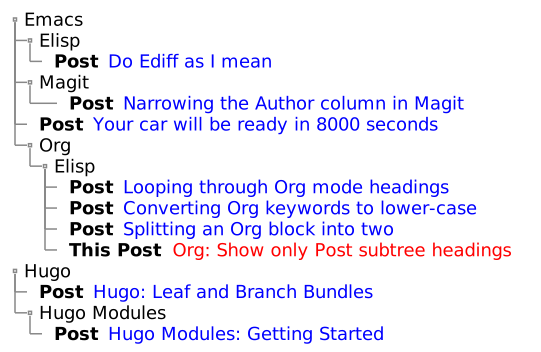
<p>I maintain most of this website&rsquo;s content in a single Org file. I have
dozens of blog posts organized in Org subtrees, which I further
organize under &ldquo;category&rdquo; headings .. It kind of looks like the below
mock-up:
<span class="sidenote-number"><small class="sidenote">
It&rsquo;s amazing how many features PlantUML has. If you are interested in
creating diagrams like these, check out the <a href="https://plantuml.com/salt">PlantUML Salt</a> syntax.
</small></span></p>
<p><a id="figure--post-subtrees-collapsed-mockup"></a></p>


<figure>
    
        <img src="https://scripter.co/org-show-only-post-subtree-headings/post-subtrees.svg" alt="Figure 1: Post Subtrees at arbitrary heading levels"/> <figcaption>
                <p>
                    <span class="figure-number">Figure 1: </span>Post Subtrees at arbitrary heading levels
                    
                        
                        </p>
                
            </figcaption></figure>

<p>As we can see,</p>
<ul>
<li>All the post subtrees are not at Level 1 headings.</li>
<li>They are also not at a fixed Level <em>N</em>.</li>
<li>The heading level of the post depends on how many parent categories
that post has (and that will also change over time).</li>
</ul>
<p>I needed to basically show everything leading up to a post subtree
heading, and then collapse all the content under that post; even the
sub-headings.</p>

<h2 id="the-collapse-all-posts-function">The &ldquo;Collapse All Posts&rdquo; function&nbsp;<a class="headline-hash no-text-decoration" href="#the-collapse-all-posts-function">#</a></h2>


<p>The <code>modi/org-hugo-collapse-all-posts</code> function defined below meets
the above requirement:</p>
<ol>
<li>It first widens the whole buffer and expands all the headings.</li>
<li>Then it loops through all the headings and collapses all the <em>post
subtrees</em> i.e. all the subtrees that have the <code>EXPORT_FILE_NAME</code>
property set. This is where I use the <a href="/looping-through-org-mode-headings/"><code>org-map-entries</code></a> magic.</li>
<li>Finally it looks for Org headings that begin with &ldquo;Footnotes&rdquo; or
&ldquo;COMMENT&rdquo; and collapses them as well.</li>
</ol>
<p>I am using the development version of Org mode (version 9.6, yet to be
released as of <span class="timestamp-wrapper"><span class="timestamp">&lt;2022-06-15 Wed&gt;</span></span>) which has the new <code>org-fold</code>
library. This library obsoletes the use of <code>outline.el</code> library and
other <em>code-folding</em> related functions in Org mode. So <code>cl-flet</code> is
used to create function symbol aliases that use the <code>org-fold-*</code>
functions if available, otherwise they fall back to the legacy
functions.</p>
<p><a id="code-snippet--collapse-all-posts-fn"></a></p>
<div class="highlight"><div class="chroma">
<table class="lntable"><tr><td class="lntd">
<pre tabindex="0" class="chroma"><code><span class="lnt"> 1
</span><span class="lnt"> 2
</span><span class="lnt"> 3
</span><span class="lnt"> 4
</span><span class="lnt"> 5
</span><span class="lnt"> 6
</span><span class="lnt"> 7
</span><span class="lnt"> 8
</span><span class="lnt"> 9
</span><span class="lnt">10
</span><span class="lnt">11
</span><span class="lnt">12
</span><span class="lnt">13
</span><span class="lnt">14
</span><span class="lnt">15
</span><span class="lnt">16
</span><span class="lnt">17
</span><span class="lnt">18
</span><span class="hl"><span class="lnt">19
</span></span><span class="lnt">20
</span><span class="lnt">21
</span><span class="lnt">22
</span><span class="hl"><span class="lnt">23
</span></span><span class="lnt">24
</span><span class="lnt">25
</span></code></pre></td>
<td class="lntd">
<pre tabindex="0" class="chroma"><code class="language-emacs-lisp" data-lang="emacs-lisp"><span class="line"><span class="cl"><span class="p">(</span><span class="nb">defun</span> <span class="nv">modi/org-hugo-collapse-all-posts</span> <span class="p">()</span>
</span></span><span class="line"><span class="cl">  <span class="s">&#34;Collapse all post subtrees in the current buffer.
</span></span></span><span class="line"><span class="cl"><span class="s">Also collapse the Footnotes subtree and COMMENT subtrees if
</span></span></span><span class="line"><span class="cl"><span class="s">present.
</span></span></span><span class="line"><span class="cl"><span class="s">
</span></span></span><span class="line"><span class="cl"><span class="s">A post subtree is one that has the EXPORT_FILE_NAME property
</span></span></span><span class="line"><span class="cl"><span class="s">set.&#34;</span>
</span></span><span class="line"><span class="cl">  <span class="p">(</span><span class="nb">interactive</span><span class="p">)</span>
</span></span><span class="line"><span class="cl">  <span class="p">(</span><span class="nb">cl-flet</span> <span class="p">((</span><span class="nv">show-all</span> <span class="p">(</span><span class="nb">if</span> <span class="p">(</span><span class="nf">fboundp</span> <span class="ss">&#39;org-fold-show-all</span><span class="p">)</span>
</span></span><span class="line"><span class="cl">                          <span class="nf">#&#39;</span><span class="nv">org-fold-show-all</span>
</span></span><span class="line"><span class="cl">                        <span class="nf">#&#39;</span><span class="nv">org-show-all</span><span class="p">))</span>
</span></span><span class="line"><span class="cl">            <span class="p">(</span><span class="nv">hide-subtree</span> <span class="p">(</span><span class="nb">if</span> <span class="p">(</span><span class="nf">fboundp</span> <span class="ss">&#39;org-fold-hide-subtree</span><span class="p">)</span>
</span></span><span class="line"><span class="cl">                              <span class="nf">#&#39;</span><span class="nv">org-fold-hide-subtree</span>
</span></span><span class="line"><span class="cl">                            <span class="nf">#&#39;</span><span class="nv">outline-hide-subtree</span><span class="p">)))</span>
</span></span><span class="line"><span class="cl">    <span class="p">(</span><span class="nf">widen</span><span class="p">)</span>
</span></span><span class="line"><span class="cl">    <span class="p">(</span><span class="nv">show-all</span> <span class="o">&#39;</span><span class="p">(</span><span class="nv">headings</span><span class="p">))</span>
</span></span><span class="line"><span class="cl">    <span class="c1">;; Collapse all the post subtrees (ones with EXPORT_FILE_NAME</span>
</span></span><span class="line"><span class="cl">    <span class="c1">;; property set).</span>
</span></span><span class="line hl"><span class="cl">    <span class="p">(</span><span class="nv">org-map-entries</span> <span class="nf">#&#39;</span><span class="nv">hide-subtree</span> <span class="s">&#34;EXPORT_FILE_NAME&lt;&gt;\&#34;\&#34;&#34;</span> <span class="ss">&#39;file</span><span class="p">)</span>
</span></span><span class="line"><span class="cl">    <span class="c1">;; Also hide Footnotes and comments.</span>
</span></span><span class="line"><span class="cl">    <span class="p">(</span><span class="nb">save-excursion</span>
</span></span><span class="line"><span class="cl">      <span class="p">(</span><span class="nf">goto-char</span> <span class="p">(</span><span class="nf">point-min</span><span class="p">))</span>
</span></span><span class="line hl"><span class="cl">      <span class="p">(</span><span class="nb">while</span> <span class="p">(</span><span class="nf">re-search-forward</span> <span class="s">&#34;^\\(\\* Footnotes\\|\\*+ COMMENT\\)&#34;</span>
</span></span><span class="line"><span class="cl">                                <span class="no">nil</span> <span class="nb">:noerror</span><span class="p">)</span>
</span></span><span class="line"><span class="cl">        <span class="p">(</span><span class="nv">hide-subtree</span><span class="p">)))))</span>
</span></span></code></pre></td></tr></table>
</div>
</div><div class="src-block-caption">
  <span class="src-block-number"><a href="#code-snippet--collapse-all-posts-fn">Code Snippet 1</a>:</span>
  Function that collapses all the post subtrees in the current buffer
</div>

<h2 id="binding-with-c-u-c-c-tab">Binding with <code>C-u C-c TAB</code>&nbsp;<a class="headline-hash no-text-decoration" href="#binding-with-c-u-c-c-tab">#</a></h2>


<p>The function is ready, but let&rsquo;s now add a bit of convenience to it.</p>
<p>If a point is under a subtree, <code>C-c TAB</code> will collapse that subtree
while showing only Level 1 headings, and if a numeric prefix is used,
it will show only those many levels of headings. I decided to bind the
above function to <code>C-u C-c TAB</code> because,</p>
<ol>
<li>The behavior of <code>modi/org-hugo-collapse-all-posts</code> falls in the
same category as that of <code>C-c TAB</code>.</li>
<li>The <code>C-u C-c ..</code> binding rolls off the fingers pretty
nicely 😃.</li>
</ol>
<p>This <em>binding</em> is achieved using one of my favorite Emacs features
.. the <strong>advice</strong> system. The <code>:before-until</code> <a href="https://www.gnu.org/software/emacs/manual/html_node/elisp/Advice-Combinators.html" title="Emacs Lisp: (info &quot;(elisp) Advice Combinators&quot;)">Advice Combinator</a> is used
here, which means that if the <em>advising</em> function (below) returns a
<em>nil</em>, the <em>advised</em> or the original function <code>org-ctrl-c-tab</code> is not
called.</p>
<p>The <em>advising</em> function below detects if the <code>C-u</code> prefix argument is
used. If it is, the <code>modi/org-hugo-collapse-all-posts</code> function is
called, otherwise the original <code>org-ctrl-c-tab</code> function is called.</p>
<p><a id="code-snippet--collapse-all-posts-binding"></a></p>
<div class="highlight"><div class="chroma">
<table class="lntable"><tr><td class="lntd">
<pre tabindex="0" class="chroma"><code><span class="lnt">1
</span><span class="lnt">2
</span><span class="lnt">3
</span><span class="hl"><span class="lnt">4
</span></span><span class="lnt">5
</span><span class="lnt">6
</span><span class="lnt">7
</span><span class="lnt">8
</span><span class="lnt">9
</span></code></pre></td>
<td class="lntd">
<pre tabindex="0" class="chroma"><code class="language-emacs-lisp" data-lang="emacs-lisp"><span class="line"><span class="cl"><span class="p">(</span><span class="nb">defun</span> <span class="nv">modi/org-ctrl-c-tab-advice</span> <span class="p">(</span><span class="kp">&amp;rest</span> <span class="nv">args</span><span class="p">)</span>
</span></span><span class="line"><span class="cl">  <span class="s">&#34;Run </span><span class="ss">`modi/org-hugo-collapse-all-posts&#39;</span><span class="s"> when
</span></span></span><span class="line"><span class="cl"><span class="s">doing \\[universal-argument] \\[org-ctrl-c-tab].&#34;</span>
</span></span><span class="line hl"><span class="cl">  <span class="p">(</span><span class="nb">let</span> <span class="p">((</span><span class="nv">do-not-run-orig-fn</span> <span class="p">(</span><span class="nf">equal</span> <span class="o">&#39;</span><span class="p">(</span><span class="mi">4</span><span class="p">)</span> <span class="nv">current-prefix-arg</span><span class="p">)))</span>
</span></span><span class="line"><span class="cl">    <span class="p">(</span><span class="nb">when</span> <span class="nv">do-not-run-orig-fn</span>
</span></span><span class="line"><span class="cl">      <span class="p">(</span><span class="nv">modi/org-hugo-collapse-all-posts</span><span class="p">))</span>
</span></span><span class="line"><span class="cl">    <span class="nv">do-not-run-orig-fn</span><span class="p">))</span>
</span></span><span class="line"><span class="cl">
</span></span><span class="line"><span class="cl"><span class="p">(</span><span class="nv">advice-add</span> <span class="ss">&#39;org-ctrl-c-tab</span> <span class="nb">:before-until</span> <span class="nf">#&#39;</span><span class="nv">modi/org-ctrl-c-tab-advice</span><span class="p">)</span>
</span></span></code></pre></td></tr></table>
</div>
</div><div class="src-block-caption">
  <span class="src-block-number"><a href="#code-snippet--collapse-all-posts-binding">Code Snippet 2</a>:</span>
  Bind <code>C-u C-c TAB</code> to call <code>modi/org-hugo-collapse-all-posts</code>
</div>

<h2 id="result">Result&nbsp;<a class="headline-hash no-text-decoration" href="#result">#</a></h2>


<p>After evaluating the above two snippets, when I do <code>C-u C-c TAB</code> in
my &ldquo;blog posts&rdquo; Org buffer, I see this:</p>
<p><a id="figure--post-subtrees-collapsed"></a></p>


<figure>
    <a href="post-subtrees-collapsed.png">
        <img src="https://scripter.co/org-show-only-post-subtree-headings/post-subtrees-collapsed.png" alt="Figure 2: My &ldquo;blog posts&rdquo; Org buffer showing only the Post subtree headings"/> </a><figcaption>
                <p>
                    <span class="figure-number">Figure 2: </span>My &ldquo;blog posts&rdquo; Org buffer showing only the Post subtree headings
                    
                        
                        </p>
                
            </figcaption></figure>

<p>It matches <a href="#figure--post-subtrees-collapsed-mockup">that earlier mockup</a> &mdash; Mission accomplished! 💯</p>
]]></content><category scheme="https://scripter.co/categories/emacs" term="emacs" label="emacs"/><category scheme="https://scripter.co/categories/org" term="org" label="org"/><category scheme="https://scripter.co/categories/elisp" term="elisp" label="elisp"/><category scheme="https://scripter.co/tags/100daystooffload" term="100daystooffload" label="100DaysToOffload"/><category scheme="https://scripter.co/tags/subtree" term="subtree" label="subtree"/><category scheme="https://scripter.co/tags/looping" term="looping" label="looping"/><category scheme="https://scripter.co/tags/advice" term="advice" label="advice"/></entry></feed>