<?xml version="1.0" encoding="utf-8"?><feed xmlns="http://www.w3.org/2005/Atom" xml:lang="en-us"><generator uri="https://gohugo.io/" version="0.101.0">Hugo</generator><title type="html">plantuml on A Scripter's Notes</title><subtitle type="html">Emacs, scripting and anything text oriented.</subtitle><link href="https://scripter.co/tags/plantuml/" rel="alternate" type="text/html" title="HTML"/><link href="https://scripter.co/tags/plantuml/index.xml" rel="alternate" type="application/rss+xml" title="RSS"/><link href="https://scripter.co/tags/plantuml/atom.xml" rel="self" type="application/atom+xml" title="Atom"/><link href="https://scripter.co/tags/plantuml/jf2feed.json" rel="alternate" type="application/jf2feed+json" title="jf2feed"/><updated>2026-04-22T08:24:58-04:00</updated><author><name>Kaushal Modi</name><email>kaushal.modi@gmail.com</email></author><id>https://scripter.co/tags/plantuml/</id><entry><title type="html">Emacs Lisp: Advice Combinators</title><link href="https://scripter.co/emacs-lisp-advice-combinators/?utm_source=atom_feed" rel="alternate" type="text/html"/><link href="https://scripter.co/org-show-only-post-subtree-headings/?utm_source=atom_feed" rel="related" type="text/html" title="Org: Show only Post subtree headings"/><link href="https://scripter.co/using-emacs-advice-to-silence-messages-from-functions/?utm_source=atom_feed" rel="related" type="text/html" title="Using Emacs advice to silence messages from functions"/><link href="https://scripter.co/firefox-always-open-a-new-tab-after-current/?utm_source=atom_feed" rel="related" type="text/html" title="Firefox: Always open a New Tab after Current"/><link href="https://scripter.co/saving-python-pip-dependencies/?utm_source=atom_feed" rel="related" type="text/html" title="Saving Python pip dependencies"/><link href="https://scripter.co/disarming-the-tar-bomb-in-10-seconds/?utm_source=atom_feed" rel="related" type="text/html" title="Disarming the 'tar' bomb in 10 seconds"/><id>https://scripter.co/emacs-lisp-advice-combinators/</id><author><name>Kaushal Modi</name></author><published>2022-06-17T21:30:00-04:00</published><updated>2022-06-18T08:51:00-04:00</updated><content type="html"><![CDATA[<blockquote>My diagrammatic take on summarizing all the Emacs advice combinators.</blockquote><div class="ox-hugo-toc toc">
<div class="heading">Table of Contents</div>
<ul>
<li><a href="#overview-on-using-advices">Overview on using advices</a></li>
<li><a href="#advice-combinators--before"><span class="section-num">1</span> <code>:before</code></a></li>
<li><a href="#advice-combinators--after"><span class="section-num">2</span> <code>:after</code></a></li>
<li><a href="#advice-combinators--override"><span class="section-num">3</span> <code>:override</code></a></li>
<li><a href="#advice-combinators--around"><span class="section-num">4</span> <code>:around</code></a></li>
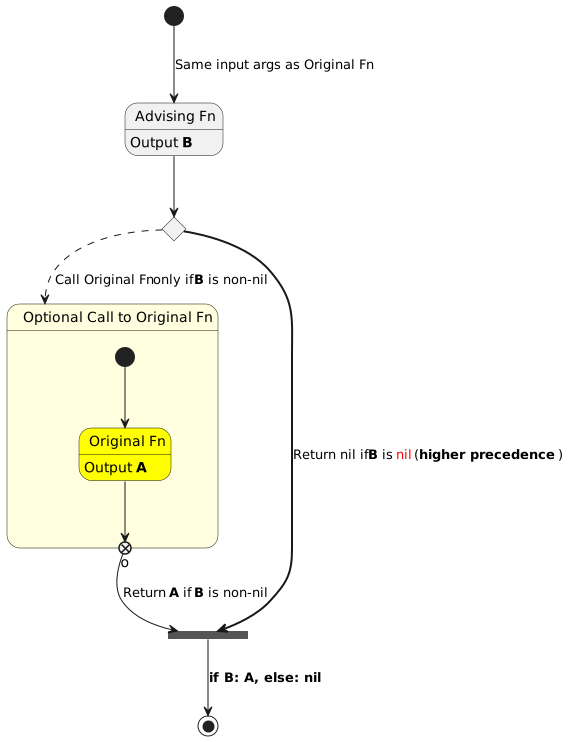
<li><a href="#advice-combinators--before-while"><span class="section-num">5</span> <code>:before-while</code></a></li>
<li><a href="#advice-combinators--before-until"><span class="section-num">6</span> <code>:before-until</code></a></li>
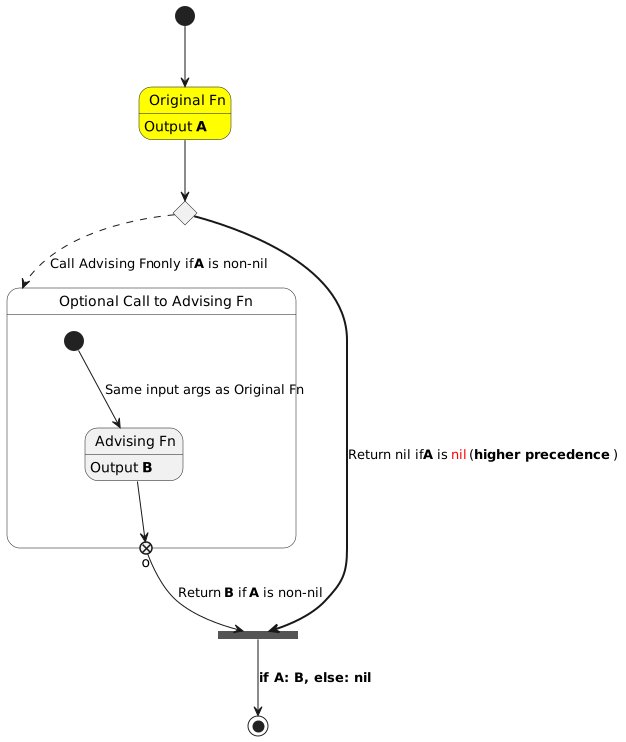
<li><a href="#advice-combinators--after-while"><span class="section-num">7</span> <code>:after-while</code></a></li>
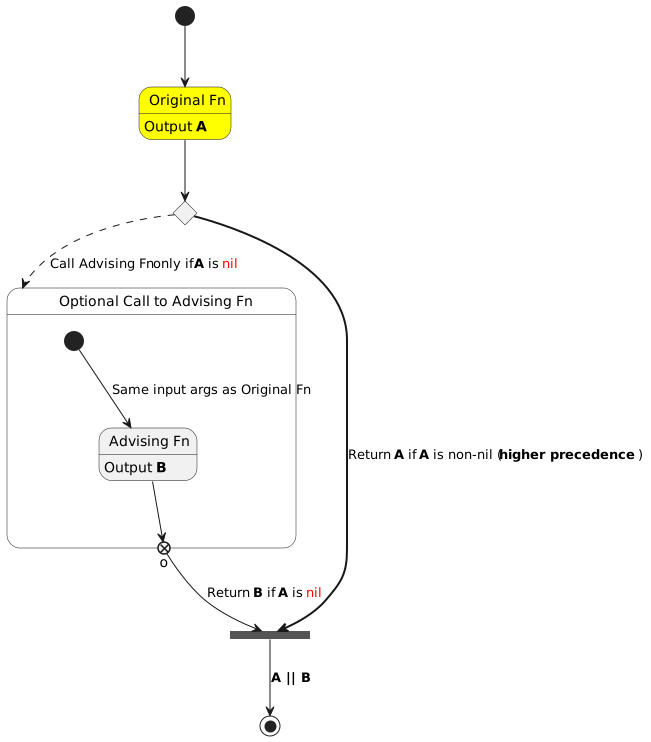
<li><a href="#advice-combinators--after-until"><span class="section-num">8</span> <code>:after-until</code></a></li>
<li><a href="#advice-combinators--filter-args"><span class="section-num">9</span> <code>:filter-args</code></a></li>
<li><a href="#advice-combinators--filter-return"><span class="section-num">10</span> <code>:filter-return</code></a></li>
<li><a href="#summary">Summary</a></li>
<li><a href="#advice-combinators--references">References</a></li>
</ul>
</div>
<!--endtoc-->
<p>If you have read some of my earlier posts, you would know that I
really enjoy using the Emacs Advice system 😃.</p>
<p>The &ldquo;advice&rdquo; feature lets you add to the existing definition of a
function, by <em>advising the function</em>.  This is a cleaner method than
redefining the whole function, because it&rsquo;s easier to debug and if you
don&rsquo;t need it, you can just <em>remove</em> the advice.</p>
<div class="note">
<p>You can jump to the <a href="#advice-combinators--references">References section</a> below if you need to look at
the related sections in the Emacs Lisp Manual.</p>
</div>

<h2 id="overview-on-using-advices">Overview on using advices&nbsp;<a class="headline-hash no-text-decoration" href="#overview-on-using-advices">#</a></h2>


<p>I do not plan to write a tutorial on how to write advices in
Emacs-Lisp, but here&rsquo;s a 3-second primer:</p>
<dl>
<dt>To add an advice</dt>
<dd><code class="code-inline language-emacs-lisp"><span class="p">(</span><span class="nv">advice-add</span> <span class="ss">&#39;original-fn</span> <span class="nv">&lt;combinator&gt;</span> <span class="nf">#&#39;</span><span class="nv">advising-fn</span><span class="p">)</span></code></dd>
<dt>To remove an advice</dt>
<dd><code class="code-inline language-emacs-lisp"><span class="p">(</span><span class="nv">advice-remove</span> <span class="ss">&#39;original-fn</span> <span class="nf">#&#39;</span><span class="nv">advising-fn</span><span class="p">)</span></code></dd>
</dl>
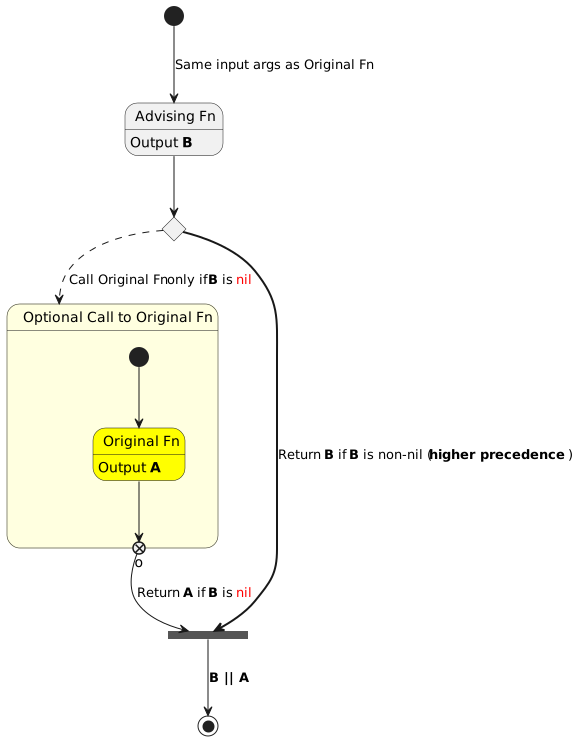
<p>This article attempts to briefly describe different ways of advising a
function, using 10 different <em>combinators</em>. If you have never used
advices in your Emacs config, don&rsquo;t worry. I am hopeful that the
diagrams in this post and the examples linked for some of the
combinators in the Summary section makes this concept a bit easier to
assimilate.</p>
<dl>
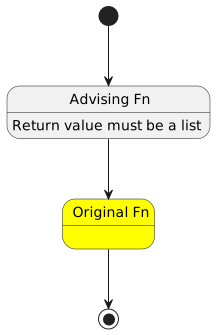
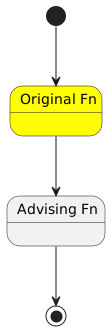
<dt>Diagram Legend</dt>
<dd><ul>
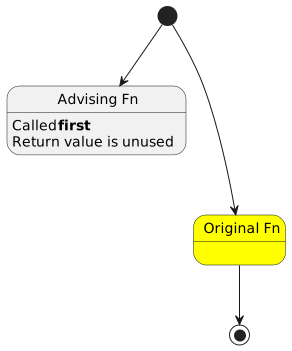
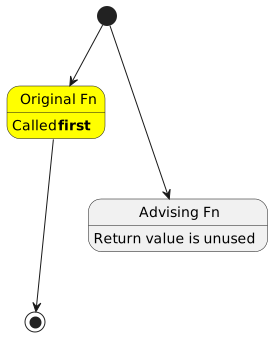
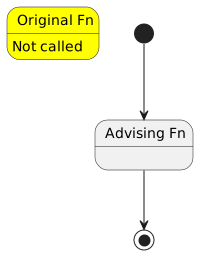
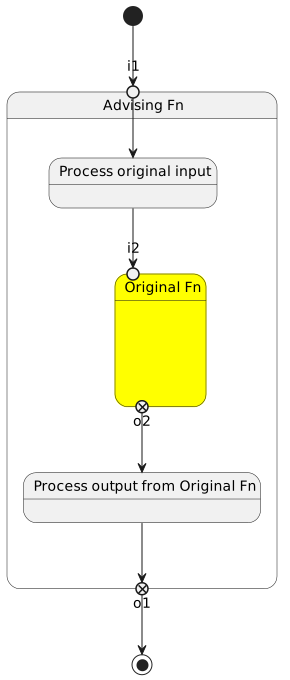
<li>Initial black circle: Original Fn input arguments</li>
<li>Yellow box: Original Fn</li>
<li>Gray box: Advising Fn</li>
<li>Black circle inside a white circle: Return values</li>
</ul>
</dd>
</dl>

<h2 id="advice-combinators--before"><span class="section-num">1</span> <code>:before</code>&nbsp;<a class="headline-hash no-text-decoration" href="#advice-combinators--before">#</a></h2>


<p><a id="figure--advice-combinators-before"></a></p>


<figure>
    
        <img src="https://scripter.co/emacs-lisp-advice-combinators/before.svg" alt="Figure 1: :before advice"/> <figcaption>
                <p>
                    <span class="figure-number">Figure 1: </span><strong>:before</strong> advice
                    
                        
                        </p>
                
            </figcaption></figure>


<h2 id="advice-combinators--after"><span class="section-num">2</span> <code>:after</code>&nbsp;<a class="headline-hash no-text-decoration" href="#advice-combinators--after">#</a></h2>


<p><a id="figure--advice-combinators-after"></a></p>


<figure>
    
        <img src="https://scripter.co/emacs-lisp-advice-combinators/after.svg" alt="Figure 2: :after advice"/> <figcaption>
                <p>
                    <span class="figure-number">Figure 2: </span><strong>:after</strong> advice
                    
                        
                        </p>
                
            </figcaption></figure>


<h2 id="advice-combinators--override"><span class="section-num">3</span> <code>:override</code>&nbsp;<a class="headline-hash no-text-decoration" href="#advice-combinators--override">#</a></h2>


<p><a id="figure--advice-combinators-override"></a></p>


<figure>
    
        <img src="https://scripter.co/emacs-lisp-advice-combinators/override.svg" alt="Figure 3: :override advice"/> <figcaption>
                <p>
                    <span class="figure-number">Figure 3: </span><strong>:override</strong> advice
                    
                        
                        </p>
                
            </figcaption></figure>


<h2 id="advice-combinators--around"><span class="section-num">4</span> <code>:around</code>&nbsp;<a class="headline-hash no-text-decoration" href="#advice-combinators--around">#</a></h2>


<p><a id="figure--advice-combinators-around"></a></p>


<figure>
    
        <img src="https://scripter.co/emacs-lisp-advice-combinators/around.svg" alt="Figure 4: :around advice"/> <figcaption>
                <p>
                    <span class="figure-number">Figure 4: </span><strong>:around</strong> advice
                    
                        
                        </p>
                
            </figcaption></figure>


<h2 id="advice-combinators--before-while"><span class="section-num">5</span> <code>:before-while</code>&nbsp;<a class="headline-hash no-text-decoration" href="#advice-combinators--before-while">#</a></h2>


<p><a id="figure--advice-combinators-before-while"></a></p>


<figure>
    
        <img src="https://scripter.co/emacs-lisp-advice-combinators/before-while.svg" alt="Figure 5: :before-while advice"/> <figcaption>
                <p>
                    <span class="figure-number">Figure 5: </span><strong>:before-while</strong> advice
                    
                        
                        </p>
                
            </figcaption></figure>


<h2 id="advice-combinators--before-until"><span class="section-num">6</span> <code>:before-until</code>&nbsp;<a class="headline-hash no-text-decoration" href="#advice-combinators--before-until">#</a></h2>


<p><a id="figure--advice-combinators-before-until"></a></p>


<figure>
    
        <img src="https://scripter.co/emacs-lisp-advice-combinators/before-until.svg" alt="Figure 6: :before-until advice"/> <figcaption>
                <p>
                    <span class="figure-number">Figure 6: </span><strong>:before-until</strong> advice
                    
                        
                        </p>
                
            </figcaption></figure>


<h2 id="advice-combinators--after-while"><span class="section-num">7</span> <code>:after-while</code>&nbsp;<a class="headline-hash no-text-decoration" href="#advice-combinators--after-while">#</a></h2>


<p><a id="figure--advice-combinators-after-while"></a></p>


<figure>
    
        <img src="https://scripter.co/emacs-lisp-advice-combinators/after-while.svg" alt="Figure 7: :after-while advice"/> <figcaption>
                <p>
                    <span class="figure-number">Figure 7: </span><strong>:after-while</strong> advice
                    
                        
                        </p>
                
            </figcaption></figure>


<h2 id="advice-combinators--after-until"><span class="section-num">8</span> <code>:after-until</code>&nbsp;<a class="headline-hash no-text-decoration" href="#advice-combinators--after-until">#</a></h2>


<p><a id="figure--advice-combinators-after-until"></a></p>


<figure>
    
        <img src="https://scripter.co/emacs-lisp-advice-combinators/after-until.svg" alt="Figure 8: :after-until advice"/> <figcaption>
                <p>
                    <span class="figure-number">Figure 8: </span><strong>:after-until</strong> advice
                    
                        
                        </p>
                
            </figcaption></figure>


<h2 id="advice-combinators--filter-args"><span class="section-num">9</span> <code>:filter-args</code>&nbsp;<a class="headline-hash no-text-decoration" href="#advice-combinators--filter-args">#</a></h2>


<p><a id="figure--advice-combinators-filter-args"></a></p>


<figure>
    
        <img src="https://scripter.co/emacs-lisp-advice-combinators/filter-args.svg" alt="Figure 9: :filter-args advice"/> <figcaption>
                <p>
                    <span class="figure-number">Figure 9: </span><strong>:filter-args</strong> advice
                    
                        
                        </p>
                
            </figcaption></figure>


<h2 id="advice-combinators--filter-return"><span class="section-num">10</span> <code>:filter-return</code>&nbsp;<a class="headline-hash no-text-decoration" href="#advice-combinators--filter-return">#</a></h2>


<p><a id="figure--advice-combinators-filter-return"></a></p>


<figure>
    
        <img src="https://scripter.co/emacs-lisp-advice-combinators/filter-return.svg" alt="Figure 10: :filter-return advice"/> <figcaption>
                <p>
                    <span class="figure-number">Figure 10: </span><strong>:filter-return</strong> advice
                    
                        
                        </p>
                
            </figcaption></figure>


<h2 id="summary">Summary&nbsp;<a class="headline-hash no-text-decoration" href="#summary">#</a></h2>


<p>Here&rsquo;s a concise summary of what each advice combinator does. For
brevity, the <em>advising function</em> is called <em>A</em> and the <em>original
function</em> is called <em>O</em>.</p>
<div class="note">
<p>Once you click on any of the example posts, search for <code>advice-add</code> on
that page to find the code example.</p>
</div>
<p><a id="table--advice-combinator-summary"></a></p>
<div class="table-caption">
  <span class="table-number"><a href="#table--advice-combinator-summary">Table 1</a>:</span>
  Summary of what each advice combinator means
</div>
<table>
<thead>
<tr>
<th>Combinator</th>
<th>Description</th>
<th>Example</th>
</tr>
</thead>
<tbody>
<tr>
<td><code>:before</code></td>
<td><em>A</em> is called before <em>O</em>. <em>O</em> args and return values are not modified.</td>
<td></td>
</tr>
<tr>
<td><code>:after</code></td>
<td><em>A</em> is called after <em>O</em>. <em>O</em> args and return values are not modified.</td>
<td></td>
</tr>
<tr>
<td><code>:override</code></td>
<td><em>A</em> is called in lieu of <em>O</em>. <em>A</em> gets the same args as <em>O</em>.</td>
<td><a href="/zero-html-validation-errors/">Zero HTML Validation Errors!</a></td>
</tr>
<tr>
<td><code>:around</code></td>
<td><em>A</em> is called in lieu of <em>O</em>. <em>A</em> gets <em>O</em> fn + <em>O</em> args as args.</td>
<td><a href="/using-emacs-advice-to-silence-messages-from-functions/">Using Emacs advice to silence messages from functions</a></td>
</tr>
<tr>
<td><code>:before-while</code></td>
<td><em>A</em> is called first. If it returns non-nil, <em>O</em> is called.</td>
<td></td>
</tr>
<tr>
<td><code>:before-until</code></td>
<td><em>A</em> is called first. If it returns nil, <em>O</em> is called.</td>
<td><a href="/org-show-only-post-subtree-headings/">Org: Show only Post subtree headings</a></td>
</tr>
<tr>
<td><code>:after-while</code></td>
<td><em>O</em> is called first. If it returns non-nil, <em>A</em> is called.</td>
<td></td>
</tr>
<tr>
<td><code>:after-until</code></td>
<td><em>O</em> is called first. If it returns nil, <em>A</em> is called.</td>
<td></td>
</tr>
<tr>
<td><code>:filter-args</code></td>
<td><em>A</em> is called first. <em>O</em> is called next with return value from <em>A</em> as input.</td>
<td><a href="/narrowing-the-author-column-in-magit/">Narrowing the Author column in Magit</a></td>
</tr>
<tr>
<td><code>:filter-return</code></td>
<td><em>O</em> is called first. <em>A</em> is called next with return value from <em>O</em> as input.</td>
<td><a href="/zero-html-validation-errors/">Zero HTML Validation Errors!</a></td>
</tr>
</tbody>
</table>
<p>If you have any feedback on how these diagrams can be made easier to
understand, please let me know.</p>

<h2 id="advice-combinators--references">References&nbsp;<a class="headline-hash no-text-decoration" href="#advice-combinators--references">#</a></h2>


<ul>
<li><a href="https://www.gnu.org/software/emacs/manual/html_node/elisp/Advising-Functions.html" title="Emacs Lisp: (info &quot;(elisp) Advising Functions&quot;)">Elisp Info: Advising Functions</a>
<ul>
<li><a href="https://www.gnu.org/software/emacs/manual/html_node/elisp/Advice-Combinators.html" title="Emacs Lisp: (info &quot;(elisp) Advice Combinators&quot;)">Elisp Info: Advice Combinators</a></li>
</ul>
</li>
</ul>
]]></content><category scheme="https://scripter.co/categories/emacs" term="emacs" label="emacs"/><category scheme="https://scripter.co/categories/elisp" term="elisp" label="elisp"/><category scheme="https://scripter.co/tags/100daystooffload" term="100daystooffload" label="100DaysToOffload"/><category scheme="https://scripter.co/tags/advice" term="advice" label="advice"/><category scheme="https://scripter.co/tags/plantuml" term="plantuml" label="plantuml"/></entry><entry><title type="html">Org Contribution Flow-chart</title><link href="https://scripter.co/org-contribution-flowchart/?utm_source=atom_feed" rel="alternate" type="text/html"/><id>https://scripter.co/org-contribution-flowchart/</id><author><name>Kaushal Modi</name></author><published>2018-03-06T00:23:00-05:00</published><updated>2022-02-22T00:00:00-05:00</updated><content type="html"><![CDATA[<blockquote>A handy flow-chart if you are confused about when commits happen to
Org <code>bugfix</code> branch vs <code>main</code> branch, what ends up in the GNU Elpa
version, and so on.</blockquote><p>I have often seen questions and confusion about why certain fixes or
features added to Org mode did not show up in its update on GNU Elpa.</p>
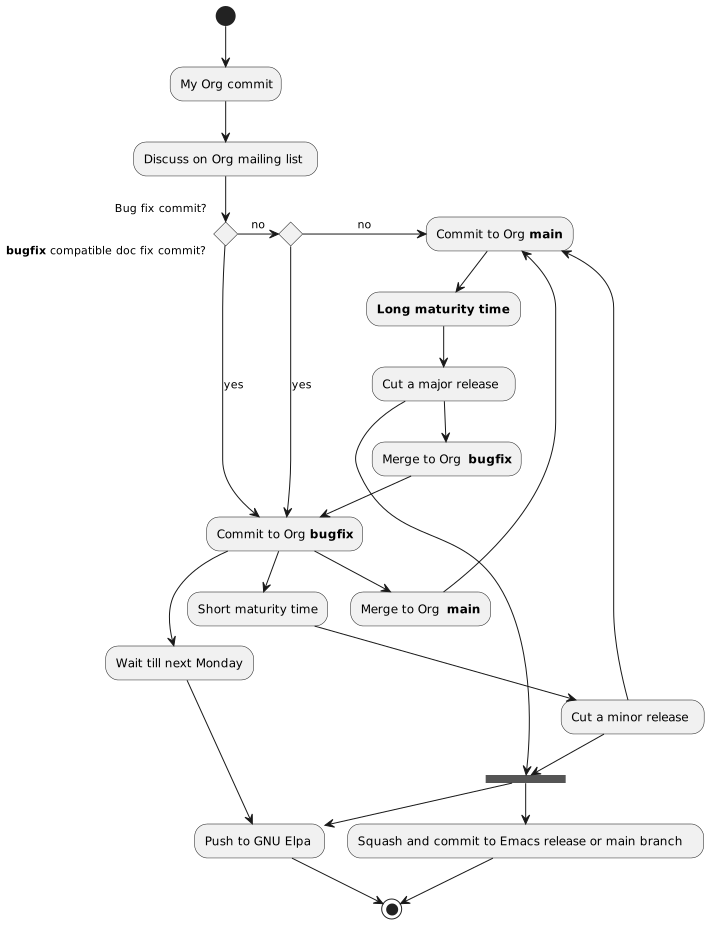
<p>Below flow chart is an attempt to answer all such questions, and also
my first attempt at creating one using <strong>PlantUML</strong> (<em>legacy syntax</em>)
<span class="sidenote-number"><small class="sidenote">
See the <a href="http://plantuml.com/activity-diagram-legacy">legacy</a> vs <a href="http://plantuml.com/activity-diagram-beta">new (beta)</a> PlantUML syntax for activity
diagrams. When I tried the new (beta) syntax, it did not allow using
the &ldquo;labels&rdquo;.. see the <code>as bugfix</code>, <code>as main</code> syntax in the <a href="#org-target--org-contrib-plantuml-source-code">flowchart
source code</a>.
</small></span>
.</p>
<p><a id="figure--org-contribution-flow-chart"></a></p>


<figure>
    
        <img src="https://scripter.co/org-contribution-flowchart/flowchart.svg" alt="Figure 1: Flow of a commit in Org mode repo from bugfix branch to main branch to Emacs repo"/> <figcaption>
                <p>
                    <span class="figure-number">Figure 1: </span>Flow of a commit in Org mode repo from <code>bugfix</code> branch to <code>main</code> branch to Emacs repo
                    
                        
                        </p>
                
            </figcaption></figure>

<p><span class="org-target" id="org-target--org-contrib-plantuml-source-code"></span></p>
<details>
<summary>PlantUML source code</summary>
<div class="details">
<pre tabindex="0"><code class="language-plantuml" data-lang="plantuml">(*) --&gt; &#34;My Org commit&#34;

--&gt; &#34;Discuss on Org mailing list&#34;

if &#34;Bug fix commit?&#34; then
  --&gt;[yes] &#34;Commit to Org **bugfix**&#34; as bugfix
else
  -&gt;[no] if &#34;**bugfix** compatible doc fix commit?&#34; then
    --&gt;[yes] bugfix
  else
    -&gt;[no] &#34;Commit to Org **main**&#34; as main
  endif
endif

bugfix --&gt; &#34;Merge to Org **main**&#34;
  --&gt; main
bugfix --&gt; &#34;Wait till next Monday&#34;
  --&gt; &#34;Push to GNU Elpa&#34; as push
bugfix --&gt; &#34;Short maturity time&#34;
  --&gt; &#34;Cut a minor release&#34; as minor_release

minor_release --&gt; ===RELEASE===
minor_release --&gt; main

main --&gt; &#34;**Long maturity time**&#34;
  --&gt; &#34;Cut a major release&#34; as major_release

major_release --&gt; ===RELEASE===
major_release --&gt; &#34;Merge to Org **bugfix**&#34;
  --&gt; bugfix

===RELEASE=== --&gt; push
===RELEASE=== --&gt; &#34;Squash and commit to Emacs release or main branch&#34;
  --&gt; (*)

push --&gt; (*)
</code></pre><dl>
<dt>Few notes on PlantUML syntax</dt>
<dd><table>
<thead>
<tr>
<th>Syntax</th>
<th>Output</th>
</tr>
</thead>
<tbody>
<tr>
<td><code>-​-​&gt;</code></td>
<td>Vertical arrow</td>
</tr>
<tr>
<td><code>-​&gt;</code></td>
<td>Horizontal arrow</td>
</tr>
<tr>
<td><code>(*) -​-​&gt;</code></td>
<td>Start point</td>
</tr>
<tr>
<td><code>-​-​&gt; (*)</code></td>
<td>End point</td>
</tr>
</tbody>
</table>
</dd>
</dl>
</div>
</details>
]]></content><category scheme="https://scripter.co/categories/emacs" term="emacs" label="emacs"/><category scheme="https://scripter.co/categories/org" term="org" label="org"/><category scheme="https://scripter.co/tags/plantuml" term="plantuml" label="plantuml"/><category scheme="https://scripter.co/tags/flow-chart" term="flow-chart" label="flow-chart"/><category scheme="https://scripter.co/tags/contribution" term="contribution" label="contribution"/><category scheme="https://scripter.co/tags/development" term="development" label="development"/></entry></feed>