<?xml version="1.0" encoding="utf-8"?><feed xmlns="http://www.w3.org/2005/Atom" xml:lang="en-us"><generator uri="https://gohugo.io/" version="0.101.0">Hugo</generator><title type="html">page-bundles on A Scripter's Notes</title><subtitle type="html">Emacs, scripting and anything text oriented.</subtitle><link href="https://scripter.co/tags/page-bundles/" rel="alternate" type="text/html" title="HTML"/><link href="https://scripter.co/tags/page-bundles/index.xml" rel="alternate" type="application/rss+xml" title="RSS"/><link href="https://scripter.co/tags/page-bundles/atom.xml" rel="self" type="application/atom+xml" title="Atom"/><link href="https://scripter.co/tags/page-bundles/jf2feed.json" rel="alternate" type="application/jf2feed+json" title="jf2feed"/><updated>2026-04-22T08:24:58-04:00</updated><author><name>Kaushal Modi</name><email>kaushal.modi@gmail.com</email></author><id>https://scripter.co/tags/page-bundles/</id><entry><title type="html">Hugo: Leaf and Branch Bundles</title><link href="https://scripter.co/hugo-leaf-and-branch-bundles/?utm_source=atom_feed" rel="alternate" type="text/html"/><link href="https://scripter.co/org-contribution-flowchart/?utm_source=atom_feed" rel="related" type="text/html" title="Org Contribution Flow-chart"/><id>https://scripter.co/hugo-leaf-and-branch-bundles/</id><author><name>Kaushal Modi</name></author><published>2018-03-06T12:40:00-05:00</published><updated>2022-03-11T00:00:00-05:00</updated><content type="html"><![CDATA[<blockquote>Content organization for Hugo posts/articles using <em>Page Bundles</em>.</blockquote><div class="ox-hugo-toc toc">
<div class="heading">Table of Contents</div>
<ul>
<li><a href="#quick-summary">Quick Summary</a></li>
<li><a href="#leaf-bundle">Leaf Bundle</a>
<ul>
<li><a href="#examples-of-leaf-bundle-organization">Examples of Leaf Bundle organization</a></li>
<li><a href="#headless-bundle">Headless Bundle</a></li>
</ul>
</li>
<li><a href="#branch-bundle">Branch Bundle</a>
<ul>
<li><a href="#examples-of-branch-bundle-organization">Examples of Branch Bundle organization</a></li>
<li><a href="#branch-bundle-vs-regular-sections">Branch Bundle vs Regular Sections</a></li>
</ul>
</li>
<li><a href="#so-which-bundle-should-i-use">So, which bundle should I use?</a></li>
<li><a href="#upgrading-to-hugo-v0-dot-32">Upgrading to Hugo v0.32?</a></li>
<li><a href="#examples">Examples</a></li>
<li><a href="#further-reading">Further Reading</a></li>
</ul>
</div>
<!--endtoc-->
<p>Hugo v0.32 introduced a new feature called <strong>Page Bundles</strong> (<a href="https://gohugo.io/content-management/organization/#page-bundles">1</a>, <a href="https://gohugo.io/news/0.32-relnotes/">2</a>), as a
way to organize the content files. It is useful for cases where a page
or section&rsquo;s content needs to be split into multiple content pages for
convenience, or has associated attachments like documents or images.</p>
<p>A Page Bundle can be one of two types:</p>
<ul>
<li>Leaf 🍃 Bundle</li>
<li>Branch 🌿 Bundle</li>
</ul>
<div class="note">
<p>The <em>leaf</em> and <em>branch</em> <em>nodes</em> from <a href="https://en.wikipedia.org/wiki/Tree_(data_structure)">Data Structure <em>Trees</em></a> serve as a
great analogy to help relate with the Hugo <em>bundles</em>.</p>
<blockquote>
<dl>
<dt>Leaf</dt>
<dd>A node with no children.</dd>
<dt>Branch</dt>
<dd>A node with at least one child.</dd>
</dl>
</blockquote>
</div>

<h2 id="quick-summary">Quick Summary&nbsp;<a class="headline-hash no-text-decoration" href="#quick-summary">#</a></h2>


<p>Here&rsquo;s a quick summary of the differences between these bundle types &mdash;
Details follow in the sections after.</p>
<p><a id="table--leaf-vs-branch"></a></p>
<div class="table-caption">
  <span class="table-number"><a href="#table--leaf-vs-branch">Table 1</a>:</span>
  Leaf Bundle vs Branch Bundle
</div>
<table>
<thead>
<tr>
<th></th>
<th>Leaf Bundle</th>
<th>Branch Bundle</th>
</tr>
</thead>
<tbody>
<tr>
<td>Usage</td>
<td>Collection of content and attachments for single pages</td>
<td>Collection of attachments for section pages (home page, sections, <code>taxonomy</code> list pages, <code>term</code> list pages)</td>
</tr>
<tr>
<td>Index file name</td>
<td><code>index.md</code> <sup id="fnref:1"><a href="#fn:1" class="footnote-ref" role="doc-noteref">1</a></sup></td>
<td><code>_index.md</code> <sup id="fnref1:1"><a href="#fn:1" class="footnote-ref" role="doc-noteref">1</a></sup></td>
</tr>
<tr>
<td>Allowed Resources</td>
<td>Page and non-page (like images, pdf, etc) types</td>
<td>Only non-page (like images, pdf, etc.) types</td>
</tr>
<tr>
<td>Where can the Resources live?</td>
<td>At any directory level within the leaf bundle directory.</td>
<td>Only in the directory level <strong>of</strong> the branch bundle directory i.e. the directory containing the <code>_index.md</code> (<a href="https://discourse.gohugo.io/t/question-about-content-folder-structure/11822/4?u=kaushalmodi">ref</a>).</td>
</tr>
<tr>
<td>Layout type</td>
<td><code>single</code></td>
<td><code>list</code></td>
</tr>
<tr>
<td>Nesting</td>
<td>Does not allow nesting of more bundles under it</td>
<td>Allows nesting of leaf or branch bundles under it</td>
</tr>
<tr>
<td>Example</td>
<td><code>content/posts/my-post/index.md</code></td>
<td><code>content/posts/_index.md</code></td>
</tr>
<tr>
<td>Content from non-index page files ..</td>
<td>Accessed only as page resources</td>
<td>Accessed only as regular pages</td>
</tr>
</tbody>
</table>
<div class="note">
<p><a href="https://github.com/gohugoio/hugo/releases/tag/v0.73.0">Hugo v0.73.0</a> made a much needed fix &mdash; It finally renamed <code>taxonomy</code>
Page Kind to <code>term</code>, and <code>taxonomyTerm</code> to <code>taxonomy</code>. Now if you have
a <code>tags = [&quot;abc&quot;]</code> front-matter, <em>tags</em> is the <strong>taxonomy</strong> and <em>abc</em> is
a <strong>term</strong>.</p>
</div>

<h2 id="leaf-bundle">Leaf Bundle&nbsp;<a class="headline-hash no-text-decoration" href="#leaf-bundle">#</a></h2>


<p>A <em>Leaf Bundle</em> is a directory at any hierarchy within the <code>content/</code>
directory, that contains an <strong><code>index.md</code></strong> file.</p>

<h3 id="examples-of-leaf-bundle-organization">Examples of Leaf Bundle organization&nbsp;<a class="headline-hash no-text-decoration" href="#examples-of-leaf-bundle-organization">#</a></h3>


<div class="highlight"><pre tabindex="0" class="chroma"><code class="language-text" data-lang="text"><span class="line"><span class="cl">content/
</span></span><span class="line"><span class="cl">├── about
</span></span><span class="line"><span class="cl">│   └── index.md
</span></span><span class="line"><span class="cl">├── posts
</span></span><span class="line"><span class="cl">│   ├── my-post
</span></span><span class="line"><span class="cl">│   │   ├── content1.md
</span></span><span class="line"><span class="cl">│   │   ├── content2.md
</span></span><span class="line"><span class="cl">│   │   ├── image1.jpg
</span></span><span class="line"><span class="cl">│   │   ├── image2.png
</span></span><span class="line"><span class="cl">│   │   └── index.md
</span></span><span class="line"><span class="cl">│   └── my-another-post
</span></span><span class="line"><span class="cl">│       └── index.md
</span></span><span class="line"><span class="cl">└── another-section
</span></span><span class="line"><span class="cl">    ├── ..
</span></span><span class="line"><span class="cl">    └── not-a-leaf-bundle
</span></span><span class="line"><span class="cl">        ├── ..
</span></span><span class="line"><span class="cl">        └── another-leaf-bundle
</span></span><span class="line"><span class="cl">            └── index.md
</span></span></code></pre></div><p>In the above example <code>content/</code> directory, there are four leaf
bundles:</p>
<dl>
<dt>about</dt>
<dd>This leaf bundle is at the root level (directly under
<code>content</code> directory) and has only the <code>index.md</code>.</dd>
<dt>my-post</dt>
<dd>This leaf bundle has the <code>index.md</code>, two other content
Markdown files and two image files. The content from the
two non-index <code>.md</code> files can be accessed <strong>only as page
resources, not as regular files</strong> i.e. those non-index
<code>.md</code> files will not have their own permalinks or HTML
files in <code>public/</code>.</dd>
<dt>my-another-post</dt>
<dd>This leaf bundle has only the <code>index.md</code>.</dd>
<dt>another-leaf-bundle</dt>
<dd>This leaf bundle is nested under couple of
directories. This bundle also has only the <code>index.md</code>.</dd>
</dl>
<div class="note">
<p>The hierarchy depth at which a leaf bundle is created does not matter,
as long as it is not inside another <strong>leaf</strong> bundle.</p>
</div>

<h3 id="headless-bundle">Headless Bundle&nbsp;<a class="headline-hash no-text-decoration" href="#headless-bundle">#</a></h3>


<p>A headless bundle is a bundle that is configured to <strong>not</strong> get
published anywhere:</p>
<ul>
<li>It will have no <code>Permalink</code> and no rendered HTML in <code>public/</code>.</li>
<li>It will not be part of <code>site.RegularPages</code>, etc.</li>
</ul>
<p>But you can get it by <code>site.GetPage</code>. Here is an example:</p>
<div class="highlight"><pre tabindex="0" class="chroma"><code class="language-go-html-template" data-lang="go-html-template"><span class="line"><span class="cl"><span class="cp">{{</span><span class="w"> </span><span class="nx">$headless</span><span class="w"> </span><span class="o">:=</span><span class="w"> </span><span class="nx">site</span><span class="na">.GetPage</span><span class="w"> </span><span class="s">&#34;page&#34;</span><span class="w"> </span><span class="s">&#34;some-headless-bundle&#34;</span><span class="w"> </span><span class="cp">}}</span>
</span></span><span class="line"><span class="cl"><span class="cp">{{</span><span class="w"> </span><span class="nx">$reusablePages</span><span class="w"> </span><span class="o">:=</span><span class="w"> </span><span class="nx">$headless</span><span class="na">.Resources.Match</span><span class="w"> </span><span class="s">&#34;author*&#34;</span><span class="w"> </span><span class="cp">}}</span>
</span></span><span class="line"><span class="cl"><span class="p">&lt;</span><span class="nt">h2</span><span class="p">&gt;</span>Authors<span class="p">&lt;/</span><span class="nt">h2</span><span class="p">&gt;</span>
</span></span><span class="line"><span class="cl"><span class="cp">{{</span><span class="w"> </span><span class="k">range</span><span class="w"> </span><span class="nx">$reusablePages</span><span class="w"> </span><span class="cp">}}</span>
</span></span><span class="line"><span class="cl">    <span class="p">&lt;</span><span class="nt">h3</span><span class="p">&gt;</span><span class="cp">{{</span><span class="w"> </span><span class="na">.Title</span><span class="w"> </span><span class="cp">}}</span><span class="p">&lt;/</span><span class="nt">h3</span><span class="p">&gt;</span>
</span></span><span class="line"><span class="cl">    <span class="cp">{{</span><span class="w"> </span><span class="na">.Content</span><span class="w"> </span><span class="cp">}}</span>
</span></span><span class="line"><span class="cl"><span class="cp">{{</span><span class="w"> </span><span class="k">end</span><span class="w"> </span><span class="cp">}}</span>
</span></span></code></pre></div><p>A leaf bundle can be made headless by adding below in the Front Matter
(in the <code>index.md</code>):</p>
<div class="highlight"><pre tabindex="0" class="chroma"><code class="language-toml" data-lang="toml"><span class="line"><span class="cl"><span class="nx">headless</span> <span class="p">=</span> <span class="kc">true</span>
</span></span></code></pre></div><div class="note">
<p>Only leaf bundles can be made headless.</p>
</div>
<p>Example uses of headless page bundles:</p>
<ul>
<li>Shared media galleries</li>
<li>Reusable page content &ldquo;snippets&rdquo;</li>
</ul>

<h2 id="branch-bundle">Branch Bundle&nbsp;<a class="headline-hash no-text-decoration" href="#branch-bundle">#</a></h2>


<p>A <em>Branch Bundle</em> is a directory at any hierarchy within the
<code>content/</code> directory, that contains an <strong><code>_index.md</code></strong> file.  This
<code>_index.md</code> can also be directly under the <code>content/</code> directory, to
set the Home page content and/or front-matter variables.</p>
<p>By default, Hugo considers the <strong>first directory level</strong> under
<code>content/</code> as a <strong>section</strong>. But a branch bundle can be used to create a
<em>section</em> at any hierarchy.</p>

<h3 id="examples-of-branch-bundle-organization">Examples of Branch Bundle organization&nbsp;<a class="headline-hash no-text-decoration" href="#examples-of-branch-bundle-organization">#</a></h3>


<div class="highlight"><pre tabindex="0" class="chroma"><code class="language-text" data-lang="text"><span class="line"><span class="cl">content/
</span></span><span class="line"><span class="cl">├── _index.md
</span></span><span class="line"><span class="cl">├── branch-bundle-2
</span></span><span class="line"><span class="cl">│   ├── branch-content1.md
</span></span><span class="line"><span class="cl">│   ├── branch-content2.md
</span></span><span class="line"><span class="cl">│   ├── image1.jpg
</span></span><span class="line"><span class="cl">│   ├── image2.png
</span></span><span class="line"><span class="cl">│   └── _index.md
</span></span><span class="line"><span class="cl">└── branch-bundle-3
</span></span><span class="line"><span class="cl">    ├── _index.md
</span></span><span class="line"><span class="cl">    └── a-leaf-bundle
</span></span><span class="line"><span class="cl">        └── index.md
</span></span></code></pre></div><p>In the above example <code>content/</code> directory, there are three branch
bundles (and a leaf bundle):</p>
<dl>
<dt>Home page as branch bundle</dt>
<dd>The home page content is organized as a
branch bundle, using <code>_index.md</code> directly in the <code>content/</code>
directory. It consists of two other branch bundles.</dd>
<dt><code>branch-bundle-2</code></dt>
<dd>This branch bundle has the <code>_index.md</code>, two
other content Markdown files and two image files.  The content
from the two non-index <code>.md</code> files can be accessed <strong>only as
regular pages, not as page resources</strong>. Branch bundles cannot have
page resources, so any non-index Hugo recognized content file in
a branch bundle can be accessed like any regular page (just like
in any section.. as.. a <em>branch bundle</em> <strong>is</strong> a <em>section</em> too).</dd>
<dt><code>branch-bundle-3</code></dt>
<dd>This branch bundle has the <code>_index.md</code> and a
nested leaf bundle.</dd>
</dl>
<div class="note">
<p>The hierarchy depth at which a branch bundle is created does not
matter.</p>
</div>

<h3 id="branch-bundle-vs-regular-sections">Branch Bundle vs Regular Sections&nbsp;<a class="headline-hash no-text-decoration" href="#branch-bundle-vs-regular-sections">#</a></h3>


<dl>
<dt>Branch Bundle section</dt>
<dd>Any directory in <code>content/</code> that contains
the <code>_index.md</code> file.</dd>
<dt>Regular Section</dt>
<dd>Any <strong>first-level directory</strong> in <code>content/</code>, and
also home page and <code>taxonomy</code> list page .. that is <strong>not</strong> already a
Branch Bundle.</dd>
</dl>
<p><a id="table--branch-bundle-section-vs-regular-section"></a></p>
<div class="table-caption">
  <span class="table-number"><a href="#table--branch-bundle-section-vs-regular-section">Table 2</a>:</span>
  Branch Bundle section vs Regular section
</div>
<table>
<thead>
<tr>
<th></th>
<th>Branch Bundle Section</th>
<th>Regular Section</th>
</tr>
</thead>
<tbody>
<tr>
<td><code>.Kind</code></td>
<td><code>&quot;section&quot;</code></td>
</tr>
<tr>
<td><code>.File.Path</code></td>
<td><code>/path/to/_index.md</code></td>
<td><code>&quot;&quot;</code></td>
</tr>
<tr>
<td>Layout type</td>
<td><code>list</code></td>
</tr>
<tr>
<td>Can contain non-page Resources?</td>
<td>Yes</td>
<td>No</td>
</tr>
<tr>
<td>Can contain page Resources?</td>
<td>No</td>
<td>No</td>
</tr>
</tbody>
</table>
<div class="note">
<p>Branch Bundle is basically a Section with non-page Resources.</p>
</div>
<p>Here&rsquo;s an example snippet that can be used in a <code>list</code> template to
distinguish between the two:</p>
<div class="highlight"><pre tabindex="0" class="chroma"><code class="language-go-html-template" data-lang="go-html-template"><span class="line"><span class="cl"><span class="cp">{{</span><span class="w"> </span><span class="k">if</span><span class="w"> </span><span class="o">(</span><span class="k">eq</span><span class="w"> </span><span class="na">.Kind</span><span class="w"> </span><span class="s">&#34;section&#34;</span><span class="o">)</span><span class="w"> </span><span class="cp">}}</span>                          <span class="c">&lt;!-- Section --&gt;</span>
</span></span><span class="line"><span class="cl">    <span class="cp">{{</span><span class="w"> </span><span class="k">if</span><span class="w"> </span><span class="o">(</span><span class="k">eq</span><span class="w"> </span><span class="na">.File.Path</span><span class="w"> </span><span class="s">&#34;&#34;</span><span class="o">)</span><span class="w"> </span><span class="cp">}}</span> <span class="c">&lt;!-- Regular section --&gt;</span>
</span></span><span class="line"><span class="cl">        <span class="p">&lt;</span><span class="nt">h1</span><span class="p">&gt;</span>Posts in ‘<span class="cp">{{</span><span class="w"> </span><span class="na">.Dir</span><span class="w"> </span><span class="o">|</span><span class="w"> </span><span class="nx">default</span><span class="w"> </span><span class="na">.Section</span><span class="w"> </span><span class="cp">}}</span>’<span class="p">&lt;/</span><span class="nt">h1</span><span class="p">&gt;</span>
</span></span><span class="line"><span class="cl">    <span class="cp">{{</span><span class="w"> </span><span class="k">else</span><span class="w"> </span><span class="cp">}}</span>                  <span class="c">&lt;!-- Branch bundle section --&gt;</span>
</span></span><span class="line"><span class="cl">        <span class="p">&lt;</span><span class="nt">h1</span><span class="p">&gt;</span><span class="cp">{{</span><span class="w"> </span><span class="na">.Title</span><span class="w"> </span><span class="cp">}}</span><span class="p">&lt;/</span><span class="nt">h1</span><span class="p">&gt;</span>
</span></span><span class="line"><span class="cl">        <span class="p">&lt;</span><span class="nt">h2</span><span class="p">&gt;</span>Posts in ‘<span class="cp">{{</span><span class="w"> </span><span class="na">.Dir</span><span class="w"> </span><span class="o">|</span><span class="w"> </span><span class="nx">default</span><span class="w"> </span><span class="na">.Section</span><span class="w"> </span><span class="cp">}}</span>’<span class="p">&lt;/</span><span class="nt">h2</span><span class="p">&gt;</span>
</span></span><span class="line"><span class="cl">    <span class="cp">{{</span><span class="w"> </span><span class="k">end</span><span class="w"> </span><span class="cp">}}</span>
</span></span><span class="line"><span class="cl"><span class="cp">{{</span><span class="w"> </span><span class="k">end</span><span class="w"> </span><span class="cp">}}</span>
</span></span></code></pre></div>
<h2 id="so-which-bundle-should-i-use">So, which bundle should I use?&nbsp;<a class="headline-hash no-text-decoration" href="#so-which-bundle-should-i-use">#</a></h2>


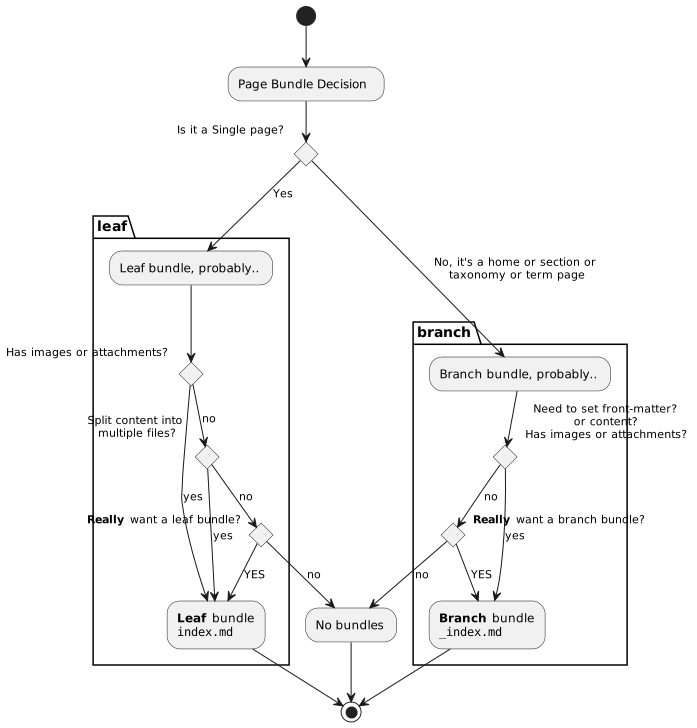
<p>In summary:</p>
<ul>
<li>
<p>If it&rsquo;s a <em>regular</em> page or a <em>single</em> page where you write your
content <strong>yourself</strong>, create a <em>leaf bundle</em>.</p>
<p><mark>Page Bundles of <code>page</code> <a href="https://gohugo.io/templates/section-templates/#page-kinds"><em>Kind</em></a> are always <em>leaf bundles</em>.. and vice versa.</mark></p>
</li>
<li>
<p>Otherwise, if it&rsquo;s a <em>list</em> page which Hugo generates for you,
create a <em>branch bundle</em>. Such pages typically are a list of
<em>regular</em> pages or even other <em>list</em> pages. Pages of <code>home</code>,
<code>section</code>, <code>taxonomy</code> and <code>term</code> <em>Kind</em> are always <em>branch bundles</em>.</p>
</li>
</ul>
<p><a id="figure--bundle-decision"></a></p>


<figure>
    
        <img src="https://scripter.co/hugo-leaf-and-branch-bundles/flowchart.svg" alt="Figure 1: Do I need a leaf bundle, or branch bundle, or none?"/> <figcaption>
                <p>
                    <span class="figure-number">Figure 1: </span>Do I need a leaf bundle, or branch bundle, or none?
                    
                        
                        </p>
                
            </figcaption></figure>


<h2 id="upgrading-to-hugo-v0-dot-32">Upgrading to Hugo v0.32?&nbsp;<a class="headline-hash no-text-decoration" href="#upgrading-to-hugo-v0-dot-32">#</a></h2>


<p>All of this boils down to these few caution points if you are
upgrading Hugo from a pre-0.32 version to 0.32 or a newer version:</p>
<ul>
<li>If a directory <code>foo</code> has an <code>index.md</code> (leaf bundle), that file will
be the content file for that <code>foo</code> <em>Regular</em> Page.</li>
<li>If a directory <code>foo</code> has an <code>_index.md</code> (branch bundle), that file
will be the content file for that <code>foo</code> <em>Section</em> Page, and <em>all
other</em><sup id="fnref:2"><a href="#fn:2" class="footnote-ref" role="doc-noteref">2</a></sup> <code>.md</code> files in the same or deeper hierarchy levels
under <code>foo/</code> will become <em>Regular</em> Pages under that <code>foo</code> section.</li>
</ul>

<h2 id="examples">Examples&nbsp;<a class="headline-hash no-text-decoration" href="#examples">#</a></h2>


<p>Of course, a post like this is not complete without examples, so here
they are:</p>
<p><a id="table--leaf-branch-bundle-examples"></a></p>
<div class="table-caption">
  <span class="table-number"><a href="#table--leaf-branch-bundle-examples">Table 3</a>:</span>
  Leaf and Branch bundle examples
</div>
<table>
<thead>
<tr>
<th>Example</th>
<th>Markdown source</th>
<th>HTML output</th>
</tr>
</thead>
<tbody>
<tr>
<td><strong>This page</strong> (leaf bundle)</td>
<td><a href="https://gitlab.com/kaushalmodi/kaushalmodi.gitlab.io/tree/master/content/posts/hugo-leaf-and-branch-bundles"><code>content/posts/hugo-leaf-and-branch-bundles/</code></a></td>
<td><em>duh!</em></td>
</tr>
<tr>
<td>Leaf and branch bundle examples from <code>ox-hugo</code> test site</td>
<td><a href="https://github.com/kaushalmodi/ox-hugo/tree/master/test/site/content/bundles"><code>content/bundles/</code></a></td>
<td><a href="https://ox-hugo.scripter.co/test/bundles/">Bundles</a></td>
</tr>
<tr>
<td>Headless (leaf) bundle example from the same</td>
<td><a href="https://raw.githubusercontent.com/kaushalmodi/ox-hugo/master/test/site/content/posts/page-using-headless-page-bundle.md">content page using headless bundle</a> + <a href="https://github.com/kaushalmodi/ox-hugo/blob/master/test/site/layouts/_default/headless-bundle-single.html">Layout fetching headless bundle pages</a></td>
<td><a href="https://ox-hugo.scripter.co/test/posts/page-using-headless-page-bundle">Page using the Headless Page Bundle</a></td>
</tr>
<tr>
<td>Branch bundles used for <code>home</code>, <code>taxonomy</code>, and <code>term</code> <em>Kind</em> pages</td>
<td><a href="https://gitlab.com/kaushalmodi/hugo-sandbox/tree/master/content">Hugo <em>Sandbox</em> <code>content/</code> dir</a></td>
<td><a href="https://hugo-sandbox.netlify.com/">Hugo Sandbox</a></td>
</tr>
</tbody>
</table>

<h2 id="further-reading">Further Reading&nbsp;<a class="headline-hash no-text-decoration" href="#further-reading">#</a></h2>


<p>I suggest reading the below pages in the Hugo documentation, as they
complement the <em>Page Bundles</em> concept:</p>
<ul>
<li><a href="https://gohugo.io/content-management/organization/">Content Organization</a></li>
<li><a href="https://gohugo.io/content-management/page-resources/">Page Resources</a></li>
<li><a href="https://gohugo.io/content-management/image-processing/">Image Processing</a></li>
</ul>
<div class="footnotes" role="doc-endnotes">
<hr>
<ol>
<li id="fn:1">
<p>The <code>.md</code> extension for <code>index.md</code>, <code>_index.md</code>, and all other
content files in this post is just an example. The extension can be
<code>.html</code> or any of any valid MIME type recognized by Hugo.&#160;<a href="#fnref:1" class="footnote-backref" role="doc-backlink">&#x21a9;&#xfe0e;</a>&#160;<a href="#fnref1:1" class="footnote-backref" role="doc-backlink">&#x21a9;&#xfe0e;</a></p>
</li>
<li id="fn:2">
<p>It&rsquo;s a qualified &ldquo;all other&rdquo; &mdash; That does not count the content
files further nested in leaf and branch bundles in that <code>foo</code> section.&#160;<a href="#fnref:2" class="footnote-backref" role="doc-backlink">&#x21a9;&#xfe0e;</a></p>
</li>
</ol>
</div>
]]></content><category scheme="https://scripter.co/categories/hugo" term="hugo" label="hugo"/><category scheme="https://scripter.co/tags/page-bundles" term="page-bundles" label="page-bundles"/><category scheme="https://scripter.co/tags/leaf" term="leaf" label="leaf"/><category scheme="https://scripter.co/tags/branch" term="branch" label="branch"/><category scheme="https://scripter.co/tags/flow-chart" term="flow-chart" label="flow-chart"/></entry></feed>