<?xml version="1.0" encoding="utf-8"?><feed xmlns="http://www.w3.org/2005/Atom" xml:lang="en-us"><generator uri="https://gohugo.io/" version="0.101.0">Hugo</generator><title type="html">github on A Scripter's Notes</title><subtitle type="html">Emacs, scripting and anything text oriented.</subtitle><link href="https://scripter.co/tags/github/" rel="alternate" type="text/html" title="HTML"/><link href="https://scripter.co/tags/github/index.xml" rel="alternate" type="application/rss+xml" title="RSS"/><link href="https://scripter.co/tags/github/atom.xml" rel="self" type="application/atom+xml" title="Atom"/><link href="https://scripter.co/tags/github/jf2feed.json" rel="alternate" type="application/jf2feed+json" title="jf2feed"/><updated>2026-04-22T08:24:58-04:00</updated><author><name>Kaushal Modi</name><email>kaushal.modi@gmail.com</email></author><id>https://scripter.co/tags/github/</id><entry><title type="html">View GitHub Pull Requests in Magit</title><link href="https://scripter.co/view-github-pull-requests-in-magit/?utm_source=atom_feed" rel="alternate" type="text/html"/><link href="https://scripter.co/creating-a-patch-file-using-magit/?utm_source=atom_feed" rel="related" type="text/html" title="Creating a patch file using Magit"/><link href="https://scripter.co/git-diff-minified-js-and-css/?utm_source=atom_feed" rel="related" type="text/html" title="Git diff Minified JS and CSS"/><link href="https://scripter.co/narrowing-the-author-column-in-magit/?utm_source=atom_feed" rel="related" type="text/html" title="Narrowing the Author column in Magit"/><link href="https://scripter.co/gujarati-fonts-in-emacs/?utm_source=atom_feed" rel="related" type="text/html" title="Gujarati fonts in Emacs"/><link href="https://scripter.co/emacs-lisp-advice-combinators/?utm_source=atom_feed" rel="related" type="text/html" title="Emacs Lisp: Advice Combinators"/><id>https://scripter.co/view-github-pull-requests-in-magit/</id><author><name>Kaushal Modi</name></author><published>2022-06-23T17:51:00-04:00</published><updated>2022-06-23T17:51:00-04:00</updated><content type="html"><![CDATA[<blockquote>How to view GitHub Pull Request branches locally in the cloned repo,
and more importantly, how to do that automatically from within Emacs.</blockquote><div class="ox-hugo-toc toc">
<div class="heading">Table of Contents</div>
<ul>
<li><a href="#locally-creating-a-branch-for-a-pr">Locally creating a branch for a PR</a></li>
<li><a href="#getting-references-to-all-pull-requests">Getting references to all Pull Requests</a></li>
<li><a href="#automatically-adding-pr-refs">Automatically adding PR refs</a></li>
<li><a href="#summary">Summary</a></li>
<li><a href="#references">References</a></li>
</ul>
</div>
<!--endtoc-->
<p>I have a few public projects in git repos, but I don&rsquo;t get that much
traffic in <em>Pull Requests (PR)</em>
<span class="sidenote-number"><small class="sidenote">
Gitlab calls these <em>Merge Requests</em> or MRs.
</small></span>
. So when I need to add additional commits to a PR, I would just add
the PR author&rsquo;s <em>remote</em> to my local repo, <em>check out</em> their PR
branch, add my own commits and then merge that to my project&rsquo;s <em>main</em>
branch.</p>
<p>As these occurrences were few and far apart, I didn&rsquo;t have a need to
view the <em>PR branches</em> directly from within Emacs/Magit. Though, I
somehow knew that each GitHub Pull Request&rsquo;s <em>HEAD</em> got assigned a <a href="https://git-scm.com/book/en/v2/Git-Internals-Git-References">git
<strong>reference</strong></a>. But I didn&rsquo;t need to use that knowledge until today
😃.</p>
<p>Today, when discussing <a href="https://github.com/protesilaos/denote/pull/20">PR # 20</a> on <a href="https://protesilaos.com/">Prot&rsquo;s</a> <a href="https://protesilaos.com/emacs/denote">Denote</a> package&rsquo;s GitHub
mirror
<span class="sidenote-number"><small class="sidenote">
Prot uses <a href="https://git.sr.ht/~protesilaos/denote">SourceHut</a> as the primary git forge for his Emacs
packages. But I am glad that he doesn&rsquo;t mind the activity in Issues
and Pull Requests on the GitHub mirror.
</small></span>
, he wrote <a href="https://github.com/protesilaos/denote/pull/20#issuecomment-1164676013">this comment</a>:</p>
<blockquote>
<p>Now I just need to figure out how best to incorporate your changes
into the <code>org-id</code> branch so I can add the final bits. I am not too
familiar with the PR workflow &hellip;</p>
</blockquote>
<p>.. and that inspired this post today.</p>

<h2 id="locally-creating-a-branch-for-a-pr">Locally creating a branch for a PR&nbsp;<a class="headline-hash no-text-decoration" href="#locally-creating-a-branch-for-a-pr">#</a></h2>


<p>From the <a href="https://docs.github.com/en/pull-requests/collaborating-with-pull-requests/reviewing-changes-in-pull-requests/checking-out-pull-requests-locally">GitHub docs</a>, the <code>git</code> command to create a local branch for a
PR is this:</p>
<div class="highlight"><pre tabindex="0" class="chroma"><code class="language-shell" data-lang="shell"><span class="line"><span class="cl">git fetch origin pull/ID/head:BRANCHNAME
</span></span></code></pre></div><p>I have the <code>denote</code> package cloned from its GitHub mirror. So the
<strong>origin</strong> remote&rsquo;s <strong>url</strong> is <code>https://github.com/protesilaos/denote</code>.</p>
<div class="note">
<p>Make sure that the remote name used in this command is pointing to a
GitHub repo, and not a mirror forge like GitLab or SourceHut.</p>
</div>
<p>When I ran the below command, I got a new branch <strong>pr-20</strong> pointing to
the latest commit of that PR:</p>
<div class="highlight"><pre tabindex="0" class="chroma"><code class="language-shell" data-lang="shell"><span class="line"><span class="cl">git fetch origin pull/20/head:pr-20
</span></span></code></pre></div><p>Awesome!</p>
<div class="verse">
<p>.. But that wasn&rsquo;t good enough<br />
    .. Now I wanted more<br />
        .. I didn&rsquo;t want to manually create a branch for each PR.<br /></p>
</div>

<h2 id="getting-references-to-all-pull-requests">Getting references to all Pull Requests&nbsp;<a class="headline-hash no-text-decoration" href="#getting-references-to-all-pull-requests">#</a></h2>


<p>Now that I was on that quest of &ldquo;I want more&rdquo;, it didn&rsquo;t take me long
to re-discover <a href="https://oremacs.com/2015/03/11/git-tricks/#illusion-2-quickly-get-github-pull-requests-on-your-system">this 7-year old nugget</a> by <a href="https://oremacs.com">Oleh Krehel</a>. Here are the
relevant bits from that post:</p>
<ol>
<li>Open the local repo&rsquo;s <code>.git/config</code> file.</li>
<li>Find the <code>[remote &quot;origin&quot;]</code> section</li>
<li>Modify it by adding this one line with <strong>pull</strong> refs. <em>This is the
same for all GitHub repositories.</em>
<div class="highlight"><pre tabindex="0" class="chroma"><code class="language-cfg" data-lang="cfg"><span class="line"><span class="cl"><span class="k">[remote &#34;origin&#34;]</span>
</span></span><span class="line"><span class="cl">    <span class="na">url</span> <span class="o">=</span> <span class="s">https://github.com/USER/REPO.git
</span></span></span><span class="line"><span class="cl"><span class="s">    fetch = +refs/heads/*:refs/remotes/origin/*
</span></span></span><span class="line hl"><span class="cl"><span class="s">    fetch = +refs/pull/*/head:refs/pull/origin/*</span>
</span></span></code></pre></div></li>
</ol>
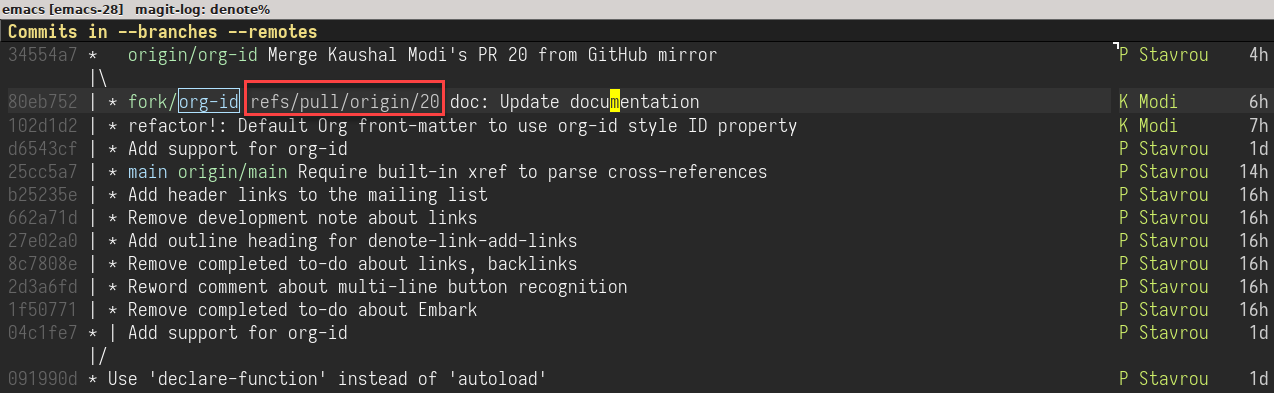
<p>With that edit in place, when I did <kbd>l</kbd> <kbd>a</kbd> (show
the log for all git references), followed by <kbd>f</kbd> <kbd>a</kbd>
(fetch all the remotes) in the Magit, I could see the references to
the <code>denote</code> repo&rsquo;s PRs!</p>
<p><a id="figure--magit-denote-pr-refs"></a></p>


<figure>
    
        <img src="https://scripter.co/view-github-pull-requests-in-magit/pr-20-ref.png" alt="Figure 1: Viewing PR references from denote package&rsquo;s GitHub repo"/> <figcaption>
                <p>
                    <span class="figure-number">Figure 1: </span>Viewing PR references from <code>denote</code> package&rsquo;s GitHub repo
                    
                        
                        </p>
                
            </figcaption></figure>

<div class="verse">
<p>.. But that still wasn&rsquo;t good enough<br />
    .. I didn&rsquo;t want to manually edit the <code>.git/config</code> in each repo.<br /></p>
</div>

<h2 id="automatically-adding-pr-refs">Automatically adding PR refs&nbsp;<a class="headline-hash no-text-decoration" href="#automatically-adding-pr-refs">#</a></h2>


<p>Of course, I wasn&rsquo;t the first one to think of this!</p>
<p>Another Emacs veteran <a href="https://endlessparentheses.com/">Artur Malabarba</a> had already had this covered
also around <a href="https://endlessparentheses.com/automatically-configure-magit-to-access-github-prs.html">7 years back</a>. Coincidentally, that post was written as a
response to that same blog post by Oleh where he shared the above
<code>.git/config</code> tip.</p>
<p>In that post, Artur shares an Emacs Lisp function that uses Magit
functions like <code>magit-get</code>, <code>magit-get-all</code> and <code>magit-git-string</code> to
auto-add the <code>fetch = +refs/pull/*/head:refs/pull/origin/*</code> line in
the <code>.git/config</code>. This magic happens after checking that the <strong>origin</strong>
remote points to a GitHub repo, and if that line doesn&rsquo;t already
exist.</p>
<p>Here, I am lightly modifying the function shared in that post so that
the <strong>origin</strong> remote name is not hard-coded
<span class="sidenote-number"><small class="sidenote">
The reason is that sometimes, I name the original remote as <strong>upstream</strong>
and my fork as <strong>fork</strong>, and I might have no remote named <strong>origin</strong>.
</small></span>
. Credit for the main logic in this code still goes to Artur.</p>
<p><a id="code-snippet--add-PR-fetch-ref"></a></p>
<div class="highlight"><pre tabindex="0" class="chroma"><code class="language-emacs-lisp" data-lang="emacs-lisp"><span class="line"><span class="cl"><span class="p">(</span><span class="nb">defun</span> <span class="nv">modi/add-PR-fetch-ref</span> <span class="p">(</span><span class="kp">&amp;optional</span> <span class="nv">remote-name</span><span class="p">)</span>
</span></span><span class="line"><span class="cl">  <span class="s">&#34;If refs/pull is not defined on a GH repo, define it.
</span></span></span><span class="line"><span class="cl"><span class="s">
</span></span></span><span class="line"><span class="cl"><span class="s">If REMOTE-NAME is not specified, it defaults to the </span><span class="ss">`remote&#39;</span><span class="s"> set
</span></span></span><span class="line"><span class="cl"><span class="s">for the \&#34;main\&#34; or \&#34;master\&#34; branch.&#34;</span>
</span></span><span class="line"><span class="cl">  <span class="p">(</span><span class="nb">let*</span> <span class="p">((</span><span class="nv">remote-name</span> <span class="p">(</span><span class="nb">or</span> <span class="nv">remote-name</span>
</span></span><span class="line"><span class="cl">                          <span class="p">(</span><span class="nv">magit-get</span> <span class="s">&#34;branch&#34;</span> <span class="s">&#34;main&#34;</span> <span class="s">&#34;remote&#34;</span><span class="p">)</span>
</span></span><span class="line"><span class="cl">                          <span class="p">(</span><span class="nv">magit-get</span> <span class="s">&#34;branch&#34;</span> <span class="s">&#34;master&#34;</span> <span class="s">&#34;remote&#34;</span><span class="p">)))</span>
</span></span><span class="line"><span class="cl">         <span class="p">(</span><span class="nv">remote-url</span> <span class="p">(</span><span class="nv">magit-get</span> <span class="s">&#34;remote&#34;</span> <span class="nv">remote-name</span> <span class="s">&#34;url&#34;</span><span class="p">))</span>
</span></span><span class="line"><span class="cl">         <span class="p">(</span><span class="nv">fetch-refs</span> <span class="p">(</span><span class="nb">and</span> <span class="p">(</span><span class="nf">stringp</span> <span class="nv">remote-url</span><span class="p">)</span>
</span></span><span class="line"><span class="cl">                          <span class="p">(</span><span class="nf">string-match</span> <span class="s">&#34;github&#34;</span> <span class="nv">remote-url</span><span class="p">)</span>
</span></span><span class="line"><span class="cl">                          <span class="p">(</span><span class="nv">magit-get-all</span> <span class="s">&#34;remote&#34;</span> <span class="nv">remote-name</span> <span class="s">&#34;fetch&#34;</span><span class="p">)))</span>
</span></span><span class="line"><span class="cl">         <span class="c1">;; https://oremacs.com/2015/03/11/git-tricks/</span>
</span></span><span class="line"><span class="cl">         <span class="p">(</span><span class="nv">fetch-address</span> <span class="p">(</span><span class="nf">format</span> <span class="s">&#34;+refs/pull/*/head:refs/pull/%s/*&#34;</span> <span class="nv">remote-name</span><span class="p">)))</span>
</span></span><span class="line"><span class="cl">    <span class="p">(</span><span class="nb">when</span> <span class="nv">fetch-refs</span>
</span></span><span class="line"><span class="cl">      <span class="p">(</span><span class="nb">unless</span> <span class="p">(</span><span class="nf">member</span> <span class="nv">fetch-address</span> <span class="nv">fetch-refs</span><span class="p">)</span>
</span></span><span class="line"><span class="cl">        <span class="p">(</span><span class="nv">magit-git-string</span> <span class="s">&#34;config&#34;</span>
</span></span><span class="line"><span class="cl">                          <span class="s">&#34;--add&#34;</span>
</span></span><span class="line"><span class="cl">                          <span class="p">(</span><span class="nf">format</span> <span class="s">&#34;remote.%s.fetch&#34;</span> <span class="nv">remote-name</span><span class="p">)</span>
</span></span><span class="line"><span class="cl">                          <span class="nv">fetch-address</span><span class="p">)))))</span>
</span></span><span class="line"><span class="cl"><span class="p">(</span><span class="nv">add-hook</span> <span class="ss">&#39;magit-mode-hook</span> <span class="nf">#&#39;</span><span class="nv">modi/add-PR-fetch-ref</span><span class="p">)</span>
</span></span></code></pre></div><div class="src-block-caption">
  <span class="src-block-number"><a href="#code-snippet--add-PR-fetch-ref">Code Snippet 1</a>:</span>
  Function to auto-add GitHub PR references to the repo's <code>.git/config</code>
</div>

<h2 id="summary">Summary&nbsp;<a class="headline-hash no-text-decoration" href="#summary">#</a></h2>


<p>With the above snippet added to your Emacs config and evaluated, each
time you visit a repo cloned from GitHub in the Magit Status buffer
(<code>M-x magit-status</code>), the PR refs will get auto-added to that repo&rsquo;s
<code>.git/config</code> if needed.</p>
<p>After that, you can easily view the commits from all the PRs by doing
<kbd>l</kbd> <kbd>a</kbd> <kbd>f</kbd> <kbd>a</kbd>.</p>

<h2 id="references">References&nbsp;<a class="headline-hash no-text-decoration" href="#references">#</a></h2>


<ul>
<li><a href="https://oremacs.com/2015/03/11/git-tricks/#illusion-2-quickly-get-github-pull-requests-on-your-system">oremacs &ndash; Some git/magit/github tricks</a></li>
<li><a href="https://endlessparentheses.com/automatically-configure-magit-to-access-github-prs.html">endlessparentheses &ndash; Automatically configure Magit to access Github PRs</a></li>
<li><a href="https://docs.github.com/en/pull-requests/collaborating-with-pull-requests/reviewing-changes-in-pull-requests/checking-out-pull-requests-locally">GitHub &ndash; Checking out PR branches locally</a></li>
</ul>
]]></content><category scheme="https://scripter.co/categories/emacs" term="emacs" label="emacs"/><category scheme="https://scripter.co/categories/elisp" term="elisp" label="elisp"/><category scheme="https://scripter.co/tags/git" term="git" label="git"/><category scheme="https://scripter.co/tags/magit" term="magit" label="magit"/><category scheme="https://scripter.co/tags/100daystooffload" term="100daystooffload" label="100DaysToOffload"/><category scheme="https://scripter.co/tags/github" term="github" label="github"/><category scheme="https://scripter.co/tags/git-reference" term="git-reference" label="git-reference"/></entry><entry><title type="html">Nim: Deploying static binaries</title><link href="https://scripter.co/nim-deploying-static-binaries/?utm_source=atom_feed" rel="alternate" type="text/html"/><link href="https://scripter.co/nim-fizz-buzz-test/?utm_source=atom_feed" rel="related" type="text/html" title="Nim: Fizz-Buzz test"/><link href="https://scripter.co/notes/nim-fmt/?utm_source=atom_feed" rel="related" type="text/html" title="Nim fmt"/><link href="https://scripter.co/notes/nim/?utm_source=atom_feed" rel="related" type="text/html" title="Nim"/><link href="https://scripter.co/nim-check-if-stdin-stdout-are-associated-with-terminal-or-pipe/?utm_source=atom_feed" rel="related" type="text/html" title="Nim: Check if stdin/stdout are associated with terminal or pipe"/><link href="https://scripter.co/accessing-devdocs-from-emacs/?utm_source=atom_feed" rel="related" type="text/html" title="Accessing Devdocs from Emacs"/><id>https://scripter.co/nim-deploying-static-binaries/</id><author><name>Kaushal Modi</name></author><published>2018-09-24T01:47:00-04:00</published><updated>2018-09-24T01:47:00-04:00</updated><content type="html"><![CDATA[<blockquote>Deploying Nim applications as static binaries for GNU/Linux type
operating systems, built using <strong>musl</strong>.</blockquote><div class="ox-hugo-toc toc">
<div class="heading">Table of Contents</div>
<ul>
<li><a href="#problem-statement">Problem statement</a></li>
<li><a href="#solution">Solution</a></li>
<li><a href="#1-building-static-binaries">1 Building static binaries</a>
<ul>
<li><a href="#what-is-musl">What is musl?</a></li>
<li><a href="#installing-musl">Installing musl</a></li>
<li><a href="#static-linking">Static linking</a></li>
</ul>
</li>
<li><a href="#2-optimizing-the-binary-size">2 Optimizing the binary size</a></li>
<li><a href="#3-doing-the-above-two-easily">3 Doing the above two easily</a>
<ul>
<li><a href="#nimscript">NimScript</a></li>
<li><a href="#config-dot-nims"><code>config.nims</code></a></li>
</ul>
</li>
<li><a href="#4-creating-and-deploying-the-builds-automatically">4 Creating and deploying the builds automatically</a></li>
<li><a href="#how-it-works-in-practice">How it works in practice</a></li>
<li><a href="#repo">Repo</a></li>
<li><a href="#references">References</a></li>
</ul>
</div>
<!--endtoc-->

<h2 id="problem-statement">Problem statement&nbsp;<a class="headline-hash no-text-decoration" href="#problem-statement">#</a></h2>


<p>I&rsquo;d like to create Nim applications, and then be able to easily deploy
the static built binaries so that anyone on GNU/Linux type OS can just
download the binary and run them.</p>
<p><em>If and when I figure out how to do the same for macOS and Windows
too, I&rsquo;ll write a separate post for that. If you can help me out with
that, please comment below, or open an issue/PR in the repo linked at
the end.</em></p>

<h2 id="solution">Solution&nbsp;<a class="headline-hash no-text-decoration" href="#solution">#</a></h2>


<p>The solution is multi-step:</p>
<ol>
<li>Building static binaries (only for GNU/Linux type OS).</li>
<li>Optimizing the binary size.</li>
<li>Doing the above two easily.</li>
<li>Creating and deploying the builds automatcally (on GitHub).</li>
</ol>

<h2 id="1-building-static-binaries">1 Building static binaries&nbsp;<a class="headline-hash no-text-decoration" href="#1-building-static-binaries">#</a></h2>


<p>My primary OS for coding and development is RHEL 6.8.</p>
<p>By default, Nim builds dynamically linked binaries using the <em>glibc</em>
version present on the OS where those binaries are built.</p>
<p>Living on a stable but <span class="underline">old</span> OS like RHEL 6.8 (that has <em>glibc 2.12</em>
by default), I have ended up with the issue many a times<sup id="fnref:1"><a href="#fn:1" class="footnote-ref" role="doc-noteref">1</a></sup> where
the deployed binary would be compiled with a newer <em>glibc</em> and so it
wouldn&rsquo;t run on my system. I would need to eventually compile that
binary myself.</p>
<p>I don&rsquo;t want to inflict other people with the same problem.</p>
<p>Inspired by how statically compiled binaries are distributed for tools
built in other languages (<a href="https://github.com/gohugoio/hugo/releases">hugo</a> [Go], <a href="https://github.com/BurntSushi/ripgrep/releases">ripgrep</a> [Rust], <a href="https://github.com/jgm/pandoc/releases">pandoc</a> [Haskell],
etc), I wanted the same for whatever I build with Nim.</p>
<p>I kept looking around for a &ldquo;single press button&rdquo; flow to do this in
Nim for a while, and after finding nothing, I came up a flow myself,
that I present in this post.</p>
<p>I picked <strong>musl</strong> to statically compile my binaries.</p>

<h3 id="what-is-musl">What is musl?&nbsp;<a class="headline-hash no-text-decoration" href="#what-is-musl">#</a></h3>


<p>Here&rsquo;s a one-liner description from <a href="https://en.wikipedia.org/wiki/Musl">Wikipedia</a>:</p>
<blockquote>
<p><strong>musl</strong> is a C standard library intended for operating systems based on
the Linux kernel, released under the MIT License.</p>
</blockquote>
<p>Check out its <a href="https://www.musl-libc.org/intro.html">introduction</a> on its official webpage for more details.</p>

<h3 id="installing-musl">Installing musl&nbsp;<a class="headline-hash no-text-decoration" href="#installing-musl">#</a></h3>


<p>Installing musl was as simple as <a href="https://www.musl-libc.org/download.html">downloading</a> its <em>.tar.gz</em> and running
<code>make &amp;&amp; make install</code> with the <code>--prefix</code> configured
appropriately. For the examples that follow, let&rsquo;s say you set the
prefix to <code>/usr/local/musl/</code>.</p>
<div class="note">
<p>Do <strong>not</strong> install musl at the default <em>prefix</em> location, else it will
override a lot of default header files &ndash; an outcome that you probably
don&rsquo;t want.</p>
</div>
<ul>
<li>With the <em>prefix</em> set as above, the <code>musl-gcc</code> binary would get
installed in the <code>/usr/local/musl/bin/</code> directory.</li>
<li>Add <code>/usr/local/musl/bin/</code> to your <code>PATH</code> environment variable.</li>
</ul>

<h3 id="static-linking">Static linking&nbsp;<a class="headline-hash no-text-decoration" href="#static-linking">#</a></h3>


<p>By default, Nim will use the <code>gcc</code> executable that&rsquo;s found in <code>PATH</code>
for C compilation. But using the <code>--gcc.exe</code> switch, we override to
use the <code>musl-gcc</code> executable. Similarly, we use the <code>--gcc.linkerexe</code>
switch to use <code>musl-gcc</code> too, and then the <code>-static</code> option is passed
to the linker using the <code>--passL</code> switch.</p>
<p>With a <code>hello.nim</code> containing:</p>
<div class="highlight"><pre tabindex="0" class="chroma"><code class="language-nim" data-lang="nim"><span class="line"><span class="cl"><span class="n">echo</span> <span class="s">&#34;Hello, World!&#34;</span>
</span></span></code></pre></div><p>running the below:</p>
<div class="highlight"><pre tabindex="0" class="chroma"><code class="language-shell" data-lang="shell"><span class="line"><span class="cl"><span class="c1"># Assuming that musl-gcc binary is found in PATH.</span>
</span></span><span class="line"><span class="cl">nim --gcc.exe:musl-gcc --gcc.linkerexe:musl-gcc --passL:-static c hello.nim
</span></span></code></pre></div><p>I got a <em>98kB</em> statically linked <code>hello</code> binary.</p>

<h2 id="2-optimizing-the-binary-size">2 Optimizing the binary size&nbsp;<a class="headline-hash no-text-decoration" href="#2-optimizing-the-binary-size">#</a></h2>


<p>The binary size can be optimized by Nim itself by doing a Release
build (<code>-d:release</code>) which disables runtime checks used for debugging,
and enables certain optimizations. Adding <code>--opt:size</code> does further
binary-size optimization.</p>
<p>So, with the same <code>hello.nim</code>, running the below:</p>
<div class="highlight"><pre tabindex="0" class="chroma"><code class="language-shell" data-lang="shell"><span class="line"><span class="cl"><span class="c1"># Assuming that musl-gcc binary is found in PATH.</span>
</span></span><span class="line"><span class="cl">nim --gcc.exe:musl-gcc --gcc.linkerexe:musl-gcc --passL:-static -d:release --opt:size c hello.nim
</span></span></code></pre></div><p>shrunk down the binary size to <em>43kB</em>.</p>
<p>Upon running external utilities like <a href="https://sourceware.org/binutils/docs/binutils/strip.html"><code>strip</code> (from <code>binutils</code>)</a><sup id="fnref:2"><a href="#fn:2" class="footnote-ref" role="doc-noteref">2</a></sup>
and <a href="https://github.com/upx/upx"><code>upx</code></a><sup id="fnref:3"><a href="#fn:3" class="footnote-ref" role="doc-noteref">3</a></sup>, the binary size shrunk even further! &ndash; <strong>16kB</strong>.</p>
<p><a id="code-snippet--musl-plus-opt"></a></p>
<div class="highlight"><pre tabindex="0" class="chroma"><code class="language-shell" data-lang="shell"><span class="line"><span class="cl"><span class="c1"># Assuming that musl-gcc binary is found in PATH.</span>
</span></span><span class="line"><span class="cl">nim --gcc.exe:musl-gcc --gcc.linkerexe:musl-gcc --passL:-static -d:release --opt:size c hello.nim
</span></span><span class="line"><span class="cl">strip -s ./hello
</span></span><span class="line"><span class="cl">upx --best ./hello
</span></span></code></pre></div><div class="src-block-caption">
  <span class="src-block-number"><a href="#code-snippet--musl-plus-opt">Code Snippet 1</a>:</span>
  Static linking using <code>musl-gcc</code> plus binary size optimization
</div>

<h2 id="3-doing-the-above-two-easily">3 Doing the above two easily&nbsp;<a class="headline-hash no-text-decoration" href="#3-doing-the-above-two-easily">#</a></h2>


<p>All of that is great, but it wouldn&rsquo;t be fun or elegant to do all the
steps in <a href="#code-snippet--musl-plus-opt">Code Snippet 1</a> manually (or even in a <em>shell</em> script).</p>
<p>Wouldn&rsquo;t it be awesome if I could just run a <code>nim musl hello.nim</code> command‽</p>
<div class="verse">
<p>    &mdash; And that&rsquo;s what I do! 😎<br /></p>
</div>

<h3 id="nimscript">NimScript&nbsp;<a class="headline-hash no-text-decoration" href="#nimscript">#</a></h3>


<p>The &ldquo;nim musl&rdquo; command is not available out-of-box, but it is easy to
create one using a <a href="https://nim-lang.org/docs/nims.html">NimScript config file</a>, which is in the form of a
project-specific <code>config.nims</code>.</p>
<div class="note">
<p>Think of NimScripts as much superior &ldquo;bash scripts&rdquo; as they are
written in Nim 😄</p>
</div>
<p>From the <a href="https://nim-lang.org/docs/nims.html">NimScript docs</a>:</p>
<blockquote>
<p>Strictly speaking, NimScript is the subset of Nim that can be
evaluated by Nim&rsquo;s builtin virtual machine (VM). This VM is used for
Nim&rsquo;s compiletime function evaluation features, but also replaces
Nim&rsquo;s existing configuration system.</p>
<p>The VM cannot deal with <code>importc</code>, the FFI is not available, so there
are not many stdlib modules that you can use with Nim&rsquo;s VM. However,
at least the following modules are available:</p>
<ul>
<li><a href="https://nim-lang.org/docs/strutils.html">strutils</a></li>
<li><a href="https://nim-lang.org/docs/math.html">math</a></li>
<li><a href="https://nim-lang.org/docs/distros.html">distros</a></li>
</ul>
</blockquote>
<p>That list of modules is not comprehensive. I believe that the <a href="https://nim-lang.org/docs/macros.html">macros</a>
module should be added to that list too (we also happen to need it for
the <code>error</code> macros in the <code>config.nims</code> below 😄).</p>
<p>So, instead of having to resort to the hacky bash scripts, NimScript
allows one to write scripts in the awesome Nim syntax, and it&rsquo;s
platform-agnostic too!</p>
<p>Also, as you see below, the <em>tasks</em> in NimScripts basically become
user-defined Nim-subcommands. For example, &ldquo;nim musl&rdquo; command doesn&rsquo;t
exist, but I could make one <em>just like that</em> by defining a &ldquo;musl&rdquo;
NimScript <em>task</em>.</p>

<h3 id="config-dot-nims"><code>config.nims</code>&nbsp;<a class="headline-hash no-text-decoration" href="#config-dot-nims">#</a></h3>


<p>Below <code>config.nims</code> is generic and would work for most Nim
projects. You need to just put it in the directory from where you
compile the Nim code.</p>
<p><em>Nim <strong>devel</strong> (v0.18.1) is needed for the below NimScript to work,
because the <code>findExe</code> I use in there was not present in Nim v0.18.0.</em></p>
<p><a id="code-snippet--musl-config-nims"></a></p>
<div class="highlight"><pre tabindex="0" class="chroma"><code class="language-nim" data-lang="nim"><span class="line"><span class="cl"><span class="c"># config.nims</span>
</span></span><span class="line"><span class="cl"><span class="kn">from</span> <span class="n">macros</span> <span class="kn">import</span> <span class="n">error</span>
</span></span><span class="line"><span class="cl"><span class="kn">from</span> <span class="n">ospaths</span> <span class="kn">import</span> <span class="n">splitFile</span><span class="p">,</span> <span class="p">`</span><span class="o">/</span><span class="p">`</span>
</span></span><span class="line"><span class="cl">
</span></span><span class="line"><span class="cl"><span class="c"># -d:musl</span>
</span></span><span class="line"><span class="cl"><span class="k">when</span> <span class="n">defined</span><span class="p">(</span><span class="n">musl</span><span class="p">):</span>
</span></span><span class="line"><span class="cl">  <span class="kd">var</span> <span class="n">muslGccPath</span><span class="p">:</span> <span class="kt">string</span>
</span></span><span class="line"><span class="cl">  <span class="n">echo</span> <span class="s">&#34;  [-d:musl] Building a static binary using musl ..&#34;</span>
</span></span><span class="line"><span class="cl">  <span class="n">muslGccPath</span> <span class="o">=</span> <span class="n">findExe</span><span class="p">(</span><span class="s">&#34;musl-gcc&#34;</span><span class="p">)</span>
</span></span><span class="line"><span class="cl">  <span class="c"># echo &#34;debug: &#34; &amp; muslGccPath</span>
</span></span><span class="line"><span class="cl">  <span class="k">if</span> <span class="n">muslGccPath</span> <span class="o">==</span> <span class="s">&#34;&#34;</span><span class="p">:</span>
</span></span><span class="line"><span class="cl">    <span class="n">error</span><span class="p">(</span><span class="s">&#34;&#39;musl-gcc&#39; binary was not found in PATH.&#34;</span><span class="p">)</span>
</span></span><span class="line"><span class="cl">  <span class="n">switch</span><span class="p">(</span><span class="s">&#34;gcc.exe&#34;</span><span class="p">,</span> <span class="n">muslGccPath</span><span class="p">)</span>
</span></span><span class="line"><span class="cl">  <span class="n">switch</span><span class="p">(</span><span class="s">&#34;gcc.linkerexe&#34;</span><span class="p">,</span> <span class="n">muslGccPath</span><span class="p">)</span>
</span></span><span class="line"><span class="cl">  <span class="n">switch</span><span class="p">(</span><span class="s">&#34;passL&#34;</span><span class="p">,</span> <span class="s">&#34;-static&#34;</span><span class="p">)</span>
</span></span><span class="line"><span class="cl">
</span></span><span class="line"><span class="cl"><span class="k">proc </span><span class="nf">binOptimize</span><span class="p">(</span><span class="n">binFile</span><span class="p">:</span> <span class="kt">string</span><span class="p">)</span> <span class="o">=</span>
</span></span><span class="line"><span class="cl">  <span class="sd">## Optimize size of the ``binFile`` binary.</span>
</span></span><span class="line"><span class="cl">  <span class="n">echo</span> <span class="s">&#34;&#34;</span>
</span></span><span class="line"><span class="cl">  <span class="k">if</span> <span class="n">findExe</span><span class="p">(</span><span class="s">&#34;strip&#34;</span><span class="p">)</span> <span class="o">!=</span> <span class="s">&#34;&#34;</span><span class="p">:</span>
</span></span><span class="line"><span class="cl">    <span class="n">echo</span> <span class="s">&#34;Running &#39;strip -s&#39; ..&#34;</span>
</span></span><span class="line"><span class="cl">    <span class="n">exec</span> <span class="s">&#34;strip -s &#34;</span> <span class="o">&amp;</span> <span class="n">binFile</span>
</span></span><span class="line"><span class="cl">  <span class="k">if</span> <span class="n">findExe</span><span class="p">(</span><span class="s">&#34;upx&#34;</span><span class="p">)</span> <span class="o">!=</span> <span class="s">&#34;&#34;</span><span class="p">:</span>
</span></span><span class="line"><span class="cl">    <span class="c"># https://github.com/upx/upx/releases/</span>
</span></span><span class="line"><span class="cl">    <span class="n">echo</span> <span class="s">&#34;Running &#39;upx --best&#39; ..&#34;</span>
</span></span><span class="line"><span class="cl">    <span class="n">exec</span> <span class="s">&#34;upx --best &#34;</span> <span class="o">&amp;</span> <span class="n">binFile</span>
</span></span><span class="line"><span class="cl">
</span></span><span class="line"><span class="cl"><span class="c"># nim musl foo.nim</span>
</span></span><span class="line"><span class="cl"><span class="n">task</span> <span class="n">musl</span><span class="p">,</span> <span class="s">&#34;Builds an optimized static binary using musl&#34;</span><span class="p">:</span>
</span></span><span class="line"><span class="cl">  <span class="sd">## Usage: nim musl &lt;.nim file path&gt;</span>
</span></span><span class="line"><span class="cl">  <span class="k">let</span>
</span></span><span class="line"><span class="cl">    <span class="n">numParams</span> <span class="o">=</span> <span class="n">paramCount</span><span class="p">()</span>
</span></span><span class="line"><span class="cl">  <span class="k">if</span> <span class="n">numParams</span> <span class="o">!=</span> <span class="mi">2</span><span class="p">:</span>
</span></span><span class="line"><span class="cl">    <span class="n">error</span><span class="p">(</span><span class="s">&#34;The &#39;musl&#39; sub-command needs exactly 1 argument, the Nim file (but &#34;</span> <span class="o">&amp;</span>
</span></span><span class="line"><span class="cl">      <span class="o">$</span><span class="p">(</span><span class="n">numParams</span><span class="o">-</span><span class="mi">1</span><span class="p">)</span> <span class="o">&amp;</span> <span class="s">&#34; were detected).&#34;</span> <span class="o">&amp;</span>
</span></span><span class="line"><span class="cl">      <span class="s">&#34;</span><span class="se">\n</span><span class="s">  Usage Example: nim musl FILE.nim.&#34;</span><span class="p">)</span>
</span></span><span class="line"><span class="cl">
</span></span><span class="line"><span class="cl">  <span class="k">let</span>
</span></span><span class="line"><span class="cl">    <span class="n">nimFile</span> <span class="o">=</span> <span class="n">paramStr</span><span class="p">(</span><span class="n">numParams</span><span class="p">)</span> <span class="sd">## The nim file name *must* be the last.</span>
</span></span><span class="line"><span class="cl">    <span class="p">(</span><span class="n">dirName</span><span class="p">,</span> <span class="n">baseName</span><span class="p">,</span> <span class="n">_</span><span class="p">)</span> <span class="o">=</span> <span class="n">splitFile</span><span class="p">(</span><span class="n">nimFile</span><span class="p">)</span>
</span></span><span class="line"><span class="cl">    <span class="n">binFile</span> <span class="o">=</span> <span class="n">dirName</span> <span class="o">/</span> <span class="n">baseName</span>  <span class="c"># Save the binary in the same dir as the nim file</span>
</span></span><span class="line"><span class="cl">    <span class="n">nimArgs</span> <span class="o">=</span> <span class="s">&#34;c -d:musl -d:release --opt:size &#34;</span> <span class="o">&amp;</span> <span class="n">nimFile</span>
</span></span><span class="line"><span class="cl">  <span class="c"># echo &#34;[debug] nimFile = &#34; &amp; nimFile &amp; &#34;, binFile = &#34; &amp; binFile</span>
</span></span><span class="line"><span class="cl">
</span></span><span class="line"><span class="cl">  <span class="c"># Build binary</span>
</span></span><span class="line"><span class="cl">  <span class="n">echo</span> <span class="s">&#34;</span><span class="se">\n</span><span class="s">Running &#39;nim &#34;</span> <span class="o">&amp;</span> <span class="n">nimArgs</span> <span class="o">&amp;</span> <span class="s">&#34;&#39; ..&#34;</span>
</span></span><span class="line"><span class="cl">  <span class="n">selfExec</span> <span class="n">nimArgs</span>
</span></span><span class="line"><span class="cl">
</span></span><span class="line"><span class="cl">  <span class="c"># Optimize binary</span>
</span></span><span class="line"><span class="cl">  <span class="n">binOptimize</span><span class="p">(</span><span class="n">binFile</span><span class="p">)</span>
</span></span><span class="line"><span class="cl">
</span></span><span class="line"><span class="cl">  <span class="n">echo</span> <span class="s">&#34;</span><span class="se">\n</span><span class="s">Created binary: &#34;</span> <span class="o">&amp;</span> <span class="n">binFile</span>
</span></span></code></pre></div><div class="src-block-caption">
  <span class="src-block-number"><a href="#code-snippet--musl-config-nims">Code Snippet 2</a>:</span>
  <code>config.nims</code> defining the <b>musl</b> NimScript <i>task</i>
</div>
<p>Here&rsquo;s a quick breakdown of that script:</p>
<ul>
<li>We first import the modules we would need for the sugar-syntax
<code>error</code> macro, and for basic file path operations.</li>
<li><code>when defined(musl)</code> block is used to do something extra to the nim
command if user has passed a <code>-d:musl</code> switch during compilation
(this custom compile-time define switch is used in the &ldquo;musl&rdquo; task).</li>
<li>The <code>binOptimize</code> is just a Nim <em>proc</em> to contain the outside-Nim
binary size optimization commands.</li>
<li>Finally, the NimScript <a href="https://nim-lang.org/docs/nimscript.html#task.t,untyped,string,untyped"><strong>task</strong></a> &ldquo;musl&rdquo; allows me to define my custom
&ldquo;musl&rdquo; sub-command for <code>nim</code> so that I can run <code>nim musl FOO.nim</code>.</li>
</ul>
<p>With a directory containing this <code>config.nims</code> and a <code>FOO.nim</code>,
running <code>nim musl FOO.nim</code> will be analogous to manually running the
commands in <a href="#code-snippet--musl-plus-opt">Code Snippet 1</a>.</p>

<h2 id="4-creating-and-deploying-the-builds-automatically">4 Creating and deploying the builds automatically&nbsp;<a class="headline-hash no-text-decoration" href="#4-creating-and-deploying-the-builds-automatically">#</a></h2>


<p>All of that is still great, but ..</p>
<div class="verse">
<p>    Wouldn&rsquo;t it be awesome if I could do all of that <strong>automatically</strong> to create static binary releases for my Nim projects‽<br /></p>
</div>
<p>And of course, I can do that too! &ndash; At least on GitHub using Travis
CI.</p>
<p><em>I would also like to know how to do the same on non-GitHub repos
too. If you know, please comment below.</em></p>
<p>Below is a generic <code>.travis.yml</code> that works for a repo name &ldquo;FOO&rdquo; and
containing the Nim code in its &ldquo;src/FOO.nim&rdquo; file. Notes on what this
config file does follow after that snippet.</p>
<p><a id="code-snippet--musl-travis"></a></p>
<div class="highlight"><pre tabindex="0" class="chroma"><code class="language-yaml" data-lang="yaml"><span class="line"><span class="cl"><span class="nt">language</span><span class="p">:</span><span class="w"> </span><span class="l">c</span><span class="w">
</span></span></span><span class="line"><span class="cl"><span class="w"></span><span class="nt">sudo</span><span class="p">:</span><span class="w"> </span><span class="l">required</span><span class="w">
</span></span></span><span class="line"><span class="cl"><span class="w">
</span></span></span><span class="line"><span class="cl"><span class="w"></span><span class="nt">cache</span><span class="p">:</span><span class="w">
</span></span></span><span class="line"><span class="cl"><span class="w">  </span><span class="nt">directories</span><span class="p">:</span><span class="w">
</span></span></span><span class="line"><span class="cl"><span class="w">    </span>- <span class="l">nim</span><span class="w">
</span></span></span><span class="line"><span class="cl"><span class="w">    </span>- <span class="l">upx</span><span class="w">
</span></span></span><span class="line"><span class="cl"><span class="w">
</span></span></span><span class="line"><span class="cl"><span class="w"></span><span class="nt">env</span><span class="p">:</span><span class="w">
</span></span></span><span class="line"><span class="cl"><span class="w">  </span><span class="nt">global</span><span class="p">:</span><span class="w">
</span></span></span><span class="line"><span class="cl"><span class="w">    </span>- <span class="l">PROGNAME=&#34;$(basename ${TRAVIS_BUILD_DIR})&#34;</span><span class="w"> </span><span class="c"># /travis/build/kaushalmodi/hello_musl -&gt; hello_musl</span><span class="w">
</span></span></span><span class="line"><span class="cl"><span class="w">    </span>- <span class="l">NIMFILE=&#34;src/${PROGNAME}.nim&#34;</span><span class="w">
</span></span></span><span class="line"><span class="cl"><span class="w">    </span>- <span class="l">BINFILE=&#34;src/${PROGNAME}&#34;</span><span class="w">
</span></span></span><span class="line"><span class="cl"><span class="w">    </span>- <span class="l">ASSETFILE=&#34;${PROGNAME}-${TRAVIS_TAG}.Linux_64bit_musl.tar.xz&#34;</span><span class="w">
</span></span></span><span class="line"><span class="cl"><span class="w">    </span>- <span class="l">NIMREPO=&#34;https://github.com/nim-lang/Nim&#34;</span><span class="w">
</span></span></span><span class="line"><span class="cl"><span class="w">    </span>- <span class="l">NIMVER=&#34;$(git ls-remote ${NIMREPO} devel | cut -f 1)&#34;</span><span class="w">
</span></span></span><span class="line"><span class="cl"><span class="w">    </span>- <span class="l">NIMDIR=&#34;${TRAVIS_BUILD_DIR}/nim/${NIMVER}&#34;</span><span class="w">
</span></span></span><span class="line"><span class="cl"><span class="w">    </span>- <span class="l">UPXVER=&#34;3.95&#34;            </span><span class="w"> </span><span class="c"># Change this value when upgrading upx</span><span class="w">
</span></span></span><span class="line"><span class="cl"><span class="w">
</span></span></span><span class="line"><span class="cl"><span class="w"></span><span class="nt">addons</span><span class="p">:</span><span class="w">
</span></span></span><span class="line"><span class="cl"><span class="w">  </span><span class="nt">apt</span><span class="p">:</span><span class="w">
</span></span></span><span class="line"><span class="cl"><span class="w">    </span><span class="nt">packages</span><span class="p">:</span><span class="w">
</span></span></span><span class="line"><span class="cl"><span class="w">      </span><span class="c"># For building MUSL static builds on Linux.</span><span class="w">
</span></span></span><span class="line"><span class="cl"><span class="w">      </span>- <span class="l">musl-tools</span><span class="w">
</span></span></span><span class="line"><span class="cl"><span class="w">
</span></span></span><span class="line"><span class="cl"><span class="w"></span><span class="nt">install</span><span class="p">:</span><span class="w">
</span></span></span><span class="line"><span class="cl"><span class="w">  </span>- <span class="l">echo &#34;NIMDIR = ${NIMDIR}&#34;</span><span class="w">
</span></span></span><span class="line"><span class="cl"><span class="w">  </span><span class="c"># After building nim, wipe csources to save on cache space.</span><span class="w">
</span></span></span><span class="line"><span class="cl"><span class="w">  </span>- <span class="s2">&#34;{ [ -f ${NIMDIR}/bin/nim ]; } ||
</span></span></span><span class="line"><span class="cl"><span class="s2">      ( rm -rf nim;
</span></span></span><span class="line"><span class="cl"><span class="s2">        mkdir -p nim;
</span></span></span><span class="line"><span class="cl"><span class="s2">        git clone --single-branch --branch devel --depth=1 ${NIMREPO} ${NIMDIR};
</span></span></span><span class="line"><span class="cl"><span class="s2">        cd ${NIMDIR};
</span></span></span><span class="line"><span class="cl"><span class="s2">        [ -d csources ] || git clone --depth 1 https://github.com/nim-lang/csources.git;
</span></span></span><span class="line"><span class="cl"><span class="s2">        cd csources;
</span></span></span><span class="line"><span class="cl"><span class="s2">        sh build.sh;
</span></span></span><span class="line"><span class="cl"><span class="s2">        cd ..;
</span></span></span><span class="line"><span class="cl"><span class="s2">        ./bin/nim c koch;
</span></span></span><span class="line"><span class="cl"><span class="s2">        ./koch boot -d:release;
</span></span></span><span class="line"><span class="cl"><span class="s2">        rm -rf csources;
</span></span></span><span class="line"><span class="cl"><span class="s2">      )&#34;</span><span class="w">
</span></span></span><span class="line"><span class="cl"><span class="w">  </span>- <span class="l">export PATH=&#34;${NIMDIR}/bin:${PATH}&#34;</span><span class="w">
</span></span></span><span class="line"><span class="cl"><span class="w">  </span>- <span class="l">nim -v</span><span class="w">
</span></span></span><span class="line"><span class="cl"><span class="w">
</span></span></span><span class="line"><span class="cl"><span class="w">  </span>- <span class="l">echo &#34;Installing upx ..&#34;</span><span class="w">
</span></span></span><span class="line"><span class="cl"><span class="w">  </span>- <span class="s2">&#34;{ [ -f upx/${UPXVER}/upx ]; } ||
</span></span></span><span class="line"><span class="cl"><span class="s2">      { curl -OL https://github.com/upx/upx/releases/download/v${UPXVER}/upx-${UPXVER}-amd64_linux.tar.xz;
</span></span></span><span class="line"><span class="cl"><span class="s2">        tar xvf upx-${UPXVER}-amd64_linux.tar.xz;
</span></span></span><span class="line"><span class="cl"><span class="s2">        mkdir -p upx;
</span></span></span><span class="line"><span class="cl"><span class="s2">        mv upx-${UPXVER}-amd64_linux upx/${UPXVER};
</span></span></span><span class="line"><span class="cl"><span class="s2">      }&#34;</span><span class="w">
</span></span></span><span class="line"><span class="cl"><span class="w">  </span>- <span class="l">export PATH=&#34;${TRAVIS_BUILD_DIR}/upx/${UPXVER}/:${PATH}&#34;</span><span class="w">
</span></span></span><span class="line"><span class="cl"><span class="w">  </span>- <span class="l">upx --version | grep -E &#39;^upx&#39;</span><span class="w">
</span></span></span><span class="line"><span class="cl"><span class="w">
</span></span></span><span class="line"><span class="cl"><span class="w"></span><span class="nt">script</span><span class="p">:</span><span class="w">
</span></span></span><span class="line"><span class="cl"><span class="w">  </span><span class="c"># Ensure that you are in repo/build root now.</span><span class="w">
</span></span></span><span class="line"><span class="cl"><span class="w">  </span>- <span class="l">cd &#34;${TRAVIS_BUILD_DIR}&#34;</span><span class="w">
</span></span></span><span class="line"><span class="cl"><span class="w">  </span>- <span class="l">echo &#34;NIMFILE = ${NIMFILE}&#34;</span><span class="w">
</span></span></span><span class="line"><span class="cl"><span class="w">  </span>- <span class="l">echo &#34;BINFILE = ${BINFILE}&#34;</span><span class="w">
</span></span></span><span class="line"><span class="cl"><span class="w">  </span><span class="c"># Compile the static binary using musl.</span><span class="w">
</span></span></span><span class="line"><span class="cl"><span class="w">  </span>- <span class="l">nim musl &#34;${NIMFILE}&#34;</span><span class="w">
</span></span></span><span class="line"><span class="cl"><span class="w">  </span><span class="c"># See that the binary is not dynamic.</span><span class="w">
</span></span></span><span class="line"><span class="cl"><span class="w">  </span>- <span class="l">ldd &#34;${BINFILE}&#34; || true</span><span class="w">
</span></span></span><span class="line"><span class="cl"><span class="w">  </span><span class="c"># Run the binary.</span><span class="w">
</span></span></span><span class="line"><span class="cl"><span class="w">  </span>- <span class="s2">&#34;${BINFILE}&#34;</span><span class="w">
</span></span></span><span class="line"><span class="cl"><span class="w">
</span></span></span><span class="line"><span class="cl"><span class="w"></span><span class="nt">before_deploy</span><span class="p">:</span><span class="w">
</span></span></span><span class="line"><span class="cl"><span class="w">  </span>- <span class="l">cd &#34;${TRAVIS_BUILD_DIR}&#34;</span><span class="w">
</span></span></span><span class="line"><span class="cl"><span class="w">  </span>- <span class="l">cp &#34;${BINFILE}&#34; &#34;${PROGNAME}&#34;</span><span class="w">
</span></span></span><span class="line"><span class="cl"><span class="w">  </span>- <span class="l">tar caf &#34;${ASSETFILE}&#34; &#34;${PROGNAME}&#34;</span><span class="w">
</span></span></span><span class="line"><span class="cl"><span class="w"></span><span class="nt">deploy</span><span class="p">:</span><span class="w">
</span></span></span><span class="line"><span class="cl"><span class="w">  </span><span class="nt">provider</span><span class="p">:</span><span class="w"> </span><span class="l">releases</span><span class="w">
</span></span></span><span class="line"><span class="cl"><span class="w">  </span><span class="nt">api_key</span><span class="p">:</span><span class="w"> </span><span class="s2">&#34;${GITHUB_OAUTH_TOKEN}&#34;</span><span class="w">
</span></span></span><span class="line"><span class="cl"><span class="w">  </span><span class="nt">file</span><span class="p">:</span><span class="w"> </span><span class="s2">&#34;${ASSETFILE}&#34;</span><span class="w">
</span></span></span><span class="line"><span class="cl"><span class="w">  </span><span class="nt">skip_cleanup</span><span class="p">:</span><span class="w"> </span><span class="kc">true</span><span class="w">
</span></span></span><span class="line"><span class="cl"><span class="w">  </span><span class="nt">on</span><span class="p">:</span><span class="w">
</span></span></span><span class="line"><span class="cl"><span class="w">    </span><span class="nt">tags</span><span class="p">:</span><span class="w"> </span><span class="kc">true</span><span class="w">
</span></span></span></code></pre></div><div class="src-block-caption">
  <span class="src-block-number"><a href="#code-snippet--musl-travis">Code Snippet 3</a>:</span>
  GitHub Travis CI config file to generate musl-built Release assets
</div>
<ul>
<li>I like environment variables to do all the configuration. So I do
that in the <em>env / global</em> block.</li>
<li>Caching is enabled for &ldquo;nim&rdquo; and &ldquo;upx&rdquo; directories, which are
created in the <em>install</em> block.
<ul>
<li>So if the Nim <em>devel</em> branch hasn&rsquo;t been updated since the last
Travis build, the cached Nim build is used.</li>
<li>And similar applies to the <code>upx</code> binary, which relies on the value
of the <code>UPXVER</code> env variable.</li>
</ul>
</li>
<li>In the <em>install</em> block, <code>nim</code> is built from the Nim <em>devel</em> branch
HEAD, and <code>upx</code> binary is downloaded from the Releases section of
its repo.</li>
<li>The key command is <code>nim musl &quot;${NIMFILE}&quot;</code> in the <em>script</em> block,
which uses the <strong>musl</strong> NimScript task defined in the <a href="#code-snippet--musl-config-nims"><code>config.nims</code></a> in
the same repo.</li>
<li>In <em>before_deploy</em>, <code>tar</code> is used to create an archive of the
generated binary.</li>
<li>The <em>deploy</em> section is mainly copy-paste of <a href="https://docs.travis-ci.com/user/deployment/releases/">what&rsquo;s suggested</a> in the
Travis CI documentation.
<ul>
<li>About the <code>${GITHUB_OAUTH_TOKEN}</code>, the first step is to get your
GitHub account&rsquo;s <strong>repo</strong> level token from <a href="https://github.com/settings/tokens">GitHub Tokens settings</a>.</li>
<li>The second step is to create a custom environment variable named
<strong>GITHUB_OAUTH_TOKEN</strong> in that repo&rsquo;s Travis CI settings (ensure
that the variable&rsquo;s value is not made public in the Travis CI&rsquo;s
logs, though they are private by default), and assigning that
token string to that variable.</li>
</ul>
</li>
</ul>

<h2 id="how-it-works-in-practice">How it works in practice&nbsp;<a class="headline-hash no-text-decoration" href="#how-it-works-in-practice">#</a></h2>


<p>Let&rsquo;s assume that the one-time setup for a new repo is already
done. The <code>config.nims</code> and <code>.travis.yml</code> are committed and pushed to
the GitHub repo, and the <code>GITHUB_OAUTH_TOKEN</code> environment variable is
set in the repo&rsquo;s Travis settings.</p>
<p>Now, to auto-generate the assets for each <em>release</em>, all I need to do
is:</p>
<ol>
<li>Commit my changes to the Nim code.</li>
<li>Tag the commit.</li>
<li>Push the commit <strong>and</strong> tag to GitHub.</li>
</ol>

<h2 id="repo">Repo&nbsp;<a class="headline-hash no-text-decoration" href="#repo">#</a></h2>


<p>You can find the latest versions of the above code in my <em>Nim+musl</em>
template repo <a href="https://github.com/kaushalmodi/hello_musl"><strong>hello_musl</strong></a>.</p>
<p>You can also try downloading and running (on a GNU/Linux 64-bit OS)
the deployed static binary from <a href="https://github.com/kaushalmodi/hello_musl/releases">its Releases section</a> and see this
printed in full glory! 😄</p>
<blockquote>
<p>Hello, World!</p>
</blockquote>

<h2 id="references">References&nbsp;<a class="headline-hash no-text-decoration" href="#references">#</a></h2>


<ul>
<li><a href="https://www.reddit.com/r/programming/comments/2wk7q6/static_linking_with_nim/corwtl7/">r/nim &ndash; Static Linking with Nim</a></li>
<li><a href="https://hookrace.net/blog/nim-binary-size/#using-the-c-standard-library">hookrace.net &ndash; Statically linking against musl libc</a></li>
<li><a href="https://github.com/nim-lang/Nim/wiki/Using-NimScript-for-configuration">Using NimScript for configuration</a></li>
<li><a href="https://nim-lang.org/docs/nimscript.html">NimScript &ldquo;API&rdquo;</a></li>
</ul>
<div class="footnotes" role="doc-endnotes">
<hr>
<ol>
<li id="fn:1">
<p><a href="https://github.com/dom96/choosenim/issues/15">One example</a>&#160;<a href="#fnref:1" class="footnote-backref" role="doc-backlink">&#x21a9;&#xfe0e;</a></p>
</li>
<li id="fn:2">
<p>The <em>binutils</em> <strong>strip</strong> utility is used to remove complete
symbol tables and other debug info that are not needed for running the
executable.&#160;<a href="#fnref:2" class="footnote-backref" role="doc-backlink">&#x21a9;&#xfe0e;</a></p>
</li>
<li id="fn:3">
<p>From <a href="https://github.com/upx/upx/blob/master/README">its docs</a>, <strong>UPX</strong> is an advanced executable file
compressor. UPX will typically reduce the file size of programs and
DLLs by around 50%-70%, thus reducing disk space, network load times,
download times and other distribution and storage costs.&#160;<a href="#fnref:3" class="footnote-backref" role="doc-backlink">&#x21a9;&#xfe0e;</a></p>
</li>
</ol>
</div>
]]></content><category scheme="https://scripter.co/categories/programming" term="programming" label="programming"/><category scheme="https://scripter.co/tags/nim" term="nim" label="nim"/><category scheme="https://scripter.co/tags/static" term="static" label="static"/><category scheme="https://scripter.co/tags/binary" term="binary" label="binary"/><category scheme="https://scripter.co/tags/musl" term="musl" label="musl"/><category scheme="https://scripter.co/tags/gnu-linux" term="gnu-linux" label="gnu-linux"/><category scheme="https://scripter.co/tags/github" term="github" label="github"/><category scheme="https://scripter.co/tags/travis-ci" term="travis-ci" label="travis-ci"/></entry></feed>