<?xml version="1.0" encoding="utf-8"?><feed xmlns="http://www.w3.org/2005/Atom" xml:lang="en-us"><generator uri="https://gohugo.io/" version="0.101.0">Hugo</generator><title type="html">diff on A Scripter's Notes</title><subtitle type="html">Emacs, scripting and anything text oriented.</subtitle><link href="https://scripter.co/tags/diff/" rel="alternate" type="text/html" title="HTML"/><link href="https://scripter.co/tags/diff/index.xml" rel="alternate" type="application/rss+xml" title="RSS"/><link href="https://scripter.co/tags/diff/atom.xml" rel="self" type="application/atom+xml" title="Atom"/><link href="https://scripter.co/tags/diff/jf2feed.json" rel="alternate" type="application/jf2feed+json" title="jf2feed"/><updated>2026-04-22T08:24:57-04:00</updated><author><name>Kaushal Modi</name><email>kaushal.modi@gmail.com</email></author><id>https://scripter.co/tags/diff/</id><entry><title type="html">Using Git Delta with Magit</title><link href="https://scripter.co/using-git-delta-with-magit/?utm_source=atom_feed" rel="alternate" type="text/html"/><link href="https://scripter.co/view-github-pull-requests-in-magit/?utm_source=atom_feed" rel="related" type="text/html" title="View GitHub Pull Requests in Magit"/><link href="https://scripter.co/creating-a-patch-file-using-magit/?utm_source=atom_feed" rel="related" type="text/html" title="Creating a patch file using Magit"/><link href="https://scripter.co/git-diff-minified-js-and-css/?utm_source=atom_feed" rel="related" type="text/html" title="Git diff Minified JS and CSS"/><link href="https://scripter.co/narrowing-the-author-column-in-magit/?utm_source=atom_feed" rel="related" type="text/html" title="Narrowing the Author column in Magit"/><link href="https://scripter.co/gujarati-transliteration/?utm_source=atom_feed" rel="related" type="text/html" title="Gujarati Transliteration"/><id>https://scripter.co/using-git-delta-with-magit/</id><author><name>Kaushal Modi</name></author><published>2022-07-06T22:04:00-04:00</published><updated>2022-07-06T22:04:00-04:00</updated><content type="html"><![CDATA[<blockquote><em>Git Delta</em> is a command line utility that beautifies git diffs in the
terminal. But did you know that it can do the same in Magit too?</blockquote><div class="ox-hugo-toc toc">
<div class="heading">Table of Contents</div>
<ul>
<li><a href="#installing-delta">Installing <code>delta</code></a></li>
<li><a href="#installing-magit-delta">Installing <code>magit-delta</code></a></li>
<li><a href="#configuring-delta">Configuring <code>delta</code></a></li>
</ul>
</div>
<!--endtoc-->
<p><a href="https://github.com/dandavison/delta">Delta</a> is a highly configurable
<span class="sidenote-number"><small class="sidenote">
I am not kidding. Check out the output of <a href="https://dandavison.github.io/delta/full---help-output.html"><code>delta --help</code></a>.
</small></span>
command line utility that makes the git diffs look better, while also
syntax-highlighting
<span class="sidenote-number"><small class="sidenote">
<a href="https://github.com/Wilfred/difftastic/">Difftastic</a> is another popular diff tool which compares files based on
their syntax. I like reviewing <em>git diffs</em> from within Emacs
(Magit). But <em>difftastic</em> <a href="https://github.com/Wilfred/difftastic/issues/251">does not support Magit</a>.
</small></span>
the code in the diffs.</p>
<p>When I first heard of &ldquo;syntax highlighted diffs&rdquo;, I wasn&rsquo;t sure what
that meant. If you are in the same boat, here&rsquo;s a screenshot that
shows that.</p>
<p><a id="figure--git-delta-example"></a></p>


<figure>
    <a href="delta-example.png">
        <img src="https://scripter.co/using-git-delta-with-magit/delta-example.png" alt="Figure 1: Example of how delta renders a git diff for an ox-hugo commit"/> </a><figcaption>
                <p>
                    <span class="figure-number">Figure 1: </span>Example of how <code>delta</code> renders a <em>git diff</em> for an <code>ox-hugo</code> commit
                    
                        
                        </p>
                
            </figcaption></figure>

<p>But I do most of my git operations including viewing of diffs from
within Emacs, using <a href="https://magit.vc">Magit</a>.</p>
<div class="verse">
<p>        .. and thankfully <em>delta</em> <a href="https://dandavison.github.io/delta/using-delta-with-magit.html">works with Magit</a>!<br /></p>
</div>
<p>Below screenshot shows how the same diff looks like in Magit.</p>
<p><a id="figure--git-magit-delta-example"></a></p>


<figure>
    <a href="magit-delta-example.png">
        <img src="https://scripter.co/using-git-delta-with-magit/magit-delta-example.png" alt="Figure 2: Example of how magit-delta renders a git diff for an ox-hugo commit"/> </a><figcaption>
                <p>
                    <span class="figure-number">Figure 2: </span>Example of how <code>magit-delta</code> renders a <em>git diff</em> for an <code>ox-hugo</code> commit
                    
                        
                        </p>
                
            </figcaption></figure>

<p>The <a href="https://github.com/dandavison/magit-delta"><code>magit-delta</code></a> Emacs package makes this possible, which is also
developed by the <code>delta</code> author Dan Davison.</p>
<dl>
<dt>Caveat</dt>
<dd>If the line numbers are enabled in <code>delta</code>, they mess up
the interactive expanding and collapsing of diffs in Magit. See
<a href="https://github.com/dandavison/magit-delta/issues/13#issuecomment-949820122">Magit Delta Issue # 13</a> for more details.</dd>
</dl>
<p>Now, I am alright with not seeing the line numbers in Magit. But I
really liked to see the line numbers in the side-by-side view in the
terminal. Luckily, if disabled the <code>line-numbers</code> feature but enabled
the <code>side-by-side</code> view, I got what I wanted!</p>
<ol>
<li>Line numbers are disabled in Magit and expanding/collapsing of
diffs works correctly. <em>I am also really glad that I don&rsquo;t see the
side-by-side view in Magit diffs even when I enable that feature in
<code>delta</code>, because I like to have my Emacs buffers only about 90
characters wide.</em></li>
<li>Line numbers <strong>and</strong> side-by-side view are enabled in the terminal.</li>
</ol>
<p>I&rsquo;ll end this post with pointers to installing <code>delta</code> and
<code>magit-delta</code> and how to configure them.</p>

<h2 id="installing-delta">Installing <code>delta</code>&nbsp;<a class="headline-hash no-text-decoration" href="#installing-delta">#</a></h2>


<p>You can install <code>delta</code> (it&rsquo;s called <code>git-delta</code> in some package
managers) using one of the methods listed <a href="https://dandavison.github.io/delta/installation.html">in its manual</a>, or you can
download → extract its statically compiled binary for your OS from its
<a href="https://github.com/dandavison/delta/releases">GitHub Releases</a> page.</p>

<h2 id="installing-magit-delta">Installing <code>magit-delta</code>&nbsp;<a class="headline-hash no-text-decoration" href="#installing-magit-delta">#</a></h2>


<p>Once you put this snippet in your Emacs config and evaluate it, it
will install this package and enable the <code>magit-delta-mode</code> in the
Magit buffers.</p>
<p><a id="code-snippet--enabling-magit-delta"></a></p>
<div class="highlight"><pre tabindex="0" class="chroma"><code class="language-emacs-lisp" data-lang="emacs-lisp"><span class="line"><span class="cl"><span class="p">(</span><span class="nb">use-package</span> <span class="nv">magit-delta</span>
</span></span><span class="line"><span class="cl">  <span class="nb">:ensure</span> <span class="no">t</span>
</span></span><span class="line"><span class="cl">  <span class="nb">:hook</span> <span class="p">(</span><span class="nv">magit-mode</span> <span class="o">.</span> <span class="nv">magit-delta-mode</span><span class="p">))</span>
</span></span></code></pre></div><div class="src-block-caption">
  <span class="src-block-number"><a href="#code-snippet--enabling-magit-delta">Code Snippet 1</a>:</span>
  Installing and enabling <code>magit-delta</code> using <code>use-package</code>
</div>

<h2 id="configuring-delta">Configuring <code>delta</code>&nbsp;<a class="headline-hash no-text-decoration" href="#configuring-delta">#</a></h2>


<p>Here&rsquo;s a snippet for <code>delta</code> configuration from my <code>.gitconfig</code>. It&rsquo;s
mostly the same as the one in <em>delta</em>&rsquo;s the <a href="https://github.com/dandavison/delta#get-started">Getting Started</a> guide. The
main difference in my workaround for the <code>magit-delta</code> issue.</p>
<p><a id="code-snippet--delta-gitconfig"></a></p>
<div class="highlight"><pre tabindex="0" class="chroma"><code class="language-sh" data-lang="sh"><span class="line"><span class="cl"><span class="o">[</span>core<span class="o">]</span>
</span></span><span class="line"><span class="cl">    <span class="nv">pager</span> <span class="o">=</span> delta
</span></span><span class="line"><span class="cl">
</span></span><span class="line"><span class="cl"><span class="o">[</span>interactive<span class="o">]</span>
</span></span><span class="line"><span class="cl">    <span class="nv">diffFilter</span> <span class="o">=</span> delta --color-only
</span></span><span class="line"><span class="cl"><span class="o">[</span>add.interactive<span class="o">]</span>
</span></span><span class="line"><span class="cl">    <span class="nv">useBuiltin</span> <span class="o">=</span> <span class="nb">false</span> <span class="c1"># required for git 2.37.0</span>
</span></span><span class="line"><span class="cl">
</span></span><span class="line"><span class="cl"><span class="o">[</span>diff<span class="o">]</span>
</span></span><span class="line"><span class="cl">    <span class="nv">colorMoved</span> <span class="o">=</span> default
</span></span><span class="line"><span class="cl">
</span></span><span class="line"><span class="cl"><span class="o">[</span>delta<span class="o">]</span>
</span></span><span class="line"><span class="cl">    <span class="c1"># https://github.com/dandavison/magit-delta/issues/13</span>
</span></span><span class="line"><span class="cl">    <span class="c1"># line-numbers = true    # Don&#39;t do this.. messes up diffs in magit</span>
</span></span><span class="line"><span class="cl">    <span class="c1">#</span>
</span></span><span class="line"><span class="cl">    side-by-side <span class="o">=</span> <span class="nb">true</span>      <span class="c1"># Display a side-by-side diff view instead of the traditional view</span>
</span></span><span class="line"><span class="cl">    <span class="c1"># navigate = true          # Activate diff navigation: use n to jump forwards and N to jump backwards</span>
</span></span><span class="line"><span class="cl">    relative-paths <span class="o">=</span> <span class="nb">true</span>    <span class="c1"># Output all file paths relative to the current directory</span>
</span></span><span class="line"><span class="cl">    file-style <span class="o">=</span> yellow
</span></span><span class="line"><span class="cl">    hunk-header-style <span class="o">=</span> line-number syntax
</span></span></code></pre></div><div class="src-block-caption">
  <span class="src-block-number"><a href="#code-snippet--delta-gitconfig">Code Snippet 2</a>:</span>
  My configuration for <code>delta</code> in <code>.gitconfig</code>
</div>
]]></content><category scheme="https://scripter.co/categories/emacs" term="emacs" label="emacs"/><category scheme="https://scripter.co/tags/git" term="git" label="git"/><category scheme="https://scripter.co/tags/100daystooffload" term="100daystooffload" label="100DaysToOffload"/><category scheme="https://scripter.co/tags/magit" term="magit" label="magit"/><category scheme="https://scripter.co/tags/diff" term="diff" label="diff"/></entry><entry><title type="html">Git diff Minified JS and CSS</title><link href="https://scripter.co/git-diff-minified-js-and-css/?utm_source=atom_feed" rel="alternate" type="text/html"/><link href="https://scripter.co/narrowing-the-author-column-in-magit/?utm_source=atom_feed" rel="related" type="text/html" title="Narrowing the Author column in Magit"/><id>https://scripter.co/git-diff-minified-js-and-css/</id><author><name>Kaushal Modi</name></author><published>2018-03-19T18:13:00-04:00</published><updated>2018-03-19T18:13:00-04:00</updated><content type="html"><![CDATA[<blockquote>Make the <code>git diff</code> output be more useful when diffing minified <em>.js</em>
and <em>.css</em> files.</blockquote><div class="ox-hugo-toc toc has-section-numbers">
<div class="heading">Table of Contents</div>
<ul>
<li><span class="section-num">1</span> <a href="#install-js-beautify-using-npm">Install <code>js-beautify</code> using <code>npm</code></a></li>
<li><span class="section-num">2</span> <a href="#configure-git-to-use-that-tool">Configure <code>git</code> to use that tool</a></li>
<li><span class="section-num">3</span> <a href="#add-update-dot-gitattributes-file-to-the-project-repo">Add/update <code>.gitattributes</code> file to the project repo</a></li>
<li><a href="#beautiful-result">Beautiful Result</a></li>
</ul>
</div>
<!--endtoc-->
<p>While working on a <a href="https://github.com/gohugoio/gohugoioTheme/pull/84">little PR for the Hugo doc site theme</a>, I learned
that if I needed to make changes to JS/CSS, I had to commit my changes
in both unminified and minified versions.</p>
<p>I have a habit to always look at the diffs at the time of staging and
committing. So it felt very unnatural to commit a minified JS where
the diff would show just <strong>one</strong> changed line with thousands of
characters of minified+uglified JS.</p>
<p>So I started looking for solutions, and found <a href="https://cweiske.de/tagebuch/git-diff-minified-js.htm">this post</a> by <em>Christian
Weiske</em> where he suggests using <a href="https://github.com/beautify-web/js-beautify"><code>js-beautify</code></a> to <em>beautify</em> minified
JS diffs.</p>
<div class="verse">
<p>    <em>And that tool works beautifully!</em><br /></p>
</div>
<ul>
<li>I later found out that the same tool can also be used to <em>beautify</em>
minified CSS.</li>
<li>.. and I installed that tool using <code>npm</code> as the <code>pip3</code> approach
failed with <em>&ldquo;Collecting js-beautify.. Could not find a version that
satisfies the requirement js-beautify (from versions: ) No matching
distribution found for js-beautify&rdquo;</em>.</li>
</ul>
<p>So here&rsquo;s how you can do useful <code>git diff</code> for minified JS and CSS.</p>

<h2 id="install-js-beautify-using-npm"><span class="section-num">1</span> Install <code>js-beautify</code> using <code>npm</code>&nbsp;<a class="headline-hash no-text-decoration" href="#install-js-beautify-using-npm">#</a></h2>


<p>I see myself using <code>js-beautify</code> in many other projects too. So I
installed it globally.</p>
<div class="highlight"><pre tabindex="0" class="chroma"><code class="language-text" data-lang="text"><span class="line"><span class="cl">npm install --global js-beautify
</span></span></code></pre></div>
<h2 id="configure-git-to-use-that-tool"><span class="section-num">2</span> Configure <code>git</code> to use that tool&nbsp;<a class="headline-hash no-text-decoration" href="#configure-git-to-use-that-tool">#</a></h2>


<p>Add below to your <code>~/.gitconfig</code>:</p>
<ol>
<li>Use <code>js-beautify</code> to first beautify the minified JS for the <code>minjs</code>
<em>diff configuration</em>, and then do a diff of those beautified files.</li>
<li>Enable caching of those beautified files to speed up the diff, so
that <em>re-beautification</em> of unmodified minified files can be
skipped.</li>
<li>Similarly for minified CSS, use <code>js-beautify --css</code> to first
beautify the minified CSS for the <code>mincss</code> <em>diff configuration</em>.</li>
</ol>
<!--listend-->
<div class="highlight"><pre tabindex="0" class="chroma"><code class="language-ini" data-lang="ini"><span class="line"><span class="cl"><span class="k">[diff &#34;minjs&#34;]</span>
</span></span><span class="line"><span class="cl">    <span class="na">textconv</span> <span class="o">=</span> <span class="s">js-beautify
</span></span></span><span class="line"><span class="cl"><span class="s">    cachetextconv = true</span>
</span></span><span class="line"><span class="cl"><span class="k">[diff &#34;mincss&#34;]</span>
</span></span><span class="line"><span class="cl">    <span class="na">textconv</span> <span class="o">=</span> <span class="s">js-beautify --css
</span></span></span><span class="line"><span class="cl"><span class="s">    cachetextconv = true</span>
</span></span></code></pre></div>
<h2 id="add-update-dot-gitattributes-file-to-the-project-repo"><span class="section-num">3</span> Add/update <code>.gitattributes</code> file to the project repo&nbsp;<a class="headline-hash no-text-decoration" href="#add-update-dot-gitattributes-file-to-the-project-repo">#</a></h2>


<p>Now, in your project repo&rsquo;s <code>.gitattributes</code> file, you need to
associate files with the <em>diff configurations</em> set above.</p>
<p>Below will use the <code>minjs</code> configuration for <em>*.min.js</em> and
<em>*.bundle.js</em> files, and <code>mincss</code> configuration for <em>*.min.css</em> and
<em>main.css</em>.</p>
<div class="highlight"><pre tabindex="0" class="chroma"><code class="language-ini" data-lang="ini"><span class="line"><span class="cl"><span class="na">*.min.js diff</span><span class="o">=</span><span class="s">minjs</span>
</span></span><span class="line"><span class="cl"><span class="na">*.bundle.js diff</span><span class="o">=</span><span class="s">minjs</span>
</span></span><span class="line"><span class="cl"><span class="na">*.min.css diff</span><span class="o">=</span><span class="s">mincss</span>
</span></span><span class="line"><span class="cl"><span class="na">main.css diff</span><span class="o">=</span><span class="s">mincss</span>
</span></span></code></pre></div>
<h2 id="beautiful-result">Beautiful Result&nbsp;<a class="headline-hash no-text-decoration" href="#beautiful-result">#</a></h2>


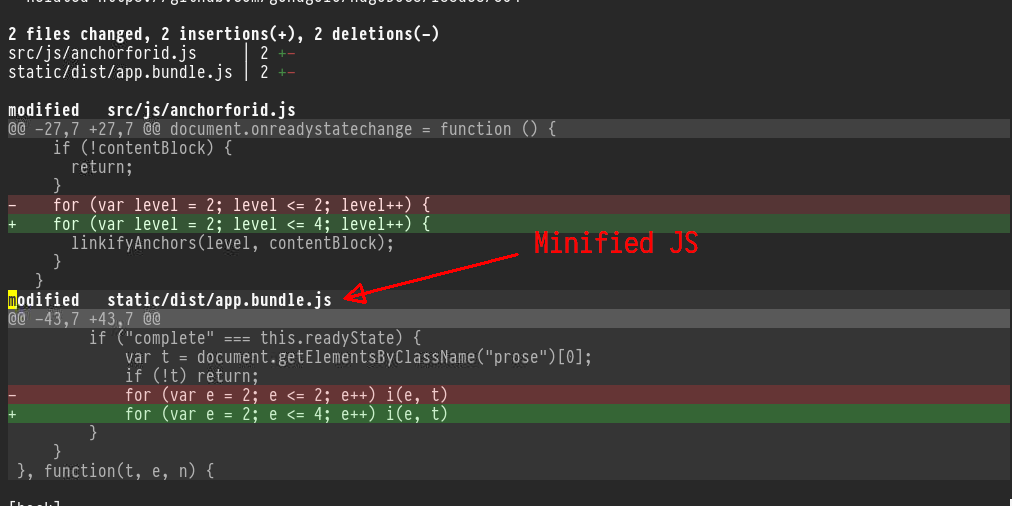
<p><a id="figure--git-diff-min-js"></a></p>


<figure>
    
        <img src="https://scripter.co/git-diff-minified-js-and-css/git-diff-minified-js.png" alt="Figure 1: git diff of minified JS as seen in Magit"/> <figcaption>
                <p>
                    <span class="figure-number">Figure 1: </span><code>git diff</code> of minified JS as seen in <em>Magit</em>
                    
                        
                        </p>
                
            </figcaption></figure>

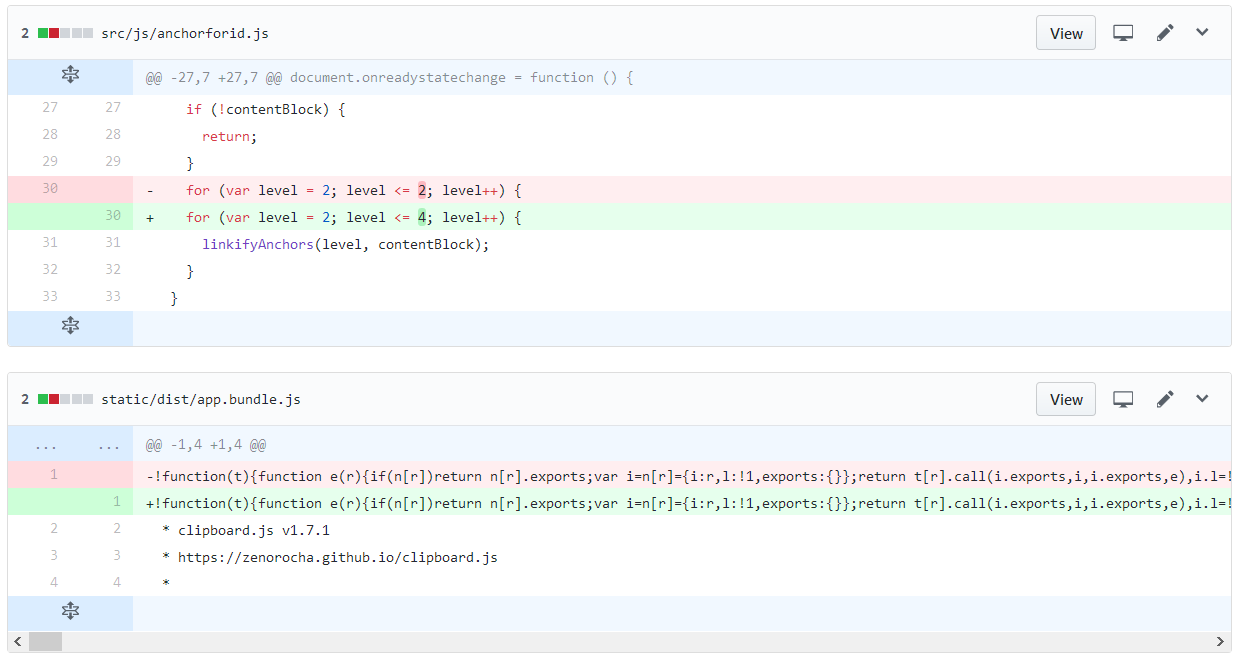
<p>Isn&rsquo;t that better than how GitHub shows the <em>exact same commit
diff</em>? 😎</p>
<p><a id="figure--github-diff-min-js"></a></p>


<figure>
    
        <img src="https://scripter.co/git-diff-minified-js-and-css/github-diff-minified-js.png" alt="Figure 2: Same commit diff shown on GitHub"/> <figcaption>
                <p>
                    <span class="figure-number">Figure 2: </span>Same commit <code>diff</code> shown on <em>GitHub</em>
                    
                        
                        </p>
                
            </figcaption></figure>

]]></content><category scheme="https://scripter.co/categories/web" term="web" label="web"/><category scheme="https://scripter.co/categories/unix" term="unix" label="unix"/><category scheme="https://scripter.co/tags/minified" term="minified" label="minified"/><category scheme="https://scripter.co/tags/javascript" term="javascript" label="javascript"/><category scheme="https://scripter.co/tags/git" term="git" label="git"/><category scheme="https://scripter.co/tags/diff" term="diff" label="diff"/><category scheme="https://scripter.co/tags/css" term="css" label="css"/><category scheme="https://scripter.co/tags/magit" term="magit" label="magit"/></entry></feed>