<?xml version="1.0" encoding="utf-8"?><feed xmlns="http://www.w3.org/2005/Atom" xml:lang="en-us"><generator uri="https://gohugo.io/" version="0.101.0">Hugo</generator><title type="html">css on A Scripter's Notes</title><subtitle type="html">Emacs, scripting and anything text oriented.</subtitle><link href="https://scripter.co/tags/css/" rel="alternate" type="text/html" title="HTML"/><link href="https://scripter.co/tags/css/index.xml" rel="alternate" type="application/rss+xml" title="RSS"/><link href="https://scripter.co/tags/css/atom.xml" rel="self" type="application/atom+xml" title="Atom"/><link href="https://scripter.co/tags/css/jf2feed.json" rel="alternate" type="application/jf2feed+json" title="jf2feed"/><updated>2026-04-22T08:24:57-04:00</updated><author><name>Kaushal Modi</name><email>kaushal.modi@gmail.com</email></author><id>https://scripter.co/tags/css/</id><entry><title type="html">Sidenotes using only CSS</title><link href="https://scripter.co/sidenotes-using-only-css/?utm_source=atom_feed" rel="alternate" type="text/html"/><link href="https://scripter.co/git-diff-minified-js-and-css/?utm_source=atom_feed" rel="related" type="text/html" title="Git diff Minified JS and CSS"/><id>https://scripter.co/sidenotes-using-only-css/</id><author><name>Kaushal Modi</name></author><published>2022-02-03T01:27:00-05:00</published><updated>2022-02-03T01:27:00-05:00</updated><content type="html"><![CDATA[<blockquote><p>Through the Mastodon-verse, one day I somehow landed on the amazing
website <a href="https://takeonrules.com/">https://takeonrules.com/</a> by Jeremy Friesen and I got motivated
to learn about sidenotes once again.</p>
<p>This post describes my fresh attempt at getting the sidenotes to work.</p>
</blockquote><div class="ox-hugo-toc toc">
<div class="heading">Table of Contents</div>
<ul>
<li><a href="#html-elements-for-sidenotes">HTML elements for sidenotes</a></li>
<li><a href="#basic-css">Basic CSS</a></li>
<li><a href="#sidenote-css">Sidenote CSS</a>
<ul>
<li><a href="#css-for-mobile-view-or-narrow-viewport">CSS for mobile view or narrow viewport</a></li>
</ul>
</li>
<li><a href="#sidenote-counter-css">Sidenote Counter CSS</a></li>
<li><a href="#things-to-improve">Things to improve</a></li>
<li><a href="#conclusion">Conclusion</a></li>
<li><a href="#more-references">More References</a></li>
</ul>
</div>
<!--endtoc-->
<p>I had dabbled into sidenotes CSS about three years back when I came
across <a href="https://fransdejonge.com/wp-content/uploads/2010/01/sidenotes.html">this blog post</a> by Frans de Jonge, but that attempt just stayed
in a git branch and never panned out.  This time, I was more
determined
<span class="sidenote-number"><small class="sidenote">
You need that kind of determination when you are working with CSS 😄
</small></span>
and I got to work by looking online for resources on <em>&ldquo;sidenotes using
CSS&rdquo;</em>, and my first stop was Kenneth Friedman&rsquo;s blog post on <a href="https://kennethfriedman.org/thoughts/2019/marginal-notes/">Marginal
Notes</a>.</p>
<p>I liked how the author introduced the basic steps for implementing
marginal notes&mdash;that you need to (i) restrict the width of the body
text so that you can fix the sidenotes, (ii) put the notes in a
special tag like <code>&lt;aside&gt;</code>, and (iii)<span class="org-target" id="org-target--kenneth-point-three"></span> add CSS
to push the <code>&lt;aside&gt;</code> tag content outside of the body text.</p>
<p>I really liked it because point (i) was already implemented on this
website.</p>
<p>I implemented the later two points using the examples on that blog
post, examples from few <a href="#org-target--more-sidenotes-references">more</a> blog posts and then a bit more of
fiddling with CSS on my own.</p>

<h2 id="html-elements-for-sidenotes">HTML elements for sidenotes&nbsp;<a class="headline-hash no-text-decoration" href="#html-elements-for-sidenotes">#</a></h2>


<p>Regarding point (ii) above, I later realized that using the <code>&lt;aside&gt;</code>
tag was a wrong choice for sidenotes. Hugo (or rather its Markdown
parser <em>Goldmark</em>) auto-wraps these tags in <code>&lt;p&gt;</code> and so we get forced
paragraph breaks around them.</p>
<p>That problem did not show up immediately. But once I started to get
the CSS sidenote counters
<span class="sidenote-number"><small class="sidenote">
<em>sidenote counters</em> allow you to easily find the sidenotes
corresponding to the those counter numbers referenced in the body
text. This is really helpful when you have a lot of sidenotes bunched
together.
</small></span>
to work, I saw that the reference counter numbers in the main text
would always jump to the next paragraph!  After few minutes .. OK
.. after a lot <strong>more</strong> minutes, after reviewing the generated HTML, and
comparing with the CSS seen on <a href="https://codepen.io/dredmorbius/details/OVmBaZ">various</a> <a href="https://takeonrules.com/about/">sites</a>, I realized that the
<code>&lt;aside&gt;</code> tag was the culprit!</p>
<p>Later, I find this <a href="https://danilafe.com/blog/sidenotes/">another blog post</a> which confirmed what I concluded
above:</p>
<blockquote>
<p>Markdown rendering generates <code>&lt;p&gt;</code> tags. According the to spec, <code>&lt;p&gt;</code>
tags cannot have a block element inside them. When you try to put a
block element, such as <code>&lt;div&gt;</code> inside <code>&lt;p&gt;</code>, the browser will
automatically close the <code>&lt;p&gt;</code> tag, breaking the rest of the page. So,
even though conceptually (and visually) the content of the sidenote is
a block, it has to be inside an inline element.</p>
</blockquote>
<p><mark>The solution was to use an inline HTML element <code>&lt;small&gt;</code> or
<code>&lt;span&gt;</code> for the sidenote content.</mark> <a id="code-snippet--sidenote-html-template"></a></p>
<div class="highlight"><pre tabindex="0" class="chroma"><code class="language-html" data-lang="html"><span class="line"><span class="cl"><span class="p">&lt;</span><span class="nt">span</span> <span class="na">class</span><span class="o">=</span><span class="s">&#34;sidenote-number&#34;</span><span class="p">&gt;</span>
</span></span><span class="line"><span class="cl">  <span class="p">&lt;</span><span class="nt">small</span> <span class="na">class</span><span class="o">=</span><span class="s">&#34;sidenote&#34;</span><span class="p">&gt;</span>
</span></span><span class="line"><span class="cl">    sidenote content
</span></span><span class="line"><span class="cl">  <span class="p">&lt;/</span><span class="nt">small</span><span class="p">&gt;</span>
</span></span><span class="line"><span class="cl"><span class="p">&lt;/</span><span class="nt">span</span><span class="p">&gt;</span>
</span></span></code></pre></div><div class="src-block-caption">
  <span class="src-block-number"><a href="#code-snippet--sidenote-html-template">Code Snippet 1</a>:</span>
  Sidenote HTML template
</div>
<p>The <span class="org-radio" id="org-radio--sidenote-element">sidenote element</span> that&rsquo;s referenced few times in this post is
the <code>&lt;small&gt;</code> HTML element with <code>sidenote</code> <em>class</em>.</p>

<h2 id="basic-css">Basic CSS&nbsp;<a class="headline-hash no-text-decoration" href="#basic-css">#</a></h2>


<p>Now to point <a href="#org-target--kenneth-point-three">(iii)</a> from Kenneth&rsquo;s blog ..</p>
<p>Here are my some key takeaways from his blog post:</p>
<ol>
<li>Use <code>float: right;</code>
<span class="sidenote-number"><small class="sidenote">
I used <code>float: left;</code> because I have the Table of Contents in the
right margin. I am going down the untrodden path of putting
sidenotes in the left margin.
</small></span>
to move the sidenote content to stick to the right side of its
parent HTML element.</li>
<li>Use <code>width: 20vw;</code>
<span class="sidenote-number"><small class="sidenote">
&ldquo;1vw&rdquo; = 1% of the width of the <em>viewport</em>, and &ldquo;viewport&rdquo; is the
browser window size.
</small></span>
to limit the width of the sidenotes in the margin. We don&rsquo;t want
the sidenotes to overflow into the body text.</li>
<li>Use <code>margin-right: -22vw;</code>
<span class="sidenote-number"><small class="sidenote">
I used <code>margin-left</code> instead.
</small></span>
to shift the whole sidenotes containing HTML element to outside the
body.</li>
<li>And finally, do <strong>not</strong> use the <code>&lt;aside&gt;</code> HTML element to contain the
sidenote content&mdash;Use an inline element like <code>&lt;small&gt;</code> instead.</li>
</ol>
<p>Now I&rsquo;ll dive into the details of the CSS code. Please bear with me
because I am not a web developer. These notes are mainly to document
the CSS for myself and to share what I learned. So I would welcome any
suggestions and corrections.</p>

<h2 id="sidenote-css">Sidenote CSS&nbsp;<a class="headline-hash no-text-decoration" href="#sidenote-css">#</a></h2>


<p>This is the basic CSS that puts the <a href="#org-radio--sidenote-element">sidenote element</a> in the margin to
the left of its container element.</p>
<p><a id="code-snippet--sidenote-css-wide-viewport"></a></p>
<div class="highlight"><div class="chroma">
<table class="lntable"><tr><td class="lntd">
<pre tabindex="0" class="chroma"><code><span class="lnt" id="org-coderef--1387e6-1"><a style="outline: none; text-decoration:none; color:inherit" href="#org-coderef--1387e6-1"> 1</a>
</span><span class="lnt" id="org-coderef--1387e6-2"><a style="outline: none; text-decoration:none; color:inherit" href="#org-coderef--1387e6-2"> 2</a>
</span><span class="lnt" id="org-coderef--1387e6-3"><a style="outline: none; text-decoration:none; color:inherit" href="#org-coderef--1387e6-3"> 3</a>
</span><span class="lnt" id="org-coderef--1387e6-4"><a style="outline: none; text-decoration:none; color:inherit" href="#org-coderef--1387e6-4"> 4</a>
</span><span class="lnt" id="org-coderef--1387e6-5"><a style="outline: none; text-decoration:none; color:inherit" href="#org-coderef--1387e6-5"> 5</a>
</span><span class="lnt" id="org-coderef--1387e6-6"><a style="outline: none; text-decoration:none; color:inherit" href="#org-coderef--1387e6-6"> 6</a>
</span><span class="lnt" id="org-coderef--1387e6-7"><a style="outline: none; text-decoration:none; color:inherit" href="#org-coderef--1387e6-7"> 7</a>
</span><span class="lnt" id="org-coderef--1387e6-8"><a style="outline: none; text-decoration:none; color:inherit" href="#org-coderef--1387e6-8"> 8</a>
</span><span class="lnt" id="org-coderef--1387e6-9"><a style="outline: none; text-decoration:none; color:inherit" href="#org-coderef--1387e6-9"> 9</a>
</span><span class="lnt" id="org-coderef--1387e6-10"><a style="outline: none; text-decoration:none; color:inherit" href="#org-coderef--1387e6-10">10</a>
</span><span class="lnt" id="org-coderef--1387e6-11"><a style="outline: none; text-decoration:none; color:inherit" href="#org-coderef--1387e6-11">11</a>
</span><span class="lnt" id="org-coderef--1387e6-12"><a style="outline: none; text-decoration:none; color:inherit" href="#org-coderef--1387e6-12">12</a>
</span><span class="lnt" id="org-coderef--1387e6-13"><a style="outline: none; text-decoration:none; color:inherit" href="#org-coderef--1387e6-13">13</a>
</span><span class="lnt" id="org-coderef--1387e6-14"><a style="outline: none; text-decoration:none; color:inherit" href="#org-coderef--1387e6-14">14</a>
</span><span class="lnt" id="org-coderef--1387e6-15"><a style="outline: none; text-decoration:none; color:inherit" href="#org-coderef--1387e6-15">15</a>
</span><span class="lnt" id="org-coderef--1387e6-16"><a style="outline: none; text-decoration:none; color:inherit" href="#org-coderef--1387e6-16">16</a>
</span><span class="lnt" id="org-coderef--1387e6-17"><a style="outline: none; text-decoration:none; color:inherit" href="#org-coderef--1387e6-17">17</a>
</span></code></pre></td>
<td class="lntd">
<pre tabindex="0" class="chroma"><code class="language-css" data-lang="css"><span class="line"><span class="cl"><span class="p">.</span><span class="nc">sidenote</span> <span class="p">{</span>
</span></span><span class="line"><span class="cl">    <span class="k">font-size</span><span class="p">:</span> <span class="mi">80</span><span class="kt">%</span><span class="p">;</span>
</span></span><span class="line"><span class="cl">    <span class="k">position</span><span class="p">:</span> <span class="kc">relative</span><span class="p">;</span>
</span></span><span class="line"><span class="cl"><span class="p">}</span>
</span></span><span class="line"><span class="cl"><span class="c">/* Wide viewport */</span>
</span></span><span class="line"><span class="cl"><span class="p">@</span><span class="k">media</span> <span class="o">(</span><span class="nt">min-width</span><span class="o">:</span> <span class="nt">1400px</span><span class="o">)</span> <span class="p">{</span>
</span></span><span class="line"><span class="cl">    <span class="p">.</span><span class="nc">sidenote</span> <span class="p">{</span>
</span></span><span class="line"><span class="cl">        <span class="k">float</span><span class="p">:</span> <span class="kc">left</span><span class="p">;</span>
</span></span><span class="line"><span class="cl">        <span class="k">clear</span><span class="p">:</span> <span class="kc">left</span><span class="p">;</span>
</span></span><span class="line"><span class="cl">        <span class="k">margin-left</span><span class="p">:</span> <span class="mi">-23</span><span class="kt">vw</span><span class="p">;</span>
</span></span><span class="line"><span class="cl">        <span class="k">text-align</span><span class="p">:</span> <span class="kc">right</span><span class="p">;</span>
</span></span><span class="line"><span class="cl">
</span></span><span class="line"><span class="cl">        <span class="k">top</span><span class="p">:</span> <span class="mi">-3</span><span class="kt">rem</span><span class="p">;</span>
</span></span><span class="line"><span class="cl">        <span class="k">width</span><span class="p">:</span> <span class="mi">20</span><span class="kt">vw</span><span class="p">;</span>
</span></span><span class="line"><span class="cl">        <span class="k">margin-top</span><span class="p">:</span> <span class="mi">1</span><span class="kt">rem</span><span class="p">;</span>
</span></span><span class="line"><span class="cl">    <span class="p">}</span>
</span></span><span class="line"><span class="cl"><span class="p">}</span>
</span></span></code></pre></td></tr></table>
</div>
</div><div class="src-block-caption">
  <span class="src-block-number"><a href="#code-snippet--sidenote-css-wide-viewport">Code Snippet 2</a>:</span>
  Sidenote CSS for normal or wide viewport
</div>
<ul>
<li>
<p><a href="#org-coderef--1387e6-2">Line 2</a> : Sidenote content font size is set to be
slighter smaller than the default body font size.</p>
</li>
<li>
<p><a href="#org-coderef--1387e6-3">Line 3</a> : The <code>position</code> specified <a href="#org-coderef--1387e6-13">later using <code>top</code></a>
is <em>relative</em> to the position of the element.</p>
</li>
<li>
<p><a href="#org-coderef--1387e6-6">Line 6</a> : For this website, when the browser window is
wider than 1400px, it&rsquo;s considered as <em>wide viewport</em>. The sidenotes
are shown in the margin only for wide viewports.</p>
</li>
<li>
<p><a href="#org-coderef--1387e6-8">Line 8</a> : The whole <a href="#org-radio--sidenote-element">sidenote element</a> is floated to the
left of the parent container.</p>
</li>
<li>
<p><a href="#org-coderef--1387e6-9">Line 9</a> : This is necessary to prevent adjacent sidenotes
from overlapping. <a href="https://dev.to/neshaz/explanation-of-the-css-clear-float-property-examples-5hd2">This blog post</a> puts it nicely:</p>
<blockquote>
<p>If an element can fit in the horizontal space next to the floated
elements, <em>it will</em>. Unless you apply the <code>clear</code> property to that
element in the
<mark>same direction as the float.</mark> Then the element will move below the floated elements.</p>
</blockquote>
</li>
<li>
<p><a href="#org-coderef--1387e6-10">Line 10</a> : The <code>float</code> moves the <a href="#org-radio--sidenote-element">sidenote element</a> to
the left most side of the container. But the margin is still further
left to that container&rsquo;s left border. So the <code>margin-left: -&lt;val&gt;;</code>
shifts the <a href="#org-radio--sidenote-element">sidenote element</a> <code>&lt;val&gt;</code> units
<mark>further left to the container&rsquo;s left border.</mark></p>
</li>
<li>
<p><a href="#org-coderef--1387e6-11">Line 11</a> : As the sidenote is floating in the left
margin, I wanted the text to the aligned towards
<span class="sidenote-number"><small class="sidenote">
Towards the right ⇶ in <em>wide</em> viewport, but it&rsquo;s left-aligned in
<em>narrow</em> viewport as you&rsquo;ll see in the CSS snippet for narrow
viewport.
</small></span>
the body text.</p>
</li>
<li>
<p><a href="#org-coderef--1387e6-14">Line 14</a> : The <code>width</code> limits the width of the &ldquo;sidenotes
column&rdquo; that gets created in the left margin.</p>
</li>
<li>
<p><a href="#org-coderef--1387e6-15">Line 15</a> : The <code>margin_top: 1rem;</code> is just an
embellishment tweak that inserts a <em>1rem</em> space between adjacent
sidenotes if they happen to get packed too close vertically.</p>
</li>
</ul>

<h3 id="css-for-mobile-view-or-narrow-viewport">CSS for mobile view or narrow viewport&nbsp;<a class="headline-hash no-text-decoration" href="#css-for-mobile-view-or-narrow-viewport">#</a></h3>


<p>On a narrow viewport like a phone, we cannot afford to display a wide
margin just for showing the sidenotes. So I interleave the sidenotes
within the body, but with some indentation on the left (<a href="#org-coderef--9b2ea7-9">line
9 below</a>).</p>
<p>As the sidenotes are within the body, they are still floated to the
left, but now the text is aligned to the <a href="#org-coderef--9b2ea7-5">left</a> instead of right. The
<a href="#org-coderef--9b2ea7-7">width</a> is set to 100% so that the text following the sidenote gets
pushed to below it.
<span class="sidenote-number"><small class="sidenote">
This part feels like a hack. So if someone can suggest a canonical way
to deal with this, please let me know.
</small></span>
<a id="code-snippet--sidenote-css-narrow-viewport"></a></p>
<div class="highlight"><div class="chroma">
<table class="lntable"><tr><td class="lntd">
<pre tabindex="0" class="chroma"><code><span class="lnt" id="org-coderef--9b2ea7-1"><a style="outline: none; text-decoration:none; color:inherit" href="#org-coderef--9b2ea7-1"> 1</a>
</span><span class="lnt" id="org-coderef--9b2ea7-2"><a style="outline: none; text-decoration:none; color:inherit" href="#org-coderef--9b2ea7-2"> 2</a>
</span><span class="lnt" id="org-coderef--9b2ea7-3"><a style="outline: none; text-decoration:none; color:inherit" href="#org-coderef--9b2ea7-3"> 3</a>
</span><span class="lnt" id="org-coderef--9b2ea7-4"><a style="outline: none; text-decoration:none; color:inherit" href="#org-coderef--9b2ea7-4"> 4</a>
</span><span class="lnt" id="org-coderef--9b2ea7-5"><a style="outline: none; text-decoration:none; color:inherit" href="#org-coderef--9b2ea7-5"> 5</a>
</span><span class="lnt" id="org-coderef--9b2ea7-6"><a style="outline: none; text-decoration:none; color:inherit" href="#org-coderef--9b2ea7-6"> 6</a>
</span><span class="lnt" id="org-coderef--9b2ea7-7"><a style="outline: none; text-decoration:none; color:inherit" href="#org-coderef--9b2ea7-7"> 7</a>
</span><span class="lnt" id="org-coderef--9b2ea7-8"><a style="outline: none; text-decoration:none; color:inherit" href="#org-coderef--9b2ea7-8"> 8</a>
</span><span class="lnt" id="org-coderef--9b2ea7-9"><a style="outline: none; text-decoration:none; color:inherit" href="#org-coderef--9b2ea7-9"> 9</a>
</span><span class="lnt" id="org-coderef--9b2ea7-10"><a style="outline: none; text-decoration:none; color:inherit" href="#org-coderef--9b2ea7-10">10</a>
</span><span class="lnt" id="org-coderef--9b2ea7-11"><a style="outline: none; text-decoration:none; color:inherit" href="#org-coderef--9b2ea7-11">11</a>
</span></code></pre></td>
<td class="lntd">
<pre tabindex="0" class="chroma"><code class="language-css" data-lang="css"><span class="line"><span class="cl"><span class="c">/* Narrow viewport */</span>
</span></span><span class="line"><span class="cl"><span class="p">@</span><span class="k">media</span> <span class="o">(</span><span class="nt">max-width</span><span class="o">:</span> <span class="nt">1400px</span><span class="o">)</span> <span class="p">{</span>
</span></span><span class="line"><span class="cl">    <span class="p">.</span><span class="nc">sidenote</span> <span class="p">{</span>
</span></span><span class="line"><span class="cl">        <span class="k">float</span><span class="p">:</span> <span class="kc">left</span><span class="p">;</span>
</span></span><span class="line"><span class="cl">        <span class="k">text-align</span><span class="p">:</span> <span class="kc">left</span><span class="p">;</span>
</span></span><span class="line"><span class="cl">
</span></span><span class="line"><span class="cl">        <span class="k">width</span><span class="p">:</span> <span class="mi">100</span><span class="kt">%</span><span class="p">;</span>
</span></span><span class="line"><span class="cl">        <span class="k">margin</span><span class="p">:</span> <span class="mi">1</span><span class="kt">rem</span> <span class="mi">0</span><span class="p">;</span>
</span></span><span class="line"><span class="cl">        <span class="k">padding-left</span><span class="p">:</span> <span class="mi">15</span><span class="kt">%</span><span class="p">;</span>
</span></span><span class="line"><span class="cl">    <span class="p">}</span>
</span></span><span class="line"><span class="cl"><span class="p">}</span>
</span></span></code></pre></td></tr></table>
</div>
</div><div class="src-block-caption">
  <span class="src-block-number"><a href="#code-snippet--sidenote-css-narrow-viewport">Code Snippet 3</a>:</span>
  Sidenote CSS for mobile or narrow viewport
</div>

<h2 id="sidenote-counter-css">Sidenote Counter CSS&nbsp;<a class="headline-hash no-text-decoration" href="#sidenote-counter-css">#</a></h2>


<p>The sidenote counters are implemented using just CSS.
<span class="sidenote-number"><small class="sidenote">
Thanks to <a href="https://codepen.io/dredmorbius/details/OVmBaZ">this codepen</a> by a user <em>dredmorbius</em> and the CSS on
<em>takeonrules.com</em>!
</small></span></p>
<p>Let&rsquo;s look at the sidenote HTML once again, but this time with some
annotation to help understand how the counter number placement works
in the body text and next to the sidenote in the margin.</p>
<p><a id="code-snippet--sidenote-html-annotated"></a></p>
<div class="highlight"><pre tabindex="0" class="chroma"><code class="language-html" data-lang="html"><span class="line"><span class="cl"><span class="p">&lt;</span><span class="nt">span</span> <span class="na">class</span><span class="o">=</span><span class="s">&#34;sidenote-number&#34;</span><span class="p">&gt;</span>❶.sidenote-number  INCREMENT COUNTER
</span></span><span class="line"><span class="cl">  <span class="p">&lt;</span><span class="nt">small</span> <span class="na">class</span><span class="o">=</span><span class="s">&#34;sidenote&#34;</span><span class="p">&gt;</span>❷.sidenote::before     COUNTER IN MARGIN
</span></span><span class="line"><span class="cl">    sidenote content
</span></span><span class="line"><span class="cl">  <span class="p">&lt;/</span><span class="nt">small</span><span class="p">&gt;</span>❸.sidenote-number::after               REF COUNTER IN BODY
</span></span><span class="line"><span class="cl"><span class="p">&lt;/</span><span class="nt">span</span><span class="p">&gt;</span>
</span></span></code></pre></div><div class="src-block-caption">
  <span class="src-block-number"><a href="#code-snippet--sidenote-html-annotated">Code Snippet 4</a>:</span>
  Sidenote HTML with annotation
</div>
<p>The sidenote counters need to be <a href="#org-coderef--1a233c-3">reset</a> in the <code>body</code> element so that
they always begin from 1 on each page.</p>
<p>From the <a href="#code-snippet--sidenote-html-annotated">above annotated HTML</a>, ❶ is the <code>.sidenote-number</code> element
that wraps both of the sidenote counter locations: one in the body
which acts as sidenote reference, and another in the margin next to
the sidenote. So the counter is <a href="#org-coderef--1a233c-6">incremented</a> only once at each
<code>.sidenote-number</code> element.</p>
<p>❷ is the point where the <a href="#org-coderef--1a233c-9"><code>.sidenote::before</code></a> CSS rule will render the
counter number <em>before</em> the sidenote content. As the <code>.sidenote</code>
element is pushed into the margin, this counter number will also be
pushed out along with the sidenote.</p>
<p>And finally, ❸ is the point that still remains at its original place
within the main body. This is where the refernce counter value gets
rendered. The <a href="#org-coderef--1a233c-17"><code>.sidenote-number::after</code></a> CSS rule is responsible for
this.</p>
<p><a id="code-snippet--sidenote-counter-css-1"></a></p>
<div class="highlight"><div class="chroma">
<table class="lntable"><tr><td class="lntd">
<pre tabindex="0" class="chroma"><code><span class="lnt" id="org-coderef--1a233c-1"><a style="outline: none; text-decoration:none; color:inherit" href="#org-coderef--1a233c-1"> 1</a>
</span><span class="lnt" id="org-coderef--1a233c-2"><a style="outline: none; text-decoration:none; color:inherit" href="#org-coderef--1a233c-2"> 2</a>
</span><span class="lnt" id="org-coderef--1a233c-3"><a style="outline: none; text-decoration:none; color:inherit" href="#org-coderef--1a233c-3"> 3</a>
</span><span class="lnt" id="org-coderef--1a233c-4"><a style="outline: none; text-decoration:none; color:inherit" href="#org-coderef--1a233c-4"> 4</a>
</span><span class="lnt" id="org-coderef--1a233c-5"><a style="outline: none; text-decoration:none; color:inherit" href="#org-coderef--1a233c-5"> 5</a>
</span><span class="lnt" id="org-coderef--1a233c-6"><a style="outline: none; text-decoration:none; color:inherit" href="#org-coderef--1a233c-6"> 6</a>
</span><span class="lnt" id="org-coderef--1a233c-7"><a style="outline: none; text-decoration:none; color:inherit" href="#org-coderef--1a233c-7"> 7</a>
</span><span class="lnt" id="org-coderef--1a233c-8"><a style="outline: none; text-decoration:none; color:inherit" href="#org-coderef--1a233c-8"> 8</a>
</span><span class="lnt" id="org-coderef--1a233c-9"><a style="outline: none; text-decoration:none; color:inherit" href="#org-coderef--1a233c-9"> 9</a>
</span><span class="lnt" id="org-coderef--1a233c-10"><a style="outline: none; text-decoration:none; color:inherit" href="#org-coderef--1a233c-10">10</a>
</span><span class="lnt" id="org-coderef--1a233c-11"><a style="outline: none; text-decoration:none; color:inherit" href="#org-coderef--1a233c-11">11</a>
</span><span class="lnt" id="org-coderef--1a233c-12"><a style="outline: none; text-decoration:none; color:inherit" href="#org-coderef--1a233c-12">12</a>
</span><span class="lnt" id="org-coderef--1a233c-13"><a style="outline: none; text-decoration:none; color:inherit" href="#org-coderef--1a233c-13">13</a>
</span><span class="lnt" id="org-coderef--1a233c-14"><a style="outline: none; text-decoration:none; color:inherit" href="#org-coderef--1a233c-14">14</a>
</span><span class="lnt" id="org-coderef--1a233c-15"><a style="outline: none; text-decoration:none; color:inherit" href="#org-coderef--1a233c-15">15</a>
</span><span class="lnt" id="org-coderef--1a233c-16"><a style="outline: none; text-decoration:none; color:inherit" href="#org-coderef--1a233c-16">16</a>
</span><span class="lnt" id="org-coderef--1a233c-17"><a style="outline: none; text-decoration:none; color:inherit" href="#org-coderef--1a233c-17">17</a>
</span><span class="lnt" id="org-coderef--1a233c-18"><a style="outline: none; text-decoration:none; color:inherit" href="#org-coderef--1a233c-18">18</a>
</span><span class="lnt" id="org-coderef--1a233c-19"><a style="outline: none; text-decoration:none; color:inherit" href="#org-coderef--1a233c-19">19</a>
</span><span class="lnt" id="org-coderef--1a233c-20"><a style="outline: none; text-decoration:none; color:inherit" href="#org-coderef--1a233c-20">20</a>
</span><span class="lnt" id="org-coderef--1a233c-21"><a style="outline: none; text-decoration:none; color:inherit" href="#org-coderef--1a233c-21">21</a>
</span><span class="lnt" id="org-coderef--1a233c-22"><a style="outline: none; text-decoration:none; color:inherit" href="#org-coderef--1a233c-22">22</a>
</span><span class="lnt" id="org-coderef--1a233c-23"><a style="outline: none; text-decoration:none; color:inherit" href="#org-coderef--1a233c-23">23</a>
</span></code></pre></td>
<td class="lntd">
<pre tabindex="0" class="chroma"><code class="language-css" data-lang="css"><span class="line"><span class="cl"><span class="c">/* Sidenote counter */</span>
</span></span><span class="line"><span class="cl"><span class="nt">body</span> <span class="p">{</span>
</span></span><span class="line"><span class="cl">    <span class="k">counter-reset</span><span class="p">:</span> <span class="n">sidenote-counter</span><span class="p">;</span>
</span></span><span class="line"><span class="cl"><span class="p">}</span>
</span></span><span class="line"><span class="cl"><span class="p">.</span><span class="nc">sidenote-number</span> <span class="p">{</span>
</span></span><span class="line"><span class="cl">    <span class="k">counter-increment</span><span class="p">:</span> <span class="n">sidenote-counter</span><span class="p">;</span>
</span></span><span class="line"><span class="cl"><span class="p">}</span>
</span></span><span class="line"><span class="cl"><span class="c">/* Counter before the sidenote in the margin. */</span>
</span></span><span class="line"><span class="cl"><span class="p">.</span><span class="nc">sidenote</span><span class="p">::</span><span class="nd">before</span> <span class="p">{</span>
</span></span><span class="line"><span class="cl">    <span class="k">content</span><span class="p">:</span> <span class="nb">counter</span><span class="p">(</span><span class="n">sidenote</span><span class="o">-</span><span class="n">counter</span><span class="p">)</span><span class="s2">&#34;.&#34;</span><span class="p">;</span>
</span></span><span class="line"><span class="cl">    <span class="k">position</span><span class="p">:</span> <span class="kc">relative</span><span class="p">;</span>
</span></span><span class="line"><span class="cl">    <span class="k">vertical-align</span><span class="p">:</span> <span class="kc">baseline</span><span class="p">;</span>
</span></span><span class="line"><span class="cl">    <span class="k">font-size</span><span class="p">:</span> <span class="mf">0.9</span><span class="kt">em</span><span class="p">;</span>
</span></span><span class="line"><span class="cl">    <span class="k">font-weight</span><span class="p">:</span> <span class="kc">bold</span><span class="p">;</span>
</span></span><span class="line"><span class="cl"><span class="p">}</span>
</span></span><span class="line"><span class="cl"><span class="c">/* Counter in the main body. */</span>
</span></span><span class="line"><span class="cl"><span class="p">.</span><span class="nc">sidenote-number</span><span class="p">::</span><span class="nd">after</span> <span class="p">{</span>
</span></span><span class="line"><span class="cl">    <span class="k">content</span><span class="p">:</span> <span class="nb">counter</span><span class="p">(</span><span class="n">sidenote</span><span class="o">-</span><span class="n">counter</span><span class="p">);</span>
</span></span><span class="line"><span class="cl">    <span class="k">vertical-align</span><span class="p">:</span> <span class="kc">super</span><span class="p">;</span>
</span></span><span class="line"><span class="cl">    <span class="k">font-size</span><span class="p">:</span> <span class="mf">0.7</span><span class="kt">em</span><span class="p">;</span>
</span></span><span class="line"><span class="cl">    <span class="k">font-weight</span><span class="p">:</span> <span class="kc">bold</span><span class="p">;</span>
</span></span><span class="line"><span class="cl">    <span class="k">margin-right</span><span class="p">:</span> <span class="mf">0.5</span><span class="kt">rem</span><span class="p">;</span>
</span></span><span class="line"><span class="cl"><span class="p">}</span>
</span></span></code></pre></td></tr></table>
</div>
</div><div class="src-block-caption">
  <span class="src-block-number"><a href="#code-snippet--sidenote-counter-css-1">Code Snippet 5</a>:</span>
  Sidenote Counter CSS
</div>
<p>This final CSS snippet is responsible for highlighting the
corresponding sidenote in the margin when mouse is hovered over a
sidenote reference counter number in the body.</p>
<p><a id="code-snippet--sidenote-css-highlight"></a></p>
<div class="highlight"><pre tabindex="0" class="chroma"><code class="language-css" data-lang="css"><span class="line"><span class="cl"><span class="p">@</span><span class="k">media</span> <span class="o">(</span><span class="nt">min-width</span><span class="o">:</span> <span class="nt">1400px</span><span class="o">)</span> <span class="p">{</span>
</span></span><span class="line"><span class="cl">    <span class="c">/* Highlight the sidenote when mouse hovers on the sidenote number in body. */</span>
</span></span><span class="line"><span class="cl">    <span class="p">.</span><span class="nc">sidenote-number</span><span class="p">:</span><span class="nd">hover</span> <span class="p">.</span><span class="nc">sidenote</span> <span class="p">{</span>
</span></span><span class="line"><span class="cl">        <span class="k">background-color</span><span class="p">:</span> <span class="kc">yellow</span><span class="p">;</span>
</span></span><span class="line"><span class="cl">    <span class="p">}</span>
</span></span><span class="line"><span class="cl"><span class="p">}</span>
</span></span></code></pre></div><div class="src-block-caption">
  <span class="src-block-number"><a href="#code-snippet--sidenote-css-highlight">Code Snippet 6</a>:</span>
  Sidenote CSS Highlight
</div>

<h2 id="things-to-improve">Things to improve&nbsp;<a class="headline-hash no-text-decoration" href="#things-to-improve">#</a></h2>


<p>While <a href="#org-coderef--1387e6-8">floating the sidenotes to the left</a> moves them into the left
margin, that aligns the left border of all the sidenotes to the left
side of the page.</p>
<p>What I really wanted to do is to:</p>
<ol>
<li>Move the sidenotes into the left margin.</li>
<li>Align the
<mark>right border</mark> of all the sidenotes in a straight line with the left border of the
body text.<sup id="fnref:1"><a href="#fn:1" class="footnote-ref" role="doc-noteref">1</a></sup></li>
</ol>

<h2 id="conclusion">Conclusion&nbsp;<a class="headline-hash no-text-decoration" href="#conclusion">#</a></h2>


<p>That said, I am quite happy with the way the sidenotes and the
counters turned out.</p>

<h2 id="more-references">More References&nbsp;<a class="headline-hash no-text-decoration" href="#more-references">#</a></h2>


<p><span class="org-target" id="org-target--more-sidenotes-references"></span> Apart from the references already linked
in this post, here are few other references for creating sidenotes
using CSS that I came across during my research:</p>
<ul>
<li><a href="https://www.kooslooijesteijn.net/blog/sidenotes-without-js">Sidenotes without javascript with accessibility coding</a></li>
<li><a href="https://www.gwern.net/Sidenotes">gwern.net &ndash; Sidenotes</a></li>
</ul>
<div class="footnotes" role="doc-endnotes">
<hr>
<ol>
<li id="fn:1">
<p>I already tried changing <a href="#org-coderef--1387e6-8"><code>float: left;</code></a> to <code>float: right;</code> and
<a href="#org-coderef--1387e6-10"><code>margin-left: -23vw;</code></a> to <code>margin-right: 50vw;</code> but that has an
undesirable effect what I don&rsquo;t understand why&mdash;Now the sidenotes
occupy the entire vertical space, even the part in the body.&#160;<a href="#fnref:1" class="footnote-backref" role="doc-backlink">&#x21a9;&#xfe0e;</a></p>
</li>
</ol>
</div>
]]></content><category scheme="https://scripter.co/categories/web" term="web" label="web"/><category scheme="https://scripter.co/series/sidenotes" term="sidenotes" label="Sidenotes"/><category scheme="https://scripter.co/tags/sidenotes" term="sidenotes" label="sidenotes"/><category scheme="https://scripter.co/tags/css" term="css" label="css"/><category scheme="https://scripter.co/tags/100daystooffload" term="100daystooffload" label="100DaysToOffload"/></entry><entry><title type="html">Git diff Minified JS and CSS</title><link href="https://scripter.co/git-diff-minified-js-and-css/?utm_source=atom_feed" rel="alternate" type="text/html"/><link href="https://scripter.co/narrowing-the-author-column-in-magit/?utm_source=atom_feed" rel="related" type="text/html" title="Narrowing the Author column in Magit"/><id>https://scripter.co/git-diff-minified-js-and-css/</id><author><name>Kaushal Modi</name></author><published>2018-03-19T18:13:00-04:00</published><updated>2018-03-19T18:13:00-04:00</updated><content type="html"><![CDATA[<blockquote>Make the <code>git diff</code> output be more useful when diffing minified <em>.js</em>
and <em>.css</em> files.</blockquote><div class="ox-hugo-toc toc has-section-numbers">
<div class="heading">Table of Contents</div>
<ul>
<li><span class="section-num">1</span> <a href="#install-js-beautify-using-npm">Install <code>js-beautify</code> using <code>npm</code></a></li>
<li><span class="section-num">2</span> <a href="#configure-git-to-use-that-tool">Configure <code>git</code> to use that tool</a></li>
<li><span class="section-num">3</span> <a href="#add-update-dot-gitattributes-file-to-the-project-repo">Add/update <code>.gitattributes</code> file to the project repo</a></li>
<li><a href="#beautiful-result">Beautiful Result</a></li>
</ul>
</div>
<!--endtoc-->
<p>While working on a <a href="https://github.com/gohugoio/gohugoioTheme/pull/84">little PR for the Hugo doc site theme</a>, I learned
that if I needed to make changes to JS/CSS, I had to commit my changes
in both unminified and minified versions.</p>
<p>I have a habit to always look at the diffs at the time of staging and
committing. So it felt very unnatural to commit a minified JS where
the diff would show just <strong>one</strong> changed line with thousands of
characters of minified+uglified JS.</p>
<p>So I started looking for solutions, and found <a href="https://cweiske.de/tagebuch/git-diff-minified-js.htm">this post</a> by <em>Christian
Weiske</em> where he suggests using <a href="https://github.com/beautify-web/js-beautify"><code>js-beautify</code></a> to <em>beautify</em> minified
JS diffs.</p>
<div class="verse">
<p>    <em>And that tool works beautifully!</em><br /></p>
</div>
<ul>
<li>I later found out that the same tool can also be used to <em>beautify</em>
minified CSS.</li>
<li>.. and I installed that tool using <code>npm</code> as the <code>pip3</code> approach
failed with <em>&ldquo;Collecting js-beautify.. Could not find a version that
satisfies the requirement js-beautify (from versions: ) No matching
distribution found for js-beautify&rdquo;</em>.</li>
</ul>
<p>So here&rsquo;s how you can do useful <code>git diff</code> for minified JS and CSS.</p>

<h2 id="install-js-beautify-using-npm"><span class="section-num">1</span> Install <code>js-beautify</code> using <code>npm</code>&nbsp;<a class="headline-hash no-text-decoration" href="#install-js-beautify-using-npm">#</a></h2>


<p>I see myself using <code>js-beautify</code> in many other projects too. So I
installed it globally.</p>
<div class="highlight"><pre tabindex="0" class="chroma"><code class="language-text" data-lang="text"><span class="line"><span class="cl">npm install --global js-beautify
</span></span></code></pre></div>
<h2 id="configure-git-to-use-that-tool"><span class="section-num">2</span> Configure <code>git</code> to use that tool&nbsp;<a class="headline-hash no-text-decoration" href="#configure-git-to-use-that-tool">#</a></h2>


<p>Add below to your <code>~/.gitconfig</code>:</p>
<ol>
<li>Use <code>js-beautify</code> to first beautify the minified JS for the <code>minjs</code>
<em>diff configuration</em>, and then do a diff of those beautified files.</li>
<li>Enable caching of those beautified files to speed up the diff, so
that <em>re-beautification</em> of unmodified minified files can be
skipped.</li>
<li>Similarly for minified CSS, use <code>js-beautify --css</code> to first
beautify the minified CSS for the <code>mincss</code> <em>diff configuration</em>.</li>
</ol>
<!--listend-->
<div class="highlight"><pre tabindex="0" class="chroma"><code class="language-ini" data-lang="ini"><span class="line"><span class="cl"><span class="k">[diff &#34;minjs&#34;]</span>
</span></span><span class="line"><span class="cl">    <span class="na">textconv</span> <span class="o">=</span> <span class="s">js-beautify
</span></span></span><span class="line"><span class="cl"><span class="s">    cachetextconv = true</span>
</span></span><span class="line"><span class="cl"><span class="k">[diff &#34;mincss&#34;]</span>
</span></span><span class="line"><span class="cl">    <span class="na">textconv</span> <span class="o">=</span> <span class="s">js-beautify --css
</span></span></span><span class="line"><span class="cl"><span class="s">    cachetextconv = true</span>
</span></span></code></pre></div>
<h2 id="add-update-dot-gitattributes-file-to-the-project-repo"><span class="section-num">3</span> Add/update <code>.gitattributes</code> file to the project repo&nbsp;<a class="headline-hash no-text-decoration" href="#add-update-dot-gitattributes-file-to-the-project-repo">#</a></h2>


<p>Now, in your project repo&rsquo;s <code>.gitattributes</code> file, you need to
associate files with the <em>diff configurations</em> set above.</p>
<p>Below will use the <code>minjs</code> configuration for <em>*.min.js</em> and
<em>*.bundle.js</em> files, and <code>mincss</code> configuration for <em>*.min.css</em> and
<em>main.css</em>.</p>
<div class="highlight"><pre tabindex="0" class="chroma"><code class="language-ini" data-lang="ini"><span class="line"><span class="cl"><span class="na">*.min.js diff</span><span class="o">=</span><span class="s">minjs</span>
</span></span><span class="line"><span class="cl"><span class="na">*.bundle.js diff</span><span class="o">=</span><span class="s">minjs</span>
</span></span><span class="line"><span class="cl"><span class="na">*.min.css diff</span><span class="o">=</span><span class="s">mincss</span>
</span></span><span class="line"><span class="cl"><span class="na">main.css diff</span><span class="o">=</span><span class="s">mincss</span>
</span></span></code></pre></div>
<h2 id="beautiful-result">Beautiful Result&nbsp;<a class="headline-hash no-text-decoration" href="#beautiful-result">#</a></h2>


<p><a id="figure--git-diff-min-js"></a></p>


<figure>
    
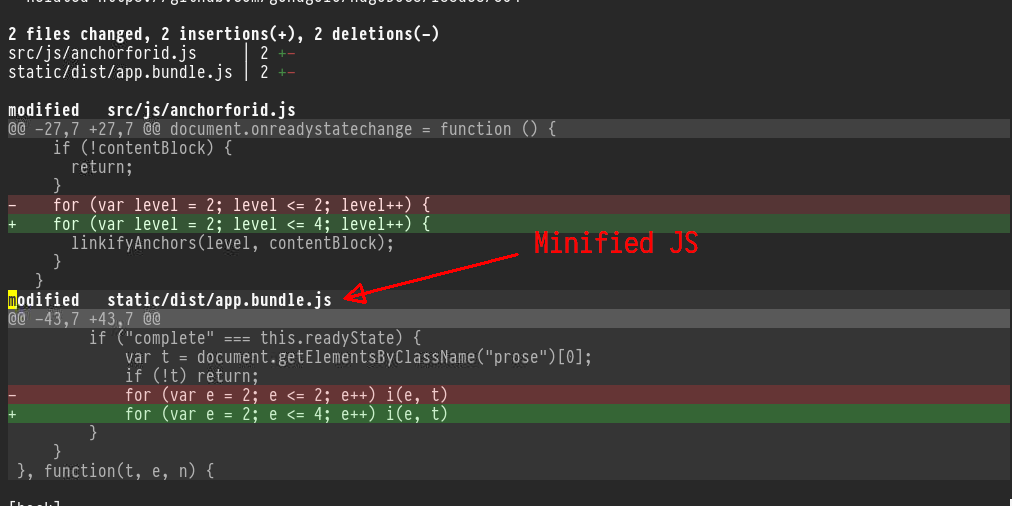
        <img src="https://scripter.co/git-diff-minified-js-and-css/git-diff-minified-js.png" alt="Figure 1: git diff of minified JS as seen in Magit"/> <figcaption>
                <p>
                    <span class="figure-number">Figure 1: </span><code>git diff</code> of minified JS as seen in <em>Magit</em>
                    
                        
                        </p>
                
            </figcaption></figure>

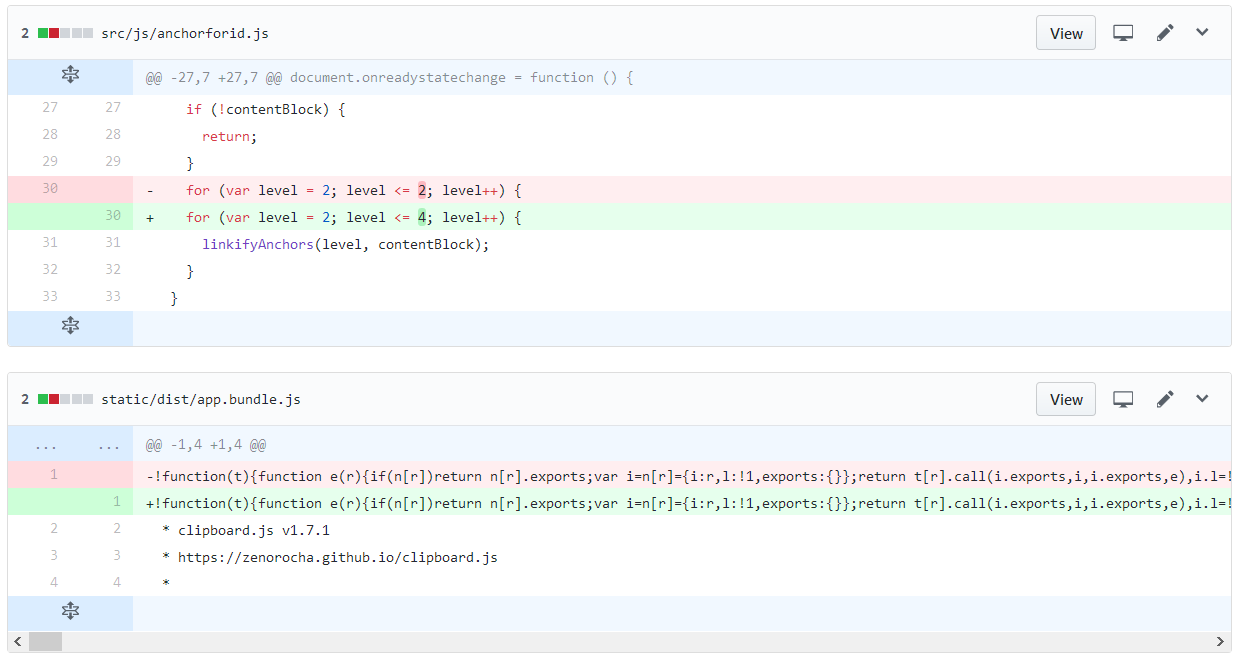
<p>Isn&rsquo;t that better than how GitHub shows the <em>exact same commit
diff</em>? 😎</p>
<p><a id="figure--github-diff-min-js"></a></p>


<figure>
    
        <img src="https://scripter.co/git-diff-minified-js-and-css/github-diff-minified-js.png" alt="Figure 2: Same commit diff shown on GitHub"/> <figcaption>
                <p>
                    <span class="figure-number">Figure 2: </span>Same commit <code>diff</code> shown on <em>GitHub</em>
                    
                        
                        </p>
                
            </figcaption></figure>

]]></content><category scheme="https://scripter.co/categories/web" term="web" label="web"/><category scheme="https://scripter.co/categories/unix" term="unix" label="unix"/><category scheme="https://scripter.co/tags/minified" term="minified" label="minified"/><category scheme="https://scripter.co/tags/javascript" term="javascript" label="javascript"/><category scheme="https://scripter.co/tags/git" term="git" label="git"/><category scheme="https://scripter.co/tags/diff" term="diff" label="diff"/><category scheme="https://scripter.co/tags/css" term="css" label="css"/><category scheme="https://scripter.co/tags/magit" term="magit" label="magit"/></entry></feed>