<?xml version="1.0" encoding="utf-8"?><feed xmlns="http://www.w3.org/2005/Atom" xml:lang="en-us"><generator uri="https://gohugo.io/" version="0.101.0">Hugo</generator><title type="html">add-on on A Scripter's Notes</title><subtitle type="html">Emacs, scripting and anything text oriented.</subtitle><link href="https://scripter.co/tags/add-on/" rel="alternate" type="text/html" title="HTML"/><link href="https://scripter.co/tags/add-on/index.xml" rel="alternate" type="application/rss+xml" title="RSS"/><link href="https://scripter.co/tags/add-on/atom.xml" rel="self" type="application/atom+xml" title="Atom"/><link href="https://scripter.co/tags/add-on/jf2feed.json" rel="alternate" type="application/jf2feed+json" title="jf2feed"/><updated>2026-04-22T08:24:57-04:00</updated><author><name>Kaushal Modi</name><email>kaushal.modi@gmail.com</email></author><id>https://scripter.co/tags/add-on/</id><entry><title type="html">Firefox: Always open a New Tab after Current</title><link href="https://scripter.co/firefox-always-open-a-new-tab-after-current/?utm_source=atom_feed" rel="alternate" type="text/html"/><link href="https://scripter.co/unclutter-a-better-reader-view-for-browsers/?utm_source=atom_feed" rel="related" type="text/html" title="Unclutter: A better Reader View for browsers"/><link href="https://scripter.co/saving-python-pip-dependencies/?utm_source=atom_feed" rel="related" type="text/html" title="Saving Python pip dependencies"/><link href="https://scripter.co/disarming-the-tar-bomb-in-10-seconds/?utm_source=atom_feed" rel="related" type="text/html" title="Disarming the 'tar' bomb in 10 seconds"/><link href="https://scripter.co/zero-html-validation-errors/?utm_source=atom_feed" rel="related" type="text/html" title="Zero HTML Validation Errors!"/><link href="https://scripter.co/offline-html5-validator/?utm_source=atom_feed" rel="related" type="text/html" title="Offline HTML5 Validator"/><id>https://scripter.co/firefox-always-open-a-new-tab-after-current/</id><author><name>Kaushal Modi</name></author><published>2022-06-15T02:08:00-04:00</published><updated>2022-06-15T02:08:00-04:00</updated><content type="html"><![CDATA[<blockquote>The default behavior of Firefox opening new tabs from links had been
troubling me for a while .. it was time I tried to do something about
it.</blockquote><div class="ox-hugo-toc toc">
<div class="heading">Table of Contents</div>
<ul>
<li><a href="#the-issue">The Issue</a></li>
<li><a href="#expected-behavior">Expected Behavior</a></li>
<li><a href="#false-leads">False Leads</a></li>
<li><a href="#firefox-bug-1485683">Firefox Bug # 1485683</a></li>
<li><a href="#solution">Solution</a></li>
</ul>
</div>
<!--endtoc-->
<p>This was one of the those little things in software that bug me, but I
don&rsquo;t start looking for a solution right-away because of reasons like
&ldquo;I am too busy with something else&rdquo;, or &ldquo;The bug is not so bad.. let
me see if I can live with it&rdquo;.</p>
<p>But no .. this particular issue with how Firefox dealt with opening
new tabs from links was now getting on my nerves.</p>

<h2 id="the-issue">The Issue&nbsp;<a class="headline-hash no-text-decoration" href="#the-issue">#</a></h2>


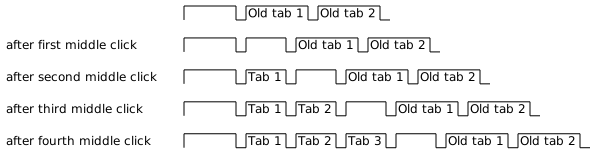
<p>While visiting a page, I typically middle-click on links so that they
open in new tabs .. and I do that a lot! And this is the order of
where the new tabs would open:</p>
<p><a id="figure--firefox-new-tabs-unexpected"></a></p>


<figure>
    
        <img src="https://scripter.co/firefox-always-open-a-new-tab-after-current/unexpected.svg" alt="Figure 1: Unexpected order of opening of new tabs opened after each middle-click"/> <figcaption>
                <p>
                    <span class="figure-number">Figure 1: </span>Unexpected order of opening of new tabs opened after each middle-click
                    
                        
                        </p>
                
            </figcaption></figure>

<div class="org-center">
<p>In my view, this behavior is completely wrong!</p>
</div>
<p>As you can see above, if I already have a bunch of links open (see the
last row where &ldquo;Tab 1&rdquo;, &ldquo;Tab 2&rdquo; and &ldquo;Tab 3&rdquo; are already open), the
last opened tab will land up between those tabs and a sea of other
previously opened tabs! When you have over a dozen of tabs already
open, hunting for the <em>last opened tabs</em> is really annoying.</p>

<h2 id="expected-behavior">Expected Behavior&nbsp;<a class="headline-hash no-text-decoration" href="#expected-behavior">#</a></h2>


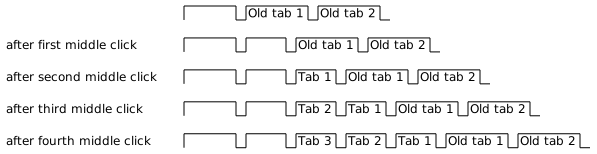
<p>I would instead expect for each middle-click to open the new tab
<strong>immediately to the right</strong> of the current tab. Below diagram shows it
very clearly that this behavior would save me the exercise of hunting
for that new tab.</p>
<p><a id="figure--firefox-new-tabs-expected"></a></p>


<figure>
    
        <img src="https://scripter.co/firefox-always-open-a-new-tab-after-current/expected.svg" alt="Figure 2: Expected order of opening of new tabs opened after each middle-click"/> <figcaption>
                <p>
                    <span class="figure-number">Figure 2: </span><strong>Expected</strong> order of opening of new tabs opened after each middle-click
                    
                        
                        </p>
                
            </figcaption></figure>


<h2 id="false-leads">False Leads&nbsp;<a class="headline-hash no-text-decoration" href="#false-leads">#</a></h2>


<p>So I searched online for &ldquo;firefox new tab location&rdquo; and similar search
terms, and found <em>Q&amp;A</em> on Mozilla Support like <a href="https://support.mozilla.org/en-US/questions/1229062#answer-1141742">How do I make tabs open
on the right by default?</a> and <a href="https://support.mozilla.org/en-US/questions/1295586#answer-1334375">New tabs ALWAYS open to the right of
the last open tab, not to the right of current tab</a>.</p>
<p>The &ldquo;Chosen solutions&rdquo; for both of these issues suggested setting
<code>browser.tabs.insertAfterCurrent = true</code> and
<code>browser.tabs.insertRelatedAfterCurrent = true</code> (which is the default)
in the Firefox <strong>about:config</strong>.</p>
<div class="verse">
<p>        But that didn&rsquo;t work!!<br /></p>
</div>
<p>Setting <code>browser.tabs.insertAfterCurrent = true</code> affected the &ldquo;new tab
opening&rdquo; behavior when opening only blank new tabs using <code>Ctrl+T</code> or
hitting the &ldquo;New Tab&rdquo; button.
<mark>This setting had <strong>nothing</strong> to do with the location of new tabs opened
by the &ldquo;Open Link in New Tab&rdquo; or &ldquo;middle-click on link&rdquo; action.</mark></p>

<h2 id="firefox-bug-1485683">Firefox Bug # 1485683&nbsp;<a class="headline-hash no-text-decoration" href="#firefox-bug-1485683">#</a></h2>


<p>After scouring through many search results, I landed up on <a href="https://bugzilla.mozilla.org/show_bug.cgi?id=1485683">Firefox
Bug # 1485683: browser.tab.insertaftercurrent order</a> which reported
the exact same issue I was seeing 🎉.</p>
<p>So I replied to that bug thread confirming that I still saw that issue
on Firefox 101.0.1 .. <strong>4 years later</strong> .. just in case that motivates
someone to still fix it.</p>
<p>But my issue isn&rsquo;t fixed yet.</p>

<h2 id="solution">Solution&nbsp;<a class="headline-hash no-text-decoration" href="#solution">#</a></h2>


<p>Finally, the <a href="https://addons.mozilla.org/en-US/firefox/addon/open-tabs-next-to-current/">Open Tabs Next to Current</a> (<a href="https://github.com/sblask/webextension-open-tabs-next-to-current">repo</a>) Firefox Add-on saved the
day!</p>
<p>The introduction of this add-on incorrectly states this:</p>
<blockquote>
<p>After the addition of the <code>browser.tabs.insertAfterCurrent</code> setting in
<strong>about:config</strong> you do not need this extension anymore.</p>
</blockquote>
<p>But I still tried installing it to see .. just in case
.. 🤞 ..</p>
<div class="verse">
<p>And it worked!!<br /></p>
</div>
<p>I could finally get new tabs to open in the order as shown in the
<a href="#figure--firefox-new-tabs-expected">Expected Tab Order figure</a> above 😂.</p>
<p>Thank you Sebastian Blask for <strong>Open Tabs Next to Current</strong>!</p>
]]></content><category scheme="https://scripter.co/categories/web" term="web" label="web"/><category scheme="https://scripter.co/tags/firefox" term="firefox" label="firefox"/><category scheme="https://scripter.co/tags/tab" term="tab" label="tab"/><category scheme="https://scripter.co/tags/add-on" term="add-on" label="add-on"/><category scheme="https://scripter.co/tags/100daystooffload" term="100daystooffload" label="100DaysToOffload"/></entry><entry><title type="html">Unclutter: A better Reader View for browsers</title><link href="https://scripter.co/unclutter-a-better-reader-view-for-browsers/?utm_source=atom_feed" rel="alternate" type="text/html"/><link href="https://scripter.co/zero-html-validation-errors/?utm_source=atom_feed" rel="related" type="text/html" title="Zero HTML Validation Errors!"/><link href="https://scripter.co/offline-html5-validator/?utm_source=atom_feed" rel="related" type="text/html" title="Offline HTML5 Validator"/><link href="https://scripter.co/hugo-modules-importing-a-theme/?utm_source=atom_feed" rel="related" type="text/html" title="Hugo Modules: Importing a Theme"/><link href="https://scripter.co/looping-through-org-mode-headings/?utm_source=atom_feed" rel="related" type="text/html" title="Looping through Org mode headings"/><link href="https://scripter.co/using-org-logbook-notes-to-record-blog-post-updates/?utm_source=atom_feed" rel="related" type="text/html" title="Using Org Logbook Notes to record blog post updates"/><id>https://scripter.co/unclutter-a-better-reader-view-for-browsers/</id><author><name>Kaushal Modi</name></author><published>2022-06-12T23:07:00-04:00</published><updated>2022-06-12T23:07:00-04:00</updated><content type="html"><![CDATA[<blockquote>Unclutter is a better looking <em>Reader View</em> browser add-on available
for both Firefox and Chrome.</blockquote><div class="ox-hugo-toc toc">
<div class="heading">Table of Contents</div>
<ul>
<li><a href="#why">Why?</a></li>
<li><a href="#caveat">Caveat</a></li>
<li><a href="#closing">Closing</a></li>
</ul>
</div>
<!--endtoc-->
<p>I am writing this post to share this wonderful browser add-on
<strong>Unclutter</strong> (available for both Firefox and Chrome) by <a href="https://github.com/lindylearn">Peter Hagen</a>. I
discovered this a few days back on <a href="https://news.ycombinator.com/item?id=31620466">Hacker News</a>. But given how awesome
this add-on is, I am surprised that the HN post didn&rsquo;t gain any
traction.</p>
<p>I&rsquo;ll quickly post the important links related to this add-on, and then
briefly list few points on why I like it.</p>
<div class="org-center">
<p>👉 <a href="https://unclutter.lindylearn.io/"><strong>Unclutter Homepage</strong></a> | <a href="https://github.com/lindylearn/unclutter"><strong>Source code</strong></a> | Add-ons:
<a href="https://addons.mozilla.org/en-GB/firefox/addon/lindylearn/"><strong>Firefox</strong></a>, <a href="https://chrome.google.com/webstore/detail/unclutter-ad-blocker-for/ibckhpijbdmdobhhhodkceffdngnglpk"><strong>Chrome</strong></a> 👈</p>
</div>

<h2 id="why">Why?&nbsp;<a class="headline-hash no-text-decoration" href="#why">#</a></h2>


<p>I use Firefox as my primary browser. If you are too, you might be
wondering &ldquo;why install this add-on when Firefox already has a <a href="https://support.mozilla.org/en-US/kb/firefox-reader-view-clutter-free-web-pages">Reader
View</a>&rdquo;.</p>
<p>Here are my reasons:</p>
<ol>
<li>You do not lose the article&rsquo;s <strong>origin style</strong>!</li>
<li>The <em>Unclutter</em> author Peter Hagen was <strong>super-responsive</strong> when I
<a href="https://github.com/lindylearn/unclutter/issues/24">opened an issue</a> on his repo. This add-on did not work well on one
of the pages on this site, but he fixed it in less than 24 hours!</li>
<li>This website shows an outline on the side, but many websites
don&rsquo;t. <em>Unclutter</em> adds a similar <strong>outline</strong> for any page where it&rsquo;s
enabled.</li>
<li><em>Unclutter</em> can be <strong>auto-enabled</strong> for your chosen sites. For example,
ever since I have discovered this add-on, I have auto-enabled it on
<a href="https://www.masteringemacs.org">https://www.masteringemacs.org</a>.</li>
<li>You can customize a <strong>key-binding</strong> or shortcut to toggle this
add-on. For now, I am keeping the default binding <code>Alt + C</code>.</li>
<li>The <strong>subtle animation</strong> you see when enabling/disabling this add-on
is pretty cool.</li>
<li>Like the Firefox built-in <em>Reader View</em>, <em>Unclutter</em> also removes
distractions &ndash; So <strong>no ads or pop-ups</strong>!</li>
</ol>
<p>It has other features like annotating pages with your notes privately
and displaying comments from <a href="https://news.ycombinator.com/">Hacker News</a> and <a href="https://web.hypothes.is/">Hypothes.is</a>, but I don&rsquo;t
use those.</p>

<h2 id="caveat">Caveat&nbsp;<a class="headline-hash no-text-decoration" href="#caveat">#</a></h2>


<p>While viewing a page with <em>Unclutter</em> enabled, there are no
issues. But I have noticed that if I toggle it off, the original CSS
gets broken. This issue is <a href="https://github.com/lindylearn/unclutter/issues/25">tracked on its repo</a>. Until this gets fixed,
a quick workaround is to do <code>Ctrl + F5</code> (force reload the page and
thus its CSS too) after disabling <em>Unclutter</em>.</p>

<h2 id="closing">Closing&nbsp;<a class="headline-hash no-text-decoration" href="#closing">#</a></h2>


<p>But this minor issue doesn&rsquo;t prevent it from making it my default
&ldquo;reader view&rdquo; app on Firefox.</p>
<p>I&rsquo;ll end this post with a before and after when visiting <a href="https://www.masteringemacs.org/article/why-emacs-has-buffers">this
page</a>. Feel free to click those images to view them in higher
resolution.</p>
<table>
<thead>
<tr>
<th></th>
<th></th>
</tr>
</thead>
<tbody>
<tr>
<td><a href="original.png"><img src="original.png" alt=""></a></td>
<td><a href="uncluttered.png"><img src="uncluttered.png" alt=""></a></td>
</tr>
</tbody>
</table>
]]></content><category scheme="https://scripter.co/categories/web" term="web" label="web"/><category scheme="https://scripter.co/tags/browser" term="browser" label="browser"/><category scheme="https://scripter.co/tags/reader-mode" term="reader-mode" label="reader-mode"/><category scheme="https://scripter.co/tags/100daystooffload" term="100daystooffload" label="100DaysToOffload"/><category scheme="https://scripter.co/tags/add-on" term="add-on" label="add-on"/></entry></feed>