<?xml version="1.0" encoding="utf-8"?><feed xmlns="http://www.w3.org/2005/Atom" xml:lang="en-us"><generator uri="https://gohugo.io/" version="0.101.0">Hugo</generator><title type="html">Posts on A Scripter's Notes</title><subtitle type="html">Emacs, scripting and anything text oriented.</subtitle><link href="https://scripter.co/posts/" rel="alternate" type="text/html" title="HTML"/><link href="https://scripter.co/posts/index.xml" rel="alternate" type="application/rss+xml" title="RSS"/><link href="https://scripter.co/posts/atom.xml" rel="self" type="application/atom+xml" title="Atom"/><link href="https://scripter.co/posts/jf2feed.json" rel="alternate" type="application/jf2feed+json" title="jf2feed"/><updated>2026-04-22T08:24:57-04:00</updated><author><name>Kaushal Modi</name><email>kaushal.modi@gmail.com</email></author><id>https://scripter.co/posts/</id><entry><title type="html">Version controlling Jenkins config</title><link href="https://scripter.co/version-controlling-jenkins-config/?utm_source=atom_feed" rel="alternate" type="text/html"/><link href="https://scripter.co/using-git-delta-with-magit/?utm_source=atom_feed" rel="related" type="text/html" title="Using Git Delta with Magit"/><link href="https://scripter.co/view-github-pull-requests-in-magit/?utm_source=atom_feed" rel="related" type="text/html" title="View GitHub Pull Requests in Magit"/><link href="https://scripter.co/creating-a-patch-file-using-magit/?utm_source=atom_feed" rel="related" type="text/html" title="Creating a patch file using Magit"/><link href="https://scripter.co/gujarati-transliteration/?utm_source=atom_feed" rel="related" type="text/html" title="Gujarati Transliteration"/><link href="https://scripter.co/cleaning-up-gopath-pkg/?utm_source=atom_feed" rel="related" type="text/html" title="Cleaning up ${GOPATH}/pkg/"/><id>https://scripter.co/version-controlling-jenkins-config/</id><author><name>Kaushal Modi</name></author><published>2022-07-20T00:18:00-04:00</published><updated>2022-07-20T00:18:00-04:00</updated><content type="html"><![CDATA[<blockquote>Jenkins is an amazing free and open source continuous integration and
deployment software. But its primary means of configuration is a web
UI, and recently that cost me a lot of debug time. That set me down
the path of figuring out a way to version control the Jenkins config
(the <code>$JENKINS_HOME</code> directory).</blockquote><div class="ox-hugo-toc toc">

<div class="heading">Table of Contents</div>
<ul>
<li><a href="#what-bit-me">What bit me</a></li>
<li><a href="#dot-gitignore-for-jenkins-config"><code>.gitignore</code> for Jenkins config</a></li>
<li><a href="#jenkins-plugin-manager">Jenkins Plugin Manager</a></li>
<li><a href="#full-solution">Full solution</a></li>
</ul>
</div>
<!--endtoc-->
<p><a href="https://www.jenkins.io/">Jenkins</a> is a wonderful piece of software and I use it with my
Bitbucket git repos for <a href="https://en.wikipedia.org/wiki/CI/CD">CI/CD</a>.</p>
<p>Jenkins uses a web UI for its configuration. I dislike that because
it&rsquo;s difficult to document the configuration process without
screenshots, and if I need to create a new server, it&rsquo;s a manual
process of clicking through tabs and filling in the text boxes. I
didn&rsquo;t mind this enough to do anything about it .. that is until I
finally got bit by it.</p>

<h2 id="what-bit-me">What bit me&nbsp;<a class="headline-hash no-text-decoration" href="#what-bit-me">#</a></h2>


<p>Without going into too much detail, that issue was multi-fold:</p>
<ol>
<li>I had unknowingly messed up the <em>Project-based Matrix Authorization
Strategy</em> such that other users in my team were not able to view
the Jenkins jobs.</li>
<li>I had also updated the Jenkins server that introduced a bug
(<a href="https://issues.jenkins.io/browse/JENKINS-68748">JENKINS-68748</a>) where the <em>Test LDAP Settings</em> failed with an
error, but the LDAP authentication actually worked!</li>
<li>I had also updated all the plugins after updating Jenkins. So if I
rolled back the Jenkins versions, most of the plugins would fail
because of incompatibility with the older Jenkins version. I had
updated Jenkins after months!</li>
</ol>
<p>That&rsquo;s when I wished that my whole Jenkins was
version-controlled. That would have allowed me to roll back to the
last working &ldquo;Jenkins image&rdquo; with the Jenkin version, plugins'
versions and my Jenkins config all in sync.</p>
<p>I had delayed doing this because my <code>$JENKINS_HOME</code> was more than 1GB
in size and I didn&rsquo;t have time or motivation to figure out what stuff
I should commit and what I should ignore .. But no more &mdash; The time
had finally come.</p>

<h2 id="dot-gitignore-for-jenkins-config"><code>.gitignore</code> for Jenkins config&nbsp;<a class="headline-hash no-text-decoration" href="#dot-gitignore-for-jenkins-config">#</a></h2>


<p>So I did what any good engineer would do .. start looking for a
solution online. I found <a href="https://stackoverflow.com/a/4695615">this StackOverflow answer</a> for <em>Is there a way
to keep Hudson / Jenkins configuration files in source control?</em>.</p>
<p>That answer shares a <code>.gitignore</code> that ignores files not necessary for
configuring a Jenkins server &mdash; Example: job builds, workspace, log
files, etc. But it didn&rsquo;t work out of the box because the plugin
version info wasn&rsquo;t getting committed correctly. I had committed
everything to git after using the suggested <code>.gitignore</code> and pushed to
my git remote. But if I cloned that repo to a different area and
attempted to start the Jenkins server from there, it crashed with this
message:</p>
<p><a id="code-snippet--jenkins-crash-log"></a></p>
<div class="highlight"><pre tabindex="0" class="chroma"><code class="language-text" data-lang="text"><span class="line"><span class="cl">2022-07-15 13:07:06.082+0000 [id=31]    SEVERE  jenkins.InitReactorRunner$1#onTaskFailed: Failed Loading global config
</span></span><span class="line"><span class="cl">com.thoughtworks.xstream.mapper.CannotResolveClassException: hudson.security.ProjectMatrixAuthorizationStrategy
</span></span><span class="line"><span class="cl">        at com.thoughtworks.xstream.mapper.DefaultMapper.realClass(DefaultMapper.java:81)
</span></span><span class="line"><span class="cl">        at com.thoughtworks.xstream.mapper.MapperWrapper.realClass(MapperWrapper.java:125)
</span></span><span class="line"><span class="cl">        at com.thoughtworks.xstream.mapper.DynamicProxyMapper.realClass(DynamicProxyMapper.java:55)
</span></span><span class="line"><span class="cl">        at com.thoughtworks.xstream.mapper.MapperWrapper.realClass(MapperWrapper.java:125)
</span></span><span class="line"><span class="cl">        at com.thoughtworks.xstream.mapper.PackageAliasingMapper.realClass(PackageAliasingMapper.java:88)
</span></span><span class="line"><span class="cl">        at com.thoughtworks.xstream.mapper.MapperWrapper.realClass(MapperWrapper.java:125)
</span></span><span class="line"><span class="cl">        at com.thoughtworks.xstream.mapper.ClassAliasingMapper.realClass(ClassAliasingMapper.java:79)
</span></span><span class="line"><span class="cl">        at com.thoughtworks.xstream.mapper.MapperWrapper.realClass(MapperWrapper.java:125)
</span></span><span class="line"><span class="cl">        at com.thoughtworks.xstream.mapper.ArrayMapper.realClass(ArrayMapper.java:74)
</span></span><span class="line"><span class="cl">        at com.thoughtworks.xstream.mapper.MapperWrapper.realClass(MapperWrapper.java:125)
</span></span><span class="line"><span class="cl">        at com.thoughtworks.xstream.mapper.SecurityMapper.realClass(SecurityMapper.java:71)
</span></span><span class="line"><span class="cl">        at com.thoughtworks.xstream.mapper.MapperWrapper.realClass(MapperWrapper.java:125)
</span></span><span class="line"><span class="cl">        at hudson.util.XStream2$CompatibilityMapper.realClass(XStream2.java:411)
</span></span><span class="line"><span class="cl">        at hudson.util.xstream.MapperDelegate.realClass(MapperDelegate.java:46)
</span></span><span class="line"><span class="cl">        at com.thoughtworks.xstream.mapper.MapperWrapper.realClass(MapperWrapper.java:125)
</span></span><span class="line"><span class="cl">        at com.thoughtworks.xstream.mapper.CachingMapper.realClass(CachingMapper.java:47)
</span></span><span class="line"><span class="cl">        at hudson.util.RobustReflectionConverter.determineType(RobustReflectionConverter.java:521)
</span></span><span class="line"><span class="cl">        at hudson.util.RobustReflectionConverter.doUnmarshal(RobustReflectionConverter.java:346)
</span></span><span class="line"><span class="cl">Caused: jenkins.util.xstream.CriticalXStreamException:
</span></span><span class="line"><span class="cl">---- Debugging information ----
</span></span><span class="line"><span class="cl">cause-exception     : com.thoughtworks.xstream.mapper.CannotResolveClassException
</span></span><span class="line"><span class="cl">cause-message       : hudson.security.ProjectMatrixAuthorizationStrategy
</span></span><span class="line"><span class="cl">class               : hudson.model.Hudson
</span></span><span class="line"><span class="cl">required-type       : hudson.model.Hudson
</span></span><span class="line"><span class="cl">converter-type      : hudson.util.RobustReflectionConverter
</span></span><span class="line"><span class="cl">path                : /hudson/authorizationStrategy
</span></span><span class="line"><span class="cl">line number         : 12
</span></span><span class="line"><span class="cl">version             : not available
</span></span><span class="line"><span class="cl">-------------------------------
</span></span></code></pre></div><div class="src-block-caption">
  <span class="src-block-number"><a href="#code-snippet--jenkins-crash-log">Code Snippet 1</a>:</span>
  Snippet of Jenkins crash when attempting to run the server from the freshly cloned git repo
</div>

<h2 id="jenkins-plugin-manager">Jenkins Plugin Manager&nbsp;<a class="headline-hash no-text-decoration" href="#jenkins-plugin-manager">#</a></h2>


<p>So I <a href="https://community.jenkins.io/t/version-controlling-jenkins-config-help-defining-a-gitignore-that-minimizes-the-git-repo-size/3036">reached out for help</a> on the Jenkins Community. One of the key
contributors to Jenkins, <a href="https://community.jenkins.io/u/MarkEWaite">Mark Waite</a>, was tremendously helpful. He
suggested using his <a href="https://github.com/jenkinsci/plugin-installation-manager-tool"><code>jenkins-plugin-manager</code></a> tool. After trying it out
for a bit, I realized that this tool had everything I needed for
version controlling the plugin versions:</p>
<ul>
<li>Ability to save a list of installed Jenkins plugins and their
versions to a file.</li>
<li>Ability to batch install all the plugins of the versions listed in a
file.</li>
</ul>
<p>This was like doing Python&rsquo;s <a href="/saving-python-pip-dependencies/">plugin management using
<code>requirements.txt</code></a>, except that this was for Jenkins.</p>

<h2 id="full-solution">Full solution&nbsp;<a class="headline-hash no-text-decoration" href="#full-solution">#</a></h2>


<p>With a combination of the <code>.gitignore</code> that I started with from that
SO answer, managing plugins using <code>jenkins-plugin-manager</code>, tweaking
the <code>.gitignore</code> to my liking, and adding helper Bash scripts for
downloading and running Jenkins server binaries, and doing the plugin
management, I finally got what I needed:</p>
<div class="org-center">
<p><a href="https://github.com/kaushalmodi/jenkins-minimal">https://github.com/kaushalmodi/jenkins-minimal</a></p>
</div>
<p>The README on the repo has all the instructions.</p>
]]></content><category scheme="https://scripter.co/categories/unix" term="unix" label="unix"/><category scheme="https://scripter.co/tags/git" term="git" label="git"/><category scheme="https://scripter.co/tags/jenkins" term="jenkins" label="jenkins"/><category scheme="https://scripter.co/tags/100daystooffload" term="100daystooffload" label="100DaysToOffload"/></entry><entry><title type="html">Using Git Delta with Magit</title><link href="https://scripter.co/using-git-delta-with-magit/?utm_source=atom_feed" rel="alternate" type="text/html"/><link href="https://scripter.co/view-github-pull-requests-in-magit/?utm_source=atom_feed" rel="related" type="text/html" title="View GitHub Pull Requests in Magit"/><link href="https://scripter.co/creating-a-patch-file-using-magit/?utm_source=atom_feed" rel="related" type="text/html" title="Creating a patch file using Magit"/><link href="https://scripter.co/git-diff-minified-js-and-css/?utm_source=atom_feed" rel="related" type="text/html" title="Git diff Minified JS and CSS"/><link href="https://scripter.co/narrowing-the-author-column-in-magit/?utm_source=atom_feed" rel="related" type="text/html" title="Narrowing the Author column in Magit"/><link href="https://scripter.co/gujarati-transliteration/?utm_source=atom_feed" rel="related" type="text/html" title="Gujarati Transliteration"/><id>https://scripter.co/using-git-delta-with-magit/</id><author><name>Kaushal Modi</name></author><published>2022-07-06T22:04:00-04:00</published><updated>2022-07-06T22:04:00-04:00</updated><content type="html"><![CDATA[<blockquote><em>Git Delta</em> is a command line utility that beautifies git diffs in the
terminal. But did you know that it can do the same in Magit too?</blockquote><div class="ox-hugo-toc toc">
<div class="heading">Table of Contents</div>
<ul>
<li><a href="#installing-delta">Installing <code>delta</code></a></li>
<li><a href="#installing-magit-delta">Installing <code>magit-delta</code></a></li>
<li><a href="#configuring-delta">Configuring <code>delta</code></a></li>
</ul>
</div>
<!--endtoc-->
<p><a href="https://github.com/dandavison/delta">Delta</a> is a highly configurable
<span class="sidenote-number"><small class="sidenote">
I am not kidding. Check out the output of <a href="https://dandavison.github.io/delta/full---help-output.html"><code>delta --help</code></a>.
</small></span>
command line utility that makes the git diffs look better, while also
syntax-highlighting
<span class="sidenote-number"><small class="sidenote">
<a href="https://github.com/Wilfred/difftastic/">Difftastic</a> is another popular diff tool which compares files based on
their syntax. I like reviewing <em>git diffs</em> from within Emacs
(Magit). But <em>difftastic</em> <a href="https://github.com/Wilfred/difftastic/issues/251">does not support Magit</a>.
</small></span>
the code in the diffs.</p>
<p>When I first heard of &ldquo;syntax highlighted diffs&rdquo;, I wasn&rsquo;t sure what
that meant. If you are in the same boat, here&rsquo;s a screenshot that
shows that.</p>
<p><a id="figure--git-delta-example"></a></p>


<figure>
    <a href="delta-example.png">
        <img src="https://scripter.co/using-git-delta-with-magit/delta-example.png" alt="Figure 1: Example of how delta renders a git diff for an ox-hugo commit"/> </a><figcaption>
                <p>
                    <span class="figure-number">Figure 1: </span>Example of how <code>delta</code> renders a <em>git diff</em> for an <code>ox-hugo</code> commit
                    
                        
                        </p>
                
            </figcaption></figure>

<p>But I do most of my git operations including viewing of diffs from
within Emacs, using <a href="https://magit.vc">Magit</a>.</p>
<div class="verse">
<p>        .. and thankfully <em>delta</em> <a href="https://dandavison.github.io/delta/using-delta-with-magit.html">works with Magit</a>!<br /></p>
</div>
<p>Below screenshot shows how the same diff looks like in Magit.</p>
<p><a id="figure--git-magit-delta-example"></a></p>


<figure>
    <a href="magit-delta-example.png">
        <img src="https://scripter.co/using-git-delta-with-magit/magit-delta-example.png" alt="Figure 2: Example of how magit-delta renders a git diff for an ox-hugo commit"/> </a><figcaption>
                <p>
                    <span class="figure-number">Figure 2: </span>Example of how <code>magit-delta</code> renders a <em>git diff</em> for an <code>ox-hugo</code> commit
                    
                        
                        </p>
                
            </figcaption></figure>

<p>The <a href="https://github.com/dandavison/magit-delta"><code>magit-delta</code></a> Emacs package makes this possible, which is also
developed by the <code>delta</code> author Dan Davison.</p>
<dl>
<dt>Caveat</dt>
<dd>If the line numbers are enabled in <code>delta</code>, they mess up
the interactive expanding and collapsing of diffs in Magit. See
<a href="https://github.com/dandavison/magit-delta/issues/13#issuecomment-949820122">Magit Delta Issue # 13</a> for more details.</dd>
</dl>
<p>Now, I am alright with not seeing the line numbers in Magit. But I
really liked to see the line numbers in the side-by-side view in the
terminal. Luckily, if disabled the <code>line-numbers</code> feature but enabled
the <code>side-by-side</code> view, I got what I wanted!</p>
<ol>
<li>Line numbers are disabled in Magit and expanding/collapsing of
diffs works correctly. <em>I am also really glad that I don&rsquo;t see the
side-by-side view in Magit diffs even when I enable that feature in
<code>delta</code>, because I like to have my Emacs buffers only about 90
characters wide.</em></li>
<li>Line numbers <strong>and</strong> side-by-side view are enabled in the terminal.</li>
</ol>
<p>I&rsquo;ll end this post with pointers to installing <code>delta</code> and
<code>magit-delta</code> and how to configure them.</p>

<h2 id="installing-delta">Installing <code>delta</code>&nbsp;<a class="headline-hash no-text-decoration" href="#installing-delta">#</a></h2>


<p>You can install <code>delta</code> (it&rsquo;s called <code>git-delta</code> in some package
managers) using one of the methods listed <a href="https://dandavison.github.io/delta/installation.html">in its manual</a>, or you can
download → extract its statically compiled binary for your OS from its
<a href="https://github.com/dandavison/delta/releases">GitHub Releases</a> page.</p>

<h2 id="installing-magit-delta">Installing <code>magit-delta</code>&nbsp;<a class="headline-hash no-text-decoration" href="#installing-magit-delta">#</a></h2>


<p>Once you put this snippet in your Emacs config and evaluate it, it
will install this package and enable the <code>magit-delta-mode</code> in the
Magit buffers.</p>
<p><a id="code-snippet--enabling-magit-delta"></a></p>
<div class="highlight"><pre tabindex="0" class="chroma"><code class="language-emacs-lisp" data-lang="emacs-lisp"><span class="line"><span class="cl"><span class="p">(</span><span class="nb">use-package</span> <span class="nv">magit-delta</span>
</span></span><span class="line"><span class="cl">  <span class="nb">:ensure</span> <span class="no">t</span>
</span></span><span class="line"><span class="cl">  <span class="nb">:hook</span> <span class="p">(</span><span class="nv">magit-mode</span> <span class="o">.</span> <span class="nv">magit-delta-mode</span><span class="p">))</span>
</span></span></code></pre></div><div class="src-block-caption">
  <span class="src-block-number"><a href="#code-snippet--enabling-magit-delta">Code Snippet 1</a>:</span>
  Installing and enabling <code>magit-delta</code> using <code>use-package</code>
</div>

<h2 id="configuring-delta">Configuring <code>delta</code>&nbsp;<a class="headline-hash no-text-decoration" href="#configuring-delta">#</a></h2>


<p>Here&rsquo;s a snippet for <code>delta</code> configuration from my <code>.gitconfig</code>. It&rsquo;s
mostly the same as the one in <em>delta</em>&rsquo;s the <a href="https://github.com/dandavison/delta#get-started">Getting Started</a> guide. The
main difference in my workaround for the <code>magit-delta</code> issue.</p>
<p><a id="code-snippet--delta-gitconfig"></a></p>
<div class="highlight"><pre tabindex="0" class="chroma"><code class="language-sh" data-lang="sh"><span class="line"><span class="cl"><span class="o">[</span>core<span class="o">]</span>
</span></span><span class="line"><span class="cl">    <span class="nv">pager</span> <span class="o">=</span> delta
</span></span><span class="line"><span class="cl">
</span></span><span class="line"><span class="cl"><span class="o">[</span>interactive<span class="o">]</span>
</span></span><span class="line"><span class="cl">    <span class="nv">diffFilter</span> <span class="o">=</span> delta --color-only
</span></span><span class="line"><span class="cl"><span class="o">[</span>add.interactive<span class="o">]</span>
</span></span><span class="line"><span class="cl">    <span class="nv">useBuiltin</span> <span class="o">=</span> <span class="nb">false</span> <span class="c1"># required for git 2.37.0</span>
</span></span><span class="line"><span class="cl">
</span></span><span class="line"><span class="cl"><span class="o">[</span>diff<span class="o">]</span>
</span></span><span class="line"><span class="cl">    <span class="nv">colorMoved</span> <span class="o">=</span> default
</span></span><span class="line"><span class="cl">
</span></span><span class="line"><span class="cl"><span class="o">[</span>delta<span class="o">]</span>
</span></span><span class="line"><span class="cl">    <span class="c1"># https://github.com/dandavison/magit-delta/issues/13</span>
</span></span><span class="line"><span class="cl">    <span class="c1"># line-numbers = true    # Don&#39;t do this.. messes up diffs in magit</span>
</span></span><span class="line"><span class="cl">    <span class="c1">#</span>
</span></span><span class="line"><span class="cl">    side-by-side <span class="o">=</span> <span class="nb">true</span>      <span class="c1"># Display a side-by-side diff view instead of the traditional view</span>
</span></span><span class="line"><span class="cl">    <span class="c1"># navigate = true          # Activate diff navigation: use n to jump forwards and N to jump backwards</span>
</span></span><span class="line"><span class="cl">    relative-paths <span class="o">=</span> <span class="nb">true</span>    <span class="c1"># Output all file paths relative to the current directory</span>
</span></span><span class="line"><span class="cl">    file-style <span class="o">=</span> yellow
</span></span><span class="line"><span class="cl">    hunk-header-style <span class="o">=</span> line-number syntax
</span></span></code></pre></div><div class="src-block-caption">
  <span class="src-block-number"><a href="#code-snippet--delta-gitconfig">Code Snippet 2</a>:</span>
  My configuration for <code>delta</code> in <code>.gitconfig</code>
</div>
]]></content><category scheme="https://scripter.co/categories/emacs" term="emacs" label="emacs"/><category scheme="https://scripter.co/tags/git" term="git" label="git"/><category scheme="https://scripter.co/tags/100daystooffload" term="100daystooffload" label="100DaysToOffload"/><category scheme="https://scripter.co/tags/magit" term="magit" label="magit"/><category scheme="https://scripter.co/tags/diff" term="diff" label="diff"/></entry><entry><title type="html">Gujarati Transliteration</title><link href="https://scripter.co/gujarati-transliteration/?utm_source=atom_feed" rel="alternate" type="text/html"/><link href="https://scripter.co/gujarati-fonts-in-emacs/?utm_source=atom_feed" rel="related" type="text/html" title="Gujarati fonts in Emacs"/><link href="https://scripter.co/cleaning-up-gopath-pkg/?utm_source=atom_feed" rel="related" type="text/html" title="Cleaning up ${GOPATH}/pkg/"/><link href="https://scripter.co/view-github-pull-requests-in-magit/?utm_source=atom_feed" rel="related" type="text/html" title="View GitHub Pull Requests in Magit"/><link href="https://scripter.co/emacs-lisp-advice-combinators/?utm_source=atom_feed" rel="related" type="text/html" title="Emacs Lisp: Advice Combinators"/><link href="https://scripter.co/org-show-only-post-subtree-headings/?utm_source=atom_feed" rel="related" type="text/html" title="Org: Show only Post subtree headings"/><id>https://scripter.co/gujarati-transliteration/</id><author><name>Kaushal Modi</name></author><published>2022-06-27T18:43:00-04:00</published><updated>2022-06-27T18:43:00-04:00</updated><content type="html"><![CDATA[<blockquote>You can phonetically write a non-English language on an English
keyword in Emacs, and that transforms into that non-English
script. This is called <a href="https://en.wikipedia.org/wiki/Transliteration"><em>transliteration</em></a>, and I demonstrate that for
the Gujarati language in this post.</blockquote><div class="ox-hugo-toc toc">
<div class="heading">Table of Contents</div>
<ul>
<li><a href="#enabling-transliteration">Enabling transliteration</a></li>
<li><a href="#toggling-the-input-method">Toggling the input method</a></li>
<li><a href="#caveats-with-gujarati-and-other-indic-language-transliteration">Caveats with Gujarati and other Indic language transliteration</a></li>
<li><a href="#input-method-cheat-sheet">&ldquo;Input method&rdquo; cheat sheet</a></li>
<li><a href="#closing">Closing</a></li>
<li><a href="#gujarati-transliteration-references">References</a></li>
</ul>
</div>
<!--endtoc-->
<p>Emacs provides the transliteration feature using the
<strong>set-input-method</strong> command. I&rsquo;ll introduce that and few related
functions in this post to get to help get started with transliteration
quickly.</p>

<h2 id="enabling-transliteration">Enabling transliteration&nbsp;<a class="headline-hash no-text-decoration" href="#enabling-transliteration">#</a></h2>


<p>Emacs uses the &ldquo;input method&rdquo; feature to do character conversion from
ASCII to the target language or script. The &ldquo;input method&rdquo;, stored in
<code>current-input-method</code>, is <em>nil</em> by default. In this state, you see
the exact ASCII in Emacs buffer, that you typed on the
keyboard<sup id="fnref:1"><a href="#fn:1" class="footnote-ref" role="doc-noteref">1</a></sup>.</p>
<p>In this post, my target non-English language is <a href="https://en.wikipedia.org/wiki/Gujarati_language">Gujarati</a>. So I want to
type on my English keyboard and have Gujarati script letters show up
in the buffer.</p>
<p>Emacs provides the <code>set-input-method</code> command to change the <em>current
input method</em>. This command is bound to <kbd>C-x</kbd> <kbd>RET</kbd>
<kbd>C-\</kbd> by default. Pick the new input method after calling
that command.</p>
<div class="note">
<p>To see the available input methods, do <code>M-x list-input-methods</code>.</p>
</div>
<p>As I want to do Gujarati transliteration, I pick the <code>gujarati-itrans</code>
method.</p>
<p>If you don&rsquo;t know Gujarati, don&rsquo;t fret! The commands shown here will
work when transliterating to other languages too &mdash; only the
Gujarati-specific <em>input method</em> <code>gujarati-itrans</code> will change to the
input method of your choice.</p>

<h2 id="toggling-the-input-method">Toggling the input method&nbsp;<a class="headline-hash no-text-decoration" href="#toggling-the-input-method">#</a></h2>


<p>I often need to switch between the Gujarati and English languages in
the same document. You can see me doing that in this post next section
onwards. The <code>toggle-input-method</code> command bound by default to
<kbd>C-\</kbd> is helpful here.</p>
<p>So if I am already in the &ldquo;Gujarati transliteration mode&rdquo; calling this
command will set <code>current-input-method</code> back to <em>nil</em>. Repeating that
same call will again set <code>current-input-method</code> to <code>gujarati-itrans</code>,
and I will once again be in the &ldquo;Gujarati transliteration mode&rdquo;.</p>

<h2 id="caveats-with-gujarati-and-other-indic-language-transliteration">Caveats with Gujarati and other Indic language transliteration&nbsp;<a class="headline-hash no-text-decoration" href="#caveats-with-gujarati-and-other-indic-language-transliteration">#</a></h2>


<p>Apologies, but this section is meaningful only if you know how to read
Gujarati. So you can safely skip to the next section.</p>
<p>Below table is a quick glimpse of some nuances in Gujarati
transliteration. I will save my explanation and instead show some of
the mistakes I made in transliteration using examples.</p>
<table>
<thead>
<tr>
<th>ASCII input</th>
<th>Gujarati Transliteration</th>
<th>Rough Translation</th>
</tr>
</thead>
<tbody>
<tr>
<td><em>ram</em></td>
<td>રમ્</td>
<td>(incorrect spelling, no meaning)</td>
</tr>
<tr>
<td><em>rama</em></td>
<td>રમ</td>
<td>play</td>
</tr>
<tr>
<td><em>raama</em></td>
<td>રામ</td>
<td>a popular name Raama (as in Lord Raama)</td>
</tr>
<tr>
<td><em>angreji</em></td>
<td>અન્ગ્રેજિ</td>
<td>(incorrect spelling)</td>
</tr>
<tr>
<td><em>hu.n</em></td>
<td>હું</td>
<td>I</td>
</tr>
<tr>
<td><em>chhu.n</em></td>
<td>છું</td>
<td>am</td>
</tr>
<tr>
<td><em>a.ngrejii</em></td>
<td>અંગ્રેજી<sup id="fnref:2"><a href="#fn:2" class="footnote-ref" role="doc-noteref">2</a></sup></td>
<td>English (language)</td>
</tr>
<tr>
<td><em>Ime.cksa</em></td>
<td>ઈમૅક્સ</td>
<td>this literally reads &ldquo;Emacs&rdquo;</td>
</tr>
</tbody>
</table>

<h2 id="input-method-cheat-sheet">&ldquo;Input method&rdquo; cheat sheet&nbsp;<a class="headline-hash no-text-decoration" href="#input-method-cheat-sheet">#</a></h2>


<p>Thankfully Emacs provides full help through the
<code>describe-input-method</code> command bound to <kbd>C-h</kbd>
<kbd>C-\</kbd>
<span class="sidenote-number"><small class="sidenote">
If you haven&rsquo;t already noticed the consistency in these bindings, the
default bindings with <kbd>C-\</kbd> in them are related to &ldquo;input
method&rdquo; commands.
</small></span>
by default.</p>
<p>For example, <code>M-x describe-input-method gujarati-itrans</code> gives this:</p>
<p><a id="figure--gujarati-itrans-help"></a></p>


<figure>
    <a href="gujarati-itrans-help.png">
        <img src="https://scripter.co/gujarati-transliteration/gujarati-itrans-help.png" alt="Figure 1: Partial screen capture of Gujarati transliteration cheat sheet C-h C- gujarati-itrans"/> </a><figcaption>
                <p>
                    <span class="figure-number">Figure 1: </span>Partial screen capture of Gujarati transliteration cheat sheet <code>C-h C- gujarati-itrans</code>
                    
                        
                        </p>
                
            </figcaption></figure>

<p>The ∗Help∗ that shows up looks formidable at the first glance. Though,
I found comfort in the fact that roughly half of the key sequences
were obvious and roughly half resulted in Gujarati characters that I
have never found the need of! 😃</p>

<h2 id="closing">Closing&nbsp;<a class="headline-hash no-text-decoration" href="#closing">#</a></h2>


<p>Typing this in the &ldquo;transliteration mode&rdquo;:</p>
<blockquote>
<p>maaru naama kaushala chhe. mane e jaaNii ne aana.nda thaaya chhe ke
hu.n aa sahelaaI thI lakhI shaku chhu.n. (joDanI-bhula maapha.)</p>
</blockquote>
<p>will result in:</p>
<p>મારુ નામ કૌશલ છે. મને એ જાણી ને આનંદ થાય છે કે હું આ સહેલાઈ થી લખી શકુ
છું. (જોડણી-ભુલ માફ.)</p>
<p><em>Translation: My name is Kaushal. I am happy knowing that I can write
this easily.</em></p>

<h2 id="gujarati-transliteration-references">References&nbsp;<a class="headline-hash no-text-decoration" href="#gujarati-transliteration-references">#</a></h2>


<ul>
<li><a href="https://www.gnu.org/software/emacs/manual/html_node/emacs/Input-Methods.html" title="Emacs Lisp: (info &quot;(emacs) Input Methods&quot;)">Emacs Info: Input Methods</a>
<ul>
<li><a href="https://www.gnu.org/software/emacs/manual/html_node/emacs/Select-Input-Method.html" title="Emacs Lisp: (info &quot;(emacs) Select Input Method&quot;)">Emacs Info: Select Input Method</a></li>
</ul>
</li>
<li><code>M-x describe-input-method gujarati-itrans</code></li>
</ul>
<div class="footnotes" role="doc-endnotes">
<hr>
<ol>
<li id="fn:1">
<p>I am assuming an English keyboard here.&#160;<a href="#fnref:1" class="footnote-backref" role="doc-backlink">&#x21a9;&#xfe0e;</a></p>
</li>
<li id="fn:2">
<p>This spelling might still render incorrectly on your browser
depending on the unicode character set available for Gujarati on your
system.&#160;<a href="#fnref:2" class="footnote-backref" role="doc-backlink">&#x21a9;&#xfe0e;</a></p>
</li>
</ol>
</div>
]]></content><category scheme="https://scripter.co/categories/emacs" term="emacs" label="emacs"/><category scheme="https://scripter.co/series/gujarati-in-emacs" term="gujarati-in-emacs" label="Gujarati in Emacs"/><category scheme="https://scripter.co/tags/gujarati" term="gujarati" label="gujarati"/><category scheme="https://scripter.co/tags/transliteration" term="transliteration" label="transliteration"/><category scheme="https://scripter.co/tags/100daystooffload" term="100daystooffload" label="100DaysToOffload"/></entry><entry><title type="html">Cleaning up ${GOPATH}/pkg/</title><link href="https://scripter.co/cleaning-up-gopath-pkg/?utm_source=atom_feed" rel="alternate" type="text/html"/><link href="https://scripter.co/view-github-pull-requests-in-magit/?utm_source=atom_feed" rel="related" type="text/html" title="View GitHub Pull Requests in Magit"/><link href="https://scripter.co/gujarati-fonts-in-emacs/?utm_source=atom_feed" rel="related" type="text/html" title="Gujarati fonts in Emacs"/><link href="https://scripter.co/emacs-lisp-advice-combinators/?utm_source=atom_feed" rel="related" type="text/html" title="Emacs Lisp: Advice Combinators"/><link href="https://scripter.co/org-show-only-post-subtree-headings/?utm_source=atom_feed" rel="related" type="text/html" title="Org: Show only Post subtree headings"/><link href="https://scripter.co/firefox-always-open-a-new-tab-after-current/?utm_source=atom_feed" rel="related" type="text/html" title="Firefox: Always open a New Tab after Current"/><id>https://scripter.co/cleaning-up-gopath-pkg/</id><author><name>Kaushal Modi</name></author><published>2022-06-25T10:48:00-04:00</published><updated>2022-06-25T10:48:00-04:00</updated><content type="html"><![CDATA[<blockquote>Use <code>go clean -modcache</code> to clean up all the old auto-downloaded Go
modules in <code>${GOPATH}/pkg/</code>. That&rsquo;s all you need to know. Rest of the
post gives just the history of how I got there.</blockquote><div class="ox-hugo-toc toc">
<div class="heading">Table of Contents</div>
<ul>
<li><a href="#the-gopath-directory">The <code>$GOPATH</code> directory</a></li>
<li><a href="#the-disk-space-issue">The disk space issue</a></li>
<li><a href="#write-protected-gopath-pkg">Write-protected <code>${GOPATH}/pkg/</code></a></li>
<li><a href="#cleaning-up-modcache">Cleaning up &ldquo;modcache&rdquo;</a></li>
<li><a href="#wrapping-up">Wrapping up</a></li>
<li><a href="#references">References</a></li>
</ul>
</div>
<!--endtoc-->
<p>As I mentioned in the post description above, the solution to clean up
the auto-populated <code>${GOPATH}/pkg/</code> is to run <code>go clean -modcache</code>. While the solution is simple, it wasn&rsquo;t easy for me to
discover, and so I am writing this short piece to make it a bit more
discoverable for others like me.</p>

<h2 id="the-gopath-directory">The <code>$GOPATH</code> directory&nbsp;<a class="headline-hash no-text-decoration" href="#the-gopath-directory">#</a></h2>


<p>The <code>GOPATH</code> environment variable lists places to look for Go code.</p>
<p>If you haven&rsquo;t set this variable and if the <code>${HOME}/go/</code> directory
isn&rsquo;t used to contain the Go distribution, <code>$GOPATH</code> defaults to that
path.</p>
<p>When you run <code>go get</code> to install any Go package,</p>
<ul>
<li><code>${GOPATH}/pkg/</code> gets populated with all the Go module dependencies,</li>
<li>.. and all package&rsquo;s executables if any get installed to <code>${GOPATH}/bin/</code>.</li>
</ul>
<div class="note">
<p>I think that if the user has set the <code>$GOMODCACHE</code> environment
variable, that directory would get populated with Go module downloads
instead. But for my use, I am sticking with only the <code>$GOPATH</code> for
simplicity.</p>
</div>
<p>To confirm the value of <code>GOPATH</code> used by Go, see <code class="code-inline language-shell">go env <span class="p">|</span> rg GOPATH</code>.</p>

<h2 id="the-disk-space-issue">The disk space issue&nbsp;<a class="headline-hash no-text-decoration" href="#the-disk-space-issue">#</a></h2>


<p>I have been happily installing and building Go apps like Hugo using
<code>go get</code> or <code>go build</code>, and all these installations would end up in
the <code>$GOPATH</code>. But over time, I noticed that the disk space used by
<code>${GOPATH}/pkg/</code> just kept on creeping up.</p>
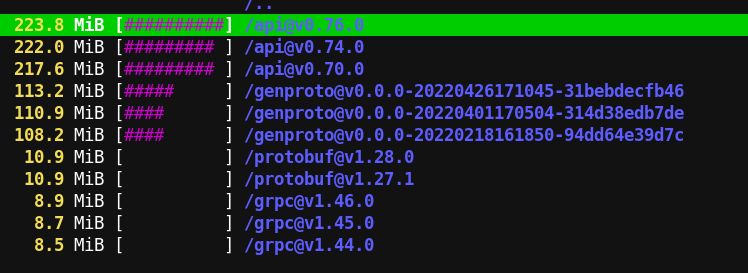
<p>Today I happened to notice that this directory was taking up roughly
<strong>4 GB</strong> of my disk space! I started analyzing why it was taking up so
much space using my favorite tool for this purpose &ndash; <a href="https://dev.yorhel.nl/ncdu">ncdu</a>.</p>
<p>Here&rsquo;s a snapshot showing disk usage by one of the sub-directories
under <code>${GOPATH}/pkg/</code>, which shows the problem &mdash; Over time, I had
accumulated multiple versions of multiple packages!</p>
<p><a id="figure--go-pkg-disk-usage"></a></p>


<figure>
    
        <img src="https://scripter.co/cleaning-up-gopath-pkg/go-pkg-disk-usage.png" alt="Figure 1: Snapshot of ncdu showing disk usage for a ${GOPATH}/pkg/ directory"/> <figcaption>
                <p>
                    <span class="figure-number">Figure 1: </span>Snapshot of <em>ncdu</em> showing disk usage for a <code>${GOPATH}/pkg/</code> directory
                    
                        
                        </p>
                
            </figcaption></figure>


<h2 id="write-protected-gopath-pkg">Write-protected <code>${GOPATH}/pkg/</code>&nbsp;<a class="headline-hash no-text-decoration" href="#write-protected-gopath-pkg">#</a></h2>


<p>I identified the problem. And I knew that I just needed to delete all
the old packages.</p>
<div class="verse">
<p>        But Go wouldn&rsquo;t allow deleting those <code>pkg/</code> directories!<br /></p>
</div>
<p>I had been searching a solution to this on and off, but didn&rsquo;t have
much success, mainly attributed to the short and generic name of the
&ldquo;Go&rdquo; language, and the fact that I didn&rsquo;t know what the
<code>${GOPATH}/pkg/</code> directory was called.</p>

<h2 id="cleaning-up-modcache">Cleaning up &ldquo;modcache&rdquo;&nbsp;<a class="headline-hash no-text-decoration" href="#cleaning-up-modcache">#</a></h2>


<p>Today, I finally had success when I searched for this magic phrase:
<em>golang &ldquo;cannot remove&rdquo; &ldquo;pkg/mod&rdquo;</em> .. and <a href="https://github.com/golang/go/issues/27161#issuecomment-415213240">Golang Issues # 27161</a> was
the first search result!</p>
<p>The solution was so simple, but so difficult to look for ..</p>
<p><a id="code-snippet--go-clean-modcache"></a></p>
<div class="highlight"><pre tabindex="0" class="chroma"><code class="language-shell" data-lang="shell"><span class="line"><span class="cl">go clean -modcache
</span></span></code></pre></div><div class="src-block-caption">
  <span class="src-block-number"><a href="#code-snippet--go-clean-modcache">Code Snippet 1</a>:</span>
  Command to delete contents in <code>${GOPATH}/pkg/</code> or the Go <i>modcache</i>
</div>
<p>From that issue, I also learned that the <code>${GOPATH}/pkg/</code> directory is
the default &ldquo;modcache&rdquo; or the cache directory for holding all the
installed Go modules.</p>

<h2 id="wrapping-up">Wrapping up&nbsp;<a class="headline-hash no-text-decoration" href="#wrapping-up">#</a></h2>


<p>Knowing that the stuff I was trying to delete is called <em>modcache</em>,
this of course works ..</p>
<p><a id="code-snippet--go-help-clean"></a></p>
<div class="highlight"><pre tabindex="0" class="chroma"><code class="language-shell" data-lang="shell"><span class="line"><span class="cl">go <span class="nb">help</span> clean <span class="p">|</span> rg modcache -A <span class="m">2</span>
</span></span></code></pre></div><div class="src-block-caption">
  <span class="src-block-number"><a href="#code-snippet--go-help-clean">Code Snippet 2</a>:</span>
  Getting help with cleaning up the <i>modcache</i> from <code>go help</code>
</div>
<p>The issue referenced above gets resolved when a <a href="https://github.com/golang/go/issues/27161#issuecomment-625899357"><code>-modcacherw</code> switch
gets added</a> to the <code>go build</code> command. I see that switch when I run
<code>go help build</code>. <em>But that switch is not available for <code>go get</code>?
.. because I don&rsquo;t see it when I run <code>go help get</code>.</em></p>
<p>I don&rsquo;t understand why Go decided to make this so complicated by
taking away the <em>write</em> access from the user who installed the Go
package!</p>
<div class="verse">
<p>        At least <code>go clean -modcache</code> accomplishes what I want .. <em>sigh</em><br /></p>
</div>

<h2 id="references">References&nbsp;<a class="headline-hash no-text-decoration" href="#references">#</a></h2>


<ul>
<li><a href="https://pkg.go.dev/cmd/go#hdr-GOPATH_environment_variable"><code>go</code> Documentation &ndash; <code>GOPATH</code> environment variable</a></li>
<li><a href="https://pkg.go.dev/cmd/go#hdr-Remove_object_files_and_cached_files"><code>go</code> Documentation &ndash; <code>go help clean</code></a></li>
<li><a href="https://github.com/golang/go/wiki/SettingGOPATH">Go Wiki &ndash; Setting <code>GOPATH</code></a></li>
<li><a href="https://github.com/golang/go/issues/27161">Golang Issue # 27161</a></li>
</ul>
]]></content><category scheme="https://scripter.co/categories/programming" term="programming" label="programming"/><category scheme="https://scripter.co/tags/golang" term="golang" label="golang"/><category scheme="https://scripter.co/tags/100daystooffload" term="100daystooffload" label="100DaysToOffload"/></entry><entry><title type="html">View GitHub Pull Requests in Magit</title><link href="https://scripter.co/view-github-pull-requests-in-magit/?utm_source=atom_feed" rel="alternate" type="text/html"/><link href="https://scripter.co/creating-a-patch-file-using-magit/?utm_source=atom_feed" rel="related" type="text/html" title="Creating a patch file using Magit"/><link href="https://scripter.co/git-diff-minified-js-and-css/?utm_source=atom_feed" rel="related" type="text/html" title="Git diff Minified JS and CSS"/><link href="https://scripter.co/narrowing-the-author-column-in-magit/?utm_source=atom_feed" rel="related" type="text/html" title="Narrowing the Author column in Magit"/><link href="https://scripter.co/gujarati-fonts-in-emacs/?utm_source=atom_feed" rel="related" type="text/html" title="Gujarati fonts in Emacs"/><link href="https://scripter.co/emacs-lisp-advice-combinators/?utm_source=atom_feed" rel="related" type="text/html" title="Emacs Lisp: Advice Combinators"/><id>https://scripter.co/view-github-pull-requests-in-magit/</id><author><name>Kaushal Modi</name></author><published>2022-06-23T17:51:00-04:00</published><updated>2022-06-23T17:51:00-04:00</updated><content type="html"><![CDATA[<blockquote>How to view GitHub Pull Request branches locally in the cloned repo,
and more importantly, how to do that automatically from within Emacs.</blockquote><div class="ox-hugo-toc toc">
<div class="heading">Table of Contents</div>
<ul>
<li><a href="#locally-creating-a-branch-for-a-pr">Locally creating a branch for a PR</a></li>
<li><a href="#getting-references-to-all-pull-requests">Getting references to all Pull Requests</a></li>
<li><a href="#automatically-adding-pr-refs">Automatically adding PR refs</a></li>
<li><a href="#summary">Summary</a></li>
<li><a href="#references">References</a></li>
</ul>
</div>
<!--endtoc-->
<p>I have a few public projects in git repos, but I don&rsquo;t get that much
traffic in <em>Pull Requests (PR)</em>
<span class="sidenote-number"><small class="sidenote">
Gitlab calls these <em>Merge Requests</em> or MRs.
</small></span>
. So when I need to add additional commits to a PR, I would just add
the PR author&rsquo;s <em>remote</em> to my local repo, <em>check out</em> their PR
branch, add my own commits and then merge that to my project&rsquo;s <em>main</em>
branch.</p>
<p>As these occurrences were few and far apart, I didn&rsquo;t have a need to
view the <em>PR branches</em> directly from within Emacs/Magit. Though, I
somehow knew that each GitHub Pull Request&rsquo;s <em>HEAD</em> got assigned a <a href="https://git-scm.com/book/en/v2/Git-Internals-Git-References">git
<strong>reference</strong></a>. But I didn&rsquo;t need to use that knowledge until today
😃.</p>
<p>Today, when discussing <a href="https://github.com/protesilaos/denote/pull/20">PR # 20</a> on <a href="https://protesilaos.com/">Prot&rsquo;s</a> <a href="https://protesilaos.com/emacs/denote">Denote</a> package&rsquo;s GitHub
mirror
<span class="sidenote-number"><small class="sidenote">
Prot uses <a href="https://git.sr.ht/~protesilaos/denote">SourceHut</a> as the primary git forge for his Emacs
packages. But I am glad that he doesn&rsquo;t mind the activity in Issues
and Pull Requests on the GitHub mirror.
</small></span>
, he wrote <a href="https://github.com/protesilaos/denote/pull/20#issuecomment-1164676013">this comment</a>:</p>
<blockquote>
<p>Now I just need to figure out how best to incorporate your changes
into the <code>org-id</code> branch so I can add the final bits. I am not too
familiar with the PR workflow &hellip;</p>
</blockquote>
<p>.. and that inspired this post today.</p>

<h2 id="locally-creating-a-branch-for-a-pr">Locally creating a branch for a PR&nbsp;<a class="headline-hash no-text-decoration" href="#locally-creating-a-branch-for-a-pr">#</a></h2>


<p>From the <a href="https://docs.github.com/en/pull-requests/collaborating-with-pull-requests/reviewing-changes-in-pull-requests/checking-out-pull-requests-locally">GitHub docs</a>, the <code>git</code> command to create a local branch for a
PR is this:</p>
<div class="highlight"><pre tabindex="0" class="chroma"><code class="language-shell" data-lang="shell"><span class="line"><span class="cl">git fetch origin pull/ID/head:BRANCHNAME
</span></span></code></pre></div><p>I have the <code>denote</code> package cloned from its GitHub mirror. So the
<strong>origin</strong> remote&rsquo;s <strong>url</strong> is <code>https://github.com/protesilaos/denote</code>.</p>
<div class="note">
<p>Make sure that the remote name used in this command is pointing to a
GitHub repo, and not a mirror forge like GitLab or SourceHut.</p>
</div>
<p>When I ran the below command, I got a new branch <strong>pr-20</strong> pointing to
the latest commit of that PR:</p>
<div class="highlight"><pre tabindex="0" class="chroma"><code class="language-shell" data-lang="shell"><span class="line"><span class="cl">git fetch origin pull/20/head:pr-20
</span></span></code></pre></div><p>Awesome!</p>
<div class="verse">
<p>.. But that wasn&rsquo;t good enough<br />
    .. Now I wanted more<br />
        .. I didn&rsquo;t want to manually create a branch for each PR.<br /></p>
</div>

<h2 id="getting-references-to-all-pull-requests">Getting references to all Pull Requests&nbsp;<a class="headline-hash no-text-decoration" href="#getting-references-to-all-pull-requests">#</a></h2>


<p>Now that I was on that quest of &ldquo;I want more&rdquo;, it didn&rsquo;t take me long
to re-discover <a href="https://oremacs.com/2015/03/11/git-tricks/#illusion-2-quickly-get-github-pull-requests-on-your-system">this 7-year old nugget</a> by <a href="https://oremacs.com">Oleh Krehel</a>. Here are the
relevant bits from that post:</p>
<ol>
<li>Open the local repo&rsquo;s <code>.git/config</code> file.</li>
<li>Find the <code>[remote &quot;origin&quot;]</code> section</li>
<li>Modify it by adding this one line with <strong>pull</strong> refs. <em>This is the
same for all GitHub repositories.</em>
<div class="highlight"><pre tabindex="0" class="chroma"><code class="language-cfg" data-lang="cfg"><span class="line"><span class="cl"><span class="k">[remote &#34;origin&#34;]</span>
</span></span><span class="line"><span class="cl">    <span class="na">url</span> <span class="o">=</span> <span class="s">https://github.com/USER/REPO.git
</span></span></span><span class="line"><span class="cl"><span class="s">    fetch = +refs/heads/*:refs/remotes/origin/*
</span></span></span><span class="line hl"><span class="cl"><span class="s">    fetch = +refs/pull/*/head:refs/pull/origin/*</span>
</span></span></code></pre></div></li>
</ol>
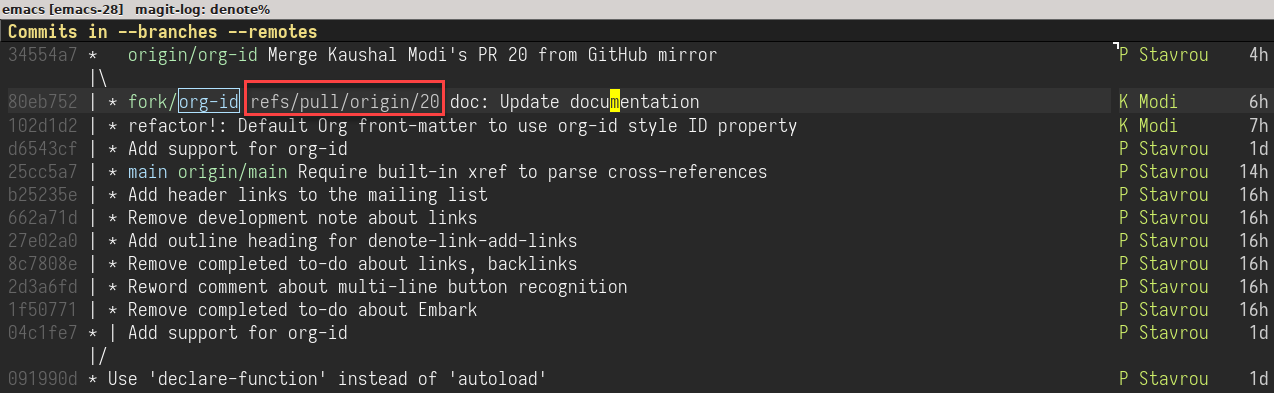
<p>With that edit in place, when I did <kbd>l</kbd> <kbd>a</kbd> (show
the log for all git references), followed by <kbd>f</kbd> <kbd>a</kbd>
(fetch all the remotes) in the Magit, I could see the references to
the <code>denote</code> repo&rsquo;s PRs!</p>
<p><a id="figure--magit-denote-pr-refs"></a></p>


<figure>
    
        <img src="https://scripter.co/view-github-pull-requests-in-magit/pr-20-ref.png" alt="Figure 1: Viewing PR references from denote package&rsquo;s GitHub repo"/> <figcaption>
                <p>
                    <span class="figure-number">Figure 1: </span>Viewing PR references from <code>denote</code> package&rsquo;s GitHub repo
                    
                        
                        </p>
                
            </figcaption></figure>

<div class="verse">
<p>.. But that still wasn&rsquo;t good enough<br />
    .. I didn&rsquo;t want to manually edit the <code>.git/config</code> in each repo.<br /></p>
</div>

<h2 id="automatically-adding-pr-refs">Automatically adding PR refs&nbsp;<a class="headline-hash no-text-decoration" href="#automatically-adding-pr-refs">#</a></h2>


<p>Of course, I wasn&rsquo;t the first one to think of this!</p>
<p>Another Emacs veteran <a href="https://endlessparentheses.com/">Artur Malabarba</a> had already had this covered
also around <a href="https://endlessparentheses.com/automatically-configure-magit-to-access-github-prs.html">7 years back</a>. Coincidentally, that post was written as a
response to that same blog post by Oleh where he shared the above
<code>.git/config</code> tip.</p>
<p>In that post, Artur shares an Emacs Lisp function that uses Magit
functions like <code>magit-get</code>, <code>magit-get-all</code> and <code>magit-git-string</code> to
auto-add the <code>fetch = +refs/pull/*/head:refs/pull/origin/*</code> line in
the <code>.git/config</code>. This magic happens after checking that the <strong>origin</strong>
remote points to a GitHub repo, and if that line doesn&rsquo;t already
exist.</p>
<p>Here, I am lightly modifying the function shared in that post so that
the <strong>origin</strong> remote name is not hard-coded
<span class="sidenote-number"><small class="sidenote">
The reason is that sometimes, I name the original remote as <strong>upstream</strong>
and my fork as <strong>fork</strong>, and I might have no remote named <strong>origin</strong>.
</small></span>
. Credit for the main logic in this code still goes to Artur.</p>
<p><a id="code-snippet--add-PR-fetch-ref"></a></p>
<div class="highlight"><pre tabindex="0" class="chroma"><code class="language-emacs-lisp" data-lang="emacs-lisp"><span class="line"><span class="cl"><span class="p">(</span><span class="nb">defun</span> <span class="nv">modi/add-PR-fetch-ref</span> <span class="p">(</span><span class="kp">&amp;optional</span> <span class="nv">remote-name</span><span class="p">)</span>
</span></span><span class="line"><span class="cl">  <span class="s">&#34;If refs/pull is not defined on a GH repo, define it.
</span></span></span><span class="line"><span class="cl"><span class="s">
</span></span></span><span class="line"><span class="cl"><span class="s">If REMOTE-NAME is not specified, it defaults to the </span><span class="ss">`remote&#39;</span><span class="s"> set
</span></span></span><span class="line"><span class="cl"><span class="s">for the \&#34;main\&#34; or \&#34;master\&#34; branch.&#34;</span>
</span></span><span class="line"><span class="cl">  <span class="p">(</span><span class="nb">let*</span> <span class="p">((</span><span class="nv">remote-name</span> <span class="p">(</span><span class="nb">or</span> <span class="nv">remote-name</span>
</span></span><span class="line"><span class="cl">                          <span class="p">(</span><span class="nv">magit-get</span> <span class="s">&#34;branch&#34;</span> <span class="s">&#34;main&#34;</span> <span class="s">&#34;remote&#34;</span><span class="p">)</span>
</span></span><span class="line"><span class="cl">                          <span class="p">(</span><span class="nv">magit-get</span> <span class="s">&#34;branch&#34;</span> <span class="s">&#34;master&#34;</span> <span class="s">&#34;remote&#34;</span><span class="p">)))</span>
</span></span><span class="line"><span class="cl">         <span class="p">(</span><span class="nv">remote-url</span> <span class="p">(</span><span class="nv">magit-get</span> <span class="s">&#34;remote&#34;</span> <span class="nv">remote-name</span> <span class="s">&#34;url&#34;</span><span class="p">))</span>
</span></span><span class="line"><span class="cl">         <span class="p">(</span><span class="nv">fetch-refs</span> <span class="p">(</span><span class="nb">and</span> <span class="p">(</span><span class="nf">stringp</span> <span class="nv">remote-url</span><span class="p">)</span>
</span></span><span class="line"><span class="cl">                          <span class="p">(</span><span class="nf">string-match</span> <span class="s">&#34;github&#34;</span> <span class="nv">remote-url</span><span class="p">)</span>
</span></span><span class="line"><span class="cl">                          <span class="p">(</span><span class="nv">magit-get-all</span> <span class="s">&#34;remote&#34;</span> <span class="nv">remote-name</span> <span class="s">&#34;fetch&#34;</span><span class="p">)))</span>
</span></span><span class="line"><span class="cl">         <span class="c1">;; https://oremacs.com/2015/03/11/git-tricks/</span>
</span></span><span class="line"><span class="cl">         <span class="p">(</span><span class="nv">fetch-address</span> <span class="p">(</span><span class="nf">format</span> <span class="s">&#34;+refs/pull/*/head:refs/pull/%s/*&#34;</span> <span class="nv">remote-name</span><span class="p">)))</span>
</span></span><span class="line"><span class="cl">    <span class="p">(</span><span class="nb">when</span> <span class="nv">fetch-refs</span>
</span></span><span class="line"><span class="cl">      <span class="p">(</span><span class="nb">unless</span> <span class="p">(</span><span class="nf">member</span> <span class="nv">fetch-address</span> <span class="nv">fetch-refs</span><span class="p">)</span>
</span></span><span class="line"><span class="cl">        <span class="p">(</span><span class="nv">magit-git-string</span> <span class="s">&#34;config&#34;</span>
</span></span><span class="line"><span class="cl">                          <span class="s">&#34;--add&#34;</span>
</span></span><span class="line"><span class="cl">                          <span class="p">(</span><span class="nf">format</span> <span class="s">&#34;remote.%s.fetch&#34;</span> <span class="nv">remote-name</span><span class="p">)</span>
</span></span><span class="line"><span class="cl">                          <span class="nv">fetch-address</span><span class="p">)))))</span>
</span></span><span class="line"><span class="cl"><span class="p">(</span><span class="nv">add-hook</span> <span class="ss">&#39;magit-mode-hook</span> <span class="nf">#&#39;</span><span class="nv">modi/add-PR-fetch-ref</span><span class="p">)</span>
</span></span></code></pre></div><div class="src-block-caption">
  <span class="src-block-number"><a href="#code-snippet--add-PR-fetch-ref">Code Snippet 1</a>:</span>
  Function to auto-add GitHub PR references to the repo's <code>.git/config</code>
</div>

<h2 id="summary">Summary&nbsp;<a class="headline-hash no-text-decoration" href="#summary">#</a></h2>


<p>With the above snippet added to your Emacs config and evaluated, each
time you visit a repo cloned from GitHub in the Magit Status buffer
(<code>M-x magit-status</code>), the PR refs will get auto-added to that repo&rsquo;s
<code>.git/config</code> if needed.</p>
<p>After that, you can easily view the commits from all the PRs by doing
<kbd>l</kbd> <kbd>a</kbd> <kbd>f</kbd> <kbd>a</kbd>.</p>

<h2 id="references">References&nbsp;<a class="headline-hash no-text-decoration" href="#references">#</a></h2>


<ul>
<li><a href="https://oremacs.com/2015/03/11/git-tricks/#illusion-2-quickly-get-github-pull-requests-on-your-system">oremacs &ndash; Some git/magit/github tricks</a></li>
<li><a href="https://endlessparentheses.com/automatically-configure-magit-to-access-github-prs.html">endlessparentheses &ndash; Automatically configure Magit to access Github PRs</a></li>
<li><a href="https://docs.github.com/en/pull-requests/collaborating-with-pull-requests/reviewing-changes-in-pull-requests/checking-out-pull-requests-locally">GitHub &ndash; Checking out PR branches locally</a></li>
</ul>
]]></content><category scheme="https://scripter.co/categories/emacs" term="emacs" label="emacs"/><category scheme="https://scripter.co/categories/elisp" term="elisp" label="elisp"/><category scheme="https://scripter.co/tags/git" term="git" label="git"/><category scheme="https://scripter.co/tags/magit" term="magit" label="magit"/><category scheme="https://scripter.co/tags/100daystooffload" term="100daystooffload" label="100DaysToOffload"/><category scheme="https://scripter.co/tags/github" term="github" label="github"/><category scheme="https://scripter.co/tags/git-reference" term="git-reference" label="git-reference"/></entry><entry><title type="html">Gujarati fonts in Emacs</title><link href="https://scripter.co/gujarati-fonts-in-emacs/?utm_source=atom_feed" rel="alternate" type="text/html"/><link href="https://scripter.co/emacs-lisp-advice-combinators/?utm_source=atom_feed" rel="related" type="text/html" title="Emacs Lisp: Advice Combinators"/><link href="https://scripter.co/org-show-only-post-subtree-headings/?utm_source=atom_feed" rel="related" type="text/html" title="Org: Show only Post subtree headings"/><link href="https://scripter.co/firefox-always-open-a-new-tab-after-current/?utm_source=atom_feed" rel="related" type="text/html" title="Firefox: Always open a New Tab after Current"/><link href="https://scripter.co/saving-python-pip-dependencies/?utm_source=atom_feed" rel="related" type="text/html" title="Saving Python pip dependencies"/><link href="https://scripter.co/disarming-the-tar-bomb-in-10-seconds/?utm_source=atom_feed" rel="related" type="text/html" title="Disarming the 'tar' bomb in 10 seconds"/><id>https://scripter.co/gujarati-fonts-in-emacs/</id><author><name>Kaushal Modi</name></author><published>2022-06-19T01:31:00-04:00</published><updated>2022-06-19T01:31:00-04:00</updated><content type="html"><![CDATA[<blockquote>Setting a different font for a specific script or language in Emacs.</blockquote><div class="ox-hugo-toc toc">
<div class="heading">Table of Contents</div>
<ul>
<li><a href="#setting-a-fontset-font">Setting a &ldquo;fontset&rdquo; font</a></li>
<li><a href="#gujarati-fonts">Gujarati fonts</a></li>
</ul>
</div>
<!--endtoc-->
<p>All Emacs versions ship with a nifty <strong>HELLO</strong> file that you can quickly
open using <code>M-x view-hello-file</code> or its default binding <code>C-h h</code>. This
file lists &ldquo;Hello&rdquo; written in dozens of languages to demonstrate some
of the character sets supported by Emacs.</p>
<p><a id="figure--hello-buffer"></a></p>


<figure>
    <a href="hello.png">
        <img src="https://scripter.co/gujarati-fonts-in-emacs/hello.png" alt="Figure 1: &ldquo;Hello&rdquo; buffer in Emacs"/> </a><figcaption>
                <p>
                    <span class="figure-number">Figure 1: </span>&ldquo;Hello&rdquo; buffer in Emacs
                    
                        
                        </p>
                
            </figcaption></figure>

<p>Born and raised in the Gujarat state in India, I grew up
speaking the <a href="https://en.wikipedia.org/wiki/Gujarati_language">Gujarati (ગુજરાતી)</a> language
<span class="sidenote-number"><small class="sidenote">
India officially recognizes <a href="https://en.wikipedia.org/wiki/Languages_of_India">22 languages</a> (as of <span class="timestamp-wrapper"><span class="timestamp">&lt;2022-06-19 Sun&gt;</span></span>) and
Gujarati is one of them.
</small></span>
and so it&rsquo;s also the language closest to my heart. So I was pleasantly
surprised to see a representation of Gujarati in the &ldquo;Hello&rdquo; buffer!
In the above screenshot, in the &ldquo;South Asia&rdquo; section, the script after
the yellow cursor is Gujarati, and it reads <em>namaste</em>.</p>

<h2 id="setting-a-fontset-font">Setting a &ldquo;fontset&rdquo; font&nbsp;<a class="headline-hash no-text-decoration" href="#setting-a-fontset-font">#</a></h2>


<p>It was on <span class="timestamp-wrapper"><span class="timestamp">&lt;2018-08-13 Mon&gt; </span></span> that I discovered the presence of Gujarati
script in that &ldquo;Hello&rdquo; buffer, and the reason I know that exact date
is because I had <a href="https://lists.gnu.org/r/help-gnu-emacs/2018-08/msg00033.html">asked a question</a> regarding that on the
<em>help-gnu-emacs</em> mailing list 😃.</p>
<p>This was the time when Emacs was using the <a href="https://www.nongnu.org/m17n/">m17n</a> library for
multi-lingual font rendering by default. The question was regarding a
font rendering issue I was seeing. As I learn later in that thread, it
was because I didn&rsquo;t have the m17n database installed on my machine
<span class="sidenote-number"><small class="sidenote">
At least in 2022, the <a href="https://github.com/harfbuzz/harfbuzz">harfbuzz</a> library is the recommended library for
text shaping and font rendering. Someone please correct me if that&rsquo;s
wrong. In any case, I have switched to using <em>harfbuzz</em> instead of
<em>m17n</em> for a while now and haven&rsquo;t found any font-rendering issues
with non-English scripts.
</small></span>
. But it&rsquo;s in that support thread that, thanks to <em>Andy Moreton</em>, I
learned that you can change the font for the Gujarati script using
<code>set-fontset-font</code>.</p>
<p>This applies in general to any script. You can read more details about
this function in <a href="https://www.gnu.org/software/emacs/manual/html_node/emacs/Modifying-Fontsets.html" title="Emacs Lisp: (info &quot;(emacs) Modifying Fontsets&quot;)">Emacs Info: Modifying Fontsets</a>, but here&rsquo;s the gist:</p>
<p><a id="code-snippet--gujarati-set-fontset-font"></a></p>
<div class="highlight"><pre tabindex="0" class="chroma"><code class="language-emacs-lisp" data-lang="emacs-lisp"><span class="line"><span class="cl"><span class="p">(</span><span class="nf">set-fontset-font</span> <span class="s">&#34;fontset-default&#34;</span> <span class="ss">&#39;gujarati</span> <span class="s">&#34;&lt;FONT NAME&gt;&#34;</span><span class="p">)</span>
</span></span></code></pre></div><div class="src-block-caption">
  <span class="src-block-number"><a href="#code-snippet--gujarati-set-fontset-font">Code Snippet 1</a>:</span>
  Setting default font for Gujarati script using <code>set-fontset-font</code>
</div>
<p>That led me down the path of exploring the available Gujarati fonts
out there ..</p>

<h2 id="gujarati-fonts">Gujarati fonts&nbsp;<a class="headline-hash no-text-decoration" href="#gujarati-fonts">#</a></h2>


<p>After looking around for a bit, I found a wonderful <a href="https://github.com/samyakbhuta/chhapkaam/wiki/%E0%AA%97%E0%AB%81%E0%AA%9C%E0%AA%B0%E0%AA%BE%E0%AA%A4%E0%AB%80-%E0%AA%AF%E0%AB%81%E0%AA%A8%E0%AA%BF%E0%AA%95%E0%AB%8B%E0%AA%A1-%E0%AA%AB%E0%AB%8B%E0%AA%A8%E0%AB%8D%E0%AA%9F-%E0%AA%B8%E0%AB%82%E0%AA%9A%E0%AB%80---List-of-Gujarati-Unicode-Fonts">collection of
Gujarati fonts</a> in this GitHub repository:
<a href="https://github.com/samyakbhuta/chhapkaam">github.com/samyakbhuta/chhapkaam</a>
<span class="sidenote-number"><small class="sidenote">
The repo name is <em>chhapkaam</em> (I
would have spelled it as <em>chhaapkaam</em>) which is the Gujarati word
છાપકામ, meaning &ldquo;printing&rdquo;.
</small></span>
.</p>
<p>Below is my further curated list of fonts from the above list:</p>
<p><a id="table--gujarati-fonts"></a></p>
<div class="table-caption">
  <span class="table-number"><a href="#table--gujarati-fonts">Table 1</a>:</span>
  Gujarati Fonts
</div>
<table>
<thead>
<tr>
<th>Font Name</th>
<th><em>Namaste</em></th>
<th>Category</th>
<th>Homepage</th>
<th>Download</th>
</tr>
</thead>
<tbody>
<tr>
<td><strong>Shruti</strong></td>
<td><img src="namaste_shruti.png" alt=""></td>
<td>serif</td>
<td></td>
<td><a href="https://www.wfonts.com/font/shruti">wfonts.com</a></td>
</tr>
<tr>
<td><strong>Mukta Vaani</strong></td>
<td><img src="namaste_mukta_vaani.png" alt=""></td>
<td>serif</td>
<td><a href="https://ektype.in/scripts/gujarati/mukta-vaani.html">Ek Type &ndash; Mukta Vaani</a></td>
<td><a href="https://github.com/EkType/Mukta/releases">GitHub</a></td>
</tr>
<tr>
<td><strong>Lohit Gujarati</strong></td>
<td><img src="namaste_lohit.png" alt=""></td>
<td>sans serif</td>
<td><a href="https://pagure.io/lohit">Pagure &ndash; Lohit</a></td>
<td><a href="https://releases.pagure.org/lohit/">pagure releases</a></td>
</tr>
</tbody>
</table>
<p>To use these fonts, after downloading and installing them on your
system, evaluate <a href="#code-snippet--gujarati-set-fontset-font">Code Snippet 1</a> above with the
correct &ldquo;FONT NAME&rdquo;. For example, to set the Gujarati text to use the
<em>Shruti</em> font, evaluate <code class="code-inline language-emacs-lisp"><span class="p">(</span><span class="nf">set-fontset-font</span> <span class="s">&#34;fontset-default&#34;</span> <span class="ss">&#39;gujarati</span> <span class="s">&#34;Shruti&#34;</span><span class="p">)</span></code>.</p>
<p>Thanks for reading (વાંચવા બદલ આભાર) 🙏!</p>
]]></content><category scheme="https://scripter.co/categories/emacs" term="emacs" label="emacs"/><category scheme="https://scripter.co/series/gujarati-in-emacs" term="gujarati-in-emacs" label="Gujarati in Emacs"/><category scheme="https://scripter.co/tags/gujarati" term="gujarati" label="gujarati"/><category scheme="https://scripter.co/tags/font" term="font" label="font"/><category scheme="https://scripter.co/tags/100daystooffload" term="100daystooffload" label="100DaysToOffload"/></entry><entry><title type="html">Emacs Lisp: Advice Combinators</title><link href="https://scripter.co/emacs-lisp-advice-combinators/?utm_source=atom_feed" rel="alternate" type="text/html"/><link href="https://scripter.co/org-show-only-post-subtree-headings/?utm_source=atom_feed" rel="related" type="text/html" title="Org: Show only Post subtree headings"/><link href="https://scripter.co/using-emacs-advice-to-silence-messages-from-functions/?utm_source=atom_feed" rel="related" type="text/html" title="Using Emacs advice to silence messages from functions"/><link href="https://scripter.co/firefox-always-open-a-new-tab-after-current/?utm_source=atom_feed" rel="related" type="text/html" title="Firefox: Always open a New Tab after Current"/><link href="https://scripter.co/saving-python-pip-dependencies/?utm_source=atom_feed" rel="related" type="text/html" title="Saving Python pip dependencies"/><link href="https://scripter.co/disarming-the-tar-bomb-in-10-seconds/?utm_source=atom_feed" rel="related" type="text/html" title="Disarming the 'tar' bomb in 10 seconds"/><id>https://scripter.co/emacs-lisp-advice-combinators/</id><author><name>Kaushal Modi</name></author><published>2022-06-17T21:30:00-04:00</published><updated>2022-06-18T08:51:00-04:00</updated><content type="html"><![CDATA[<blockquote>My diagrammatic take on summarizing all the Emacs advice combinators.</blockquote><div class="ox-hugo-toc toc">
<div class="heading">Table of Contents</div>
<ul>
<li><a href="#overview-on-using-advices">Overview on using advices</a></li>
<li><a href="#advice-combinators--before"><span class="section-num">1</span> <code>:before</code></a></li>
<li><a href="#advice-combinators--after"><span class="section-num">2</span> <code>:after</code></a></li>
<li><a href="#advice-combinators--override"><span class="section-num">3</span> <code>:override</code></a></li>
<li><a href="#advice-combinators--around"><span class="section-num">4</span> <code>:around</code></a></li>
<li><a href="#advice-combinators--before-while"><span class="section-num">5</span> <code>:before-while</code></a></li>
<li><a href="#advice-combinators--before-until"><span class="section-num">6</span> <code>:before-until</code></a></li>
<li><a href="#advice-combinators--after-while"><span class="section-num">7</span> <code>:after-while</code></a></li>
<li><a href="#advice-combinators--after-until"><span class="section-num">8</span> <code>:after-until</code></a></li>
<li><a href="#advice-combinators--filter-args"><span class="section-num">9</span> <code>:filter-args</code></a></li>
<li><a href="#advice-combinators--filter-return"><span class="section-num">10</span> <code>:filter-return</code></a></li>
<li><a href="#summary">Summary</a></li>
<li><a href="#advice-combinators--references">References</a></li>
</ul>
</div>
<!--endtoc-->
<p>If you have read some of my earlier posts, you would know that I
really enjoy using the Emacs Advice system 😃.</p>
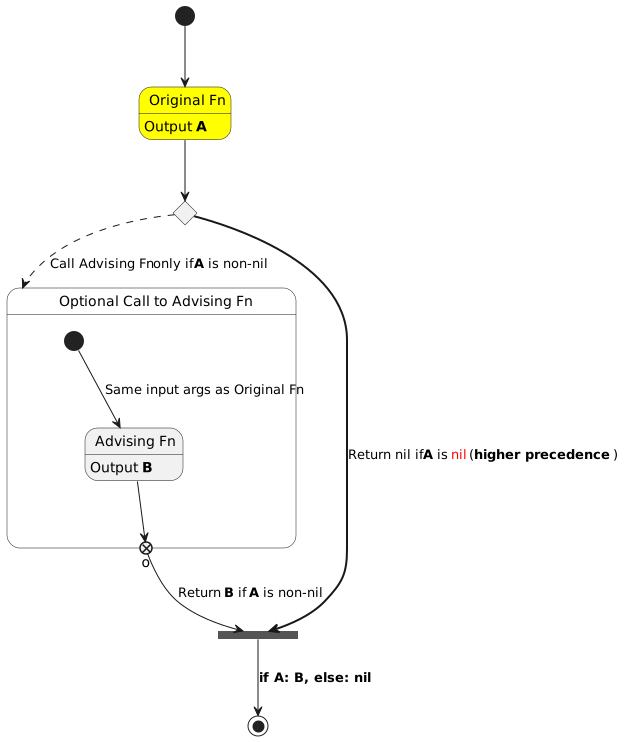
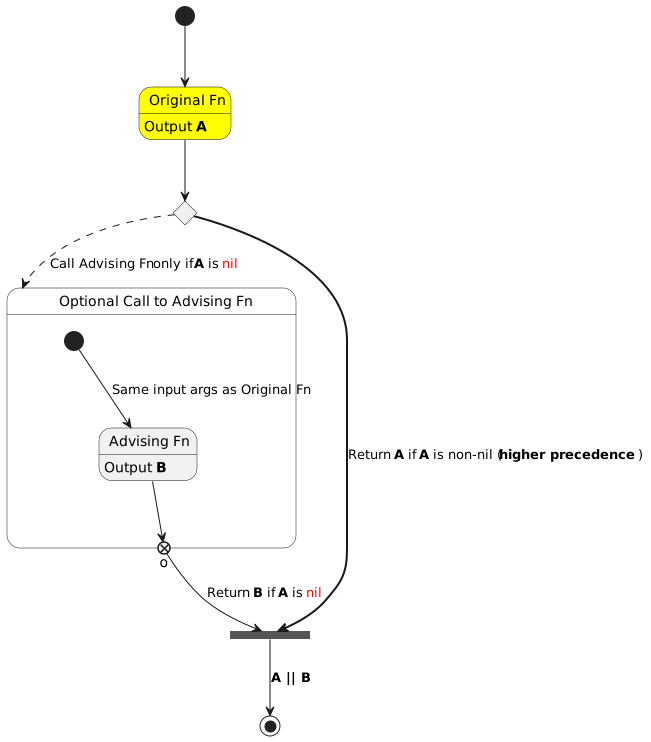
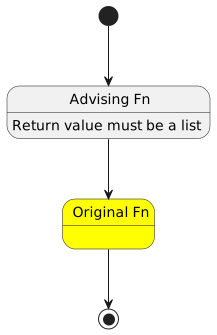
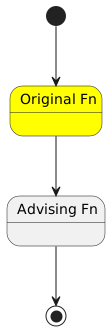
<p>The &ldquo;advice&rdquo; feature lets you add to the existing definition of a
function, by <em>advising the function</em>.  This is a cleaner method than
redefining the whole function, because it&rsquo;s easier to debug and if you
don&rsquo;t need it, you can just <em>remove</em> the advice.</p>
<div class="note">
<p>You can jump to the <a href="#advice-combinators--references">References section</a> below if you need to look at
the related sections in the Emacs Lisp Manual.</p>
</div>

<h2 id="overview-on-using-advices">Overview on using advices&nbsp;<a class="headline-hash no-text-decoration" href="#overview-on-using-advices">#</a></h2>


<p>I do not plan to write a tutorial on how to write advices in
Emacs-Lisp, but here&rsquo;s a 3-second primer:</p>
<dl>
<dt>To add an advice</dt>
<dd><code class="code-inline language-emacs-lisp"><span class="p">(</span><span class="nv">advice-add</span> <span class="ss">&#39;original-fn</span> <span class="nv">&lt;combinator&gt;</span> <span class="nf">#&#39;</span><span class="nv">advising-fn</span><span class="p">)</span></code></dd>
<dt>To remove an advice</dt>
<dd><code class="code-inline language-emacs-lisp"><span class="p">(</span><span class="nv">advice-remove</span> <span class="ss">&#39;original-fn</span> <span class="nf">#&#39;</span><span class="nv">advising-fn</span><span class="p">)</span></code></dd>
</dl>
<p>This article attempts to briefly describe different ways of advising a
function, using 10 different <em>combinators</em>. If you have never used
advices in your Emacs config, don&rsquo;t worry. I am hopeful that the
diagrams in this post and the examples linked for some of the
combinators in the Summary section makes this concept a bit easier to
assimilate.</p>
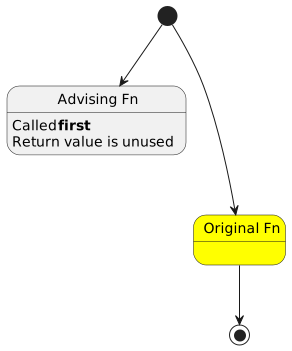
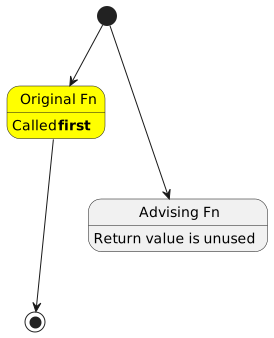
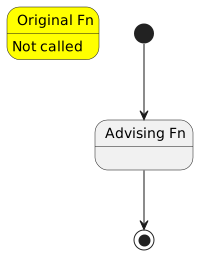
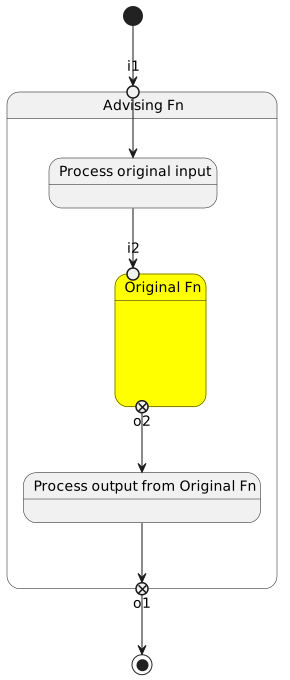
<dl>
<dt>Diagram Legend</dt>
<dd><ul>
<li>Initial black circle: Original Fn input arguments</li>
<li>Yellow box: Original Fn</li>
<li>Gray box: Advising Fn</li>
<li>Black circle inside a white circle: Return values</li>
</ul>
</dd>
</dl>

<h2 id="advice-combinators--before"><span class="section-num">1</span> <code>:before</code>&nbsp;<a class="headline-hash no-text-decoration" href="#advice-combinators--before">#</a></h2>


<p><a id="figure--advice-combinators-before"></a></p>


<figure>
    
        <img src="https://scripter.co/emacs-lisp-advice-combinators/before.svg" alt="Figure 1: :before advice"/> <figcaption>
                <p>
                    <span class="figure-number">Figure 1: </span><strong>:before</strong> advice
                    
                        
                        </p>
                
            </figcaption></figure>


<h2 id="advice-combinators--after"><span class="section-num">2</span> <code>:after</code>&nbsp;<a class="headline-hash no-text-decoration" href="#advice-combinators--after">#</a></h2>


<p><a id="figure--advice-combinators-after"></a></p>


<figure>
    
        <img src="https://scripter.co/emacs-lisp-advice-combinators/after.svg" alt="Figure 2: :after advice"/> <figcaption>
                <p>
                    <span class="figure-number">Figure 2: </span><strong>:after</strong> advice
                    
                        
                        </p>
                
            </figcaption></figure>


<h2 id="advice-combinators--override"><span class="section-num">3</span> <code>:override</code>&nbsp;<a class="headline-hash no-text-decoration" href="#advice-combinators--override">#</a></h2>


<p><a id="figure--advice-combinators-override"></a></p>


<figure>
    
        <img src="https://scripter.co/emacs-lisp-advice-combinators/override.svg" alt="Figure 3: :override advice"/> <figcaption>
                <p>
                    <span class="figure-number">Figure 3: </span><strong>:override</strong> advice
                    
                        
                        </p>
                
            </figcaption></figure>


<h2 id="advice-combinators--around"><span class="section-num">4</span> <code>:around</code>&nbsp;<a class="headline-hash no-text-decoration" href="#advice-combinators--around">#</a></h2>


<p><a id="figure--advice-combinators-around"></a></p>


<figure>
    
        <img src="https://scripter.co/emacs-lisp-advice-combinators/around.svg" alt="Figure 4: :around advice"/> <figcaption>
                <p>
                    <span class="figure-number">Figure 4: </span><strong>:around</strong> advice
                    
                        
                        </p>
                
            </figcaption></figure>


<h2 id="advice-combinators--before-while"><span class="section-num">5</span> <code>:before-while</code>&nbsp;<a class="headline-hash no-text-decoration" href="#advice-combinators--before-while">#</a></h2>


<p><a id="figure--advice-combinators-before-while"></a></p>


<figure>
    
        <img src="https://scripter.co/emacs-lisp-advice-combinators/before-while.svg" alt="Figure 5: :before-while advice"/> <figcaption>
                <p>
                    <span class="figure-number">Figure 5: </span><strong>:before-while</strong> advice
                    
                        
                        </p>
                
            </figcaption></figure>


<h2 id="advice-combinators--before-until"><span class="section-num">6</span> <code>:before-until</code>&nbsp;<a class="headline-hash no-text-decoration" href="#advice-combinators--before-until">#</a></h2>


<p><a id="figure--advice-combinators-before-until"></a></p>


<figure>
    
        <img src="https://scripter.co/emacs-lisp-advice-combinators/before-until.svg" alt="Figure 6: :before-until advice"/> <figcaption>
                <p>
                    <span class="figure-number">Figure 6: </span><strong>:before-until</strong> advice
                    
                        
                        </p>
                
            </figcaption></figure>


<h2 id="advice-combinators--after-while"><span class="section-num">7</span> <code>:after-while</code>&nbsp;<a class="headline-hash no-text-decoration" href="#advice-combinators--after-while">#</a></h2>


<p><a id="figure--advice-combinators-after-while"></a></p>


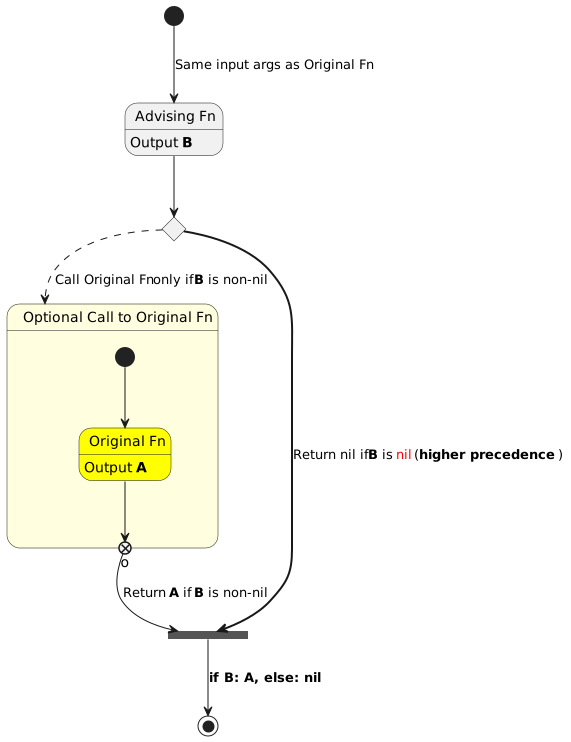
<figure>
    
        <img src="https://scripter.co/emacs-lisp-advice-combinators/after-while.svg" alt="Figure 7: :after-while advice"/> <figcaption>
                <p>
                    <span class="figure-number">Figure 7: </span><strong>:after-while</strong> advice
                    
                        
                        </p>
                
            </figcaption></figure>


<h2 id="advice-combinators--after-until"><span class="section-num">8</span> <code>:after-until</code>&nbsp;<a class="headline-hash no-text-decoration" href="#advice-combinators--after-until">#</a></h2>


<p><a id="figure--advice-combinators-after-until"></a></p>


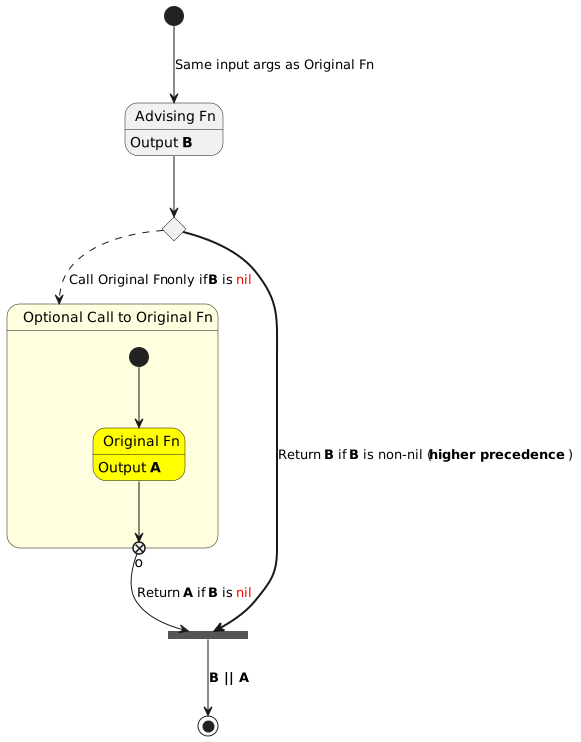
<figure>
    
        <img src="https://scripter.co/emacs-lisp-advice-combinators/after-until.svg" alt="Figure 8: :after-until advice"/> <figcaption>
                <p>
                    <span class="figure-number">Figure 8: </span><strong>:after-until</strong> advice
                    
                        
                        </p>
                
            </figcaption></figure>


<h2 id="advice-combinators--filter-args"><span class="section-num">9</span> <code>:filter-args</code>&nbsp;<a class="headline-hash no-text-decoration" href="#advice-combinators--filter-args">#</a></h2>


<p><a id="figure--advice-combinators-filter-args"></a></p>


<figure>
    
        <img src="https://scripter.co/emacs-lisp-advice-combinators/filter-args.svg" alt="Figure 9: :filter-args advice"/> <figcaption>
                <p>
                    <span class="figure-number">Figure 9: </span><strong>:filter-args</strong> advice
                    
                        
                        </p>
                
            </figcaption></figure>


<h2 id="advice-combinators--filter-return"><span class="section-num">10</span> <code>:filter-return</code>&nbsp;<a class="headline-hash no-text-decoration" href="#advice-combinators--filter-return">#</a></h2>


<p><a id="figure--advice-combinators-filter-return"></a></p>


<figure>
    
        <img src="https://scripter.co/emacs-lisp-advice-combinators/filter-return.svg" alt="Figure 10: :filter-return advice"/> <figcaption>
                <p>
                    <span class="figure-number">Figure 10: </span><strong>:filter-return</strong> advice
                    
                        
                        </p>
                
            </figcaption></figure>


<h2 id="summary">Summary&nbsp;<a class="headline-hash no-text-decoration" href="#summary">#</a></h2>


<p>Here&rsquo;s a concise summary of what each advice combinator does. For
brevity, the <em>advising function</em> is called <em>A</em> and the <em>original
function</em> is called <em>O</em>.</p>
<div class="note">
<p>Once you click on any of the example posts, search for <code>advice-add</code> on
that page to find the code example.</p>
</div>
<p><a id="table--advice-combinator-summary"></a></p>
<div class="table-caption">
  <span class="table-number"><a href="#table--advice-combinator-summary">Table 1</a>:</span>
  Summary of what each advice combinator means
</div>
<table>
<thead>
<tr>
<th>Combinator</th>
<th>Description</th>
<th>Example</th>
</tr>
</thead>
<tbody>
<tr>
<td><code>:before</code></td>
<td><em>A</em> is called before <em>O</em>. <em>O</em> args and return values are not modified.</td>
<td></td>
</tr>
<tr>
<td><code>:after</code></td>
<td><em>A</em> is called after <em>O</em>. <em>O</em> args and return values are not modified.</td>
<td></td>
</tr>
<tr>
<td><code>:override</code></td>
<td><em>A</em> is called in lieu of <em>O</em>. <em>A</em> gets the same args as <em>O</em>.</td>
<td><a href="/zero-html-validation-errors/">Zero HTML Validation Errors!</a></td>
</tr>
<tr>
<td><code>:around</code></td>
<td><em>A</em> is called in lieu of <em>O</em>. <em>A</em> gets <em>O</em> fn + <em>O</em> args as args.</td>
<td><a href="/using-emacs-advice-to-silence-messages-from-functions/">Using Emacs advice to silence messages from functions</a></td>
</tr>
<tr>
<td><code>:before-while</code></td>
<td><em>A</em> is called first. If it returns non-nil, <em>O</em> is called.</td>
<td></td>
</tr>
<tr>
<td><code>:before-until</code></td>
<td><em>A</em> is called first. If it returns nil, <em>O</em> is called.</td>
<td><a href="/org-show-only-post-subtree-headings/">Org: Show only Post subtree headings</a></td>
</tr>
<tr>
<td><code>:after-while</code></td>
<td><em>O</em> is called first. If it returns non-nil, <em>A</em> is called.</td>
<td></td>
</tr>
<tr>
<td><code>:after-until</code></td>
<td><em>O</em> is called first. If it returns nil, <em>A</em> is called.</td>
<td></td>
</tr>
<tr>
<td><code>:filter-args</code></td>
<td><em>A</em> is called first. <em>O</em> is called next with return value from <em>A</em> as input.</td>
<td><a href="/narrowing-the-author-column-in-magit/">Narrowing the Author column in Magit</a></td>
</tr>
<tr>
<td><code>:filter-return</code></td>
<td><em>O</em> is called first. <em>A</em> is called next with return value from <em>O</em> as input.</td>
<td><a href="/zero-html-validation-errors/">Zero HTML Validation Errors!</a></td>
</tr>
</tbody>
</table>
<p>If you have any feedback on how these diagrams can be made easier to
understand, please let me know.</p>

<h2 id="advice-combinators--references">References&nbsp;<a class="headline-hash no-text-decoration" href="#advice-combinators--references">#</a></h2>


<ul>
<li><a href="https://www.gnu.org/software/emacs/manual/html_node/elisp/Advising-Functions.html" title="Emacs Lisp: (info &quot;(elisp) Advising Functions&quot;)">Elisp Info: Advising Functions</a>
<ul>
<li><a href="https://www.gnu.org/software/emacs/manual/html_node/elisp/Advice-Combinators.html" title="Emacs Lisp: (info &quot;(elisp) Advice Combinators&quot;)">Elisp Info: Advice Combinators</a></li>
</ul>
</li>
</ul>
]]></content><category scheme="https://scripter.co/categories/emacs" term="emacs" label="emacs"/><category scheme="https://scripter.co/categories/elisp" term="elisp" label="elisp"/><category scheme="https://scripter.co/tags/100daystooffload" term="100daystooffload" label="100DaysToOffload"/><category scheme="https://scripter.co/tags/advice" term="advice" label="advice"/><category scheme="https://scripter.co/tags/plantuml" term="plantuml" label="plantuml"/></entry><entry><title type="html">Org: Show only Post subtree headings</title><link href="https://scripter.co/org-show-only-post-subtree-headings/?utm_source=atom_feed" rel="alternate" type="text/html"/><link href="https://scripter.co/looping-through-org-mode-headings/?utm_source=atom_feed" rel="related" type="text/html" title="Looping through Org mode headings"/><link href="https://scripter.co/using-emacs-advice-to-silence-messages-from-functions/?utm_source=atom_feed" rel="related" type="text/html" title="Using Emacs advice to silence messages from functions"/><link href="https://scripter.co/firefox-always-open-a-new-tab-after-current/?utm_source=atom_feed" rel="related" type="text/html" title="Firefox: Always open a New Tab after Current"/><link href="https://scripter.co/saving-python-pip-dependencies/?utm_source=atom_feed" rel="related" type="text/html" title="Saving Python pip dependencies"/><link href="https://scripter.co/disarming-the-tar-bomb-in-10-seconds/?utm_source=atom_feed" rel="related" type="text/html" title="Disarming the 'tar' bomb in 10 seconds"/><id>https://scripter.co/org-show-only-post-subtree-headings/</id><author><name>Kaushal Modi</name></author><published>2022-06-16T00:21:00-04:00</published><updated>2022-06-16T00:21:00-04:00</updated><content type="html"><![CDATA[<blockquote>How to define a custom <code>org-global-cycle</code>-like command that collapses
only the Org subtrees with specific properties.</blockquote><div class="ox-hugo-toc toc">
<div class="heading">Table of Contents</div>
<ul>
<li><a href="#org-global-cycle">Org Global Cycle</a></li>
<li><a href="#skeleton-of-only-post-headings">Skeleton of only Post headings</a></li>
<li><a href="#the-collapse-all-posts-function">The &ldquo;Collapse All Posts&rdquo; function</a></li>
<li><a href="#binding-with-c-u-c-c-tab">Binding with <code>C-u C-c TAB</code></a></li>
<li><a href="#result">Result</a></li>
</ul>
</div>
<!--endtoc-->
<p>I start this post by introducing what the Org mode global cycling
command does, what kind of subtree folding I actually need, and then
share the solution with code snippets.</p>

<h2 id="org-global-cycle">Org Global Cycle&nbsp;<a class="headline-hash no-text-decoration" href="#org-global-cycle">#</a></h2>


<p>Org mode has a built-in <code>org-global-cycle</code> command that you might be
familiar with. It&rsquo;s bound by default to the <code>S-TAB</code> key. Each time
this command is called, the Org buffer will cycle through these
states:</p>
<ol>
<li>Overview: Show only the Level 1 headings and collapse everything
underneath.</li>
<li>Contents: Show only the Org headings and collapse all the content.</li>
<li>Show All: Expand all the headings and show their contents too.</li>
</ol>
<p>If a numeric prefix <em>N</em> is used with this command, it will show only
the Org headings up to Level <em>N</em>. For example, <code>C-2 S-TAB</code> will show
only the headings up to Level 2.</p>
<p>This is a really helpful command, but I needed something different ..</p>

<h2 id="skeleton-of-only-post-headings">Skeleton of only Post headings&nbsp;<a class="headline-hash no-text-decoration" href="#skeleton-of-only-post-headings">#</a></h2>


<p>I maintain most of this website&rsquo;s content in a single Org file. I have
dozens of blog posts organized in Org subtrees, which I further
organize under &ldquo;category&rdquo; headings .. It kind of looks like the below
mock-up:
<span class="sidenote-number"><small class="sidenote">
It&rsquo;s amazing how many features PlantUML has. If you are interested in
creating diagrams like these, check out the <a href="https://plantuml.com/salt">PlantUML Salt</a> syntax.
</small></span></p>
<p><a id="figure--post-subtrees-collapsed-mockup"></a></p>


<figure>
    
        <img src="https://scripter.co/org-show-only-post-subtree-headings/post-subtrees.svg" alt="Figure 1: Post Subtrees at arbitrary heading levels"/> <figcaption>
                <p>
                    <span class="figure-number">Figure 1: </span>Post Subtrees at arbitrary heading levels
                    
                        
                        </p>
                
            </figcaption></figure>

<p>As we can see,</p>
<ul>
<li>All the post subtrees are not at Level 1 headings.</li>
<li>They are also not at a fixed Level <em>N</em>.</li>
<li>The heading level of the post depends on how many parent categories
that post has (and that will also change over time).</li>
</ul>
<p>I needed to basically show everything leading up to a post subtree
heading, and then collapse all the content under that post; even the
sub-headings.</p>

<h2 id="the-collapse-all-posts-function">The &ldquo;Collapse All Posts&rdquo; function&nbsp;<a class="headline-hash no-text-decoration" href="#the-collapse-all-posts-function">#</a></h2>


<p>The <code>modi/org-hugo-collapse-all-posts</code> function defined below meets
the above requirement:</p>
<ol>
<li>It first widens the whole buffer and expands all the headings.</li>
<li>Then it loops through all the headings and collapses all the <em>post
subtrees</em> i.e. all the subtrees that have the <code>EXPORT_FILE_NAME</code>
property set. This is where I use the <a href="/looping-through-org-mode-headings/"><code>org-map-entries</code></a> magic.</li>
<li>Finally it looks for Org headings that begin with &ldquo;Footnotes&rdquo; or
&ldquo;COMMENT&rdquo; and collapses them as well.</li>
</ol>
<p>I am using the development version of Org mode (version 9.6, yet to be
released as of <span class="timestamp-wrapper"><span class="timestamp">&lt;2022-06-15 Wed&gt;</span></span>) which has the new <code>org-fold</code>
library. This library obsoletes the use of <code>outline.el</code> library and
other <em>code-folding</em> related functions in Org mode. So <code>cl-flet</code> is
used to create function symbol aliases that use the <code>org-fold-*</code>
functions if available, otherwise they fall back to the legacy
functions.</p>
<p><a id="code-snippet--collapse-all-posts-fn"></a></p>
<div class="highlight"><div class="chroma">
<table class="lntable"><tr><td class="lntd">
<pre tabindex="0" class="chroma"><code><span class="lnt"> 1
</span><span class="lnt"> 2
</span><span class="lnt"> 3
</span><span class="lnt"> 4
</span><span class="lnt"> 5
</span><span class="lnt"> 6
</span><span class="lnt"> 7
</span><span class="lnt"> 8
</span><span class="lnt"> 9
</span><span class="lnt">10
</span><span class="lnt">11
</span><span class="lnt">12
</span><span class="lnt">13
</span><span class="lnt">14
</span><span class="lnt">15
</span><span class="lnt">16
</span><span class="lnt">17
</span><span class="lnt">18
</span><span class="hl"><span class="lnt">19
</span></span><span class="lnt">20
</span><span class="lnt">21
</span><span class="lnt">22
</span><span class="hl"><span class="lnt">23
</span></span><span class="lnt">24
</span><span class="lnt">25
</span></code></pre></td>
<td class="lntd">
<pre tabindex="0" class="chroma"><code class="language-emacs-lisp" data-lang="emacs-lisp"><span class="line"><span class="cl"><span class="p">(</span><span class="nb">defun</span> <span class="nv">modi/org-hugo-collapse-all-posts</span> <span class="p">()</span>
</span></span><span class="line"><span class="cl">  <span class="s">&#34;Collapse all post subtrees in the current buffer.
</span></span></span><span class="line"><span class="cl"><span class="s">Also collapse the Footnotes subtree and COMMENT subtrees if
</span></span></span><span class="line"><span class="cl"><span class="s">present.
</span></span></span><span class="line"><span class="cl"><span class="s">
</span></span></span><span class="line"><span class="cl"><span class="s">A post subtree is one that has the EXPORT_FILE_NAME property
</span></span></span><span class="line"><span class="cl"><span class="s">set.&#34;</span>
</span></span><span class="line"><span class="cl">  <span class="p">(</span><span class="nb">interactive</span><span class="p">)</span>
</span></span><span class="line"><span class="cl">  <span class="p">(</span><span class="nb">cl-flet</span> <span class="p">((</span><span class="nv">show-all</span> <span class="p">(</span><span class="nb">if</span> <span class="p">(</span><span class="nf">fboundp</span> <span class="ss">&#39;org-fold-show-all</span><span class="p">)</span>
</span></span><span class="line"><span class="cl">                          <span class="nf">#&#39;</span><span class="nv">org-fold-show-all</span>
</span></span><span class="line"><span class="cl">                        <span class="nf">#&#39;</span><span class="nv">org-show-all</span><span class="p">))</span>
</span></span><span class="line"><span class="cl">            <span class="p">(</span><span class="nv">hide-subtree</span> <span class="p">(</span><span class="nb">if</span> <span class="p">(</span><span class="nf">fboundp</span> <span class="ss">&#39;org-fold-hide-subtree</span><span class="p">)</span>
</span></span><span class="line"><span class="cl">                              <span class="nf">#&#39;</span><span class="nv">org-fold-hide-subtree</span>
</span></span><span class="line"><span class="cl">                            <span class="nf">#&#39;</span><span class="nv">outline-hide-subtree</span><span class="p">)))</span>
</span></span><span class="line"><span class="cl">    <span class="p">(</span><span class="nf">widen</span><span class="p">)</span>
</span></span><span class="line"><span class="cl">    <span class="p">(</span><span class="nv">show-all</span> <span class="o">&#39;</span><span class="p">(</span><span class="nv">headings</span><span class="p">))</span>
</span></span><span class="line"><span class="cl">    <span class="c1">;; Collapse all the post subtrees (ones with EXPORT_FILE_NAME</span>
</span></span><span class="line"><span class="cl">    <span class="c1">;; property set).</span>
</span></span><span class="line hl"><span class="cl">    <span class="p">(</span><span class="nv">org-map-entries</span> <span class="nf">#&#39;</span><span class="nv">hide-subtree</span> <span class="s">&#34;EXPORT_FILE_NAME&lt;&gt;\&#34;\&#34;&#34;</span> <span class="ss">&#39;file</span><span class="p">)</span>
</span></span><span class="line"><span class="cl">    <span class="c1">;; Also hide Footnotes and comments.</span>
</span></span><span class="line"><span class="cl">    <span class="p">(</span><span class="nb">save-excursion</span>
</span></span><span class="line"><span class="cl">      <span class="p">(</span><span class="nf">goto-char</span> <span class="p">(</span><span class="nf">point-min</span><span class="p">))</span>
</span></span><span class="line hl"><span class="cl">      <span class="p">(</span><span class="nb">while</span> <span class="p">(</span><span class="nf">re-search-forward</span> <span class="s">&#34;^\\(\\* Footnotes\\|\\*+ COMMENT\\)&#34;</span>
</span></span><span class="line"><span class="cl">                                <span class="no">nil</span> <span class="nb">:noerror</span><span class="p">)</span>
</span></span><span class="line"><span class="cl">        <span class="p">(</span><span class="nv">hide-subtree</span><span class="p">)))))</span>
</span></span></code></pre></td></tr></table>
</div>
</div><div class="src-block-caption">
  <span class="src-block-number"><a href="#code-snippet--collapse-all-posts-fn">Code Snippet 1</a>:</span>
  Function that collapses all the post subtrees in the current buffer
</div>

<h2 id="binding-with-c-u-c-c-tab">Binding with <code>C-u C-c TAB</code>&nbsp;<a class="headline-hash no-text-decoration" href="#binding-with-c-u-c-c-tab">#</a></h2>


<p>The function is ready, but let&rsquo;s now add a bit of convenience to it.</p>
<p>If a point is under a subtree, <code>C-c TAB</code> will collapse that subtree
while showing only Level 1 headings, and if a numeric prefix is used,
it will show only those many levels of headings. I decided to bind the
above function to <code>C-u C-c TAB</code> because,</p>
<ol>
<li>The behavior of <code>modi/org-hugo-collapse-all-posts</code> falls in the
same category as that of <code>C-c TAB</code>.</li>
<li>The <code>C-u C-c ..</code> binding rolls off the fingers pretty
nicely 😃.</li>
</ol>
<p>This <em>binding</em> is achieved using one of my favorite Emacs features
.. the <strong>advice</strong> system. The <code>:before-until</code> <a href="https://www.gnu.org/software/emacs/manual/html_node/elisp/Advice-Combinators.html" title="Emacs Lisp: (info &quot;(elisp) Advice Combinators&quot;)">Advice Combinator</a> is used
here, which means that if the <em>advising</em> function (below) returns a
<em>nil</em>, the <em>advised</em> or the original function <code>org-ctrl-c-tab</code> is not
called.</p>
<p>The <em>advising</em> function below detects if the <code>C-u</code> prefix argument is
used. If it is, the <code>modi/org-hugo-collapse-all-posts</code> function is
called, otherwise the original <code>org-ctrl-c-tab</code> function is called.</p>
<p><a id="code-snippet--collapse-all-posts-binding"></a></p>
<div class="highlight"><div class="chroma">
<table class="lntable"><tr><td class="lntd">
<pre tabindex="0" class="chroma"><code><span class="lnt">1
</span><span class="lnt">2
</span><span class="lnt">3
</span><span class="hl"><span class="lnt">4
</span></span><span class="lnt">5
</span><span class="lnt">6
</span><span class="lnt">7
</span><span class="lnt">8
</span><span class="lnt">9
</span></code></pre></td>
<td class="lntd">
<pre tabindex="0" class="chroma"><code class="language-emacs-lisp" data-lang="emacs-lisp"><span class="line"><span class="cl"><span class="p">(</span><span class="nb">defun</span> <span class="nv">modi/org-ctrl-c-tab-advice</span> <span class="p">(</span><span class="kp">&amp;rest</span> <span class="nv">args</span><span class="p">)</span>
</span></span><span class="line"><span class="cl">  <span class="s">&#34;Run </span><span class="ss">`modi/org-hugo-collapse-all-posts&#39;</span><span class="s"> when
</span></span></span><span class="line"><span class="cl"><span class="s">doing \\[universal-argument] \\[org-ctrl-c-tab].&#34;</span>
</span></span><span class="line hl"><span class="cl">  <span class="p">(</span><span class="nb">let</span> <span class="p">((</span><span class="nv">do-not-run-orig-fn</span> <span class="p">(</span><span class="nf">equal</span> <span class="o">&#39;</span><span class="p">(</span><span class="mi">4</span><span class="p">)</span> <span class="nv">current-prefix-arg</span><span class="p">)))</span>
</span></span><span class="line"><span class="cl">    <span class="p">(</span><span class="nb">when</span> <span class="nv">do-not-run-orig-fn</span>
</span></span><span class="line"><span class="cl">      <span class="p">(</span><span class="nv">modi/org-hugo-collapse-all-posts</span><span class="p">))</span>
</span></span><span class="line"><span class="cl">    <span class="nv">do-not-run-orig-fn</span><span class="p">))</span>
</span></span><span class="line"><span class="cl">
</span></span><span class="line"><span class="cl"><span class="p">(</span><span class="nv">advice-add</span> <span class="ss">&#39;org-ctrl-c-tab</span> <span class="nb">:before-until</span> <span class="nf">#&#39;</span><span class="nv">modi/org-ctrl-c-tab-advice</span><span class="p">)</span>
</span></span></code></pre></td></tr></table>
</div>
</div><div class="src-block-caption">
  <span class="src-block-number"><a href="#code-snippet--collapse-all-posts-binding">Code Snippet 2</a>:</span>
  Bind <code>C-u C-c TAB</code> to call <code>modi/org-hugo-collapse-all-posts</code>
</div>

<h2 id="result">Result&nbsp;<a class="headline-hash no-text-decoration" href="#result">#</a></h2>


<p>After evaluating the above two snippets, when I do <code>C-u C-c TAB</code> in
my &ldquo;blog posts&rdquo; Org buffer, I see this:</p>
<p><a id="figure--post-subtrees-collapsed"></a></p>


<figure>
    <a href="post-subtrees-collapsed.png">
        <img src="https://scripter.co/org-show-only-post-subtree-headings/post-subtrees-collapsed.png" alt="Figure 2: My &ldquo;blog posts&rdquo; Org buffer showing only the Post subtree headings"/> </a><figcaption>
                <p>
                    <span class="figure-number">Figure 2: </span>My &ldquo;blog posts&rdquo; Org buffer showing only the Post subtree headings
                    
                        
                        </p>
                
            </figcaption></figure>

<p>It matches <a href="#figure--post-subtrees-collapsed-mockup">that earlier mockup</a> &mdash; Mission accomplished! 💯</p>
]]></content><category scheme="https://scripter.co/categories/emacs" term="emacs" label="emacs"/><category scheme="https://scripter.co/categories/org" term="org" label="org"/><category scheme="https://scripter.co/categories/elisp" term="elisp" label="elisp"/><category scheme="https://scripter.co/tags/100daystooffload" term="100daystooffload" label="100DaysToOffload"/><category scheme="https://scripter.co/tags/subtree" term="subtree" label="subtree"/><category scheme="https://scripter.co/tags/looping" term="looping" label="looping"/><category scheme="https://scripter.co/tags/advice" term="advice" label="advice"/></entry><entry><title type="html">Firefox: Always open a New Tab after Current</title><link href="https://scripter.co/firefox-always-open-a-new-tab-after-current/?utm_source=atom_feed" rel="alternate" type="text/html"/><link href="https://scripter.co/unclutter-a-better-reader-view-for-browsers/?utm_source=atom_feed" rel="related" type="text/html" title="Unclutter: A better Reader View for browsers"/><link href="https://scripter.co/saving-python-pip-dependencies/?utm_source=atom_feed" rel="related" type="text/html" title="Saving Python pip dependencies"/><link href="https://scripter.co/disarming-the-tar-bomb-in-10-seconds/?utm_source=atom_feed" rel="related" type="text/html" title="Disarming the 'tar' bomb in 10 seconds"/><link href="https://scripter.co/zero-html-validation-errors/?utm_source=atom_feed" rel="related" type="text/html" title="Zero HTML Validation Errors!"/><link href="https://scripter.co/offline-html5-validator/?utm_source=atom_feed" rel="related" type="text/html" title="Offline HTML5 Validator"/><id>https://scripter.co/firefox-always-open-a-new-tab-after-current/</id><author><name>Kaushal Modi</name></author><published>2022-06-15T02:08:00-04:00</published><updated>2022-06-15T02:08:00-04:00</updated><content type="html"><![CDATA[<blockquote>The default behavior of Firefox opening new tabs from links had been
troubling me for a while .. it was time I tried to do something about
it.</blockquote><div class="ox-hugo-toc toc">
<div class="heading">Table of Contents</div>
<ul>
<li><a href="#the-issue">The Issue</a></li>
<li><a href="#expected-behavior">Expected Behavior</a></li>
<li><a href="#false-leads">False Leads</a></li>
<li><a href="#firefox-bug-1485683">Firefox Bug # 1485683</a></li>
<li><a href="#solution">Solution</a></li>
</ul>
</div>
<!--endtoc-->
<p>This was one of the those little things in software that bug me, but I
don&rsquo;t start looking for a solution right-away because of reasons like
&ldquo;I am too busy with something else&rdquo;, or &ldquo;The bug is not so bad.. let
me see if I can live with it&rdquo;.</p>
<p>But no .. this particular issue with how Firefox dealt with opening
new tabs from links was now getting on my nerves.</p>

<h2 id="the-issue">The Issue&nbsp;<a class="headline-hash no-text-decoration" href="#the-issue">#</a></h2>


<p>While visiting a page, I typically middle-click on links so that they
open in new tabs .. and I do that a lot! And this is the order of
where the new tabs would open:</p>
<p><a id="figure--firefox-new-tabs-unexpected"></a></p>


<figure>
    
        <img src="https://scripter.co/firefox-always-open-a-new-tab-after-current/unexpected.svg" alt="Figure 1: Unexpected order of opening of new tabs opened after each middle-click"/> <figcaption>
                <p>
                    <span class="figure-number">Figure 1: </span>Unexpected order of opening of new tabs opened after each middle-click
                    
                        
                        </p>
                
            </figcaption></figure>

<div class="org-center">
<p>In my view, this behavior is completely wrong!</p>
</div>
<p>As you can see above, if I already have a bunch of links open (see the
last row where &ldquo;Tab 1&rdquo;, &ldquo;Tab 2&rdquo; and &ldquo;Tab 3&rdquo; are already open), the
last opened tab will land up between those tabs and a sea of other
previously opened tabs! When you have over a dozen of tabs already
open, hunting for the <em>last opened tabs</em> is really annoying.</p>

<h2 id="expected-behavior">Expected Behavior&nbsp;<a class="headline-hash no-text-decoration" href="#expected-behavior">#</a></h2>


<p>I would instead expect for each middle-click to open the new tab
<strong>immediately to the right</strong> of the current tab. Below diagram shows it
very clearly that this behavior would save me the exercise of hunting
for that new tab.</p>
<p><a id="figure--firefox-new-tabs-expected"></a></p>


<figure>
    
        <img src="https://scripter.co/firefox-always-open-a-new-tab-after-current/expected.svg" alt="Figure 2: Expected order of opening of new tabs opened after each middle-click"/> <figcaption>
                <p>
                    <span class="figure-number">Figure 2: </span><strong>Expected</strong> order of opening of new tabs opened after each middle-click
                    
                        
                        </p>
                
            </figcaption></figure>


<h2 id="false-leads">False Leads&nbsp;<a class="headline-hash no-text-decoration" href="#false-leads">#</a></h2>


<p>So I searched online for &ldquo;firefox new tab location&rdquo; and similar search
terms, and found <em>Q&amp;A</em> on Mozilla Support like <a href="https://support.mozilla.org/en-US/questions/1229062#answer-1141742">How do I make tabs open
on the right by default?</a> and <a href="https://support.mozilla.org/en-US/questions/1295586#answer-1334375">New tabs ALWAYS open to the right of
the last open tab, not to the right of current tab</a>.</p>
<p>The &ldquo;Chosen solutions&rdquo; for both of these issues suggested setting
<code>browser.tabs.insertAfterCurrent = true</code> and
<code>browser.tabs.insertRelatedAfterCurrent = true</code> (which is the default)
in the Firefox <strong>about:config</strong>.</p>
<div class="verse">
<p>        But that didn&rsquo;t work!!<br /></p>
</div>
<p>Setting <code>browser.tabs.insertAfterCurrent = true</code> affected the &ldquo;new tab
opening&rdquo; behavior when opening only blank new tabs using <code>Ctrl+T</code> or
hitting the &ldquo;New Tab&rdquo; button.
<mark>This setting had <strong>nothing</strong> to do with the location of new tabs opened
by the &ldquo;Open Link in New Tab&rdquo; or &ldquo;middle-click on link&rdquo; action.</mark></p>

<h2 id="firefox-bug-1485683">Firefox Bug # 1485683&nbsp;<a class="headline-hash no-text-decoration" href="#firefox-bug-1485683">#</a></h2>


<p>After scouring through many search results, I landed up on <a href="https://bugzilla.mozilla.org/show_bug.cgi?id=1485683">Firefox
Bug # 1485683: browser.tab.insertaftercurrent order</a> which reported
the exact same issue I was seeing 🎉.</p>
<p>So I replied to that bug thread confirming that I still saw that issue
on Firefox 101.0.1 .. <strong>4 years later</strong> .. just in case that motivates
someone to still fix it.</p>
<p>But my issue isn&rsquo;t fixed yet.</p>

<h2 id="solution">Solution&nbsp;<a class="headline-hash no-text-decoration" href="#solution">#</a></h2>


<p>Finally, the <a href="https://addons.mozilla.org/en-US/firefox/addon/open-tabs-next-to-current/">Open Tabs Next to Current</a> (<a href="https://github.com/sblask/webextension-open-tabs-next-to-current">repo</a>) Firefox Add-on saved the
day!</p>
<p>The introduction of this add-on incorrectly states this:</p>
<blockquote>
<p>After the addition of the <code>browser.tabs.insertAfterCurrent</code> setting in
<strong>about:config</strong> you do not need this extension anymore.</p>
</blockquote>
<p>But I still tried installing it to see .. just in case
.. 🤞 ..</p>
<div class="verse">
<p>And it worked!!<br /></p>
</div>
<p>I could finally get new tabs to open in the order as shown in the
<a href="#figure--firefox-new-tabs-expected">Expected Tab Order figure</a> above 😂.</p>
<p>Thank you Sebastian Blask for <strong>Open Tabs Next to Current</strong>!</p>
]]></content><category scheme="https://scripter.co/categories/web" term="web" label="web"/><category scheme="https://scripter.co/tags/firefox" term="firefox" label="firefox"/><category scheme="https://scripter.co/tags/tab" term="tab" label="tab"/><category scheme="https://scripter.co/tags/add-on" term="add-on" label="add-on"/><category scheme="https://scripter.co/tags/100daystooffload" term="100daystooffload" label="100DaysToOffload"/></entry><entry><title type="html">Saving Python pip dependencies</title><link href="https://scripter.co/saving-python-pip-dependencies/?utm_source=atom_feed" rel="alternate" type="text/html"/><link href="https://scripter.co/zero-html-validation-errors/?utm_source=atom_feed" rel="related" type="text/html" title="Zero HTML Validation Errors!"/><link href="https://scripter.co/offline-html5-validator/?utm_source=atom_feed" rel="related" type="text/html" title="Offline HTML5 Validator"/><link href="https://scripter.co/disarming-the-tar-bomb-in-10-seconds/?utm_source=atom_feed" rel="related" type="text/html" title="Disarming the 'tar' bomb in 10 seconds"/><link href="https://scripter.co/unclutter-a-better-reader-view-for-browsers/?utm_source=atom_feed" rel="related" type="text/html" title="Unclutter: A better Reader View for browsers"/><link href="https://scripter.co/hugo-modules-importing-a-theme/?utm_source=atom_feed" rel="related" type="text/html" title="Hugo Modules: Importing a Theme"/><id>https://scripter.co/saving-python-pip-dependencies/</id><author><name>Kaushal Modi</name></author><published>2022-06-14T00:38:00-04:00</published><updated>2022-06-14T00:38:00-04:00</updated><content type="html"><![CDATA[<blockquote>How I generated the Python dependencies file <code>requirements.txt</code> so
that Netlify can install and run the HTML5 Validator before deploying
this site.</blockquote><div class="ox-hugo-toc toc">
<div class="heading">Table of Contents</div>
<ul>
<li><a href="#create-a-virtual-environment"><span class="section-num">1</span> Create a <em>virtual environment</em></a></li>
<li><a href="#activate-the-virtual-environment"><span class="section-num">2</span> Activate the <em>virtual environment</em></a></li>
<li><a href="#install-the-packages-using-pip"><span class="section-num">3</span> Install the packages using <code>pip</code></a></li>
<li><a href="#generate-requirements-dot-txt"><span class="section-num">4</span> Generate <code>requirements.txt</code></a></li>
<li><a href="#netlify-deployment">Netlify deployment</a></li>
<li><a href="#summary">Summary</a></li>
</ul>
</div>
<!--endtoc-->
<p>Recently I learned about the Python tool <code>html5validator</code> tool and
used it to run HTML5 validation on local HTML files. You can read more
about that in the <a href="/offline-html5-validator/">Offline HTML5 Validator</a> post.</p>
<p>But then I wondered .. &ldquo;Wouldn&rsquo;t it be awesome if I run this
validation step <strong>each time</strong> after Hugo generates this site on <a href="https://netlify.com">Netlify</a>,
but <span class="underline">before</span> it gets deployed?&rdquo;. That curiosity led me to <a href="https://docs.netlify.com/configure-builds/manage-dependencies/#python-dependencies">Netlify&rsquo;s
documentation on Python dependencies</a>, and I learned that Netlify will
run <code>pip install</code> to install the dependencies in <code>requirements.txt</code>
present in the repository&rsquo;s base directory.</p>
<p><span class="org-target" id="netlify-pip-freeze"></span> I followed the <code>pip freeze &gt; requirements.txt</code>
step in that documentation but that ended up listing <strong>all</strong> my <code>pip</code>
installed packages in that file! I needed the <code>requirements.txt</code> to
include the dependencies only for <code>html5validator</code>. This post was born
in my quest to achieve that.</p>
<p>The solution to this problem was to first create a Python <em>virtual
environment</em> in my site directory, and <em>then</em> do all the <code>pip</code>
operations in there. I learned about this <em>virtual environment</em> step
from <a href="https://medium.com/python-pandemonium/better-python-dependency-and-package-management-b5d8ea29dff1">this Python Pandemonium post</a>.</p>
<p>The <a href="https://docs.python.org/3/library/venv.html"><strong>venv</strong> documentation</a> has a lot of details &mdash; I&rsquo;ll just list the
key steps in this post.</p>

<h2 id="create-a-virtual-environment"><span class="section-num">1</span> Create a <em>virtual environment</em>&nbsp;<a class="headline-hash no-text-decoration" href="#create-a-virtual-environment">#</a></h2>


<p><em>cd</em> to your site directory and run the below command create a
virtualenv directory named <code>pyenv</code> in there.</p>
<div class="highlight"><pre tabindex="0" class="chroma"><code class="language-shell" data-lang="shell"><span class="line"><span class="cl">python3 -m venv pyenv
</span></span></code></pre></div><div class="note">
<p>As we are creating this <em>virtual environment</em> just for the sake of
creating a <code>requirements.txt</code>, we don&rsquo;t need to commit this
directory to <em>git</em>.</p>
</div>

<h2 id="activate-the-virtual-environment"><span class="section-num">2</span> Activate the <em>virtual environment</em>&nbsp;<a class="headline-hash no-text-decoration" href="#activate-the-virtual-environment">#</a></h2>


<p>The virtualenv directory <code>pyenv/bin/</code> will have multiple flavors of
shell scripts to activate your virtualenv. I am using
<code>activate.csh</code> here as my shell is <em>tcsh</em> 🙄.</p>
<div class="highlight"><pre tabindex="0" class="chroma"><code class="language-shell" data-lang="shell"><span class="line"><span class="cl"><span class="nb">source</span> pyenv/bin/activate.csh
</span></span></code></pre></div><p>Just to emphasize, it is important to use the <strong><code>source</code></strong> command here,
and not just call the shell script directly.</p>
<p>Once you activate this virtualenv, you should see something like
<em>[pyenv]</em> in the shell prompt.</p>

<h2 id="install-the-packages-using-pip"><span class="section-num">3</span> Install the packages using <code>pip</code>&nbsp;<a class="headline-hash no-text-decoration" href="#install-the-packages-using-pip">#</a></h2>


<p>Install all the project-specific packages. In this case it was just
this:</p>
<div class="highlight"><pre tabindex="0" class="chroma"><code class="language-shell" data-lang="shell"><span class="line"><span class="cl">pip install html5validator
</span></span></code></pre></div><p>The package (and its dependencies) will be installed in
<code>pyenv/lib/python3.7/site-packages/</code>. Here, the <code>python3.7/</code>
sub-directory name will match the version of Python you have
installed.</p>

<h2 id="generate-requirements-dot-txt"><span class="section-num">4</span> Generate <code>requirements.txt</code>&nbsp;<a class="headline-hash no-text-decoration" href="#generate-requirements-dot-txt">#</a></h2>


<p>Finally, we run the <code>pip freeze</code> command <a href="#netlify-pip-freeze">mentioned</a> in Netlify docs,
but with the <strong><code>--local</code></strong> switch:</p>
<div class="highlight"><pre tabindex="0" class="chroma"><code class="language-shell" data-lang="shell"><span class="line"><span class="cl">pip freeze --local &gt; requirements.txt
</span></span></code></pre></div><div class="note">
<p>The <code>--local</code> option ensures that globally-installed packages are not
listed even if the virtualenv has global access.</p>
</div>
<p>Here&rsquo;s the <code>requirements.txt</code> created by that command:</p>
<p><a id="code-snippet--netlify-requirements.txt"></a></p>
<div class="highlight"><pre tabindex="0" class="chroma"><code class="language-text" data-lang="text"><span class="line"><span class="cl">html5validator==0.4.2
</span></span><span class="line"><span class="cl">PyYAML==6.0
</span></span></code></pre></div><div class="src-block-caption">
  <span class="src-block-number"><a href="#code-snippet--netlify-requirements.txt">Code Snippet 1</a>:</span>
  The <code>requirements.txt</code> for Netlify
</div>
<p>Now, I could have just manually typed <code>html5validator==0.4.2</code> in a
<code>requirements.txt</code> and committed that, and that would work too. But
then, I wouldn&rsquo;t have learned how to create a project-specific <em>pip
dependency file</em> 😄.</p>

<h2 id="netlify-deployment">Netlify deployment&nbsp;<a class="headline-hash no-text-decoration" href="#netlify-deployment">#</a></h2>


<p>The <code>html5validator</code> has a dependency on Java 8. Luckily the Netlify
environment already comes with that installed. So the only extra setup
needed to make this package work on Netlify was to set the
<code>PYTHON_VERSION</code> environment variable to <strong>3.8</strong>
<span class="sidenote-number"><small class="sidenote">
The version number should be one of the values listed in <a href="https://github.com/netlify/build-image/blob/focal/included_software.md">Netlify&rsquo;s
<em>included software</em> list</a>.
</small></span>
.</p>

<h2 id="summary">Summary&nbsp;<a class="headline-hash no-text-decoration" href="#summary">#</a></h2>


<p>The numbered headings in this post already summarize the steps needed
to create a project-specific <code>requirements.txt</code>.</p>
<p>With these in place:</p>
<div class="verse">
<p>✅ <code>requirements.txt</code> committed in site directory root<br />
✅ Netlify environment variable <code>PYTHON_VERSION</code> set to 3.8<br /></p>
</div>
<p>my Netlify deployment script now does HTML5 Validation along with few
other checks before this site gets deployed 🎉.</p>
<p>Here&rsquo;s the <a href="https://gitlab.com/kaushalmodi/kaushalmodi.gitlab.io/-/blob/master/build.sh">full <code>build.sh</code> script</a>.</p>
]]></content><category scheme="https://scripter.co/categories/web" term="web" label="web"/><category scheme="https://scripter.co/series/html5-validator" term="html5-validator" label="HTML5 Validator"/><category scheme="https://scripter.co/tags/html" term="html" label="html"/><category scheme="https://scripter.co/tags/validator" term="validator" label="validator"/><category scheme="https://scripter.co/tags/python" term="python" label="python"/><category scheme="https://scripter.co/tags/pip" term="pip" label="pip"/><category scheme="https://scripter.co/tags/100daystooffload" term="100daystooffload" label="100DaysToOffload"/><category scheme="https://scripter.co/tags/netlify" term="netlify" label="netlify"/></entry><entry><title type="html">Disarming the 'tar' bomb in 10 seconds</title><link href="https://scripter.co/disarming-the-tar-bomb-in-10-seconds/?utm_source=atom_feed" rel="alternate" type="text/html"/><link href="https://scripter.co/unclutter-a-better-reader-view-for-browsers/?utm_source=atom_feed" rel="related" type="text/html" title="Unclutter: A better Reader View for browsers"/><link href="https://scripter.co/zero-html-validation-errors/?utm_source=atom_feed" rel="related" type="text/html" title="Zero HTML Validation Errors!"/><link href="https://scripter.co/offline-html5-validator/?utm_source=atom_feed" rel="related" type="text/html" title="Offline HTML5 Validator"/><link href="https://scripter.co/hugo-modules-importing-a-theme/?utm_source=atom_feed" rel="related" type="text/html" title="Hugo Modules: Importing a Theme"/><link href="https://scripter.co/looping-through-org-mode-headings/?utm_source=atom_feed" rel="related" type="text/html" title="Looping through Org mode headings"/><id>https://scripter.co/disarming-the-tar-bomb-in-10-seconds/</id><author><name>Kaushal Modi</name></author><published>2022-06-13T01:14:00-04:00</published><updated>2022-06-13T01:14:00-04:00</updated><content type="html"><![CDATA[<blockquote>Use <code>tar -caf &lt;file&gt; &lt;dir&gt;</code> to create an archive, <code>tar -xf &lt;file&gt;</code> to
extract one, and more.</blockquote><div class="ox-hugo-toc toc">
<div class="heading">Table of Contents</div>
<ul>
<li><a href="#mnemonics">Mnemonics</a></li>
<li><a href="#creating-an-archive">Creating an archive</a></li>
<li><a href="#extracting-an-archive">Extracting an archive</a></li>
<li><a href="#listing-contents-of-an-archive">Listing contents of an archive</a></li>
<li><a href="#summary">Summary</a></li>
</ul>
</div>
<!--endtoc-->
<p>I had come across <a href="https://fosstodon.org/@garritfra/108409516362853350">this post by user <em>Garrit</em></a> on Mastodon, and that
inspired this post.</p>
<div class="mf2 reply">In reply to: <p><a class="u-in-reply-to h-cite" rel="in-reply-to" href="https://garrit.xyz/posts/2022-06-02-tar-commands">https://garrit.xyz/posts/2022-06-02-tar-commands</a></p></div>
<p>A post on the Unix command <a href="https://www.gnu.org/software/tar/manual/html_node/index.html" title="Emacs Lisp: (info &quot;(tar) Top&quot;)"><code>tar</code></a> cannot leave out the obligatory <em>xkcd
<strong>tar</strong></em> comic 😄, so here it is:</p>
<p><a id="figure--xkcd-1168"></a></p>


<figure>
    
        <img src="https://scripter.co/disarming-the-tar-bomb-in-10-seconds/xkcd-1168.png" title="I don't know what's worse--the fact that after 15 years of using tar I still can't keep the flags straight, or that after 15 years of technological advancement I'm still mucking with tar flags that were 15 years old when I started."/> <figcaption>
                <p>
                    
                    <a href="https://xkcd.com/1168/"> 
                        xkcd.com
                        </a></p>
                
            </figcaption></figure>


<h2 id="mnemonics">Mnemonics&nbsp;<a class="headline-hash no-text-decoration" href="#mnemonics">#</a></h2>


<p>These few mnemonics help me remember the basic and my most frequently
used <code>tar</code> options:</p>
<ul>
<li><strong>c</strong> to (c)reate</li>
<li><strong>a</strong> to (a)uto compress the archive based on the file name</li>
<li><strong>x</strong> to e(x)tract</li>
<li><strong>f</strong> for the archive (f)ile name we are dealing with (whether
creating, listing or extracting an archive)</li>
</ul>
<p>.. and a few not so frequent options (for me):</p>
<ul>
<li><strong>t</strong> to lis(t) contents of an archive</li>
<li><strong>v</strong> for (v)erbose output</li>
</ul>

<h2 id="creating-an-archive">Creating an archive&nbsp;<a class="headline-hash no-text-decoration" href="#creating-an-archive">#</a></h2>


<div class="org-center">
<p><strong>tar -caf &lt;file&gt; &lt;dir&gt;</strong></p>
</div>
<p>A keen user might have noticed that I am using <code>tar -caf ..</code> instead
of <code>tar caf ..</code> i.e. I am using a hyphen before the <code>tar</code>
options. Both approaches work and they look similar, but the approach
with the hyphen is the <strong>newer</strong> <a href="https://www.gnu.org/software/tar/manual/html_node/Short-Options.html" title="Emacs Lisp: (info &quot;(tar) Short Options&quot;)">Short Option style</a> while the other is
the <a href="https://www.gnu.org/software/tar/manual/html_node/Old-Options.html" title="Emacs Lisp: (info &quot;(tar) Old Options&quot;)">Old Option style</a>.</p>
<div class="note">
<p>I prefer the <em>short option style</em> because .. well.. the other style is
old.. and also because the <em>short option style</em> is <strong>stricter</strong> e.g. the
<code>-f</code> switch has to be followed by the file name.</p>
</div>
<p>Whether you are creating a regular <strong>.tar</strong> archive, or a compressed
archive like <strong>.tar.gz</strong>, always use the auto-compresion switch
<strong>-a</strong>. That relieves you from deciding <em>if</em> you need that switch, or
which compression algorithm switch should be used 😄.</p>
<p>The <strong>-a</strong> switch makes the decision for you based on the file
extension.  For example, <code>tar -caf foo.tar foo/</code> will create a regular
archive, while <code>tar -caf foo.tar.gz foo/</code> will create a compressed
archive using <code>gzip</code>. You can read more about it in <a href="https://www.gnu.org/software/tar/manual/html_node/gzip.html" title="Emacs Lisp: (info &quot;(tar) gzip&quot;)">Creating and
Reading Compressed Archives</a>.</p>

<h2 id="extracting-an-archive">Extracting an archive&nbsp;<a class="headline-hash no-text-decoration" href="#extracting-an-archive">#</a></h2>


<div class="org-center">
<p><strong>tar -xf &lt;file&gt;</strong></p>
</div>
<p>At times, it might be useful to add the verbosity switch <strong>-v</strong> to this
command and do <code>tar -xvf &lt;file&gt;</code>.</p>
<div class="note">
<p>Just to reiterate, the <strong>-f</strong> switch must be followed by the archive
file name.</p>
</div>

<h2 id="listing-contents-of-an-archive">Listing contents of an archive&nbsp;<a class="headline-hash no-text-decoration" href="#listing-contents-of-an-archive">#</a></h2>


<div class="org-center">
<p><strong>tar -tf &lt;file&gt;</strong></p>
</div>
<p>Once you are done creating an archive, you might feel the need to
check if the archive contains everything you expect. Or you might want
to check what&rsquo;s inside the archive before you extract it.</p>
<p>This command is often paired with <code>grep</code> or <a href="https://github.com/BurntSushi/ripgrep"><code>rg</code> (ripgrep)</a> like so:
<code>tar -tf foo.tar.xz | rg 'some_file_name_in_archive'</code>.</p>

<h2 id="summary">Summary&nbsp;<a class="headline-hash no-text-decoration" href="#summary">#</a></h2>


<p>If you simply glossed over the whole article, or didn&rsquo;t read through
the all linked manual pages
<span class="sidenote-number"><small class="sidenote">
I know you didn&rsquo;t 😉
</small></span>
, just remember this &mdash;</p>
<div class="org-center">
<p><strong>tar -caf</strong> to <strong>c</strong>​reate and <strong>tar -xf</strong> to e​<strong>x</strong>​tract</p>
</div>
]]></content><category scheme="https://scripter.co/categories/unix" term="unix" label="unix"/><category scheme="https://scripter.co/categories/replies" term="replies" label="replies"/><category scheme="https://scripter.co/tags/tar" term="tar" label="tar"/><category scheme="https://scripter.co/tags/100daystooffload" term="100daystooffload" label="100DaysToOffload"/></entry><entry><title type="html">Unclutter: A better Reader View for browsers</title><link href="https://scripter.co/unclutter-a-better-reader-view-for-browsers/?utm_source=atom_feed" rel="alternate" type="text/html"/><link href="https://scripter.co/zero-html-validation-errors/?utm_source=atom_feed" rel="related" type="text/html" title="Zero HTML Validation Errors!"/><link href="https://scripter.co/offline-html5-validator/?utm_source=atom_feed" rel="related" type="text/html" title="Offline HTML5 Validator"/><link href="https://scripter.co/hugo-modules-importing-a-theme/?utm_source=atom_feed" rel="related" type="text/html" title="Hugo Modules: Importing a Theme"/><link href="https://scripter.co/looping-through-org-mode-headings/?utm_source=atom_feed" rel="related" type="text/html" title="Looping through Org mode headings"/><link href="https://scripter.co/using-org-logbook-notes-to-record-blog-post-updates/?utm_source=atom_feed" rel="related" type="text/html" title="Using Org Logbook Notes to record blog post updates"/><id>https://scripter.co/unclutter-a-better-reader-view-for-browsers/</id><author><name>Kaushal Modi</name></author><published>2022-06-12T23:07:00-04:00</published><updated>2022-06-12T23:07:00-04:00</updated><content type="html"><![CDATA[<blockquote>Unclutter is a better looking <em>Reader View</em> browser add-on available
for both Firefox and Chrome.</blockquote><div class="ox-hugo-toc toc">
<div class="heading">Table of Contents</div>
<ul>
<li><a href="#why">Why?</a></li>
<li><a href="#caveat">Caveat</a></li>
<li><a href="#closing">Closing</a></li>
</ul>
</div>
<!--endtoc-->
<p>I am writing this post to share this wonderful browser add-on
<strong>Unclutter</strong> (available for both Firefox and Chrome) by <a href="https://github.com/lindylearn">Peter Hagen</a>. I
discovered this a few days back on <a href="https://news.ycombinator.com/item?id=31620466">Hacker News</a>. But given how awesome
this add-on is, I am surprised that the HN post didn&rsquo;t gain any
traction.</p>
<p>I&rsquo;ll quickly post the important links related to this add-on, and then
briefly list few points on why I like it.</p>
<div class="org-center">
<p>👉 <a href="https://unclutter.lindylearn.io/"><strong>Unclutter Homepage</strong></a> | <a href="https://github.com/lindylearn/unclutter"><strong>Source code</strong></a> | Add-ons:
<a href="https://addons.mozilla.org/en-GB/firefox/addon/lindylearn/"><strong>Firefox</strong></a>, <a href="https://chrome.google.com/webstore/detail/unclutter-ad-blocker-for/ibckhpijbdmdobhhhodkceffdngnglpk"><strong>Chrome</strong></a> 👈</p>
</div>

<h2 id="why">Why?&nbsp;<a class="headline-hash no-text-decoration" href="#why">#</a></h2>


<p>I use Firefox as my primary browser. If you are too, you might be
wondering &ldquo;why install this add-on when Firefox already has a <a href="https://support.mozilla.org/en-US/kb/firefox-reader-view-clutter-free-web-pages">Reader
View</a>&rdquo;.</p>
<p>Here are my reasons:</p>
<ol>
<li>You do not lose the article&rsquo;s <strong>origin style</strong>!</li>
<li>The <em>Unclutter</em> author Peter Hagen was <strong>super-responsive</strong> when I
<a href="https://github.com/lindylearn/unclutter/issues/24">opened an issue</a> on his repo. This add-on did not work well on one
of the pages on this site, but he fixed it in less than 24 hours!</li>
<li>This website shows an outline on the side, but many websites
don&rsquo;t. <em>Unclutter</em> adds a similar <strong>outline</strong> for any page where it&rsquo;s
enabled.</li>
<li><em>Unclutter</em> can be <strong>auto-enabled</strong> for your chosen sites. For example,
ever since I have discovered this add-on, I have auto-enabled it on
<a href="https://www.masteringemacs.org">https://www.masteringemacs.org</a>.</li>
<li>You can customize a <strong>key-binding</strong> or shortcut to toggle this
add-on. For now, I am keeping the default binding <code>Alt + C</code>.</li>
<li>The <strong>subtle animation</strong> you see when enabling/disabling this add-on
is pretty cool.</li>
<li>Like the Firefox built-in <em>Reader View</em>, <em>Unclutter</em> also removes
distractions &ndash; So <strong>no ads or pop-ups</strong>!</li>
</ol>
<p>It has other features like annotating pages with your notes privately
and displaying comments from <a href="https://news.ycombinator.com/">Hacker News</a> and <a href="https://web.hypothes.is/">Hypothes.is</a>, but I don&rsquo;t
use those.</p>

<h2 id="caveat">Caveat&nbsp;<a class="headline-hash no-text-decoration" href="#caveat">#</a></h2>


<p>While viewing a page with <em>Unclutter</em> enabled, there are no
issues. But I have noticed that if I toggle it off, the original CSS
gets broken. This issue is <a href="https://github.com/lindylearn/unclutter/issues/25">tracked on its repo</a>. Until this gets fixed,
a quick workaround is to do <code>Ctrl + F5</code> (force reload the page and
thus its CSS too) after disabling <em>Unclutter</em>.</p>

<h2 id="closing">Closing&nbsp;<a class="headline-hash no-text-decoration" href="#closing">#</a></h2>


<p>But this minor issue doesn&rsquo;t prevent it from making it my default
&ldquo;reader view&rdquo; app on Firefox.</p>
<p>I&rsquo;ll end this post with a before and after when visiting <a href="https://www.masteringemacs.org/article/why-emacs-has-buffers">this
page</a>. Feel free to click those images to view them in higher
resolution.</p>
<table>
<thead>
<tr>
<th></th>
<th></th>
</tr>
</thead>
<tbody>
<tr>
<td><a href="original.png"><img src="original.png" alt=""></a></td>
<td><a href="uncluttered.png"><img src="uncluttered.png" alt=""></a></td>
</tr>
</tbody>
</table>
]]></content><category scheme="https://scripter.co/categories/web" term="web" label="web"/><category scheme="https://scripter.co/tags/browser" term="browser" label="browser"/><category scheme="https://scripter.co/tags/reader-mode" term="reader-mode" label="reader-mode"/><category scheme="https://scripter.co/tags/100daystooffload" term="100daystooffload" label="100DaysToOffload"/><category scheme="https://scripter.co/tags/add-on" term="add-on" label="add-on"/></entry><entry><title type="html">Zero HTML Validation Errors!</title><link href="https://scripter.co/zero-html-validation-errors/?utm_source=atom_feed" rel="alternate" type="text/html"/><link href="https://scripter.co/offline-html5-validator/?utm_source=atom_feed" rel="related" type="text/html" title="Offline HTML5 Validator"/><link href="https://scripter.co/hugo-modules-importing-a-theme/?utm_source=atom_feed" rel="related" type="text/html" title="Hugo Modules: Importing a Theme"/><link href="https://scripter.co/looping-through-org-mode-headings/?utm_source=atom_feed" rel="related" type="text/html" title="Looping through Org mode headings"/><link href="https://scripter.co/using-org-logbook-notes-to-record-blog-post-updates/?utm_source=atom_feed" rel="related" type="text/html" title="Using Org Logbook Notes to record blog post updates"/><link href="https://scripter.co/building-org-development-version/?utm_source=atom_feed" rel="related" type="text/html" title="Building Org Development version (2022)"/><id>https://scripter.co/zero-html-validation-errors/</id><author><name>Kaushal Modi</name></author><published>2022-06-05T17:58:00-04:00</published><updated>2022-06-05T17:58:00-04:00</updated><content type="html"><![CDATA[<blockquote>How I fixed my site content and went down from 46 HTML validations
errors down to 0!</blockquote><div class="ox-hugo-toc toc">
<div class="heading">Table of Contents</div>
<ul>
<li><a href="#avoid-duplicate-heading-id-attributes"><span class="section-num">1</span> Avoid duplicate heading <code>id</code> attributes</a></li>
<li><a href="#remove-inline-style-elements"><span class="section-num">2</span> Remove inline <code>&lt;style&gt;</code> elements</a></li>
<li><a href="#ensure-that-all-images-have-captions-or-alt-attributes"><span class="section-num">3</span> Ensure that all images have captions or <code>alt</code> attributes</a></li>
<li><a href="#do-not-have-hyperlinks-in-headings"><span class="section-num">4</span> Do not have hyperlinks in headings</a></li>
<li><a href="#validation-ignores">Validation Ignores</a>
<ul>
<li><a href="#ignore-errors-due-to-hyperlinks-in-inline-svg"><span class="section-num">5</span> Ignore errors due to hyperlinks in inline SVG</a></li>
<li><a href="#ignore-files-not-expected-to-serve-html-content"><span class="section-num">6</span> Ignore files not expected to serve HTML content</a></li>
</ul>
</li>
<li><a href="#summary">Summary</a></li>
</ul>
</div>
<!--endtoc-->
<p>In my <a href="/offline-html5-validator/">previous HTML5 Validator post</a>, I mentioned:</p>
<blockquote>
<p>I was a bit disappointed to see validation errors on my site, but then
it wasn&rsquo;t too bad .. 46 errors.</p>
</blockquote>
<p>But they truly say ..</p>
<div class="org-center">
<p>Ignorance is bliss.</p>
</div>
<p>So .. once I realized that my site had 46 validation errors, I lost
that <em>bliss</em> .. and I couldn&rsquo;t rest easy &mdash; I had to fix them all
😁.</p>
<p>This post summarizes the categories of those errors and how I fixed
<span class="sidenote-number"><small class="sidenote">
The fixes mentioned in this post refer to changes in Org mode
content. But you should be able to derive equivalent fixes for
Markdown too.
</small></span>
them all.</p>

<h2 id="avoid-duplicate-heading-id-attributes"><span class="section-num">1</span> Avoid duplicate heading <code>id</code> attributes&nbsp;<a class="headline-hash no-text-decoration" href="#avoid-duplicate-heading-id-attributes">#</a></h2>


<div class="highlight"><pre tabindex="0" class="chroma"><code class="language-text" data-lang="text"><span class="line"><span class="cl">&#34;file:/public/notes/​string-fns-nim-vs-python/index.html&#34;:636.34-636.46: error: Duplicate ID &#34;notes&#34;.
</span></span><span class="line"><span class="cl">&#34;file:/public/notes/​nim-fmt/index.html&#34;:300.34-300.52: error: Duplicate ID &#34;older-issue&#34;.
</span></span><span class="line"><span class="cl">&#34;file:/public/notes/​nim-fmt/index.html&#34;:306.20-306.33: error: Duplicate ID &#34;floats&#34;.
</span></span><span class="line"><span class="cl">&#34;file:/public/page/6/index.html&#34;:29.39-29.54: error: Duplicate ID &#34;fnref:1&#34;.
</span></span></code></pre></div><p>Errors with above kind of signatures were fixed by,</p>
<ol>
<li>
<p>Converting headings to description lists</p>
<p>I had a bunch of generic headings like &ldquo;Notes&rdquo; and &ldquo;Older Issue&rdquo; in
some of my posts. After taking a second look at those, it made more
sense to convert those to description lists. So in Org mode, I
converted headings like <code class="code-inline language-org"><span class="gh">*</span><span class="gs"> Notes</span></code> to
description lists <code class="code-inline language-org"><span class="k">- </span>Notes ::</code>.</p>
</li>
<li>
<p>Setting <code>CUSTOM_ID</code> heading property</p>
<p>For the cases, where the headings needed to be left as so, their
IDs were uniquified by setting their <code>CUSTOM_ID</code> property. For
example, below fixed the <em>Duplicate ID &ldquo;floats&rdquo;</em> errors.
<a id="code-snippet--using-custom-id-to-uniquify-heading-id"></a></p>
<div class="highlight"><pre tabindex="0" class="chroma"><code class="language-diff" data-lang="diff"><span class="line"><span class="cl"> ** Precision
</span></span><span class="line"><span class="cl"> ..
</span></span><span class="line"><span class="cl"> *** Floats
</span></span><span class="line"><span class="cl"><span class="gi">+:PROPERTIES:
</span></span></span><span class="line"><span class="cl"><span class="gi">+:CUSTOM_ID: precision-floats
</span></span></span><span class="line"><span class="cl"><span class="gi">+:END:
</span></span></span><span class="line"><span class="cl"><span class="gi"></span> ..
</span></span><span class="line"><span class="cl"> ** Type (only for numbers)
</span></span><span class="line"><span class="cl"> ..
</span></span><span class="line"><span class="cl"> *** Floats
</span></span><span class="line"><span class="cl"><span class="gi">+:PROPERTIES:
</span></span></span><span class="line"><span class="cl"><span class="gi">+:CUSTOM_ID: type-floats
</span></span></span><span class="line"><span class="cl"><span class="gi">+:END:
</span></span></span></code></pre></div><div class="src-block-caption">
  <span class="src-block-number"><a href="#code-snippet--using-custom-id-to-uniquify-heading-id">Code Snippet 1</a>:</span>
  Using <code>CUSTOM_ID</code> property to uniquify heading ID's
</div>
</li>
<li>
<p>Prevent footnote links in post summaries</p>
<p>This issue was due to me not being conscious about how the footnote
references work in a post <em>versus</em> on a page outside that post&rsquo;s
context.  The issue was caused by footnote references getting into
the post summaries parsed by Hugo, which will then show up on the
list pages.</p>
<p>The fix was simple &mdash; Edit the post summaries so that they don&rsquo;t
contain any footnote references.</p>
</li>
</ol>

<h2 id="remove-inline-style-elements"><span class="section-num">2</span> Remove inline <code>&lt;style&gt;</code> elements&nbsp;<a class="headline-hash no-text-decoration" href="#remove-inline-style-elements">#</a></h2>


<div class="highlight"><pre tabindex="0" class="chroma"><code class="language-text" data-lang="text"><span class="line"><span class="cl">&#34;file:/public/​grep-po/index.html&#34;:51.139-51.145: error: Element &#34;style&#34; not allowed as child of element &#34;div&#34; in this context. (Suppressing further errors from this subtree.)
</span></span><span class="line"><span class="cl">&#34;file:/public/​how-do-i-write-org-mode/index.html&#34;:23.194-23.200: error: Element &#34;style&#34; not allowed as child of element &#34;div&#34; in this context. (Suppressing further errors from this subtree.)
</span></span></code></pre></div><p>Errors with above kind of signatures were fixed by,</p>
<ol>
<li>
<p>Avoiding export of raw <code>&lt;style&gt;</code> elements in the Markdown content</p>
<p>I figured out which functions were responsible for injecting
<code>&lt;style&gt;</code> elements in Markdown content and then advised them to
stop that. After applying these advises, I lost the in-content
rules for CSS classes <code>.org-center</code> and <code>.csl-entry</code>. So I put
those rules directly in this website&rsquo;s CSS.
<a id="code-snippet--advices-to-prevent-style-elem-in-exports"></a></p>
<div class="highlight"><pre tabindex="0" class="chroma"><code class="language-emacs-lisp" data-lang="emacs-lisp"><span class="line"><span class="cl"><span class="p">(</span><span class="nb">defun</span> <span class="nv">modi/org-blackfriday-center-block</span> <span class="p">(</span><span class="nv">_center-block</span> <span class="nv">contents</span> <span class="nv">info</span><span class="p">)</span>
</span></span><span class="line"><span class="cl">  <span class="p">(</span><span class="nb">let*</span> <span class="p">((</span><span class="nv">class</span> <span class="s">&#34;org-center&#34;</span><span class="p">))</span>
</span></span><span class="line"><span class="cl">    <span class="p">(</span><span class="nf">format</span> <span class="s">&#34;&lt;div class=\&#34;%s\&#34;&gt;%s\n\n%s\n&lt;/div&gt;&#34;</span>
</span></span><span class="line"><span class="cl">            <span class="nv">class</span> <span class="p">(</span><span class="nv">org-blackfriday--extra-div-hack</span> <span class="nv">info</span><span class="p">)</span> <span class="nv">contents</span><span class="p">)))</span>
</span></span><span class="line"><span class="cl"><span class="p">(</span><span class="nv">advice-add</span> <span class="ss">&#39;org-blackfriday-center-block</span> <span class="nb">:override</span> <span class="nf">#&#39;</span><span class="nv">modi/org-blackfriday-center-block</span><span class="p">)</span>
</span></span><span class="line"><span class="cl">
</span></span><span class="line"><span class="cl"><span class="p">(</span><span class="nb">defun</span> <span class="nv">modi/org-cite-csl-render-bibliography</span> <span class="p">(</span><span class="nv">bib-str</span><span class="p">)</span>
</span></span><span class="line"><span class="cl">  <span class="p">(</span><span class="nv">replace-regexp-in-string</span> <span class="s">&#34;&lt;style&gt;\\.csl-entry[^&lt;]+&lt;/style&gt;&#34;</span> <span class="s">&#34;&#34;</span> <span class="nv">bib-str</span><span class="p">))</span>
</span></span><span class="line"><span class="cl"><span class="p">(</span><span class="nv">advice-add</span> <span class="ss">&#39;org-cite-csl-render-bibliography</span> <span class="nb">:filter-return</span> <span class="nf">#&#39;</span><span class="nv">modi/org-cite-csl-render-bibliography</span><span class="p">)</span>
</span></span></code></pre></div><div class="src-block-caption">
  <span class="src-block-number"><a href="#code-snippet--advices-to-prevent-style-elem-in-exports">Code Snippet 2</a>:</span>
  Emacs-Lisp advices to prevent <code>&lt;style&gt;</code> elements in exports
</div>
</li>
<li>
<p>Removing unnecessary micro-styling</p>
<p>I found a single case, where an inline CSS rule was defined in
content for CSS class <code>.repr-type</code> for a table. I just removed that
without affecting the looks of that rendered table too much.</p>
</li>
</ol>

<h2 id="ensure-that-all-images-have-captions-or-alt-attributes"><span class="section-num">3</span> Ensure that all images have captions or <code>alt</code> attributes&nbsp;<a class="headline-hash no-text-decoration" href="#ensure-that-all-images-have-captions-or-alt-attributes">#</a></h2>


<div class="highlight"><pre tabindex="0" class="chroma"><code class="language-text" data-lang="text"><span class="line"><span class="cl">&#34;file:/public/​hugo-use-goat-code-blocks-for-ascii-diagrams/index.html&#34;:24.130-24.255: error: An &#34;img&#34; element must have an &#34;alt&#34; attribute, except under certain conditions. For details, consult guidance on providing text alternatives for images.
</span></span></code></pre></div><p>Errors with above kind of signatures were easily fixed by ensuring
that all images had captions
<span class="sidenote-number"><small class="sidenote">
Thankfully, there were only two images that were missing captions.
</small></span>
. The Hugo <code>figure</code> shortcode adds the caption to the <code>alt</code> attribute if
the <code>alt</code> is not specified separately.</p>
<p>As an example, here&rsquo;s how I fixed the above error:</p>
<p><a id="code-snippet--adding-a-caption-to-an-image"></a></p>
<div class="highlight"><pre tabindex="0" class="chroma"><code class="language-diff" data-lang="diff"><span class="line"><span class="cl"><span class="gi">+ #+name: fig__disproportionate_box_drawing
</span></span></span><span class="line"><span class="cl"><span class="gi">+ #+caption: Disproportionate box drawing characters
</span></span></span><span class="line"><span class="cl"><span class="gi"></span>[[file:images/​hugo-use-goat-code-blocks-for-ascii-diagrams/ascii-diagram-rendered-in-plain-text-code-block.png]]
</span></span></code></pre></div><div class="src-block-caption">
  <span class="src-block-number"><a href="#code-snippet--adding-a-caption-to-an-image">Code Snippet 3</a>:</span>
  A <code>git diff</code> showing addition of caption to an image
</div>

<h2 id="do-not-have-hyperlinks-in-headings"><span class="section-num">4</span> Do not have hyperlinks in headings&nbsp;<a class="headline-hash no-text-decoration" href="#do-not-have-hyperlinks-in-headings">#</a></h2>


<div class="highlight"><pre tabindex="0" class="chroma"><code class="language-text" data-lang="text"><span class="line"><span class="cl">&#34;file:/public/​using-emacs-advice-to-silence-messages-from-functions/index.html&#34;:151.687-151.732: error: Start tag &#34;a&#34; seen but an element of the same type was already open.
</span></span><span class="line"><span class="cl">&#34;file:/public/​using-emacs-advice-to-silence-messages-from-functions/index.html&#34;:151.748-151.751: error: Stray end tag &#34;a&#34;.
</span></span><span class="line"><span class="cl">&#34;file:/public/​auto-count-100daystooffload-posts/index.html&#34;:114.446-114.475: error: Start tag &#34;a&#34; seen but an element of the same type was already open.
</span></span><span class="line"><span class="cl">&#34;file:/public/​auto-count-100daystooffload-posts/index.html&#34;:114.446-114.475: error: End tag &#34;a&#34; violates nesting rules.
</span></span><span class="line"><span class="cl">&#34;file:/public/​auto-count-100daystooffload-posts/index.html&#34;:114.526-114.529: error: Stray end tag &#34;a&#34;.
</span></span></code></pre></div><p>While the hyperlinks in headings work well, they created invalid HTML
in the Hugo-generated TOC. So while these errors were created
technically because of a bug in Hugo
<span class="sidenote-number"><small class="sidenote">
It&rsquo;s really cool when you end up finding a bug in an upstream project
while trying to fix the errors in your own thing 😎.
</small></span>
, I wanted to fix these errors on my end as soon as I can.</p>
<p>I reviewed the errors, and this is all it took to get rid of them all:</p>
<ol>
<li>
<p>Remove manually inserting hyperlinks in headings
<a id="code-snippet--removing-hyperlink-from-a-heading"></a></p>
<div class="highlight"><pre tabindex="0" class="chroma"><code class="language-diff" data-lang="diff"><span class="line"><span class="cl"> show two methods of finding sources of any printed messages.
</span></span><span class="line"><span class="cl"><span class="gd">-***** Using plain-old /grep/ or [[https://github.com/BurntSushi/ripgrep][/rg/]]
</span></span></span><span class="line"><span class="cl"><span class="gd"></span><span class="gi">+***** Using plain-old /grep/ or /ripgrep (rg)/
</span></span></span><span class="line"><span class="cl"><span class="gi"></span> This method is pretty easy (but not robust) to use if the search
</span></span><span class="line"><span class="cl"> ..
</span></span><span class="line"><span class="cl"> Org source directory and search for the /&#34;org-babel-exp process ..&#34;/
</span></span><span class="line"><span class="cl"><span class="gd">-string ..
</span></span></span><span class="line"><span class="cl"><span class="gd"></span><span class="gi">+string using [[https://github.com/BurntSushi/ripgrep][~rg~]] ..
</span></span></span></code></pre></div><div class="src-block-caption">
  <span class="src-block-number"><a href="#code-snippet--removing-hyperlink-from-a-heading">Code Snippet 4</a>:</span>
  Removing hyperlink from a heading
</div>
</li>
<li>
<p>Remove Org Radio links that created links in headings</p>
<p>Here, a Org heading happened to contain the string &ldquo;Day count&rdquo;,
which was also an <a href="https://orgmode.org/manual/Radio-Targets.html" title="Emacs Lisp: (info &quot;(org) Radio Targets&quot;)">an Org Radio link</a> in that post. While ideally
that shouldn&rsquo;t have mattered, I removed that radio link to get
around this Hugo bug.
<a id="code-snippet--removing-an-org-radio-link"></a></p>
<div class="highlight"><pre tabindex="0" class="chroma"><code class="language-diff" data-lang="diff"><span class="line"><span class="cl"> .. /Just may be/. But regardless, I am already enjoying writing once
</span></span><span class="line"><span class="cl"><span class="gd">-again, and it&#39;s great to see the &lt;&lt;&lt;Day count&gt;&gt;&gt; (counting up to 100)
</span></span></span><span class="line"><span class="cl"><span class="gd"></span><span class="gi">+again, and it&#39;s great to see the Day count (counting up to 100)
</span></span></span><span class="line"><span class="cl"><span class="gi"></span> increase with each new post!
</span></span></code></pre></div><div class="src-block-caption">
  <span class="src-block-number"><a href="#code-snippet--removing-an-org-radio-link">Code Snippet 5</a>:</span>
  Removing an Org Radio link
</div>
</li>
</ol>

<h2 id="validation-ignores">Validation Ignores&nbsp;<a class="headline-hash no-text-decoration" href="#validation-ignores">#</a></h2>


<p>Above fixes fixed 43 out of 46 errors, but the remaining 3 were unfixable.</p>

<h3 id="ignore-errors-due-to-hyperlinks-in-inline-svg"><span class="section-num">5</span> Ignore errors due to hyperlinks in inline SVG&nbsp;<a class="headline-hash no-text-decoration" href="#ignore-errors-due-to-hyperlinks-in-inline-svg">#</a></h3>


<div class="highlight"><pre tabindex="0" class="chroma"><code class="language-text" data-lang="text"><span class="line"><span class="cl">&#34;file:/public/notes/​plantuml/index.html&#34;:114.474-114.678: error: Attribute &#34;title&#34; not allowed on element &#34;a&#34; at this point.
</span></span></code></pre></div><p>This error was caused by hyperlinks in inline SVG elements. These SVG
elements are created by <a href="https://plantuml.com/">PlantUML</a>. The <em>hyperlinks in SVG</em> feature
works great, and as these are generated by PlantUML, I chose to just
ignore these errors.</p>
<p>I ignored this error by adding the <code>--ignore-re 'notes/plantuml.*Attribute.*title.*not allowed'</code> switch to the
<code>html5validator</code> command.</p>

<h3 id="ignore-files-not-expected-to-serve-html-content"><span class="section-num">6</span> Ignore files not expected to serve HTML content&nbsp;<a class="headline-hash no-text-decoration" href="#ignore-files-not-expected-to-serve-html-content">#</a></h3>


<div class="highlight"><pre tabindex="0" class="chroma"><code class="language-text" data-lang="text"><span class="line"><span class="cl">&#34;file:/public/googleFOO.html&#34;:1.1-1.52: error: Non-space characters found without seeing a doctype first. Expected &#34;&lt;!DOCTYPE html&gt;&#34;.
</span></span></code></pre></div><p>The <code>googleFOO.html</code> file here is not a valid HTML file. It&rsquo;s a just a
<em>cookie</em> file that was used by Google to verify that I own this
domain.</p>
<p>This error was masked by adding the <code>--ignore 'googleFOO'</code> switch to
the <code>html5validator</code> command.</p>

<h2 id="summary">Summary&nbsp;<a class="headline-hash no-text-decoration" href="#summary">#</a></h2>


<p>Once I fixed the 43 errors by tweaking the Org mode content, and added
those two ignores, I had <strong>zero validation errors</strong>! 🎉</p>
<p>If you are interested in the fix details, <a href="https://gitlab.com/kaushalmodi/kaushalmodi.gitlab.io/-/compare/a7cac5dd1293442a51fd5020a3bcef8da7f75fdc...42d6c72d533c337b5c67fa09207f68e45efe6e6c">here are the commits</a>.</p>
]]></content><category scheme="https://scripter.co/categories/emacs" term="emacs" label="emacs"/><category scheme="https://scripter.co/categories/web" term="web" label="web"/><category scheme="https://scripter.co/categories/org" term="org" label="org"/><category scheme="https://scripter.co/series/html5-validator" term="html5-validator" label="HTML5 Validator"/><category scheme="https://scripter.co/tags/html" term="html" label="html"/><category scheme="https://scripter.co/tags/validator" term="validator" label="validator"/><category scheme="https://scripter.co/tags/100daystooffload" term="100daystooffload" label="100DaysToOffload"/></entry><entry><title type="html">Offline HTML5 Validator</title><link href="https://scripter.co/offline-html5-validator/?utm_source=atom_feed" rel="alternate" type="text/html"/><link href="https://scripter.co/hugo-modules-importing-a-theme/?utm_source=atom_feed" rel="related" type="text/html" title="Hugo Modules: Importing a Theme"/><link href="https://scripter.co/looping-through-org-mode-headings/?utm_source=atom_feed" rel="related" type="text/html" title="Looping through Org mode headings"/><link href="https://scripter.co/using-org-logbook-notes-to-record-blog-post-updates/?utm_source=atom_feed" rel="related" type="text/html" title="Using Org Logbook Notes to record blog post updates"/><link href="https://scripter.co/building-org-development-version/?utm_source=atom_feed" rel="related" type="text/html" title="Building Org Development version (2022)"/><link href="https://scripter.co/downloading-nim/?utm_source=atom_feed" rel="related" type="text/html" title="Downloading Nim"/><id>https://scripter.co/offline-html5-validator/</id><author><name>Kaushal Modi</name></author><published>2022-06-01T00:11:00-04:00</published><updated>2022-06-01T00:11:00-04:00</updated><content type="html"><![CDATA[<blockquote>Validate your website offline &mdash; It&rsquo;s just one <code>curl</code> command away.</blockquote><div class="ox-hugo-toc toc">
<div class="heading">Table of Contents</div>
<ul>
<li><a href="#using-the-dot-jar">Using the <code>.jar</code></a>
<ul>
<li><a href="#using-pip-install">Using <code>pip install</code></a></li>
</ul>
</li>
<li><a href="#using-pre-compiled-binary">Using pre-compiled binary</a></li>
<li><a href="#results">Results</a></li>
<li><a href="#conclusion">Conclusion</a></li>
</ul>
</div>
<!--endtoc-->
<p>I have been using the online HTML5 Validator
<a href="https://html5.validator.nu/">https://html5.validator.nu/</a> for few years now. I have a link at the
bottom of each post to validate that page&rsquo;s HTML. For an example, see
the <em>html5 validator</em> link at the <a href="#bottom">bottom</a> of this
post.</p>
<p>But it didn&rsquo;t occur to me until now to look for a way to do the same
validation offline! Offline validation would be useful so that I can
look at any HTML generation problem before I deploy the website. So I
looked for a solution online, and of course it&rsquo;s <a href="https://stackoverflow.com/a/26505206/1219634">answered on
StackOverflow</a> 😄.</p>
<p>It turns out that same <a href="https://github.com/validator/validator">Nu HTML5 Validator</a> project that provides the
online validation service, also provides a Java application as well as
pre-compiled binaries for Linux, Windows and MacOS for offline use!</p>
<p>To use the Java <em>.jar</em> file, you need to have at least Java 8
installed on your system. But you don&rsquo;t need to have any version of
Java installed if you use the pre-compiled binary instead. See <a href="https://validator.github.io/validator/">its
documentation</a> for more details.</p>

<h2 id="using-the-dot-jar">Using the <code>.jar</code>&nbsp;<a class="headline-hash no-text-decoration" href="#using-the-dot-jar">#</a></h2>


<div class="note">
<p>Requires at least Java 8</p>
</div>
<dl>
<dt>Download</dt>
<dd>Download the latest <code>vnu.jar</code> from the project&rsquo;s <a href="https://github.com/validator/validator/releases">GitHub
Releases section</a>.
<div class="highlight"><pre tabindex="0" class="chroma"><code class="language-shell" data-lang="shell"><span class="line"><span class="cl">curl -ROLs https://github.com/validator/validator/releases/download/latest/vnu.jar
</span></span></code></pre></div></dd>
<dt>Run</dt>
<dd>Below command runs the validator only on the HTML files in
the <code>public/</code>
<span class="sidenote-number"><small class="sidenote">
If you are using <a href="https://gohugo.io">Hugo</a>, the <code>hugo</code> command will publish the HTML
files in the <code>public/</code> directory by default.
</small></span>
directory. See its <a href="https://validator.github.io/validator/#usage">Usage documentation</a> for more details.
<div class="highlight"><pre tabindex="0" class="chroma"><code class="language-shell" data-lang="shell"><span class="line"><span class="cl">java -jar vnu.jar --skip-non-html --errors-only public/
</span></span></code></pre></div><p>For my usecase, if I don&rsquo;t provide the <code>--skip-non-html --errors-only</code> switches, the output is too noisy.</p>
</dd>
</dl>

<h3 id="using-pip-install">Using <code>pip install</code>&nbsp;<a class="headline-hash no-text-decoration" href="#using-pip-install">#</a></h3>


<p>If you do not want to manually download the <code>.jar</code>, there&rsquo;s a Python
wrapper available to do the same for you: <a href="https://github.com/svenkreiss/html5validator">html5validator</a>.</p>
<dl>
<dt>Install</dt>
<dd><div class="highlight"><pre tabindex="0" class="chroma"><code class="language-shell" data-lang="shell"><span class="line"><span class="cl">  pip install --user html5validator
</span></span></code></pre></div></dd>
<dt>Run</dt>
<dd><div class="highlight"><pre tabindex="0" class="chroma"><code class="language-shell" data-lang="shell"><span class="line"><span class="cl">  html5validator --root public/
</span></span></code></pre></div>It seems like this Python wrapper implicitly passes <code>--skip-non-html --errors-only</code> to the Java app. So those are not needed when running
<code>html5validator</code>. But on the flip side, it needs the <code>--root</code> switch
when specifying the directory to run the script on.</dd>
</dl>
<p>Note that you still need to have at least Java 8 installed when
running this Python app too, because it downloads and run the same
<code>.jar</code> behind the scenes.</p>

<h2 id="using-pre-compiled-binary">Using pre-compiled binary&nbsp;<a class="headline-hash no-text-decoration" href="#using-pre-compiled-binary">#</a></h2>


<p>If your system doesn&rsquo;t have the required Java version, you can use the
pre-compiled binary instead.</p>
<dl>
<dt>Download &amp; Extract</dt>
<dd>Download and extract the <code>vnu.&lt;OS&gt;.zip</code> for
your <strong>OS</strong> from the same <em>Releases</em> section. Here, I am showing how
to do that on Linux:
<div class="highlight"><pre tabindex="0" class="chroma"><code class="language-shell" data-lang="shell"><span class="line"><span class="cl">curl -ROLs https://github.com/validator/validator/releases/download/latest/vnu.linux.zip
</span></span><span class="line"><span class="cl">unzip vnu.linux.zip
</span></span></code></pre></div><p>The extracted binary path will be <code>vnu-runtime-image/bin/vnu</code>.</p>
</dd>
<dt>Run</dt>
<dd>The run options will be the exact same; just that you will be
running the binary directly instead of running through <code>java</code>.
<div class="highlight"><pre tabindex="0" class="chroma"><code class="language-shell" data-lang="shell"><span class="line"><span class="cl">vnu-runtime-image/bin/vnu --skip-non-html --errors-only public/
</span></span></code></pre></div></dd>
</dl>

<h2 id="results">Results&nbsp;<a class="headline-hash no-text-decoration" href="#results">#</a></h2>

    <div class="logbook-notes">
        <dl>
            
                <dt>
                    <span class="timestamp-wrapper">
                        <span class="timestamp">
                            &lt;2022-06-05&gt;
                        </span>
                    </span>
                </dt>
                <dd>
                    This website now has zero validation errors! 🎉 All the errors
listed in the <a href="#org-target--validation-log">collapsed log below</a> are now resolved. See my <a href="/zero-html-validation-errors/">Zero HTML Validation Errors!</a> post on how I did that.
                </dd>
            
        </dl>
    </div>


<p>I was a bit disappointed to see validation errors on my site, but then
it wasn&rsquo;t too bad .. <del>52</del> 46 errors:</p>
<dl>
<dt>Some I already fixed</dt>
<dd>These 6 errors were fixed in <a href="https://gitlab.com/kaushalmodi/kaushalmodi.gitlab.io/-/commit/4288a70fa473800b597d46c77bf4021d7c0cd060">this commit</a>.
<div class="highlight"><pre tabindex="0" class="chroma"><code class="language-text" data-lang="text"><span class="line"><span class="cl">&#34;file:/public/​getting-started-with-texlive/index.html&#34;:6.2198-6.2206: error: Element &#34;package&#34; not allowed as child of element &#34;li&#34; in this context. (Suppressing further errors from this subtree.)
</span></span><span class="line"><span class="cl">&#34;file:/public/​getting-started-with-texlive/index.html&#34;:6.2256-6.2259: error: End tag &#34;li&#34; implied, but there were open elements.
</span></span><span class="line"><span class="cl">&#34;file:/public/​getting-started-with-texlive/index.html&#34;:6.2198-6.2206: error: Unclosed element &#34;package&#34;.
</span></span><span class="line"><span class="cl">&#34;file:/public/​getting-started-with-texlive/index.html&#34;:6.2307-6.2315: error: Element &#34;package&#34; not allowed as child of element &#34;li&#34; in this context. (Suppressing further errors from this subtree.)
</span></span><span class="line"><span class="cl">&#34;file:/public/​getting-started-with-texlive/index.html&#34;:6.2316-6.2319: error: End tag &#34;li&#34; implied, but there were open elements.
</span></span><span class="line"><span class="cl">&#34;file:/public/​getting-started-with-texlive/index.html&#34;:6.2307-6.2315: error: Unclosed element &#34;package&#34;.
</span></span></code></pre></div></dd>
<dt>Some I can probably fix</dt>
<dd><div class="highlight"><pre tabindex="0" class="chroma"><code class="language-text" data-lang="text"><span class="line"><span class="cl">  &#34;file:/public/notes/​nim/index.html&#34;:472.480-472.486: error: Element &#34;style&#34; not allowed as child of element &#34;div&#34; in this context. (Suppressing further errors from this subtree.)
</span></span><span class="line"><span class="cl">  &#34;file:/public/notes/​nim/index.html&#34;:1359.221-1359.231: error: Duplicate ID &#34;log&#34;.
</span></span><span class="line"><span class="cl">  ..
</span></span></code></pre></div></dd>
<dt>Some need to be ignored</dt>
<dd><div class="highlight"><pre tabindex="0" class="chroma"><code class="language-text" data-lang="text"><span class="line"><span class="cl">  &#34;file:/public/​google4a938eaf9bbacbcd.html&#34;:1.1-1.52: error: Non-space characters found without seeing a doctype first. Expected &#34;&lt;!DOCTYPE html&gt;&#34;.
</span></span><span class="line"><span class="cl">  &#34;file:/public/​google4a938eaf9bbacbcd.html&#34;:1.1-1.52: error: Element &#34;head&#34; is missing a required instance of child element &#34;title&#34;.
</span></span><span class="line"><span class="cl">  ..
</span></span></code></pre></div></dd>
<dt>And the rest would be out of my scope to fix</dt>
<dd><div class="highlight"><pre tabindex="0" class="chroma"><code class="language-text" data-lang="text"><span class="line"><span class="cl">  &#34;file:/public/​auto-count-100daystooffload-posts/index.html&#34;:114.446-114.475: error: Start tag &#34;a&#34; seen but an element of the same type was already open.
</span></span><span class="line"><span class="cl">  &#34;file:/public/​auto-count-100daystooffload-posts/index.html&#34;:114.446-114.475: error: End tag &#34;a&#34; violates nesting rules.
</span></span><span class="line"><span class="cl">  &#34;file:/public/​auto-count-100daystooffload-posts/index.html&#34;:114.526-114.529: error: Stray end tag &#34;a&#34;.
</span></span><span class="line"><span class="cl">  ..
</span></span></code></pre></div></dd>
</dl>
<p>Expand the below drawer if you&rsquo;d like to see the full log with 46
errors: <span class="org-target" id="org-target--validation-log"></span></p>
<details>
<summary>Output of running <code>html5validator --root public/</code></summary>
<div class="details">
<div class="highlight"><pre tabindex="0" class="chroma"><code class="language-text" data-lang="text"><span class="line"><span class="cl">&#34;file:/public/​google4a938eaf9bbacbcd.html&#34;:1.1-1.52: error: Non-space characters found without seeing a doctype first. Expected &#34;&lt;!DOCTYPE html&gt;&#34;.
</span></span><span class="line"><span class="cl">&#34;file:/public/​google4a938eaf9bbacbcd.html&#34;:1.1-1.52: error: Element &#34;head&#34; is missing a required instance of child element &#34;title&#34;.
</span></span><span class="line"><span class="cl">&#34;file:/public/notes/​plantuml/index.html&#34;:114.474-114.678: error: Attribute &#34;title&#34; not allowed on element &#34;a&#34; at this point.
</span></span><span class="line"><span class="cl">&#34;file:/public/notes/​nim-fmt/index.html&#34;:300.34-300.52: error: Duplicate ID &#34;older-issue&#34;.
</span></span><span class="line"><span class="cl">&#34;file:/public/notes/​nim-fmt/index.html&#34;:306.20-306.33: error: Duplicate ID &#34;floats&#34;.
</span></span><span class="line"><span class="cl">&#34;file:/public/notes/​nim-fmt/index.html&#34;:339.34-339.52: error: Duplicate ID &#34;older-issue&#34;.
</span></span><span class="line"><span class="cl">&#34;file:/public/notes/​nim-fmt/index.html&#34;:341.320-341.335: error: Duplicate ID &#34;integers&#34;.
</span></span><span class="line"><span class="cl">&#34;file:/public/notes/​nim-fmt/index.html&#34;:341.494-341.507: error: Duplicate ID &#34;floats&#34;.
</span></span><span class="line"><span class="cl">&#34;file:/public/notes/​nim-fmt/index.html&#34;:385.34-385.48: error: Duplicate ID &#34;strings&#34;.
</span></span><span class="line"><span class="cl">&#34;file:/public/notes/​string-fns-nim-vs-python/index.html&#34;:134.34-134.46: error: Duplicate ID &#34;notes&#34;.
</span></span><span class="line"><span class="cl">&#34;file:/public/notes/​string-fns-nim-vs-python/index.html&#34;:239.34-239.46: error: Duplicate ID &#34;notes&#34;.
</span></span><span class="line"><span class="cl">&#34;file:/public/notes/​string-fns-nim-vs-python/index.html&#34;:269.34-269.46: error: Duplicate ID &#34;notes&#34;.
</span></span><span class="line"><span class="cl">&#34;file:/public/notes/​string-fns-nim-vs-python/index.html&#34;:336.34-336.46: error: Duplicate ID &#34;notes&#34;.
</span></span><span class="line"><span class="cl">&#34;file:/public/notes/​string-fns-nim-vs-python/index.html&#34;:513.106-513.118: error: Duplicate ID &#34;notes&#34;.
</span></span><span class="line"><span class="cl">&#34;file:/public/notes/​string-fns-nim-vs-python/index.html&#34;:588.106-588.118: error: Duplicate ID &#34;notes&#34;.
</span></span><span class="line"><span class="cl">&#34;file:/public/notes/​string-fns-nim-vs-python/index.html&#34;:636.34-636.46: error: Duplicate ID &#34;notes&#34;.
</span></span><span class="line"><span class="cl">&#34;file:/public/notes/​string-fns-nim-vs-python/index.html&#34;:731.34-731.46: error: Duplicate ID &#34;notes&#34;.
</span></span><span class="line"><span class="cl">&#34;file:/public/notes/​string-fns-nim-vs-python/index.html&#34;:797.34-797.46: error: Duplicate ID &#34;notes&#34;.
</span></span><span class="line"><span class="cl">&#34;file:/public/notes/​string-fns-nim-vs-python/index.html&#34;:846.34-846.46: error: Duplicate ID &#34;notes&#34;.
</span></span><span class="line"><span class="cl">&#34;file:/public/notes/​string-fns-nim-vs-python/index.html&#34;:894.34-894.46: error: Duplicate ID &#34;notes&#34;.
</span></span><span class="line"><span class="cl">&#34;file:/public/notes/​string-fns-nim-vs-python/index.html&#34;:920.34-920.46: error: Duplicate ID &#34;notes&#34;.
</span></span><span class="line"><span class="cl">&#34;file:/public/notes/​string-fns-nim-vs-python/index.html&#34;:942.34-942.46: error: Duplicate ID &#34;notes&#34;.
</span></span><span class="line"><span class="cl">&#34;file:/public/notes/​string-fns-nim-vs-python/index.html&#34;:1012.34-1012.46: error: Duplicate ID &#34;notes&#34;.
</span></span><span class="line"><span class="cl">&#34;file:/public/notes/​string-fns-nim-vs-python/index.html&#34;:1074.34-1074.46: error: Duplicate ID &#34;notes&#34;.
</span></span><span class="line"><span class="cl">&#34;file:/public/notes/​nim/index.html&#34;:472.480-472.486: error: Element &#34;style&#34; not allowed as child of element &#34;div&#34; in this context. (Suppressing further errors from this subtree.)
</span></span><span class="line"><span class="cl">&#34;file:/public/notes/​nim/index.html&#34;:1359.221-1359.231: error: Duplicate ID &#34;log&#34;.
</span></span><span class="line"><span class="cl">&#34;file:/public/notes/​nim/index.html&#34;:2364.130-2364.149: error: Duplicate ID &#34;named-tuples&#34;.
</span></span><span class="line"><span class="cl">&#34;file:/public/notes/​nim/index.html&#34;:2403.149-2403.172: error: Duplicate ID &#34;anonymous-tuples&#34;.
</span></span><span class="line"><span class="cl">&#34;file:/public/notes/​nim/index.html&#34;:3370.284-3370.303: error: Duplicate ID &#34;installation&#34;.
</span></span><span class="line"><span class="cl">&#34;file:/public/notes/​nim/index.html&#34;:3410.354-3410.373: error: Duplicate ID &#34;installation&#34;.
</span></span><span class="line"><span class="cl">&#34;file:/public/notes/​nim/index.html&#34;:5033.34-5033.52: error: Duplicate ID &#34;older-issue&#34;.
</span></span><span class="line"><span class="cl">&#34;file:/public/notes/​nim/index.html&#34;:5376.34-5376.45: error: Duplicate ID &#34;json&#34;.
</span></span><span class="line"><span class="cl">&#34;file:/public/notes/​nim/index.html&#34;:6066.64-6066.81: error: Duplicate ID &#34;references&#34;.
</span></span><span class="line"><span class="cl">&#34;file:/public/bits/​plantuml-version/index.html&#34;:7.37-7.94: error: An &#34;img&#34; element must have an &#34;alt&#34; attribute, except under certain conditions. For details, consult guidance on providing text alternatives for images.
</span></span><span class="line"><span class="cl">&#34;file:/public/​auto-count-100daystooffload-posts/index.html&#34;:114.446-114.475: error: Start tag &#34;a&#34; seen but an element of the same type was already open.
</span></span><span class="line"><span class="cl">&#34;file:/public/​auto-count-100daystooffload-posts/index.html&#34;:114.446-114.475: error: End tag &#34;a&#34; violates nesting rules.
</span></span><span class="line"><span class="cl">&#34;file:/public/​auto-count-100daystooffload-posts/index.html&#34;:114.526-114.529: error: Stray end tag &#34;a&#34;.
</span></span><span class="line"><span class="cl">&#34;file:/public/​generics-not-exactly-in-systemverilog/index.html&#34;:118.232-118.238: error: Element &#34;style&#34; not allowed as child of element &#34;div&#34; in this context. (Suppressing further errors from this subtree.)
</span></span><span class="line"><span class="cl">&#34;file:/public/​grep-po/index.html&#34;:51.139-51.145: error: Element &#34;style&#34; not allowed as child of element &#34;div&#34; in this context. (Suppressing further errors from this subtree.)
</span></span><span class="line"><span class="cl">&#34;file:/public/​how-do-i-write-org-mode/index.html&#34;:23.194-23.200: error: Element &#34;style&#34; not allowed as child of element &#34;div&#34; in this context. (Suppressing further errors from this subtree.)
</span></span><span class="line"><span class="cl">&#34;file:/public/​hugo-use-goat-code-blocks-for-ascii-diagrams/index.html&#34;:24.130-24.255: error: An &#34;img&#34; element must have an &#34;alt&#34; attribute, except under certain conditions. For details, consult guidance on providing text alternatives for images.
</span></span><span class="line"><span class="cl">&#34;file:/public/​hugo-modules-getting-started/index.html&#34;:6.865-6.871: error: Element &#34;style&#34; not allowed as child of element &#34;div&#34; in this context. (Suppressing further errors from this subtree.)
</span></span><span class="line"><span class="cl">&#34;file:/public/​using-emacs-advice-to-silence-messages-from-functions/index.html&#34;:151.687-151.732: error: Start tag &#34;a&#34; seen but an element of the same type was already open.
</span></span><span class="line"><span class="cl">&#34;file:/public/​using-emacs-advice-to-silence-messages-from-functions/index.html&#34;:151.748-151.751: error: Stray end tag &#34;a&#34;.
</span></span><span class="line"><span class="cl">&#34;file:/public/page/6/index.html&#34;:29.39-29.54: error: Duplicate ID &#34;fnref:1&#34;.
</span></span><span class="line"><span class="cl">&#34;file:/public/page/6/index.html&#34;:49.169-49.184: error: Duplicate ID &#34;fnref:1&#34;.
</span></span></code></pre></div></div>
</details>

<h2 id="conclusion">Conclusion&nbsp;<a class="headline-hash no-text-decoration" href="#conclusion">#</a></h2>


<p>It was really easy to download the run the <code>vnu</code> application using
Java, the standalone Linux binary and also through the
<code>html5validator</code> Python wrapper.</p>
<p>After my quick trials, I think I will use the <code>html5validator</code>
approach more because,</p>
<ol>
<li>It works as I expect will the least number of switches.</li>
<li>I am able to redirect the output using <code>html5validator --root public/ &gt; validate.log</code>. <em>I tried the same using the <code>vnu.jar</code> and
Linux compiled <code>vnu</code> binary, but the error log redirection didn&rsquo;t
work with those.</em></li>
</ol>
]]></content><category scheme="https://scripter.co/categories/web" term="web" label="web"/><category scheme="https://scripter.co/series/html5-validator" term="html5-validator" label="HTML5 Validator"/><category scheme="https://scripter.co/tags/html" term="html" label="html"/><category scheme="https://scripter.co/tags/validator" term="validator" label="validator"/><category scheme="https://scripter.co/tags/100daystooffload" term="100daystooffload" label="100DaysToOffload"/></entry><entry><title type="html">Hugo Modules: Importing a Theme</title><link href="https://scripter.co/hugo-modules-importing-a-theme/?utm_source=atom_feed" rel="alternate" type="text/html"/><link href="https://scripter.co/hugo-modules-getting-started/?utm_source=atom_feed" rel="related" type="text/html" title="Hugo Modules: Getting Started"/><link href="https://scripter.co/looping-through-org-mode-headings/?utm_source=atom_feed" rel="related" type="text/html" title="Looping through Org mode headings"/><link href="https://scripter.co/using-org-logbook-notes-to-record-blog-post-updates/?utm_source=atom_feed" rel="related" type="text/html" title="Using Org Logbook Notes to record blog post updates"/><link href="https://scripter.co/building-org-development-version/?utm_source=atom_feed" rel="related" type="text/html" title="Building Org Development version (2022)"/><link href="https://scripter.co/downloading-nim/?utm_source=atom_feed" rel="related" type="text/html" title="Downloading Nim"/><id>https://scripter.co/hugo-modules-importing-a-theme/</id><author><name>Kaushal Modi</name></author><published>2022-05-26T16:26:00-04:00</published><updated>2022-05-26T16:26:00-04:00</updated><content type="html"><![CDATA[<blockquote>A brief guide on how to install Hugo themes using Hugo Modules.</blockquote><div class="ox-hugo-toc toc">
<div class="heading">Table of Contents</div>
<ul>
<li><a href="#clean-up-the-old-way-of-setting-a-theme"><span class="section-num">1</span> Clean up the old way of setting a theme</a></li>
<li><a href="#import-the-theme-module"><span class="section-num">2</span> Import the &ldquo;theme&rdquo; module</a>
<ul>
<li><a href="#module-imports-example">Quick Example</a></li>
</ul>
</li>
<li><a href="#hugo-mod-tidy"><span class="section-num">3</span> <code>hugo mod tidy</code></a></li>
<li><a href="#updating-the-theme"><span class="section-num">4</span> Updating the theme</a></li>
<li><a href="#dependency-graph">Dependency Graph</a></li>
<li><a href="#building-your-hugo-site-on-a-server">Building your Hugo site on a server</a></li>
<li><a href="#in-a-nutshell">In a nutshell</a></li>
<li><a href="#references">References</a></li>
</ul>
</div>
<!--endtoc-->
<p>Hello! You are reading this post because you are probably interested
in the Hugo Modules feature and are considering to import a Hugo
Module as a theme.</p>
<p><strong>Step 0</strong> for that approach is to make your site repo a Hugo Module. If
your site already is, then it would have a <code>go.mod</code> file in the repo
root. If you don&rsquo;t have the <code>go.mod</code> file, check out the previous post
<a href="/hugo-modules-getting-started/">Hugo Modules: Getting Started</a> first ‼️</p>
<div class="note">
<p>If you don&rsquo;t have a <code>go.mod</code> file for your site repo, and you still
decide to continue with the next steps, don&rsquo;t complain if you see
errors like <em>module &ldquo;foo&rdquo; not found; either add it as a Hugo Module or
store it in &ldquo;&lt;your site repo&gt;/themes&rdquo;.: module does not exist</em>. &mdash;
<a href="https://discourse.gohugo.io/t/hugo-mod-init-fails-to-create-go-mod-if-hugo-detects-an-error-prematurely-in-site-config-toml/36687">speaking from experience</a> 😉.</p>
</div>
<p>With that out of the way, here are the next steps ..</p>

<h2 id="clean-up-the-old-way-of-setting-a-theme"><span class="section-num">1</span> Clean up the old way of setting a theme&nbsp;<a class="headline-hash no-text-decoration" href="#clean-up-the-old-way-of-setting-a-theme">#</a></h2>


<p>If you are upgrading your Hugo site to switch from the legacy method
of using themes (i.e using the <code>theme</code> variable in the site config
<span class="sidenote-number"><small class="sidenote">
In my posts, you may have seen me use the <em>Site Config</em> term or
<code>config.toml</code> &ndash; They mean the same thing.
</small></span>
), you need to clean that up.</p>
<ol>
<li>Remove the <code>theme</code> variable from your site config.</li>
<li>Remove the <code>themes</code> directory, or move it out of your Hugo site
repo.
<ul>
<li>If you were cloning a theme developed by someone else in there,
you can just remove this directory.</li>
<li>If you are maintaining your own theme in that directory, move it
out of your site repo and <a href="/hugo-modules-getting-started/#convert-to-hugo-module">convert it to a Hugo Module</a>.</li>
</ul>
</li>
</ol>

<h2 id="import-the-theme-module"><span class="section-num">2</span> Import the &ldquo;theme&rdquo; module&nbsp;<a class="headline-hash no-text-decoration" href="#import-the-theme-module">#</a></h2>


<p>The <em>theme</em> is quoted in this title, because the concept of a Hugo
&ldquo;theme&rdquo; is a bit old now (<span class="timestamp-wrapper"><span class="timestamp">&lt;2022-05-26 Thu&gt;</span></span>) and that has been
superseded with the concept of &ldquo;modules&rdquo;.</p>
<p>The main difference between a theme and a generic <em>Hugo Module</em> is
that the former will allow you to build your site entirely, while the
latter might implement only some modular features like enabling the
ATOM feed, or adding a search to your website.</p>
<div class="note">
<p>I am mentioning this again for convenience, from <a href="/hugo-modules-getting-started/">the previous post in
this series</a>:</p>
<p><em>A module can be your main project or a smaller module providing one
or more of the 7 component types defined in Hugo: <strong>static</strong>, <strong>content</strong>,
<strong>layouts</strong>, <strong>data</strong>, <strong>assets</strong>, <strong>i18n</strong>, and <strong>archetypes</strong>. You can combine
modules in any combination you like, and even mount directories from
non-Hugo projects, forming a big, virtual union file system.</em></p>
</div>
<p>A theme will need to have the &ldquo;layout&rdquo; component. Additionally, it
might have the &ldquo;assets&rdquo;, &ldquo;static&rdquo;, and other components too.</p>
<p>Importing a module as a theme will typically look like this in your
site config:</p>
<div class="highlight"><pre tabindex="0" class="chroma"><code class="language-toml" data-lang="toml"><span class="line"><span class="cl"><span class="p">[</span><span class="nx">module</span><span class="p">]</span>
</span></span><span class="line"><span class="cl">  <span class="p">[[</span><span class="nx">module</span><span class="p">.</span><span class="nx">imports</span><span class="p">]]</span>
</span></span><span class="line"><span class="cl">    <span class="nx">path</span> <span class="p">=</span> <span class="s2">&#34;URL of the theme&#39;s git remote *without* the &#39;https://&#39; part&#34;</span>
</span></span></code></pre></div><p>The <strong>path</strong> here would be something like
<code>github.com/USER/THEME-REPO-NAME</code> or
<code>gitlab.com/USER/THEME-REPO-NAME</code>.</p>
<dl>
<dt>Note</dt>
<dd>It&rsquo;s possible to take <span class="underline">any</span> Hugo theme git repo and import
that as a Hugo Module even if that repo isn&rsquo;t actually one
i.e. doesn&rsquo;t have a <code>go.mod</code>. But it&rsquo;s recommended that the theme be
a proper Hugo Module so that you have better dependency tracking
between your site and the theme.</dd>
</dl>

<h3 id="module-imports-example">Quick Example&nbsp;<a class="headline-hash no-text-decoration" href="#module-imports-example">#</a></h3>


<p>Follow these steps if you want to try out how this Hugo Module based
theme importing</p>
<div class="note">
<p>As a reminder, you <a href="/hugo-modules-getting-started/#install-a-recent-version-of-go">need to have Go installed</a>
on your system.</p>
</div>
<ol>
<li>Create a temporary directory somewhere and <code>cd</code> to it.</li>
<li>Initialize your site as a Hugo Module: <code>hugo mod init foo</code> (yeah,
type that out literally &mdash; it will work)</li>
<li>Create a <code>config.toml</code> file with the below content. It imports the
<a href="https://gitlab.com/kaushalmodi/hugo-mwe-theme"><code>hugo-mwe-theme</code></a>
<span class="sidenote-number"><small class="sidenote">
<code>hugo-mwe-theme</code> is a minimal Hugo theme that I use to quickly try
out some new feature in Hugo or to create a <em>minimal working
example</em> to reproduce a bug.
</small></span>
theme.
<a id="code-snippet--theme-module-import-example"></a>
<div class="highlight"><pre tabindex="0" class="chroma"><code class="language-toml" data-lang="toml"><span class="line"><span class="cl"><span class="p">[</span><span class="nx">module</span><span class="p">]</span>
</span></span><span class="line"><span class="cl">  <span class="p">[[</span><span class="nx">module</span><span class="p">.</span><span class="nx">imports</span><span class="p">]]</span>
</span></span><span class="line"><span class="cl">    <span class="nx">path</span> <span class="p">=</span> <span class="s2">&#34;gitlab.com/kaushalmodi/hugo-mwe-theme&#34;</span>
</span></span></code></pre></div><div class="src-block-caption">
  <span class="src-block-number"><a href="#code-snippet--theme-module-import-example">Code Snippet 1</a>:</span>
  Example of importing a Hugo module as a theme in <code>config.toml</code>
</div>
</li>
<li>Create <code>content/hello.md</code>. This step is optional and is only so
that your test site as some content.
<div class="highlight"><pre tabindex="0" class="chroma"><code class="language-md" data-lang="md"><span class="line"><span class="cl">+++
</span></span><span class="line"><span class="cl">title = &#34;Hello&#34;
</span></span><span class="line"><span class="cl">+++
</span></span><span class="line"><span class="cl">Hey!
</span></span></code></pre></div></li>
</ol>
<p>That&rsquo;s it! Now run the Hugo server (<code>hugo server</code>) and look at your
site running on localhost .. while thinking in disbelief.. <em>just how
easy all of this was!</em> 😃.</p>
<ul>
<li>Did you need to manually clone any theme? <strong>No</strong></li>
<li>Would you need to deal with the <code>.gitmodules</code> file? <strong>No</strong></li>
</ul>

<h2 id="hugo-mod-tidy"><span class="section-num">3</span> <code>hugo mod tidy</code>&nbsp;<a class="headline-hash no-text-decoration" href="#hugo-mod-tidy">#</a></h2>


<p>Finally, run <a href="https://gohugo.io/commands/hugo_mod_tidy/"><code>hugo mod tidy</code></a> to clean up the <code>go.mod</code> and
update/generate the <code>go.sum</code> file. These files will track the module
dependencies for your site.</p>
<ul>
<li>The <code>go.mod</code> contains the direct module dependencies for your site.</li>
<li>The <code>go.sum</code> contains the versions and hashes of all the direct <strong>and
indirect</strong> dependencies
<span class="sidenote-number"><small class="sidenote">
Just as you added a theme as a Hugo Module to your site, it&rsquo;s
possible that that theme is depending on other Hugo Modules (like
the ones I mentioned earlier: ATOM feeds, search, etc.).
</small></span>
for your site.</li>
</ul>
<div class="note">
<p>You would need to commit the <code>go.mod</code> and <code>go.sum</code><sup id="fnref:1"><a href="#fn:1" class="footnote-ref" role="doc-noteref">1</a></sup> files if you
build and deploy your website on a remote server or a <a href="https://en.wikipedia.org/wiki/CI/CD">CI/CD</a> system.</p>
</div>
<p>If you ran the <a href="#module-imports-example">Quick Example</a>, you will see this (as of
<span class="timestamp-wrapper"><span class="timestamp">&lt;2022-05-26 Thu&gt;</span></span>) in your <code>go.mod</code>:</p>
<div class="highlight"><pre tabindex="0" class="chroma"><code class="language-text" data-lang="text"><span class="line"><span class="cl">module foo
</span></span><span class="line"><span class="cl">
</span></span><span class="line"><span class="cl">go 1.18
</span></span><span class="line"><span class="cl">
</span></span><span class="line"><span class="cl">require gitlab.com/kaushalmodi/hugo-mwe-theme v0.1.1 // indirect
</span></span></code></pre></div><p>.. and this in your <code>go.sum</code>:</p>
<div class="highlight"><pre tabindex="0" class="chroma"><code class="language-text" data-lang="text"><span class="line"><span class="cl">gitlab.com/kaushalmodi/hugo-mwe-theme v0.1.1 h1:FyTp43CJRpBfoHyWnwQFx//cipgP6xQ9/uucj+qjj1U=
</span></span><span class="line"><span class="cl">gitlab.com/kaushalmodi/hugo-mwe-theme v0.1.1/go.mod h1:vvq0r/SfKMbiPbyqL4YottSOkpCkBSosqGRm82aDNrU=
</span></span></code></pre></div>
<h2 id="updating-the-theme"><span class="section-num">4</span> Updating the theme&nbsp;<a class="headline-hash no-text-decoration" href="#updating-the-theme">#</a></h2>


<p>Here are some common ways to update the theme module going forward:</p>
<table>
<thead>
<tr>
<th>Command</th>
<th>Description</th>
</tr>
</thead>
<tbody>
<tr>
<td><code>hugo mod get -u</code></td>
<td>Update only the modules that your site directly depends on.</td>
</tr>
<tr>
<td><code>hugo mod get -u ./...</code></td>
<td>Update the modules that your site depends on in a recursive fashion.</td>
</tr>
</tbody>
</table>
<p>Additionally, you might or might not need these, but I am documenting
them here for completeness:</p>
<table>
<thead>
<tr>
<th>Command</th>
<th>Description</th>
</tr>
</thead>
<tbody>
<tr>
<td><code>hugo mod get -u &lt;module path&gt;</code></td>
<td>Update only the specified module<sup id="fnref:2"><a href="#fn:2" class="footnote-ref" role="doc-noteref">2</a></sup> to the latest version. Example: <code>hugo mod get -u gitlab.com/kaushalmodi/hugo-mwe-theme</code></td>
</tr>
<tr>
<td><code>hugo mod get &lt;module path&gt;@&lt;git ref&gt;</code></td>
<td>Update a module to the specified git tag or commit. Example: <code>hugo mod get gitlab.com/kaushalmodi/hugo-mwe-theme@v0.1.1</code></td>
</tr>
</tbody>
</table>

<h2 id="dependency-graph">Dependency Graph&nbsp;<a class="headline-hash no-text-decoration" href="#dependency-graph">#</a></h2>


<p>If you have a theme added as a Hugo Module, which depends on other
Hugo Modules, it&rsquo;s often helpful to know the dependency graph. You can
do that by running:</p>
<div class="highlight"><pre tabindex="0" class="chroma"><code class="language-shell" data-lang="shell"><span class="line"><span class="cl">hugo mod graph
</span></span></code></pre></div><p>For the above <a href="#module-imports-example">Quick Example</a>, you will see just this one line because
that theme does not depend on other modules:</p>
<div class="highlight"><pre tabindex="0" class="chroma"><code class="language-text" data-lang="text"><span class="line"><span class="cl">foo gitlab.com/kaushalmodi/hugo-mwe-theme@v0.1.1
</span></span></code></pre></div>
<h2 id="building-your-hugo-site-on-a-server">Building your Hugo site on a server&nbsp;<a class="headline-hash no-text-decoration" href="#building-your-hugo-site-on-a-server">#</a></h2>


<p>Alright, so you are able to build your site locally after switching to
using themes as modules, great!</p>
<p>Now, if you build and deploy your site on a remote server like Netlify
or Vercel, you need to ensure that you have a recent version of Go
installed in their environment too.</p>
<p>I deploy this website using Netlify, and so I know how to do that
there &mdash; Set the <code>GO_VERSION</code> environment variable to a recent
version like <strong>1.18</strong> in the <a href="https://docs.netlify.com/configure-builds/environment-variables/">Environment variables</a> section in Netlify
<em>Build &amp; deploy</em> settings.</p>

<h2 id="in-a-nutshell">In a nutshell&nbsp;<a class="headline-hash no-text-decoration" href="#in-a-nutshell">#</a></h2>


<ol>
<li><strong>First</strong> convert your Hugo site to a Hugo module.</li>
<li>Then replace the <code>theme</code> in your site config with a module import.</li>
</ol>
<p>Enjoy! 🍾</p>

<h2 id="references">References&nbsp;<a class="headline-hash no-text-decoration" href="#references">#</a></h2>


<ul>
<li><a href="https://gohugo.io/hugo-modules/use-modules/">Hugo Modules documentation</a></li>
<li><a href="https://www.thenewdynamic.com/article/hugo-modules-everything-from-imports-to-create/">Hugo Modules: Everything you need to know!</a></li>
</ul>
<div class="footnotes" role="doc-endnotes">
<hr>
<ol>
<li id="fn:1">
<p>It is recommended to <em>git commit</em> the <code>go.sum</code> along with your
site&rsquo;s <code>go.mod</code>. From the <a href="https://github.com/golang/go/wiki/Modules#releasing-modules-all-versions">Go Modules documention</a>: <em>Ensure your
<code>go.sum</code> file is committed along with your <code>go.mod</code> file. See <a href="https://github.com/golang/go/wiki/Modules#should-i-commit-my-gosum-file-as-well-as-my-gomod-file">FAQ
below</a> for more details and rationale.</em>&#160;<a href="#fnref:1" class="footnote-backref" role="doc-backlink">&#x21a9;&#xfe0e;</a></p>
</li>
<li id="fn:2">
<p>Trust me.. once you get a hang of the Hugo Module system, your
site will have more than one!&#160;<a href="#fnref:2" class="footnote-backref" role="doc-backlink">&#x21a9;&#xfe0e;</a></p>
</li>
</ol>
</div>
]]></content><category scheme="https://scripter.co/categories/hugo" term="hugo" label="hugo"/><category scheme="https://scripter.co/series/hugo-modules" term="hugo-modules" label="Hugo Modules"/><category scheme="https://scripter.co/tags/module" term="module" label="module"/><category scheme="https://scripter.co/tags/100daystooffload" term="100daystooffload" label="100DaysToOffload"/><category scheme="https://scripter.co/tags/theme" term="theme" label="theme"/><category scheme="https://scripter.co/tags/component" term="component" label="component"/></entry><entry><title type="html">Looping through Org mode headings</title><link href="https://scripter.co/looping-through-org-mode-headings/?utm_source=atom_feed" rel="alternate" type="text/html"/><link href="https://scripter.co/using-org-logbook-notes-to-record-blog-post-updates/?utm_source=atom_feed" rel="related" type="text/html" title="Using Org Logbook Notes to record blog post updates"/><link href="https://scripter.co/building-org-development-version/?utm_source=atom_feed" rel="related" type="text/html" title="Building Org Development version (2022)"/><link href="https://scripter.co/downloading-nim/?utm_source=atom_feed" rel="related" type="text/html" title="Downloading Nim"/><link href="https://scripter.co/creating-a-patch-file-using-magit/?utm_source=atom_feed" rel="related" type="text/html" title="Creating a patch file using Magit"/><link href="https://scripter.co/presenting-tomelr/?utm_source=atom_feed" rel="related" type="text/html" title="Presenting tomelr!"/><id>https://scripter.co/looping-through-org-mode-headings/</id><author><name>Kaushal Modi</name></author><published>2022-05-18T23:29:00-04:00</published><updated>2022-05-18T23:29:00-04:00</updated><content type="html"><![CDATA[<blockquote>Using the <code>org-map-entries</code> API to loop through selected or all
headings in an Org file.</blockquote><div class="ox-hugo-toc toc">
<div class="heading">Table of Contents</div>
<ul>
<li><a href="#org-map-entries-api"><code>org-map-entries</code> API</a>
<ul>
<li><a href="#match-strings"><em>MATCH</em> strings</a></li>
<li><a href="#comparison-types">Comparison Types</a></li>
<li><a href="#other-notes">Other notes</a></li>
</ul>
</li>
<li><a href="#example-modifying-a-property-in-all-headings">Example: Modifying a property in all headings</a></li>
<li><a href="#org-map-entries-references"><code>org-map-entries</code> References</a></li>
</ul>
</div>
<!--endtoc-->
<p><a href="https://framapiaf.org/@postroutine/108313152514542145">Below question</a> on Mastodon by the user <a href="https://framapiaf.org/@postroutine">@postroutine</a> inspired me to
write this post:</p>
<blockquote>
<p>I got a lot of Org-Mode headings and I want to modify their properties
(add, remove, edit). Is there a function to do the same modifications
on each heading?</p>
</blockquote>
<p>I think that the best solution to that question is using the
<strong>org-map-entries</strong> function.</p>
<p>But somehow when replying to that question then, that wasn&rsquo;t what
first came to my mind! .. when ironically that function is the <a href="https://github.com/kaushalmodi/ox-hugo/blob/2b169e5e83d608e80f4faee9d681b98d87041f58/ox-hugo.el#L4781-L4788">main
function</a> that enables my preferred <em>subtree-based flow</em> in <code>ox-hugo</code>
😆. So I am writing this post to better ingrain the following
concept in myself ..</p>
<div class="note">
<p>If you need to loop through headings in an Org buffer, and especially
if you <strong>need to modify that buffer</strong> in the process, use
<strong>org-map-entries</strong><sup id="fnref:1"><a href="#fn:1" class="footnote-ref" role="doc-noteref">1</a></sup>.</p>
</div>
<p>Next,</p>
<ol>
<li>I will give a give introduction to the <code>org-map-entries</code> API.</li>
<li>Then provide a super-short solution to the above question.</li>
</ol>

<h2 id="org-map-entries-api"><code>org-map-entries</code> API&nbsp;<a class="headline-hash no-text-decoration" href="#org-map-entries-api">#</a></h2>


<p>I will give only a broad level overview on how to use this function. I
would encourage the reader to refer to the resources at the end of
this post to learn more about it.</p>
<p>So let&rsquo;s start by looking at this function&rsquo;s signature:</p>
<p><a id="code-snippet--org-map-entries-signature"></a></p>
<div class="highlight"><pre tabindex="0" class="chroma"><code class="language-emacs-lisp" data-lang="emacs-lisp"><span class="line"><span class="cl"><span class="p">(</span><span class="nv">org-map-entries</span> <span class="nv">FUNC</span> <span class="kp">&amp;optional</span> <span class="nv">MATCH</span> <span class="nv">SCOPE</span> <span class="kp">&amp;rest</span> <span class="nv">SKIP</span><span class="p">)</span>
</span></span></code></pre></div><div class="src-block-caption">
  <span class="src-block-number"><a href="#code-snippet--org-map-entries-signature">Code Snippet 1</a>:</span>
  Signature of the <code>org-map-entries</code> function
</div>
<p>The <code>org-map-entries</code> function iterates through all the headings
meeting the <em>MATCH</em> criteria in the determined <em>SCOPE</em>, and then calls
the specified function <em>FUNC</em> at each of those headings.</p>
<ul>
<li>The <code>FUNC</code> function accepts <strong>no</strong> arguments and is called at the
beginning of each Org heading.</li>
<li>The optional second argument <em>MATCH</em> is either <em>nil</em>, <code>t</code> or a
<em>search string</em>.
<ul>
<li>If <em>MATCH</em> is <em>nil</em> or <code>t</code>, <strong>all</strong> headings will be visited by the
iteration and <em>FUNC</em> will be called on all of them.</li>
<li>But if <em>MATCH</em> is a string, the headings will first be filtered
based on that string and then the <em>FUNC</em> will be called on only
those.</li>
</ul>
</li>
<li>For explanations on the optional <em>SCOPE</em> and <em>SKIP</em> arguments, see
<a href="https://orgmode.org/manual/Using-the-Mapping-API.html" title="Emacs Lisp: (info &quot;(org) Using the Mapping API&quot;)">Org Info: Using the Mapping API</a> or <kbd>C-h</kbd> <kbd>f</kbd> <code>org-map-entries</code> from
within Emacs.</li>
</ul>
<p>Here&rsquo;s a typical <code>org-map-entries</code> call that loops through <strong>all</strong> the
headings in the <strong>visible</strong> buffer: <code class="code-inline language-emacs-lisp"><span class="p">(</span><span class="nv">org-map-entries</span> <span class="nf">#&#39;</span><span class="nv">some-function</span><span class="p">)</span></code> where all the optional
argument values are <em>nil</em>. Next, we&rsquo;ll see some examples of
string-type <em>MATCH</em> arguments used for filtering the headings.</p>

<h3 id="match-strings"><em>MATCH</em> strings&nbsp;<a class="headline-hash no-text-decoration" href="#match-strings">#</a></h3>


<p>Below table shows few examples of match string patterns.</p>
<p><a id="table--org-map-entries-search-strings"></a></p>
<div class="table-caption">
  <span class="table-number"><a href="#table--org-map-entries-search-strings">Table 1</a>:</span>
  String-type <i>MATCH</i> argument examples for <code>org-map-entries</code>
</div>
<table>
<thead>
<tr>
<th>Search string</th>
<th>Description</th>
<th>Example</th>
</tr>
</thead>
<tbody>
<tr>
<td><strong><code>&quot;TAG&quot;</code></strong></td>
<td>Tag name</td>
<td><code>&quot;foo&quot;</code> matches all headings with that tag</td>
</tr>
<tr>
<td><strong><code>&quot;{TAG REGEXP}&quot;</code></strong></td>
<td>Regexp matching tags</td>
<td><code>&quot;{f.*}&quot;</code> matches all headings whose tags match that regexp</td>
</tr>
<tr>
<td><strong><code>&quot;TAG1+TAG2+..&quot;</code></strong></td>
<td>Tag set intersection</td>
<td><code>&quot;foo+bar&quot;</code> matches all headings with both of those tags</td>
</tr>
<tr>
<td><strong><code>&quot;TAG1-TAG2+..&quot;</code></strong></td>
<td>Tag set difference</td>
<td><code>&quot;foo-bar&quot;</code> matches all headings with <code>foo</code> tag but without <code>bar</code> tag</td>
</tr>
<tr>
<td><strong><code>&quot;TAG1</code>|​<code>TAG2</code>|​<code>..&quot;</code></strong></td>
<td>Tag set union or boolean <em>OR</em></td>
<td><code>&quot;foo</code>​|​<code>bar&quot;</code> matches all headings with either of those tags</td>
</tr>
<tr>
<td><strong><code>&quot;TAG1&amp;TAG2&amp;..&quot;</code></strong></td>
<td>Tag set intersection or boolean <em>AND</em></td>
<td><code>&quot;foo&amp;bar&quot;</code> is same as <code>&quot;foo+bar&quot;</code></td>
</tr>
<tr>
<td><strong><code>&quot;PROP</code>​=​<code>\&quot;STRVAL\&quot;&quot;</code></strong></td>
<td>Specified property value matching a string</td>
<td><code>&quot;color</code>​=​<code>\&quot;blue\&quot;&quot;</code> matches all headings where <code>color</code> property is <code>blue</code></td>
</tr>
<tr>
<td><strong><code>&quot;PROP&lt;&gt;\&quot;STRVAL\&quot;&quot;</code></strong></td>
<td>Specified property value not matching a string</td>
<td><code>&quot;color&lt;&gt;\&quot;blue\&quot;&quot;</code> matches all headings where <code>color</code> property is not <code>blue</code></td>
</tr>
<tr>
<td><strong><code>&quot;PROP</code>​=​<code>{VAL REGEXP}&quot;</code></strong></td>
<td>Specified property value matching a regexp</td>
<td><code>&quot;color={b.*}&quot;</code> matches all headings where <code>color</code> property value matches &lsquo;<code>b.*</code>&rsquo; regexp</td>
</tr>
<tr>
<td><strong><code>&quot;PROP[OP]NUMVAL&quot;</code></strong></td>
<td>Specified property value compared with a numeric value</td>
<td><code>&quot;some_num</code>​&gt;=​<code>10&quot;</code> matches all headings where <code>some_num</code> property is &gt;=10</td>
</tr>
<tr>
<td><strong><code>&quot;LEVEL[OP]VAL&quot;</code></strong></td>
<td>Check value of headline&rsquo;s special property <em>LEVEL</em></td>
<td><code>&quot;level&gt;2&quot;</code> matches all headlines at levels greater than 2</td>
</tr>
<tr>
<td><strong><code>&quot;TODO[OP]\&quot;STRVAL\&quot;&quot;</code></strong></td>
<td>Check value of headline&rsquo;s <em>TODO</em> state</td>
<td><code>&quot;TODO</code>​=​<code>\&quot;DONE\&quot;&quot;</code> matches all headlines with <em>TODO</em> state set to &lsquo;DONE&rsquo;</td>
</tr>
</tbody>
</table>

<h3 id="comparison-types">Comparison Types&nbsp;<a class="headline-hash no-text-decoration" href="#comparison-types">#</a></h3>


<ul>
<li>If the comparison value is a plain number, a numerical comparison is
done, and the allowed operators are &lsquo;&lt;&rsquo;, &lsquo;=​&rsquo;, &lsquo;&gt;&rsquo;, &lsquo;&lt;=​&rsquo;, &lsquo;&gt;=​&rsquo;,
and &lsquo;&lt;&gt;&rsquo;.</li>
<li>If the comparison value is enclosed in double quotes, a string
comparison is done, and the same operators are allowed.</li>
<li>If the comparison value is enclosed in curly braces, a regexp match
is performed. For this comparison, only &lsquo;=​&rsquo; (regexp matches) and
&lsquo;&lt;&gt;&rsquo; (regexp does not match) operators are allowed.</li>
<li>Comparison with dates and <a href="https://orgmode.org/manual/Tag-Hierarchy.html" title="Emacs Lisp: (info &quot;(org) Tag Hierarchy&quot;)">Group Tags</a> is also possible. See
<a href="https://orgmode.org/manual/Matching-tags-and-properties.html" title="Emacs Lisp: (info &quot;(org) Matching tags and properties&quot;)">Org Info: Matching tags and properties</a> for more details.</li>
</ul>

<h3 id="other-notes">Other notes&nbsp;<a class="headline-hash no-text-decoration" href="#other-notes">#</a></h3>


<ul>
<li>The property names are case-insensitive. So these all work the
same: <code>&quot;COLOR&lt;&gt;\&quot;blue\&quot;&quot;</code>, <code>&quot;color&lt;&gt;\&quot;blue\&quot;&quot;</code>,
<code>&quot;Color&lt;&gt;\&quot;blue\&quot;&quot;</code>.</li>
<li>The &ldquo;tag&rdquo; and &ldquo;property&rdquo; matches can be mixed up using the boolean
&lsquo;<code>&amp;</code>&rsquo;, &lsquo;<code>|</code>&rsquo;, &lsquo;<code>+</code>&rsquo; and &lsquo;<code>-</code>​&rsquo; operators. So searching
&lsquo;<code>+LEVEL=3+boss-TODO​=&quot;DONE&quot;</code>&rsquo; lists all level three headlines
that have the tag &lsquo;boss&rsquo; and are <span class="underline">not</span> marked with the TODO
keyword &lsquo;DONE&rsquo;.</li>
<li>&lsquo;<code>&amp;</code>&rsquo; binds more strongly than &lsquo;<code>|</code>&rsquo;.</li>
<li>Grouping of match expressions using parentheses is not
supported.</li>
</ul>

<h2 id="example-modifying-a-property-in-all-headings">Example: Modifying a property in all headings&nbsp;<a class="headline-hash no-text-decoration" href="#example-modifying-a-property-in-all-headings">#</a></h2>


<p>Below is an example solution to the <a href="https://framapiaf.org/@postroutine/108313152514542145">Mastoson question</a> that I
referenced in the beginning of this post.</p>
<p><a id="code-snippet--set-props-all-headings"></a></p>
<div class="highlight"><pre tabindex="0" class="chroma"><code class="language-emacs-lisp" data-lang="emacs-lisp"><span class="line"><span class="cl"><span class="p">(</span><span class="nb">defun</span> <span class="nv">test/set-property-at-heading</span> <span class="p">()</span>
</span></span><span class="line"><span class="cl">  <span class="s">&#34;Function to be called at the beginning of an Org heading.&#34;</span>
</span></span><span class="line"><span class="cl">  <span class="p">(</span><span class="nb">let</span> <span class="p">((</span><span class="nv">el</span> <span class="p">(</span><span class="nv">org-element-at-point</span><span class="p">)))</span>
</span></span><span class="line"><span class="cl">    <span class="p">(</span><span class="nv">org-set-property</span> <span class="s">&#34;foo&#34;</span> <span class="p">(</span><span class="nv">org-element-property</span> <span class="nb">:title</span> <span class="nv">el</span><span class="p">))))</span>
</span></span><span class="line"><span class="cl"><span class="p">(</span><span class="nv">org-map-entries</span> <span class="nf">#&#39;</span><span class="nv">test/set-property-at-heading</span><span class="p">)</span>
</span></span></code></pre></div><div class="src-block-caption">
  <span class="src-block-number"><a href="#code-snippet--set-props-all-headings">Code Snippet 2</a>:</span>
  Dummy example showing how to set a property for all Org headings using <code>org-map-entries</code>
</div>
<ul>
<li>It defines a function that parses the Org element at point using
<code>org-element-at-point</code>, gets the <code>title</code> property of the element
<span class="sidenote-number"><small class="sidenote">
This function is designed to be called by <code>org-map-entries</code> and so
the point at the time of calling this function will always be on a
heading.
</small></span>
, and sets that to the <em>headline</em> element&rsquo;s <code>foo</code> property.</li>
<li>The <code>org-map-entries</code> call now simply calls this function on each
heading in the visible scope of the Org buffer.</li>
</ul>

<h2 id="org-map-entries-references"><code>org-map-entries</code> References&nbsp;<a class="headline-hash no-text-decoration" href="#org-map-entries-references">#</a></h2>


<ul>
<li><kbd>C-h</kbd> <kbd>f</kbd> <code>org-map-entries</code></li>
<li><a href="https://orgmode.org/manual/Using-the-Mapping-API.html" title="Emacs Lisp: (info &quot;(org) Using the Mapping API&quot;)">Org Info: Using the Mapping API</a></li>
<li><a href="https://orgmode.org/manual/Matching-tags-and-properties.html" title="Emacs Lisp: (info &quot;(org) Matching tags and properties&quot;)">Org Info: Matching tags and properties</a></li>
</ul>
<div class="footnotes" role="doc-endnotes">
<hr>
<ol>
<li id="fn:1">
<p>Org mode has another popular mapping/looping API function
<strong>org-element-map</strong>. I won&rsquo;t go into much detail about that in this post
&mdash; I&rsquo;ll just mention that <code>org-element-map</code> is not the best choice if
you need to modify the original Org buffer. It&rsquo;s main use is to loop
through a parsed <abbr aria-label="Abstract Syntax Tree" tabindex=0>AST</abbr> of an Org buffer
and optional modify those elements <em>in memory</em>.&#160;<a href="#fnref:1" class="footnote-backref" role="doc-backlink">&#x21a9;&#xfe0e;</a></p>
</li>
</ol>
</div>
]]></content><category scheme="https://scripter.co/categories/emacs" term="emacs" label="emacs"/><category scheme="https://scripter.co/categories/org" term="org" label="org"/><category scheme="https://scripter.co/categories/elisp" term="elisp" label="elisp"/><category scheme="https://scripter.co/tags/looping" term="looping" label="looping"/><category scheme="https://scripter.co/tags/100daystooffload" term="100daystooffload" label="100DaysToOffload"/></entry><entry><title type="html">Using Org Logbook Notes to record blog post updates</title><link href="https://scripter.co/using-org-logbook-notes-to-record-blog-post-updates/?utm_source=atom_feed" rel="alternate" type="text/html"/><link href="https://scripter.co/building-org-development-version/?utm_source=atom_feed" rel="related" type="text/html" title="Building Org Development version (2022)"/><link href="https://scripter.co/downloading-nim/?utm_source=atom_feed" rel="related" type="text/html" title="Downloading Nim"/><link href="https://scripter.co/creating-a-patch-file-using-magit/?utm_source=atom_feed" rel="related" type="text/html" title="Creating a patch file using Magit"/><link href="https://scripter.co/presenting-tomelr/?utm_source=atom_feed" rel="related" type="text/html" title="Presenting tomelr!"/><link href="https://scripter.co/defining-tomelr/?utm_source=atom_feed" rel="related" type="text/html" title="Defining tomelr – A library for converting Lisp expressions to TOML"/><id>https://scripter.co/using-org-logbook-notes-to-record-blog-post-updates/</id><author><name>Kaushal Modi</name></author><published>2022-05-16T00:59:00-04:00</published><updated>2022-05-16T00:59:00-04:00</updated><content type="html"><![CDATA[<blockquote>Quick introduction to Org mode&rsquo;s <code>:LOGBOOK:</code> feature and how I use it
to record time-stamped notes for blog post updates.</blockquote><div class="ox-hugo-toc toc">
<div class="heading">Table of Contents</div>
<ul>
<li><a href="#prior-forms-of-adding-post-updates">Prior forms of adding post updates</a></li>
<li><a href="#introducing-logbook">Introducing <code>:LOGBOOK:</code></a></li>
<li><a href="#adding-notes-to-logbook">Adding notes to <code>:LOGBOOK:</code></a></li>
<li><a href="#logbook-notes-example"><code>:LOGBOOK:</code> Notes Example</a></li>
<li><a href="#references">References</a></li>
</ul>
</div>
<!--endtoc-->
<p>Most of my blog posts are mainly to serve as documentation for my
future self
<span class="sidenote-number"><small class="sidenote">
This post will serve to remind me how to get the <code>:LOGBOOK:</code> notes
working once again in case I end up with some issue there.
</small></span>
. So when I get a chance, I try to fix outdated stuff in
my old blog posts. And along with the act of updating things, adding
brief notes describing those updates comes naturally to me.</p>

<h2 id="prior-forms-of-adding-post-updates">Prior forms of adding post updates&nbsp;<a class="headline-hash no-text-decoration" href="#prior-forms-of-adding-post-updates">#</a></h2>


<p>As I author my posts in Org mode, I can easy enter a date stamp using
the <code>org-time-stamp</code> command (bound by default to <kbd>C-c</kbd> <kbd>.</kbd> <kbd>RET</kbd>) and
follow that by the update note.</p>
<p>While that worked, that approach bothered me because those notes
didn&rsquo;t have consistent format across multiple posts. For example, I
might type the update as &ldquo;<code class="code-inline language-org"><span class="gs">*Update (&lt;time stamp&gt;)*</span>: &lt;<span class="s">note</span>&gt;</code>&rdquo; in one post, while I might type the same in a
<em>description list</em> form in another: &ldquo;<code class="code-inline language-org"><span class="k">- </span>&lt;<span class="s">time stamp</span>&gt;) :: &lt;<span class="s">note</span>&gt;</code>&rdquo;.</p>
<p>To solve the consistency problem, I came up with this Org macro:</p>
<p><a id="code-snippet--update-org-macro"></a></p>
<div class="highlight"><pre tabindex="0" class="chroma"><code class="language-org" data-lang="org"><span class="line"><span class="cl"><span class="cs">#+macro</span><span class="c">: update - $1 :: $2</span>
</span></span></code></pre></div><div class="src-block-caption">
  <span class="src-block-number"><a href="#code-snippet--update-org-macro">Code Snippet 1</a>:</span>
  <code>{{{update(..)}}}</code> Org Macro
</div>
<p>This worked mostly &hellip; except when the update text needed to be a bit
longer, like a paragraph. It didn&rsquo;t look elegant in that case. Also,
if the text had a <em>comma</em> character in there, it needed to be escaped
with a backslash (<code>\</code>).</p>

<h2 id="introducing-logbook">Introducing <code>:LOGBOOK:</code>&nbsp;<a class="headline-hash no-text-decoration" href="#introducing-logbook">#</a></h2>


<p>So when I learned
<span class="sidenote-number"><small class="sidenote">
A little bit of history .. I learned about the <code>:LOGBOOK:</code> drawer when
Adam Porter mentioned it in <a href="https://github.com/kaushalmodi/ox-hugo/issues/203"><code>ox-hugo</code> Issue # 203</a> back in
September 2018. I wanted to use that feature, but I didn&rsquo;t have time
and/or know-how on how exactly I would parse those Org Drawers in
<code>ox-hugo</code> until very recently (May 2022)!
</small></span>
about the Org <code>:LOGBOOK:</code> drawer, it solved all those problems: (i)
consistency in adding notes (ii) easy to add update notes &ndash; in fact
much easier (iii) easy to type long form notes (iv) no comma escaping
needed.</p>
<p>Org Drawers look like this:</p>
<p><a id="code-snippet--code-org-drawers"></a></p>
<div class="highlight"><pre tabindex="0" class="chroma"><code class="language-org" data-lang="org"><span class="line"><span class="cl">Content before the drawer
</span></span><span class="line"><span class="cl"><span class="c">:DRAWERNAME:
</span></span></span><span class="line"><span class="cl"><span class="c"></span><span class="cs">Content inside the drawer
</span></span></span><span class="line"><span class="cl"><span class="cs"></span><span class="c">:END:</span>
</span></span><span class="line"><span class="cl">Content after the drawer
</span></span></code></pre></div><div class="src-block-caption">
  <span class="src-block-number"><a href="#code-snippet--code-org-drawers">Code Snippet 2</a>:</span>
  Org Drawers
</div>
<p>and they can be inserted anywhere in your Org content using the
<code>org-insert-drawer</code> command (bound by default to <kbd>C-c</kbd> <kbd>C-x</kbd> <kbd>d</kbd>).</p>
<p><code>:LOGBOOK:</code> is a special kind of drawer that&rsquo;s auto-inserted by Org
mode when certain actions are detected, like changing the TODO state
of a subtree, or
<mark>adding a note</mark> . That latter action is what this blog post is about.</p>

<h2 id="adding-notes-to-logbook">Adding notes to <code>:LOGBOOK:</code>&nbsp;<a class="headline-hash no-text-decoration" href="#adding-notes-to-logbook">#</a></h2>


<p>You need to enable this feature using one of these methods:</p>
<ol>
<li>Set the <code>org-log-into-drawer</code> variable to a non-nil value
(typically <code>t</code>) in your Emacs config, or as a file-local variable,
or in your project&rsquo;s <strong><code>.dir-locals.el</code></strong> (⭐ my preference).</li>
<li>Set <code>#+startup: logdrawer</code> to enable this for the whole Org file.</li>
<li>To enable this feature for only selected subtrees, set the
<code>:LOG_INTO_DRAWER: t</code> property in the subtree (or one of its parent
subtrees).</li>
</ol>
<p>Once this is set, call the <code>org-add-note</code> command (bound by default to
<kbd>C-c</kbd> <kbd>C-z</kbd>). That will open a window with ∗Org Note∗ buffer where-in
you will type your post update and then <kbd>C-c</kbd> <kbd>C-c</kbd> to save it to the
subtree&rsquo;s <code>:LOGBOOK:</code> drawer. If that drawer didn&rsquo;t exist already, it
will be created directly under the subtree&rsquo;s heading.</p>
<p>The note will get recorded in this format by default under the current
subtree:</p>
<p><a id="code-snippet--logbook-default-format"></a></p>
<div class="highlight"><pre tabindex="0" class="chroma"><code class="language-org" data-lang="org"><span class="line"><span class="cl"><span class="gh">*</span><span class="gs"> Subtree title</span>
</span></span><span class="line"><span class="cl"><span class="c">:LOGBOOK:
</span></span></span><span class="line"><span class="cl"><span class="c"></span><span class="cs">- Note taken on &lt;current date and time&gt; \\
</span></span></span><span class="line"><span class="cl"><span class="cs">  &lt;note text&gt;
</span></span></span><span class="line"><span class="cl"><span class="cs"></span><span class="c">:END:</span>
</span></span></code></pre></div><div class="src-block-caption">
  <span class="src-block-number"><a href="#code-snippet--logbook-default-format">Code Snippet 3</a>:</span>
  Default format of a <code>:LOGBOOK:</code> note
</div>
<p>As you see, you only type the note text, and the time-stamp is
inserted automatically.</p>

<h2 id="logbook-notes-example"><code>:LOGBOOK:</code> Notes Example&nbsp;<a class="headline-hash no-text-decoration" href="#logbook-notes-example">#</a></h2>


<p>Here are the update notes from one of my posts:</p>
<p><a id="code-snippet--logbook-example"></a></p>
<div class="highlight"><pre tabindex="0" class="chroma"><code class="language-org" data-lang="org"><span class="line"><span class="cl"><span class="c">:LOGBOOK:
</span></span></span><span class="line"><span class="cl"><span class="c"></span><span class="cs">- Note taken on &lt;2018-08-26 Sun&gt; \\
</span></span></span><span class="line"><span class="cl"><span class="cs">  Mention =org-babel-demarcate-block=, tweak the =org-meta-return= advice.
</span></span></span><span class="line"><span class="cl"><span class="cs">- Note taken on &lt;2018-08-23 Thu&gt; \\
</span></span></span><span class="line"><span class="cl"><span class="cs">  Use ~M-return~ instead of ~C-return~ for splitting blocks and
</span></span></span><span class="line"><span class="cl"><span class="cs">  support upper-case blocks (though I [[* Converting Org keywords to lower-case][don&#39;t prefer those]]!).
</span></span></span><span class="line"><span class="cl"><span class="cs"></span><span class="c">:END:</span>
</span></span></code></pre></div><div class="src-block-caption">
  <span class="src-block-number"><a href="#code-snippet--logbook-example">Code Snippet 4</a>:</span>
  Examples of post update notes added to the <code>:LOGBOOK:</code> drawer
</div>
<p>You can see how they rendered at the top of the <a href="/splitting-an-org-block-into-two/">Splitting an Org block into two</a> post.</p>
<p>If you are an <code>ox-hugo</code> user following the <em>subtree-based export
flow</em>, and would like to export <code>:LOGBOOK:</code> notes in a similar
fashion, check out the <a href="https://ox-hugo.scripter.co/doc/drawers/"><code>ox-hugo</code> Manual: Drawers</a> page for details.</p>

<h2 id="references">References&nbsp;<a class="headline-hash no-text-decoration" href="#references">#</a></h2>


<ul>
<li><a href="https://orgmode.org/manual/Drawers.html" title="Emacs Lisp: (info &quot;(org) Drawers&quot;)">Org Info: Drawers</a></li>
<li><a href="https://orgmode.org/manual/Tracking-TODO-state-changes.html" title="Emacs Lisp: (info &quot;(org) Tracking TODO state changes&quot;)">Org Info: Tracking TODO state changes</a></li>
</ul>
]]></content><category scheme="https://scripter.co/categories/emacs" term="emacs" label="emacs"/><category scheme="https://scripter.co/categories/org" term="org" label="org"/><category scheme="https://scripter.co/tags/100daystooffload" term="100daystooffload" label="100DaysToOffload"/><category scheme="https://scripter.co/tags/logbook" term="logbook" label="logbook"/></entry><entry><title type="html">Building Org Development version (2022)</title><link href="https://scripter.co/building-org-development-version/?utm_source=atom_feed" rel="alternate" type="text/html"/><link href="https://scripter.co/downloading-nim/?utm_source=atom_feed" rel="related" type="text/html" title="Downloading Nim"/><link href="https://scripter.co/creating-a-patch-file-using-magit/?utm_source=atom_feed" rel="related" type="text/html" title="Creating a patch file using Magit"/><link href="https://scripter.co/presenting-tomelr/?utm_source=atom_feed" rel="related" type="text/html" title="Presenting tomelr!"/><link href="https://scripter.co/defining-tomelr/?utm_source=atom_feed" rel="related" type="text/html" title="Defining tomelr – A library for converting Lisp expressions to TOML"/><link href="https://scripter.co/parsing-backlinks-in-hugo/?utm_source=atom_feed" rel="related" type="text/html" title="Parsing Backlinks in Hugo"/><id>https://scripter.co/building-org-development-version/</id><author><name>Kaushal Modi</name></author><published>2022-05-13T17:01:00-04:00</published><updated>2022-05-13T17:01:00-04:00</updated><content type="html"><![CDATA[<blockquote>A guide on how to build Org mode from its <strong>main</strong> branch and load in
Emacs without any path <em>shadowing</em>.</blockquote><div class="ox-hugo-toc toc">
<div class="heading">Table of Contents</div>
<ul>
<li><a href="#clone-the-org-repo"><span class="section-num">1</span> Clone the Org repo</a></li>
<li><a href="#build-setup"><span class="section-num">2</span> Build Setup</a>
<ul>
<li><a href="#customizing-local-dot-mk--optional">Customizing <code>local.mk</code> (Optional)</a></li>
</ul>
</li>
<li><a href="#build"><span class="section-num">3</span> Build</a></li>
<li><a href="#set-the-correct-paths-in-your-emacs-config"><span class="section-num">4</span> Set the correct paths in your Emacs config</a></li>
<li><a href="#testing-that-the-right-org-version-got-loaded"><span class="section-num">5</span> Testing that the right Org version got loaded</a></li>
<li><a href="#future-org-development-version-updates">Future Org development version updates</a></li>
<li><a href="#references">References</a></li>
</ul>
</div>
<!--endtoc-->
<div class="note">
<p>This post is a re-write of <a href="/building-org-development-version-2017/">an earlier &ldquo;Building Org Development
version&rdquo; post</a> but minus all the outdated stuff.</p>
</div>
<p>I am assuming that you already know what <a href="https://orgmode.org/">Org mode</a> is and that&rsquo;s why
you are here 😃.</p>
<p>You would want to build Org from its development branch (<a href="https://git.savannah.gnu.org/cgit/emacs/org-mode.git/log/?h=main"><strong>main</strong>
branch</a>) to get the latest and greatest goodies <em>plus</em> bug fixes! Go
through the <a href="https://git.savannah.gnu.org/cgit/emacs/org-mode.git/tree/etc/ORG-NEWS?h=main"><code>ORG-NEWS</code></a> file to read about what&rsquo;s new in the <strong>main</strong>
branch.</p>
<p>If you like what you see there, here are the steps for installing the
development version of Org.</p>

<h2 id="clone-the-org-repo"><span class="section-num">1</span> Clone the Org repo&nbsp;<a class="headline-hash no-text-decoration" href="#clone-the-org-repo">#</a></h2>


<div class="highlight"><pre tabindex="0" class="chroma"><code class="language-shell" data-lang="shell"><span class="line"><span class="cl">git clone https://git.savannah.gnu.org/git/emacs/org-mode.git
</span></span></code></pre></div>
<h2 id="build-setup"><span class="section-num">2</span> Build Setup&nbsp;<a class="headline-hash no-text-decoration" href="#build-setup">#</a></h2>


<ol>
<li>Copy <code>&lt;REPO_ROOT&gt;/mk/default.mk</code> to <code>&lt;REPO_ROOT&gt;/local.mk</code></li>
<li>Tweak <code>local.mk</code> (optional)</li>
</ol>

<h3 id="customizing-local-dot-mk--optional">Customizing <code>local.mk</code> (Optional)&nbsp;<a class="headline-hash no-text-decoration" href="#customizing-local-dot-mk--optional">#</a></h3>


<p>Here are few variables that you might like to change in the <code>local.mk</code>:</p>
<dl>
<dt><code>prefix</code></dt>
<dd>Org installation directory
<div class="highlight"><pre tabindex="0" class="chroma"><code class="language-makefile" data-lang="makefile"><span class="line"><span class="cl"><span class="nv">prefix</span> <span class="o">=</span> /dir/where/you/want/to/install/org <span class="c1"># Default: /usr/share</span>
</span></span></code></pre></div><p>The <code>.el</code> files will go to <code>$(prefix)/emacs/site-lisp/org</code> by
default. If you&rsquo;d like to change that, change the <code>lispdir</code>
variable too.</p>
</dd>
<dt><code>infodir</code></dt>
<dd>Org Info installation directory. I like to keep the
Info file for development version of Org in a separate directory.
<div class="highlight"><pre tabindex="0" class="chroma"><code class="language-makefile" data-lang="makefile"><span class="line"><span class="cl"><span class="nv">infodir</span> <span class="o">=</span> <span class="k">$(</span>prefix<span class="k">)</span>/org/info <span class="c1"># Default: $(prefix)/info</span>
</span></span></code></pre></div></dd>
<dt><code>ORG_MAKE_DOC</code></dt>
<dd>Types of Org documentation you&rsquo;d like to build by
default.  Setting below generates only the Org Info manual.
<div class="highlight"><pre tabindex="0" class="chroma"><code class="language-makefile" data-lang="makefile"><span class="line"><span class="cl"><span class="nv">ORG_MAKE_DOC</span> <span class="o">=</span> info <span class="c1"># Default: html pdf</span>
</span></span></code></pre></div></dd>
</dl>

<h2 id="build"><span class="section-num">3</span> Build&nbsp;<a class="headline-hash no-text-decoration" href="#build">#</a></h2>


<div class="highlight"><pre tabindex="0" class="chroma"><code class="language-shell" data-lang="shell"><span class="line"><span class="cl">make autoloads
</span></span><span class="line"><span class="cl">make
</span></span><span class="line"><span class="cl">make doc
</span></span><span class="line"><span class="cl">make install
</span></span></code></pre></div><p>Type <code>make help</code> for help on the Org <code>Makefile</code>. Type <code>make helpall</code>
to get a detailed help, or see the <a href="https://orgmode.org/worg/dev/org-build-system.html">Org build system help</a>.</p>

<h2 id="set-the-correct-paths-in-your-emacs-config"><span class="section-num">4</span> Set the correct paths in your Emacs config&nbsp;<a class="headline-hash no-text-decoration" href="#set-the-correct-paths-in-your-emacs-config">#</a></h2>


<ol>
<li>Update <code>load-path</code> to remove the Org version that ships with
Emacs. Do the same if you have Org installed via GNU ELPA
<span class="sidenote-number"><small class="sidenote">
If you need the latest stable version of Org mode, install it from
GNU ELPA.
</small></span>
too.</li>
<li>Also remove the associated old Org mode Info manuals from
<code>Info-directory-list</code>.</li>
<li>Update the <code>load-path</code> and <code>Info-directory-list</code> variables to point
to the Org mode source code and Info manual built using the <strong>main</strong>
branch.</li>
</ol>
<p><a href="#code-snippet--org-load-path-info-update">Below code</a> does all that but
<mark>make sure this code is executed <strong>after</strong> you do <code>(package-initialize)</code>,
but <strong>before</strong> you <code>require</code> the <code>org</code> package</mark> . You can use <a href="https://github.com/jwiegley/use-package"><code>use-package</code></a> and make sure that this order of code
evaluation is always correct &mdash; Just put the code from
<a href="#code-snippet--org-load-path-info-update">Code Snippet 2</a> where <code>&lt;HERE&gt;</code> is shown in the below
snippet:</p>
<p><a id="code-snippet--use-package-org"></a></p>
<div class="highlight"><pre tabindex="0" class="chroma"><code class="language-emacs-lisp" data-lang="emacs-lisp"><span class="line"><span class="cl"><span class="p">(</span><span class="nb">use-package</span> <span class="nv">org</span>
</span></span><span class="line"><span class="cl">  <span class="nb">:preface</span>
</span></span><span class="line"><span class="cl">  <span class="nv">&lt;HERE&gt;</span><span class="p">)</span>
</span></span></code></pre></div><div class="src-block-caption">
  <span class="src-block-number"><a href="#code-snippet--use-package-org">Code Snippet 1</a>:</span>
  Update <code>load-path</code> and <code>Info-directory-list</code> in <code>use-package</code> <code>:preface</code>
</div>
<p><a id="code-snippet--org-load-path-info-update"></a></p>
<div class="highlight"><pre tabindex="0" class="chroma"><code class="language-emacs-lisp" data-lang="emacs-lisp"><span class="line"><span class="cl"><span class="p">(</span><span class="nb">defvar</span> <span class="nv">modi/org-version-select</span> <span class="ss">&#39;dev</span>
</span></span><span class="line"><span class="cl">  <span class="s">&#34;Variable to choose the version of Org to be loaded.
</span></span></span><span class="line"><span class="cl"><span class="s">Valid values are </span><span class="ss">`dev&#39;</span><span class="s">, </span><span class="ss">`elpa&#39;</span><span class="s"> and </span><span class="ss">`emacs&#39;</span><span class="s">.
</span></span></span><span class="line"><span class="cl"><span class="s">
</span></span></span><span class="line"><span class="cl"><span class="s">When set to </span><span class="ss">`dev&#39;</span><span class="s">, the development version of Org built locally
</span></span></span><span class="line"><span class="cl"><span class="s">is loaded.
</span></span></span><span class="line"><span class="cl"><span class="s">When set to </span><span class="ss">`elpa&#39;</span><span class="s">, Org is installed and loaded from GNU ELPA.
</span></span></span><span class="line"><span class="cl"><span class="s">When set to </span><span class="ss">`emacs&#39;</span><span class="s">, the Org version shipped with Emacs is used.&#34;</span><span class="p">)</span>
</span></span><span class="line"><span class="cl">
</span></span><span class="line"><span class="cl"><span class="p">(</span><span class="nb">defvar</span> <span class="nv">modi/default-lisp-directory</span> <span class="s">&#34;/your/emacs/share/dir/version/lisp/&#34;</span>
</span></span><span class="line"><span class="cl">  <span class="s">&#34;Directory containing lisp files for the Emacs installation.
</span></span></span><span class="line"><span class="cl"><span class="s">
</span></span></span><span class="line"><span class="cl"><span class="s">This value must match the path to the lisp/ directory of your
</span></span></span><span class="line"><span class="cl"><span class="s">Emacs installation.
</span></span></span><span class="line"><span class="cl"><span class="s">
</span></span></span><span class="line"><span class="cl"><span class="s">If Emacs is installed using --prefix=\&#34;${PREFIX_DIR}\&#34; this value
</span></span></span><span class="line"><span class="cl"><span class="s">would typically be
</span></span></span><span class="line"><span class="cl"><span class="s">\&#34;${PREFIX_DIR}/share/emacs/&lt;VERSION&gt;/lisp/\&#34;.&#34;</span><span class="p">)</span>
</span></span><span class="line"><span class="cl">
</span></span><span class="line"><span class="cl"><span class="p">(</span><span class="nb">defvar</span> <span class="nv">org-dev-lisp-directory</span> <span class="s">&#34;/value/of/lispdir/in/local.mk&#34;</span>
</span></span><span class="line"><span class="cl">  <span class="s">&#34;Directory containing lisp files for dev version of Org.
</span></span></span><span class="line"><span class="cl"><span class="s">
</span></span></span><span class="line"><span class="cl"><span class="s">This value must match the </span><span class="ss">`lispdir&#39;</span><span class="s"> variable in the Org local.mk.
</span></span></span><span class="line"><span class="cl"><span class="s">By default the value is \&#34;$prefix/emacs/site-lisp/org\&#34;, where
</span></span></span><span class="line"><span class="cl"><span class="s"></span><span class="ss">`prefix&#39;</span><span class="s"> must match that in local.mk too.&#34;</span><span class="p">)</span>
</span></span><span class="line"><span class="cl">
</span></span><span class="line"><span class="cl"><span class="p">(</span><span class="nb">defvar</span> <span class="nv">org-dev-info-directory</span> <span class="s">&#34;/value/of/infodir/in/local.mk&#34;</span>
</span></span><span class="line"><span class="cl">  <span class="s">&#34;Directory containing Info manual file for dev version of Org.
</span></span></span><span class="line"><span class="cl"><span class="s">
</span></span></span><span class="line"><span class="cl"><span class="s">This value must match the </span><span class="ss">`infodir&#39;</span><span class="s"> variable in the Org local.mk.&#34;</span><span class="p">)</span>
</span></span><span class="line"><span class="cl">
</span></span><span class="line"><span class="cl"><span class="p">(</span><span class="nb">when</span> <span class="p">(</span><span class="nb">and</span> <span class="nv">org-dev-lisp-directory</span>
</span></span><span class="line"><span class="cl">           <span class="nv">org-dev-info-directory</span><span class="p">)</span>
</span></span><span class="line"><span class="cl">  <span class="p">(</span><span class="nb">with-eval-after-load</span> <span class="ss">&#39;package</span>
</span></span><span class="line"><span class="cl">    <span class="c1">;; If `modi/org-version-select&#39; is *not* `emacs&#39;, remove the Emacs</span>
</span></span><span class="line"><span class="cl">    <span class="c1">;; version of Org from the `load-path&#39;.</span>
</span></span><span class="line"><span class="cl">    <span class="p">(</span><span class="nb">unless</span> <span class="p">(</span><span class="nf">eq</span> <span class="nv">modi/org-version-select</span> <span class="ss">&#39;emacs</span><span class="p">)</span>
</span></span><span class="line"><span class="cl">      <span class="c1">;; Remove Org that ships with Emacs from the `load-path&#39;.</span>
</span></span><span class="line"><span class="cl">      <span class="p">(</span><span class="nb">let</span> <span class="p">((</span><span class="nv">default-org-path</span> <span class="p">(</span><span class="nf">expand-file-name</span> <span class="s">&#34;org&#34;</span> <span class="nv">modi/default-lisp-directory</span><span class="p">)))</span>
</span></span><span class="line"><span class="cl">        <span class="p">(</span><span class="nb">setq</span> <span class="nv">load-path</span> <span class="p">(</span><span class="nf">delete</span> <span class="nv">default-org-path</span> <span class="nv">load-path</span><span class="p">))))</span>
</span></span><span class="line"><span class="cl">
</span></span><span class="line"><span class="cl">    <span class="c1">;; If `modi/org-version-select&#39; is *not* `elpa&#39;, remove the Elpa</span>
</span></span><span class="line"><span class="cl">    <span class="c1">;; version of Org from the `load-path&#39;.</span>
</span></span><span class="line"><span class="cl">    <span class="p">(</span><span class="nb">unless</span> <span class="p">(</span><span class="nf">eq</span> <span class="nv">modi/org-version-select</span> <span class="ss">&#39;elpa</span><span class="p">)</span>
</span></span><span class="line"><span class="cl">      <span class="p">(</span><span class="nb">dolist</span> <span class="p">(</span><span class="nv">org-elpa-install-path</span> <span class="p">(</span><span class="nv">directory-files-recursively</span>
</span></span><span class="line"><span class="cl">                                      <span class="nv">package-user-dir</span>
</span></span><span class="line"><span class="cl">                                      <span class="s">&#34;\\`org-[0-9.]+\\&#39;&#34;</span>
</span></span><span class="line"><span class="cl">                                      <span class="nb">:include-directories</span><span class="p">))</span>
</span></span><span class="line"><span class="cl">        <span class="p">(</span><span class="nb">setq</span> <span class="nv">load-path</span> <span class="p">(</span><span class="nf">delete</span> <span class="nv">org-elpa-install-path</span> <span class="nv">load-path</span><span class="p">))</span>
</span></span><span class="line"><span class="cl">        <span class="c1">;; Also ensure that the associated path is removed from Info</span>
</span></span><span class="line"><span class="cl">        <span class="c1">;; search list.</span>
</span></span><span class="line"><span class="cl">        <span class="p">(</span><span class="nb">setq</span> <span class="nv">Info-directory-list</span> <span class="p">(</span><span class="nf">delete</span> <span class="nv">org-elpa-install-path</span> <span class="nv">Info-directory-list</span><span class="p">))))</span>
</span></span><span class="line"><span class="cl">
</span></span><span class="line"><span class="cl">    <span class="p">(</span><span class="nb">let</span> <span class="p">((</span><span class="nv">dev-org-path</span> <span class="p">(</span><span class="nf">directory-file-name</span> <span class="nv">org-dev-lisp-directory</span><span class="p">))</span>
</span></span><span class="line"><span class="cl">          <span class="p">(</span><span class="nv">dev-org-info</span> <span class="p">(</span><span class="nf">directory-file-name</span> <span class="nv">org-dev-info-directory</span><span class="p">)))</span>
</span></span><span class="line"><span class="cl">      <span class="p">(</span><span class="nb">if</span> <span class="p">(</span><span class="nf">eq</span> <span class="nv">modi/org-version-select</span> <span class="ss">&#39;dev</span><span class="p">)</span>
</span></span><span class="line"><span class="cl">          <span class="p">(</span><span class="nb">progn</span>
</span></span><span class="line"><span class="cl">            <span class="p">(</span><span class="nv">add-to-list</span> <span class="ss">&#39;load-path</span> <span class="nv">dev-org-path</span><span class="p">)</span>
</span></span><span class="line"><span class="cl">            <span class="c1">;; It&#39;s possible that `org-dev-info-directory&#39; is set to</span>
</span></span><span class="line"><span class="cl">            <span class="c1">;; an unconventional value, in which case, it will not be</span>
</span></span><span class="line"><span class="cl">            <span class="c1">;; automatically added to `Info-directory-alist&#39;. So add</span>
</span></span><span class="line"><span class="cl">            <span class="c1">;; it to `Info-directory-alist&#39; manually.</span>
</span></span><span class="line"><span class="cl">            <span class="p">(</span><span class="nv">add-to-list</span> <span class="ss">&#39;Info-directory-list</span> <span class="nv">dev-org-info</span><span class="p">))</span>
</span></span><span class="line"><span class="cl">
</span></span><span class="line"><span class="cl">        <span class="c1">;; If `modi/org-version-select&#39; is *not* `dev&#39;, remove the</span>
</span></span><span class="line"><span class="cl">        <span class="c1">;; development version of Org from the `load-path&#39;, and its</span>
</span></span><span class="line"><span class="cl">        <span class="c1">;; Info from the Info search list.</span>
</span></span><span class="line"><span class="cl">        <span class="p">(</span><span class="nb">setq</span> <span class="nv">load-path</span> <span class="p">(</span><span class="nf">delete</span> <span class="nv">dev-org-path</span> <span class="nv">load-path</span><span class="p">))</span>
</span></span><span class="line"><span class="cl">        <span class="p">(</span><span class="nb">with-eval-after-load</span> <span class="ss">&#39;info</span>
</span></span><span class="line"><span class="cl">          <span class="p">(</span><span class="nb">setq</span> <span class="nv">Info-directory-list</span> <span class="p">(</span><span class="nf">delete</span> <span class="nv">dev-org-info</span> <span class="nv">Info-directory-list</span><span class="p">)))))))</span>
</span></span></code></pre></div><div class="src-block-caption">
  <span class="src-block-number"><a href="#code-snippet--org-load-path-info-update">Code Snippet 2</a>:</span>
  Emacs config snippet to ensure that <code>load-path</code> and <code>Info-directory-list</code> use the right Org version
</div>
<dl>
<dt>Note</dt>
<dd>Remember that you need to correctly set the values of these
3 variables in the above snippet:
<ul>
<li><code>modi/default-lisp-directory</code></li>
<li><code>org-dev-lisp-directory</code></li>
<li><code>org-dev-info-directory</code></li>
</ul>
</dd>
</dl>

<h2 id="testing-that-the-right-org-version-got-loaded"><span class="section-num">5</span> Testing that the right Org version got loaded&nbsp;<a class="headline-hash no-text-decoration" href="#testing-that-the-right-org-version-got-loaded">#</a></h2>


<ol>
<li><strong>Restart Emacs</strong> (<em>Don&rsquo;t be lazy &mdash; do it!</em>)</li>
<li><code>M-x org-version</code> &ndash; That should show something like this in the
echo area:
<div class="highlight"><pre tabindex="0" class="chroma"><code class="language-text" data-lang="text"><span class="line"><span class="cl">Org mode version 9.5.3 (release_9.5.3-482-gd5a52b @ /home/kmodi/usr_local/apps/7/emacs/emacs-28/share/emacs/site-lisp/org/)
</span></span></code></pre></div>This message format is broken down as:
<div class="highlight"><pre tabindex="0" class="chroma"><code class="language-text" data-lang="text"><span class="line"><span class="cl">Org mode version &lt;ORG-VERSION&gt; (release_&lt;ORG-VERSION&gt;-NNN-g&lt;GIT-HASH&gt; @ &lt;PREFIX&gt;/emacs/site-lisp/org/)
</span></span></code></pre></div></li>
</ol>
<p>If the <code>GIT-HASH</code> and <code>PREFIX</code> above are what you expect,
congratulations! You did it! 🎉</p>
<p>Else, let me know in comments if I can help you.</p>

<h2 id="future-org-development-version-updates">Future Org development version updates&nbsp;<a class="headline-hash no-text-decoration" href="#future-org-development-version-updates">#</a></h2>


<ol>
<li>Below will do <code>git pull</code> and build Org.
<div class="highlight"><pre tabindex="0" class="chroma"><code class="language-shell" data-lang="shell"><span class="line"><span class="cl">make update
</span></span></code></pre></div></li>
<li>Restart Emacs.</li>
</ol>

<h2 id="references">References&nbsp;<a class="headline-hash no-text-decoration" href="#references">#</a></h2>


<ul>
<li><a href="https://github.com/kaushalmodi/.emacs.d/blob/master/setup-files/setup-org.el"><code>setup-org.el</code> in my Emacs config</a></li>
<li><a href="https://github.com/kaushalmodi/.emacs.d/blob/master/setup-packages.el"><code>setup-packages.el</code> in my Emacs config</a></li>
</ul>
]]></content><category scheme="https://scripter.co/categories/emacs" term="emacs" label="emacs"/><category scheme="https://scripter.co/categories/org" term="org" label="org"/><category scheme="https://scripter.co/tags/development" term="development" label="development"/><category scheme="https://scripter.co/tags/100daystooffload" term="100daystooffload" label="100DaysToOffload"/></entry><entry><title type="html">Downloading Nim</title><link href="https://scripter.co/downloading-nim/?utm_source=atom_feed" rel="alternate" type="text/html"/><link href="https://scripter.co/binding-nim-to-c-plus-plus-std-list/?utm_source=atom_feed" rel="related" type="text/html" title="Binding Nim to C++ std::list"/><link href="https://scripter.co/creating-a-patch-file-using-magit/?utm_source=atom_feed" rel="related" type="text/html" title="Creating a patch file using Magit"/><link href="https://scripter.co/presenting-tomelr/?utm_source=atom_feed" rel="related" type="text/html" title="Presenting tomelr!"/><link href="https://scripter.co/defining-tomelr/?utm_source=atom_feed" rel="related" type="text/html" title="Defining tomelr – A library for converting Lisp expressions to TOML"/><link href="https://scripter.co/parsing-backlinks-in-hugo/?utm_source=atom_feed" rel="related" type="text/html" title="Parsing Backlinks in Hugo"/><id>https://scripter.co/downloading-nim/</id><author><name>Kaushal Modi</name></author><published>2022-05-10T10:45:00-04:00</published><updated>2022-05-10T10:45:00-04:00</updated><content type="html"><![CDATA[<blockquote>Download and &ldquo;installing&rdquo; Nim using just <code>curl</code> and <code>tar</code>.</blockquote><p>Today I saw <a href="https://mastodon.art/@hyperlinkyourheart/108277257649997561">this toot by user <em>@hyperlinkyourheart</em></a> regarding
installing Nim:</p>
<blockquote>
<p>Not a great experience so far though - choosenim is broken on Ubuntu
22.04 based systems ..</p>
</blockquote>
<p>..  and that inspired this quick post. I would encourage the user
posting that to bring up that issue on the <a href="https://forum.nim-lang.org/">Nim Forum</a>, but here&rsquo;s a
quick stop-gap solution to install Nim using just <code>curl</code> and <code>tar</code>.</p>
<ol>
<li>Copy and save the below script somewhere, let&rsquo;s say as
<code>~/scripts/download_nim.sh</code>.
<mark>Update the <code>nim_install_dir</code> variable
in there to your choice.</mark> That is set to <code class="code-inline language-bash"><span class="si">${</span><span class="nv">HOME</span><span class="si">}</span>/nim</code> by default.
<a id="code-snippet--nim-download"></a>
<div class="highlight"><pre tabindex="0" class="chroma"><code class="language-shell" data-lang="shell"><span class="line"><span class="cl"><span class="cp">#!/usr/bin/env bash
</span></span></span><span class="line"><span class="cl"><span class="cp"></span>
</span></span><span class="line"><span class="cl"><span class="c1"># Running this script will download and extract nim installation to ~/nim/${nim_version}.</span>
</span></span><span class="line"><span class="cl"><span class="c1"># To uninstall nim, just remove the ~/nim directory.</span>
</span></span><span class="line"><span class="cl">
</span></span><span class="line"><span class="cl"><span class="nb">set</span> -euo pipefail <span class="c1"># http://redsymbol.net/articles/unofficial-bash-strict-mode</span>
</span></span><span class="line"><span class="cl"><span class="nv">IFS</span><span class="o">=</span><span class="s1">$&#39;\n\t&#39;</span>
</span></span><span class="line"><span class="cl">
</span></span><span class="line"><span class="cl"><span class="nv">nim_version</span><span class="o">=</span><span class="s2">&#34;1.6.6&#34;</span>
</span></span><span class="line"><span class="cl"><span class="nv">nim_archive_url</span><span class="o">=</span><span class="s2">&#34;https://nim-lang.org/download/nim-</span><span class="si">${</span><span class="nv">nim_version</span><span class="si">}</span><span class="s2">-linux_x64.tar.xz&#34;</span>
</span></span><span class="line"><span class="cl"><span class="nv">nim_install_dir</span><span class="o">=</span><span class="s2">&#34;</span><span class="si">${</span><span class="nv">HOME</span><span class="si">}</span><span class="s2">/nim&#34;</span>
</span></span><span class="line"><span class="cl">
</span></span><span class="line"><span class="cl"><span class="nv">tmp_dir</span><span class="o">=</span><span class="s2">&#34;/tmp/</span><span class="si">${</span><span class="nv">USER</span><span class="si">}</span><span class="s2">&#34;</span>
</span></span><span class="line"><span class="cl"><span class="nv">nim_download_dir</span><span class="o">=</span><span class="s2">&#34;</span><span class="si">${</span><span class="nv">tmp_dir</span><span class="si">}</span><span class="s2">/nim-</span><span class="si">${</span><span class="nv">nim_version</span><span class="si">}</span><span class="s2">&#34;</span>
</span></span><span class="line"><span class="cl">
</span></span><span class="line"><span class="cl"><span class="nv">nim_version_dir</span><span class="o">=</span><span class="s2">&#34;</span><span class="si">${</span><span class="nv">nim_install_dir</span><span class="si">}</span><span class="s2">/</span><span class="si">${</span><span class="nv">nim_version</span><span class="si">}</span><span class="s2">&#34;</span>
</span></span><span class="line"><span class="cl">
</span></span><span class="line"><span class="cl">mkdir -p <span class="s2">&#34;</span><span class="si">${</span><span class="nv">tmp_dir</span><span class="si">}</span><span class="s2">&#34;</span>
</span></span><span class="line"><span class="cl"><span class="nb">cd</span> <span class="s2">&#34;</span><span class="si">${</span><span class="nv">tmp_dir</span><span class="si">}</span><span class="s2">&#34;</span> <span class="o">||</span> <span class="nb">exit</span>
</span></span><span class="line"><span class="cl"><span class="nb">echo</span> <span class="s2">&#34;Downloading nim archive from </span><span class="si">${</span><span class="nv">nim_archive_url</span><span class="si">}</span><span class="s2"> ..&#34;</span>
</span></span><span class="line"><span class="cl">curl -RLs <span class="s2">&#34;</span><span class="si">${</span><span class="nv">nim_archive_url</span><span class="si">}</span><span class="s2">&#34;</span> -o <span class="s2">&#34;nim.tar.xz&#34;</span>
</span></span><span class="line"><span class="cl">tar xf nim.tar.xz <span class="c1"># Extracts to ${nim_download_dir}.</span>
</span></span><span class="line"><span class="cl">
</span></span><span class="line"><span class="cl"><span class="k">if</span> <span class="o">[[</span> -d <span class="s2">&#34;</span><span class="si">${</span><span class="nv">nim_version_dir</span><span class="si">}</span><span class="s2">&#34;</span> <span class="o">]]</span>
</span></span><span class="line"><span class="cl"><span class="k">then</span>
</span></span><span class="line"><span class="cl">    rm -rf <span class="s2">&#34;</span><span class="si">${</span><span class="nv">nim_version_dir</span><span class="si">}</span><span class="s2">&#34;</span>
</span></span><span class="line"><span class="cl"><span class="k">fi</span>
</span></span><span class="line"><span class="cl">mkdir -p <span class="s2">&#34;</span><span class="si">${</span><span class="nv">nim_version_dir</span><span class="si">}</span><span class="s2">/doc&#34;</span>
</span></span><span class="line"><span class="cl">
</span></span><span class="line"><span class="cl"><span class="nb">cd</span> <span class="s2">&#34;</span><span class="si">${</span><span class="nv">nim_version_dir</span><span class="si">}</span><span class="s2">&#34;</span> <span class="o">||</span> <span class="nb">exit</span>
</span></span><span class="line"><span class="cl">cp -fP <span class="s2">&#34;</span><span class="si">${</span><span class="nv">nim_download_dir</span><span class="si">}</span><span class="s2">&#34;</span>/doc/*.css ./doc/. <span class="c1"># Required for &#39;nim doc ..&#39; to work</span>
</span></span><span class="line"><span class="cl">cp -rfP <span class="s2">&#34;</span><span class="si">${</span><span class="nv">nim_download_dir</span><span class="si">}</span><span class="s2">&#34;</span>/bin .
</span></span><span class="line"><span class="cl">cp -rfP <span class="s2">&#34;</span><span class="si">${</span><span class="nv">nim_download_dir</span><span class="si">}</span><span class="s2">&#34;</span>/lib .
</span></span><span class="line"><span class="cl">cp -rfP <span class="s2">&#34;</span><span class="si">${</span><span class="nv">nim_download_dir</span><span class="si">}</span><span class="s2">&#34;</span>/compiler . <span class="c1"># Required for &#39;nimterop&#39; package</span>
</span></span><span class="line"><span class="cl">cp -rfP <span class="s2">&#34;</span><span class="si">${</span><span class="nv">nim_download_dir</span><span class="si">}</span><span class="s2">&#34;</span>/config .
</span></span><span class="line"><span class="cl">
</span></span><span class="line"><span class="cl"><span class="nb">cd</span> <span class="s2">&#34;</span><span class="si">${</span><span class="nv">nim_install_dir</span><span class="si">}</span><span class="s2">&#34;</span> <span class="o">||</span> <span class="nb">exit</span>
</span></span><span class="line"><span class="cl">find . -name <span class="s2">&#34;bin&#34;</span> -type l -delete
</span></span><span class="line"><span class="cl">ln -fs <span class="s2">&#34;</span><span class="si">${</span><span class="nv">nim_version_dir</span><span class="si">}</span><span class="s2">&#34;</span>/bin ./bin
</span></span><span class="line"><span class="cl">
</span></span><span class="line"><span class="cl"><span class="nb">echo</span> <span class="s2">&#34;Finished downloading </span><span class="k">$(</span><span class="s2">&#34;</span><span class="si">${</span><span class="nv">nim_version_dir</span><span class="si">}</span><span class="s2">&#34;</span>/bin/nim -v <span class="p">|</span> head -n 1<span class="k">)</span><span class="s2">&#34;</span>
</span></span></code></pre></div><div class="src-block-caption">
  <span class="src-block-number"><a href="#code-snippet--nim-download">Code Snippet 1</a>:</span>
  Nim download script
</div>
</li>
<li>Make the script an executable: <code class="code-inline language-shell">chmod +x ~/scripts/download_nim.sh</code></li>
<li>Run <code>~/scripts/download_nim.sh</code>.. This will download the <code>nim</code>
compiler and its standard libraries (totaling to only 40MB!) to the
path set in <code class="code-inline language-bash"><span class="si">${</span><span class="nv">nim_install_dir</span><span class="si">}</span></code>.</li>
<li>Make sure that the path in <code class="code-inline language-bash"><span class="si">${</span><span class="nv">nim_install_dir</span><span class="si">}</span></code> is added to your <strong>PATH</strong>.</li>
<li>Run <code>nim --version</code> to check the installation.
<div class="highlight"><pre tabindex="0" class="chroma"><code class="language-text" data-lang="text"><span class="line"><span class="cl">Nim Compiler Version 1.6.6 [Linux: amd64]
</span></span><span class="line"><span class="cl">Compiled at 2022-05-05
</span></span><span class="line"><span class="cl">Copyright (c) 2006-2021 by Andreas Rumpf
</span></span><span class="line"><span class="cl">
</span></span><span class="line"><span class="cl">git hash: 0565a70eab02122ce278b98181c7d1170870865c
</span></span><span class="line"><span class="cl">active boot switches: -d:release
</span></span></code></pre></div></li>
</ol>
<p>Now head over to <a href="https://nim-lang.org/learn.html">https://nim-lang.org/learn.html</a> to learn this
awesome ❤️ language!</p>
]]></content><category scheme="https://scripter.co/categories/programming" term="programming" label="programming"/><category scheme="https://scripter.co/tags/nim" term="nim" label="nim"/><category scheme="https://scripter.co/tags/installing" term="installing" label="installing"/><category scheme="https://scripter.co/tags/100daystooffload" term="100daystooffload" label="100DaysToOffload"/></entry><entry><title type="html">Creating a patch file using Magit</title><link href="https://scripter.co/creating-a-patch-file-using-magit/?utm_source=atom_feed" rel="alternate" type="text/html"/><link href="https://scripter.co/git-diff-minified-js-and-css/?utm_source=atom_feed" rel="related" type="text/html" title="Git diff Minified JS and CSS"/><link href="https://scripter.co/narrowing-the-author-column-in-magit/?utm_source=atom_feed" rel="related" type="text/html" title="Narrowing the Author column in Magit"/><link href="https://scripter.co/presenting-tomelr/?utm_source=atom_feed" rel="related" type="text/html" title="Presenting tomelr!"/><link href="https://scripter.co/defining-tomelr/?utm_source=atom_feed" rel="related" type="text/html" title="Defining tomelr – A library for converting Lisp expressions to TOML"/><link href="https://scripter.co/parsing-backlinks-in-hugo/?utm_source=atom_feed" rel="related" type="text/html" title="Parsing Backlinks in Hugo"/><id>https://scripter.co/creating-a-patch-file-using-magit/</id><author><name>Kaushal Modi</name></author><published>2022-05-08T08:48:00-04:00</published><updated>2022-05-08T08:48:00-04:00</updated><content type="html"><![CDATA[<blockquote>Quick tip on how to create <em>git</em> patch files in Emacs using Magit.</blockquote><div class="ox-hugo-toc toc">
<div class="heading">Table of Contents</div>
<ul>
<li><a href="#single-file-patch">Single-file patch</a></li>
<li><a href="#multi-file-patch">Multi-file patch</a></li>
<li><a href="#more-resources">More Resources</a></li>
</ul>
</div>
<!--endtoc-->
<p>Recently I came across few instances where people were asking
questions related to creating patches for contributions to Emacs and
Org mode repos <a href="https://www.reddit.com/r/emacs/comments/udjk8l/how_do_you_actually_send_pull_requests_in/">here</a> and then <a href="https://github.com/kaushalmodi/ox-hugo/discussions/618#discussioncomment-2690410">here</a>. I was in the same shoes back then
when I was about to make my first contribution to Emacs. And so I
thought of sharing this tip on how to use Magit to create patch files.</p>
<p>If you have been using both Emacs and git, you might have already
heard about the awesome <a href="https://magit.vc/">Magit</a> package. If you haven&rsquo;t 😲,
check out <a href="https://emacsair.me/2017/09/01/magit-walk-through/">this screenshot-annotated review of what Magit is</a>. With that
out of the way, and assuming that you already have it installed
<span class="sidenote-number"><small class="sidenote">
<code class="code-inline language-emacs-lisp"><span class="p">(</span><span class="nb">use-package</span> <span class="nv">magit</span> <span class="nb">:ensure</span> <span class="no">t</span><span class="p">)</span></code>
</small></span>
, here&rsquo;s how to create a patch file using Magit ..</p>

<h2 id="single-file-patch">Single-file patch&nbsp;<a class="headline-hash no-text-decoration" href="#single-file-patch">#</a></h2>


<ol>
<li>Commit your changes to the git repo first.</li>
<li>Bring up the <strong>Magit Log</strong> view. From the Magit status buffer, you
would type <kbd>l</kbd> <kbd>l</kbd> to show the log of the current branch.</li>
<li>Move the point to the commit that you want to send as a patch file,
and hit <kbd>W</kbd> <kbd>c</kbd> <kbd>c</kbd> <kbd>RET</kbd>.
<ul>
<li>The last <kbd>RET</kbd> selects the commit the point is on, in the
∗magit-log∗ buffer.</li>
<li>If the first line of the commit log of the selected commit is
&ldquo;Update docstrings for shortdoc.el&rdquo;, you&rsquo;ll see a patch file
named <code>0001-Update-docstrings-for-shortdoc.el.patch</code> created in
your git repo root.</li>
<li>You can now email this patch file
<mark>as an attachment</mark> to <a href="mailto:bug-gnu-emacs@gnu.org">bug-gnu-emacs@gnu.org</a> (if contributing to Emacs) or to
<a href="mailto:emacs-orgmode@gnu.org">emacs-orgmode@gnu.org</a> (if contributing to Org mode).</li>
</ul>
</li>
</ol>

<h2 id="multi-file-patch">Multi-file patch&nbsp;<a class="headline-hash no-text-decoration" href="#multi-file-patch">#</a></h2>


<p>If you need to create a multi-file patch i.e. patch files for a series
of commits, select those commits in the ∗magit-log∗ buffer
<span class="sidenote-number"><small class="sidenote">
The commit selection process is the same as how you would select
text in any Emacs buffer. For example, if I want to create a series
of 5 patches, I would go to the latest commit in the series, hit
<kbd>C-SPC</kbd> and then <kbd>C-n</kbd> 4 times to select 5 rows of commits.
</small></span>
, and then use the same <kbd>W</kbd> <kbd>c</kbd> <kbd>c</kbd> binding.</p>

<h2 id="more-resources">More Resources&nbsp;<a class="headline-hash no-text-decoration" href="#more-resources">#</a></h2>


<p>Here are the official contribution guides for Emacs and Org mode:</p>
<ul>
<li><a href="https://git.savannah.gnu.org/cgit/emacs.git/tree/CONTRIBUTE">How to contribute to Emacs &ndash; Emacs CONTRIBUTE document</a></li>
<li><a href="https://orgmode.org/worg/org-contribute.html">How to contribute to Org &ndash; Worg</a></li>
</ul>
<p>Here are some more resources that got shared in the <em>Emacsverse</em>
recently (within the past year as of writing this):</p>
<ol>
<li><span class="timestamp-wrapper"><span class="timestamp">&lt;2022-04-23 Sat&gt; </span></span> <a href="https://lists.gnu.org/r/emacs-orgmode/2022-04/orgYGCOr0hBKH.org">Contributing patches to Org &ndash; Ihor Radchenko</a></li>
<li><span class="timestamp-wrapper"><span class="timestamp">&lt;2022-04-09 Sat&gt; </span></span> <a href="https://protesilaos.com/codelog/2022-04-09-simple-guide-git-patches-emacs/">Primer on formatting Git patches with Emacs (Magit) &ndash; Protesilaos Stavrou</a></li>
<li><span class="timestamp-wrapper"><span class="timestamp">&lt;2021-08-17 Tue&gt; </span></span> <a href="https://www.fosskers.ca/en/blog/contributing-to-emacs">Contributing to Emacs &ndash; Colin Woodbury</a></li>
</ol>
]]></content><category scheme="https://scripter.co/categories/emacs" term="emacs" label="emacs"/><category scheme="https://scripter.co/tags/git" term="git" label="git"/><category scheme="https://scripter.co/tags/magit" term="magit" label="magit"/><category scheme="https://scripter.co/tags/100daystooffload" term="100daystooffload" label="100DaysToOffload"/></entry><entry><title type="html">Presenting tomelr!</title><link href="https://scripter.co/presenting-tomelr/?utm_source=atom_feed" rel="alternate" type="text/html"/><link href="https://scripter.co/defining-tomelr/?utm_source=atom_feed" rel="related" type="text/html" title="Defining tomelr – A library for converting Lisp expressions to TOML"/><link href="https://scripter.co/improving-ox-hugo-exported-org-info-links/?utm_source=atom_feed" rel="related" type="text/html" title='  Improving ox-hugo exported Org "info:" links   '/><link href="https://scripter.co/linking-and-exporting-org-info-links/?utm_source=atom_feed" rel="related" type="text/html" title='  Linking and Exporting Org "info:" links   '/><link href="https://scripter.co/sidenotes-using-ox-hugo/?utm_source=atom_feed" rel="related" type="text/html" title="Sidenotes using ox-hugo"/><link href="https://scripter.co/parsing-backlinks-in-hugo/?utm_source=atom_feed" rel="related" type="text/html" title="Parsing Backlinks in Hugo"/><id>https://scripter.co/presenting-tomelr/</id><author><name>Kaushal Modi</name></author><published>2022-05-04T01:03:00-04:00</published><updated>2022-05-04T01:03:00-04:00</updated><content type="html"><![CDATA[<blockquote>In this post, I introduce a little library I created for <code>ox-hugo</code> to
have a robust mechanism for generating TOML from any Lisp expression.</blockquote><div class="ox-hugo-toc toc">
<div class="heading">Table of Contents</div>
<ul>
<li><a href="#my-flow-for-creating-this-library">My flow for creating this library</a></li>
<li><a href="#adapting-the-library-to-fit-ox-hugo">Adapting the library to fit <code>ox-hugo</code></a></li>
<li><a href="#changes-in-ox-hugo-tests">Changes in <code>ox-hugo</code> tests</a></li>
<li><a href="#what-s-next">What&rsquo;s next?</a>
<ul>
<li><a href="#unblocking-some-future-ox-hugo-improvements">Unblocking some future <code>ox-hugo</code> improvements</a></li>
</ul>
</li>
</ul>
</div>
<!--endtoc-->
<p>In my previous post <a href="/defining-tomelr/">Defining <em>tomelr</em></a>, I started toying with the idea
of creating a library that would help convert any Lisp expression to a
TOML config, and I share my vision (specification) of what this
library would look like.</p>
<p>I wasn&rsquo;t even sure if I would be able to make the <a href="https://github.com/kaushalmodi/tomelr"><strong>tomelr</strong></a> library
feature-complete at least to the extent of what <code>ox-hugo</code> was already
doing! But to my surprise, the library development snowballed to a
completion much earlier than I thought, and additionally it helped fix
some inconsistencies that the older TOML generation code had in
<code>ox-hugo</code>.</p>
<p>In this post, I start by (i) giving a broad overview of how the
development of <code>tomelr</code> happened, then (ii) briefly describe how it
got integrated into <code>ox-hugo</code>, and finally (iii) how the use of this
library will unblock the path to addition of some cool features to
<code>ox-hugo</code>.</p>

<h2 id="my-flow-for-creating-this-library">My flow for creating this library&nbsp;<a class="headline-hash no-text-decoration" href="#my-flow-for-creating-this-library">#</a></h2>


<ol>
<li>Write the spec for the library.
<ul>
<li>List all the formats of Lisp data I would expect it to process.</li>
<li>List the corresponding TOML data I would expect it to generate.</li>
<li>Ensure that I am not inventing my <em>own lisp syntax</em> by confirming
that the expected TOML output matches the JSON generated from
that same lisp form (using the Emacs built-in <code>json.el</code> library).</li>
</ul>
</li>
<li>That helped me write the tests first! &ndash; <a href="https://en.wikipedia.org/wiki/Test-driven_development">Test Driven Development
(TDD)</a>.</li>
<li>I started with writing tests for TOML booleans and then
implementing that (because that was the simplest and easiest). Of
course, I used <a href="/quick-intro-to-emacs-lisp-regression-testing/">ert</a> for this! <code>ert</code> helped me quickly create small
modular tests
<span class="sidenote-number"><small class="sidenote">
<a href="https://github.com/kaushalmodi/tomelr/blob/867c82c9e230309c748de59bf8c0937b10d6fc64/test/tscalar.el#L31-L43">Here&rsquo;s</a> the <em>ert</em> test for booleans as an example.
</small></span>
and efficiently iterate through modifications in the library code
until I got the tests to pass.</li>
<li>Once that got working, I set up a continuous integration system
using <a href="https://docs.github.com/en/actions">GitHub Actions (GHA)</a>. I used GHA because I host my library on
GitHub. Also I already have a tried and tested setup that I could
get up and going in a matter of few seconds. In general, this
concept would apply to any <em>Continuous Integration system</em>. The CI
setup step should come early in the development of any project so
that incremental feature additions don&rsquo;t start breaking previously
added features 😃.</li>
<li>The library development just snowballed after this point .. added
support for integers, floats, regular strings, multi-line strings,
arrays, TOML tables, arrays of TOML tables. By this time, the
library was about 80% finished.</li>
<li>Then came the difficult part .. stabilizing the library to support
all the varieties of Lisp data I can think of. I must have put in
double the time spent so far to finish the remaining 20% of the
planned features for this library 👉 <a href="https://github.com/kaushalmodi/tomelr/tree/main/test"><strong>tomelr test suite</strong></a></li>
<li>Once I had the test suite complete and passing, it was time to do
some code cleanup:
<ul>
<li>Remove duplicate code and break them off into smaller helper
functions.</li>
<li>See if the function defined in this library is already defined
somewhere else (in this case, I was able to use <code>json-plist-p</code>
directly from <code>json.el</code>).</li>
<li>Proof read the code.</li>
<li>Proof read the docstrings and run <code>M-x checkdoc</code> to fix their
formatting.</li>
<li>Ensure that the code compiles without any warnings.</li>
<li>Remove unnecessary customization options and case statements from
the library (while continuously ensuring that the <em>ert</em> tests
still pass).</li>
</ul>
</li>
</ol>

<h2 id="adapting-the-library-to-fit-ox-hugo">Adapting the library to fit <code>ox-hugo</code>&nbsp;<a class="headline-hash no-text-decoration" href="#adapting-the-library-to-fit-ox-hugo">#</a></h2>


<p>After polishing the library by its stand-alone testing, I decided to
use it with <code>ox-hugo</code> and see how the test suite in that repo fared.</p>
<p>Of course I saw that a lot of tests failed now 😁.</p>
<p>The main issue was that <code>tomelr</code> was constructing multi-line strings
such that the spaces translated exactly from Lisp data to TOML. So
<code class="code-inline language-emacs-lisp"><span class="p">(</span><span class="nv">tomelr-encode</span> <span class="o">&#39;</span><span class="p">((</span><span class="nv">foo</span> <span class="o">.</span> <span class="s">&#34;line1\nline2&#34;</span><span class="p">)))</span></code> would generate:</p>
<p><a id="code-snippet--tomelr-mls-no-extra-ws"></a></p>
<div class="highlight"><pre tabindex="0" class="chroma"><code class="language-toml" data-lang="toml"><span class="line"><span class="cl"><span class="nx">foo</span> <span class="p">=</span> <span class="s2">&#34;&#34;&#34;
</span></span></span><span class="line"><span class="cl"><span class="s2">line1
</span></span></span><span class="line"><span class="cl"><span class="s2">line2&#34;&#34;&#34;</span>
</span></span></code></pre></div><div class="src-block-caption">
  <span class="src-block-number"><a href="#code-snippet--tomelr-mls-no-extra-ws">Code Snippet 1</a>:</span>
  Multi-line string with same white-space as in original data.. but not that "pretty"
</div>
<p>whereas <code>ox-hugo</code> expected the same TOML to look like:</p>
<p><a id="code-snippet--tomelr-pretty-mls"></a></p>
<div class="highlight"><pre tabindex="0" class="chroma"><code class="language-toml" data-lang="toml"><span class="line"><span class="cl"><span class="nx">foo</span> <span class="p">=</span> <span class="s2">&#34;&#34;&#34;
</span></span></span><span class="line"><span class="cl"><span class="s2">  line1
</span></span></span><span class="line"><span class="cl"><span class="s2">  line2
</span></span></span><span class="line"><span class="cl"><span class="s2">  &#34;&#34;&#34;</span>
</span></span></code></pre></div><div class="src-block-caption">
  <span class="src-block-number"><a href="#code-snippet--tomelr-pretty-mls">Code Snippet 2</a>:</span>
  Pretty multi-line string, but with extra white-space
</div>
<p>I had intentionally decided for <code>ox-hugo</code> to have this latter format
for multi-line strings because (i) it made it more readable with the
<em>triple-quotes</em> out of the way on their own lines, (ii) the indented
lines prevented the multi-line string from getting mixed with
surrounding TOML parameters, and <strong>most importantly</strong> (iii) these
strings were processed by the Hugo Markdown parser, and so it wasn&rsquo;t
sensitive to horizontal spaces.</p>
<p>And so the <code>tomelr-indent-multi-line-strings</code> feature was born
(<a href="https://github.com/kaushalmodi/tomelr/commit/3362213172237f40ff0d9aa3ddf12b4bb00a3564">commit</a>) which optionally made <code>tomelr</code> export multi-line strings as
expected by <code>ox-hugo</code> 😎.</p>

<h2 id="changes-in-ox-hugo-tests">Changes in <code>ox-hugo</code> tests&nbsp;<a class="headline-hash no-text-decoration" href="#changes-in-ox-hugo-tests">#</a></h2>


<p>Once I had finalized the integration of <code>tomelr</code> into <code>ox-hugo</code>, I had
only about 30 tests change out of roughly 400 tests. These changes
were welcome as they fixed all the inconsistencies in the older TOML
generation code in <code>ox-hugo</code>. If interested, you can see <a href="https://github.com/kaushalmodi/ox-hugo/commit/c24ea792484598ffd2f8e786fadb823d48c8ec12">this commit</a>
for the diff and details, but here&rsquo;s the gist:</p>
<ol>
<li>Now <em>nil</em> value of a key in Lisp consistently implies that the key
should not be exported to TOML. So <code class="code-inline language-emacs-lisp"><span class="o">&#39;</span><span class="p">((</span><span class="nv">foo</span> <span class="o">.</span> <span class="no">nil</span><span class="p">))</span></code> will result in <code>foo</code> <strong>not</strong> getting exported
to TOML, whether that&rsquo;s a top-level key or a key in a nested TOML
map or array. If you need to set a key to a boolean <em>false</em>, use
<code>&quot;false&quot;</code> or any value from <code>tomelr-false</code>.</li>
<li>Earlier <em>empty string</em> value as in <code class="code-inline language-emacs-lisp"><span class="o">&#39;</span><span class="p">((</span><span class="nv">foo</span> <span class="o">.</span> <span class="s">&#34;&#34;</span><span class="p">))</span></code> behaved like the current <em>nil</em>
implementation. That&rsquo;s not the case any more. Now that empty string
will export as <code class="code-inline language-toml"><span class="nx">foo</span> <span class="p">=</span> <span class="s2">&#34;&#34;</span></code> in TOML.</li>
<li>Now if a string has a quote character (<code>&quot;</code>) in it, that value will
auto-export as TOML multi-line string. I like the readability of
this more than that of backslash-escaped double-quotes.</li>
<li>Now the nested tables like <code class="code-inline language-toml"><span class="p">[</span><span class="nx">menu</span><span class="p">.</span><span class="s2">&#34;nested menu&#34;</span><span class="p">]</span></code> export with their parent table keys like <code class="code-inline language-toml"><span class="p">[</span><span class="nx">menu</span><span class="p">]</span></code>. As per the TOML spec, this is not required. But now
that <code>tomelr</code> has added a generic support for any TOML table, this
change happens as a result of consistency 💯.</li>
</ol>
<p>In summary, the changes in <code>ox-hugo</code> TOML front-matter exports were
mostly cosmetic, and if they were not cosmetic, they were consistency
fixes.</p>

<h2 id="what-s-next">What&rsquo;s next?&nbsp;<a class="headline-hash no-text-decoration" href="#what-s-next">#</a></h2>


<dl>
<dt>tomelr</dt>
<dd>The library is pretty much feature complete ✨ as
many of the examples from <a href="https://toml.io/en/v1.0.0">TOML v1.0.0 spec</a> have been added to its
test suite, and .. it is supporting all the <code>ox-hugo</code> use cases.
<p>The library though has <a href="https://github.com/kaushalmodi/tomelr#limitations">one limitation</a> that I&rsquo;d like to resolve at
some point &mdash; Right now, we require the Lisp data to first list all
the scalar keys and then list the TOML tables and arrays of
tables. But at the moment, I don&rsquo;t know how to fix that, and also
<code>ox-hugo</code> is not affected by that (because it already populates the
front-matter alist in the correct order). So fixing this is not
urgent, but of course, if someone can help me out with that, I&rsquo;d
welcome that! 🙏.</p>
</dd>
<dt>ox-hugo</dt>
<dd>Given that <code>tomelr</code> allows robustly exporting any Lisp
data expression to TOML, I do not see any value in continuing with
YAML generation support using the old custom code.
<p>📢 In near future, I plan to get rid of the
<code>org-hugo-front-matter-format</code> customization variable from <code>ox-hugo</code>
&mdash; thus deprecating YAML export support
<span class="sidenote-number"><small class="sidenote">
This change should not functionally affect the YAML front-matter
fans out there because the front-matter that <code>ox-hugo</code> is exporting
is mainly for Hugo&rsquo;s consumption. The only scenario where I see that
this change can be breaking is if the user is using YAML format
<em>extra front-matter</em> blocks. If so, unfortunately, they will need to
convert those to TOML manually.
</small></span>
and sticking with using just TOML for the front-matter.</p>
</dd>
</dl>

<h3 id="unblocking-some-future-ox-hugo-improvements">Unblocking some future <code>ox-hugo</code> improvements&nbsp;<a class="headline-hash no-text-decoration" href="#unblocking-some-future-ox-hugo-improvements">#</a></h3>


<p>This decision will open up the doors to add more features to <code>ox-hugo</code>
like:</p>
<ol>
<li>
<p>Exporting Org <code>:LOGBOOK:</code> drawers to TOML front-matter (<a href="https://github.com/kaushalmodi/ox-hugo/pull/504">ox-hugo #
<strong>504</strong></a>)</p>
</li>
<li>
<p>Exporting Org Special Blocks to user-configurable front-matter
(<a href="https://github.com/kaushalmodi/ox-hugo/pull/627">ox-hugo # <strong>627</strong></a>)</p>
</li>
<li>
<p>Supporting more complex data in Lisp form using
<code>:EXPORT_HUGO_CUSTOM_FRONT_MATTER:</code> which could translate to nested
TOML tables or arrays of TOML tables.</p>
<p>Finally, there won&rsquo;t be a need to use the <a href="https://ox-hugo.scripter.co/doc/custom-front-matter/#front-matter-extra">&ldquo;Extra front-matter&rdquo;</a>
workaround. For example, it would be possible to represent the data
in that first example on that page as <code class="code-inline language-emacs-lisp"><span class="nb">:foo</span> <span class="p">((</span><span class="nb">:bar</span> <span class="mi">1</span> <span class="nb">:zoo</span> <span class="s">&#34;abc&#34;</span><span class="p">)</span> <span class="p">(</span><span class="nb">:bar</span> <span class="mi">2</span> <span class="nb">:zoo</span> <span class="s">&#34;def&#34;</span><span class="p">))</span></code> in the
<code>:EXPORT_HUGO_CUSTOM_FRONT_MATTER:</code> property.</p>
</li>
</ol>
]]></content><category scheme="https://scripter.co/categories/web" term="web" label="web"/><category scheme="https://scripter.co/categories/org" term="org" label="org"/><category scheme="https://scripter.co/categories/hugo" term="hugo" label="hugo"/><category scheme="https://scripter.co/categories/emacs" term="emacs" label="emacs"/><category scheme="https://scripter.co/categories/elisp" term="elisp" label="elisp"/><category scheme="https://scripter.co/tags/ox-hugo" term="ox-hugo" label="ox-hugo"/><category scheme="https://scripter.co/tags/toml" term="toml" label="toml"/><category scheme="https://scripter.co/tags/100daystooffload" term="100daystooffload" label="100DaysToOffload"/></entry><entry><title type="html">Defining tomelr – A library for converting Lisp expressions to TOML</title><link href="https://scripter.co/defining-tomelr/?utm_source=atom_feed" rel="alternate" type="text/html"/><link href="https://scripter.co/parsing-backlinks-in-hugo/?utm_source=atom_feed" rel="related" type="text/html" title="Parsing Backlinks in Hugo"/><link href="https://scripter.co/improving-ox-hugo-exported-org-info-links/?utm_source=atom_feed" rel="related" type="text/html" title='  Improving ox-hugo exported Org "info:" links   '/><link href="https://scripter.co/linking-and-exporting-org-info-links/?utm_source=atom_feed" rel="related" type="text/html" title='  Linking and Exporting Org "info:" links   '/><link href="https://scripter.co/straight-and-curved-quotes-in-emacs-lisp/?utm_source=atom_feed" rel="related" type="text/html" title="Straight and Curved Quotes in Emacs Lisp"/><link href="https://scripter.co/hugo-use-goat-code-blocks-for-ascii-diagrams/?utm_source=atom_feed" rel="related" type="text/html" title="Hugo: Use goat code blocks for ASCII diagrams"/><id>https://scripter.co/defining-tomelr/</id><author><name>Kaushal Modi</name></author><published>2022-04-28T00:08:00-04:00</published><updated>2022-04-28T00:08:00-04:00</updated><content type="html"><![CDATA[<blockquote>Creating a specification for an Emacs-Lisp library to convert Lisp
data expressions into easy-to-read TOML strings.</blockquote><div class="ox-hugo-toc toc">
<div class="heading">Table of Contents</div>
<ul>
<li><a href="#using-json-encode-as-reference">Using <code>json-encode</code> as reference</a></li>
<li><a href="#mapping-scalar-data-to-toml">Mapping scalar data to TOML</a>
<ul>
<li><a href="#about-false">About <code>:false</code></a></li>
</ul>
</li>
<li><a href="#mapping-lists-to-toml">Mapping lists to TOML</a></li>
<li><a href="#mapping-lists-of-lists-to-toml">Mapping lists of lists to TOML</a></li>
<li><a href="#mapping-other-object-types">Mapping other object types</a></li>
<li><a href="#closing">Closing</a></li>
</ul>
</div>
<!--endtoc-->
<p><code>ox-hugo</code> has some custom code that generates <a href="https://toml.io/en/">TOML</a>
<span class="sidenote-number"><small class="sidenote">
I ❤️ TOML. As the makers of this config format put it.. &ldquo;it&rsquo;s a
format <em>for humans</em>&rdquo;! &mdash; No need to deal with indentations, weird
syntax for multi-line strings, no prohibition on adding comments to
the config, or dealing with careful placement of commas and braces.
</small></span>
for <a href="https://gohugo.io/">Hugo</a> front-matter, based on the Org keywords and other meta-data
that the user sets in their Org file. But this TOML generation code is
not generic enough for any TOML object type.</p>
<p>As I am <a href="https://github.com/kaushalmodi/ox-hugo/pull/504#issuecomment-1093592230">writing up a definition</a> on how to export <code>:LOGBOOK:</code> <a href="https://orgmode.org/manual/Drawers.html" title="Emacs Lisp: (info &quot;(org) Drawers&quot;)">drawers</a>,
I felt it&rsquo;s a good time to polish the whole <strong>Lisp data → TOML</strong>
conversion code, and may be package that into a separate library.</p>
<div class="verse">
<p>        It&rsquo;s kind of an ambitious project &mdash; I am calling it <a href="https://github.com/kaushalmodi/tomelr">tom​<strong>el</strong>​r</a> ✨<br /></p>
</div>
<p>It&rsquo;s a big undertaking to create a generic library for this kind of
data format conversion. But even before I start coding or think if I
can complete this project, I need to <em>spec</em>
<span class="sidenote-number"><small class="sidenote">
I am not sure if it&rsquo;s a widely used verb, but <em>to spec</em> means <em>to
write a specification for something</em>.
</small></span>
it. I need to understand early-on how the <em>S-exp</em> (Symbolic lisp
expression) would needed to look for each kind of generated TOML
object &mdash; scalars, lists, lists of lists, maps, lists of maps, etc.</p>

<h2 id="using-json-encode-as-reference">Using <code>json-encode</code> as reference&nbsp;<a class="headline-hash no-text-decoration" href="#using-json-encode-as-reference">#</a></h2>


<p>The aim of the <code>tomelr</code> library is to take some <code>(lisp data)</code> and
convert that TOML. But I did not want to invent my own <em>lisp data
convention</em> for this! So I decided to stick with the lisp expression
conventions understood by the <code>json-encode</code> function from the Emacs
core library <code>json.el</code>.</p>
<p>Credit for the <code>json.el</code> idea goes to <a href="https://twitter.com/pdcawley/status/1519007598896369664">this tweet</a> by <a href="https://twitter.com/pdcawley">Piers Cawley</a>:</p>
<blockquote>
<p>I&rsquo;d suggest that
<span class="sidenote-number"><small class="sidenote">
By &ldquo;that&rdquo;, he&rsquo;s referring to adding support for exporting front-matter
to JSON in <code>ox-hugo</code>.
</small></span>
, since emacs has built in JSON support these days, you
don&rsquo;t really have to worry about the commas and braces, just build the
s-exp you want and export, but it&rsquo;s you that&rsquo;s writing the code and
I&rsquo;m just delighted that it exists.</p>
<p>Thank you for your efforts.</p>
</blockquote>
<p>I am not sold on adding support of yet another front-matter format to
<code>ox-hugo</code>. I might not use <code>json.el</code> for that, but it definitely
helped me a lot with coming up with this library&rsquo;s spec 😆.</p>

<h2 id="mapping-scalar-data-to-toml">Mapping scalar data to TOML&nbsp;<a class="headline-hash no-text-decoration" href="#mapping-scalar-data-to-toml">#</a></h2>


<p>Figuring out the Lisp representation for scalar (plain key-value
pairs) TOML objects was easy. <code>json.el</code> helped figure out how to deal
with <em>nil</em> and <em>false</em> values.</p>
<p><a id="table--mapping-scalar-lisp-to-toml"></a></p>
<div class="table-caption">
  <span class="table-number"><a href="#table--mapping-scalar-lisp-to-toml">Table 1</a>:</span>
  Mapping of <i>scalar</i> Lisp data to TOML
</div>
<table>
<thead>
<tr>
<th>Lisp S-exp</th>
<th>TOML</th>
</tr>
</thead>
<tbody>
<tr>
<td><code>'((int_key . 123))</code></td>
<td><code>int_key = 123</code></td>
</tr>
<tr>
<td><code>'((float_key . 1.23))</code></td>
<td><code>float_key = 1.23</code></td>
</tr>
<tr>
<td><code>'((date_key . 2022-04-27))</code></td>
<td><code>date_key = 2022-04-27</code></td>
</tr>
<tr>
<td><code>'((bool_key . t))</code></td>
<td><code>bool_key = true</code></td>
</tr>
<tr>
<td><code>'((any_key . nil))</code></td>
<td><em>(key removed in TOML)</em></td>
</tr>
<tr>
<td><code>'((bool_key . :false))</code></td>
<td><code>bool_key = false</code></td>
</tr>
</tbody>
</table>

<h3 id="about-false">About <code>:false</code>&nbsp;<a class="headline-hash no-text-decoration" href="#about-false">#</a></h3>


<p><code>json.el</code> defines a variable <code>json-false</code> that&rsquo;s set to the value
<code>:json-false</code>. This is because in JSON, the <em>null</em> value is different
from the boolean <code>false</code> value.</p>
<ul>
<li><em>nil</em> in Lisp → <em>null</em> in JSON</li>
<li><code>:json-false</code> in Lisp → <code>false</code> in JSON</li>
</ul>
<p>Inspired by that decision of <code>json.el</code>, I am thinking of using
<code>:false</code> as the special value that will set the equivalent TOML value
to boolean <code>false</code>.</p>
<div class="note">
<p>TOML does not define a <em>null</em> value, but if the Lisp value is <em>nil</em>,
that key will simply not be translated to TOML.</p>
</div>

<h2 id="mapping-lists-to-toml">Mapping lists to TOML&nbsp;<a class="headline-hash no-text-decoration" href="#mapping-lists-to-toml">#</a></h2>


<p>Mapping lists was simple.. because in Lisp, a list value of course
looks like <code class="code-inline language-emacs-lisp"><span class="o">&#39;</span><span class="p">((</span><span class="nv">foo</span> <span class="o">.</span> <span class="p">(</span><span class="mi">1</span> <span class="mi">2</span> <span class="mi">3</span> <span class="mi">4</span> <span class="mi">5</span><span class="p">)))</span></code>
😃.</p>
<p><a id="table--mapping-list-lisp-to-toml"></a></p>
<div class="table-caption">
  <span class="table-number"><a href="#table--mapping-list-lisp-to-toml">Table 2</a>:</span>
  Mapping of <i>list</i> Lisp data to TOML
</div>
<table>
<thead>
<tr>
<th>Lisp S-exp</th>
<th>TOML</th>
</tr>
</thead>
<tbody>
<tr>
<td><code>'((list_key1 . (1 2 3)))</code></td>
<td><code>list_key1 = [1, 2, 3]</code></td>
</tr>
<tr>
<td><code>'((list_key2 . (&quot;a&quot; &quot;b&quot; &quot;c&quot;)))</code></td>
<td><code>list_key2 = [&quot;a&quot;, &quot;b&quot;, &quot;c&quot;]</code></td>
</tr>
</tbody>
</table>

<h2 id="mapping-lists-of-lists-to-toml">Mapping lists of lists to TOML&nbsp;<a class="headline-hash no-text-decoration" href="#mapping-lists-of-lists-to-toml">#</a></h2>


<p><a id="table--mapping-list-of-list-lisp-to-toml"></a></p>
<div class="table-caption">
  <span class="table-number"><a href="#table--mapping-list-of-list-lisp-to-toml">Table 3</a>:</span>
  Mapping of <i>list of list</i> Lisp data to TOML
</div>
<table>
<thead>
<tr>
<th>Lisp S-exp</th>
<th>TOML</th>
</tr>
</thead>
<tbody>
<tr>
<td><code>'((lol_key . [(1 2) (3 4)]))</code></td>
<td><code>lol_key = [ [1, 2], [3, 4] ]</code></td>
</tr>
</tbody>
</table>
<p>I was going to use <code class="code-inline language-emacs-lisp"><span class="o">&#39;</span><span class="p">((</span><span class="nv">lol_key</span> <span class="o">.</span> <span class="p">((</span><span class="mi">1</span> <span class="mi">2</span><span class="p">)</span> <span class="p">(</span><span class="mi">3</span> <span class="mi">4</span><span class="p">))))</span></code> as the reference Lisp expression for <code class="code-inline language-toml"><span class="nx">lol_key</span> <span class="p">=</span> <span class="p">[</span> <span class="p">[</span><span class="mi">1</span><span class="p">,</span> <span class="mi">2</span><span class="p">],</span> <span class="p">[</span><span class="mi">3</span><span class="p">,</span> <span class="mi">4</span><span class="p">]</span> <span class="p">]</span></code>. But I found out that
<code>json-encode</code> throws an error if you pass it that expression! I don&rsquo;t
understand the reason for that error, and so I have <a href="https://lists.gnu.org/r/help-gnu-emacs/2022-04/msg00240.html">asked for help</a> on
the <em>help-gnu-emacs</em> mailing list.</p>
<p>But while that question gets resolved, I wanted to move forward with
the spec definition. After some trial-and-error and
reverse-engineering <code>json.el</code>
<span class="sidenote-number"><small class="sidenote">
I knew how I wanted TOML to look. So I used <a href="https://toolkit.site/format.html">an online JSON/TOML
converter</a> to convert that TOML snippet to JSON, and then used
<code>json-read</code> to convert JSON to Lisp expression.
</small></span>
, I learned that <em>list of list</em> data needs to be represented using a <a href="https://www.gnu.org/software/emacs/manual/html_node/elisp/Vector-Type.html" title="Emacs Lisp: (info &quot;(elisp) Vector Type&quot;)">Vector type</a>, and so <code class="code-inline language-emacs-lisp"><span class="o">&#39;</span><span class="p">((</span><span class="nv">lol_key</span> <span class="o">.</span> <span class="p">[(</span><span class="mi">1</span> <span class="mi">2</span><span class="p">)</span> <span class="p">(</span><span class="mi">3</span> <span class="mi">4</span><span class="p">)]))</span></code> would be the correct expression &ndash; <em>Notice the use
of square brackets instead of parentheses for the outer vector</em>.</p>

<h2 id="mapping-other-object-types">Mapping other object types&nbsp;<a class="headline-hash no-text-decoration" href="#mapping-other-object-types">#</a></h2>


<p>Once I figured out how to map the above data types, mapping Lisp data
to <em>TOML Tables</em> aka <em>dictionaries</em> and <em>arrays of Tables</em> was a
breeze
<span class="sidenote-number"><small class="sidenote">
Of course, the <em>breeze</em> is referring to the ease of writing the spec
for these 😆. Implementation-wise, the <em>tables</em>, <em>arrays of
tables</em>, and the especially <strong>nested</strong> variants of those are going to be
the most challenging.
</small></span>
.</p>

<h2 id="closing">Closing&nbsp;<a class="headline-hash no-text-decoration" href="#closing">#</a></h2>


<p>It was fun coming up with an initial draft of the specification for
this library. My next steps would be to gradually add TOML generator
functions (as I find time) to this library, along with <a href="/quick-intro-to-emacs-lisp-regression-testing/">ERT tests</a>!
Eventually, I will remove the existing TOML generation code from
<code>ox-hugo</code> and depend on this library.</p>
<p>Getting back to <a href="https://github.com/kaushalmodi/ox-hugo/pull/504#issuecomment-1093592230">my plan</a> for exporting <code>:LOGBOOK:</code> drawers in
<code>ox-hugo</code>, based on this spec, I will need to construct this date in
Emacs-Lisp:</p>
<p><a id="code-snippet--org-logbook-lisp"></a></p>
<div class="highlight"><pre tabindex="0" class="chroma"><code class="language-emacs-lisp" data-lang="emacs-lisp"><span class="line"><span class="cl"><span class="p">(</span><span class="nv">org_logbook</span> <span class="o">.</span> <span class="p">(((</span><span class="nv">timestamp</span> <span class="o">.</span> <span class="nv">2022-04-08T14:53:00-04:00</span><span class="p">)</span>
</span></span><span class="line"><span class="cl">                 <span class="p">(</span><span class="nv">note</span> <span class="o">.</span> <span class="s">&#34;This note addition prompt shows up on typing the `C-c C-z` binding.\nSee [org#Drawers](https://www.gnu.org/software/emacs/manual/html_mono/org.html#Drawers).&#34;</span><span class="p">))</span>
</span></span><span class="line"><span class="cl">                <span class="p">((</span><span class="nv">timestamp</span> <span class="o">.</span> <span class="nv">2018-09-06T11:45:00-04:00</span><span class="p">)</span>
</span></span><span class="line"><span class="cl">                 <span class="p">(</span><span class="nv">note</span> <span class="o">.</span> <span class="s">&#34;Another note **bold** _italics_.&#34;</span><span class="p">))</span>
</span></span><span class="line"><span class="cl">                <span class="p">((</span><span class="nv">timestamp</span> <span class="o">.</span> <span class="nv">2018-09-06T11:37:00-04:00</span><span class="p">)</span>
</span></span><span class="line"><span class="cl">                 <span class="p">(</span><span class="nv">note</span> <span class="o">.</span> <span class="s">&#34;A note `mono`.&#34;</span><span class="p">))))</span>
</span></span></code></pre></div><div class="src-block-caption">
  <span class="src-block-number"><a href="#code-snippet--org-logbook-lisp">Code Snippet 1</a>:</span>
  Example data from a <code>:LOGBOOK:</code> drawer in Lisp format
</div>
<p>.. will translate to this in TOML:</p>
<p><a id="code-snippet--org-logbook-toml"></a></p>
<div class="highlight"><pre tabindex="0" class="chroma"><code class="language-toml" data-lang="toml"><span class="line"><span class="cl"><span class="p">[[</span><span class="nx">org_logbook</span><span class="p">]]</span>
</span></span><span class="line"><span class="cl">  <span class="nx">timestamp</span> <span class="p">=</span> <span class="ld">2022-04-08T14:53:00-04:00</span>
</span></span><span class="line"><span class="cl">  <span class="nx">note</span> <span class="p">=</span> <span class="s2">&#34;&#34;&#34;This note addition prompt shows up on typing the `C-c C-z` binding.
</span></span></span><span class="line"><span class="cl"><span class="s2">See [org#Drawers](https://www.gnu.org/software/emacs/manual/html_mono/org.html#Drawers).&#34;&#34;&#34;</span>
</span></span><span class="line"><span class="cl"><span class="p">[[</span><span class="nx">org_logbook</span><span class="p">]]</span>
</span></span><span class="line"><span class="cl">  <span class="nx">timestamp</span> <span class="p">=</span> <span class="ld">2018-09-06T11:45:00-04:00</span>
</span></span><span class="line"><span class="cl">  <span class="nx">note</span> <span class="p">=</span> <span class="s2">&#34;&#34;&#34;Another note **bold** _italics_.&#34;&#34;&#34;</span>
</span></span><span class="line"><span class="cl"><span class="p">[[</span><span class="nx">org_logbook</span><span class="p">]]</span>
</span></span><span class="line"><span class="cl">  <span class="nx">timestamp</span> <span class="p">=</span> <span class="ld">2018-09-06T11:37:00-04:00</span>
</span></span><span class="line"><span class="cl">  <span class="nx">note</span> <span class="p">=</span> <span class="s2">&#34;&#34;&#34;A note `mono`.&#34;&#34;&#34;</span>
</span></span></code></pre></div><div class="src-block-caption">
  <span class="src-block-number"><a href="#code-snippet--org-logbook-toml">Code Snippet 2</a>:</span>
  Same example data from the <code>:LOGBOOK:</code> drawer translated to TOML format
</div>
<hr>
<p>Check out the below link where I have documented the equivalent
expressions between Lisp, TOML and JSON for all the object types.</p>
<p>👉 <a href="https://github.com/kaushalmodi/tomelr/blob/main/README.org">tom​<strong>el</strong>​r Specification</a></p>
]]></content><category scheme="https://scripter.co/categories/emacs" term="emacs" label="emacs"/><category scheme="https://scripter.co/categories/elisp" term="elisp" label="elisp"/><category scheme="https://scripter.co/tags/toml" term="toml" label="toml"/><category scheme="https://scripter.co/tags/100daystooffload" term="100daystooffload" label="100DaysToOffload"/></entry><entry><title type="html">Parsing Backlinks in Hugo</title><link href="https://scripter.co/parsing-backlinks-in-hugo/?utm_source=atom_feed" rel="alternate" type="text/html"/><link href="https://scripter.co/improving-ox-hugo-exported-org-info-links/?utm_source=atom_feed" rel="related" type="text/html" title='  Improving ox-hugo exported Org "info:" links   '/><link href="https://scripter.co/linking-and-exporting-org-info-links/?utm_source=atom_feed" rel="related" type="text/html" title='  Linking and Exporting Org "info:" links   '/><link href="https://scripter.co/straight-and-curved-quotes-in-emacs-lisp/?utm_source=atom_feed" rel="related" type="text/html" title="Straight and Curved Quotes in Emacs Lisp"/><link href="https://scripter.co/hugo-use-goat-code-blocks-for-ascii-diagrams/?utm_source=atom_feed" rel="related" type="text/html" title="Hugo: Use goat code blocks for ASCII diagrams"/><link href="https://scripter.co/using-emacs-advice-to-silence-messages-from-functions/?utm_source=atom_feed" rel="related" type="text/html" title="Using Emacs advice to silence messages from functions"/><id>https://scripter.co/parsing-backlinks-in-hugo/</id><author><name>Kaushal Modi</name></author><published>2022-04-20T09:50:00-04:00</published><updated>2022-04-20T09:50:00-04:00</updated><content type="html"><![CDATA[<blockquote>A Hugo partial to parse all the <em>backlinks</em> to any post from the same
Hugo-generated website.</blockquote><div class="ox-hugo-toc toc">
<div class="heading">Table of Contents</div>
<ul>
<li><a href="#code">Code</a>
<ul>
<li><a href="#create-a-backlinks-dot-html-partial"><span class="section-num">1</span> Create a <code>backlinks.html</code> <em>partial</em></a></li>
<li><a href="#use-the-partial"><span class="section-num">2</span> Use the partial</a></li>
</ul>
</li>
<li><a href="#features-and-improvements">Features and Improvements</a></li>
<li><a href="#closing">Closing</a></li>
</ul>
</div>
<!--endtoc-->
<p>If a post is referred to in other posts, then all those posts are
creating <em>backlinks</em> to that first post.</p>
<p>As of writing this (<span class="timestamp-wrapper"><span class="timestamp">&lt;2022-04-19 Tue&gt;</span></span>), Hugo doesn&rsquo;t have a built-in
way to generate a list of such backlinks, though there&rsquo;s an open issue
(<a href="https://github.com/gohugoio/hugo/issues/8077"># 8077</a>) to track this feature request.</p>
<p>One way to gather a list of backlinks to a post is to find out that
post&rsquo;s relative or absolute <em>permalink</em>, and search for the
occurrences of that link in all the other posts on the published
site. The author of <a href="https://seds.nl/notes/export_org_roam_backlinks_with_gohugo/">seds.nl: Export org-roam backlinks with Gohugo</a>,
Ben Mezger, uses this approach in his solution for creating backlinks
in that post.</p>
<p>In this post, I am expanding upon that solution and refactoring it bit
to fit my needs.</p>

<h2 id="code">Code&nbsp;<a class="headline-hash no-text-decoration" href="#code">#</a></h2>


<p>Without further ado, here is my version of the <em>partial</em>:</p>

<h3 id="create-a-backlinks-dot-html-partial"><span class="section-num">1</span> Create a <code>backlinks.html</code> <em>partial</em>&nbsp;<a class="headline-hash no-text-decoration" href="#create-a-backlinks-dot-html-partial">#</a></h3>


<p>Save this partial to your site repo as
<code>layouts/partials/backlinks.html</code>.</p>
<p><a id="code-snippet--backlinks-partial"></a></p>
<div class="highlight"><div class="chroma">
<table class="lntable"><tr><td class="lntd">
<pre tabindex="0" class="chroma"><code><span class="lnt" id="org-coderef--e7ca1c-1"><a style="outline: none; text-decoration:none; color:inherit" href="#org-coderef--e7ca1c-1"> 1</a>
</span><span class="lnt" id="org-coderef--e7ca1c-2"><a style="outline: none; text-decoration:none; color:inherit" href="#org-coderef--e7ca1c-2"> 2</a>
</span><span class="lnt" id="org-coderef--e7ca1c-3"><a style="outline: none; text-decoration:none; color:inherit" href="#org-coderef--e7ca1c-3"> 3</a>
</span><span class="lnt" id="org-coderef--e7ca1c-4"><a style="outline: none; text-decoration:none; color:inherit" href="#org-coderef--e7ca1c-4"> 4</a>
</span><span class="lnt" id="org-coderef--e7ca1c-5"><a style="outline: none; text-decoration:none; color:inherit" href="#org-coderef--e7ca1c-5"> 5</a>
</span><span class="lnt" id="org-coderef--e7ca1c-6"><a style="outline: none; text-decoration:none; color:inherit" href="#org-coderef--e7ca1c-6"> 6</a>
</span><span class="lnt" id="org-coderef--e7ca1c-7"><a style="outline: none; text-decoration:none; color:inherit" href="#org-coderef--e7ca1c-7"> 7</a>
</span><span class="lnt" id="org-coderef--e7ca1c-8"><a style="outline: none; text-decoration:none; color:inherit" href="#org-coderef--e7ca1c-8"> 8</a>
</span><span class="lnt" id="org-coderef--e7ca1c-9"><a style="outline: none; text-decoration:none; color:inherit" href="#org-coderef--e7ca1c-9"> 9</a>
</span><span class="lnt" id="org-coderef--e7ca1c-10"><a style="outline: none; text-decoration:none; color:inherit" href="#org-coderef--e7ca1c-10">10</a>
</span><span class="lnt" id="org-coderef--e7ca1c-11"><a style="outline: none; text-decoration:none; color:inherit" href="#org-coderef--e7ca1c-11">11</a>
</span><span class="lnt" id="org-coderef--e7ca1c-12"><a style="outline: none; text-decoration:none; color:inherit" href="#org-coderef--e7ca1c-12">12</a>
</span><span class="lnt" id="org-coderef--e7ca1c-13"><a style="outline: none; text-decoration:none; color:inherit" href="#org-coderef--e7ca1c-13">13</a>
</span><span class="lnt" id="org-coderef--e7ca1c-14"><a style="outline: none; text-decoration:none; color:inherit" href="#org-coderef--e7ca1c-14">14</a>
</span><span class="lnt" id="org-coderef--e7ca1c-15"><a style="outline: none; text-decoration:none; color:inherit" href="#org-coderef--e7ca1c-15">15</a>
</span><span class="lnt" id="org-coderef--e7ca1c-16"><a style="outline: none; text-decoration:none; color:inherit" href="#org-coderef--e7ca1c-16">16</a>
</span><span class="lnt" id="org-coderef--e7ca1c-17"><a style="outline: none; text-decoration:none; color:inherit" href="#org-coderef--e7ca1c-17">17</a>
</span><span class="lnt" id="org-coderef--e7ca1c-18"><a style="outline: none; text-decoration:none; color:inherit" href="#org-coderef--e7ca1c-18">18</a>
</span><span class="lnt" id="org-coderef--e7ca1c-19"><a style="outline: none; text-decoration:none; color:inherit" href="#org-coderef--e7ca1c-19">19</a>
</span><span class="lnt" id="org-coderef--e7ca1c-20"><a style="outline: none; text-decoration:none; color:inherit" href="#org-coderef--e7ca1c-20">20</a>
</span><span class="lnt" id="org-coderef--e7ca1c-21"><a style="outline: none; text-decoration:none; color:inherit" href="#org-coderef--e7ca1c-21">21</a>
</span><span class="lnt" id="org-coderef--e7ca1c-22"><a style="outline: none; text-decoration:none; color:inherit" href="#org-coderef--e7ca1c-22">22</a>
</span></code></pre></td>
<td class="lntd">
<pre tabindex="0" class="chroma"><code class="language-go-html-template" data-lang="go-html-template"><span class="line"><span class="cl"><span class="cp">{{</span><span class="w"> </span><span class="nx">$backlinks</span><span class="w"> </span><span class="o">:=</span><span class="w"> </span><span class="nx">slice</span><span class="w"> </span><span class="cp">}}</span>
</span></span><span class="line"><span class="cl"><span class="cp">{{</span><span class="w"> </span><span class="nx">$path_base</span><span class="w"> </span><span class="o">:=</span><span class="w"> </span><span class="na">.page.File.ContentBaseName</span><span class="w"> </span><span class="cp">}}</span>
</span></span><span class="line"><span class="cl"><span class="cp">{{</span><span class="w"> </span><span class="nx">$path_base_re</span><span class="w"> </span><span class="o">:=</span><span class="w"> </span><span class="k">printf</span><span class="w"> </span><span class="s">`[&#34;/(]%s[&#34;/)]`</span><span class="w"> </span><span class="nx">$path_base</span><span class="w"> </span><span class="cp">}}</span>
</span></span><span class="line"><span class="cl">
</span></span><span class="line"><span class="cl"><span class="cp">{{</span><span class="w"> </span><span class="k">range</span><span class="w"> </span><span class="nx">where</span><span class="w"> </span><span class="nx">site</span><span class="na">.RegularPages</span><span class="w"> </span><span class="s">&#34;RelPermalink&#34;</span><span class="w"> </span><span class="s">&#34;ne&#34;</span><span class="w"> </span><span class="na">.page.RelPermalink</span><span class="w"> </span><span class="cp">}}</span>
</span></span><span class="line"><span class="cl">    <span class="cp">{{</span><span class="w"> </span><span class="k">if</span><span class="w"> </span><span class="o">(</span><span class="nx">findRE</span><span class="w"> </span><span class="nx">$path_base_re</span><span class="w"> </span><span class="na">.RawContent</span><span class="w"> </span><span class="nx">1</span><span class="o">)</span><span class="w"> </span><span class="cp">}}</span>
</span></span><span class="line"><span class="cl">        <span class="cp">{{</span><span class="w"> </span><span class="nx">$backlinks</span><span class="w"> </span><span class="o">=</span><span class="w"> </span><span class="nx">$backlinks</span><span class="w"> </span><span class="o">|</span><span class="w"> </span><span class="nx">append</span><span class="w"> </span><span class="na">.</span><span class="w"> </span><span class="cp">}}</span>
</span></span><span class="line"><span class="cl">    <span class="cp">{{</span><span class="w"> </span><span class="k">end</span><span class="w"> </span><span class="cp">}}</span>
</span></span><span class="line"><span class="cl"><span class="cp">{{</span><span class="w"> </span><span class="k">end</span><span class="w"> </span><span class="cp">}}</span>
</span></span><span class="line"><span class="cl">
</span></span><span class="line"><span class="cl"><span class="cp">{{</span><span class="w"> </span><span class="k">with</span><span class="w"> </span><span class="nx">$backlinks</span><span class="w"> </span><span class="cp">}}</span>
</span></span><span class="line"><span class="cl">    <span class="p">&lt;</span><span class="nt">section</span> <span class="na">class</span><span class="o">=</span><span class="s">&#34;backlinks&#34;</span><span class="p">&gt;</span>
</span></span><span class="line"><span class="cl">        <span class="cp">{{</span><span class="w"> </span><span class="k">printf</span><span class="w"> </span><span class="s">&#34;%s&#34;</span><span class="w"> </span><span class="o">(</span><span class="na">$.heading</span><span class="w"> </span><span class="o">|</span><span class="w"> </span><span class="nx">default</span><span class="w"> </span><span class="s">&#34;&lt;h2&gt;Backlinks&lt;/h2&gt;&#34;</span><span class="o">)</span><span class="w"> </span><span class="o">|</span><span class="w"> </span><span class="nx">safeHTML</span><span class="w"> </span><span class="cp">}}</span>
</span></span><span class="line"><span class="cl">        <span class="p">&lt;</span><span class="nt">nav</span><span class="p">&gt;</span>
</span></span><span class="line"><span class="cl">            <span class="p">&lt;</span><span class="nt">ul</span><span class="p">&gt;</span>
</span></span><span class="line"><span class="cl">                <span class="cp">{{</span><span class="w"> </span><span class="k">range</span><span class="w"> </span><span class="na">.</span><span class="w"> </span><span class="cp">}}</span>
</span></span><span class="line"><span class="cl">                    <span class="p">&lt;</span><span class="nt">li</span><span class="p">&gt;&lt;</span><span class="nt">a</span> <span class="na">href</span><span class="o">=</span><span class="s">&#34;</span><span class="cp">{{</span><span class="w"> </span><span class="na">.RelPermalink</span><span class="w"> </span><span class="cp">}}</span><span class="s">&#34;</span><span class="p">&gt;</span><span class="cp">{{</span><span class="w"> </span><span class="na">.Title</span><span class="w"> </span><span class="cp">}}</span><span class="p">&lt;/</span><span class="nt">a</span><span class="p">&gt;&lt;/</span><span class="nt">li</span><span class="p">&gt;</span>
</span></span><span class="line"><span class="cl">                <span class="cp">{{</span><span class="w"> </span><span class="k">end</span><span class="w"> </span><span class="cp">}}</span>
</span></span><span class="line"><span class="cl">            <span class="p">&lt;/</span><span class="nt">ul</span><span class="p">&gt;</span>
</span></span><span class="line"><span class="cl">        <span class="p">&lt;/</span><span class="nt">nav</span><span class="p">&gt;</span>
</span></span><span class="line"><span class="cl">    <span class="p">&lt;/</span><span class="nt">section</span><span class="p">&gt;</span>
</span></span><span class="line"><span class="cl"><span class="cp">{{</span><span class="w"> </span><span class="k">end</span><span class="w"> </span><span class="cp">}}</span>
</span></span></code></pre></td></tr></table>
</div>
</div><div class="src-block-caption">
  <span class="src-block-number"><a href="#code-snippet--backlinks-partial">Code Snippet 1</a>:</span>
  <code>backlinks.html</code> Hugo partial
</div>

<h3 id="use-the-partial"><span class="section-num">2</span> Use the partial&nbsp;<a class="headline-hash no-text-decoration" href="#use-the-partial">#</a></h3>


<p>Add a call to this partial in your &ldquo;single&rdquo; layout&rsquo;s template file,
which is typically <code>layouts/_default/single.html</code>.</p>
<p><a id="code-snippet--call-backlinks-partial"></a></p>
<div class="highlight"><pre tabindex="0" class="chroma"><code class="language-go-html-template" data-lang="go-html-template"><span class="line"><span class="cl"><span class="cp">{{</span><span class="w"> </span><span class="nx">partial</span><span class="w"> </span><span class="s">&#34;backlinks.html&#34;</span><span class="w"> </span><span class="o">(</span><span class="nx">dict</span><span class="w"> </span><span class="s">&#34;page&#34;</span><span class="w"> </span><span class="na">.</span><span class="o">)</span><span class="w"> </span><span class="cp">}}</span>
</span></span></code></pre></div><div class="src-block-caption">
  <span class="src-block-number"><a href="#code-snippet--call-backlinks-partial">Code Snippet 2</a>:</span>
  Calling the <code>backlinks.html</code> partial
</div>

<h2 id="features-and-improvements">Features and Improvements&nbsp;<a class="headline-hash no-text-decoration" href="#features-and-improvements">#</a></h2>


<ol>
<li>✨ The partial now accepts a <code>dict</code> or a dictionary with
keys <code>page</code> and <code>heading</code>.
<ul>
<li>The <code>page</code> key is required to pass the page context from where
the partial is called.</li>
<li>The <code>heading</code> key is optional. This can be used by the user to
set the &ldquo;Backlinks&rdquo; heading differently. For example,
<code class="code-inline language-go-html-template"><span class="cp">{{</span><span class="w"> </span><span class="nx">partial</span><span class="w"> </span><span class="s">&#34;backlinks.html&#34;</span><span class="w"> </span><span class="o">(</span><span class="nx">dict</span><span class="w"> </span><span class="s">&#34;page&#34;</span><span class="w"> </span><span class="na">.</span><span class="w"> </span><span class="s">&#34;heading&#34;</span><span class="w"> </span><span class="s">&#34;&lt;h4&gt;Links to this note&lt;/h4&gt;&#34;</span><span class="o">)</span><span class="w"> </span><span class="cp">}}</span></code>.</li>
</ul>
</li>
<li>🐛 <a href="#org-coderef--e7ca1c-2">Line 2</a>: <code>.File.BaseFileName</code> would be
just &ldquo;index&rdquo; for all the <a href="/hugo-leaf-and-branch-bundles/"><em>Leaf Bundles</em></a>
<span class="sidenote-number"><small class="sidenote">
If you follow this link and scroll to the bottom of that page, you
will see a &ldquo;Backlinks&rdquo; section auto-generated with the help of this
partial. This post will be linked there because I just referenced
that post here.
</small></span>
, and I use them <strong>heavily</strong>! Using <code>.File.ContentBaseName</code> fixes
this problem. See <a href="https://gohugo.io/variables/files/">📖 Hugo File Variables</a> for more
info. [Credit: <a href="https://github.com/benmezger/blog/issues/8#issuecomment-894750079"><em>@sjgknight</em></a>]</li>
<li>🐛 <a href="#org-coderef--e7ca1c-3">Line 3</a>: Reduce false matches for
backlinks by making the regular expression a bit stricter. Now it
will match only if the derived <code>$path_base</code> variable is found
wrapped in characters like <strong><code>&quot;</code></strong>, <strong><code>/</code></strong>, <strong><code>(</code></strong> or <strong><code>)</code></strong>.
<ul>
<li>If <code>$path_base</code> is &lsquo;hello&rsquo;, I don&rsquo;t want its mere reference like
in this line to create a backlink on that &lsquo;hello&rsquo; post!</li>
<li>Instead, a match will happen only if something like <strong><code>&quot;hello&quot;</code></strong>
(as in <code class="code-inline language-go-html-template"><span class="cp">{{</span><span class="err">&lt;</span><span class="w"> </span><span class="nx">relref</span><span class="w"> </span><span class="s">&#34;hello&#34;</span><span class="w"> </span><span class="err">&gt;</span><span class="cp">}}</span></code>), or <strong><code>/hello&quot;</code></strong> (as in <code class="code-inline language-go-html-template"><span class="cp">{{</span><span class="err">&lt;</span><span class="w"> </span><span class="nx">relref</span><span class="w"> </span><span class="s">&#34;/posts/hello&#34;</span><span class="w"> </span><span class="err">&gt;</span><span class="cp">}}</span></code>), or <strong><code>/hello)</code></strong> (as in
<code class="code-inline language-md">[<span class="nt">Hello</span>](<span class="na">/hello</span>)</code>) is found in the raw
Markdown content (<code>.RawContent</code>).</li>
</ul>
</li>
<li>⚡ <a href="#org-coderef--e7ca1c-5">Line 5</a>: Look for backlinks only in
<code>site.RegularPages</code>. See <a href="https://gohugo.io/variables/site/#sitepages-compared-to-pages">📖 About site Pages variables</a> for
more info. <code>site.AllPages</code> includes <strong>all</strong> pages.. even the list
pages like section and taxonomy pages which, I believe, won&rsquo;t
contain backlinks.</li>
<li>⚡ The <code>findRE</code> in <a href="#org-coderef--e7ca1c-6">line 6</a> is slightly optimized
by quitting the search immediately as soon as the first match is
found.</li>
<li>💄 Rest of the changes are just using a different style of
coding using Hugo templates and creating a different structure in
HTML.</li>
</ol>

<h2 id="closing">Closing&nbsp;<a class="headline-hash no-text-decoration" href="#closing">#</a></h2>


<p>This partial works great for this site &mdash; adds only a few hundred
<em>milliseconds</em> to the build time.</p>
<p>But it&rsquo;s not an efficient solution. The partial is called in the
<em>single</em> template where it searching for backlinks to the current page
in <strong>all</strong> other regular pages, and the <em>single</em> template is evaluated
for <strong>all</strong> the regular pages. So its <a href="https://en.wikipedia.org/wiki/Big_O_notation">\(O\) notation</a> will be close to
\(O(n^2)\) where \(n\) is the number of regular pages.</p>
<p>I have only about a hundred regular pages at the moment, but I can see
this partial taking a major chunk of the build time
<span class="sidenote-number"><small class="sidenote">
The <code>hugo --templateMetrics --templateMetricsHints</code> command prints a
table listing all the partials used in the build and how much time
each of them took. See <a href="https://gohugo.io/troubleshooting/build-performance/">📖 Hugo Build Performance</a> for more
info.
</small></span>
as the number of pages increase.</p>
<p>A built-in support for backlinks from Hugo (<a href="https://github.com/gohugoio/hugo/issues/8077"># 8077</a>) would really help
in this performance department.</p>
]]></content><category scheme="https://scripter.co/categories/hugo" term="hugo" label="hugo"/><category scheme="https://scripter.co/tags/partials" term="partials" label="partials"/><category scheme="https://scripter.co/tags/backlinks" term="backlinks" label="backlinks"/><category scheme="https://scripter.co/tags/100daystooffload" term="100daystooffload" label="100DaysToOffload"/></entry><entry><title type="html">Improving ox-hugo exported Org "info:" links</title><link href="https://scripter.co/improving-ox-hugo-exported-org-info-links/?utm_source=atom_feed" rel="alternate" type="text/html"/><link href="https://scripter.co/linking-and-exporting-org-info-links/?utm_source=atom_feed" rel="related" type="text/html" title='  Linking and Exporting Org "info:" links   '/><link href="https://scripter.co/sidenotes-using-ox-hugo/?utm_source=atom_feed" rel="related" type="text/html" title="Sidenotes using ox-hugo"/><link href="https://scripter.co/straight-and-curved-quotes-in-emacs-lisp/?utm_source=atom_feed" rel="related" type="text/html" title="Straight and Curved Quotes in Emacs Lisp"/><link href="https://scripter.co/hugo-use-goat-code-blocks-for-ascii-diagrams/?utm_source=atom_feed" rel="related" type="text/html" title="Hugo: Use goat code blocks for ASCII diagrams"/><link href="https://scripter.co/using-emacs-advice-to-silence-messages-from-functions/?utm_source=atom_feed" rel="related" type="text/html" title="Using Emacs advice to silence messages from functions"/><id>https://scripter.co/improving-ox-hugo-exported-org-info-links/</id><author><name>Kaushal Modi</name></author><published>2022-04-15T22:50:00-04:00</published><updated>2022-04-15T22:50:00-04:00</updated><content type="html"><![CDATA[<blockquote>In my previous post, I talked about how <code>info:</code> Org link export
support got added to <code>ox-hugo</code>. This post is about making those
exported links a tiny :pinching_hand: bit better.</blockquote><div class="ox-hugo-toc toc">
<div class="heading">Table of Contents</div>
<ul>
<li><a href="#flexed-biceps-1-exported-links-now-point-to-separate-pages-in-the-manual">💪1: Exported links now point to separate pages in the manual</a></li>
<li><a href="#flexed-biceps-2-export-org-manual-links-to-orgmode-dot-org-urls">💪 2: Export Org manual links to <code>orgmode.org</code> URLs</a></li>
<li><a href="#flexed-biceps-3-link-hover-text-shows-the-elisp-code-for-accessing-the-info-node">💪 3: Link hover text shows the <em>elisp</em> code for accessing the Info node</a></li>
<li><a href="#final-code-in-ox-hugo-that-exports-the-info-links">Final code in <code>ox-hugo</code> that exports the <code>info:</code> links</a></li>
</ul>
</div>
<!--endtoc-->
<p>After writing my <a href="/linking-and-exporting-org-info-links/">previous post</a>, I had shared its link on the Org mode
mailing list
<span class="sidenote-number"><small class="sidenote">
For folks who don&rsquo;t know, you can email the Org mode mailing list
(<code>emacs-orgmode@gnu.org</code>) about pretty much anything Org mode related:
any help you want, a bug you want to report, a patch you want to
submit, or just share your positive or negative experiences with Org
mode or thank someone for their awesome work.
</small></span>
<a href="https://lists.gnu.org/r/emacs-orgmode/2022-04/msg00162.html">here</a>, and received some helpful feedback from Max Nikulin.</p>
<div class="verse">
<p>        <em>Thank you Max!</em><br /></p>
</div>
<p>This post is a response to his feedback, and it also describes a few
improvements made for <code>info:</code> link exports in <code>ox-hugo</code> based on that.</p>
<div class="note">
<p>The commits for this <code>info:</code> link export improvements can be found in
<code>ox-hugo</code> <a href="https://github.com/kaushalmodi/ox-hugo/pull/620">PR # 620</a>.</p>
</div>

<h2 id="flexed-biceps-1-exported-links-now-point-to-separate-pages-in-the-manual">💪<sup id="fnref:1"><a href="#fn:1" class="footnote-ref" role="doc-noteref">1</a></sup> 1: Exported links now point to separate pages in the manual&nbsp;<a class="headline-hash no-text-decoration" href="#flexed-biceps-1-exported-links-now-point-to-separate-pages-in-the-manual">#</a></h2>


<dl>
<dt>Feedback</dt>
<dd><div class="highlight"><pre tabindex="0" class="chroma"><code class="language-text" data-lang="text"><span class="line"><span class="cl">  For &lt;info:emacs#Browse-URL&gt; export to html produces the following link:
</span></span><span class="line"><span class="cl">      https://www.gnu.org/software/emacs/manual/html_mono/emacs.html#Browse_002dURL
</span></span><span class="line"><span class="cl">  I think, a better variant is
</span></span><span class="line"><span class="cl">      https://www.gnu.org/software/emacs/manual/html_node/emacs/Browse_002dURL.html
</span></span><span class="line"><span class="cl">  even though for the Org manual I often prefer single-page HTML version.
</span></span></code></pre></div></dd>
</dl>
<p>I really liked this suggestion!</p>
<ul>
<li>Earlier, the Info node references were exporting to an <span class="underline">anchor</span> on a
huge single-page HTML manual e.g. <code>emacs.html#Browse_002dURL</code></li>
<li>After implementing this fix, the exported link points to a <span class="underline">separate
HTML page</span> for that node e.g. <code>emacs/Browse_002dURL.html</code>.</li>
</ul>
<p>Now, <code class="code-inline language-org">[[<span class="na">info:emacs#Screen</span>]]</code> exports and renders to
<a href="https://www.gnu.org/software/emacs/manual/html_node/emacs/Screen.html" title="Emacs Lisp: (info &quot;(emacs) Screen&quot;)">Emacs Info: Screen</a>, and a Top level node like <code class="code-inline language-org">[[<span class="na">info:emacs#Top</span>]]</code> exports and renders to <a href="https://www.gnu.org/software/emacs/manual/html_node/emacs/index.html" title="Emacs Lisp: (info &quot;(emacs) Top&quot;)">Emacs Info</a>.</p>
<p>For consistency, all <code>info:</code> links will now be exported to URLs
pointing to the separate node HTML pages, even for Org manual links.</p>

<h2 id="flexed-biceps-2-export-org-manual-links-to-orgmode-dot-org-urls">💪 2: Export Org manual links to <code>orgmode.org</code> URLs&nbsp;<a class="headline-hash no-text-decoration" href="#flexed-biceps-2-export-org-manual-links-to-orgmode-dot-org-urls">#</a></h2>


<dl>
<dt>Feedback</dt>
<dd>(About an example <code>info:</code> link pointing to Org manual:
<code class="code-inline language-org">[[<span class="na">info:org#Top</span>]]</code>)
<div class="highlight"><pre tabindex="0" class="chroma"><code class="language-text" data-lang="text"><span class="line"><span class="cl">And the link target ideally should be https://orgmode.org/manual/index.html
</span></span></code></pre></div></dd>
</dl>
<p>This was another great suggestion!</p>
<p>By default, the Org manual <code>info:</code> links will export to URLs pointing
to the <a href="https://www.gnu.org/software/emacs/manual/html_node/org/index.html">Org manual shipped with Emacs</a>. That manual will be associated
with the Org mode version that shipped with the last stable version of
Emacs. <em>So depending on how long it has been since the last Emacs
release, you could be referring to quite an older version of the Org
manual.</em></p>
<p>If you install Org from GNU Elpa, you can get an
<mark>update of the latest stable Org version every week</mark> !
<span class="sidenote-number"><small class="sidenote">
There&rsquo;s a related post on <a href="/org-contribution-flowchart/">Org mode&rsquo;s Release Flow</a> that might interest
you.
</small></span>
And the manual hosted on <a href="https://orgmode.org">https://orgmode.org</a> gets updated every week
as well. I would like to always refer to the latest Org manual with
the latest fixes and documentation improvements, and so I agree with
Max&rsquo;s suggestion above.</p>
<p>Now <code class="code-inline language-org">[[<span class="na">info:org#Top</span>]]</code> exports and renders as
<a href="https://orgmode.org/manual/index.html" title="Emacs Lisp: (info &quot;(org) Top&quot;)">Org Info</a> and the Org manual nodes like <code class="code-inline language-org">[[<span class="na">info:org#Working with Source Code</span>]]</code> also export as a link to a
page in that manual: <span class="org-target" id="org-target--improving-info-link-exports--last-link"></span>
<a href="https://orgmode.org/manual/Working-with-Source-Code.html" title="Emacs Lisp: (info &quot;(org) Working with Source Code&quot;)">Org Info: Working with Source Code</a>.</p>

<h2 id="flexed-biceps-3-link-hover-text-shows-the-elisp-code-for-accessing-the-info-node">💪 3: Link hover text shows the <em>elisp</em> code for accessing the Info node&nbsp;<a class="headline-hash no-text-decoration" href="#flexed-biceps-3-link-hover-text-shows-the-elisp-code-for-accessing-the-info-node">#</a></h2>


<dl>
<dt>Feedback</dt>
<dd><div class="highlight"><pre tabindex="0" class="chroma"><code class="language-text" data-lang="text"><span class="line"><span class="cl">  I would prefer
</span></span><span class="line"><span class="cl">      info &#34;(org) Top&#34;
</span></span><span class="line"><span class="cl">  to
</span></span><span class="line"><span class="cl">      Org Info: Top
</span></span><span class="line"><span class="cl">  since the former may be pasted to M-x : or to shell command prompt.
</span></span></code></pre></div></dd>
</dl>
<p>I wanted the link descriptions in the exported markdown to be more
&ldquo;English&rdquo; and understandable to people not familiar with the Emacs
Info interface. So I decided to keep this <em>mostly</em> unchanged ..</p>
<p>I did not change the link <em>description</em>, but I did add a new HTML
<strong>title</strong> attribute to the link. This attribute contains the Emacs Lisp
code needed to access the Info manual from Emacs. The user will see
the text from this attribute when they hover the mouse over the
links. If you haven&rsquo;t already discovered this feature, try hovering
the mouse over <a href="#org-target--improving-info-link-exports--last-link">that last link above</a> and you should see this 😃 :</p>
<p><a id="figure--info-link-title-attribute"></a></p>


<figure>
    
        <img src="https://scripter.co/improving-ox-hugo-exported-org-info-links/info-link-title-attribute.png" alt="Figure 1: Hovering the mouse over the exported info: links will show the Emacs Lisp code for accessing the same node from Emacs"/> <figcaption>
                <p>
                    <span class="figure-number">Figure 1: </span>Hovering the mouse over the exported <code>info:</code> links will show the Emacs Lisp code for accessing the same node from Emacs
                    
                        
                        </p>
                
            </figcaption></figure>

<p>Of course, the user will still not be able to copy that text and paste
in Emacs. But it will still provide them enough hint on how to access
Info nodes in Emacs.</p>

<h2 id="final-code-in-ox-hugo-that-exports-the-info-links">Final code in <code>ox-hugo</code> that exports the <code>info:</code> links&nbsp;<a class="headline-hash no-text-decoration" href="#final-code-in-ox-hugo-that-exports-the-info-links">#</a></h2>


<p>Here&rsquo;s the version of the <code>org-hugo--org-info-export</code> function that
handles the exports of <code>info:</code> links as of today (<span class="timestamp-wrapper"><span class="timestamp">&lt;2022-04-15 Fri&gt;</span></span>):</p>
<details title="Click to expand">
<summary><code>org-hugo--org-info-export</code> function from <code>ox-hugo</code></summary>
<div class="details">
<p><a id="code-snippet--org-hugo--org-info-export"></a></p>
<div class="highlight"><div class="chroma">
<table class="lntable"><tr><td class="lntd">
<pre tabindex="0" class="chroma"><code><span class="lnt">888
</span><span class="lnt">889
</span><span class="lnt">890
</span><span class="lnt">891
</span><span class="lnt">892
</span><span class="lnt">893
</span><span class="lnt">894
</span><span class="lnt">895
</span><span class="lnt">896
</span><span class="lnt">897
</span><span class="lnt">898
</span><span class="lnt">899
</span><span class="lnt">900
</span><span class="lnt">901
</span><span class="lnt">902
</span><span class="lnt">903
</span><span class="lnt">904
</span><span class="lnt">905
</span><span class="lnt">906
</span><span class="lnt">907
</span><span class="lnt">908
</span><span class="lnt">909
</span><span class="lnt">910
</span><span class="lnt">911
</span><span class="lnt">912
</span></code></pre></td>
<td class="lntd">
<pre tabindex="0" class="chroma"><code class="language-emacs-lisp" data-lang="emacs-lisp"><span class="line"><span class="cl"><span class="p">(</span><span class="nb">defun</span> <span class="nv">org-hugo--org-info-export</span> <span class="p">(</span><span class="nv">path</span> <span class="nv">desc</span> <span class="nf">format</span><span class="p">)</span>
</span></span><span class="line"><span class="cl">  <span class="s">&#34;Add support for exporting [[info:..]] links for </span><span class="ss">`hugo&#39;</span><span class="s"> format.&#34;</span>
</span></span><span class="line"><span class="cl">  <span class="p">(</span><span class="nb">let*</span> <span class="p">((</span><span class="nv">parts</span> <span class="p">(</span><span class="nv">split-string</span> <span class="nv">path</span> <span class="s">&#34;#\\|::&#34;</span><span class="p">))</span>
</span></span><span class="line"><span class="cl">         <span class="p">(</span><span class="nv">manual</span> <span class="p">(</span><span class="nf">car</span> <span class="nv">parts</span><span class="p">))</span>
</span></span><span class="line"><span class="cl">         <span class="p">(</span><span class="nv">node</span> <span class="p">(</span><span class="nb">or</span> <span class="p">(</span><span class="nf">nth</span> <span class="mi">1</span> <span class="nv">parts</span><span class="p">)</span> <span class="s">&#34;Top&#34;</span><span class="p">))</span>
</span></span><span class="line"><span class="cl">         <span class="p">(</span><span class="nv">title</span> <span class="p">(</span><span class="nf">format</span> <span class="s">&#34;Emacs Lisp: (info \\\&#34;(%s) %s\\\&#34;)&#34;</span> <span class="nv">manual</span> <span class="nv">node</span><span class="p">))</span>
</span></span><span class="line"><span class="cl">         <span class="p">(</span><span class="nv">desc</span> <span class="p">(</span><span class="nb">or</span> <span class="nv">desc</span>
</span></span><span class="line"><span class="cl">                   <span class="p">(</span><span class="nb">if</span> <span class="p">(</span><span class="nv">string=</span> <span class="nv">node</span> <span class="s">&#34;Top&#34;</span><span class="p">)</span>
</span></span><span class="line"><span class="cl">                       <span class="p">(</span><span class="nf">format</span> <span class="s">&#34;%s Info&#34;</span> <span class="p">(</span><span class="nf">capitalize</span> <span class="nv">manual</span><span class="p">))</span>
</span></span><span class="line"><span class="cl">                     <span class="p">(</span><span class="nf">format</span> <span class="s">&#34;%s Info: %s&#34;</span> <span class="p">(</span><span class="nf">capitalize</span> <span class="nv">manual</span><span class="p">)</span> <span class="nv">node</span><span class="p">))))</span>
</span></span><span class="line"><span class="cl">         <span class="c1">;; `link&#39; below is mostly derived from the code in</span>
</span></span><span class="line"><span class="cl">         <span class="c1">;; `org-info-map-html-url&#39;.</span>
</span></span><span class="line"><span class="cl">         <span class="p">(</span><span class="nv">link</span> <span class="p">(</span><span class="nb">cond</span> <span class="p">((</span><span class="nf">member</span> <span class="nv">manual</span> <span class="nv">org-info-emacs-documents</span><span class="p">)</span>
</span></span><span class="line"><span class="cl">                      <span class="p">(</span><span class="nb">let</span> <span class="p">((</span><span class="nv">manual-url</span> <span class="p">(</span><span class="nb">if</span> <span class="p">(</span><span class="nv">string=</span> <span class="p">(</span><span class="nf">downcase</span> <span class="nv">manual</span><span class="p">)</span> <span class="s">&#34;org&#34;</span><span class="p">)</span>
</span></span><span class="line"><span class="cl">                                            <span class="s">&#34;https://orgmode.org/manual&#34;</span>
</span></span><span class="line"><span class="cl">                                          <span class="p">(</span><span class="nf">format</span> <span class="s">&#34;https://www.gnu.org/software/emacs/manual/html_node/%s&#34;</span> <span class="nv">manual</span><span class="p">)))</span>
</span></span><span class="line"><span class="cl">                            <span class="p">(</span><span class="nv">node-url</span> <span class="p">(</span><span class="nb">if</span> <span class="p">(</span><span class="nv">string=</span> <span class="nv">node</span> <span class="s">&#34;Top&#34;</span><span class="p">)</span>
</span></span><span class="line"><span class="cl">                                          <span class="s">&#34;index.html&#34;</span>
</span></span><span class="line"><span class="cl">                                        <span class="p">(</span><span class="nf">concat</span> <span class="p">(</span><span class="nv">org-info--expand-node-name</span> <span class="nv">node</span><span class="p">)</span> <span class="s">&#34;.html&#34;</span><span class="p">))))</span>
</span></span><span class="line"><span class="cl">                        <span class="p">(</span><span class="nf">format</span> <span class="s">&#34;%s/%s&#34;</span> <span class="nv">manual-url</span> <span class="nv">node-url</span><span class="p">)))</span>
</span></span><span class="line"><span class="cl">                     <span class="p">((</span><span class="nf">cdr</span> <span class="p">(</span><span class="nf">assoc</span> <span class="nv">manual</span> <span class="nv">org-info-other-documents</span><span class="p">)))</span>
</span></span><span class="line"><span class="cl">                     <span class="p">(</span><span class="no">t</span>
</span></span><span class="line"><span class="cl">                      <span class="p">(</span><span class="nf">concat</span> <span class="nv">manual</span> <span class="s">&#34;.html&#34;</span><span class="p">)))))</span>
</span></span><span class="line"><span class="cl">    <span class="p">(</span><span class="nb">when</span> <span class="p">(</span><span class="nf">member</span> <span class="nf">format</span> <span class="o">&#39;</span><span class="p">(</span><span class="nv">md</span> <span class="nv">hugo</span><span class="p">))</span>
</span></span><span class="line"><span class="cl">      <span class="p">(</span><span class="nf">format</span> <span class="s">&#34;[%s](%s \&#34;%s\&#34;)&#34;</span> <span class="nv">desc</span> <span class="nv">link</span> <span class="nv">title</span><span class="p">))))</span>
</span></span></code></pre></td></tr></table>
</div>
</div><div class="src-block-caption">
  <span class="src-block-number"><a href="#code-snippet--org-hugo--org-info-export">Code Snippet 1</a>:</span>
  <code>ox-hugo</code>'s version of <code>org-info-export</code> (<code>ol-info.el</code>) function
</div>
</div>
</details>
<p><a href="https://github.com/kaushalmodi/ox-hugo/blob/5b3a0d8a7da49f602785aa20486bbbbeb35ebb36/ox-hugo.el#L888-L912">Link to code in the repo</a></p>
<p>I will leave it as an exercise for the reader to map the lines in
above code snippet to the features described in this post
🍀.</p>
<div class="footnotes" role="doc-endnotes">
<hr>
<ol>
<li id="fn:1">
<p>Just for giggles, I am using 💪 as a replacement
for &ldquo;Improvement&rdquo;&#160;<a href="#fnref:1" class="footnote-backref" role="doc-backlink">&#x21a9;&#xfe0e;</a></p>
</li>
</ol>
</div>
]]></content><category scheme="https://scripter.co/categories/web" term="web" label="web"/><category scheme="https://scripter.co/categories/hugo" term="hugo" label="hugo"/><category scheme="https://scripter.co/categories/emacs" term="emacs" label="emacs"/><category scheme="https://scripter.co/categories/org" term="org" label="org"/><category scheme="https://scripter.co/tags/100daystooffload" term="100daystooffload" label="100DaysToOffload"/><category scheme="https://scripter.co/tags/info" term="info" label="info"/><category scheme="https://scripter.co/tags/ox-hugo" term="ox-hugo" label="ox-hugo"/></entry><entry><title type="html">Linking and Exporting Org "info:" links</title><link href="https://scripter.co/linking-and-exporting-org-info-links/?utm_source=atom_feed" rel="alternate" type="text/html"/><link href="https://scripter.co/sidenotes-using-ox-hugo/?utm_source=atom_feed" rel="related" type="text/html" title="Sidenotes using ox-hugo"/><link href="https://scripter.co/straight-and-curved-quotes-in-emacs-lisp/?utm_source=atom_feed" rel="related" type="text/html" title="Straight and Curved Quotes in Emacs Lisp"/><link href="https://scripter.co/hugo-use-goat-code-blocks-for-ascii-diagrams/?utm_source=atom_feed" rel="related" type="text/html" title="Hugo: Use goat code blocks for ASCII diagrams"/><link href="https://scripter.co/using-emacs-advice-to-silence-messages-from-functions/?utm_source=atom_feed" rel="related" type="text/html" title="Using Emacs advice to silence messages from functions"/><link href="https://scripter.co/binding-nim-to-c-plus-plus-std-list/?utm_source=atom_feed" rel="related" type="text/html" title="Binding Nim to C++ std::list"/><id>https://scripter.co/linking-and-exporting-org-info-links/</id><author><name>Kaushal Modi</name></author><published>2022-04-12T13:51:00-04:00</published><updated>2022-04-15T00:00:00-04:00</updated><content type="html"><![CDATA[<blockquote>Journey of Org links from copying (storing) them, inserting them in
Org documents and exporting them. The focus of this post is on the
<code>info:</code> type Org links, but the same concept would apply to any Org
link type.</blockquote><div class="ox-hugo-toc toc">
<div class="heading">Table of Contents</div>
<ul>
<li><a href="#storing-links-to-info-nodes"><span class="section-num">1</span> Storing links to Info nodes</a></li>
<li><a href="#inserting-stored-links"><span class="section-num">2</span> Inserting stored links</a>
<ul>
<li><a href="#org-link-library-for-info-links--ol-info">Org Link library for <code>info:</code> links (<code>ol-info</code>)</a></li>
</ul>
</li>
<li><a href="#exporting-info-dot-dot-links-using-ox-hugo"><span class="section-num">3</span> Exporting <code>[[info:..]]</code> links using <code>ox-hugo</code></a></li>
<li><a href="#summary">Summary</a></li>
</ul>
</div>
<!--endtoc-->
<p>This post was inspired out of the exercise of support <code>info:</code> Org link
exports in <code>ox-hugo</code>.</p>
<p>There are 3 steps:</p>
<ol>
<li>Storing a link from any buffer that you want to later document in
an Org file.</li>
<li>Inserting that link that you stored earlier.</li>
<li>Exporting the Org document.</li>
</ol>
<p>I am focusing on the <code>info:</code> Org links in this post, they these steps
apply to <a href="https://orgmode.org/manual/External-Links.html" title="Emacs Lisp: (info &quot;(org) External Links&quot;)">any</a> Org link type.</p>

<h2 id="storing-links-to-info-nodes"><span class="section-num">1</span> Storing links to Info nodes&nbsp;<a class="headline-hash no-text-decoration" href="#storing-links-to-info-nodes">#</a></h2>


<p>If you follow the instructions on <a href="https://orgmode.org/manual/Activation.html" title="Emacs Lisp: (info &quot;(org) Activation&quot;)">Org Info: Activation</a>, you&rsquo;ll see that
it is recommended
<span class="sidenote-number"><small class="sidenote">
This post assumes that you have actually set this binding. If you
haven&rsquo;t yet, go do it already! <code>(global-set-key (kbd &quot;C-c l&quot;) #'org-store-link)</code>
</small></span>
to bind the <code>org-store-link</code> command to <kbd>C-c</kbd> <kbd>l</kbd> in your Emacs
<em>global map</em>.</p>
<p><code>org-store-link</code> stores an Org Mode compatible link based on the
context i.e. type of buffer where the point is.  Org supports a
variety of links as documented in <a href="https://orgmode.org/manual/External-Links.html" title="Emacs Lisp: (info &quot;(org) External Links&quot;)">Org Info: External Links</a>.</p>
<p>If the point is in an ∗Info∗ buffer and <code>org-store-link</code> is called, it
stores an <code>info:</code> type link that will lead back to the same node where
the point was.</p>
<p>Let&rsquo;s say you have opened the Org Info manual and you hit <kbd>C-c</kbd>
<kbd>l</kbd>. You should then see this in the <em>Echo Area</em>:</p>
<blockquote>
<p>Stored: org#Top</p>
</blockquote>
<p>The link to Org manual&rsquo;s <em>Top</em> node is <em>stored</em> by that command, but
only temporarily &ndash; it isn&rsquo;t yet saved anywhere.</p>

<h2 id="inserting-stored-links"><span class="section-num">2</span> Inserting stored links&nbsp;<a class="headline-hash no-text-decoration" href="#inserting-stored-links">#</a></h2>


<p>These stored links can now be saved in an Org file. To do that,</p>
<ul>
<li>Visit an Org file or a buffer and call <kbd>M-x</kbd> <kbd>org-insert-link</kbd>
(bound to <kbd>C-c</kbd> <kbd>C-l</kbd> by default) and follow the prompts.</li>
<li>An immediate <kbd>RET</kbd> after the prompt will select the last stored link
to be inserted.</li>
<li>The second prompt allows you to change the link description, and
then the link will be inserted.</li>
</ul>
<p>If I insert the <code>org#Top</code> Info link that I stored earlier over here,
and accept the default link description, it will paste as
<code class="code-inline language-org">[[<span class="na">info:org#Top</span>][<span class="nt">org#Top</span>]]</code>.</p>
<p>But .. how did the link description become &ldquo;<code>org#Top</code>&rdquo; by default?</p>
<div class="verse">
<p>        The <a href="https://git.savannah.gnu.org/cgit/emacs/org-mode.git/tree/lisp/ol-info.el"><code>ol-info.el</code></a> library did that.<br /></p>
</div>

<h3 id="org-link-library-for-info-links--ol-info">Org Link library for <code>info:</code> links (<code>ol-info</code>)&nbsp;<a class="headline-hash no-text-decoration" href="#org-link-library-for-info-links--ol-info">#</a></h3>


<p>The default description for <code>info:</code> type links was set at the time of
storing those links, with the help of the <a href="https://git.savannah.gnu.org/cgit/emacs/org-mode.git/tree/lisp/ol-info.el?id=f6813dbea9ef0c6be19bf68b4d9227ceb64c9449#n49"><code>org-info-store-link</code></a>
function in <code>ol-info.el</code>.  That same description is then suggested at
the time of inserting that link.</p>
<p>This library defines these &ldquo;actions&rdquo; for <code>[[info:..]]</code> type of links:</p>
<dl>
<dt>:store</dt>
<dd>Defines when (in which buffer, major mode, etc.) the
&ldquo;store&rdquo; operation should store to an <code>info:</code> type link, and what
metadata should be stored. Some of the stored metadata are: the Info
file name, node name, link string and description string.</dd>
<dt>:follow</dt>
<dd>Defines what action to perform when <code>org-open-at-point</code>
(<kbd>C-c</kbd> <kbd>C-o</kbd>) is called with point on the link.  Hitting this
binding with point on an <code>info:</code> link will open or switch to that
∗Info∗ node.</dd>
<dt>:export</dt>
<dd>Defines how the link should be exported for various
backends. <em><code>ol-info</code> defines how the <code>info:</code> links should be
exported, but only for <code>html</code> and <code>texinfo</code> backends.</em></dd>
</dl>

<h2 id="exporting-info-dot-dot-links-using-ox-hugo"><span class="section-num">3</span> Exporting <code>[[info:..]]</code> links using <code>ox-hugo</code>&nbsp;<a class="headline-hash no-text-decoration" href="#exporting-info-dot-dot-links-using-ox-hugo">#</a></h2>


<p><code>ol-info.el</code> defines the <code>:export</code> &ldquo;action&rdquo; such that <code>info:</code> links
get converted to hyperlinks pointing to online Org manual pages, when
exporting using <code>ox-html</code>.</p>
<p>But it didn&rsquo;t do the same when exporting using <code>ox-hugo</code>. That feature
got added recently in <a href="https://github.com/kaushalmodi/ox-hugo/blob/d3d4c57444f03898e78d2ae11e97fdb94a4655c5/ox-hugo.el#L888-L899">this <code>ox-hugo</code> commit</a>. Now <code>ox-hugo</code> exports
<code class="code-inline language-org">[[<span class="na">info:org#Top</span>][<span class="nt">org#Top</span>]]</code> to <a href="https://orgmode.org/manual/index.html" title="Emacs Lisp: (info &quot;(org) Top&quot;)">org#Top</a>.</p>
<p>I didn&rsquo;t like the <code>#</code> that <code>org-info-store-link</code> added to the default
description (notice that previous link). So I added a tiny little
feature to the <code>info:</code> export behavior 😁 &mdash; If you leave the
<code>info:</code> link descriptions empty when inserting the links, <code>ox-hugo</code>
injects its own &ldquo;auto description&rdquo; which are better (in my
opinion).</p>
<p>Now when that same Info link is inserted description-less as
<code class="code-inline language-org">[[<span class="na">info:org#Top</span>]]</code>, it renders to: <a href="https://orgmode.org/manual/index.html" title="Emacs Lisp: (info &quot;(org) Top&quot;)">Org Info</a>.</p>

<h2 id="summary">Summary&nbsp;<a class="headline-hash no-text-decoration" href="#summary">#</a></h2>


<ol>
<li>Store link (from anywhere in Emacs) : <kbd>C-c</kbd> <kbd>l</kbd></li>
<li>Insert link (in an Org file) : <kbd>C-c</kbd> <kbd>C-l</kbd></li>
<li>Export the Org file as usual.</li>
</ol>
]]></content><category scheme="https://scripter.co/categories/web" term="web" label="web"/><category scheme="https://scripter.co/categories/hugo" term="hugo" label="hugo"/><category scheme="https://scripter.co/categories/emacs" term="emacs" label="emacs"/><category scheme="https://scripter.co/categories/org" term="org" label="org"/><category scheme="https://scripter.co/tags/100daystooffload" term="100daystooffload" label="100DaysToOffload"/><category scheme="https://scripter.co/tags/info" term="info" label="info"/><category scheme="https://scripter.co/tags/ox-hugo" term="ox-hugo" label="ox-hugo"/></entry><entry><title type="html">Straight and Curved Quotes in Emacs Lisp</title><link href="https://scripter.co/straight-and-curved-quotes-in-emacs-lisp/?utm_source=atom_feed" rel="alternate" type="text/html"/><link href="https://scripter.co/hugo-use-goat-code-blocks-for-ascii-diagrams/?utm_source=atom_feed" rel="related" type="text/html" title="Hugo: Use goat code blocks for ASCII diagrams"/><link href="https://scripter.co/using-emacs-advice-to-silence-messages-from-functions/?utm_source=atom_feed" rel="related" type="text/html" title="Using Emacs advice to silence messages from functions"/><link href="https://scripter.co/binding-nim-to-c-plus-plus-std-list/?utm_source=atom_feed" rel="related" type="text/html" title="Binding Nim to C++ std::list"/><link href="https://scripter.co/quick-intro-to-emacs-lisp-regression-testing/?utm_source=atom_feed" rel="related" type="text/html" title="Quick Intro to Emacs Lisp Regression Testing"/><link href="https://scripter.co/titleref-referencing-hugo-posts-by-their-titles/?utm_source=atom_feed" rel="related" type="text/html" title="titleref: Referencing Hugo posts by their titles"/><id>https://scripter.co/straight-and-curved-quotes-in-emacs-lisp/</id><author><name>Kaushal Modi</name></author><published>2022-04-10T10:05:00-04:00</published><updated>2022-04-10T10:05:00-04:00</updated><content type="html"><![CDATA[<blockquote>A short guide for getting the single quotes rendered as expected
(straight or curved) in Emacs Lisp function and variable documentation
strings and <code>message</code> outputs.</blockquote><div class="ox-hugo-toc toc">
<div class="heading">Table of Contents</div>
<ul>
<li><a href="#emacs-25-curved-quotes-rendering-feature">Emacs 25 &ndash; Curved quotes rendering feature</a></li>
<li><a href="#preventing-curved-quotes-in-documentation-strings">Preventing curved quotes in documentation strings</a></li>
<li><a href="#preventing-curved-quotes-in-messages">Preventing curved quotes in messages</a></li>
<li><a href="#summary">Summary</a></li>
<li><a href="#references">References</a></li>
</ul>
</div>
<!--endtoc-->
<p>This post is related to the curved quotes feature from Emacs 25
(September 2016), but I got inspired to write this as I was reading
the NEWS file of the recently released Emacs 28.1 ✨ .. <a href="https://git.savannah.gnu.org/cgit/emacs.git/tree/etc/NEWS?h=emacs-28&amp;id=886339747b8d34fc09fd69a143cf548daf92dce6#n219">this
specific part related to the <code>shortdoc</code> library</a>. Turns out that I had
never used <code>shortdoc</code>
<span class="sidenote-number"><small class="sidenote">
If you also haven&rsquo;t used this library before, it&rsquo;s basically a &ldquo;cheat
sheet generator&rdquo; or an aggregator of related functions grouped
together with code examples and their outputs &ndash; for example,
functions related to string manipulation, buffer operations, etc. It
is like <a href="https://tldr.sh/">https://tldr.sh/</a> but for Emacs Lisp functions.
</small></span>
. So as I was reading through the help for various user-facing
<code>shortdoc</code> functions, <code>C-h f shortdoc-add-function</code> led me to
this:</p>
<p><a id="figure--elisp-curved-quotes--docstring-unexpected-curved-quotes"></a></p>


<figure>
    <a href="shortdoc-add-function-curved-quotes-at-wrong-place.png">
        <img src="https://scripter.co/straight-and-curved-quotes-in-emacs-lisp/shortdoc-add-function-curved-quotes-at-wrong-place.png" alt="Figure 1: Notice the curved closing single quotations in the Emacs Lisp example in that doc string"/> </a><figcaption>
                <p>
                    <span class="figure-number">Figure 1: </span>Notice the curved closing single quotations in the Emacs Lisp example in that doc string
                    
                        
                        </p>
                
            </figcaption></figure>

<p>We don&rsquo;t have curved quotes in Emacs Lisp syntax 🧐
.. So I look up the <a href="https://git.savannah.gnu.org/cgit/emacs.git/tree/lisp/emacs-lisp/shortdoc.el?h=emacs-28&amp;id=98abf01fd681931f8870569ff559b547579d7cef#n1349">source of <code>shortdoc-add-function</code></a>:</p>
<p><a id="code-snippet--elisp-curved-quotes--docstring-unescaped-single-quotes"></a></p>
<div class="highlight"><div class="chroma">
<table class="lntable"><tr><td class="lntd">
<pre tabindex="0" class="chroma"><code><span class="lnt">1349
</span><span class="lnt">1350
</span><span class="lnt">1351
</span><span class="lnt">1352
</span><span class="lnt">1353
</span><span class="lnt">1354
</span><span class="lnt">1355
</span><span class="lnt">1356
</span><span class="hl"><span class="lnt">1357
</span></span><span class="hl"><span class="lnt">1358
</span></span></code></pre></td>
<td class="lntd">
<pre tabindex="0" class="chroma"><code class="language-emacs-lisp" data-lang="emacs-lisp"><span class="line"><span class="cl"><span class="p">(</span><span class="nb">defun</span> <span class="nv">shortdoc-add-function</span> <span class="p">(</span><span class="nv">group</span> <span class="nv">section</span> <span class="nv">elem</span><span class="p">)</span>
</span></span><span class="line"><span class="cl">  <span class="s">&#34;Add ELEM to shortdoc GROUP in SECTION.
</span></span></span><span class="line"><span class="cl"><span class="s">If GROUP doesn&#39;t exist, it will be created.
</span></span></span><span class="line"><span class="cl"><span class="s">If SECTION doesn&#39;t exist, it will be added.
</span></span></span><span class="line"><span class="cl"><span class="s">
</span></span></span><span class="line"><span class="cl"><span class="s">Example:
</span></span></span><span class="line"><span class="cl"><span class="s">
</span></span></span><span class="line"><span class="cl"><span class="s">  (shortdoc-add-function
</span></span></span><span class="line hl"><span class="cl"><span class="s">    &#39;file \&#34;Predicates\&#34;
</span></span></span><span class="line hl"><span class="cl"><span class="s">    &#39;(file-locked-p :no-eval (file-locked-p \&#34;/tmp\&#34;)))&#34;</span>
</span></span></code></pre></td></tr></table>
</div>
</div><div class="src-block-caption">
  <span class="src-block-number"><a href="#code-snippet--elisp-curved-quotes--docstring-unescaped-single-quotes">Code Snippet 1</a>:</span>
  Unescaped single quotes in Emacs Lisp documentation strings
</div>
<p>The documentation looks correct at first glance, but there&rsquo;s a minor
problem. This post talks about how to fix that documentation and then
a bit more on how to deal with auto-conversion to curved quotes.</p>

<h2 id="emacs-25-curved-quotes-rendering-feature">Emacs 25 &ndash; Curved quotes rendering feature&nbsp;<a class="headline-hash no-text-decoration" href="#emacs-25-curved-quotes-rendering-feature">#</a></h2>


<p>Emacs 25 had landed with one of my favorite new features &mdash; the
auto-rendering of grave accents (<code>`</code>) and straight quotes (<code>'</code>​) to
curved (or curly) quotes (<code>‘</code>, <code>’</code>). From <a href="https://git.savannah.gnu.org/cgit/emacs.git/tree/etc/NEWS?h=emacs-25#n1284">its <code>NEWS</code> file</a>:</p>
<blockquote>
<p>New variable &rsquo;text-quoting-style&rsquo; to control how Emacs translates
quotes.  Set it to &lsquo;curve&rsquo; for curved single quotes, to &lsquo;straight&rsquo; for
straight apostrophes, and to &lsquo;grave&rsquo; for grave accent and apostrophe.
The default value nil acts like &lsquo;curve&rsquo; if curved single quotes are
displayable, and like &lsquo;grave&rsquo; otherwise.  The new variable affects
display of diagnostics and help, but not of info.  As the variable is
not intended for casual use, it is not a user option.</p>
</blockquote>
<p>I like the rendering to curved quotes because it improves the
readability of documentation strings in the ∗Help∗ buffers (<code>C-h v</code>,
<code>C-h f</code>, etc.), and they look great in ∗Messages∗ buffer. It helps
differentiate between typographical use of quotes like in ‘Hello’
versus the straight quotes used in Emacs Lisp syntax like
<code class="code-inline language-emacs-lisp"><span class="p">(</span><span class="nb">setq</span> <span class="nv">foo</span> <span class="ss">&#39;some-symbol</span><span class="p">)</span></code> or the usage of
grave accents like <code class="code-inline language-emacs-lisp"><span class="p">(</span><span class="nb">setq</span> <span class="nv">foo</span> <span class="o">`</span><span class="p">(</span><span class="o">,</span><span class="p">(</span><span class="nf">+</span> <span class="mi">1</span> <span class="mi">1</span><span class="p">)))</span></code>.</p>
<p>This feature renders grave accents (<code>`</code>) to <code>‘</code> and straight quotes
(<code>'</code>​) to <code>’</code> by default. But there would be times when you would want
to literally print grave accents or straight quotes in ∗Help∗ and
∗Messages∗ buffers.</p>

<h2 id="preventing-curved-quotes-in-documentation-strings">Preventing curved quotes in documentation strings&nbsp;<a class="headline-hash no-text-decoration" href="#preventing-curved-quotes-in-documentation-strings">#</a></h2>


<p>In documentation strings, some times you would want to show literal
straight quotes or grave accents, for instance, when showing some
example Emacs Lisp code snippets in there. <a href="#figure--elisp-curved-quotes--docstring-unexpected-curved-quotes">Above image</a> shows one of
such examples.</p>
<p>More than the visual inaccuracy of seeing curved quoted where straight
quotes should be,
<mark>if someone copies that code to try it out, it will
not work</mark> !</p>
<p>This should be fixed by escaping the <code>'</code> characters.</p>
<div class="note">
<p>Emacs Lisp uses a special escaping sequence in documentation strings:
<code>\\=</code>.</p>
<ul>
<li>Escape <code>`</code> using <code>\\=`</code>.</li>
<li>Escape <code>'</code> using <code>\\='</code>.</li>
</ul>
</div>
<p>Below we see
<a href="#code-snippet--elisp-curved-quotes--docstring-unescaped-single-quotes">Code Snippet 1</a> after
this fix:</p>
<p><a id="code-snippet--elisp-curved-quotes--docstring-escaped-single-quotes"></a></p>
<div class="highlight"><div class="chroma">
<table class="lntable"><tr><td class="lntd">
<pre tabindex="0" class="chroma"><code><span class="lnt">1349
</span><span class="lnt">1350
</span><span class="lnt">1351
</span><span class="lnt">1352
</span><span class="lnt">1353
</span><span class="lnt">1354
</span><span class="lnt">1355
</span><span class="lnt">1356
</span><span class="hl"><span class="lnt">1357
</span></span><span class="hl"><span class="lnt">1358
</span></span></code></pre></td>
<td class="lntd">
<pre tabindex="0" class="chroma"><code class="language-emacs-lisp" data-lang="emacs-lisp"><span class="line"><span class="cl"><span class="p">(</span><span class="nb">defun</span> <span class="nv">shortdoc-add-function</span> <span class="p">(</span><span class="nv">group</span> <span class="nv">section</span> <span class="nv">elem</span><span class="p">)</span>
</span></span><span class="line"><span class="cl">  <span class="s">&#34;Add ELEM to shortdoc GROUP in SECTION.
</span></span></span><span class="line"><span class="cl"><span class="s">If GROUP doesn&#39;t exist, it will be created.
</span></span></span><span class="line"><span class="cl"><span class="s">If SECTION doesn&#39;t exist, it will be added.
</span></span></span><span class="line"><span class="cl"><span class="s">
</span></span></span><span class="line"><span class="cl"><span class="s">Example:
</span></span></span><span class="line"><span class="cl"><span class="s">
</span></span></span><span class="line"><span class="cl"><span class="s">  (shortdoc-add-function
</span></span></span><span class="line hl"><span class="cl"><span class="s">    \\=&#39;file \&#34;Predicates\&#34;
</span></span></span><span class="line hl"><span class="cl"><span class="s">    \\=&#39;(file-locked-p :no-eval (file-locked-p \&#34;/tmp\&#34;)))&#34;</span>
</span></span></code></pre></td></tr></table>
</div>
</div><div class="src-block-caption">
  <span class="src-block-number"><a href="#code-snippet--elisp-curved-quotes--docstring-escaped-single-quotes">Code Snippet 2</a>:</span>
  Correctly escaped single quotes in Emacs Lisp documentation strings
</div>
<p>.. and now the straight quotes get rendered as straight quotes:</p>
<p><a id="figure--elisp-curved-quotes--docstring-escaped-single-quotes"></a></p>


<figure>
    <a href="shortdoc-add-function-single-quotes-correctly-escaped.png">
        <img src="https://scripter.co/straight-and-curved-quotes-in-emacs-lisp/shortdoc-add-function-single-quotes-correctly-escaped.png" alt="Figure 2: Correctly escaped single quotes in documentation strings"/> </a><figcaption>
                <p>
                    <span class="figure-number">Figure 2: </span>Correctly escaped single quotes in documentation strings
                    
                        
                        </p>
                
            </figcaption></figure>


<h2 id="preventing-curved-quotes-in-messages">Preventing curved quotes in messages&nbsp;<a class="headline-hash no-text-decoration" href="#preventing-curved-quotes-in-messages">#</a></h2>


<p>The same auto-rendering of curved quotes happens in the messages that
get printed to the ∗Messages∗ buffer and Echo Area as well. So the
below behavior where <strong>‘Hi’</strong> gets printed is expected and nice:</p>
<p><a id="code-snippet--elisp-curved-quotes--message-lsqm-hi-rsqm"></a></p>
<div class="highlight"><pre tabindex="0" class="chroma"><code class="language-emacs-lisp" data-lang="emacs-lisp"><span class="line"><span class="cl"><span class="p">(</span><span class="nf">message</span> <span class="s">&#34;</span><span class="ss">`Hi&#39;</span><span class="s">&#34;</span><span class="p">)</span>      <span class="c1">;=&gt; &#34;‘Hi’&#34;</span>
</span></span></code></pre></div><div class="src-block-caption">
  <span class="src-block-number"><a href="#code-snippet--elisp-curved-quotes--message-lsqm-hi-rsqm">Code Snippet 3</a>:</span>
  <code>message</code> auto-converting <code>`Hi'</code> to <code>‘Hi’</code>
</div>
<p>But if someone does below, the rendered <strong>’Hi’</strong> looks pretty odd:</p>
<p><a id="code-snippet--elisp-curved-quotes--message-rsqm-hi-rsqm"></a></p>
<div class="highlight"><pre tabindex="0" class="chroma"><code class="language-emacs-lisp" data-lang="emacs-lisp"><span class="line"><span class="cl"><span class="p">(</span><span class="nf">message</span> <span class="s">&#34;&#39;Hi&#39;&#34;</span><span class="p">)</span>      <span class="c1">;=&gt; &#34;’Hi’&#34;</span>
</span></span></code></pre></div><div class="src-block-caption">
  <span class="src-block-number"><a href="#code-snippet--elisp-curved-quotes--message-rsqm-hi-rsqm">Code Snippet 4</a>:</span>
  <code>message</code> auto-converting <code>'Hi'</code> to <code>’Hi’</code> 😮
</div>
<p>I had come across this surprise rendering in Emacs 25 and had raised
<a href="https://lists.gnu.org/archive/html/bug-gnu-emacs/2015-10/msg00234.html">this issue</a> then. From Paul Eggert&rsquo;s reply, I learned that to prevent
this curved quote conversion, we should make the <code>message</code> function
print the string processed by the <code>format</code> function and not the string
directly. You could do this ..</p>
<p><a id="code-snippet--elisp-curved-quotes--fix-message-format"></a></p>
<div class="highlight"><pre tabindex="0" class="chroma"><code class="language-emacs-lisp" data-lang="emacs-lisp"><span class="line"><span class="cl"><span class="p">(</span><span class="nf">message</span> <span class="s">&#34;%s&#34;</span> <span class="p">(</span><span class="nf">format</span> <span class="s">&#34;%s&#34;</span> <span class="s">&#34;&#39;Hi&#39;&#34;</span><span class="p">))</span> <span class="c1">;=&gt;&#34;&#39;Hi&#39;&#34;</span>
</span></span></code></pre></div><div class="src-block-caption">
  <span class="src-block-number"><a href="#code-snippet--elisp-curved-quotes--fix-message-format">Code Snippet 5</a>:</span>
  Passing <code>format</code> formatted string to <code>message</code>
</div>
<p>But below will do the same thing and is much easier to type:</p>
<p><a id="code-snippet--elisp-curved-quotes--fix-message-format-indirect"></a></p>
<div class="highlight"><pre tabindex="0" class="chroma"><code class="language-emacs-lisp" data-lang="emacs-lisp"><span class="line"><span class="cl"><span class="p">(</span><span class="nf">message</span> <span class="s">&#34;%s&#34;</span> <span class="s">&#34;&#39;Hi&#39;&#34;</span><span class="p">)</span> <span class="c1">;=&gt; &#34;&#39;Hi&#39;&#34;</span>
</span></span><span class="line"><span class="cl"><span class="p">(</span><span class="nf">message</span> <span class="s">&#34;%s&#34;</span> <span class="s">&#34;</span><span class="ss">`Hi&#39;</span><span class="s">&#34;</span><span class="p">)</span> <span class="c1">;=&gt; &#34;`Hi&#39;&#34;</span>
</span></span></code></pre></div><div class="src-block-caption">
  <span class="src-block-number"><a href="#code-snippet--elisp-curved-quotes--fix-message-format-indirect">Code Snippet 6</a>:</span>
  Implicit passing of a string to <code>format</code> for formatting, before getting printed by <code>message</code>
</div>

<h2 id="summary">Summary&nbsp;<a class="headline-hash no-text-decoration" href="#summary">#</a></h2>


<p><a id="table--elisp-curved-quotes--summary"></a></p>
<div class="table-caption">
  <span class="table-number"><a href="#table--elisp-curved-quotes--summary">Table 1</a>:</span>
  Summary of techniques for enforcing straight quotes and grave accents in printed messages and documentation strings
</div>
<table>
<thead>
<tr>
<th>Description</th>
<th>Solution</th>
<th>Outcome</th>
</tr>
</thead>
<tbody>
<tr>
<td>Render <code>'</code> in docstring</td>
<td><em>doc string snippet</em>: <code>&quot;foo \\='bar&quot;</code></td>
<td><code>foo 'bar</code></td>
</tr>
<tr>
<td>Render <code>`</code> in docstring</td>
<td><em>doc string snippet</em>: <code>&quot;foo \\=`bar&quot;</code></td>
<td><code>foo `bar</code></td>
</tr>
<tr>
<td>Print <code>'</code> as <code>'</code></td>
<td><code>(message &quot;%s&quot; &quot;'foo&quot;)</code></td>
<td><code>'foo</code></td>
</tr>
<tr>
<td>Print <code>`</code> as <code>`</code></td>
<td><code>(message &quot;%s&quot; &quot;`foo&quot;)</code></td>
<td><code>`foo</code></td>
</tr>
</tbody>
</table>
<p>By the way, I submitted a patch for fixing the escaping of straight
quotes in <code>shortdoc-add-function</code> documentation string
<span class="sidenote-number"><small class="sidenote">
I planned to fix just this straight quote escaping issue, but then I
also ended up slightly improving the documentation of the <code>(FUNC :eval EVAL)</code> and other forms used for adding a function&rsquo;s documentation to
<code>shortdoc</code>.
</small></span>
in <a href="https://debbugs.gnu.org/cgi/bugreport.cgi?bug=54782">debbugs # 54782</a> and now it&rsquo;s <a href="https://git.savannah.gnu.org/cgit/emacs.git/commit/?id=cca47ae555bfddf87b4871988555738c335f8457">in the emacs <em>master</em> branch</a>! 🎉</p>

<h2 id="references">References&nbsp;<a class="headline-hash no-text-decoration" href="#references">#</a></h2>


<dl>
<dt>Fixing curved quotes conversion in documentation strings</dt>
<dd><ul>
<li><a href="https://www.gnu.org/software/emacs/manual/html_node/elisp/Text-Quoting-Style.html" title="Emacs Lisp: (info &quot;(elisp) Text Quoting Style&quot;)">Elisp Info: Text Quoting Style</a></li>
</ul>
</dd>
<dt>Fixing curved quotes conversion in printed messages</dt>
<dd><ul>
<li><a href="https://www.gnu.org/software/emacs/manual/html_node/elisp/Formatting-Strings.html" title="Emacs Lisp: (info &quot;(elisp) Formatting Strings&quot;)">Elisp Info: Formatting Strings</a></li>
</ul>
</dd>
</dl>
]]></content><category scheme="https://scripter.co/categories/emacs" term="emacs" label="emacs"/><category scheme="https://scripter.co/categories/elisp" term="elisp" label="elisp"/><category scheme="https://scripter.co/tags/100daystooffload" term="100daystooffload" label="100DaysToOffload"/><category scheme="https://scripter.co/tags/single-quotes" term="single-quotes" label="single-quotes"/><category scheme="https://scripter.co/tags/grave-accents" term="grave-accents" label="grave-accents"/></entry><entry><title type="html">Hugo: Use goat code blocks for ASCII diagrams</title><link href="https://scripter.co/hugo-use-goat-code-blocks-for-ascii-diagrams/?utm_source=atom_feed" rel="alternate" type="text/html"/><link href="https://scripter.co/using-emacs-advice-to-silence-messages-from-functions/?utm_source=atom_feed" rel="related" type="text/html" title="Using Emacs advice to silence messages from functions"/><link href="https://scripter.co/binding-nim-to-c-plus-plus-std-list/?utm_source=atom_feed" rel="related" type="text/html" title="Binding Nim to C++ std::list"/><link href="https://scripter.co/quick-intro-to-emacs-lisp-regression-testing/?utm_source=atom_feed" rel="related" type="text/html" title="Quick Intro to Emacs Lisp Regression Testing"/><link href="https://scripter.co/titleref-referencing-hugo-posts-by-their-titles/?utm_source=atom_feed" rel="related" type="text/html" title="titleref: Referencing Hugo posts by their titles"/><link href="https://scripter.co/hugo-modules-getting-started/?utm_source=atom_feed" rel="related" type="text/html" title="Hugo Modules: Getting Started"/><id>https://scripter.co/hugo-use-goat-code-blocks-for-ascii-diagrams/</id><author><name>Kaushal Modi</name></author><published>2022-04-07T23:44:00-04:00</published><updated>2022-04-07T23:44:00-04:00</updated><content type="html"><![CDATA[<blockquote>Use <code>goat</code> code blocks if you have ASCII diagrams with a mix of text
and box drawing characters.</blockquote><div class="ox-hugo-toc toc">
<div class="heading">Table of Contents</div>
<ul>
<li><a href="#references">References</a></li>
</ul>
</div>
<!--endtoc-->
<p><a href="https://github.com/gohugoio/hugo/releases/tag/v0.93.0">Hugo <strong>v0.93.0</strong></a> added some serious features like <a href="https://gohugo.io/templates/render-hooks/#render-hooks-for-code-blocks">Code Block Render
Hooks</a> and native rendering of ASCII diagrams to SVG using a <a href="https://github.com/blampe/goat">GoAT</a>
<span class="sidenote-number"><small class="sidenote">
Go ASCII Tool
</small></span>
library.</p>
<div class="note">
<p>To use this feature, you put ASCII diagrams in a code block with
language set to <code>goat</code> .. .. That&rsquo;s it!</p>
</div>
<p>I realized I needed to use this new GoAT rendering feature because if
I had an ASCII diagram with a mix of text and box drawing characters
like ┌ │ ─ ┐, the positional relationship between the text and those
characters wasn&rsquo;t always guaranteed to remain as I intended. The
reason is that based on the user&rsquo;s font setup, the box drawing
characters and the regular text characters could be rendered using
different fonts.</p>
<p>This problem is best shown with this example that I was documenting in
the <a href="https://ox-hugo.scripter.co/doc/hugo-section/"><code>ox-hugo</code> manual</a> <a href="https://github.com/kaushalmodi/ox-hugo/commit/88ae5c8c65a4f0d401b450338cf8bb36c47684fc">today</a>.</p>
<p><a id="code-snippet--ascii-diagram-in-text-src-block"></a></p>
<div class="highlight"><pre tabindex="0" class="chroma"><code class="language-org" data-lang="org"><span class="line"><span class="cl"><span class="c">#+begin_src </span><span class="cs">text</span><span class="c">
</span></span></span><span class="line"><span class="cl"><span class="c"></span>&lt;HUGO_BASE_DIR&gt;/content/&lt;HUGO_SECTION&gt;/&lt;concatenated values of EXPORT_HUGO_SECTION_FRAG&gt;/
</span></span><span class="line"><span class="cl">                        └─────────────────────  section path  ─────────────────────────┘
</span></span><span class="line"><span class="cl"><span class="c">#+end_src</span>
</span></span></code></pre></div><div class="src-block-caption">
  <span class="src-block-number"><a href="#code-snippet--ascii-diagram-in-text-src-block">Code Snippet 1</a>:</span>
  Mix of text and box characters in a plain <code>text</code> code block
</div>
<p>Above code block renders to:</p>
<div class="highlight"><pre tabindex="0" class="chroma"><code class="language-text" data-lang="text"><span class="line"><span class="cl">&lt;HUGO_BASE_DIR&gt;/content/&lt;HUGO_SECTION&gt;/&lt;concatenated values of EXPORT_HUGO_SECTION_FRAG&gt;/
</span></span><span class="line"><span class="cl">                        └─────────────────────  section path  ─────────────────────────┘
</span></span></code></pre></div><p>The code block rendered above might look alright on your browser based
on your font setup.</p>
<ul>
<li>The &ldquo;section path&rdquo; box drawing should start at <code>&lt;HUGO_SECTION&gt;/ ..</code>
and end at <code>.. EXPORT_HUGO_SECTION_FRAG&gt;</code>.</li>
</ul>
<p>But it can also look like below with a different font setup:</p>
<p><a id="figure--disproportionate-box-drawing"></a></p>


<figure>
    
        <img src="https://scripter.co/hugo-use-goat-code-blocks-for-ascii-diagrams/ascii-diagram-rendered-in-plain-text-code-block.png" alt="Figure 1: Disproportionate box drawing characters"/> <figcaption>
                <p>
                    <span class="figure-number">Figure 1: </span>Disproportionate box drawing characters
                    
                        
                        </p>
                
            </figcaption></figure>

<p>To fix that, we simply change the code block language to <code>goat</code>
<span class="sidenote-number"><small class="sidenote">
If you author your posts in Markdown, this applies to you too. Just
use the Markdown fenced code block syntax: <code>```goat .. ```</code>.
</small></span>
<a id="code-snippet--ascii-diagram-in-goat-src-block"></a></p>
<div class="highlight"><pre tabindex="0" class="chroma"><code class="language-org" data-lang="org"><span class="line"><span class="cl"><span class="c">#+begin_src </span><span class="cs">goat</span><span class="c">
</span></span></span><span class="line"><span class="cl"><span class="c"></span>&lt;HUGO_BASE_DIR&gt;/content/&lt;HUGO_SECTION&gt;/&lt;concatenated values of EXPORT_HUGO_SECTION_FRAG&gt;/
</span></span><span class="line"><span class="cl">                        └─────────────────────  section path  ─────────────────────────┘
</span></span><span class="line"><span class="cl"><span class="c">#+end_src</span>
</span></span></code></pre></div><div class="src-block-caption">
  <span class="src-block-number"><a href="#code-snippet--ascii-diagram-in-goat-src-block">Code Snippet 2</a>:</span>
  Mix of text and box characters in a <code>goat</code> code block
</div>
<p>Now we will see the below rendering on any browser because you are
looking at the SVG generated from the above code block by that <em>GoAT</em>
library.</p>


<div class="goat svg-container ">
  
    <svg
      xmlns="http://www.w3.org/2000/svg"
      font-family="Menlo,Lucida Console,monospace"
      
        viewBox="0 0 720 41"
      >
      <g transform='translate(8,16)'>
<text text-anchor='middle' x='0' y='4' fill='currentColor' style='font-size:1em'>&lt;</text>
<text text-anchor='middle' x='8' y='4' fill='currentColor' style='font-size:1em'>H</text>
<text text-anchor='middle' x='16' y='4' fill='currentColor' style='font-size:1em'>U</text>
<text text-anchor='middle' x='24' y='4' fill='currentColor' style='font-size:1em'>G</text>
<text text-anchor='middle' x='32' y='4' fill='currentColor' style='font-size:1em'>O</text>
<text text-anchor='middle' x='40' y='4' fill='currentColor' style='font-size:1em'>_</text>
<text text-anchor='middle' x='48' y='4' fill='currentColor' style='font-size:1em'>B</text>
<text text-anchor='middle' x='56' y='4' fill='currentColor' style='font-size:1em'>A</text>
<text text-anchor='middle' x='64' y='4' fill='currentColor' style='font-size:1em'>S</text>
<text text-anchor='middle' x='72' y='4' fill='currentColor' style='font-size:1em'>E</text>
<text text-anchor='middle' x='80' y='4' fill='currentColor' style='font-size:1em'>_</text>
<text text-anchor='middle' x='88' y='4' fill='currentColor' style='font-size:1em'>D</text>
<text text-anchor='middle' x='96' y='4' fill='currentColor' style='font-size:1em'>I</text>
<text text-anchor='middle' x='104' y='4' fill='currentColor' style='font-size:1em'>R</text>
<text text-anchor='middle' x='112' y='4' fill='currentColor' style='font-size:1em'>&gt;</text>
<text text-anchor='middle' x='120' y='4' fill='currentColor' style='font-size:1em'>/</text>
<text text-anchor='middle' x='128' y='4' fill='currentColor' style='font-size:1em'>c</text>
<text text-anchor='middle' x='136' y='4' fill='currentColor' style='font-size:1em'>o</text>
<text text-anchor='middle' x='144' y='4' fill='currentColor' style='font-size:1em'>n</text>
<text text-anchor='middle' x='152' y='4' fill='currentColor' style='font-size:1em'>t</text>
<text text-anchor='middle' x='160' y='4' fill='currentColor' style='font-size:1em'>e</text>
<text text-anchor='middle' x='168' y='4' fill='currentColor' style='font-size:1em'>n</text>
<text text-anchor='middle' x='176' y='4' fill='currentColor' style='font-size:1em'>t</text>
<text text-anchor='middle' x='184' y='4' fill='currentColor' style='font-size:1em'>/</text>
<text text-anchor='middle' x='192' y='4' fill='currentColor' style='font-size:1em'>&lt;</text>
<text text-anchor='middle' x='192' y='20' fill='currentColor' style='font-size:1em'>└</text>
<text text-anchor='middle' x='200' y='4' fill='currentColor' style='font-size:1em'>H</text>
<text text-anchor='middle' x='200' y='20' fill='currentColor' style='font-size:1em'>─</text>
<text text-anchor='middle' x='208' y='4' fill='currentColor' style='font-size:1em'>U</text>
<text text-anchor='middle' x='208' y='20' fill='currentColor' style='font-size:1em'>─</text>
<text text-anchor='middle' x='216' y='4' fill='currentColor' style='font-size:1em'>G</text>
<text text-anchor='middle' x='216' y='20' fill='currentColor' style='font-size:1em'>─</text>
<text text-anchor='middle' x='224' y='4' fill='currentColor' style='font-size:1em'>O</text>
<text text-anchor='middle' x='224' y='20' fill='currentColor' style='font-size:1em'>─</text>
<text text-anchor='middle' x='232' y='4' fill='currentColor' style='font-size:1em'>_</text>
<text text-anchor='middle' x='232' y='20' fill='currentColor' style='font-size:1em'>─</text>
<text text-anchor='middle' x='240' y='4' fill='currentColor' style='font-size:1em'>S</text>
<text text-anchor='middle' x='240' y='20' fill='currentColor' style='font-size:1em'>─</text>
<text text-anchor='middle' x='248' y='4' fill='currentColor' style='font-size:1em'>E</text>
<text text-anchor='middle' x='248' y='20' fill='currentColor' style='font-size:1em'>─</text>
<text text-anchor='middle' x='256' y='4' fill='currentColor' style='font-size:1em'>C</text>
<text text-anchor='middle' x='256' y='20' fill='currentColor' style='font-size:1em'>─</text>
<text text-anchor='middle' x='264' y='4' fill='currentColor' style='font-size:1em'>T</text>
<text text-anchor='middle' x='264' y='20' fill='currentColor' style='font-size:1em'>─</text>
<text text-anchor='middle' x='272' y='4' fill='currentColor' style='font-size:1em'>I</text>
<text text-anchor='middle' x='272' y='20' fill='currentColor' style='font-size:1em'>─</text>
<text text-anchor='middle' x='280' y='4' fill='currentColor' style='font-size:1em'>O</text>
<text text-anchor='middle' x='280' y='20' fill='currentColor' style='font-size:1em'>─</text>
<text text-anchor='middle' x='288' y='4' fill='currentColor' style='font-size:1em'>N</text>
<text text-anchor='middle' x='288' y='20' fill='currentColor' style='font-size:1em'>─</text>
<text text-anchor='middle' x='296' y='4' fill='currentColor' style='font-size:1em'>&gt;</text>
<text text-anchor='middle' x='296' y='20' fill='currentColor' style='font-size:1em'>─</text>
<text text-anchor='middle' x='304' y='4' fill='currentColor' style='font-size:1em'>/</text>
<text text-anchor='middle' x='304' y='20' fill='currentColor' style='font-size:1em'>─</text>
<text text-anchor='middle' x='312' y='4' fill='currentColor' style='font-size:1em'>&lt;</text>
<text text-anchor='middle' x='312' y='20' fill='currentColor' style='font-size:1em'>─</text>
<text text-anchor='middle' x='320' y='4' fill='currentColor' style='font-size:1em'>c</text>
<text text-anchor='middle' x='320' y='20' fill='currentColor' style='font-size:1em'>─</text>
<text text-anchor='middle' x='328' y='4' fill='currentColor' style='font-size:1em'>o</text>
<text text-anchor='middle' x='328' y='20' fill='currentColor' style='font-size:1em'>─</text>
<text text-anchor='middle' x='336' y='4' fill='currentColor' style='font-size:1em'>n</text>
<text text-anchor='middle' x='336' y='20' fill='currentColor' style='font-size:1em'>─</text>
<text text-anchor='middle' x='344' y='4' fill='currentColor' style='font-size:1em'>c</text>
<text text-anchor='middle' x='344' y='20' fill='currentColor' style='font-size:1em'>─</text>
<text text-anchor='middle' x='352' y='4' fill='currentColor' style='font-size:1em'>a</text>
<text text-anchor='middle' x='352' y='20' fill='currentColor' style='font-size:1em'>─</text>
<text text-anchor='middle' x='360' y='4' fill='currentColor' style='font-size:1em'>t</text>
<text text-anchor='middle' x='360' y='20' fill='currentColor' style='font-size:1em'>─</text>
<text text-anchor='middle' x='368' y='4' fill='currentColor' style='font-size:1em'>e</text>
<text text-anchor='middle' x='376' y='4' fill='currentColor' style='font-size:1em'>n</text>
<text text-anchor='middle' x='384' y='4' fill='currentColor' style='font-size:1em'>a</text>
<text text-anchor='middle' x='384' y='20' fill='currentColor' style='font-size:1em'>s</text>
<text text-anchor='middle' x='392' y='4' fill='currentColor' style='font-size:1em'>t</text>
<text text-anchor='middle' x='392' y='20' fill='currentColor' style='font-size:1em'>e</text>
<text text-anchor='middle' x='400' y='4' fill='currentColor' style='font-size:1em'>e</text>
<text text-anchor='middle' x='400' y='20' fill='currentColor' style='font-size:1em'>c</text>
<text text-anchor='middle' x='408' y='4' fill='currentColor' style='font-size:1em'>d</text>
<text text-anchor='middle' x='408' y='20' fill='currentColor' style='font-size:1em'>t</text>
<text text-anchor='middle' x='416' y='20' fill='currentColor' style='font-size:1em'>i</text>
<text text-anchor='middle' x='424' y='4' fill='currentColor' style='font-size:1em'>v</text>
<text text-anchor='middle' x='424' y='20' fill='currentColor' style='font-size:1em'>o</text>
<text text-anchor='middle' x='432' y='4' fill='currentColor' style='font-size:1em'>a</text>
<text text-anchor='middle' x='432' y='20' fill='currentColor' style='font-size:1em'>n</text>
<text text-anchor='middle' x='440' y='4' fill='currentColor' style='font-size:1em'>l</text>
<text text-anchor='middle' x='448' y='4' fill='currentColor' style='font-size:1em'>u</text>
<text text-anchor='middle' x='448' y='20' fill='currentColor' style='font-size:1em'>p</text>
<text text-anchor='middle' x='456' y='4' fill='currentColor' style='font-size:1em'>e</text>
<text text-anchor='middle' x='456' y='20' fill='currentColor' style='font-size:1em'>a</text>
<text text-anchor='middle' x='464' y='4' fill='currentColor' style='font-size:1em'>s</text>
<text text-anchor='middle' x='464' y='20' fill='currentColor' style='font-size:1em'>t</text>
<text text-anchor='middle' x='472' y='20' fill='currentColor' style='font-size:1em'>h</text>
<text text-anchor='middle' x='480' y='4' fill='currentColor' style='font-size:1em'>o</text>
<text text-anchor='middle' x='488' y='4' fill='currentColor' style='font-size:1em'>f</text>
<text text-anchor='middle' x='496' y='20' fill='currentColor' style='font-size:1em'>─</text>
<text text-anchor='middle' x='504' y='4' fill='currentColor' style='font-size:1em'>E</text>
<text text-anchor='middle' x='504' y='20' fill='currentColor' style='font-size:1em'>─</text>
<text text-anchor='middle' x='512' y='4' fill='currentColor' style='font-size:1em'>X</text>
<text text-anchor='middle' x='512' y='20' fill='currentColor' style='font-size:1em'>─</text>
<text text-anchor='middle' x='520' y='4' fill='currentColor' style='font-size:1em'>P</text>
<text text-anchor='middle' x='520' y='20' fill='currentColor' style='font-size:1em'>─</text>
<text text-anchor='middle' x='528' y='4' fill='currentColor' style='font-size:1em'>O</text>
<text text-anchor='middle' x='528' y='20' fill='currentColor' style='font-size:1em'>─</text>
<text text-anchor='middle' x='536' y='4' fill='currentColor' style='font-size:1em'>R</text>
<text text-anchor='middle' x='536' y='20' fill='currentColor' style='font-size:1em'>─</text>
<text text-anchor='middle' x='544' y='4' fill='currentColor' style='font-size:1em'>T</text>
<text text-anchor='middle' x='544' y='20' fill='currentColor' style='font-size:1em'>─</text>
<text text-anchor='middle' x='552' y='4' fill='currentColor' style='font-size:1em'>_</text>
<text text-anchor='middle' x='552' y='20' fill='currentColor' style='font-size:1em'>─</text>
<text text-anchor='middle' x='560' y='4' fill='currentColor' style='font-size:1em'>H</text>
<text text-anchor='middle' x='560' y='20' fill='currentColor' style='font-size:1em'>─</text>
<text text-anchor='middle' x='568' y='4' fill='currentColor' style='font-size:1em'>U</text>
<text text-anchor='middle' x='568' y='20' fill='currentColor' style='font-size:1em'>─</text>
<text text-anchor='middle' x='576' y='4' fill='currentColor' style='font-size:1em'>G</text>
<text text-anchor='middle' x='576' y='20' fill='currentColor' style='font-size:1em'>─</text>
<text text-anchor='middle' x='584' y='4' fill='currentColor' style='font-size:1em'>O</text>
<text text-anchor='middle' x='584' y='20' fill='currentColor' style='font-size:1em'>─</text>
<text text-anchor='middle' x='592' y='4' fill='currentColor' style='font-size:1em'>_</text>
<text text-anchor='middle' x='592' y='20' fill='currentColor' style='font-size:1em'>─</text>
<text text-anchor='middle' x='600' y='4' fill='currentColor' style='font-size:1em'>S</text>
<text text-anchor='middle' x='600' y='20' fill='currentColor' style='font-size:1em'>─</text>
<text text-anchor='middle' x='608' y='4' fill='currentColor' style='font-size:1em'>E</text>
<text text-anchor='middle' x='608' y='20' fill='currentColor' style='font-size:1em'>─</text>
<text text-anchor='middle' x='616' y='4' fill='currentColor' style='font-size:1em'>C</text>
<text text-anchor='middle' x='616' y='20' fill='currentColor' style='font-size:1em'>─</text>
<text text-anchor='middle' x='624' y='4' fill='currentColor' style='font-size:1em'>T</text>
<text text-anchor='middle' x='624' y='20' fill='currentColor' style='font-size:1em'>─</text>
<text text-anchor='middle' x='632' y='4' fill='currentColor' style='font-size:1em'>I</text>
<text text-anchor='middle' x='632' y='20' fill='currentColor' style='font-size:1em'>─</text>
<text text-anchor='middle' x='640' y='4' fill='currentColor' style='font-size:1em'>O</text>
<text text-anchor='middle' x='640' y='20' fill='currentColor' style='font-size:1em'>─</text>
<text text-anchor='middle' x='648' y='4' fill='currentColor' style='font-size:1em'>N</text>
<text text-anchor='middle' x='648' y='20' fill='currentColor' style='font-size:1em'>─</text>
<text text-anchor='middle' x='656' y='4' fill='currentColor' style='font-size:1em'>_</text>
<text text-anchor='middle' x='656' y='20' fill='currentColor' style='font-size:1em'>─</text>
<text text-anchor='middle' x='664' y='4' fill='currentColor' style='font-size:1em'>F</text>
<text text-anchor='middle' x='664' y='20' fill='currentColor' style='font-size:1em'>─</text>
<text text-anchor='middle' x='672' y='4' fill='currentColor' style='font-size:1em'>R</text>
<text text-anchor='middle' x='672' y='20' fill='currentColor' style='font-size:1em'>─</text>
<text text-anchor='middle' x='680' y='4' fill='currentColor' style='font-size:1em'>A</text>
<text text-anchor='middle' x='680' y='20' fill='currentColor' style='font-size:1em'>─</text>
<text text-anchor='middle' x='688' y='4' fill='currentColor' style='font-size:1em'>G</text>
<text text-anchor='middle' x='688' y='20' fill='currentColor' style='font-size:1em'>─</text>
<text text-anchor='middle' x='696' y='4' fill='currentColor' style='font-size:1em'>&gt;</text>
<text text-anchor='middle' x='696' y='20' fill='currentColor' style='font-size:1em'>┘</text>
<text text-anchor='middle' x='704' y='4' fill='currentColor' style='font-size:1em'>/</text>
</g>

    </svg>
  
</div>
<dl>
<dt>Caveat</dt>
<dd>The GoAT library doesn&rsquo;t render the text fonts to my
liking, but it&rsquo;s still better than completely messing up the
positional relationship between the text and the box diagram
characters.</dd>
</dl>
<p>Happy grazing! 🐐</p>

<h2 id="references">References&nbsp;<a class="headline-hash no-text-decoration" href="#references">#</a></h2>


<ul>
<li><a href="https://gohugo.io/content-management/diagrams/">Hugo Documentation &ndash; Diagrams</a></li>
</ul>
]]></content><category scheme="https://scripter.co/categories/hugo" term="hugo" label="hugo"/><category scheme="https://scripter.co/tags/ascii" term="ascii" label="ascii"/><category scheme="https://scripter.co/tags/diagrams" term="diagrams" label="diagrams"/><category scheme="https://scripter.co/tags/100daystooffload" term="100daystooffload" label="100DaysToOffload"/></entry><entry><title type="html">Using Emacs advice to silence messages from functions</title><link href="https://scripter.co/using-emacs-advice-to-silence-messages-from-functions/?utm_source=atom_feed" rel="alternate" type="text/html"/><link href="https://scripter.co/binding-nim-to-c-plus-plus-std-list/?utm_source=atom_feed" rel="related" type="text/html" title="Binding Nim to C++ std::list"/><link href="https://scripter.co/quick-intro-to-emacs-lisp-regression-testing/?utm_source=atom_feed" rel="related" type="text/html" title="Quick Intro to Emacs Lisp Regression Testing"/><link href="https://scripter.co/titleref-referencing-hugo-posts-by-their-titles/?utm_source=atom_feed" rel="related" type="text/html" title="titleref: Referencing Hugo posts by their titles"/><link href="https://scripter.co/hugo-modules-getting-started/?utm_source=atom_feed" rel="related" type="text/html" title="Hugo Modules: Getting Started"/><link href="https://scripter.co/auto-count-100daystooffload-posts/?utm_source=atom_feed" rel="related" type="text/html" title="Auto-count #100DaysToOffload posts"/><id>https://scripter.co/using-emacs-advice-to-silence-messages-from-functions/</id><author><name>Kaushal Modi</name></author><published>2022-03-19T02:25:00-04:00</published><updated>2022-03-19T02:25:00-04:00</updated><content type="html"><![CDATA[<blockquote>Using the <code>:around</code> advice to prevent messages from being displayed in
the <em>echo</em> area or the ∗Messages∗ buffer.</blockquote><div class="ox-hugo-toc toc">
<div class="heading">Table of Contents</div>
<ul>
<li><a href="#problem-statement">Problem Statement</a></li>
<li><a href="#course-of-action">Course of action</a></li>
<li><a href="#finding-the-culprit-functions"><span class="section-num">1</span> Finding the culprit functions</a>
<ul>
<li><a href="#using-plain-old-grep-or-ripgrep--rg">Using plain-old <em>grep</em> or <em>ripgrep (rg)</em></a></li>
<li><a href="#using-debug-on-message">Using <code>debug-on-message</code></a></li>
</ul>
</li>
<li><a href="#figure-out-how-to-silence-those-messages"><span class="section-num">2</span> Figure out how to silence those messages</a></li>
<li><a href="#applying-the-silence-advice"><span class="section-num">3</span> Applying the &lsquo;silence&rsquo; advice</a>
<ul>
<li><a href="#limiting-the-scope-of-these-advices">Limiting the scope of these advices</a></li>
</ul>
</li>
<li><a href="#conclusion">Conclusion</a></li>
</ul>
</div>
<!--endtoc-->
<p>Today I was working on a minor cleanup of the <code>ox-hugo</code> package and as
a part of that, I figured out a way to reduce the noisy messages
printed in the ∗Messages∗
<span class="sidenote-number"><small class="sidenote">
Random tidbit: You can quickly access the ∗Messages∗ buffer using the
default binding <code>C-h e</code>.
</small></span>
buffer. This post describes how I used the <a href="https://www.gnu.org/software/emacs/manual/html_node/elisp/Advising-Functions.html">📖 Emacs Advice
feature</a> to solve the noisy-messages-buffer problem.</p>
<dl>
<dt>What is this &lsquo;advising&rsquo;?</dt>
<dd>In Emacs, <em>advising</em>
<span class="sidenote-number"><small class="sidenote">
<em>Advice</em> with a &lsquo;c&rsquo; is the <em>noun</em> form. The <em>noun</em> form is used
everywhere in the Emacs advising API e.g. <code>advice-add</code>,
<code>advice-remove</code>. <em>Advise</em> with an &rsquo;s&rsquo; is the <em>verb</em> form. <a href="https://www.merriam-webster.com/words-at-play/advise-vs-advice-usage">More
Reading</a>.
</small></span>
is a means to modify a function defined in any library &mdash; You can
modify the arguments to the function, return values of that
function, run other functions before and/or after that advised
function, .. or may be just replace that function with something
else entirely!</dd>
</dl>

<h2 id="problem-statement">Problem Statement&nbsp;<a class="headline-hash no-text-decoration" href="#problem-statement">#</a></h2>


<p>If I run <code>C-c C-e H A</code>
<span class="sidenote-number"><small class="sidenote">
This is the default binding of <code>ox-hugo</code> to export all the post
subtrees in the current Org file.
</small></span>
in this site&rsquo;s Org file, I will see a wall of messages, which won&rsquo;t be
too useful to look at if I am exporting dozens of posts in one go.</p>
<p>Here&rsquo;s a snippet from that which shows the text printed while two of
the posts were being exporting:</p>
<p><a id="code-snippet--silence-messages-noise"></a></p>
<div class="highlight"><pre tabindex="0" class="chroma"><code class="language-text" data-lang="text"><span class="line"><span class="cl">[ox-hugo] 60/ Exporting ‘Nim: Deploying static binaries’ ..
</span></span><span class="line hl"><span class="cl">org-babel-exp process nim at position 246918...
</span></span><span class="line"><span class="cl">Evaluation of this nim code block is disabled.
</span></span><span class="line"><span class="cl">org-babel-exp process shell at position 246985...
</span></span><span class="line"><span class="cl">org-babel-exp process shell at position 247505...
</span></span><span class="line"><span class="cl">org-babel-exp process shell at position 248054...
</span></span><span class="line"><span class="cl">org-babel-exp process nim at position 250620...
</span></span><span class="line"><span class="cl">Evaluation of this nim code block (code__musl_config_nims) is disabled.
</span></span><span class="line"><span class="cl">org-babel-exp process yaml at position 253830...
</span></span><span class="line hl"><span class="cl">Wrote /home/kmodi/hugo/scripter.co/content/posts/nim-deploying-static-binaries/index.md
</span></span><span class="line"><span class="cl">[ox-hugo] 61/ Exporting ‘Binding Nim to C++ std::list’ ..
</span></span><span class="line"><span class="cl">org-babel-exp process nim at position 261418...
</span></span><span class="line"><span class="cl">Evaluation of this nim code block (code__nim_bindings_importcpp) is disabled.
</span></span><span class="line"><span class="cl">org-babel-exp process nim at position 262802...
</span></span><span class="line"><span class="cl">Evaluation of this nim code block (code__nim_std_list_bindings) is disabled.
</span></span><span class="line"><span class="cl">org-babel-exp process cpp at position 266921...
</span></span><span class="line"><span class="cl">org-babel-exp process nim at position 267957...
</span></span><span class="line"><span class="cl">Evaluation of this nim code block (code__nim_bindings_emit) is disabled.
</span></span><span class="line"><span class="cl">org-babel-exp process nim at position 268861...
</span></span><span class="line"><span class="cl">Evaluation of this nim code block (code__nim_bindings_test_nim_code) is disabled.
</span></span><span class="line"><span class="cl">org-babel-exp process text at position 269849...
</span></span><span class="line"><span class="cl">org-babel-exp process nim at position 270412...
</span></span><span class="line"><span class="cl">Evaluation of this nim code block (code__nim_bindings_toSeq) is disabled.
</span></span><span class="line"><span class="cl">org-babel-exp process nim at position 271808...
</span></span><span class="line"><span class="cl">Evaluation of this nim code block (code__nim_bindings_full_code) is disabled.
</span></span><span class="line"><span class="cl">Wrote /home/kmodi/hugo/scripter.co/content/posts/binding-nim-to-c-plus-plus-std-list/index.md
</span></span></code></pre></div><div class="src-block-caption">
  <span class="src-block-number"><a href="#code-snippet--silence-messages-noise">Code Snippet 1</a>:</span>
  Snippet of the noise seen in the &lowast;Messages&lowast; buffer when exporting all post subtrees using <code>ox-hugo</code>
</div>
<p>After applying the advices described in this post, that output
reduced to this:</p>
<p><a id="code-snippet--silence-messages-denoised"></a></p>
<div class="highlight"><pre tabindex="0" class="chroma"><code class="language-text" data-lang="text"><span class="line"><span class="cl">[ox-hugo] 60/ Exporting ‘Nim: Deploying static binaries’ ..
</span></span><span class="line"><span class="cl">[ox-hugo] 61/ Exporting ‘Binding Nim to C++ std::list’ ..
</span></span></code></pre></div><div class="src-block-caption">
  <span class="src-block-number"><a href="#code-snippet--silence-messages-denoised">Code Snippet 2</a>:</span>
  Snippet of the &lowast;Messages&lowast; buffer after applying the <i>silencing</i> advices
</div>

<h2 id="course-of-action">Course of action&nbsp;<a class="headline-hash no-text-decoration" href="#course-of-action">#</a></h2>


<p>Here is how I tackled this problem:</p>
<ol>
<li>Find the functions responsible for printing those messages.</li>
<li>Figure out how to silence those messages.</li>
<li>Advise those functions (temporarily, while the export is happening)
to not print those messages.</li>
</ol>

<h2 id="finding-the-culprit-functions"><span class="section-num">1</span> Finding the culprit functions&nbsp;<a class="headline-hash no-text-decoration" href="#finding-the-culprit-functions">#</a></h2>


<p>In <a href="#code-snippet--silence-messages-noise">Code Snippet 1</a>, I have highlighted 2 lines. I first
needed to figure out which functions printed those messages.  I&rsquo;ll
show two methods of finding sources of any printed messages.</p>

<h3 id="using-plain-old-grep-or-ripgrep--rg">Using plain-old <em>grep</em> or <em>ripgrep (rg)</em>&nbsp;<a class="headline-hash no-text-decoration" href="#using-plain-old-grep-or-ripgrep--rg">#</a></h3>


<p>This method is pretty easy (but not robust) to use if the search
string is unique enough. The first highlighted line above is a good
candidate for this:</p>
<blockquote>
<p>org-babel-exp process nim at position 246918&hellip;</p>
</blockquote>
<p>The message gives me a clue that it&rsquo;s originating somewhere in the
<em>Org Babel</em> source code (one of the <code>ob-*.el</code> files). So I <em>cd</em> to the
Org source directory and search for the <em>&ldquo;org-babel-exp process ..&rdquo;</em>
string using <a href="https://github.com/BurntSushi/ripgrep"><code>rg</code></a> ..</p>
<p><a id="figure--finding-org-babel-exp-process-message"></a></p>


<figure>
    <a href="finding-org-babel-exp-process-message.png">
        <img src="https://scripter.co/using-emacs-advice-to-silence-messages-from-functions/finding-org-babel-exp-process-message.png" alt="Figure 1: Finding the source of &ldquo;org-babel-exp process ..&rdquo; message using ripgrep (rg) in Org source"/> </a><figcaption>
                <p>
                    <span class="figure-number">Figure 1: </span>Finding the source of &ldquo;org-babel-exp process ..&rdquo; message using ripgrep (<code>rg</code>) in Org source
                    
                        
                        </p>
                
            </figcaption></figure>

<p>.. and sure enough, there is this one and only one hit .. in the
<code>org-babel-exp-src-block</code> function in <a href="https://git.savannah.gnu.org/cgit/emacs/org-mode.git/tree/lisp/ob-exp.el/?id=91681fc03334285dc0879fcb9a27583bd7ab9782#n93"><code>lisp/ob-exp.el</code></a>.</p>
<p>But this method is not robust for some obvious reasons like,</p>
<ul>
<li>the string being <em>grepped</em> might not be present in raw literal form
like above,</li>
<li>may be it&rsquo;s created through variable interpolation, or</li>
<li>may be that whole string is not present on the same line; may be it
wrapped to the next line.</li>
</ul>
<p>While this <em>grep</em> method helped find the source of <em>&ldquo;org-babel-exp
process ..&rdquo;</em>, let&rsquo;s use a better way of source tracing for the next
message.</p>

<h3 id="using-debug-on-message">Using <code>debug-on-message</code>&nbsp;<a class="headline-hash no-text-decoration" href="#using-debug-on-message">#</a></h3>


<p>From <code>C-h v debug-on-message</code>, we see:</p>
<blockquote>
<p>If non-nil, debug if a message matching this regexp is displayed.</p>
</blockquote>
<p>This means that each time a message gets displayed that matches the
regular expression set in this variable, we get a backtrace to that
message. <em>Who said we can get backtraces for errors only‽</em> 🤓</p>
<p>The second highlighted line from <a href="#code-snippet--silence-messages-noise">Code Snippet 1</a> is:</p>
<blockquote>
<p>Wrote /home/kmodi/hugo/scripter.co/content/posts/nim-deploying-static-binaries/index.md</p>
</blockquote>
<p>After evaluating <code class="code-inline language-emacs-lisp"><span class="p">(</span><span class="nb">setq</span> <span class="nv">debug-on-message</span> <span class="s">&#34;Wrote&#34;</span><span class="p">)</span></code>, when I exported this post, I saw a backtrace that looked
like this.</p>
<p><a id="code-snippet--debug-on-message-backtrace"></a></p>
<div class="highlight"><pre tabindex="0" class="chroma"><code class="language-text" data-lang="text"><span class="line"><span class="cl">Debugger entered--Lisp error: &#34;Wrote /home/kmodi/hugo/scripter.co/content/posts/u...&#34;
</span></span><span class="line hl"><span class="cl">  write-region(nil nil &#34;/home/kmodi/hugo/scripter.co/ ..
</span></span><span class="line"><span class="cl">  basic-save-buffer-2()
</span></span><span class="line"><span class="cl">  basic-save-buffer-1()
</span></span><span class="line"><span class="cl">  ..
</span></span><span class="line"><span class="cl">  basic-save-buffer(nil)
</span></span><span class="line"><span class="cl">  save-buffer()
</span></span><span class="line"><span class="cl">  write-file(&#34;/home/kmodi/hugo/scripter.co/content/posts/using-e...&#34;)
</span></span><span class="line"><span class="cl">  ..
</span></span><span class="line"><span class="cl">  org-export-to-file(hugo &#34;/home/kmodi/hugo/scripter.co/content/posts/using-e...&#34; ..
</span></span><span class="line"><span class="cl">  org-hugo-export-to-md(nil :subtreep nil)
</span></span><span class="line"><span class="cl">  ..
</span></span></code></pre></div><div class="src-block-caption">
  <span class="src-block-number"><a href="#code-snippet--debug-on-message-backtrace">Code Snippet 3</a>:</span>
  Backtrace created on setting <code>debug-on-message</code> to <code>"Wrote</code>"
</div>
<p>The top line of that backtrace shows the source of that message:
<code>write-region</code>.</p>
<div class="note">
<p>Remember to reset <code>debug-on-message</code> back to <em>nil</em> by evaluating
<code class="code-inline language-emacs-lisp"><span class="p">(</span><span class="nb">setq</span> <span class="nv">debug-on-message</span> <span class="no">nil</span><span class="p">)</span></code> once
you are done with this debug!</p>
</div>

<h2 id="figure-out-how-to-silence-those-messages"><span class="section-num">2</span> Figure out how to silence those messages&nbsp;<a class="headline-hash no-text-decoration" href="#figure-out-how-to-silence-those-messages">#</a></h2>


<p>Now that I knew that I needed to alter the <code>org-babel-exp-src-block</code>
and <code>write-region</code> functions
<span class="sidenote-number"><small class="sidenote">
There was a third function too that I found using this second method:
<code>table-generate-source</code>. This was printing <em>&ldquo;Generating source&hellip;&rdquo;</em>
when parsing each <code>table.el</code> message.
</small></span>
, I wanted to quiet these messages in both the <em>echo</em> area and the
∗Messages∗ buffer, but only when exporting all the post
subtrees from a file.</p>
<p>Emacs provides us ways to separately control the displaying of
messages in those regions:</p>
<dl>
<dt>Prevent messages in the <em>echo</em> area</dt>
<dd>From <a href="https://www.gnu.org/software/emacs/manual/html_node/elisp/Displaying-Messages.html">📖 Elisp &ndash;
Displaying Messages</a>
<span class="sidenote-number"><small class="sidenote">
You can visit the same manual page from within Emacs by <code>C-h i g (elisp)Displaying Messages</code>.
</small></span>
, if
<mark><code>inhibit-message</code> is set to <em>t</em></mark> , <code>message</code> outputs are not shown in the <em>echo</em> area (though they
would still be logged in the ∗Messages∗ buffer.</dd>
<dt>Prevent messages in the ∗Messages∗ buffer</dt>
<dd>From <a href="https://www.gnu.org/software/emacs/manual/html_node/elisp/Logging-Messages.html">📖 Elisp
&ndash; Logging Messages</a>
<span class="sidenote-number"><small class="sidenote">
<code>C-h i g (elisp)Logging Messages</code>
</small></span>
, if
<mark><code>message-log-max</code> is set to <em>nil</em></mark> , no messages will be printed in the ∗Messages∗ buffer.</dd>
</dl>

<h2 id="applying-the-silence-advice"><span class="section-num">3</span> Applying the &lsquo;silence&rsquo; advice&nbsp;<a class="headline-hash no-text-decoration" href="#applying-the-silence-advice">#</a></h2>


<p>With that information, I created this <em>advising function</em> which calls
the function name it receives in its first argument.</p>
<p><a id="code-snippet--silence-messages-advising-fn"></a></p>
<div class="highlight"><div class="chroma">
<table class="lntable"><tr><td class="lntd">
<pre tabindex="0" class="chroma"><code><span class="lnt">1
</span><span class="lnt">2
</span><span class="lnt">3
</span><span class="lnt">4
</span><span class="lnt">5
</span></code></pre></td>
<td class="lntd">
<pre tabindex="0" class="chroma"><code class="language-emacs-lisp" data-lang="emacs-lisp"><span class="line"><span class="cl"><span class="p">(</span><span class="nb">defun</span> <span class="nv">org-hugo--advice-silence-messages</span> <span class="p">(</span><span class="nv">orig-fun</span> <span class="kp">&amp;rest</span> <span class="nv">args</span><span class="p">)</span>
</span></span><span class="line"><span class="cl">  <span class="s">&#34;Advice function that silences all messages in ORIG-FUN.&#34;</span>
</span></span><span class="line"><span class="cl">  <span class="p">(</span><span class="nb">let</span> <span class="p">((</span><span class="nv">inhibit-message</span> <span class="no">t</span><span class="p">)</span>      <span class="c1">;Don&#39;t show the messages in Echo area</span>
</span></span><span class="line"><span class="cl">        <span class="p">(</span><span class="nv">message-log-max</span> <span class="no">nil</span><span class="p">))</span>   <span class="c1">;Don&#39;t show the messages in the *Messages* buffer</span>
</span></span><span class="line"><span class="cl">    <span class="p">(</span><span class="nf">apply</span> <span class="nv">orig-fun</span> <span class="nv">args</span><span class="p">)))</span>
</span></span></code></pre></td></tr></table>
</div>
</div><div class="src-block-caption">
  <span class="src-block-number"><a href="#code-snippet--silence-messages-advising-fn">Code Snippet 4</a>:</span>
  Advising function to silence the messages in the advised <code>orig-fun</code>
</div>
<p>Note that the above function does not set the <code>inhibit-message</code> and
<code>message-log-max</code> variables globally (e.g. using <code>setq</code>). We do not
want to permanently stop the printing of messages for all the
functions! That&rsquo;s why they are set in the <code>let</code> scope or the local
scope, and the <code>orig-fun</code> is called within that scope.</p>
<p>This snippet, though, only defines the advising function. The advices
are actually applied using the <code>advice-add</code>
<span class="sidenote-number"><small class="sidenote">
The counterpart of <code>advice-add</code> is <code>advice-remove</code>, to remove the
advising functions from the original functions.
</small></span>
function.</p>
<p>Emacs provides a <a href="https://www.gnu.org/software/emacs/manual/html_node/elisp/Advice-Combinators.html">variety</a> of <em>Advice Combinators</em>. These combinators
are used to specify <em>how</em> an advice should be applied to the original
function. I have found the <code>:around</code> combinator to usually fit my
needs because the advices I add typically look like:</p>
<ol>
<li>Do something before.</li>
<li>Set some variables in a <code>let</code> scope.</li>
<li>Call the original function with its arguments inside that scope.</li>
<li>Do something afterwards.</li>
</ol>
<p>As I wanted to apply the same advice to multiple functions
(<code>org-babel-exp-src-block</code> and <code>write-region</code>), I used <code>dolist</code> to
loop through them and advise them to 🤫 :</p>
<p><a id="code-snippet--silence-messages-advice-add"></a></p>
<div class="highlight"><div class="chroma">
<table class="lntable"><tr><td class="lntd">
<pre tabindex="0" class="chroma"><code><span class="lnt">1
</span><span class="lnt">2
</span></code></pre></td>
<td class="lntd">
<pre tabindex="0" class="chroma"><code class="language-emacs-lisp" data-lang="emacs-lisp"><span class="line"><span class="cl"><span class="p">(</span><span class="nb">dolist</span> <span class="p">(</span><span class="nv">fn</span> <span class="o">&#39;</span><span class="p">(</span><span class="nv">org-babel-exp-src-block</span> <span class="nf">write-region</span><span class="p">)</span>
</span></span><span class="line"><span class="cl">  <span class="p">(</span><span class="nv">advice-add</span> <span class="nv">fn</span> <span class="nb">:around</span> <span class="nf">#&#39;</span><span class="nv">org-hugo--advice-silence-messages</span><span class="p">))</span>
</span></span></code></pre></td></tr></table>
</div>
</div><div class="src-block-caption">
  <span class="src-block-number"><a href="#code-snippet--silence-messages-advice-add">Code Snippet 5</a>:</span>
  Enabling the advices
</div>

<h3 id="limiting-the-scope-of-these-advices">Limiting the scope of these advices&nbsp;<a class="headline-hash no-text-decoration" href="#limiting-the-scope-of-these-advices">#</a></h3>


<p>You might wonder &mdash; If <code>ox-hugo</code> is applying these advices, wouldn&rsquo;t
it affect the global behavior of <code>write-region</code>, etc. outside of
<code>ox-hugo</code> exports as well?</p>
<div class="verse">
<p>    The answer is &ldquo;no&rdquo;.<br /></p>
</div>
<p>In <code>ox-hugo</code>, the <code>advice-add</code> calls are made just before the &ldquo;export
all post subtrees&rdquo; operation begins. Once the export command finishes,
<code>advice-remove</code> calls remove those advices from those functions. So
those advices are effective only <span class="underline">for the duration of the export</span>.</p>
<p>Details of the implementation can be seen in <a href="https://github.com/kaushalmodi/ox-hugo/commit/6e4f74d20dcb7e5da65cd504d1c64c944319c5f0">this <code>ox-hugo</code> commit</a>.</p>

<h2 id="conclusion">Conclusion&nbsp;<a class="headline-hash no-text-decoration" href="#conclusion">#</a></h2>


<p>The main effort here was to (i) identify the problem, (ii) find out
which functions were causing the problem, and (iii) what knobs or
variables are available to us to help fix that.</p>
<p>Once that is done, you write an <em>advising</em> function and <code>advice-add</code>
that function to the original function using a combinator of your
choice
<span class="sidenote-number"><small class="sidenote">
If you are not sure which combinator to use, pick <code>:around</code> 😃.
</small></span>
.</p>
<p>In this post, I am using Emacs advices to make <code>ox-hugo</code> exports less
noisy. But you can add similar advices to your Emacs config
<span class="sidenote-number"><small class="sidenote">
You can find the ways I am using advices in my Emacs config <a href="https://github.com/kaushalmodi/.emacs.d/search?q=advice-add">here</a>.
</small></span>
to tweak and fine-tune any function that&rsquo;s getting on your nerves
😄.</p>
]]></content><category scheme="https://scripter.co/categories/emacs" term="emacs" label="emacs"/><category scheme="https://scripter.co/categories/elisp" term="elisp" label="elisp"/><category scheme="https://scripter.co/tags/advice" term="advice" label="advice"/><category scheme="https://scripter.co/tags/100daystooffload" term="100daystooffload" label="100DaysToOffload"/></entry><entry><title type="html">Binding Nim to C++ std::list</title><link href="https://scripter.co/binding-nim-to-c-plus-plus-std-list/?utm_source=atom_feed" rel="alternate" type="text/html"/><link href="https://scripter.co/quick-intro-to-emacs-lisp-regression-testing/?utm_source=atom_feed" rel="related" type="text/html" title="Quick Intro to Emacs Lisp Regression Testing"/><link href="https://scripter.co/titleref-referencing-hugo-posts-by-their-titles/?utm_source=atom_feed" rel="related" type="text/html" title="titleref: Referencing Hugo posts by their titles"/><link href="https://scripter.co/hugo-modules-getting-started/?utm_source=atom_feed" rel="related" type="text/html" title="Hugo Modules: Getting Started"/><link href="https://scripter.co/auto-count-100daystooffload-posts/?utm_source=atom_feed" rel="related" type="text/html" title="Auto-count #100DaysToOffload posts"/><link href="https://scripter.co/grep-po/?utm_source=atom_feed" rel="related" type="text/html" title="grep -Po"/><id>https://scripter.co/binding-nim-to-c-plus-plus-std-list/</id><author><name>Kaushal Modi</name></author><published>2022-03-14T01:49:00-04:00</published><updated>2022-03-14T01:49:00-04:00</updated><content type="html"><![CDATA[<blockquote>How to use the Nim <code>importcpp</code> pragma to bind to C++ Standard Template
Libraries like <code>std::list</code>.</blockquote><div class="ox-hugo-toc toc">
<div class="heading">Table of Contents</div>
<ul>
<li><a href="#nim-cpp-bindings-goal">Goal: Be able to easily access C++ <code>std::list</code> elements</a></li>
<li><a href="#importcpp-pragma"><code>importcpp</code> pragma</a></li>
<li><a href="#bindings-to-the-c-plus-plus-list-header">Bindings to the C++ <code>&lt;list&gt;</code> header</a></li>
<li><a href="#test-c-plus-plus-code">Test C++ code</a></li>
<li><a href="#test-nim-code">Test Nim code</a></li>
<li><a href="#extending-the-std-list-api-in-nim">Extending the <code>std::list</code> API in Nim</a></li>
<li><a href="#final-code">Final Code</a></li>
<li><a href="#summary">Summary</a></li>
<li><a href="#references">References</a></li>
</ul>
</div>
<!--endtoc-->
<p>I like ❤️ using <a href="https://nim-lang.org/">Nim</a> as my go-to programming language &ndash; be it for
scripting, some CLI tool or any <a href="/tags/nim">other application</a>. The nice thing when
using Nim is that you don&rsquo;t have to throw away any of the past work
done in C or C++, because it is pretty easy to bind those C/C++
libraries and extend their functionality in Nim.</p>
<p>To demonstrate that extensibility, in this post, I will add some new
API in Nim that builds on top of the <code>std::list</code> <abbr aria-label="Standard Template Library" tabindex=0>STL</abbr>
<span class="sidenote-number"><small class="sidenote">
The C++ STL is a set of template classes to provide common programming
data structures and functions such as lists, stacks, arrays, etc.
</small></span>
library. I won&rsquo;t be re-writing any of the <code>std::list</code> methods in Nim
&mdash; No need to re-invent the <code>std::list</code> wheel in Nim! &mdash; I will
directly use the C++ <code>std::list</code> methods to build new API functions in
Nim. 🤯</p>

<h2 id="nim-cpp-bindings-goal">Goal: Be able to easily access C++ <code>std::list</code> elements&nbsp;<a class="headline-hash no-text-decoration" href="#nim-cpp-bindings-goal">#</a></h2>


<p>From the <a href="https://en.cppreference.com/w/cpp/container/list"><em>std::list</em> reference</a>, we can see that we cannot access a
<em>list</em> element by index using syntax like <code>list_obj[index]</code>. At the
end of this post, you will be able to convert C++ <em>list</em> objects to
Nim <em>sequences</em> and make the <em>list</em> data super-accessible &mdash; You can
print them using <code>echo</code>, use built-in libraries like <a href="https://nim-lang.github.io/Nim/sequtils"><code>sequtils</code></a>, and
more.</p>

<h2 id="importcpp-pragma"><code>importcpp</code> pragma&nbsp;<a class="headline-hash no-text-decoration" href="#importcpp-pragma">#</a></h2>


<p>The first thing we&rsquo;ll need is to be able to call the C++ <em>list</em>
methods directly in Nim, and we will need the <code>importcpp</code> pragma
<span class="sidenote-number"><small class="sidenote">
This post will highlight some key features of this pragma. For full
details, check out this section in the Nim Manual <a href="#ref-importcpp">linked</a> in
References.
</small></span>
for that. This pragma is used to import a C++ <em>method</em> or <em>type</em> into
the Nim space.</p>
<p>This pragma is typically used like this:</p>
<p><a id="code-snippet--nim-bindings-importcpp"></a></p>
<div class="highlight"><pre tabindex="0" class="chroma"><code class="language-nim" data-lang="nim"><span class="line"><span class="cl"><span class="p">{.</span><span class="n">link</span><span class="p">:</span> <span class="s">&#34;/path/to/libCppCode.so&#34;</span><span class="p">.}</span>
</span></span><span class="line"><span class="cl">
</span></span><span class="line"><span class="cl"><span class="k">type</span>
</span></span><span class="line"><span class="cl">  <span class="n">MyNimType</span> <span class="p">{.</span><span class="n">importcpp</span><span class="p">:</span> <span class="s">&#34;MyCppType&#34;</span><span class="p">,</span> <span class="n">header</span><span class="p">:</span> <span class="s">&#34;libCppCode.hpp&#34;</span><span class="p">.}</span> <span class="o">=</span> <span class="k">object</span>
</span></span><span class="line"><span class="cl">
</span></span><span class="line"><span class="cl"><span class="k">proc </span><span class="nf">myNimProc</span><span class="p">():</span> <span class="n">MyNimType</span> <span class="p">{.</span><span class="n">importcpp</span><span class="p">:</span> <span class="s">&#34;myCppMethod&#34;</span><span class="p">,</span> <span class="n">header</span><span class="p">:</span> <span class="s">&#34;libCppCode.hpp&#34;</span><span class="p">.}</span>
</span></span><span class="line"><span class="cl">
</span></span><span class="line"><span class="cl"><span class="kd">var</span>
</span></span><span class="line"><span class="cl">  <span class="n">foo</span> <span class="o">=</span> <span class="n">MyNimProc</span><span class="p">()</span>
</span></span></code></pre></div><div class="src-block-caption">
  <span class="src-block-number"><a href="#code-snippet--nim-bindings-importcpp">Code Snippet 1</a>:</span>
  General use of <code>importcpp</code> pragma
</div>
<ul>
<li><code>MyCppType</code> type from the C++ library is mapped to <code>MyNimType</code>
<span class="sidenote-number"><small class="sidenote">
You would typically name the type and method identifiers same same
when binding external libraries to Nim, just to prevent any
confusion. You can name them differently if you want to though.
</small></span>
in the Nim code.</li>
<li><code>myCppMethod</code> from C++ is mapped to <code>myNimProc</code>.</li>
<li>Then the code can call that <code>myNimProc</code> in the Nim code along with
other Nim stuff.</li>
<li>The <a href="https://nim-lang.github.io/Nim/manual.html#noalias-pragma-link-pragma"><code>link</code> pragma</a> is needed if we need to tell the Nim compiler
where to find the implementation
<span class="sidenote-number"><small class="sidenote">
For the case of linking to the C++ STL <code>&lt;list&gt;</code> header, we do not
need to provide the <code>std::list</code> implementation because the GNU GCC
compiler provides that.
</small></span>
of linked methods.</li>
</ul>

<h2 id="bindings-to-the-c-plus-plus-list-header">Bindings to the C++ <code>&lt;list&gt;</code> header&nbsp;<a class="headline-hash no-text-decoration" href="#bindings-to-the-c-plus-plus-list-header">#</a></h2>


<p>Below code snippet shows us all the <code>&lt;list&gt;</code> header bindings we will
need to meet the <a href="#nim-cpp-bindings-goal">goal</a> of this post.</p>
<p><a id="code-snippet--nim-std-list-bindings"></a></p>
<div class="highlight"><div class="chroma">
<table class="lntable"><tr><td class="lntd">
<pre tabindex="0" class="chroma"><code><span class="lnt" id="org-coderef--045394-1"><a style="outline: none; text-decoration:none; color:inherit" href="#org-coderef--045394-1">1</a>
</span><span class="lnt" id="org-coderef--045394-2"><a style="outline: none; text-decoration:none; color:inherit" href="#org-coderef--045394-2">2</a>
</span><span class="lnt" id="org-coderef--045394-3"><a style="outline: none; text-decoration:none; color:inherit" href="#org-coderef--045394-3">3</a>
</span><span class="lnt" id="org-coderef--045394-4"><a style="outline: none; text-decoration:none; color:inherit" href="#org-coderef--045394-4">4</a>
</span><span class="lnt" id="org-coderef--045394-5"><a style="outline: none; text-decoration:none; color:inherit" href="#org-coderef--045394-5">5</a>
</span><span class="lnt" id="org-coderef--045394-6"><a style="outline: none; text-decoration:none; color:inherit" href="#org-coderef--045394-6">6</a>
</span><span class="lnt" id="org-coderef--045394-7"><a style="outline: none; text-decoration:none; color:inherit" href="#org-coderef--045394-7">7</a>
</span><span class="lnt" id="org-coderef--045394-8"><a style="outline: none; text-decoration:none; color:inherit" href="#org-coderef--045394-8">8</a>
</span></code></pre></td>
<td class="lntd">
<pre tabindex="0" class="chroma"><code class="language-nim" data-lang="nim"><span class="line"><span class="cl"><span class="k">type</span>
</span></span><span class="line"><span class="cl">  <span class="n">List</span><span class="o">*[</span><span class="n">T</span><span class="o">]</span>                              <span class="p">{.</span><span class="n">importcpp</span><span class="p">:</span> <span class="s">&#34;std::list&#34;</span><span class="p">,</span> <span class="n">header</span><span class="p">:</span> <span class="s">&#34;&lt;list&gt;&#34;</span><span class="p">.}</span> <span class="o">=</span> <span class="k">object</span>
</span></span><span class="line"><span class="cl">  <span class="n">ListIter</span><span class="o">*[</span><span class="n">T</span><span class="o">]</span>                          <span class="p">{.</span><span class="n">importcpp</span><span class="p">:</span> <span class="s">&#34;std::list&lt;&#39;0&gt;::iterator&#34;</span><span class="p">,</span> <span class="n">header</span><span class="p">:</span> <span class="s">&#34;&lt;list&gt;&#34;</span><span class="p">.}</span> <span class="o">=</span> <span class="k">object</span>
</span></span><span class="line"><span class="cl">
</span></span><span class="line"><span class="cl"><span class="k">proc </span><span class="nf">initList</span><span class="o">*[</span><span class="n">T</span><span class="o">]</span><span class="p">():</span> <span class="n">List</span><span class="o">[</span><span class="n">T</span><span class="o">]</span>            <span class="p">{.</span><span class="n">importcpp</span><span class="p">:</span> <span class="s">&#34;std::list&lt;&#39;*0&gt;()&#34;</span><span class="p">,</span> <span class="n">constructor</span><span class="p">,</span> <span class="n">header</span><span class="p">:</span> <span class="s">&#34;&lt;list&gt;&#34;</span><span class="p">.}</span>
</span></span><span class="line"><span class="cl"><span class="k">proc </span><span class="nf">size</span><span class="o">*</span><span class="p">(</span><span class="n">l</span><span class="p">:</span> <span class="n">List</span><span class="p">):</span> <span class="n">csize_t</span>            <span class="p">{.</span><span class="n">importcpp</span><span class="p">:</span> <span class="s">&#34;size&#34;</span><span class="p">,</span> <span class="n">header</span><span class="p">:</span> <span class="s">&#34;&lt;list&gt;&#34;</span><span class="p">.}</span>
</span></span><span class="line"><span class="cl"><span class="k">proc </span><span class="nf">begin</span><span class="o">*[</span><span class="n">T</span><span class="o">]</span><span class="p">(</span><span class="n">l</span><span class="p">:</span> <span class="n">List</span><span class="o">[</span><span class="n">T</span><span class="o">]</span><span class="p">):</span> <span class="n">ListIter</span><span class="o">[</span><span class="n">T</span><span class="o">]</span> <span class="p">{.</span><span class="n">importcpp</span><span class="p">:</span> <span class="s">&#34;begin&#34;</span><span class="p">,</span> <span class="n">header</span><span class="p">:</span> <span class="s">&#34;&lt;list&gt;&#34;</span><span class="p">.}</span>
</span></span><span class="line"><span class="cl"><span class="k">proc </span><span class="nf">`[]`</span><span class="o">*[</span><span class="n">T</span><span class="o">]</span><span class="p">(</span><span class="n">it</span><span class="p">:</span> <span class="n">ListIter</span><span class="o">[</span><span class="n">T</span><span class="o">]</span><span class="p">):</span> <span class="n">T</span>       <span class="p">{.</span><span class="n">importcpp</span><span class="p">:</span> <span class="s">&#34;*#&#34;</span><span class="p">,</span> <span class="n">header</span><span class="p">:</span> <span class="s">&#34;&lt;list&gt;&#34;</span><span class="p">.}</span>
</span></span></code></pre></td></tr></table>
</div>
</div><div class="src-block-caption">
  <span class="src-block-number"><a href="#code-snippet--nim-std-list-bindings">Code Snippet 2</a>:</span>
  Nim bindings for basic <code>std::list</code> object types and methods
</div>
<ul>
<li><a href="#org-coderef--045394-2">Line 2</a> binds the C++ <code>std::list</code> type with the Nim
<code>List</code> type. So, a <code class="code-inline language-nim"><span class="n">List</span><span class="o">[</span><span class="n">cint</span><span class="o">]</span></code> type in Nim
get mapped to <code class="code-inline language-cpp"><span class="n">std</span><span class="o">::</span><span class="n">list</span><span class="o">&lt;</span><span class="kt">int</span><span class="o">&gt;</span></code> in C++.</li>
<li><a href="#org-coderef--045394-3">Line 3</a> binds the C++ <code>iterator</code> type from
<code>std::list</code> with the Nim type <code>ListIter</code>.
<ul>
<li>Note special pattern <code>&lt;'0&gt;</code>
<span class="sidenote-number"><small class="sidenote">
See <a href="https://nim-lang.github.io/Nim/manual.html#importcpp-pragma-importcpp-for-procs">📖 <code>importcpp</code> for procs</a> for details on such special
patterns.
</small></span>
in the <code>importcpp</code> argument for this binding. The apostrophe
followed by an integer <em>i</em> is replaced by the <em>i&rsquo;th</em> parameter in
the <code>ListIter[T]</code> type i.e. the <code>T</code> type. So, <code class="code-inline language-nim"><span class="n">ListIter</span><span class="o">[</span><span class="n">cint</span><span class="o">]</span></code> in Nim gets mapped to <code class="code-inline language-cpp"><span class="n">std</span><span class="o">::</span><span class="n">list</span><span class="o">&lt;</span><span class="kt">int</span><span class="o">&gt;::</span><span class="n">iterator</span></code> in C++.</li>
</ul>
</li>
<li><a href="#org-coderef--045394-5">Line 5</a> binds the <em>list</em> constructor <code>()</code> with
the Nim proc <code>initList[T]()</code>. As the constructor returns a <em>list</em>
type, the return type on the Nim side set to the equivalent
<code>List[T]</code>.
<ul>
<li>Note the slightly different pattern in the <code>importcpp</code> argument
for this binding: <code>&lt;'*​0&gt;</code>. If we had <strong>not</strong> used that <em>asterisk</em>
there, that would have mapped to the proc&rsquo;s return type,
<code>List[T]</code>. But we want the C++ mapped constructor to look like
<code class="code-inline language-cpp"><span class="n">std</span><span class="o">::</span><span class="n">list</span><span class="o">&lt;</span><span class="kt">int</span><span class="o">&gt;</span><span class="p">()</span></code> i.e. we need <code>T</code> and not
<code>List[T]</code> in the C++ template type. The <code>*</code> does the job of
deriving <code>T</code> from its &ldquo;container&rdquo; type <code>List[T]</code>.</li>
</ul>
</li>
<li>In lines <a href="#org-coderef--045394-6">6</a> and <a href="#org-coderef--045394-7">7</a>, <code>size</code> and
<code>begin</code> on C++ get mapped to same named procs on the Nim side, with
the correct return types.
<ul>
<li><a href="https://nim-lang.github.io/Nim/system.html#csize_t"><code>csize_t</code></a> is a Nim type that maps to the C <code>size_t</code> type.</li>
<li>As <a href="https://en.cppreference.com/w/cpp/container/list/begin"><code>begin</code></a> returns an <em>iterator</em> handle, the return type of
<code>begin</code> is <code>ListIter[T]</code>.</li>
<li>Note that I did not use the <code>std::list</code> prefix for these mappings,
because these procs will always be called in context of their
arguments. For example, <code class="code-inline language-nim"><span class="n">listIterVar</span><span class="p">.</span><span class="n">size</span><span class="p">()</span></code>
in Nim will map to <code class="code-inline language-cpp"><span class="n">listIterVar</span><span class="p">.</span><span class="n">size</span><span class="p">()</span></code> in
C++..</li>
</ul>
</li>
<li><a href="#org-coderef--045394-8">Line 8</a> maps the C/C++ <em>indirection operator <code>*</code></em>
with Nim <em>dereferencing operator <code>[]</code></em>. The input argument type is
an <em>iterator</em>. So if <code>iter</code> is a variable of type <code>ListIter[cint]</code>,
<code class="code-inline language-nim"><span class="n">iter</span><span class="o">[]</span></code> will return the value of type <code>cint</code>
pointed to by that iterator.
<ul>
<li>The <code>importcpp</code> argument for this mapping has a different pattern:
<code>*#</code>. The <code>#</code> is replaced by the first argument of the proc:
<code>iter</code>. So <code class="code-inline language-nim"><span class="n">iter</span><span class="o">[]</span></code> in Nim code
<span class="sidenote-number"><small class="sidenote">
<code>iter[]</code> is same as writing <code>`[]`(iter)</code>, but one might agree that the
former style is better and more readable.
</small></span>
will translate to <code class="code-inline language-cpp"><span class="o">*</span><span class="err">​</span><span class="n">iter</span></code><sup id="fnref:1"><a href="#fn:1" class="footnote-ref" role="doc-noteref">1</a></sup> on the C++
side.</li>
</ul>
</li>
</ul>

<h2 id="test-c-plus-plus-code">Test C++ code&nbsp;<a class="headline-hash no-text-decoration" href="#test-c-plus-plus-code">#</a></h2>


<p>We have the <code>&lt;list&gt;</code> bindings ready, but now we need some test C++
code which will be our &ldquo;library&rdquo; for use in the Nim code.</p>
<p>So here it is:</p>
<p><a id="code-snippet--nim-bindings-cpp-test-code"></a></p>
<div class="highlight"><pre tabindex="0" class="chroma"><code class="language-cpp" data-lang="cpp"><span class="line"><span class="cl"><span class="kt">void</span> <span class="nf">generateList</span><span class="p">(</span><span class="kt">int</span> <span class="n">num</span><span class="p">,</span> <span class="n">std</span><span class="o">::</span><span class="n">list</span><span class="o">&lt;</span><span class="kt">int</span><span class="o">&gt;</span> <span class="o">*</span><span class="n">retList</span><span class="p">)</span>
</span></span><span class="line"><span class="cl"><span class="p">{</span>
</span></span><span class="line"><span class="cl">    <span class="k">for</span> <span class="p">(</span><span class="kt">int</span> <span class="n">i</span> <span class="o">=</span> <span class="mi">0</span><span class="p">;</span> <span class="n">i</span> <span class="o">&lt;</span> <span class="n">num</span><span class="p">;</span> <span class="o">++</span><span class="n">i</span><span class="p">)</span> <span class="p">{</span>
</span></span><span class="line"><span class="cl">        <span class="n">retList</span><span class="o">-&gt;</span><span class="n">push_back</span><span class="p">(</span><span class="n">i</span> <span class="o">*</span> <span class="mi">2</span><span class="p">);</span>
</span></span><span class="line"><span class="cl">    <span class="p">}</span>
</span></span><span class="line"><span class="cl"><span class="p">}</span>
</span></span></code></pre></div><div class="src-block-caption">
  <span class="src-block-number"><a href="#code-snippet--nim-bindings-cpp-test-code">Code Snippet 3</a>:</span>
  Dummy C++ "library" that we will extend in Nim
</div>
<p>The C++ &ldquo;library&rdquo; here has a <code>generateList</code> API with expects an
integer <code>num</code> as the first arg, and it save a <code>num</code> element
<code>std::list&lt;int&gt;</code> object to the pointer passed as its second arg.</p>
<p>Now, we can either go the conventional route of compiling this code to
a shared object (<code>.so</code> or <code>.dll</code>) and then linking it to the Nim code
using the <a href="https://nim-lang.github.io/Nim/manual.html#noalias-pragma-link-pragma"><code>link</code> pragma</a>.</p>
<div class="verse">
<p>    But.. that is boring 💤<br /></p>
</div>
<p>We will do something cooler.. we will inline that C++ code in Nim
using the <a href="https://nim-lang.github.io/Nim/manual.html#noalias-pragma-emit-pragma"><code>emit</code> pragma</a> and bind to it using <code>importcpp</code> just as we
did for the <code>&lt;list&gt;</code> methods! 😎</p>
<p><a id="code-snippet--nim-bindings-emit"></a></p>
<div class="highlight"><pre tabindex="0" class="chroma"><code class="language-nim" data-lang="nim"><span class="line"><span class="cl"><span class="p">{.</span><span class="n">emit</span><span class="p">:</span> <span class="s">&#34;&#34;&#34;
</span></span></span><span class="line"><span class="cl"><span class="s">void generateList(int num, std::list&lt;int&gt; *retList)
</span></span></span><span class="line"><span class="cl"><span class="s">{
</span></span></span><span class="line"><span class="cl"><span class="s">    for (int i = 0; i &lt; num; ++i) {
</span></span></span><span class="line"><span class="cl"><span class="s">        retList-&gt;push_back(i * 2);
</span></span></span><span class="line"><span class="cl"><span class="s">    }
</span></span></span><span class="line"><span class="cl"><span class="s">}
</span></span></span><span class="line"><span class="cl"><span class="s">&#34;&#34;&#34;</span><span class="p">.}</span>
</span></span><span class="line"><span class="cl"><span class="k">proc </span><span class="nf">generateList</span><span class="p">(</span><span class="n">num</span><span class="p">:</span> <span class="n">cint</span><span class="p">;</span> <span class="n">lPtr</span><span class="p">:</span> <span class="k">ptr</span> <span class="n">List</span><span class="o">[</span><span class="n">cint</span><span class="o">]</span><span class="p">)</span> <span class="p">{.</span><span class="n">importcpp</span><span class="p">:</span> <span class="s">&#34;generateList(@)&#34;</span><span class="p">.}</span>
</span></span></code></pre></div><div class="src-block-caption">
  <span class="src-block-number"><a href="#code-snippet--nim-bindings-emit">Code Snippet 4</a>:</span>
  Inlining C++ code in Nim using the <code>emit</code> pragma and then binding to it using <code>importcpp</code>
</div>
<p>Here, I also introduce you readers to a new <code>importcpp</code> pattern:
<code>@</code>. The <code>@</code> expands to comma-separated arguments passed on the Nim
side.</p>
<p>Note the equivalence between the C++ function signature
<code class="code-inline language-cpp"><span class="kt">void</span> <span class="n">generateList</span><span class="p">(</span><span class="kt">int</span> <span class="n">num</span><span class="p">,</span> <span class="n">std</span><span class="o">::</span><span class="n">list</span><span class="o">&lt;</span><span class="kt">int</span><span class="o">&gt;</span> <span class="o">*</span><span class="err">​</span><span class="n">retList</span><span class="p">)</span></code> and Nim proc signature <code class="code-inline language-nim"><span class="k">proc </span><span class="nf">generateList</span><span class="p">(</span><span class="n">num</span><span class="p">:</span> <span class="n">cint</span><span class="p">;</span> <span class="n">lPtr</span><span class="p">:</span> <span class="k">ptr</span> <span class="n">List</span><span class="o">[</span><span class="n">cint</span><span class="o">]</span><span class="p">)</span></code>.</p>

<h2 id="test-nim-code">Test Nim code&nbsp;<a class="headline-hash no-text-decoration" href="#test-nim-code">#</a></h2>


<p>Below Nim code will call the test C++ <code>generateList</code> method defined
above and then print the whole <em>list</em> object after converting it to a
Nim sequence.</p>
<p><a id="code-snippet--nim-bindings-test-nim-code"></a></p>
<div class="highlight"><pre tabindex="0" class="chroma"><code class="language-nim" data-lang="nim"><span class="line"><span class="cl"><span class="kd">var</span>
</span></span><span class="line"><span class="cl">  <span class="n">l</span> <span class="o">=</span> <span class="n">initList</span><span class="o">[</span><span class="n">cint</span><span class="o">]</span><span class="p">()</span>
</span></span><span class="line"><span class="cl"><span class="n">generateList</span><span class="p">(</span><span class="mi">10</span><span class="p">,</span> <span class="k">addr</span> <span class="n">l</span><span class="p">)</span>
</span></span><span class="line"><span class="cl"><span class="kd">var</span>
</span></span><span class="line"><span class="cl">  <span class="n">s</span> <span class="o">=</span> <span class="n">l</span><span class="p">.</span><span class="n">toSeq</span><span class="p">()</span>
</span></span><span class="line"><span class="cl"><span class="n">echo</span> <span class="s">&#34;sequence   = &#34;</span><span class="p">,</span> <span class="n">s</span>
</span></span></code></pre></div><div class="src-block-caption">
  <span class="src-block-number"><a href="#code-snippet--nim-bindings-test-nim-code">Code Snippet 5</a>:</span>
  Test Nim code that will call the <code>generateList</code> method implemented in C++
</div>
<ul>
<li>In above snippet, <a href="#org-coderef--045394-5"><code>initList</code></a> bindings defined in
<a href="#code-snippet--nim-std-list-bindings">Code Snippet 2</a> is used to initialize the <em>list</em> object
<code>l</code>.</li>
<li>Its address or pointer is passed to <code>generateList</code> which will
populate the Nim allocated memory with 10 elements.</li>
<li>Then we call a <code>toSeq</code> proc (that we will define in the next
section) to convert that <em>list</em> to a Nim sequence.</li>
<li>Now that the <em>list</em> object is converted to a Nim sequence, printing
it out as easy as you see above 😄.</li>
</ul>

<h2 id="extending-the-std-list-api-in-nim">Extending the <code>std::list</code> API in Nim&nbsp;<a class="headline-hash no-text-decoration" href="#extending-the-std-list-api-in-nim">#</a></h2>


<p>The <a href="#nim-cpp-bindings-goal">end goal</a> is to be able to write a <code>toSeq</code> proc that can convert a
<code>std::list</code> object to a Nim sequence. Here&rsquo;s a psuedo-code I began
before it evolved into <a href="#code-snippet--nim-bindings-toSeq">Code Snippet 7</a>.</p>
<p><a id="code-snippet--nim-bindings-toSeq-pseudo"></a></p>
<div class="highlight"><pre tabindex="0" class="chroma"><code class="language-text" data-lang="text"><span class="line"><span class="cl">proc toSeq (l: list_obj): sequence
</span></span><span class="line"><span class="cl">  lBegin = handle to the iterator for the beginning of list_obj; use `begin`
</span></span><span class="line"><span class="cl">  lSize = number of elements in list_obj; use `size`
</span></span><span class="line"><span class="cl">
</span></span><span class="line"><span class="cl">  lIter = lBegin
</span></span><span class="line"><span class="cl">  for idx in 0 ..&lt; lSize:
</span></span><span class="line"><span class="cl">    sequence[idx] = *lIter; use the `[]` dereferencing operator
</span></span><span class="line"><span class="cl">    lIter = pointer to the next element; use `next` from &lt;iterator&gt;
</span></span></code></pre></div><div class="src-block-caption">
  <span class="src-block-number"><a href="#code-snippet--nim-bindings-toSeq-pseudo">Code Snippet 6</a>:</span>
  Pseudocode on how I plan to implement <code>toSeq</code>
</div>
<p>As it turned out, the real Nim code wasn&rsquo;t longer or more complicated
than the pseudocode 😆.</p>
<p><a id="code-snippet--nim-bindings-toSeq"></a></p>
<div class="highlight"><div class="chroma">
<table class="lntable"><tr><td class="lntd">
<pre tabindex="0" class="chroma"><code><span class="lnt" id="org-coderef--7ad52f-1"><a style="outline: none; text-decoration:none; color:inherit" href="#org-coderef--7ad52f-1">1</a>
</span><span class="lnt" id="org-coderef--7ad52f-2"><a style="outline: none; text-decoration:none; color:inherit" href="#org-coderef--7ad52f-2">2</a>
</span><span class="lnt" id="org-coderef--7ad52f-3"><a style="outline: none; text-decoration:none; color:inherit" href="#org-coderef--7ad52f-3">3</a>
</span><span class="lnt" id="org-coderef--7ad52f-4"><a style="outline: none; text-decoration:none; color:inherit" href="#org-coderef--7ad52f-4">4</a>
</span><span class="lnt" id="org-coderef--7ad52f-5"><a style="outline: none; text-decoration:none; color:inherit" href="#org-coderef--7ad52f-5">5</a>
</span><span class="lnt" id="org-coderef--7ad52f-6"><a style="outline: none; text-decoration:none; color:inherit" href="#org-coderef--7ad52f-6">6</a>
</span><span class="lnt" id="org-coderef--7ad52f-7"><a style="outline: none; text-decoration:none; color:inherit" href="#org-coderef--7ad52f-7">7</a>
</span><span class="lnt" id="org-coderef--7ad52f-8"><a style="outline: none; text-decoration:none; color:inherit" href="#org-coderef--7ad52f-8">8</a>
</span><span class="lnt" id="org-coderef--7ad52f-9"><a style="outline: none; text-decoration:none; color:inherit" href="#org-coderef--7ad52f-9">9</a>
</span></code></pre></td>
<td class="lntd">
<pre tabindex="0" class="chroma"><code class="language-nim" data-lang="nim"><span class="line"><span class="cl"><span class="k">proc </span><span class="nf">next</span><span class="o">*[</span><span class="n">T</span><span class="o">]</span><span class="p">(</span><span class="n">it</span><span class="p">:</span> <span class="n">ListIter</span><span class="o">[</span><span class="n">T</span><span class="o">]</span><span class="p">;</span> <span class="n">n</span> <span class="o">=</span> <span class="mi">1</span><span class="p">):</span> <span class="n">ListIter</span><span class="o">[</span><span class="n">T</span><span class="o">]</span> <span class="p">{.</span><span class="n">importcpp</span><span class="p">:</span> <span class="s">&#34;next(@)&#34;</span><span class="p">,</span> <span class="n">header</span><span class="p">:</span> <span class="s">&#34;&lt;iterator&gt;&#34;</span><span class="p">.}</span>
</span></span><span class="line"><span class="cl">
</span></span><span class="line"><span class="cl"><span class="k">proc </span><span class="nf">toSeq</span><span class="o">*[</span><span class="n">T</span><span class="o">]</span><span class="p">(</span><span class="n">l</span><span class="p">:</span> <span class="n">List</span><span class="o">[</span><span class="n">T</span><span class="o">]</span><span class="p">):</span> <span class="kt">seq</span><span class="o">[</span><span class="n">T</span><span class="o">]</span> <span class="o">=</span>
</span></span><span class="line"><span class="cl">  <span class="n">result</span> <span class="o">=</span> <span class="n">newSeq</span><span class="o">[</span><span class="n">T</span><span class="o">]</span><span class="p">(</span><span class="n">l</span><span class="p">.</span><span class="n">size</span><span class="p">())</span>
</span></span><span class="line"><span class="cl">  <span class="kd">var</span>
</span></span><span class="line"><span class="cl">    <span class="n">it</span> <span class="o">=</span> <span class="n">l</span><span class="p">.</span><span class="n">begin</span><span class="p">()</span>
</span></span><span class="line"><span class="cl">  <span class="k">for</span> <span class="n">i</span> <span class="ow">in</span> <span class="mi">0</span> <span class="p">..</span><span class="o">&lt;</span> <span class="n">l</span><span class="p">.</span><span class="n">size</span><span class="p">():</span>
</span></span><span class="line"><span class="cl">    <span class="n">result</span><span class="o">[</span><span class="n">i</span><span class="o">]</span> <span class="o">=</span> <span class="n">it</span><span class="o">[]</span>
</span></span><span class="line"><span class="cl">    <span class="n">it</span> <span class="o">=</span> <span class="n">it</span><span class="p">.</span><span class="n">next</span><span class="p">()</span>
</span></span></code></pre></td></tr></table>
</div>
</div><div class="src-block-caption">
  <span class="src-block-number"><a href="#code-snippet--nim-bindings-toSeq">Code Snippet 7</a>:</span>
  Adding new API <code>toSeq</code> for <code>std::list</code> objects
</div>
<ul>
<li><a href="#org-coderef--7ad52f-1">Line 1</a> - We needed a binding to the <a href="https://en.cppreference.com/w/cpp/iterator/next"><code>std::next</code></a>
method from iterator so that we can increment the iterator starting
from the <code>begin()</code> returned value.</li>
<li><a href="#org-coderef--7ad52f-4">Line 4</a> - We already know the size of the <em>list</em>
object, so we pre-allocated the Nim sequence to the same size by
using the <a href="https://nim-lang.github.io/Nim/system.html#newSeq"><code>newSeq</code></a> proc.</li>
<li>Then rest of the code follows the idea presented in the pseudocode
above.</li>
</ul>

<h2 id="final-code">Final Code&nbsp;<a class="headline-hash no-text-decoration" href="#final-code">#</a></h2>


<p>The final code to (i) wrap the <code>&lt;list&gt;</code> types and methods and (ii) one
method from <code>&lt;iterator&gt;</code>, and (iii) define a proc for converting
<code>std::list</code> objects to Nim sequences was only 22 lines! (including
comments and blank lines)</p>
<details>
<summary>Click here to see the full code + output</summary>
<div class="details">
<p><a id="code-snippet--nim-bindings-full-code"></a></p>
<div class="highlight"><div class="chroma">
<table class="lntable"><tr><td class="lntd">
<pre tabindex="0" class="chroma"><code><span class="lnt"> 1
</span><span class="lnt"> 2
</span><span class="lnt"> 3
</span><span class="lnt"> 4
</span><span class="lnt"> 5
</span><span class="lnt"> 6
</span><span class="lnt"> 7
</span><span class="lnt"> 8
</span><span class="lnt"> 9
</span><span class="lnt">10
</span><span class="lnt">11
</span><span class="lnt">12
</span><span class="lnt">13
</span><span class="lnt">14
</span><span class="lnt">15
</span><span class="lnt">16
</span><span class="lnt">17
</span><span class="lnt">18
</span><span class="lnt">19
</span><span class="lnt">20
</span><span class="lnt">21
</span><span class="lnt">22
</span><span class="lnt">23
</span><span class="lnt">24
</span><span class="lnt">25
</span><span class="lnt">26
</span><span class="lnt">27
</span><span class="lnt">28
</span><span class="lnt">29
</span><span class="lnt">30
</span><span class="lnt">31
</span><span class="lnt">32
</span><span class="lnt">33
</span><span class="lnt">34
</span><span class="lnt">35
</span><span class="lnt">36
</span><span class="lnt">37
</span><span class="lnt">38
</span><span class="lnt">39
</span><span class="lnt">40
</span><span class="lnt">41
</span><span class="lnt">42
</span><span class="lnt">43
</span><span class="lnt">44
</span></code></pre></td>
<td class="lntd">
<pre tabindex="0" class="chroma"><code class="language-nim" data-lang="nim"><span class="line"><span class="cl"><span class="k">when</span> <span class="ow">not</span> <span class="n">defined</span><span class="p">(</span><span class="n">cpp</span><span class="p">):</span> <span class="p">{.</span><span class="n">error</span><span class="p">:</span> <span class="s">&#34;This file needs to be compiled with cpp backend: Run &#39;nim -b:cpp r &lt;file&gt;&#39;.&#34;</span><span class="p">.}</span>
</span></span><span class="line"><span class="cl">
</span></span><span class="line"><span class="cl"><span class="sd">## &lt;list&gt; bindings -- https://en.cppreference.com/w/cpp/container/list</span>
</span></span><span class="line"><span class="cl"><span class="k">type</span>
</span></span><span class="line"><span class="cl">  <span class="n">List</span><span class="o">*[</span><span class="n">T</span><span class="o">]</span>                              <span class="p">{.</span><span class="n">importcpp</span><span class="p">:</span> <span class="s">&#34;std::list&#34;</span><span class="p">,</span> <span class="n">header</span><span class="p">:</span> <span class="s">&#34;&lt;list&gt;&#34;</span><span class="p">.}</span> <span class="o">=</span> <span class="k">object</span>
</span></span><span class="line"><span class="cl">  <span class="n">ListIter</span><span class="o">*[</span><span class="n">T</span><span class="o">]</span>                          <span class="p">{.</span><span class="n">importcpp</span><span class="p">:</span> <span class="s">&#34;std::list&lt;&#39;0&gt;::iterator&#34;</span><span class="p">,</span> <span class="n">header</span><span class="p">:</span> <span class="s">&#34;&lt;list&gt;&#34;</span><span class="p">.}</span> <span class="o">=</span> <span class="k">object</span>
</span></span><span class="line"><span class="cl">
</span></span><span class="line"><span class="cl"><span class="k">proc </span><span class="nf">initList</span><span class="o">*[</span><span class="n">T</span><span class="o">]</span><span class="p">():</span> <span class="n">List</span><span class="o">[</span><span class="n">T</span><span class="o">]</span>            <span class="p">{.</span><span class="n">importcpp</span><span class="p">:</span> <span class="s">&#34;std::list&lt;&#39;*0&gt;()&#34;</span><span class="p">,</span> <span class="n">constructor</span><span class="p">,</span> <span class="n">header</span><span class="p">:</span> <span class="s">&#34;&lt;list&gt;&#34;</span><span class="p">.}</span>
</span></span><span class="line"><span class="cl"><span class="k">proc </span><span class="nf">size</span><span class="o">*</span><span class="p">(</span><span class="n">l</span><span class="p">:</span> <span class="n">List</span><span class="p">):</span> <span class="n">csize_t</span>            <span class="p">{.</span><span class="n">importcpp</span><span class="p">:</span> <span class="s">&#34;size&#34;</span><span class="p">,</span> <span class="n">header</span><span class="p">:</span> <span class="s">&#34;&lt;list&gt;&#34;</span><span class="p">.}</span>
</span></span><span class="line"><span class="cl"><span class="k">proc </span><span class="nf">begin</span><span class="o">*[</span><span class="n">T</span><span class="o">]</span><span class="p">(</span><span class="n">l</span><span class="p">:</span> <span class="n">List</span><span class="o">[</span><span class="n">T</span><span class="o">]</span><span class="p">):</span> <span class="n">ListIter</span><span class="o">[</span><span class="n">T</span><span class="o">]</span> <span class="p">{.</span><span class="n">importcpp</span><span class="p">:</span> <span class="s">&#34;begin&#34;</span><span class="p">,</span> <span class="n">header</span><span class="p">:</span> <span class="s">&#34;&lt;list&gt;&#34;</span><span class="p">.}</span>
</span></span><span class="line"><span class="cl"><span class="k">proc </span><span class="nf">`[]`</span><span class="o">*[</span><span class="n">T</span><span class="o">]</span><span class="p">(</span><span class="n">it</span><span class="p">:</span> <span class="n">ListIter</span><span class="o">[</span><span class="n">T</span><span class="o">]</span><span class="p">):</span> <span class="n">T</span>       <span class="p">{.</span><span class="n">importcpp</span><span class="p">:</span> <span class="s">&#34;*#&#34;</span><span class="p">,</span> <span class="n">header</span><span class="p">:</span> <span class="s">&#34;&lt;list&gt;&#34;</span><span class="p">.}</span>
</span></span><span class="line"><span class="cl">
</span></span><span class="line"><span class="cl"><span class="sd">## std::list processing procs and iterators</span>
</span></span><span class="line"><span class="cl"><span class="k">proc </span><span class="nf">next</span><span class="o">*[</span><span class="n">T</span><span class="o">]</span><span class="p">(</span><span class="n">it</span><span class="p">:</span> <span class="n">ListIter</span><span class="o">[</span><span class="n">T</span><span class="o">]</span><span class="p">;</span> <span class="n">n</span> <span class="o">=</span> <span class="mi">1</span><span class="p">):</span> <span class="n">ListIter</span><span class="o">[</span><span class="n">T</span><span class="o">]</span> <span class="p">{.</span><span class="n">importcpp</span><span class="p">:</span> <span class="s">&#34;next(@)&#34;</span><span class="p">,</span> <span class="n">header</span><span class="p">:</span> <span class="s">&#34;&lt;iterator&gt;&#34;</span><span class="p">.}</span>
</span></span><span class="line"><span class="cl">
</span></span><span class="line"><span class="cl"><span class="k">proc </span><span class="nf">toSeq</span><span class="o">*[</span><span class="n">T</span><span class="o">]</span><span class="p">(</span><span class="n">l</span><span class="p">:</span> <span class="n">List</span><span class="o">[</span><span class="n">T</span><span class="o">]</span><span class="p">):</span> <span class="kt">seq</span><span class="o">[</span><span class="n">T</span><span class="o">]</span> <span class="o">=</span>
</span></span><span class="line"><span class="cl">  <span class="n">result</span> <span class="o">=</span> <span class="n">newSeq</span><span class="o">[</span><span class="n">T</span><span class="o">]</span><span class="p">(</span><span class="n">l</span><span class="p">.</span><span class="n">size</span><span class="p">())</span>
</span></span><span class="line"><span class="cl">  <span class="kd">var</span>
</span></span><span class="line"><span class="cl">    <span class="n">it</span> <span class="o">=</span> <span class="n">l</span><span class="p">.</span><span class="n">begin</span><span class="p">()</span>
</span></span><span class="line"><span class="cl">  <span class="k">for</span> <span class="n">i</span> <span class="ow">in</span> <span class="mi">0</span> <span class="p">..</span><span class="o">&lt;</span> <span class="n">l</span><span class="p">.</span><span class="n">size</span><span class="p">():</span>
</span></span><span class="line"><span class="cl">    <span class="n">result</span><span class="o">[</span><span class="n">i</span><span class="o">]</span> <span class="o">=</span> <span class="n">it</span><span class="o">[]</span>
</span></span><span class="line"><span class="cl">    <span class="n">it</span> <span class="o">=</span> <span class="n">it</span><span class="p">.</span><span class="n">next</span><span class="p">()</span>
</span></span><span class="line"><span class="cl">
</span></span><span class="line"><span class="cl"><span class="sd">## Test</span>
</span></span><span class="line"><span class="cl"><span class="k">when</span> <span class="n">isMainModule</span><span class="p">:</span>
</span></span><span class="line"><span class="cl">  <span class="p">{.</span><span class="n">emit</span><span class="p">:</span> <span class="s">&#34;&#34;&#34;
</span></span></span><span class="line"><span class="cl"><span class="s">  void generateList(int num, std::list&lt;int&gt; *retList)
</span></span></span><span class="line"><span class="cl"><span class="s">  {
</span></span></span><span class="line"><span class="cl"><span class="s">      for (int i = 0; i &lt; num; ++i) {
</span></span></span><span class="line"><span class="cl"><span class="s">          retList-&gt;push_back(i * 2);
</span></span></span><span class="line"><span class="cl"><span class="s">      }
</span></span></span><span class="line"><span class="cl"><span class="s">  }
</span></span></span><span class="line"><span class="cl"><span class="s">  &#34;&#34;&#34;</span><span class="p">.}</span>
</span></span><span class="line"><span class="cl">  <span class="k">proc </span><span class="nf">generateList</span><span class="p">(</span><span class="n">num</span><span class="p">:</span> <span class="n">cint</span><span class="p">;</span> <span class="n">lPtr</span><span class="p">:</span> <span class="k">ptr</span> <span class="n">List</span><span class="o">[</span><span class="n">cint</span><span class="o">]</span><span class="p">)</span> <span class="p">{.</span><span class="n">importcpp</span><span class="p">:</span> <span class="s">&#34;generateList(@)&#34;</span><span class="p">.}</span>
</span></span><span class="line"><span class="cl">
</span></span><span class="line"><span class="cl">  <span class="kd">var</span>
</span></span><span class="line"><span class="cl">    <span class="n">l</span> <span class="o">=</span> <span class="n">initList</span><span class="o">[</span><span class="n">cint</span><span class="o">]</span><span class="p">()</span>
</span></span><span class="line"><span class="cl">  <span class="n">generateList</span><span class="p">(</span><span class="mi">10</span><span class="p">,</span> <span class="k">addr</span> <span class="n">l</span><span class="p">)</span>
</span></span><span class="line"><span class="cl">  <span class="kd">var</span>
</span></span><span class="line"><span class="cl">    <span class="n">s</span> <span class="o">=</span> <span class="n">l</span><span class="p">.</span><span class="n">toSeq</span><span class="p">()</span>
</span></span><span class="line"><span class="cl">  <span class="n">echo</span> <span class="s">&#34;sequence   = &#34;</span><span class="p">,</span> <span class="n">s</span>
</span></span><span class="line"><span class="cl">  <span class="n">echo</span> <span class="s">&#34;first elem = &#34;</span><span class="p">,</span> <span class="n">s</span><span class="o">[</span><span class="mi">0</span><span class="o">]</span>
</span></span><span class="line"><span class="cl">  <span class="n">echo</span> <span class="s">&#34;elem 5     = &#34;</span><span class="p">,</span> <span class="n">s</span><span class="o">[</span><span class="mi">5</span><span class="o">]</span>
</span></span><span class="line"><span class="cl">  <span class="n">echo</span> <span class="s">&#34;last elem  = &#34;</span><span class="p">,</span> <span class="n">s</span><span class="o">[</span><span class="p">^</span><span class="mi">1</span><span class="o">]</span>
</span></span></code></pre></td></tr></table>
</div>
</div><div class="src-block-caption">
  <span class="src-block-number"><a href="#code-snippet--nim-bindings-full-code">Code Snippet 8</a>:</span>
  Full Nim solution for converting <code>std::list</code> to a Nim sequence, with test C++ code
</div>
<div class="highlight"><pre tabindex="0" class="chroma"><code class="language-text" data-lang="text"><span class="line"><span class="cl">sequence   = @[0, 2, 4, 6, 8, 10, 12, 14, 16, 18]
</span></span><span class="line"><span class="cl">first elem = 0
</span></span><span class="line"><span class="cl">elem 5     = 10
</span></span><span class="line"><span class="cl">last elem  = 18
</span></span></code></pre></div></div>
</details>
<p>You can try this code by saving to a <code>list_to_seq.nim</code> file and
running <code>nim -b:cpp r list_to_seq.nim</code>.</p>
<p>Alternatively, you can paste this code on <a href="https://play.nim-lang.org/">https://play.nim-lang.org/</a>,
set the &lsquo;Compilation target&rsquo; to <strong>C++</strong> and hit the yellow &lsquo;Run!&rsquo;
button.</p>

<h2 id="summary">Summary&nbsp;<a class="headline-hash no-text-decoration" href="#summary">#</a></h2>


<p>It becomes fairly easy to map any C++ (or C) library to Nim. Once that
it done, you can leverage the power of Nim to extend that mapped
library or manipulate data generated by that library. And you do not
need to be a C++ programmer to do so (I am not).</p>
<p>The folks on <a href="https://forum.nim-lang.org/">Nim Forum</a>, <a href="https://discord.gg/nim">Discord</a> and elsewhere have been very generous
with their help and support, and that&rsquo;s one of the main reasons it&rsquo;s a
joy to use Nim. 🙏</p>

<h2 id="references">References&nbsp;<a class="headline-hash no-text-decoration" href="#references">#</a></h2>


<ul>
<li><span class="org-target" id="ref-importcpp"></span>📖 <a href="https://nim-lang.github.io/Nim/manual.html#noalias-pragma-importcpp-pragma">Nim Manual &ndash; <code>importcpp</code> pragma</a></li>
<li><a href="https://en.cppreference.com/w/cpp/container/list">C++ <code>std::list</code> reference</a></li>
<li>Nim <a href="https://github.com/Clonkk/nim-cppstl"><code>cppstl</code></a>
<span class="sidenote-number"><small class="sidenote">
This package contains bindings to <code>std::string</code>, <code>std::vector</code> and
<code>std::complex</code> as of <span class="timestamp-wrapper"><span class="timestamp">&lt;2022-03-10 Thu&gt;</span></span>.
</small></span>
package &ndash; can be installed using <code>nimble install cppstl</code></li>
</ul>
<div class="footnotes" role="doc-endnotes">
<hr>
<ol>
<li id="fn:1">
<p>I have almost no experience with coding in C++; I got help with
this <code>importcpp: *#</code> binding from user <em>sls1005</em> on <a href="https://forum.nim-lang.org/t/8994">this Nim Forums
thread</a>. Thank you!&#160;<a href="#fnref:1" class="footnote-backref" role="doc-backlink">&#x21a9;&#xfe0e;</a></p>
</li>
</ol>
</div>
]]></content><category scheme="https://scripter.co/categories/programming" term="programming" label="programming"/><category scheme="https://scripter.co/tags/nim" term="nim" label="nim"/><category scheme="https://scripter.co/tags/binding" term="binding" label="binding"/><category scheme="https://scripter.co/tags/cpp" term="cpp" label="cpp"/><category scheme="https://scripter.co/tags/stl" term="stl" label="stl"/><category scheme="https://scripter.co/tags/list" term="list" label="list"/><category scheme="https://scripter.co/tags/100daystooffload" term="100daystooffload" label="100DaysToOffload"/></entry><entry><title type="html">Quick Intro to Emacs Lisp Regression Testing</title><link href="https://scripter.co/quick-intro-to-emacs-lisp-regression-testing/?utm_source=atom_feed" rel="alternate" type="text/html"/><link href="https://scripter.co/titleref-referencing-hugo-posts-by-their-titles/?utm_source=atom_feed" rel="related" type="text/html" title="titleref: Referencing Hugo posts by their titles"/><link href="https://scripter.co/hugo-modules-getting-started/?utm_source=atom_feed" rel="related" type="text/html" title="Hugo Modules: Getting Started"/><link href="https://scripter.co/auto-count-100daystooffload-posts/?utm_source=atom_feed" rel="related" type="text/html" title="Auto-count #100DaysToOffload posts"/><link href="https://scripter.co/grep-po/?utm_source=atom_feed" rel="related" type="text/html" title="grep -Po"/><link href="https://scripter.co/generics-not-exactly-in-systemverilog/?utm_source=atom_feed" rel="related" type="text/html" title="Generics (not exactly) in SystemVerilog"/><id>https://scripter.co/quick-intro-to-emacs-lisp-regression-testing/</id><author><name>Kaushal Modi</name></author><published>2022-03-06T14:40:00-05:00</published><updated>2022-03-06T14:40:00-05:00</updated><content type="html"><![CDATA[<blockquote>A quick introduction to using ERT (Emacs Lisp Regression Testing) for
your next <em>elisp</em> library.</blockquote><div class="ox-hugo-toc toc">
<div class="heading">Table of Contents</div>
<ul>
<li><a href="#test-directory">Test directory</a></li>
<li><a href="#test-files">Test Files</a>
<ul>
<li><a href="#feature-test">Feature-specific <code>t***.el</code> test files</a></li>
<li><a href="#wrapper-test-file-all-tests-dot-el">Wrapper test file <code>all-tests.el</code></a></li>
</ul>
</li>
<li><a href="#makefile">Makefile</a></li>
<li><a href="#summary">Summary</a></li>
<li><a href="#references">References</a></li>
</ul>
</div>
<!--endtoc-->
<p><abbr aria-label="Emacs Lisp Regression Testing" tabindex=0>ERT</abbr> is a testing library
that comes with Emacs i.e. you do not need to install from GNU Elpa or
Melpa. The aim of this post is to serve as a quick guide on how to
start using ERT with your Emacs Lisp library
<span class="sidenote-number"><small class="sidenote">
Here, a &ldquo;library&rdquo; could even be a set of custom Emacs Lisp code that
you wrote for your Emacs config.
</small></span>
.</p>
<p>The ERT manual
<span class="sidenote-number"><small class="sidenote">
You can quickly visit the ERT manual from within Emacs using the
wonderful <em>Info</em> system by typing <code>C-h i m ert</code>, you can visit <a href="https://www.gnu.org/software/emacs/manual/html_node/ert/">Emacs
Manual &ndash; ERT</a> in a web browser.
</small></span>
is really well-written and here&rsquo;s how it introduces this testing
library:</p>
<blockquote>
<p>ERT is a tool for automated testing in Emacs Lisp. Its main features
are facilities for defining tests, running them and reporting the
results, and for debugging test failures interactively.</p>
<p>..it
<mark>works well both for <a href="https://en.wikipedia.org/wiki/Test-driven_development">test-driven development</a></mark> and for traditional software development methods.</p>
</blockquote>
<p>The part about <em>test-driven development</em> is so true! At the moment, I
am developing an Emacs library called <a href="https://github.com/kaushalmodi/baser"><code>baser</code></a> that does signed number
conversions among base 10, base 2 and base 16 formats. Before adding
new features, I first write the <code>ert</code> tests, and then I develop and
refine the functions until they start passing.</p>
<p>In this post, I will use that <em>baser</em> library as an example of how to
set up ERT &ndash; which I believe would be applicable to other Emacs Lisp
projects too.</p>

<h2 id="test-directory">Test directory&nbsp;<a class="headline-hash no-text-decoration" href="#test-directory">#</a></h2>


<p>Below shows how the <code>test/</code> directory is created with respect to the
library being tested.</p>
<p><a id="code-snippet--test-dir-structure-ert"></a></p>
<div class="highlight"><pre tabindex="0" class="chroma"><code class="language-text" data-lang="text"><span class="line"><span class="cl">baser/                (repo root)
</span></span><span class="line"><span class="cl">├── baser.el
</span></span><span class="line"><span class="cl">├── ..
</span></span><span class="line"><span class="cl">├── test/
</span></span><span class="line"><span class="cl">│  ├── all-tests.el
</span></span><span class="line"><span class="cl">│  ├── ..
</span></span><span class="line"><span class="cl">│  └── tdec-hex.el
</span></span><span class="line"><span class="cl">└── Makefile
</span></span></code></pre></div><div class="src-block-caption">
  <span class="src-block-number"><a href="#code-snippet--test-dir-structure-ert">Code Snippet 1</a>:</span>
  Test directory structure from <a href="https://github.com/kaushalmodi/baser"><b>baser</b></a>
</div>
<p>Here,</p>
<ol>
<li><code>baser.el</code> is the Emacs Lisp library being tested.</li>
<li><code>test/</code> is the directory containing all the tests.</li>
<li><code>Makefile</code> defines a <code>test</code> target so that running tests is as easy
as <code>make test</code>.</li>
</ol>

<h2 id="test-files">Test Files&nbsp;<a class="headline-hash no-text-decoration" href="#test-files">#</a></h2>


<p>In the <code>test/</code> directory, I have a main <code>all-tests.el</code> file that
requires all other test files named in <code>t***.el</code> style.</p>

<h3 id="feature-test">Feature-specific <code>t***.el</code> test files&nbsp;<a class="headline-hash no-text-decoration" href="#feature-test">#</a></h3>


<p>I like to follow the convention of starting all test file names with
<code>t</code>.</p>
<p>I break up the test files such that each file tests only a particular
feature. In <em>baser</em>, I have <code>tdec-hex.el</code> to test the conversions
between decimal and hexidecimal formats. Similarly I have
<code>tdec-bin.el</code> and <code>thex-bin.el</code>.</p>

<h4 id="general-structure-of-each-feature-test">General structure of each feature test&nbsp;<a class="headline-hash no-text-decoration" href="#general-structure-of-each-feature-test">#</a></h4>


<p>The structure of each <code>tfeature.el</code> file looks like this:</p>
<p><a id="code-snippet--tfeature-file-structure"></a></p>
<div class="highlight"><div class="chroma">
<table class="lntable"><tr><td class="lntd">
<pre tabindex="0" class="chroma"><code><span class="lnt" id="org-coderef--7f5520-1"><a style="outline: none; text-decoration:none; color:inherit" href="#org-coderef--7f5520-1"> 1</a>
</span><span class="lnt" id="org-coderef--7f5520-2"><a style="outline: none; text-decoration:none; color:inherit" href="#org-coderef--7f5520-2"> 2</a>
</span><span class="lnt" id="org-coderef--7f5520-3"><a style="outline: none; text-decoration:none; color:inherit" href="#org-coderef--7f5520-3"> 3</a>
</span><span class="lnt" id="org-coderef--7f5520-4"><a style="outline: none; text-decoration:none; color:inherit" href="#org-coderef--7f5520-4"> 4</a>
</span><span class="lnt" id="org-coderef--7f5520-5"><a style="outline: none; text-decoration:none; color:inherit" href="#org-coderef--7f5520-5"> 5</a>
</span><span class="lnt" id="org-coderef--7f5520-6"><a style="outline: none; text-decoration:none; color:inherit" href="#org-coderef--7f5520-6"> 6</a>
</span><span class="lnt" id="org-coderef--7f5520-7"><a style="outline: none; text-decoration:none; color:inherit" href="#org-coderef--7f5520-7"> 7</a>
</span><span class="lnt" id="org-coderef--7f5520-8"><a style="outline: none; text-decoration:none; color:inherit" href="#org-coderef--7f5520-8"> 8</a>
</span><span class="lnt" id="org-coderef--7f5520-9"><a style="outline: none; text-decoration:none; color:inherit" href="#org-coderef--7f5520-9"> 9</a>
</span><span class="lnt" id="org-coderef--7f5520-10"><a style="outline: none; text-decoration:none; color:inherit" href="#org-coderef--7f5520-10">10</a>
</span><span class="lnt" id="org-coderef--7f5520-11"><a style="outline: none; text-decoration:none; color:inherit" href="#org-coderef--7f5520-11">11</a>
</span><span class="lnt" id="org-coderef--7f5520-12"><a style="outline: none; text-decoration:none; color:inherit" href="#org-coderef--7f5520-12">12</a>
</span><span class="lnt" id="org-coderef--7f5520-13"><a style="outline: none; text-decoration:none; color:inherit" href="#org-coderef--7f5520-13">13</a>
</span><span class="lnt" id="org-coderef--7f5520-14"><a style="outline: none; text-decoration:none; color:inherit" href="#org-coderef--7f5520-14">14</a>
</span><span class="lnt" id="org-coderef--7f5520-15"><a style="outline: none; text-decoration:none; color:inherit" href="#org-coderef--7f5520-15">15</a>
</span><span class="lnt" id="org-coderef--7f5520-16"><a style="outline: none; text-decoration:none; color:inherit" href="#org-coderef--7f5520-16">16</a>
</span></code></pre></td>
<td class="lntd">
<pre tabindex="0" class="chroma"><code class="language-emacs-lisp" data-lang="emacs-lisp"><span class="line"><span class="cl"><span class="c1">;; tfeature.el                    -*- lexical-binding: t; -*-</span>
</span></span><span class="line"><span class="cl">
</span></span><span class="line"><span class="cl"><span class="c1">;; Require the emacs-lisp library being tested.</span>
</span></span><span class="line"><span class="cl"><span class="c1">;; Example: (require &#39;baser)</span>
</span></span><span class="line"><span class="cl">
</span></span><span class="line"><span class="cl"><span class="c1">;; Test things that *should* happen.</span>
</span></span><span class="line"><span class="cl"><span class="p">(</span><span class="nb">ert-deftest</span> <span class="nv">addition-test</span> <span class="p">()</span>
</span></span><span class="line"><span class="cl">  <span class="p">(</span><span class="nv">should</span> <span class="p">(</span><span class="nf">=</span> <span class="p">(</span><span class="nf">+</span> <span class="mi">1</span> <span class="mi">2</span><span class="p">)</span> <span class="mi">3</span><span class="p">)))</span>
</span></span><span class="line"><span class="cl">
</span></span><span class="line"><span class="cl"><span class="c1">;; Test things that your library *should trigger errors* for.</span>
</span></span><span class="line"><span class="cl"><span class="p">(</span><span class="nb">ert-deftest</span> <span class="nv">div-by-0-test</span> <span class="p">()</span>
</span></span><span class="line"><span class="cl">  <span class="p">(</span><span class="nv">should-error</span> <span class="p">(</span><span class="nf">/</span> <span class="mi">0</span> <span class="mi">0</span><span class="p">)</span>
</span></span><span class="line"><span class="cl">                <span class="nb">:type</span> <span class="ss">&#39;arith-error</span><span class="p">))</span>
</span></span><span class="line"><span class="cl">
</span></span><span class="line"><span class="cl"><span class="p">(</span><span class="nb">provide</span> <span class="ss">&#39;tfeature</span><span class="p">)</span>
</span></span></code></pre></td></tr></table>
</div>
</div><div class="src-block-caption">
  <span class="src-block-number"><a href="#code-snippet--tfeature-file-structure">Code Snippet 2</a>:</span>
  Structure of each <code>tfeature.el</code> test file
</div>
<ul>
<li>Lines <a href="#org-coderef--7f5520-7">7</a> and <a href="#org-coderef--7f5520-11">11</a> define the <em>ert</em> tests using
<code>ert-deftest</code>.</li>
<li>The first <code>ert_deftest</code> uses a <a href="https://www.gnu.org/software/emacs/manual/html_node/ert/The-should-Macro.html"><code>should</code> macro</a> that checks if its
body evaluates to <em>non-nil</em>. It is similar to constructs like
<code class="code-inline language-systemverilog"><span class="k">assert</span> <span class="p">(</span><span class="n">something</span> <span class="o">==</span> <span class="mh">1</span><span class="p">);</span></code> or
<code class="code-inline language-nim"><span class="n">doAssert</span> <span class="n">something</span> <span class="o">==</span> <span class="kp">true</span></code> in
<span title="SystemVerilog">other</span> <span title="Nim">programming</span> languages.</li>
<li>The <a href="#org-coderef--7f5520-11">second <code>ert_deftest</code>​</a> uses kind the <code>should-error</code> macro that
asserts if the evaluation of its body resulted in an error. Here,
the test fails if the body does <strong>not</strong> throw an error. The optional
<code>:type &lt;error type&gt;</code> argument makes the test stricter; in addition
to checking if evaluating that body throws an error, it also checks
if the thrown error is of that specific type.</li>
</ul>
<div class="note">
<p><code>ert</code> does not need to be <em>required</em> manually because <code>ert-deftest</code>
will autoload it.</p>
</div>

<h3 id="wrapper-test-file-all-tests-dot-el">Wrapper test file <code>all-tests.el</code>&nbsp;<a class="headline-hash no-text-decoration" href="#wrapper-test-file-all-tests-dot-el">#</a></h3>


<p>A wrapper test file <code>all-tests.el</code> is created for convenience so that
loading just this one file loads all the tests. Having such a wrapper
file is helpful as you will see in the <em>Makefile</em> section next.</p>
<p>This file simply requires all the feature test files like the ones
explained <a href="#feature-test">above</a>.</p>
<p><a id="code-snippet--all-tests-ert"></a></p>
<div class="highlight"><pre tabindex="0" class="chroma"><code class="language-emacs-lisp" data-lang="emacs-lisp"><span class="line"><span class="cl"><span class="c1">;; all-tests.el</span>
</span></span><span class="line"><span class="cl">
</span></span><span class="line"><span class="cl"><span class="c1">;; If the directory happens to have both compiled and uncompiled</span>
</span></span><span class="line"><span class="cl"><span class="c1">;; version, prefer to use the newer (typically the uncompiled) version.</span>
</span></span><span class="line"><span class="cl"><span class="p">(</span><span class="nb">setq</span> <span class="nv">load-prefer-newer</span> <span class="no">t</span><span class="p">)</span>
</span></span><span class="line"><span class="cl">
</span></span><span class="line"><span class="cl"><span class="p">(</span><span class="nb">require</span> <span class="ss">&#39;tdec-hex</span><span class="p">)</span>  <span class="c1">;Require the dec&lt;-&gt;hex conversion feature test</span>
</span></span><span class="line"><span class="cl"><span class="c1">;; more feature tests ..</span>
</span></span></code></pre></div><div class="src-block-caption">
  <span class="src-block-number"><a href="#code-snippet--all-tests-ert">Code Snippet 3</a>:</span>
  Wrapper test file <code>all-tests.el</code> to require all other tests
</div>

<h2 id="makefile">Makefile&nbsp;<a class="headline-hash no-text-decoration" href="#makefile">#</a></h2>


<p>Finally, we create a <code>Makefile</code> so that we can run <code>make test</code> to run
the ERT tests.</p>
<ol>
<li>Run <code>make test</code> to run all tests.</li>
<li>Run <code>make test MATCH=foo</code> to run only the tests whose names match
&ldquo;foo&rdquo;. The test names are the ones defined by the <code>ert-deftest</code>
macro.</li>
</ol>
<!--listend-->
<p><a id="code-snippet--makefile-ert"></a></p>
<div class="highlight"><pre tabindex="0" class="chroma"><code class="language-makefile" data-lang="makefile"><span class="line"><span class="cl"><span class="nv">EMACS</span> <span class="o">?=</span> emacs
</span></span><span class="line"><span class="cl">
</span></span><span class="line"><span class="cl"><span class="nv">TEST_DIR</span><span class="o">=</span><span class="k">$(</span>shell <span class="nb">pwd</span><span class="k">)</span>/test
</span></span><span class="line"><span class="cl">
</span></span><span class="line"><span class="cl"><span class="c"># Run all tests by default.
</span></span></span><span class="line"><span class="cl"><span class="c"></span><span class="nv">MATCH</span> <span class="o">?=</span>
</span></span><span class="line"><span class="cl">
</span></span><span class="line"><span class="cl"><span class="nf">.PHONY</span><span class="o">:</span> <span class="n">test</span>
</span></span><span class="line"><span class="cl">
</span></span><span class="line"><span class="cl"><span class="nf">test</span><span class="o">:</span>
</span></span><span class="line"><span class="cl">    <span class="k">$(</span>EMACS<span class="k">)</span> --batch -L . -L <span class="k">$(</span>TEST_DIR<span class="k">)</span> -l all-tests.el -eval <span class="s1">&#39;(ert-run-tests-batch-and-exit &#34;$(MATCH)&#34;)&#39;</span>
</span></span></code></pre></div><div class="src-block-caption">
  <span class="src-block-number"><a href="#code-snippet--makefile-ert">Code Snippet 4</a>:</span>
  <code>make test</code> recipe for running ERT tests
</div>
<p>See <a href="https://www.gnu.org/software/emacs/manual/html_node/ert/Running-Tests-in-Batch-Mode.html">ERT &ndash; Running Tests in Batch Mode</a> for reference.</p>

<h2 id="summary">Summary&nbsp;<a class="headline-hash no-text-decoration" href="#summary">#</a></h2>


<p>You can quickly create a nice test setup for your Emacs Lisp library
or Emacs config by adding a test file with tests defined using
<code>erf-deftest</code> with <code>should</code> and <code>should-error</code> macros, and then
running <code>make test</code> with the help of a <code>Makefile</code> like the one shown
above.</p>
<p>While this post might help you get started with using ERT quickly, do
go through its manual &mdash; it&rsquo;s short and sweet, and well-written, and
covers a lot more than this post.</p>

<h2 id="references">References&nbsp;<a class="headline-hash no-text-decoration" href="#references">#</a></h2>


<ul>
<li><a href="https://www.gnu.org/software/emacs/manual/html_node/ert/">Emacs Manual &ndash; ERT</a></li>
<li><a href="https://github.com/kaushalmodi/baser"><code>baser</code> library</a></li>
</ul>
]]></content><category scheme="https://scripter.co/categories/emacs" term="emacs" label="emacs"/><category scheme="https://scripter.co/categories/elisp" term="elisp" label="elisp"/><category scheme="https://scripter.co/tags/ert" term="ert" label="ert"/><category scheme="https://scripter.co/tags/testing" term="testing" label="testing"/><category scheme="https://scripter.co/tags/regression" term="regression" label="regression"/><category scheme="https://scripter.co/tags/100daystooffload" term="100daystooffload" label="100DaysToOffload"/><category scheme="https://scripter.co/tags/makefile" term="makefile" label="makefile"/></entry><entry><title type="html">titleref: Referencing Hugo posts by their titles</title><link href="https://scripter.co/titleref-referencing-hugo-posts-by-their-titles/?utm_source=atom_feed" rel="alternate" type="text/html"/><link href="https://scripter.co/hugo-modules-getting-started/?utm_source=atom_feed" rel="related" type="text/html" title="Hugo Modules: Getting Started"/><link href="https://scripter.co/auto-count-100daystooffload-posts/?utm_source=atom_feed" rel="related" type="text/html" title="Auto-count #100DaysToOffload posts"/><link href="https://scripter.co/grep-po/?utm_source=atom_feed" rel="related" type="text/html" title="grep -Po"/><link href="https://scripter.co/generics-not-exactly-in-systemverilog/?utm_source=atom_feed" rel="related" type="text/html" title="Generics (not exactly) in SystemVerilog"/><link href="https://scripter.co/sidenotes-using-ox-hugo/?utm_source=atom_feed" rel="related" type="text/html" title="Sidenotes using ox-hugo"/><id>https://scripter.co/titleref-referencing-hugo-posts-by-their-titles/</id><author><name>Kaushal Modi</name></author><published>2022-03-01T00:20:00-05:00</published><updated>2022-03-01T00:20:00-05:00</updated><content type="html"><![CDATA[<blockquote>A custom Hugo shortcode to create cross-references to other posts
using their title strings.</blockquote><div class="ox-hugo-toc toc">
<div class="heading">Table of Contents</div>
<ul>
<li><a href="#relref-shortcode"><code>relref</code> shortcode</a></li>
<li><a href="#relref-org-macro"><code>relref</code> Org macro</a></li>
<li><a href="#titleref-shortcode"><code>titleref</code> shortcode</a></li>
<li><a href="#titleref-org-macro"><code>titleref</code> Org macro</a></li>
<li><a href="#summary">Summary</a></li>
</ul>
</div>
<!--endtoc-->

<h2 id="relref-shortcode"><code>relref</code> shortcode&nbsp;<a class="headline-hash no-text-decoration" href="#relref-shortcode">#</a></h2>


<p>Hugo has a built-in shortcode <a href="https://gohugo.io/content-management/cross-references/"><code>relref</code></a> that gets relative links
<span class="sidenote-number"><small class="sidenote">
There&rsquo;s also a <code>ref</code> shortcode which creates absolute links. <code>ref</code> can
be used wherever <code>relref</code> is used.
</small></span>
to other posts by using their <code>url</code>. In <a href="https://gohugo.io/content-management/organization#path-breakdown-in-hugo">Hugo lingo</a>, a post&rsquo;s <code>url</code>
consists of the post&rsquo;s <code>section</code> and <code>slug</code>
<span class="sidenote-number"><small class="sidenote">
This post&rsquo;s <code>section</code> is <code>posts</code> and <code>slug</code> is
<code>titleref-referencing-hugo-posts-by-their-titles</code>. So the <code>url</code> is
<code>posts/titleref-referencing-hugo-posts-by-their-titles</code>.
</small></span>
.</p>
<p>This page&rsquo;s relative link can be fetched by using <code class="code-inline language-md">{{<span class="p">&lt;</span> <span class="nt">relref</span> <span class="err">&#34;</span><span class="na">posts</span><span class="err">/</span><span class="na">titleref-referencing-hugo-posts-by-their-titles</span><span class="err">&#34;</span> <span class="p">&gt;</span>}}</code>. If a
post&rsquo;s slug is unique across all the posts, its <code>section</code> part can be
skipped. So the same <code>relref</code> can be written as <code class="code-inline language-md">{{<span class="p">&lt;</span> <span class="nt">relref</span> <span class="err">&#34;</span><span class="na">titleref-referencing-hugo-posts-by-their-titles</span><span class="err">&#34;</span> <span class="p">&gt;</span>}}</code> and that will
still return
<a href="/titleref-referencing-hugo-posts-by-their-titles/"> this </a>
same link.</p>
<dl>
<dt>Problem Statement</dt>
<dd>The issue with <code>relref</code> is that it returns only
the link &mdash; the description still needs to be written manually. I
typically use a post&rsquo;s title as description when I link to it. So
the full link with description will look like this when writing in
Org mode
<span class="sidenote-number"><small class="sidenote">
In Markdown, the same link will look like this: <code class="code-inline language-md">[<span class="nt">titleref: Referencing Hugo posts by their titles</span>](<span class="na">{{&lt; relref &quot;titleref-referencing-hugo-posts-by-their-titles&quot; &gt;}}</span>)</code>.
</small></span>
for exporting using <a href="https://ox-hugo.scripter.co">ox-hugo</a>:
<code class="code-inline language-org">[[<span class="na">@@hugo:{{&lt; relref &#34;titleref-referencing-hugo-posts-by-their-titles&#34; &gt;}}@@</span>][<span class="nt">titleref: Referencing Hugo posts by their titles</span>]]</code>.</dd>
</dl>
<p>You can see how impractical and verbose that is!</p>
<p><em>If you write your posts in Markdown, you can jump to the <a href="#titleref-shortcode"><code>titleref</code>
shortcode</a> section.</em></p>

<h2 id="relref-org-macro"><code>relref</code> Org macro&nbsp;<a class="headline-hash no-text-decoration" href="#relref-org-macro">#</a></h2>


<p>An Org macro can help a little over here.</p>
<p><a id="code-snippet--relref-org-macro"></a></p>
<div class="highlight"><pre tabindex="0" class="chroma"><code class="language-org" data-lang="org"><span class="line"><span class="cl"><span class="cs">#+macro</span><span class="c">: relref @@hugo:[@@ $1 @@hugo:]({{&lt; relref &#34;$2&#34; &gt;}})@@</span>
</span></span></code></pre></div><div class="src-block-caption">
  <span class="src-block-number"><a href="#code-snippet--relref-org-macro">Code Snippet 1</a>:</span>
  <code>relref</code> Org macro
</div>
<p><span class="org-target" id="org-target--relref-macro-example"></span> With this macro, that same <code>relref</code> link can
be rewritten as <code class="code-inline language-org"><span class="nb">{{{relref(titleref: Referencing Hugo posts by their titles,titleref-referencing-hugo-posts-by-their-titles)}}}</span></code>.</p>
<p>It&rsquo;s a bit less verbose compared to using the shortcode directly, but
I still wasn&rsquo;t happy with the <a href="https://en.wikipedia.org/wiki/Redundancy_(information_theory)">redundancy</a>.</p>

<h2 id="titleref-shortcode"><code>titleref</code> shortcode&nbsp;<a class="headline-hash no-text-decoration" href="#titleref-shortcode">#</a></h2>


<div class="note">
<p>In that <em>relref</em> link, we are providing both, the post slug and the
post title.
<mark>Both are uniquely associated with each-other</mark> , and Hugo can internally derive one from the other. So there&rsquo;s no
need for us to specify both!</p>
</div>
<p>And so I thought that it should be pretty simple to specify just the
title of post that I want to link, and let Hugo derive the post&rsquo;s
permalink &mdash; and it was simple, by using this custom
<span class="sidenote-number"><small class="sidenote">
A user can add custom shortcodes or override the default Hugo
shortcodes by putting them in the <code>layouts/shortcodes/</code> directory of
the site or theme repo.
</small></span>
shortcode!</p>
<p>An astute Org mode user might think that this idea looks like the
<code class="code-inline language-org">[[<span class="na">*Heading</span>]]</code> syntax <a href="https://orgmode.org/manual/Internal-Links.html">supported by Org</a>, and they
would be right! This <code>titleref</code> idea is inspired by that Org mode
feature.</p>
<p><a id="code-snippet--titleref-sc"></a></p>
<div class="highlight"><div class="chroma">
<table class="lntable"><tr><td class="lntd">
<pre tabindex="0" class="chroma"><code><span class="lnt" id="org-coderef--4922be-1"><a style="outline: none; text-decoration:none; color:inherit" href="#org-coderef--4922be-1"> 1</a>
</span><span class="lnt" id="org-coderef--4922be-2"><a style="outline: none; text-decoration:none; color:inherit" href="#org-coderef--4922be-2"> 2</a>
</span><span class="lnt" id="org-coderef--4922be-3"><a style="outline: none; text-decoration:none; color:inherit" href="#org-coderef--4922be-3"> 3</a>
</span><span class="lnt" id="org-coderef--4922be-4"><a style="outline: none; text-decoration:none; color:inherit" href="#org-coderef--4922be-4"> 4</a>
</span><span class="hl"><span class="lnt" id="org-coderef--4922be-5"><a style="outline: none; text-decoration:none; color:inherit" href="#org-coderef--4922be-5"> 5</a>
</span></span><span class="lnt" id="org-coderef--4922be-6"><a style="outline: none; text-decoration:none; color:inherit" href="#org-coderef--4922be-6"> 6</a>
</span><span class="lnt" id="org-coderef--4922be-7"><a style="outline: none; text-decoration:none; color:inherit" href="#org-coderef--4922be-7"> 7</a>
</span><span class="lnt" id="org-coderef--4922be-8"><a style="outline: none; text-decoration:none; color:inherit" href="#org-coderef--4922be-8"> 8</a>
</span><span class="lnt" id="org-coderef--4922be-9"><a style="outline: none; text-decoration:none; color:inherit" href="#org-coderef--4922be-9"> 9</a>
</span><span class="lnt" id="org-coderef--4922be-10"><a style="outline: none; text-decoration:none; color:inherit" href="#org-coderef--4922be-10">10</a>
</span><span class="lnt" id="org-coderef--4922be-11"><a style="outline: none; text-decoration:none; color:inherit" href="#org-coderef--4922be-11">11</a>
</span><span class="hl"><span class="lnt" id="org-coderef--4922be-12"><a style="outline: none; text-decoration:none; color:inherit" href="#org-coderef--4922be-12">12</a>
</span></span><span class="hl"><span class="lnt" id="org-coderef--4922be-13"><a style="outline: none; text-decoration:none; color:inherit" href="#org-coderef--4922be-13">13</a>
</span></span><span class="lnt" id="org-coderef--4922be-14"><a style="outline: none; text-decoration:none; color:inherit" href="#org-coderef--4922be-14">14</a>
</span><span class="lnt" id="org-coderef--4922be-15"><a style="outline: none; text-decoration:none; color:inherit" href="#org-coderef--4922be-15">15</a>
</span><span class="lnt" id="org-coderef--4922be-16"><a style="outline: none; text-decoration:none; color:inherit" href="#org-coderef--4922be-16">16</a>
</span></code></pre></td>
<td class="lntd">
<pre tabindex="0" class="chroma"><code class="language-go-html-template" data-lang="go-html-template"><span class="line"><span class="cl"><span class="cp">{{-</span><span class="w"> </span><span class="nx">$title_anchor</span><span class="w"> </span><span class="o">:=</span><span class="w"> </span><span class="o">(</span><span class="na">.Get</span><span class="w"> </span><span class="nx">0</span><span class="o">)</span><span class="w"> </span><span class="cp">-}}</span>
</span></span><span class="line"><span class="cl"><span class="cp">{{-</span><span class="w"> </span><span class="nx">$title</span><span class="w"> </span><span class="o">:=</span><span class="w"> </span><span class="nx">trim</span><span class="w"> </span><span class="o">(</span><span class="k">index</span><span class="w"> </span><span class="o">(</span><span class="nx">split</span><span class="w"> </span><span class="nx">$title_anchor</span><span class="w"> </span><span class="s">&#34;#&#34;</span><span class="o">)</span><span class="w"> </span><span class="nx">0</span><span class="o">)</span><span class="w"> </span><span class="s">&#34; &#34;</span><span class="w"> </span><span class="cp">-}}</span>
</span></span><span class="line"><span class="cl"><span class="cp">{{-</span><span class="w"> </span><span class="nx">$anchor</span><span class="w"> </span><span class="o">:=</span><span class="w"> </span><span class="nx">trim</span><span class="w"> </span><span class="o">(</span><span class="k">index</span><span class="w"> </span><span class="o">(</span><span class="nx">split</span><span class="w"> </span><span class="nx">$title_anchor</span><span class="w"> </span><span class="s">&#34;#&#34;</span><span class="o">)</span><span class="w"> </span><span class="nx">1</span><span class="o">)</span><span class="w"> </span><span class="s">&#34; &#34;</span><span class="w"> </span><span class="cp">-}}</span>
</span></span><span class="line"><span class="cl"><span class="cp">{{-</span><span class="w"> </span><span class="nx">$desc</span><span class="w"> </span><span class="o">:=</span><span class="w"> </span><span class="o">(</span><span class="na">.Get</span><span class="w"> </span><span class="nx">1</span><span class="o">)</span><span class="w"> </span><span class="o">|</span><span class="w"> </span><span class="nx">markdownify</span><span class="w"> </span><span class="cp">-}}</span>
</span></span><span class="line hl"><span class="cl"><span class="cp">{{-</span><span class="w"> </span><span class="nx">$filtered</span><span class="w"> </span><span class="o">:=</span><span class="w"> </span><span class="nx">where</span><span class="w"> </span><span class="nx">site</span><span class="na">.RegularPages</span><span class="w"> </span><span class="s">&#34;Title&#34;</span><span class="w"> </span><span class="nx">$title</span><span class="w"> </span><span class="cp">-}}</span>
</span></span><span class="line"><span class="cl"><span class="cp">{{-</span><span class="w"> </span><span class="nx">$first_match</span><span class="w"> </span><span class="o">:=</span><span class="w"> </span><span class="k">index</span><span class="w"> </span><span class="nx">$filtered</span><span class="w"> </span><span class="nx">0</span><span class="w"> </span><span class="cp">-}}</span>
</span></span><span class="line"><span class="cl"><span class="cp">{{-</span><span class="w"> </span><span class="k">with</span><span class="w"> </span><span class="nx">$first_match</span><span class="w"> </span><span class="cp">-}}</span>
</span></span><span class="line"><span class="cl">    <span class="cp">{{-</span><span class="w"> </span><span class="k">if</span><span class="w"> </span><span class="nx">$anchor</span><span class="w"> </span><span class="cp">-}}</span>
</span></span><span class="line"><span class="cl">        <span class="cp">{{-</span><span class="w"> </span><span class="nx">$anchor</span><span class="w"> </span><span class="o">=</span><span class="w"> </span><span class="k">printf</span><span class="w"> </span><span class="s">`#%s`</span><span class="w"> </span><span class="nx">$anchor</span><span class="w"> </span><span class="cp">-}}</span>
</span></span><span class="line"><span class="cl">    <span class="cp">{{-</span><span class="w"> </span><span class="k">end</span><span class="w"> </span><span class="cp">-}}</span>
</span></span><span class="line"><span class="cl">    <span class="cp">{{-</span><span class="w"> </span><span class="nx">$anchor</span><span class="w"> </span><span class="o">=</span><span class="w"> </span><span class="nx">$anchor</span><span class="w"> </span><span class="o">|</span><span class="w"> </span><span class="nx">default</span><span class="w"> </span><span class="s">&#34;&#34;</span><span class="w"> </span><span class="cp">-}}</span>
</span></span><span class="line hl"><span class="cl">    <span class="cp">{{-</span><span class="w"> </span><span class="nx">$desc</span><span class="w"> </span><span class="o">=</span><span class="w"> </span><span class="nx">$desc</span><span class="w"> </span><span class="o">|</span><span class="w"> </span><span class="nx">default</span><span class="w"> </span><span class="na">.Title</span><span class="w"> </span><span class="cp">-}}</span>
</span></span><span class="line hl"><span class="cl">    <span class="cp">{{-</span><span class="w"> </span><span class="o">(</span><span class="k">printf</span><span class="w"> </span><span class="s">`&lt;a href=&#34;%s%s&#34;&gt;%s&lt;/a&gt;`</span><span class="w"> </span><span class="na">.RelPermalink</span><span class="w"> </span><span class="nx">$anchor</span><span class="w"> </span><span class="nx">$desc</span><span class="o">)</span><span class="w"> </span><span class="o">|</span><span class="w"> </span><span class="nx">safeHTML</span><span class="w"> </span><span class="cp">-}}</span>
</span></span><span class="line"><span class="cl"><span class="cp">{{-</span><span class="w"> </span><span class="k">else</span><span class="w"> </span><span class="cp">-}}</span>
</span></span><span class="line"><span class="cl">    <span class="cp">{{-</span><span class="w"> </span><span class="o">(</span><span class="nx">errorf</span><span class="w"> </span><span class="s">`%s: Page titled &#34;%s&#34; not found`</span><span class="w"> </span><span class="na">.Position</span><span class="w"> </span><span class="nx">$title</span><span class="o">)</span><span class="w"> </span><span class="cp">-}}</span>
</span></span><span class="line"><span class="cl"><span class="cp">{{-</span><span class="w"> </span><span class="k">end</span><span class="w"> </span><span class="cp">-}}</span>
</span></span></code></pre></td></tr></table>
</div>
</div><div class="src-block-caption">
  <span class="src-block-number"><a href="#code-snippet--titleref-sc">Code Snippet 2</a>:</span>
  <code>titleref</code> Shortcode
</div>
<p>This shortcode is designed to take up to two arguments:</p>
<dl>
<dt>title (+anchor)</dt>
<dd>The first argument can be just the title of the
post that we want to link (e.g. <em>&ldquo;My post&rdquo;</em>). Optionally, it can
also be followed by an anchor in that post, separated by &ldquo;#&rdquo;
(e.g. <em>&ldquo;My post#some-heading&rdquo;</em>).</dd>
<dt>(description)</dt>
<dd>The second argument is optional, and it&rsquo;s the link
description. If this argument is not set, the description is set to
the post&rsquo;s title.</dd>
</dl>
<details title="Click to expand">
<summary>How this shortcode works</summary>
<div class="details">
<ul>
<li>In lines <a href="#org-coderef--4922be-2">2</a> and <a href="#org-coderef--4922be-3">3</a>, the title and
anchor portions are parsed from the first argument.</li>
<li>In line <a href="#org-coderef--4922be-4">4</a>, if the description is specified using a
second argument, it&rsquo;s converted to HTML using <code>markdownify</code>.</li>
<li>✨ <a href="#org-coderef--4922be-5">Line 5</a> is the main logic &ndash; It
returned a list of all the pages whose <em>Title</em> matches the title
parsed from the first argument.
<mark>This list should have only 1 element as the assumption is that all
blog posts have unique titles.</mark></li>
<li>The first (and only) <em>page</em> element of that list is saved on
<code>$first_match</code> in line <a href="#org-coderef--4922be-6">6</a>.</li>
<li>If the <em>Title</em> based search was successfully in that main logic,
<code>$first_match</code> won&rsquo;t be <em>nil</em>. In line <a href="#org-coderef--4922be-12">12</a>,
the link description is set to the <code>.Title</code> from that page object,
if a description wasn&rsquo;t already set using the second
argument. Finally an HTML link is printed by using <code>.RelPermalink</code>
(<em>relative permalink</em>) from the <em>page</em> object and the description.</li>
<li>If the <em>Title</em> based search fails in the main logic, an error is
printed on line <a href="#org-coderef--4922be-15">15</a>.</li>
</ul>
</div>
</details>
<details title="Click to expand">
<summary>Examples of using the <code>titleref</code> shortcode (for Markdown users)</summary>
<div class="details">
<ul>
<li><code class="code-inline language-md">{{<span class="p">&lt;</span> <span class="nt">titleref</span> <span class="err">&#34;</span><span class="na">TITLE</span><span class="err">&#34;</span> <span class="p">&gt;</span>}}</code> &ndash; Link to a page
with that <em>TITLE</em> and set the link description to be the same as the
<em>TITLE</em>.</li>
<li><code class="code-inline language-md">{{<span class="p">&lt;</span> <span class="nt">titleref</span> <span class="err">&#34;</span><span class="na">TITLE</span><span class="err">&#34;</span> <span class="err">&#34;</span><span class="na">DESC</span><span class="err">&#34;</span> <span class="p">&gt;</span>}}</code> &ndash; Link to a
page with that <em>TITLE</em>, with <em>DESC</em> as description.</li>
<li><code class="code-inline language-md">{{<span class="p">&lt;</span> <span class="nt">titleref</span> <span class="err">&#34;</span><span class="na">TITLE</span><span class="err">#</span><span class="na">ANCHOR</span><span class="err">&#34;</span> <span class="err">&#34;</span><span class="na">DESC</span><span class="err">&#34;</span> <span class="p">&gt;</span>}}</code> &ndash;
Link to an <em>ANCHOR</em> in a page with that <em>TITLE</em>, with <em>DESC</em> as
description.</li>
</ul>
</div>
</details>

<h2 id="titleref-org-macro"><code>titleref</code> Org macro&nbsp;<a class="headline-hash no-text-decoration" href="#titleref-org-macro">#</a></h2>


<p>But the fun doesn&rsquo;t end here for an Org mode user! 😃</p>
<p>I do not prefer using Hugo shortcodes directly in my Org source. So I
created an Org macro to wrap this shortcode.</p>
<p><a id="code-snippet--titleref-org-macro"></a></p>
<div class="highlight"><pre tabindex="0" class="chroma"><code class="language-org" data-lang="org"><span class="line"><span class="cl"><span class="cs">#+macro</span><span class="c">: titleref @@hugo:{{&lt; titleref &#34;$1&#34; &#34;@@ $2 @@hugo:&#34; &gt;}}@@</span>
</span></span></code></pre></div><div class="src-block-caption">
  <span class="src-block-number"><a href="#code-snippet--titleref-org-macro">Code Snippet 3</a>:</span>
  <code>titleref</code> Org macro
</div>
<p>Now <code class="code-inline language-org"><span class="nb">{{{titleref(titleref: Referencing Hugo posts by their titles,)}}}</span></code> will export to <a href="/titleref-referencing-hugo-posts-by-their-titles/">titleref: Referencing Hugo posts by their titles</a>.</p>
<p>Here are some example uses of this macro:</p>
<ul>
<li><code class="code-inline language-org"><span class="nb">{{{titleref(TITLE,)}}}</span></code> &ndash; Link to a page
with that <em>TITLE</em> and set the link description to be the same as the
<em>TITLE</em>.</li>
<li><code class="code-inline language-org"><span class="nb">{{{titleref(TITLE,DESC)}}}</span></code> &ndash; Link to a page
with that <em>TITLE</em>, with <em>DESC</em> as description.</li>
<li><code class="code-inline language-org"><span class="nb">{{{titleref(TITLE#ANCHOR,DESC)}}}</span></code> &ndash; Link to
an <em>ANCHOR</em> in a page with that <em>TITLE</em>, with <em>DESC</em> as description.</li>
</ul>

<h2 id="summary">Summary&nbsp;<a class="headline-hash no-text-decoration" href="#summary">#</a></h2>


<p>By using the <code>titleref</code> shortcode (or Org macro) instead of <code>relref</code>,
we now have a tremendous reduction of redundancy.</p>
<dl>
<dt><a href="#org-target--relref-macro-example">Before</a></dt>
<dd><ul>
<li>Org mode: <code class="code-inline language-org"><span class="nb">{{{relref(titleref: Referencing Hugo posts by their titles,titleref-referencing-hugo-posts-by-their-titles)}}}</span></code></li>
<li>Markdown: <code class="code-inline language-md">[<span class="nt">titleref: Referencing Hugo posts by their titles</span>](<span class="na">{{&lt; relref &#34;titleref-referencing-hugo-posts-by-their-titles&#34; &gt;}}</span>)</code></li>
</ul>
</dd>
<dt>Now</dt>
<dd><ul>
<li>Org mode: <code class="code-inline language-org"><span class="nb">{{{titleref(titleref: Referencing Hugo posts by their titles,)}}}</span></code></li>
<li>Markdown: <code class="code-inline language-md">{{<span class="p">&lt;</span> <span class="nt">titleref</span> <span class="err">&#34;</span><span class="na">titleref:</span> <span class="na">Referencing</span> <span class="na">Hugo</span> <span class="na">posts</span> <span class="na">by</span> <span class="na">their</span> <span class="na">titles</span><span class="err">&#34;</span> <span class="p">&gt;</span>}}</code></li>
</ul>
</dd>
</dl>
]]></content><category scheme="https://scripter.co/categories/hugo" term="hugo" label="hugo"/><category scheme="https://scripter.co/series/hugo-shortcodes" term="hugo-shortcodes" label="Hugo Shortcodes"/><category scheme="https://scripter.co/tags/shortcodes" term="shortcodes" label="shortcodes"/><category scheme="https://scripter.co/tags/cross-referencing" term="cross-referencing" label="cross-referencing"/><category scheme="https://scripter.co/tags/100daystooffload" term="100daystooffload" label="100DaysToOffload"/><category scheme="https://scripter.co/tags/org-macro" term="org-macro" label="org-macro"/></entry><entry><title type="html">Hugo Modules: Getting Started</title><link href="https://scripter.co/hugo-modules-getting-started/?utm_source=atom_feed" rel="alternate" type="text/html"/><link href="https://scripter.co/auto-count-100daystooffload-posts/?utm_source=atom_feed" rel="related" type="text/html" title="Auto-count #100DaysToOffload posts"/><link href="https://scripter.co/grep-po/?utm_source=atom_feed" rel="related" type="text/html" title="grep -Po"/><link href="https://scripter.co/generics-not-exactly-in-systemverilog/?utm_source=atom_feed" rel="related" type="text/html" title="Generics (not exactly) in SystemVerilog"/><link href="https://scripter.co/sidenotes-using-ox-hugo/?utm_source=atom_feed" rel="related" type="text/html" title="Sidenotes using ox-hugo"/><link href="https://scripter.co/sidenotes-using-only-css/?utm_source=atom_feed" rel="related" type="text/html" title="Sidenotes using only CSS"/><id>https://scripter.co/hugo-modules-getting-started/</id><author><name>Kaushal Modi</name></author><published>2022-02-24T02:21:00-05:00</published><updated>2022-02-24T02:21:00-05:00</updated><content type="html"><![CDATA[<blockquote>What are Hugo Modules and should you convert your Hugo site to be one?</blockquote><div class="ox-hugo-toc toc">
<div class="heading">Table of Contents</div>
<ul>
<li><a href="#why-use-hugo-modules">Why use Hugo Modules?</a></li>
<li><a href="#how-to-use-hugo-modules">How to use Hugo Modules?</a>
<ul>
<li><a href="#install-a-recent-version-of-go"><span class="section-num">1</span> Install a recent version of <code>go</code></a></li>
<li><a href="#convert-to-hugo-module"><span class="section-num">2</span> Convert your Hugo site to a <em>Hugo Module</em></a></li>
</ul>
</li>
<li><a href="#example-hugo-mod-init">Example: <code>hugo mod init</code></a></li>
<li><a href="#closing">Closing</a></li>
<li><a href="#references">References</a></li>
</ul>
</div>
<!--endtoc-->
<div class="org-center">
<p>The short answer to the second question is <em>yes</em>!</p>
</div>
<p>The <strong>Hugo Modules</strong> feature
<span class="sidenote-number"><small class="sidenote">
This feature was added to Hugo back in <a href="https://github.com/gohugoio/hugo/releases/tag/v0.56.0">July 2019</a> and it has become
more stable and feature-rich with time.
</small></span>
allows collecting different pieces of your Hugo site source from
different repositories. Here each &ldquo;piece&rdquo; is a <em>module</em>. Those modules
do not have to be just themes &mdash; they can even be parts of your site
content.</p>
<p>From the <a href="https://gohugo.io/hugo-modules/">documentation</a>:</p>
<blockquote>
<p>A module can be your main project or a smaller module providing one or
more of the 7 component types defined in Hugo: <strong>static</strong>, <strong>content</strong>,
<strong>layouts</strong>, <strong>data</strong>, <strong>assets</strong>, <strong>i18n</strong>, and <strong>archetypes</strong>. You can combine
modules in any combination you like, and even mount directories from
non-Hugo projects, forming a big, virtual union file system.</p>
</blockquote>
<p>I find the Hugo Modules feature to be
<mark>kind of like <a href="https://git-scm.com/book/en/v2/Git-Tools-Submodules">Git Submodules</a></mark> , or like a symbolic link aggregation scheme like <a href="https://www.gnu.org/software/stow/">GNU Stow</a> but version
controlled.</p>
<div class="note">
<p>You need to install <code>go</code> in order to use Hugo Modules.</p>
</div>
<p>So you might wonder why you would want to go through that trouble ..</p>

<h2 id="why-use-hugo-modules">Why use Hugo Modules?&nbsp;<a class="headline-hash no-text-decoration" href="#why-use-hugo-modules">#</a></h2>


<dl>
<dt>Separation of reusable components</dt>
<dd>This benefit is same as that of
using <em>git submodules</em> for managing themes. You might have separate
repos for <a href="https://github.com/kaushalmodi/hugo-atom-feed">adding ATOM feed</a>, another for adding <a href="https://github.com/kaushalmodi/hugo-search-fuse-js">search</a> which you
would want to reuse on multiple sites, and you integrate those in
your main site repo as submodules. Hugo modules allows you to do the
same, and then more (recursive module updates, printing dependency
graphs, etc.).</dd>
<dt>Mounts</dt>
<dd>Once a site repo is a Hugo module, it can start using the
<a href="https://gohugo.io/hugo-modules/configuration/#module-config-mounts"><strong>mounts</strong> feature</a>.
<p>Let&rsquo;s call the main Hugo site repository the <span class="org-radio" id="org-radio--self-module">self module</span>.
<em>Mounts</em> are analogous to creating symbolic links
<span class="sidenote-number"><small class="sidenote">
If you know what GNU Stow does, it&rsquo;s kind of like that.
</small></span>
from any file or directory in the <a href="#org-radio--self-module">self module</a> to <strong>any</strong> file or
directory in one or more of the imported <em>modules</em> (including the
<a href="#org-radio--self-module">self module</a>).</p>
<p>As an example, you might have a <code>README.md</code> in the root of your git
repository. Using <em>mounts</em>, you can tell Hugo to use that same file
as if it were <code>content/_index.md</code>
<span class="sidenote-number"><small class="sidenote">
You can find the full example in <a href="https://github.com/bep/portable-hugo-links/blob/aa096af0d46e5fc8126b0afaedac557470128cf1/config.toml#L12-L14">github.com/bep/portable-hugo-links</a>.
</small></span>
, and now the same <code>README.md</code> serves as the content page for your
site&rsquo;s home page! 🤯</p>
</dd>
</dl>

<h2 id="how-to-use-hugo-modules">How to use Hugo Modules?&nbsp;<a class="headline-hash no-text-decoration" href="#how-to-use-hugo-modules">#</a></h2>


<h3 id="install-a-recent-version-of-go"><span class="section-num">1</span> Install a recent version of <code>go</code>&nbsp;<a class="headline-hash no-text-decoration" href="#install-a-recent-version-of-go">#</a></h3>


<p>The <em>Hugo Modules</em> feature is powered by <a href="https://github.com/golang/go/wiki/Modules">Go Modules</a>. So even if you
don&rsquo;t develop anything in <code>go</code>, you need to have a recent version of
<code>go</code> installed (version 1.12
<span class="sidenote-number"><small class="sidenote">
If you are using Netlify to deploy your website, go to the <em>Deploy
Settings</em> ➔ <em>Environment</em>, and set the <code>GO_VERSION</code> environment
variable to 1.12 or newer.
</small></span>
or newer).</p>
<div class="note">
<p>As of <span class="timestamp-wrapper"><span class="timestamp">&lt;2022-02-24 Thu&gt;</span></span>, the latest stable version of <code>go</code> is
<em>1.17.7</em>. Download it from <a href="https://go.dev/dl/">https://go.dev/dl/</a>
<span class="sidenote-number"><small class="sidenote">
Also see <a href="/installing-go-toolchain/">Installing go toolchain</a>.
</small></span>
.</p>
</div>

<h3 id="convert-to-hugo-module"><span class="section-num">2</span> Convert your Hugo site to a <em>Hugo Module</em>&nbsp;<a class="headline-hash no-text-decoration" href="#convert-to-hugo-module">#</a></h3>


<p>For your Hugo site to be able to use themes or theme components (like
ATOM feed support, etc.), or even to use the <em>Mounts</em> feature,
<mark>your Hugo site itself needs to become a Hugo Module</mark> .</p>
<p>Here&rsquo;s how you initialize your site repo to be a Hugo Module. The
following command assumes that you Hugo site repo lives at
<code>https://github.com/USER/PROJECT</code>.</p>
<p><a id="code-snippet--hugo-mod-init-example"></a></p>
<div class="highlight"><pre tabindex="0" class="chroma"><code class="language-shell" data-lang="shell"><span class="line"><span class="cl"><span class="c1"># cd /path/to/your/site/repo/</span>
</span></span><span class="line"><span class="cl">hugo mod init github.com/USER/PROJECT
</span></span></code></pre></div><div class="src-block-caption">
  <span class="src-block-number"><a href="#code-snippet--hugo-mod-init-example">Code Snippet 1</a>:</span>
  Initializing your site repo to become a Hugo Module
</div>
<p>Here, <code>github.com/USER/PROJECT</code> is your Go/Hugo <span class="org-radio" id="org-radio--module-name">module name</span>.
This name does not need to be your git remote&rsquo;s URL. It could be any
globally unique string you can think of.</p>
<div class="note">
<p>Note that &ldquo;https​://&rdquo; should not be included in the <em><a href="#org-radio--module-name">module name</a></em>.</p>
</div>
<p>If all went well, a <code>go.mod</code> file will be created that will look like
this:</p>
<p><a id="code-snippet--example-go-mod"></a></p>
<div class="highlight"><pre tabindex="0" class="chroma"><code class="language-text" data-lang="text"><span class="line"><span class="cl">module github.com/USER/PROJECT
</span></span><span class="line"><span class="cl">
</span></span><span class="line"><span class="cl">go 1.17
</span></span></code></pre></div><div class="src-block-caption">
  <span class="src-block-number"><a href="#code-snippet--example-go-mod">Code Snippet 2</a>:</span>
  Example <code>go.mod</code>
</div>
<p>Right now, the <code>go.mod</code> only contains your site&rsquo;s <a href="#org-radio--module-name">module name</a> and the
<code>go</code> version used to create it. Once other modules are added as
dependencies, they will be added in this same file
<span class="sidenote-number"><small class="sidenote">
Coming back to the <em>git submodules</em> analogy, <code>go.mod</code> is similar to
the <code>.gitmodules</code> file.
</small></span>
.</p>
<p>Also, once other module dependencies are added, a <code>go.sum</code> file would
also be created containing the checksums of all your module
dependencies.</p>
<p>If you are managing your Hugo themes via <em>git submodules</em>, don&rsquo;t
worry! Converting your site to a Hugo Module will not break anything.</p>

<h2 id="example-hugo-mod-init">Example: <code>hugo mod init</code>&nbsp;<a class="headline-hash no-text-decoration" href="#example-hugo-mod-init">#</a></h2>


<p>I have a <abbr aria-label="Minimum Working Example" tabindex=0>MWE</abbr> repository called
<a href="https://gitlab.com/hugo-mwe/hugo-mwe"><code>hugo-mwe</code></a> to conduct small Hugo-related experiments, or play with a
new feature, or attempt to reproduce a bug that I&rsquo;d want to
report. You can clone it and quickly try out the <code>hugo mod init</code>
command.</p>
<p><a id="code-snippet--hugo-mod-init-hugo-mwe"></a></p>
<div class="highlight"><pre tabindex="0" class="chroma"><code class="language-shell" data-lang="shell"><span class="line"><span class="cl">git clone https://gitlab.com/hugo-mwe/hugo-mwe
</span></span><span class="line"><span class="cl"><span class="nb">cd</span> hugo-mwe
</span></span><span class="line"><span class="cl">hugo mod init gitlab.com/<span class="nv">$USER</span>/hugo-mwe
</span></span></code></pre></div><div class="src-block-caption">
  <span class="src-block-number"><a href="#code-snippet--hugo-mod-init-hugo-mwe">Code Snippet 3</a>:</span>
  Full example of initializing a <i>Hugo Module</i>
</div>

<h2 id="closing">Closing&nbsp;<a class="headline-hash no-text-decoration" href="#closing">#</a></h2>


<p>In this post, I have given a brief introduction to what <em>Hugo Modules</em>
are, and how you can convert your Hugo site into one.  In the <a href="/hugo-modules-importing-a-theme/">next
post</a>, I go through how to import themes as <em>modules</em>.</p>

<h2 id="references">References&nbsp;<a class="headline-hash no-text-decoration" href="#references">#</a></h2>


<ul>
<li><a href="https://gohugo.io/hugo-modules/">Hugo Modules documentation</a></li>
<li><a href="https://discourse.gohugo.io/t/hugo-modules-for-dummies/20758">Hugo Forum &ndash; Hugo Modules for &ldquo;dummies&rdquo;</a></li>
<li><a href="https://www.thenewdynamic.com/article/hugo-modules-everything-from-imports-to-create/">Hugo Modules: Everything you need to know!</a></li>
</ul>
]]></content><category scheme="https://scripter.co/categories/hugo" term="hugo" label="hugo"/><category scheme="https://scripter.co/series/hugo-modules" term="hugo-modules" label="Hugo Modules"/><category scheme="https://scripter.co/tags/module" term="module" label="module"/><category scheme="https://scripter.co/tags/100daystooffload" term="100daystooffload" label="100DaysToOffload"/></entry><entry><title type="html">Auto-count #100DaysToOffload posts</title><link href="https://scripter.co/auto-count-100daystooffload-posts/?utm_source=atom_feed" rel="alternate" type="text/html"/><link href="https://scripter.co/grep-po/?utm_source=atom_feed" rel="related" type="text/html" title="grep -Po"/><link href="https://scripter.co/generics-not-exactly-in-systemverilog/?utm_source=atom_feed" rel="related" type="text/html" title="Generics (not exactly) in SystemVerilog"/><link href="https://scripter.co/sidenotes-using-ox-hugo/?utm_source=atom_feed" rel="related" type="text/html" title="Sidenotes using ox-hugo"/><link href="https://scripter.co/sidenotes-using-only-css/?utm_source=atom_feed" rel="related" type="text/html" title="Sidenotes using only CSS"/><id>https://scripter.co/auto-count-100daystooffload-posts/</id><author><name>Kaushal Modi</name></author><published>2022-02-20T02:39:00-05:00</published><updated>2022-02-20T02:39:00-05:00</updated><content type="html"><![CDATA[<blockquote>Let Hugo do the counting of how far along I got into the
<em>#100DaysToOffload</em> challenge.</blockquote><div class="ox-hugo-toc toc">
<div class="heading">Table of Contents</div>
<ul>
<li><a href="#day-count-stub-at-the-bottom-of-each-post"><em>Day count</em> stub at the bottom of each post</a></li>
<li><a href="#get-post-index-with-tag-dot-html-partial"><code>get-post-index-with-tag.html</code> Partial</a></li>
<li><a href="#closing">Closing</a></li>
</ul>
</div>
<!--endtoc-->
<p>I learned about the <a href="https://100daystooffload.com/"><em>#100DaysToOffload</em></a> challenge from my <a href="https://mastodon.technology/">Mastodon</a>
stream about a month back. Motivated by that, this year I have now
already written a lot more blog posts than my last two years combined
<span class="sidenote-number"><small class="sidenote">
My grand total number of posts from the last two years is
zero, and this is my 5th post this year. 😆
</small></span>
.</p>
<p><a href="/sidenotes-using-only-css/">Sidenotes using only CSS</a> was the first post of my first
<em>#100DaysToOffload</em> challenge that I started on <span class="timestamp-wrapper"><span class="timestamp">&lt;2022-02-03 Thu&gt;</span></span>. May
be I will get to 100 posts by <span class="timestamp-wrapper"><span class="timestamp">&lt;2023-02-02 Thu&gt; </span></span> 🤞
.. <em>Just may be</em>. But regardless, I am already enjoying writing once
again, and it&rsquo;s great to see the Day count (counting up to 100)
increase with each new post!</p>
<p>But it&rsquo;s not fun to manually type that <em>Day count</em> in each post. This
post is about a little Hugo templating code, a <a href="https://gohugo.io/templates/partials/">Hugo partial</a>
<span class="sidenote-number"><small class="sidenote">
Think of a <em>Hugo partial</em> as a function which you can then call
anywhere in your template or theme files (not in the content files
like Org or Markdown).
</small></span>
, that does that job for me 😎.</p>
<dl>
<dt>Definition of this mission</dt>
<dd>I want to have a line at the bottom of
all posts reading &ldquo;This is Day NN of #100DaysToOffload.&rdquo;. But that
should happen
<mark>only for the posts with a <em>100DaysToOffload</em> tag</mark> .</dd>
</dl>

<h2 id="day-count-stub-at-the-bottom-of-each-post"><em>Day count</em> stub at the bottom of each post&nbsp;<a class="headline-hash no-text-decoration" href="#day-count-stub-at-the-bottom-of-each-post">#</a></h2>


<p>So I defined a <em>partial</em> that would calculate that Day count, and then
I called that <em>partial</em> at the bottom of my <em>single</em>
<span class="sidenote-number"><small class="sidenote">
The <a href="https://gohugo.io/templates/single-page-templates/"><em>single</em></a> template is the template that will be used to render the
content from a single content file, like a post page.. like the page
you are seeing right now. Compared to that, the <em>list</em> template is
used to render &ldquo;list&rdquo; type pages like the <a href="/">home page</a>, pages listing all
the <a href="/posts/"> posts </a>, all the <a href="/tags/"> tags </a>, etc.
</small></span>
template.</p>
<p>The template file for <em>single</em> pages is typically
<code>layouts/_default/single.html</code> in the site or theme directory. Below
snippet is added towards the bottom of that template.</p>
<p><a id="code-snippet--using-get-post-index-with-tag"></a></p>
<div class="highlight"><pre tabindex="0" class="chroma"><code class="language-go-html-template" data-lang="go-html-template"><span class="line"><span class="cl"><span class="cp">{{</span><span class="w"> </span><span class="nx">$day</span><span class="w"> </span><span class="o">:=</span><span class="w"> </span><span class="o">(</span><span class="nx">partial</span><span class="w"> </span><span class="s">&#34;get-post-index-with-tag.html&#34;</span><span class="w">
</span></span></span><span class="line"><span class="cl"><span class="w">                    </span><span class="o">(</span><span class="nx">dict</span><span class="w"> </span><span class="s">&#34;page&#34;</span><span class="w"> </span><span class="na">.</span><span class="w"> </span><span class="s">&#34;tag&#34;</span><span class="w"> </span><span class="s">&#34;100DaysToOffload&#34;</span><span class="o">))</span><span class="w"> </span><span class="cp">}}</span>
</span></span><span class="line"><span class="cl"><span class="cp">{{</span><span class="w"> </span><span class="k">if</span><span class="w"> </span><span class="o">(</span><span class="k">gt</span><span class="w"> </span><span class="nx">$day</span><span class="w"> </span><span class="nx">0</span><span class="o">)</span><span class="w"> </span><span class="cp">}}</span>
</span></span><span class="line"><span class="cl">    <span class="cp">{{</span><span class="w"> </span><span class="k">printf</span><span class="w"> </span><span class="s">`&lt;small id=&#34;day-counter&#34;&gt;This is &lt;strong&gt;Day %d&lt;/strong&gt; of &lt;a href=&#34;https://100daystooffload.com/&#34;&gt;#100DaysToOffload&lt;/a&gt;.&lt;/small&gt;`</span><span class="w"> </span><span class="nx">$day</span><span class="w"> </span><span class="o">|</span><span class="w"> </span><span class="nx">safeHTML</span><span class="w"> </span><span class="cp">}}</span>
</span></span><span class="line"><span class="cl"><span class="cp">{{</span><span class="w"> </span><span class="k">end</span><span class="w"> </span><span class="cp">}}</span>
</span></span></code></pre></div><div class="src-block-caption">
  <span class="src-block-number"><a href="#code-snippet--using-get-post-index-with-tag">Code Snippet 1</a>:</span>
  Using the <code>get-post-index-with-tag.html</code> partial
</div>
<p>Explanation of the above snippet:</p>
<ul>
<li><em>Partial</em> <code>get-post-index-with-tag.html</code> is called with a <code>dict</code> type
input (think of a map or associative array) with keys <code>page</code> and
<code>tag</code>.</li>
<li>This <em>partial</em> will return a number representing the chronological
index of the current page in a pool of the specified tag.</li>
<li>Almost always, you would want to pass the current page&rsquo;s
context<sup id="fnref:1"><a href="#fn:1" class="footnote-ref" role="doc-noteref">1</a></sup> &ndash; the <em>dot</em> &ndash; to the called <em>partial</em> so that it
can extract useful metadata from the page&rsquo;s context, like the page
parameters, content, etc. So the &ldquo;.&rdquo; or the current page context is
passed to the partial using the <code>page</code> key.</li>
<li>The <code>tag</code> key is <em>&ldquo;100DaysToOffload&rdquo;</em> as we want to know which
number post is the current post with that specific tag. For example,
this is the 5th post so far.</li>
<li>If the <em>partial</em> returns a non-zero value,
<span class="sidenote-number"><small class="sidenote">
The <em>partial</em> call will return a value of 0 if a page is <strong>not</strong>
tagged that <em>&ldquo;tag&rdquo;</em> key&rsquo;s value.
</small></span>
the <em>Day count</em> line is printed with the shown HTML formatting.</li>
</ul>

<h2 id="get-post-index-with-tag-dot-html-partial"><code>get-post-index-with-tag.html</code> Partial&nbsp;<a class="headline-hash no-text-decoration" href="#get-post-index-with-tag-dot-html-partial">#</a></h2>


<p>Below is the definition of the <em>partial</em>. It is saved as
<code>layouts/partials/get-post-index-with-tag.html</code> in the site or theme
directory.</p>
<p><a id="code-snippet--defn-get-post-index-with-tag"></a></p>
<div class="highlight"><div class="chroma">
<table class="lntable"><tr><td class="lntd">
<pre tabindex="0" class="chroma"><code><span class="lnt" id="org-coderef--52750f-1"><a style="outline: none; text-decoration:none; color:inherit" href="#org-coderef--52750f-1"> 1</a>
</span><span class="lnt" id="org-coderef--52750f-2"><a style="outline: none; text-decoration:none; color:inherit" href="#org-coderef--52750f-2"> 2</a>
</span><span class="lnt" id="org-coderef--52750f-3"><a style="outline: none; text-decoration:none; color:inherit" href="#org-coderef--52750f-3"> 3</a>
</span><span class="lnt" id="org-coderef--52750f-4"><a style="outline: none; text-decoration:none; color:inherit" href="#org-coderef--52750f-4"> 4</a>
</span><span class="lnt" id="org-coderef--52750f-5"><a style="outline: none; text-decoration:none; color:inherit" href="#org-coderef--52750f-5"> 5</a>
</span><span class="lnt" id="org-coderef--52750f-6"><a style="outline: none; text-decoration:none; color:inherit" href="#org-coderef--52750f-6"> 6</a>
</span><span class="lnt" id="org-coderef--52750f-7"><a style="outline: none; text-decoration:none; color:inherit" href="#org-coderef--52750f-7"> 7</a>
</span><span class="lnt" id="org-coderef--52750f-8"><a style="outline: none; text-decoration:none; color:inherit" href="#org-coderef--52750f-8"> 8</a>
</span><span class="lnt" id="org-coderef--52750f-9"><a style="outline: none; text-decoration:none; color:inherit" href="#org-coderef--52750f-9"> 9</a>
</span><span class="lnt" id="org-coderef--52750f-10"><a style="outline: none; text-decoration:none; color:inherit" href="#org-coderef--52750f-10">10</a>
</span><span class="lnt" id="org-coderef--52750f-11"><a style="outline: none; text-decoration:none; color:inherit" href="#org-coderef--52750f-11">11</a>
</span><span class="lnt" id="org-coderef--52750f-12"><a style="outline: none; text-decoration:none; color:inherit" href="#org-coderef--52750f-12">12</a>
</span><span class="lnt" id="org-coderef--52750f-13"><a style="outline: none; text-decoration:none; color:inherit" href="#org-coderef--52750f-13">13</a>
</span><span class="lnt" id="org-coderef--52750f-14"><a style="outline: none; text-decoration:none; color:inherit" href="#org-coderef--52750f-14">14</a>
</span><span class="lnt" id="org-coderef--52750f-15"><a style="outline: none; text-decoration:none; color:inherit" href="#org-coderef--52750f-15">15</a>
</span></code></pre></td>
<td class="lntd">
<pre tabindex="0" class="chroma"><code class="language-go-html-template" data-lang="go-html-template"><span class="line"><span class="cl"><span class="cp">{{</span><span class="w"> </span><span class="nx">$page</span><span class="w"> </span><span class="o">:=</span><span class="w"> </span><span class="na">.page</span><span class="w"> </span><span class="cp">}}</span>
</span></span><span class="line"><span class="cl"><span class="cp">{{</span><span class="w"> </span><span class="nx">$tag</span><span class="w"> </span><span class="o">:=</span><span class="w"> </span><span class="na">.tag</span><span class="w"> </span><span class="cp">}}</span>
</span></span><span class="line"><span class="cl"><span class="cp">{{</span><span class="w"> </span><span class="nx">$index</span><span class="w"> </span><span class="o">:=</span><span class="w"> </span><span class="mi">-1</span><span class="w"> </span><span class="cp">}}</span>
</span></span><span class="line"><span class="cl"><span class="cp">{{</span><span class="w"> </span><span class="k">if</span><span class="w"> </span><span class="o">(</span><span class="nx">in</span><span class="w"> </span><span class="nx">$page</span><span class="na">.Params.tags</span><span class="w"> </span><span class="nx">$tag</span><span class="o">)</span><span class="w"> </span><span class="cp">}}</span>
</span></span><span class="line"><span class="cl">    <span class="cp">{{</span><span class="w"> </span><span class="k">with</span><span class="w"> </span><span class="nx">site</span><span class="na">.Taxonomies.tags</span><span class="w"> </span><span class="cp">}}</span>
</span></span><span class="line"><span class="cl">        <span class="cp">{{</span><span class="w"> </span><span class="nx">$weighted_pages</span><span class="w"> </span><span class="o">:=</span><span class="w"> </span><span class="k">index</span><span class="w"> </span><span class="na">.</span><span class="w"> </span><span class="o">(</span><span class="nx">$tag</span><span class="w"> </span><span class="o">|</span><span class="w"> </span><span class="nx">lower</span><span class="o">)</span><span class="w"> </span><span class="cp">}}</span>
</span></span><span class="line"><span class="cl">        <span class="cp">{{</span><span class="w"> </span><span class="k">range</span><span class="w"> </span><span class="nx">$idx</span><span class="o">,</span><span class="w"> </span><span class="nx">$p</span><span class="w"> </span><span class="o">:=</span><span class="w"> </span><span class="nx">$weighted_pages</span><span class="na">.Pages.ByDate</span><span class="w"> </span><span class="cp">}}</span>
</span></span><span class="line"><span class="cl">            <span class="cp">{{</span><span class="w"> </span><span class="k">if</span><span class="w"> </span><span class="o">(</span><span class="k">eq</span><span class="w"> </span><span class="nx">$page</span><span class="na">.Permalink</span><span class="w"> </span><span class="nx">$p</span><span class="na">.Permalink</span><span class="o">)</span><span class="w"> </span><span class="cp">}}</span>
</span></span><span class="line"><span class="cl">                <span class="cp">{{</span><span class="w"> </span><span class="nx">$index</span><span class="w"> </span><span class="o">=</span><span class="w"> </span><span class="nx">$idx</span><span class="w"> </span><span class="cp">}}</span>
</span></span><span class="line"><span class="cl">            <span class="cp">{{</span><span class="w"> </span><span class="k">end</span><span class="w"> </span><span class="cp">}}</span>
</span></span><span class="line"><span class="cl">        <span class="cp">{{</span><span class="w"> </span><span class="k">end</span><span class="w"> </span><span class="cp">}}</span>
</span></span><span class="line"><span class="cl">    <span class="cp">{{</span><span class="w"> </span><span class="k">end</span><span class="w"> </span><span class="cp">}}</span>
</span></span><span class="line"><span class="cl"><span class="cp">{{</span><span class="w"> </span><span class="k">end</span><span class="w"> </span><span class="cp">}}</span>
</span></span><span class="line"><span class="cl"><span class="cp">{{</span><span class="w"> </span><span class="nx">$index</span><span class="w"> </span><span class="o">=</span><span class="w"> </span><span class="o">(</span><span class="nx">add</span><span class="w"> </span><span class="nx">$index</span><span class="w"> </span><span class="nx">1</span><span class="o">)</span><span class="w"> </span><span class="cp">}}</span>
</span></span><span class="line"><span class="cl"><span class="cp">{{</span><span class="w"> </span><span class="nx">return</span><span class="w"> </span><span class="nx">$index</span><span class="w"> </span><span class="cp">}}</span>
</span></span></code></pre></td></tr></table>
</div>
</div><div class="src-block-caption">
  <span class="src-block-number"><a href="#code-snippet--defn-get-post-index-with-tag">Code Snippet 2</a>:</span>
  Definition of <code>get-post-index-with-tag.html</code> partial
</div>
<ul>
<li>
<p>The partial was passed in a map with keys &ldquo;page&rdquo; and &ldquo;tag&rdquo;. We save
those to local variables <code>$page</code> and <code>$tag</code>.</p>
</li>
<li>
<p>On <a href="#org-coderef--52750f-3">line 3</a>, a local variable <code>$index</code> is
initialized to -1. Later in the code (line <a href="#org-coderef--52750f-14">14</a>),
we increment this variable by 1 and return that. So, if <code>$tag</code> is
not found for a page, <code>$index</code> + 1 = 0 is returned.</p>
</li>
<li>
<p><a href="#org-coderef--52750f-4">Line 4</a> checks if the current page&rsquo;s <em>tags</em>
front-matter has the <code>$tag</code> (which is set to <em>&ldquo;100DaysToOffload&rdquo;</em> in
<a href="#code-snippet--using-get-post-index-with-tag">Code Snippet 1</a>).</p>
</li>
<li>
<p>In <a href="#org-coderef--52750f-6">line 6</a>, we get an object
<code>$weighted_pages</code> that has a collection or list of all pages with
the <code>$tag</code> tag set. <em>That list will contain the current page too.</em></p>
</li>
<li>
<p>In <a href="#org-coderef--52750f-7">line 7</a>, we sort this filtered
page list <code>$weighted_pages.Pages</code> by <em>date</em> using the <code>.ByDate</code>
method, and then loop through that.
<span class="sidenote-number"><small class="sidenote">
Here, we just get a list of <strong>all</strong> the posts with that <code>$tag</code>. We
don&rsquo;t deal with cases like.. &ldquo;What if I were on my second or later
attempts of <em>#100DaysToOffload</em> challenge?&rdquo;. I will deal with that
when I need to, and then probably I will have a followup post for
that 😄.
</small></span>
In this line, <code>$idx</code> is the loop counter variable, and <code>$p</code> will
hold the page item from the list.</p>
</li>
<li>
<p>In <a href="#org-coderef--52750f-8">line 8</a>, the permalink of each page
(<code>$p</code>) in that page list is compared with the current page&rsquo;s
permalink. When we find a match, we update the <code>$index</code> variable
with that loop counter variable&rsquo;s value. This match must happen only
once because all pages have unique permalinks.
<span class="sidenote-number"><small class="sidenote">
I would have liked to use a <code>break</code> statement once the first match
was found, to avoid wasting time going through other pages in the
list. But the Hugo/Go templating doesn&rsquo;t have that feature.
</small></span></p>
</li>
<li>
<p>The list indices begin with 0. So if this were the first page in the
date sorted list, <code>$index</code> would be set to 0. But &ldquo;Day 0 of 100&rdquo;
would sound weird. So in <a href="#org-coderef--52750f-14">line 14</a>, we first
increment the <code>$index</code> value, and then return that.</p>
</li>
</ul>

<h2 id="closing">Closing&nbsp;<a class="headline-hash no-text-decoration" href="#closing">#</a></h2>


<p>That&rsquo;s it!</p>
<p>With that little <em>partial</em> defined and then called in the
<em>single.html</em> layout file, you can see how the automatic Day count
shows up <a href="#day-counter"> below</a>.</p>
<p>Happy Hugo Templating! 🎉</p>
<div class="footnotes" role="doc-endnotes">
<hr>
<ol>
<li id="fn:1">
<p>You can learn more about Hugo&rsquo;s <em>dot</em> notion and page context
from <a href="https://www.regisphilibert.com/blog/2018/02/hugo-the-scope-the-context-and-the-dot/">this wonderfully written post</a> by Regis Philibert.&#160;<a href="#fnref:1" class="footnote-backref" role="doc-backlink">&#x21a9;&#xfe0e;</a></p>
</li>
</ol>
</div>
]]></content><category scheme="https://scripter.co/categories/hugo" term="hugo" label="hugo"/><category scheme="https://scripter.co/tags/100daystooffload" term="100daystooffload" label="100DaysToOffload"/><category scheme="https://scripter.co/tags/template" term="template" label="template"/><category scheme="https://scripter.co/tags/partial" term="partial" label="partial"/></entry><entry><title type="html">grep -Po</title><link href="https://scripter.co/grep-po/?utm_source=atom_feed" rel="alternate" type="text/html"/><link href="https://scripter.co/golang-quirk-number-strings-starting-with-0-are-octals/?utm_source=atom_feed" rel="related" type="text/html" title='  Golang Quirk: Number-strings starting with "0" are Octals   '/><link href="https://scripter.co/generics-not-exactly-in-systemverilog/?utm_source=atom_feed" rel="related" type="text/html" title="Generics (not exactly) in SystemVerilog"/><link href="https://scripter.co/sidenotes-using-ox-hugo/?utm_source=atom_feed" rel="related" type="text/html" title="Sidenotes using ox-hugo"/><link href="https://scripter.co/sidenotes-using-only-css/?utm_source=atom_feed" rel="related" type="text/html" title="Sidenotes using only CSS"/><link href="https://scripter.co/notes/string-fns-nim-vs-python/?utm_source=atom_feed" rel="related" type="text/html" title="String Functions: Nim vs Python"/><id>https://scripter.co/grep-po/</id><author><name>Kaushal Modi</name></author><published>2022-02-16T21:34:00-05:00</published><updated>2022-02-16T21:34:00-05:00</updated><content type="html"><![CDATA[<blockquote>Using <code>grep</code> to do substring extraction in shell scripts.</blockquote><div class="ox-hugo-toc toc">
<div class="heading">Table of Contents</div>
<ul>
<li><a href="#grep-po-problem-statement">Problem statement</a></li>
<li><a href="#solution-using-grep-po">Solution using <code>grep -Po</code></a></li>
<li><a href="#arriving-to-this-solution">Arriving to this solution</a></li>
<li><a href="#summary">Summary</a></li>
</ul>
</div>
<!--endtoc-->
<p>I like <a href="https://en.wikipedia.org/wiki/Regular_expression">regular expressions</a>
<span class="sidenote-number"><small class="sidenote">
I recommend using <a href="https://regex101.com/">https://regex101.com/</a> to practice regular
expressions of different flavors (PCRE2, PCRE, Python, etc.) whether
or not you are new to using <abbr aria-label=" regular expression" tabindex=0>regex</abbr>.
</small></span>
as they allow me to be concise and specific about what I need to
search.</p>
<p>And I have liked using regular expressions for many years, ever since
I learned Perl about fifteen years back. I am writing this post as I
am remembering the delight I felt when I realized that I can use the
familiar Perl regular expressions to do string parsing in shell
scripts. I am not exactly sure, but I probably learned about this
<code>grep -Po</code> trick from <em>stackexchange</em> (<a href="#citeproc_bib_item_1">camh, 2011</a>).</p>

<h2 id="grep-po-problem-statement">Problem statement&nbsp;<a class="headline-hash no-text-decoration" href="#grep-po-problem-statement">#</a></h2>


<p>I could be parsing a log file with a line like <code>web report: https://foo.bar/detail.html</code> and I need to extract the
<code>https://foo.bar</code> part to a shell script variable.</p>

<h2 id="solution-using-grep-po">Solution using <code>grep -Po</code>&nbsp;<a class="headline-hash no-text-decoration" href="#solution-using-grep-po">#</a></h2>


<div class="note">
<p>This solution requires a GNU <code>grep</code> version supporting <code>-P</code>, that&rsquo;s
compiled with <code>libpcre</code>.
<span class="sidenote-number"><small class="sidenote">
<em>GNU grep</em> gained the PCRE (<code>-P</code>) feature back <a href="https://git.savannah.gnu.org/cgit/grep.git/commit/?id=05860b2d966701a5a9f70a650d32b30ae2612eeb">in 2000</a>.
</small></span>
Also I have never come across a system or
used one that did not have such a <code>grep</code> version installed.</p>
</div>
<p>I&rsquo;ll throw the solution out here and then dig into the details.</p>
<p><a id="code-snippet--grepPo-example"></a></p>
<div class="highlight"><pre tabindex="0" class="chroma"><code class="language-shell" data-lang="shell"><span class="line"><span class="cl"><span class="nb">echo</span> <span class="s2">&#34;def\nabc&#34;</span> <span class="p">|</span> grep -Po <span class="s1">&#39;a\K.(?=c)&#39;</span> <span class="c1"># =&gt; b</span>
</span></span></code></pre></div><div class="src-block-caption">
  <span class="src-block-number"><a href="#code-snippet--grepPo-example">Code Snippet 1</a>:</span>
  Extracting "b" from "abc" using <code>grep -Po</code>
</div>
<p>The <em>grep</em> switches used here are:</p>
<dl>
<dt><code>-P</code></dt>
<dd>Use (P)erl regular expressions. This allows us to use the
<a href="https://www.regular-expressions.info/lookaround.html"><em>look around</em> regex</a> syntax like <code>(?=..)</code> and special characters like
<code>\K</code> (<a href="#citeproc_bib_item_2">“perlre - Perl regular expressions,” n.d.</a>).</dd>
<dt><code>-o</code></dt>
<dd>Print only the matched portion to the (o)utput</dd>
</dl>

<h2 id="arriving-to-this-solution">Arriving to this solution&nbsp;<a class="headline-hash no-text-decoration" href="#arriving-to-this-solution">#</a></h2>


<p>Now I&rsquo;ll start with a basic example and build up to the <a href="#code-snippet--grepPo-example">above
solution</a>.</p>
<dl>
<dt>Problem</dt>
<dd>Let&rsquo;s say I have this text with two lines &ldquo;def&rdquo; and &ldquo;abc&rdquo;
and I want<span class="org-target" id="org-target--wanted-grep-output"></span> to output whatever character is between &ldquo;a&rdquo; and &ldquo;c&rdquo;.</dd>
</dl>
<!--listend-->
<ul>
<li>
<p>Below, the regular expression for matching any character between &ldquo;a&rdquo;
and &ldquo;c&rdquo; ( <code>'a.c'</code> ) is correct, but that will output the whole input
because the <em>grep</em> of that regex succeeded.</p>
<div class="highlight"><pre tabindex="0" class="chroma"><code class="language-shell" data-lang="shell"><span class="line"><span class="cl"><span class="nb">echo</span> <span class="s2">&#34;def\nabc&#34;</span> <span class="p">|</span> grep <span class="s1">&#39;a.c&#39;</span> <span class="c1"># =&gt; def\nabc</span>
</span></span></code></pre></div></li>
<li>
<p>Now we add the <em>grep</em> <code>-o</code> switch so that it outputs only the
matched portion. As the regex is <code>'a.c'</code>​, the <code>-o</code> switch will
output every part of the input that matched that. So the output is
&ldquo;abc&rdquo;. It&rsquo;s still not what we <a href="#org-target--wanted-grep-output">wanted</a>.</p>
<div class="highlight"><pre tabindex="0" class="chroma"><code class="language-shell" data-lang="shell"><span class="line"><span class="cl"><span class="nb">echo</span> <span class="s2">&#34;def\nabc&#34;</span> <span class="p">|</span> grep -o <span class="s1">&#39;a.c&#39;</span> <span class="c1"># =&gt; abc</span>
</span></span></code></pre></div></li>
<li>
<p>Now we bring in the powerful Perl regex feature <em>positive
lookahead</em>.
<span class="sidenote-number"><small class="sidenote">
Positive lookahead is used when you want to match something <span class="underline">only
if</span> it&rsquo;s followed by something else. It&rsquo;s syntax looks like <code>q(?=u)</code>
where that expression matches if a <code>q</code> is followed by a <code>u</code>, without
making the <code>u</code> part of the match &ndash; <a href="https://www.regular-expressions.info/lookaround.html">reference</a>.
</small></span>
But this is still not exactly what we want because &ldquo;a&rdquo; is still
considered as part of the match. Now the output is &ldquo;ab&rdquo;.</p>
<div class="highlight"><pre tabindex="0" class="chroma"><code class="language-shell" data-lang="shell"><span class="line"><span class="cl"><span class="nb">echo</span> <span class="s2">&#34;abc&#34;</span> <span class="p">|</span> grep -Po <span class="s1">&#39;a.(?=c)&#39;</span> <span class="c1"># =&gt; ab</span>
</span></span></code></pre></div></li>
<li>
<p>We only need a special character that marks a point in the regex
that tells &ldquo;don&rsquo;t consider anything before this as part of the
match&rdquo;. The <code>\K</code> special construct described in the <a href="https://perldoc.perl.org/perlre#Lookaround-Assertions">Perl regular
expressions doc</a> as:</p>
<blockquote>
<p>There is a special form of this construct, called <code>\K</code> (available
since Perl 5.10.0), which causes the regex engine to &ldquo;keep&rdquo;
everything it had matched prior to the <code>\K</code> and not include it in
matched string. This effectively provides non-experimental
variable-length lookbehind of any length.</p>
</blockquote>
<p>And, thus we have the final solution:</p>
<div class="highlight"><pre tabindex="0" class="chroma"><code class="language-shell" data-lang="shell"><span class="line"><span class="cl"><span class="nb">echo</span> <span class="s2">&#34;abc&#34;</span> <span class="p">|</span> grep -Po <span class="s1">&#39;a\K.(?=c)&#39;</span> <span class="c1"># =&gt; b</span>
</span></span></code></pre></div></li>
</ul>

<h2 id="summary">Summary&nbsp;<a class="headline-hash no-text-decoration" href="#summary">#</a></h2>


<p>Taking the example from the <a href="#grep-po-problem-statement">problem statement</a>, this will work:</p>
<div class="highlight"><pre tabindex="0" class="chroma"><code class="language-bash" data-lang="bash"><span class="line"><span class="cl"><span class="nv">string</span><span class="o">=</span><span class="s2">&#34;web report: https://foo.bar/detail.html&#34;</span>
</span></span><span class="line"><span class="cl"><span class="nv">substring</span><span class="o">=</span><span class="k">$(</span>grep -Po <span class="s1">&#39;web report:\s*\K.*?(?=/detail\.html)&#39;</span> <span class="o">&lt;&lt;&lt;</span> <span class="s2">&#34;</span><span class="si">${</span><span class="nv">string</span><span class="si">}</span><span class="s2">&#34;</span><span class="k">)</span>
</span></span><span class="line"><span class="cl"><span class="nb">echo</span> <span class="s2">&#34;</span><span class="si">${</span><span class="nv">substring</span><span class="si">}</span><span class="s2">&#34;</span>
</span></span></code></pre></div><div class="highlight"><pre tabindex="0" class="chroma"><code class="language-text" data-lang="text"><span class="line"><span class="cl">https://foo.bar
</span></span></code></pre></div>
<h2 id="references">References&nbsp;<a class="headline-hash no-text-decoration" href="#references">#</a></h2>


<div class="csl-bib-body">
  <div class="csl-entry"><a id="citeproc_bib_item_1"></a>camh. (2011). Can grep output only specified groupings that match? [Website]. In <i>Unix stackexchange</i>. <a href="https://unix.stackexchange.com/a/13472/57923">https://unix.stackexchange.com/a/13472/57923</a></div>
  <div class="csl-entry"><a id="citeproc_bib_item_2"></a>perlre - Perl regular expressions. (n.d.). [Website]. In <i>Perldoc 5.34.0</i>. Retrieved February 16, 2022, from <a href="https://perldoc.perl.org/perlre">https://perldoc.perl.org/perlre</a></div>
</div>
]]></content><category scheme="https://scripter.co/categories/unix" term="unix" label="unix"/><category scheme="https://scripter.co/categories/shell" term="shell" label="shell"/><category scheme="https://scripter.co/tags/grep" term="grep" label="grep"/><category scheme="https://scripter.co/tags/regex" term="regex" label="regex"/><category scheme="https://scripter.co/tags/string" term="string" label="string"/><category scheme="https://scripter.co/tags/perl" term="perl" label="perl"/><category scheme="https://scripter.co/tags/100daystooffload" term="100daystooffload" label="100DaysToOffload"/></entry><entry><title type="html">Generics (not exactly) in SystemVerilog</title><link href="https://scripter.co/generics-not-exactly-in-systemverilog/?utm_source=atom_feed" rel="alternate" type="text/html"/><link href="https://scripter.co/sidenotes-using-ox-hugo/?utm_source=atom_feed" rel="related" type="text/html" title="Sidenotes using ox-hugo"/><link href="https://scripter.co/sidenotes-using-only-css/?utm_source=atom_feed" rel="related" type="text/html" title="Sidenotes using only CSS"/><link href="https://scripter.co/nim-deploying-static-binaries/?utm_source=atom_feed" rel="related" type="text/html" title="Nim: Deploying static binaries"/><id>https://scripter.co/generics-not-exactly-in-systemverilog/</id><author><name>Kaushal Modi</name></author><published>2022-02-11T01:48:00-05:00</published><updated>2022-02-11T01:48:00-05:00</updated><content type="html"><![CDATA[<blockquote>Using <em>parameterized classes</em> with <em>static functions</em> to make up for
the lack of generics in SystemVerilog.</blockquote><div class="ox-hugo-toc toc">
<div class="heading">Table of Contents</div>
<ul>
<li><a href="#a-real-generics-example">A real <em>Generics</em> example</a></li>
<li><a href="#poor-man-s-generics-in-systemverilog"><em>Poor man&rsquo;s Generics</em> in SystemVerilog</a>
<ul>
<li><a href="#parameterized-classes">Parameterized Classes</a></li>
<li><a href="#static-methods">Static methods</a></li>
<li><a href="#should-compile-with-all-types-t">Should compile with all types <em>T</em></a></li>
</ul>
</li>
<li><a href="#final-code">Final Code</a></li>
<li><a href="#cluelib">Cluelib</a></li>
</ul>
</div>
<!--endtoc-->
<p>Many modern languages like <a href="https://nim-lang.org">Nim</a> allow defining <em>Generic</em> functions
types, etc that can work for any type. See Nim Manual <a href="#citeproc_bib_item_2">2022</a> <em>Generics</em>.</p>
<p>This post demonstrates how you can make generics <em>kind of</em> (if you
really squint your eyes, you can see it 😄) work with
SystemVerilog.</p>

<h2 id="a-real-generics-example">A real <em>Generics</em> example&nbsp;<a class="headline-hash no-text-decoration" href="#a-real-generics-example">#</a></h2>


<p>The focus of this post is not how to write generics in Nim, but here&rsquo;s
a quick summary:</p>
<ul>
<li><a href="#org-coderef--51b0fc-1">Line 1</a> overloads the <code>+</code> operator for any type <code>T</code>.</li>
<li><a href="#org-coderef--51b0fc-2">Line 2</a> is a <strong>compile time</strong> check (using <code>when</code>) to
see if <code>T</code> is a <em>string</em>, and then concatenates <em>a</em> and <em>b</em> inputs
using the <code>&amp;</code> <em>string concat</em> operator.</li>
<li>For <a href="#org-coderef--51b0fc-4">other types</a>, it does the expected &ldquo;a + b&rdquo;.</li>
</ul>
<!--listend-->
<p><a id="code-snippet--code-generics-nim"></a></p>
<div class="highlight"><div class="chroma">
<table class="lntable"><tr><td class="lntd">
<pre tabindex="0" class="chroma"><code><span class="lnt" id="org-coderef--51b0fc-1"><a style="outline: none; text-decoration:none; color:inherit" href="#org-coderef--51b0fc-1">1</a>
</span><span class="lnt" id="org-coderef--51b0fc-2"><a style="outline: none; text-decoration:none; color:inherit" href="#org-coderef--51b0fc-2">2</a>
</span><span class="lnt" id="org-coderef--51b0fc-3"><a style="outline: none; text-decoration:none; color:inherit" href="#org-coderef--51b0fc-3">3</a>
</span><span class="lnt" id="org-coderef--51b0fc-4"><a style="outline: none; text-decoration:none; color:inherit" href="#org-coderef--51b0fc-4">4</a>
</span><span class="lnt" id="org-coderef--51b0fc-5"><a style="outline: none; text-decoration:none; color:inherit" href="#org-coderef--51b0fc-5">5</a>
</span><span class="lnt" id="org-coderef--51b0fc-6"><a style="outline: none; text-decoration:none; color:inherit" href="#org-coderef--51b0fc-6">6</a>
</span><span class="lnt" id="org-coderef--51b0fc-7"><a style="outline: none; text-decoration:none; color:inherit" href="#org-coderef--51b0fc-7">7</a>
</span><span class="lnt" id="org-coderef--51b0fc-8"><a style="outline: none; text-decoration:none; color:inherit" href="#org-coderef--51b0fc-8">8</a>
</span><span class="lnt" id="org-coderef--51b0fc-9"><a style="outline: none; text-decoration:none; color:inherit" href="#org-coderef--51b0fc-9">9</a>
</span></code></pre></td>
<td class="lntd">
<pre tabindex="0" class="chroma"><code class="language-nim" data-lang="nim"><span class="line"><span class="cl"><span class="k">proc </span><span class="nf">`+`</span><span class="o">[</span><span class="n">T</span><span class="o">]</span><span class="p">(</span><span class="n">a</span><span class="p">,</span> <span class="n">b</span><span class="p">:</span> <span class="n">T</span><span class="p">):</span> <span class="n">T</span> <span class="o">=</span>
</span></span><span class="line"><span class="cl">  <span class="k">when</span> <span class="n">T</span> <span class="ow">is</span> <span class="kt">string</span><span class="p">:</span>
</span></span><span class="line"><span class="cl">    <span class="n">a</span> <span class="o">&amp;</span> <span class="n">b</span>
</span></span><span class="line"><span class="cl">  <span class="k">else</span><span class="p">:</span>
</span></span><span class="line"><span class="cl">    <span class="n">a</span> <span class="o">+</span> <span class="n">b</span>
</span></span><span class="line"><span class="cl">
</span></span><span class="line"><span class="cl"><span class="n">echo</span> <span class="mi">1</span> <span class="o">+</span> <span class="mi">2</span>
</span></span><span class="line"><span class="cl"><span class="n">echo</span> <span class="mf">100.1</span> <span class="o">+</span> <span class="mf">100.2</span>
</span></span><span class="line"><span class="cl"><span class="n">echo</span> <span class="s">&#34;x&#34;</span> <span class="o">+</span> <span class="s">&#34;y&#34;</span> <span class="o">+</span> <span class="s">&#34;z&#34;</span>
</span></span></code></pre></td></tr></table>
</div>
</div><div class="src-block-caption">
  <span class="src-block-number"><a href="#code-snippet--code-generics-nim">Code Snippet 1</a>:</span>
  Example of generics in Nim
</div>
<div class="highlight"><pre tabindex="0" class="chroma"><code class="language-text" data-lang="text"><span class="line"><span class="cl">3
</span></span><span class="line"><span class="cl">200.3
</span></span><span class="line"><span class="cl">xyz
</span></span></code></pre></div><p>We will now see how to write something like this in SystemVerilog.</p>

<h2 id="poor-man-s-generics-in-systemverilog"><em>Poor man&rsquo;s Generics</em> in SystemVerilog&nbsp;<a class="headline-hash no-text-decoration" href="#poor-man-s-generics-in-systemverilog">#</a></h2>


<p>SystemVerilog is a strongly typed compiled language. So you need to
define the types for <em>function</em> and <em>task</em> arguments.</p>
<p>So if you need an <em>add</em> function for integers, you would do:</p>
<p><a id="code-snippet--sv-add-int"></a></p>
<div class="highlight"><pre tabindex="0" class="chroma"><code class="language-systemverilog" data-lang="systemverilog"><span class="line"><span class="cl"><span class="k">function</span> <span class="k">int</span> <span class="n">add_int</span><span class="p">(</span><span class="k">input</span> <span class="k">int</span> <span class="n">a</span><span class="p">,</span> <span class="n">b</span><span class="p">);</span>
</span></span><span class="line"><span class="cl">  <span class="k">return</span> <span class="n">a</span> <span class="o">+</span> <span class="n">b</span><span class="p">;</span>
</span></span><span class="line"><span class="cl"><span class="k">endfunction</span>
</span></span></code></pre></div><div class="src-block-caption">
  <span class="src-block-number"><a href="#code-snippet--sv-add-int">Code Snippet 2</a>:</span>
  <code>add_int</code> for adding integers
</div>
<p>If you need an <em>add</em> function for real numbers, you would do:</p>
<p><a id="code-snippet--sv-add-real"></a></p>
<div class="highlight"><pre tabindex="0" class="chroma"><code class="language-systemverilog" data-lang="systemverilog"><span class="line"><span class="cl"><span class="k">function</span> <span class="k">real</span> <span class="n">add_real</span><span class="p">(</span><span class="k">input</span> <span class="k">real</span> <span class="n">a</span><span class="p">,</span> <span class="n">b</span><span class="p">);</span>
</span></span><span class="line"><span class="cl">  <span class="k">return</span> <span class="n">a</span> <span class="o">+</span> <span class="n">b</span><span class="p">;</span>
</span></span><span class="line"><span class="cl"><span class="k">endfunction</span>
</span></span></code></pre></div><div class="src-block-caption">
  <span class="src-block-number"><a href="#code-snippet--sv-add-real">Code Snippet 3</a>:</span>
  <code>add_real</code> for adding reals (doubles)
</div>
<p>I am using the <strong>add</strong> functions here only to demonstrate the
concept. In real world code, you would come across many cases where
you would want to avoid such function redefinitions. Some examples
are: dealing with objects of different classes, or queues with
elements of different types (e.g. queues of <em>ints</em>, queues of
<em>strings</em>), or dynamic arrays of different types, etc.</p>

<h3 id="parameterized-classes">Parameterized Classes&nbsp;<a class="headline-hash no-text-decoration" href="#parameterized-classes">#</a></h3>


<p>In <a href="#code-snippet--sv-add-int"><code>add_int</code></a>, we see that the type <code>int</code> has to be specified in the
function signature. That <code>int</code> can be replaced by a <em>parameter</em>
representing a <em>type</em> only if that function is defined inside a
<em>parameterized class</em> (See <span style="color:grey;">§</span> <strong>Parameterized classes</strong> <a href="#citeproc_bib_item_1">2018, sec. 8.25</a>).</p>
<p>So it would look like this:</p>
<p><a id="code-snippet--parameterized-class1-sv"></a></p>
<div class="highlight"><pre tabindex="0" class="chroma"><code class="language-systemverilog" data-lang="systemverilog"><span class="line"><span class="cl"><span class="k">class</span> <span class="n">math</span> <span class="p">#(</span><span class="k">parameter</span> <span class="k">type</span> <span class="n">T</span> <span class="o">=</span> <span class="k">int</span><span class="p">);</span>
</span></span><span class="line"><span class="cl">  <span class="k">function</span> <span class="n">T</span> <span class="n">add</span><span class="p">(</span><span class="k">input</span> <span class="n">T</span> <span class="n">a</span><span class="p">,</span> <span class="n">b</span><span class="p">);</span>
</span></span><span class="line"><span class="cl">    <span class="k">return</span> <span class="n">a</span> <span class="o">+</span> <span class="n">b</span><span class="p">;</span>
</span></span><span class="line"><span class="cl">  <span class="k">endfunction</span>
</span></span><span class="line"><span class="cl"><span class="k">endclass</span>
</span></span></code></pre></div><div class="src-block-caption">
  <span class="src-block-number"><a href="#code-snippet--parameterized-class1-sv">Code Snippet 4</a>:</span>
  Parameterized class and method
</div>
<p>This code, though has a problem &mdash; In order to call that function, we
would first need to construct an object of that class for each type
<em>T</em> we plan to use.</p>

<h3 id="static-methods">Static methods&nbsp;<a class="headline-hash no-text-decoration" href="#static-methods">#</a></h3>


<p>The solution to that is to declare the methods/functions in the class
as <strong>static</strong>. That way, that method can be called directly without
constructing the object first. See <span style="color:grey;">§</span> <strong>Static methods</strong> <a href="#citeproc_bib_item_1">2018, sec. 8.10</a>.</p>
<p>And because we don&rsquo;t need to construct an object of that class, and
don&rsquo;t want anyone else to unnecessary construct it, we declare the
class as <em>virtual</em>.</p>
<p><a id="code-snippet--parameterized-class2-sv"></a></p>
<div class="highlight"><pre tabindex="0" class="chroma"><code class="language-systemverilog" data-lang="systemverilog"><span class="line hl"><span class="cl"><span class="k">virtual</span> <span class="k">class</span> <span class="n">math</span> <span class="p">#(</span><span class="k">parameter</span> <span class="k">type</span> <span class="n">T</span> <span class="o">=</span> <span class="k">int</span><span class="p">);</span>
</span></span><span class="line hl"><span class="cl">  <span class="k">static</span> <span class="k">function</span> <span class="n">T</span> <span class="n">add</span><span class="p">(</span><span class="k">input</span> <span class="n">T</span> <span class="n">a</span><span class="p">,</span> <span class="n">b</span><span class="p">);</span>
</span></span><span class="line"><span class="cl">    <span class="k">return</span> <span class="n">a</span> <span class="o">+</span> <span class="n">b</span><span class="p">;</span>
</span></span><span class="line"><span class="cl">  <span class="k">endfunction</span>
</span></span><span class="line"><span class="cl"><span class="k">endclass</span>
</span></span></code></pre></div><div class="src-block-caption">
  <span class="src-block-number"><a href="#code-snippet--parameterized-class2-sv">Code Snippet 5</a>:</span>
  Virtual parameterized class and <b>static</b> method
</div>
<p>Now we can call <code class="code-inline language-systemverilog"><span class="n">math</span> <span class="p">#(</span><span class="k">int</span><span class="p">)</span><span class="o">::</span><span class="n">add</span><span class="p">(</span><span class="mh">1</span><span class="p">,</span> <span class="mh">2</span><span class="p">)</span></code> and <code class="code-inline language-systemverilog"><span class="n">math</span> <span class="p">#(</span><span class="k">real</span><span class="p">)</span><span class="o">::</span><span class="n">add</span><span class="p">(</span><span class="mf">100.1</span><span class="p">,</span> <span class="mf">100.2</span><span class="p">)</span></code> and get the expected results.</p>

<h3 id="should-compile-with-all-types-t">Should compile with all types <em>T</em>&nbsp;<a class="headline-hash no-text-decoration" href="#should-compile-with-all-types-t">#</a></h3>


<p>But.. what if the type <em>T</em> is <em>string</em> ..</p>
<p><code>$typename</code> system function (See <span style="color:grey;">§</span> <strong>Type name function</strong> <a href="#citeproc_bib_item_1">2018, sec. 20.6.1</a>) comes to our help here. This function takes in a
variable identifier and returns a string name of that variable&rsquo;s
type. So if a variable <em>x</em> is a <em>string</em>, <code>$typename(x)</code> will return
<code>&quot;string&quot;</code>.</p>
<p>So, we can define the <code>add</code> method like this, right?</p>
<p><a id="code-snippet--parameterized-class3-sv"></a></p>
<div class="highlight"><pre tabindex="0" class="chroma"><code class="language-systemverilog" data-lang="systemverilog"><span class="line"><span class="cl"><span class="k">virtual</span> <span class="k">class</span> <span class="n">math</span> <span class="p">#(</span><span class="k">parameter</span> <span class="k">type</span> <span class="n">T</span> <span class="o">=</span> <span class="k">int</span><span class="p">);</span>
</span></span><span class="line"><span class="cl">  <span class="k">static</span> <span class="k">function</span> <span class="n">T</span> <span class="n">add</span><span class="p">(</span><span class="k">input</span> <span class="n">T</span> <span class="n">a</span><span class="p">,</span> <span class="n">b</span><span class="p">);</span>
</span></span><span class="line hl"><span class="cl">    <span class="k">if</span> <span class="p">(</span><span class="n">$typename</span><span class="p">(</span><span class="n">a</span><span class="p">)</span> <span class="o">==</span> <span class="s">&#34;string&#34;</span><span class="p">)</span>
</span></span><span class="line hl"><span class="cl">      <span class="k">return</span> <span class="p">{</span><span class="n">a</span><span class="p">,</span> <span class="n">b</span><span class="p">};</span>
</span></span><span class="line"><span class="cl">    <span class="k">else</span>
</span></span><span class="line"><span class="cl">      <span class="k">return</span> <span class="n">a</span> <span class="o">+</span> <span class="n">b</span><span class="p">;</span>
</span></span><span class="line"><span class="cl">  <span class="k">endfunction</span>
</span></span><span class="line"><span class="cl"><span class="k">endclass</span>
</span></span></code></pre></div><div class="src-block-caption">
  <span class="src-block-number"><a href="#code-snippet--parameterized-class3-sv">Code Snippet 6</a>:</span>
  <code>add</code> method with a condition for <i>string</i> type &#x2013; Won't compile!
</div>
<p>❌ <strong>Wrong</strong> ❌</p>
<div class="note">
<p>Even if you have the code execute conditionally based on the
<code>$typename</code>, note that the <code class="code-inline language-systemverilog"><span class="k">if</span> <span class="p">(</span><span class="n">$typename</span><span class="p">(</span><span class="n">a</span><span class="p">)</span> <span class="o">==</span> <span class="s">&#34;string&#34;</span><span class="p">)</span></code> check is happening at run time, and so the
<strong>entire code</strong> needs to compile for any type <em>T</em> that&rsquo;s planned to be
used.</p>
</div>
<p>In the above example, because the <code>{a, b}</code> concatenation isn&rsquo;t meant
for types like <em>ints</em> and <em>reals</em>, it will fail compilation.
<span class="sidenote-number"><small class="sidenote">
That&rsquo;s the reason for the &ldquo;(not exactly)&rdquo; in this post&rsquo;s title 😄
</small></span></p>
<p>In order to make <code>add</code> work with strings as well, we need this messy
<em>cast</em> when the type name is <em>&ldquo;string&rdquo;</em> : <code class="code-inline language-systemverilog"><span class="n">$cast</span><span class="p">(</span><span class="n">ret_val</span><span class="p">,</span> <span class="nb">$sformatf</span><span class="p">(</span><span class="s">&#34;%s%s&#34;</span><span class="p">,</span> <span class="n">a</span><span class="p">,</span> <span class="n">b</span><span class="p">));</span></code>. It&rsquo;s basically
telling the compiler: &ldquo;Trust me, I know what I am doing.. I will be
executing this code only when the <em>ret_val</em> is a string.&rdquo;</p>

<h2 id="final-code">Final Code&nbsp;<a class="headline-hash no-text-decoration" href="#final-code">#</a></h2>


<p>Finally, here&rsquo;s the entire code with the <em>generic</em> <code>add</code> method and
some test code.</p>
<p><a id="code-snippet--math-sv"></a></p>
<div class="highlight"><pre tabindex="0" class="chroma"><code class="language-systemverilog" data-lang="systemverilog"><span class="line"><span class="cl"><span class="k">virtual</span> <span class="k">class</span> <span class="n">math</span> <span class="p">#(</span><span class="k">parameter</span> <span class="k">type</span> <span class="n">T</span> <span class="o">=</span> <span class="k">int</span><span class="p">);</span>
</span></span><span class="line"><span class="cl">
</span></span><span class="line"><span class="cl">  <span class="k">static</span> <span class="k">function</span> <span class="n">T</span> <span class="n">add</span><span class="p">(</span><span class="k">input</span> <span class="n">T</span> <span class="n">a</span><span class="p">,</span> <span class="n">b</span><span class="p">);</span>
</span></span><span class="line"><span class="cl">    <span class="k">if</span> <span class="p">(</span><span class="n">$typename</span><span class="p">(</span><span class="n">a</span><span class="p">)</span> <span class="o">==</span> <span class="s">&#34;string&#34;</span><span class="p">)</span> <span class="k">begin</span>
</span></span><span class="line"><span class="cl">      <span class="n">T</span> <span class="n">ret_val</span><span class="p">;</span>
</span></span><span class="line"><span class="cl">      <span class="n">$cast</span><span class="p">(</span><span class="n">ret_val</span><span class="p">,</span> <span class="nb">$sformatf</span><span class="p">(</span><span class="s">&#34;%s%s&#34;</span><span class="p">,</span> <span class="n">a</span><span class="p">,</span> <span class="n">b</span><span class="p">));</span>
</span></span><span class="line"><span class="cl">      <span class="k">return</span> <span class="n">ret_val</span><span class="p">;</span>
</span></span><span class="line"><span class="cl">    <span class="k">end</span> <span class="k">else</span> <span class="k">begin</span>
</span></span><span class="line"><span class="cl">      <span class="k">return</span> <span class="n">a</span> <span class="o">+</span> <span class="n">b</span><span class="p">;</span>
</span></span><span class="line"><span class="cl">    <span class="k">end</span>
</span></span><span class="line"><span class="cl">  <span class="k">endfunction</span> <span class="o">:</span> <span class="n">add</span>
</span></span><span class="line"><span class="cl">
</span></span><span class="line"><span class="cl"><span class="k">endclass</span> <span class="o">:</span> <span class="n">math</span>
</span></span><span class="line"><span class="cl">
</span></span><span class="line"><span class="cl"><span class="k">module</span> <span class="n">test</span><span class="p">;</span>
</span></span><span class="line"><span class="cl">
</span></span><span class="line"><span class="cl">    <span class="nb">$display</span><span class="p">(</span><span class="s">&#34;1 + 2 = %p&#34;</span><span class="p">,</span> <span class="n">math</span> <span class="p">#(</span><span class="k">int</span><span class="p">)</span><span class="o">::</span><span class="n">add</span><span class="p">(</span><span class="mh">1</span><span class="p">,</span> <span class="mh">2</span><span class="p">));</span>                <span class="c1">// 3
</span></span></span><span class="line"><span class="cl"><span class="c1"></span>    <span class="nb">$display</span><span class="p">(</span><span class="s">&#34;1.1 + 2.2 = %p&#34;</span><span class="p">,</span> <span class="n">math</span> <span class="p">#(</span><span class="k">real</span><span class="p">)</span><span class="o">::</span><span class="n">add</span><span class="p">(</span><span class="mf">1.1</span><span class="p">,</span> <span class="mf">2.2</span><span class="p">));</span>       <span class="c1">// 3.3
</span></span></span><span class="line"><span class="cl"><span class="c1"></span>    <span class="nb">$display</span><span class="p">(</span><span class="s">&#34;1 + 1 = %p&#34;</span><span class="p">,</span> <span class="n">math</span> <span class="p">#(</span><span class="k">bit</span><span class="p">)</span><span class="o">::</span><span class="n">add</span><span class="p">(</span><span class="mh">1</span><span class="p">,</span> <span class="mh">1</span><span class="p">));</span>                <span class="c1">// 0
</span></span></span><span class="line"><span class="cl"><span class="c1"></span>    <span class="nb">$display</span><span class="p">(</span><span class="s">&#34;abc + def = %p&#34;</span><span class="p">,</span> <span class="n">math</span> <span class="p">#(</span><span class="k">string</span><span class="p">)</span><span class="o">::</span><span class="n">add</span><span class="p">(</span><span class="s">&#34;abc&#34;</span><span class="p">,</span> <span class="s">&#34;def&#34;</span><span class="p">));</span> <span class="c1">// &#34;abcdef&#34;
</span></span></span><span class="line"><span class="cl"><span class="c1"></span>
</span></span><span class="line"><span class="cl">    <span class="nb">$finish</span><span class="p">;</span>
</span></span><span class="line"><span class="cl">  <span class="k">end</span>
</span></span><span class="line"><span class="cl"><span class="k">endmodule</span> <span class="o">:</span> <span class="n">test</span>
</span></span></code></pre></div><div class="src-block-caption">
  <span class="src-block-number"><a href="#code-snippet--math-sv">Code Snippet 7</a>:</span>
  Parameterized class <code>math</code> with <i>static</i> function <code>add</code>
</div>

<h2 id="cluelib">Cluelib&nbsp;<a class="headline-hash no-text-decoration" href="#cluelib">#</a></h2>


<p>If you liked how these <em>&ldquo;generics&rdquo;</em> work in SystemVerilog and how the
<code class="code-inline language-systemverilog"><span class="n">math</span> <span class="p">#(</span><span class="k">int</span><span class="p">)</span><span class="o">::</span><span class="n">add</span><span class="p">(</span><span class="mh">1</span><span class="p">,</span> <span class="mh">2</span><span class="p">));</span></code> syntax
looks, check out the <a href="https://github.com/cluelogic/cluelib"><strong>cluelib</strong></a> library by <em>cluelogic.com</em>. It is an
amazing SystemVerilog library with a big collection of <em>&ldquo;generic&rdquo;</em>
functions like above for handling strings, queues and dynamic arrays,
and a lot more. You can take a peek at its API <a href="http://cluelogic.com/tools/cluelib/api/framed_html/index.html">here</a>.</p>

<h2 id="references">References&nbsp;<a class="headline-hash no-text-decoration" href="#references">#</a></h2>


<div class="csl-bib-body">
  <div class="csl-entry"><a id="citeproc_bib_item_1"></a>IEEE Standard for SystemVerilog–Unified Hardware Design, Specification, and Verification Language. (2018). <i>IEEE Std 1800-2017 (Revision of IEEE Std 1800-2012)</i>, 1–1315. <a href="https://doi.org/10.1109/IEEESTD.2018.8299595">https://doi.org/10.1109/IEEESTD.2018.8299595</a></div>
  <div class="csl-entry"><a id="citeproc_bib_item_2"></a>Nim contributors. (2022). Nim Manual [Website]. In <i>Nim</i>. <a href="https://nim-lang.org/docs/manual.html">https://nim-lang.org/docs/manual.html</a></div>
</div>
]]></content><category scheme="https://scripter.co/categories/systemverilog" term="systemverilog" label="systemverilog"/><category scheme="https://scripter.co/tags/parameterized-classes" term="parameterized-classes" label="parameterized-classes"/><category scheme="https://scripter.co/tags/typename" term="typename" label="typename"/><category scheme="https://scripter.co/tags/static" term="static" label="static"/><category scheme="https://scripter.co/tags/methods" term="methods" label="methods"/><category scheme="https://scripter.co/tags/generics" term="generics" label="generics"/><category scheme="https://scripter.co/tags/100daystooffload" term="100daystooffload" label="100DaysToOffload"/></entry><entry><title type="html">Sidenotes using ox-hugo</title><link href="https://scripter.co/sidenotes-using-ox-hugo/?utm_source=atom_feed" rel="alternate" type="text/html"/><link href="https://scripter.co/sidenotes-using-only-css/?utm_source=atom_feed" rel="related" type="text/html" title="Sidenotes using only CSS"/><id>https://scripter.co/sidenotes-using-ox-hugo/</id><author><name>Kaushal Modi</name></author><published>2022-02-05T18:14:00-05:00</published><updated>2022-02-05T18:14:00-05:00</updated><content type="html"><![CDATA[<blockquote>Adding sidenotes using a Hugo shortcode and ox-hugo.</blockquote><div class="ox-hugo-toc toc">
<div class="heading">Table of Contents</div>
<ul>
<li><a href="#hugo-shortcode">Hugo shortcode</a></li>
<li><a href="#org-mode-special-block">Org mode special block</a></li>
<li><a href="#summary">Summary</a>
<ul>
<li><a href="#one-time-configuration">One-time configuration</a></li>
<li><a href="#org-special-block-sidenote">Org special block: <code>sidenote</code></a></li>
</ul>
</li>
</ul>
</div>
<!--endtoc-->
<p>The main focus of my <a href="/sidenotes-using-only-css/"> previous post </a> was the CSS for sidenotes. I also
showed the companion HTML wrapper needed for that CSS to work. Here it
is again for convenience:</p>
<p><a id="code-snippet--sidenote-html-example"></a></p>
<div class="highlight"><pre tabindex="0" class="chroma"><code class="language-html" data-lang="html"><span class="line"><span class="cl"><span class="p">&lt;</span><span class="nt">span</span> <span class="na">class</span><span class="o">=</span><span class="s">&#34;sidenote-number&#34;</span><span class="p">&gt;</span>
</span></span><span class="line"><span class="cl">  <span class="p">&lt;</span><span class="nt">small</span> <span class="na">class</span><span class="o">=</span><span class="s">&#34;sidenote&#34;</span><span class="p">&gt;</span>
</span></span><span class="line"><span class="cl">    sidenote content
</span></span><span class="line"><span class="cl">  <span class="p">&lt;/</span><span class="nt">small</span><span class="p">&gt;</span>
</span></span><span class="line"><span class="cl"><span class="p">&lt;/</span><span class="nt">span</span><span class="p">&gt;</span>
</span></span></code></pre></div><div class="src-block-caption">
  <span class="src-block-number"><a href="#code-snippet--sidenote-html-example">Code Snippet 1</a>:</span>
  Sidenote HTML example
</div>

<h2 id="hugo-shortcode">Hugo shortcode&nbsp;<a class="headline-hash no-text-decoration" href="#hugo-shortcode">#</a></h2>


<p>Now .. You might be thinking that it&rsquo;s not too practical to type that
thing for each new sidenote. And you are right! That&rsquo;s where we use
the <a href="https://gohugo.io/content-management/shortcodes/">Hugo Shortcode</a> feature.
<span class="sidenote-number"><small class="sidenote">
<em>Hugo Shortcodes</em> are like Org Macros that are typically used to
insert some HTML template around the user entered content.
</small></span>
If you look at the <a href="#code-snippet--sidenote-html-example">above snippet</a>, the outer <code>span</code> and <code>small</code> tags
are just HTML boilerplate that the user will need to type mechanically
around each sidenote. So the shortcodes are perfect for solving this
annoyance.</p>
<p>If we design a <em>paired</em> shortcode for this, the above HTML example
will change to below:</p>
<p><a id="code-snippet--sidenote-shortcode-use"></a></p>
<div class="highlight"><pre tabindex="0" class="chroma"><code class="language-md" data-lang="md"><span class="line"><span class="cl">{{% sidenote %}}
</span></span><span class="line"><span class="cl">sidenote content
</span></span><span class="line"><span class="cl">{{% /sidenote %}}
</span></span></code></pre></div><div class="src-block-caption">
  <span class="src-block-number"><a href="#code-snippet--sidenote-shortcode-use">Code Snippet 2</a>:</span>
  Example use of the <code>sidenote</code> shortcode
</div>
<p>As you can see, this shortcode
<span class="sidenote-number"><small class="sidenote">
This is a markdown-rendering shortcode i.e. a shortcode with <code>{{​% .. %}}</code> instead of <code>{{​&lt; .. &gt;}}</code>. So the insides of this shortcode
will passed on to the Hugo Markdown renderer.
</small></span>
<em>now</em> enables the user to
<mark>focus on content writing</mark> than on writing boilerplate HTML. And the definition of that shortcode
is pretty simple as well:</p>
<p><a id="code-snippet--sidenote-shortcode"></a></p>
<div class="highlight"><pre tabindex="0" class="chroma"><code class="language-html" data-lang="html"><span class="line"><span class="cl"><span class="p">&lt;</span><span class="nt">span</span> <span class="na">class</span><span class="o">=</span><span class="s">&#34;sidenote-number&#34;</span><span class="p">&gt;&lt;</span><span class="nt">small</span> <span class="na">class</span><span class="o">=</span><span class="s">&#34;sidenote&#34;</span><span class="p">&gt;</span>{{ .Inner }}<span class="p">&lt;/</span><span class="nt">small</span><span class="p">&gt;&lt;/</span><span class="nt">span</span><span class="p">&gt;</span>
</span></span></code></pre></div><div class="src-block-caption">
  <span class="src-block-number"><a href="#code-snippet--sidenote-shortcode">Code Snippet 3</a>:</span>
  "sidenote.html" Hugo shortcode
</div>
<p>The only Hugo-templating syntax used here is <code>{{ .Inner }}</code>. You can
read more about it <a href="https://gohugo.io/templates/shortcode-templates/#inner">here</a>, but the <em>tl;dr</em> is that the <code>.Inner</code> holds
whatever content the user entered <em>inside</em> the <code>{{​% sidenote %}}</code> and
<code>{{​% /sidenote %}}</code> tags.</p>
<p>Once you save <a href="#code-snippet--sidenote-shortcode">that shortcode snippet</a> to a <code>layouts/sidenote.html</code> file
in your Hugo site&rsquo;s directory, you are ready to use it.</p>
<div class="verse">
<p>        🛑 But wait! 🛑<br /></p>
</div>

<h2 id="org-mode-special-block">Org mode special block&nbsp;<a class="headline-hash no-text-decoration" href="#org-mode-special-block">#</a></h2>


<p>It would be a shame to populate the Org source of this blog with
Hugo-specific shortcodes when I am using <a href="https://ox-hugo.scripter.co/">ox-hugo</a> 😄.</p>
<p>So instead, we just use the plain-old Org special blocks and tell
<em>ox-hugo</em> that this &ldquo;sidenote&rdquo; special block be exported as a
markdown-rendering Hugo shortcode. I do that by just placing this at
the top of my Org file
<span class="sidenote-number"><small class="sidenote">
See the <a href="https://ox-hugo.scripter.co/doc/shortcodes/#hugo-paired-shortcodes">Hugo Paired Shortcodes</a> section in the <em>ox-hugo</em> manual to learn
more about this.
</small></span>
:</p>
<p><a id="code-snippet--sidenote-hugo-paired-shortcode"></a></p>
<div class="highlight"><pre tabindex="0" class="chroma"><code class="language-org" data-lang="org"><span class="line"><span class="cl"><span class="cs">#+hugo_paired_shortcodes</span><span class="c">: %sidenote</span>
</span></span></code></pre></div><div class="src-block-caption">
  <span class="src-block-number"><a href="#code-snippet--sidenote-hugo-paired-shortcode">Code Snippet 4</a>:</span>
  <code>#+hugo_paired_shortcodes</code> keyword for specifying "shortcode" special blocks
</div>
<p>.. and then writing a &ldquo;sidenote&rdquo; type Org special block:</p>
<p><a id="code-snippet--sidenote-special-block-use"></a></p>
<div class="highlight"><pre tabindex="0" class="chroma"><code class="language-org" data-lang="org"><span class="line"><span class="cl">abc
</span></span><span class="line"><span class="cl"><span class="c">#+begin_sidenote</span>
</span></span><span class="line"><span class="cl">example sidenote content
</span></span><span class="line"><span class="cl"><span class="c">#+end_sidenote</span>
</span></span><span class="line"><span class="cl">def
</span></span></code></pre></div><div class="src-block-caption">
  <span class="src-block-number"><a href="#code-snippet--sidenote-special-block-use">Code Snippet 5</a>:</span>
  Example use of the <code>sidenote</code> special block
</div>
<p>Normally, Org mode would insert a paragraph break where any Org block
(like that <em>sidenote</em> special block) is used. So above would render
as:</p>
<div style="color:green;" class="green">
<p>abc</p>
<p><span class="sidenote-number"><small class="sidenote">
example sidenote content
</small></span></p>
<p>def</p>
</div>
<p>But I am pretty sure that nobody would render sidenote references in
their main text as above&mdash;instead, below is more <em>normal</em> 😄.</p>
<div style="color:green;" class="green">
<p>abc
<span class="sidenote-number"><small class="sidenote">
example sidenote content
</small></span>
def</p>
</div>
<p>In that <em>normal</em> example of the sidenote, <em>ox-hugo</em> trims the whitespace
around the <em>sidenote</em> block. That is configured by customizing the
<code>org-hugo-special-block-type-properties</code> variable:</p>
<p><a id="code-snippet--sidenote-whitespace-trimming"></a></p>
<div class="highlight"><pre tabindex="0" class="chroma"><code class="language-emacs-lisp" data-lang="emacs-lisp"><span class="line"><span class="cl"><span class="p">(</span><span class="nb">with-eval-after-load</span> <span class="ss">&#39;ox-hugo</span>
</span></span><span class="line"><span class="cl">  <span class="p">(</span><span class="nv">add-to-list</span> <span class="ss">&#39;org-hugo-special-block-type-properties</span> <span class="o">&#39;</span><span class="p">(</span><span class="s">&#34;sidenote&#34;</span> <span class="o">.</span> <span class="p">(</span><span class="nb">:trim-pre</span> <span class="no">t</span> <span class="nb">:trim-post</span> <span class="no">t</span><span class="p">))))</span>
</span></span></code></pre></div><div class="src-block-caption">
  <span class="src-block-number"><a href="#code-snippet--sidenote-whitespace-trimming">Code Snippet 6</a>:</span>
  Whitespace trimming enabled by default for <code>sidenote</code> special blocks
</div>
<p>You can read more about this <em>whitespace trimming</em> feature in the
<a href="https://ox-hugo.scripter.co/doc/org-special-blocks/#whitespace-trimming">ox-hugo manual</a>.</p>

<h2 id="summary">Summary&nbsp;<a class="headline-hash no-text-decoration" href="#summary">#</a></h2>


<h3 id="one-time-configuration">One-time configuration&nbsp;<a class="headline-hash no-text-decoration" href="#one-time-configuration">#</a></h3>


<ol>
<li>Create and save a &ldquo;sidenote&rdquo; Hugo shortcode as shown <a href="#code-snippet--sidenote-shortcode">here</a>.</li>
<li>Configure <em>ox-hugo</em> to export &ldquo;sidenote&rdquo; special block as a
markdown-rendering shortcode.</li>
<li>Configure whitespace to be trimmed around those blocks using
<code>org-hugo-special-block-type-properties</code> customization variable.</li>
</ol>

<h3 id="org-special-block-sidenote">Org special block: <code>sidenote</code>&nbsp;<a class="headline-hash no-text-decoration" href="#org-special-block-sidenote">#</a></h3>


<p>Now just use the <code>#+begin_sidenote</code> .. <code>#+end_sidenote</code> Org special
blocks wherever you need sidenotes.</p>
]]></content><category scheme="https://scripter.co/categories/emacs" term="emacs" label="emacs"/><category scheme="https://scripter.co/categories/org" term="org" label="org"/><category scheme="https://scripter.co/categories/hugo" term="hugo" label="hugo"/><category scheme="https://scripter.co/categories/web" term="web" label="web"/><category scheme="https://scripter.co/series/sidenotes" term="sidenotes" label="Sidenotes"/><category scheme="https://scripter.co/tags/sidenotes" term="sidenotes" label="sidenotes"/><category scheme="https://scripter.co/tags/100daystooffload" term="100daystooffload" label="100DaysToOffload"/><category scheme="https://scripter.co/tags/ox-hugo" term="ox-hugo" label="ox-hugo"/><category scheme="https://scripter.co/tags/shortcode" term="shortcode" label="shortcode"/><category scheme="https://scripter.co/tags/special-block" term="special-block" label="special-block"/></entry><entry><title type="html">Sidenotes using only CSS</title><link href="https://scripter.co/sidenotes-using-only-css/?utm_source=atom_feed" rel="alternate" type="text/html"/><link href="https://scripter.co/git-diff-minified-js-and-css/?utm_source=atom_feed" rel="related" type="text/html" title="Git diff Minified JS and CSS"/><id>https://scripter.co/sidenotes-using-only-css/</id><author><name>Kaushal Modi</name></author><published>2022-02-03T01:27:00-05:00</published><updated>2022-02-03T01:27:00-05:00</updated><content type="html"><![CDATA[<blockquote><p>Through the Mastodon-verse, one day I somehow landed on the amazing
website <a href="https://takeonrules.com/">https://takeonrules.com/</a> by Jeremy Friesen and I got motivated
to learn about sidenotes once again.</p>
<p>This post describes my fresh attempt at getting the sidenotes to work.</p>
</blockquote><div class="ox-hugo-toc toc">
<div class="heading">Table of Contents</div>
<ul>
<li><a href="#html-elements-for-sidenotes">HTML elements for sidenotes</a></li>
<li><a href="#basic-css">Basic CSS</a></li>
<li><a href="#sidenote-css">Sidenote CSS</a>
<ul>
<li><a href="#css-for-mobile-view-or-narrow-viewport">CSS for mobile view or narrow viewport</a></li>
</ul>
</li>
<li><a href="#sidenote-counter-css">Sidenote Counter CSS</a></li>
<li><a href="#things-to-improve">Things to improve</a></li>
<li><a href="#conclusion">Conclusion</a></li>
<li><a href="#more-references">More References</a></li>
</ul>
</div>
<!--endtoc-->
<p>I had dabbled into sidenotes CSS about three years back when I came
across <a href="https://fransdejonge.com/wp-content/uploads/2010/01/sidenotes.html">this blog post</a> by Frans de Jonge, but that attempt just stayed
in a git branch and never panned out.  This time, I was more
determined
<span class="sidenote-number"><small class="sidenote">
You need that kind of determination when you are working with CSS 😄
</small></span>
and I got to work by looking online for resources on <em>&ldquo;sidenotes using
CSS&rdquo;</em>, and my first stop was Kenneth Friedman&rsquo;s blog post on <a href="https://kennethfriedman.org/thoughts/2019/marginal-notes/">Marginal
Notes</a>.</p>
<p>I liked how the author introduced the basic steps for implementing
marginal notes&mdash;that you need to (i) restrict the width of the body
text so that you can fix the sidenotes, (ii) put the notes in a
special tag like <code>&lt;aside&gt;</code>, and (iii)<span class="org-target" id="org-target--kenneth-point-three"></span> add CSS
to push the <code>&lt;aside&gt;</code> tag content outside of the body text.</p>
<p>I really liked it because point (i) was already implemented on this
website.</p>
<p>I implemented the later two points using the examples on that blog
post, examples from few <a href="#org-target--more-sidenotes-references">more</a> blog posts and then a bit more of
fiddling with CSS on my own.</p>

<h2 id="html-elements-for-sidenotes">HTML elements for sidenotes&nbsp;<a class="headline-hash no-text-decoration" href="#html-elements-for-sidenotes">#</a></h2>


<p>Regarding point (ii) above, I later realized that using the <code>&lt;aside&gt;</code>
tag was a wrong choice for sidenotes. Hugo (or rather its Markdown
parser <em>Goldmark</em>) auto-wraps these tags in <code>&lt;p&gt;</code> and so we get forced
paragraph breaks around them.</p>
<p>That problem did not show up immediately. But once I started to get
the CSS sidenote counters
<span class="sidenote-number"><small class="sidenote">
<em>sidenote counters</em> allow you to easily find the sidenotes
corresponding to the those counter numbers referenced in the body
text. This is really helpful when you have a lot of sidenotes bunched
together.
</small></span>
to work, I saw that the reference counter numbers in the main text
would always jump to the next paragraph!  After few minutes .. OK
.. after a lot <strong>more</strong> minutes, after reviewing the generated HTML, and
comparing with the CSS seen on <a href="https://codepen.io/dredmorbius/details/OVmBaZ">various</a> <a href="https://takeonrules.com/about/">sites</a>, I realized that the
<code>&lt;aside&gt;</code> tag was the culprit!</p>
<p>Later, I find this <a href="https://danilafe.com/blog/sidenotes/">another blog post</a> which confirmed what I concluded
above:</p>
<blockquote>
<p>Markdown rendering generates <code>&lt;p&gt;</code> tags. According the to spec, <code>&lt;p&gt;</code>
tags cannot have a block element inside them. When you try to put a
block element, such as <code>&lt;div&gt;</code> inside <code>&lt;p&gt;</code>, the browser will
automatically close the <code>&lt;p&gt;</code> tag, breaking the rest of the page. So,
even though conceptually (and visually) the content of the sidenote is
a block, it has to be inside an inline element.</p>
</blockquote>
<p><mark>The solution was to use an inline HTML element <code>&lt;small&gt;</code> or
<code>&lt;span&gt;</code> for the sidenote content.</mark> <a id="code-snippet--sidenote-html-template"></a></p>
<div class="highlight"><pre tabindex="0" class="chroma"><code class="language-html" data-lang="html"><span class="line"><span class="cl"><span class="p">&lt;</span><span class="nt">span</span> <span class="na">class</span><span class="o">=</span><span class="s">&#34;sidenote-number&#34;</span><span class="p">&gt;</span>
</span></span><span class="line"><span class="cl">  <span class="p">&lt;</span><span class="nt">small</span> <span class="na">class</span><span class="o">=</span><span class="s">&#34;sidenote&#34;</span><span class="p">&gt;</span>
</span></span><span class="line"><span class="cl">    sidenote content
</span></span><span class="line"><span class="cl">  <span class="p">&lt;/</span><span class="nt">small</span><span class="p">&gt;</span>
</span></span><span class="line"><span class="cl"><span class="p">&lt;/</span><span class="nt">span</span><span class="p">&gt;</span>
</span></span></code></pre></div><div class="src-block-caption">
  <span class="src-block-number"><a href="#code-snippet--sidenote-html-template">Code Snippet 1</a>:</span>
  Sidenote HTML template
</div>
<p>The <span class="org-radio" id="org-radio--sidenote-element">sidenote element</span> that&rsquo;s referenced few times in this post is
the <code>&lt;small&gt;</code> HTML element with <code>sidenote</code> <em>class</em>.</p>

<h2 id="basic-css">Basic CSS&nbsp;<a class="headline-hash no-text-decoration" href="#basic-css">#</a></h2>


<p>Now to point <a href="#org-target--kenneth-point-three">(iii)</a> from Kenneth&rsquo;s blog ..</p>
<p>Here are my some key takeaways from his blog post:</p>
<ol>
<li>Use <code>float: right;</code>
<span class="sidenote-number"><small class="sidenote">
I used <code>float: left;</code> because I have the Table of Contents in the
right margin. I am going down the untrodden path of putting
sidenotes in the left margin.
</small></span>
to move the sidenote content to stick to the right side of its
parent HTML element.</li>
<li>Use <code>width: 20vw;</code>
<span class="sidenote-number"><small class="sidenote">
&ldquo;1vw&rdquo; = 1% of the width of the <em>viewport</em>, and &ldquo;viewport&rdquo; is the
browser window size.
</small></span>
to limit the width of the sidenotes in the margin. We don&rsquo;t want
the sidenotes to overflow into the body text.</li>
<li>Use <code>margin-right: -22vw;</code>
<span class="sidenote-number"><small class="sidenote">
I used <code>margin-left</code> instead.
</small></span>
to shift the whole sidenotes containing HTML element to outside the
body.</li>
<li>And finally, do <strong>not</strong> use the <code>&lt;aside&gt;</code> HTML element to contain the
sidenote content&mdash;Use an inline element like <code>&lt;small&gt;</code> instead.</li>
</ol>
<p>Now I&rsquo;ll dive into the details of the CSS code. Please bear with me
because I am not a web developer. These notes are mainly to document
the CSS for myself and to share what I learned. So I would welcome any
suggestions and corrections.</p>

<h2 id="sidenote-css">Sidenote CSS&nbsp;<a class="headline-hash no-text-decoration" href="#sidenote-css">#</a></h2>


<p>This is the basic CSS that puts the <a href="#org-radio--sidenote-element">sidenote element</a> in the margin to
the left of its container element.</p>
<p><a id="code-snippet--sidenote-css-wide-viewport"></a></p>
<div class="highlight"><div class="chroma">
<table class="lntable"><tr><td class="lntd">
<pre tabindex="0" class="chroma"><code><span class="lnt" id="org-coderef--1387e6-1"><a style="outline: none; text-decoration:none; color:inherit" href="#org-coderef--1387e6-1"> 1</a>
</span><span class="lnt" id="org-coderef--1387e6-2"><a style="outline: none; text-decoration:none; color:inherit" href="#org-coderef--1387e6-2"> 2</a>
</span><span class="lnt" id="org-coderef--1387e6-3"><a style="outline: none; text-decoration:none; color:inherit" href="#org-coderef--1387e6-3"> 3</a>
</span><span class="lnt" id="org-coderef--1387e6-4"><a style="outline: none; text-decoration:none; color:inherit" href="#org-coderef--1387e6-4"> 4</a>
</span><span class="lnt" id="org-coderef--1387e6-5"><a style="outline: none; text-decoration:none; color:inherit" href="#org-coderef--1387e6-5"> 5</a>
</span><span class="lnt" id="org-coderef--1387e6-6"><a style="outline: none; text-decoration:none; color:inherit" href="#org-coderef--1387e6-6"> 6</a>
</span><span class="lnt" id="org-coderef--1387e6-7"><a style="outline: none; text-decoration:none; color:inherit" href="#org-coderef--1387e6-7"> 7</a>
</span><span class="lnt" id="org-coderef--1387e6-8"><a style="outline: none; text-decoration:none; color:inherit" href="#org-coderef--1387e6-8"> 8</a>
</span><span class="lnt" id="org-coderef--1387e6-9"><a style="outline: none; text-decoration:none; color:inherit" href="#org-coderef--1387e6-9"> 9</a>
</span><span class="lnt" id="org-coderef--1387e6-10"><a style="outline: none; text-decoration:none; color:inherit" href="#org-coderef--1387e6-10">10</a>
</span><span class="lnt" id="org-coderef--1387e6-11"><a style="outline: none; text-decoration:none; color:inherit" href="#org-coderef--1387e6-11">11</a>
</span><span class="lnt" id="org-coderef--1387e6-12"><a style="outline: none; text-decoration:none; color:inherit" href="#org-coderef--1387e6-12">12</a>
</span><span class="lnt" id="org-coderef--1387e6-13"><a style="outline: none; text-decoration:none; color:inherit" href="#org-coderef--1387e6-13">13</a>
</span><span class="lnt" id="org-coderef--1387e6-14"><a style="outline: none; text-decoration:none; color:inherit" href="#org-coderef--1387e6-14">14</a>
</span><span class="lnt" id="org-coderef--1387e6-15"><a style="outline: none; text-decoration:none; color:inherit" href="#org-coderef--1387e6-15">15</a>
</span><span class="lnt" id="org-coderef--1387e6-16"><a style="outline: none; text-decoration:none; color:inherit" href="#org-coderef--1387e6-16">16</a>
</span><span class="lnt" id="org-coderef--1387e6-17"><a style="outline: none; text-decoration:none; color:inherit" href="#org-coderef--1387e6-17">17</a>
</span></code></pre></td>
<td class="lntd">
<pre tabindex="0" class="chroma"><code class="language-css" data-lang="css"><span class="line"><span class="cl"><span class="p">.</span><span class="nc">sidenote</span> <span class="p">{</span>
</span></span><span class="line"><span class="cl">    <span class="k">font-size</span><span class="p">:</span> <span class="mi">80</span><span class="kt">%</span><span class="p">;</span>
</span></span><span class="line"><span class="cl">    <span class="k">position</span><span class="p">:</span> <span class="kc">relative</span><span class="p">;</span>
</span></span><span class="line"><span class="cl"><span class="p">}</span>
</span></span><span class="line"><span class="cl"><span class="c">/* Wide viewport */</span>
</span></span><span class="line"><span class="cl"><span class="p">@</span><span class="k">media</span> <span class="o">(</span><span class="nt">min-width</span><span class="o">:</span> <span class="nt">1400px</span><span class="o">)</span> <span class="p">{</span>
</span></span><span class="line"><span class="cl">    <span class="p">.</span><span class="nc">sidenote</span> <span class="p">{</span>
</span></span><span class="line"><span class="cl">        <span class="k">float</span><span class="p">:</span> <span class="kc">left</span><span class="p">;</span>
</span></span><span class="line"><span class="cl">        <span class="k">clear</span><span class="p">:</span> <span class="kc">left</span><span class="p">;</span>
</span></span><span class="line"><span class="cl">        <span class="k">margin-left</span><span class="p">:</span> <span class="mi">-23</span><span class="kt">vw</span><span class="p">;</span>
</span></span><span class="line"><span class="cl">        <span class="k">text-align</span><span class="p">:</span> <span class="kc">right</span><span class="p">;</span>
</span></span><span class="line"><span class="cl">
</span></span><span class="line"><span class="cl">        <span class="k">top</span><span class="p">:</span> <span class="mi">-3</span><span class="kt">rem</span><span class="p">;</span>
</span></span><span class="line"><span class="cl">        <span class="k">width</span><span class="p">:</span> <span class="mi">20</span><span class="kt">vw</span><span class="p">;</span>
</span></span><span class="line"><span class="cl">        <span class="k">margin-top</span><span class="p">:</span> <span class="mi">1</span><span class="kt">rem</span><span class="p">;</span>
</span></span><span class="line"><span class="cl">    <span class="p">}</span>
</span></span><span class="line"><span class="cl"><span class="p">}</span>
</span></span></code></pre></td></tr></table>
</div>
</div><div class="src-block-caption">
  <span class="src-block-number"><a href="#code-snippet--sidenote-css-wide-viewport">Code Snippet 2</a>:</span>
  Sidenote CSS for normal or wide viewport
</div>
<ul>
<li>
<p><a href="#org-coderef--1387e6-2">Line 2</a> : Sidenote content font size is set to be
slighter smaller than the default body font size.</p>
</li>
<li>
<p><a href="#org-coderef--1387e6-3">Line 3</a> : The <code>position</code> specified <a href="#org-coderef--1387e6-13">later using <code>top</code></a>
is <em>relative</em> to the position of the element.</p>
</li>
<li>
<p><a href="#org-coderef--1387e6-6">Line 6</a> : For this website, when the browser window is
wider than 1400px, it&rsquo;s considered as <em>wide viewport</em>. The sidenotes
are shown in the margin only for wide viewports.</p>
</li>
<li>
<p><a href="#org-coderef--1387e6-8">Line 8</a> : The whole <a href="#org-radio--sidenote-element">sidenote element</a> is floated to the
left of the parent container.</p>
</li>
<li>
<p><a href="#org-coderef--1387e6-9">Line 9</a> : This is necessary to prevent adjacent sidenotes
from overlapping. <a href="https://dev.to/neshaz/explanation-of-the-css-clear-float-property-examples-5hd2">This blog post</a> puts it nicely:</p>
<blockquote>
<p>If an element can fit in the horizontal space next to the floated
elements, <em>it will</em>. Unless you apply the <code>clear</code> property to that
element in the
<mark>same direction as the float.</mark> Then the element will move below the floated elements.</p>
</blockquote>
</li>
<li>
<p><a href="#org-coderef--1387e6-10">Line 10</a> : The <code>float</code> moves the <a href="#org-radio--sidenote-element">sidenote element</a> to
the left most side of the container. But the margin is still further
left to that container&rsquo;s left border. So the <code>margin-left: -&lt;val&gt;;</code>
shifts the <a href="#org-radio--sidenote-element">sidenote element</a> <code>&lt;val&gt;</code> units
<mark>further left to the container&rsquo;s left border.</mark></p>
</li>
<li>
<p><a href="#org-coderef--1387e6-11">Line 11</a> : As the sidenote is floating in the left
margin, I wanted the text to the aligned towards
<span class="sidenote-number"><small class="sidenote">
Towards the right ⇶ in <em>wide</em> viewport, but it&rsquo;s left-aligned in
<em>narrow</em> viewport as you&rsquo;ll see in the CSS snippet for narrow
viewport.
</small></span>
the body text.</p>
</li>
<li>
<p><a href="#org-coderef--1387e6-14">Line 14</a> : The <code>width</code> limits the width of the &ldquo;sidenotes
column&rdquo; that gets created in the left margin.</p>
</li>
<li>
<p><a href="#org-coderef--1387e6-15">Line 15</a> : The <code>margin_top: 1rem;</code> is just an
embellishment tweak that inserts a <em>1rem</em> space between adjacent
sidenotes if they happen to get packed too close vertically.</p>
</li>
</ul>

<h3 id="css-for-mobile-view-or-narrow-viewport">CSS for mobile view or narrow viewport&nbsp;<a class="headline-hash no-text-decoration" href="#css-for-mobile-view-or-narrow-viewport">#</a></h3>


<p>On a narrow viewport like a phone, we cannot afford to display a wide
margin just for showing the sidenotes. So I interleave the sidenotes
within the body, but with some indentation on the left (<a href="#org-coderef--9b2ea7-9">line
9 below</a>).</p>
<p>As the sidenotes are within the body, they are still floated to the
left, but now the text is aligned to the <a href="#org-coderef--9b2ea7-5">left</a> instead of right. The
<a href="#org-coderef--9b2ea7-7">width</a> is set to 100% so that the text following the sidenote gets
pushed to below it.
<span class="sidenote-number"><small class="sidenote">
This part feels like a hack. So if someone can suggest a canonical way
to deal with this, please let me know.
</small></span>
<a id="code-snippet--sidenote-css-narrow-viewport"></a></p>
<div class="highlight"><div class="chroma">
<table class="lntable"><tr><td class="lntd">
<pre tabindex="0" class="chroma"><code><span class="lnt" id="org-coderef--9b2ea7-1"><a style="outline: none; text-decoration:none; color:inherit" href="#org-coderef--9b2ea7-1"> 1</a>
</span><span class="lnt" id="org-coderef--9b2ea7-2"><a style="outline: none; text-decoration:none; color:inherit" href="#org-coderef--9b2ea7-2"> 2</a>
</span><span class="lnt" id="org-coderef--9b2ea7-3"><a style="outline: none; text-decoration:none; color:inherit" href="#org-coderef--9b2ea7-3"> 3</a>
</span><span class="lnt" id="org-coderef--9b2ea7-4"><a style="outline: none; text-decoration:none; color:inherit" href="#org-coderef--9b2ea7-4"> 4</a>
</span><span class="lnt" id="org-coderef--9b2ea7-5"><a style="outline: none; text-decoration:none; color:inherit" href="#org-coderef--9b2ea7-5"> 5</a>
</span><span class="lnt" id="org-coderef--9b2ea7-6"><a style="outline: none; text-decoration:none; color:inherit" href="#org-coderef--9b2ea7-6"> 6</a>
</span><span class="lnt" id="org-coderef--9b2ea7-7"><a style="outline: none; text-decoration:none; color:inherit" href="#org-coderef--9b2ea7-7"> 7</a>
</span><span class="lnt" id="org-coderef--9b2ea7-8"><a style="outline: none; text-decoration:none; color:inherit" href="#org-coderef--9b2ea7-8"> 8</a>
</span><span class="lnt" id="org-coderef--9b2ea7-9"><a style="outline: none; text-decoration:none; color:inherit" href="#org-coderef--9b2ea7-9"> 9</a>
</span><span class="lnt" id="org-coderef--9b2ea7-10"><a style="outline: none; text-decoration:none; color:inherit" href="#org-coderef--9b2ea7-10">10</a>
</span><span class="lnt" id="org-coderef--9b2ea7-11"><a style="outline: none; text-decoration:none; color:inherit" href="#org-coderef--9b2ea7-11">11</a>
</span></code></pre></td>
<td class="lntd">
<pre tabindex="0" class="chroma"><code class="language-css" data-lang="css"><span class="line"><span class="cl"><span class="c">/* Narrow viewport */</span>
</span></span><span class="line"><span class="cl"><span class="p">@</span><span class="k">media</span> <span class="o">(</span><span class="nt">max-width</span><span class="o">:</span> <span class="nt">1400px</span><span class="o">)</span> <span class="p">{</span>
</span></span><span class="line"><span class="cl">    <span class="p">.</span><span class="nc">sidenote</span> <span class="p">{</span>
</span></span><span class="line"><span class="cl">        <span class="k">float</span><span class="p">:</span> <span class="kc">left</span><span class="p">;</span>
</span></span><span class="line"><span class="cl">        <span class="k">text-align</span><span class="p">:</span> <span class="kc">left</span><span class="p">;</span>
</span></span><span class="line"><span class="cl">
</span></span><span class="line"><span class="cl">        <span class="k">width</span><span class="p">:</span> <span class="mi">100</span><span class="kt">%</span><span class="p">;</span>
</span></span><span class="line"><span class="cl">        <span class="k">margin</span><span class="p">:</span> <span class="mi">1</span><span class="kt">rem</span> <span class="mi">0</span><span class="p">;</span>
</span></span><span class="line"><span class="cl">        <span class="k">padding-left</span><span class="p">:</span> <span class="mi">15</span><span class="kt">%</span><span class="p">;</span>
</span></span><span class="line"><span class="cl">    <span class="p">}</span>
</span></span><span class="line"><span class="cl"><span class="p">}</span>
</span></span></code></pre></td></tr></table>
</div>
</div><div class="src-block-caption">
  <span class="src-block-number"><a href="#code-snippet--sidenote-css-narrow-viewport">Code Snippet 3</a>:</span>
  Sidenote CSS for mobile or narrow viewport
</div>

<h2 id="sidenote-counter-css">Sidenote Counter CSS&nbsp;<a class="headline-hash no-text-decoration" href="#sidenote-counter-css">#</a></h2>


<p>The sidenote counters are implemented using just CSS.
<span class="sidenote-number"><small class="sidenote">
Thanks to <a href="https://codepen.io/dredmorbius/details/OVmBaZ">this codepen</a> by a user <em>dredmorbius</em> and the CSS on
<em>takeonrules.com</em>!
</small></span></p>
<p>Let&rsquo;s look at the sidenote HTML once again, but this time with some
annotation to help understand how the counter number placement works
in the body text and next to the sidenote in the margin.</p>
<p><a id="code-snippet--sidenote-html-annotated"></a></p>
<div class="highlight"><pre tabindex="0" class="chroma"><code class="language-html" data-lang="html"><span class="line"><span class="cl"><span class="p">&lt;</span><span class="nt">span</span> <span class="na">class</span><span class="o">=</span><span class="s">&#34;sidenote-number&#34;</span><span class="p">&gt;</span>❶.sidenote-number  INCREMENT COUNTER
</span></span><span class="line"><span class="cl">  <span class="p">&lt;</span><span class="nt">small</span> <span class="na">class</span><span class="o">=</span><span class="s">&#34;sidenote&#34;</span><span class="p">&gt;</span>❷.sidenote::before     COUNTER IN MARGIN
</span></span><span class="line"><span class="cl">    sidenote content
</span></span><span class="line"><span class="cl">  <span class="p">&lt;/</span><span class="nt">small</span><span class="p">&gt;</span>❸.sidenote-number::after               REF COUNTER IN BODY
</span></span><span class="line"><span class="cl"><span class="p">&lt;/</span><span class="nt">span</span><span class="p">&gt;</span>
</span></span></code></pre></div><div class="src-block-caption">
  <span class="src-block-number"><a href="#code-snippet--sidenote-html-annotated">Code Snippet 4</a>:</span>
  Sidenote HTML with annotation
</div>
<p>The sidenote counters need to be <a href="#org-coderef--1a233c-3">reset</a> in the <code>body</code> element so that
they always begin from 1 on each page.</p>
<p>From the <a href="#code-snippet--sidenote-html-annotated">above annotated HTML</a>, ❶ is the <code>.sidenote-number</code> element
that wraps both of the sidenote counter locations: one in the body
which acts as sidenote reference, and another in the margin next to
the sidenote. So the counter is <a href="#org-coderef--1a233c-6">incremented</a> only once at each
<code>.sidenote-number</code> element.</p>
<p>❷ is the point where the <a href="#org-coderef--1a233c-9"><code>.sidenote::before</code></a> CSS rule will render the
counter number <em>before</em> the sidenote content. As the <code>.sidenote</code>
element is pushed into the margin, this counter number will also be
pushed out along with the sidenote.</p>
<p>And finally, ❸ is the point that still remains at its original place
within the main body. This is where the refernce counter value gets
rendered. The <a href="#org-coderef--1a233c-17"><code>.sidenote-number::after</code></a> CSS rule is responsible for
this.</p>
<p><a id="code-snippet--sidenote-counter-css-1"></a></p>
<div class="highlight"><div class="chroma">
<table class="lntable"><tr><td class="lntd">
<pre tabindex="0" class="chroma"><code><span class="lnt" id="org-coderef--1a233c-1"><a style="outline: none; text-decoration:none; color:inherit" href="#org-coderef--1a233c-1"> 1</a>
</span><span class="lnt" id="org-coderef--1a233c-2"><a style="outline: none; text-decoration:none; color:inherit" href="#org-coderef--1a233c-2"> 2</a>
</span><span class="lnt" id="org-coderef--1a233c-3"><a style="outline: none; text-decoration:none; color:inherit" href="#org-coderef--1a233c-3"> 3</a>
</span><span class="lnt" id="org-coderef--1a233c-4"><a style="outline: none; text-decoration:none; color:inherit" href="#org-coderef--1a233c-4"> 4</a>
</span><span class="lnt" id="org-coderef--1a233c-5"><a style="outline: none; text-decoration:none; color:inherit" href="#org-coderef--1a233c-5"> 5</a>
</span><span class="lnt" id="org-coderef--1a233c-6"><a style="outline: none; text-decoration:none; color:inherit" href="#org-coderef--1a233c-6"> 6</a>
</span><span class="lnt" id="org-coderef--1a233c-7"><a style="outline: none; text-decoration:none; color:inherit" href="#org-coderef--1a233c-7"> 7</a>
</span><span class="lnt" id="org-coderef--1a233c-8"><a style="outline: none; text-decoration:none; color:inherit" href="#org-coderef--1a233c-8"> 8</a>
</span><span class="lnt" id="org-coderef--1a233c-9"><a style="outline: none; text-decoration:none; color:inherit" href="#org-coderef--1a233c-9"> 9</a>
</span><span class="lnt" id="org-coderef--1a233c-10"><a style="outline: none; text-decoration:none; color:inherit" href="#org-coderef--1a233c-10">10</a>
</span><span class="lnt" id="org-coderef--1a233c-11"><a style="outline: none; text-decoration:none; color:inherit" href="#org-coderef--1a233c-11">11</a>
</span><span class="lnt" id="org-coderef--1a233c-12"><a style="outline: none; text-decoration:none; color:inherit" href="#org-coderef--1a233c-12">12</a>
</span><span class="lnt" id="org-coderef--1a233c-13"><a style="outline: none; text-decoration:none; color:inherit" href="#org-coderef--1a233c-13">13</a>
</span><span class="lnt" id="org-coderef--1a233c-14"><a style="outline: none; text-decoration:none; color:inherit" href="#org-coderef--1a233c-14">14</a>
</span><span class="lnt" id="org-coderef--1a233c-15"><a style="outline: none; text-decoration:none; color:inherit" href="#org-coderef--1a233c-15">15</a>
</span><span class="lnt" id="org-coderef--1a233c-16"><a style="outline: none; text-decoration:none; color:inherit" href="#org-coderef--1a233c-16">16</a>
</span><span class="lnt" id="org-coderef--1a233c-17"><a style="outline: none; text-decoration:none; color:inherit" href="#org-coderef--1a233c-17">17</a>
</span><span class="lnt" id="org-coderef--1a233c-18"><a style="outline: none; text-decoration:none; color:inherit" href="#org-coderef--1a233c-18">18</a>
</span><span class="lnt" id="org-coderef--1a233c-19"><a style="outline: none; text-decoration:none; color:inherit" href="#org-coderef--1a233c-19">19</a>
</span><span class="lnt" id="org-coderef--1a233c-20"><a style="outline: none; text-decoration:none; color:inherit" href="#org-coderef--1a233c-20">20</a>
</span><span class="lnt" id="org-coderef--1a233c-21"><a style="outline: none; text-decoration:none; color:inherit" href="#org-coderef--1a233c-21">21</a>
</span><span class="lnt" id="org-coderef--1a233c-22"><a style="outline: none; text-decoration:none; color:inherit" href="#org-coderef--1a233c-22">22</a>
</span><span class="lnt" id="org-coderef--1a233c-23"><a style="outline: none; text-decoration:none; color:inherit" href="#org-coderef--1a233c-23">23</a>
</span></code></pre></td>
<td class="lntd">
<pre tabindex="0" class="chroma"><code class="language-css" data-lang="css"><span class="line"><span class="cl"><span class="c">/* Sidenote counter */</span>
</span></span><span class="line"><span class="cl"><span class="nt">body</span> <span class="p">{</span>
</span></span><span class="line"><span class="cl">    <span class="k">counter-reset</span><span class="p">:</span> <span class="n">sidenote-counter</span><span class="p">;</span>
</span></span><span class="line"><span class="cl"><span class="p">}</span>
</span></span><span class="line"><span class="cl"><span class="p">.</span><span class="nc">sidenote-number</span> <span class="p">{</span>
</span></span><span class="line"><span class="cl">    <span class="k">counter-increment</span><span class="p">:</span> <span class="n">sidenote-counter</span><span class="p">;</span>
</span></span><span class="line"><span class="cl"><span class="p">}</span>
</span></span><span class="line"><span class="cl"><span class="c">/* Counter before the sidenote in the margin. */</span>
</span></span><span class="line"><span class="cl"><span class="p">.</span><span class="nc">sidenote</span><span class="p">::</span><span class="nd">before</span> <span class="p">{</span>
</span></span><span class="line"><span class="cl">    <span class="k">content</span><span class="p">:</span> <span class="nb">counter</span><span class="p">(</span><span class="n">sidenote</span><span class="o">-</span><span class="n">counter</span><span class="p">)</span><span class="s2">&#34;.&#34;</span><span class="p">;</span>
</span></span><span class="line"><span class="cl">    <span class="k">position</span><span class="p">:</span> <span class="kc">relative</span><span class="p">;</span>
</span></span><span class="line"><span class="cl">    <span class="k">vertical-align</span><span class="p">:</span> <span class="kc">baseline</span><span class="p">;</span>
</span></span><span class="line"><span class="cl">    <span class="k">font-size</span><span class="p">:</span> <span class="mf">0.9</span><span class="kt">em</span><span class="p">;</span>
</span></span><span class="line"><span class="cl">    <span class="k">font-weight</span><span class="p">:</span> <span class="kc">bold</span><span class="p">;</span>
</span></span><span class="line"><span class="cl"><span class="p">}</span>
</span></span><span class="line"><span class="cl"><span class="c">/* Counter in the main body. */</span>
</span></span><span class="line"><span class="cl"><span class="p">.</span><span class="nc">sidenote-number</span><span class="p">::</span><span class="nd">after</span> <span class="p">{</span>
</span></span><span class="line"><span class="cl">    <span class="k">content</span><span class="p">:</span> <span class="nb">counter</span><span class="p">(</span><span class="n">sidenote</span><span class="o">-</span><span class="n">counter</span><span class="p">);</span>
</span></span><span class="line"><span class="cl">    <span class="k">vertical-align</span><span class="p">:</span> <span class="kc">super</span><span class="p">;</span>
</span></span><span class="line"><span class="cl">    <span class="k">font-size</span><span class="p">:</span> <span class="mf">0.7</span><span class="kt">em</span><span class="p">;</span>
</span></span><span class="line"><span class="cl">    <span class="k">font-weight</span><span class="p">:</span> <span class="kc">bold</span><span class="p">;</span>
</span></span><span class="line"><span class="cl">    <span class="k">margin-right</span><span class="p">:</span> <span class="mf">0.5</span><span class="kt">rem</span><span class="p">;</span>
</span></span><span class="line"><span class="cl"><span class="p">}</span>
</span></span></code></pre></td></tr></table>
</div>
</div><div class="src-block-caption">
  <span class="src-block-number"><a href="#code-snippet--sidenote-counter-css-1">Code Snippet 5</a>:</span>
  Sidenote Counter CSS
</div>
<p>This final CSS snippet is responsible for highlighting the
corresponding sidenote in the margin when mouse is hovered over a
sidenote reference counter number in the body.</p>
<p><a id="code-snippet--sidenote-css-highlight"></a></p>
<div class="highlight"><pre tabindex="0" class="chroma"><code class="language-css" data-lang="css"><span class="line"><span class="cl"><span class="p">@</span><span class="k">media</span> <span class="o">(</span><span class="nt">min-width</span><span class="o">:</span> <span class="nt">1400px</span><span class="o">)</span> <span class="p">{</span>
</span></span><span class="line"><span class="cl">    <span class="c">/* Highlight the sidenote when mouse hovers on the sidenote number in body. */</span>
</span></span><span class="line"><span class="cl">    <span class="p">.</span><span class="nc">sidenote-number</span><span class="p">:</span><span class="nd">hover</span> <span class="p">.</span><span class="nc">sidenote</span> <span class="p">{</span>
</span></span><span class="line"><span class="cl">        <span class="k">background-color</span><span class="p">:</span> <span class="kc">yellow</span><span class="p">;</span>
</span></span><span class="line"><span class="cl">    <span class="p">}</span>
</span></span><span class="line"><span class="cl"><span class="p">}</span>
</span></span></code></pre></div><div class="src-block-caption">
  <span class="src-block-number"><a href="#code-snippet--sidenote-css-highlight">Code Snippet 6</a>:</span>
  Sidenote CSS Highlight
</div>

<h2 id="things-to-improve">Things to improve&nbsp;<a class="headline-hash no-text-decoration" href="#things-to-improve">#</a></h2>


<p>While <a href="#org-coderef--1387e6-8">floating the sidenotes to the left</a> moves them into the left
margin, that aligns the left border of all the sidenotes to the left
side of the page.</p>
<p>What I really wanted to do is to:</p>
<ol>
<li>Move the sidenotes into the left margin.</li>
<li>Align the
<mark>right border</mark> of all the sidenotes in a straight line with the left border of the
body text.<sup id="fnref:1"><a href="#fn:1" class="footnote-ref" role="doc-noteref">1</a></sup></li>
</ol>

<h2 id="conclusion">Conclusion&nbsp;<a class="headline-hash no-text-decoration" href="#conclusion">#</a></h2>


<p>That said, I am quite happy with the way the sidenotes and the
counters turned out.</p>

<h2 id="more-references">More References&nbsp;<a class="headline-hash no-text-decoration" href="#more-references">#</a></h2>


<p><span class="org-target" id="org-target--more-sidenotes-references"></span> Apart from the references already linked
in this post, here are few other references for creating sidenotes
using CSS that I came across during my research:</p>
<ul>
<li><a href="https://www.kooslooijesteijn.net/blog/sidenotes-without-js">Sidenotes without javascript with accessibility coding</a></li>
<li><a href="https://www.gwern.net/Sidenotes">gwern.net &ndash; Sidenotes</a></li>
</ul>
<div class="footnotes" role="doc-endnotes">
<hr>
<ol>
<li id="fn:1">
<p>I already tried changing <a href="#org-coderef--1387e6-8"><code>float: left;</code></a> to <code>float: right;</code> and
<a href="#org-coderef--1387e6-10"><code>margin-left: -23vw;</code></a> to <code>margin-right: 50vw;</code> but that has an
undesirable effect what I don&rsquo;t understand why&mdash;Now the sidenotes
occupy the entire vertical space, even the part in the body.&#160;<a href="#fnref:1" class="footnote-backref" role="doc-backlink">&#x21a9;&#xfe0e;</a></p>
</li>
</ol>
</div>
]]></content><category scheme="https://scripter.co/categories/web" term="web" label="web"/><category scheme="https://scripter.co/series/sidenotes" term="sidenotes" label="Sidenotes"/><category scheme="https://scripter.co/tags/sidenotes" term="sidenotes" label="sidenotes"/><category scheme="https://scripter.co/tags/css" term="css" label="css"/><category scheme="https://scripter.co/tags/100daystooffload" term="100daystooffload" label="100DaysToOffload"/></entry><entry><title type="html">"Hello World" for SV/C++ DPI-C integration</title><link href="https://scripter.co/hello-world-for-sv-cpp-dpi-c-integration/?utm_source=atom_feed" rel="alternate" type="text/html"/><id>https://scripter.co/hello-world-for-sv-cpp-dpi-c-integration/</id><author><name>Kaushal Modi</name></author><published>2019-04-26T16:16:00-04:00</published><updated>2019-04-26T16:16:00-04:00</updated><content type="html"><![CDATA[<blockquote>A little example demonstrating calling a C++ written function in
SystemVerilog.</blockquote><div class="ox-hugo-toc toc">
<div class="heading">Table of Contents</div>
<ul>
<li><a href="#c-plus-plus-header">C++ Header</a></li>
<li><a href="#c-plus-plus-source-code">C++ Source Code</a></li>
<li><a href="#creating-shared-object--dot-so">Creating shared object (<code>.so</code>)</a>
<ul>
<li><a href="#verifying-that-the-dot-so-actually-contains-that-exported-function">Verifying that the <code>.so</code> actually contains that exported function</a></li>
</ul>
</li>
<li><a href="#systemverilog-test-bench">SystemVerilog test bench</a></li>
<li><a href="#result">Result</a></li>
</ul>
</div>
<!--endtoc-->
<p>Let&rsquo;s say we want to call a C++ function named <code>hello_from_cpp</code> in
SystemVerilog, and for simplicity, let&rsquo;s say that this is a <em>void</em>
returning function and takes no arguments.</p>

<h2 id="c-plus-plus-header">C++ Header&nbsp;<a class="headline-hash no-text-decoration" href="#c-plus-plus-header">#</a></h2>


<p>So that function signature would look like:</p>
<div class="highlight"><pre tabindex="0" class="chroma"><code class="language-cpp" data-lang="cpp"><span class="line"><span class="cl"><span class="kt">void</span> <span class="nf">hello_from_cpp</span><span class="p">();</span>
</span></span></code></pre></div><p>We need to <strong>export</strong> that function from the C++ compiled library. So we
need to prefix that signature with the <code>extern</code> keyword and wrap it
with <code>extern &quot;C&quot;</code> as shown below, in <code>libdpi.h</code>:</p>
<p><a id="code-snippet--libdpi-h"></a></p>
<div class="highlight"><pre tabindex="0" class="chroma"><code class="language-cpp" data-lang="cpp"><span class="line"><span class="cl"><span class="c1">// libdpi.h
</span></span></span><span class="line"><span class="cl"><span class="c1"></span><span class="cp">#ifdef __cplusplus
</span></span></span><span class="line"><span class="cl"><span class="cp"></span><span class="k">extern</span> <span class="s">&#34;C&#34;</span> <span class="p">{</span>
</span></span><span class="line"><span class="cl"><span class="cp">#endif
</span></span></span><span class="line"><span class="cl"><span class="cp"></span>
</span></span><span class="line"><span class="cl">  <span class="k">extern</span> <span class="kt">void</span> <span class="nf">hello_from_cpp</span><span class="p">();</span>
</span></span><span class="line"><span class="cl">
</span></span><span class="line"><span class="cl"><span class="cp">#ifdef __cplusplus
</span></span></span><span class="line"><span class="cl"><span class="cp"></span><span class="p">}</span>
</span></span><span class="line"><span class="cl"><span class="cp">#endif
</span></span></span></code></pre></div><div class="src-block-caption">
  <span class="src-block-number"><a href="#code-snippet--libdpi-h">Code Snippet 1</a>:</span>
  C++ Header file marking the <code>hello_from_cpp</code> function as <b>exportable</b>
</div>

<h2 id="c-plus-plus-source-code">C++ Source Code&nbsp;<a class="headline-hash no-text-decoration" href="#c-plus-plus-source-code">#</a></h2>


<p>And here&rsquo;s the implementation of that <code>hello_from_cpp</code> function in
C++:</p>
<p><a id="code-snippet--libdpi-cpp"></a></p>
<div class="highlight"><pre tabindex="0" class="chroma"><code class="language-cpp" data-lang="cpp"><span class="line"><span class="cl"><span class="c1">// libdpi.cpp
</span></span></span><span class="line"><span class="cl"><span class="c1"></span><span class="cp">#include</span> <span class="cpf">&lt;iostream&gt;</span><span class="cp">
</span></span></span><span class="line"><span class="cl"><span class="cp"></span><span class="k">using</span> <span class="k">namespace</span> <span class="n">std</span><span class="p">;</span>
</span></span><span class="line"><span class="cl">
</span></span><span class="line"><span class="cl"><span class="cp">#include</span> <span class="cpf">&#34;libdpi.h&#34;</span><span class="cp">
</span></span></span><span class="line"><span class="cl"><span class="cp"></span>
</span></span><span class="line"><span class="cl"><span class="kt">void</span>
</span></span><span class="line"><span class="cl"><span class="nf">hello_from_cpp</span><span class="p">()</span> <span class="p">{</span>
</span></span><span class="line"><span class="cl">  <span class="n">cout</span> <span class="o">&lt;&lt;</span> <span class="s">&#34;Hello from C++!</span><span class="se">\n</span><span class="s">&#34;</span><span class="p">;</span>
</span></span><span class="line"><span class="cl"><span class="p">}</span>
</span></span></code></pre></div><div class="src-block-caption">
  <span class="src-block-number"><a href="#code-snippet--libdpi-cpp">Code Snippet 2</a>:</span>
  Implementation of the <code>hello_from_cpp</code> function in C++
</div>

<h2 id="creating-shared-object--dot-so">Creating shared object (<code>.so</code>)&nbsp;<a class="headline-hash no-text-decoration" href="#creating-shared-object--dot-so">#</a></h2>


<p>Cadence Xcelium uses a <code>libdpi.so</code> by default as an &ldquo;SV/DPI Lib&rdquo;
(<code>-sv_lib</code> switch) if it is present in the compilation directory. So
we will simply compile the above to a <code>libdpi.so</code>.</p>
<p><a id="code-snippet--libdpi-cpp-build-steps"></a></p>
<div class="highlight"><pre tabindex="0" class="chroma"><code class="language-shell" data-lang="shell"><span class="line"><span class="cl">g++ -c -fPIC libdpi.cpp -o libdpi.o
</span></span><span class="line"><span class="cl">g++ -shared -Wl,-soname,libdpi.so -o libdpi.so libdpi.o
</span></span></code></pre></div><div class="src-block-caption">
  <span class="src-block-number"><a href="#code-snippet--libdpi-cpp-build-steps">Code Snippet 3</a>:</span>
  <code>g++</code> commands to compile <code>libdpi.cpp</code> into the shared object <code>libdpi.so</code>
</div>

<h3 id="verifying-that-the-dot-so-actually-contains-that-exported-function">Verifying that the <code>.so</code> actually contains that exported function&nbsp;<a class="headline-hash no-text-decoration" href="#verifying-that-the-dot-so-actually-contains-that-exported-function">#</a></h3>


<p>This is a <a href="https://stackoverflow.com/a/67985/1219634">wonderful SO answer</a> that taught me the existence of a CLI
GNU development tool called <code>nm</code>. From its <em>man</em> page, this utility nm
list symbols from object files.</p>
<p>Here, I need to know which symbols from the text/code section got
exported to the <code>libdpi.so</code>. When I did <code>nm libdpi.so</code>, it listed
about two dozen symbols, most of which were gibberish to me. But the
symbol that I cared about: <code>hello_from_cpp</code> has a <strong>T</strong> before it.</p>
<p><a href="http://man7.org/linux/man-pages/man1/nm.1.html"><code>man nm</code></a> says this about that <strong>T</strong>:</p>
<div class="highlight"><pre tabindex="0" class="chroma"><code class="language-text" data-lang="text"><span class="line"><span class="cl">&#34;T&#34;
</span></span><span class="line"><span class="cl">&#34;t&#34; The symbol is in the text (code) section.
</span></span></code></pre></div><p>So after kind of understanding that, I do:</p>
<div class="highlight"><pre tabindex="0" class="chroma"><code class="language-shell" data-lang="shell"><span class="line"><span class="cl">nm libdpi.so <span class="p">|</span> rg <span class="s1">&#39;\bT\b&#39;</span>
</span></span></code></pre></div><p>and I get:</p>
<div class="highlight"><pre tabindex="0" class="chroma"><code class="language-text" data-lang="text"><span class="line"><span class="cl">0000000000000888 T _fini
</span></span><span class="line"><span class="cl">0000000000000698 T _init
</span></span><span class="line hl"><span class="cl">00000000000007cc T hello_from_cpp
</span></span></code></pre></div>
<h2 id="systemverilog-test-bench">SystemVerilog test bench&nbsp;<a class="headline-hash no-text-decoration" href="#systemverilog-test-bench">#</a></h2>


<p>With the <code>libdpi.so</code> object containing the exported <code>hello_from_cpp</code>
ready, we just need to <em>DPI-C import</em> it into the SystemVerilog test
bench.</p>
<p><a id="code-snippet--libdpi-cpp-sv-tn"></a></p>
<div class="highlight"><pre tabindex="0" class="chroma"><code class="language-systemverilog" data-lang="systemverilog"><span class="line"><span class="cl"><span class="k">program</span> <span class="n">top</span><span class="p">;</span>
</span></span><span class="line"><span class="cl">
</span></span><span class="line"><span class="cl">  <span class="kn">import</span> <span class="s">&#34;DPI-C&#34;</span> <span class="k">function</span> <span class="k">void</span> <span class="n">hello_from_cpp</span><span class="p">();</span>
</span></span><span class="line"><span class="cl">
</span></span><span class="line"><span class="cl">  <span class="k">initial</span> <span class="k">begin</span>
</span></span><span class="line"><span class="cl">    <span class="n">hello_from_cpp</span><span class="p">();</span>
</span></span><span class="line"><span class="cl">    <span class="nb">$finish</span><span class="p">;</span>
</span></span><span class="line"><span class="cl">  <span class="k">end</span>
</span></span><span class="line"><span class="cl">
</span></span><span class="line"><span class="cl"><span class="k">endprogram</span> <span class="o">:</span> <span class="n">top</span>
</span></span></code></pre></div><div class="src-block-caption">
  <span class="src-block-number"><a href="#code-snippet--libdpi-cpp-sv-tn">Code Snippet 4</a>:</span>
  SystemVerilog test bench importing function from C++
</div>

<h2 id="result">Result&nbsp;<a class="headline-hash no-text-decoration" href="#result">#</a></h2>


<p>And running:</p>
<div class="highlight"><pre tabindex="0" class="chroma"><code class="language-text" data-lang="text"><span class="line"><span class="cl">xrun -64bit tb.sv
</span></span></code></pre></div><p>gives:</p>
<div class="highlight"><pre tabindex="0" class="chroma"><code class="language-text" data-lang="text"><span class="line"><span class="cl">xcelium&gt; run
</span></span><span class="line"><span class="cl">Hello from C++!
</span></span></code></pre></div>]]></content><category scheme="https://scripter.co/categories/systemverilog" term="systemverilog" label="systemverilog"/><category scheme="https://scripter.co/tags/dpi-c" term="dpi-c" label="dpi-c"/><category scheme="https://scripter.co/tags/cpp" term="cpp" label="cpp"/><category scheme="https://scripter.co/tags/cadence" term="cadence" label="cadence"/><category scheme="https://scripter.co/tags/xcelium" term="xcelium" label="xcelium"/></entry><entry><title type="html">Nim: Deploying static binaries</title><link href="https://scripter.co/nim-deploying-static-binaries/?utm_source=atom_feed" rel="alternate" type="text/html"/><link href="https://scripter.co/nim-fizz-buzz-test/?utm_source=atom_feed" rel="related" type="text/html" title="Nim: Fizz-Buzz test"/><link href="https://scripter.co/notes/nim-fmt/?utm_source=atom_feed" rel="related" type="text/html" title="Nim fmt"/><link href="https://scripter.co/notes/nim/?utm_source=atom_feed" rel="related" type="text/html" title="Nim"/><link href="https://scripter.co/nim-check-if-stdin-stdout-are-associated-with-terminal-or-pipe/?utm_source=atom_feed" rel="related" type="text/html" title="Nim: Check if stdin/stdout are associated with terminal or pipe"/><link href="https://scripter.co/accessing-devdocs-from-emacs/?utm_source=atom_feed" rel="related" type="text/html" title="Accessing Devdocs from Emacs"/><id>https://scripter.co/nim-deploying-static-binaries/</id><author><name>Kaushal Modi</name></author><published>2018-09-24T01:47:00-04:00</published><updated>2018-09-24T01:47:00-04:00</updated><content type="html"><![CDATA[<blockquote>Deploying Nim applications as static binaries for GNU/Linux type
operating systems, built using <strong>musl</strong>.</blockquote><div class="ox-hugo-toc toc">
<div class="heading">Table of Contents</div>
<ul>
<li><a href="#problem-statement">Problem statement</a></li>
<li><a href="#solution">Solution</a></li>
<li><a href="#1-building-static-binaries">1 Building static binaries</a>
<ul>
<li><a href="#what-is-musl">What is musl?</a></li>
<li><a href="#installing-musl">Installing musl</a></li>
<li><a href="#static-linking">Static linking</a></li>
</ul>
</li>
<li><a href="#2-optimizing-the-binary-size">2 Optimizing the binary size</a></li>
<li><a href="#3-doing-the-above-two-easily">3 Doing the above two easily</a>
<ul>
<li><a href="#nimscript">NimScript</a></li>
<li><a href="#config-dot-nims"><code>config.nims</code></a></li>
</ul>
</li>
<li><a href="#4-creating-and-deploying-the-builds-automatically">4 Creating and deploying the builds automatically</a></li>
<li><a href="#how-it-works-in-practice">How it works in practice</a></li>
<li><a href="#repo">Repo</a></li>
<li><a href="#references">References</a></li>
</ul>
</div>
<!--endtoc-->

<h2 id="problem-statement">Problem statement&nbsp;<a class="headline-hash no-text-decoration" href="#problem-statement">#</a></h2>


<p>I&rsquo;d like to create Nim applications, and then be able to easily deploy
the static built binaries so that anyone on GNU/Linux type OS can just
download the binary and run them.</p>
<p><em>If and when I figure out how to do the same for macOS and Windows
too, I&rsquo;ll write a separate post for that. If you can help me out with
that, please comment below, or open an issue/PR in the repo linked at
the end.</em></p>

<h2 id="solution">Solution&nbsp;<a class="headline-hash no-text-decoration" href="#solution">#</a></h2>


<p>The solution is multi-step:</p>
<ol>
<li>Building static binaries (only for GNU/Linux type OS).</li>
<li>Optimizing the binary size.</li>
<li>Doing the above two easily.</li>
<li>Creating and deploying the builds automatcally (on GitHub).</li>
</ol>

<h2 id="1-building-static-binaries">1 Building static binaries&nbsp;<a class="headline-hash no-text-decoration" href="#1-building-static-binaries">#</a></h2>


<p>My primary OS for coding and development is RHEL 6.8.</p>
<p>By default, Nim builds dynamically linked binaries using the <em>glibc</em>
version present on the OS where those binaries are built.</p>
<p>Living on a stable but <span class="underline">old</span> OS like RHEL 6.8 (that has <em>glibc 2.12</em>
by default), I have ended up with the issue many a times<sup id="fnref:1"><a href="#fn:1" class="footnote-ref" role="doc-noteref">1</a></sup> where
the deployed binary would be compiled with a newer <em>glibc</em> and so it
wouldn&rsquo;t run on my system. I would need to eventually compile that
binary myself.</p>
<p>I don&rsquo;t want to inflict other people with the same problem.</p>
<p>Inspired by how statically compiled binaries are distributed for tools
built in other languages (<a href="https://github.com/gohugoio/hugo/releases">hugo</a> [Go], <a href="https://github.com/BurntSushi/ripgrep/releases">ripgrep</a> [Rust], <a href="https://github.com/jgm/pandoc/releases">pandoc</a> [Haskell],
etc), I wanted the same for whatever I build with Nim.</p>
<p>I kept looking around for a &ldquo;single press button&rdquo; flow to do this in
Nim for a while, and after finding nothing, I came up a flow myself,
that I present in this post.</p>
<p>I picked <strong>musl</strong> to statically compile my binaries.</p>

<h3 id="what-is-musl">What is musl?&nbsp;<a class="headline-hash no-text-decoration" href="#what-is-musl">#</a></h3>


<p>Here&rsquo;s a one-liner description from <a href="https://en.wikipedia.org/wiki/Musl">Wikipedia</a>:</p>
<blockquote>
<p><strong>musl</strong> is a C standard library intended for operating systems based on
the Linux kernel, released under the MIT License.</p>
</blockquote>
<p>Check out its <a href="https://www.musl-libc.org/intro.html">introduction</a> on its official webpage for more details.</p>

<h3 id="installing-musl">Installing musl&nbsp;<a class="headline-hash no-text-decoration" href="#installing-musl">#</a></h3>


<p>Installing musl was as simple as <a href="https://www.musl-libc.org/download.html">downloading</a> its <em>.tar.gz</em> and running
<code>make &amp;&amp; make install</code> with the <code>--prefix</code> configured
appropriately. For the examples that follow, let&rsquo;s say you set the
prefix to <code>/usr/local/musl/</code>.</p>
<div class="note">
<p>Do <strong>not</strong> install musl at the default <em>prefix</em> location, else it will
override a lot of default header files &ndash; an outcome that you probably
don&rsquo;t want.</p>
</div>
<ul>
<li>With the <em>prefix</em> set as above, the <code>musl-gcc</code> binary would get
installed in the <code>/usr/local/musl/bin/</code> directory.</li>
<li>Add <code>/usr/local/musl/bin/</code> to your <code>PATH</code> environment variable.</li>
</ul>

<h3 id="static-linking">Static linking&nbsp;<a class="headline-hash no-text-decoration" href="#static-linking">#</a></h3>


<p>By default, Nim will use the <code>gcc</code> executable that&rsquo;s found in <code>PATH</code>
for C compilation. But using the <code>--gcc.exe</code> switch, we override to
use the <code>musl-gcc</code> executable. Similarly, we use the <code>--gcc.linkerexe</code>
switch to use <code>musl-gcc</code> too, and then the <code>-static</code> option is passed
to the linker using the <code>--passL</code> switch.</p>
<p>With a <code>hello.nim</code> containing:</p>
<div class="highlight"><pre tabindex="0" class="chroma"><code class="language-nim" data-lang="nim"><span class="line"><span class="cl"><span class="n">echo</span> <span class="s">&#34;Hello, World!&#34;</span>
</span></span></code></pre></div><p>running the below:</p>
<div class="highlight"><pre tabindex="0" class="chroma"><code class="language-shell" data-lang="shell"><span class="line"><span class="cl"><span class="c1"># Assuming that musl-gcc binary is found in PATH.</span>
</span></span><span class="line"><span class="cl">nim --gcc.exe:musl-gcc --gcc.linkerexe:musl-gcc --passL:-static c hello.nim
</span></span></code></pre></div><p>I got a <em>98kB</em> statically linked <code>hello</code> binary.</p>

<h2 id="2-optimizing-the-binary-size">2 Optimizing the binary size&nbsp;<a class="headline-hash no-text-decoration" href="#2-optimizing-the-binary-size">#</a></h2>


<p>The binary size can be optimized by Nim itself by doing a Release
build (<code>-d:release</code>) which disables runtime checks used for debugging,
and enables certain optimizations. Adding <code>--opt:size</code> does further
binary-size optimization.</p>
<p>So, with the same <code>hello.nim</code>, running the below:</p>
<div class="highlight"><pre tabindex="0" class="chroma"><code class="language-shell" data-lang="shell"><span class="line"><span class="cl"><span class="c1"># Assuming that musl-gcc binary is found in PATH.</span>
</span></span><span class="line"><span class="cl">nim --gcc.exe:musl-gcc --gcc.linkerexe:musl-gcc --passL:-static -d:release --opt:size c hello.nim
</span></span></code></pre></div><p>shrunk down the binary size to <em>43kB</em>.</p>
<p>Upon running external utilities like <a href="https://sourceware.org/binutils/docs/binutils/strip.html"><code>strip</code> (from <code>binutils</code>)</a><sup id="fnref:2"><a href="#fn:2" class="footnote-ref" role="doc-noteref">2</a></sup>
and <a href="https://github.com/upx/upx"><code>upx</code></a><sup id="fnref:3"><a href="#fn:3" class="footnote-ref" role="doc-noteref">3</a></sup>, the binary size shrunk even further! &ndash; <strong>16kB</strong>.</p>
<p><a id="code-snippet--musl-plus-opt"></a></p>
<div class="highlight"><pre tabindex="0" class="chroma"><code class="language-shell" data-lang="shell"><span class="line"><span class="cl"><span class="c1"># Assuming that musl-gcc binary is found in PATH.</span>
</span></span><span class="line"><span class="cl">nim --gcc.exe:musl-gcc --gcc.linkerexe:musl-gcc --passL:-static -d:release --opt:size c hello.nim
</span></span><span class="line"><span class="cl">strip -s ./hello
</span></span><span class="line"><span class="cl">upx --best ./hello
</span></span></code></pre></div><div class="src-block-caption">
  <span class="src-block-number"><a href="#code-snippet--musl-plus-opt">Code Snippet 1</a>:</span>
  Static linking using <code>musl-gcc</code> plus binary size optimization
</div>

<h2 id="3-doing-the-above-two-easily">3 Doing the above two easily&nbsp;<a class="headline-hash no-text-decoration" href="#3-doing-the-above-two-easily">#</a></h2>


<p>All of that is great, but it wouldn&rsquo;t be fun or elegant to do all the
steps in <a href="#code-snippet--musl-plus-opt">Code Snippet 1</a> manually (or even in a <em>shell</em> script).</p>
<p>Wouldn&rsquo;t it be awesome if I could just run a <code>nim musl hello.nim</code> command‽</p>
<div class="verse">
<p>    &mdash; And that&rsquo;s what I do! 😎<br /></p>
</div>

<h3 id="nimscript">NimScript&nbsp;<a class="headline-hash no-text-decoration" href="#nimscript">#</a></h3>


<p>The &ldquo;nim musl&rdquo; command is not available out-of-box, but it is easy to
create one using a <a href="https://nim-lang.org/docs/nims.html">NimScript config file</a>, which is in the form of a
project-specific <code>config.nims</code>.</p>
<div class="note">
<p>Think of NimScripts as much superior &ldquo;bash scripts&rdquo; as they are
written in Nim 😄</p>
</div>
<p>From the <a href="https://nim-lang.org/docs/nims.html">NimScript docs</a>:</p>
<blockquote>
<p>Strictly speaking, NimScript is the subset of Nim that can be
evaluated by Nim&rsquo;s builtin virtual machine (VM). This VM is used for
Nim&rsquo;s compiletime function evaluation features, but also replaces
Nim&rsquo;s existing configuration system.</p>
<p>The VM cannot deal with <code>importc</code>, the FFI is not available, so there
are not many stdlib modules that you can use with Nim&rsquo;s VM. However,
at least the following modules are available:</p>
<ul>
<li><a href="https://nim-lang.org/docs/strutils.html">strutils</a></li>
<li><a href="https://nim-lang.org/docs/math.html">math</a></li>
<li><a href="https://nim-lang.org/docs/distros.html">distros</a></li>
</ul>
</blockquote>
<p>That list of modules is not comprehensive. I believe that the <a href="https://nim-lang.org/docs/macros.html">macros</a>
module should be added to that list too (we also happen to need it for
the <code>error</code> macros in the <code>config.nims</code> below 😄).</p>
<p>So, instead of having to resort to the hacky bash scripts, NimScript
allows one to write scripts in the awesome Nim syntax, and it&rsquo;s
platform-agnostic too!</p>
<p>Also, as you see below, the <em>tasks</em> in NimScripts basically become
user-defined Nim-subcommands. For example, &ldquo;nim musl&rdquo; command doesn&rsquo;t
exist, but I could make one <em>just like that</em> by defining a &ldquo;musl&rdquo;
NimScript <em>task</em>.</p>

<h3 id="config-dot-nims"><code>config.nims</code>&nbsp;<a class="headline-hash no-text-decoration" href="#config-dot-nims">#</a></h3>


<p>Below <code>config.nims</code> is generic and would work for most Nim
projects. You need to just put it in the directory from where you
compile the Nim code.</p>
<p><em>Nim <strong>devel</strong> (v0.18.1) is needed for the below NimScript to work,
because the <code>findExe</code> I use in there was not present in Nim v0.18.0.</em></p>
<p><a id="code-snippet--musl-config-nims"></a></p>
<div class="highlight"><pre tabindex="0" class="chroma"><code class="language-nim" data-lang="nim"><span class="line"><span class="cl"><span class="c"># config.nims</span>
</span></span><span class="line"><span class="cl"><span class="kn">from</span> <span class="n">macros</span> <span class="kn">import</span> <span class="n">error</span>
</span></span><span class="line"><span class="cl"><span class="kn">from</span> <span class="n">ospaths</span> <span class="kn">import</span> <span class="n">splitFile</span><span class="p">,</span> <span class="p">`</span><span class="o">/</span><span class="p">`</span>
</span></span><span class="line"><span class="cl">
</span></span><span class="line"><span class="cl"><span class="c"># -d:musl</span>
</span></span><span class="line"><span class="cl"><span class="k">when</span> <span class="n">defined</span><span class="p">(</span><span class="n">musl</span><span class="p">):</span>
</span></span><span class="line"><span class="cl">  <span class="kd">var</span> <span class="n">muslGccPath</span><span class="p">:</span> <span class="kt">string</span>
</span></span><span class="line"><span class="cl">  <span class="n">echo</span> <span class="s">&#34;  [-d:musl] Building a static binary using musl ..&#34;</span>
</span></span><span class="line"><span class="cl">  <span class="n">muslGccPath</span> <span class="o">=</span> <span class="n">findExe</span><span class="p">(</span><span class="s">&#34;musl-gcc&#34;</span><span class="p">)</span>
</span></span><span class="line"><span class="cl">  <span class="c"># echo &#34;debug: &#34; &amp; muslGccPath</span>
</span></span><span class="line"><span class="cl">  <span class="k">if</span> <span class="n">muslGccPath</span> <span class="o">==</span> <span class="s">&#34;&#34;</span><span class="p">:</span>
</span></span><span class="line"><span class="cl">    <span class="n">error</span><span class="p">(</span><span class="s">&#34;&#39;musl-gcc&#39; binary was not found in PATH.&#34;</span><span class="p">)</span>
</span></span><span class="line"><span class="cl">  <span class="n">switch</span><span class="p">(</span><span class="s">&#34;gcc.exe&#34;</span><span class="p">,</span> <span class="n">muslGccPath</span><span class="p">)</span>
</span></span><span class="line"><span class="cl">  <span class="n">switch</span><span class="p">(</span><span class="s">&#34;gcc.linkerexe&#34;</span><span class="p">,</span> <span class="n">muslGccPath</span><span class="p">)</span>
</span></span><span class="line"><span class="cl">  <span class="n">switch</span><span class="p">(</span><span class="s">&#34;passL&#34;</span><span class="p">,</span> <span class="s">&#34;-static&#34;</span><span class="p">)</span>
</span></span><span class="line"><span class="cl">
</span></span><span class="line"><span class="cl"><span class="k">proc </span><span class="nf">binOptimize</span><span class="p">(</span><span class="n">binFile</span><span class="p">:</span> <span class="kt">string</span><span class="p">)</span> <span class="o">=</span>
</span></span><span class="line"><span class="cl">  <span class="sd">## Optimize size of the ``binFile`` binary.</span>
</span></span><span class="line"><span class="cl">  <span class="n">echo</span> <span class="s">&#34;&#34;</span>
</span></span><span class="line"><span class="cl">  <span class="k">if</span> <span class="n">findExe</span><span class="p">(</span><span class="s">&#34;strip&#34;</span><span class="p">)</span> <span class="o">!=</span> <span class="s">&#34;&#34;</span><span class="p">:</span>
</span></span><span class="line"><span class="cl">    <span class="n">echo</span> <span class="s">&#34;Running &#39;strip -s&#39; ..&#34;</span>
</span></span><span class="line"><span class="cl">    <span class="n">exec</span> <span class="s">&#34;strip -s &#34;</span> <span class="o">&amp;</span> <span class="n">binFile</span>
</span></span><span class="line"><span class="cl">  <span class="k">if</span> <span class="n">findExe</span><span class="p">(</span><span class="s">&#34;upx&#34;</span><span class="p">)</span> <span class="o">!=</span> <span class="s">&#34;&#34;</span><span class="p">:</span>
</span></span><span class="line"><span class="cl">    <span class="c"># https://github.com/upx/upx/releases/</span>
</span></span><span class="line"><span class="cl">    <span class="n">echo</span> <span class="s">&#34;Running &#39;upx --best&#39; ..&#34;</span>
</span></span><span class="line"><span class="cl">    <span class="n">exec</span> <span class="s">&#34;upx --best &#34;</span> <span class="o">&amp;</span> <span class="n">binFile</span>
</span></span><span class="line"><span class="cl">
</span></span><span class="line"><span class="cl"><span class="c"># nim musl foo.nim</span>
</span></span><span class="line"><span class="cl"><span class="n">task</span> <span class="n">musl</span><span class="p">,</span> <span class="s">&#34;Builds an optimized static binary using musl&#34;</span><span class="p">:</span>
</span></span><span class="line"><span class="cl">  <span class="sd">## Usage: nim musl &lt;.nim file path&gt;</span>
</span></span><span class="line"><span class="cl">  <span class="k">let</span>
</span></span><span class="line"><span class="cl">    <span class="n">numParams</span> <span class="o">=</span> <span class="n">paramCount</span><span class="p">()</span>
</span></span><span class="line"><span class="cl">  <span class="k">if</span> <span class="n">numParams</span> <span class="o">!=</span> <span class="mi">2</span><span class="p">:</span>
</span></span><span class="line"><span class="cl">    <span class="n">error</span><span class="p">(</span><span class="s">&#34;The &#39;musl&#39; sub-command needs exactly 1 argument, the Nim file (but &#34;</span> <span class="o">&amp;</span>
</span></span><span class="line"><span class="cl">      <span class="o">$</span><span class="p">(</span><span class="n">numParams</span><span class="o">-</span><span class="mi">1</span><span class="p">)</span> <span class="o">&amp;</span> <span class="s">&#34; were detected).&#34;</span> <span class="o">&amp;</span>
</span></span><span class="line"><span class="cl">      <span class="s">&#34;</span><span class="se">\n</span><span class="s">  Usage Example: nim musl FILE.nim.&#34;</span><span class="p">)</span>
</span></span><span class="line"><span class="cl">
</span></span><span class="line"><span class="cl">  <span class="k">let</span>
</span></span><span class="line"><span class="cl">    <span class="n">nimFile</span> <span class="o">=</span> <span class="n">paramStr</span><span class="p">(</span><span class="n">numParams</span><span class="p">)</span> <span class="sd">## The nim file name *must* be the last.</span>
</span></span><span class="line"><span class="cl">    <span class="p">(</span><span class="n">dirName</span><span class="p">,</span> <span class="n">baseName</span><span class="p">,</span> <span class="n">_</span><span class="p">)</span> <span class="o">=</span> <span class="n">splitFile</span><span class="p">(</span><span class="n">nimFile</span><span class="p">)</span>
</span></span><span class="line"><span class="cl">    <span class="n">binFile</span> <span class="o">=</span> <span class="n">dirName</span> <span class="o">/</span> <span class="n">baseName</span>  <span class="c"># Save the binary in the same dir as the nim file</span>
</span></span><span class="line"><span class="cl">    <span class="n">nimArgs</span> <span class="o">=</span> <span class="s">&#34;c -d:musl -d:release --opt:size &#34;</span> <span class="o">&amp;</span> <span class="n">nimFile</span>
</span></span><span class="line"><span class="cl">  <span class="c"># echo &#34;[debug] nimFile = &#34; &amp; nimFile &amp; &#34;, binFile = &#34; &amp; binFile</span>
</span></span><span class="line"><span class="cl">
</span></span><span class="line"><span class="cl">  <span class="c"># Build binary</span>
</span></span><span class="line"><span class="cl">  <span class="n">echo</span> <span class="s">&#34;</span><span class="se">\n</span><span class="s">Running &#39;nim &#34;</span> <span class="o">&amp;</span> <span class="n">nimArgs</span> <span class="o">&amp;</span> <span class="s">&#34;&#39; ..&#34;</span>
</span></span><span class="line"><span class="cl">  <span class="n">selfExec</span> <span class="n">nimArgs</span>
</span></span><span class="line"><span class="cl">
</span></span><span class="line"><span class="cl">  <span class="c"># Optimize binary</span>
</span></span><span class="line"><span class="cl">  <span class="n">binOptimize</span><span class="p">(</span><span class="n">binFile</span><span class="p">)</span>
</span></span><span class="line"><span class="cl">
</span></span><span class="line"><span class="cl">  <span class="n">echo</span> <span class="s">&#34;</span><span class="se">\n</span><span class="s">Created binary: &#34;</span> <span class="o">&amp;</span> <span class="n">binFile</span>
</span></span></code></pre></div><div class="src-block-caption">
  <span class="src-block-number"><a href="#code-snippet--musl-config-nims">Code Snippet 2</a>:</span>
  <code>config.nims</code> defining the <b>musl</b> NimScript <i>task</i>
</div>
<p>Here&rsquo;s a quick breakdown of that script:</p>
<ul>
<li>We first import the modules we would need for the sugar-syntax
<code>error</code> macro, and for basic file path operations.</li>
<li><code>when defined(musl)</code> block is used to do something extra to the nim
command if user has passed a <code>-d:musl</code> switch during compilation
(this custom compile-time define switch is used in the &ldquo;musl&rdquo; task).</li>
<li>The <code>binOptimize</code> is just a Nim <em>proc</em> to contain the outside-Nim
binary size optimization commands.</li>
<li>Finally, the NimScript <a href="https://nim-lang.org/docs/nimscript.html#task.t,untyped,string,untyped"><strong>task</strong></a> &ldquo;musl&rdquo; allows me to define my custom
&ldquo;musl&rdquo; sub-command for <code>nim</code> so that I can run <code>nim musl FOO.nim</code>.</li>
</ul>
<p>With a directory containing this <code>config.nims</code> and a <code>FOO.nim</code>,
running <code>nim musl FOO.nim</code> will be analogous to manually running the
commands in <a href="#code-snippet--musl-plus-opt">Code Snippet 1</a>.</p>

<h2 id="4-creating-and-deploying-the-builds-automatically">4 Creating and deploying the builds automatically&nbsp;<a class="headline-hash no-text-decoration" href="#4-creating-and-deploying-the-builds-automatically">#</a></h2>


<p>All of that is still great, but ..</p>
<div class="verse">
<p>    Wouldn&rsquo;t it be awesome if I could do all of that <strong>automatically</strong> to create static binary releases for my Nim projects‽<br /></p>
</div>
<p>And of course, I can do that too! &ndash; At least on GitHub using Travis
CI.</p>
<p><em>I would also like to know how to do the same on non-GitHub repos
too. If you know, please comment below.</em></p>
<p>Below is a generic <code>.travis.yml</code> that works for a repo name &ldquo;FOO&rdquo; and
containing the Nim code in its &ldquo;src/FOO.nim&rdquo; file. Notes on what this
config file does follow after that snippet.</p>
<p><a id="code-snippet--musl-travis"></a></p>
<div class="highlight"><pre tabindex="0" class="chroma"><code class="language-yaml" data-lang="yaml"><span class="line"><span class="cl"><span class="nt">language</span><span class="p">:</span><span class="w"> </span><span class="l">c</span><span class="w">
</span></span></span><span class="line"><span class="cl"><span class="w"></span><span class="nt">sudo</span><span class="p">:</span><span class="w"> </span><span class="l">required</span><span class="w">
</span></span></span><span class="line"><span class="cl"><span class="w">
</span></span></span><span class="line"><span class="cl"><span class="w"></span><span class="nt">cache</span><span class="p">:</span><span class="w">
</span></span></span><span class="line"><span class="cl"><span class="w">  </span><span class="nt">directories</span><span class="p">:</span><span class="w">
</span></span></span><span class="line"><span class="cl"><span class="w">    </span>- <span class="l">nim</span><span class="w">
</span></span></span><span class="line"><span class="cl"><span class="w">    </span>- <span class="l">upx</span><span class="w">
</span></span></span><span class="line"><span class="cl"><span class="w">
</span></span></span><span class="line"><span class="cl"><span class="w"></span><span class="nt">env</span><span class="p">:</span><span class="w">
</span></span></span><span class="line"><span class="cl"><span class="w">  </span><span class="nt">global</span><span class="p">:</span><span class="w">
</span></span></span><span class="line"><span class="cl"><span class="w">    </span>- <span class="l">PROGNAME=&#34;$(basename ${TRAVIS_BUILD_DIR})&#34;</span><span class="w"> </span><span class="c"># /travis/build/kaushalmodi/hello_musl -&gt; hello_musl</span><span class="w">
</span></span></span><span class="line"><span class="cl"><span class="w">    </span>- <span class="l">NIMFILE=&#34;src/${PROGNAME}.nim&#34;</span><span class="w">
</span></span></span><span class="line"><span class="cl"><span class="w">    </span>- <span class="l">BINFILE=&#34;src/${PROGNAME}&#34;</span><span class="w">
</span></span></span><span class="line"><span class="cl"><span class="w">    </span>- <span class="l">ASSETFILE=&#34;${PROGNAME}-${TRAVIS_TAG}.Linux_64bit_musl.tar.xz&#34;</span><span class="w">
</span></span></span><span class="line"><span class="cl"><span class="w">    </span>- <span class="l">NIMREPO=&#34;https://github.com/nim-lang/Nim&#34;</span><span class="w">
</span></span></span><span class="line"><span class="cl"><span class="w">    </span>- <span class="l">NIMVER=&#34;$(git ls-remote ${NIMREPO} devel | cut -f 1)&#34;</span><span class="w">
</span></span></span><span class="line"><span class="cl"><span class="w">    </span>- <span class="l">NIMDIR=&#34;${TRAVIS_BUILD_DIR}/nim/${NIMVER}&#34;</span><span class="w">
</span></span></span><span class="line"><span class="cl"><span class="w">    </span>- <span class="l">UPXVER=&#34;3.95&#34;            </span><span class="w"> </span><span class="c"># Change this value when upgrading upx</span><span class="w">
</span></span></span><span class="line"><span class="cl"><span class="w">
</span></span></span><span class="line"><span class="cl"><span class="w"></span><span class="nt">addons</span><span class="p">:</span><span class="w">
</span></span></span><span class="line"><span class="cl"><span class="w">  </span><span class="nt">apt</span><span class="p">:</span><span class="w">
</span></span></span><span class="line"><span class="cl"><span class="w">    </span><span class="nt">packages</span><span class="p">:</span><span class="w">
</span></span></span><span class="line"><span class="cl"><span class="w">      </span><span class="c"># For building MUSL static builds on Linux.</span><span class="w">
</span></span></span><span class="line"><span class="cl"><span class="w">      </span>- <span class="l">musl-tools</span><span class="w">
</span></span></span><span class="line"><span class="cl"><span class="w">
</span></span></span><span class="line"><span class="cl"><span class="w"></span><span class="nt">install</span><span class="p">:</span><span class="w">
</span></span></span><span class="line"><span class="cl"><span class="w">  </span>- <span class="l">echo &#34;NIMDIR = ${NIMDIR}&#34;</span><span class="w">
</span></span></span><span class="line"><span class="cl"><span class="w">  </span><span class="c"># After building nim, wipe csources to save on cache space.</span><span class="w">
</span></span></span><span class="line"><span class="cl"><span class="w">  </span>- <span class="s2">&#34;{ [ -f ${NIMDIR}/bin/nim ]; } ||
</span></span></span><span class="line"><span class="cl"><span class="s2">      ( rm -rf nim;
</span></span></span><span class="line"><span class="cl"><span class="s2">        mkdir -p nim;
</span></span></span><span class="line"><span class="cl"><span class="s2">        git clone --single-branch --branch devel --depth=1 ${NIMREPO} ${NIMDIR};
</span></span></span><span class="line"><span class="cl"><span class="s2">        cd ${NIMDIR};
</span></span></span><span class="line"><span class="cl"><span class="s2">        [ -d csources ] || git clone --depth 1 https://github.com/nim-lang/csources.git;
</span></span></span><span class="line"><span class="cl"><span class="s2">        cd csources;
</span></span></span><span class="line"><span class="cl"><span class="s2">        sh build.sh;
</span></span></span><span class="line"><span class="cl"><span class="s2">        cd ..;
</span></span></span><span class="line"><span class="cl"><span class="s2">        ./bin/nim c koch;
</span></span></span><span class="line"><span class="cl"><span class="s2">        ./koch boot -d:release;
</span></span></span><span class="line"><span class="cl"><span class="s2">        rm -rf csources;
</span></span></span><span class="line"><span class="cl"><span class="s2">      )&#34;</span><span class="w">
</span></span></span><span class="line"><span class="cl"><span class="w">  </span>- <span class="l">export PATH=&#34;${NIMDIR}/bin:${PATH}&#34;</span><span class="w">
</span></span></span><span class="line"><span class="cl"><span class="w">  </span>- <span class="l">nim -v</span><span class="w">
</span></span></span><span class="line"><span class="cl"><span class="w">
</span></span></span><span class="line"><span class="cl"><span class="w">  </span>- <span class="l">echo &#34;Installing upx ..&#34;</span><span class="w">
</span></span></span><span class="line"><span class="cl"><span class="w">  </span>- <span class="s2">&#34;{ [ -f upx/${UPXVER}/upx ]; } ||
</span></span></span><span class="line"><span class="cl"><span class="s2">      { curl -OL https://github.com/upx/upx/releases/download/v${UPXVER}/upx-${UPXVER}-amd64_linux.tar.xz;
</span></span></span><span class="line"><span class="cl"><span class="s2">        tar xvf upx-${UPXVER}-amd64_linux.tar.xz;
</span></span></span><span class="line"><span class="cl"><span class="s2">        mkdir -p upx;
</span></span></span><span class="line"><span class="cl"><span class="s2">        mv upx-${UPXVER}-amd64_linux upx/${UPXVER};
</span></span></span><span class="line"><span class="cl"><span class="s2">      }&#34;</span><span class="w">
</span></span></span><span class="line"><span class="cl"><span class="w">  </span>- <span class="l">export PATH=&#34;${TRAVIS_BUILD_DIR}/upx/${UPXVER}/:${PATH}&#34;</span><span class="w">
</span></span></span><span class="line"><span class="cl"><span class="w">  </span>- <span class="l">upx --version | grep -E &#39;^upx&#39;</span><span class="w">
</span></span></span><span class="line"><span class="cl"><span class="w">
</span></span></span><span class="line"><span class="cl"><span class="w"></span><span class="nt">script</span><span class="p">:</span><span class="w">
</span></span></span><span class="line"><span class="cl"><span class="w">  </span><span class="c"># Ensure that you are in repo/build root now.</span><span class="w">
</span></span></span><span class="line"><span class="cl"><span class="w">  </span>- <span class="l">cd &#34;${TRAVIS_BUILD_DIR}&#34;</span><span class="w">
</span></span></span><span class="line"><span class="cl"><span class="w">  </span>- <span class="l">echo &#34;NIMFILE = ${NIMFILE}&#34;</span><span class="w">
</span></span></span><span class="line"><span class="cl"><span class="w">  </span>- <span class="l">echo &#34;BINFILE = ${BINFILE}&#34;</span><span class="w">
</span></span></span><span class="line"><span class="cl"><span class="w">  </span><span class="c"># Compile the static binary using musl.</span><span class="w">
</span></span></span><span class="line"><span class="cl"><span class="w">  </span>- <span class="l">nim musl &#34;${NIMFILE}&#34;</span><span class="w">
</span></span></span><span class="line"><span class="cl"><span class="w">  </span><span class="c"># See that the binary is not dynamic.</span><span class="w">
</span></span></span><span class="line"><span class="cl"><span class="w">  </span>- <span class="l">ldd &#34;${BINFILE}&#34; || true</span><span class="w">
</span></span></span><span class="line"><span class="cl"><span class="w">  </span><span class="c"># Run the binary.</span><span class="w">
</span></span></span><span class="line"><span class="cl"><span class="w">  </span>- <span class="s2">&#34;${BINFILE}&#34;</span><span class="w">
</span></span></span><span class="line"><span class="cl"><span class="w">
</span></span></span><span class="line"><span class="cl"><span class="w"></span><span class="nt">before_deploy</span><span class="p">:</span><span class="w">
</span></span></span><span class="line"><span class="cl"><span class="w">  </span>- <span class="l">cd &#34;${TRAVIS_BUILD_DIR}&#34;</span><span class="w">
</span></span></span><span class="line"><span class="cl"><span class="w">  </span>- <span class="l">cp &#34;${BINFILE}&#34; &#34;${PROGNAME}&#34;</span><span class="w">
</span></span></span><span class="line"><span class="cl"><span class="w">  </span>- <span class="l">tar caf &#34;${ASSETFILE}&#34; &#34;${PROGNAME}&#34;</span><span class="w">
</span></span></span><span class="line"><span class="cl"><span class="w"></span><span class="nt">deploy</span><span class="p">:</span><span class="w">
</span></span></span><span class="line"><span class="cl"><span class="w">  </span><span class="nt">provider</span><span class="p">:</span><span class="w"> </span><span class="l">releases</span><span class="w">
</span></span></span><span class="line"><span class="cl"><span class="w">  </span><span class="nt">api_key</span><span class="p">:</span><span class="w"> </span><span class="s2">&#34;${GITHUB_OAUTH_TOKEN}&#34;</span><span class="w">
</span></span></span><span class="line"><span class="cl"><span class="w">  </span><span class="nt">file</span><span class="p">:</span><span class="w"> </span><span class="s2">&#34;${ASSETFILE}&#34;</span><span class="w">
</span></span></span><span class="line"><span class="cl"><span class="w">  </span><span class="nt">skip_cleanup</span><span class="p">:</span><span class="w"> </span><span class="kc">true</span><span class="w">
</span></span></span><span class="line"><span class="cl"><span class="w">  </span><span class="nt">on</span><span class="p">:</span><span class="w">
</span></span></span><span class="line"><span class="cl"><span class="w">    </span><span class="nt">tags</span><span class="p">:</span><span class="w"> </span><span class="kc">true</span><span class="w">
</span></span></span></code></pre></div><div class="src-block-caption">
  <span class="src-block-number"><a href="#code-snippet--musl-travis">Code Snippet 3</a>:</span>
  GitHub Travis CI config file to generate musl-built Release assets
</div>
<ul>
<li>I like environment variables to do all the configuration. So I do
that in the <em>env / global</em> block.</li>
<li>Caching is enabled for &ldquo;nim&rdquo; and &ldquo;upx&rdquo; directories, which are
created in the <em>install</em> block.
<ul>
<li>So if the Nim <em>devel</em> branch hasn&rsquo;t been updated since the last
Travis build, the cached Nim build is used.</li>
<li>And similar applies to the <code>upx</code> binary, which relies on the value
of the <code>UPXVER</code> env variable.</li>
</ul>
</li>
<li>In the <em>install</em> block, <code>nim</code> is built from the Nim <em>devel</em> branch
HEAD, and <code>upx</code> binary is downloaded from the Releases section of
its repo.</li>
<li>The key command is <code>nim musl &quot;${NIMFILE}&quot;</code> in the <em>script</em> block,
which uses the <strong>musl</strong> NimScript task defined in the <a href="#code-snippet--musl-config-nims"><code>config.nims</code></a> in
the same repo.</li>
<li>In <em>before_deploy</em>, <code>tar</code> is used to create an archive of the
generated binary.</li>
<li>The <em>deploy</em> section is mainly copy-paste of <a href="https://docs.travis-ci.com/user/deployment/releases/">what&rsquo;s suggested</a> in the
Travis CI documentation.
<ul>
<li>About the <code>${GITHUB_OAUTH_TOKEN}</code>, the first step is to get your
GitHub account&rsquo;s <strong>repo</strong> level token from <a href="https://github.com/settings/tokens">GitHub Tokens settings</a>.</li>
<li>The second step is to create a custom environment variable named
<strong>GITHUB_OAUTH_TOKEN</strong> in that repo&rsquo;s Travis CI settings (ensure
that the variable&rsquo;s value is not made public in the Travis CI&rsquo;s
logs, though they are private by default), and assigning that
token string to that variable.</li>
</ul>
</li>
</ul>

<h2 id="how-it-works-in-practice">How it works in practice&nbsp;<a class="headline-hash no-text-decoration" href="#how-it-works-in-practice">#</a></h2>


<p>Let&rsquo;s assume that the one-time setup for a new repo is already
done. The <code>config.nims</code> and <code>.travis.yml</code> are committed and pushed to
the GitHub repo, and the <code>GITHUB_OAUTH_TOKEN</code> environment variable is
set in the repo&rsquo;s Travis settings.</p>
<p>Now, to auto-generate the assets for each <em>release</em>, all I need to do
is:</p>
<ol>
<li>Commit my changes to the Nim code.</li>
<li>Tag the commit.</li>
<li>Push the commit <strong>and</strong> tag to GitHub.</li>
</ol>

<h2 id="repo">Repo&nbsp;<a class="headline-hash no-text-decoration" href="#repo">#</a></h2>


<p>You can find the latest versions of the above code in my <em>Nim+musl</em>
template repo <a href="https://github.com/kaushalmodi/hello_musl"><strong>hello_musl</strong></a>.</p>
<p>You can also try downloading and running (on a GNU/Linux 64-bit OS)
the deployed static binary from <a href="https://github.com/kaushalmodi/hello_musl/releases">its Releases section</a> and see this
printed in full glory! 😄</p>
<blockquote>
<p>Hello, World!</p>
</blockquote>

<h2 id="references">References&nbsp;<a class="headline-hash no-text-decoration" href="#references">#</a></h2>


<ul>
<li><a href="https://www.reddit.com/r/programming/comments/2wk7q6/static_linking_with_nim/corwtl7/">r/nim &ndash; Static Linking with Nim</a></li>
<li><a href="https://hookrace.net/blog/nim-binary-size/#using-the-c-standard-library">hookrace.net &ndash; Statically linking against musl libc</a></li>
<li><a href="https://github.com/nim-lang/Nim/wiki/Using-NimScript-for-configuration">Using NimScript for configuration</a></li>
<li><a href="https://nim-lang.org/docs/nimscript.html">NimScript &ldquo;API&rdquo;</a></li>
</ul>
<div class="footnotes" role="doc-endnotes">
<hr>
<ol>
<li id="fn:1">
<p><a href="https://github.com/dom96/choosenim/issues/15">One example</a>&#160;<a href="#fnref:1" class="footnote-backref" role="doc-backlink">&#x21a9;&#xfe0e;</a></p>
</li>
<li id="fn:2">
<p>The <em>binutils</em> <strong>strip</strong> utility is used to remove complete
symbol tables and other debug info that are not needed for running the
executable.&#160;<a href="#fnref:2" class="footnote-backref" role="doc-backlink">&#x21a9;&#xfe0e;</a></p>
</li>
<li id="fn:3">
<p>From <a href="https://github.com/upx/upx/blob/master/README">its docs</a>, <strong>UPX</strong> is an advanced executable file
compressor. UPX will typically reduce the file size of programs and
DLLs by around 50%-70%, thus reducing disk space, network load times,
download times and other distribution and storage costs.&#160;<a href="#fnref:3" class="footnote-backref" role="doc-backlink">&#x21a9;&#xfe0e;</a></p>
</li>
</ol>
</div>
]]></content><category scheme="https://scripter.co/categories/programming" term="programming" label="programming"/><category scheme="https://scripter.co/tags/nim" term="nim" label="nim"/><category scheme="https://scripter.co/tags/static" term="static" label="static"/><category scheme="https://scripter.co/tags/binary" term="binary" label="binary"/><category scheme="https://scripter.co/tags/musl" term="musl" label="musl"/><category scheme="https://scripter.co/tags/gnu-linux" term="gnu-linux" label="gnu-linux"/><category scheme="https://scripter.co/tags/github" term="github" label="github"/><category scheme="https://scripter.co/tags/travis-ci" term="travis-ci" label="travis-ci"/></entry><entry><title type="html">Splitting an Org block into two</title><link href="https://scripter.co/splitting-an-org-block-into-two/?utm_source=atom_feed" rel="alternate" type="text/html"/><id>https://scripter.co/splitting-an-org-block-into-two/</id><author><name>Kaushal Modi</name></author><published>2018-08-22T17:47:00-04:00</published><updated>2018-08-26T00:00:00-04:00</updated><content type="html"><![CDATA[<blockquote><p>I ventured out to start writing about a 100+ line <a href="https://github.com/kaushalmodi/.emacs.d/blob/e3b17a7fb9cd3d429002b1d339956d394584570d/setup-files/setup-editing.el#L537-L654">Emacs Lisp snippet
in my config</a>, and then I thought &mdash; Wouldn&rsquo;t it be nice if I can
quickly split out that huge snippet into smaller Org Src blocks?</p>
<p>And so this blog post happened.</p>
</blockquote><div class="ox-hugo-toc toc">
<div class="heading">Table of Contents</div>
<ul>
<li><a href="#problem">Problem</a></li>
<li><a href="#action-plan">Action Plan</a></li>
<li><a href="#org-in-any-block-p">Am I in an Org block?</a></li>
<li><a href="#org-block-split">If so, split the block</a></li>
<li><a href="#M-return-split-block-dwim">Now make <kbd>M-return</kbd> do that</a></li>
<li><a href="#full-code">Full code</a></li>
</ul>
</div>
<!--endtoc-->

<h2 id="problem">Problem&nbsp;<a class="headline-hash no-text-decoration" href="#problem">#</a></h2>


<p>If I have a huge Org Src block, I&rsquo;d like to split it into multiple Org
Src blocks so that I can write my explanations in-between.</p>
<p>So I&rsquo;d like to quickly split up:</p>
<div class="highlight"><pre tabindex="0" class="chroma"><code class="language-org" data-lang="org"><span class="line"><span class="cl"><span class="c">#+begin_src </span><span class="cs">emacs-lisp</span><span class="c">
</span></span></span><span class="line"><span class="cl"><span class="c"></span><span class="p">(</span><span class="nf">message</span> <span class="s">&#34;one&#34;</span><span class="p">)</span>
</span></span><span class="line"><span class="cl"><span class="p">(</span><span class="nf">message</span> <span class="s">&#34;two&#34;</span><span class="p">)</span>
</span></span><span class="line"><span class="cl"><span class="c">#+end_src</span>
</span></span></code></pre></div><p>into:</p>
<div class="highlight"><pre tabindex="0" class="chroma"><code class="language-org" data-lang="org"><span class="line"><span class="cl"><span class="c">#+begin_src </span><span class="cs">emacs-lisp</span><span class="c">
</span></span></span><span class="line"><span class="cl"><span class="c"></span><span class="p">(</span><span class="nf">message</span> <span class="s">&#34;one&#34;</span><span class="p">)</span>
</span></span><span class="line"><span class="cl"><span class="c">#+end_src</span>
</span></span><span class="line"><span class="cl">
</span></span><span class="line"><span class="cl"><span class="c">#+begin_src </span><span class="cs">emacs-lisp</span><span class="c">
</span></span></span><span class="line"><span class="cl"><span class="c"></span><span class="p">(</span><span class="nf">message</span> <span class="s">&#34;two&#34;</span><span class="p">)</span>
</span></span><span class="line"><span class="cl"><span class="c">#+end_src</span>
</span></span></code></pre></div><p>.. <a href="org-block-splitting-in-action.gif">like this</a>.</p>
<p>☝ <em>Click for animation.</em></p>

<h2 id="action-plan">Action Plan&nbsp;<a class="headline-hash no-text-decoration" href="#action-plan">#</a></h2>


<ol>
<li>Write a function to return <em>non-nil</em> if point is in <strong>any</strong> Org block
&ndash; Not just &ldquo;src&rdquo;, &ldquo;example&rdquo;, &ldquo;export&rdquo; or any of the inbuilt Org
blocks.. but also any Org Special block like <code>#+begin_foo .. #+end_foo</code>.</li>
<li>Write a function that does this imagined block splitting.</li>
<li>Overload the <kbd>M-return</kbd> binding so that this block splitting
function gets called only when the point is inside an Org block
(detected using that first function).</li>
</ol>
<div class="note">
<p><span class="timestamp-wrapper"><span class="timestamp">&lt;2018-08-26 Sun&gt; </span></span> Thanks to the comment by reader <strong>Mankoff</strong>, I learnt
about the <code>org-babel-demarcate-block</code> function (bound by default to
<kbd>C-c C-v d</kbd> and <kbd>C-c C-v C-d</kbd>).</p>
<p>This function varies from the solution in this post in at least two
ways:</p>
<ol>
<li>It works only for Org Src blocks.</li>
<li>It splits the block exactly at where the point is, whereas I would
like to always split only at EOL or BOL.</li>
</ol>
<p>But I can see that <code>org-babel-demarcate-block</code> can cover most of the
block splitting use cases.</p>
</div>

<h2 id="org-in-any-block-p">Am I in an Org block?&nbsp;<a class="headline-hash no-text-decoration" href="#org-in-any-block-p">#</a></h2>


<p>Before venturing into writing this function, I looked at these
existing ones, but none did what I exactly wanted:</p>
<dl>
<dt><code>org-in-src-block-p</code></dt>
<dd>Returns <em>non-nil</em> only if the point is in a
<code>#+begin_src .. #+end_src</code> block; not when point is in any other
Org block.</dd>
<dt><code>org-in-block-p</code></dt>
<dd>Returns <em>non-nil</em> only if the point is in one of
the pre-defined block names passed as a list (<code>'(&quot;src&quot; &quot;example&quot; &quot;quote&quot; ..)</code>). So this again won&rsquo;t work as I cannot pre-define all
Org Special blocks.</dd>
</dl>
<p>So I define the below <code>modi/org-in-any-block-p</code> function that returns
<em>non-nil</em> if the point is in-between any <code>#+begin_FOOBAR .. #+end_FOOBAR</code>. Thankfully, I was able to reuse a lot of logic from
the <code>org-between-regexps-p</code> function (<code>org-in-block-p</code> uses that
function internally).</p>
<p><a id="code-snippet--modi-org-in-any-block-p"></a></p>
<div class="highlight"><pre tabindex="0" class="chroma"><code class="language-emacs-lisp" data-lang="emacs-lisp"><span class="line"><span class="cl"><span class="p">(</span><span class="nb">defun</span> <span class="nv">modi/org-in-any-block-p</span> <span class="p">()</span>
</span></span><span class="line"><span class="cl">  <span class="s">&#34;Return non-nil if the point is in any Org block.
</span></span></span><span class="line"><span class="cl"><span class="s">
</span></span></span><span class="line"><span class="cl"><span class="s">The Org block can be *any*: src, example, verse, etc., even any
</span></span></span><span class="line"><span class="cl"><span class="s">Org Special block.
</span></span></span><span class="line"><span class="cl"><span class="s">
</span></span></span><span class="line"><span class="cl"><span class="s">This function is heavily adapted from </span><span class="ss">`org-between-regexps-p&#39;</span><span class="s">.&#34;</span>
</span></span><span class="line"><span class="cl">  <span class="p">(</span><span class="nb">save-match-data</span>
</span></span><span class="line"><span class="cl">    <span class="p">(</span><span class="nb">let</span> <span class="p">((</span><span class="nv">pos</span> <span class="p">(</span><span class="nf">point</span><span class="p">))</span>
</span></span><span class="line"><span class="cl">          <span class="p">(</span><span class="nv">case-fold-search</span> <span class="no">t</span><span class="p">)</span>
</span></span><span class="line"><span class="cl">          <span class="p">(</span><span class="nv">block-begin-re</span> <span class="s">&#34;^[[:blank:]]*#\\+begin_\\(?1:.+?\\)\\(?: .*\\)*$&#34;</span><span class="p">)</span>
</span></span><span class="line"><span class="cl">          <span class="p">(</span><span class="nv">limit-up</span> <span class="p">(</span><span class="nb">save-excursion</span> <span class="p">(</span><span class="nv">outline-previous-heading</span><span class="p">)))</span>
</span></span><span class="line"><span class="cl">          <span class="p">(</span><span class="nv">limit-down</span> <span class="p">(</span><span class="nb">save-excursion</span> <span class="p">(</span><span class="nv">outline-next-heading</span><span class="p">)))</span>
</span></span><span class="line"><span class="cl">          <span class="nv">beg</span> <span class="nv">end</span><span class="p">)</span>
</span></span><span class="line"><span class="cl">      <span class="p">(</span><span class="nb">save-excursion</span>
</span></span><span class="line"><span class="cl">        <span class="c1">;; Point is on a block when on BLOCK-BEGIN-RE or if</span>
</span></span><span class="line"><span class="cl">        <span class="c1">;; BLOCK-BEGIN-RE can be found before it...</span>
</span></span><span class="line"><span class="cl">        <span class="p">(</span><span class="nb">and</span> <span class="p">(</span><span class="nb">or</span> <span class="p">(</span><span class="nv">org-in-regexp</span> <span class="nv">block-begin-re</span><span class="p">)</span>
</span></span><span class="line"><span class="cl">                 <span class="p">(</span><span class="nf">re-search-backward</span> <span class="nv">block-begin-re</span> <span class="nv">limit-up</span> <span class="nb">:noerror</span><span class="p">))</span>
</span></span><span class="line"><span class="cl">             <span class="p">(</span><span class="nb">setq</span> <span class="nv">beg</span> <span class="p">(</span><span class="nf">match-beginning</span> <span class="mi">0</span><span class="p">))</span>
</span></span><span class="line"><span class="cl">             <span class="c1">;; ... and BLOCK-END-RE after it...</span>
</span></span><span class="line"><span class="cl">             <span class="p">(</span><span class="nb">let</span> <span class="p">((</span><span class="nv">block-end-re</span> <span class="p">(</span><span class="nf">concat</span> <span class="s">&#34;^[[:blank:]]*#\\+end_&#34;</span>
</span></span><span class="line"><span class="cl">                                         <span class="p">(</span><span class="nv">match-string-no-properties</span> <span class="mi">1</span><span class="p">)</span>
</span></span><span class="line"><span class="cl">                                         <span class="s">&#34;\\( .*\\)*$&#34;</span><span class="p">)))</span>
</span></span><span class="line"><span class="cl">               <span class="p">(</span><span class="nf">goto-char</span> <span class="p">(</span><span class="nf">match-end</span> <span class="mi">0</span><span class="p">))</span>
</span></span><span class="line"><span class="cl">               <span class="p">(</span><span class="nf">re-search-forward</span> <span class="nv">block-end-re</span> <span class="nv">limit-down</span> <span class="nb">:noerror</span><span class="p">))</span>
</span></span><span class="line"><span class="cl">             <span class="p">(</span><span class="nf">&gt;</span> <span class="p">(</span><span class="nb">setq</span> <span class="nv">end</span> <span class="p">(</span><span class="nf">match-end</span> <span class="mi">0</span><span class="p">))</span> <span class="nv">pos</span><span class="p">)</span>
</span></span><span class="line"><span class="cl">             <span class="c1">;; ... without another BLOCK-BEGIN-RE in-between.</span>
</span></span><span class="line"><span class="cl">             <span class="p">(</span><span class="nf">goto-char</span> <span class="p">(</span><span class="nf">match-beginning</span> <span class="mi">0</span><span class="p">))</span>
</span></span><span class="line"><span class="cl">             <span class="p">(</span><span class="nv">not</span> <span class="p">(</span><span class="nf">re-search-backward</span> <span class="nv">block-begin-re</span> <span class="p">(</span><span class="nf">1+</span> <span class="nv">beg</span><span class="p">)</span> <span class="nb">:noerror</span><span class="p">))</span>
</span></span><span class="line"><span class="cl">             <span class="c1">;; Return value.</span>
</span></span><span class="line"><span class="cl">             <span class="p">(</span><span class="nf">cons</span> <span class="nv">beg</span> <span class="nv">end</span><span class="p">))))))</span>
</span></span></code></pre></div><div class="src-block-caption">
  <span class="src-block-number"><a href="#code-snippet--modi-org-in-any-block-p">Code Snippet 1</a>:</span>
  Function to check if point is in any Org block
</div>
<ul>
<li><code>(case-fold-search t)</code> ensures that either <code>#+BEGIN_ ..</code> or <code>#+begin_ ..</code> match.</li>
<li>The regular expression in <code>block-begin-re</code> matches with
<code>&quot;#+begin_src foo&quot;</code> or <code>&quot;   #+begin_src foo&quot;</code> or <code>&quot;#+BEGIN_EXAMPLE&quot;</code>
or <code>&quot;#+begin_FOOBAR&quot;</code> or ..</li>
<li>The <code>limit-up</code> and <code>limit-down</code> are set to the buffer locations of
the previous and next Org headings. The following regexp searches
are limited to happen in those bounds for better performance.</li>
<li>The <code>block-end-re</code> is dynamically constructed based on the string
matched using <code>block-begin-re</code>. This is so that if <code>&quot;#+begin_quote&quot;</code>
is found initially, it matches the block ending with specifically
<code>&quot;#+end_quote&quot;</code> and not something like <code>&quot;#+end_src&quot;</code>.</li>
<li><em>nil</em> is returned if the point is not between <code>#+begin_FOOBAR .. #+end_FOOBAR</code>.</li>
</ul>
<!--listend-->
<dl>
<dt>Caveat</dt>
<dd>I haven&rsquo;t gone extra lengths to support nested block cases,
specifically where the point is outside the inner-most
block, but still inside the outer block:
<div class="highlight"><pre tabindex="0" class="chroma"><code class="language-text" data-lang="text"><span class="line"><span class="cl">#+begin_src org
</span></span><span class="line"><span class="cl">▮
</span></span><span class="line"><span class="cl">#+begin_src emacs-lisp
</span></span><span class="line"><span class="cl">(message &#34;hello!&#34;)
</span></span><span class="line"><span class="cl">#+end_src
</span></span></code></pre></div></dd>
</dl>

<h2 id="org-block-split">If so, split the block&nbsp;<a class="headline-hash no-text-decoration" href="#org-block-split">#</a></h2>


<p>With the &ldquo;point in an Org block&rdquo; detection working, I now needed the
split to happen with these rules:</p>
<ol>
<li>
<p>If the point is anywhere on the line, but not at the beginning of
the line (BOL),</p>
<ul>
<li>
<p>Go to the end of the line, and then split the block.</p>
<p>So if the point<sup id="fnref:1"><a href="#fn:1" class="footnote-ref" role="doc-noteref">1</a></sup> is after the first <code>message</code> identifier,
or at the end of that first <code>message</code> line:</p>
<div class="highlight"><pre tabindex="0" class="chroma"><code class="language-org" data-lang="org"><span class="line"><span class="cl"><span class="c">#+begin_src </span><span class="cs">emacs-lisp</span><span class="c">
</span></span></span><span class="line"><span class="cl"><span class="c"></span><span class="p">(</span><span class="nf">message</span> <span class="s">&#34;one&#34;</span><span class="p">)</span><span class="err">▮</span>
</span></span><span class="line"><span class="cl"><span class="p">(</span><span class="nf">message</span> <span class="s">&#34;two&#34;</span><span class="p">)</span>
</span></span><span class="line"><span class="cl"><span class="c">#+end_src</span>
</span></span></code></pre></div><p>Split the block at the point <strong>after</strong> <code>(message &quot;one&quot;)</code> and move
the point to between the split blocks:</p>
<div class="highlight"><pre tabindex="0" class="chroma"><code class="language-org" data-lang="org"><span class="line"><span class="cl"><span class="c">#+begin_src </span><span class="cs">emacs-lisp</span><span class="c">
</span></span></span><span class="line"><span class="cl"><span class="c"></span><span class="p">(</span><span class="nf">message</span> <span class="s">&#34;one&#34;</span><span class="p">)</span>
</span></span><span class="line"><span class="cl"><span class="c">#+end_src</span>
</span></span><span class="line"><span class="cl">▮
</span></span><span class="line"><span class="cl"><span class="c">#+begin_src </span><span class="cs">emacs-lisp</span><span class="c">
</span></span></span><span class="line"><span class="cl"><span class="c"></span><span class="p">(</span><span class="nf">message</span> <span class="s">&#34;two&#34;</span><span class="p">)</span>
</span></span><span class="line"><span class="cl"><span class="c">#+end_src</span>
</span></span></code></pre></div></li>
</ul>
</li>
<li>
<p>Otherwise (if point is at BOL),</p>
<ul>
<li>
<p>Split the block exactly at that point.</p>
<p>So if the point is at the beginning of the second <code>message</code> line:</p>
<div class="highlight"><pre tabindex="0" class="chroma"><code class="language-org" data-lang="org"><span class="line"><span class="cl"><span class="c">#+begin_src </span><span class="cs">emacs-lisp</span><span class="c">
</span></span></span><span class="line"><span class="cl"><span class="c"></span><span class="p">(</span><span class="nf">message</span> <span class="s">&#34;one&#34;</span><span class="p">)</span>
</span></span><span class="line"><span class="cl"><span class="err">▮</span><span class="p">(</span><span class="nf">message</span> <span class="s">&#34;two&#34;</span><span class="p">)</span>
</span></span><span class="line"><span class="cl"><span class="c">#+end_src</span>
</span></span></code></pre></div><p>Split the block at the point <strong>before</strong> <code>(message &quot;two&quot;)</code> and move
the point to between the split blocks:</p>
<div class="highlight"><pre tabindex="0" class="chroma"><code class="language-org" data-lang="org"><span class="line"><span class="cl"><span class="c">#+begin_src </span><span class="cs">emacs-lisp</span><span class="c">
</span></span></span><span class="line"><span class="cl"><span class="c"></span><span class="p">(</span><span class="nf">message</span> <span class="s">&#34;one&#34;</span><span class="p">)</span>
</span></span><span class="line"><span class="cl"><span class="c">#+end_src</span>
</span></span><span class="line"><span class="cl">▮
</span></span><span class="line"><span class="cl"><span class="c">#+begin_src </span><span class="cs">emacs-lisp</span><span class="c">
</span></span></span><span class="line"><span class="cl"><span class="c"></span><span class="p">(</span><span class="nf">message</span> <span class="s">&#34;two&#34;</span><span class="p">)</span>
</span></span><span class="line"><span class="cl"><span class="c">#+end_src</span>
</span></span></code></pre></div></li>
</ul>
</li>
</ol>
<p>So here&rsquo;s the code that follows that spec:</p>
<p><a id="code-snippet--modi-org-split-block"></a></p>
<div class="highlight"><pre tabindex="0" class="chroma"><code class="language-emacs-lisp" data-lang="emacs-lisp"><span class="line"><span class="cl"><span class="p">(</span><span class="nb">defun</span> <span class="nv">modi/org-split-block</span> <span class="p">()</span>
</span></span><span class="line"><span class="cl">  <span class="s">&#34;Sensibly split the current Org block at point.&#34;</span>
</span></span><span class="line"><span class="cl">  <span class="p">(</span><span class="nb">interactive</span><span class="p">)</span>
</span></span><span class="line"><span class="cl">  <span class="p">(</span><span class="nb">if</span> <span class="p">(</span><span class="nv">modi/org-in-any-block-p</span><span class="p">)</span>
</span></span><span class="line"><span class="cl">      <span class="p">(</span><span class="nb">save-match-data</span>
</span></span><span class="line"><span class="cl">        <span class="p">(</span><span class="nb">save-restriction</span>
</span></span><span class="line"><span class="cl">          <span class="p">(</span><span class="nf">widen</span><span class="p">)</span>
</span></span><span class="line"><span class="cl">          <span class="p">(</span><span class="nb">let</span> <span class="p">((</span><span class="nv">case-fold-search</span> <span class="no">t</span><span class="p">)</span>
</span></span><span class="line"><span class="cl">                <span class="p">(</span><span class="nv">at-bol</span> <span class="p">(</span><span class="nf">bolp</span><span class="p">))</span>
</span></span><span class="line"><span class="cl">                <span class="nv">block-start</span>
</span></span><span class="line"><span class="cl">                <span class="nv">block-end</span><span class="p">)</span>
</span></span><span class="line"><span class="cl">            <span class="p">(</span><span class="nb">save-excursion</span>
</span></span><span class="line"><span class="cl">              <span class="p">(</span><span class="nf">re-search-backward</span> <span class="s">&#34;^\\(?1:[[:blank:]]*#\\+begin_.+?\\)\\(?: .*\\)*$&#34;</span> <span class="no">nil</span> <span class="no">nil</span> <span class="mi">1</span><span class="p">)</span>
</span></span><span class="line"><span class="cl">              <span class="p">(</span><span class="nb">setq</span> <span class="nv">block-start</span> <span class="p">(</span><span class="nv">match-string-no-properties</span> <span class="mi">0</span><span class="p">))</span>
</span></span><span class="line"><span class="cl">              <span class="p">(</span><span class="nb">setq</span> <span class="nv">block-end</span> <span class="p">(</span><span class="nv">replace-regexp-in-string</span>
</span></span><span class="line"><span class="cl">                               <span class="s">&#34;begin_&#34;</span> <span class="s">&#34;end_&#34;</span> <span class="c1">;Replaces &#34;begin_&#34; with &#34;end_&#34;, &#34;BEGIN_&#34; with &#34;END_&#34;</span>
</span></span><span class="line"><span class="cl">                               <span class="p">(</span><span class="nv">match-string-no-properties</span> <span class="mi">1</span><span class="p">))))</span>
</span></span><span class="line"><span class="cl">            <span class="c1">;; Go to the end of current line, if not at the BOL</span>
</span></span><span class="line"><span class="cl">            <span class="p">(</span><span class="nb">unless</span> <span class="nv">at-bol</span>
</span></span><span class="line"><span class="cl">              <span class="p">(</span><span class="nf">end-of-line</span> <span class="mi">1</span><span class="p">))</span>
</span></span><span class="line"><span class="cl">            <span class="p">(</span><span class="nf">insert</span> <span class="p">(</span><span class="nf">concat</span> <span class="p">(</span><span class="nb">if</span> <span class="nv">at-bol</span> <span class="s">&#34;&#34;</span> <span class="s">&#34;\n&#34;</span><span class="p">)</span>
</span></span><span class="line"><span class="cl">                            <span class="nv">block-end</span>
</span></span><span class="line"><span class="cl">                            <span class="s">&#34;\n\n&#34;</span>
</span></span><span class="line"><span class="cl">                            <span class="nv">block-start</span>
</span></span><span class="line"><span class="cl">                            <span class="p">(</span><span class="nb">if</span> <span class="nv">at-bol</span> <span class="s">&#34;\n&#34;</span> <span class="s">&#34;&#34;</span><span class="p">)))</span>
</span></span><span class="line"><span class="cl">            <span class="c1">;; Go to the line before the inserted &#34;#+begin_ ..&#34; line</span>
</span></span><span class="line"><span class="cl">            <span class="p">(</span><span class="nf">beginning-of-line</span> <span class="p">(</span><span class="nb">if</span> <span class="nv">at-bol</span> <span class="mi">-1</span> <span class="mi">0</span><span class="p">)))))</span>
</span></span><span class="line"><span class="cl">    <span class="p">(</span><span class="nf">message</span> <span class="s">&#34;Point is not in an Org block&#34;</span><span class="p">)))</span>
</span></span></code></pre></div><div class="src-block-caption">
  <span class="src-block-number"><a href="#code-snippet--modi-org-split-block">Code Snippet 2</a>:</span>
  Function to split the current Org block in sensible fashion
</div>
<ul>
<li>The regexp for extracting <code>block-start</code> is the same as
<code>block-begin-re</code> in <a href="#code-snippet--modi-org-in-any-block-p">Code Snippet 1</a>, but with
different sub-grouping.</li>
<li>The <code>block-end</code> string is derived from sub-group 1 of <code>block-start</code>
string &ndash; just replacing &ldquo;begin_&rdquo; with &ldquo;end_&rdquo;.</li>
<li>And then based on if the point was initially at BOL (<code>at-bol</code>), the
insertion of newlines and movement of point is done accordingly.</li>
</ul>

<h2 id="M-return-split-block-dwim">Now make <kbd>M-return</kbd> do that&nbsp;<a class="headline-hash no-text-decoration" href="#M-return-split-block-dwim">#</a></h2>


<p>With these two functions evaluated, <code>M-x modi/org-split-block</code> will
work right away.</p>
<div class="verse">
<p>    But where&rsquo;s the fun in that‽<br /></p>
</div>
<p>I needed to have the Org block splitting happen with an intuitive
binding &mdash; like <kbd>M-return</kbd>.</p>
<ul>
<li>By default, <kbd>M-return</kbd> is used to either create new headings, or do
other things like insert an item, wrap a region in table, etc. based
on the context. See the doc-string of <code>org-meta-return</code> (function
bound to this key by default) for more info.</li>
<li>But it doesn&rsquo;t have a context for &ldquo;point in an Org block&rdquo;. So it
tries to create a heading when inside a block too, which doesn&rsquo;t
make much sense.</li>
<li>So fix that by adding that context.</li>
</ul>
<p>So I <strong>advise</strong> <code>org-meta-return</code> to call <code>modi/org-split-block</code> when
the point is inside an Org block.</p>
<p>The advising function <code>modi/org-meta-return</code> is the same as the
advised function <code>org-meta-return</code> (as of <span class="timestamp-wrapper"><span class="timestamp">&lt;2018-08-26 Sun&gt;</span></span>), except
that a new context <code>(modi/org-in-any-block-p)</code> is added.</p>
<p><em>You can tweak the precedence of this new context by moving the
<code>((modi/org-in-any-block-p) #'modi/org-split-block)</code> form in that
<code>cond</code> form.</em></p>
<p><a id="code-snippet--modi-org-meta-return"></a></p>
<div class="highlight"><pre tabindex="0" class="chroma"><code class="language-emacs-lisp" data-lang="emacs-lisp"><span class="line"><span class="cl"><span class="p">(</span><span class="nb">defun</span> <span class="nv">modi/org-meta-return</span> <span class="p">(</span><span class="kp">&amp;optional</span> <span class="nv">arg</span><span class="p">)</span>
</span></span><span class="line"><span class="cl">  <span class="s">&#34;Insert a new heading or wrap a region in a table.
</span></span></span><span class="line"><span class="cl"><span class="s">
</span></span></span><span class="line"><span class="cl"><span class="s">Calls </span><span class="ss">`org-insert-heading&#39;</span><span class="s">, </span><span class="ss">`org-insert-item&#39;</span><span class="s">,
</span></span></span><span class="line"><span class="cl"><span class="s"></span><span class="ss">`org-table-wrap-region&#39;</span><span class="s">, or </span><span class="ss">`modi/org-split-block&#39;</span><span class="s"> depending on
</span></span></span><span class="line"><span class="cl"><span class="s">context.  When called with an argument, unconditionally call
</span></span></span><span class="line"><span class="cl"><span class="s"></span><span class="ss">`org-insert-heading&#39;</span><span class="s">.&#34;</span>
</span></span><span class="line"><span class="cl">  <span class="p">(</span><span class="nb">interactive</span> <span class="s">&#34;P&#34;</span><span class="p">)</span>
</span></span><span class="line"><span class="cl">  <span class="p">(</span><span class="nv">org-check-before-invisible-edit</span> <span class="ss">&#39;insert</span><span class="p">)</span>
</span></span><span class="line"><span class="cl">  <span class="p">(</span><span class="nb">or</span> <span class="p">(</span><span class="nf">run-hook-with-args-until-success</span> <span class="ss">&#39;org-metareturn-hook</span><span class="p">)</span>
</span></span><span class="line"><span class="cl">      <span class="p">(</span><span class="nf">call-interactively</span> <span class="p">(</span><span class="nb">cond</span> <span class="p">(</span><span class="nv">arg</span> <span class="nf">#&#39;</span><span class="nv">org-insert-heading</span><span class="p">)</span>
</span></span><span class="line"><span class="cl">                                <span class="p">((</span><span class="nv">org-at-table-p</span><span class="p">)</span> <span class="nf">#&#39;</span><span class="nv">org-table-wrap-region</span><span class="p">)</span>
</span></span><span class="line"><span class="cl">                                <span class="p">((</span><span class="nv">org-in-item-p</span><span class="p">)</span> <span class="nf">#&#39;</span><span class="nv">org-insert-item</span><span class="p">)</span>
</span></span><span class="line"><span class="cl">                                <span class="p">((</span><span class="nv">modi/org-in-any-block-p</span><span class="p">)</span> <span class="nf">#&#39;</span><span class="nv">modi/org-split-block</span><span class="p">)</span>
</span></span><span class="line"><span class="cl">                                <span class="p">(</span><span class="no">t</span> <span class="nf">#&#39;</span><span class="nv">org-insert-heading</span><span class="p">)))))</span>
</span></span><span class="line"><span class="cl"><span class="p">(</span><span class="nv">advice-add</span> <span class="ss">&#39;org-meta-return</span> <span class="nb">:override</span> <span class="nf">#&#39;</span><span class="nv">modi/org-meta-return</span><span class="p">)</span>
</span></span></code></pre></div><div class="src-block-caption">
  <span class="src-block-number"><a href="#code-snippet--modi-org-meta-return">Code Snippet 3</a>:</span>
  Advising <code>org-meta-return</code> to add context of point being inside any Org block
</div>
<p>Now with the point in <strong>any</strong> Org block, <kbd>M-return</kbd> away!</p>

<h2 id="full-code">Full code&nbsp;<a class="headline-hash no-text-decoration" href="#full-code">#</a></h2>


<p>Look for the source of <code>modi/org-split-block</code> (and dependent
functions) added to <a href="https://github.com/kaushalmodi/.emacs.d/blob/master/setup-files/setup-org.el"><code>setup-org.el</code></a> in my Emacs config.</p>
<div class="footnotes" role="doc-endnotes">
<hr>
<ol>
<li id="fn:1">
<p>The point is denoted by the <em>BLACK VERTICAL RECTANGLE</em> unicode
char (▮).&#160;<a href="#fnref:1" class="footnote-backref" role="doc-backlink">&#x21a9;&#xfe0e;</a></p>
</li>
</ol>
</div>
]]></content><category scheme="https://scripter.co/categories/emacs" term="emacs" label="emacs"/><category scheme="https://scripter.co/categories/org" term="org" label="org"/><category scheme="https://scripter.co/categories/elisp" term="elisp" label="elisp"/><category scheme="https://scripter.co/tags/src-block" term="src-block" label="src-block"/><category scheme="https://scripter.co/tags/org-block" term="org-block" label="org-block"/><category scheme="https://scripter.co/tags/split" term="split" label="split"/><category scheme="https://scripter.co/tags/advice" term="advice" label="advice"/></entry><entry><title type="html">Time formatting in Go</title><link href="https://scripter.co/time-formatting-in-go/?utm_source=atom_feed" rel="alternate" type="text/html"/><link href="https://scripter.co/follow-up-golang-quirk-number-strings-starting-with-0-are-octals/?utm_source=atom_feed" rel="related" type="text/html" title='  Follow-up: Golang Quirk: Number-strings starting with "0" are Octals   '/><link href="https://scripter.co/golang-quirk-number-strings-starting-with-0-are-octals/?utm_source=atom_feed" rel="related" type="text/html" title='  Golang Quirk: Number-strings starting with "0" are Octals   '/><link href="https://scripter.co/convert-seconds-to-human-time/?utm_source=atom_feed" rel="related" type="text/html" title="Your car will be ready in 8000 seconds"/><link href="https://scripter.co/installing-go-toolchain/?utm_source=atom_feed" rel="related" type="text/html" title="Installing go toolchain"/><id>https://scripter.co/time-formatting-in-go/</id><author><name>Kaushal Modi</name></author><published>2018-06-12T12:21:00-04:00</published><updated>2018-06-12T12:21:00-04:00</updated><content type="html"><![CDATA[<blockquote>A little cheat sheet to help remember the Go time formatting syntax.</blockquote><div class="ox-hugo-toc toc">
<div class="heading">Table of Contents</div>
<ul>
<li><a href="#time-dot-format-syntax"><code>Time.Format</code> Syntax</a></li>
<li><a href="#hugo-s-dateformat">Hugo&rsquo;s <code>dateFormat</code></a>
<ul>
<li><a href="#ordinal-dates">Ordinal dates</a></li>
</ul>
</li>
<li><a href="#examples">Examples</a></li>
<li><a href="#references">References</a></li>
</ul>
</div>
<!--endtoc-->
<p>Today on Hugo Discourse, I came across the &ndash; <em>Why &ldquo;2006&rdquo;?</em> &ndash; question
regarding the use of <code>{{ now.Format &quot;2006&quot; }}</code> in Hugo template. That
template simply prints the current year i.e. the time when that
template was rendered by Hugo.</p>
<p>As I was <a href="https://discourse.gohugo.io/t/how-do-i-display-the-current-year/1174/12?u=kaushalmodi">answering that</a>, I thought that this was a good time to
document this for myself too.. and thus this post.</p>

<h2 id="time-dot-format-syntax"><code>Time.Format</code> Syntax&nbsp;<a class="headline-hash no-text-decoration" href="#time-dot-format-syntax">#</a></h2>


<p>Hugo uses the <a href="https://golang.org/pkg/time/#Time.Format">Go <code>Time.Format</code></a> <em>method</em><sup id="fnref:1"><a href="#fn:1" class="footnote-ref" role="doc-noteref">1</a></sup> for formatting date and
time strings. But that format specification uses a strange syntax &mdash;
You need to associate 1, 2, 3, 4, 5, 6, 7 with date elements as
follows:</p>
<p><a id="table--go-time-format-syntax"></a></p>
<div class="table-caption">
  <span class="table-number"><a href="#table--go-time-format-syntax">Table 1</a>:</span>
  Cryptic dates used for Go <code>Time.Format</code>
</div>
<table>
<thead>
<tr>
<th>Number</th>
<th>Field Strings</th>
<th>Meaning</th>
</tr>
</thead>
<tbody>
<tr>
<td>1</td>
<td>01 (<em>with optional leading zero</em>), 1, Jan, January</td>
<td>month</td>
</tr>
<tr>
<td>2</td>
<td>02 (<em>with optional leading zero</em>), 2, Mon, Monday</td>
<td>day</td>
</tr>
<tr>
<td>3</td>
<td>03 (<em>with optional leading zero</em>), 3, 15</td>
<td>hour</td>
</tr>
<tr>
<td>4</td>
<td>04 (<em>with optional leading zero</em>), 4</td>
<td>minute</td>
</tr>
<tr>
<td>5</td>
<td>05 (<em>with optional leading zero</em>), 5</td>
<td>seconds</td>
</tr>
<tr>
<td>6</td>
<td>06, 2006</td>
<td>year</td>
</tr>
<tr>
<td>-7</td>
<td>-0700, -07:00, -07, MST</td>
<td>timezone</td>
</tr>
<tr>
<td>n/a</td>
<td>PM (<strong>not AM</strong>)</td>
<td>AM or PM (<em>uppercase</em>)</td>
</tr>
<tr>
<td>n/a</td>
<td>pm (<strong>not am</strong>)</td>
<td>am or pm (<em>lowercase</em>)</td>
</tr>
<tr>
<td>n/a</td>
<td><strong>anything else</strong></td>
<td><em>shows up as it is</em></td>
</tr>
</tbody>
</table>
<p>You can visualize a formatting string <code>&quot;Jan 2 15:04:05 2006 MST&quot;</code> as
below:</p>
<div class="highlight"><pre tabindex="0" class="chroma"><code class="language-text" data-lang="text"><span class="line"><span class="cl">Jan 2 15:04:05 2006 MST
</span></span><span class="line"><span class="cl">  1 2  3  4  5    6  -7
</span></span></code></pre></div>
<h2 id="hugo-s-dateformat">Hugo&rsquo;s <code>dateFormat</code>&nbsp;<a class="headline-hash no-text-decoration" href="#hugo-s-dateformat">#</a></h2>


<p>The <code>dateFormat</code> accepts a date/time format using the same syntax.</p>
<p>Here is the signature of that function:</p>
<div class="highlight"><pre tabindex="0" class="chroma"><code class="language-text" data-lang="text"><span class="line"><span class="cl">dateFormat &#34;&lt;FORMAT_STRING&gt;&#34; &#34;&lt;DATE_RFC3339&gt;&#34;
</span></span></code></pre></div><ul>
<li>The <code>&lt;FORMAT_STRING&gt;</code> uses one or more date/time fields as shown in
the &ldquo;Field Strings&rdquo; column in <a href="#table--go-time-format-syntax">Table 1</a>. Few
examples:
<ul>
<li><em>&ldquo;Jan 2 15:04:05 2006 MST&rdquo;</em></li>
<li><em>&ldquo;2006-01-02&rdquo;</em></li>
<li><em>&ldquo;Jan 2, Mon&rdquo;</em></li>
<li><em>&ldquo;It&rsquo;s 3 O&rsquo;clock&rdquo;</em></li>
</ul>
</li>
<li>The <code>&lt;DATE_RFC3339&gt;</code> is a date string compatible with <a href="https://tools.ietf.org/html/rfc3339#section-5.8">RFC3339</a>. Few
example valid date strings:
<ul>
<li><em>&ldquo;2017-07-31&rdquo;</em></li>
<li><em>&ldquo;2017-07-31T17:05:38&rdquo;</em></li>
<li><em>&ldquo;2017-07-31T17:05:38Z&rdquo;</em></li>
<li><em>&ldquo;2017-07-31T17:05:38+04:00&rdquo;</em></li>
<li><em>&ldquo;2017-07-31T17:05:38-04:00&rdquo;</em></li>
</ul>
</li>
</ul>

<h3 id="ordinal-dates">Ordinal dates&nbsp;<a class="headline-hash no-text-decoration" href="#ordinal-dates">#</a></h3>


<p>In addition, <a href="https://gohugo.io/functions/humanize/"><code>humanize</code></a> can be used to generate <em>ordinal</em> date, like
&ldquo;1st&rdquo;, &ldquo;2nd&rdquo;, &ldquo;3rd&rdquo;, ..</p>

<h2 id="examples">Examples&nbsp;<a class="headline-hash no-text-decoration" href="#examples">#</a></h2>


The time string <i>"2018-06-13T11:30:00-04:00"</i>
(RFC3339 format) can be output in different formats:

<br />
<br />

<table>
    <tr><th>Go Formatting string</th>
        <th>Output</th>
    </tr>
    
        
        <tr><td><code>"Jan 2 15:04:05 2006 MST"</code></td><td><code>"Jun 13 11:30:00 2018 EDT"</code></td></tr>
    
        
        <tr><td><code>"2006-01-02 03:04pm Monday"</code></td><td><code>"2018-06-13 11:30am Wednesday"</code></td></tr>
    
        
        <tr><td><code>"Jan 2, Mon"</code></td><td><code>"Jun 13, Wed"</code></td></tr>
    
        
        <tr><td><code>"It's 3 O'clock"</code></td><td><code>"It's 11 O'clock"</code></td></tr>
    
</table>

Below shows examples of printing ordinal dates using a combination of
<code>((dateFormat "2" $dt) | humanize)</code> and <code>(dateFormat "of
January" $dt)</code>:

<br />
<br />

<table>
    <tr><th>Date (<code>$dt</code>)</th>
        <th>Output</th>
    </tr>
    
        
        <tr><td>2018-06-01</td><td><code>"1st of June"</code></td></tr>
    
        
        <tr><td>2018-06-02</td><td><code>"2nd of June"</code></td></tr>
    
        
        <tr><td>2018-06-03</td><td><code>"3rd of June"</code></td></tr>
    
        
        <tr><td>2018-06-04</td><td><code>"4th of June"</code></td></tr>
    
        
        <tr><td>2018-06-10</td><td><code>"10th of June"</code></td></tr>
    
</table>


<h2 id="references">References&nbsp;<a class="headline-hash no-text-decoration" href="#references">#</a></h2>


<ul>
<li>gohugohq.com &ndash; <a href="https://gohugohq.com/howto/hugo-dateformat/">Hugo dateFormat</a></li>
<li>Hugo documentation &ndash; <a href="https://gohugo.io/functions/dateformat/"><code>dateFormat</code></a></li>
<li><a href="https://github.com/bdotdub/fuckinggodateformat">f***inggodateformat</a></li>
</ul>
<div class="footnotes" role="doc-endnotes">
<hr>
<ol>
<li id="fn:1">
<p>I am not a Go dev.. let me know if the correct term for that is
a &ldquo;function&rdquo; or a &ldquo;method&rdquo; in Go 😄. <strong>Update</strong> <span class="timestamp-wrapper"><span class="timestamp">&lt;2018-11-08 Thu&gt;</span></span>:
Thanks to <em>Mendy</em> in comments, I have now fixed referencing
<code>Time.Format</code> as a <strong>method</strong>.&#160;<a href="#fnref:1" class="footnote-backref" role="doc-backlink">&#x21a9;&#xfe0e;</a></p>
</li>
</ol>
</div>
]]></content><category scheme="https://scripter.co/categories/hugo" term="hugo" label="hugo"/><category scheme="https://scripter.co/tags/time" term="time" label="time"/><category scheme="https://scripter.co/tags/format" term="format" label="format"/><category scheme="https://scripter.co/tags/golang" term="golang" label="golang"/></entry><entry><title type="html">Nim: Fizz-Buzz test</title><link href="https://scripter.co/nim-fizz-buzz-test/?utm_source=atom_feed" rel="alternate" type="text/html"/><link href="https://scripter.co/notes/nim-fmt/?utm_source=atom_feed" rel="related" type="text/html" title="Nim fmt"/><link href="https://scripter.co/notes/nim/?utm_source=atom_feed" rel="related" type="text/html" title="Nim"/><link href="https://scripter.co/nim-check-if-stdin-stdout-are-associated-with-terminal-or-pipe/?utm_source=atom_feed" rel="related" type="text/html" title="Nim: Check if stdin/stdout are associated with terminal or pipe"/><link href="https://scripter.co/accessing-devdocs-from-emacs/?utm_source=atom_feed" rel="related" type="text/html" title="Accessing Devdocs from Emacs"/><link href="https://scripter.co/notes/string-fns-nim-vs-python/?utm_source=atom_feed" rel="related" type="text/html" title="String Functions: Nim vs Python"/><id>https://scripter.co/nim-fizz-buzz-test/</id><author><name>Kaushal Modi</name></author><published>2018-06-05T11:13:00-04:00</published><updated>2018-06-05T11:13:00-04:00</updated><content type="html"><![CDATA[<blockquote>My attempt at <em>FizzBuzz</em> in Nim.</blockquote><div class="mf2 reply">In reply to: <p><a class="u-in-reply-to h-cite" rel="in-reply-to" href="https://masahiko-ofgp-notebook.blogspot.com/2018/06/fizzbuzz-by-nim-lang.html">https://masahiko-ofgp-notebook.blogspot.com/2018/06/fizzbuzz-by-nim-lang.html</a></p></div>
<p>Today I came across this <a href="https://masahiko-ofgp-notebook.blogspot.com/2018/06/fizzbuzz-by-nim-lang.html">FizzBuzz attempt for Nim</a>, so I thought of
giving it a try too.</p>
<p>Here&rsquo;s how <em>Fizz buzz</em> is <a href="https://en.wikipedia.org/wiki/Fizz_buzz">defined on Wikipedia</a>:</p>
<blockquote>
<p>Fizz buzz is a group word game for children to teach them about
division. Players take turns to count incrementally, replacing any
number divisible by three with the word &ldquo;fizz&rdquo;, and any number
divisible by five with the word &ldquo;buzz&rdquo;.</p>
</blockquote>
<p>And it&rsquo;s also one of those basic programming problems (labeled as
<em>interview questions</em>) that&rsquo;s written in <a href="https://rosettacode.org/wiki/FizzBuzz">many languages</a>. Here&rsquo;s how
Rosetta Code defines this programming task &mdash;</p>
<blockquote>
<p>Write a program that prints the integers from 1 to 100 (inclusive).</p>
<p>But:</p>
<ul>
<li>for multiples of three, print Fizz (instead of the number)</li>
<li>for multiples of five, print Buzz (instead of the number)</li>
<li>for multiples of both three and five, print FizzBuzz (instead of the
number)</li>
</ul>
</blockquote>
<p>I am not doing anything radical in this post.. just recording my
attempt at FizzBuzz using Nim 😄.</p>
<div class="highlight"><pre tabindex="0" class="chroma"><code class="language-nim" data-lang="nim"><span class="line"><span class="cl"><span class="k">for</span> <span class="n">i</span> <span class="ow">in</span> <span class="mi">1</span> <span class="p">..</span> <span class="mi">100</span><span class="p">:</span>
</span></span><span class="line"><span class="cl">  <span class="kd">var</span> <span class="n">str</span> <span class="o">=</span> <span class="o">$</span><span class="n">i</span>
</span></span><span class="line"><span class="cl">  <span class="k">if</span> <span class="p">(</span><span class="n">i</span> <span class="ow">mod</span> <span class="mi">3</span><span class="p">)</span> <span class="o">==</span> <span class="mi">0</span><span class="p">:</span>
</span></span><span class="line"><span class="cl">    <span class="n">str</span> <span class="o">=</span> <span class="s">&#34;Fizz&#34;</span>
</span></span><span class="line"><span class="cl">    <span class="k">if</span> <span class="p">(</span><span class="n">i</span> <span class="ow">mod</span> <span class="mi">5</span><span class="p">)</span> <span class="o">==</span> <span class="mi">0</span><span class="p">:</span>
</span></span><span class="line"><span class="cl">      <span class="n">str</span><span class="p">.</span><span class="n">add</span><span class="p">(</span><span class="s">&#34;Buzz&#34;</span><span class="p">)</span>
</span></span><span class="line"><span class="cl">  <span class="k">elif</span> <span class="p">(</span><span class="n">i</span> <span class="ow">mod</span> <span class="mi">5</span><span class="p">)</span> <span class="o">==</span> <span class="mi">0</span><span class="p">:</span>
</span></span><span class="line"><span class="cl">    <span class="n">str</span> <span class="o">=</span> <span class="s">&#34;Buzz&#34;</span>
</span></span><span class="line"><span class="cl">  <span class="n">echo</span> <span class="n">str</span>
</span></span></code></pre></div><details>
<summary>See the output</summary>
<div class="details">
<div class="highlight"><pre tabindex="0" class="chroma"><code class="language-text" data-lang="text"><span class="line"><span class="cl">1
</span></span><span class="line"><span class="cl">2
</span></span><span class="line"><span class="cl">Fizz
</span></span><span class="line"><span class="cl">4
</span></span><span class="line"><span class="cl">Buzz
</span></span><span class="line"><span class="cl">Fizz
</span></span><span class="line"><span class="cl">7
</span></span><span class="line"><span class="cl">8
</span></span><span class="line"><span class="cl">Fizz
</span></span><span class="line"><span class="cl">Buzz
</span></span><span class="line"><span class="cl">11
</span></span><span class="line"><span class="cl">Fizz
</span></span><span class="line"><span class="cl">13
</span></span><span class="line"><span class="cl">14
</span></span><span class="line"><span class="cl">FizzBuzz
</span></span><span class="line"><span class="cl">16
</span></span><span class="line"><span class="cl">17
</span></span><span class="line"><span class="cl">Fizz
</span></span><span class="line"><span class="cl">19
</span></span><span class="line"><span class="cl">Buzz
</span></span><span class="line"><span class="cl">Fizz
</span></span><span class="line"><span class="cl">22
</span></span><span class="line"><span class="cl">23
</span></span><span class="line"><span class="cl">Fizz
</span></span><span class="line"><span class="cl">Buzz
</span></span><span class="line"><span class="cl">26
</span></span><span class="line"><span class="cl">Fizz
</span></span><span class="line"><span class="cl">28
</span></span><span class="line"><span class="cl">29
</span></span><span class="line"><span class="cl">FizzBuzz
</span></span><span class="line"><span class="cl">31
</span></span><span class="line"><span class="cl">32
</span></span><span class="line"><span class="cl">Fizz
</span></span><span class="line"><span class="cl">34
</span></span><span class="line"><span class="cl">Buzz
</span></span><span class="line"><span class="cl">Fizz
</span></span><span class="line"><span class="cl">37
</span></span><span class="line"><span class="cl">38
</span></span><span class="line"><span class="cl">Fizz
</span></span><span class="line"><span class="cl">Buzz
</span></span><span class="line"><span class="cl">41
</span></span><span class="line"><span class="cl">Fizz
</span></span><span class="line"><span class="cl">43
</span></span><span class="line"><span class="cl">44
</span></span><span class="line"><span class="cl">FizzBuzz
</span></span><span class="line"><span class="cl">46
</span></span><span class="line"><span class="cl">47
</span></span><span class="line"><span class="cl">Fizz
</span></span><span class="line"><span class="cl">49
</span></span><span class="line"><span class="cl">Buzz
</span></span><span class="line"><span class="cl">Fizz
</span></span><span class="line"><span class="cl">52
</span></span><span class="line"><span class="cl">53
</span></span><span class="line"><span class="cl">Fizz
</span></span><span class="line"><span class="cl">Buzz
</span></span><span class="line"><span class="cl">56
</span></span><span class="line"><span class="cl">Fizz
</span></span><span class="line"><span class="cl">58
</span></span><span class="line"><span class="cl">59
</span></span><span class="line"><span class="cl">FizzBuzz
</span></span><span class="line"><span class="cl">61
</span></span><span class="line"><span class="cl">62
</span></span><span class="line"><span class="cl">Fizz
</span></span><span class="line"><span class="cl">64
</span></span><span class="line"><span class="cl">Buzz
</span></span><span class="line"><span class="cl">Fizz
</span></span><span class="line"><span class="cl">67
</span></span><span class="line"><span class="cl">68
</span></span><span class="line"><span class="cl">Fizz
</span></span><span class="line"><span class="cl">Buzz
</span></span><span class="line"><span class="cl">71
</span></span><span class="line"><span class="cl">Fizz
</span></span><span class="line"><span class="cl">73
</span></span><span class="line"><span class="cl">74
</span></span><span class="line"><span class="cl">FizzBuzz
</span></span><span class="line"><span class="cl">76
</span></span><span class="line"><span class="cl">77
</span></span><span class="line"><span class="cl">Fizz
</span></span><span class="line"><span class="cl">79
</span></span><span class="line"><span class="cl">Buzz
</span></span><span class="line"><span class="cl">Fizz
</span></span><span class="line"><span class="cl">82
</span></span><span class="line"><span class="cl">83
</span></span><span class="line"><span class="cl">Fizz
</span></span><span class="line"><span class="cl">Buzz
</span></span><span class="line"><span class="cl">86
</span></span><span class="line"><span class="cl">Fizz
</span></span><span class="line"><span class="cl">88
</span></span><span class="line"><span class="cl">89
</span></span><span class="line"><span class="cl">FizzBuzz
</span></span><span class="line"><span class="cl">91
</span></span><span class="line"><span class="cl">92
</span></span><span class="line"><span class="cl">Fizz
</span></span><span class="line"><span class="cl">94
</span></span><span class="line"><span class="cl">Buzz
</span></span><span class="line"><span class="cl">Fizz
</span></span><span class="line"><span class="cl">97
</span></span><span class="line"><span class="cl">98
</span></span><span class="line"><span class="cl">Fizz
</span></span><span class="line"><span class="cl">Buzz
</span></span></code></pre></div></div>
</details>
]]></content><category scheme="https://scripter.co/categories/programming" term="programming" label="programming"/><category scheme="https://scripter.co/categories/replies" term="replies" label="replies"/><category scheme="https://scripter.co/tags/nim" term="nim" label="nim"/><category scheme="https://scripter.co/tags/fizz-buzz" term="fizz-buzz" label="fizz-buzz"/><category scheme="https://scripter.co/tags/test" term="test" label="test"/></entry><entry><title type="html">How do I write "Org mode"?</title><link href="https://scripter.co/how-do-i-write-org-mode/?utm_source=atom_feed" rel="alternate" type="text/html"/><id>https://scripter.co/how-do-i-write-org-mode/</id><author><name>Kaushal Modi</name></author><published>2018-05-21T16:35:00-04:00</published><updated>2018-05-21T16:35:00-04:00</updated><content type="html"><![CDATA[<blockquote>You write it just like that in the title &mdash; &ldquo;Org&rdquo; with capital &ldquo;O&rdquo;,
and then lower-case &ldquo;mode&rdquo; separated by a space.</blockquote><div class="ox-hugo-toc toc">
<div class="heading">Table of Contents</div>
<ul>
<li><a href="#a-super-quick-intro-to-org-mode">A super-quick intro to Org mode</a></li>
<li><a href="#inconsistency">Inconsistency</a></li>
<li><a href="#the-right-way">The right way</a></li>
<li><a href="#reference">Reference</a></li>
</ul>
</div>
<!--endtoc-->

<h2 id="a-super-quick-intro-to-org-mode">A super-quick intro to Org mode&nbsp;<a class="headline-hash no-text-decoration" href="#a-super-quick-intro-to-org-mode">#</a></h2>


<p><a href="https://orgmode.org">Org mode</a> is a fantastic major mode for Emacs, and people use it for
all sorts of things like keeping notes, maintaining TODO lists,
writing documentation, or even blogging&mdash;like I am doing here.</p>

<h2 id="inconsistency">Inconsistency&nbsp;<a class="headline-hash no-text-decoration" href="#inconsistency">#</a></h2>


<p>Every now and then, I would see &ldquo;Org mode&rdquo; and related phrases written
in the &ldquo;wild&rdquo; (like blogs, Reddit posts, tweets) as <em>Org-mode</em>,
<em>org-manual</em>, <em>org file</em>, etc., with a mix-and-match of cases and
hyphens.</p>
<p>So here is an attempt to familiarize more people with the
documentation standard for referring to &ldquo;Org&rdquo; stuff. Below I am
quoting the text from the official Org Documentation Standards:</p>
<blockquote>
<ul>
<li>Prefer &ldquo;Org mode&rdquo; to &ldquo;Org-mode&rdquo; or &ldquo;org-mode&rdquo;. This is simply
because it reflects an existing convention in <a href="https://www.gnu.org/software/emacs/manual/html_node/emacs/index.html">The Emacs Manual</a> which
consistently documents mode names in this form - &ldquo;Text mode&rdquo;,
&ldquo;Outline mode&rdquo;, &ldquo;Mail mode&rdquo;, etc.</li>
<li>Likewise refer, if at all possible, to &ldquo;Org file or &ldquo;Org buffer&rdquo;
meaning with, great generality, any file or buffer which requires
use of some part of Org to edit it properly.</li>
<li>Org uses &ldquo;org-&hellip;&rdquo; to ring fence a name space for itself in the
Emacs code base. This is obviously retained in code snippets.</li>
</ul>
</blockquote>

<h2 id="the-right-way">The right way&nbsp;<a class="headline-hash no-text-decoration" href="#the-right-way">#</a></h2>


<div class="org-center">
<p><strong>Org mode</strong>, <strong>Org manual</strong>, <strong>Org file</strong></p>
</div>
<p>Only in the Elisp code, is it called <code>org-mode</code>, because it is a
<em>major mode</em>, and has to be named so in code by convention, and for
its separate <code>org-*</code> name space.</p>
<p>But for blogging, documentation, etc. &ndash;</p>
<div class="verse">
<p>    <strong>Org foo</strong> it is.<br /></p>
</div>

<h2 id="reference">Reference&nbsp;<a class="headline-hash no-text-decoration" href="#reference">#</a></h2>


<ul>
<li><a href="https://code.orgmode.org/bzg/org-mode/src/master/doc/Documentation_Standards.org#referencing-systems-packages-modes-and-much-else">Org mode Documentation Standard</a></li>
</ul>
]]></content><category scheme="https://scripter.co/categories/emacs" term="emacs" label="emacs"/><category scheme="https://scripter.co/categories/org" term="org" label="org"/><category scheme="https://scripter.co/tags/convention" term="convention" label="convention"/><category scheme="https://scripter.co/tags/consistency" term="consistency" label="consistency"/><category scheme="https://scripter.co/tags/standard" term="standard" label="standard"/></entry><entry><title type="html">Nim: Check if stdin/stdout are associated with terminal or pipe</title><link href="https://scripter.co/nim-check-if-stdin-stdout-are-associated-with-terminal-or-pipe/?utm_source=atom_feed" rel="alternate" type="text/html"/><link href="https://scripter.co/accessing-devdocs-from-emacs/?utm_source=atom_feed" rel="related" type="text/html" title="Accessing Devdocs from Emacs"/><link href="https://scripter.co/notes/string-fns-nim-vs-python/?utm_source=atom_feed" rel="related" type="text/html" title="String Functions: Nim vs Python"/><link href="https://scripter.co/installing-bleeding-edge-hugo-goorgeous/?utm_source=atom_feed" rel="related" type="text/html" title="Installing bleeding edge Hugo + Goorgeous"/><link href="https://scripter.co/count-down-timer-in-shell/?utm_source=atom_feed" rel="related" type="text/html" title="Count Down Timer in Shell"/><link href="https://scripter.co/check-if-a-command-exists-from-shell-script/?utm_source=atom_feed" rel="related" type="text/html" title="Check If a Command/Executable Exists from Shell Script"/><id>https://scripter.co/nim-check-if-stdin-stdout-are-associated-with-terminal-or-pipe/</id><author><name>Kaushal Modi</name></author><published>2018-05-15T13:12:00-04:00</published><updated>2018-05-15T13:12:00-04:00</updated><content type="html"><![CDATA[<blockquote><p>When writing bash scripts, I often need to know if the script is
receiving input from the terminal, or some piped process. I would also
need to know if the script is sending output to the terminal, or
to another piped process.</p>
<p>As I am learning Nim and trying to write new scripts using that, I
need to know how to do the same in Nim.</p>
</blockquote><div class="ox-hugo-toc toc">
<div class="heading">Table of Contents</div>
<ul>
<li><a href="#bash">Bash</a></li>
<li><a href="#nim">Nim</a>
<ul>
<li><a href="#using-os-dot-getfileinfo">Using <code>os.getFileInfo</code></a></li>
<li><a href="#stdin-stdout-isatty">Using <code>terminal.isatty</code></a></li>
</ul>
</li>
<li><a href="#result">Result</a></li>
</ul>
</div>
<!--endtoc-->
<p>Today, I came across this <strong>r/nim</strong> <a href="https://www.reddit.com/r/nim/comments/8jki3k/checking_stdin_for_content/">thread</a> where a user needed to know
if the Nim-compiled binary was receiving input from <em>stdin</em>.</p>
<p>That reminded me of <a href="https://github.com/kaushalmodi/eless/blob/0065c3b9629bcc74b5d1f818336d9dcf1ccd2b05/eless#L166-L196">this technique</a> that I had used in my bash project
<a href="https://eless.scripter.co/"><strong>eless</strong></a>..  (by checking <code>[[ -t 0 ]]</code> and <code>[[ -t 1 ]]</code>).</p>

<h2 id="bash">Bash&nbsp;<a class="headline-hash no-text-decoration" href="#bash">#</a></h2>


<p>Here&rsquo;s a similar bash snippet if you want to try it out:</p>
<p><a id="code-snippet--stdin-stdout-bash"></a></p>
<div class="highlight"><pre tabindex="0" class="chroma"><code class="language-bash" data-lang="bash"><span class="line"><span class="cl"><span class="cp">#!/usr/bin/env bash
</span></span></span><span class="line"><span class="cl"><span class="cp"></span>
</span></span><span class="line"><span class="cl"><span class="c1"># How to detect whether input is from keyboard, a file, or another process.</span>
</span></span><span class="line"><span class="cl"><span class="c1"># Useful for writing a script that can read from standard input, or prompt the</span>
</span></span><span class="line"><span class="cl"><span class="c1"># user for input if there is none.</span>
</span></span><span class="line"><span class="cl">
</span></span><span class="line"><span class="cl"><span class="c1"># https://gist.github.com/davejamesmiller/1966557</span>
</span></span><span class="line"><span class="cl"><span class="k">if</span> <span class="o">[[</span> -t <span class="m">0</span> <span class="o">]]</span> <span class="c1"># Script is called normally - Terminal input (keyboard) - interactive</span>
</span></span><span class="line"><span class="cl"><span class="k">then</span>
</span></span><span class="line"><span class="cl">    <span class="c1"># eless foo</span>
</span></span><span class="line"><span class="cl">    <span class="c1"># eless foo | cat -</span>
</span></span><span class="line"><span class="cl">    <span class="nb">echo</span> <span class="s2">&#34;--&gt; Input from terminal&#34;</span>
</span></span><span class="line"><span class="cl"><span class="k">else</span> <span class="c1"># Script is getting input from pipe or file - non-interactive</span>
</span></span><span class="line"><span class="cl">    <span class="c1"># echo bar | eless foo</span>
</span></span><span class="line"><span class="cl">    <span class="c1"># echo bar | eless foo | cat -</span>
</span></span><span class="line"><span class="cl">    <span class="nb">echo</span> <span class="s2">&#34;--&gt; Input from PIPE/FILE&#34;</span>
</span></span><span class="line"><span class="cl"><span class="k">fi</span>
</span></span><span class="line"><span class="cl">
</span></span><span class="line"><span class="cl"><span class="c1"># https://stackoverflow.com/a/911213/1219634</span>
</span></span><span class="line"><span class="cl"><span class="k">if</span> <span class="o">[[</span> -t <span class="m">1</span> <span class="o">]]</span> <span class="c1"># Output is going to the terminal</span>
</span></span><span class="line"><span class="cl"><span class="k">then</span>
</span></span><span class="line"><span class="cl">    <span class="c1"># eless foo</span>
</span></span><span class="line"><span class="cl">    <span class="c1"># echo bar | eless foo</span>
</span></span><span class="line"><span class="cl">    <span class="nb">echo</span> <span class="s2">&#34;    Output to terminal --&gt;&#34;</span>
</span></span><span class="line"><span class="cl"><span class="k">else</span> <span class="c1"># Output is going to a pipe, file?</span>
</span></span><span class="line"><span class="cl">    <span class="c1"># eless foo | cat -</span>
</span></span><span class="line"><span class="cl">    <span class="c1"># echo bar | eless foo | cat -</span>
</span></span><span class="line"><span class="cl">    <span class="nb">echo</span> <span class="s2">&#34;    Output to a PIPE --&gt;&#34;</span>
</span></span><span class="line"><span class="cl"><span class="k">fi</span>
</span></span></code></pre></div><div class="src-block-caption">
  <span class="src-block-number"><a href="#code-snippet--stdin-stdout-bash">Code Snippet 1</a>:</span>
  Checking <b>stdin</b> and <b>stdout</b> in bash
</div>
<p>So using that as the basis, I went down the path of figuring out how
to do the same in Nim.</p>

<h2 id="nim">Nim&nbsp;<a class="headline-hash no-text-decoration" href="#nim">#</a></h2>


<p>I remembered seeing the variables <a href="https://nim-lang.org/docs/system.html#stdin"><code>stdin</code></a> and <a href="https://nim-lang.org/docs/system.html#stdout"><code>stdout</code></a> defined in the
implicitly<sup id="fnref:1"><a href="#fn:1" class="footnote-ref" role="doc-noteref">1</a></sup> imported <code>system</code> module. So I started with trying
to get the value of those variables and see if they helped me figure
out how they are associated with the terminal.</p>

<h3 id="using-os-dot-getfileinfo">Using <code>os.getFileInfo</code>&nbsp;<a class="headline-hash no-text-decoration" href="#using-os-dot-getfileinfo">#</a></h3>


<p>From the docs of <code>stdin</code> and <code>stdout</code>, I learned that the <strong>type</strong> of
both of those is <code>File</code>. So while searching for &ldquo;File&rdquo;, I ended up on
<a href="https://devdocs.io/nim/os#FileInfo"><code>os.FileInfo</code></a>, whose value I can get using <a href="https://devdocs.io/nim/os#getFileInfo"><code>os.getFileInfo</code></a>.</p>
<p>Based on the structure of that <code>FileInfo</code> object:</p>
<div class="highlight"><pre tabindex="0" class="chroma"><code class="language-nim" data-lang="nim"><span class="line"><span class="cl"><span class="n">FileInfo</span> <span class="o">=</span> <span class="k">object</span>
</span></span><span class="line hl"><span class="cl">  <span class="n">id</span><span class="o">*</span><span class="p">:</span> <span class="k">tuple</span><span class="o">[</span><span class="n">device</span><span class="p">:</span> <span class="n">DeviceId</span><span class="p">,</span> <span class="n">file</span><span class="p">:</span> <span class="n">FileId</span><span class="o">]</span>
</span></span><span class="line"><span class="cl">  <span class="n">kind</span><span class="o">*</span><span class="p">:</span> <span class="n">PathComponent</span>
</span></span><span class="line"><span class="cl">  <span class="n">size</span><span class="o">*</span><span class="p">:</span> <span class="n">BiggestInt</span>
</span></span><span class="line"><span class="cl">  <span class="n">permissions</span><span class="o">*</span><span class="p">:</span> <span class="kt">set</span><span class="o">[</span><span class="n">FilePermission</span><span class="o">]</span>
</span></span><span class="line"><span class="cl">  <span class="n">linkCount</span><span class="o">*</span><span class="p">:</span> <span class="n">BiggestInt</span>
</span></span><span class="line"><span class="cl">  <span class="n">lastAccessTime</span><span class="o">*</span><span class="p">:</span> <span class="n">times</span><span class="p">.</span><span class="n">Time</span>
</span></span><span class="line"><span class="cl">  <span class="n">lastWriteTime</span><span class="o">*</span><span class="p">:</span> <span class="n">times</span><span class="p">.</span><span class="n">Time</span>
</span></span><span class="line"><span class="cl">  <span class="n">creationTime</span><span class="o">*</span><span class="p">:</span> <span class="n">times</span><span class="p">.</span><span class="n">Time</span>
</span></span></code></pre></div><p>I guessed that the <code>id</code> field in there might hold the information I
needed.. and indeed it did!</p>
<p>By printing out the value of <code>getFileInfo(stdin).id.file</code>, and running
the Nim-compiled binary by itself (<code>./binary</code>) <em>vs</em> providing it the
output of another process (<code>echo foo | ./binary</code>), I learned that its
value is <code>35</code> if the binary is not receiving input from another
process/pipe.</p>
<p><em>Similarly the value of <code>getFileInfo(stdout).id.file</code> is also <code>35</code> if
the binary is not sending the output to another process/pipe.</em></p>
<p>Based on that deduction, this worked!</p>
<p><a id="code-snippet--stdin-stdout-getFileInfo"></a></p>
<div class="highlight"><pre tabindex="0" class="chroma"><code class="language-nim" data-lang="nim"><span class="line"><span class="cl"><span class="c"># Figuring out if input is coming from a pipe and if output is going to a pipe.</span>
</span></span><span class="line"><span class="cl"><span class="kn">import</span> <span class="n">std</span><span class="o">/[</span><span class="n">os</span><span class="p">,</span> <span class="n">strutils</span><span class="o">]</span>
</span></span><span class="line"><span class="cl">
</span></span><span class="line"><span class="cl"><span class="c"># https://nim-lang.org/docs/os.html#FileInfo</span>
</span></span><span class="line"><span class="cl"><span class="k">if</span> <span class="n">getFileInfo</span><span class="p">(</span><span class="n">stdin</span><span class="p">).</span><span class="n">id</span><span class="p">.</span><span class="n">file</span><span class="o">==</span><span class="mi">35</span><span class="p">:</span>
</span></span><span class="line"><span class="cl">  <span class="c"># ./stdin_stdout foo</span>
</span></span><span class="line"><span class="cl">  <span class="c"># ./stdin_stdout foo | cat</span>
</span></span><span class="line"><span class="cl">  <span class="n">echo</span> <span class="s">&#34;--&gt; Input from terminal&#34;</span>
</span></span><span class="line"><span class="cl"><span class="k">else</span><span class="p">:</span>
</span></span><span class="line"><span class="cl">  <span class="c"># echo bar | ./stdin_stdout</span>
</span></span><span class="line"><span class="cl">  <span class="c"># echo bar | ./stdin_stdout | cat</span>
</span></span><span class="line"><span class="cl">  <span class="n">echo</span> <span class="s">&#34;--&gt; Input from a PIPE/FILE: `&#34;</span> <span class="o">&amp;</span> <span class="n">readAll</span><span class="p">(</span><span class="n">stdin</span><span class="p">).</span><span class="n">strip</span><span class="p">()</span> <span class="o">&amp;</span> <span class="s">&#34;&#39;&#34;</span>
</span></span><span class="line"><span class="cl">
</span></span><span class="line"><span class="cl"><span class="k">if</span> <span class="n">getFileInfo</span><span class="p">(</span><span class="n">stdout</span><span class="p">).</span><span class="n">id</span><span class="p">.</span><span class="n">file</span><span class="o">==</span><span class="mi">35</span><span class="p">:</span>
</span></span><span class="line"><span class="cl">  <span class="c"># ./stdin_stdout foo</span>
</span></span><span class="line"><span class="cl">  <span class="c"># echo bar | ./stdin_stdout foo</span>
</span></span><span class="line"><span class="cl">  <span class="n">echo</span> <span class="s">&#34;    Output to terminal --&gt;&#34;</span>
</span></span><span class="line"><span class="cl"><span class="k">else</span><span class="p">:</span>
</span></span><span class="line"><span class="cl">  <span class="c"># ./stdin_stdout | cat</span>
</span></span><span class="line"><span class="cl">  <span class="c"># echo bar | ./stdin_stdout | cat</span>
</span></span><span class="line"><span class="cl">  <span class="n">echo</span> <span class="s">&#34;    Output to a PIPE --&gt;&#34;</span>
</span></span></code></pre></div><div class="src-block-caption">
  <span class="src-block-number"><a href="#code-snippet--stdin-stdout-getFileInfo">Code Snippet 2</a>:</span>
  Using <code>os.getFileInfo</code> to check <b>stdin</b> and <b>stdout</b>
</div>
<div class="note">
<p>But there&rsquo;s a catch .. That value of <code>35</code> might not be the same on all
POSIX systems. So instead, use the <code>isatty()</code> based approach that I
show next.</p>
</div>

<h3 id="stdin-stdout-isatty">Using <code>terminal.isatty</code>&nbsp;<a class="headline-hash no-text-decoration" href="#stdin-stdout-isatty">#</a></h3>


<p>In the same reddit thread, <a href="https://www.reddit.com/user/bpbio"><strong>/u/bpbio</strong></a> from Reddit provides a better,
concise <a href="https://www.reddit.com/r/nim/comments/8jki3k/checking_stdin_for_content/dz0pmjd/">answer</a>&mdash;using the <code>isatty</code> proc from the <code>terminal</code> module:</p>
<blockquote>
<div class="highlight"><pre tabindex="0" class="chroma"><code class="language-nim" data-lang="nim"><span class="line"><span class="cl"><span class="k">proc </span><span class="nf">isatty</span><span class="p">(</span><span class="n">f</span><span class="p">:</span> <span class="n">File</span><span class="p">):</span> <span class="kt">bool</span> <span class="p">{.</span><span class="n">raises</span><span class="p">:</span> <span class="o">[]</span><span class="p">,</span> <span class="n">tags</span><span class="p">:</span> <span class="o">[]</span><span class="p">.}</span>
</span></span></code></pre></div><p>Returns true if f is associated with a terminal device.</p>
</blockquote>
<p>From my brief testing, I saw that <code>isatty(stdin)</code> is equivalent to
<code>getFileInfo(stdin).id.file==35</code>, and the same for <code>stdout</code> too.</p>
<p>So my above snippet can be rewritten as:</p>
<p><a id="code-snippet--stdin-stdout-isatty"></a></p>
<div class="highlight"><pre tabindex="0" class="chroma"><code class="language-nim" data-lang="nim"><span class="line"><span class="cl"><span class="c"># Figuring out if input is coming from a pipe and if output is going to a pipe.</span>
</span></span><span class="line hl"><span class="cl"><span class="kn">import</span> <span class="n">std</span><span class="o">/[</span><span class="n">terminal</span><span class="p">,</span> <span class="n">strutils</span><span class="o">]</span>
</span></span><span class="line"><span class="cl">
</span></span><span class="line hl"><span class="cl"><span class="k">if</span> <span class="n">isatty</span><span class="p">(</span><span class="n">stdin</span><span class="p">):</span>
</span></span><span class="line"><span class="cl">  <span class="c"># ./stdin_stdout foo</span>
</span></span><span class="line"><span class="cl">  <span class="c"># ./stdin_stdout foo | cat</span>
</span></span><span class="line"><span class="cl">  <span class="n">echo</span> <span class="s">&#34;--&gt; Input from terminal&#34;</span>
</span></span><span class="line"><span class="cl"><span class="k">else</span><span class="p">:</span>
</span></span><span class="line"><span class="cl">  <span class="c"># echo bar | ./stdin_stdout</span>
</span></span><span class="line"><span class="cl">  <span class="c"># echo bar | ./stdin_stdout | cat</span>
</span></span><span class="line"><span class="cl">  <span class="n">echo</span> <span class="s">&#34;--&gt; Input from a PIPE/FILE: `&#34;</span> <span class="o">&amp;</span> <span class="n">readAll</span><span class="p">(</span><span class="n">stdin</span><span class="p">).</span><span class="n">strip</span><span class="p">()</span> <span class="o">&amp;</span> <span class="s">&#34;&#39;&#34;</span>
</span></span><span class="line"><span class="cl">
</span></span><span class="line hl"><span class="cl"><span class="k">if</span> <span class="n">isatty</span><span class="p">(</span><span class="n">stdout</span><span class="p">):</span>
</span></span><span class="line"><span class="cl">  <span class="c"># ./stdin_stdout foo</span>
</span></span><span class="line"><span class="cl">  <span class="c"># echo bar | ./stdin_stdout foo</span>
</span></span><span class="line"><span class="cl">  <span class="n">echo</span> <span class="s">&#34;    Output to terminal --&gt;&#34;</span>
</span></span><span class="line"><span class="cl"><span class="k">else</span><span class="p">:</span>
</span></span><span class="line"><span class="cl">  <span class="c"># ./stdin_stdout | cat</span>
</span></span><span class="line"><span class="cl">  <span class="c"># echo bar | ./stdin_stdout | cat</span>
</span></span><span class="line"><span class="cl">  <span class="n">echo</span> <span class="s">&#34;    Output to a PIPE --&gt;&#34;</span>
</span></span></code></pre></div><div class="src-block-caption">
  <span class="src-block-number"><a href="#code-snippet--stdin-stdout-isatty">Code Snippet 3</a>:</span>
  Using <code>terminal.isatty</code> to check <b>stdin</b> and <b>stdout</b>
</div>

<h2 id="result">Result&nbsp;<a class="headline-hash no-text-decoration" href="#result">#</a></h2>


<p>Assuming that the Nim-compiled binary of the above code<sup id="fnref:2"><a href="#fn:2" class="footnote-ref" role="doc-noteref">2</a></sup> is
<code>stdin_stdout</code>, you get this output:</p>
<div class="highlight"><pre tabindex="0" class="chroma"><code class="language-text" data-lang="text"><span class="line"><span class="cl">&gt; ./stdin_stdout
</span></span><span class="line"><span class="cl">--&gt; Input from terminal
</span></span><span class="line"><span class="cl">    Output to terminal --&gt;
</span></span><span class="line"><span class="cl">&gt; ./stdin_stdout | cat
</span></span><span class="line"><span class="cl">--&gt; Input from terminal
</span></span><span class="line"><span class="cl">    Output to a PIPE --&gt;
</span></span><span class="line"><span class="cl">&gt; echo foo | ./stdin_stdout
</span></span><span class="line"><span class="cl">--&gt; Input from a PIPE/FILE: `foo&#39;
</span></span><span class="line"><span class="cl">    Output to terminal --&gt;
</span></span><span class="line"><span class="cl">&gt; echo foo | ./stdin_stdout | cat
</span></span><span class="line"><span class="cl">--&gt; Input from a PIPE/FILE: `foo&#39;
</span></span><span class="line"><span class="cl">    Output to a PIPE --&gt;
</span></span></code></pre></div><div class="footnotes" role="doc-endnotes">
<hr>
<ol>
<li id="fn:1">
<p>Nim has the concept of implictly and explicitly imported
modules. You do not need to manually import the former using the
<code>import</code> keyword, while you need to do that for the latter.&#160;<a href="#fnref:1" class="footnote-backref" role="doc-backlink">&#x21a9;&#xfe0e;</a></p>
</li>
<li id="fn:2">
<p>It doesn&rsquo;t matter if you use <a href="#code-snippet--stdin-stdout-getFileInfo">Code Snippet 2</a> or
<a href="#code-snippet--stdin-stdout-isatty">Code Snippet 3</a>.&#160;<a href="#fnref:2" class="footnote-backref" role="doc-backlink">&#x21a9;&#xfe0e;</a></p>
</li>
</ol>
</div>
]]></content><category scheme="https://scripter.co/categories/programming" term="programming" label="programming"/><category scheme="https://scripter.co/tags/nim" term="nim" label="nim"/><category scheme="https://scripter.co/tags/stdin" term="stdin" label="stdin"/><category scheme="https://scripter.co/tags/stdout" term="stdout" label="stdout"/><category scheme="https://scripter.co/tags/tty" term="tty" label="tty"/><category scheme="https://scripter.co/tags/terminal" term="terminal" label="terminal"/><category scheme="https://scripter.co/tags/pipe" term="pipe" label="pipe"/><category scheme="https://scripter.co/tags/bash" term="bash" label="bash"/></entry><entry><title type="html">Accessing Devdocs from Emacs</title><link href="https://scripter.co/accessing-devdocs-from-emacs/?utm_source=atom_feed" rel="alternate" type="text/html"/><link href="https://scripter.co/notes/string-fns-nim-vs-python/?utm_source=atom_feed" rel="related" type="text/html" title="String Functions: Nim vs Python"/><id>https://scripter.co/accessing-devdocs-from-emacs/</id><author><name>Kaushal Modi</name></author><published>2018-05-10T12:45:00-04:00</published><updated>2021-12-17T00:00:00-05:00</updated><content type="html"><![CDATA[<blockquote>Spoiled by being able to access in-built docs in Emacs at fingertips,
here&rsquo;s an attempt to <em>kind-of</em> do that for Nim documentation too,
using <code>devdocs.io</code>.</blockquote><div class="ox-hugo-toc toc">
<div class="heading">Table of Contents</div>
<ul>
<li><a href="#json-docs">JSON Docs</a></li>
<li><a href="#devdocs-dot-io">Devdocs.io</a>
<ul>
<li><a href="#christopher-wellon-s-devdocs-lookup">Christopher Wellon&rsquo;s <code>devdocs-lookup</code></a></li>
<li><a href="#making-devdocs-lookup-dwim">Making <code>devdocs-lookup</code> DWIM</a></li>
</ul>
</li>
<li><a href="#using-devdocs-lookup">Using <code>devdocs-lookup</code></a></li>
<li><a href="#devdocs-lookup-demo">Demo</a></li>
<li><a href="#devdocs-lookup-code">Code</a></li>
</ul>
</div>
<!--endtoc-->
<p>Nim lang has good documentation for all its <code>stdlib</code> functions
<a href="https://nim-lang.org/docs/lib.html">online</a>. But the Emacs user in me does not like to switch back and
forth between the Nim code in Emacs buffers and the docs outside in an
external browser.</p>
<p>Well.. a solution to that, that this post is about, <em>still</em> needs one
to look up the Nim docs in an external browser.. but the workflow is a
bit better &mdash; You don&rsquo;t need to manually launch the doc site, and you
don&rsquo;t need to then manually type in the search query.</p>
<div class="note">
<p>If you want to skip the history and code analysis, you can directly
jump to the <a href="#devdocs-lookup-demo">Demo</a> or the <a href="#devdocs-lookup-code">Final Code</a>.</p>
</div>

<h2 id="json-docs">JSON Docs&nbsp;<a class="headline-hash no-text-decoration" href="#json-docs">#</a></h2>


<p>I tried asking folks on <a href="https://www.reddit.com/r/nim/comments/8ia1xk/is_there_a_way_to_access_the_nim_docs_from_the/">r/nim</a> if there was a good solution for
<em>in-editor</em> Nim doc access. <a href="https://www.reddit.com/user/PMunch"><strong>/u/PMunch</strong></a> from Reddit gave a wonderful
<a href="https://www.reddit.com/r/nim/comments/8ia1xk/is_there_a_way_to_access_the_nim_docs_from_the/dyqcb2m/">solution</a>&mdash;To generate JSON docs for the Nim stdlib, and then parse
those to display the docs within Emacs.</p>
<div class="verse">
<p>    I would love that solution!<br /></p>
</div>
<p>.. just that I don&rsquo;t know how to get a nice single <code>.json</code> for the
whole of Nim documentation.</p>
<p><em>If someone knows how to do that, please let me know.</em></p>

<h2 id="devdocs-dot-io">Devdocs.io&nbsp;<a class="headline-hash no-text-decoration" href="#devdocs-dot-io">#</a></h2>


<p>So I continued my search online.. I was looking if someone had already
implemented a way to access Nim docs from the command line, and that
somehow led me to <a href="https://devdocs.io/nim/">https://devdocs.io/nim/</a>!</p>
<p>And after searching further for <em>&ldquo;devdocs Emacs&rdquo;</em>, I found these two
Emacs packages:</p>
<ul>
<li><a href="https://github.com/xuchunyang/DevDocs.el">https://github.com/xuchunyang/DevDocs.el</a></li>
<li><a href="https://github.com/skeeto/devdocs-lookup">https://github.com/skeeto/devdocs-lookup</a></li>
</ul>

<h3 id="christopher-wellon-s-devdocs-lookup">Christopher Wellon&rsquo;s <code>devdocs-lookup</code>&nbsp;<a class="headline-hash no-text-decoration" href="#christopher-wellon-s-devdocs-lookup">#</a></h3>


<p>After reviewing the two packages, I decided to build my solution
further upon the <code>devdocs-lookup</code> package<sup id="fnref:1"><a href="#fn:1" class="footnote-ref" role="doc-noteref">1</a></sup> by <em>Christopher
Wellons</em> aka <a href="https://www.github.com/skeeto"><strong>@skeeto</strong></a> from GitHub.</p>
<p>Here&rsquo;s why &mdash;</p>
<ol>
<li>
<p>He first fetches the whole JSON <em>search index</em> (<a href="#org-coderef--e4865e-5">line 5</a>) from
docs.devdocs.io for the picked &ldquo;subject&rdquo; (which would be &ldquo;Nim&rdquo; for
this post). So the search index for Nim documentation would be at
<a href="https://docs.devdocs.io/nim/index.json">https://docs.devdocs.io/nim/index.json</a><sup id="fnref:2"><a href="#fn:2" class="footnote-ref" role="doc-noteref">2</a></sup>.</p>
<p>The retrieved JSON is then parsed using <code>json-read</code> (<a href="#org-coderef--e4865e-13">line
13</a>).
<a id="code-snippet--devdocs-index"></a></p>
<div class="highlight"><div class="chroma">
<table class="lntable"><tr><td class="lntd">
<pre tabindex="0" class="chroma"><code><span class="lnt" id="org-coderef--e4865e-1"><a style="outline: none; text-decoration:none; color:inherit" href="#org-coderef--e4865e-1"> 1</a>
</span><span class="lnt" id="org-coderef--e4865e-2"><a style="outline: none; text-decoration:none; color:inherit" href="#org-coderef--e4865e-2"> 2</a>
</span><span class="lnt" id="org-coderef--e4865e-3"><a style="outline: none; text-decoration:none; color:inherit" href="#org-coderef--e4865e-3"> 3</a>
</span><span class="lnt" id="org-coderef--e4865e-4"><a style="outline: none; text-decoration:none; color:inherit" href="#org-coderef--e4865e-4"> 4</a>
</span><span class="hl"><span class="lnt" id="org-coderef--e4865e-5"><a style="outline: none; text-decoration:none; color:inherit" href="#org-coderef--e4865e-5"> 5</a>
</span></span><span class="lnt" id="org-coderef--e4865e-6"><a style="outline: none; text-decoration:none; color:inherit" href="#org-coderef--e4865e-6"> 6</a>
</span><span class="lnt" id="org-coderef--e4865e-7"><a style="outline: none; text-decoration:none; color:inherit" href="#org-coderef--e4865e-7"> 7</a>
</span><span class="lnt" id="org-coderef--e4865e-8"><a style="outline: none; text-decoration:none; color:inherit" href="#org-coderef--e4865e-8"> 8</a>
</span><span class="lnt" id="org-coderef--e4865e-9"><a style="outline: none; text-decoration:none; color:inherit" href="#org-coderef--e4865e-9"> 9</a>
</span><span class="lnt" id="org-coderef--e4865e-10"><a style="outline: none; text-decoration:none; color:inherit" href="#org-coderef--e4865e-10">10</a>
</span><span class="lnt" id="org-coderef--e4865e-11"><a style="outline: none; text-decoration:none; color:inherit" href="#org-coderef--e4865e-11">11</a>
</span><span class="lnt" id="org-coderef--e4865e-12"><a style="outline: none; text-decoration:none; color:inherit" href="#org-coderef--e4865e-12">12</a>
</span><span class="hl"><span class="lnt" id="org-coderef--e4865e-13"><a style="outline: none; text-decoration:none; color:inherit" href="#org-coderef--e4865e-13">13</a>
</span></span><span class="lnt" id="org-coderef--e4865e-14"><a style="outline: none; text-decoration:none; color:inherit" href="#org-coderef--e4865e-14">14</a>
</span><span class="lnt" id="org-coderef--e4865e-15"><a style="outline: none; text-decoration:none; color:inherit" href="#org-coderef--e4865e-15">15</a>
</span><span class="lnt" id="org-coderef--e4865e-16"><a style="outline: none; text-decoration:none; color:inherit" href="#org-coderef--e4865e-16">16</a>
</span><span class="lnt" id="org-coderef--e4865e-17"><a style="outline: none; text-decoration:none; color:inherit" href="#org-coderef--e4865e-17">17</a>
</span><span class="lnt" id="org-coderef--e4865e-18"><a style="outline: none; text-decoration:none; color:inherit" href="#org-coderef--e4865e-18">18</a>
</span><span class="lnt" id="org-coderef--e4865e-19"><a style="outline: none; text-decoration:none; color:inherit" href="#org-coderef--e4865e-19">19</a>
</span><span class="lnt" id="org-coderef--e4865e-20"><a style="outline: none; text-decoration:none; color:inherit" href="#org-coderef--e4865e-20">20</a>
</span></code></pre></td>
<td class="lntd">
<pre tabindex="0" class="chroma"><code class="language-emacs-lisp" data-lang="emacs-lisp"><span class="line"><span class="cl"><span class="p">(</span><span class="nb">defun</span> <span class="nv">devdocs-index</span> <span class="p">(</span><span class="nv">subject</span> <span class="kp">&amp;optional</span> <span class="nv">callback</span><span class="p">)</span>
</span></span><span class="line"><span class="cl">  <span class="s">&#34;Return the devdocs.io index for SUBJECT, optionally async via CALLBACK.&#34;</span>
</span></span><span class="line"><span class="cl">  <span class="p">(</span><span class="nb">cl-declare</span> <span class="p">(</span><span class="nv">special</span> <span class="nv">url-http-end-of-headers</span><span class="p">))</span>
</span></span><span class="line"><span class="cl">  <span class="p">(</span><span class="nb">let</span> <span class="p">((</span><span class="nv">index</span> <span class="p">(</span><span class="nf">gethash</span> <span class="nv">subject</span> <span class="nv">devdocs-index</span><span class="p">))</span>
</span></span><span class="line hl"><span class="cl">        <span class="p">(</span><span class="nv">url</span> <span class="p">(</span><span class="nf">format</span> <span class="s">&#34;%s/%s/index.json&#34;</span> <span class="nv">devdocs-base-index-url</span> <span class="nv">subject</span><span class="p">)))</span>
</span></span><span class="line"><span class="cl">    <span class="p">(</span><span class="nb">cond</span> <span class="p">((</span><span class="nb">and</span> <span class="nv">index</span> <span class="nv">callback</span><span class="p">)</span>
</span></span><span class="line"><span class="cl">           <span class="p">(</span><span class="nf">funcall</span> <span class="nv">callback</span> <span class="nv">index</span><span class="p">))</span>
</span></span><span class="line"><span class="cl">          <span class="p">((</span><span class="nb">and</span> <span class="nv">index</span> <span class="p">(</span><span class="nv">not</span> <span class="nv">callback</span><span class="p">))</span>
</span></span><span class="line"><span class="cl">           <span class="nv">index</span><span class="p">)</span>
</span></span><span class="line"><span class="cl">          <span class="p">((</span><span class="nb">and</span> <span class="p">(</span><span class="nv">not</span> <span class="nv">index</span><span class="p">)</span> <span class="p">(</span><span class="nv">not</span> <span class="nv">callback</span><span class="p">))</span>
</span></span><span class="line"><span class="cl">           <span class="p">(</span><span class="nb">with-current-buffer</span> <span class="p">(</span><span class="nv">url-retrieve-synchronously</span> <span class="nv">url</span> <span class="no">nil</span> <span class="no">t</span><span class="p">)</span>
</span></span><span class="line"><span class="cl">             <span class="p">(</span><span class="nf">goto-char</span> <span class="nv">url-http-end-of-headers</span><span class="p">)</span>
</span></span><span class="line hl"><span class="cl">             <span class="p">(</span><span class="nb">setf</span> <span class="p">(</span><span class="nf">gethash</span> <span class="nv">subject</span> <span class="nv">devdocs-index</span><span class="p">)</span> <span class="p">(</span><span class="nv">json-read</span><span class="p">))))</span>
</span></span><span class="line"><span class="cl">          <span class="p">((</span><span class="nb">and</span> <span class="p">(</span><span class="nv">not</span> <span class="nv">index</span><span class="p">)</span> <span class="nv">callback</span><span class="p">)</span>
</span></span><span class="line"><span class="cl">           <span class="p">(</span><span class="nv">url-retrieve</span>
</span></span><span class="line"><span class="cl">            <span class="nv">url</span>
</span></span><span class="line"><span class="cl">            <span class="p">(</span><span class="nb">lambda</span> <span class="p">(</span><span class="nv">_</span><span class="p">)</span>
</span></span><span class="line"><span class="cl">              <span class="p">(</span><span class="nf">goto-char</span> <span class="nv">url-http-end-of-headers</span><span class="p">)</span>
</span></span><span class="line"><span class="cl">              <span class="p">(</span><span class="nb">setf</span> <span class="p">(</span><span class="nf">gethash</span> <span class="nv">subject</span> <span class="nv">devdocs-index</span><span class="p">)</span> <span class="p">(</span><span class="nv">json-read</span><span class="p">))</span>
</span></span><span class="line"><span class="cl">              <span class="p">(</span><span class="nf">funcall</span> <span class="nv">callback</span> <span class="p">(</span><span class="nf">gethash</span> <span class="nv">subject</span> <span class="nv">devdocs-index</span><span class="p">))))))))</span>
</span></span></code></pre></td></tr></table>
</div>
</div><div class="src-block-caption">
  <span class="src-block-number"><a href="#code-snippet--devdocs-index">Code Snippet 1</a>:</span>
  Function to fetch the search index from devdocs.io and parse the JSON
</div>
</li>
<li>
<p>The <code>name</code> and <code>path</code> properties from the parsed JSON are then
stored in an association list on lines <a href="#org-coderef--6fba6a-4">4</a> and <a href="#org-coderef--6fba6a-5">5</a>.
<a id="code-snippet--devdocs-entries"></a></p>
<div class="highlight"><div class="chroma">
<table class="lntable"><tr><td class="lntd">
<pre tabindex="0" class="chroma"><code><span class="lnt" id="org-coderef--6fba6a-1"><a style="outline: none; text-decoration:none; color:inherit" href="#org-coderef--6fba6a-1">1</a>
</span><span class="lnt" id="org-coderef--6fba6a-2"><a style="outline: none; text-decoration:none; color:inherit" href="#org-coderef--6fba6a-2">2</a>
</span><span class="lnt" id="org-coderef--6fba6a-3"><a style="outline: none; text-decoration:none; color:inherit" href="#org-coderef--6fba6a-3">3</a>
</span><span class="hl"><span class="lnt" id="org-coderef--6fba6a-4"><a style="outline: none; text-decoration:none; color:inherit" href="#org-coderef--6fba6a-4">4</a>
</span></span><span class="hl"><span class="lnt" id="org-coderef--6fba6a-5"><a style="outline: none; text-decoration:none; color:inherit" href="#org-coderef--6fba6a-5">5</a>
</span></span></code></pre></td>
<td class="lntd">
<pre tabindex="0" class="chroma"><code class="language-emacs-lisp" data-lang="emacs-lisp"><span class="line"><span class="cl"><span class="p">(</span><span class="nb">defun</span> <span class="nv">devdocs-entries</span> <span class="p">(</span><span class="nv">subject</span><span class="p">)</span>
</span></span><span class="line"><span class="cl">  <span class="s">&#34;Return an association list of the entries in SUBJECT.&#34;</span>
</span></span><span class="line"><span class="cl">  <span class="p">(</span><span class="nb">cl-loop</span> <span class="nv">for</span> <span class="nv">entry</span> <span class="nv">across</span> <span class="p">(</span><span class="nf">cdr</span> <span class="p">(</span><span class="nf">assoc</span> <span class="ss">&#39;entries</span> <span class="p">(</span><span class="nv">devdocs-index</span> <span class="nv">subject</span><span class="p">)))</span>
</span></span><span class="line hl"><span class="cl">           <span class="nv">collect</span> <span class="p">(</span><span class="nf">cons</span> <span class="p">(</span><span class="nf">cdr</span> <span class="p">(</span><span class="nf">assoc</span> <span class="ss">&#39;name</span> <span class="nv">entry</span><span class="p">))</span>
</span></span><span class="line hl"><span class="cl">                         <span class="p">(</span><span class="nf">cdr</span> <span class="p">(</span><span class="nf">assoc</span> <span class="ss">&#39;path</span> <span class="nv">entry</span><span class="p">)))))</span>
</span></span></code></pre></td></tr></table>
</div>
</div><div class="src-block-caption">
  <span class="src-block-number"><a href="#code-snippet--devdocs-entries">Code Snippet 2</a>:</span>
  Function to store the <code>name</code> and <code>path</code> properties to alists
</div>
<p>So a JSON entry like this:</p>
<div class="highlight"><pre tabindex="0" class="chroma"><code class="language-json" data-lang="json"><span class="line"><span class="cl"><span class="p">{</span>
</span></span><span class="line"><span class="cl">    <span class="nt">&#34;name&#34;</span><span class="p">:</span> <span class="s2">&#34;os.walkDirRec&#34;</span><span class="p">,</span>
</span></span><span class="line"><span class="cl">    <span class="nt">&#34;path&#34;</span><span class="p">:</span> <span class="s2">&#34;os#walkDirRec.i,string&#34;</span><span class="p">,</span>
</span></span><span class="line"><span class="cl">    <span class="nt">&#34;type&#34;</span><span class="p">:</span> <span class="s2">&#34;os&#34;</span>
</span></span><span class="line"><span class="cl"><span class="p">}</span>
</span></span></code></pre></div><p>would translate to this Emacs-Lisp alist element:</p>
<div class="highlight"><pre tabindex="0" class="chroma"><code class="language-emacs-lisp" data-lang="emacs-lisp"><span class="line"><span class="cl"><span class="p">(</span><span class="s">&#34;os.walkDirRec&#34;</span> <span class="o">.</span> <span class="s">&#34;os#walkDirRec.i,string&#34;</span><span class="p">)</span>
</span></span></code></pre></div></li>
<li>
<p>Then the <em>list</em> of all the <em>car</em>&rsquo;s of such elements is used to
create a collection of entries for completion (<a href="#org-coderef--25a1bb-3">line 3</a>).
<a id="code-snippet--devdocs-read-entry"></a></p>
<div class="highlight"><div class="chroma">
<table class="lntable"><tr><td class="lntd">
<pre tabindex="0" class="chroma"><code><span class="lnt" id="org-coderef--25a1bb-1"><a style="outline: none; text-decoration:none; color:inherit" href="#org-coderef--25a1bb-1">1</a>
</span><span class="lnt" id="org-coderef--25a1bb-2"><a style="outline: none; text-decoration:none; color:inherit" href="#org-coderef--25a1bb-2">2</a>
</span><span class="hl"><span class="lnt" id="org-coderef--25a1bb-3"><a style="outline: none; text-decoration:none; color:inherit" href="#org-coderef--25a1bb-3">3</a>
</span></span><span class="lnt" id="org-coderef--25a1bb-4"><a style="outline: none; text-decoration:none; color:inherit" href="#org-coderef--25a1bb-4">4</a>
</span><span class="lnt" id="org-coderef--25a1bb-5"><a style="outline: none; text-decoration:none; color:inherit" href="#org-coderef--25a1bb-5">5</a>
</span><span class="lnt" id="org-coderef--25a1bb-6"><a style="outline: none; text-decoration:none; color:inherit" href="#org-coderef--25a1bb-6">6</a>
</span><span class="lnt" id="org-coderef--25a1bb-7"><a style="outline: none; text-decoration:none; color:inherit" href="#org-coderef--25a1bb-7">7</a>
</span></code></pre></td>
<td class="lntd">
<pre tabindex="0" class="chroma"><code class="language-emacs-lisp" data-lang="emacs-lisp"><span class="line"><span class="cl"><span class="p">(</span><span class="nb">defun</span> <span class="nv">devdocs-read-entry</span> <span class="p">(</span><span class="nv">subject</span><span class="p">)</span>
</span></span><span class="line"><span class="cl">  <span class="s">&#34;Interactively ask the user for an entry in SUBJECT.&#34;</span>
</span></span><span class="line hl"><span class="cl">  <span class="p">(</span><span class="nb">let</span> <span class="p">((</span><span class="nv">names</span> <span class="p">(</span><span class="nf">mapcar</span> <span class="nf">#&#39;car</span> <span class="p">(</span><span class="nv">devdocs-entries</span> <span class="nv">subject</span><span class="p">)))</span>
</span></span><span class="line"><span class="cl">        <span class="p">(</span><span class="nv">hist</span> <span class="p">(</span><span class="nf">intern</span> <span class="p">(</span><span class="nf">format</span> <span class="s">&#34;devdocs--hist-%s&#34;</span> <span class="nv">subject</span><span class="p">))))</span>
</span></span><span class="line"><span class="cl">    <span class="p">(</span><span class="nb">unless</span> <span class="p">(</span><span class="nf">boundp</span> <span class="nv">hist</span><span class="p">)</span>
</span></span><span class="line"><span class="cl">      <span class="p">(</span><span class="nf">set</span> <span class="nv">hist</span> <span class="no">nil</span><span class="p">))</span>
</span></span><span class="line"><span class="cl">    <span class="p">(</span><span class="nf">completing-read</span> <span class="s">&#34;Entry: &#34;</span> <span class="nv">names</span> <span class="no">nil</span> <span class="nb">:match</span> <span class="no">nil</span> <span class="nv">hist</span><span class="p">)))</span>
</span></span></code></pre></td></tr></table>
</div>
</div><div class="src-block-caption">
  <span class="src-block-number"><a href="#code-snippet--devdocs-read-entry">Code Snippet 3</a>:</span>
  Function to show completion list based on "names" from the JSON-parsed database
</div>
</li>
<li>
<p>And finally, for the selected <em>name</em>, the associated <em>path</em> is
retrieved from that <em>alist</em> (<a href="#org-coderef--e484ad-7">line 7</a>), and we browse
to that path using the Emacs <code>browse-url</code> function (<a href="#org-coderef--e484ad-9">line
9</a>). <em>User can of course configure the browser to be used
when that function is called.</em>
<a id="code-snippet--devdocs-lookup"></a></p>
<div class="highlight"><div class="chroma">
<table class="lntable"><tr><td class="lntd">
<pre tabindex="0" class="chroma"><code><span class="lnt" id="org-coderef--e484ad-1"><a style="outline: none; text-decoration:none; color:inherit" href="#org-coderef--e484ad-1"> 1</a>
</span><span class="lnt" id="org-coderef--e484ad-2"><a style="outline: none; text-decoration:none; color:inherit" href="#org-coderef--e484ad-2"> 2</a>
</span><span class="lnt" id="org-coderef--e484ad-3"><a style="outline: none; text-decoration:none; color:inherit" href="#org-coderef--e484ad-3"> 3</a>
</span><span class="lnt" id="org-coderef--e484ad-4"><a style="outline: none; text-decoration:none; color:inherit" href="#org-coderef--e484ad-4"> 4</a>
</span><span class="lnt" id="org-coderef--e484ad-5"><a style="outline: none; text-decoration:none; color:inherit" href="#org-coderef--e484ad-5"> 5</a>
</span><span class="lnt" id="org-coderef--e484ad-6"><a style="outline: none; text-decoration:none; color:inherit" href="#org-coderef--e484ad-6"> 6</a>
</span><span class="hl"><span class="lnt" id="org-coderef--e484ad-7"><a style="outline: none; text-decoration:none; color:inherit" href="#org-coderef--e484ad-7"> 7</a>
</span></span><span class="lnt" id="org-coderef--e484ad-8"><a style="outline: none; text-decoration:none; color:inherit" href="#org-coderef--e484ad-8"> 8</a>
</span><span class="hl"><span class="lnt" id="org-coderef--e484ad-9"><a style="outline: none; text-decoration:none; color:inherit" href="#org-coderef--e484ad-9"> 9</a>
</span></span><span class="lnt" id="org-coderef--e484ad-10"><a style="outline: none; text-decoration:none; color:inherit" href="#org-coderef--e484ad-10">10</a>
</span></code></pre></td>
<td class="lntd">
<pre tabindex="0" class="chroma"><code class="language-emacs-lisp" data-lang="emacs-lisp"><span class="line"><span class="cl"><span class="p">(</span><span class="nb">defun</span> <span class="nv">devdocs-lookup</span> <span class="p">(</span><span class="nv">subject</span> <span class="nv">entry</span><span class="p">)</span>
</span></span><span class="line"><span class="cl">  <span class="s">&#34;Visit the documentation for ENTRY from SUBJECT in a browser.&#34;</span>
</span></span><span class="line"><span class="cl">  <span class="p">(</span><span class="nb">interactive</span>
</span></span><span class="line"><span class="cl">   <span class="p">(</span><span class="nb">let*</span> <span class="p">((</span><span class="nv">subject</span> <span class="p">(</span><span class="nv">devdocs-read-subject</span><span class="p">))</span>
</span></span><span class="line"><span class="cl">          <span class="p">(</span><span class="nv">entry</span> <span class="p">(</span><span class="nv">devdocs-read-entry</span> <span class="nv">subject</span><span class="p">)))</span>
</span></span><span class="line"><span class="cl">     <span class="p">(</span><span class="nf">list</span> <span class="nv">subject</span> <span class="nv">entry</span><span class="p">)))</span>
</span></span><span class="line hl"><span class="cl">  <span class="p">(</span><span class="nb">let</span> <span class="p">((</span><span class="nv">path</span> <span class="p">(</span><span class="nf">cdr</span> <span class="p">(</span><span class="nf">assoc</span> <span class="nv">entry</span> <span class="p">(</span><span class="nv">devdocs-entries</span> <span class="nv">subject</span><span class="p">)))))</span>
</span></span><span class="line"><span class="cl">    <span class="p">(</span><span class="nb">when</span> <span class="nv">path</span>
</span></span><span class="line hl"><span class="cl">      <span class="p">(</span><span class="nv">browse-url</span> <span class="p">(</span><span class="nf">format</span> <span class="s">&#34;%s/%s/%s&#34;</span> <span class="nv">devdocs-base-url</span> <span class="nv">subject</span> <span class="nv">path</span><span class="p">))</span>
</span></span><span class="line"><span class="cl">      <span class="nb">:found</span><span class="p">)))</span>
</span></span></code></pre></td></tr></table>
</div>
</div><div class="src-block-caption">
  <span class="src-block-number"><a href="#code-snippet--devdocs-lookup">Code Snippet 4</a>:</span>
  Function to browse the doc page associated with the user-selected "name"
</div>
</li>
</ol>
<p>All of that worked beautifully. As I used it a few times though, I
felt a need to add a touch of <abbr aria-label="Do What I Mean" tabindex=0>DWIM</abbr> to that.</p>

<h3 id="making-devdocs-lookup-dwim">Making <code>devdocs-lookup</code> DWIM&nbsp;<a class="headline-hash no-text-decoration" href="#making-devdocs-lookup-dwim">#</a></h3>


<p>Here are the 2 things that I wanted to happen automatically:</p>

<h4 id="auto-select-subject-based-on-major-mode-if-possible">Auto-select subject based on <code>major-mode</code> if possible&nbsp;<a class="headline-hash no-text-decoration" href="#auto-select-subject-based-on-major-mode-if-possible">#</a></h4>


<p>In the original code, if I used <code>devdocs-lookup</code> function, I needed to
manually select the &ldquo;Nim&rdquo; subject even when I called that function
from a <code>nim-mode</code> buffer. <em>At least for my use cases, I would want to
access only Nim docs if I am looking up devdocs while in a Nim code
buffer.</em></p>
<p>The package has an interesting function called <code>devdocs-setup</code> which
would generate a function specific to each subject.. so for &ldquo;Nim&rdquo;
subject, it would generate a <code>devdocs-lookup-nim</code> function.</p>
<p>But I wanted to avoid calling <code>devdocs-setup</code> too.</p>
<p>So below is what I did:</p>
<p><a id="code-snippet--devdocs-lookup-modified"></a></p>
<div class="highlight"><pre tabindex="0" class="chroma"><code class="language-emacs-lisp" data-lang="emacs-lisp"><span class="line"><span class="cl"><span class="p">(</span><span class="nb">defun</span> <span class="nv">devdocs-lookup</span> <span class="p">(</span><span class="nv">subject</span> <span class="nv">entry</span><span class="p">)</span>
</span></span><span class="line"><span class="cl">  <span class="s">&#34;Visit the documentation for ENTRY from SUBJECT in a browser.&#34;</span>
</span></span><span class="line"><span class="cl">  <span class="p">(</span><span class="nb">interactive</span>
</span></span><span class="line hl"><span class="cl">   <span class="p">(</span><span class="nb">cl-letf</span> <span class="p">(((</span><span class="nf">symbol-function</span> <span class="ss">&#39;string-match-case-insensitive</span><span class="p">)</span>
</span></span><span class="line hl"><span class="cl">              <span class="p">(</span><span class="nb">lambda</span> <span class="p">(</span><span class="nv">str1</span> <span class="nv">str2</span><span class="p">)</span>
</span></span><span class="line hl"><span class="cl">                <span class="p">(</span><span class="nv">string=</span> <span class="p">(</span><span class="nf">downcase</span> <span class="nv">str1</span><span class="p">)</span> <span class="p">(</span><span class="nf">downcase</span> <span class="nv">str2</span><span class="p">)))))</span>
</span></span><span class="line hl"><span class="cl">     <span class="p">(</span><span class="nb">let*</span> <span class="p">((</span><span class="nv">major-mode-str</span> <span class="p">(</span><span class="nv">replace-regexp-in-string</span> <span class="s">&#34;-mode&#34;</span> <span class="s">&#34;&#34;</span> <span class="p">(</span><span class="nf">symbol-name</span> <span class="nv">major-mode</span><span class="p">)))</span>
</span></span><span class="line hl"><span class="cl">            <span class="c1">;; If major mode is `nim-mode&#39;, the (&#34;Nim&#34; &#34;nim&#34;) element</span>
</span></span><span class="line hl"><span class="cl">            <span class="c1">;; will be auto-picked from `devdocs-subjects&#39;.</span>
</span></span><span class="line hl"><span class="cl">            <span class="p">(</span><span class="nv">subject-dwim</span> <span class="p">(</span><span class="nv">cadr</span> <span class="p">(</span><span class="nf">assoc</span> <span class="nv">major-mode-str</span> <span class="nv">devdocs-subjects</span>
</span></span><span class="line hl"><span class="cl">                                       <span class="nf">#&#39;</span><span class="nv">string-match-case-insensitive</span><span class="p">)))</span>
</span></span><span class="line hl"><span class="cl">            <span class="p">(</span><span class="nv">subject</span> <span class="p">(</span><span class="nb">or</span> <span class="nv">subject-dwim</span> <span class="p">(</span><span class="nv">devdocs-read-subject</span><span class="p">)))</span>
</span></span><span class="line"><span class="cl">            <span class="p">(</span><span class="nv">entry</span> <span class="p">(</span><span class="nv">devdocs-read-entry</span> <span class="nv">subject</span><span class="p">)))</span>
</span></span><span class="line"><span class="cl">       <span class="p">(</span><span class="nf">list</span> <span class="nv">subject</span> <span class="nv">entry</span><span class="p">))))</span>
</span></span><span class="line"><span class="cl">  <span class="p">(</span><span class="nb">let</span> <span class="p">((</span><span class="nv">path</span> <span class="p">(</span><span class="nf">cdr</span> <span class="p">(</span><span class="nf">assoc</span> <span class="nv">entry</span> <span class="p">(</span><span class="nv">devdocs-entries</span> <span class="nv">subject</span><span class="p">)))))</span>
</span></span><span class="line"><span class="cl">    <span class="p">(</span><span class="nb">when</span> <span class="nv">path</span>
</span></span><span class="line"><span class="cl">      <span class="p">(</span><span class="nv">browse-url</span> <span class="p">(</span><span class="nf">format</span> <span class="s">&#34;%s/%s/%s&#34;</span> <span class="nv">devdocs-base-url</span> <span class="nv">subject</span> <span class="nv">path</span><span class="p">))</span>
</span></span><span class="line"><span class="cl">      <span class="nb">:found</span><span class="p">)))</span>
</span></span></code></pre></div><div class="src-block-caption">
  <span class="src-block-number"><a href="#code-snippet--devdocs-lookup-modified">Code Snippet 5</a>:</span>
  Modification of the original <code>devdocs-lookup</code> &#x2013; Now auto-selects the subject if the <code>major-mode</code> matches.
</div>

<h4 id="auto-filter-using-the-symbol-at-point">Auto-filter using the symbol at point&nbsp;<a class="headline-hash no-text-decoration" href="#auto-filter-using-the-symbol-at-point">#</a></h4>


<p>The second thing that I wanted to work upon was to make Emacs kind of
&ldquo;know&rdquo; what I was trying to search.</p>
<p>Originally, <code>devdocs-read-entry</code> would always show the completion-list
pointing at the first entry. I wanted to make that a bit more
intelligent.. If my point were on the <code>walkDirRec</code> <em>proc</em> identifier
on a line like below,</p>
<div class="highlight"><pre tabindex="0" class="chroma"><code class="language-nim" data-lang="nim"><span class="line"><span class="cl"><span class="k">for</span> <span class="n">filepath</span> <span class="ow">in</span> <span class="n">walkDirRec</span><span class="p">(</span><span class="n">appPath</span><span class="p">,</span> <span class="n">yieldFilter</span><span class="o">=</span><span class="p">{</span><span class="n">pcFile</span><span class="p">}):</span>
</span></span></code></pre></div><p>I wanted the collection to narrow down to only the entries that
matched &ldquo;walkDirRec&rdquo;.</p>
<p>Below is my modification to do that.</p>
<p><a id="code-snippet--devdocs-read-entry-modified"></a></p>
<div class="highlight"><pre tabindex="0" class="chroma"><code class="language-emacs-lisp" data-lang="emacs-lisp"><span class="line"><span class="cl"><span class="p">(</span><span class="nb">defun</span> <span class="nv">devdocs-read-entry</span> <span class="p">(</span><span class="nv">subject</span><span class="p">)</span>
</span></span><span class="line"><span class="cl">  <span class="s">&#34;Interactively ask the user for an entry in SUBJECT.&#34;</span>
</span></span><span class="line"><span class="cl">  <span class="p">(</span><span class="nb">let</span> <span class="p">((</span><span class="nv">names</span> <span class="p">(</span><span class="nf">mapcar</span> <span class="nf">#&#39;car</span> <span class="p">(</span><span class="nv">devdocs-entries</span> <span class="nv">subject</span><span class="p">)))</span>
</span></span><span class="line"><span class="cl">        <span class="p">(</span><span class="nv">hist</span> <span class="p">(</span><span class="nf">intern</span> <span class="p">(</span><span class="nf">format</span> <span class="s">&#34;devdocs--hist-%s&#34;</span> <span class="nv">subject</span><span class="p">)))</span>
</span></span><span class="line hl"><span class="cl">        <span class="p">(</span><span class="nv">init</span> <span class="p">(</span><span class="nf">symbol-name</span> <span class="p">(</span><span class="nv">symbol-at-point</span><span class="p">))))</span>
</span></span><span class="line"><span class="cl">    <span class="p">(</span><span class="nb">unless</span> <span class="p">(</span><span class="nf">boundp</span> <span class="nv">hist</span><span class="p">)</span>
</span></span><span class="line"><span class="cl">      <span class="p">(</span><span class="nf">set</span> <span class="nv">hist</span> <span class="no">nil</span><span class="p">))</span>
</span></span><span class="line hl"><span class="cl">    <span class="p">(</span><span class="nf">completing-read</span> <span class="p">(</span><span class="nf">format</span> <span class="s">&#34;Entry (%s): &#34;</span> <span class="nv">subject</span><span class="p">)</span> <span class="nv">names</span> <span class="no">nil</span> <span class="nb">:require-match</span> <span class="nv">init</span> <span class="nv">hist</span><span class="p">)))</span>
</span></span></code></pre></div><div class="src-block-caption">
  <span class="src-block-number"><a href="#code-snippet--devdocs-read-entry-modified">Code Snippet 6</a>:</span>
  Modification of the original <code>devdocs-read-entry</code> &#x2013; Now auto-filters the entries that match the symbol at point.
</div>
<p>Above function just pre-sets the filter.. If the user wants to change
the search string, they can still do that.</p>

<h2 id="using-devdocs-lookup">Using <code>devdocs-lookup</code>&nbsp;<a class="headline-hash no-text-decoration" href="#using-devdocs-lookup">#</a></h2>


<p>Finally, I like the <a href="https://www.emacswiki.org/emacs/key-chord.el"><code>key-chord.el</code></a> package. So using that, I bind the
<code>??</code> key-chord to the modified <code>devdocs-lookup</code> function.</p>
<p>So if I want to look up the docs for <code>walkDirRec</code> on that line in the
above example, I just move the point there, and hit <code>??</code>, and the docs
for that will pop up in my browser..</p>
<ul>
<li>No manual launching of the browser.</li>
<li>No manual typing of the search string.</li>
</ul>

<h2 id="devdocs-lookup-demo">Demo&nbsp;<a class="headline-hash no-text-decoration" href="#devdocs-lookup-demo">#</a></h2>


<p>It won&rsquo;t be fun if I did not end this post without a demo. So here it
is &mdash;</p>
<p><a id="figure--nim-devdocs-gif"></a></p>


<figure>
    <a href="nim-devdocs.gif">
        <img src="https://scripter.co/accessing-devdocs-from-emacs/nim-devdocs-screenshot.png" alt="Figure 1: Click the above image to see the devdocs.io access from Emacs in action (GIF)"/> </a><figcaption>
                <p>
                    <span class="figure-number">Figure 1: </span>Click the above image to see the devdocs.io access from Emacs in action (GIF)
                    
                        
                        </p>
                
            </figcaption></figure>


<h2 id="devdocs-lookup-code">Code&nbsp;<a class="headline-hash no-text-decoration" href="#devdocs-lookup-code">#</a></h2>


<p>You can find the modified <code>devdocs-lookup</code> code <a href="https://github.com/kaushalmodi/devdocs-lookup">here</a>.</p>
<div class="footnotes" role="doc-endnotes">
<hr>
<ol>
<li id="fn:1">
<p>All of the code snippets from Christopher Wellon&rsquo;s
<code>devdocs-lookup</code> that now follow in this post are from <a href="https://github.com/skeeto/devdocs-lookup/tree/021c3c95030b4ee0d83a6961804c7a347faa72de">this commit</a>.&#160;<a href="#fnref:1" class="footnote-backref" role="doc-backlink">&#x21a9;&#xfe0e;</a></p>
</li>
<li id="fn:2">
<p>If you visit that file in Firefox, it will show up in a
wonderful formatted form with collapsible drawers, search, etc.&#160;<a href="#fnref:2" class="footnote-backref" role="doc-backlink">&#x21a9;&#xfe0e;</a></p>
</li>
</ol>
</div>
]]></content><category scheme="https://scripter.co/categories/emacs" term="emacs" label="emacs"/><category scheme="https://scripter.co/tags/devdocs" term="devdocs" label="devdocs"/><category scheme="https://scripter.co/tags/documentation" term="documentation" label="documentation"/><category scheme="https://scripter.co/tags/nim" term="nim" label="nim"/><category scheme="https://scripter.co/tags/search" term="search" label="search"/><category scheme="https://scripter.co/tags/package" term="package" label="package"/></entry><entry><title type="html">Follow-up: Golang Quirk: Number-strings starting with "0" are Octals</title><link href="https://scripter.co/follow-up-golang-quirk-number-strings-starting-with-0-are-octals/?utm_source=atom_feed" rel="alternate" type="text/html"/><link href="https://scripter.co/golang-quirk-number-strings-starting-with-0-are-octals/?utm_source=atom_feed" rel="related" type="text/html" title='  Golang Quirk: Number-strings starting with "0" are Octals   '/><link href="https://scripter.co/installing-go-toolchain/?utm_source=atom_feed" rel="related" type="text/html" title="Installing go toolchain"/><id>https://scripter.co/follow-up-golang-quirk-number-strings-starting-with-0-are-octals/</id><author><name>Kaushal Modi</name></author><published>2018-04-23T23:39:00-04:00</published><updated>2018-04-23T23:39:00-04:00</updated><content type="html"><![CDATA[<blockquote>Follow-up post to my earlier post on octals in Golang &ndash; Feedback to
reactions that varied from ridicule to helpfulness to empathy.</blockquote><p>First of all&mdash;I get it. Golang is not the <strong>only</strong> language that has
this odd behavior related to <em>octals</em>. But following the foot-steps of
ancestor languages in this particular aspect does not mean that Golang
is doing the Right Thing(TM).</p>
<p>I got many interesting comments at:</p>
<ul>
<li><a href="https://www.reddit.com/r/programmingcirclejerk/comments/8dasl5/what_is_octal_s/">A thread on <em>r/programmingcirclejerk</em></a></li>
<li><a href="https://www.reddit.com/r/golang/comments/8d9d5n/golang_quirk_numberstrings_starting_with_0_are/">A thread on <em>r/golang</em></a></li>
<li><a href="https://news.ycombinator.com/item?id=16871683">HN thread</a></li>
<li>And on the <a href="/golang-quirk-number-strings-starting-with-0-are-octals/">original post</a> itself.</li>
</ul>
<p>Here are some highlights.</p>
<dl>
<dt><a href="https://news.ycombinator.com/user?id=zcdopizocioics"><strong>zcdopizocioics</strong></a> from Hacker News</dt>
<dd>The <code>strconv</code> function simply acts in
the same manner as the language does, see
<a href="https://play.golang.org/p/rg0VwhCDVB_C">https://play.golang.org/p/rg0VwhCDVB_C</a>. The idea for <code>strconv</code>
originates in c (see atoi etc), and c also has 0-octal
notation. Go is simply mimicing c in this regard.
<p><strong>My reply</strong> &ndash; <em>I just wished the octals needed a stricter prefix
like &ldquo;0o&rdquo; as they are not very common compared to decimal and hex
(in my experience at least).</em></p>
</dd>
<dt><a href="https://news.ycombinator.com/user?id=karmakaze"><strong>karmakaze</strong></a> from Hacker News</dt>
<dd>A better solution is to always provide the
base (e.g. 10) rather than using 0 if you don&rsquo;t want special
interpretation of &lsquo;0x&rsquo; and &lsquo;0&rsquo; prefixes. That should be in
Hugo. The problem is not with the golang library which was well
documented and always worked as such. By placing any blame on the
golang library, there&rsquo;s less incentive to fix Hugo.
<p><strong>My reply</strong> &ndash; <em>That&rsquo;s a valid point. I have <a href="https://github.com/gohugoio/hugo/issues/4628#issuecomment-382595019">made that suggestion</a> to
the Hugo devs. Someone on Reddit also suggested using
<code>strconv.Atoi()</code> instead of <code>ParseInt()</code>. I have added to the
suggestion too.</em></p>
</dd>
<dt><a href="https://www.reddit.com/user/shekelharmony"><strong>/u/shekelharmony</strong></a> from Reddit</dt>
<dd>This isn&rsquo;t really a quirk of Go - the
documentation says exactly how <code>strconv.ParseInt()</code> works, and
you would only get that behavior by intentionally setting the
second argument to 0. If you&rsquo;re always working with decimals, you
might use <code>strconv.Atoi()</code> instead since it only takes one
argument. You could say it&rsquo;s a quirk of Hugo though, since it
sounds like they don&rsquo;t have a function for parsing decimals at
all.
<p><strong>My reply</strong> &ndash; <em>.. I&rsquo;ll definitely forward your suggestion with the
Hugo dev team.</em> (I then do that, which I linked above.)</p>
</dd>
<dt><a href="https://www.reddit.com/user/FascinatedBox"><strong>/u/FascinatedBox</strong></a> from Reddit</dt>
<dd>Java and C both have this and it&rsquo;s
incredibly stupid. Every once in a while some noob thinks that
leading zeroes don&rsquo;t matter (they shouldn&rsquo;t). So they write a
number like 0123 and it doesn&rsquo;t come out to 123 but there is
nothing you can look up to figure out why. There&rsquo;s no function
you&rsquo;re calling to say &ldquo;okay, why is function X doing this
transformation?&rdquo; It&rsquo;s really not hard to have some sort of a
prefix. We have a prefix for binary numbers when languages have
that. We have one for hex. Why not octal. My language uses <code>0c</code>
to denote octal so that people don&rsquo;t accidentally fall into this
trap. I added that in precisely because I saw someone in a
programming class get burned by accidental octal. I knew what the
problem was right away, because I&rsquo;m a PL nerd. But a lot of
people don&rsquo;t want octal, and they certainly aren&rsquo;t expecting it.
<p><strong>My reply</strong> &ndash; <em>Thank you. Exactly my point.. We have prefixes for
binary and hexadecimal. So I find it odd that octal is given a
special treatment by it not needing a prefix! And Golang was
created in 2009; it shouldn&rsquo;t have blindly ported that from
C. And who IS writing octal literals today, so furiously, in so
much abundance, that they cannot afford using a normal prefix
like <code>0o</code>? Kudos to Python for obsoleting the <code>0</code> octal prefix in
lieu of <code>0o</code> in Python 3.</em></p>
</dd>
<dt><a href="https://www.reddit.com/user/stone_henge"><strong>/u/stone_henge</strong></a> from Reddit</dt>
<dd>poor guy, he just goes on and on about it
forever, no way for anyone to step in in the middle of it and
point out to him that he&rsquo;s being dumb.
<p><strong>My reply</strong> &ndash; <em>Yup. Poor, dumb, me.</em></p>
</dd>
<dt><a href="https://www.reddit.com/user/Noughmad"><strong>/u/Noughmad</strong></a> from Reddit</dt>
<dd>The handling of octal numbers in C is
stupid, I have been bitten by it especially when trying to align
multiple numbers with a different number of digits. There should
be some non-digit identifier (and not O because it looks to much
like 0 in a fixed-width font) used for specifying octal numbers,
like x for hexadecimal and now b for binary. But once again, C
gets a pass because it was made over 40 years ago. Go doesn&rsquo;t
have this excuse.
<p><strong>My reply</strong> &ndash; <em>Thank you. Exactly.</em></p>
</dd>
<dt><a href="https://www.reddit.com/user/pingpong"><strong>/u/pingpong</strong></a> from Reddit</dt>
<dd>Relevant golang bugs, where people try to
fix octal: <a href="https://github.com/golang/go/issues/22671">golang issue #22671</a>, <a href="https://github.com/golang/go/issues/151">golang issue #151</a>, <a href="https://github.com/golang/go/issues/12711">golang issue
#12711</a>.
<p><strong>My reply</strong> &ndash; <em>Great! So I am not alone.</em></p>
</dd>
</dl>
<hr>
<p>You can enjoy more of such comments by visiting the Reddit thread
linked above.</p>
<p>I would though welcome constructive comments below, or if you prefer,
at one of those reddit/HN threads linked above.</p>

<h2 id="conclusion">Conclusion&nbsp;<a class="headline-hash no-text-decoration" href="#conclusion">#</a></h2>


<p>Golang is a modern language born in 2009. It could have fixed this by
requiring a more logical prefix like <code>0o</code> for Octals. <em>Or can it
still?</em></p>
<p>At least I hope that parsing of numbers in front-matter in Hugo gets
fixed as it&rsquo;s unlikely for folks to use octal numbers there.</p>
]]></content><category scheme="https://scripter.co/categories/hugo" term="hugo" label="hugo"/><category scheme="https://scripter.co/categories/replies" term="replies" label="replies"/><category scheme="https://scripter.co/series/golang-octals" term="golang-octals" label="Golang Octals"/><category scheme="https://scripter.co/tags/golang" term="golang" label="golang"/><category scheme="https://scripter.co/tags/octal" term="octal" label="octal"/><category scheme="https://scripter.co/tags/quirk" term="quirk" label="quirk"/></entry><entry><title type="html">Golang Quirk: Number-strings starting with "0" are Octals</title><link href="https://scripter.co/golang-quirk-number-strings-starting-with-0-are-octals/?utm_source=atom_feed" rel="alternate" type="text/html"/><link href="https://scripter.co/notes/string-fns-nim-vs-python/?utm_source=atom_feed" rel="related" type="text/html" title="String Functions: Nim vs Python"/><link href="https://scripter.co/installing-go-toolchain/?utm_source=atom_feed" rel="related" type="text/html" title="Installing go toolchain"/><id>https://scripter.co/golang-quirk-number-strings-starting-with-0-are-octals/</id><author><name>Kaushal Modi</name></author><published>2018-04-18T16:29:00-04:00</published><updated>2018-04-18T16:29:00-04:00</updated><content type="html"><![CDATA[<blockquote>Someone in the Golang team thought that it would be a good idea to
consider all numbers (represented as strings) starting with &ldquo;0&rdquo; as
Octals.. so &ldquo;010&rdquo; is actually 8.. Really?</blockquote><div class="ox-hugo-toc toc">
<div class="heading">Table of Contents</div>
<ul>
<li><a href="#problem">Problem</a></li>
<li><a href="#cause">Cause</a></li>
<li><a href="#workaround">Workaround</a></li>
<li><a href="#resurgence">Resurgence</a></li>
<li><a href="#debug">Debug</a></li>
<li><a href="#next-steps">Next Steps?</a></li>
</ul>
</div>
<!--endtoc-->
<p>The aim of this post is to make a Golang quirk more of a common
knowledge, with an ulterior motive to eventually get it fixed
upstream, somehow..</p>
<div class="note">
<p><strong>Disclaimer</strong>: I don&rsquo;t code in Go lang. So I could very well be wrong
in saying <em>problem with Golang</em> vs <em>problem with specifically
<code>strconv</code> package</em>.</p>
</div>
<p>From my perspective, I see <code>strconv</code> as an internal Go package that
any (most of?) Go coder would use to do <em>string → int</em> conversions. If
so, I don&rsquo;t grasp the rationale behind why the <code>strconv</code> developers
would make this strange decision.. strange because in <em>normal</em>
languages like Python, <code>int(&quot;010&quot;)</code> returns <code>10</code>.</p>

<h2 id="problem">Problem&nbsp;<a class="headline-hash no-text-decoration" href="#problem">#</a></h2>


<p>I learned about this issue for the first time from <a href="https://discourse.gohugo.io/t/unable-to-cast-09-of-type-string-to-int/9614/6?u=kaushalmodi">this Hugo Discourse
thread</a>. The synopsis is that someone is retrieving US city zip-codes
from a Hugo front-matter variable, and then using some conditional
logic based on the last 2 digits.</p>
<p>So the code was:</p>
<div class="highlight"><pre tabindex="0" class="chroma"><code class="language-go-html-template" data-lang="go-html-template"><span class="line"><span class="cl"><span class="c">&lt;!-- Value of .Params.cityZipCode is &#34;75009&#34; --&gt;</span>
</span></span><span class="line"><span class="cl"><span class="cp">{{</span><span class="w"> </span><span class="k">if</span><span class="w"> </span><span class="o">(</span><span class="nx">int</span><span class="w"> </span><span class="o">(</span><span class="nx">last</span><span class="w"> </span><span class="nx">2</span><span class="w"> </span><span class="na">.Params.cityZipCode</span><span class="o">))</span><span class="w"> </span><span class="k">eq</span><span class="w"> </span><span class="nx">1</span><span class="w"> </span><span class="cp">}}</span>er<span class="cp">{{</span><span class="w"> </span><span class="k">else</span><span class="w"> </span><span class="cp">}}</span>e<span class="cp">{{</span><span class="w"> </span><span class="k">end</span><span class="w"> </span><span class="cp">}}</span>
</span></span></code></pre></div><p>The logic is simple.. Get the last two characters of
<code>.Params.cityZipCode</code>, which would be <code>&quot;09&quot;</code>, convert that string to a
number (<code>int</code>), and check if it is <code>1</code>.</p>
<p>But <em>of-course</em> that didn&rsquo;t work:</p>
<blockquote>
<p>unable to cast &ldquo;09&rdquo; of type string to int</p>
</blockquote>

<h2 id="cause">Cause&nbsp;<a class="headline-hash no-text-decoration" href="#cause">#</a></h2>


<p>Later, as I learn, that&rsquo;s because of the <a href="https://golang.org/pkg/strconv/#ParseInt"><code>ParseInt</code> function from the
<code>strconv</code></a> package. There it says (emphasis mine):</p>
<blockquote>
<div class="highlight"><pre tabindex="0" class="chroma"><code class="language-go" data-lang="go"><span class="line"><span class="cl"><span class="kd">func</span> <span class="nf">ParseInt</span><span class="p">(</span><span class="nx">s</span> <span class="kt">string</span><span class="p">,</span> <span class="nx">base</span> <span class="kt">int</span><span class="p">,</span> <span class="nx">bitSize</span> <span class="kt">int</span><span class="p">)</span> <span class="p">(</span><span class="nx">i</span> <span class="kt">int64</span><span class="p">,</span> <span class="nx">err</span> <span class="kt">error</span><span class="p">)</span>
</span></span></code></pre></div><p><code>ParseInt</code> interprets a string <code>s</code> in the given <code>base</code> (0, 2 to 36)
and <code>bit</code> size (0 to 64) and returns the corresponding value <code>i</code>.</p>
<p>If <code>base == 0</code>, the <code>base</code> is implied by the string&rsquo;s prefix: base 16
for <code>&quot;0x&quot;</code>, <strong>base 8 for <code>&quot;0&quot;</code></strong>, and base 10 otherwise. For bases 1,
below 0 or above 36 an error is returned.</p>
</blockquote>
<div class="verse">
<p>    Again.. What was the Golang team thinking?!<br /></p>
</div>

<h2 id="workaround">Workaround&nbsp;<a class="headline-hash no-text-decoration" href="#workaround">#</a></h2>


<p>This led me to update the <a href="https://gohugo.io/functions/int/"><code>int</code> function</a> documentation for Hugo with
an ugly workaround:</p>
<div class="highlight"><pre tabindex="0" class="chroma"><code class="language-go-html-template" data-lang="go-html-template"><span class="line"><span class="cl"><span class="cp">{{</span><span class="w"> </span><span class="nx">int</span><span class="w"> </span><span class="o">(</span><span class="s">&#34;00987&#34;</span><span class="w"> </span><span class="o">|</span><span class="w"> </span><span class="nx">strings</span><span class="na">.TrimLeft</span><span class="w"> </span><span class="s">&#34;0&#34;</span><span class="o">)</span><span class="w"> </span><span class="cp">}}</span>
</span></span></code></pre></div>
<h2 id="resurgence">Resurgence&nbsp;<a class="headline-hash no-text-decoration" href="#resurgence">#</a></h2>


<p>This problem of <em>number-strings beginning with &ldquo;0&rdquo; considered as
octals</em> resurfaced recently in Hugo issue #<a href="https://github.com/gohugoio/hugo/issues/4628">4628</a>.</p>
<p>Though, the reported error did not make it evident that that was the
problem:</p>
<div class="highlight"><pre tabindex="0" class="chroma"><code class="language-text" data-lang="text"><span class="line"><span class="cl">INFO 2018/04/15 18:49:36 found taxonomies: map[string]string{&#34;category&#34;:&#34;categories&#34;, &#34;manufacturerletter&#34;:&#34;manufacturerletters&#34;, &#34;manufacturer&#34;:&#34;manufacturers&#34;, &#34;featured&#34;:&#34;featured&#34;, &#34;tag&#34;:&#34;tags&#34;}
</span></span><span class="line"><span class="cl">panic: interface conversion: interface {} is float64, not int
</span></span><span class="line"><span class="cl">
</span></span><span class="line"><span class="cl">goroutine 50 [running]:
</span></span><span class="line"><span class="cl">
</span></span><span class="line"><span class="cl">github.com/gohugoio/hugo/hugolib.(*Site).assembleTaxonomies(0xc4204ce2c0)
</span></span><span class="line"><span class="cl">	/go/src/github.com/gohugoio/hugo/hugolib/site.go:1545 +0xee2
</span></span></code></pre></div><p>The issue reporter had 1500+ content files, and one or more of those
files caused this uncaught exception (<em>which is a separate issue, and
is planned to be fixed in Hugo</em>) to happen. So I had to spend quite
some time doing &ldquo;forensic debug&rdquo;<sup id="fnref:1"><a href="#fn:1" class="footnote-ref" role="doc-noteref">1</a></sup> to understand what caused that
<em>&ldquo;interface conversion: interface {} is float64, not int&rdquo;</em>.</p>

<h2 id="debug">Debug&nbsp;<a class="headline-hash no-text-decoration" href="#debug">#</a></h2>


<ul>
<li>
<p>The exception was thrown at <a href="https://github.com/gohugoio/hugo/blob/74520d2cfd39bb4428182e26c57afa9df83ce7b5/hugolib/site.go#L1545">this line</a> (highlighted below):</p>
<div class="highlight"><pre tabindex="0" class="chroma"><code class="language-go" data-lang="go"><span class="line"><span class="cl"><span class="k">for</span> <span class="nx">_</span><span class="p">,</span> <span class="nx">p</span> <span class="o">:=</span> <span class="k">range</span> <span class="nx">s</span><span class="p">.</span><span class="nx">Pages</span> <span class="p">{</span>
</span></span><span class="line"><span class="cl">    <span class="nx">vals</span> <span class="o">:=</span> <span class="nx">p</span><span class="p">.</span><span class="nf">getParam</span><span class="p">(</span><span class="nx">plural</span><span class="p">,</span> <span class="p">!</span><span class="nx">s</span><span class="p">.</span><span class="nx">Info</span><span class="p">.</span><span class="nx">preserveTaxonomyNames</span><span class="p">)</span>
</span></span><span class="line"><span class="cl">    <span class="nx">weight</span> <span class="o">:=</span> <span class="nx">p</span><span class="p">.</span><span class="nf">getParamToLower</span><span class="p">(</span><span class="nx">plural</span> <span class="o">+</span> <span class="s">&#34;_weight&#34;</span><span class="p">)</span>
</span></span><span class="line"><span class="cl">    <span class="k">if</span> <span class="nx">weight</span> <span class="o">==</span> <span class="kc">nil</span> <span class="p">{</span>
</span></span><span class="line"><span class="cl">        <span class="nx">weight</span> <span class="p">=</span> <span class="mi">0</span>
</span></span><span class="line"><span class="cl">    <span class="p">}</span>
</span></span><span class="line"><span class="cl">    <span class="k">if</span> <span class="nx">vals</span> <span class="o">!=</span> <span class="kc">nil</span> <span class="p">{</span>
</span></span><span class="line"><span class="cl">        <span class="k">if</span> <span class="nx">v</span><span class="p">,</span> <span class="nx">ok</span> <span class="o">:=</span> <span class="nx">vals</span><span class="p">.([]</span><span class="kt">string</span><span class="p">);</span> <span class="nx">ok</span> <span class="p">{</span>
</span></span><span class="line"><span class="cl">            <span class="k">for</span> <span class="nx">_</span><span class="p">,</span> <span class="nx">idx</span> <span class="o">:=</span> <span class="k">range</span> <span class="nx">v</span> <span class="p">{</span>
</span></span><span class="line hl"><span class="cl">                <span class="nx">x</span> <span class="o">:=</span> <span class="nx">WeightedPage</span><span class="p">{</span><span class="nx">weight</span><span class="p">.(</span><span class="kt">int</span><span class="p">),</span> <span class="nx">p</span><span class="p">}</span>
</span></span></code></pre></div></li>
<li>
<p>So it was evident that one of the taxonomy weight
(<code>manufacturers_weight</code> in this case) values wasn&rsquo;t getting casted
to <code>int</code>.</p>
</li>
<li>
<p>So I grepped for anything <em>non-int</em> in those values, like <code>.</code>, <code>,</code>,
<code>e</code> or <code>E</code>, but found nothing.</p>
</li>
<li>
<p>Then doing <code>rg ':\s[0-9]{7,}(\.[0-9]+)*$'</code> in the content files, I
saw that there were 4 files that had oddly high weight values like
4611000, and wondered if that was somehow the problem. But that
wasn&rsquo;t it either.</p>
</li>
<li>
<p>When I deleted <strong>all</strong> the <code>manufacturers_weight</code> lines in those 1500+
files, the error went away.</p>
<div class="highlight"><pre tabindex="0" class="chroma"><code class="language-shell" data-lang="shell"><span class="line"><span class="cl">find . -name <span class="s2">&#34;*.md&#34;</span> -print0 <span class="p">|</span> xargs -0 sed -i <span class="s1">&#39;/manufacturers_weight:.*/d&#39;</span>
</span></span></code></pre></div></li>
<li>
<p>So then I restored all of those deleted lines, and started deleting
them again, this time in progression ..</p>
<ul>
<li>First deleting all the lines with values with 7 or more
digits.. <em>Error still present</em>.</li>
<li>Then deleting all lines with values with 6 digits.. <em>Error still present</em>.</li>
<li>.. <em>Error still present</em>.</li>
<li>Finally when I deleted all lines with values with 4 digits, the
error went away!</li>
<li>But by now, I had modified about 700 files in this process!</li>
</ul>
</li>
<li>
<p>I had almost given up on debugging this further, when I decided to
give the <code>git diff</code> one last glance.. and I found the pattern..</p>
<div class="verse">
<p>    .. the <em>freaking</em> leading 0&rsquo;s in some of those <code>manufacturers_weight</code> values!<br /></p>
</div>
</li>
</ul>
<p>I had a strong gut feeling that those zeros <strong>were</strong> the problem. So I
once again restored the deleted lines in all the content files,
typed out the below<sup id="fnref:2"><a href="#fn:2" class="footnote-ref" role="doc-noteref">2</a></sup> with confidence ..</p>
<div class="highlight"><pre tabindex="0" class="chroma"><code class="language-shell" data-lang="shell"><span class="line"><span class="cl">find . -name <span class="s2">&#34;*.md&#34;</span> -exec grep -P <span class="s1">&#39;manufacturers_weight: 0[0-9]+&#39;</span> -l <span class="o">{}</span> <span class="se">\;</span> -exec sed -r -i <span class="s1">&#39;s/(manufacturers_weight: )0([0-9]+)/\1\2/&#39;</span> <span class="o">{}</span> <span class="se">\;</span>
</span></span></code></pre></div><div class="verse">
<p>    .. and that error was of course gone! 🎉<br /></p>
</div>
<p>This ended up with just 16 modified files with a diff like this:</p>
<div class="highlight"><pre tabindex="0" class="chroma"><code class="language-diff" data-lang="diff"><span class="line"><span class="cl">...
</span></span><span class="line"><span class="cl">modified   content/movements/b/buren/buren-04.en.md
</span></span><span class="line"><span class="cl"><span class="gu">@@ -12,7 +12,7 @@ image: &#34;Buren_04.jpg&#34;
</span></span></span><span class="line"><span class="cl"><span class="gu"></span> movementlistkey: &#34;buren&#34;
</span></span><span class="line"><span class="cl"> caliberkey: &#34;04&#34;
</span></span><span class="line"><span class="cl"> manufacturers: [&#34;buren&#34;]
</span></span><span class="line"><span class="cl"><span class="gd">-manufacturers_weight: 04
</span></span></span><span class="line"><span class="cl"><span class="gd"></span><span class="gi">+manufacturers_weight: 4
</span></span></span><span class="line"><span class="cl"><span class="gi"></span> categories: [&#34;movements&#34;,&#34;movements_b&#34;,&#34;movements_b_buren_en&#34;]
</span></span><span class="line"><span class="cl"> widgets:
</span></span><span class="line"><span class="cl">   relatedmovements: true
</span></span><span class="line"><span class="cl">modified   content/movements/c/citizen/citizen-0153.de.md
</span></span><span class="line"><span class="cl"><span class="gu">@@ -12,7 +12,7 @@ image: &#34;Citizen_0153.jpg&#34;
</span></span></span><span class="line"><span class="cl"><span class="gu"></span> movementlistkey: &#34;citizen&#34;
</span></span><span class="line"><span class="cl"> caliberkey: &#34;0153&#34;
</span></span><span class="line"><span class="cl"> manufacturers: [&#34;citizen&#34;]
</span></span><span class="line"><span class="cl"><span class="gd">-manufacturers_weight: 0153
</span></span></span><span class="line"><span class="cl"><span class="gd"></span><span class="gi">+manufacturers_weight: 153
</span></span></span><span class="line"><span class="cl"><span class="gi"></span> categories: [&#34;movements&#34;,&#34;movements_c&#34;,&#34;movements_c_citizen&#34;]
</span></span><span class="line"><span class="cl"> widgets:
</span></span><span class="line"><span class="cl">   relatedmovements: true
</span></span><span class="line"><span class="cl">...
</span></span></code></pre></div><p>So that provided that issue originator a workaround so that they can
at least get their site built.</p>
<p>But I hope that this <em>0-leading octal</em> absurdity gets fixed at the
root level &mdash; People should once again say with confidence, as they
learned as kids, that &ldquo;010&rdquo; is the same thing as &ldquo;10&rdquo;.</p>

<h2 id="next-steps">Next Steps?&nbsp;<a class="headline-hash no-text-decoration" href="#next-steps">#</a></h2>


<ul>
<li>
<p>Hugo fixes this issue (<a href="https://github.com/gohugoio/hugo/issues/4628">4628</a>) on its end by not making this exception
go uncaught, and instead let the user know that they magically added
a non-<code>int</code>-castable <em>octal</em> value in their content in X file on Y
line.</p>
</li>
<li>
<p>The Golang team gives some serious thought to this <del>stupid</del> <em>(sorry
about that)</em> annoying decision:</p>
<blockquote>
<p>If <code>base == 0</code>, the <code>base</code> is implied by the string&rsquo;s prefix: base 16
for <code>&quot;0x&quot;</code>, <strong>base 8 for <code>&quot;0&quot;</code></strong> ..</p>
</blockquote>
</li>
</ul>
<div class="center"><b>§</b></div>
<div class="footnotes" role="doc-endnotes">
<hr>
<ol>
<li id="fn:1">
<p>I call this &ldquo;forensic debug&rdquo; because I don&rsquo;t know Go, and how
and where to add debug statements within the <code>hugo</code> source code. So my
approach was to figure out which content file/line caused that error.&#160;<a href="#fnref:1" class="footnote-backref" role="doc-backlink">&#x21a9;&#xfe0e;</a></p>
</li>
<li id="fn:2">
<p>That command finds all the <code>.md</code> files in the current
directory, returns a list of file names wherein the
<code>manufactureres_weight</code> value begins with <code>0</code> using <code>grep</code>, and then
surgically remove the leading zeros just in those short-listed files
using <code>sed</code>.&#160;<a href="#fnref:2" class="footnote-backref" role="doc-backlink">&#x21a9;&#xfe0e;</a></p>
</li>
</ol>
</div>
]]></content><category scheme="https://scripter.co/categories/hugo" term="hugo" label="hugo"/><category scheme="https://scripter.co/series/golang-octals" term="golang-octals" label="Golang Octals"/><category scheme="https://scripter.co/tags/golang" term="golang" label="golang"/><category scheme="https://scripter.co/tags/octal" term="octal" label="octal"/><category scheme="https://scripter.co/tags/quirk" term="quirk" label="quirk"/><category scheme="https://scripter.co/tags/strconv" term="strconv" label="strconv"/><category scheme="https://scripter.co/tags/zero" term="zero" label="zero"/><category scheme="https://scripter.co/tags/string" term="string" label="string"/><category scheme="https://scripter.co/tags/sed" term="sed" label="sed"/><category scheme="https://scripter.co/tags/find" term="find" label="find"/><category scheme="https://scripter.co/tags/grep" term="grep" label="grep"/><category scheme="https://scripter.co/tags/go-template" term="go-template" label="go-template"/></entry><entry><title type="html">Optimize your FontAwesome</title><link href="https://scripter.co/optimize-your-fontawesome/?utm_source=atom_feed" rel="alternate" type="text/html"/><link href="https://scripter.co/git-diff-minified-js-and-css/?utm_source=atom_feed" rel="related" type="text/html" title="Git diff Minified JS and CSS"/><link href="https://scripter.co/fragmentions/?utm_source=atom_feed" rel="related" type="text/html" title="Fragmentions"/><id>https://scripter.co/optimize-your-fontawesome/</id><author><name>Kaushal Modi</name></author><published>2018-04-04T15:20:00-04:00</published><updated>2018-04-04T15:20:00-04:00</updated><content type="html"><![CDATA[<blockquote>How to trim the FontAwesome JS for your website, using Emacs Lisp.</blockquote><div class="ox-hugo-toc toc">
<div class="heading">Table of Contents</div>
<ul>
<li><a href="#fontawesome-5-setup">FontAwesome 5 Setup</a></li>
<li><a href="#problem">Problem</a></li>
<li><a href="#solution">Solution</a></li>
<li><a href="#code">Code</a></li>
<li><a href="#result">Result</a></li>
</ul>
</div>
<!--endtoc-->
<p>This post briefly goes through the FontAwesome 5 setup, the problem
statement and a solution for that.</p>
<p>I signed up for the <a href="https://www.kickstarter.com/projects/232193852/font-awesome-5">FontAwesome 5 Pro Kickstarter</a>, and I have to say
that this is one of my few Kickstarter fundings that delivered really
well!</p>
<div class="verse">
<p>    <em>Thank you FontAwesome!</em><br /></p>
</div>

<h2 id="fontawesome-5-setup">FontAwesome 5 Setup&nbsp;<a class="headline-hash no-text-decoration" href="#fontawesome-5-setup">#</a></h2>


<p>FontAwesome 5 supports an awesome new way of loading icons, using
<a href="https://fontawesome.com/get-started/svg-with-js">SVG with JS</a>. The benefit is that you simply load one
<code>fontawesome-all.js</code> file and <em>everything just works</em>!.</p>
<p><a id="code-snippet--fa-setup"></a></p>
<div class="highlight"><pre tabindex="0" class="chroma"><code class="language-html" data-lang="html"><span class="line"><span class="cl"><span class="p">&lt;</span><span class="nt">head</span><span class="p">&gt;</span>
</span></span><span class="line"><span class="cl">  <span class="c">&lt;!--load everything--&gt;</span>
</span></span><span class="line"><span class="cl">  <span class="p">&lt;</span><span class="nt">script</span> <span class="na">defer</span> <span class="na">src</span><span class="o">=</span><span class="s">&#34;/static/fontawesome/fontawesome-all.js&#34;</span><span class="p">&gt;&lt;/</span><span class="nt">script</span><span class="p">&gt;</span>
</span></span><span class="line"><span class="cl"><span class="p">&lt;/</span><span class="nt">head</span><span class="p">&gt;</span>
</span></span><span class="line"><span class="cl"><span class="p">&lt;</span><span class="nt">body</span><span class="p">&gt;</span>
</span></span><span class="line"><span class="cl">  <span class="c">&lt;!--icon--&gt;</span>
</span></span><span class="line"><span class="cl">  <span class="p">&lt;</span><span class="nt">i</span> <span class="na">class</span><span class="o">=</span><span class="s">&#34;fas fa-user&#34;</span><span class="p">&gt;&lt;/</span><span class="nt">i</span><span class="p">&gt;</span>
</span></span><span class="line"><span class="cl"><span class="p">&lt;/</span><span class="nt">body</span><span class="p">&gt;</span>
</span></span></code></pre></div><div class="src-block-caption">
  <span class="src-block-number"><a href="#code-snippet--fa-setup">Code Snippet 1</a>:</span>
  Fontawesome 5 Setup
</div>

<h2 id="problem">Problem&nbsp;<a class="headline-hash no-text-decoration" href="#problem">#</a></h2>


<p>With FontAwesome 5 Pro, I get about 2700 icons packed in that
<code>fontawesome-all.js</code>. While that is great, there are 2 issues:</p>
<ol>
<li>I don&rsquo;t need all of those 2700 icons on my site. That file is
roughly 1.7 <strong>MB</strong> (minified or not) which I need not unnecessarily
load for all my visitors.</li>
<li>Anyone can easily pirate the whole JS file and use it for free!</li>
</ol>

<h2 id="solution">Solution&nbsp;<a class="headline-hash no-text-decoration" href="#solution">#</a></h2>


<p>The solution is simple &mdash; I just comment out all the lines with SVG
code for the icons that I don&rsquo;t use.</p>
<p>But searching for the icons I need in all the icon packs (Solid,
Regular, Light, Brand) in that single 5k+ line JS file is not fun,
especially when I want to add/remove icons occasionally.</p>
<p>And so <code>fontawesome-choose</code> was born!</p>
<ul>
<li>I list the icons I need in <code>fontawesome-choose-icons</code>.</li>
<li>Run <code>M-x fontawesome-choose</code> in the <code>fontawesome-all.js</code> file
buffer.</li>
</ul>
<p>The code is in the next section, but you can also find the latest
version <a href="https://github.com/kaushalmodi/.emacs.d/blob/master/elisp/misc/fontawesome-choose.el">in my repo</a>.</p>
<p><em>Note that while I have used this on Fontawesome 5 Pro, it should work
just as well on Fontawesome 5 Free too.</em></p>

<h2 id="code">Code&nbsp;<a class="headline-hash no-text-decoration" href="#code">#</a></h2>


<p><a id="code-snippet--fontawesome-choose"></a></p>
<div class="highlight"><pre tabindex="0" class="chroma"><code class="language-emacs-lisp" data-lang="emacs-lisp"><span class="line"><span class="cl"><span class="c1">;; Helper function `fontawesome-choose&#39; used to uncomment only the</span>
</span></span><span class="line"><span class="cl"><span class="c1">;; icons the user cares about in `fontawesome-all.js&#39;.</span>
</span></span><span class="line"><span class="cl">
</span></span><span class="line"><span class="cl"><span class="p">(</span><span class="nb">defconst</span> <span class="nv">fontawesome-choose-icons</span> <span class="o">&#39;</span><span class="p">(</span><span class="s">&#34;list-alt&#34;</span> <span class="c1">;categories</span>
</span></span><span class="line"><span class="cl">                                     <span class="s">&#34;tags&#34;</span>
</span></span><span class="line"><span class="cl">                                     <span class="s">&#34;rss&#34;</span>
</span></span><span class="line"><span class="cl">                                     <span class="s">&#34;link&#34;</span>
</span></span><span class="line"><span class="cl">                                     <span class="s">&#34;heart&#34;</span> <span class="c1">;like</span>
</span></span><span class="line"><span class="cl">                                     <span class="s">&#34;reply&#34;</span>
</span></span><span class="line"><span class="cl">                                     <span class="s">&#34;retweet&#34;</span>
</span></span><span class="line"><span class="cl">                                     <span class="s">&#34;github&#34;</span> <span class="c1">;&#34;github-alt&#34; &#34;github-square&#34;</span>
</span></span><span class="line"><span class="cl">                                     <span class="s">&#34;twitter&#34;</span> <span class="c1">;&#34;twitter-square&#34;</span>
</span></span><span class="line"><span class="cl">                                     <span class="s">&#34;gitlab&#34;</span><span class="p">)</span>
</span></span><span class="line"><span class="cl">  <span class="s">&#34;List of icons to choose from fontawesome-all.js.
</span></span></span><span class="line"><span class="cl"><span class="s">Used in </span><span class="ss">`fontawesome-choose&#39;</span><span class="s">.&#34;</span><span class="p">)</span>
</span></span><span class="line"><span class="cl">
</span></span><span class="line"><span class="cl"><span class="p">(</span><span class="nb">defun</span> <span class="nv">fontawesome-choose</span> <span class="p">()</span>
</span></span><span class="line"><span class="cl">  <span class="s">&#34;Comment out all icons in fontawesome-all.js except the selected few.
</span></span></span><span class="line"><span class="cl"><span class="s">
</span></span></span><span class="line"><span class="cl"><span class="s">Minifying the resultant .js will then remove the commented icons,
</span></span></span><span class="line"><span class="cl"><span class="s">thus drastically reducing the minified JS size.
</span></span></span><span class="line"><span class="cl"><span class="s">
</span></span></span><span class="line"><span class="cl"><span class="s">Set the </span><span class="ss">`fontawesome-choose-icons&#39;</span><span class="s"> variable to the list of icons
</span></span></span><span class="line"><span class="cl"><span class="s">that you want to keep uncommented.&#34;</span>
</span></span><span class="line"><span class="cl">  <span class="p">(</span><span class="nb">interactive</span><span class="p">)</span>
</span></span><span class="line"><span class="cl">  <span class="p">(</span><span class="nb">let</span> <span class="p">((</span><span class="nv">case-fold-search</span> <span class="no">nil</span><span class="p">)</span>
</span></span><span class="line"><span class="cl">        <span class="p">(</span><span class="nv">count</span> <span class="mi">0</span><span class="p">))</span>
</span></span><span class="line"><span class="cl">    <span class="p">(</span><span class="nb">save-excursion</span>
</span></span><span class="line"><span class="cl">      <span class="p">(</span><span class="nf">goto-char</span> <span class="p">(</span><span class="nf">point-min</span><span class="p">))</span>
</span></span><span class="line"><span class="cl">      <span class="p">(</span><span class="nb">while</span> <span class="p">(</span><span class="nf">re-search-forward</span> <span class="s">&#34;^var icons&#34;</span> <span class="no">nil</span> <span class="nb">:noerror</span><span class="p">)</span>
</span></span><span class="line"><span class="cl">        <span class="p">(</span><span class="nb">let</span> <span class="p">((</span><span class="nv">begin</span> <span class="p">(</span><span class="nb">progn</span>
</span></span><span class="line"><span class="cl">                       <span class="p">(</span><span class="nf">forward-line</span> <span class="mi">1</span><span class="p">)</span>
</span></span><span class="line"><span class="cl">                       <span class="p">(</span><span class="nf">point</span><span class="p">)))</span>
</span></span><span class="line"><span class="cl">              <span class="nv">end</span><span class="p">)</span>
</span></span><span class="line"><span class="cl">          <span class="p">(</span><span class="nf">re-search-forward</span> <span class="s">&#34;^\\};&#34;</span><span class="p">)</span>
</span></span><span class="line"><span class="cl">          <span class="p">(</span><span class="nf">forward-line</span> <span class="mi">0</span><span class="p">)</span>
</span></span><span class="line"><span class="cl">          <span class="p">(</span><span class="nf">backward-char</span> <span class="mi">1</span><span class="p">)</span>
</span></span><span class="line"><span class="cl">          <span class="p">(</span><span class="nb">setq</span> <span class="nv">end</span> <span class="p">(</span><span class="nf">point</span><span class="p">))</span>
</span></span><span class="line"><span class="cl">          <span class="c1">;; First comment all the lines</span>
</span></span><span class="line"><span class="cl">          <span class="p">(</span><span class="nb">save-excursion</span>
</span></span><span class="line"><span class="cl">            <span class="p">(</span><span class="nf">narrow-to-region</span> <span class="nv">begin</span> <span class="nv">end</span><span class="p">)</span>
</span></span><span class="line"><span class="cl">            <span class="p">(</span><span class="nf">goto-char</span> <span class="p">(</span><span class="nf">point-min</span><span class="p">))</span>
</span></span><span class="line"><span class="cl">            <span class="p">(</span><span class="nb">while</span> <span class="p">(</span><span class="nf">re-search-forward</span> <span class="s">&#34;^\\s-*\\(\&#34;\\)&#34;</span> <span class="no">nil</span> <span class="nb">:noerror</span><span class="p">)</span>
</span></span><span class="line"><span class="cl">              <span class="p">(</span><span class="nf">replace-match</span> <span class="s">&#34;// \\1&#34;</span> <span class="no">nil</span> <span class="no">nil</span> <span class="no">nil</span> <span class="mi">1</span><span class="p">))</span>
</span></span><span class="line"><span class="cl">            <span class="p">(</span><span class="nf">widen</span><span class="p">))</span>
</span></span><span class="line"><span class="cl">          <span class="c1">;; Now uncomment only the selected icons</span>
</span></span><span class="line"><span class="cl">          <span class="p">(</span><span class="nb">save-excursion</span>
</span></span><span class="line"><span class="cl">            <span class="p">(</span><span class="nf">narrow-to-region</span> <span class="nv">begin</span> <span class="nv">end</span><span class="p">)</span>
</span></span><span class="line"><span class="cl">            <span class="p">(</span><span class="nf">goto-char</span> <span class="p">(</span><span class="nf">point-min</span><span class="p">))</span>
</span></span><span class="line"><span class="cl">            <span class="p">(</span><span class="nb">let*</span> <span class="p">((</span><span class="nv">icon-regexp</span> <span class="p">(</span><span class="nv">regexp-opt</span> <span class="nv">fontawesome-choose-icons</span> <span class="ss">&#39;symbols</span><span class="p">))</span>
</span></span><span class="line"><span class="cl">                   <span class="p">(</span><span class="nv">regexp</span> <span class="p">(</span><span class="nf">format</span> <span class="s">&#34;^\\s-*\\(//\\s-*\\)\&#34;%s\&#34;:&#34;</span> <span class="nv">icon-regexp</span><span class="p">)))</span>
</span></span><span class="line"><span class="cl">              <span class="p">(</span><span class="nb">while</span> <span class="p">(</span><span class="nf">re-search-forward</span> <span class="nv">regexp</span> <span class="no">nil</span> <span class="nb">:noerror</span><span class="p">)</span>
</span></span><span class="line"><span class="cl">                <span class="p">(</span><span class="nf">replace-match</span> <span class="s">&#34;&#34;</span> <span class="no">nil</span> <span class="no">nil</span> <span class="no">nil</span> <span class="mi">1</span><span class="p">)</span>
</span></span><span class="line"><span class="cl">                <span class="p">(</span><span class="nb">setq</span> <span class="nv">count</span> <span class="p">(</span><span class="nf">1+</span> <span class="nv">count</span><span class="p">))))</span>
</span></span><span class="line"><span class="cl">            <span class="p">(</span><span class="nf">widen</span><span class="p">))))</span>
</span></span><span class="line"><span class="cl">      <span class="p">(</span><span class="nf">message</span> <span class="s">&#34;fontawesome-choose: Uncommented %d icons matching %S&#34;</span>
</span></span><span class="line"><span class="cl">               <span class="nv">count</span> <span class="nv">fontawesome-choose-icons</span><span class="p">))))</span>
</span></span></code></pre></div><div class="src-block-caption">
  <span class="src-block-number"><a href="#code-snippet--fontawesome-choose">Code Snippet 2</a>:</span>
  <code>fontawesome-choose</code> &#x2014; Comment out all the FontAwesome icons you don't need
</div>

<h2 id="result">Result&nbsp;<a class="headline-hash no-text-decoration" href="#result">#</a></h2>


<p>This solution solves the first problem wonderfully &mdash; After
minification, <code>fontawesome-all.js</code> is just 71 <strong>KB</strong> (down from 1.7
<strong>MB</strong>).</p>
<p>That&rsquo;s a 25x factor reduction! The minification step is important
because that removes all the commented lines from the JS. I do the
minification using <a href="https://github.com/tdewolff/minify"><code>tdewolff/minify</code></a>.</p>
<p>The second problem, that of piracy, is difficult to solve completely
using this. But whoever pirates this <em>reduced</em> FontAwesome from my
site won&rsquo;t get the real deal 😎.</p>
<p>Emacs-Lisp saves the day once again!</p>
]]></content><category scheme="https://scripter.co/categories/emacs" term="emacs" label="emacs"/><category scheme="https://scripter.co/categories/elisp" term="elisp" label="elisp"/><category scheme="https://scripter.co/categories/web" term="web" label="web"/><category scheme="https://scripter.co/tags/fa5" term="fa5" label="FA5"/><category scheme="https://scripter.co/tags/fontawesome" term="fontawesome" label="fontawesome"/><category scheme="https://scripter.co/tags/javascript" term="javascript" label="javascript"/><category scheme="https://scripter.co/tags/optimize" term="optimize" label="optimize"/><category scheme="https://scripter.co/tags/minified" term="minified" label="minified"/></entry><entry><title type="html">Fragmentions</title><link href="https://scripter.co/fragmentions/?utm_source=atom_feed" rel="alternate" type="text/html"/><link href="https://scripter.co/git-diff-minified-js-and-css/?utm_source=atom_feed" rel="related" type="text/html" title="Git diff Minified JS and CSS"/><id>https://scripter.co/fragmentions/</id><author><name>Kaushal Modi</name></author><published>2018-03-28T00:50:00-04:00</published><updated>2018-03-28T00:50:00-04:00</updated><content type="html"><![CDATA[<div class="ox-hugo-toc toc">
<div class="heading">Table of Contents</div>
<ul>
<li><a href="#fragmention--er">Fragmention(er)</a></li>
<li><a href="#reference">Reference</a></li>
</ul>
</div>
<!--endtoc-->
<div class="mf2 reply">In reply to: <p><a class="u-in-reply-to h-cite" rel="in-reply-to" href="http://www.kevinmarks.com/fragmentions.html">http://www.kevinmarks.com/fragmentions.html</a></p></div>
<p>Have you ever got tired of having to find the a heading&rsquo;s <code>id</code> (<em>view
site source using <code>Ctrl + U</code></em>) so that you can send someone a link
like <code>https://example.com/#foo</code>?<sup id="fnref:1"><a href="#fn:1" class="footnote-ref" role="doc-noteref">1</a></sup></p>
<p>And then becoming even more frustrated when you find that the heading
that you want to link does not even have an <code>id</code> attribute!?</p>
<p>And then in the end you resort to just telling them &ldquo;Go to that page,
and search for `foo&rsquo;&rdquo;? &mdash;</p>
<p>Today I came across this wonderful Javascript utility script called
<a href="https://github.com/chapmanu/fragmentions"><code>fragmentions.js</code></a> by <a href="http://www.jonathantneal.com/">Jonathan Neal</a> (the idea for that was pitched by
Kevin Marks) that alleviates that pain &mdash; at least on this site (or
more, if that site also uses this script, or you use one of the
extensions listed in below reference).</p>
<p>As I have this script loaded in the footer of all pages on this site,
if you want to link to a phrase <em>&ldquo;frobnicate foobar&rdquo;</em> on a page (like
this one), simply prefix that with <code>#</code>, and append that to that page&rsquo;s
link.. like
<a href="https://scripter.co/replies/fragmentions/#frobnicate%20foobar">https://scripter.co/replies/fragmentions/#frobnicate%20foobar</a><sup id="fnref:2"><a href="#fn:2" class="footnote-ref" role="doc-noteref">2</a></sup> &mdash;
<em>Go ahead, click that link, try it.</em></p>
<p>You too can do that for your sites by downloading the
<code>fragmentions.js</code> from the above linked project repo and loading it in
your site footer.</p>

<h2 id="fragmention--er">Fragmention(er)&nbsp;<a class="headline-hash no-text-decoration" href="#fragmention--er">#</a></h2>


<div class="mf2 reply">In reply to: <p><a class="u-in-reply-to h-cite" rel="in-reply-to" href="https://kartikprabhu.com/notes/fragmentioner">https://kartikprabhu.com/notes/fragmentioner</a></p></div>
<p><a href="https://kartikprabhu.com/">Kartik Prabhu</a> then goes an extra mile, and comes up with
<a href="https://github.com/kartikprabhu/fragmentioner/"><code>fragmentioner.js</code></a> (and <code>fragmentioner.css</code>) that&rsquo;s designed to be
used along with <code>fragmentions.js</code>.</p>
<p>This project adds a nifty feature &mdash; While <code>fragmentions.js</code> allows you
to link to <code>#any arbitrary phrase</code>, <code>fragmentioner.js</code> allows you to
<strong>select a phrase</strong> and derive a <em>fragmentions</em> link using that.</p>
<p>I have now added that to this site too. <em>To try it, select any phrase,
and click the &ldquo;Link to text&rdquo; popup.</em></p>

<h2 id="reference">Reference&nbsp;<a class="headline-hash no-text-decoration" href="#reference">#</a></h2>


<ul>
<li><a href="https://indieweb.org/fragmention">https://indieweb.org/fragmention</a></li>
</ul>
<div class="footnotes" role="doc-endnotes">
<hr>
<ol>
<li id="fn:1">
<p>No wonder you will see, what I call &ldquo;headline hashes&rdquo;, for all
post sub-headings on my blog 😄.&#160;<a href="#fnref:1" class="footnote-backref" role="doc-backlink">&#x21a9;&#xfe0e;</a></p>
</li>
<li id="fn:2">
<p>I replaced the space with <code>%20</code> so that you can click that link
right away, but you can type the literal space when typing in the
browser address bar.&#160;<a href="#fnref:2" class="footnote-backref" role="doc-backlink">&#x21a9;&#xfe0e;</a></p>
</li>
</ol>
</div>]]></content><category scheme="https://scripter.co/categories/replies" term="replies" label="replies"/><category scheme="https://scripter.co/categories/web" term="web" label="web"/><category scheme="https://scripter.co/tags/javascript" term="javascript" label="javascript"/></entry><entry><title type="html">Git diff Minified JS and CSS</title><link href="https://scripter.co/git-diff-minified-js-and-css/?utm_source=atom_feed" rel="alternate" type="text/html"/><link href="https://scripter.co/narrowing-the-author-column-in-magit/?utm_source=atom_feed" rel="related" type="text/html" title="Narrowing the Author column in Magit"/><id>https://scripter.co/git-diff-minified-js-and-css/</id><author><name>Kaushal Modi</name></author><published>2018-03-19T18:13:00-04:00</published><updated>2018-03-19T18:13:00-04:00</updated><content type="html"><![CDATA[<blockquote>Make the <code>git diff</code> output be more useful when diffing minified <em>.js</em>
and <em>.css</em> files.</blockquote><div class="ox-hugo-toc toc has-section-numbers">
<div class="heading">Table of Contents</div>
<ul>
<li><span class="section-num">1</span> <a href="#install-js-beautify-using-npm">Install <code>js-beautify</code> using <code>npm</code></a></li>
<li><span class="section-num">2</span> <a href="#configure-git-to-use-that-tool">Configure <code>git</code> to use that tool</a></li>
<li><span class="section-num">3</span> <a href="#add-update-dot-gitattributes-file-to-the-project-repo">Add/update <code>.gitattributes</code> file to the project repo</a></li>
<li><a href="#beautiful-result">Beautiful Result</a></li>
</ul>
</div>
<!--endtoc-->
<p>While working on a <a href="https://github.com/gohugoio/gohugoioTheme/pull/84">little PR for the Hugo doc site theme</a>, I learned
that if I needed to make changes to JS/CSS, I had to commit my changes
in both unminified and minified versions.</p>
<p>I have a habit to always look at the diffs at the time of staging and
committing. So it felt very unnatural to commit a minified JS where
the diff would show just <strong>one</strong> changed line with thousands of
characters of minified+uglified JS.</p>
<p>So I started looking for solutions, and found <a href="https://cweiske.de/tagebuch/git-diff-minified-js.htm">this post</a> by <em>Christian
Weiske</em> where he suggests using <a href="https://github.com/beautify-web/js-beautify"><code>js-beautify</code></a> to <em>beautify</em> minified
JS diffs.</p>
<div class="verse">
<p>    <em>And that tool works beautifully!</em><br /></p>
</div>
<ul>
<li>I later found out that the same tool can also be used to <em>beautify</em>
minified CSS.</li>
<li>.. and I installed that tool using <code>npm</code> as the <code>pip3</code> approach
failed with <em>&ldquo;Collecting js-beautify.. Could not find a version that
satisfies the requirement js-beautify (from versions: ) No matching
distribution found for js-beautify&rdquo;</em>.</li>
</ul>
<p>So here&rsquo;s how you can do useful <code>git diff</code> for minified JS and CSS.</p>

<h2 id="install-js-beautify-using-npm"><span class="section-num">1</span> Install <code>js-beautify</code> using <code>npm</code>&nbsp;<a class="headline-hash no-text-decoration" href="#install-js-beautify-using-npm">#</a></h2>


<p>I see myself using <code>js-beautify</code> in many other projects too. So I
installed it globally.</p>
<div class="highlight"><pre tabindex="0" class="chroma"><code class="language-text" data-lang="text"><span class="line"><span class="cl">npm install --global js-beautify
</span></span></code></pre></div>
<h2 id="configure-git-to-use-that-tool"><span class="section-num">2</span> Configure <code>git</code> to use that tool&nbsp;<a class="headline-hash no-text-decoration" href="#configure-git-to-use-that-tool">#</a></h2>


<p>Add below to your <code>~/.gitconfig</code>:</p>
<ol>
<li>Use <code>js-beautify</code> to first beautify the minified JS for the <code>minjs</code>
<em>diff configuration</em>, and then do a diff of those beautified files.</li>
<li>Enable caching of those beautified files to speed up the diff, so
that <em>re-beautification</em> of unmodified minified files can be
skipped.</li>
<li>Similarly for minified CSS, use <code>js-beautify --css</code> to first
beautify the minified CSS for the <code>mincss</code> <em>diff configuration</em>.</li>
</ol>
<!--listend-->
<div class="highlight"><pre tabindex="0" class="chroma"><code class="language-ini" data-lang="ini"><span class="line"><span class="cl"><span class="k">[diff &#34;minjs&#34;]</span>
</span></span><span class="line"><span class="cl">    <span class="na">textconv</span> <span class="o">=</span> <span class="s">js-beautify
</span></span></span><span class="line"><span class="cl"><span class="s">    cachetextconv = true</span>
</span></span><span class="line"><span class="cl"><span class="k">[diff &#34;mincss&#34;]</span>
</span></span><span class="line"><span class="cl">    <span class="na">textconv</span> <span class="o">=</span> <span class="s">js-beautify --css
</span></span></span><span class="line"><span class="cl"><span class="s">    cachetextconv = true</span>
</span></span></code></pre></div>
<h2 id="add-update-dot-gitattributes-file-to-the-project-repo"><span class="section-num">3</span> Add/update <code>.gitattributes</code> file to the project repo&nbsp;<a class="headline-hash no-text-decoration" href="#add-update-dot-gitattributes-file-to-the-project-repo">#</a></h2>


<p>Now, in your project repo&rsquo;s <code>.gitattributes</code> file, you need to
associate files with the <em>diff configurations</em> set above.</p>
<p>Below will use the <code>minjs</code> configuration for <em>*.min.js</em> and
<em>*.bundle.js</em> files, and <code>mincss</code> configuration for <em>*.min.css</em> and
<em>main.css</em>.</p>
<div class="highlight"><pre tabindex="0" class="chroma"><code class="language-ini" data-lang="ini"><span class="line"><span class="cl"><span class="na">*.min.js diff</span><span class="o">=</span><span class="s">minjs</span>
</span></span><span class="line"><span class="cl"><span class="na">*.bundle.js diff</span><span class="o">=</span><span class="s">minjs</span>
</span></span><span class="line"><span class="cl"><span class="na">*.min.css diff</span><span class="o">=</span><span class="s">mincss</span>
</span></span><span class="line"><span class="cl"><span class="na">main.css diff</span><span class="o">=</span><span class="s">mincss</span>
</span></span></code></pre></div>
<h2 id="beautiful-result">Beautiful Result&nbsp;<a class="headline-hash no-text-decoration" href="#beautiful-result">#</a></h2>


<p><a id="figure--git-diff-min-js"></a></p>


<figure>
    
        <img src="https://scripter.co/git-diff-minified-js-and-css/git-diff-minified-js.png" alt="Figure 1: git diff of minified JS as seen in Magit"/> <figcaption>
                <p>
                    <span class="figure-number">Figure 1: </span><code>git diff</code> of minified JS as seen in <em>Magit</em>
                    
                        
                        </p>
                
            </figcaption></figure>

<p>Isn&rsquo;t that better than how GitHub shows the <em>exact same commit
diff</em>? 😎</p>
<p><a id="figure--github-diff-min-js"></a></p>


<figure>
    
        <img src="https://scripter.co/git-diff-minified-js-and-css/github-diff-minified-js.png" alt="Figure 2: Same commit diff shown on GitHub"/> <figcaption>
                <p>
                    <span class="figure-number">Figure 2: </span>Same commit <code>diff</code> shown on <em>GitHub</em>
                    
                        
                        </p>
                
            </figcaption></figure>

]]></content><category scheme="https://scripter.co/categories/web" term="web" label="web"/><category scheme="https://scripter.co/categories/unix" term="unix" label="unix"/><category scheme="https://scripter.co/tags/minified" term="minified" label="minified"/><category scheme="https://scripter.co/tags/javascript" term="javascript" label="javascript"/><category scheme="https://scripter.co/tags/git" term="git" label="git"/><category scheme="https://scripter.co/tags/diff" term="diff" label="diff"/><category scheme="https://scripter.co/tags/css" term="css" label="css"/><category scheme="https://scripter.co/tags/magit" term="magit" label="magit"/></entry><entry><title type="html">Hugo: Leaf and Branch Bundles</title><link href="https://scripter.co/hugo-leaf-and-branch-bundles/?utm_source=atom_feed" rel="alternate" type="text/html"/><link href="https://scripter.co/org-contribution-flowchart/?utm_source=atom_feed" rel="related" type="text/html" title="Org Contribution Flow-chart"/><id>https://scripter.co/hugo-leaf-and-branch-bundles/</id><author><name>Kaushal Modi</name></author><published>2018-03-06T12:40:00-05:00</published><updated>2022-03-11T00:00:00-05:00</updated><content type="html"><![CDATA[<blockquote>Content organization for Hugo posts/articles using <em>Page Bundles</em>.</blockquote><div class="ox-hugo-toc toc">
<div class="heading">Table of Contents</div>
<ul>
<li><a href="#quick-summary">Quick Summary</a></li>
<li><a href="#leaf-bundle">Leaf Bundle</a>
<ul>
<li><a href="#examples-of-leaf-bundle-organization">Examples of Leaf Bundle organization</a></li>
<li><a href="#headless-bundle">Headless Bundle</a></li>
</ul>
</li>
<li><a href="#branch-bundle">Branch Bundle</a>
<ul>
<li><a href="#examples-of-branch-bundle-organization">Examples of Branch Bundle organization</a></li>
<li><a href="#branch-bundle-vs-regular-sections">Branch Bundle vs Regular Sections</a></li>
</ul>
</li>
<li><a href="#so-which-bundle-should-i-use">So, which bundle should I use?</a></li>
<li><a href="#upgrading-to-hugo-v0-dot-32">Upgrading to Hugo v0.32?</a></li>
<li><a href="#examples">Examples</a></li>
<li><a href="#further-reading">Further Reading</a></li>
</ul>
</div>
<!--endtoc-->
<p>Hugo v0.32 introduced a new feature called <strong>Page Bundles</strong> (<a href="https://gohugo.io/content-management/organization/#page-bundles">1</a>, <a href="https://gohugo.io/news/0.32-relnotes/">2</a>), as a
way to organize the content files. It is useful for cases where a page
or section&rsquo;s content needs to be split into multiple content pages for
convenience, or has associated attachments like documents or images.</p>
<p>A Page Bundle can be one of two types:</p>
<ul>
<li>Leaf 🍃 Bundle</li>
<li>Branch 🌿 Bundle</li>
</ul>
<div class="note">
<p>The <em>leaf</em> and <em>branch</em> <em>nodes</em> from <a href="https://en.wikipedia.org/wiki/Tree_(data_structure)">Data Structure <em>Trees</em></a> serve as a
great analogy to help relate with the Hugo <em>bundles</em>.</p>
<blockquote>
<dl>
<dt>Leaf</dt>
<dd>A node with no children.</dd>
<dt>Branch</dt>
<dd>A node with at least one child.</dd>
</dl>
</blockquote>
</div>

<h2 id="quick-summary">Quick Summary&nbsp;<a class="headline-hash no-text-decoration" href="#quick-summary">#</a></h2>


<p>Here&rsquo;s a quick summary of the differences between these bundle types &mdash;
Details follow in the sections after.</p>
<p><a id="table--leaf-vs-branch"></a></p>
<div class="table-caption">
  <span class="table-number"><a href="#table--leaf-vs-branch">Table 1</a>:</span>
  Leaf Bundle vs Branch Bundle
</div>
<table>
<thead>
<tr>
<th></th>
<th>Leaf Bundle</th>
<th>Branch Bundle</th>
</tr>
</thead>
<tbody>
<tr>
<td>Usage</td>
<td>Collection of content and attachments for single pages</td>
<td>Collection of attachments for section pages (home page, sections, <code>taxonomy</code> list pages, <code>term</code> list pages)</td>
</tr>
<tr>
<td>Index file name</td>
<td><code>index.md</code> <sup id="fnref:1"><a href="#fn:1" class="footnote-ref" role="doc-noteref">1</a></sup></td>
<td><code>_index.md</code> <sup id="fnref1:1"><a href="#fn:1" class="footnote-ref" role="doc-noteref">1</a></sup></td>
</tr>
<tr>
<td>Allowed Resources</td>
<td>Page and non-page (like images, pdf, etc) types</td>
<td>Only non-page (like images, pdf, etc.) types</td>
</tr>
<tr>
<td>Where can the Resources live?</td>
<td>At any directory level within the leaf bundle directory.</td>
<td>Only in the directory level <strong>of</strong> the branch bundle directory i.e. the directory containing the <code>_index.md</code> (<a href="https://discourse.gohugo.io/t/question-about-content-folder-structure/11822/4?u=kaushalmodi">ref</a>).</td>
</tr>
<tr>
<td>Layout type</td>
<td><code>single</code></td>
<td><code>list</code></td>
</tr>
<tr>
<td>Nesting</td>
<td>Does not allow nesting of more bundles under it</td>
<td>Allows nesting of leaf or branch bundles under it</td>
</tr>
<tr>
<td>Example</td>
<td><code>content/posts/my-post/index.md</code></td>
<td><code>content/posts/_index.md</code></td>
</tr>
<tr>
<td>Content from non-index page files ..</td>
<td>Accessed only as page resources</td>
<td>Accessed only as regular pages</td>
</tr>
</tbody>
</table>
<div class="note">
<p><a href="https://github.com/gohugoio/hugo/releases/tag/v0.73.0">Hugo v0.73.0</a> made a much needed fix &mdash; It finally renamed <code>taxonomy</code>
Page Kind to <code>term</code>, and <code>taxonomyTerm</code> to <code>taxonomy</code>. Now if you have
a <code>tags = [&quot;abc&quot;]</code> front-matter, <em>tags</em> is the <strong>taxonomy</strong> and <em>abc</em> is
a <strong>term</strong>.</p>
</div>

<h2 id="leaf-bundle">Leaf Bundle&nbsp;<a class="headline-hash no-text-decoration" href="#leaf-bundle">#</a></h2>


<p>A <em>Leaf Bundle</em> is a directory at any hierarchy within the <code>content/</code>
directory, that contains an <strong><code>index.md</code></strong> file.</p>

<h3 id="examples-of-leaf-bundle-organization">Examples of Leaf Bundle organization&nbsp;<a class="headline-hash no-text-decoration" href="#examples-of-leaf-bundle-organization">#</a></h3>


<div class="highlight"><pre tabindex="0" class="chroma"><code class="language-text" data-lang="text"><span class="line"><span class="cl">content/
</span></span><span class="line"><span class="cl">├── about
</span></span><span class="line"><span class="cl">│   └── index.md
</span></span><span class="line"><span class="cl">├── posts
</span></span><span class="line"><span class="cl">│   ├── my-post
</span></span><span class="line"><span class="cl">│   │   ├── content1.md
</span></span><span class="line"><span class="cl">│   │   ├── content2.md
</span></span><span class="line"><span class="cl">│   │   ├── image1.jpg
</span></span><span class="line"><span class="cl">│   │   ├── image2.png
</span></span><span class="line"><span class="cl">│   │   └── index.md
</span></span><span class="line"><span class="cl">│   └── my-another-post
</span></span><span class="line"><span class="cl">│       └── index.md
</span></span><span class="line"><span class="cl">└── another-section
</span></span><span class="line"><span class="cl">    ├── ..
</span></span><span class="line"><span class="cl">    └── not-a-leaf-bundle
</span></span><span class="line"><span class="cl">        ├── ..
</span></span><span class="line"><span class="cl">        └── another-leaf-bundle
</span></span><span class="line"><span class="cl">            └── index.md
</span></span></code></pre></div><p>In the above example <code>content/</code> directory, there are four leaf
bundles:</p>
<dl>
<dt>about</dt>
<dd>This leaf bundle is at the root level (directly under
<code>content</code> directory) and has only the <code>index.md</code>.</dd>
<dt>my-post</dt>
<dd>This leaf bundle has the <code>index.md</code>, two other content
Markdown files and two image files. The content from the
two non-index <code>.md</code> files can be accessed <strong>only as page
resources, not as regular files</strong> i.e. those non-index
<code>.md</code> files will not have their own permalinks or HTML
files in <code>public/</code>.</dd>
<dt>my-another-post</dt>
<dd>This leaf bundle has only the <code>index.md</code>.</dd>
<dt>another-leaf-bundle</dt>
<dd>This leaf bundle is nested under couple of
directories. This bundle also has only the <code>index.md</code>.</dd>
</dl>
<div class="note">
<p>The hierarchy depth at which a leaf bundle is created does not matter,
as long as it is not inside another <strong>leaf</strong> bundle.</p>
</div>

<h3 id="headless-bundle">Headless Bundle&nbsp;<a class="headline-hash no-text-decoration" href="#headless-bundle">#</a></h3>


<p>A headless bundle is a bundle that is configured to <strong>not</strong> get
published anywhere:</p>
<ul>
<li>It will have no <code>Permalink</code> and no rendered HTML in <code>public/</code>.</li>
<li>It will not be part of <code>site.RegularPages</code>, etc.</li>
</ul>
<p>But you can get it by <code>site.GetPage</code>. Here is an example:</p>
<div class="highlight"><pre tabindex="0" class="chroma"><code class="language-go-html-template" data-lang="go-html-template"><span class="line"><span class="cl"><span class="cp">{{</span><span class="w"> </span><span class="nx">$headless</span><span class="w"> </span><span class="o">:=</span><span class="w"> </span><span class="nx">site</span><span class="na">.GetPage</span><span class="w"> </span><span class="s">&#34;page&#34;</span><span class="w"> </span><span class="s">&#34;some-headless-bundle&#34;</span><span class="w"> </span><span class="cp">}}</span>
</span></span><span class="line"><span class="cl"><span class="cp">{{</span><span class="w"> </span><span class="nx">$reusablePages</span><span class="w"> </span><span class="o">:=</span><span class="w"> </span><span class="nx">$headless</span><span class="na">.Resources.Match</span><span class="w"> </span><span class="s">&#34;author*&#34;</span><span class="w"> </span><span class="cp">}}</span>
</span></span><span class="line"><span class="cl"><span class="p">&lt;</span><span class="nt">h2</span><span class="p">&gt;</span>Authors<span class="p">&lt;/</span><span class="nt">h2</span><span class="p">&gt;</span>
</span></span><span class="line"><span class="cl"><span class="cp">{{</span><span class="w"> </span><span class="k">range</span><span class="w"> </span><span class="nx">$reusablePages</span><span class="w"> </span><span class="cp">}}</span>
</span></span><span class="line"><span class="cl">    <span class="p">&lt;</span><span class="nt">h3</span><span class="p">&gt;</span><span class="cp">{{</span><span class="w"> </span><span class="na">.Title</span><span class="w"> </span><span class="cp">}}</span><span class="p">&lt;/</span><span class="nt">h3</span><span class="p">&gt;</span>
</span></span><span class="line"><span class="cl">    <span class="cp">{{</span><span class="w"> </span><span class="na">.Content</span><span class="w"> </span><span class="cp">}}</span>
</span></span><span class="line"><span class="cl"><span class="cp">{{</span><span class="w"> </span><span class="k">end</span><span class="w"> </span><span class="cp">}}</span>
</span></span></code></pre></div><p>A leaf bundle can be made headless by adding below in the Front Matter
(in the <code>index.md</code>):</p>
<div class="highlight"><pre tabindex="0" class="chroma"><code class="language-toml" data-lang="toml"><span class="line"><span class="cl"><span class="nx">headless</span> <span class="p">=</span> <span class="kc">true</span>
</span></span></code></pre></div><div class="note">
<p>Only leaf bundles can be made headless.</p>
</div>
<p>Example uses of headless page bundles:</p>
<ul>
<li>Shared media galleries</li>
<li>Reusable page content &ldquo;snippets&rdquo;</li>
</ul>

<h2 id="branch-bundle">Branch Bundle&nbsp;<a class="headline-hash no-text-decoration" href="#branch-bundle">#</a></h2>


<p>A <em>Branch Bundle</em> is a directory at any hierarchy within the
<code>content/</code> directory, that contains an <strong><code>_index.md</code></strong> file.  This
<code>_index.md</code> can also be directly under the <code>content/</code> directory, to
set the Home page content and/or front-matter variables.</p>
<p>By default, Hugo considers the <strong>first directory level</strong> under
<code>content/</code> as a <strong>section</strong>. But a branch bundle can be used to create a
<em>section</em> at any hierarchy.</p>

<h3 id="examples-of-branch-bundle-organization">Examples of Branch Bundle organization&nbsp;<a class="headline-hash no-text-decoration" href="#examples-of-branch-bundle-organization">#</a></h3>


<div class="highlight"><pre tabindex="0" class="chroma"><code class="language-text" data-lang="text"><span class="line"><span class="cl">content/
</span></span><span class="line"><span class="cl">├── _index.md
</span></span><span class="line"><span class="cl">├── branch-bundle-2
</span></span><span class="line"><span class="cl">│   ├── branch-content1.md
</span></span><span class="line"><span class="cl">│   ├── branch-content2.md
</span></span><span class="line"><span class="cl">│   ├── image1.jpg
</span></span><span class="line"><span class="cl">│   ├── image2.png
</span></span><span class="line"><span class="cl">│   └── _index.md
</span></span><span class="line"><span class="cl">└── branch-bundle-3
</span></span><span class="line"><span class="cl">    ├── _index.md
</span></span><span class="line"><span class="cl">    └── a-leaf-bundle
</span></span><span class="line"><span class="cl">        └── index.md
</span></span></code></pre></div><p>In the above example <code>content/</code> directory, there are three branch
bundles (and a leaf bundle):</p>
<dl>
<dt>Home page as branch bundle</dt>
<dd>The home page content is organized as a
branch bundle, using <code>_index.md</code> directly in the <code>content/</code>
directory. It consists of two other branch bundles.</dd>
<dt><code>branch-bundle-2</code></dt>
<dd>This branch bundle has the <code>_index.md</code>, two
other content Markdown files and two image files.  The content
from the two non-index <code>.md</code> files can be accessed <strong>only as
regular pages, not as page resources</strong>. Branch bundles cannot have
page resources, so any non-index Hugo recognized content file in
a branch bundle can be accessed like any regular page (just like
in any section.. as.. a <em>branch bundle</em> <strong>is</strong> a <em>section</em> too).</dd>
<dt><code>branch-bundle-3</code></dt>
<dd>This branch bundle has the <code>_index.md</code> and a
nested leaf bundle.</dd>
</dl>
<div class="note">
<p>The hierarchy depth at which a branch bundle is created does not
matter.</p>
</div>

<h3 id="branch-bundle-vs-regular-sections">Branch Bundle vs Regular Sections&nbsp;<a class="headline-hash no-text-decoration" href="#branch-bundle-vs-regular-sections">#</a></h3>


<dl>
<dt>Branch Bundle section</dt>
<dd>Any directory in <code>content/</code> that contains
the <code>_index.md</code> file.</dd>
<dt>Regular Section</dt>
<dd>Any <strong>first-level directory</strong> in <code>content/</code>, and
also home page and <code>taxonomy</code> list page .. that is <strong>not</strong> already a
Branch Bundle.</dd>
</dl>
<p><a id="table--branch-bundle-section-vs-regular-section"></a></p>
<div class="table-caption">
  <span class="table-number"><a href="#table--branch-bundle-section-vs-regular-section">Table 2</a>:</span>
  Branch Bundle section vs Regular section
</div>
<table>
<thead>
<tr>
<th></th>
<th>Branch Bundle Section</th>
<th>Regular Section</th>
</tr>
</thead>
<tbody>
<tr>
<td><code>.Kind</code></td>
<td><code>&quot;section&quot;</code></td>
</tr>
<tr>
<td><code>.File.Path</code></td>
<td><code>/path/to/_index.md</code></td>
<td><code>&quot;&quot;</code></td>
</tr>
<tr>
<td>Layout type</td>
<td><code>list</code></td>
</tr>
<tr>
<td>Can contain non-page Resources?</td>
<td>Yes</td>
<td>No</td>
</tr>
<tr>
<td>Can contain page Resources?</td>
<td>No</td>
<td>No</td>
</tr>
</tbody>
</table>
<div class="note">
<p>Branch Bundle is basically a Section with non-page Resources.</p>
</div>
<p>Here&rsquo;s an example snippet that can be used in a <code>list</code> template to
distinguish between the two:</p>
<div class="highlight"><pre tabindex="0" class="chroma"><code class="language-go-html-template" data-lang="go-html-template"><span class="line"><span class="cl"><span class="cp">{{</span><span class="w"> </span><span class="k">if</span><span class="w"> </span><span class="o">(</span><span class="k">eq</span><span class="w"> </span><span class="na">.Kind</span><span class="w"> </span><span class="s">&#34;section&#34;</span><span class="o">)</span><span class="w"> </span><span class="cp">}}</span>                          <span class="c">&lt;!-- Section --&gt;</span>
</span></span><span class="line"><span class="cl">    <span class="cp">{{</span><span class="w"> </span><span class="k">if</span><span class="w"> </span><span class="o">(</span><span class="k">eq</span><span class="w"> </span><span class="na">.File.Path</span><span class="w"> </span><span class="s">&#34;&#34;</span><span class="o">)</span><span class="w"> </span><span class="cp">}}</span> <span class="c">&lt;!-- Regular section --&gt;</span>
</span></span><span class="line"><span class="cl">        <span class="p">&lt;</span><span class="nt">h1</span><span class="p">&gt;</span>Posts in ‘<span class="cp">{{</span><span class="w"> </span><span class="na">.Dir</span><span class="w"> </span><span class="o">|</span><span class="w"> </span><span class="nx">default</span><span class="w"> </span><span class="na">.Section</span><span class="w"> </span><span class="cp">}}</span>’<span class="p">&lt;/</span><span class="nt">h1</span><span class="p">&gt;</span>
</span></span><span class="line"><span class="cl">    <span class="cp">{{</span><span class="w"> </span><span class="k">else</span><span class="w"> </span><span class="cp">}}</span>                  <span class="c">&lt;!-- Branch bundle section --&gt;</span>
</span></span><span class="line"><span class="cl">        <span class="p">&lt;</span><span class="nt">h1</span><span class="p">&gt;</span><span class="cp">{{</span><span class="w"> </span><span class="na">.Title</span><span class="w"> </span><span class="cp">}}</span><span class="p">&lt;/</span><span class="nt">h1</span><span class="p">&gt;</span>
</span></span><span class="line"><span class="cl">        <span class="p">&lt;</span><span class="nt">h2</span><span class="p">&gt;</span>Posts in ‘<span class="cp">{{</span><span class="w"> </span><span class="na">.Dir</span><span class="w"> </span><span class="o">|</span><span class="w"> </span><span class="nx">default</span><span class="w"> </span><span class="na">.Section</span><span class="w"> </span><span class="cp">}}</span>’<span class="p">&lt;/</span><span class="nt">h2</span><span class="p">&gt;</span>
</span></span><span class="line"><span class="cl">    <span class="cp">{{</span><span class="w"> </span><span class="k">end</span><span class="w"> </span><span class="cp">}}</span>
</span></span><span class="line"><span class="cl"><span class="cp">{{</span><span class="w"> </span><span class="k">end</span><span class="w"> </span><span class="cp">}}</span>
</span></span></code></pre></div>
<h2 id="so-which-bundle-should-i-use">So, which bundle should I use?&nbsp;<a class="headline-hash no-text-decoration" href="#so-which-bundle-should-i-use">#</a></h2>


<p>In summary:</p>
<ul>
<li>
<p>If it&rsquo;s a <em>regular</em> page or a <em>single</em> page where you write your
content <strong>yourself</strong>, create a <em>leaf bundle</em>.</p>
<p><mark>Page Bundles of <code>page</code> <a href="https://gohugo.io/templates/section-templates/#page-kinds"><em>Kind</em></a> are always <em>leaf bundles</em>.. and vice versa.</mark></p>
</li>
<li>
<p>Otherwise, if it&rsquo;s a <em>list</em> page which Hugo generates for you,
create a <em>branch bundle</em>. Such pages typically are a list of
<em>regular</em> pages or even other <em>list</em> pages. Pages of <code>home</code>,
<code>section</code>, <code>taxonomy</code> and <code>term</code> <em>Kind</em> are always <em>branch bundles</em>.</p>
</li>
</ul>
<p><a id="figure--bundle-decision"></a></p>


<figure>
    
        <img src="https://scripter.co/hugo-leaf-and-branch-bundles/flowchart.svg" alt="Figure 1: Do I need a leaf bundle, or branch bundle, or none?"/> <figcaption>
                <p>
                    <span class="figure-number">Figure 1: </span>Do I need a leaf bundle, or branch bundle, or none?
                    
                        
                        </p>
                
            </figcaption></figure>


<h2 id="upgrading-to-hugo-v0-dot-32">Upgrading to Hugo v0.32?&nbsp;<a class="headline-hash no-text-decoration" href="#upgrading-to-hugo-v0-dot-32">#</a></h2>


<p>All of this boils down to these few caution points if you are
upgrading Hugo from a pre-0.32 version to 0.32 or a newer version:</p>
<ul>
<li>If a directory <code>foo</code> has an <code>index.md</code> (leaf bundle), that file will
be the content file for that <code>foo</code> <em>Regular</em> Page.</li>
<li>If a directory <code>foo</code> has an <code>_index.md</code> (branch bundle), that file
will be the content file for that <code>foo</code> <em>Section</em> Page, and <em>all
other</em><sup id="fnref:2"><a href="#fn:2" class="footnote-ref" role="doc-noteref">2</a></sup> <code>.md</code> files in the same or deeper hierarchy levels
under <code>foo/</code> will become <em>Regular</em> Pages under that <code>foo</code> section.</li>
</ul>

<h2 id="examples">Examples&nbsp;<a class="headline-hash no-text-decoration" href="#examples">#</a></h2>


<p>Of course, a post like this is not complete without examples, so here
they are:</p>
<p><a id="table--leaf-branch-bundle-examples"></a></p>
<div class="table-caption">
  <span class="table-number"><a href="#table--leaf-branch-bundle-examples">Table 3</a>:</span>
  Leaf and Branch bundle examples
</div>
<table>
<thead>
<tr>
<th>Example</th>
<th>Markdown source</th>
<th>HTML output</th>
</tr>
</thead>
<tbody>
<tr>
<td><strong>This page</strong> (leaf bundle)</td>
<td><a href="https://gitlab.com/kaushalmodi/kaushalmodi.gitlab.io/tree/master/content/posts/hugo-leaf-and-branch-bundles"><code>content/posts/hugo-leaf-and-branch-bundles/</code></a></td>
<td><em>duh!</em></td>
</tr>
<tr>
<td>Leaf and branch bundle examples from <code>ox-hugo</code> test site</td>
<td><a href="https://github.com/kaushalmodi/ox-hugo/tree/master/test/site/content/bundles"><code>content/bundles/</code></a></td>
<td><a href="https://ox-hugo.scripter.co/test/bundles/">Bundles</a></td>
</tr>
<tr>
<td>Headless (leaf) bundle example from the same</td>
<td><a href="https://raw.githubusercontent.com/kaushalmodi/ox-hugo/master/test/site/content/posts/page-using-headless-page-bundle.md">content page using headless bundle</a> + <a href="https://github.com/kaushalmodi/ox-hugo/blob/master/test/site/layouts/_default/headless-bundle-single.html">Layout fetching headless bundle pages</a></td>
<td><a href="https://ox-hugo.scripter.co/test/posts/page-using-headless-page-bundle">Page using the Headless Page Bundle</a></td>
</tr>
<tr>
<td>Branch bundles used for <code>home</code>, <code>taxonomy</code>, and <code>term</code> <em>Kind</em> pages</td>
<td><a href="https://gitlab.com/kaushalmodi/hugo-sandbox/tree/master/content">Hugo <em>Sandbox</em> <code>content/</code> dir</a></td>
<td><a href="https://hugo-sandbox.netlify.com/">Hugo Sandbox</a></td>
</tr>
</tbody>
</table>

<h2 id="further-reading">Further Reading&nbsp;<a class="headline-hash no-text-decoration" href="#further-reading">#</a></h2>


<p>I suggest reading the below pages in the Hugo documentation, as they
complement the <em>Page Bundles</em> concept:</p>
<ul>
<li><a href="https://gohugo.io/content-management/organization/">Content Organization</a></li>
<li><a href="https://gohugo.io/content-management/page-resources/">Page Resources</a></li>
<li><a href="https://gohugo.io/content-management/image-processing/">Image Processing</a></li>
</ul>
<div class="footnotes" role="doc-endnotes">
<hr>
<ol>
<li id="fn:1">
<p>The <code>.md</code> extension for <code>index.md</code>, <code>_index.md</code>, and all other
content files in this post is just an example. The extension can be
<code>.html</code> or any of any valid MIME type recognized by Hugo.&#160;<a href="#fnref:1" class="footnote-backref" role="doc-backlink">&#x21a9;&#xfe0e;</a>&#160;<a href="#fnref1:1" class="footnote-backref" role="doc-backlink">&#x21a9;&#xfe0e;</a></p>
</li>
<li id="fn:2">
<p>It&rsquo;s a qualified &ldquo;all other&rdquo; &mdash; That does not count the content
files further nested in leaf and branch bundles in that <code>foo</code> section.&#160;<a href="#fnref:2" class="footnote-backref" role="doc-backlink">&#x21a9;&#xfe0e;</a></p>
</li>
</ol>
</div>
]]></content><category scheme="https://scripter.co/categories/hugo" term="hugo" label="hugo"/><category scheme="https://scripter.co/tags/page-bundles" term="page-bundles" label="page-bundles"/><category scheme="https://scripter.co/tags/leaf" term="leaf" label="leaf"/><category scheme="https://scripter.co/tags/branch" term="branch" label="branch"/><category scheme="https://scripter.co/tags/flow-chart" term="flow-chart" label="flow-chart"/></entry><entry><title type="html">Org Contribution Flow-chart</title><link href="https://scripter.co/org-contribution-flowchart/?utm_source=atom_feed" rel="alternate" type="text/html"/><id>https://scripter.co/org-contribution-flowchart/</id><author><name>Kaushal Modi</name></author><published>2018-03-06T00:23:00-05:00</published><updated>2022-02-22T00:00:00-05:00</updated><content type="html"><![CDATA[<blockquote>A handy flow-chart if you are confused about when commits happen to
Org <code>bugfix</code> branch vs <code>main</code> branch, what ends up in the GNU Elpa
version, and so on.</blockquote><p>I have often seen questions and confusion about why certain fixes or
features added to Org mode did not show up in its update on GNU Elpa.</p>
<p>Below flow chart is an attempt to answer all such questions, and also
my first attempt at creating one using <strong>PlantUML</strong> (<em>legacy syntax</em>)
<span class="sidenote-number"><small class="sidenote">
See the <a href="http://plantuml.com/activity-diagram-legacy">legacy</a> vs <a href="http://plantuml.com/activity-diagram-beta">new (beta)</a> PlantUML syntax for activity
diagrams. When I tried the new (beta) syntax, it did not allow using
the &ldquo;labels&rdquo;.. see the <code>as bugfix</code>, <code>as main</code> syntax in the <a href="#org-target--org-contrib-plantuml-source-code">flowchart
source code</a>.
</small></span>
.</p>
<p><a id="figure--org-contribution-flow-chart"></a></p>


<figure>
    
        <img src="https://scripter.co/org-contribution-flowchart/flowchart.svg" alt="Figure 1: Flow of a commit in Org mode repo from bugfix branch to main branch to Emacs repo"/> <figcaption>
                <p>
                    <span class="figure-number">Figure 1: </span>Flow of a commit in Org mode repo from <code>bugfix</code> branch to <code>main</code> branch to Emacs repo
                    
                        
                        </p>
                
            </figcaption></figure>

<p><span class="org-target" id="org-target--org-contrib-plantuml-source-code"></span></p>
<details>
<summary>PlantUML source code</summary>
<div class="details">
<pre tabindex="0"><code class="language-plantuml" data-lang="plantuml">(*) --&gt; &#34;My Org commit&#34;

--&gt; &#34;Discuss on Org mailing list&#34;

if &#34;Bug fix commit?&#34; then
  --&gt;[yes] &#34;Commit to Org **bugfix**&#34; as bugfix
else
  -&gt;[no] if &#34;**bugfix** compatible doc fix commit?&#34; then
    --&gt;[yes] bugfix
  else
    -&gt;[no] &#34;Commit to Org **main**&#34; as main
  endif
endif

bugfix --&gt; &#34;Merge to Org **main**&#34;
  --&gt; main
bugfix --&gt; &#34;Wait till next Monday&#34;
  --&gt; &#34;Push to GNU Elpa&#34; as push
bugfix --&gt; &#34;Short maturity time&#34;
  --&gt; &#34;Cut a minor release&#34; as minor_release

minor_release --&gt; ===RELEASE===
minor_release --&gt; main

main --&gt; &#34;**Long maturity time**&#34;
  --&gt; &#34;Cut a major release&#34; as major_release

major_release --&gt; ===RELEASE===
major_release --&gt; &#34;Merge to Org **bugfix**&#34;
  --&gt; bugfix

===RELEASE=== --&gt; push
===RELEASE=== --&gt; &#34;Squash and commit to Emacs release or main branch&#34;
  --&gt; (*)

push --&gt; (*)
</code></pre><dl>
<dt>Few notes on PlantUML syntax</dt>
<dd><table>
<thead>
<tr>
<th>Syntax</th>
<th>Output</th>
</tr>
</thead>
<tbody>
<tr>
<td><code>-​-​&gt;</code></td>
<td>Vertical arrow</td>
</tr>
<tr>
<td><code>-​&gt;</code></td>
<td>Horizontal arrow</td>
</tr>
<tr>
<td><code>(*) -​-​&gt;</code></td>
<td>Start point</td>
</tr>
<tr>
<td><code>-​-​&gt; (*)</code></td>
<td>End point</td>
</tr>
</tbody>
</table>
</dd>
</dl>
</div>
</details>
]]></content><category scheme="https://scripter.co/categories/emacs" term="emacs" label="emacs"/><category scheme="https://scripter.co/categories/org" term="org" label="org"/><category scheme="https://scripter.co/tags/plantuml" term="plantuml" label="plantuml"/><category scheme="https://scripter.co/tags/flow-chart" term="flow-chart" label="flow-chart"/><category scheme="https://scripter.co/tags/contribution" term="contribution" label="contribution"/><category scheme="https://scripter.co/tags/development" term="development" label="development"/></entry><entry><title type="html">Field Formatters in Org table</title><link href="https://scripter.co/field-formatters-in-org-table/?utm_source=atom_feed" rel="alternate" type="text/html"/><link href="https://scripter.co/how-to-quickly-create-a-table-in-org-mode/?utm_source=atom_feed" rel="related" type="text/html" title="How to quickly create a table in Org mode"/><id>https://scripter.co/field-formatters-in-org-table/</id><author><name>Kaushal Modi</name></author><published>2018-03-05T17:40:00-05:00</published><updated>2018-03-05T17:40:00-05:00</updated><content type="html"><![CDATA[<blockquote>Using field-formatters to format results of Org table formulae.</blockquote><div class="ox-hugo-toc toc">
<div class="heading">Table of Contents</div>
<ul>
<li><a href="#using-printf-style-0-dot-1f-formatter">Using <code>printf</code> style <code>%0.1f</code> formatter</a></li>
<li><a href="#using-calc-f1-formatter">Using <em>Calc</em> <code>f1</code> formatter</a></li>
</ul>
</div>
<!--endtoc-->
<p>If you have a simple Org table like:</p>
<div class="highlight"><pre tabindex="0" class="chroma"><code class="language-org" data-lang="org"><span class="line"><span class="cl"><span class="s">| 0.5 |</span>
</span></span><span class="line"><span class="cl"><span class="s">| 1.5 |</span>
</span></span><span class="line"><span class="cl"><span class="s">|-----|</span>
</span></span><span class="line"><span class="cl"><span class="s">|     |</span>
</span></span></code></pre></div><p>And you want the <em>A3</em> cell to contain the sum of <em>A1</em> and <em>A2</em> cells,
you would add this at the bottom on that table and evaluate it (<kbd>C-c
C-c</kbd>).</p>
<div class="highlight"><pre tabindex="0" class="chroma"><code class="language-org" data-lang="org"><span class="line"><span class="cl"><span class="cs">#+tblfm</span><span class="c">: @&gt;$1=vsum(@1..@&gt;&gt;)</span>
</span></span></code></pre></div><p>That formula reads as: &ldquo;Set the value of the cell is last row
(<code>@&gt;</code>)<sup id="fnref:1"><a href="#fn:1" class="footnote-ref" role="doc-noteref">1</a></sup>, first column (<code>$1</code>) be equal to the sum of all cells in
the same column from row 1 (<code>@1</code>) to second-to-the-last row (<code>@&gt;&gt;</code>).&rdquo;</p>
<p>But then you end up with an odd-looking <code>2.</code> instead of <code>2.0</code> in the
result cell:</p>
<div class="highlight"><pre tabindex="0" class="chroma"><code class="language-org" data-lang="org"><span class="line"><span class="cl"><span class="s">| 0.5 |</span>
</span></span><span class="line"><span class="cl"><span class="s">| 1.5 |</span>
</span></span><span class="line"><span class="cl"><span class="s">|-----|</span>
</span></span><span class="line hl"><span class="cl"><span class="s">|  2. |</span>
</span></span><span class="line"><span class="cl"><span class="cs">#+tblfm</span><span class="c">: @&gt;$1=vsum(@1..@&gt;&gt;)</span>
</span></span></code></pre></div><p>So I had <a href="https://lists.gnu.org/r/emacs-orgmode/2016-04/msg00581.html">posted</a> a question on the Org mailing list to understand if
this was a bug &mdash; <em>it was not</em>.</p>

<h2 id="using-printf-style-0-dot-1f-formatter">Using <code>printf</code> style <code>%0.1f</code> formatter&nbsp;<a class="headline-hash no-text-decoration" href="#using-printf-style-0-dot-1f-formatter">#</a></h2>


<p>Thanks to the reply from Thierry Banel to that question, one of the
solutions is to use <em>field formatters</em>, like in <code>printf</code> in C (and
many other languages):</p>
<div class="highlight"><pre tabindex="0" class="chroma"><code class="language-org" data-lang="org"><span class="line"><span class="cl"><span class="s">| 0.5 |</span>
</span></span><span class="line"><span class="cl"><span class="s">| 1.5 |</span>
</span></span><span class="line"><span class="cl"><span class="s">|-----|</span>
</span></span><span class="line hl"><span class="cl"><span class="s">| 2.0 |</span>
</span></span><span class="line hl"><span class="cl"><span class="cs">#+tblfm</span><span class="c">: @&gt;$1=vsum(@1..@&gt;&gt;);%0.1f</span>
</span></span></code></pre></div>
<h2 id="using-calc-f1-formatter">Using <em>Calc</em> <code>f1</code> formatter&nbsp;<a class="headline-hash no-text-decoration" href="#using-calc-f1-formatter">#</a></h2>


<p>Another solution, also from Thierry, was to use the <em>Calc</em> <code>f1</code>
formatter instead of <code>%0.1f</code> (and similarly <code>f5</code> instead of <code>%0.5f</code>).</p>
<div class="highlight"><pre tabindex="0" class="chroma"><code class="language-org" data-lang="org"><span class="line"><span class="cl"><span class="s">| 0.5 |</span>
</span></span><span class="line"><span class="cl"><span class="s">| 1.5 |</span>
</span></span><span class="line"><span class="cl"><span class="s">|-----|</span>
</span></span><span class="line hl"><span class="cl"><span class="s">| 2.0 |</span>
</span></span><span class="line hl"><span class="cl"><span class="cs">#+tblfm</span><span class="c">: @&gt;$1=vsum(@1..@&gt;&gt;);f1</span>
</span></span></code></pre></div><dl>
<dt>Note</dt>
<dd>While the <code>%.1f</code> format is handy for those who are used to
<code>printf()</code> syntax, note that Calc unlimited precision
numbers are converted to double floats before applying
<code>%.1f</code>. Whereas <code>f1</code> operates on Calc numbers without
conversion.</dd>
</dl>
<div class="footnotes" role="doc-endnotes">
<hr>
<ol>
<li id="fn:1">
<p>See <a href="https://orgmode.org/manual/References.html"><abbr title="Read the same section within Emacs by doing 'C-h i g (org) References'">(org) References</abbr></a> for more information on those field references.&#160;<a href="#fnref:1" class="footnote-backref" role="doc-backlink">&#x21a9;&#xfe0e;</a></p>
</li>
</ol>
</div>
]]></content><category scheme="https://scripter.co/categories/emacs" term="emacs" label="emacs"/><category scheme="https://scripter.co/categories/org" term="org" label="org"/><category scheme="https://scripter.co/tags/table" term="table" label="table"/><category scheme="https://scripter.co/tags/field-formatter" term="field-formatter" label="field-formatter"/></entry><entry><title type="html">Your car will be ready in 8000 seconds</title><link href="https://scripter.co/convert-seconds-to-human-time/?utm_source=atom_feed" rel="alternate" type="text/html"/><id>https://scripter.co/convert-seconds-to-human-time/</id><author><name>Kaushal Modi</name></author><published>2018-02-07T18:10:00-05:00</published><updated>2018-02-08T00:00:00-05:00</updated><content type="html"><![CDATA[<div class="ox-hugo-toc toc">
<div class="heading">Table of Contents</div>
<ul>
<li><a href="#code">Code</a></li>
<li><a href="#tests">Tests</a>
<ul>
<li><a href="#test-output">Test Output</a></li>
</ul>
</li>
<li><a href="#source">Source</a></li>
<li><a href="#closing">Closing</a></li>
<li><a href="#appendix">Appendix</a>
<ul>
<li><a href="#test-output-using-format-seconds">Test output using <code>format-seconds</code></a></li>
<li><a href="#code--revision-1">Code (Revision 1)</a></li>
</ul>
</li>
</ul>
</div>
<!--endtoc-->
<div class="verse">
<p>    Huh? 😕<br /></p>
</div>
<p>Well, a mechanic usually wouldn&rsquo;t give you a time estimate in seconds,
but a tool I am using prints something like this at the end:</p>
<blockquote>
<p>The simulation took 54227.9 seconds in CPU time.</p>
</blockquote>
<p>That triggered me to write a &ldquo;little&rdquo; script to convert seconds to
<em>human time</em> i.e. time in <em>days</em>, <em>hours</em>, <em>minutes</em> and <em>seconds</em>.</p>
<p>Thanks to <a href="https://www.reddit.com/user/xiongtx"><strong>/u/xiongtx</strong></a> from Reddit, I learned about the built-in function
<a href="https://git.savannah.gnu.org/cgit/emacs.git/tree/lisp/calendar/time-date.el?id=04c5bd5b1f1dc07994d70caa640a07da6b5a54b5#n260"><code>format-seconds</code></a> that does what I wanted to do &ndash; <em>but not exactly in a
way I wanted to see</em>. Though, <code>format-seconds</code> gave me an idea for a
big optimization (code <a href="https://github.com/kaushalmodi/.emacs.d/commit/db9e1a7c54a4c822e80b0308b7fc644db44fe1eb">commit diff</a>).</p>
<p>Below Code section is updated to reflect that. If you like, you can
review older version of the same section at the <a href="#code--revision-1">end of this
post</a>. Also, at the end, you will find a <a href="#test-output-using-format-seconds">comparison</a> between the outputs
from <code>format-seconds</code> and <code>modi/seconds-to-human-time</code>.</p>
<hr>

<h2 id="code">Code&nbsp;<a class="headline-hash no-text-decoration" href="#code">#</a></h2>


<p>Here&rsquo;s the <strong>updated</strong> code, and notes about that follow after that:</p>
<p><a id="code-snippet--seconds-to-human-time"></a></p>
<div class="highlight"><pre tabindex="0" class="chroma"><code class="language-emacs-lisp" data-lang="emacs-lisp"><span class="line"><span class="cl"><span class="p">(</span><span class="nb">defun</span> <span class="nv">modi/seconds-to-human-time</span> <span class="p">(</span><span class="kp">&amp;optional</span> <span class="nv">seconds</span><span class="p">)</span>
</span></span><span class="line"><span class="cl">  <span class="s">&#34;Convert SECONDS to \&#34;DDd HHh MMm SSs\&#34; string.
</span></span></span><span class="line"><span class="cl"><span class="s">
</span></span></span><span class="line"><span class="cl"><span class="s">SECONDS is a non-negative integer or fractional number.
</span></span></span><span class="line"><span class="cl"><span class="s">
</span></span></span><span class="line"><span class="cl"><span class="s">SECONDS can also be a list of such numbers, which is the case
</span></span></span><span class="line"><span class="cl"><span class="s">when this function is called recursively.
</span></span></span><span class="line"><span class="cl"><span class="s">
</span></span></span><span class="line"><span class="cl"><span class="s">When called interactively, if a region is selected SECONDS is
</span></span></span><span class="line"><span class="cl"><span class="s">extracted from that, else the user is prompted to enter those.&#34;</span>
</span></span><span class="line"><span class="cl">  <span class="p">(</span><span class="nb">interactive</span><span class="p">)</span>
</span></span><span class="line"><span class="cl">  <span class="p">(</span><span class="nb">let</span> <span class="p">((</span><span class="nv">inter</span> <span class="p">(</span><span class="nv">called-interactively-p</span> <span class="ss">&#39;interactive</span><span class="p">)))</span>
</span></span><span class="line"><span class="cl">    <span class="p">(</span><span class="nb">when</span> <span class="nv">inter</span>
</span></span><span class="line"><span class="cl">      <span class="p">(</span><span class="nb">let</span> <span class="p">((</span><span class="nv">seconds-str</span> <span class="p">(</span><span class="nb">if</span> <span class="p">(</span><span class="nv">use-region-p</span><span class="p">)</span>
</span></span><span class="line"><span class="cl">                             <span class="p">(</span><span class="nf">buffer-substring-no-properties</span> <span class="p">(</span><span class="nf">region-beginning</span><span class="p">)</span> <span class="p">(</span><span class="nf">region-end</span><span class="p">))</span>
</span></span><span class="line"><span class="cl">                           <span class="p">(</span><span class="nf">read-string</span> <span class="s">&#34;Enter seconds: &#34;</span><span class="p">))))</span>
</span></span><span class="line"><span class="cl">        <span class="p">(</span><span class="nb">setq</span> <span class="nv">seconds</span> <span class="p">(</span><span class="nf">string-to-number</span> <span class="nv">seconds-str</span><span class="p">))))</span> <span class="c1">;&#34;1&#34; -&gt; 1, &#34;1.2&#34; -&gt; 1.2, &#34;&#34; -&gt; 0</span>
</span></span><span class="line"><span class="cl">    <span class="p">(</span><span class="nb">let*</span> <span class="p">((</span><span class="nv">MINUTE</span> <span class="mi">60</span><span class="p">)</span>
</span></span><span class="line"><span class="cl">           <span class="p">(</span><span class="nv">HOUR</span> <span class="p">(</span><span class="nf">*</span> <span class="mi">60</span> <span class="nv">MINUTE</span><span class="p">))</span>
</span></span><span class="line"><span class="cl">           <span class="p">(</span><span class="nv">DAY</span> <span class="p">(</span><span class="nf">*</span> <span class="mi">24</span> <span class="nv">HOUR</span><span class="p">))</span>
</span></span><span class="line"><span class="cl">           <span class="p">(</span><span class="nv">sec</span> <span class="p">(</span><span class="nb">cond</span>
</span></span><span class="line"><span class="cl">                 <span class="p">((</span><span class="nf">listp</span> <span class="nv">seconds</span><span class="p">)</span>         <span class="c1">;This is entered only by recursive calls</span>
</span></span><span class="line"><span class="cl">                  <span class="p">(</span><span class="nf">car</span> <span class="p">(</span><span class="nv">last</span> <span class="nv">seconds</span><span class="p">)))</span>
</span></span><span class="line"><span class="cl">                 <span class="p">((</span><span class="nb">and</span> <span class="p">(</span><span class="nf">numberp</span> <span class="nv">seconds</span><span class="p">)</span>  <span class="c1">;This is entered only in the first entry</span>
</span></span><span class="line"><span class="cl">                       <span class="p">(</span><span class="nf">&gt;=</span> <span class="nv">seconds</span> <span class="mi">0</span><span class="p">))</span>
</span></span><span class="line"><span class="cl">                  <span class="nv">seconds</span><span class="p">)</span>
</span></span><span class="line"><span class="cl">                 <span class="p">(</span><span class="no">t</span>
</span></span><span class="line"><span class="cl">                  <span class="p">(</span><span class="ne">user-error</span> <span class="s">&#34;Invalid argument %S&#34;</span> <span class="nv">seconds</span><span class="p">))))</span>
</span></span><span class="line"><span class="cl">           <span class="p">(</span><span class="nv">gen-time-string</span>
</span></span><span class="line"><span class="cl">            <span class="p">(</span><span class="nb">lambda</span> <span class="p">(</span><span class="nv">time</span> <span class="nv">inter</span><span class="p">)</span>
</span></span><span class="line"><span class="cl">              <span class="s">&#34;Return string representation of TIME.
</span></span></span><span class="line"><span class="cl"><span class="s">TIME is of the type (DD HH MM SS), where each of those elements
</span></span></span><span class="line"><span class="cl"><span class="s">are numbers.  If INTER is non-nil, echo the time string in a
</span></span></span><span class="line"><span class="cl"><span class="s">well-formatted manner instead of returning it.&#34;</span>
</span></span><span class="line"><span class="cl">              <span class="p">(</span><span class="nb">let</span> <span class="p">((</span><span class="nv">filler</span> <span class="s">&#34;    &#34;</span><span class="p">)</span>
</span></span><span class="line"><span class="cl">                    <span class="p">(</span><span class="nv">str</span> <span class="s">&#34;&#34;</span><span class="p">))</span>
</span></span><span class="line"><span class="cl">                <span class="p">(</span><span class="nb">dolist</span> <span class="p">(</span><span class="nv">unit</span> <span class="o">&#39;</span><span class="p">(</span><span class="s">&#34;d&#34;</span> <span class="s">&#34;h&#34;</span> <span class="s">&#34;m&#34;</span> <span class="s">&#34;s&#34;</span><span class="p">))</span>
</span></span><span class="line"><span class="cl">                  <span class="p">(</span><span class="nb">let*</span> <span class="p">((</span><span class="nv">val</span> <span class="p">(</span><span class="nf">car</span> <span class="p">(</span><span class="nf">rassoc</span> <span class="nv">unit</span> <span class="nv">time</span><span class="p">)))</span>
</span></span><span class="line"><span class="cl">                         <span class="p">(</span><span class="nv">val-str</span> <span class="p">(</span><span class="nb">cond</span>
</span></span><span class="line"><span class="cl">                                   <span class="p">((</span><span class="nb">and</span> <span class="p">(</span><span class="nv">string=</span> <span class="nv">unit</span> <span class="s">&#34;s&#34;</span><span class="p">)</span> <span class="c1">;0 seconds</span>
</span></span><span class="line"><span class="cl">                                         <span class="p">(</span><span class="nf">=</span> <span class="nv">val</span> <span class="mi">0</span><span class="p">)</span>
</span></span><span class="line"><span class="cl">                                         <span class="p">(</span><span class="nv">string-match-p</span> <span class="s">&#34;\\</span><span class="ss">`\\s-*\\&#39;</span><span class="s">&#34;</span> <span class="nv">str</span><span class="p">))</span>
</span></span><span class="line"><span class="cl">                                    <span class="s">&#34; 0s&#34;</span><span class="p">)</span>
</span></span><span class="line"><span class="cl">                                   <span class="p">((</span><span class="nb">and</span> <span class="p">(</span><span class="nv">string=</span> <span class="nv">unit</span> <span class="s">&#34;s&#34;</span><span class="p">)</span>
</span></span><span class="line"><span class="cl">                                         <span class="p">(</span><span class="nf">&gt;</span> <span class="nv">val</span> <span class="mi">0</span><span class="p">))</span>
</span></span><span class="line"><span class="cl">                                    <span class="p">(</span><span class="nb">if</span> <span class="p">(</span><span class="nf">integerp</span> <span class="nv">val</span><span class="p">)</span>
</span></span><span class="line"><span class="cl">                                        <span class="p">(</span><span class="nf">format</span> <span class="s">&#34;%2d%s&#34;</span> <span class="nv">val</span> <span class="nv">unit</span><span class="p">)</span>
</span></span><span class="line"><span class="cl">                                      <span class="p">(</span><span class="nf">format</span> <span class="s">&#34;%5.2f%s&#34;</span> <span class="nv">val</span> <span class="nv">unit</span><span class="p">)))</span>
</span></span><span class="line"><span class="cl">                                   <span class="p">((</span><span class="nb">and</span> <span class="nv">val</span> <span class="p">(</span><span class="nf">&gt;</span> <span class="nv">val</span> <span class="mi">0</span><span class="p">))</span>
</span></span><span class="line"><span class="cl">                                    <span class="p">(</span><span class="nf">format</span> <span class="s">&#34;%2d%s &#34;</span> <span class="nv">val</span> <span class="nv">unit</span><span class="p">))</span>
</span></span><span class="line"><span class="cl">                                   <span class="p">(</span><span class="no">t</span>
</span></span><span class="line"><span class="cl">                                    <span class="nv">filler</span><span class="p">))))</span>
</span></span><span class="line"><span class="cl">                    <span class="p">(</span><span class="nb">setq</span> <span class="nv">str</span> <span class="p">(</span><span class="nf">concat</span> <span class="nv">str</span> <span class="nv">val-str</span><span class="p">))))</span>
</span></span><span class="line"><span class="cl">                <span class="c1">;; (message &#34;debug: %S&#34; time)</span>
</span></span><span class="line"><span class="cl">                <span class="p">(</span><span class="nb">if</span> <span class="nv">inter</span>
</span></span><span class="line"><span class="cl">                    <span class="p">(</span><span class="nf">message</span> <span class="s">&#34;%0.2f seconds → %s&#34;</span>
</span></span><span class="line"><span class="cl">                             <span class="nv">seconds</span>
</span></span><span class="line"><span class="cl">                             <span class="p">(</span><span class="nv">string-trim</span> <span class="p">(</span><span class="nv">replace-regexp-in-string</span> <span class="s">&#34; +&#34;</span>  <span class="s">&#34; &#34;</span> <span class="nv">str</span><span class="p">)))</span>
</span></span><span class="line"><span class="cl">                  <span class="p">(</span><span class="nv">string-trim-right</span> <span class="nv">str</span><span class="p">)))))</span>
</span></span><span class="line"><span class="cl">           <span class="p">(</span><span class="nv">time</span> <span class="p">(</span><span class="nb">cond</span>
</span></span><span class="line"><span class="cl">                  <span class="p">((</span><span class="nf">&gt;=</span> <span class="nv">sec</span> <span class="nv">DAY</span><span class="p">)</span>          <span class="c1">;&gt; day</span>
</span></span><span class="line"><span class="cl">                   <span class="p">(</span><span class="nb">let*</span> <span class="p">((</span><span class="nv">days</span> <span class="p">(</span><span class="nf">/</span> <span class="p">(</span><span class="nf">floor</span> <span class="nv">sec</span><span class="p">)</span> <span class="nv">DAY</span><span class="p">))</span>
</span></span><span class="line"><span class="cl">                          <span class="p">(</span><span class="nv">rem</span> <span class="p">(</span><span class="nf">-</span> <span class="nv">sec</span> <span class="p">(</span><span class="nf">*</span> <span class="nv">days</span> <span class="nv">DAY</span><span class="p">))))</span>
</span></span><span class="line"><span class="cl">                     <span class="c1">;; Note that (list rem) instead of just `rem&#39; is</span>
</span></span><span class="line"><span class="cl">                     <span class="c1">;; being passed to the recursive call to</span>
</span></span><span class="line"><span class="cl">                     <span class="c1">;; `modi/seconds-to-human-time&#39;.  This helps us</span>
</span></span><span class="line"><span class="cl">                     <span class="c1">;; distinguish between direct and re-entrant</span>
</span></span><span class="line"><span class="cl">                     <span class="c1">;; calls to this function.</span>
</span></span><span class="line"><span class="cl">                     <span class="p">(</span><span class="nf">append</span> <span class="p">(</span><span class="nf">list</span> <span class="p">(</span><span class="nf">cons</span> <span class="nv">days</span> <span class="s">&#34;d&#34;</span><span class="p">))</span> <span class="p">(</span><span class="nv">modi/seconds-to-human-time</span> <span class="p">(</span><span class="nf">list</span> <span class="nv">rem</span><span class="p">)))))</span>
</span></span><span class="line"><span class="cl">                  <span class="p">((</span><span class="nf">&gt;=</span> <span class="nv">sec</span> <span class="nv">HOUR</span><span class="p">)</span>         <span class="c1">;&gt; hour AND &lt; day</span>
</span></span><span class="line"><span class="cl">                   <span class="p">(</span><span class="nb">let*</span> <span class="p">((</span><span class="nv">hours</span> <span class="p">(</span><span class="nf">/</span> <span class="p">(</span><span class="nf">floor</span> <span class="nv">sec</span><span class="p">)</span> <span class="nv">HOUR</span><span class="p">))</span>
</span></span><span class="line"><span class="cl">                          <span class="p">(</span><span class="nv">rem</span> <span class="p">(</span><span class="nf">-</span> <span class="nv">sec</span> <span class="p">(</span><span class="nf">*</span> <span class="nv">hours</span> <span class="nv">HOUR</span><span class="p">))))</span>
</span></span><span class="line"><span class="cl">                     <span class="p">(</span><span class="nf">append</span> <span class="p">(</span><span class="nf">list</span> <span class="p">(</span><span class="nf">cons</span> <span class="nv">hours</span> <span class="s">&#34;h&#34;</span><span class="p">))</span> <span class="p">(</span><span class="nv">modi/seconds-to-human-time</span> <span class="p">(</span><span class="nf">list</span> <span class="nv">rem</span><span class="p">)))))</span>
</span></span><span class="line"><span class="cl">                  <span class="p">((</span><span class="nf">&gt;=</span> <span class="nv">sec</span> <span class="nv">MINUTE</span><span class="p">)</span>       <span class="c1">;&gt; minute AND &lt; hour</span>
</span></span><span class="line"><span class="cl">                   <span class="p">(</span><span class="nb">let*</span> <span class="p">((</span><span class="nv">mins</span> <span class="p">(</span><span class="nf">/</span> <span class="p">(</span><span class="nf">floor</span> <span class="nv">sec</span><span class="p">)</span> <span class="nv">MINUTE</span><span class="p">))</span>
</span></span><span class="line"><span class="cl">                          <span class="p">(</span><span class="nv">rem</span> <span class="p">(</span><span class="nf">-</span> <span class="nv">sec</span> <span class="p">(</span><span class="nf">*</span> <span class="nv">mins</span> <span class="nv">MINUTE</span><span class="p">))))</span>
</span></span><span class="line"><span class="cl">                     <span class="p">(</span><span class="nf">append</span> <span class="p">(</span><span class="nf">list</span> <span class="p">(</span><span class="nf">cons</span> <span class="nv">mins</span> <span class="s">&#34;m&#34;</span><span class="p">))</span> <span class="p">(</span><span class="nv">modi/seconds-to-human-time</span> <span class="p">(</span><span class="nf">list</span> <span class="nv">rem</span><span class="p">)))))</span>
</span></span><span class="line"><span class="cl">                  <span class="p">(</span><span class="no">t</span>                    <span class="c1">;&lt; minute</span>
</span></span><span class="line"><span class="cl">                   <span class="p">(</span><span class="nf">list</span> <span class="p">(</span><span class="nf">cons</span> <span class="nv">sec</span> <span class="s">&#34;s&#34;</span><span class="p">))))))</span>
</span></span><span class="line"><span class="cl">      <span class="c1">;; If `seconds&#39; is a number and not a list, this is *not* a</span>
</span></span><span class="line"><span class="cl">      <span class="c1">;; recursive call.  Return the time as a string only then.  For</span>
</span></span><span class="line"><span class="cl">      <span class="c1">;; re-entrant executions, return the `time&#39; list instead.</span>
</span></span><span class="line"><span class="cl">      <span class="p">(</span><span class="nb">if</span> <span class="p">(</span><span class="nf">numberp</span> <span class="nv">seconds</span><span class="p">)</span>
</span></span><span class="line"><span class="cl">          <span class="p">(</span><span class="nf">funcall</span> <span class="nv">gen-time-string</span> <span class="nv">time</span> <span class="nv">inter</span><span class="p">)</span>
</span></span><span class="line"><span class="cl">        <span class="nv">time</span><span class="p">))))</span>
</span></span></code></pre></div><div class="src-block-caption">
  <span class="src-block-number"><a href="#code-snippet--seconds-to-human-time">Code Snippet 1</a>:</span>
  Seconds to Human Time
</div>
<p>Most of this snippet is just the day/hour/minute/second math. Apart
from that, here are some points that I found of interest:</p>
<ul>
<li>
<p>I did not always want to prompt the user to enter the input
argument. If a region was selected, the function assumes that the
user selected a number, and skips the prompt step. So I used a plain
<code>(interactive)</code> form instead of using <code>(interactive &quot;sPrompt: &quot;)</code> or
<code>(interactive &quot;r&quot;)</code>. See <a href="https://www.gnu.org/software/emacs/manual/html_node/eintr/Interactive-Options.html"><em>(eintr) Interactive Options</em></a> and <a href="https://www.gnu.org/software/emacs/manual/html_node/elisp/Interactive-Codes.html"><em>(elisp)
Interactive Codes</em></a> to learn about <code>interactive</code> and its codes.</p>
</li>
<li>
<p>Instead of in-lining a modular chunk of logic, like the one where I
convert a list like <code>(1 2 3 4)</code> into <code>&quot;1d 2h 3m 4s&quot;</code>, I assigned it
to a <em>let</em>-bound symbol <code>gen-time-string</code>. That allowed the logic to
be more discernible when used in:</p>
<div class="highlight"><pre tabindex="0" class="chroma"><code class="language-emacs-lisp" data-lang="emacs-lisp"><span class="line"><span class="cl"><span class="p">(</span><span class="nb">if</span> <span class="p">(</span><span class="nf">numberp</span> <span class="nv">seconds</span><span class="p">)</span>
</span></span><span class="line"><span class="cl">    <span class="p">(</span><span class="nf">funcall</span> <span class="nv">gen-time-string</span> <span class="nv">time</span> <span class="nv">inter</span><span class="p">)</span>
</span></span><span class="line"><span class="cl">  <span class="nv">time</span><span class="p">)</span>
</span></span></code></pre></div><ul>
<li>Also interesting is the fact that these <em>let</em>-bound lambdas can
have their own doc-strings too.</li>
</ul>
</li>
<li>
<p>I make use of <strong>recursion</strong> in this function! But I needed this
function to return a string (using that <code>gen-time-string</code> function)
only when all the nested calls to itself were returned. So to
distinguish between a direct call to the function, and re-entrant
calls, when doing the latter, I make the input number a <em>list of
that number</em>.</p>
<ul>
<li>So while the function might take an input number like <code>7</code> for a
direct call, that same number, when needed to call to a recursive
call, would get passed as <code>(list 7)</code> or <code>'(7)</code>.</li>
<li>If you glance back as that little snippet above, I return the
<code>time</code> as a string only if the input <code>seconds</code> is a <em>number</em> &mdash; and
not a list i.e. only when I am in the &ldquo;direct call instance&rdquo;.</li>
</ul>
</li>
<li>
<p><strong>The internal variable <code>time</code> is now an alist</strong> and can have up to 4
cons elements. Each cons is of the type <code>(TIMEVALUE . TIMEUNIT)</code>. So
<code>time</code> now looks like <code>((DAYS . &quot;d&quot;) (HOURS . &quot;h&quot;) (MINUTES . &quot;m&quot;) (SECONDS . &quot;s&quot;))</code>.</p>
<p>If the input <code>seconds</code> is 7200 seconds i.e. 2 hours, I cannot allow
<code>time</code> to be just <code>(2)</code>, because then I wouldn&rsquo;t know the unit of
that <code>2</code> (2 days? 2 hours? ..). With the above technique to <em>tag</em> the
time value with its unit (inspired from <code>format-seconds</code>), the
<code>time</code> value will be set as <code>((2 . &quot;h&quot;))</code> instead. That way, it
would read clearly as <em>2 hours, 0 minutes, and 0 seconds</em>.</p>
</li>
<li>
<p>Back inside <code>gen-time-string</code>, I then skip printing the time units
that are 0 (unless everything is 0, in which case I print
<code>&quot;0s&quot;</code>).</p>
<div class="highlight"><pre tabindex="0" class="chroma"><code class="language-emacs-lisp" data-lang="emacs-lisp"><span class="line"><span class="cl"><span class="p">((</span><span class="nb">and</span> <span class="nv">val</span> <span class="p">(</span><span class="nf">&gt;</span> <span class="nv">val</span> <span class="mi">0</span><span class="p">))</span>
</span></span><span class="line"><span class="cl"> <span class="p">(</span><span class="nf">format</span> <span class="s">&#34;%2d%s &#34;</span> <span class="nv">val</span> <span class="nv">unit</span><span class="p">))</span>
</span></span><span class="line"><span class="cl"><span class="p">(</span><span class="no">t</span>
</span></span><span class="line"><span class="cl"> <span class="nv">filler</span><span class="p">)</span>                                <span class="c1">;`filler&#39; is just white-space</span>
</span></span></code></pre></div><p>So instead of printing <code>&quot;1d 0h 0m 5s&quot;</code>, it would print <code>&quot;1d 5s&quot;</code>.</p>
</li>
</ul>

<h2 id="tests">Tests&nbsp;<a class="headline-hash no-text-decoration" href="#tests">#</a></h2>


<p><em>The test generator did not need to be updated, because the code
optimization was completely internal &mdash; Return values were not
affected.</em></p>
<p>A code isn&rsquo;t complete without tests!</p>
<p>As much fun I had writing the above function, I had equal fun in
writing its little tester too.</p>
<p><a id="code-snippet--seconds-to-human-time-test"></a></p>
<div class="highlight"><pre tabindex="0" class="chroma"><code class="language-emacs-lisp" data-lang="emacs-lisp"><span class="line"><span class="cl"><span class="p">(</span><span class="nb">let*</span> <span class="p">((</span><span class="nv">rand-bool</span> <span class="p">(</span><span class="nb">lambda</span><span class="p">()</span>
</span></span><span class="line"><span class="cl">                    <span class="s">&#34;(random 2) will return either 1 or 0, so
</span></span></span><span class="line"><span class="cl"><span class="s">                    frac will be either t or nil&#34;</span>
</span></span><span class="line"><span class="cl">                    <span class="p">(</span><span class="nf">=</span> <span class="mi">1</span> <span class="p">(</span><span class="nf">random</span> <span class="mi">2</span><span class="p">))))</span>
</span></span><span class="line"><span class="cl">       <span class="p">(</span><span class="nv">count</span> <span class="mi">0</span><span class="p">)</span>
</span></span><span class="line"><span class="cl">       <span class="p">(</span><span class="nv">secs</span> <span class="o">&#39;</span><span class="p">(</span><span class="mi">0</span> <span class="mi">1</span> <span class="mi">60</span> <span class="mi">61</span>
</span></span><span class="line"><span class="cl">                 <span class="mi">3600</span> <span class="mi">3601</span> <span class="mi">3660</span> <span class="mi">3661</span>
</span></span><span class="line"><span class="cl">                 <span class="mi">86400</span> <span class="mi">86401</span> <span class="mi">86460</span> <span class="mi">86461</span>
</span></span><span class="line"><span class="cl">                 <span class="mi">90000</span> <span class="mi">90001</span> <span class="mi">90060</span> <span class="mi">90061</span><span class="p">))</span>
</span></span><span class="line"><span class="cl">       <span class="p">(</span><span class="nv">len-secs</span> <span class="p">(</span><span class="nf">length</span> <span class="nv">secs</span><span class="p">))</span>
</span></span><span class="line"><span class="cl">       <span class="p">(</span><span class="nv">secs-rand1</span> <span class="p">(</span><span class="nf">mapcar</span> <span class="p">(</span><span class="nb">lambda</span> <span class="p">(</span><span class="nv">s</span><span class="p">)</span>
</span></span><span class="line"><span class="cl">                             <span class="p">(</span><span class="nb">let</span> <span class="p">((</span><span class="nv">add-sec</span> <span class="p">(</span><span class="nf">funcall</span> <span class="nv">rand-bool</span><span class="p">))</span>
</span></span><span class="line"><span class="cl">                                   <span class="p">(</span><span class="nv">add-min</span> <span class="p">(</span><span class="nf">funcall</span> <span class="nv">rand-bool</span><span class="p">))</span>
</span></span><span class="line"><span class="cl">                                   <span class="p">(</span><span class="nv">add-hr</span> <span class="p">(</span><span class="nf">funcall</span> <span class="nv">rand-bool</span><span class="p">))</span>
</span></span><span class="line"><span class="cl">                                   <span class="p">(</span><span class="nv">add-day</span> <span class="p">(</span><span class="nf">funcall</span> <span class="nv">rand-bool</span><span class="p">)))</span>
</span></span><span class="line"><span class="cl">                               <span class="p">(</span><span class="nb">when</span> <span class="nv">add-sec</span>
</span></span><span class="line"><span class="cl">                                 <span class="p">(</span><span class="nb">setq</span> <span class="nv">s</span> <span class="p">(</span><span class="nf">+</span> <span class="nv">s</span> <span class="mi">1</span><span class="p">)))</span>
</span></span><span class="line"><span class="cl">                               <span class="p">(</span><span class="nb">when</span> <span class="nv">add-min</span>
</span></span><span class="line"><span class="cl">                                 <span class="p">(</span><span class="nb">setq</span> <span class="nv">s</span> <span class="p">(</span><span class="nf">+</span> <span class="nv">s</span> <span class="mi">60</span><span class="p">)))</span>
</span></span><span class="line"><span class="cl">                               <span class="p">(</span><span class="nb">when</span> <span class="nv">add-hr</span>
</span></span><span class="line"><span class="cl">                                 <span class="p">(</span><span class="nb">setq</span> <span class="nv">s</span> <span class="p">(</span><span class="nf">+</span> <span class="nv">s</span> <span class="p">(</span><span class="nf">*</span> <span class="mi">60</span> <span class="mi">60</span><span class="p">))))</span>
</span></span><span class="line"><span class="cl">                               <span class="p">(</span><span class="nb">when</span> <span class="nv">add-day</span>
</span></span><span class="line"><span class="cl">                                 <span class="p">(</span><span class="nb">setq</span> <span class="nv">s</span> <span class="p">(</span><span class="nf">+</span> <span class="nv">s</span> <span class="p">(</span><span class="nf">*</span> <span class="mi">60</span> <span class="mi">60</span> <span class="mi">24</span><span class="p">))))</span>
</span></span><span class="line"><span class="cl">                               <span class="nv">s</span><span class="p">))</span>
</span></span><span class="line"><span class="cl">                           <span class="nv">secs</span><span class="p">))</span>
</span></span><span class="line"><span class="cl">       <span class="nv">secs-rand2</span><span class="p">)</span>
</span></span><span class="line"><span class="cl">  <span class="p">(</span><span class="nb">dotimes</span> <span class="p">(</span><span class="nv">_</span> <span class="p">(</span><span class="nf">*</span> <span class="mi">2</span> <span class="nv">len-secs</span><span class="p">))</span>
</span></span><span class="line"><span class="cl">    <span class="p">(</span><span class="nb">let*</span> <span class="p">((</span><span class="nv">frac</span> <span class="p">(</span><span class="nf">funcall</span> <span class="nv">rand-bool</span><span class="p">))</span>
</span></span><span class="line"><span class="cl">           <span class="p">(</span><span class="nv">sec</span> <span class="p">(</span><span class="nb">if</span> <span class="nv">frac</span>
</span></span><span class="line"><span class="cl">                    <span class="p">(</span><span class="nf">/</span> <span class="p">(</span><span class="nf">random</span> <span class="mi">100000000</span><span class="p">)</span> <span class="mf">100.00</span><span class="p">)</span>
</span></span><span class="line"><span class="cl">                  <span class="p">(</span><span class="nf">random</span> <span class="mi">1000000</span><span class="p">))))</span>
</span></span><span class="line"><span class="cl">      <span class="p">(</span><span class="nb">push</span> <span class="nv">sec</span> <span class="nv">secs-rand2</span><span class="p">)))</span>
</span></span><span class="line"><span class="cl">  <span class="p">(</span><span class="nb">dolist</span> <span class="p">(</span><span class="nv">sec</span> <span class="p">(</span><span class="nf">append</span> <span class="nv">secs</span> <span class="nv">secs-rand1</span> <span class="nv">secs-rand2</span><span class="p">))</span>
</span></span><span class="line"><span class="cl">    <span class="p">(</span><span class="nf">message</span> <span class="s">&#34;%9.2f seconds → %s&#34;</span> <span class="nv">sec</span> <span class="p">(</span><span class="nv">modi/seconds-to-human-time</span> <span class="nv">sec</span><span class="p">))</span>
</span></span><span class="line"><span class="cl">    <span class="p">(</span><span class="nb">cl-incf</span> <span class="nv">count</span><span class="p">)</span>
</span></span><span class="line"><span class="cl">    <span class="p">(</span><span class="nb">when</span> <span class="p">(</span><span class="nf">=</span> <span class="mi">0</span> <span class="p">(</span><span class="nf">mod</span> <span class="nv">count</span> <span class="nv">len-secs</span><span class="p">))</span>
</span></span><span class="line"><span class="cl">      <span class="p">(</span><span class="nf">message</span> <span class="p">(</span><span class="nf">make-string</span> <span class="mi">40</span> <span class="sc">?─</span><span class="p">)))))</span>
</span></span></code></pre></div><div class="src-block-caption">
  <span class="src-block-number"><a href="#code-snippet--seconds-to-human-time-test">Code Snippet 2</a>:</span>
  Test Generator
</div>
<ul>
<li>The test also makes use of a <em>let</em>-bound lambda, for the <code>rand-bool</code>
function which I use to randomly return <code>t</code> or <code>nil</code>.</li>
<li>The <code>secs</code> list is a set of directed tests, in which the <em>day</em>,
<em>hour</em>, <em>minute</em> and <em>second</em> units in <code>time</code> get set to <code>1</code> in all
possible combinations. (If you are into binary numbers, think of
<code>0000</code>, <code>0001</code>, .. up to <code>1111</code>.)</li>
<li>The <code>secs-rand1</code> is a partly randomized version of <code>secs</code> where one
or more of the above time units would get randomly added by 1.</li>
<li>The <code>secs-rand2</code> is a totally randomized list of time in seconds
where the time could be anywhere in the <code>[0, 1000000)</code> range,
fractional times with 2 decimal places included.</li>
</ul>

<h3 id="test-output">Test Output&nbsp;<a class="headline-hash no-text-decoration" href="#test-output">#</a></h3>


<p>Upon evaluating both <a href="#code-snippet--seconds-to-human-time">Code Snippet 1</a> and
<a href="#code-snippet--seconds-to-human-time-test">Code Snippet 2</a>, you will get an output like below:</p>
<div class="highlight"><pre tabindex="0" class="chroma"><code class="language-text" data-lang="text"><span class="line"><span class="cl">     0.00 seconds →              0s
</span></span><span class="line"><span class="cl">     1.00 seconds →              1s
</span></span><span class="line"><span class="cl">    60.00 seconds →          1m
</span></span><span class="line"><span class="cl">    61.00 seconds →          1m  1s
</span></span><span class="line"><span class="cl">  3600.00 seconds →      1h
</span></span><span class="line"><span class="cl">  3601.00 seconds →      1h      1s
</span></span><span class="line"><span class="cl">  3660.00 seconds →      1h  1m
</span></span><span class="line"><span class="cl">  3661.00 seconds →      1h  1m  1s
</span></span><span class="line"><span class="cl"> 86400.00 seconds →  1d
</span></span><span class="line"><span class="cl"> 86401.00 seconds →  1d          1s
</span></span><span class="line"><span class="cl"> 86460.00 seconds →  1d      1m
</span></span><span class="line"><span class="cl"> 86461.00 seconds →  1d      1m  1s
</span></span><span class="line"><span class="cl"> 90000.00 seconds →  1d  1h
</span></span><span class="line"><span class="cl"> 90001.00 seconds →  1d  1h      1s
</span></span><span class="line"><span class="cl"> 90060.00 seconds →  1d  1h  1m
</span></span><span class="line"><span class="cl"> 90061.00 seconds →  1d  1h  1m  1s
</span></span><span class="line"><span class="cl">────────────────────────────────────────
</span></span><span class="line"><span class="cl">    60.00 seconds →          1m
</span></span><span class="line"><span class="cl"> 86402.00 seconds →  1d          2s
</span></span><span class="line"><span class="cl"> 86521.00 seconds →  1d      2m  1s
</span></span><span class="line"><span class="cl">  3722.00 seconds →      1h  2m  2s
</span></span><span class="line"><span class="cl">  3661.00 seconds →      1h  1m  1s
</span></span><span class="line"><span class="cl"> 90061.00 seconds →  1d  1h  1m  1s
</span></span><span class="line"><span class="cl"> 90121.00 seconds →  1d  1h  2m  1s
</span></span><span class="line"><span class="cl"> 93662.00 seconds →  1d  2h  1m  2s
</span></span><span class="line"><span class="cl">172861.00 seconds →  2d      1m  1s
</span></span><span class="line"><span class="cl">176462.00 seconds →  2d  1h  1m  2s
</span></span><span class="line"><span class="cl">176520.00 seconds →  2d  1h  2m
</span></span><span class="line"><span class="cl"> 86521.00 seconds →  1d      2m  1s
</span></span><span class="line"><span class="cl">176460.00 seconds →  2d  1h  1m
</span></span><span class="line"><span class="cl"> 90062.00 seconds →  1d  1h  1m  2s
</span></span><span class="line"><span class="cl"> 93660.00 seconds →  1d  2h  1m
</span></span><span class="line"><span class="cl"> 93661.00 seconds →  1d  2h  1m  1s
</span></span><span class="line"><span class="cl">────────────────────────────────────────
</span></span><span class="line"><span class="cl">429733.00 seconds →  4d 23h 22m 13s
</span></span><span class="line"><span class="cl">902957.30 seconds → 10d 10h 49m 17.30s
</span></span><span class="line"><span class="cl">684313.07 seconds →  7d 22h  5m 13.07s
</span></span><span class="line"><span class="cl"> 62058.42 seconds →     17h 14m 18.42s
</span></span><span class="line"><span class="cl">799077.55 seconds →  9d  5h 57m 57.55s
</span></span><span class="line"><span class="cl">347952.39 seconds →  4d     39m 12.39s
</span></span><span class="line"><span class="cl"> 31041.30 seconds →      8h 37m 21.30s
</span></span><span class="line"><span class="cl">242839.97 seconds →  2d 19h 27m 19.97s
</span></span><span class="line"><span class="cl">852518.67 seconds →  9d 20h 48m 38.67s
</span></span><span class="line"><span class="cl">160038.24 seconds →  1d 20h 27m 18.24s
</span></span><span class="line"><span class="cl">689297.00 seconds →  7d 23h 28m 17s
</span></span><span class="line"><span class="cl"> 64048.00 seconds →     17h 47m 28s
</span></span><span class="line"><span class="cl">870956.98 seconds → 10d  1h 55m 56.98s
</span></span><span class="line"><span class="cl">608767.00 seconds →  7d  1h  6m  7s
</span></span><span class="line"><span class="cl">167796.00 seconds →  1d 22h 36m 36s
</span></span><span class="line"><span class="cl">114940.07 seconds →  1d  7h 55m 40.07s
</span></span><span class="line"><span class="cl">────────────────────────────────────────
</span></span><span class="line"><span class="cl">106163.46 seconds →  1d  5h 29m 23.46s
</span></span><span class="line"><span class="cl">701980.00 seconds →  8d  2h 59m 40s
</span></span><span class="line"><span class="cl">258706.73 seconds →  2d 23h 51m 46.73s
</span></span><span class="line"><span class="cl"> 33609.98 seconds →      9h 20m  9.98s
</span></span><span class="line"><span class="cl">639774.63 seconds →  7d  9h 42m 54.63s
</span></span><span class="line"><span class="cl">338533.00 seconds →  3d 22h  2m 13s
</span></span><span class="line"><span class="cl">365910.00 seconds →  4d  5h 38m 30s
</span></span><span class="line"><span class="cl">140002.00 seconds →  1d 14h 53m 22s
</span></span><span class="line"><span class="cl">365024.20 seconds →  4d  5h 23m 44.20s
</span></span><span class="line"><span class="cl">497072.00 seconds →  5d 18h  4m 32s
</span></span><span class="line"><span class="cl">304307.67 seconds →  3d 12h 31m 47.67s
</span></span><span class="line"><span class="cl">337126.00 seconds →  3d 21h 38m 46s
</span></span><span class="line"><span class="cl">711862.00 seconds →  8d  5h 44m 22s
</span></span><span class="line"><span class="cl">746474.22 seconds →  8d 15h 21m 14.22s
</span></span><span class="line"><span class="cl">200503.00 seconds →  2d  7h 41m 43s
</span></span><span class="line"><span class="cl">952391.00 seconds → 11d     33m 11s
</span></span><span class="line"><span class="cl">────────────────────────────────────────
</span></span></code></pre></div>
<h2 id="source">Source&nbsp;<a class="headline-hash no-text-decoration" href="#source">#</a></h2>


<p>You can find the latest version of this code at
<a href="https://github.com/kaushalmodi/.emacs.d/blob/master/elisp/misc/seconds-to-human-time.el"><code>seconds-to-human-time.el</code></a> (<a href="https://github.com/kaushalmodi/.emacs.d/blob/d620b4afb5ff4c531e2944015646ec6708692bb9/elisp/misc/seconds-to-human-time.el"><em>first revision</em></a>).</p>

<h2 id="closing">Closing&nbsp;<a class="headline-hash no-text-decoration" href="#closing">#</a></h2>


<p><em>Your car will be ready in 2h 13m 20s, and the simulation took 15h 3m
47.90s in CPU time.</em></p>


<figure>
    
        <img src="https://scripter.co/convert-seconds-to-human-time/images/seconds-to-human-time.png" alt="Figure 1: Screenshot of seconds-to-human-time.el in Emacs"/> <figcaption>
                <p>
                    <span class="figure-number">Figure 1: </span>Screenshot of <code>seconds-to-human-time.el</code> in Emacs
                    
                        
                        </p>
                
            </figcaption></figure>

<div class="center"><b>§</b></div>
<hr>

<h2 id="appendix">Appendix&nbsp;<a class="headline-hash no-text-decoration" href="#appendix">#</a></h2>


<h3 id="test-output-using-format-seconds">Test output using <code>format-seconds</code>&nbsp;<a class="headline-hash no-text-decoration" href="#test-output-using-format-seconds">#</a></h3>


<p>Instead of using <code>(modi/seconds-to-human-time sec)</code> in the <a href="#tests">test
generator</a>, if I use the below form using <code>format-seconds</code> to get as
close as to what I want:</p>
<div class="highlight"><pre tabindex="0" class="chroma"><code class="language-emacs-lisp" data-lang="emacs-lisp"><span class="line"><span class="cl"><span class="p">(</span><span class="nf">message</span> <span class="s">&#34;%9.2f seconds → %s&#34;</span>
</span></span><span class="line"><span class="cl">         <span class="nv">sec</span>
</span></span><span class="line"><span class="cl">         <span class="p">(</span><span class="nv">replace-regexp-in-string</span>
</span></span><span class="line"><span class="cl">          <span class="s">&#34; days?&#34;</span> <span class="s">&#34;d&#34;</span>
</span></span><span class="line"><span class="cl">          <span class="p">(</span><span class="nv">replace-regexp-in-string</span>
</span></span><span class="line"><span class="cl">           <span class="s">&#34; hours?&#34;</span> <span class="s">&#34;h&#34;</span>
</span></span><span class="line"><span class="cl">           <span class="p">(</span><span class="nv">replace-regexp-in-string</span>
</span></span><span class="line"><span class="cl">            <span class="s">&#34; minutes?&#34;</span> <span class="s">&#34;m&#34;</span>
</span></span><span class="line"><span class="cl">            <span class="p">(</span><span class="nv">replace-regexp-in-string</span>
</span></span><span class="line"><span class="cl">             <span class="s">&#34; seconds?&#34;</span> <span class="s">&#34;s&#34;</span>
</span></span><span class="line"><span class="cl">             <span class="p">(</span><span class="nv">format-seconds</span> <span class="s">&#34;%2D %2H %2M %z%2S&#34;</span> <span class="nv">sec</span><span class="p">))))))</span>
</span></span></code></pre></div><p>I get the output on the <em>left below</em>. For brevity, I have pasted only
few snippets of the whole test for comparison:</p>
<p><a id="code-snippet--seconds-to-human-time-comparison"></a></p>
<div class="highlight"><pre tabindex="0" class="chroma"><code class="language-text" data-lang="text"><span class="line"><span class="cl">     0.00 seconds →  0s                                     0.00 seconds →              0s
</span></span><span class="line"><span class="cl">     1.00 seconds →  1s                                     1.00 seconds →              1s
</span></span><span class="line hl"><span class="cl">    60.00 seconds →  1m  0s                                60.00 seconds →          1m
</span></span><span class="line"><span class="cl">    61.00 seconds →  1m  1s                                61.00 seconds →          1m  1s
</span></span><span class="line hl"><span class="cl">  3600.00 seconds →  1h  0m  0s                          3600.00 seconds →      1h
</span></span><span class="line"><span class="cl">
</span></span><span class="line"><span class="cl">  3661.00 seconds →  1h  1m  1s                          3661.00 seconds →      1h  1m  1s
</span></span><span class="line hl"><span class="cl"> 86400.00 seconds →  1d  0h  0m  0s                     86400.00 seconds →  1d
</span></span><span class="line hl"><span class="cl"> 86401.00 seconds →  1d  0h  0m  1s                     86401.00 seconds →  1d          1s
</span></span><span class="line hl"><span class="cl"> 86460.00 seconds →  1d  0h  1m  0s                     86460.00 seconds →  1d      1m
</span></span><span class="line hl"><span class="cl"> 86461.00 seconds →  1d  0h  1m  1s                     86461.00 seconds →  1d      1m  1s
</span></span><span class="line hl"><span class="cl"> 90000.00 seconds →  1d  1h  0m  0s                     90000.00 seconds →  1d  1h
</span></span><span class="line hl"><span class="cl"> 90001.00 seconds →  1d  1h  0m  1s                     90001.00 seconds →  1d  1h      1s
</span></span><span class="line hl"><span class="cl"> 90060.00 seconds →  1d  1h  1m  0s                     90060.00 seconds →  1d  1h  1m
</span></span><span class="line"><span class="cl"> 90061.00 seconds →  1d  1h  1m  1s                     90061.00 seconds →  1d  1h  1m  1s
</span></span><span class="line"><span class="cl">
</span></span><span class="line"><span class="cl"># Below the random numbers are different on both sides, but the thing to note is the loss
</span></span><span class="line"><span class="cl"># fractional values (on the left) when seconds are not integers.
</span></span><span class="line"><span class="cl">
</span></span><span class="line hl"><span class="cl">288128.50 seconds →  3d  8h  2m  8s                    902957.30 seconds → 10d 10h 49m 17.30s
</span></span><span class="line hl"><span class="cl">989679.28 seconds → 11d 10h 54m 39s                    684313.07 seconds →  7d 22h  5m 13.07s
</span></span><span class="line"><span class="cl">803137.00 seconds →  9d  7h  5m 37s                    347952.39 seconds →  4d     39m 12.39s
</span></span><span class="line"><span class="cl"> 39361.00 seconds → 10h 56m  1s                        689297.00 seconds →  7d 23h 28m 17s
</span></span></code></pre></div><div class="src-block-caption">
  <span class="src-block-number"><a href="#code-snippet--seconds-to-human-time-comparison">Code Snippet 3</a>:</span>
  Using <code>format-seconds</code> (<i>Left</i>), using <code>modi/seconds-to-human-time</code> (<i>Right</i>)
</div>
<ul>
<li>Notice the redundant <code>0h</code>, <code>0m</code>, <code>0s</code> on the left, and also the loss
of seconds precision (<em>the latter point is not a big deal though</em>).</li>
</ul>

<h3 id="code--revision-1">Code (Revision 1)&nbsp;<a class="headline-hash no-text-decoration" href="#code--revision-1">#</a></h3>


<p>Here&rsquo;s the code, and notes about that follow after that:</p>
<p><a id="code-snippet--seconds-to-human-time-rev-1"></a></p>
<div class="highlight"><pre tabindex="0" class="chroma"><code class="language-emacs-lisp" data-lang="emacs-lisp"><span class="line"><span class="cl"><span class="p">(</span><span class="nb">defun</span> <span class="nv">modi/seconds-to-human-time</span> <span class="p">(</span><span class="kp">&amp;optional</span> <span class="nv">seconds</span><span class="p">)</span>
</span></span><span class="line"><span class="cl">  <span class="s">&#34;Convert SECONDS to \&#34;DDd HHh MMm SSs\&#34; string.
</span></span></span><span class="line"><span class="cl"><span class="s">
</span></span></span><span class="line"><span class="cl"><span class="s">SECONDS is a non-negative integer or fractional number.
</span></span></span><span class="line"><span class="cl"><span class="s">
</span></span></span><span class="line"><span class="cl"><span class="s">SECONDS can also be a list of such numbers, which is the case
</span></span></span><span class="line"><span class="cl"><span class="s">when this function is called recursively.
</span></span></span><span class="line"><span class="cl"><span class="s">
</span></span></span><span class="line"><span class="cl"><span class="s">When called interactively, if a region is selected SECONDS is
</span></span></span><span class="line"><span class="cl"><span class="s">extracted from that, else the user is prompted to enter those.&#34;</span>
</span></span><span class="line"><span class="cl">  <span class="p">(</span><span class="nb">interactive</span><span class="p">)</span>
</span></span><span class="line"><span class="cl">  <span class="p">(</span><span class="nb">let</span> <span class="p">((</span><span class="nv">inter</span> <span class="p">(</span><span class="nv">called-interactively-p</span> <span class="ss">&#39;interactive</span><span class="p">)))</span>
</span></span><span class="line"><span class="cl">    <span class="p">(</span><span class="nb">when</span> <span class="nv">inter</span>
</span></span><span class="line"><span class="cl">      <span class="p">(</span><span class="nb">let</span> <span class="p">((</span><span class="nv">seconds-str</span> <span class="p">(</span><span class="nb">if</span> <span class="p">(</span><span class="nv">use-region-p</span><span class="p">)</span>
</span></span><span class="line"><span class="cl">                             <span class="p">(</span><span class="nf">buffer-substring-no-properties</span> <span class="p">(</span><span class="nf">region-beginning</span><span class="p">)</span> <span class="p">(</span><span class="nf">region-end</span><span class="p">))</span>
</span></span><span class="line"><span class="cl">                           <span class="p">(</span><span class="nf">read-string</span> <span class="s">&#34;Enter seconds: &#34;</span><span class="p">))))</span>
</span></span><span class="line"><span class="cl">        <span class="p">(</span><span class="nb">setq</span> <span class="nv">seconds</span> <span class="p">(</span><span class="nf">string-to-number</span> <span class="nv">seconds-str</span><span class="p">))))</span> <span class="c1">;&#34;1&#34; -&gt; 1, &#34;1.2&#34; -&gt; 1.2, &#34;&#34; -&gt; 0</span>
</span></span><span class="line"><span class="cl">    <span class="p">(</span><span class="nb">let*</span> <span class="p">((</span><span class="nv">MINUTE</span> <span class="mi">60</span><span class="p">)</span>
</span></span><span class="line"><span class="cl">           <span class="p">(</span><span class="nv">HOUR</span> <span class="p">(</span><span class="nf">*</span> <span class="mi">60</span> <span class="nv">MINUTE</span><span class="p">))</span>
</span></span><span class="line"><span class="cl">           <span class="p">(</span><span class="nv">DAY</span> <span class="p">(</span><span class="nf">*</span> <span class="mi">24</span> <span class="nv">HOUR</span><span class="p">))</span>
</span></span><span class="line"><span class="cl">           <span class="p">(</span><span class="nv">sec</span> <span class="p">(</span><span class="nb">cond</span>
</span></span><span class="line"><span class="cl">                 <span class="p">((</span><span class="nf">listp</span> <span class="nv">seconds</span><span class="p">)</span>         <span class="c1">;This is entered only by recursive calls</span>
</span></span><span class="line"><span class="cl">                  <span class="p">(</span><span class="nf">car</span> <span class="p">(</span><span class="nv">last</span> <span class="nv">seconds</span><span class="p">)))</span>
</span></span><span class="line"><span class="cl">                 <span class="p">((</span><span class="nb">and</span> <span class="p">(</span><span class="nf">numberp</span> <span class="nv">seconds</span><span class="p">)</span>  <span class="c1">;This is entered only in the first entry</span>
</span></span><span class="line"><span class="cl">                       <span class="p">(</span><span class="nf">&gt;=</span> <span class="nv">seconds</span> <span class="mi">0</span><span class="p">))</span>
</span></span><span class="line"><span class="cl">                  <span class="nv">seconds</span><span class="p">)</span>
</span></span><span class="line"><span class="cl">                 <span class="p">(</span><span class="no">t</span>
</span></span><span class="line"><span class="cl">                  <span class="p">(</span><span class="ne">user-error</span> <span class="s">&#34;Invalid argument %S&#34;</span> <span class="nv">seconds</span><span class="p">))))</span>
</span></span><span class="line"><span class="cl">           <span class="p">(</span><span class="nv">gen-time-string</span>
</span></span><span class="line"><span class="cl">            <span class="p">(</span><span class="nb">lambda</span> <span class="p">(</span><span class="nv">time</span> <span class="nv">inter</span><span class="p">)</span>
</span></span><span class="line"><span class="cl">              <span class="s">&#34;Return string representation of TIME.
</span></span></span><span class="line"><span class="cl"><span class="s">TIME is of the type (DD HH MM SS), where each of those elements
</span></span></span><span class="line"><span class="cl"><span class="s">are numbers.  If INTER is non-nil, echo the time string in a
</span></span></span><span class="line"><span class="cl"><span class="s">well-formatted manner instead of returning it.&#34;</span>
</span></span><span class="line"><span class="cl">              <span class="p">(</span><span class="nb">let*</span> <span class="p">((</span><span class="nv">rev-time</span> <span class="p">(</span><span class="nf">reverse</span> <span class="nv">time</span><span class="p">))</span>
</span></span><span class="line"><span class="cl">                     <span class="p">(</span><span class="nv">sec</span> <span class="p">(</span><span class="nf">nth</span> <span class="mi">0</span> <span class="nv">rev-time</span><span class="p">))</span>
</span></span><span class="line"><span class="cl">                     <span class="p">(</span><span class="nf">min</span> <span class="p">(</span><span class="nf">nth</span> <span class="mi">1</span> <span class="nv">rev-time</span><span class="p">))</span>
</span></span><span class="line"><span class="cl">                     <span class="p">(</span><span class="nv">hr</span> <span class="p">(</span><span class="nf">nth</span> <span class="mi">2</span> <span class="nv">rev-time</span><span class="p">))</span>
</span></span><span class="line"><span class="cl">                     <span class="p">(</span><span class="nv">day</span> <span class="p">(</span><span class="nf">nth</span> <span class="mi">3</span> <span class="nv">rev-time</span><span class="p">))</span>
</span></span><span class="line"><span class="cl">                     <span class="p">(</span><span class="nv">filler</span> <span class="s">&#34;    &#34;</span><span class="p">)</span>
</span></span><span class="line"><span class="cl">                     <span class="p">(</span><span class="nv">sec-str</span> <span class="p">(</span><span class="nb">cond</span>
</span></span><span class="line"><span class="cl">                               <span class="p">((</span><span class="nf">&gt;</span> <span class="nv">sec</span> <span class="mi">0</span><span class="p">)</span>
</span></span><span class="line"><span class="cl">                                <span class="p">(</span><span class="nb">if</span> <span class="p">(</span><span class="nf">integerp</span> <span class="nv">sec</span><span class="p">)</span>
</span></span><span class="line"><span class="cl">                                    <span class="p">(</span><span class="nf">format</span> <span class="s">&#34;%2ds&#34;</span> <span class="nv">sec</span><span class="p">)</span>
</span></span><span class="line"><span class="cl">                                  <span class="p">(</span><span class="nf">format</span> <span class="s">&#34;%5.2fs&#34;</span> <span class="nv">sec</span><span class="p">)))</span>
</span></span><span class="line"><span class="cl">                               <span class="p">((</span><span class="nb">and</span> <span class="p">(</span><span class="nf">=</span> <span class="nv">sec</span> <span class="mi">0</span><span class="p">)</span> <span class="p">(</span><span class="nf">null</span> <span class="nf">min</span><span class="p">)</span> <span class="p">(</span><span class="nf">null</span> <span class="nv">hr</span><span class="p">)</span> <span class="p">(</span><span class="nf">null</span> <span class="nv">day</span><span class="p">))</span> <span class="c1">;0 seconds</span>
</span></span><span class="line"><span class="cl">                                <span class="s">&#34; 0s&#34;</span><span class="p">)))</span>
</span></span><span class="line"><span class="cl">                     <span class="p">(</span><span class="nv">min-str</span> <span class="p">(</span><span class="nb">if</span> <span class="p">(</span><span class="nb">and</span> <span class="nf">min</span> <span class="p">(</span><span class="nf">&gt;</span> <span class="nf">min</span> <span class="mi">0</span><span class="p">))</span>
</span></span><span class="line"><span class="cl">                                  <span class="p">(</span><span class="nf">format</span> <span class="s">&#34;%2dm &#34;</span> <span class="nf">min</span><span class="p">)</span>
</span></span><span class="line"><span class="cl">                                <span class="nv">filler</span><span class="p">))</span>
</span></span><span class="line"><span class="cl">                     <span class="p">(</span><span class="nv">hr-str</span> <span class="p">(</span><span class="nb">if</span> <span class="p">(</span><span class="nb">and</span> <span class="nv">hr</span> <span class="p">(</span><span class="nf">&gt;</span> <span class="nv">hr</span> <span class="mi">0</span><span class="p">))</span>
</span></span><span class="line"><span class="cl">                                 <span class="p">(</span><span class="nf">format</span> <span class="s">&#34;%2dh &#34;</span> <span class="nv">hr</span><span class="p">)</span>
</span></span><span class="line"><span class="cl">                               <span class="nv">filler</span><span class="p">))</span>
</span></span><span class="line"><span class="cl">                     <span class="p">(</span><span class="nv">day-str</span> <span class="p">(</span><span class="nb">if</span> <span class="p">(</span><span class="nb">and</span> <span class="nv">day</span> <span class="p">(</span><span class="nf">&gt;</span> <span class="nv">day</span> <span class="mi">0</span><span class="p">))</span>
</span></span><span class="line"><span class="cl">                                  <span class="p">(</span><span class="nf">format</span> <span class="s">&#34;%2dd &#34;</span> <span class="nv">day</span><span class="p">)</span>
</span></span><span class="line"><span class="cl">                                <span class="nv">filler</span><span class="p">))</span>
</span></span><span class="line"><span class="cl">                     <span class="p">(</span><span class="nv">str</span> <span class="p">(</span><span class="nv">string-trim-right</span>
</span></span><span class="line"><span class="cl">                           <span class="p">(</span><span class="nf">concat</span> <span class="nv">day-str</span> <span class="nv">hr-str</span> <span class="nv">min-str</span> <span class="nv">sec-str</span><span class="p">))))</span>
</span></span><span class="line"><span class="cl">                <span class="p">(</span><span class="nb">if</span> <span class="nv">inter</span>
</span></span><span class="line"><span class="cl">                    <span class="p">(</span><span class="nf">message</span> <span class="s">&#34;%0.2f seconds → %s&#34;</span>
</span></span><span class="line"><span class="cl">                             <span class="nv">seconds</span>
</span></span><span class="line"><span class="cl">                             <span class="p">(</span><span class="nv">string-trim</span> <span class="p">(</span><span class="nv">replace-regexp-in-string</span> <span class="s">&#34; +&#34;</span>  <span class="s">&#34; &#34;</span> <span class="nv">str</span><span class="p">)))</span>
</span></span><span class="line"><span class="cl">                  <span class="nv">str</span><span class="p">))))</span>
</span></span><span class="line"><span class="cl">           <span class="p">(</span><span class="nv">time</span> <span class="p">(</span><span class="nb">cond</span>
</span></span><span class="line"><span class="cl">                  <span class="p">((</span><span class="nf">&gt;=</span> <span class="nv">sec</span> <span class="nv">DAY</span><span class="p">)</span>          <span class="c1">;&gt; day</span>
</span></span><span class="line"><span class="cl">                   <span class="p">(</span><span class="nb">let*</span> <span class="p">((</span><span class="nv">days</span> <span class="p">(</span><span class="nf">/</span> <span class="p">(</span><span class="nf">floor</span> <span class="nv">sec</span><span class="p">)</span> <span class="nv">DAY</span><span class="p">))</span>
</span></span><span class="line"><span class="cl">                          <span class="p">(</span><span class="nv">rem</span> <span class="p">(</span><span class="nf">-</span> <span class="nv">sec</span> <span class="p">(</span><span class="nf">*</span> <span class="nv">days</span> <span class="nv">DAY</span><span class="p">))))</span>
</span></span><span class="line"><span class="cl">                     <span class="p">(</span><span class="nb">cond</span>
</span></span><span class="line"><span class="cl">                      <span class="p">((</span><span class="nf">=</span> <span class="nv">rem</span> <span class="mi">0</span><span class="p">)</span>
</span></span><span class="line"><span class="cl">                       <span class="p">(</span><span class="nf">list</span> <span class="nv">days</span> <span class="mi">0</span> <span class="mi">0</span> <span class="mi">0</span><span class="p">))</span>
</span></span><span class="line"><span class="cl">                      <span class="p">((</span><span class="nf">&lt;</span> <span class="nv">rem</span> <span class="nv">MINUTE</span><span class="p">)</span>
</span></span><span class="line"><span class="cl">                       <span class="c1">;; Note that (list rem) instead of just `rem&#39; is being</span>
</span></span><span class="line"><span class="cl">                       <span class="c1">;; passed to the recursive call to</span>
</span></span><span class="line"><span class="cl">                       <span class="c1">;; `modi/seconds-to-human-time&#39;.  This helps us</span>
</span></span><span class="line"><span class="cl">                       <span class="c1">;; distinguish between direct and re-entrant calls to</span>
</span></span><span class="line"><span class="cl">                       <span class="c1">;; this function.</span>
</span></span><span class="line"><span class="cl">                       <span class="p">(</span><span class="nf">append</span> <span class="p">(</span><span class="nf">list</span> <span class="nv">days</span> <span class="mi">0</span> <span class="mi">0</span><span class="p">)</span> <span class="p">(</span><span class="nv">modi/seconds-to-human-time</span> <span class="p">(</span><span class="nf">list</span> <span class="nv">rem</span><span class="p">))))</span>
</span></span><span class="line"><span class="cl">                      <span class="p">((</span><span class="nf">&lt;</span> <span class="nv">rem</span> <span class="nv">HOUR</span><span class="p">)</span>
</span></span><span class="line"><span class="cl">                       <span class="p">(</span><span class="nf">append</span> <span class="p">(</span><span class="nf">list</span> <span class="nv">days</span> <span class="mi">0</span><span class="p">)</span> <span class="p">(</span><span class="nv">modi/seconds-to-human-time</span> <span class="p">(</span><span class="nf">list</span> <span class="nv">rem</span><span class="p">))))</span>
</span></span><span class="line"><span class="cl">                      <span class="p">(</span><span class="no">t</span>
</span></span><span class="line"><span class="cl">                       <span class="p">(</span><span class="nf">append</span> <span class="p">(</span><span class="nf">list</span> <span class="nv">days</span><span class="p">)</span> <span class="p">(</span><span class="nv">modi/seconds-to-human-time</span> <span class="p">(</span><span class="nf">list</span> <span class="nv">rem</span><span class="p">)))))))</span>
</span></span><span class="line"><span class="cl">                  <span class="p">((</span><span class="nf">&gt;=</span> <span class="nv">sec</span> <span class="nv">HOUR</span><span class="p">)</span>         <span class="c1">;&gt; hour AND &lt; day</span>
</span></span><span class="line"><span class="cl">                   <span class="p">(</span><span class="nb">let*</span> <span class="p">((</span><span class="nv">hours</span> <span class="p">(</span><span class="nf">/</span> <span class="p">(</span><span class="nf">floor</span> <span class="nv">sec</span><span class="p">)</span> <span class="nv">HOUR</span><span class="p">))</span>
</span></span><span class="line"><span class="cl">                          <span class="p">(</span><span class="nv">rem</span> <span class="p">(</span><span class="nf">-</span> <span class="nv">sec</span> <span class="p">(</span><span class="nf">*</span> <span class="nv">hours</span> <span class="nv">HOUR</span><span class="p">))))</span>
</span></span><span class="line"><span class="cl">                     <span class="p">(</span><span class="nb">cond</span>
</span></span><span class="line"><span class="cl">                      <span class="p">((</span><span class="nf">=</span> <span class="nv">rem</span> <span class="mi">0</span><span class="p">)</span>
</span></span><span class="line"><span class="cl">                       <span class="p">(</span><span class="nf">list</span> <span class="nv">hours</span> <span class="mi">0</span> <span class="mi">0</span><span class="p">))</span>
</span></span><span class="line"><span class="cl">                      <span class="p">((</span><span class="nf">&lt;</span> <span class="nv">rem</span> <span class="nv">MINUTE</span><span class="p">)</span>
</span></span><span class="line"><span class="cl">                       <span class="p">(</span><span class="nf">append</span> <span class="p">(</span><span class="nf">list</span> <span class="nv">hours</span> <span class="mi">0</span><span class="p">)</span> <span class="p">(</span><span class="nv">modi/seconds-to-human-time</span> <span class="p">(</span><span class="nf">list</span> <span class="nv">rem</span><span class="p">))))</span>
</span></span><span class="line"><span class="cl">                      <span class="p">(</span><span class="no">t</span>
</span></span><span class="line"><span class="cl">                       <span class="p">(</span><span class="nf">append</span> <span class="p">(</span><span class="nf">list</span> <span class="nv">hours</span><span class="p">)</span> <span class="p">(</span><span class="nv">modi/seconds-to-human-time</span> <span class="p">(</span><span class="nf">list</span> <span class="nv">rem</span><span class="p">)))))))</span>
</span></span><span class="line"><span class="cl">                  <span class="p">((</span><span class="nf">&gt;=</span> <span class="nv">sec</span> <span class="nv">MINUTE</span><span class="p">)</span>       <span class="c1">;&gt; minute AND &lt; hour</span>
</span></span><span class="line"><span class="cl">                   <span class="p">(</span><span class="nb">let*</span> <span class="p">((</span><span class="nv">mins</span> <span class="p">(</span><span class="nf">/</span> <span class="p">(</span><span class="nf">floor</span> <span class="nv">sec</span><span class="p">)</span> <span class="nv">MINUTE</span><span class="p">))</span>
</span></span><span class="line"><span class="cl">                          <span class="p">(</span><span class="nv">rem</span> <span class="p">(</span><span class="nf">-</span> <span class="nv">sec</span> <span class="p">(</span><span class="nf">*</span> <span class="nv">mins</span> <span class="nv">MINUTE</span><span class="p">))))</span>
</span></span><span class="line"><span class="cl">                     <span class="p">(</span><span class="nb">cond</span>
</span></span><span class="line"><span class="cl">                      <span class="p">((</span><span class="nf">=</span> <span class="nv">rem</span> <span class="mi">0</span><span class="p">)</span>
</span></span><span class="line"><span class="cl">                       <span class="p">(</span><span class="nf">list</span> <span class="nv">mins</span> <span class="mi">0</span><span class="p">))</span>
</span></span><span class="line"><span class="cl">                      <span class="p">(</span><span class="no">t</span>
</span></span><span class="line"><span class="cl">                       <span class="p">(</span><span class="nf">append</span> <span class="p">(</span><span class="nf">list</span> <span class="nv">mins</span><span class="p">)</span> <span class="p">(</span><span class="nv">modi/seconds-to-human-time</span> <span class="p">(</span><span class="nf">list</span> <span class="nv">rem</span><span class="p">)))))))</span>
</span></span><span class="line"><span class="cl">                  <span class="p">(</span><span class="no">t</span>                    <span class="c1">;&lt; minute</span>
</span></span><span class="line"><span class="cl">                   <span class="p">(</span><span class="nf">list</span> <span class="nv">sec</span><span class="p">)))))</span>
</span></span><span class="line"><span class="cl">      <span class="c1">;; If `seconds&#39; is a number and not a list, this is *not* a recursive</span>
</span></span><span class="line"><span class="cl">      <span class="c1">;; call.  Return the time as a string only then.  For re-entrant</span>
</span></span><span class="line"><span class="cl">      <span class="c1">;; executions, return the `time&#39; list instead.</span>
</span></span><span class="line"><span class="cl">      <span class="p">(</span><span class="nb">if</span> <span class="p">(</span><span class="nf">numberp</span> <span class="nv">seconds</span><span class="p">)</span>
</span></span><span class="line"><span class="cl">          <span class="p">(</span><span class="nf">funcall</span> <span class="nv">gen-time-string</span> <span class="nv">time</span> <span class="nv">inter</span><span class="p">)</span>
</span></span><span class="line"><span class="cl">        <span class="nv">time</span><span class="p">))))</span>
</span></span></code></pre></div><div class="src-block-caption">
  <span class="src-block-number"><a href="#code-snippet--seconds-to-human-time-rev-1">Code Snippet 4</a>:</span>
  Seconds to Human Time (Revision 1)
</div>
<p>Most of this snippet is just the day/hour/minute/second math. Apart
from that, here are some points that I found of interest:</p>
<ul>
<li>
<p>I did not always want to prompt the user to enter the input
argument. If a region was selected, the function assumes that the
user selected a number, and skips the prompt step. So I used a plain
<code>(interactive)</code> form instead of using <code>(interactive &quot;sPrompt: &quot;)</code> or
<code>(interactive &quot;r&quot;)</code>. See <a href="https://www.gnu.org/software/emacs/manual/html_node/eintr/Interactive-Options.html"><em>(eintr) Interactive Options</em></a> and <a href="https://www.gnu.org/software/emacs/manual/html_node/elisp/Interactive-Codes.html"><em>(elisp)
Interactive Codes</em></a> to learn about <code>interactive</code> and its codes.</p>
</li>
<li>
<p>Instead of in-lining a modular chunk of logic, like the one where I
convert a list like <code>(1 2 3 4)</code> into <code>&quot;1d 2h 3m 4s&quot;</code>, I assigned it
to a <em>let</em>-bound symbol <code>gen-time-string</code>. That allowed the logic to
be more discernible when used in:</p>
<div class="highlight"><pre tabindex="0" class="chroma"><code class="language-emacs-lisp" data-lang="emacs-lisp"><span class="line"><span class="cl"><span class="p">(</span><span class="nb">if</span> <span class="p">(</span><span class="nf">numberp</span> <span class="nv">seconds</span><span class="p">)</span>
</span></span><span class="line"><span class="cl">    <span class="p">(</span><span class="nf">funcall</span> <span class="nv">gen-time-string</span> <span class="nv">time</span> <span class="nv">inter</span><span class="p">)</span>
</span></span><span class="line"><span class="cl">  <span class="nv">time</span><span class="p">)</span>
</span></span></code></pre></div><ul>
<li>Also interesting is the fact that these <em>let</em>-bound lambdas can
have their own doc-strings too.</li>
</ul>
</li>
<li>
<p>I make use of <strong>recursion</strong> in this function! But I needed this
function to return a string (using that <code>gen-time-string</code> function)
only when all the nested calls to itself were returned. So to
distinguish between a direct call to the function, and re-entrant
calls, when doing the latter, I make the input number a <em>list of
that number</em>.</p>
<ul>
<li>So while the function might take an input number like <code>7</code> for a
direct call, that same number, when needed to call to a recursive
call, would get passed as <code>(list 7)</code> or <code>'(7)</code>.</li>
<li>If you glance back as that little snippet above, I return the
<code>time</code> as a string only if the input <code>seconds</code> is a <em>number</em> &mdash; and
not a list i.e. only when I am in the &ldquo;direct call instance&rdquo;.</li>
</ul>
</li>
<li>
<p>The internal variable <code>time</code> is a list and can have up to 4 number
elements: <code>(DAYS HOURS MINUTES SECONDS)</code>. The key was to always have
each of those elements at their respective positions in the list.</p>
<p>If the input <code>seconds</code> is 7200 seconds i.e. 2 hours, I cannot allow
<code>time</code> to be just <code>(2)</code>, because then I wouldn&rsquo;t know the unit of
that <code>2</code> (2 days? 2 hours? ..) &mdash; The nested <code>cond</code> logic for setting
the <code>time</code> variable ensures it gets set to <code>(2 0 0)</code> instead. That
way, it would read clearly as <em>2 hours, 0 minutes, and 0 seconds</em>.</p>
</li>
<li>
<p>Back inside <code>gen-time-string</code>, I then skip printing the time units
that are 0 (unless everything is 0, in which case I print
<code>&quot;0s&quot;</code>). So instead of printing <code>&quot;1d 0h 0m 5s&quot;</code>, it would print just
<code>&quot;1d 5s&quot;</code>.</p>
</li>
</ul>]]></content><category scheme="https://scripter.co/categories/emacs" term="emacs" label="emacs"/><category scheme="https://scripter.co/categories/elisp" term="elisp" label="elisp"/><category scheme="https://scripter.co/tags/time" term="time" label="time"/><category scheme="https://scripter.co/tags/seconds" term="seconds" label="seconds"/><category scheme="https://scripter.co/tags/recursion" term="recursion" label="recursion"/></entry><entry><title type="html">LaTeX in HTML</title><link href="https://scripter.co/latex-in-html/?utm_source=atom_feed" rel="alternate" type="text/html"/><id>https://scripter.co/latex-in-html/</id><author><name>Kaushal Modi</name></author><published>2018-02-02T18:58:00-05:00</published><updated>2018-02-12T00:00:00-05:00</updated><content type="html"><![CDATA[<div class="ox-hugo-toc toc has-section-numbers">
<div class="heading">Table of Contents</div>
<ul>
<li><span class="section-num">1</span> <a href="#using-mathjax">Using MathJax</a></li>
<li><span class="section-num">2</span> <a href="#using-html-plus-css">Using HTML + CSS</a>
<ul>
<li><a href="#define-these-macros-in-org">Define these macros in Org</a></li>
<li><a href="#css">CSS</a></li>
<li><a href="#use-the-org-macros">Use the Org macros</a></li>
</ul>
</li>
<li><a href="#references">References</a></li>
</ul>
</div>
<!--endtoc-->
<p>Ever wondered how to show <span class="latex">L<sup>a</sup>T<sub>e</sub>X</span> in HTML or a <a href="https://ox-hugo.scripter.co">Hugo blog post</a>
exported from Org?</p>
<p>There are 2 ways to do this:</p>
<ol>
<li>Using MathJax &ndash; \(\LaTeX\).</li>
<li>Using HTML + CSS &ndash; <span class="latex">L<sup>a</sup>T<sub>e</sub>X</span>.</li>
</ol>

<h2 id="using-mathjax"><span class="section-num">1</span> Using MathJax&nbsp;<a class="headline-hash no-text-decoration" href="#using-mathjax">#</a></h2>


<p>If you don&rsquo;t mind including the <a href="https://gitlab.com/kaushalmodi/hugo-theme-refined/blob/master/layouts/partials/mathjax.html">MathJax script</a>, it&rsquo;s as simple as
typing <code>$\LaTeX$</code> in Org, which results in \(\LaTeX\).</p>
<p>Similarly \(\TeX\) (<code>$\TeX$</code>) also works, though not <code>$\XeTeX$</code>.</p>

<h2 id="using-html-plus-css"><span class="section-num">2</span> Using HTML + CSS&nbsp;<a class="headline-hash no-text-decoration" href="#using-html-plus-css">#</a></h2>


<p>And here&rsquo;s another way if you don&rsquo;t want to include MathJax.</p>

<h3 id="define-these-macros-in-org">Define these macros in Org&nbsp;<a class="headline-hash no-text-decoration" href="#define-these-macros-in-org">#</a></h3>


<div class="highlight"><pre tabindex="0" class="chroma"><code class="language-org" data-lang="org"><span class="line"><span class="cl"><span class="cs">#+macro</span><span class="c">: tex @@html:&lt;span class=&#34;tex&#34;&gt;T&lt;sub&gt;e&lt;/sub&gt;X&lt;/span&gt;@@</span>
</span></span><span class="line"><span class="cl"><span class="cs">#+macro</span><span class="c">: latex @@html:&lt;span class=&#34;latex&#34;&gt;L&lt;sup&gt;a&lt;/sup&gt;T&lt;sub&gt;e&lt;/sub&gt;X&lt;/span&gt;@@</span>
</span></span><span class="line"><span class="cl"><span class="cs">#+macro</span><span class="c">: xetex @@html:&lt;span class=&#34;xetex&#34;&gt;X&lt;sub&gt;&amp;#398;&lt;/sub&gt;T&lt;sub&gt;E&lt;/sub&gt;X&lt;/span&gt;@@</span>
</span></span></code></pre></div>
<h3 id="css">CSS&nbsp;<a class="headline-hash no-text-decoration" href="#css">#</a></h3>


<p>Add this CSS directly in the page within a <code>#+begin_export html</code> /
<code>#+end_export</code> block, or add that CSS your site&rsquo;s stylesheet.</p>
<div class="highlight"><pre tabindex="0" class="chroma"><code class="language-html" data-lang="html"><span class="line"><span class="cl"><span class="p">&lt;</span><span class="nt">style</span><span class="p">&gt;</span>
</span></span><span class="line"><span class="cl"><span class="p">.</span><span class="nc">tex</span><span class="o">,</span> <span class="p">.</span><span class="nc">latex</span><span class="o">,</span> <span class="p">.</span><span class="nc">tex</span> <span class="nt">sub</span><span class="o">,</span> <span class="p">.</span><span class="nc">latex</span> <span class="nt">sub</span><span class="o">,</span> <span class="p">.</span><span class="nc">xetex</span> <span class="nt">sub</span> <span class="p">{</span>
</span></span><span class="line"><span class="cl">  <span class="k">font-size</span><span class="p">:</span> <span class="mi">1</span><span class="kt">em</span><span class="p">;</span>
</span></span><span class="line"><span class="cl"><span class="p">}</span>
</span></span><span class="line"><span class="cl">
</span></span><span class="line"><span class="cl"><span class="p">.</span><span class="nc">tex</span> <span class="nt">sub</span><span class="o">,</span> <span class="p">.</span><span class="nc">latex</span> <span class="nt">sub</span><span class="o">,</span> <span class="p">.</span><span class="nc">latex</span> <span class="nt">sup</span><span class="o">,</span> <span class="p">.</span><span class="nc">xetex</span> <span class="nt">sub</span> <span class="p">{</span>
</span></span><span class="line"><span class="cl">  <span class="k">text-transform</span><span class="p">:</span> <span class="kc">uppercase</span><span class="p">;</span>
</span></span><span class="line"><span class="cl"><span class="p">}</span>
</span></span><span class="line"><span class="cl">
</span></span><span class="line"><span class="cl"><span class="p">.</span><span class="nc">tex</span> <span class="nt">sub</span><span class="o">,</span> <span class="p">.</span><span class="nc">latex</span> <span class="nt">sub</span><span class="o">,</span> <span class="p">.</span><span class="nc">xetex</span> <span class="nt">sub</span> <span class="p">{</span>
</span></span><span class="line"><span class="cl">  <span class="k">vertical-align</span><span class="p">:</span> <span class="mf">-0.5</span><span class="kt">ex</span><span class="p">;</span>
</span></span><span class="line"><span class="cl">  <span class="k">margin-left</span><span class="p">:</span> <span class="mf">-0.1667</span><span class="kt">em</span><span class="p">;</span>
</span></span><span class="line"><span class="cl">  <span class="k">margin-right</span><span class="p">:</span> <span class="mf">-0.125</span><span class="kt">em</span><span class="p">;</span>
</span></span><span class="line"><span class="cl"><span class="p">}</span>
</span></span><span class="line"><span class="cl">
</span></span><span class="line"><span class="cl"><span class="p">.</span><span class="nc">latex</span> <span class="nt">sup</span> <span class="p">{</span>
</span></span><span class="line"><span class="cl">  <span class="k">font-size</span><span class="p">:</span> <span class="mf">0.85</span><span class="kt">em</span><span class="p">;</span>
</span></span><span class="line"><span class="cl">  <span class="k">vertical-align</span><span class="p">:</span> <span class="mf">0.15</span><span class="kt">em</span><span class="p">;</span>
</span></span><span class="line"><span class="cl">  <span class="k">margin-left</span><span class="p">:</span> <span class="mf">-0.36</span><span class="kt">em</span><span class="p">;</span>
</span></span><span class="line"><span class="cl">  <span class="k">margin-right</span><span class="p">:</span> <span class="mf">-0.15</span><span class="kt">em</span><span class="p">;</span>
</span></span><span class="line"><span class="cl"><span class="p">}</span>
</span></span><span class="line"><span class="cl"><span class="p">&lt;/</span><span class="nt">style</span><span class="p">&gt;</span>
</span></span></code></pre></div>
<h3 id="use-the-org-macros">Use the Org macros&nbsp;<a class="headline-hash no-text-decoration" href="#use-the-org-macros">#</a></h3>


<div class="highlight"><pre tabindex="0" class="chroma"><code class="language-org" data-lang="org"><span class="line"><span class="cl"><span class="k">- </span><span class="nb">{{{tex}}}</span>
</span></span><span class="line"><span class="cl"><span class="k">- </span><span class="nb">{{{latex}}}</span>
</span></span><span class="line"><span class="cl"><span class="k">- </span><span class="nb">{{{xetex}}}</span>
</span></span></code></pre></div><p>Export that from Org to HTML or Hugo, and you get:</p>
<ul>
<li><span class="tex">T<sub>e</sub>X</span></li>
<li><span class="latex">L<sup>a</sup>T<sub>e</sub>X</span></li>
<li><span class="xetex">X<sub>Ǝ</sub>T<sub>E</sub>X</span></li>
</ul>

<h2 id="references">References&nbsp;<a class="headline-hash no-text-decoration" href="#references">#</a></h2>


<ul>
<li><a href="https://stackoverflow.com/a/8160532/1219634">stackoverflow.com</a></li>
<li><a href="http://tess.oconnor.cx/2007/08/tex-poshlet">tess.oconnor.cx</a></li>
<li><a href="https://hroy.eu/tips/TeX/htmlAndCss/">hroy.eu</a></li>
</ul>]]></content><category scheme="https://scripter.co/categories/emacs" term="emacs" label="emacs"/><category scheme="https://scripter.co/categories/org" term="org" label="org"/><category scheme="https://scripter.co/tags/latex" term="latex" label="latex"/><category scheme="https://scripter.co/tags/html" term="html" label="html"/><category scheme="https://scripter.co/tags/hugo" term="hugo" label="hugo"/></entry><entry><title type="html">Converting Org keywords to lower-case</title><link href="https://scripter.co/org-keywords-lower-case/?utm_source=atom_feed" rel="alternate" type="text/html"/><id>https://scripter.co/org-keywords-lower-case/</id><author><name>Kaushal Modi</name></author><published>2018-02-02T13:42:00-05:00</published><updated>2018-02-02T13:42:00-05:00</updated><content type="html"><![CDATA[<p>I never quite liked the trend to have upper-cased keywords in Org
documents, like <code>#+TITLE</code>.</p>
<p>So it was a pleasure to see that trend start changing in this <a href="https://code.orgmode.org/bzg/org-mode/commit/13424336a6f30c50952d291e7a82906c1210daf0">Org
commit</a>.. so that that same keyword would now be written as <code>#+title</code>.</p>
<p>But now I have quite a few Org documents with the ALL-CAPS keywords
and block identifiers. So I came up with this little &ldquo;lower-case all
the Org keywords and block identifiers in the current document&rdquo; Elisp
command:</p>
<div class="highlight"><pre tabindex="0" class="chroma"><code class="language-emacs-lisp" data-lang="emacs-lisp"><span class="line"><span class="cl"><span class="p">(</span><span class="nb">defun</span> <span class="nv">modi/lower-case-org-keywords</span> <span class="p">()</span>
</span></span><span class="line"><span class="cl">  <span class="s">&#34;Lower case Org keywords and block identifiers.
</span></span></span><span class="line"><span class="cl"><span class="s">
</span></span></span><span class="line"><span class="cl"><span class="s">Example: \&#34;#+TITLE\&#34; -&gt; \&#34;#+title\&#34;
</span></span></span><span class="line"><span class="cl"><span class="s">         \&#34;#+BEGIN_EXAMPLE\&#34; -&gt; \&#34;#+begin_example\&#34;
</span></span></span><span class="line"><span class="cl"><span class="s">
</span></span></span><span class="line"><span class="cl"><span class="s">Inspiration:
</span></span></span><span class="line"><span class="cl"><span class="s">https://code.orgmode.org/bzg/org-mode/commit/13424336a6f30c50952d291e7a82906c1210daf0.&#34;</span>
</span></span><span class="line"><span class="cl">  <span class="p">(</span><span class="nb">interactive</span><span class="p">)</span>
</span></span><span class="line"><span class="cl">  <span class="p">(</span><span class="nb">save-excursion</span>
</span></span><span class="line"><span class="cl">    <span class="p">(</span><span class="nf">goto-char</span> <span class="p">(</span><span class="nf">point-min</span><span class="p">))</span>
</span></span><span class="line"><span class="cl">    <span class="p">(</span><span class="nb">let</span> <span class="p">((</span><span class="nv">case-fold-search</span> <span class="no">nil</span><span class="p">)</span>
</span></span><span class="line"><span class="cl">          <span class="p">(</span><span class="nv">count</span> <span class="mi">0</span><span class="p">))</span>
</span></span><span class="line"><span class="cl">      <span class="c1">;; Match examples: &#34;#+FOO bar&#34;, &#34;#+FOO:&#34;, &#34;=#+FOO=&#34;, &#34;~#+FOO~&#34;,</span>
</span></span><span class="line"><span class="cl">      <span class="c1">;;                 &#34;‘#+FOO’&#34;, &#34;“#+FOO”&#34;, &#34;,#+FOO bar&#34;,</span>
</span></span><span class="line"><span class="cl">      <span class="c1">;;                 &#34;#+FOO_bar&lt;eol&gt;&#34;, &#34;#+FOO&lt;eol&gt;&#34;.</span>
</span></span><span class="line"><span class="cl">      <span class="p">(</span><span class="nb">while</span> <span class="p">(</span><span class="nf">re-search-forward</span> <span class="s">&#34;\\(?1:#\\+[A-Z_]+\\(?:_[[:alpha:]]+\\)*\\)\\(?:[ :=~’”]\\|$\\)&#34;</span> <span class="no">nil</span> <span class="nb">:noerror</span><span class="p">)</span>
</span></span><span class="line"><span class="cl">        <span class="p">(</span><span class="nb">setq</span> <span class="nv">count</span> <span class="p">(</span><span class="nf">1+</span> <span class="nv">count</span><span class="p">))</span>
</span></span><span class="line"><span class="cl">        <span class="p">(</span><span class="nf">replace-match</span> <span class="p">(</span><span class="nf">downcase</span> <span class="p">(</span><span class="nv">match-string-no-properties</span> <span class="mi">1</span><span class="p">))</span> <span class="nb">:fixedcase</span> <span class="no">nil</span> <span class="no">nil</span> <span class="mi">1</span><span class="p">))</span>
</span></span><span class="line"><span class="cl">      <span class="p">(</span><span class="nf">message</span> <span class="s">&#34;Lower-cased %d matches&#34;</span> <span class="nv">count</span><span class="p">))))</span>
</span></span></code></pre></div><p>Here are <a href="https://github.com/kaushalmodi/ox-hugo/commit/ad1b513c0847383d19bf37becce6413697d14bd0">few</a> <a href="https://github.com/kaushalmodi/eless/commit/f2eee31be46f6f296541d840f74fdd7dc1f5acd2">examples</a> where <kbd>M-x</kbd> <code>modi/lower-case-org-keywords</code> did
hundreds of replacements for me, saving me a <strong>lot</strong> of time
😎.</p>
<p><a href="https://github.com/kaushalmodi/.emacs.d/blob/56a2d3ad42e6640ddae46b5afd3f93044b6d5172/setup-files/setup-org.el#L267-L286">Source</a></p>]]></content><category scheme="https://scripter.co/categories/emacs" term="emacs" label="emacs"/><category scheme="https://scripter.co/categories/org" term="org" label="org"/><category scheme="https://scripter.co/categories/elisp" term="elisp" label="elisp"/></entry><entry><title type="html">Narrowing the Author column in Magit</title><link href="https://scripter.co/narrowing-the-author-column-in-magit/?utm_source=atom_feed" rel="alternate" type="text/html"/><link href="https://scripter.co/notes/string-fns-nim-vs-python/?utm_source=atom_feed" rel="related" type="text/html" title="String Functions: Nim vs Python"/><id>https://scripter.co/narrowing-the-author-column-in-magit/</id><author><name>Kaushal Modi</name></author><published>2017-12-18T16:36:00-05:00</published><updated>2018-08-11T00:00:00-04:00</updated><content type="html"><![CDATA[<p>The Org and <a href="https://orgmode.org/worg/">Worg</a> git repos can be committed to only via <em>ssh</em> protocol
(and not <em>https</em>), and for technical reasons, I cannot commit to those
repos via <em>ssh</em> from my primary development machine. So I ended up
with a flow that involves pushing commits to those repos using my
Nexus 6p phone.</p>
<p><a href="https://magit.vc/">Magit</a> is how I <em>git</em>, and I love to primarily work from the
<em>∗magit-log∗</em> buffer (<code>M-x magit-status</code>, <kbd>l</kbd> <kbd>b</kbd>). But the default
column widths were not optimal on a Nexus 6p 5.7&quot; screen. And that&rsquo;s
what inspired this tweak, which looks great on a regular desktop
monitor too.</p>
<p>Before I jump to the code, you can see in the below figure how the
author and commit age columns took up roughly half the screen width on
my phone before the tweak (left), and how much easier it is to read
the commit messages after the tweak (right).</p>


<figure>
    <a href="/images/magit_author_column.png">
        <img src="https://scripter.co/images/magit_author_column.png" alt="Figure 1: Org-mode Worg commit log : Before (Left), After (Right)"/> </a><figcaption>
                <p>
                    <span class="figure-number">Figure 1: </span>Org-mode Worg commit log : Before (Left), After (Right)
                    
                        
                        </p>
                
            </figcaption></figure>

<p>So the Magit Log columns tweaks are basically:</p>
<ol>
<li>Abbreviate the authors&rsquo; first names to just their initials.</li>
<li>Abbreviate the commit ages to 1-character time units.</li>
</ol>
<p>To implement those tweaks, I started digging through <code>magit-log.el</code>
and found that I would need to customize (i) the <code>magit-log-margin</code>
variable and (ii) <code>magit-log-format-margin</code> function.</p>
<ul>
<li>Customizing <code>magit-log-margin</code> variable allows me to use the
abbreviated age instead of the verbose age strings (minute→m,
hour→h, day→d, week→w, month→M, year→Y). It&rsquo;s also where I specify
how wide I want the author column to be.. I can now reduce that
column width from the default value of 18 to 11 as I am abbreviating
the author name too.</li>
<li>Reviewing the <code>magit-log.el</code> code, I realized that I also need to
advise the <code>magit-log-format-margin</code> function to implement the
author name abbreviation.</li>
</ul>
<p>In the below code snippet, I am using <a href="https://github.com/jwiegley/use-package"><code>use-package</code></a><sup id="fnref:1"><a href="#fn:1" class="footnote-ref" role="doc-noteref">1</a></sup> to customize
that variable and function in <code>magit-log</code>.</p>
<div class="highlight"><pre tabindex="0" class="chroma"><code class="language-emacs-lisp" data-lang="emacs-lisp"><span class="line"><span class="cl"><span class="p">(</span><span class="nb">use-package</span> <span class="nv">magit-log</span>
</span></span><span class="line"><span class="cl">  <span class="nb">:init</span>
</span></span><span class="line"><span class="cl">  <span class="p">(</span><span class="nb">progn</span>
</span></span><span class="line"><span class="cl">    <span class="c1">;; (setq magit-log-margin &#39;(t age magit-log-margin-width t 18)) ;Default value</span>
</span></span><span class="line"><span class="cl">    <span class="p">(</span><span class="nb">setq</span> <span class="nv">magit-log-margin</span> <span class="o">&#39;</span><span class="p">(</span><span class="no">t</span> <span class="nv">age-abbreviated</span> <span class="nv">magit-log-margin-width</span> <span class="nb">:author</span> <span class="mi">11</span><span class="p">)))</span>
</span></span><span class="line"><span class="cl">  <span class="nb">:config</span>
</span></span><span class="line"><span class="cl">  <span class="p">(</span><span class="nb">progn</span>
</span></span><span class="line"><span class="cl">    <span class="c1">;; Abbreviate author name. I added this so that I can view Magit log without</span>
</span></span><span class="line"><span class="cl">    <span class="c1">;; too much commit message truncation even on narrow screens (like on phone).</span>
</span></span><span class="line"><span class="cl">    <span class="p">(</span><span class="nb">defun</span> <span class="nv">modi/magit-log--abbreviate-author</span> <span class="p">(</span><span class="kp">&amp;rest</span> <span class="nv">args</span><span class="p">)</span>
</span></span><span class="line"><span class="cl">      <span class="s">&#34;The first arg is AUTHOR, abbreviate it.
</span></span></span><span class="line"><span class="cl"><span class="s">First Last  -&gt; F Last
</span></span></span><span class="line"><span class="cl"><span class="s">First.Last  -&gt; F Last
</span></span></span><span class="line"><span class="cl"><span class="s">Last, First -&gt; F Last
</span></span></span><span class="line"><span class="cl"><span class="s">First       -&gt; First (no change).
</span></span></span><span class="line"><span class="cl"><span class="s">
</span></span></span><span class="line"><span class="cl"><span class="s">It is assumed that the author has only one or two names.&#34;</span>
</span></span><span class="line"><span class="cl">      <span class="c1">;; ARGS               -&gt; &#39;((REV AUTHOR DATE))</span>
</span></span><span class="line"><span class="cl">      <span class="c1">;; (car ARGS)         -&gt; &#39;(REV AUTHOR DATE)</span>
</span></span><span class="line"><span class="cl">      <span class="c1">;; (nth 1 (car ARGS)) -&gt; AUTHOR</span>
</span></span><span class="line"><span class="cl">      <span class="p">(</span><span class="nb">let*</span> <span class="p">((</span><span class="nv">author</span> <span class="p">(</span><span class="nf">nth</span> <span class="mi">1</span> <span class="p">(</span><span class="nf">car</span> <span class="nv">args</span><span class="p">)))</span>
</span></span><span class="line"><span class="cl">             <span class="p">(</span><span class="nv">author-abbr</span> <span class="p">(</span><span class="nb">if</span> <span class="p">(</span><span class="nv">string-match-p</span> <span class="s">&#34;,&#34;</span> <span class="nv">author</span><span class="p">)</span>
</span></span><span class="line"><span class="cl">                              <span class="c1">;; Last, First -&gt; F Last</span>
</span></span><span class="line"><span class="cl">                              <span class="p">(</span><span class="nv">replace-regexp-in-string</span> <span class="s">&#34;\\(.*?\\), *\\(.\\).*&#34;</span> <span class="s">&#34;\\2 \\1&#34;</span> <span class="nv">author</span><span class="p">)</span>
</span></span><span class="line"><span class="cl">                            <span class="c1">;; First Last -&gt; F Last</span>
</span></span><span class="line"><span class="cl">                            <span class="p">(</span><span class="nv">replace-regexp-in-string</span> <span class="s">&#34;\\(.\\).*?[. ]+\\(.*\\)&#34;</span> <span class="s">&#34;\\1 \\2&#34;</span> <span class="nv">author</span><span class="p">))))</span>
</span></span><span class="line"><span class="cl">        <span class="p">(</span><span class="nb">setf</span> <span class="p">(</span><span class="nf">nth</span> <span class="mi">1</span> <span class="p">(</span><span class="nf">car</span> <span class="nv">args</span><span class="p">))</span> <span class="nv">author-abbr</span><span class="p">))</span>
</span></span><span class="line"><span class="cl">      <span class="p">(</span><span class="nf">car</span> <span class="nv">args</span><span class="p">))</span>                       <span class="c1">;&#39;(REV AUTHOR-ABBR DATE)</span>
</span></span><span class="line"><span class="cl">    <span class="p">(</span><span class="nv">advice-add</span> <span class="ss">&#39;magit-log-format-margin</span> <span class="nb">:filter-args</span> <span class="nf">#&#39;</span><span class="nv">modi/magit-log--abbreviate-author</span><span class="p">)))</span>
</span></span></code></pre></div><p><strong>NOTES</strong></p>
<ul>
<li>I need to set the <code>magit-log-margin</code> value in the <code>:init</code> block
because that variable dynamically sets many other variables in
<code>magit-log</code> at the time of loading. So we cannot wait for the whole
<code>magit-log</code> to load before setting that variable. I wouldn&rsquo;t need to
worry about this if I were using the Emacs <em>Customize</em> interface to
set this variable.</li>
<li>I use <code>modi/magit-log--abbreviate-author</code> to add a <code>:filter-args</code>
advice to <code>magit-log-format-margin</code>. The signature of the advised
function is <code>(magit-log-format-margin REV AUTHOR DATE)</code> (as of
<em>Magit 20180809.1716</em>). So the advice basically replaces the
<code>AUTHOR</code> arg with its abbreviated form as explained in the
<code>modi/magit-log--abbreviate-author</code> doc-string.</li>
</ul>
<div class="footnotes" role="doc-endnotes">
<hr>
<ol>
<li id="fn:1">
<p>Feel free to ask for more explanation in comments in the case
you don&rsquo;t use <code>use-package</code>.&#160;<a href="#fnref:1" class="footnote-backref" role="doc-backlink">&#x21a9;&#xfe0e;</a></p>
</li>
</ol>
</div>]]></content><category scheme="https://scripter.co/categories/emacs" term="emacs" label="emacs"/><category scheme="https://scripter.co/categories/elisp" term="elisp" label="elisp"/><category scheme="https://scripter.co/tags/magit" term="magit" label="magit"/><category scheme="https://scripter.co/tags/git" term="git" label="git"/><category scheme="https://scripter.co/tags/org" term="org" label="org"/><category scheme="https://scripter.co/tags/log" term="log" label="log"/></entry><entry><title type="html">A Better less</title><link href="https://scripter.co/a-better-less/?utm_source=atom_feed" rel="alternate" type="text/html"/><id>https://scripter.co/a-better-less/</id><published>2017-04-24T17:54:51-04:00</published><updated>2017-04-24T17:54:51-04:00</updated><content type="html"><![CDATA[<p>I use emacs &ndash; with a <a href="https://www.gnu.org/software/emacs/manual/html_node/emacs/Emacs-Server.html">server</a><sup id="fnref:1"><a href="#fn:1" class="footnote-ref" role="doc-noteref">1</a></sup> and client setup &ndash; so that I
can quickly open new files in it using <code>emacsclient</code>. My typical setup
is to have <code>xterm</code> + <code>tmux</code> on one monitor and a single emacs(client)
frame on another. But there are times when I do not want to
shift focus from one monitor to another, like when I just need to
review some log file. So I started using an alias to <code>emacs -nw -Q</code> to
quickly open log files, review, filter, and <code>C-x C-c</code>.</p>
<p>Of course, that&rsquo;s not where this post ends.  An alias was no longer
adequate to do what I wanted it to do more ..</p>
<p>I typically do my text editing in the emacs frame, while do just
non-editing actions like viewing, navigating, searching, filtering in
quick emacs sessions from <code>tmux</code>.</p>
<p>I wanted that &ldquo;tmux emacs&rdquo; to be independent of my config, independent
of the server &ndash; Just something really quick that I can launch, <em>do</em>,
and quit. I wanted something <em>like</em> <code>less</code>, but better .. better in
these ways:</p>
<ul>
<li>Do syntax highlighting</li>
<li>Render Org-mode files</li>
<li>A better navigable man page viewer</li>
<li>Dired, especially <code>wdired</code> (batch edit symbolic links, for example?)<sup id="fnref:2"><a href="#fn:2" class="footnote-ref" role="doc-noteref">2</a></sup></li>
<li>Show colored diffs</li>
<li>Filter log files to only show or not show lines matching a regexp</li>
<li>Start auto-reverting log files when I want (like <code>tail -f</code>)</li>
<li>Quickly change frame and font sizes</li>
<li>.. and more; basically everything that emacs has to offer!</li>
</ul>
<p>I call it <code>eless</code> and here&rsquo;s a little taste of what it looks like:</p>
<p><em>Click the below image to see a GIF animation in larger size.</em>
<a href="/gifs/eless.gif"><img src="/images/eless.png" alt="eless"></a></p>
<p>As a bonus:</p>
<ul>
<li><input checked="" disabled="" type="checkbox"> This script passes <a href="https://www.shellcheck.net">ShellCheck</a>, and</li>
<li><input checked="" disabled="" type="checkbox"> Unofficial Bash <a href="http://redsymbol.net/articles/unofficial-bash-strict-mode">strict mode</a> is enabled.</li>
</ul>
<p><a href="https://github.com/kaushalmodi/eless">Try it out</a> and let me know how you find it. As you will see,
<code>eless</code> is a bash script where most of it is a string containing a
<em>sane</em> emacs configuration for <code>view-mode</code>. I wanted <code>eless</code> to be a
monolithic script, and not a multi-file setup.</p>
<div class="highlight"><pre tabindex="0" class="chroma"><code class="language-bash" data-lang="bash"><span class="line"><span class="cl">eless -h <span class="p">|</span> eless
</span></span></code></pre></div><hr>
<p><strong>Update (2017/04/25)</strong></p>
<p>Thanks to the <a href="https://github.com/kaushalmodi/eless/pull/2">PR</a> by <a href="https://github.com/iqbalansari">Iqbal Ansari</a>, <code>eless</code> now supports
reading piped-in data even when emacs is run in terminal mode. The
solution was to:</p>
<ul>
<li>Always start the emacs process in a sub-shell, and</li>
<li>Redirect <code>/dev/tty</code> into that emacs instance.</li>
</ul>
<p>That way, that emacs instance would always <em>think</em> that it is
receiving input from tty &ndash; even when the wrapper bash script is
receiving input from the pipe.</p>
<div class="footnotes" role="doc-endnotes">
<hr>
<ol>
<li id="fn:1">
<p>You can also do <kbd>C-h</kbd><kbd>i</kbd><kbd>g</kbd> <code>(emacs) Emacs Server</code> from within emacs.&#160;<a href="#fnref:1" class="footnote-backref" role="doc-backlink">&#x21a9;&#xfe0e;</a></p>
</li>
<li id="fn:2">
<p>Do: <kbd>C-h</kbd><kbd>i</kbd><kbd>g</kbd> <code>(emacs) Wdired</code>&#160;<a href="#fnref:2" class="footnote-backref" role="doc-backlink">&#x21a9;&#xfe0e;</a></p>
</li>
</ol>
</div>]]></content><category scheme="https://scripter.co/categories/emacs" term="emacs" label="emacs"/><category scheme="https://scripter.co/categories/bash" term="bash" label="bash"/></entry><entry><title type="html">Installing bleeding edge Hugo + Goorgeous</title><link href="https://scripter.co/installing-bleeding-edge-hugo-goorgeous/?utm_source=atom_feed" rel="alternate" type="text/html"/><link href="https://scripter.co/count-down-timer-in-shell/?utm_source=atom_feed" rel="related" type="text/html" title="Count Down Timer in Shell"/><link href="https://scripter.co/check-if-a-command-exists-from-shell-script/?utm_source=atom_feed" rel="related" type="text/html" title="Check If a Command/Executable Exists from Shell Script"/><id>https://scripter.co/installing-bleeding-edge-hugo-goorgeous/</id><published>2017-03-07T21:36:13-05:00</published><updated>2017-03-07T21:36:13-05:00</updated><content type="html"><![CDATA[<p><strong>Outdated</strong> post on how to build <code>hugo</code> from source with the latest
commit from the <em>goorgeous</em> package.</p>
<p><strong>Update (2017/06/16)</strong></p>
<p>Updated the github source references as per
the changes in <code>hugo</code> v0.23<sup id="fnref:1"><a href="#fn:1" class="footnote-ref" role="doc-noteref">1</a></sup>. Also made the shell
script <a href="https://github.com/koalaman/shellcheck">ShellCheck</a>-passing! 🙌 §</p>
<hr>
<p>You already got <code>go</code> installed, and that&rsquo;s why are you reading it.</p>
<p>         If not &ndash; Go! <a href="/installing-go-toolchain/">Install it!</a></p>
<p>So.. now that you have <code>go</code> installed, why settle for the
release version of <a href="https://gohugo.io/"><code>hugo</code></a>! You are reading this blog post
generated using the bleeding edge of <code>hugo</code><sup id="fnref:2"><a href="#fn:2" class="footnote-ref" role="doc-noteref">2</a></sup>.</p>
<p>In addition, Hugo v0.19 onwards supports the <a href="https://orgmode.org/"><em>org-mode</em></a>
syntax<sup id="fnref:3"><a href="#fn:3" class="footnote-ref" role="doc-noteref">3</a></sup>, which is so much more awesome than <em>markdown</em>,
especially if you are using emacs.</p>
<p>This post is about how you can install the latest versions of <code>hugo</code> and the go
package that adds the <em>org-mode</em> support &ndash; <a href="https://github.com/chaseadamsio/goorgeous"><code>goorgeous</code></a>.</p>

<h2 id="first-time-install-of-hugo">First time install of hugo&nbsp;<a class="headline-hash no-text-decoration" href="#first-time-install-of-hugo">#</a></h2>


<p>When any package gets installed using <code>go get</code>, it gets installed
inside the <code>$GOPATH/src/</code> directory. We install <code>hugo</code> using <code>go get</code>
for this <em>one-and-only</em> time to get that correct directory structure
in there:</p>
<div class="highlight"><pre tabindex="0" class="chroma"><code class="language-bash" data-lang="bash"><span class="line"><span class="cl">go get -u -v github.com/gohugoio/hugo
</span></span></code></pre></div>
<h2 id="installing-hugo-from-master">Installing hugo from master&nbsp;<a class="headline-hash no-text-decoration" href="#installing-hugo-from-master">#</a></h2>


<p>Now you should find the <code>hugo</code> source code in
<code>$GOPATH/src/github.com/gohugoio/hugo/</code>.</p>
<p><strong>From here on, run all commands in that directory! </strong><sup id="fnref:4"><a href="#fn:4" class="footnote-ref" role="doc-noteref">4</a></sup></p>
<p>To get the latest files from the <em>master</em> branch do:</p>
<div class="highlight"><pre tabindex="0" class="chroma"><code class="language-bash" data-lang="bash"><span class="line"><span class="cl">git fetch --all <span class="c1"># fetch new branch names if any</span>
</span></span><span class="line"><span class="cl">git checkout master
</span></span><span class="line"><span class="cl"><span class="c1"># I also do hard reset as I don&#39;t develop any code in go</span>
</span></span><span class="line"><span class="cl">git reset --hard origin/master
</span></span></code></pre></div>
<h3 id="govendor">Govendor&nbsp;<a class="headline-hash no-text-decoration" href="#govendor">#</a></h3>


<p>Hugo does its package dependency management using <a href="https://github.com/kardianos/govendor"><code>govendor</code></a>,
which, not surprisingly, is also a <code>go</code> package. (<code>goorgeous</code> is one
of these dependent packages.)</p>
<p>So you would install <code>govendor</code> like any other <code>go</code> package:</p>
<div class="highlight"><pre tabindex="0" class="chroma"><code class="language-bash" data-lang="bash"><span class="line"><span class="cl">go get -u -v github.com/kardianos/govendor
</span></span></code></pre></div><p>The package dependency database is stored in
<code>$GOPATH/src/github.com/gohugoio/hugo/vendor/vendor.json</code>. This JSON
file specifies what other <code>go</code> packages need to be installed from
which git repo, using which commit.</p>
<p>Govendor makes installing the right versions of the dependent packages
easy &ndash; Just run the below.</p>
<div class="highlight"><pre tabindex="0" class="chroma"><code class="language-bash" data-lang="bash"><span class="line"><span class="cl">govendor sync
</span></span></code></pre></div>
<h3 id="latest-goorgeous">Latest <code>goorgeous</code>&nbsp;<a class="headline-hash no-text-decoration" href="#latest-goorgeous">#</a></h3>


<p><strong>Note:</strong> If you do not wish to update to the latest version of
<code>goorgeous</code>, you can skip this step.</p>
<p>The commit hash for <code>goorgeous</code> in that JSON file might not
point to its latest version. But we are interested in getting the
latest-and-greatest <em>org-mode</em> support for <code>hugo</code> ..</p>
<p>The good news is that <code>govendor</code> allows that:</p>
<div class="highlight"><pre tabindex="0" class="chroma"><code class="language-bash" data-lang="bash"><span class="line"><span class="cl"><span class="c1"># Fetch the goorgeous package from its master branch</span>
</span></span><span class="line"><span class="cl">govendor fetch github.com/chaseadamsio/goorgeous
</span></span></code></pre></div><p><em>See the Govendor <a href="https://github.com/kardianos/govendor#quick-start-also-see-the-faq">Quick Start Guide</a> for frequently used
commands.</em></p>

<h3 id="static-executable">Static Executable&nbsp;<a class="headline-hash no-text-decoration" href="#static-executable">#</a></h3>


<p>We want to make the <code>hugo</code> executable a <strong>static</strong> executable.</p>
<p>That way it is <em>100% portable</em> &mdash; independent of dynamically linked
libraries. This is also how the <em>Continuous Integration</em> engines (like
the Gitlab CI Runner that generates this blog) can use this custom
built <code>hugo</code> binary without any dynamic library dependency issue.</p>
<p>To enable static building of <code>go</code> binaries, these env variables need
to be set:</p>
<div class="highlight"><pre tabindex="0" class="chroma"><code class="language-bash" data-lang="bash"><span class="line"><span class="cl"><span class="nb">export</span> <span class="nv">CGO_ENABLED</span><span class="o">=</span><span class="m">0</span>
</span></span><span class="line"><span class="cl"><span class="nb">export</span> <span class="nv">GO_EXTLINK_ENABLED</span><span class="o">=</span><span class="m">0</span>
</span></span></code></pre></div><p><em>Note that above (and the snippet that follows) work in a <code>bash</code>
shell. Even if your default shell is not <code>bash</code>, you can run the <a href="#full-build-script">full
<code>bash</code> script</a> at the end of this post.</em></p>

<h3 id="building-hugo">Building Hugo&nbsp;<a class="headline-hash no-text-decoration" href="#building-hugo">#</a></h3>


<p>We now finally build <code>hugo</code>, with some customization so that
running <code>hugo version</code> prints the <em>Build Date</em> and <em>Commit Hash</em>
too.</p>
<div class="highlight"><pre tabindex="0" class="chroma"><code class="language-bash" data-lang="bash"><span class="line"><span class="cl"><span class="nv">package</span><span class="o">=</span><span class="s2">&#34;github.com/gohugoio/hugo&#34;</span>
</span></span><span class="line"><span class="cl"><span class="nv">commithash</span><span class="o">=</span><span class="k">$(</span>git rev-parse --short HEAD 2&gt;/dev/null<span class="k">)</span>
</span></span><span class="line"><span class="cl"><span class="nv">builddate</span><span class="o">=</span><span class="k">$(</span>date +%FT%T%z<span class="k">)</span>
</span></span><span class="line"><span class="cl">go install -v <span class="se">\
</span></span></span><span class="line"><span class="cl"><span class="se"></span>   -ldflags <span class="s2">&#34;-X </span><span class="si">${</span><span class="nv">package</span><span class="si">}</span><span class="s2">/hugolib.CommitHash=</span><span class="si">${</span><span class="nv">commithash</span><span class="si">}</span><span class="s2"> \
</span></span></span><span class="line"><span class="cl"><span class="s2">             -X </span><span class="si">${</span><span class="nv">package</span><span class="si">}</span><span class="s2">/hugolib.BuildDate=</span><span class="si">${</span><span class="nv">builddate</span><span class="si">}</span><span class="s2">&#34;</span> <span class="se">\
</span></span></span><span class="line"><span class="cl"><span class="se"></span>   <span class="si">${</span><span class="nv">package</span><span class="si">}</span>
</span></span></code></pre></div><p>This will install the binary as <code>$GOPATH/bin/hugo</code>.</p>
<p><em>Now don&rsquo;t forget to add <code>$GOPATH/bin</code> to your <code>$PATH</code>!</em></p>
<p>Verify that the binary got built as expected by running <code>hugo version</code>.</p>
<blockquote>
<p>Hugo Static Site Generator v0.24-DEV-411AC930 linux/amd64 BuildDate: 2017-06-16T11:16:50-04:00</p>
</blockquote>

<h2 id="full-build-script">Full Build Script&nbsp;<a class="headline-hash no-text-decoration" href="#full-build-script">#</a></h2>


<p>Here is the full <code>bash</code> script. You can save it as <code>hugo-build.sh</code> and
it will run just fine on any shell (as long as you haven&rsquo;t removed
<code>bash</code> from your system 😄).</p>
<div class="highlight"><pre tabindex="0" class="chroma"><code class="language-bash" data-lang="bash"><span class="line"><span class="cl"><span class="cp">#!/usr/bin/env bash
</span></span></span><span class="line"><span class="cl"><span class="cp"></span>
</span></span><span class="line"><span class="cl"><span class="nv">here</span><span class="o">=</span><span class="k">$(</span><span class="nb">pwd</span><span class="k">)</span>
</span></span><span class="line"><span class="cl">
</span></span><span class="line"><span class="cl"><span class="nv">package</span><span class="o">=</span><span class="s2">&#34;github.com/gohugoio/hugo&#34;</span>
</span></span><span class="line"><span class="cl">
</span></span><span class="line"><span class="cl"><span class="nb">export</span> <span class="nv">CGO_ENABLED</span><span class="o">=</span><span class="m">0</span>
</span></span><span class="line"><span class="cl"><span class="nb">export</span> <span class="nv">GO_EXTLINK_ENABLED</span><span class="o">=</span><span class="m">0</span>
</span></span><span class="line"><span class="cl">
</span></span><span class="line"><span class="cl"><span class="k">if</span> ! <span class="nb">hash</span> govendor 2&gt;/dev/null
</span></span><span class="line"><span class="cl"><span class="k">then</span>
</span></span><span class="line"><span class="cl">    go get -u -v github.com/kardianos/govendor
</span></span><span class="line"><span class="cl"><span class="k">fi</span>
</span></span><span class="line"><span class="cl">
</span></span><span class="line"><span class="cl"><span class="c1"># Install hugo for the first time so that the ${GOPATH}/src/${package}</span>
</span></span><span class="line"><span class="cl"><span class="c1"># directory gets populated.</span>
</span></span><span class="line"><span class="cl"><span class="k">if</span> <span class="o">[[</span> ! -d <span class="s2">&#34;</span><span class="si">${</span><span class="nv">GOPATH</span><span class="si">}</span><span class="s2">/src/</span><span class="si">${</span><span class="nv">package</span><span class="si">}</span><span class="s2">&#34;</span> <span class="o">]]</span> <span class="o">||</span> <span class="o">(</span> ! <span class="nb">hash</span> hugo 2&gt;/dev/null <span class="o">)</span>
</span></span><span class="line"><span class="cl"><span class="k">then</span>
</span></span><span class="line"><span class="cl">    go get -u -v <span class="si">${</span><span class="nv">package</span><span class="si">}</span>
</span></span><span class="line"><span class="cl"><span class="k">fi</span>
</span></span><span class="line"><span class="cl">
</span></span><span class="line"><span class="cl"><span class="c1"># Update to hugo master branch</span>
</span></span><span class="line"><span class="cl"><span class="nb">cd</span> <span class="s2">&#34;</span><span class="si">${</span><span class="nv">GOPATH</span><span class="si">}</span><span class="s2">/src/</span><span class="si">${</span><span class="nv">package</span><span class="si">}</span><span class="s2">&#34;</span> <span class="o">||</span> <span class="nb">exit</span>
</span></span><span class="line"><span class="cl">git fetch --all <span class="c1"># fetch new branch names if any</span>
</span></span><span class="line"><span class="cl">git checkout master
</span></span><span class="line"><span class="cl"><span class="c1"># git fetch --all</span>
</span></span><span class="line"><span class="cl"><span class="c1"># Force update the vendor file in case it got changed</span>
</span></span><span class="line"><span class="cl">git reset --hard origin/master
</span></span><span class="line"><span class="cl">
</span></span><span class="line"><span class="cl"><span class="c1"># Synchronize all the dependent packages as per the just updated vendor file</span>
</span></span><span class="line"><span class="cl">govendor sync
</span></span><span class="line"><span class="cl">
</span></span><span class="line"><span class="cl"><span class="c1"># Update the goorgeous package to its master branch</span>
</span></span><span class="line"><span class="cl"><span class="c1"># You can comment out the below line if you do not need to fetch the</span>
</span></span><span class="line"><span class="cl"><span class="c1"># latest version of goorgeous.</span>
</span></span><span class="line"><span class="cl">govendor fetch github.com/chaseadamsio/goorgeous
</span></span><span class="line"><span class="cl"><span class="c1"># govendor fetch github.com/chaseadamsio/goorgeous@=fixNewlineParagraphs</span>
</span></span><span class="line"><span class="cl">
</span></span><span class="line"><span class="cl"><span class="nv">commithash</span><span class="o">=</span><span class="k">$(</span>git rev-parse --short HEAD 2&gt;/dev/null<span class="k">)</span>
</span></span><span class="line"><span class="cl"><span class="nv">builddate</span><span class="o">=</span><span class="k">$(</span>date +%FT%T%z<span class="k">)</span>
</span></span><span class="line"><span class="cl">go install -v <span class="se">\
</span></span></span><span class="line"><span class="cl"><span class="se"></span>   -ldflags <span class="s2">&#34;-X </span><span class="si">${</span><span class="nv">package</span><span class="si">}</span><span class="s2">/hugolib.CommitHash=</span><span class="si">${</span><span class="nv">commithash</span><span class="si">}</span><span class="s2"> \
</span></span></span><span class="line"><span class="cl"><span class="s2">             -X </span><span class="si">${</span><span class="nv">package</span><span class="si">}</span><span class="s2">/hugolib.BuildDate=</span><span class="si">${</span><span class="nv">builddate</span><span class="si">}</span><span class="s2">&#34;</span> <span class="se">\
</span></span></span><span class="line"><span class="cl"><span class="se"></span>   <span class="si">${</span><span class="nv">package</span><span class="si">}</span>
</span></span><span class="line"><span class="cl">
</span></span><span class="line"><span class="cl"><span class="nb">echo</span> <span class="s2">&#34;Hugo Version Check:&#34;</span>
</span></span><span class="line"><span class="cl">
</span></span><span class="line"><span class="cl"><span class="nb">cd</span> <span class="s2">&#34;</span><span class="si">${</span><span class="nv">here</span><span class="si">}</span><span class="s2">&#34;</span> <span class="o">||</span> <span class="nb">exit</span>
</span></span></code></pre></div><div class="footnotes" role="doc-endnotes">
<hr>
<ol>
<li id="fn:1">
<p>Hugo v0.23 <a href="https://github.com/gohugoio/hugo/releases/tag/v0.23">Release Notes</a>&#160;<a href="#fnref:1" class="footnote-backref" role="doc-backlink">&#x21a9;&#xfe0e;</a></p>
</li>
<li id="fn:2">
<p>To see the master branch commit of <code>hugo</code> used to build this site, do <kbd>Ctrl</kbd> + <kbd>U</kbd> in your browser and search for <em>Hugo Commit Hash</em>.&#160;<a href="#fnref:2" class="footnote-backref" role="doc-backlink">&#x21a9;&#xfe0e;</a></p>
</li>
<li id="fn:3">
<p>Hugo v0.19 <a href="https://github.com/gohugoio/hugo/releases/tag/v0.19">Release Notes</a>&#160;<a href="#fnref:3" class="footnote-backref" role="doc-backlink">&#x21a9;&#xfe0e;</a></p>
</li>
<li id="fn:4">
<p>You need to be in the <code>${GOPATH}/src/${package}</code> directory in order to build any <code>go</code> <code>${package}</code> (unless you are doing a plain <code>go get</code>).&#160;<a href="#fnref:4" class="footnote-backref" role="doc-backlink">&#x21a9;&#xfe0e;</a></p>
</li>
</ol>
</div>]]></content><category scheme="https://scripter.co/categories/hugo" term="hugo" label="hugo"/><category scheme="https://scripter.co/categories/org" term="org" label="org"/><category scheme="https://scripter.co/tags/bash" term="bash" label="bash"/><category scheme="https://scripter.co/tags/installation" term="installation" label="installation"/><category scheme="https://scripter.co/tags/go" term="go" label="go"/></entry><entry><title type="html">Installing go toolchain</title><link href="https://scripter.co/installing-go-toolchain/?utm_source=atom_feed" rel="alternate" type="text/html"/><id>https://scripter.co/installing-go-toolchain/</id><author><name>Kaushal Modi</name></author><published>2017-02-24T01:33:47-05:00</published><updated>2018-05-17T00:00:00-04:00</updated><content type="html"><![CDATA[<blockquote>&ldquo;Installing&rdquo; <code>go</code> is simply extracting its release archive, putting it
somewhere in you <code>$HOME</code> and pointing <code>GOROOT</code> and <code>PATH</code> env vars to
it.</blockquote><div class="ox-hugo-toc toc">
<div class="heading">Table of Contents</div>
<ul>
<li><a href="#installing-go">Installing <code>go</code></a></li>
<li><a href="#updating-go">Updating <code>go</code></a></li>
</ul>
</div>
<!--endtoc-->
<p>There are <strong>two</strong> reasons why I suggest installing <code>go</code> to anyone,
whether they are Go developers, or not (like me).</p>
<ol>
<li>You can then build amazing utilities like <a href="https://github.com/peco/peco">peco</a>, <a href="https://github.com/gohugoio/hugo">hugo</a> and <a href="https://github.com/variadico/noti">noti</a>.</li>
<li><strong>It&rsquo;s easy!</strong></li>
</ol>

<h2 id="installing-go">Installing <code>go</code>&nbsp;<a class="headline-hash no-text-decoration" href="#installing-go">#</a></h2>


<p>Below instructions are for installing <code>go</code> on a 64-bit GNU/Linux
machine, and using <code>tcsh</code> shell. But similar steps should work for any
other OS and shell.</p>
<ol>
<li>Download the <em>tar.gz</em> for the latest <em>linux-amd64</em> binaries from
<a href="https://golang.org/dl/">https://golang.org/dl/</a>.</li>
<li>Extract it to some place in your <code>$HOME</code>. I extract it to
<code>${HOME}/go/</code><sup id="fnref:1"><a href="#fn:1" class="footnote-ref" role="doc-noteref">1</a></sup>.</li>
<li>Create a directory where you would want to install the <code>go</code>
packages.
<div class="highlight"><pre tabindex="0" class="chroma"><code class="language-shell" data-lang="shell"><span class="line"><span class="cl">mkdir -p ~/go.apps
</span></span></code></pre></div></li>
<li>Set the following environment variables<sup id="fnref:2"><a href="#fn:2" class="footnote-ref" role="doc-noteref">2</a></sup>, and also save them to
your shell config:
<div class="highlight"><pre tabindex="0" class="chroma"><code class="language-tcsh" data-lang="tcsh"><span class="line"><span class="cl"><span class="nb">setenv </span>GOROOT <span class="k">${</span><span class="nv">HOME</span><span class="k">}</span>/go <span class="c"># go root</span>
</span></span><span class="line"><span class="cl"><span class="nb">setenv </span>GOPATH <span class="k">${</span><span class="nv">HOME</span><span class="k">}</span>/go.apps <span class="c"># for go applications</span>
</span></span></code></pre></div></li>
<li>Add the <code>${GOROOT}/bin</code> and <code>${GOPATH}/bin</code> directories to your
<code>$PATH</code>.</li>
</ol>
<p>Now you can install any <code>go</code> application!</p>
<p>For instance, <code>noti</code> is a nice little utility that triggers an alert
(desktop popup, <em>Pushbullet</em> notification, etc.) when a process
finishes.  From its <a href="https://github.com/variadico/noti#installation">installation notes</a>, you just run the below to
install it:</p>
<div class="highlight"><pre tabindex="0" class="chroma"><code class="language-text" data-lang="text"><span class="line"><span class="cl">go get -u github.com/variadico/noti/cmd/noti
</span></span></code></pre></div><p>Apart from the <code>go</code> applications I suggested here, <em>go</em> out and explore
more &ndash; <code>go get</code> them 😁</p>

<h2 id="updating-go">Updating <code>go</code>&nbsp;<a class="headline-hash no-text-decoration" href="#updating-go">#</a></h2>


<ol>
<li>Delete the existing <code>$GOROOT</code> directory (<strong>not <code>GOPATH</code>!</strong>)
<div class="highlight"><pre tabindex="0" class="chroma"><code class="language-shell" data-lang="shell"><span class="line"><span class="cl">rm -rf ~/go   <span class="c1"># as that is my GOROOT</span>
</span></span></code></pre></div></li>
<li>Download the <em>tar.gz</em> for the latest <em>linux-amd64</em> binaries.</li>
<li>Extract it to the same <code>$GOROOT</code> (<code>~/go</code> in my case).</li>
</ol>
<div class="footnotes" role="doc-endnotes">
<hr>
<ol>
<li id="fn:1">
<p>I prefer to not add the version number to my <code>go</code> installation
folder. That way, when I want to update it, I simply <code>rm -rf</code> it and
put in the new version.. and I don&rsquo;t need to update <code>GOROOT</code> or
<code>PATH</code>.&#160;<a href="#fnref:1" class="footnote-backref" role="doc-backlink">&#x21a9;&#xfe0e;</a></p>
</li>
<li id="fn:2">
<p>You can refer to these official <code>go</code> references [ <a href="https://golang.org/doc/install#tarball">1</a> ], [ <a href="https://golang.org/doc/install#testing">2</a> ] for
further information on these variables.&#160;<a href="#fnref:2" class="footnote-backref" role="doc-backlink">&#x21a9;&#xfe0e;</a></p>
</li>
</ol>
</div>
]]></content><category scheme="https://scripter.co/categories/unix" term="unix" label="unix"/><category scheme="https://scripter.co/tags/toolchain" term="toolchain" label="toolchain"/><category scheme="https://scripter.co/tags/golang" term="golang" label="golang"/></entry><entry><title type="html">Stuff about command-line ftp</title><link href="https://scripter.co/stuff-about-command-line-ftp/?utm_source=atom_feed" rel="alternate" type="text/html"/><id>https://scripter.co/stuff-about-command-line-ftp/</id><published>2017-01-12T12:07:43-05:00</published><updated>2017-01-12T12:07:43-05:00</updated><content type="html"><![CDATA[<p>To connect to a machine with ip <em>MACHINE</em>, you simply need to enter the below at command-line:</p>
<div class="highlight"><pre tabindex="0" class="chroma"><code class="language-bash" data-lang="bash"><span class="line"><span class="cl">ftp MACHINE
</span></span></code></pre></div><p>See below for a list of commands you would typically use once you <code>ftp</code> to a machine.</p>
<h2 id="basic-ftp-commands">Basic FTP Commands&nbsp;<a class="headline-hash no-text-decoration" href="#basic-ftp-commands">#</a></h2>


<!--- BEGIN RECEIVE ORGTBL ftp-commands -->
<table>
<thead>
<tr>
<th>Command</th>
<th>Description</th>
</tr>
</thead>
<tbody>
<tr>
<td><code>?</code> or <code>help</code></td>
<td>Get help on FTP commands</td>
</tr>
<tr>
<td><code>bye</code> or <code>quit</code></td>
<td>Exit the FTP session</td>
</tr>
<tr>
<td><code>binary</code></td>
<td>Set the mode of file transfer to <em>binary</em></td>
</tr>
<tr>
<td></td>
<td><em>(Provides less chance of transmission error)</em></td>
</tr>
<tr>
<td><code>cd</code>, <code>ls</code>, <code>mkdir</code>, <code>pwd</code>, <code>rmdir</code></td>
<td>Unix operations on remote machine</td>
</tr>
<tr>
<td><code>delete</code></td>
<td>Unix <code>rm</code> operation on remote machine</td>
</tr>
<tr>
<td><code>lcd</code></td>
<td>Unix <code>cd</code> operation on local machine</td>
</tr>
<tr>
<td><code>put</code> <em>FILE</em></td>
<td>Copy 1 file from local to remote</td>
</tr>
<tr>
<td><code>mput</code> <em>FILES</em> (ex: <code>mput *</code>)</td>
<td>Copy multiple files from local to remote</td>
</tr>
<tr>
<td><code>get</code> <em>FILE</em></td>
<td>Copy 1 file from remote to local</td>
</tr>
<tr>
<td><code>mget</code> <em>FILES</em> (ex: <code>mget*</code>)</td>
<td>Copy multiple files from remote to local</td>
</tr>
</tbody>
</table>
<!--- END RECEIVE ORGTBL ftp-commands -->
<!---
#+ORGTBL: SEND ftp-commands orgtbl-to-gfm
| Command                             | Description                                    |
|-------------------------------------+------------------------------------------------|
| `?` or `help`                       | Get help on FTP commands                       |
| `bye` or `quit`                     | Exit the FTP session                           |
| `binary`                            | Set the mode of file transfer to *binary*      |
|                                     | *(Provides less chance of transmission error)* |
| `cd`, `ls`, `mkdir`, `pwd`, `rmdir` | Unix operations on remote machine              |
| `delete`                            | Unix `rm` operation on remote machine          |
| `lcd`                               | Unix `cd` operation on local machine           |
| `put` *FILE*                        | Copy 1 file from local to remote               |
| `mput` *FILES* (ex: `mput *`)       | Copy multiple files from local to remote       |
| `get` *FILE*                        | Copy 1 file from remote to local               |
| `mget` *FILES* (ex: `mget*`)        | Copy multiple files from remote to local       |
-->

<h2 id="automating-ftp-logins-for-specific-ips">Automating FTP logins for specific IPs&nbsp;<a class="headline-hash no-text-decoration" href="#automating-ftp-logins-for-specific-ips">#</a></h2>


<p>If you find yourself logging into a specific <em>MACHINE</em> too frequently, and if you want to save yourself from having to enter the username and password each time, you can save those credentials to your <code>~/.netrc</code> file. See the example at the end of this post.</p>
<p>If that file does not exist, then create it, and <strong>remember to set its permission to 600</strong>.</p>
<div class="highlight"><pre tabindex="0" class="chroma"><code class="language-bash" data-lang="bash"><span class="line"><span class="cl">touch ~/.netrc
</span></span><span class="line"><span class="cl">chmod <span class="m">600</span> ~/.netrc
</span></span></code></pre></div><p>If the permissions are not set so, you will get this ftp error:</p>
<pre tabindex="0"><code>Error - .netrc file not correct mode.
Remove password or correct mode.
</code></pre>
<h3 id="ignore-the-credentials-in-netrc">Ignore the credentials in <code>.netrc</code>&nbsp;<a class="headline-hash no-text-decoration" href="#ignore-the-credentials-in-netrc">#</a></h3>


<p>But at times, you might need to manually log into a machine with a different set of credentials than the one saved in the <code>~/.netrc</code>. To do so, run <code>ftp</code> with the <code>-n</code> option. And then use the <code>quote USER</code> and <code>quote PASS</code> commands to pass in the username and password.</p>
<pre tabindex="0"><code>&gt; ftp -n &lt;machine&gt;
ftp&gt; quote USER &lt;username&gt;
ftp&gt; quote PASS &lt;password&gt;
</code></pre>
<h3 id="commenting-out-stuff-in-netrc">Commenting out stuff in <code>.netrc</code>&nbsp;<a class="headline-hash no-text-decoration" href="#commenting-out-stuff-in-netrc">#</a></h3>


<p>Unfortunately, <code>.netrc</code> does not seem to have a comment syntax. But this hack works ..</p>
<p>Using the <code>#</code> character quickly followed by an FTP command <em>foo</em> (no space, ex: <code>#foo</code>) is one way to &ldquo;comment out&rdquo; lines with valid .netrc keywords.</p>
<blockquote>
<p>You cannot have such &lsquo;comments&rsquo; after valid .netrc keywords are used.</p>
</blockquote>
<p>So if you need to comment out a set of logins and passwords, do that <strong>before</strong> the first valid set of uncommented login credentials. See below for an example of that.</p>

<h2 id="an-example-netrc">An Example <code>~/.netrc</code>&nbsp;<a class="headline-hash no-text-decoration" href="#an-example-netrc">#</a></h2>


<pre tabindex="0"><code>#machine foo.bar.com
#login username1
#password pAsSw0rd1

machine foo.bar.com
login username2
password pAsSw0rd2
</code></pre>
<h2 id="references">References&nbsp;<a class="headline-hash no-text-decoration" href="#references">#</a></h2>


<ul>
<li><a href="https://www.cs.colostate.edu/helpdocs/ftp.html">Basic FTP Commands</a> - Colorado State Univerity</li>
<li><a href="https://unix.stackexchange.com/a/28440/57923">Use configuration file for ftp with auto login enabled upon initial connection</a> - <em>unix.stackexchange</em></li>
<li><code>man ftp</code>, <code>man netrc</code></li>
</ul>]]></content><category scheme="https://scripter.co/categories/ftp" term="ftp" label="ftp"/></entry><entry><title type="html">Installing rust toolchain</title><link href="https://scripter.co/installing-rust-toolchain/?utm_source=atom_feed" rel="alternate" type="text/html"/><id>https://scripter.co/installing-rust-toolchain/</id><published>2017-01-12T10:29:28-05:00</published><updated>2017-01-12T10:29:28-05:00</updated><content type="html"><![CDATA[<p>Lately, I have come to know of a command line search utility called [<code>ripgrep</code>][3], coded in <code>rust</code>, that is capable of faster code searches (at least for my use cases) than <code>grep</code> or [<code>ag</code>][4]. So I got interested in building the latest versions of <code>rg</code> (<em>ripgrep</em> binary name) directly from its github <em>master</em> branch rather than waiting for its [release binaries][5].</p>
<p>So came the need to install the <code>rust</code> toolchain on my machine. Luckily, installing that was super easy; here are the steps:</p>
<ol>
<li>
<p>Navigate to <a href="https://www.rustup.rs">https://www.rustup.rs</a> in your web browser.</p>
<ul>
<li>
<p>Based on your OS, it will provide you the install instructions. For RHEL 6.6, it asked me to run this <code>curl</code> command<sup id="fnref:1"><a href="#fn:1" class="footnote-ref" role="doc-noteref">1</a></sup>:</p>
<div class="highlight"><pre tabindex="0" class="chroma"><code class="language-bash" data-lang="bash"><span class="line"><span class="cl">curl https://sh.rustup.rs -sSf <span class="p">|</span> sh
</span></span></code></pre></div></li>
</ul>
</li>
<li>
<p>Once I ran that command, I was faced with the below prompt:</p>
<p>![Outcome of running the curl .. | sh command][1]</p>
<p>Everything looked good, except that I did not want the script to modify the <code>PATH</code> variable for me. So I went with the <em>2) Customize ..</em> option and disabled that. The main thing to make note of was that all the binaries would be installed in <code>~/.cargo/bin</code>.</p>
</li>
<li>
<p>So after running the above, I updated the <code>PATH</code> to include <code>~/.cargo/bin</code> in my shell config.</p>
</li>
</ol>
<p>That&rsquo;s it! You can then verify the installation by doing a version check.</p>
<div class="highlight"><pre tabindex="0" class="chroma"><code class="language-bash" data-lang="bash"><span class="line"><span class="cl">rustc --version
</span></span></code></pre></div><hr>
<p>You can learn more about <code>rustup</code> from this [<code>README.md</code>][2].</p>
<div class="footnotes" role="doc-endnotes">
<hr>
<ol>
<li id="fn:1">
<p><em>Normally I wouldn&rsquo;t run a stray <code>curl .. | sh</code> command, but I made an exception for this one.</em>
[1]: /images/installing_rust_toolchain__curl_sh.png
[2]: <a href="https://github.com/rust-lang-nursery/rustup.rs/blob/master/README.md">https://github.com/rust-lang-nursery/rustup.rs/blob/master/README.md</a>
[3]: <a href="https://github.com/BurntSushi/ripgrep">https://github.com/BurntSushi/ripgrep</a>
[4]: <a href="https://github.com/ggreer/the_silver_searcher">https://github.com/ggreer/the_silver_searcher</a>
[5]: <a href="https://github.com/BurntSushi/ripgrep/releases">https://github.com/BurntSushi/ripgrep/releases</a>&#160;<a href="#fnref:1" class="footnote-backref" role="doc-backlink">&#x21a9;&#xfe0e;</a></p>
</li>
</ol>
</div>]]></content><category scheme="https://scripter.co/categories/rust" term="rust" label="rust"/></entry><entry><title type="html">Count Down Timer in Shell</title><link href="https://scripter.co/count-down-timer-in-shell/?utm_source=atom_feed" rel="alternate" type="text/html"/><link href="https://scripter.co/check-if-a-command-exists-from-shell-script/?utm_source=atom_feed" rel="related" type="text/html" title="Check If a Command/Executable Exists from Shell Script"/><id>https://scripter.co/count-down-timer-in-shell/</id><author><name>Kaushal Modi</name></author><published>2017-01-09T08:02:25-05:00</published><updated>2017-01-09T08:02:25-05:00</updated><content type="html"><![CDATA[<blockquote><p>I was working on a <code>tcsh</code> script that did some cool stuff. But if a
user ran that script not knowing the true impact of the script, it
could make some bad irreversible changes.</p>
<p>While I could simply echo a warning statement and put a <code>sleep 10</code>, I
wanted the wait time to be shown <strong>live</strong>.</p>
</blockquote><div class="ox-hugo-toc toc">
<div class="heading">Table of Contents</div>
<ul>
<li><a href="#explanation">Explanation</a></li>
<li><a href="#result">Result</a></li>
<li><a href="#bash-implementation">Bash implementation</a></li>
</ul>
</div>
<!--endtoc-->
<p>So here&rsquo;s what worked pretty nicely &mdash; The warning message is shown to
the user, and the actual wait time countdown is also displayed.</p>
<div class="highlight"><pre tabindex="0" class="chroma"><code class="language-tcsh" data-lang="tcsh"><span class="line"><span class="cl"><span class="c">#!/usr/bin/env tcsh</span>
</span></span><span class="line"><span class="cl"><span class="nb">set </span><span class="nv">wait_time</span> <span class="o">=</span> 10 <span class="c"># seconds</span>
</span></span><span class="line"><span class="cl">
</span></span><span class="line"><span class="cl"><span class="nb">echo</span> <span class="s2">&#34;Are you sure you meant to run this script?&#34;</span>
</span></span><span class="line"><span class="cl"><span class="nb">echo</span> <span class="s2">&#34;This script does something drastic that you would severely regret if you happened to run this script by mistake!&#34;</span>
</span></span><span class="line"><span class="cl"><span class="nb">echo</span> <span class="s2">&#34;&#34;</span>
</span></span><span class="line"><span class="cl"><span class="nb">set </span><span class="nv">temp_cnt</span> <span class="o">=</span> <span class="k">${</span><span class="nv">wait_time</span><span class="k">}</span>
</span></span><span class="line"><span class="cl"><span class="c"># https://www.cyberciti.biz/faq/csh-shell-scripting-loop-example/</span>
</span></span><span class="line"><span class="cl"><span class="k">while</span> <span class="o">(</span> <span class="k">${</span><span class="nv">temp_cnt</span><span class="k">}</span> &gt;<span class="o">=</span> 1 <span class="o">)</span>
</span></span><span class="line"><span class="cl">    printf <span class="s2">&#34;\rYou have %2d second(s) remaining to hit Ctrl+C to cancel that operation!&#34;</span> <span class="k">${</span><span class="nv">temp_cnt</span><span class="k">}</span>
</span></span><span class="line"><span class="cl">    sleep 1
</span></span><span class="line"><span class="cl">    @ temp_cnt--
</span></span><span class="line"><span class="cl"><span class="k">end
</span></span></span><span class="line"><span class="cl"><span class="k"></span><span class="nb">echo</span> <span class="s2">&#34;&#34;</span>
</span></span></code></pre></div>
<h2 id="explanation">Explanation&nbsp;<a class="headline-hash no-text-decoration" href="#explanation">#</a></h2>


<ul>
<li>The <code>while</code> loop runs for <code>$wait_time</code> times; each time waiting for
a second (<code>sleep 1</code>) and then decrementing the temporary counter
<code>$temp_cnt</code>.</li>
<li><code>printf</code> is chosen instead of <code>echo -n</code> because I wanted to have the
seconds number always hold 2 character places (<code>%2d</code>).</li>
<li>The <code>\r</code> character in <code>printf</code> makes the magic here. It represents
<em>carriage return</em> i.e. The cursor will return to the beginning of
the line, and then print the following string, <strong>overwriting</strong>
whatever there was on that line earlier.
<ul>
<li><code>printf</code> acts like <code>echo -n</code> i.e. a newline is not inserted
automatically at the end of the printed message. In order to add a
newline at the end for <code>printf</code>, you need to do so explicitly by
adding a <code>\n</code> character.</li>
</ul>
</li>
</ul>

<h2 id="result">Result&nbsp;<a class="headline-hash no-text-decoration" href="#result">#</a></h2>


<p><em><a href="https://asciinema.org/a/4vk5dayfbj4k19ghra6k67mmw">Click here</a> to see the animation on asciinema.org.</em></p>

<h2 id="bash-implementation">Bash implementation&nbsp;<a class="headline-hash no-text-decoration" href="#bash-implementation">#</a></h2>


<p>Below is a re-implementation of the above in bash.</p>
<div class="highlight"><pre tabindex="0" class="chroma"><code class="language-bash" data-lang="bash"><span class="line"><span class="cl"><span class="cp">#!/usr/bin/env bash
</span></span></span><span class="line"><span class="cl"><span class="cp"></span><span class="nv">wait_time</span><span class="o">=</span><span class="m">10</span> <span class="c1"># seconds</span>
</span></span><span class="line"><span class="cl">
</span></span><span class="line"><span class="cl"><span class="nb">echo</span> <span class="s2">&#34;Are you sure you meant to run this script?&#34;</span>
</span></span><span class="line"><span class="cl"><span class="nb">echo</span> <span class="s2">&#34;This script does something drastic that you would severely regret if you happened to run this script by mistake!&#34;</span>
</span></span><span class="line"><span class="cl"><span class="nb">echo</span> <span class="s2">&#34;&#34;</span>
</span></span><span class="line"><span class="cl"><span class="nv">temp_cnt</span><span class="o">=</span><span class="si">${</span><span class="nv">wait_time</span><span class="si">}</span>
</span></span><span class="line"><span class="cl"><span class="k">while</span> <span class="o">[[</span> <span class="si">${</span><span class="nv">temp_cnt</span><span class="si">}</span> -gt <span class="m">0</span> <span class="o">]]</span><span class="p">;</span>
</span></span><span class="line"><span class="cl"><span class="k">do</span>
</span></span><span class="line"><span class="cl">    <span class="nb">printf</span> <span class="s2">&#34;\rYou have %2d second(s) remaining to hit Ctrl+C to cancel that operation!&#34;</span> <span class="si">${</span><span class="nv">temp_cnt</span><span class="si">}</span>
</span></span><span class="line"><span class="cl">    sleep <span class="m">1</span>
</span></span><span class="line"><span class="cl">    <span class="o">((</span>temp_cnt--<span class="o">))</span>
</span></span><span class="line"><span class="cl"><span class="k">done</span>
</span></span><span class="line"><span class="cl"><span class="nb">echo</span> <span class="s2">&#34;&#34;</span>
</span></span></code></pre></div>]]></content><category scheme="https://scripter.co/categories/unix" term="unix" label="unix"/><category scheme="https://scripter.co/categories/shell" term="shell" label="shell"/><category scheme="https://scripter.co/tags/bash" term="bash" label="bash"/><category scheme="https://scripter.co/tags/tcsh" term="tcsh" label="tcsh"/><category scheme="https://scripter.co/tags/countdown" term="countdown" label="countdown"/><category scheme="https://scripter.co/tags/timer" term="timer" label="timer"/></entry><entry><title type="html">Optimize your .git</title><link href="https://scripter.co/optimize-your-dot-git/?utm_source=atom_feed" rel="alternate" type="text/html"/><id>https://scripter.co/optimize-your-dot-git/</id><published>2016-11-28T15:51:11-05:00</published><updated>2016-11-28T15:51:11-05:00</updated><content type="html"><![CDATA[<p>I was reviewing what was occupying the maximum disk space using the
<a href="https://dev.yorhel.nl/ncdu"><code>ncdu</code></a> command line utility. One of the top candidates was the
git clone of <a href="https://code.orgmode.org/bzg/org-mode"><code>org-mode</code></a>. It was using 2.4GB of my disk space!</p>
<p>Surprised by that, I started searching online if there was a way to
optimize the cloned git repositories i.e. the <code>.git/</code> directories. And
sure enough, there <strong>was</strong> a way.</p>
<p>From <a href="https://stackoverflow.com/a/2116892/1219634">this SO solution</a>, all I needed to do was run the below in
the git repo directory.</p>
<div class="highlight"><pre tabindex="0" class="chroma"><code class="language-bash" data-lang="bash"><span class="line"><span class="cl">git reflog expire --all --expire<span class="o">=</span>now
</span></span><span class="line"><span class="cl">git gc --prune<span class="o">=</span>now --aggressive
</span></span></code></pre></div><p>After running the above, the <code>org-mode</code> git repo shrunk down to 68MB!</p>
<hr>
<p>I will find myself needing this for various git projects. So I created
an alias called <code>git_optimize</code> for my <code>tcsh</code> shell.</p>
<div class="highlight"><pre tabindex="0" class="chroma"><code class="language-tcsh" data-lang="tcsh"><span class="line"><span class="cl"><span class="nb">alias </span>git_optimize <span class="s1">&#39;git reflog expire --all --expire=now; \\
</span></span></span><span class="line"><span class="cl"><span class="s1">                    git gc --prune=now --aggressive&#39;</span>
</span></span></code></pre></div>]]></content><category scheme="https://scripter.co/categories/git" term="git" label="git"/></entry><entry><title type="html">Check If a Command/Executable Exists from Shell Script</title><link href="https://scripter.co/check-if-a-command-exists-from-shell-script/?utm_source=atom_feed" rel="alternate" type="text/html"/><id>https://scripter.co/check-if-a-command-exists-from-shell-script/</id><author><name>Kaushal Modi</name></author><published>2016-11-23T17:07:26-05:00</published><updated>2016-11-23T17:07:26-05:00</updated><content type="html"><![CDATA[<blockquote>Shell script snippets to check if you have an executable or binary
installed in <code>PATH</code>.</blockquote><div class="ox-hugo-toc toc">
<div class="heading">Table of Contents</div>
<ul>
<li><a href="#bash-shell">Bash Shell</a></li>
<li><a href="#tcsh-shell">Tcsh Shell</a></li>
</ul>
</div>
<!--endtoc-->
<p>I often need to check if a particular executable is present in the
<code>PATH</code> before I can proceed with what I am doing in a shell
script. Also, I need to work with both <code>tcsh</code> and <code>bash</code>
scripts. Below presents the solution that has worked for these shell
scripts for me.</p>

<h2 id="bash-shell">Bash Shell&nbsp;<a class="headline-hash no-text-decoration" href="#bash-shell">#</a></h2>


<p>The below solution using <code>hash</code> was with the help of <a href="https://stackoverflow.com/a/677212/1219634">this SO solution</a>.</p>
<div class="highlight"><pre tabindex="0" class="chroma"><code class="language-sh" data-lang="sh"><span class="line"><span class="cl"><span class="k">if</span> ! <span class="nb">hash</span> some_exec 2&gt;/dev/null
</span></span><span class="line"><span class="cl"><span class="k">then</span>
</span></span><span class="line"><span class="cl">    <span class="nb">echo</span> <span class="s2">&#34;&#39;some_exec&#39; was not found in PATH&#34;</span>
</span></span><span class="line"><span class="cl"><span class="k">fi</span>
</span></span></code></pre></div><p>Here is the <em>tl;dr</em> from the above SO solution:</p>
<blockquote>
<p>Where bash is your shell/hashbang, consistently use <code>hash</code> (for
commands) or <code>type</code> (to consider built-ins &amp; keywords). When writing a
POSIX script, use <code>command -v</code>.</p>
</blockquote>

<h2 id="tcsh-shell">Tcsh Shell&nbsp;<a class="headline-hash no-text-decoration" href="#tcsh-shell">#</a></h2>


<p>As it turns out, the <code>tcsh</code> shell does not have the same <code>hash</code>
command as the <code>bash</code> shell.</p>
<p>But the below solution using <code>where</code> which I found with the help of
<a href="https://stackoverflow.com/a/22058620/1219634">this SO solution</a> works fine.</p>
<div class="highlight"><pre tabindex="0" class="chroma"><code class="language-tcsh" data-lang="tcsh"><span class="line"><span class="cl"><span class="k">if</span> <span class="o">(</span> <span class="sb">`</span><span class="nb">where </span>some_exec<span class="sb">`</span> <span class="o">==</span> <span class="s2">&#34;&#34;</span> <span class="o">)</span> <span class="k">then
</span></span></span><span class="line"><span class="cl"><span class="k">    </span><span class="nb">echo</span> <span class="s2">&#34;&#39;some_exec&#39; was not found in PATH&#34;</span>
</span></span><span class="line"><span class="cl"><span class="k">endif</span>
</span></span></code></pre></div>]]></content><category scheme="https://scripter.co/categories/unix" term="unix" label="unix"/><category scheme="https://scripter.co/categories/shell" term="shell" label="shell"/><category scheme="https://scripter.co/tags/bash" term="bash" label="bash"/><category scheme="https://scripter.co/tags/tcsh" term="tcsh" label="tcsh"/><category scheme="https://scripter.co/tags/executable" term="executable" label="executable"/><category scheme="https://scripter.co/tags/exists" term="exists" label="exists"/><category scheme="https://scripter.co/tags/binary" term="binary" label="binary"/></entry><entry><title type="html">Second Argument to basename</title><link href="https://scripter.co/second-argument-to-basename/?utm_source=atom_feed" rel="alternate" type="text/html"/><id>https://scripter.co/second-argument-to-basename/</id><published>2016-11-23T13:24:45-05:00</published><updated>2016-11-23T13:24:45-05:00</updated><content type="html"><![CDATA[<p>It is quite common knowledge that the <code>basename</code> command is used to get just the file name without its full path.</p>
<pre tabindex="0"><code>&gt; basename /home/$USER/file.txt
file.txt
</code></pre><p>But what wasn&rsquo;t common knowledge, at least to me, was that <code>basename</code> also accepts a <em>second</em> argument ..</p>
<p>That argument is used to specify the trailing string to be removed from first argument.</p>
<p>From <code>man basename</code>, we get</p>
<pre tabindex="0"><code>DESCRIPTION
        Print NAME with any leading directory components removed.  If
        specified, also remove a trailing SUFFIX.

 EXAMPLES
        basename /usr/bin/sort
               Output &#34;sort&#34;.

        basename include/stdio.h .h
               Output &#34;stdio&#34;.
</code></pre><p>In other words, with the second argument set to the file&rsquo;s extension, <code>basename</code> returns the file name without the full path <strong>and</strong> without the extension.</p>
<pre tabindex="0"><code>&gt; basename /home/$USER/file.txt .txt
file
</code></pre><hr>
<p>I came across this feature of <code>basename</code> when I wanted to create this tcsh alias:</p>
<div class="highlight"><pre tabindex="0" class="chroma"><code class="language-tcsh" data-lang="tcsh"><span class="line"><span class="cl"><span class="c"># Usage: md2 html file.md # Converts file.md (markdown) to file.html</span>
</span></span><span class="line"><span class="cl"><span class="c">#        md2 pdf file.md # Converts file.md (markdown) to file.pdf</span>
</span></span><span class="line"><span class="cl"><span class="c">#        md2 docx file.md # Converts file.md (markdown) to file.docx (Word)</span>
</span></span><span class="line"><span class="cl"><span class="nb">alias </span>md2 <span class="s1">&#39;pandoc \!:3* \!:2 -o `basename \!:2 .md`.\!:1&#39;</span>
</span></span></code></pre></div>]]></content><category scheme="https://scripter.co/categories/unix" term="unix" label="unix"/></entry><entry><title type="html">Emacsclient on Windows</title><link href="https://scripter.co/emacsclient-on-windows/?utm_source=atom_feed" rel="alternate" type="text/html"/><id>https://scripter.co/emacsclient-on-windows/</id><published>2016-11-19T21:37:14-05:00</published><updated>2016-11-19T21:37:14-05:00</updated><content type="html"><![CDATA[<p>Using <em>emacsclient</em> instead of the <em>emacs</em> binary is a very useful technique to prevent loading emacs from scratch each time you open a new file. That technique is useful on Windows too. But for this to work on Windows, we need some more elisp and Windows environment variable configuration than just the below code,</p>
<div class="highlight"><pre tabindex="0" class="chroma"><code class="language-elisp" data-lang="elisp"><span class="line"><span class="cl"><span class="p">(</span><span class="nb">require</span> <span class="ss">&#39;server</span><span class="p">)</span>
</span></span><span class="line"><span class="cl"><span class="c1">;; Start a server if (server-running-p) does not return t (e.g. if it</span>
</span></span><span class="line"><span class="cl"><span class="c1">;; returns nil or :other)</span>
</span></span><span class="line"><span class="cl"><span class="p">(</span><span class="nb">or</span> <span class="p">(</span><span class="nf">eq</span> <span class="p">(</span><span class="nv">server-running-p</span><span class="p">)</span> <span class="no">t</span><span class="p">)</span>
</span></span><span class="line"><span class="cl">    <span class="p">(</span><span class="nv">server-start</span><span class="p">))</span>
</span></span></code></pre></div><h2 id="setup-in-elisp">Setup in elisp&nbsp;<a class="headline-hash no-text-decoration" href="#setup-in-elisp">#</a></h2>


<h3 id="use-tcp-sockets">Use TCP sockets&nbsp;<a class="headline-hash no-text-decoration" href="#use-tcp-sockets">#</a></h3>


<p>I do not understand what this means, but you need to use TCP sockets instead of local sockets for the server to run on Windows. By default the value of <code>server-use-tcp</code> is <code>nil</code>. So for Windows, we need this,</p>
<div class="highlight"><pre tabindex="0" class="chroma"><code class="language-elisp" data-lang="elisp"><span class="line"><span class="cl"><span class="p">(</span><span class="nb">when</span> <span class="p">(</span><span class="nf">equal</span> <span class="nf">window-system</span> <span class="ss">&#39;w32</span><span class="p">)</span>
</span></span><span class="line"><span class="cl">  <span class="p">(</span><span class="nb">setq</span> <span class="nv">server-use-tcp</span> <span class="no">t</span><span class="p">))</span>
</span></span></code></pre></div>
<h3 id="uniquify-the-server-authentication-directory">Uniquify the server authentication directory&nbsp;<a class="headline-hash no-text-decoration" href="#uniquify-the-server-authentication-directory">#</a></h3>


<p>When <code>server-use-tcp</code> is a non-nil value, the <code>server-auth-dir</code> is used to store the server authentication files. It is not unusual for me to have emacs running on two different machines (possibly different versions of emacs on the same machine too in rare occassions) sharing the same <code>~/.emacs.d/</code> via Dropbox. So I <em>uniquify</em> the <code>server-auth-dir</code>.</p>
<div class="highlight"><pre tabindex="0" class="chroma"><code class="language-elisp" data-lang="elisp"><span class="line"><span class="cl"><span class="c1">;; Below needs to be set before you require &#39;server</span>
</span></span><span class="line"><span class="cl"><span class="p">(</span><span class="nb">setq</span> <span class="nv">server-auth-dir</span>
</span></span><span class="line"><span class="cl">      <span class="p">(</span><span class="nb">let</span> <span class="p">((</span><span class="nv">dir</span> <span class="p">(</span><span class="nf">concat</span> <span class="nv">user-emacs-directory</span>
</span></span><span class="line"><span class="cl">                         <span class="s">&#34;server_&#34;</span> <span class="p">(</span><span class="nf">format</span> <span class="s">&#34;%s_%s&#34;</span>
</span></span><span class="line"><span class="cl">                                           <span class="nv">emacs-major-version</span>
</span></span><span class="line"><span class="cl">                                           <span class="nv">emacs-minor-version</span><span class="p">)</span>
</span></span><span class="line"><span class="cl">                         <span class="s">&#34;_&#34;</span> <span class="p">(</span><span class="nf">system-name</span><span class="p">)</span> <span class="c1">; Use the var `system-name&#39; directly</span>
</span></span><span class="line"><span class="cl">                                        <span class="c1">; if using emacs older than 25.1.</span>
</span></span><span class="line"><span class="cl">                         <span class="s">&#34;/&#34;</span><span class="p">)))</span>
</span></span><span class="line"><span class="cl">        <span class="p">(</span><span class="nv">make-directory</span> <span class="nv">dir</span> <span class="nb">:parents</span><span class="p">)</span>
</span></span><span class="line"><span class="cl">        <span class="nv">dir</span><span class="p">))</span>
</span></span></code></pre></div><p>So, if am running emacs 25.1, and if my Windows machine name is <code>FOO</code>, the value of <code>server-auth-dir</code> will be set to <code>~/.emacs.d/server_25_1_FOO/</code>.</p>

<h3 id="prevent-server-is-unsafe-errors">Prevent &lsquo;server is unsafe&rsquo; errors&nbsp;<a class="headline-hash no-text-decoration" href="#prevent-server-is-unsafe-errors">#</a></h3>


<p>I also had to put the below hack in order for the server to start on Windows.</p>
<div class="highlight"><pre tabindex="0" class="chroma"><code class="language-elisp" data-lang="elisp"><span class="line"><span class="cl"><span class="p">(</span><span class="nb">with-eval-after-load</span> <span class="ss">&#39;server</span>
</span></span><span class="line"><span class="cl">  <span class="p">(</span><span class="nb">when</span> <span class="p">(</span><span class="nf">equal</span> <span class="nf">window-system</span> <span class="ss">&#39;w32</span><span class="p">)</span>
</span></span><span class="line"><span class="cl">    <span class="c1">;; Suppress error &#34;directory  ~/.emacs.d/server is unsafe&#34;. It is needed</span>
</span></span><span class="line"><span class="cl">    <span class="c1">;; needed for the server to start on Windows.</span>
</span></span><span class="line"><span class="cl">    <span class="p">(</span><span class="nb">defun</span> <span class="nv">server-ensure-safe-dir</span> <span class="p">(</span><span class="nv">dir</span><span class="p">)</span> <span class="s">&#34;Noop&#34;</span> <span class="no">t</span><span class="p">)))</span>
</span></span></code></pre></div>
<h2 id="windows-environment-variables">Windows environment variables&nbsp;<a class="headline-hash no-text-decoration" href="#windows-environment-variables">#</a></h2>


<p>You will need to set <code>EMACS_SERVER_FILE</code> and <code>HOME</code> environment variables in Windows. I came up with the below steps that work on Windows 7.</p>
<ul>
<li>Click on <em>Start &gt; Control Panel</em>.</li>
<li>Search for <em>environment</em> in the search field.</li>
<li>Click on <em>Edit environment variables for your account</em>.</li>
<li>Click on <em>New</em> under <em>User variables for ..</em>.</li>
<li>Enter <code>EMACS_SERVER_FILE</code> in the <em>Variable name</em> field and appropriate value in the <em>Variable value</em> field to match the value set in <code>server-auth-dir</code>, appended by <code>server</code>.
<ul>
<li>My <code>server-auth-dir</code> value is <code>~/.emacs.d/server_25_1_FOO/</code>. So I have set <em>Variable value</em> to <code>C:\Users\KModi\Dropbox\home\.emacs.d\server_25_1_FOO\server</code>. Note the use of <code>/</code> instead of <code>\</code>.</li>
<li>Also I have set my user environment variable <code>HOME</code> in Windows to <code>C:\Users\KModi\Dropbox\home</code> using the same steps as above.</li>
</ul>
</li>
<li>Hit <em>OK</em> to save your environment variable setup.</li>
</ul>

<h2 id="start-the-server">Start the server&nbsp;<a class="headline-hash no-text-decoration" href="#start-the-server">#</a></h2>


<p>And then you need to have the below snippet that starts the server when you start emacs.</p>
<div class="highlight"><pre tabindex="0" class="chroma"><code class="language-elisp" data-lang="elisp"><span class="line"><span class="cl"><span class="p">(</span><span class="nb">require</span> <span class="ss">&#39;server</span><span class="p">)</span>
</span></span><span class="line"><span class="cl"><span class="c1">;; Start a server if (server-running-p) does not return t (e.g. if it</span>
</span></span><span class="line"><span class="cl"><span class="c1">;; returns nil or :other)</span>
</span></span><span class="line"><span class="cl"><span class="p">(</span><span class="nb">or</span> <span class="p">(</span><span class="nf">eq</span> <span class="p">(</span><span class="nv">server-running-p</span><span class="p">)</span> <span class="no">t</span><span class="p">)</span>
</span></span><span class="line"><span class="cl">    <span class="p">(</span><span class="nv">server-start</span><span class="p">))</span>
</span></span></code></pre></div>
<h2 id="using-the-emacsclient">Using the emacsclient&nbsp;<a class="headline-hash no-text-decoration" href="#using-the-emacsclient">#</a></h2>


<ol>
<li>Start emacs using the <code>runemacs.exe</code> executable for the first time on starting Windows.</li>
<li>Use the <code>emacsclientw.exe</code> executable after that.</li>
</ol>
<p>To makes things easy, I add <code>runemacs.exe</code> <em>Shortcut</em> to <em>All Programs &gt; Startup</em>. So emacs starts automatically each time I boot Windows.</p>
<p>If you need to always open certain files in emacs using <em>emacsclient</em>,</p>
<ul>
<li><em>Shift + Right-click</em> on that file.</li>
<li>Select <em>Open with</em>.</li>
<li>Click <em>Select default program</em> and choose the <code>emacsclientw.exe</code> executable.</li>
</ul>

<h2 id="closing">Closing&nbsp;<a class="headline-hash no-text-decoration" href="#closing">#</a></h2>


<ul>
<li>You can find my full setup related to emacs server setup <a href="https://github.com/kaushalmodi/.emacs.d/blob/6c7b77af6ea39fd6e016a873fad763a712547223/setup-files/setup-server.el">here</a>.</li>
<li>This has been tested to work on emacs 25.1 on the <a href="https://ftp.gnu.org/gnu/emacs/windows/">official emacs Windows</a> as well as <a href="https://github.com/zklhp/emacs-w64/releases"><em>emacs-w64</em></a> builds.</li>
</ul>]]></content><category scheme="https://scripter.co/categories/emacs" term="emacs" label="emacs"/></entry><entry><title type="html">Generating a transparent favicon</title><link href="https://scripter.co/generating-a-transparent-favicon/?utm_source=atom_feed" rel="alternate" type="text/html"/><id>https://scripter.co/generating-a-transparent-favicon/</id><published>2016-10-15T01:27:35-04:00</published><updated>2016-10-15T01:27:35-04:00</updated><content type="html"><![CDATA[<p>While generating a simple favicon for this blog, I went through a little exercise on how to generate a favicon with transparent background. I did not want the favicon with square block background which runs a risk of not blending well with the browser tab background as seen below:</p>
<p><img src="/images/favicon_not_good.png" alt="Bad Favicon"></p>
<h2 id="inkscape-and-transparent-png">Inkscape and transparent png&nbsp;<a class="headline-hash no-text-decoration" href="#inkscape-and-transparent-png">#</a></h2>


<p>Here are the steps I took to make this icon transparent. I used <a href="https://inkscape.org/en/">Inkscape</a> and <a href="http://tools.dynamicdrive.com/favicon/">Dynamic Drive&rsquo;s online favicon generator</a> to make this happen.</p>
<ol>
<li>Inkscape sets the background of the image to be transparent by default. But here is how to verify that that&rsquo;s the case. Do <kbd>Ctrl</kbd> + <kbd>Shift</kbd> + <kbd>d</kbd> or <em>Files &gt; Document Properties</em>, click on the <em>Background color</em> and ensure that the <em>Alpha</em> component of <em>RGBA Hex</em> is <code>00</code>.
<img src="/images/favicon_transparent_background.png" alt="Inkscape - Transparent Background"></li>
<li>This next step when saving the image is crucial. Do not simply <em>Save</em> or <em>Save As</em> the image. That will <em>not</em> save the transparent properties in the image!</li>
</ol>
<p>Thanks to <a href="https://graphicdesign.stackexchange.com/a/44411/78149">this <em>graphicdesign.stackexchange</em> solution</a>,</p>
<blockquote>
<p>Just using <em>save as -&gt; png</em> does not apply the transparent background. However, the transparent background is the default when you export: <em>File &gt; Export Bitmap -&gt; Export</em>.</p>
</blockquote>
<p>In newer Inkscape versions (at least in version 0.91), that option is <em>File &gt; Export PNG Image</em> (or <kbd>Ctrl</kbd> + <kbd>Shift</kbd> + <kbd>e</kbd>) instead. Note that when you do that, instead of a pop-up window, you will see an attached window (shown below) appear on the side.</p>
<p><img src="/images/favicon_export_png_image.png" alt="Inkscape - Export PNG Image"></p>

<h2 id="png-or-ico"><code>.png</code> or <code>.ico</code>&nbsp;<a class="headline-hash no-text-decoration" href="#png-or-ico">#</a></h2>


<p>Another question I faced when working on this was whether I should save the favicon as a <code>.png</code> or .<code>ico</code> because I have seen both of these types being used.</p>
<p>Thanks to <a href="https://stackoverflow.com/a/1344379/1219634">this <em>stackoverflow</em> solution</a>,</p>
<blockquote>
<p>All modern browsers (tested with Chrome 4, Firefox 3.5, IE8, Opera 10 and Safari 4) will always request a favicon.ico unless you&rsquo;ve specified a shortcut icon via &lt;link&gt;.</p>
</blockquote>
<p>The answer also says that <code>.ico</code> files support transparency just fine
and that&rsquo;s where I learned about Dynamic Drive&rsquo;s favicon generator tool.</p>

<h2 id="summary">Summary&nbsp;<a class="headline-hash no-text-decoration" href="#summary">#</a></h2>


<ul>
<li>Created a transparent <code>.png</code> in Inkscape.</li>
<li>Converted it to <code>.ico</code> using Dynamic Drive&rsquo;s favicon generator tool.</li>
<li>And the result!
<img src="/images/favicon_good.png" alt="Good Favicon"></li>
</ul>
<hr>

<h2 id="update---oct-20-2016">Update - Oct 20 2016&nbsp;<a class="headline-hash no-text-decoration" href="#update---oct-20-2016">#</a></h2>


<p>Today I was browsing this site on my Android phone and I noticed that the Google Chrome browser did not show this favicon on the list of recently visited websites.</p>
<p>That bugged me and a little bit of googling led me to an even better online favicon generator website: <a href="https://realfavicongenerator.net/">realfavicongenerator.net</a>.</p>
<p>I simply needed to upload my Inkscape created <code>.png</code> (with transparent background) to that site, and it provided a favicon package for different platforms and an HTML code to be put in the <code>&lt;head&gt;</code>:</p>
<div class="highlight"><pre tabindex="0" class="chroma"><code class="language-html" data-lang="html"><span class="line"><span class="cl"><span class="p">&lt;</span><span class="nt">link</span> <span class="na">rel</span><span class="o">=</span><span class="s">&#34;apple-touch-icon&#34;</span> <span class="na">sizes</span><span class="o">=</span><span class="s">&#34;180x180&#34;</span> <span class="na">href</span><span class="o">=</span><span class="s">&#34;/apple-touch-icon.png&#34;</span><span class="p">&gt;</span>
</span></span><span class="line"><span class="cl"><span class="p">&lt;</span><span class="nt">link</span> <span class="na">rel</span><span class="o">=</span><span class="s">&#34;icon&#34;</span> <span class="na">type</span><span class="o">=</span><span class="s">&#34;image/png&#34;</span> <span class="na">href</span><span class="o">=</span><span class="s">&#34;/favicon-32x32.png&#34;</span> <span class="na">sizes</span><span class="o">=</span><span class="s">&#34;32x32&#34;</span><span class="p">&gt;</span>
</span></span><span class="line"><span class="cl"><span class="p">&lt;</span><span class="nt">link</span> <span class="na">rel</span><span class="o">=</span><span class="s">&#34;icon&#34;</span> <span class="na">type</span><span class="o">=</span><span class="s">&#34;image/png&#34;</span> <span class="na">href</span><span class="o">=</span><span class="s">&#34;/favicon-16x16.png&#34;</span> <span class="na">sizes</span><span class="o">=</span><span class="s">&#34;16x16&#34;</span><span class="p">&gt;</span>
</span></span><span class="line"><span class="cl"><span class="p">&lt;</span><span class="nt">link</span> <span class="na">rel</span><span class="o">=</span><span class="s">&#34;manifest&#34;</span> <span class="na">href</span><span class="o">=</span><span class="s">&#34;/manifest.json&#34;</span><span class="p">&gt;</span>
</span></span><span class="line"><span class="cl"><span class="p">&lt;</span><span class="nt">link</span> <span class="na">rel</span><span class="o">=</span><span class="s">&#34;mask-icon&#34;</span> <span class="na">href</span><span class="o">=</span><span class="s">&#34;/safari-pinned-tab.svg&#34;</span> <span class="na">color</span><span class="o">=</span><span class="s">&#34;#5bbad5&#34;</span><span class="p">&gt;</span>
</span></span><span class="line"><span class="cl"><span class="p">&lt;</span><span class="nt">meta</span> <span class="na">name</span><span class="o">=</span><span class="s">&#34;theme-color&#34;</span> <span class="na">content</span><span class="o">=</span><span class="s">&#34;#000000&#34;</span><span class="p">&gt;</span>
</span></span></code></pre></div><p>The website also shows previews of how the icon would look on different platforms: regular browser tabs, iOS, Android, etc.</p>
<p>Here is how this favicon looks on Android Chrome after updating the icons and this website&rsquo;s <code>&lt;head&gt;</code>.</p>
<p><img src="/images/favicon_android_chrome.png" alt="Favicon in Android Chrome"></p>]]></content><category scheme="https://scripter.co/categories/web-design" term="web-design" label="Web Design"/><category scheme="https://scripter.co/tags/favicon" term="favicon" label="favicon"/><category scheme="https://scripter.co/tags/transparent" term="transparent" label="transparent"/><category scheme="https://scripter.co/tags/browser" term="browser" label="browser"/></entry><entry><title type="html">How I Created this Blog</title><link href="https://scripter.co/how-i-created-this-blog/?utm_source=atom_feed" rel="alternate" type="text/html"/><id>https://scripter.co/how-i-created-this-blog/</id><published>2016-10-10T11:27:10-04:00</published><updated>2016-10-10T11:27:10-04:00</updated><content type="html"><![CDATA[<p>I have been toying with the idea to use <a href="https://gohugo.io/"><code>hugo</code></a> as my static web site generator for few weeks now. And then the news of its version 0.17 release are <a href="http://spf13.com/post/hugo-goes-global/">announced</a>, and <code>hugo</code> shows up on <a href="https://news.ycombinator.com/item?id=12672394">Hacker News once again</a>.</p>
<p>Somehow while browsing through the comments on HN, I end up on <a href="https://pages.gitlab.io/">Gitlab Pages</a>, and there I read:</p>
<blockquote>
<p>While you can create a project from scratch, let&rsquo;s keep it simple and fork one of your favorite example projects to get a quick start. GitLab Pages works with <strong>any</strong> <em>(emphasis mine)</em> static site generator.</p>
</blockquote>
<p>From there I navigate to the <a href="https://gitlab.com/groups/pages">Example projects for various static site generators</a> and Hugo is one of them!</p>
<p><img src="/images/gitlab_pages_examples_hugo.png" alt="Gitlab Pages Examples - Hugo"></p>
<p>So then I proceed to the <a href="https://gitlab.com/pages/hugo"><code>hugo</code> example</a>, and then proceed through the following steps to get my own <em>Gitlab Page</em> running!</p>
<ol>
<li><em>Fork</em> the <a href="https://gitlab.com/pages/hugo"><code>hugo</code> example</a></li>
<li>In the fork&rsquo;s <em>Settings (Gear icon) &gt; Runners</em>, I ensure that shared runners are enabled. These runners are what rebuild my static web page each time I update the content/site configuration.</li>
<li>In <em>Settings &gt; Edit Project</em>,
<ul>
<li>Navigate to <strong>Rename repository</strong> section and change the fields in <strong>Project name</strong> and <strong>Path</strong> to <code>NAMESPACE.gitlab.io</code> where <em>NAMESPACE</em> is your gitlab <em>username</em>.</li>
<li>Navigate further down in the same page and remove the forking relationship (optional).</li>
</ul>
</li>
<li>In <code>config.toml</code>, change this <code>baseurl</code> line, from <code>&quot;https://pages.gitlab.io/hugo/&quot;</code> to <code>&quot;https://NAMESPACE.gitlab.io&quot;</code> where <em>NAMESPACE</em> is your gitlab <em>username</em>. Then <strong>commit and push those changes</strong>.</li>
</ol>
<p>Within few minutes when the shared runner finished building the site, my site was available on <a href="https://kaushalmodi.gitlab.io"><code>https://kaushalmodi.gitlab.io</code></a>.</p>
<p>The source repo for this site is <a href="https://gitlab.com/kaushalmodi/kaushalmodi.gitlab.io">here</a>.</p>

<h2 id="port-from-octopress">Port from Octopress&nbsp;<a class="headline-hash no-text-decoration" href="#port-from-octopress">#</a></h2>


<p>After setting up Gitlab and <code>hugo</code> CI, it was then pretty straightforward to port in my <em>very old</em> posts from my Octopress blog.</p>

<h2 id="tweaking-the-gitlab-ci-configuration-script">Tweaking the Gitlab CI configuration script&nbsp;<a class="headline-hash no-text-decoration" href="#tweaking-the-gitlab-ci-configuration-script">#</a></h2>


<p>I tweaked the Gitlab provided <code>.gitlab-ci.yml</code> to achieve two things:</p>
<ol>
<li>Use the latest <code>hugo</code> release as of today (version 0.17)</li>
<li>Use <a href="http://pygments.org/"><em>Pygments</em></a> for syntax highlighting.</li>
</ol>
<p>So below was the result:</p>
<div class="highlight"><pre tabindex="0" class="chroma"><code class="language-yaml" data-lang="yaml"><span class="line"><span class="cl"><span class="nt">image</span><span class="p">:</span><span class="w"> </span><span class="l">alpine:3.4</span><span class="w">
</span></span></span><span class="line"><span class="cl"><span class="w">
</span></span></span><span class="line"><span class="cl"><span class="w"></span><span class="nt">before_script</span><span class="p">:</span><span class="w">
</span></span></span><span class="line"><span class="cl"><span class="w">  </span>- <span class="l">apk update &amp;&amp; apk add openssl</span><span class="w">
</span></span></span><span class="line"><span class="cl"><span class="w">  </span><span class="c"># Install Pygments for syntax highlighting</span><span class="w">
</span></span></span><span class="line"><span class="cl"><span class="w">  </span><span class="c"># https://gitlab.com/gitlab-com/support-forum/issues/1150#note_16763556</span><span class="w">
</span></span></span><span class="line"><span class="cl"><span class="w">  </span>- <span class="l">apk add py-pygments</span><span class="w">
</span></span></span><span class="line"><span class="cl"><span class="w">  </span>- <span class="l">wget https://github.com/spf13/hugo/releases/download/v0.17/hugo_0.17_Linux-64bit.tar.gz</span><span class="w">
</span></span></span><span class="line"><span class="cl"><span class="w">  </span>- <span class="l">echo &#34;6a74626b64434a5ee9fc5ec4fbf22ce6  hugo_0.17_Linux-64bit.tar.gz&#34; | md5sum -c</span><span class="w">
</span></span></span><span class="line"><span class="cl"><span class="w">  </span>- <span class="l">tar xf hugo_0.17_Linux-64bit.tar.gz &amp;&amp; cp ./hugo_0.17_linux_amd64/hugo_0.17_linux_amd64 /usr/bin/hugo</span><span class="w">
</span></span></span><span class="line"><span class="cl"><span class="w">  </span>- <span class="l">hugo version</span><span class="w">
</span></span></span><span class="line"><span class="cl"><span class="w">
</span></span></span><span class="line"><span class="cl"><span class="w"></span><span class="nt">test</span><span class="p">:</span><span class="w">
</span></span></span><span class="line"><span class="cl"><span class="w">  </span><span class="nt">script</span><span class="p">:</span><span class="w">
</span></span></span><span class="line"><span class="cl"><span class="w">  </span>- <span class="l">hugo</span><span class="w">
</span></span></span><span class="line"><span class="cl"><span class="w">  </span><span class="nt">except</span><span class="p">:</span><span class="w">
</span></span></span><span class="line"><span class="cl"><span class="w">  </span>- <span class="l">master</span><span class="w">
</span></span></span><span class="line"><span class="cl"><span class="w">
</span></span></span><span class="line"><span class="cl"><span class="w"></span><span class="nt">pages</span><span class="p">:</span><span class="w">
</span></span></span><span class="line"><span class="cl"><span class="w">  </span><span class="nt">script</span><span class="p">:</span><span class="w">
</span></span></span><span class="line"><span class="cl"><span class="w">  </span>- <span class="l">hugo</span><span class="w">
</span></span></span><span class="line"><span class="cl"><span class="w">  </span><span class="nt">artifacts</span><span class="p">:</span><span class="w">
</span></span></span><span class="line"><span class="cl"><span class="w">    </span><span class="nt">paths</span><span class="p">:</span><span class="w">
</span></span></span><span class="line"><span class="cl"><span class="w">    </span>- <span class="l">public</span><span class="w">
</span></span></span><span class="line"><span class="cl"><span class="w">  </span><span class="nt">only</span><span class="p">:</span><span class="w">
</span></span></span><span class="line"><span class="cl"><span class="w">  </span>- <span class="l">master</span><span class="w">
</span></span></span></code></pre></div><p>In order to make <code>hugo</code> use <em>Pygments</em>, you need to put the below in your <code>config.toml</code>:</p>
<pre tabindex="0"><code>pygmentsStyle = &#34;trac&#34; # This is just the Pygments theme I like
pygmentsCodeFences = true
</code></pre>]]></content><category scheme="https://scripter.co/categories/hugo" term="hugo" label="hugo"/><category scheme="https://scripter.co/categories/gitlab" term="gitlab" label="gitlab"/></entry><entry><title type="html">Do Ediff as I mean</title><link href="https://scripter.co/do-ediff-as-i-mean/?utm_source=atom_feed" rel="alternate" type="text/html"/><id>https://scripter.co/do-ediff-as-i-mean/</id><author><name>Kaushal Modi</name></author><published>2015-03-09T17:31:45-04:00</published><updated>2017-09-19T00:00:00-04:00</updated><content type="html"><![CDATA[<p>In almost all of my <code>ediff</code> use cases, I would have windows open
side-by-side in a frame, and then I would want to do a diff between
the two using <code>ediff-buffers</code>.</p>
<p>But emacs doesn&rsquo;t know that I obviously want to diff those two
side-by-side buffers! So it always asks me to select the buffers to be
diffed. The same problem is when using <code>ediff-files</code> too.</p>
<p>So I came up with the following helper function to pick the correct
<code>ediff</code> command.</p>
<div class="highlight"><pre tabindex="0" class="chroma"><code class="language-emacs-lisp" data-lang="emacs-lisp"><span class="line"><span class="cl"><span class="p">(</span><span class="nb">defun</span> <span class="nv">modi/ediff-dwim</span> <span class="p">()</span>
</span></span><span class="line"><span class="cl">  <span class="s">&#34;Do ediff as I mean.
</span></span></span><span class="line"><span class="cl"><span class="s">
</span></span></span><span class="line"><span class="cl"><span class="s">If a region is active, call </span><span class="ss">`ediff-regions-wordwise&#39;</span><span class="s">.
</span></span></span><span class="line"><span class="cl"><span class="s">Else if the frame has 2 windows with identical major modes,
</span></span></span><span class="line"><span class="cl"><span class="s">  - Do </span><span class="ss">`ediff-files&#39;</span><span class="s"> if the buffers are associated to files and the buffers
</span></span></span><span class="line"><span class="cl"><span class="s">    have not been modified.
</span></span></span><span class="line"><span class="cl"><span class="s">  - Do </span><span class="ss">`ediff-buffers&#39;</span><span class="s"> otherwise.
</span></span></span><span class="line"><span class="cl"><span class="s">Else if the current is a file buffer with a VC backend, call </span><span class="ss">`vc-ediff&#39;</span><span class="s">
</span></span></span><span class="line"><span class="cl"><span class="s">Else call </span><span class="ss">`ediff-buffers&#39;</span><span class="s">.&#34;</span>
</span></span><span class="line"><span class="cl">  <span class="p">(</span><span class="nb">interactive</span><span class="p">)</span>
</span></span><span class="line"><span class="cl">  <span class="p">(</span><span class="nb">let*</span> <span class="p">((</span><span class="nv">num-win</span> <span class="p">(</span><span class="nf">safe-length</span> <span class="p">(</span><span class="nf">window-list</span><span class="p">)))</span>
</span></span><span class="line"><span class="cl">         <span class="p">(</span><span class="nv">bufa</span> <span class="p">(</span><span class="nf">get-buffer</span> <span class="p">(</span><span class="nf">buffer-name</span><span class="p">)))</span>
</span></span><span class="line"><span class="cl">         <span class="p">(</span><span class="nv">filea</span> <span class="p">(</span><span class="nf">buffer-file-name</span> <span class="nv">bufa</span><span class="p">))</span>
</span></span><span class="line"><span class="cl">         <span class="p">(</span><span class="nv">modea</span> <span class="p">(</span><span class="nb">with-current-buffer</span> <span class="nv">bufa</span> <span class="nv">major-mode</span><span class="p">))</span>
</span></span><span class="line"><span class="cl">         <span class="nv">bufb</span> <span class="nv">fileb</span> <span class="nv">modeb</span><span class="p">)</span>
</span></span><span class="line"><span class="cl">    <span class="p">(</span><span class="nb">save-excursion</span>
</span></span><span class="line"><span class="cl">      <span class="p">(</span><span class="nv">other-window</span> <span class="mi">1</span><span class="p">)</span>
</span></span><span class="line"><span class="cl">      <span class="p">(</span><span class="nb">setq</span> <span class="nv">bufb</span> <span class="p">(</span><span class="nf">get-buffer</span> <span class="p">(</span><span class="nf">buffer-name</span><span class="p">)))</span>
</span></span><span class="line"><span class="cl">      <span class="p">(</span><span class="nb">setq</span> <span class="nv">fileb</span> <span class="p">(</span><span class="nf">buffer-file-name</span> <span class="nv">bufb</span><span class="p">))</span>
</span></span><span class="line"><span class="cl">      <span class="p">(</span><span class="nb">setq</span> <span class="nv">modeb</span> <span class="p">(</span><span class="nb">with-current-buffer</span> <span class="nv">bufb</span> <span class="nv">major-mode</span><span class="p">)))</span>
</span></span><span class="line"><span class="cl">    <span class="p">(</span><span class="nb">cond</span>
</span></span><span class="line"><span class="cl">     <span class="c1">;; If a region is selected</span>
</span></span><span class="line"><span class="cl">     <span class="p">((</span><span class="nv">region-active-p</span><span class="p">)</span>
</span></span><span class="line"><span class="cl">      <span class="p">(</span><span class="nf">call-interactively</span> <span class="nf">#&#39;</span><span class="nv">ediff-regions-wordwise</span><span class="p">))</span>
</span></span><span class="line"><span class="cl">     <span class="c1">;; Else if 2 windows with same major modes</span>
</span></span><span class="line"><span class="cl">     <span class="p">((</span><span class="nb">and</span> <span class="p">(</span><span class="nf">=</span> <span class="mi">2</span> <span class="nv">num-win</span><span class="p">)</span>
</span></span><span class="line"><span class="cl">           <span class="p">(</span><span class="nf">eq</span> <span class="nv">modea</span> <span class="nv">modeb</span><span class="p">))</span>
</span></span><span class="line"><span class="cl">      <span class="p">(</span><span class="nb">if</span> <span class="c1">;; If either of the buffers is not associated to a file,</span>
</span></span><span class="line"><span class="cl">          <span class="c1">;; or if either of the buffers is modified</span>
</span></span><span class="line"><span class="cl">          <span class="p">(</span><span class="nb">or</span> <span class="p">(</span><span class="nf">null</span> <span class="nv">filea</span><span class="p">)</span>
</span></span><span class="line"><span class="cl">              <span class="p">(</span><span class="nf">null</span> <span class="nv">fileb</span><span class="p">)</span>
</span></span><span class="line"><span class="cl">              <span class="p">(</span><span class="nf">buffer-modified-p</span> <span class="nv">bufa</span><span class="p">)</span>
</span></span><span class="line"><span class="cl">              <span class="p">(</span><span class="nf">buffer-modified-p</span> <span class="nv">bufb</span><span class="p">))</span>
</span></span><span class="line"><span class="cl">          <span class="p">(</span><span class="nb">progn</span>
</span></span><span class="line"><span class="cl">            <span class="p">(</span><span class="nf">message</span> <span class="s">&#34;Running (ediff-buffers \&#34;%s\&#34; \&#34;%s\&#34;) ..&#34;</span> <span class="nv">bufa</span> <span class="nv">bufb</span><span class="p">)</span>
</span></span><span class="line"><span class="cl">            <span class="p">(</span><span class="nv">ediff-buffers</span> <span class="nv">bufa</span> <span class="nv">bufb</span><span class="p">))</span>
</span></span><span class="line"><span class="cl">        <span class="p">(</span><span class="nb">progn</span>
</span></span><span class="line"><span class="cl">          <span class="p">(</span><span class="nf">message</span> <span class="s">&#34;Running (ediff-files \&#34;%s\&#34; \&#34;%s\&#34;) ..&#34;</span> <span class="nv">filea</span> <span class="nv">fileb</span><span class="p">)</span>
</span></span><span class="line"><span class="cl">          <span class="p">(</span><span class="nv">ediff-files</span> <span class="nv">filea</span> <span class="nv">fileb</span><span class="p">))))</span>
</span></span><span class="line"><span class="cl">     <span class="c1">;; Else if file in current buffer has a vc backend</span>
</span></span><span class="line"><span class="cl">     <span class="p">((</span><span class="nb">and</span> <span class="nv">filea</span>
</span></span><span class="line"><span class="cl">           <span class="p">(</span><span class="nv">vc-registered</span> <span class="nv">filea</span><span class="p">))</span>
</span></span><span class="line"><span class="cl">      <span class="p">(</span><span class="nf">call-interactively</span> <span class="nf">#&#39;</span><span class="nv">vc-ediff</span><span class="p">))</span>
</span></span><span class="line"><span class="cl">     <span class="c1">;; Else call `ediff-buffers&#39;</span>
</span></span><span class="line"><span class="cl">     <span class="p">(</span><span class="no">t</span>
</span></span><span class="line"><span class="cl">      <span class="p">(</span><span class="nf">call-interactively</span> <span class="nf">#&#39;</span><span class="nv">ediff-buffers</span><span class="p">)))))</span>
</span></span></code></pre></div><p><a href="https://github.com/search?utf8=%E2%9C%93&amp;q=user:kaushalmodi+extension:el++%22defun+modi/ediff-dwim%22&amp;type=Code">Find this function in my emacs config</a>.</p>
<hr>
<p>My favorite <code>ediff</code> settings are:</p>
<div class="highlight"><pre tabindex="0" class="chroma"><code class="language-emacs-lisp" data-lang="emacs-lisp"><span class="line"><span class="cl"><span class="c1">;; No separate frame for ediff control buffer</span>
</span></span><span class="line"><span class="cl"><span class="p">(</span><span class="nb">setq</span> <span class="nv">ediff-window-setup-function</span> <span class="nf">#&#39;</span><span class="nv">ediff-setup-windows-plain</span><span class="p">)</span>
</span></span><span class="line"><span class="cl">
</span></span><span class="line"><span class="cl"><span class="c1">;; Split windows horizontally in ediff (instead of vertically)</span>
</span></span><span class="line"><span class="cl"><span class="p">(</span><span class="nb">setq</span> <span class="nv">ediff-split-window-function</span> <span class="nf">#&#39;</span><span class="nv">split-window-horizontally</span><span class="p">)</span>
</span></span></code></pre></div>]]></content><category scheme="https://scripter.co/categories/emacs" term="emacs" label="emacs"/><category scheme="https://scripter.co/categories/elisp" term="elisp" label="elisp"/><category scheme="https://scripter.co/tags/ediff" term="ediff" label="ediff"/></entry><entry><title type="html">Elisp Meta Characters in String</title><link href="https://scripter.co/elisp-meta-characters-in-string/?utm_source=atom_feed" rel="alternate" type="text/html"/><id>https://scripter.co/elisp-meta-characters-in-string/</id><published>2015-02-07T23:24:13-05:00</published><updated>2015-02-07T23:24:13-05:00</updated><content type="html"><![CDATA[<p>The setup of <a href="https://github.com/tj64/outshine">outshine</a> package for emacs requires the user to set the
variable <code>outline-minor-mode-prefix</code> to <code>&quot;\M-#&quot;</code> before the <code>outline-mode</code>
package (that ships with emacs) is loaded.</p>
<p>The best way to do this is via the Customize interface in emacs.</p>
<p>So I did <code>M-x customize</code> and set that variable&rsquo;s value to <code>&quot;\M-#&quot;</code> and restarted
emacs and that worked.</p>
<p>But then I was surprised to see that value being saved in the <code>custom.el</code> as
<code>'(outline-minor-mode-prefix &quot;\243&quot;)</code>.</p>
<p>After some digging, I came across this <a href="https://www.gnu.org/software/emacs/manual/html_node/elisp/Meta_002dChar-Syntax.html#Meta_002dChar-Syntax">elisp meta-character syntax
reference</a>,</p>
<blockquote>
<p>In a string, the 2**7 bit attached to an ASCII character indicates a meta
character; thus, the meta characters that can fit in a string have codes in
the range from 128 to 255, and are the meta versions of the ordinary ASCII
characters.</p>
</blockquote>
<p>Thus if the decimal <a href="https://theasciicode.com.ar/ascii-printable-characters/number-sign-ascii-code-35.html">ASCII value of the <code>#</code> character</a> is 35, the decimal
value of <code>\M-#</code> will be &ldquo;2**7 bit attached to #&rdquo; i.e. 2**7 + 35 = 128 + 35 =
163. But the value of <code>\M-#</code> got stored in <code>custom.el</code> as <code>\243</code>.</p>
<p>From the <a href="https://www.gnu.org/software/emacs/manual/html_node/elisp/General-Escape-Syntax.html#General-Escape-Syntax">elisp general escape syntax reference</a>,</p>
<blockquote>
<p>An octal escape sequence consists of a backslash followed by up to three octal
digits; thus, ‘?\101’ for the character A</p>
</blockquote>
<p>.. and doing decimal to octal conversion of 163 gives 243!</p>]]></content><category scheme="https://scripter.co/categories/elisp" term="elisp" label="elisp"/><category scheme="https://scripter.co/categories/octal" term="octal" label="octal"/><category scheme="https://scripter.co/categories/meta" term="meta" label="meta"/><category scheme="https://scripter.co/categories/outshine" term="outshine" label="outshine"/></entry><entry><title type="html">How to undo the unpushed commits in magit?</title><link href="https://scripter.co/how-to-undo-the-unpushed-commits-in-magit/?utm_source=atom_feed" rel="alternate" type="text/html"/><id>https://scripter.co/how-to-undo-the-unpushed-commits-in-magit/</id><published>2014-10-15T11:17:52-04:00</published><updated>2014-10-15T11:17:52-04:00</updated><content type="html"><![CDATA[<p>In Magit buffer <code>*magit: ..*</code>,</p>
<ul>
<li>Hit <code>x</code></li>
<li>Select <code>origin/master</code></li>
</ul>
<p>Above action will undo all the commits that haven&rsquo;t been pushed to
<code>origin/master</code>. It will still preserve the modified states of the yet-to-be
staged/committed files.</p>]]></content><category scheme="https://scripter.co/categories/magit" term="magit" label="magit"/><category scheme="https://scripter.co/categories/git" term="git" label="git"/><category scheme="https://scripter.co/categories/emacs" term="emacs" label="emacs"/></entry><entry><title type="html">tmux Shift + Mouse</title><link href="https://scripter.co/tmux-shift-plus-mouse/?utm_source=atom_feed" rel="alternate" type="text/html"/><link href="https://scripter.co/command-to-every-pane-window-session-in-tmux/?utm_source=atom_feed" rel="related" type="text/html" title="Send a command to every pane/window/session in tmux"/><id>https://scripter.co/tmux-shift-plus-mouse/</id><author><name>Kaushal Modi</name></author><published>2014-08-28T16:47:46-04:00</published><updated>2014-08-28T16:47:46-04:00</updated><content type="html"><![CDATA[<blockquote>Using mouse to copy/paste in <code>tmux</code> <em>panes</em>.</blockquote><p>I had been missing the <em>&ldquo;select and middle-click&rdquo;</em> method for copying
and pasting stuff in <code>tmux</code> panes.</p>
<p>Thanks to <a href="https://superuser.com/questions/598718/how-do-i-select-entire-words-with-tmuxs-mouse-mode">this</a> post, I learned that I can use the <kbd>Shift</kbd> key and
bypass <code>tmux</code>&rsquo;s own copy and paste method.</p>
<table>
<thead>
<tr>
<th>Key/Mouse Binding</th>
<th>Action</th>
</tr>
</thead>
<tbody>
<tr>
<td><kbd>Shift</kbd> + Mouse left button double-click</td>
<td>Copies the double-clicked word</td>
</tr>
<tr>
<td><kbd>Shift</kbd> + Select using mouse</td>
<td>Copies the selection</td>
</tr>
<tr>
<td><kbd>Shift</kbd> + Mouse middle button click</td>
<td>Pastes the copied text using above method in the <code>tmux</code> pane</td>
</tr>
</tbody>
</table>
]]></content><category scheme="https://scripter.co/categories/unix" term="unix" label="unix"/><category scheme="https://scripter.co/tags/tmux" term="tmux" label="tmux"/><category scheme="https://scripter.co/tags/mouse" term="mouse" label="mouse"/><category scheme="https://scripter.co/tags/copy" term="copy" label="copy"/><category scheme="https://scripter.co/tags/paste" term="paste" label="paste"/></entry><entry><title type="html">Save a macro as a function in emacs</title><link href="https://scripter.co/save-a-macro-as-a-function-in-emacs/?utm_source=atom_feed" rel="alternate" type="text/html"/><id>https://scripter.co/save-a-macro-as-a-function-in-emacs/</id><published>2014-07-27T15:50:47-04:00</published><updated>2014-07-27T15:50:47-04:00</updated><content type="html"><![CDATA[<p>I am in the process of converting traditional verilog test benches to
SystemVerilog UVM test benches. As per the UVM methodology, it is recommended to
use <code> `uvm_info</code> instead of <code>$display</code> statements so that the <code>info</code> statement
encodes a <em>Message ID</em> and <em>Message Verbosity</em> along with the message required
to be printed.</p>
<p><em>I won&rsquo;t go in more detail about UVM and verilog as this post is about how I can
save a macro that I use very frequently into an elisp function.</em></p>
<hr>
<ul>
<li>Regex Search Expression</li>
</ul>
<pre tabindex="0"><code>\$display(\(.*?\));\(.*\)
</code></pre><ul>
<li>Replace Expression</li>
</ul>
<pre tabindex="0"><code>`uvm_info(&#34;REPLACE_THIS_GENERIC_ID&#34;, $sformatf(\1), UVM_MEDIUM) \2
</code></pre><hr>
<p>As it can be seen that it very time consuming if I need to type these search and
replace expressions every time (even if I use the <code>M-n</code> and <code>M-p</code> key bindings
during the <code>query-replace-regexp</code>).</p>
<p>So the solution is to save the search-replace operation into a macro and then
save that macro as an elisp function.</p>
<ol>
<li>Select the region you want to do the search-replace.</li>
<li>Start recording macro <code>start-kbd-macro</code>. <em>I have bound this to <code>C-F4</code>.</em></li>
<li>Do the above search-replace and use <code>!</code> to force search-replace in the whole region.</li>
<li>Stop recording macro <code>kmacro-end-or-call-macro</code>. <em>I have bound this to <code>F4</code>.</em></li>
<li>Do <code>M-x kmacro-name-last-macro</code> and give the macro a descriptive name. You will then be able to call that macro again by doing <code>M-x</code> and the macro name you picked. For this example, I named the macro <code>uvm-convert-display-to-uvm_info</code>.</li>
<li>Now save this macro as a function to a file that you load during your emacs initialization<sup id="fnref:1"><a href="#fn:1" class="footnote-ref" role="doc-noteref">1</a></sup>. To do that do <code>M-x insert-kbd-macro</code> and select your named macro to be inserted there.</li>
<li>Now save that file and your named macro will be loaded in all of your future emacs sessions.</li>
</ol>
<p>The inserted <code>uvm-convert-display-to-uvm_info</code> function definition looks like this:</p>
<div class="highlight"><pre tabindex="0" class="chroma"><code class="language-elisp" data-lang="elisp"><span class="line"><span class="cl"><span class="p">(</span><span class="nf">fset</span> <span class="ss">&#39;uvm-convert-display-to-uvm_info</span>
</span></span><span class="line"><span class="cl">   <span class="p">(</span><span class="nb">lambda</span> <span class="p">(</span><span class="kp">&amp;optional</span> <span class="nv">arg</span><span class="p">)</span> <span class="s">&#34;Keyboard macro.&#34;</span> <span class="p">(</span><span class="nb">interactive</span> <span class="s">&#34;p&#34;</span><span class="p">)</span> <span class="p">(</span><span class="nv">kmacro-exec-ring-item</span> <span class="p">(</span><span class="nb">quote</span> <span class="p">([</span><span class="mi">3</span> <span class="mi">113</span> <span class="mi">92</span> <span class="mi">36</span> <span class="mi">100</span> <span class="mi">105</span> <span class="mi">115</span> <span class="mi">112</span> <span class="mi">108</span> <span class="mi">97</span> <span class="mi">121</span> <span class="mi">40</span> <span class="mi">92</span> <span class="mi">40</span> <span class="mi">46</span> <span class="mi">42</span> <span class="mi">63</span> <span class="mi">92</span> <span class="mi">41</span> <span class="mi">41</span> <span class="mi">59</span> <span class="mi">92</span> <span class="mi">40</span> <span class="mi">46</span> <span class="mi">42</span> <span class="mi">92</span> <span class="mi">41</span> <span class="nb">return</span> <span class="mi">96</span> <span class="mi">117</span> <span class="mi">118</span> <span class="mi">109</span> <span class="mi">95</span> <span class="mi">105</span> <span class="mi">110</span> <span class="mi">102</span> <span class="mi">111</span> <span class="mi">40</span> <span class="mi">34</span> <span class="mi">82</span> <span class="mi">69</span> <span class="mi">80</span> <span class="mi">76</span> <span class="mi">65</span> <span class="mi">67</span> <span class="mi">69</span> <span class="mi">95</span> <span class="mi">84</span> <span class="mi">72</span> <span class="mi">73</span> <span class="mi">83</span> <span class="mi">95</span> <span class="mi">71</span> <span class="mi">69</span> <span class="mi">78</span> <span class="mi">69</span> <span class="mi">82</span> <span class="mi">73</span> <span class="mi">67</span> <span class="mi">95</span> <span class="mi">73</span> <span class="mi">68</span> <span class="mi">34</span> <span class="mi">44</span> <span class="mi">32</span> <span class="mi">36</span> <span class="mi">115</span> <span class="mi">102</span> <span class="mi">111</span> <span class="mi">114</span> <span class="mi">109</span> <span class="mi">97</span> <span class="mi">116</span> <span class="mi">102</span> <span class="mi">40</span> <span class="mi">92</span> <span class="mi">49</span> <span class="mi">41</span> <span class="mi">44</span> <span class="mi">32</span> <span class="mi">85</span> <span class="mi">86</span> <span class="mi">77</span> <span class="mi">95</span> <span class="mi">77</span> <span class="mi">69</span> <span class="mi">68</span> <span class="mi">73</span> <span class="mi">85</span> <span class="mi">77</span> <span class="mi">41</span> <span class="mi">32</span> <span class="mi">92</span> <span class="mi">50</span> <span class="nb">return</span> <span class="mi">33</span><span class="p">]</span> <span class="mi">0</span> <span class="s">&#34;%d&#34;</span><span class="p">))</span> <span class="nv">arg</span><span class="p">)))</span>
</span></span></code></pre></div><p>Now I can simply <code>M-x uvm-convert-display-to-uvm_info</code> the next time I need to replace those <code>$display</code>s with <code> `uvm_info</code>s.</p>
<div class="footnotes" role="doc-endnotes">
<hr>
<ol>
<li id="fn:1">
<p>I save my verilog related macros to my <a href="https://github.com/kaushalmodi/.emacs.d/blob/master/setup-files/setup-verilog.el"><em>setup-verilog-mode.el</em></a>.&#160;<a href="#fnref:1" class="footnote-backref" role="doc-backlink">&#x21a9;&#xfe0e;</a></p>
</li>
</ol>
</div>]]></content><category scheme="https://scripter.co/categories/emacs" term="emacs" label="emacs"/><category scheme="https://scripter.co/categories/macro" term="macro" label="macro"/><category scheme="https://scripter.co/categories/verilog" term="verilog" label="verilog"/><category scheme="https://scripter.co/categories/uvm" term="uvm" label="uvm"/><category scheme="https://scripter.co/categories/escape" term="escape" label="escape"/><category scheme="https://scripter.co/categories/backtick" term="backtick" label="backtick"/><category scheme="https://scripter.co/categories/markdown" term="markdown" label=" markdown"/></entry><entry><title type="html">Org-to-HTML and fill-column-indicator</title><link href="https://scripter.co/org-to-html-and-fill-column-indicator/?utm_source=atom_feed" rel="alternate" type="text/html"/><id>https://scripter.co/org-to-html-and-fill-column-indicator/</id><published>2014-07-21T13:06:09-04:00</published><updated>2014-07-21T13:06:09-04:00</updated><content type="html"><![CDATA[<p>Lately I was having an issue in the org to html conversion where the newline
characters got appended with funky unicode characters.</p>
<p>Full detail is in <a href="https://www.reddit.com/r/emacs/comments/2b5x5g/funny_characters_appended_at_new_line_to_source/">this</a> reddit post I started.</p>
<p>The fix was to add the following code after the line <code>(funcall lang-mode)</code> in
the <code>org-html-fontify-code</code> defun in <code>ox-html.el</code>.</p>
<div class="highlight"><pre tabindex="0" class="chroma"><code class="language-elisp" data-lang="elisp"><span class="line"><span class="cl"><span class="p">(</span><span class="nb">when</span> <span class="p">(</span><span class="nb">require</span> <span class="ss">&#39;fill-column-indicator</span> <span class="no">nil</span> <span class="ss">&#39;noerror</span><span class="p">)</span>
</span></span><span class="line"><span class="cl">    <span class="p">(</span><span class="nv">fci-mode</span> <span class="mi">-1</span><span class="p">))</span>
</span></span></code></pre></div><p><em>Make sure you delete ox-html.elc else your patched ox-html.el won&rsquo;t be effective.</em></p>]]></content><category scheme="https://scripter.co/categories/emacs" term="emacs" label="emacs"/><category scheme="https://scripter.co/categories/org" term="org" label="org"/><category scheme="https://scripter.co/categories/html" term="html" label="html"/></entry><entry><title type="html">Getting started with texlive</title><link href="https://scripter.co/getting-started-with-texlive/?utm_source=atom_feed" rel="alternate" type="text/html"/><id>https://scripter.co/getting-started-with-texlive/</id><published>2014-05-29T17:32:05-04:00</published><updated>2014-05-29T17:32:05-04:00</updated><content type="html"><![CDATA[<p>A list of my frequently used texlive manager commands.</p>
<ul>
<li><code>man tlmgr</code> Get help on TeX Live Manager</li>
<li><code>tlmgr info &lt;PACKAGE&gt;</code> Display detailed information about <em>PACKAGE</em>, such as the installation status and description</li>
<li><code>tlmgr update &lt;PACKAGE&gt;</code> Install <em>PACKAGE</em></li>
<li><code>tlmgr update --list</code> Just report what needs to be updated</li>
<li><code>tlmgr update --all</code> Make the local TeX installation correspond to what is in the package repository</li>
</ul>]]></content><category scheme="https://scripter.co/categories/texlive" term="texlive" label="texlive"/><category scheme="https://scripter.co/categories/latex" term="latex" label="latex"/></entry><entry><title type="html">Formatting in LaTeX</title><link href="https://scripter.co/formatting-in-latex/?utm_source=atom_feed" rel="alternate" type="text/html"/><id>https://scripter.co/formatting-in-latex/</id><published>2014-05-29T10:48:39-04:00</published><updated>2014-05-29T10:48:39-04:00</updated><content type="html"><![CDATA[<p>Notes and references for formatting in LaTeX.</p>
<ul>
<li>LaTeX formatting examples - <a href="https://www.andy-roberts.net/writing/latex/formatting">Getting to Grips with LaTeX</a></li>
<li>Replace the default LaTeX font to a crisper font using the code snippet suggested in <a href="http://www.khirevich.com/latex/font/">Tips on Writing a Thesis in LaTeX</a></li>
</ul>
<div class="highlight"><pre tabindex="0" class="chroma"><code class="language-latex" data-lang="latex"><span class="line"><span class="cl"><span class="k">\usepackage</span><span class="na">[T1]</span><span class="nb">{</span>fontenc<span class="nb">}</span>
</span></span><span class="line"><span class="cl"><span class="k">\usepackage</span><span class="nb">{</span>charter<span class="nb">}</span>
</span></span><span class="line"><span class="cl"><span class="k">\usepackage</span><span class="na">[expert]</span><span class="nb">{</span>mathdesign<span class="nb">}</span>
</span></span></code></pre></div><ul>
<li>Using Inconsolata font to format the code blocks using <code>minted</code> package - <a href="https://tex.stackexchange.com/questions/85932/mintedinconsolata-straight-quotes">tex.stackexchange.com</a></li>
</ul>]]></content><category scheme="https://scripter.co/categories/latex" term="latex" label="latex"/><category scheme="https://scripter.co/categories/formatting" term="formatting" label="formatting"/></entry><entry><title type="html">Inline LaTeX code fragments in Org</title><link href="https://scripter.co/inline-latex-code-fragments-in-org/?utm_source=atom_feed" rel="alternate" type="text/html"/><id>https://scripter.co/inline-latex-code-fragments-in-org/</id><published>2014-05-28T17:31:24-04:00</published><updated>2014-05-28T17:31:24-04:00</updated><content type="html"><![CDATA[<p>At times you might need your org exported pdf to have the exact font rendering
as generated by a snippet of LaTeX code. To do that, wrap that code inbetween
the <code>\(</code> and <code>\)</code> delimiters.</p>
<pre tabindex="0"><code>* Section in org mode
Text in org mode. And here is the LaTeX snippet \(\sim 2000k \approx 2^{21}\).
</code></pre><p><a href="https://orgmode.org/manual/LaTeX-fragments.html">Source</a></p>]]></content><category scheme="https://scripter.co/categories/latex" term="latex" label="latex"/><category scheme="https://scripter.co/categories/org" term="org" label="org"/><category scheme="https://scripter.co/categories/inline" term="inline" label="inline"/><category scheme="https://scripter.co/categories/fragment" term="fragment" label="fragment"/><category scheme="https://scripter.co/categories/emacs" term="emacs" label="emacs"/></entry><entry><title type="html">How to quickly create a table in Org mode</title><link href="https://scripter.co/how-to-quickly-create-a-table-in-org-mode/?utm_source=atom_feed" rel="alternate" type="text/html"/><id>https://scripter.co/how-to-quickly-create-a-table-in-org-mode/</id><author><name>Kaushal Modi</name></author><published>2014-05-28T12:44:06-04:00</published><updated>2014-05-28T12:44:06-04:00</updated><content type="html"><![CDATA[<p>Set the buffer major mode to <code>org-mode</code>. If the file extension is
<code>.org</code>, that major mode would be set automatically by emacs.</p>
<p>Follow the below steps to create a table ..</p>
<ol>
<li>
<p>Start writing the headers of the table starting with a vertical pipe
<code>|</code>.</p>
<div class="highlight"><pre tabindex="0" class="chroma"><code class="language-text" data-lang="text"><span class="line"><span class="cl">| Header1 | Header2 | Header3 |▮
</span></span></code></pre></div></li>
<li>
<p>Once you have finished writing the headers, do <code>C-u C-c -</code> to insert
a horizontal line above the header row.</p>
<div class="highlight"><pre tabindex="0" class="chroma"><code class="language-text" data-lang="text"><span class="line"><span class="cl">|---------+---------+---------|
</span></span><span class="line"><span class="cl">| Header1 | Header2 | Header3 |▮
</span></span></code></pre></div></li>
<li>
<p>Then do <code>C-c -</code> to insert a horizontal line below the header row.</p>
<div class="highlight"><pre tabindex="0" class="chroma"><code class="language-text" data-lang="text"><span class="line"><span class="cl">|---------+---------+---------|
</span></span><span class="line"><span class="cl">| Header1 | Header2 | Header3 |▮
</span></span><span class="line"><span class="cl">|---------+---------+---------|
</span></span></code></pre></div></li>
<li>
<p>Go down one row ( <code>C-n</code> ) and hit TAB and org-mode will figure out
that you need to create a new row and will put the cursor in the
first cell of the new row.</p>
<div class="highlight"><pre tabindex="0" class="chroma"><code class="language-text" data-lang="text"><span class="line"><span class="cl">|---------+---------+---------|
</span></span><span class="line"><span class="cl">| Header1 | Header2 | Header3 |
</span></span><span class="line"><span class="cl">|---------+---------+---------|
</span></span><span class="line"><span class="cl">|▮        |         |         |
</span></span></code></pre></div></li>
<li>
<p>You can now use TAB and Shift + TAB to navigate the cells and new
rows will be created when you hit TAB when you are in the last cell
of the last created row.</p>
<p>When you want to close the table with a bottom border, hit <code>C-c -</code>
when the cursor is in the last row.</p>
<div class="highlight"><pre tabindex="0" class="chroma"><code class="language-text" data-lang="text"><span class="line"><span class="cl">|---------+---------+---------|
</span></span><span class="line"><span class="cl">| Header1 | Header2 | Header3 |
</span></span><span class="line"><span class="cl">|---------+---------+---------|
</span></span><span class="line"><span class="cl">| A       | B       | C▮      |
</span></span><span class="line"><span class="cl">|---------+---------+---------|
</span></span></code></pre></div></li>
</ol>]]></content><category scheme="https://scripter.co/categories/emacs" term="emacs" label="emacs"/><category scheme="https://scripter.co/categories/org" term="org" label="org"/><category scheme="https://scripter.co/tags/table" term="table" label="table"/></entry><entry><title type="html">Returning a matched group in Matlab</title><link href="https://scripter.co/returning-a-matched-group-in-matlab/?utm_source=atom_feed" rel="alternate" type="text/html"/><id>https://scripter.co/returning-a-matched-group-in-matlab/</id><published>2014-05-20T15:43:44-04:00</published><updated>2014-05-20T15:43:44-04:00</updated><content type="html"><![CDATA[<p>In Matlab, the groups that are defined in parentheses are saved as <em>tokens</em>.</p>
<p>Here is a example where I am retreiving the first matched group or token.</p>
<div class="highlight"><pre tabindex="0" class="chroma"><code class="language-matlab" data-lang="matlab"><span class="line"><span class="cl"><span class="n">string</span> <span class="p">=</span> <span class="s">&#39;adcout1_TAG_i.txt&#39;</span><span class="p">;</span>
</span></span><span class="line"><span class="cl"><span class="p">[</span><span class="n">tok</span><span class="p">]</span> <span class="p">=</span> <span class="n">regexp</span><span class="p">(</span><span class="n">string</span><span class="p">,</span> <span class="s">&#39;([^_]+).*[iq]\..*&#39;</span><span class="p">,</span> <span class="s">&#39;tokens&#39;</span><span class="p">);</span>
</span></span><span class="line"><span class="cl"><span class="n">datapath_point</span> <span class="p">=</span> <span class="n">char</span><span class="p">(</span><span class="n">tok</span><span class="p">{</span><span class="mi">1</span><span class="p">});</span> <span class="c">% convert cell to string</span>
</span></span><span class="line"><span class="cl"><span class="c">% returns &#39;adcout1&#39; (without quotes)</span>
</span></span></code></pre></div><p>Note that &rsquo;tokens&rsquo; argument to the Matlab regexp function makes that function
return a cell of tokens. In the above example that is stored in <code>tok</code> cell. In
order to use that cell element as a string, I need to first convert it to a
string using the <code>char</code> function.</p>]]></content><category scheme="https://scripter.co/categories/matlab" term="matlab" label="matlab"/><category scheme="https://scripter.co/categories/regex" term="regex" label="regex"/><category scheme="https://scripter.co/categories/grouping" term="grouping" label="grouping"/><category scheme="https://scripter.co/categories/cell" term="cell" label="cell"/><category scheme="https://scripter.co/categories/token" term="token" label="token"/></entry><entry><title type="html">zsh Guide by Peter Stephenson</title><link href="https://scripter.co/zsh-guide-by-peter-stephenson/?utm_source=atom_feed" rel="alternate" type="text/html"/><id>https://scripter.co/zsh-guide-by-peter-stephenson/</id><published>2014-04-28T11:11:28-04:00</published><updated>2014-04-28T11:11:28-04:00</updated><content type="html">&lt;p>&lt;a href="https://github.com/yamadapc/zshguide">github link&lt;/a>&lt;/p></content><category scheme="https://scripter.co/categories/zsh" term="zsh" label="zsh"/><category scheme="https://scripter.co/categories/guide" term="guide" label="guide"/></entry><entry><title type="html">Search/replace groups using sed</title><link href="https://scripter.co/search-replace-groups-using-sed/?utm_source=atom_feed" rel="alternate" type="text/html"/><id>https://scripter.co/search-replace-groups-using-sed/</id><published>2014-04-16T14:16:42-04:00</published><updated>2014-04-16T14:16:42-04:00</updated><content type="html"><![CDATA[<p>This is the most common way of my sed usage:</p>
<div class="highlight"><pre tabindex="0" class="chroma"><code class="language-bash" data-lang="bash"><span class="line"><span class="cl"><span class="nb">echo</span> Good morning <span class="p">|</span> sed <span class="s1">&#39;s/\(.*\s\+\).*/\1evening/g&#39;</span>
</span></span></code></pre></div><p>Here are brief notes on that ..</p>
<p>The above script changes <code>Good morning</code> to <code>Good evening</code>.
Note that the following characters needed the escape character <code>\</code>:</p>
<ul>
<li>Brackets to create regex groups: <code>\(</code> <code>\)</code></li>
<li>Plus sign to match one or more times: <code>\+</code></li>
<li>Note that the <code>.</code> and <code>*</code> characters don&rsquo;t need escaping.</li>
</ul>]]></content><category scheme="https://scripter.co/categories/sed" term="sed" label="sed"/><category scheme="https://scripter.co/categories/regex" term="regex" label="regex"/><category scheme="https://scripter.co/categories/escape" term="escape" label="escape"/><category scheme="https://scripter.co/categories/search" term="search" label="search"/><category scheme="https://scripter.co/categories/replace" term="replace" label="replace"/></entry><entry><title type="html">Installing custom fonts in Linux</title><link href="https://scripter.co/installing-custom-fonts-in-linux/?utm_source=atom_feed" rel="alternate" type="text/html"/><id>https://scripter.co/installing-custom-fonts-in-linux/</id><published>2014-03-27T13:42:19-04:00</published><updated>2014-03-27T13:42:19-04:00</updated><content type="html"><![CDATA[<p>I&rsquo;ll step through how to set custom fonts for xterm terminal. My default shell is <code>tcsh</code>.</p>
<ol>
<li>Create a folder <code>.fonts</code> in your $HOME directory.</li>
<li>Download fonts of your choice (<strong>ttf</strong> or <strong>otf</strong> format to ~/.fonts).</li>
<li>Refresh the fonts cache with <code>fc-cache -fv</code>.</li>
<li>You can verify if your custom fonts got added to the cache using <code>fc-list</code>. For example, I would do <code>fc-list -f &quot;%{family}\n&quot; | sort -u | grep 'Inconsolata'</code><sup id="fnref:1"><a href="#fn:1" class="footnote-ref" role="doc-noteref">1</a></sup> to check if my downloaded Inconsolata fonts got into the font cache.</li>
<li>Add the below .Xdefaults snippet to your <code>~/.Xdefaults</code></li>
<li>Add <code>xrdb -merge $HOME/.Xdefaults</code> to your shell init script. <em>My shell init script is <code>~/.alias</code></em>.</li>
</ol>
<div class="highlight"><pre tabindex="0" class="chroma"><code class="language-text" data-lang="text"><span class="line"><span class="cl">*customization: -color
</span></span><span class="line"><span class="cl">XTerm*termName: xterm-256color
</span></span><span class="line"><span class="cl">
</span></span><span class="line"><span class="cl">xterm*saveLines:        500
</span></span><span class="line"><span class="cl">xterm*scrollBar:        false
</span></span><span class="line"><span class="cl">xterm*cursorColor:      white
</span></span><span class="line"><span class="cl">xterm*pointerColor:     white
</span></span><span class="line"><span class="cl">xterm*Foreground:       white
</span></span><span class="line"><span class="cl">xterm*Background:       black
</span></span><span class="line"><span class="cl">xterm*c132:             true
</span></span><span class="line"><span class="cl">xterm*loginShell:       false
</span></span><span class="line"><span class="cl">
</span></span><span class="line"><span class="cl">! Fonts
</span></span><span class="line"><span class="cl">! XTerm*faceName: DejaVu Sans Mono:size=11
</span></span><span class="line"><span class="cl">! XTerm*faceName: Inconsolata:size=11
</span></span><span class="line"><span class="cl">! XTerm*faceName: Inconsolata\\-dz:style=dz:size=11
</span></span><span class="line"><span class="cl">XTerm*faceName: Inconsolata\\-g:style=g:size=11
</span></span></code></pre></div><p>Done! Now source your shell init script and launch <code>xterm</code>.</p>
<p><strong>Note</strong>: In order to use font names with hyphens in them, I had to escape them by using <code>\\</code>. So for the <code>Inconsolata-g</code> font, I have <code>XTerm*faceName: Inconsolata\\-g:style=g:size=11</code>.</p>
<p>It might be helpful to add the below aliases to your tcsh init script for quick font refresh and check, using <code>fontsrefresh; fontsavail | grep 'Inconsolata'</code>.</p>
<div class="highlight"><pre tabindex="0" class="chroma"><code class="language-tcsh" data-lang="tcsh"><span class="line"><span class="cl"><span class="nb">alias </span>fontsavail   <span class="s1">&#39;fc-list -f &#34;%{family}\n&#34; | sort -u&#39;</span>
</span></span><span class="line"><span class="cl"><span class="nb">alias </span>fontsrefresh <span class="s1">&#39;fc-cache -fv&#39;</span>
</span></span></code></pre></div><div class="footnotes" role="doc-endnotes">
<hr>
<ol>
<li id="fn:1">
<p>You can download Inconsolata font from <a href="http://levien.com/type/myfonts/inconsolata.html">here</a>.&#160;<a href="#fnref:1" class="footnote-backref" role="doc-backlink">&#x21a9;&#xfe0e;</a></p>
</li>
</ol>
</div>]]></content><category scheme="https://scripter.co/categories/font" term="font" label="font"/><category scheme="https://scripter.co/categories/linux" term="linux" label="linux"/><category scheme="https://scripter.co/categories/xterm" term="xterm" label="xterm"/><category scheme="https://scripter.co/categories/tcsh" term="tcsh" label="tcsh"/></entry><entry><title type="html">Assigning a hash to another hash</title><link href="https://scripter.co/assigning-a-hash-to-another-hash/?utm_source=atom_feed" rel="alternate" type="text/html"/><id>https://scripter.co/assigning-a-hash-to-another-hash/</id><published>2014-03-22T10:37:50-04:00</published><updated>2014-03-22T10:37:50-04:00</updated><content type="html"><![CDATA[<p>A hash can be assigned to a key of another hash using hash reference.</p>
<p>For a hash %HASH, it&rsquo;s reference is obtained by <code>\%HASH</code>.</p>
<p>In the below example, the <code>%fruit_colors</code> and <code>%veg_colors</code> are assigned to the <code>%food_colors</code> hash.</p>
<div class="highlight"><pre tabindex="0" class="chroma"><code class="language-perl" data-lang="perl"><span class="line"><span class="cl"><span class="k">use</span> <span class="nn">Data::Dumper</span><span class="p">;</span>
</span></span><span class="line"><span class="cl">
</span></span><span class="line"><span class="cl"><span class="k">my</span> <span class="nv">%food_colors</span> <span class="o">=</span> <span class="p">(</span>
</span></span><span class="line"><span class="cl">                   <span class="n">Fruits</span>     <span class="o">=&gt;</span> <span class="nb">undef</span><span class="p">,</span>
</span></span><span class="line"><span class="cl">                   <span class="n">Vegetables</span> <span class="o">=&gt;</span> <span class="nb">undef</span>
</span></span><span class="line"><span class="cl">                  <span class="p">);</span>
</span></span><span class="line"><span class="cl">
</span></span><span class="line"><span class="cl"><span class="k">my</span> <span class="nv">%fruit_colors</span> <span class="o">=</span> <span class="p">(</span>
</span></span><span class="line"><span class="cl">                    <span class="n">Apple</span>  <span class="o">=&gt;</span> <span class="s">&#34;red&#34;</span><span class="p">,</span>
</span></span><span class="line"><span class="cl">                    <span class="n">Banana</span> <span class="o">=&gt;</span> <span class="s">&#34;yellow&#34;</span>
</span></span><span class="line"><span class="cl">                   <span class="p">);</span>
</span></span><span class="line"><span class="cl">
</span></span><span class="line"><span class="cl"><span class="k">my</span> <span class="nv">%veg_colors</span> <span class="o">=</span> <span class="p">(</span>
</span></span><span class="line"><span class="cl">                  <span class="s">&#34;Green pepper&#34;</span>  <span class="o">=&gt;</span> <span class="s">&#34;green&#34;</span><span class="p">,</span>
</span></span><span class="line"><span class="cl">                  <span class="n">Potato</span>          <span class="o">=&gt;</span> <span class="s">&#34;white&#34;</span>
</span></span><span class="line"><span class="cl">                 <span class="p">);</span>
</span></span><span class="line"><span class="cl"><span class="k">print</span> <span class="n">Dumper</span><span class="p">(</span><span class="o">\</span><span class="nv">%food_colors</span><span class="p">);</span>
</span></span><span class="line"><span class="cl"><span class="k">print</span> <span class="n">Dumper</span><span class="p">(</span><span class="o">\</span><span class="nv">%fruit_colors</span><span class="p">);</span>
</span></span><span class="line"><span class="cl"><span class="k">print</span> <span class="n">Dumper</span><span class="p">(</span><span class="o">\</span><span class="nv">%veg_colors</span><span class="p">);</span>
</span></span><span class="line"><span class="cl">
</span></span><span class="line"><span class="cl"><span class="nv">$food_colors</span><span class="p">{</span><span class="n">Fruits</span><span class="p">}</span>     <span class="o">=</span> <span class="o">\</span><span class="nv">%fruit_colors</span><span class="p">;</span>
</span></span><span class="line"><span class="cl"><span class="nv">$food_colors</span><span class="p">{</span><span class="n">Vegetables</span><span class="p">}</span> <span class="o">=</span> <span class="o">\</span><span class="nv">%veg_colors</span><span class="p">;</span>
</span></span><span class="line"><span class="cl"><span class="k">print</span> <span class="n">Dumper</span><span class="p">(</span><span class="o">\</span><span class="nv">%food_colors</span><span class="p">);</span>
</span></span></code></pre></div>]]></content><category scheme="https://scripter.co/categories/perl" term="perl" label="perl"/><category scheme="https://scripter.co/categories/hash" term="hash" label="hash"/></entry><entry><title type="html">How to remove duplicate lines using awk?</title><link href="https://scripter.co/how-to-remove-duplicate-lines-using-awk/?utm_source=atom_feed" rel="alternate" type="text/html"/><id>https://scripter.co/how-to-remove-duplicate-lines-using-awk/</id><published>2014-03-20T16:11:24-04:00</published><updated>2014-03-20T16:11:24-04:00</updated><content type="html"><![CDATA[<p>If  you type <code>echo &quot;Hi\nHow\nHi\nAre\nHi\nYou?\nAre&quot;</code>, you will get this in your terminal:</p>
<pre tabindex="0"><code>Hi
How
Hi
Are
Hi
You?
Are
</code></pre><p>Here&rsquo;s how we can remove the duplicate lines using <code>awk</code> ..</p>
<div class="highlight"><pre tabindex="0" class="chroma"><code class="language-tcsh" data-lang="tcsh"><span class="line"><span class="cl"><span class="nb">echo</span> <span class="s2">&#34;Hi\nHow\nHi\nAre\nHi\nYou?\nAre&#34;</span> |  awk <span class="s1">&#39;\!x[$0]++&#39;</span>
</span></span></code></pre></div><p>The above will give this output:</p>
<pre tabindex="0"><code>Hi
How
Are
You?
</code></pre><p>The escape char <code>\</code> is required for <code>!</code> in tcsh.</p>
<p>This is how that awk snippet works:</p>
<ul>
<li>Initially the x array will be empty.</li>
<li>When $0 is <code>Hi</code>, <code>x[$0]=x[Hi]=0</code>. So <code>!x[Hi]</code> will be <code>True</code> and it will be printed out.</li>
<li>After that the <code>x[Hi]</code> becomes 1 because of the <code>++</code> increment operator.</li>
<li>Next time when <code>$0==Hi</code>, as <code>x[Hi]==1</code>, <code>!x[Hi]</code> will be <code>False</code> and so $0 won&rsquo;t be printed out.</li>
</ul>]]></content><category scheme="https://scripter.co/categories/awk" term="awk" label="awk"/><category scheme="https://scripter.co/categories/duplicate" term="duplicate" label="duplicate"/><category scheme="https://scripter.co/categories/tcsh" term="tcsh" label="tcsh"/></entry><entry><title type="html">One liner if-else in awk</title><link href="https://scripter.co/one-liner-if-else-in-awk/?utm_source=atom_feed" rel="alternate" type="text/html"/><id>https://scripter.co/one-liner-if-else-in-awk/</id><published>2014-03-18T16:00:53-04:00</published><updated>2014-03-18T16:00:53-04:00</updated><content type="html"><![CDATA[<p>Tiny snippets showing if/else use in <code>awk</code> ..</p>
<div class="highlight"><pre tabindex="0" class="chroma"><code class="language-bash" data-lang="bash"><span class="line"><span class="cl"><span class="nb">echo</span> abc:def <span class="p">|</span> awk -F: <span class="s1">&#39;{ if ( $2 ) {print $2} else {print} }&#39;</span>
</span></span></code></pre></div><p>Prints <code>def</code>.</p>
<div class="highlight"><pre tabindex="0" class="chroma"><code class="language-bash" data-lang="bash"><span class="line"><span class="cl"><span class="nb">echo</span> abc <span class="p">|</span> awk -F: <span class="s1">&#39;{ if ( $2 ) {print $2} else {print} }&#39;</span>
</span></span></code></pre></div><p>Prints <code>abc</code>.</p>]]></content><category scheme="https://scripter.co/categories/awk" term="awk" label="awk"/><category scheme="https://scripter.co/categories/condition" term="condition" label="condition"/><category scheme="https://scripter.co/categories/oneliner" term="oneliner" label="oneliner"/></entry><entry><title type="html">Using sed</title><link href="https://scripter.co/using-sed/?utm_source=atom_feed" rel="alternate" type="text/html"/><id>https://scripter.co/using-sed/</id><published>2014-03-17T09:31:29-04:00</published><updated>2014-03-17T09:31:29-04:00</updated><content type="html"><![CDATA[<p><em>sed</em> stands for <strong>s</strong>tream <strong>ed</strong>itor.</p>
<p>This is the most common way of my sed usage:</p>
<div class="highlight"><pre tabindex="0" class="chroma"><code class="language-tcsh" data-lang="tcsh"><span class="line"><span class="cl"><span class="nb">echo</span> <span class="o">[</span>SOMETHING<span class="o">]</span> | sed <span class="s1">&#39;s/old/NEW/g&#39;</span>
</span></span></code></pre></div><p>Based on that, I have this tcsh alias<sup id="fnref:1"><a href="#fn:1" class="footnote-ref" role="doc-noteref">1</a></sup> to get timestamps that I use to append to quick tar backups.</p>
<div class="highlight"><pre tabindex="0" class="chroma"><code class="language-tcsh" data-lang="tcsh"><span class="line"><span class="cl"><span class="nb">alias </span>gettimestamp <span class="s1">&#39;date | tr &#34; :&#34; &#34;__&#34; | sed &#39;</span><span class="s2">&#34;&#39;&#34;</span><span class="s1">&#39;s/_[0-9]*_EDT.*//g&#39;</span><span class="s2">&#34;&#39;&#34;</span><span class="s1">&#39;&#39;</span>
</span></span></code></pre></div><p>Learn about sed from [here][s1].</p>
<div class="footnotes" role="doc-endnotes">
<hr>
<ol>
<li id="fn:1">
<p>Note how single quotes are escaped inside single-quoted alias definitions in tcsh.
[s1]: <a href="http://www.grymoire.com/Unix/Sed.html">http://www.grymoire.com/Unix/Sed.html</a>&#160;<a href="#fnref:1" class="footnote-backref" role="doc-backlink">&#x21a9;&#xfe0e;</a></p>
</li>
</ol>
</div>]]></content><category scheme="https://scripter.co/categories/sed" term="sed" label="sed"/><category scheme="https://scripter.co/categories/unix" term="unix" label="unix"/><category scheme="https://scripter.co/categories/tcsh" term="tcsh" label="tcsh"/><category scheme="https://scripter.co/categories/alias" term="alias" label="alias"/></entry><entry><title type="html">Binary &lt;> Decimal &lt;> Hex conversion in Python</title><link href="https://scripter.co/bin-dec-hex-conversion-in-python/?utm_source=atom_feed" rel="alternate" type="text/html"/><id>https://scripter.co/bin-dec-hex-conversion-in-python/</id><published>2014-03-14T17:04:04-04:00</published><updated>2014-03-14T17:04:04-04:00</updated><content type="html"><![CDATA[<p>Python snippets to do number representation conversion among
binary/decimal/hexadecimal.</p>
<ul>
<li>Binary -&gt; Decimal</li>
</ul>
<div class="highlight"><pre tabindex="0" class="chroma"><code class="language-python" data-lang="python"><span class="line"><span class="cl"><span class="nb">int</span><span class="p">(</span><span class="s1">&#39;10010100&#39;</span><span class="p">,</span> <span class="mi">2</span><span class="p">)</span>
</span></span></code></pre></div><ul>
<li>Hexadecimal -&gt; Decimal</li>
</ul>
<div class="highlight"><pre tabindex="0" class="chroma"><code class="language-python" data-lang="python"><span class="line"><span class="cl"><span class="nb">int</span><span class="p">(</span><span class="s1">&#39;94&#39;</span><span class="p">,</span> <span class="mi">16</span><span class="p">)</span>
</span></span></code></pre></div><ul>
<li>Decimal -&gt; Hexadecimal</li>
</ul>
<div class="highlight"><pre tabindex="0" class="chroma"><code class="language-python" data-lang="python"><span class="line"><span class="cl"><span class="nb">hex</span><span class="p">(</span><span class="mi">148</span><span class="p">)[</span><span class="mi">2</span><span class="p">:]</span>
</span></span></code></pre></div><p>The <code>[2:]</code> truncates the <code>0x</code> prefix added to hex output string.</p>
<ul>
<li>Decimal -&gt; Binary</li>
</ul>
<div class="highlight"><pre tabindex="0" class="chroma"><code class="language-python" data-lang="python"><span class="line"><span class="cl"><span class="nb">bin</span><span class="p">(</span><span class="mi">148</span><span class="p">)[</span><span class="mi">2</span><span class="p">:]</span>
</span></span></code></pre></div><p>The <code>[2:]</code> truncates the <code>0b</code> prefix added to binary output string.</p>
<hr>
<p>Other conversions can be derived from the ones above.</p>
<ul>
<li>Hexadecimal -&gt; Binary</li>
</ul>
<div class="highlight"><pre tabindex="0" class="chroma"><code class="language-python" data-lang="python"><span class="line"><span class="cl"><span class="nb">bin</span><span class="p">(</span><span class="nb">int</span><span class="p">(</span><span class="s1">&#39;94&#39;</span><span class="p">,</span> <span class="mi">16</span><span class="p">))[</span><span class="mi">2</span><span class="p">:]</span>
</span></span></code></pre></div><ul>
<li>Binary -&gt; Hexadecimal</li>
</ul>
<div class="highlight"><pre tabindex="0" class="chroma"><code class="language-python" data-lang="python"><span class="line"><span class="cl"><span class="nb">hex</span><span class="p">(</span><span class="nb">int</span><span class="p">(</span><span class="s1">&#39;10010100&#39;</span><span class="p">,</span> <span class="mi">2</span><span class="p">))[</span><span class="mi">2</span><span class="p">:]</span>
</span></span></code></pre></div>]]></content><category scheme="https://scripter.co/categories/conversion" term="conversion" label="conversion"/><category scheme="https://scripter.co/categories/python" term="python" label="python"/></entry><entry><title type="html">How to change upper case to lower via search/replace?</title><link href="https://scripter.co/how-to-change-upper-case-to-lower-via-search-replace/?utm_source=atom_feed" rel="alternate" type="text/html"/><id>https://scripter.co/how-to-change-upper-case-to-lower-via-search-replace/</id><published>2014-03-14T09:46:58-04:00</published><updated>2014-03-14T09:46:58-04:00</updated><content type="html"><![CDATA[<p>This posts explain how the emacs in-built <code>query-replace-regexp</code>
command can be used to convert upper-cased strings to lower case.</p>
<ul>
<li>Do <code>M-x query-replace-regexp</code> or use the default binding <code>C-M-%</code> to
activate the regular expression search/replace.</li>
<li>Enter the regexp for the strings to be replaced in the *Query regexp:&quot;
field. For instance, if I want to convert <code>I_data</code> and <code>Q_data</code> to
<code>i_data</code> and <code>q_data</code> respectively, then my search regular expression
will be <code>\([IQ]\)_data</code>.</li>
<li>It is important to use the <strong>escaped</strong> grouping brackets <code>\(</code> and <code>\)</code>
to wrap an expression that you want to upcase or downcase.</li>
<li>In the next <em>Query replace:</em> prompt, the expression will be
<code>\,(downcase \1)_data</code><sup id="fnref:1"><a href="#fn:1" class="footnote-ref" role="doc-noteref">1</a></sup>.</li>
</ul>
<div class="footnotes" role="doc-endnotes">
<hr>
<ol>
<li id="fn:1">
<p>Use <code>\,(upcase \REGEXGROUPNUMBER)</code> to convert to upper case instead.&#160;<a href="#fnref:1" class="footnote-backref" role="doc-backlink">&#x21a9;&#xfe0e;</a></p>
</li>
</ol>
</div>]]></content><category scheme="https://scripter.co/categories/emacs" term="emacs" label="emacs"/><category scheme="https://scripter.co/categories/regex" term="regex" label="regex"/><category scheme="https://scripter.co/categories/replace" term="replace" label="replace"/></entry><entry><title type="html">How to save a function name in a variable in elisp?</title><link href="https://scripter.co/how-to-save-a-function-name-in-a-variable-in-elisp/?utm_source=atom_feed" rel="alternate" type="text/html"/><id>https://scripter.co/how-to-save-a-function-name-in-a-variable-in-elisp/</id><published>2014-03-12T15:53:31-04:00</published><updated>2014-03-12T15:53:31-04:00</updated><content type="html"><![CDATA[<p>I have a couple of theme packages installed on my emacs but I would
like to assign a default theme.</p>
<p>I set the <a href="https://github.com/bbatsov/zenburn-emacs">zenburn theme</a> via a function <code>zenburn</code>. I set the
<a href="https://github.com/fniessen/emacs-leuven-theme">leuven theme</a> via another function <code>leuven</code>. But in my emacs
startup I didn&rsquo;t want to hard-code either of these function and thus
arose the need to set a variable to one of these functions.</p>
<p><em>You assign the function to a variable using <code>defvar</code> and you call
that function linked to that variable using <code>funcall</code>.</em></p>
<div class="highlight"><pre tabindex="0" class="chroma"><code class="language-elisp" data-lang="elisp"><span class="line"><span class="cl"><span class="p">(</span><span class="nb">defvar</span> <span class="nv">default-theme</span> <span class="ss">&#39;zenburn</span><span class="p">)</span>
</span></span><span class="line"><span class="cl">
</span></span><span class="line"><span class="cl"><span class="c1">;; zenburn</span>
</span></span><span class="line"><span class="cl"><span class="p">(</span><span class="nb">defun</span> <span class="nv">zenburn</span> <span class="p">()</span>
</span></span><span class="line"><span class="cl">  <span class="s">&#34;Activate zenburn theme.&#34;</span>
</span></span><span class="line"><span class="cl">  <span class="p">(</span><span class="nb">interactive</span><span class="p">)</span>
</span></span><span class="line"><span class="cl">  <span class="c1">;; disable other themes before setting this theme</span>
</span></span><span class="line"><span class="cl">  <span class="p">(</span><span class="nv">disable-theme</span> <span class="ss">&#39;leuven</span><span class="p">)</span>
</span></span><span class="line"><span class="cl">  <span class="p">(</span><span class="nv">load-theme</span> <span class="ss">&#39;zenburn</span> <span class="no">t</span><span class="p">))</span>
</span></span><span class="line"><span class="cl">
</span></span><span class="line"><span class="cl"><span class="p">(</span><span class="nf">funcall</span> <span class="nv">default-theme</span><span class="p">)</span> <span class="c1">;; Set the default theme</span>
</span></span></code></pre></div><p>You can check out my full emacs config for visual settings on
my <a href="https://github.com/kaushalmodi/.emacs.d/blob/master/setup-files/setup-visual.el">git</a>.</p>
<p><a href="https://stackoverflow.com/questions/9942675/in-elisp-how-do-i-put-a-function-in-a-variable">Reference</a></p>]]></content><category scheme="https://scripter.co/categories/emacs" term="emacs" label="emacs"/><category scheme="https://scripter.co/categories/elisp" term="elisp" label="elisp"/><category scheme="https://scripter.co/categories/function" term="function" label="function"/><category scheme="https://scripter.co/categories/variable" term="variable" label="variable"/><category scheme="https://scripter.co/categories/theme" term="theme" label="theme"/></entry><entry><title type="html">Writing aliases with optional arguments in tcsh</title><link href="https://scripter.co/writing-aliases-with-optional-arguments-in-tcsh/?utm_source=atom_feed" rel="alternate" type="text/html"/><id>https://scripter.co/writing-aliases-with-optional-arguments-in-tcsh/</id><published>2014-03-12T11:46:49-04:00</published><updated>2014-03-12T11:46:49-04:00</updated><content type="html"><![CDATA[<p>Some times I would need to define an alias in tcsh which can have
optional arguments. tcsh doesn&rsquo;t seem to support that directly.</p>
<p>Here&rsquo;s how I solve that problem.</p>
<p>If you have an alias <code>alias test 'echo \!:1*'</code> and if you run <code>test abc def</code>, you will get the output <code>abc def</code>.</p>
<p><code>!:1*</code> prints out all the arguments starting from argument 1 till the
last where even argument 1 is optional.  If that argument doesn&rsquo;t
exist, the variable will be assigned a null value.</p>
<p><strong>But</strong> tcsh will not complain about it &ndash; the <code>*</code> after <code>!:1</code> is
the beauty. On the other hand, if I have an alias <code>alias test2 'echo \!:1'</code>, and if I run <code>test</code> &ndash; with zero arguments &ndash; tcsh will give
an error.</p>
<p>So extending that, I have the below alias defined to grab an argument
of any index.</p>
<div class="highlight"><pre tabindex="0" class="chroma"><code class="language-tcsh" data-lang="tcsh"><span class="line"><span class="cl"><span class="nb">alias </span>opt_args <span class="s1">&#39;set arg1 = `echo \!:1* | awk &#39;</span><span class="s2">&#34;&#39;&#34;</span><span class="s1">&#39;{ print $1 }&#39;</span><span class="s2">&#34;&#39;&#34;</span><span class="s1">&#39;`; \\
</span></span></span><span class="line"><span class="cl"><span class="s1">                echo -n &#34;Arg num 1 = $arg1 &#34;; \\
</span></span></span><span class="line"><span class="cl"><span class="s1">                set arg2 = `echo \!:2* | awk &#39;</span><span class="s2">&#34;&#39;&#34;</span><span class="s1">&#39;{ print $1 }&#39;</span><span class="s2">&#34;&#39;&#34;</span><span class="s1">&#39;`; \\
</span></span></span><span class="line"><span class="cl"><span class="s1">                echo -n &#34;Arg num 2 = $arg2 &#34;; \\
</span></span></span><span class="line"><span class="cl"><span class="s1">                set arg3 = `echo \!:3* | awk &#39;</span><span class="s2">&#34;&#39;&#34;</span><span class="s1">&#39;{ print $1 }&#39;</span><span class="s2">&#34;&#39;&#34;</span><span class="s1">&#39;`; \\
</span></span></span><span class="line"><span class="cl"><span class="s1">                echo -n &#34;Arg num 3 = $arg3 &#34;; \\
</span></span></span><span class="line"><span class="cl"><span class="s1">                echo &#34;&#34;; \\
</span></span></span><span class="line"><span class="cl"><span class="s1">               &#39;</span>
</span></span></code></pre></div><p>You can test this alias by running these commands:</p>
<pre tabindex="0"><code>opt_args abc
opt_args abc def
opt_args abc def ghi
opt_args abc def ghi jkl
</code></pre>]]></content><category scheme="https://scripter.co/categories/tcsh" term="tcsh" label="tcsh"/><category scheme="https://scripter.co/categories/alias" term="alias" label="alias"/><category scheme="https://scripter.co/categories/awk" term="awk" label="awk"/></entry><entry><title type="html">ctags, systemverilog and emacs</title><link href="https://scripter.co/ctags-systemverilog-and-emacs/?utm_source=atom_feed" rel="alternate" type="text/html"/><id>https://scripter.co/ctags-systemverilog-and-emacs/</id><published>2014-03-09T03:44:36-04:00</published><updated>2014-03-09T03:44:36-04:00</updated><content type="html"><![CDATA[<p><strong>Update (2017/02/23)</strong> &mdash; Now I use <a href="https://www.gnu.org/software/global/"><em>GNU Global</em></a> with <a href="https://github.com/universal-ctags"><em>Universal
Ctags</em></a> as back-end to generate the tag files. In emacs, I use the
<a href="https://github.com/leoliu/ggtags"><code>ggtags</code></a> package &ndash; <a href="https://github.com/kaushalmodi/.emacs.d/blob/master/setup-files/setup-tags.el">[config]</a>.</p>
<p>This post still has value if you are interesting in configuring
<code>ctags</code> only.</p>
<hr>
<p>This posts shows how to set up <code>ctags</code> to parse SystemVerilog code and
how to access that tag database in emacs.</p>
<h1 id="exuberant-ctags">Exuberant ctags&nbsp;<a class="headline-hash no-text-decoration" href="#exuberant-ctags">#</a></h1>


<p><code>ctags</code> is an awesome application which crawls through all your code
and indexes everything you want, as you want as all of that can be
controlled using regular expressions. Here&rsquo;s a scenario where ctags
comes helpful. Say you are in pqr.v file in which a function xyz is
called. Now that function may neither be defined in the same file nor
in some other file in the same directory. The function xyz could be
defined in some other folder in a file called abc.v. But with the help
of ctags, you can jump directly to the function xyz definition from
the place where it is called!</p>
<p>I code in Verilog and ctags helps be jump to the point where a
variable/module/task/function/interface/define(or macro)/class/..
etc. is defined.</p>

<h2 id="ctags-customizations">ctags customizations&nbsp;<a class="headline-hash no-text-decoration" href="#ctags-customizations">#</a></h2>


<p>Custom configuration for ctags is usually stored in <code>~/.ctags</code>.</p>
<div class="highlight"><pre tabindex="0" class="chroma"><code class="language-text" data-lang="text"><span class="line"><span class="cl">--exclude=.SOS
</span></span><span class="line"><span class="cl">--exclude=.git
</span></span><span class="line"><span class="cl">
</span></span><span class="line"><span class="cl">--extra=+q
</span></span><span class="line"><span class="cl">
</span></span><span class="line"><span class="cl"># Hide the warning: ctags: Warning: xcmd recognizes
</span></span><span class="line"><span class="cl"># /home/kmodi/usr_local2/libexec/ctags/drivers/coffeetags is not available
</span></span><span class="line"><span class="cl"># https://github.com/fishman/ctags/issues/131#issuecomment-69467247
</span></span><span class="line"><span class="cl">--quiet
</span></span><span class="line"><span class="cl">
</span></span><span class="line"><span class="cl">--langmap=SystemVerilog:.sv.v.svh.vg.tv.vinc
</span></span><span class="line"><span class="cl">--languages=SystemVerilog,C,C++,HTML,Lisp,Make,Matlab,Perl,Python,Sh,Tex
</span></span><span class="line"><span class="cl">
</span></span><span class="line"><span class="cl">--regex-SystemVerilog=/^\s*`define\b\s*(\w+)/`\1/d,define/
</span></span></code></pre></div><p>Here are some notes about my customizations in <code>.ctags</code> file:</p>
<ul>
<li>ctags doesn&rsquo;t have a language defined systemverilog. But I can
define my own language called so: <code>--langdef=systemverilog</code></li>
<li>I can define which files should be parsed for systemverilog code:
<code>--langmap=systemverilog:.v.vg.sv.svh.tv.vinc</code></li>
<li>Syntax to define your custom regex:
<code>--regex-LANGUAGE=/REGEX/REGEX_GROUP/CTAGS_KIND_ABBREV, CTAGS_KIND_NAME/</code>
<ul>
<li>REGEX is the regular expression to define to find the line
containing the task, function, module, etc. You would normally
use atleast 1 regex grouping to filter out the portion of the
line that would contain the function / task / etc name. Example:
<code>^\s*\bfunction\b.*(\b\w+\b)</code></li>
<li>REGEX_GROUP section specifes what string you want to do the data
entry under. This is usually the task / function / etc name. For
example, for function xyz, the data entry would happen under the
string <code>xyz</code>. The REGEX_GROUP defined for the Verilog <code>defines</code>
or <code>macros</code> is a special case because I wanted to also prefix
the define/macro string with backtick <code>`</code>. The reason is
that in emacs when I have the cursor on a define like <code> `XYZ</code>,
etags-select-find-tag-at-point function uses that whole string
including the backtick for searching in the TAGS file.</li>
<li>Examples of ctags kinds and their abbreviations: <code>t,task</code>
<code>f,function</code> <code>m,module</code>. Specifying the kind is important
because you can later specify which kinds of matches
you want to log in the TAGS file. This is done using
<code>--systemverilog-kinds=+ctfmpied</code>.</li>
</ul>
</li>
<li>You can specify which language files ctags should parse for tag generation:
<code>--languages=systemverilog,C,C++,HTML,Lisp,Make,Matlab,Perl,Python,Sh,Tex</code>.
<em>NOTE: I learnt that specifying the language files you want to parse
is better because if a particular extension is defined for more than
1 language, then they result in duplicate tag entries in the TAGS
file. I am not sure if that duplication is done by ctags or emacs, but
once I specified the languages I wanted to parse, I stopped getting
duplicate entries when using the etags-select package in emacs. In my
case, the .v extension was associated with Verilog language predefined
in ctags, and it was also defined for systemverilog language in my
<code>.ctags</code>.</em></li>
</ul>

<h2 id="ctags-execution">ctags execution&nbsp;<a class="headline-hash no-text-decoration" href="#ctags-execution">#</a></h2>


<p>Once you have your .ctags file ready, generate the TAGS file using
the command, <code>ctags -Re -f /project/root/dir/TAGS /project/root/dir</code>.
Example: <code>ctags -Re -f ~/.emacs.d/TAGS ~/.emacs.d</code></p>
<ul>
<li>The -R option makes ctags crawl through all directories recursively
from the specified root directory.</li>
<li>The -e option makes ctags generate the TAGS file in a format
compatible with emacs.</li>
</ul>
<p>I use <a href="http://ctags.sourceforge.net/">Exuberant ctags 5.8</a> with emacs 24.3. My <code>.ctags</code> is heavily
inspired from a <em>verificationguild.com</em> forum.</p>
<p><em>Ensure that you are using Exuberant ctags and not the ctags
that&rsquo;s installed along with emacs by checking the output of
<code>ctags --version</code>. Usually you would need to install ctags AFTER
installing emacs so that the ctags binary in <code>/usr/local/bin</code> or
<code>$HOME/local/bin</code> is the Exuberant version and not emacs.</em></p>

<h1 id="emacs--ctags">emacs + ctags&nbsp;<a class="headline-hash no-text-decoration" href="#emacs--ctags">#</a></h1>


<p>Here is my emacs configuration for ctags: <a href="https://github.com/kaushalmodi/.emacs.d/blob/master/setup-files/setup-tags.el">[github]</a>.</p>
<p>My emacs ctags config starts by setting few variables to avoid any
annoyances:</p>
<ul>
<li><code>(setq tags-revert-without-query t)</code> This prevents emacs from asking
you every time if you want to reread that updated TAGS file. Of
course you would want to!</li>
<li><code>(setq large-file-warning-threshold 30000000)</code> In most of the cases,
TAGS files will be large (&gt; 10MB). I didn&rsquo;t want emacs warning me
about that every time it accessed the TAGS files. So I increased the
threshold to 30MB. So set the threshold as per your needs. You can
also disable that warning completely by setting the value to <code>nil</code>.</li>
<li><code>(setq tags-case-fold-search nil)</code> I like the searches to be
case-insensitive. It is useful when I manually search for a tag. But
usually the way I use tags is: I put my cursor on the name of
function/task/.. etc I want to jump to and hit my key-binding for
tag search.</li>
</ul>
<p>I rely on few packages to makes the emacs and TAGS files'
interaction seemless: <a href="https://www.emacswiki.org/emacs/etags-table.el">etags-table</a>, <a href="https://github.com/jixiuf/ctags-update">ctags-update</a>,
<a href="https://www.emacswiki.org/emacs/etags-select.el">etags-select</a>. All are available through MELPA.</p>

<h2 id="etags-table">etags-table&nbsp;<a class="headline-hash no-text-decoration" href="#etags-table">#</a></h2>


<p>etags-table will help you load the correct TAGS file based on your
file path. <strong>But you have to load all the project path possibilities
into <code>etags-table-alist</code> first!</strong> Let&rsquo;s say one of the project roots
entered in that list is $PRJ. If your TAGS path is $PRJ/TAGS and you
search a tag in $PRJ/any/nested/path/file.c, etags-table will figure
out that you want to search in $PRJ/TAGS.</p>
<p>In my ctags setup file I check for a <code>project-root</code> var and load that
into &rsquo;etags-table-list&rsquo; if available. I update the project-root var
using a shell env var. <em>I haven&rsquo;t committed that project-root var
assignment to github</em>. But you can update that using projectile or any
other mechanism.</p>
<p>The beauty is that etags-table won&rsquo;t load the TAGS files from ALL
the paths in &rsquo;etags-table-alist&rsquo;. It will load only the relevant
one(s). Note that each entry in &rsquo;etags-table-alist&rsquo; is another
list. Each of those lists is of the nature <code>'( PROJECT_PATH, TAGS_FILE_1, [OPTIONAL_TAGS_FILE_2, ..] )</code>.</p>
<div class="highlight"><pre tabindex="0" class="chroma"><code class="language-elisp" data-lang="elisp"><span class="line"><span class="cl"><span class="p">(</span><span class="nb">require</span> <span class="ss">&#39;etags-table</span><span class="p">)</span>
</span></span><span class="line"><span class="cl"><span class="p">(</span><span class="nb">setq</span> <span class="nv">etags-table-alist</span>
</span></span><span class="line"><span class="cl">      <span class="p">(</span><span class="nf">list</span>
</span></span><span class="line"><span class="cl">       <span class="o">`</span><span class="p">(</span><span class="o">,</span><span class="p">(</span><span class="nf">concat</span> <span class="nv">user-emacs-directory</span> <span class="s">&#34;/.*&#34;</span><span class="p">)</span> <span class="o">,</span><span class="p">(</span><span class="nf">concat</span> <span class="nv">user-emacs-directory</span> <span class="s">&#34;/TAGS&#34;</span><span class="p">))</span>
</span></span><span class="line"><span class="cl">       <span class="p">))</span>
</span></span><span class="line"><span class="cl"><span class="p">(</span><span class="nb">setq</span> <span class="nv">etags-table-search-up-depth</span> <span class="mi">15</span><span class="p">)</span> <span class="c1">;; Max depth to search up for a tags file.  nil means don&#39;t search.</span>
</span></span><span class="line"><span class="cl">
</span></span><span class="line"><span class="cl"><span class="c1">;; Below function comes useful when you change the project-root symbol to a</span>
</span></span><span class="line"><span class="cl"><span class="c1">;; different value (when switching projects)</span>
</span></span><span class="line"><span class="cl"><span class="p">(</span><span class="nb">defun</span> <span class="nv">update-etags-table-then-find-tag</span> <span class="p">()</span>
</span></span><span class="line"><span class="cl">  <span class="s">&#34;Update etags-table based on the current value of project-root and then do
</span></span></span><span class="line"><span class="cl"><span class="s">tag find&#34;</span>
</span></span><span class="line"><span class="cl">  <span class="p">(</span><span class="nb">interactive</span><span class="p">)</span>
</span></span><span class="line"><span class="cl">  <span class="p">(</span><span class="nb">when</span> <span class="p">(</span><span class="nf">boundp</span> <span class="ss">&#39;project-root</span><span class="p">)</span> <span class="c1">;; add-to-list if project-root symbol is defined</span>
</span></span><span class="line"><span class="cl">    <span class="p">(</span><span class="nv">add-to-list</span> <span class="ss">&#39;etags-table-alist</span>
</span></span><span class="line"><span class="cl">                 <span class="o">`</span><span class="p">(</span><span class="o">,</span><span class="p">(</span><span class="nf">concat</span> <span class="nv">project-root</span> <span class="s">&#34;/.*&#34;</span><span class="p">)</span> <span class="o">,</span><span class="p">(</span><span class="nf">concat</span> <span class="nv">project-root</span> <span class="s">&#34;/TAGS&#34;</span><span class="p">))</span> <span class="no">t</span><span class="p">))</span>
</span></span><span class="line"><span class="cl">  <span class="p">(</span><span class="nv">etags-select-find-tag-at-point</span><span class="p">)</span>
</span></span><span class="line"><span class="cl">  <span class="p">)</span>
</span></span></code></pre></div>
<h2 id="ctags-update">ctags-update&nbsp;<a class="headline-hash no-text-decoration" href="#ctags-update">#</a></h2>


<p>ctags-update will update the <em>first</em> TAGS file that is found while
searching up the parent directories from the path of the file that
gets modified. You can configure how frequent you want the update
frequency to be.</p>
<div class="highlight"><pre tabindex="0" class="chroma"><code class="language-elisp" data-lang="elisp"><span class="line"><span class="cl"><span class="p">(</span><span class="nb">require</span> <span class="ss">&#39;ctags-update</span><span class="p">)</span>
</span></span><span class="line"><span class="cl"><span class="p">(</span><span class="nb">setq</span> <span class="nv">ctags-update-delay-seconds</span> <span class="p">(</span><span class="nf">*</span> <span class="mi">30</span> <span class="mi">60</span><span class="p">))</span> <span class="c1">;; every 1/2 hour</span>
</span></span><span class="line"><span class="cl"><span class="p">(</span><span class="nf">autoload</span> <span class="ss">&#39;turn-on-ctags-auto-update-mode</span> <span class="s">&#34;ctags-update&#34;</span> <span class="s">&#34;turn on </span><span class="ss">`ctags-auto-update-mode&#39;</span><span class="s">.&#34;</span> <span class="no">t</span><span class="p">)</span>
</span></span><span class="line"><span class="cl"><span class="p">(</span><span class="nv">add-hook</span> <span class="ss">&#39;verilog-mode-hook</span>    <span class="ss">&#39;turn-on-ctags-auto-update-mode</span><span class="p">)</span>
</span></span><span class="line"><span class="cl"><span class="p">(</span><span class="nv">add-hook</span> <span class="ss">&#39;emacs-lisp-mode-hook</span> <span class="ss">&#39;turn-on-ctags-auto-update-mode</span><span class="p">)</span>
</span></span></code></pre></div>
<h2 id="etags-select">etags-select&nbsp;<a class="headline-hash no-text-decoration" href="#etags-select">#</a></h2>


<p>You can use <code>etags-select</code> to pick one of
multiple tag matches. It is useful when a same function/task/.. has
multiple definitions and you need to pick the definition to jump
to. If multiple matches don&rsquo;t exist, finding a tag at point will make
you jump directly to the definition file.</p>
<p>I prefer etags-select as helm-etags+ doesn&rsquo;t play well with tags
that have a <code>`</code> prefix (which is very crucial for jumping to
define/macro definitions in Verilog).</p>
<div class="highlight"><pre tabindex="0" class="chroma"><code class="language-elisp" data-lang="elisp"><span class="line"><span class="cl"><span class="p">(</span><span class="nb">require</span> <span class="ss">&#39;etags-select</span><span class="p">)</span>
</span></span><span class="line"><span class="cl"><span class="p">(</span><span class="nf">define-key</span> <span class="nv">etags-select-mode-map</span> <span class="p">(</span><span class="nv">kbd</span> <span class="s">&#34;C-g&#34;</span><span class="p">)</span>   <span class="ss">&#39;etags-select-quit</span><span class="p">)</span>
</span></span><span class="line"><span class="cl"><span class="c1">;; Also quit etags-select when cursor moves to another window</span>
</span></span><span class="line"><span class="cl"><span class="p">(</span><span class="nf">define-key</span> <span class="nv">etags-select-mode-map</span> <span class="p">(</span><span class="nv">kbd</span> <span class="s">&#34;C-x o&#34;</span><span class="p">)</span> <span class="ss">&#39;etags-select-quit</span><span class="p">)</span>
</span></span><span class="line"><span class="cl"><span class="p">(</span><span class="nf">define-key</span> <span class="nv">etags-select-mode-map</span> <span class="p">(</span><span class="nv">kbd</span> <span class="s">&#34;C-x O&#34;</span><span class="p">)</span> <span class="ss">&#39;etags-select-quit</span><span class="p">)</span>
</span></span><span class="line"><span class="cl"><span class="p">(</span><span class="nf">define-key</span> <span class="nv">etags-select-mode-map</span> <span class="p">(</span><span class="nv">kbd</span> <span class="s">&#34;C-p&#34;</span><span class="p">)</span>   <span class="ss">&#39;etags-select-previous-tag</span><span class="p">)</span>
</span></span><span class="line"><span class="cl"><span class="p">(</span><span class="nf">define-key</span> <span class="nv">etags-select-mode-map</span> <span class="p">(</span><span class="nv">kbd</span> <span class="s">&#34;C-n&#34;</span><span class="p">)</span>   <span class="ss">&#39;etags-select-next-tag</span><span class="p">)</span>
</span></span></code></pre></div>
<h2 id="key-bindings">Key Bindings&nbsp;<a class="headline-hash no-text-decoration" href="#key-bindings">#</a></h2>


<p>Finally here is the key-binding I have set to my quick hyper-space
jumps to definitions of any kind.</p>
<div class="highlight"><pre tabindex="0" class="chroma"><code class="language-elisp" data-lang="elisp"><span class="line"><span class="cl"><span class="p">(</span><span class="nv">global-set-key</span> <span class="p">(</span><span class="nv">kbd</span> <span class="s">&#34;M-.&#34;</span><span class="p">)</span> <span class="ss">&#39;update-etags-table-then-find-tag</span><span class="p">)</span>
</span></span></code></pre></div>]]></content><category scheme="https://scripter.co/categories/ctags" term="ctags" label="ctags"/><category scheme="https://scripter.co/categories/exuberant" term="exuberant" label="exuberant"/><category scheme="https://scripter.co/categories/emacs" term="emacs" label="emacs"/><category scheme="https://scripter.co/categories/systemverilog" term="systemverilog" label="systemverilog"/></entry><entry><title type="html">Escaping dollar signs in tcsh</title><link href="https://scripter.co/escaping-dollar-signs-in-tcsh/?utm_source=atom_feed" rel="alternate" type="text/html"/><id>https://scripter.co/escaping-dollar-signs-in-tcsh/</id><published>2014-03-06T16:12:56-05:00</published><updated>2014-03-06T16:12:56-05:00</updated><content type="html"><![CDATA[<p>I found how to escape a $ sign
in a regex expression in a tcsh alias. BUT it is UGLY!</p>
<p>I wanted to set an alias for a <code>find</code> command containing the <code>-regex</code>
switch. For simplicity I will use this example:</p>
<div class="highlight"><pre tabindex="0" class="chroma"><code class="language-tcsh" data-lang="tcsh"><span class="line"><span class="cl">find . -type f -regex <span class="s1">&#39;.*\.txt$&#39;</span>
</span></span></code></pre></div><p>This expression simply gives a list of all *.txt files in any
directory under the current path.</p>
<p>The above command works fine when running in the terminal, but when
saving that to a <code>tcsh</code> alias, that <code>$</code> needs to be escaped:</p>
<div class="highlight"><pre tabindex="0" class="chroma"><code class="language-tcsh" data-lang="tcsh"><span class="line"><span class="cl"><span class="nb">alias </span>findtxt <span class="s2">&#34;find . -type f -regex &#39;.*txt&#39;\&#34;\$&#34;</span><span class="s1">&#39;&#39;</span><span class="err">&#34;</span>
</span></span></code></pre></div><blockquote>
<p>A simple <code>$</code> has to be written as <code>'\&quot;\$&quot;'</code>!!!</p>
</blockquote>
<p>Granted that I will usually get the same result if I did <code>alias findtxt &quot;find . -type f -regex '.*txt'&quot;</code> instead. But this turned out
to be an interesting exercise on how to escape a <code>$</code>.</p>
<p><a href="https://stackoverflow.com/questions/3571743/csh-alias-with-perl-one-liner-evaluates-when-alias-is-created-and-not-when-alias">Reference</a></p>]]></content><category scheme="https://scripter.co/categories/tcsh" term="tcsh" label="tcsh"/><category scheme="https://scripter.co/categories/find" term="find" label="find"/><category scheme="https://scripter.co/categories/escaping" term="escaping" label="escaping"/><category scheme="https://scripter.co/categories/regex" term="regex" label="regex"/></entry><entry><title type="html">How to add footnotes in Octopress posts?</title><link href="https://scripter.co/how-to-add-footnotes-in-octopress-posts/?utm_source=atom_feed" rel="alternate" type="text/html"/><id>https://scripter.co/how-to-add-footnotes-in-octopress-posts/</id><published>2014-03-06T10:47:35-05:00</published><updated>2014-03-06T10:47:35-05:00</updated><content type="html"><![CDATA[<p><strong>Update (2017/02/23)</strong> &mdash; Now I use Hugo instead of Octopress for
blogging. But the same method of using <code>[^1]</code> works for creating
footnotes.</p>
<hr>
<p>While looking for a way to add footnotes to my posts, I came across
this <a href="https://hiltmon.com/blog/2013/05/08/octopress-now-has-footnotes/">post</a>.</p>
<p>Based on that, here is how I got the footnotes working:</p>
<ul>
<li>To create a footnote, use the standard MultiMarkdown <code>[^1]</code> anchor
to create the footnote reference link, and add <code>[^1]: The footnote content</code> to the bottom of the file. Footnote example<sup id="fnref:1"><a href="#fn:1" class="footnote-ref" role="doc-noteref">1</a></sup>.</li>
<li>To make the footnotes smaller, lighter and closer together, add the
following CSS to <code>sass/custom/_styles.css</code> file:
<div class="highlight"><pre tabindex="0" class="chroma"><code class="language-css" data-lang="css"><span class="line"><span class="cl"><span class="p">.</span><span class="nc">footnotes</span> <span class="p">{</span>
</span></span><span class="line"><span class="cl">  <span class="k">font-size</span><span class="p">:</span> <span class="mi">13</span><span class="kt">px</span><span class="p">;</span>
</span></span><span class="line"><span class="cl">  <span class="k">line-height</span><span class="p">:</span> <span class="mi">16</span><span class="kt">px</span><span class="p">;</span>
</span></span><span class="line"><span class="cl">  <span class="k">color</span><span class="p">:</span> <span class="mh">#666</span><span class="p">;</span>
</span></span><span class="line"><span class="cl">
</span></span><span class="line"><span class="cl">  <span class="err">p</span> <span class="err">{</span>
</span></span><span class="line"><span class="cl">    <span class="k">margin-bottom</span><span class="p">:</span> <span class="mi">6</span><span class="kt">px</span><span class="p">;</span>
</span></span><span class="line"><span class="cl">  <span class="p">}</span>
</span></span><span class="line"><span class="cl"><span class="err">}</span>
</span></span></code></pre></div></li>
</ul>
<div class="footnotes" role="doc-endnotes">
<hr>
<ol>
<li id="fn:1">
<p>I am a little footnote. <a href="https://www.google.com">Hyperlinks</a> are also allowed here. Note that the index style <code>[Page Title][linkindex]</code> links don&rsquo;t work in the footnotes; the links have to be defined using the <code>[Page Title](link)</code> syntax.&#160;<a href="#fnref:1" class="footnote-backref" role="doc-backlink">&#x21a9;&#xfe0e;</a></p>
</li>
</ol>
</div>]]></content><category scheme="https://scripter.co/categories/octopress" term="octopress" label="octopress"/><category scheme="https://scripter.co/categories/markdown" term="markdown" label="markdown"/><category scheme="https://scripter.co/categories/footnotes" term="footnotes" label="footnotes"/></entry><entry><title type="html">Send a command to every pane/window/session in tmux</title><link href="https://scripter.co/command-to-every-pane-window-session-in-tmux/?utm_source=atom_feed" rel="alternate" type="text/html"/><id>https://scripter.co/command-to-every-pane-window-session-in-tmux/</id><author><name>Kaushal Modi</name></author><published>2014-03-06T09:50:21-05:00</published><updated>2018-03-20T00:00:00-04:00</updated><content type="html"><![CDATA[<blockquote>Faster way to send the same command to each and every <em>pane</em> in your
tmux <em>session</em>.</blockquote><div class="ox-hugo-toc toc">
<div class="heading">Table of Contents</div>
<ul>
<li><a href="#send-command-to-all-panes-in-all-sessions">Send command to all panes in <strong>all</strong> sessions</a>
<ul>
<li><a href="#usage">Usage</a></li>
<li><a href="#about-the-double-hashes">About the <code>##</code></a></li>
</ul>
</li>
<li><a href="#send-command-to-all-panes-in-current-session">Send command to all panes in <strong>current</strong> session</a></li>
<li><a href="#tmux-send-cmd-to-all-panes-old">Older version (circa 2014)</a></li>
</ul>
</div>
<!--endtoc-->
<p>Ever wondered how you would send the <code>clear</code> command to <em>each pane</em>,
in <em>each window</em>, in <em>each session</em> in <code>tmux</code>, or how you would do
source your shell config file in each after each tweak?</p>
<p>Here are few excerpts from my <a href="https://github.com/kaushalmodi/dotfiles/blob/master/tmux/dot-tmux.conf"><code>.tmux.conf</code></a> that allow doing just
that.</p>

<h2 id="send-command-to-all-panes-in-all-sessions">Send command to all panes in <strong>all</strong> sessions&nbsp;<a class="headline-hash no-text-decoration" href="#send-command-to-all-panes-in-all-sessions">#</a></h2>


<p>Thanks to the tip in comments from <em>Bob Fleming</em>, I learned that <code>tmux</code> has a <code>-a</code>
switch for the <code>list-panes</code> command.</p>
<p>From <code>man tmux</code>,</p>
<blockquote>
<div class="highlight"><pre tabindex="0" class="chroma"><code class="language-text" data-lang="text"><span class="line"><span class="cl">list-panes [-as] [-F format] [-t target]
</span></span><span class="line"><span class="cl">              (alias: lsp)
</span></span><span class="line"><span class="cl">        If -a is given, target is ignored and all panes on the server
</span></span><span class="line"><span class="cl">        are listed.  If -s is given, target is a session (or the
</span></span><span class="line"><span class="cl">        current session).  If neither is given, target is a window (or
</span></span><span class="line"><span class="cl">        the current window).  For the meaning of the -F flag, see the
</span></span><span class="line"><span class="cl">        FORMATS section.
</span></span></code></pre></div></blockquote>
<p>With that knowledge, the <a href="#tmux-send-cmd-to-all-panes-old">older version</a> of the <kbd>E</kbd> binding now reduces
to,</p>
<div class="highlight"><pre tabindex="0" class="chroma"><code class="language-docker" data-lang="docker"><span class="line"><span class="cl"><span class="c"># Send the same command to all panes/windows/sessions</span><span class="err">
</span></span></span><span class="line"><span class="cl"><span class="err"></span><span class="nb">bind</span> E command-prompt -p <span class="s2">&#34;Command:&#34;</span> <span class="se">\
</span></span></span><span class="line"><span class="cl"><span class="se"></span>       <span class="s2">&#34;run \&#34;tmux list-panes -a -F &#39;##{session_name}:##{window_index}.##{pane_index}&#39; \
</span></span></span><span class="line"><span class="cl"><span class="s2">              | xargs -I PANE tmux send-keys -t PANE &#39;%1&#39; Enter\&#34;&#34;</span><span class="err">
</span></span></span></code></pre></div>
<h3 id="usage">Usage&nbsp;<a class="headline-hash no-text-decoration" href="#usage">#</a></h3>


<ul>
<li>Type the following binding in any <code>tmux</code> pane: <kbd>C-z E</kbd><sup id="fnref:1"><a href="#fn:1" class="footnote-ref" role="doc-noteref">1</a></sup></li>
<li>Enter a command that you would want to send to all the panes, like
<code>source ~/.alias; clear</code> <em>(this is entered in the tmux command
prompt)</em>.</li>
<li>That will source the <code>~/.alias</code> in <strong>all</strong> panes, and then clear the
terminals as well.</li>
</ul>

<h3 id="about-the-double-hashes">About the <code>##</code>&nbsp;<a class="headline-hash no-text-decoration" href="#about-the-double-hashes">#</a></h3>


<div class="note">
<p>The <code>#</code> character needs to be escaped by another <code>#</code> and typed as
<code>##</code>, only when used inside the <code>run-shell</code> command.</p>
</div>
<p>.. because otherwise, <code>tmux run-shell</code> command will replace the
unescaped <code>#{session_name}</code>, <code>#{window_index}</code> and <code>#{pane_index}</code> with
their current values <strong>before</strong> executing the command.</p>
<p>With the hashes escaped, those variables will be evaluated <em>at run
time</em>.</p>
<p>But if you were to type the above command directly in the terminal,
without the <code>run-shell</code> command wrapper, you would use only single
<code>#</code>:</p>
<div class="highlight"><pre tabindex="0" class="chroma"><code class="language-text" data-lang="text"><span class="line"><span class="cl">tmux list-panes -s -F &#34;#{session_name}:#{window_index}.#{pane_index}&#34;
</span></span></code></pre></div>
<h2 id="send-command-to-all-panes-in-current-session">Send command to all panes in <strong>current</strong> session&nbsp;<a class="headline-hash no-text-decoration" href="#send-command-to-all-panes-in-current-session">#</a></h2>


<p>The <code>list-panes</code> command has another useful switch: <code>-s</code>, which takes
an optional argument, a <em>session name</em>. If that argument is not
supplied, it takes the current session name by default.</p>
<p>Below <kbd>C-e</kbd> binding is used to send a command to all panes, in all
windows, but <strong>only in the current session</strong>.</p>
<div class="highlight"><pre tabindex="0" class="chroma"><code class="language-docker" data-lang="docker"><span class="line"><span class="cl"><span class="nb">bind</span> C-e command-prompt -p <span class="s2">&#34;Command:&#34;</span> <span class="se">\
</span></span></span><span class="line"><span class="cl"><span class="se"></span>         <span class="s2">&#34;run \&#34;tmux list-panes -s -F &#39;##{session_name}:##{window_index}.##{pane_index}&#39; \
</span></span></span><span class="line"><span class="cl"><span class="s2">                | xargs -I PANE tmux send-keys -t PANE &#39;%1&#39; Enter\&#34;&#34;</span><span class="err">
</span></span></span></code></pre></div>
<h2 id="tmux-send-cmd-to-all-panes-old">Older version (circa 2014)&nbsp;<a class="headline-hash no-text-decoration" href="#tmux-send-cmd-to-all-panes-old">#</a></h2>


<div class="highlight"><pre tabindex="0" class="chroma"><code class="language-docker" data-lang="docker"><span class="line"><span class="cl"><span class="c"># Send the same command to all panes/windows/sessions</span><span class="err">
</span></span></span><span class="line"><span class="cl"><span class="err"></span><span class="nb">bind</span> E command-prompt -p <span class="s2">&#34;Command:&#34;</span> <span class="se">\
</span></span></span><span class="line"><span class="cl"><span class="se"></span>       <span class="s2">&#34;run \&#34;tmux list-sessions                                           -F &#39;##{session_name}&#39; \
</span></span></span><span class="line"><span class="cl"><span class="s2">              | xargs -I SESS          tmux list-windows  -t SESS          -F &#39;SESS:##{window_index}&#39; \
</span></span></span><span class="line"><span class="cl"><span class="s2">              | xargs -I SESS_WIN      tmux list-panes    -t SESS_WIN      -F &#39;SESS_WIN.##{pane_index}&#39; \
</span></span></span><span class="line"><span class="cl"><span class="s2">              | xargs -I SESS_WIN_PANE tmux send-keys     -t SESS_WIN_PANE &#39;%1&#39; Enter\&#34;&#34;</span><span class="err">
</span></span></span></code></pre></div><div class="footnotes" role="doc-endnotes">
<hr>
<ol>
<li id="fn:1">
<p>I have set my tmux prefix to <kbd>C-z</kbd>.&#160;<a href="#fnref:1" class="footnote-backref" role="doc-backlink">&#x21a9;&#xfe0e;</a></p>
</li>
</ol>
</div>
]]></content><category scheme="https://scripter.co/categories/unix" term="unix" label="unix"/><category scheme="https://scripter.co/tags/tmux" term="tmux" label="tmux"/><category scheme="https://scripter.co/tags/pane" term="pane" label="pane"/><category scheme="https://scripter.co/tags/window" term="window" label="window"/><category scheme="https://scripter.co/tags/session" term="session" label="session"/></entry><entry><title type="html">How to do math in Makefile?</title><link href="https://scripter.co/how-to-do-math-in-makefile/?utm_source=atom_feed" rel="alternate" type="text/html"/><id>https://scripter.co/how-to-do-math-in-makefile/</id><published>2014-03-05T13:38:08-05:00</published><updated>2014-03-05T13:38:08-05:00</updated><content type="html"><![CDATA[<p>If you have <code>bc</code> installed, you can use it to do math operations on
variables in a <em>Makefile</em>.</p>
<p>For me, it was installed in <code>/usr/bin/bc</code>.</p>
<div class="highlight"><pre tabindex="0" class="chroma"><code class="language-makefile" data-lang="makefile"><span class="line"><span class="cl"><span class="nv">VAR_A</span> <span class="o">=</span> <span class="m">10</span>
</span></span><span class="line"><span class="cl"><span class="nv">VAR_B</span> <span class="o">=</span> <span class="m">11</span>
</span></span><span class="line"><span class="cl"><span class="nv">VAR_C</span> <span class="o">=</span> <span class="k">$(</span>shell <span class="nb">echo</span> <span class="k">$(</span>VAR_A<span class="k">)</span><span class="se">\*</span><span class="k">$(</span>VAR_B<span class="k">)</span> <span class="p">|</span> bc<span class="k">)</span>
</span></span><span class="line"><span class="cl">
</span></span><span class="line"><span class="cl"><span class="nf">default</span><span class="o">:</span>
</span></span><span class="line"><span class="cl">	<span class="nb">echo</span> <span class="k">$(</span>VAR_C<span class="k">)</span>
</span></span></code></pre></div>]]></content><category scheme="https://scripter.co/categories/makefile" term="makefile" label="makefile"/><category scheme="https://scripter.co/categories/bc" term="bc" label="bc"/></entry><entry><title type="html">Get current directory name without path</title><link href="https://scripter.co/get-current-directory-name-without-path/?utm_source=atom_feed" rel="alternate" type="text/html"/><id>https://scripter.co/get-current-directory-name-without-path/</id><published>2014-03-04T13:48:01-05:00</published><updated>2014-03-04T13:48:01-05:00</updated><content type="html"><![CDATA[<p>This post shows how to get the current directory name without the
preceeding path, using <code>awk</code> or <code>rev</code>+<code>cut</code> or the boring <code>basename</code>.</p>
<ul>
<li>awk</li>
</ul>
<div class="highlight"><pre tabindex="0" class="chroma"><code class="language-sh" data-lang="sh"><span class="line"><span class="cl"><span class="nb">pwd</span> <span class="p">|</span> awk -F/ <span class="s1">&#39;{print $NF}&#39;</span>
</span></span></code></pre></div><ul>
<li>rev and cut</li>
</ul>
<div class="highlight"><pre tabindex="0" class="chroma"><code class="language-sh" data-lang="sh"><span class="line"><span class="cl"><span class="nb">pwd</span> <span class="p">|</span> rev <span class="p">|</span> cut -d/ -f <span class="m">1</span> <span class="p">|</span> rev
</span></span></code></pre></div><ul>
<li>basename</li>
</ul>
<div class="highlight"><pre tabindex="0" class="chroma"><code class="language-sh" data-lang="sh"><span class="line"><span class="cl">basename <span class="sb">`</span><span class="nb">pwd</span><span class="sb">`</span>
</span></span></code></pre></div>]]></content><category scheme="https://scripter.co/categories/awk" term="awk" label="awk"/><category scheme="https://scripter.co/categories/shell" term="shell" label="shell"/></entry><entry><title type="html">First Post</title><link href="https://scripter.co/first-post/?utm_source=atom_feed" rel="alternate" type="text/html"/><id>https://scripter.co/first-post/</id><published>2014-03-03T18:21:33-05:00</published><updated>2014-03-03T18:21:33-05:00</updated><content type="html"><![CDATA[<p><strong>Update</strong>: This first post was created using <code>octopress</code>, but now I
am using <a href="https://gohugo.io/"><code>hugo</code></a>.</p>
<p>Testing the first post using octopress.</p>]]></content></entry></feed>