<?xml version="1.0" encoding="utf-8"?><feed xmlns="http://www.w3.org/2005/Atom" xml:lang="en-us"><generator uri="https://gohugo.io/" version="0.101.0">Hugo</generator><title type="html">unix on A Scripter's Notes</title><subtitle type="html">Emacs, scripting and anything text oriented.</subtitle><link href="https://scripter.co/categories/unix/" rel="alternate" type="text/html" title="HTML"/><link href="https://scripter.co/categories/unix/index.xml" rel="alternate" type="application/rss+xml" title="RSS"/><link href="https://scripter.co/categories/unix/atom.xml" rel="self" type="application/atom+xml" title="Atom"/><link href="https://scripter.co/categories/unix/jf2feed.json" rel="alternate" type="application/jf2feed+json" title="jf2feed"/><updated>2026-04-22T08:24:57-04:00</updated><author><name>Kaushal Modi</name><email>kaushal.modi@gmail.com</email></author><id>https://scripter.co/categories/unix/</id><entry><title type="html">Version controlling Jenkins config</title><link href="https://scripter.co/version-controlling-jenkins-config/?utm_source=atom_feed" rel="alternate" type="text/html"/><link href="https://scripter.co/using-git-delta-with-magit/?utm_source=atom_feed" rel="related" type="text/html" title="Using Git Delta with Magit"/><link href="https://scripter.co/view-github-pull-requests-in-magit/?utm_source=atom_feed" rel="related" type="text/html" title="View GitHub Pull Requests in Magit"/><link href="https://scripter.co/creating-a-patch-file-using-magit/?utm_source=atom_feed" rel="related" type="text/html" title="Creating a patch file using Magit"/><link href="https://scripter.co/gujarati-transliteration/?utm_source=atom_feed" rel="related" type="text/html" title="Gujarati Transliteration"/><link href="https://scripter.co/cleaning-up-gopath-pkg/?utm_source=atom_feed" rel="related" type="text/html" title="Cleaning up ${GOPATH}/pkg/"/><id>https://scripter.co/version-controlling-jenkins-config/</id><author><name>Kaushal Modi</name></author><published>2022-07-20T00:18:00-04:00</published><updated>2022-07-20T00:18:00-04:00</updated><content type="html"><![CDATA[<blockquote>Jenkins is an amazing free and open source continuous integration and
deployment software. But its primary means of configuration is a web
UI, and recently that cost me a lot of debug time. That set me down
the path of figuring out a way to version control the Jenkins config
(the <code>$JENKINS_HOME</code> directory).</blockquote><div class="ox-hugo-toc toc">
<div class="heading">Table of Contents</div>
<ul>
<li><a href="#what-bit-me">What bit me</a></li>
<li><a href="#dot-gitignore-for-jenkins-config"><code>.gitignore</code> for Jenkins config</a></li>
<li><a href="#jenkins-plugin-manager">Jenkins Plugin Manager</a></li>
<li><a href="#full-solution">Full solution</a></li>
</ul>
</div>
<!--endtoc-->
<p><a href="https://www.jenkins.io/">Jenkins</a> is a wonderful piece of software and I use it with my
Bitbucket git repos for <a href="https://en.wikipedia.org/wiki/CI/CD">CI/CD</a>.</p>
<p>Jenkins uses a web UI for its configuration. I dislike that because
it&rsquo;s difficult to document the configuration process without
screenshots, and if I need to create a new server, it&rsquo;s a manual
process of clicking through tabs and filling in the text boxes. I
didn&rsquo;t mind this enough to do anything about it .. that is until I
finally got bit by it.</p>

<h2 id="what-bit-me">What bit me&nbsp;<a class="headline-hash no-text-decoration" href="#what-bit-me">#</a></h2>


<p>Without going into too much detail, that issue was multi-fold:</p>
<ol>
<li>I had unknowingly messed up the <em>Project-based Matrix Authorization
Strategy</em> such that other users in my team were not able to view
the Jenkins jobs.</li>
<li>I had also updated the Jenkins server that introduced a bug
(<a href="https://issues.jenkins.io/browse/JENKINS-68748">JENKINS-68748</a>) where the <em>Test LDAP Settings</em> failed with an
error, but the LDAP authentication actually worked!</li>
<li>I had also updated all the plugins after updating Jenkins. So if I
rolled back the Jenkins versions, most of the plugins would fail
because of incompatibility with the older Jenkins version. I had
updated Jenkins after months!</li>
</ol>
<p>That&rsquo;s when I wished that my whole Jenkins was
version-controlled. That would have allowed me to roll back to the
last working &ldquo;Jenkins image&rdquo; with the Jenkin version, plugins'
versions and my Jenkins config all in sync.</p>
<p>I had delayed doing this because my <code>$JENKINS_HOME</code> was more than 1GB
in size and I didn&rsquo;t have time or motivation to figure out what stuff
I should commit and what I should ignore .. But no more &mdash; The time
had finally come.</p>

<h2 id="dot-gitignore-for-jenkins-config"><code>.gitignore</code> for Jenkins config&nbsp;<a class="headline-hash no-text-decoration" href="#dot-gitignore-for-jenkins-config">#</a></h2>


<p>So I did what any good engineer would do .. start looking for a
solution online. I found <a href="https://stackoverflow.com/a/4695615">this StackOverflow answer</a> for <em>Is there a way
to keep Hudson / Jenkins configuration files in source control?</em>.</p>
<p>That answer shares a <code>.gitignore</code> that ignores files not necessary for
configuring a Jenkins server &mdash; Example: job builds, workspace, log
files, etc. But it didn&rsquo;t work out of the box because the plugin
version info wasn&rsquo;t getting committed correctly. I had committed
everything to git after using the suggested <code>.gitignore</code> and pushed to
my git remote. But if I cloned that repo to a different area and
attempted to start the Jenkins server from there, it crashed with this
message:</p>
<p><a id="code-snippet--jenkins-crash-log"></a></p>
<div class="highlight"><pre tabindex="0" class="chroma"><code class="language-text" data-lang="text"><span class="line"><span class="cl">2022-07-15 13:07:06.082+0000 [id=31]    SEVERE  jenkins.InitReactorRunner$1#onTaskFailed: Failed Loading global config
</span></span><span class="line"><span class="cl">com.thoughtworks.xstream.mapper.CannotResolveClassException: hudson.security.ProjectMatrixAuthorizationStrategy
</span></span><span class="line"><span class="cl">        at com.thoughtworks.xstream.mapper.DefaultMapper.realClass(DefaultMapper.java:81)
</span></span><span class="line"><span class="cl">        at com.thoughtworks.xstream.mapper.MapperWrapper.realClass(MapperWrapper.java:125)
</span></span><span class="line"><span class="cl">        at com.thoughtworks.xstream.mapper.DynamicProxyMapper.realClass(DynamicProxyMapper.java:55)
</span></span><span class="line"><span class="cl">        at com.thoughtworks.xstream.mapper.MapperWrapper.realClass(MapperWrapper.java:125)
</span></span><span class="line"><span class="cl">        at com.thoughtworks.xstream.mapper.PackageAliasingMapper.realClass(PackageAliasingMapper.java:88)
</span></span><span class="line"><span class="cl">        at com.thoughtworks.xstream.mapper.MapperWrapper.realClass(MapperWrapper.java:125)
</span></span><span class="line"><span class="cl">        at com.thoughtworks.xstream.mapper.ClassAliasingMapper.realClass(ClassAliasingMapper.java:79)
</span></span><span class="line"><span class="cl">        at com.thoughtworks.xstream.mapper.MapperWrapper.realClass(MapperWrapper.java:125)
</span></span><span class="line"><span class="cl">        at com.thoughtworks.xstream.mapper.ArrayMapper.realClass(ArrayMapper.java:74)
</span></span><span class="line"><span class="cl">        at com.thoughtworks.xstream.mapper.MapperWrapper.realClass(MapperWrapper.java:125)
</span></span><span class="line"><span class="cl">        at com.thoughtworks.xstream.mapper.SecurityMapper.realClass(SecurityMapper.java:71)
</span></span><span class="line"><span class="cl">        at com.thoughtworks.xstream.mapper.MapperWrapper.realClass(MapperWrapper.java:125)
</span></span><span class="line"><span class="cl">        at hudson.util.XStream2$CompatibilityMapper.realClass(XStream2.java:411)
</span></span><span class="line"><span class="cl">        at hudson.util.xstream.MapperDelegate.realClass(MapperDelegate.java:46)
</span></span><span class="line"><span class="cl">        at com.thoughtworks.xstream.mapper.MapperWrapper.realClass(MapperWrapper.java:125)
</span></span><span class="line"><span class="cl">        at com.thoughtworks.xstream.mapper.CachingMapper.realClass(CachingMapper.java:47)
</span></span><span class="line"><span class="cl">        at hudson.util.RobustReflectionConverter.determineType(RobustReflectionConverter.java:521)
</span></span><span class="line"><span class="cl">        at hudson.util.RobustReflectionConverter.doUnmarshal(RobustReflectionConverter.java:346)
</span></span><span class="line"><span class="cl">Caused: jenkins.util.xstream.CriticalXStreamException:
</span></span><span class="line"><span class="cl">---- Debugging information ----
</span></span><span class="line"><span class="cl">cause-exception     : com.thoughtworks.xstream.mapper.CannotResolveClassException
</span></span><span class="line"><span class="cl">cause-message       : hudson.security.ProjectMatrixAuthorizationStrategy
</span></span><span class="line"><span class="cl">class               : hudson.model.Hudson
</span></span><span class="line"><span class="cl">required-type       : hudson.model.Hudson
</span></span><span class="line"><span class="cl">converter-type      : hudson.util.RobustReflectionConverter
</span></span><span class="line"><span class="cl">path                : /hudson/authorizationStrategy
</span></span><span class="line"><span class="cl">line number         : 12
</span></span><span class="line"><span class="cl">version             : not available
</span></span><span class="line"><span class="cl">-------------------------------
</span></span></code></pre></div><div class="src-block-caption">
  <span class="src-block-number"><a href="#code-snippet--jenkins-crash-log">Code Snippet 1</a>:</span>
  Snippet of Jenkins crash when attempting to run the server from the freshly cloned git repo
</div>

<h2 id="jenkins-plugin-manager">Jenkins Plugin Manager&nbsp;<a class="headline-hash no-text-decoration" href="#jenkins-plugin-manager">#</a></h2>


<p>So I <a href="https://community.jenkins.io/t/version-controlling-jenkins-config-help-defining-a-gitignore-that-minimizes-the-git-repo-size/3036">reached out for help</a> on the Jenkins Community. One of the key
contributors to Jenkins, <a href="https://community.jenkins.io/u/MarkEWaite">Mark Waite</a>, was tremendously helpful. He
suggested using his <a href="https://github.com/jenkinsci/plugin-installation-manager-tool"><code>jenkins-plugin-manager</code></a> tool. After trying it out
for a bit, I realized that this tool had everything I needed for
version controlling the plugin versions:</p>
<ul>
<li>Ability to save a list of installed Jenkins plugins and their
versions to a file.</li>
<li>Ability to batch install all the plugins of the versions listed in a
file.</li>
</ul>
<p>This was like doing Python&rsquo;s <a href="/saving-python-pip-dependencies/">plugin management using
<code>requirements.txt</code></a>, except that this was for Jenkins.</p>

<h2 id="full-solution">Full solution&nbsp;<a class="headline-hash no-text-decoration" href="#full-solution">#</a></h2>


<p>With a combination of the <code>.gitignore</code> that I started with from that
SO answer, managing plugins using <code>jenkins-plugin-manager</code>, tweaking
the <code>.gitignore</code> to my liking, and adding helper Bash scripts for
downloading and running Jenkins server binaries, and doing the plugin
management, I finally got what I needed:</p>
<div class="org-center">
<p><a href="https://github.com/kaushalmodi/jenkins-minimal">https://github.com/kaushalmodi/jenkins-minimal</a></p>
</div>
<p>The README on the repo has all the instructions.</p>
]]></content><category scheme="https://scripter.co/categories/unix" term="unix" label="unix"/><category scheme="https://scripter.co/tags/git" term="git" label="git"/><category scheme="https://scripter.co/tags/jenkins" term="jenkins" label="jenkins"/><category scheme="https://scripter.co/tags/100daystooffload" term="100daystooffload" label="100DaysToOffload"/></entry><entry><title type="html">Disarming the 'tar' bomb in 10 seconds</title><link href="https://scripter.co/disarming-the-tar-bomb-in-10-seconds/?utm_source=atom_feed" rel="alternate" type="text/html"/><link href="https://scripter.co/unclutter-a-better-reader-view-for-browsers/?utm_source=atom_feed" rel="related" type="text/html" title="Unclutter: A better Reader View for browsers"/><link href="https://scripter.co/zero-html-validation-errors/?utm_source=atom_feed" rel="related" type="text/html" title="Zero HTML Validation Errors!"/><link href="https://scripter.co/offline-html5-validator/?utm_source=atom_feed" rel="related" type="text/html" title="Offline HTML5 Validator"/><link href="https://scripter.co/hugo-modules-importing-a-theme/?utm_source=atom_feed" rel="related" type="text/html" title="Hugo Modules: Importing a Theme"/><link href="https://scripter.co/looping-through-org-mode-headings/?utm_source=atom_feed" rel="related" type="text/html" title="Looping through Org mode headings"/><id>https://scripter.co/disarming-the-tar-bomb-in-10-seconds/</id><author><name>Kaushal Modi</name></author><published>2022-06-13T01:14:00-04:00</published><updated>2022-06-13T01:14:00-04:00</updated><content type="html"><![CDATA[<blockquote>Use <code>tar -caf &lt;file&gt; &lt;dir&gt;</code> to create an archive, <code>tar -xf &lt;file&gt;</code> to
extract one, and more.</blockquote><div class="ox-hugo-toc toc">
<div class="heading">Table of Contents</div>
<ul>
<li><a href="#mnemonics">Mnemonics</a></li>
<li><a href="#creating-an-archive">Creating an archive</a></li>
<li><a href="#extracting-an-archive">Extracting an archive</a></li>
<li><a href="#listing-contents-of-an-archive">Listing contents of an archive</a></li>
<li><a href="#summary">Summary</a></li>
</ul>
</div>
<!--endtoc-->
<p>I had come across <a href="https://fosstodon.org/@garritfra/108409516362853350">this post by user <em>Garrit</em></a> on Mastodon, and that
inspired this post.</p>
<div class="mf2 reply">In reply to: <p><a class="u-in-reply-to h-cite" rel="in-reply-to" href="https://garrit.xyz/posts/2022-06-02-tar-commands">https://garrit.xyz/posts/2022-06-02-tar-commands</a></p></div>
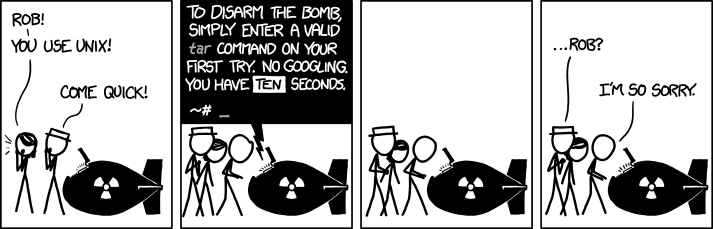
<p>A post on the Unix command <a href="https://www.gnu.org/software/tar/manual/html_node/index.html" title="Emacs Lisp: (info &quot;(tar) Top&quot;)"><code>tar</code></a> cannot leave out the obligatory <em>xkcd
<strong>tar</strong></em> comic 😄, so here it is:</p>
<p><a id="figure--xkcd-1168"></a></p>


<figure>
    
        <img src="https://scripter.co/disarming-the-tar-bomb-in-10-seconds/xkcd-1168.png" title="I don't know what's worse--the fact that after 15 years of using tar I still can't keep the flags straight, or that after 15 years of technological advancement I'm still mucking with tar flags that were 15 years old when I started."/> <figcaption>
                <p>
                    
                    <a href="https://xkcd.com/1168/"> 
                        xkcd.com
                        </a></p>
                
            </figcaption></figure>


<h2 id="mnemonics">Mnemonics&nbsp;<a class="headline-hash no-text-decoration" href="#mnemonics">#</a></h2>


<p>These few mnemonics help me remember the basic and my most frequently
used <code>tar</code> options:</p>
<ul>
<li><strong>c</strong> to (c)reate</li>
<li><strong>a</strong> to (a)uto compress the archive based on the file name</li>
<li><strong>x</strong> to e(x)tract</li>
<li><strong>f</strong> for the archive (f)ile name we are dealing with (whether
creating, listing or extracting an archive)</li>
</ul>
<p>.. and a few not so frequent options (for me):</p>
<ul>
<li><strong>t</strong> to lis(t) contents of an archive</li>
<li><strong>v</strong> for (v)erbose output</li>
</ul>

<h2 id="creating-an-archive">Creating an archive&nbsp;<a class="headline-hash no-text-decoration" href="#creating-an-archive">#</a></h2>


<div class="org-center">
<p><strong>tar -caf &lt;file&gt; &lt;dir&gt;</strong></p>
</div>
<p>A keen user might have noticed that I am using <code>tar -caf ..</code> instead
of <code>tar caf ..</code> i.e. I am using a hyphen before the <code>tar</code>
options. Both approaches work and they look similar, but the approach
with the hyphen is the <strong>newer</strong> <a href="https://www.gnu.org/software/tar/manual/html_node/Short-Options.html" title="Emacs Lisp: (info &quot;(tar) Short Options&quot;)">Short Option style</a> while the other is
the <a href="https://www.gnu.org/software/tar/manual/html_node/Old-Options.html" title="Emacs Lisp: (info &quot;(tar) Old Options&quot;)">Old Option style</a>.</p>
<div class="note">
<p>I prefer the <em>short option style</em> because .. well.. the other style is
old.. and also because the <em>short option style</em> is <strong>stricter</strong> e.g. the
<code>-f</code> switch has to be followed by the file name.</p>
</div>
<p>Whether you are creating a regular <strong>.tar</strong> archive, or a compressed
archive like <strong>.tar.gz</strong>, always use the auto-compresion switch
<strong>-a</strong>. That relieves you from deciding <em>if</em> you need that switch, or
which compression algorithm switch should be used 😄.</p>
<p>The <strong>-a</strong> switch makes the decision for you based on the file
extension.  For example, <code>tar -caf foo.tar foo/</code> will create a regular
archive, while <code>tar -caf foo.tar.gz foo/</code> will create a compressed
archive using <code>gzip</code>. You can read more about it in <a href="https://www.gnu.org/software/tar/manual/html_node/gzip.html" title="Emacs Lisp: (info &quot;(tar) gzip&quot;)">Creating and
Reading Compressed Archives</a>.</p>

<h2 id="extracting-an-archive">Extracting an archive&nbsp;<a class="headline-hash no-text-decoration" href="#extracting-an-archive">#</a></h2>


<div class="org-center">
<p><strong>tar -xf &lt;file&gt;</strong></p>
</div>
<p>At times, it might be useful to add the verbosity switch <strong>-v</strong> to this
command and do <code>tar -xvf &lt;file&gt;</code>.</p>
<div class="note">
<p>Just to reiterate, the <strong>-f</strong> switch must be followed by the archive
file name.</p>
</div>

<h2 id="listing-contents-of-an-archive">Listing contents of an archive&nbsp;<a class="headline-hash no-text-decoration" href="#listing-contents-of-an-archive">#</a></h2>


<div class="org-center">
<p><strong>tar -tf &lt;file&gt;</strong></p>
</div>
<p>Once you are done creating an archive, you might feel the need to
check if the archive contains everything you expect. Or you might want
to check what&rsquo;s inside the archive before you extract it.</p>
<p>This command is often paired with <code>grep</code> or <a href="https://github.com/BurntSushi/ripgrep"><code>rg</code> (ripgrep)</a> like so:
<code>tar -tf foo.tar.xz | rg 'some_file_name_in_archive'</code>.</p>

<h2 id="summary">Summary&nbsp;<a class="headline-hash no-text-decoration" href="#summary">#</a></h2>


<p>If you simply glossed over the whole article, or didn&rsquo;t read through
the all linked manual pages
<span class="sidenote-number"><small class="sidenote">
I know you didn&rsquo;t 😉
</small></span>
, just remember this &mdash;</p>
<div class="org-center">
<p><strong>tar -caf</strong> to <strong>c</strong>​reate and <strong>tar -xf</strong> to e​<strong>x</strong>​tract</p>
</div>
]]></content><category scheme="https://scripter.co/categories/unix" term="unix" label="unix"/><category scheme="https://scripter.co/categories/replies" term="replies" label="replies"/><category scheme="https://scripter.co/tags/tar" term="tar" label="tar"/><category scheme="https://scripter.co/tags/100daystooffload" term="100daystooffload" label="100DaysToOffload"/></entry><entry><title type="html">grep -Po</title><link href="https://scripter.co/grep-po/?utm_source=atom_feed" rel="alternate" type="text/html"/><link href="https://scripter.co/golang-quirk-number-strings-starting-with-0-are-octals/?utm_source=atom_feed" rel="related" type="text/html" title='  Golang Quirk: Number-strings starting with "0" are Octals   '/><link href="https://scripter.co/generics-not-exactly-in-systemverilog/?utm_source=atom_feed" rel="related" type="text/html" title="Generics (not exactly) in SystemVerilog"/><link href="https://scripter.co/sidenotes-using-ox-hugo/?utm_source=atom_feed" rel="related" type="text/html" title="Sidenotes using ox-hugo"/><link href="https://scripter.co/sidenotes-using-only-css/?utm_source=atom_feed" rel="related" type="text/html" title="Sidenotes using only CSS"/><link href="https://scripter.co/notes/string-fns-nim-vs-python/?utm_source=atom_feed" rel="related" type="text/html" title="String Functions: Nim vs Python"/><id>https://scripter.co/grep-po/</id><author><name>Kaushal Modi</name></author><published>2022-02-16T21:34:00-05:00</published><updated>2022-02-16T21:34:00-05:00</updated><content type="html"><![CDATA[<blockquote>Using <code>grep</code> to do substring extraction in shell scripts.</blockquote><div class="ox-hugo-toc toc">
<div class="heading">Table of Contents</div>
<ul>
<li><a href="#grep-po-problem-statement">Problem statement</a></li>
<li><a href="#solution-using-grep-po">Solution using <code>grep -Po</code></a></li>
<li><a href="#arriving-to-this-solution">Arriving to this solution</a></li>
<li><a href="#summary">Summary</a></li>
</ul>
</div>
<!--endtoc-->
<p>I like <a href="https://en.wikipedia.org/wiki/Regular_expression">regular expressions</a>
<span class="sidenote-number"><small class="sidenote">
I recommend using <a href="https://regex101.com/">https://regex101.com/</a> to practice regular
expressions of different flavors (PCRE2, PCRE, Python, etc.) whether
or not you are new to using <abbr aria-label=" regular expression" tabindex=0>regex</abbr>.
</small></span>
as they allow me to be concise and specific about what I need to
search.</p>
<p>And I have liked using regular expressions for many years, ever since
I learned Perl about fifteen years back. I am writing this post as I
am remembering the delight I felt when I realized that I can use the
familiar Perl regular expressions to do string parsing in shell
scripts. I am not exactly sure, but I probably learned about this
<code>grep -Po</code> trick from <em>stackexchange</em> (<a href="#citeproc_bib_item_1">camh, 2011</a>).</p>

<h2 id="grep-po-problem-statement">Problem statement&nbsp;<a class="headline-hash no-text-decoration" href="#grep-po-problem-statement">#</a></h2>


<p>I could be parsing a log file with a line like <code>web report: https://foo.bar/detail.html</code> and I need to extract the
<code>https://foo.bar</code> part to a shell script variable.</p>

<h2 id="solution-using-grep-po">Solution using <code>grep -Po</code>&nbsp;<a class="headline-hash no-text-decoration" href="#solution-using-grep-po">#</a></h2>


<div class="note">
<p>This solution requires a GNU <code>grep</code> version supporting <code>-P</code>, that&rsquo;s
compiled with <code>libpcre</code>.
<span class="sidenote-number"><small class="sidenote">
<em>GNU grep</em> gained the PCRE (<code>-P</code>) feature back <a href="https://git.savannah.gnu.org/cgit/grep.git/commit/?id=05860b2d966701a5a9f70a650d32b30ae2612eeb">in 2000</a>.
</small></span>
Also I have never come across a system or
used one that did not have such a <code>grep</code> version installed.</p>
</div>
<p>I&rsquo;ll throw the solution out here and then dig into the details.</p>
<p><a id="code-snippet--grepPo-example"></a></p>
<div class="highlight"><pre tabindex="0" class="chroma"><code class="language-shell" data-lang="shell"><span class="line"><span class="cl"><span class="nb">echo</span> <span class="s2">&#34;def\nabc&#34;</span> <span class="p">|</span> grep -Po <span class="s1">&#39;a\K.(?=c)&#39;</span> <span class="c1"># =&gt; b</span>
</span></span></code></pre></div><div class="src-block-caption">
  <span class="src-block-number"><a href="#code-snippet--grepPo-example">Code Snippet 1</a>:</span>
  Extracting "b" from "abc" using <code>grep -Po</code>
</div>
<p>The <em>grep</em> switches used here are:</p>
<dl>
<dt><code>-P</code></dt>
<dd>Use (P)erl regular expressions. This allows us to use the
<a href="https://www.regular-expressions.info/lookaround.html"><em>look around</em> regex</a> syntax like <code>(?=..)</code> and special characters like
<code>\K</code> (<a href="#citeproc_bib_item_2">“perlre - Perl regular expressions,” n.d.</a>).</dd>
<dt><code>-o</code></dt>
<dd>Print only the matched portion to the (o)utput</dd>
</dl>

<h2 id="arriving-to-this-solution">Arriving to this solution&nbsp;<a class="headline-hash no-text-decoration" href="#arriving-to-this-solution">#</a></h2>


<p>Now I&rsquo;ll start with a basic example and build up to the <a href="#code-snippet--grepPo-example">above
solution</a>.</p>
<dl>
<dt>Problem</dt>
<dd>Let&rsquo;s say I have this text with two lines &ldquo;def&rdquo; and &ldquo;abc&rdquo;
and I want<span class="org-target" id="org-target--wanted-grep-output"></span> to output whatever character is between &ldquo;a&rdquo; and &ldquo;c&rdquo;.</dd>
</dl>
<!--listend-->
<ul>
<li>
<p>Below, the regular expression for matching any character between &ldquo;a&rdquo;
and &ldquo;c&rdquo; ( <code>'a.c'</code> ) is correct, but that will output the whole input
because the <em>grep</em> of that regex succeeded.</p>
<div class="highlight"><pre tabindex="0" class="chroma"><code class="language-shell" data-lang="shell"><span class="line"><span class="cl"><span class="nb">echo</span> <span class="s2">&#34;def\nabc&#34;</span> <span class="p">|</span> grep <span class="s1">&#39;a.c&#39;</span> <span class="c1"># =&gt; def\nabc</span>
</span></span></code></pre></div></li>
<li>
<p>Now we add the <em>grep</em> <code>-o</code> switch so that it outputs only the
matched portion. As the regex is <code>'a.c'</code>​, the <code>-o</code> switch will
output every part of the input that matched that. So the output is
&ldquo;abc&rdquo;. It&rsquo;s still not what we <a href="#org-target--wanted-grep-output">wanted</a>.</p>
<div class="highlight"><pre tabindex="0" class="chroma"><code class="language-shell" data-lang="shell"><span class="line"><span class="cl"><span class="nb">echo</span> <span class="s2">&#34;def\nabc&#34;</span> <span class="p">|</span> grep -o <span class="s1">&#39;a.c&#39;</span> <span class="c1"># =&gt; abc</span>
</span></span></code></pre></div></li>
<li>
<p>Now we bring in the powerful Perl regex feature <em>positive
lookahead</em>.
<span class="sidenote-number"><small class="sidenote">
Positive lookahead is used when you want to match something <span class="underline">only
if</span> it&rsquo;s followed by something else. It&rsquo;s syntax looks like <code>q(?=u)</code>
where that expression matches if a <code>q</code> is followed by a <code>u</code>, without
making the <code>u</code> part of the match &ndash; <a href="https://www.regular-expressions.info/lookaround.html">reference</a>.
</small></span>
But this is still not exactly what we want because &ldquo;a&rdquo; is still
considered as part of the match. Now the output is &ldquo;ab&rdquo;.</p>
<div class="highlight"><pre tabindex="0" class="chroma"><code class="language-shell" data-lang="shell"><span class="line"><span class="cl"><span class="nb">echo</span> <span class="s2">&#34;abc&#34;</span> <span class="p">|</span> grep -Po <span class="s1">&#39;a.(?=c)&#39;</span> <span class="c1"># =&gt; ab</span>
</span></span></code></pre></div></li>
<li>
<p>We only need a special character that marks a point in the regex
that tells &ldquo;don&rsquo;t consider anything before this as part of the
match&rdquo;. The <code>\K</code> special construct described in the <a href="https://perldoc.perl.org/perlre#Lookaround-Assertions">Perl regular
expressions doc</a> as:</p>
<blockquote>
<p>There is a special form of this construct, called <code>\K</code> (available
since Perl 5.10.0), which causes the regex engine to &ldquo;keep&rdquo;
everything it had matched prior to the <code>\K</code> and not include it in
matched string. This effectively provides non-experimental
variable-length lookbehind of any length.</p>
</blockquote>
<p>And, thus we have the final solution:</p>
<div class="highlight"><pre tabindex="0" class="chroma"><code class="language-shell" data-lang="shell"><span class="line"><span class="cl"><span class="nb">echo</span> <span class="s2">&#34;abc&#34;</span> <span class="p">|</span> grep -Po <span class="s1">&#39;a\K.(?=c)&#39;</span> <span class="c1"># =&gt; b</span>
</span></span></code></pre></div></li>
</ul>

<h2 id="summary">Summary&nbsp;<a class="headline-hash no-text-decoration" href="#summary">#</a></h2>


<p>Taking the example from the <a href="#grep-po-problem-statement">problem statement</a>, this will work:</p>
<div class="highlight"><pre tabindex="0" class="chroma"><code class="language-bash" data-lang="bash"><span class="line"><span class="cl"><span class="nv">string</span><span class="o">=</span><span class="s2">&#34;web report: https://foo.bar/detail.html&#34;</span>
</span></span><span class="line"><span class="cl"><span class="nv">substring</span><span class="o">=</span><span class="k">$(</span>grep -Po <span class="s1">&#39;web report:\s*\K.*?(?=/detail\.html)&#39;</span> <span class="o">&lt;&lt;&lt;</span> <span class="s2">&#34;</span><span class="si">${</span><span class="nv">string</span><span class="si">}</span><span class="s2">&#34;</span><span class="k">)</span>
</span></span><span class="line"><span class="cl"><span class="nb">echo</span> <span class="s2">&#34;</span><span class="si">${</span><span class="nv">substring</span><span class="si">}</span><span class="s2">&#34;</span>
</span></span></code></pre></div><div class="highlight"><pre tabindex="0" class="chroma"><code class="language-text" data-lang="text"><span class="line"><span class="cl">https://foo.bar
</span></span></code></pre></div>
<h2 id="references">References&nbsp;<a class="headline-hash no-text-decoration" href="#references">#</a></h2>


<div class="csl-bib-body">
  <div class="csl-entry"><a id="citeproc_bib_item_1"></a>camh. (2011). Can grep output only specified groupings that match? [Website]. In <i>Unix stackexchange</i>. <a href="https://unix.stackexchange.com/a/13472/57923">https://unix.stackexchange.com/a/13472/57923</a></div>
  <div class="csl-entry"><a id="citeproc_bib_item_2"></a>perlre - Perl regular expressions. (n.d.). [Website]. In <i>Perldoc 5.34.0</i>. Retrieved February 16, 2022, from <a href="https://perldoc.perl.org/perlre">https://perldoc.perl.org/perlre</a></div>
</div>
]]></content><category scheme="https://scripter.co/categories/unix" term="unix" label="unix"/><category scheme="https://scripter.co/categories/shell" term="shell" label="shell"/><category scheme="https://scripter.co/tags/grep" term="grep" label="grep"/><category scheme="https://scripter.co/tags/regex" term="regex" label="regex"/><category scheme="https://scripter.co/tags/string" term="string" label="string"/><category scheme="https://scripter.co/tags/perl" term="perl" label="perl"/><category scheme="https://scripter.co/tags/100daystooffload" term="100daystooffload" label="100DaysToOffload"/></entry><entry><title type="html">Git diff Minified JS and CSS</title><link href="https://scripter.co/git-diff-minified-js-and-css/?utm_source=atom_feed" rel="alternate" type="text/html"/><link href="https://scripter.co/narrowing-the-author-column-in-magit/?utm_source=atom_feed" rel="related" type="text/html" title="Narrowing the Author column in Magit"/><id>https://scripter.co/git-diff-minified-js-and-css/</id><author><name>Kaushal Modi</name></author><published>2018-03-19T18:13:00-04:00</published><updated>2018-03-19T18:13:00-04:00</updated><content type="html"><![CDATA[<blockquote>Make the <code>git diff</code> output be more useful when diffing minified <em>.js</em>
and <em>.css</em> files.</blockquote><div class="ox-hugo-toc toc has-section-numbers">
<div class="heading">Table of Contents</div>
<ul>
<li><span class="section-num">1</span> <a href="#install-js-beautify-using-npm">Install <code>js-beautify</code> using <code>npm</code></a></li>
<li><span class="section-num">2</span> <a href="#configure-git-to-use-that-tool">Configure <code>git</code> to use that tool</a></li>
<li><span class="section-num">3</span> <a href="#add-update-dot-gitattributes-file-to-the-project-repo">Add/update <code>.gitattributes</code> file to the project repo</a></li>
<li><a href="#beautiful-result">Beautiful Result</a></li>
</ul>
</div>
<!--endtoc-->
<p>While working on a <a href="https://github.com/gohugoio/gohugoioTheme/pull/84">little PR for the Hugo doc site theme</a>, I learned
that if I needed to make changes to JS/CSS, I had to commit my changes
in both unminified and minified versions.</p>
<p>I have a habit to always look at the diffs at the time of staging and
committing. So it felt very unnatural to commit a minified JS where
the diff would show just <strong>one</strong> changed line with thousands of
characters of minified+uglified JS.</p>
<p>So I started looking for solutions, and found <a href="https://cweiske.de/tagebuch/git-diff-minified-js.htm">this post</a> by <em>Christian
Weiske</em> where he suggests using <a href="https://github.com/beautify-web/js-beautify"><code>js-beautify</code></a> to <em>beautify</em> minified
JS diffs.</p>
<div class="verse">
<p>    <em>And that tool works beautifully!</em><br /></p>
</div>
<ul>
<li>I later found out that the same tool can also be used to <em>beautify</em>
minified CSS.</li>
<li>.. and I installed that tool using <code>npm</code> as the <code>pip3</code> approach
failed with <em>&ldquo;Collecting js-beautify.. Could not find a version that
satisfies the requirement js-beautify (from versions: ) No matching
distribution found for js-beautify&rdquo;</em>.</li>
</ul>
<p>So here&rsquo;s how you can do useful <code>git diff</code> for minified JS and CSS.</p>

<h2 id="install-js-beautify-using-npm"><span class="section-num">1</span> Install <code>js-beautify</code> using <code>npm</code>&nbsp;<a class="headline-hash no-text-decoration" href="#install-js-beautify-using-npm">#</a></h2>


<p>I see myself using <code>js-beautify</code> in many other projects too. So I
installed it globally.</p>
<div class="highlight"><pre tabindex="0" class="chroma"><code class="language-text" data-lang="text"><span class="line"><span class="cl">npm install --global js-beautify
</span></span></code></pre></div>
<h2 id="configure-git-to-use-that-tool"><span class="section-num">2</span> Configure <code>git</code> to use that tool&nbsp;<a class="headline-hash no-text-decoration" href="#configure-git-to-use-that-tool">#</a></h2>


<p>Add below to your <code>~/.gitconfig</code>:</p>
<ol>
<li>Use <code>js-beautify</code> to first beautify the minified JS for the <code>minjs</code>
<em>diff configuration</em>, and then do a diff of those beautified files.</li>
<li>Enable caching of those beautified files to speed up the diff, so
that <em>re-beautification</em> of unmodified minified files can be
skipped.</li>
<li>Similarly for minified CSS, use <code>js-beautify --css</code> to first
beautify the minified CSS for the <code>mincss</code> <em>diff configuration</em>.</li>
</ol>
<!--listend-->
<div class="highlight"><pre tabindex="0" class="chroma"><code class="language-ini" data-lang="ini"><span class="line"><span class="cl"><span class="k">[diff &#34;minjs&#34;]</span>
</span></span><span class="line"><span class="cl">    <span class="na">textconv</span> <span class="o">=</span> <span class="s">js-beautify
</span></span></span><span class="line"><span class="cl"><span class="s">    cachetextconv = true</span>
</span></span><span class="line"><span class="cl"><span class="k">[diff &#34;mincss&#34;]</span>
</span></span><span class="line"><span class="cl">    <span class="na">textconv</span> <span class="o">=</span> <span class="s">js-beautify --css
</span></span></span><span class="line"><span class="cl"><span class="s">    cachetextconv = true</span>
</span></span></code></pre></div>
<h2 id="add-update-dot-gitattributes-file-to-the-project-repo"><span class="section-num">3</span> Add/update <code>.gitattributes</code> file to the project repo&nbsp;<a class="headline-hash no-text-decoration" href="#add-update-dot-gitattributes-file-to-the-project-repo">#</a></h2>


<p>Now, in your project repo&rsquo;s <code>.gitattributes</code> file, you need to
associate files with the <em>diff configurations</em> set above.</p>
<p>Below will use the <code>minjs</code> configuration for <em>*.min.js</em> and
<em>*.bundle.js</em> files, and <code>mincss</code> configuration for <em>*.min.css</em> and
<em>main.css</em>.</p>
<div class="highlight"><pre tabindex="0" class="chroma"><code class="language-ini" data-lang="ini"><span class="line"><span class="cl"><span class="na">*.min.js diff</span><span class="o">=</span><span class="s">minjs</span>
</span></span><span class="line"><span class="cl"><span class="na">*.bundle.js diff</span><span class="o">=</span><span class="s">minjs</span>
</span></span><span class="line"><span class="cl"><span class="na">*.min.css diff</span><span class="o">=</span><span class="s">mincss</span>
</span></span><span class="line"><span class="cl"><span class="na">main.css diff</span><span class="o">=</span><span class="s">mincss</span>
</span></span></code></pre></div>
<h2 id="beautiful-result">Beautiful Result&nbsp;<a class="headline-hash no-text-decoration" href="#beautiful-result">#</a></h2>


<p><a id="figure--git-diff-min-js"></a></p>


<figure>
    
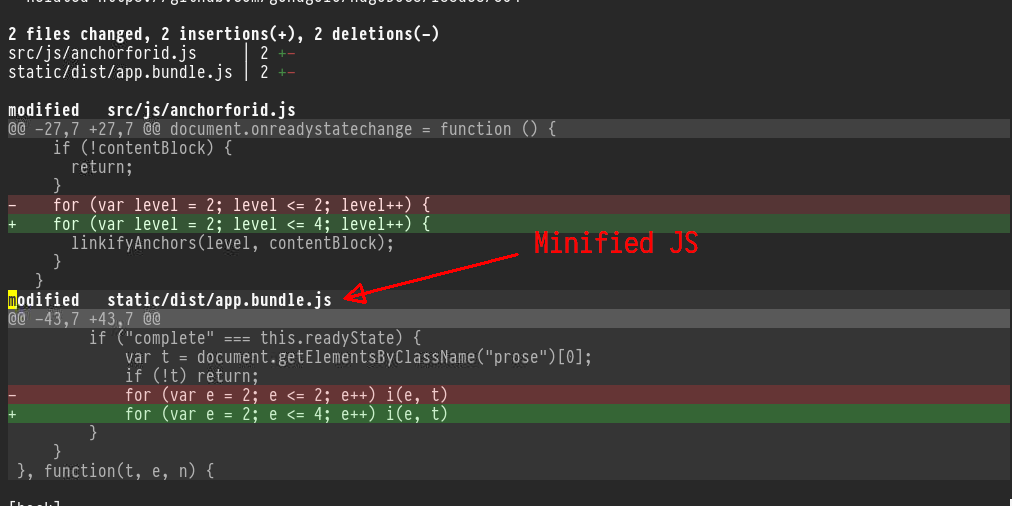
        <img src="https://scripter.co/git-diff-minified-js-and-css/git-diff-minified-js.png" alt="Figure 1: git diff of minified JS as seen in Magit"/> <figcaption>
                <p>
                    <span class="figure-number">Figure 1: </span><code>git diff</code> of minified JS as seen in <em>Magit</em>
                    
                        
                        </p>
                
            </figcaption></figure>

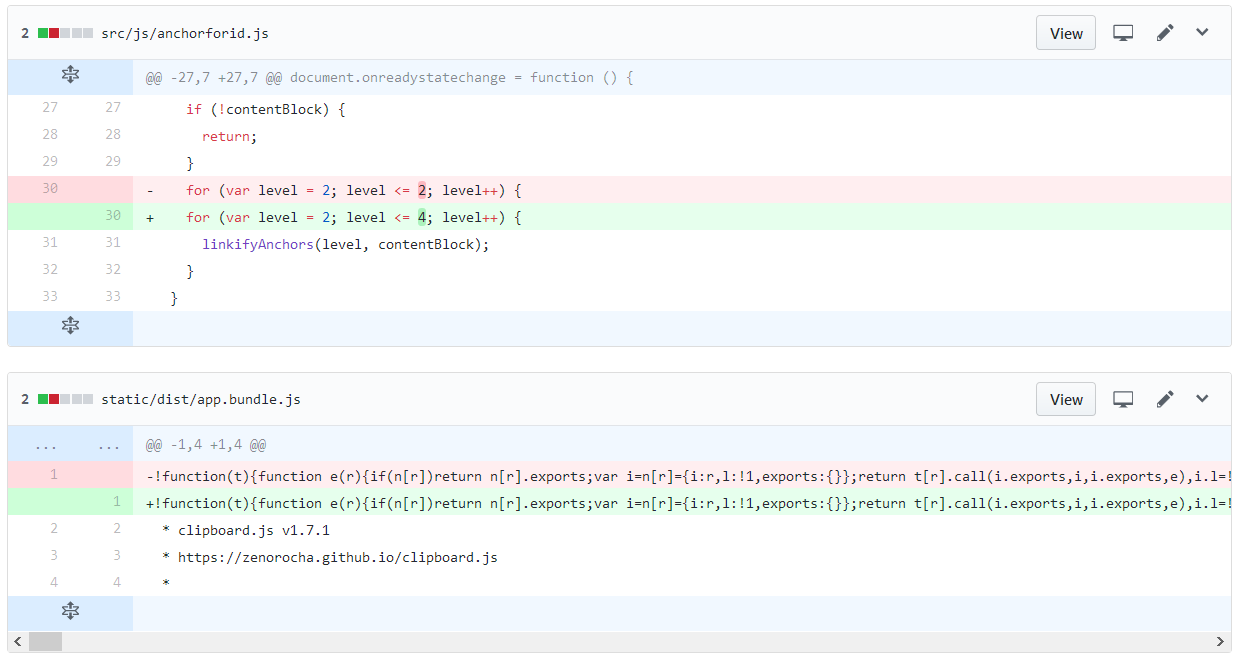
<p>Isn&rsquo;t that better than how GitHub shows the <em>exact same commit
diff</em>? 😎</p>
<p><a id="figure--github-diff-min-js"></a></p>


<figure>
    
        <img src="https://scripter.co/git-diff-minified-js-and-css/github-diff-minified-js.png" alt="Figure 2: Same commit diff shown on GitHub"/> <figcaption>
                <p>
                    <span class="figure-number">Figure 2: </span>Same commit <code>diff</code> shown on <em>GitHub</em>
                    
                        
                        </p>
                
            </figcaption></figure>

]]></content><category scheme="https://scripter.co/categories/web" term="web" label="web"/><category scheme="https://scripter.co/categories/unix" term="unix" label="unix"/><category scheme="https://scripter.co/tags/minified" term="minified" label="minified"/><category scheme="https://scripter.co/tags/javascript" term="javascript" label="javascript"/><category scheme="https://scripter.co/tags/git" term="git" label="git"/><category scheme="https://scripter.co/tags/diff" term="diff" label="diff"/><category scheme="https://scripter.co/tags/css" term="css" label="css"/><category scheme="https://scripter.co/tags/magit" term="magit" label="magit"/></entry><entry><title type="html">Installing go toolchain</title><link href="https://scripter.co/installing-go-toolchain/?utm_source=atom_feed" rel="alternate" type="text/html"/><id>https://scripter.co/installing-go-toolchain/</id><author><name>Kaushal Modi</name></author><published>2017-02-24T01:33:47-05:00</published><updated>2018-05-17T00:00:00-04:00</updated><content type="html"><![CDATA[<blockquote>&ldquo;Installing&rdquo; <code>go</code> is simply extracting its release archive, putting it
somewhere in you <code>$HOME</code> and pointing <code>GOROOT</code> and <code>PATH</code> env vars to
it.</blockquote><div class="ox-hugo-toc toc">
<div class="heading">Table of Contents</div>
<ul>
<li><a href="#installing-go">Installing <code>go</code></a></li>
<li><a href="#updating-go">Updating <code>go</code></a></li>
</ul>
</div>
<!--endtoc-->
<p>There are <strong>two</strong> reasons why I suggest installing <code>go</code> to anyone,
whether they are Go developers, or not (like me).</p>
<ol>
<li>You can then build amazing utilities like <a href="https://github.com/peco/peco">peco</a>, <a href="https://github.com/gohugoio/hugo">hugo</a> and <a href="https://github.com/variadico/noti">noti</a>.</li>
<li><strong>It&rsquo;s easy!</strong></li>
</ol>

<h2 id="installing-go">Installing <code>go</code>&nbsp;<a class="headline-hash no-text-decoration" href="#installing-go">#</a></h2>


<p>Below instructions are for installing <code>go</code> on a 64-bit GNU/Linux
machine, and using <code>tcsh</code> shell. But similar steps should work for any
other OS and shell.</p>
<ol>
<li>Download the <em>tar.gz</em> for the latest <em>linux-amd64</em> binaries from
<a href="https://golang.org/dl/">https://golang.org/dl/</a>.</li>
<li>Extract it to some place in your <code>$HOME</code>. I extract it to
<code>${HOME}/go/</code><sup id="fnref:1"><a href="#fn:1" class="footnote-ref" role="doc-noteref">1</a></sup>.</li>
<li>Create a directory where you would want to install the <code>go</code>
packages.
<div class="highlight"><pre tabindex="0" class="chroma"><code class="language-shell" data-lang="shell"><span class="line"><span class="cl">mkdir -p ~/go.apps
</span></span></code></pre></div></li>
<li>Set the following environment variables<sup id="fnref:2"><a href="#fn:2" class="footnote-ref" role="doc-noteref">2</a></sup>, and also save them to
your shell config:
<div class="highlight"><pre tabindex="0" class="chroma"><code class="language-tcsh" data-lang="tcsh"><span class="line"><span class="cl"><span class="nb">setenv </span>GOROOT <span class="k">${</span><span class="nv">HOME</span><span class="k">}</span>/go <span class="c"># go root</span>
</span></span><span class="line"><span class="cl"><span class="nb">setenv </span>GOPATH <span class="k">${</span><span class="nv">HOME</span><span class="k">}</span>/go.apps <span class="c"># for go applications</span>
</span></span></code></pre></div></li>
<li>Add the <code>${GOROOT}/bin</code> and <code>${GOPATH}/bin</code> directories to your
<code>$PATH</code>.</li>
</ol>
<p>Now you can install any <code>go</code> application!</p>
<p>For instance, <code>noti</code> is a nice little utility that triggers an alert
(desktop popup, <em>Pushbullet</em> notification, etc.) when a process
finishes.  From its <a href="https://github.com/variadico/noti#installation">installation notes</a>, you just run the below to
install it:</p>
<div class="highlight"><pre tabindex="0" class="chroma"><code class="language-text" data-lang="text"><span class="line"><span class="cl">go get -u github.com/variadico/noti/cmd/noti
</span></span></code></pre></div><p>Apart from the <code>go</code> applications I suggested here, <em>go</em> out and explore
more &ndash; <code>go get</code> them 😁</p>

<h2 id="updating-go">Updating <code>go</code>&nbsp;<a class="headline-hash no-text-decoration" href="#updating-go">#</a></h2>


<ol>
<li>Delete the existing <code>$GOROOT</code> directory (<strong>not <code>GOPATH</code>!</strong>)
<div class="highlight"><pre tabindex="0" class="chroma"><code class="language-shell" data-lang="shell"><span class="line"><span class="cl">rm -rf ~/go   <span class="c1"># as that is my GOROOT</span>
</span></span></code></pre></div></li>
<li>Download the <em>tar.gz</em> for the latest <em>linux-amd64</em> binaries.</li>
<li>Extract it to the same <code>$GOROOT</code> (<code>~/go</code> in my case).</li>
</ol>
<div class="footnotes" role="doc-endnotes">
<hr>
<ol>
<li id="fn:1">
<p>I prefer to not add the version number to my <code>go</code> installation
folder. That way, when I want to update it, I simply <code>rm -rf</code> it and
put in the new version.. and I don&rsquo;t need to update <code>GOROOT</code> or
<code>PATH</code>.&#160;<a href="#fnref:1" class="footnote-backref" role="doc-backlink">&#x21a9;&#xfe0e;</a></p>
</li>
<li id="fn:2">
<p>You can refer to these official <code>go</code> references [ <a href="https://golang.org/doc/install#tarball">1</a> ], [ <a href="https://golang.org/doc/install#testing">2</a> ] for
further information on these variables.&#160;<a href="#fnref:2" class="footnote-backref" role="doc-backlink">&#x21a9;&#xfe0e;</a></p>
</li>
</ol>
</div>
]]></content><category scheme="https://scripter.co/categories/unix" term="unix" label="unix"/><category scheme="https://scripter.co/tags/toolchain" term="toolchain" label="toolchain"/><category scheme="https://scripter.co/tags/golang" term="golang" label="golang"/></entry><entry><title type="html">Count Down Timer in Shell</title><link href="https://scripter.co/count-down-timer-in-shell/?utm_source=atom_feed" rel="alternate" type="text/html"/><link href="https://scripter.co/check-if-a-command-exists-from-shell-script/?utm_source=atom_feed" rel="related" type="text/html" title="Check If a Command/Executable Exists from Shell Script"/><id>https://scripter.co/count-down-timer-in-shell/</id><author><name>Kaushal Modi</name></author><published>2017-01-09T08:02:25-05:00</published><updated>2017-01-09T08:02:25-05:00</updated><content type="html"><![CDATA[<blockquote><p>I was working on a <code>tcsh</code> script that did some cool stuff. But if a
user ran that script not knowing the true impact of the script, it
could make some bad irreversible changes.</p>
<p>While I could simply echo a warning statement and put a <code>sleep 10</code>, I
wanted the wait time to be shown <strong>live</strong>.</p>
</blockquote><div class="ox-hugo-toc toc">
<div class="heading">Table of Contents</div>
<ul>
<li><a href="#explanation">Explanation</a></li>
<li><a href="#result">Result</a></li>
<li><a href="#bash-implementation">Bash implementation</a></li>
</ul>
</div>
<!--endtoc-->
<p>So here&rsquo;s what worked pretty nicely &mdash; The warning message is shown to
the user, and the actual wait time countdown is also displayed.</p>
<div class="highlight"><pre tabindex="0" class="chroma"><code class="language-tcsh" data-lang="tcsh"><span class="line"><span class="cl"><span class="c">#!/usr/bin/env tcsh</span>
</span></span><span class="line"><span class="cl"><span class="nb">set </span><span class="nv">wait_time</span> <span class="o">=</span> 10 <span class="c"># seconds</span>
</span></span><span class="line"><span class="cl">
</span></span><span class="line"><span class="cl"><span class="nb">echo</span> <span class="s2">&#34;Are you sure you meant to run this script?&#34;</span>
</span></span><span class="line"><span class="cl"><span class="nb">echo</span> <span class="s2">&#34;This script does something drastic that you would severely regret if you happened to run this script by mistake!&#34;</span>
</span></span><span class="line"><span class="cl"><span class="nb">echo</span> <span class="s2">&#34;&#34;</span>
</span></span><span class="line"><span class="cl"><span class="nb">set </span><span class="nv">temp_cnt</span> <span class="o">=</span> <span class="k">${</span><span class="nv">wait_time</span><span class="k">}</span>
</span></span><span class="line"><span class="cl"><span class="c"># https://www.cyberciti.biz/faq/csh-shell-scripting-loop-example/</span>
</span></span><span class="line"><span class="cl"><span class="k">while</span> <span class="o">(</span> <span class="k">${</span><span class="nv">temp_cnt</span><span class="k">}</span> &gt;<span class="o">=</span> 1 <span class="o">)</span>
</span></span><span class="line"><span class="cl">    printf <span class="s2">&#34;\rYou have %2d second(s) remaining to hit Ctrl+C to cancel that operation!&#34;</span> <span class="k">${</span><span class="nv">temp_cnt</span><span class="k">}</span>
</span></span><span class="line"><span class="cl">    sleep 1
</span></span><span class="line"><span class="cl">    @ temp_cnt--
</span></span><span class="line"><span class="cl"><span class="k">end
</span></span></span><span class="line"><span class="cl"><span class="k"></span><span class="nb">echo</span> <span class="s2">&#34;&#34;</span>
</span></span></code></pre></div>
<h2 id="explanation">Explanation&nbsp;<a class="headline-hash no-text-decoration" href="#explanation">#</a></h2>


<ul>
<li>The <code>while</code> loop runs for <code>$wait_time</code> times; each time waiting for
a second (<code>sleep 1</code>) and then decrementing the temporary counter
<code>$temp_cnt</code>.</li>
<li><code>printf</code> is chosen instead of <code>echo -n</code> because I wanted to have the
seconds number always hold 2 character places (<code>%2d</code>).</li>
<li>The <code>\r</code> character in <code>printf</code> makes the magic here. It represents
<em>carriage return</em> i.e. The cursor will return to the beginning of
the line, and then print the following string, <strong>overwriting</strong>
whatever there was on that line earlier.
<ul>
<li><code>printf</code> acts like <code>echo -n</code> i.e. a newline is not inserted
automatically at the end of the printed message. In order to add a
newline at the end for <code>printf</code>, you need to do so explicitly by
adding a <code>\n</code> character.</li>
</ul>
</li>
</ul>

<h2 id="result">Result&nbsp;<a class="headline-hash no-text-decoration" href="#result">#</a></h2>


<p><em><a href="https://asciinema.org/a/4vk5dayfbj4k19ghra6k67mmw">Click here</a> to see the animation on asciinema.org.</em></p>

<h2 id="bash-implementation">Bash implementation&nbsp;<a class="headline-hash no-text-decoration" href="#bash-implementation">#</a></h2>


<p>Below is a re-implementation of the above in bash.</p>
<div class="highlight"><pre tabindex="0" class="chroma"><code class="language-bash" data-lang="bash"><span class="line"><span class="cl"><span class="cp">#!/usr/bin/env bash
</span></span></span><span class="line"><span class="cl"><span class="cp"></span><span class="nv">wait_time</span><span class="o">=</span><span class="m">10</span> <span class="c1"># seconds</span>
</span></span><span class="line"><span class="cl">
</span></span><span class="line"><span class="cl"><span class="nb">echo</span> <span class="s2">&#34;Are you sure you meant to run this script?&#34;</span>
</span></span><span class="line"><span class="cl"><span class="nb">echo</span> <span class="s2">&#34;This script does something drastic that you would severely regret if you happened to run this script by mistake!&#34;</span>
</span></span><span class="line"><span class="cl"><span class="nb">echo</span> <span class="s2">&#34;&#34;</span>
</span></span><span class="line"><span class="cl"><span class="nv">temp_cnt</span><span class="o">=</span><span class="si">${</span><span class="nv">wait_time</span><span class="si">}</span>
</span></span><span class="line"><span class="cl"><span class="k">while</span> <span class="o">[[</span> <span class="si">${</span><span class="nv">temp_cnt</span><span class="si">}</span> -gt <span class="m">0</span> <span class="o">]]</span><span class="p">;</span>
</span></span><span class="line"><span class="cl"><span class="k">do</span>
</span></span><span class="line"><span class="cl">    <span class="nb">printf</span> <span class="s2">&#34;\rYou have %2d second(s) remaining to hit Ctrl+C to cancel that operation!&#34;</span> <span class="si">${</span><span class="nv">temp_cnt</span><span class="si">}</span>
</span></span><span class="line"><span class="cl">    sleep <span class="m">1</span>
</span></span><span class="line"><span class="cl">    <span class="o">((</span>temp_cnt--<span class="o">))</span>
</span></span><span class="line"><span class="cl"><span class="k">done</span>
</span></span><span class="line"><span class="cl"><span class="nb">echo</span> <span class="s2">&#34;&#34;</span>
</span></span></code></pre></div>]]></content><category scheme="https://scripter.co/categories/unix" term="unix" label="unix"/><category scheme="https://scripter.co/categories/shell" term="shell" label="shell"/><category scheme="https://scripter.co/tags/bash" term="bash" label="bash"/><category scheme="https://scripter.co/tags/tcsh" term="tcsh" label="tcsh"/><category scheme="https://scripter.co/tags/countdown" term="countdown" label="countdown"/><category scheme="https://scripter.co/tags/timer" term="timer" label="timer"/></entry><entry><title type="html">Check If a Command/Executable Exists from Shell Script</title><link href="https://scripter.co/check-if-a-command-exists-from-shell-script/?utm_source=atom_feed" rel="alternate" type="text/html"/><id>https://scripter.co/check-if-a-command-exists-from-shell-script/</id><author><name>Kaushal Modi</name></author><published>2016-11-23T17:07:26-05:00</published><updated>2016-11-23T17:07:26-05:00</updated><content type="html"><![CDATA[<blockquote>Shell script snippets to check if you have an executable or binary
installed in <code>PATH</code>.</blockquote><div class="ox-hugo-toc toc">
<div class="heading">Table of Contents</div>
<ul>
<li><a href="#bash-shell">Bash Shell</a></li>
<li><a href="#tcsh-shell">Tcsh Shell</a></li>
</ul>
</div>
<!--endtoc-->
<p>I often need to check if a particular executable is present in the
<code>PATH</code> before I can proceed with what I am doing in a shell
script. Also, I need to work with both <code>tcsh</code> and <code>bash</code>
scripts. Below presents the solution that has worked for these shell
scripts for me.</p>

<h2 id="bash-shell">Bash Shell&nbsp;<a class="headline-hash no-text-decoration" href="#bash-shell">#</a></h2>


<p>The below solution using <code>hash</code> was with the help of <a href="https://stackoverflow.com/a/677212/1219634">this SO solution</a>.</p>
<div class="highlight"><pre tabindex="0" class="chroma"><code class="language-sh" data-lang="sh"><span class="line"><span class="cl"><span class="k">if</span> ! <span class="nb">hash</span> some_exec 2&gt;/dev/null
</span></span><span class="line"><span class="cl"><span class="k">then</span>
</span></span><span class="line"><span class="cl">    <span class="nb">echo</span> <span class="s2">&#34;&#39;some_exec&#39; was not found in PATH&#34;</span>
</span></span><span class="line"><span class="cl"><span class="k">fi</span>
</span></span></code></pre></div><p>Here is the <em>tl;dr</em> from the above SO solution:</p>
<blockquote>
<p>Where bash is your shell/hashbang, consistently use <code>hash</code> (for
commands) or <code>type</code> (to consider built-ins &amp; keywords). When writing a
POSIX script, use <code>command -v</code>.</p>
</blockquote>

<h2 id="tcsh-shell">Tcsh Shell&nbsp;<a class="headline-hash no-text-decoration" href="#tcsh-shell">#</a></h2>


<p>As it turns out, the <code>tcsh</code> shell does not have the same <code>hash</code>
command as the <code>bash</code> shell.</p>
<p>But the below solution using <code>where</code> which I found with the help of
<a href="https://stackoverflow.com/a/22058620/1219634">this SO solution</a> works fine.</p>
<div class="highlight"><pre tabindex="0" class="chroma"><code class="language-tcsh" data-lang="tcsh"><span class="line"><span class="cl"><span class="k">if</span> <span class="o">(</span> <span class="sb">`</span><span class="nb">where </span>some_exec<span class="sb">`</span> <span class="o">==</span> <span class="s2">&#34;&#34;</span> <span class="o">)</span> <span class="k">then
</span></span></span><span class="line"><span class="cl"><span class="k">    </span><span class="nb">echo</span> <span class="s2">&#34;&#39;some_exec&#39; was not found in PATH&#34;</span>
</span></span><span class="line"><span class="cl"><span class="k">endif</span>
</span></span></code></pre></div>]]></content><category scheme="https://scripter.co/categories/unix" term="unix" label="unix"/><category scheme="https://scripter.co/categories/shell" term="shell" label="shell"/><category scheme="https://scripter.co/tags/bash" term="bash" label="bash"/><category scheme="https://scripter.co/tags/tcsh" term="tcsh" label="tcsh"/><category scheme="https://scripter.co/tags/executable" term="executable" label="executable"/><category scheme="https://scripter.co/tags/exists" term="exists" label="exists"/><category scheme="https://scripter.co/tags/binary" term="binary" label="binary"/></entry><entry><title type="html">Second Argument to basename</title><link href="https://scripter.co/second-argument-to-basename/?utm_source=atom_feed" rel="alternate" type="text/html"/><id>https://scripter.co/second-argument-to-basename/</id><published>2016-11-23T13:24:45-05:00</published><updated>2016-11-23T13:24:45-05:00</updated><content type="html"><![CDATA[<p>It is quite common knowledge that the <code>basename</code> command is used to get just the file name without its full path.</p>
<pre tabindex="0"><code>&gt; basename /home/$USER/file.txt
file.txt
</code></pre><p>But what wasn&rsquo;t common knowledge, at least to me, was that <code>basename</code> also accepts a <em>second</em> argument ..</p>
<p>That argument is used to specify the trailing string to be removed from first argument.</p>
<p>From <code>man basename</code>, we get</p>
<pre tabindex="0"><code>DESCRIPTION
        Print NAME with any leading directory components removed.  If
        specified, also remove a trailing SUFFIX.

 EXAMPLES
        basename /usr/bin/sort
               Output &#34;sort&#34;.

        basename include/stdio.h .h
               Output &#34;stdio&#34;.
</code></pre><p>In other words, with the second argument set to the file&rsquo;s extension, <code>basename</code> returns the file name without the full path <strong>and</strong> without the extension.</p>
<pre tabindex="0"><code>&gt; basename /home/$USER/file.txt .txt
file
</code></pre><hr>
<p>I came across this feature of <code>basename</code> when I wanted to create this tcsh alias:</p>
<div class="highlight"><pre tabindex="0" class="chroma"><code class="language-tcsh" data-lang="tcsh"><span class="line"><span class="cl"><span class="c"># Usage: md2 html file.md # Converts file.md (markdown) to file.html</span>
</span></span><span class="line"><span class="cl"><span class="c">#        md2 pdf file.md # Converts file.md (markdown) to file.pdf</span>
</span></span><span class="line"><span class="cl"><span class="c">#        md2 docx file.md # Converts file.md (markdown) to file.docx (Word)</span>
</span></span><span class="line"><span class="cl"><span class="nb">alias </span>md2 <span class="s1">&#39;pandoc \!:3* \!:2 -o `basename \!:2 .md`.\!:1&#39;</span>
</span></span></code></pre></div>]]></content><category scheme="https://scripter.co/categories/unix" term="unix" label="unix"/></entry><entry><title type="html">tmux Shift + Mouse</title><link href="https://scripter.co/tmux-shift-plus-mouse/?utm_source=atom_feed" rel="alternate" type="text/html"/><link href="https://scripter.co/command-to-every-pane-window-session-in-tmux/?utm_source=atom_feed" rel="related" type="text/html" title="Send a command to every pane/window/session in tmux"/><id>https://scripter.co/tmux-shift-plus-mouse/</id><author><name>Kaushal Modi</name></author><published>2014-08-28T16:47:46-04:00</published><updated>2014-08-28T16:47:46-04:00</updated><content type="html"><![CDATA[<blockquote>Using mouse to copy/paste in <code>tmux</code> <em>panes</em>.</blockquote><p>I had been missing the <em>&ldquo;select and middle-click&rdquo;</em> method for copying
and pasting stuff in <code>tmux</code> panes.</p>
<p>Thanks to <a href="https://superuser.com/questions/598718/how-do-i-select-entire-words-with-tmuxs-mouse-mode">this</a> post, I learned that I can use the <kbd>Shift</kbd> key and
bypass <code>tmux</code>&rsquo;s own copy and paste method.</p>
<table>
<thead>
<tr>
<th>Key/Mouse Binding</th>
<th>Action</th>
</tr>
</thead>
<tbody>
<tr>
<td><kbd>Shift</kbd> + Mouse left button double-click</td>
<td>Copies the double-clicked word</td>
</tr>
<tr>
<td><kbd>Shift</kbd> + Select using mouse</td>
<td>Copies the selection</td>
</tr>
<tr>
<td><kbd>Shift</kbd> + Mouse middle button click</td>
<td>Pastes the copied text using above method in the <code>tmux</code> pane</td>
</tr>
</tbody>
</table>
]]></content><category scheme="https://scripter.co/categories/unix" term="unix" label="unix"/><category scheme="https://scripter.co/tags/tmux" term="tmux" label="tmux"/><category scheme="https://scripter.co/tags/mouse" term="mouse" label="mouse"/><category scheme="https://scripter.co/tags/copy" term="copy" label="copy"/><category scheme="https://scripter.co/tags/paste" term="paste" label="paste"/></entry><entry><title type="html">Using sed</title><link href="https://scripter.co/using-sed/?utm_source=atom_feed" rel="alternate" type="text/html"/><id>https://scripter.co/using-sed/</id><published>2014-03-17T09:31:29-04:00</published><updated>2014-03-17T09:31:29-04:00</updated><content type="html"><![CDATA[<p><em>sed</em> stands for <strong>s</strong>tream <strong>ed</strong>itor.</p>
<p>This is the most common way of my sed usage:</p>
<div class="highlight"><pre tabindex="0" class="chroma"><code class="language-tcsh" data-lang="tcsh"><span class="line"><span class="cl"><span class="nb">echo</span> <span class="o">[</span>SOMETHING<span class="o">]</span> | sed <span class="s1">&#39;s/old/NEW/g&#39;</span>
</span></span></code></pre></div><p>Based on that, I have this tcsh alias<sup id="fnref:1"><a href="#fn:1" class="footnote-ref" role="doc-noteref">1</a></sup> to get timestamps that I use to append to quick tar backups.</p>
<div class="highlight"><pre tabindex="0" class="chroma"><code class="language-tcsh" data-lang="tcsh"><span class="line"><span class="cl"><span class="nb">alias </span>gettimestamp <span class="s1">&#39;date | tr &#34; :&#34; &#34;__&#34; | sed &#39;</span><span class="s2">&#34;&#39;&#34;</span><span class="s1">&#39;s/_[0-9]*_EDT.*//g&#39;</span><span class="s2">&#34;&#39;&#34;</span><span class="s1">&#39;&#39;</span>
</span></span></code></pre></div><p>Learn about sed from [here][s1].</p>
<div class="footnotes" role="doc-endnotes">
<hr>
<ol>
<li id="fn:1">
<p>Note how single quotes are escaped inside single-quoted alias definitions in tcsh.
[s1]: <a href="http://www.grymoire.com/Unix/Sed.html">http://www.grymoire.com/Unix/Sed.html</a>&#160;<a href="#fnref:1" class="footnote-backref" role="doc-backlink">&#x21a9;&#xfe0e;</a></p>
</li>
</ol>
</div>]]></content><category scheme="https://scripter.co/categories/sed" term="sed" label="sed"/><category scheme="https://scripter.co/categories/unix" term="unix" label="unix"/><category scheme="https://scripter.co/categories/tcsh" term="tcsh" label="tcsh"/><category scheme="https://scripter.co/categories/alias" term="alias" label="alias"/></entry><entry><title type="html">Send a command to every pane/window/session in tmux</title><link href="https://scripter.co/command-to-every-pane-window-session-in-tmux/?utm_source=atom_feed" rel="alternate" type="text/html"/><id>https://scripter.co/command-to-every-pane-window-session-in-tmux/</id><author><name>Kaushal Modi</name></author><published>2014-03-06T09:50:21-05:00</published><updated>2018-03-20T00:00:00-04:00</updated><content type="html"><![CDATA[<blockquote>Faster way to send the same command to each and every <em>pane</em> in your
tmux <em>session</em>.</blockquote><div class="ox-hugo-toc toc">
<div class="heading">Table of Contents</div>
<ul>
<li><a href="#send-command-to-all-panes-in-all-sessions">Send command to all panes in <strong>all</strong> sessions</a>
<ul>
<li><a href="#usage">Usage</a></li>
<li><a href="#about-the-double-hashes">About the <code>##</code></a></li>
</ul>
</li>
<li><a href="#send-command-to-all-panes-in-current-session">Send command to all panes in <strong>current</strong> session</a></li>
<li><a href="#tmux-send-cmd-to-all-panes-old">Older version (circa 2014)</a></li>
</ul>
</div>
<!--endtoc-->
<p>Ever wondered how you would send the <code>clear</code> command to <em>each pane</em>,
in <em>each window</em>, in <em>each session</em> in <code>tmux</code>, or how you would do
source your shell config file in each after each tweak?</p>
<p>Here are few excerpts from my <a href="https://github.com/kaushalmodi/dotfiles/blob/master/tmux/dot-tmux.conf"><code>.tmux.conf</code></a> that allow doing just
that.</p>

<h2 id="send-command-to-all-panes-in-all-sessions">Send command to all panes in <strong>all</strong> sessions&nbsp;<a class="headline-hash no-text-decoration" href="#send-command-to-all-panes-in-all-sessions">#</a></h2>


<p>Thanks to the tip in comments from <em>Bob Fleming</em>, I learned that <code>tmux</code> has a <code>-a</code>
switch for the <code>list-panes</code> command.</p>
<p>From <code>man tmux</code>,</p>
<blockquote>
<div class="highlight"><pre tabindex="0" class="chroma"><code class="language-text" data-lang="text"><span class="line"><span class="cl">list-panes [-as] [-F format] [-t target]
</span></span><span class="line"><span class="cl">              (alias: lsp)
</span></span><span class="line"><span class="cl">        If -a is given, target is ignored and all panes on the server
</span></span><span class="line"><span class="cl">        are listed.  If -s is given, target is a session (or the
</span></span><span class="line"><span class="cl">        current session).  If neither is given, target is a window (or
</span></span><span class="line"><span class="cl">        the current window).  For the meaning of the -F flag, see the
</span></span><span class="line"><span class="cl">        FORMATS section.
</span></span></code></pre></div></blockquote>
<p>With that knowledge, the <a href="#tmux-send-cmd-to-all-panes-old">older version</a> of the <kbd>E</kbd> binding now reduces
to,</p>
<div class="highlight"><pre tabindex="0" class="chroma"><code class="language-docker" data-lang="docker"><span class="line"><span class="cl"><span class="c"># Send the same command to all panes/windows/sessions</span><span class="err">
</span></span></span><span class="line"><span class="cl"><span class="err"></span><span class="nb">bind</span> E command-prompt -p <span class="s2">&#34;Command:&#34;</span> <span class="se">\
</span></span></span><span class="line"><span class="cl"><span class="se"></span>       <span class="s2">&#34;run \&#34;tmux list-panes -a -F &#39;##{session_name}:##{window_index}.##{pane_index}&#39; \
</span></span></span><span class="line"><span class="cl"><span class="s2">              | xargs -I PANE tmux send-keys -t PANE &#39;%1&#39; Enter\&#34;&#34;</span><span class="err">
</span></span></span></code></pre></div>
<h3 id="usage">Usage&nbsp;<a class="headline-hash no-text-decoration" href="#usage">#</a></h3>


<ul>
<li>Type the following binding in any <code>tmux</code> pane: <kbd>C-z E</kbd><sup id="fnref:1"><a href="#fn:1" class="footnote-ref" role="doc-noteref">1</a></sup></li>
<li>Enter a command that you would want to send to all the panes, like
<code>source ~/.alias; clear</code> <em>(this is entered in the tmux command
prompt)</em>.</li>
<li>That will source the <code>~/.alias</code> in <strong>all</strong> panes, and then clear the
terminals as well.</li>
</ul>

<h3 id="about-the-double-hashes">About the <code>##</code>&nbsp;<a class="headline-hash no-text-decoration" href="#about-the-double-hashes">#</a></h3>


<div class="note">
<p>The <code>#</code> character needs to be escaped by another <code>#</code> and typed as
<code>##</code>, only when used inside the <code>run-shell</code> command.</p>
</div>
<p>.. because otherwise, <code>tmux run-shell</code> command will replace the
unescaped <code>#{session_name}</code>, <code>#{window_index}</code> and <code>#{pane_index}</code> with
their current values <strong>before</strong> executing the command.</p>
<p>With the hashes escaped, those variables will be evaluated <em>at run
time</em>.</p>
<p>But if you were to type the above command directly in the terminal,
without the <code>run-shell</code> command wrapper, you would use only single
<code>#</code>:</p>
<div class="highlight"><pre tabindex="0" class="chroma"><code class="language-text" data-lang="text"><span class="line"><span class="cl">tmux list-panes -s -F &#34;#{session_name}:#{window_index}.#{pane_index}&#34;
</span></span></code></pre></div>
<h2 id="send-command-to-all-panes-in-current-session">Send command to all panes in <strong>current</strong> session&nbsp;<a class="headline-hash no-text-decoration" href="#send-command-to-all-panes-in-current-session">#</a></h2>


<p>The <code>list-panes</code> command has another useful switch: <code>-s</code>, which takes
an optional argument, a <em>session name</em>. If that argument is not
supplied, it takes the current session name by default.</p>
<p>Below <kbd>C-e</kbd> binding is used to send a command to all panes, in all
windows, but <strong>only in the current session</strong>.</p>
<div class="highlight"><pre tabindex="0" class="chroma"><code class="language-docker" data-lang="docker"><span class="line"><span class="cl"><span class="nb">bind</span> C-e command-prompt -p <span class="s2">&#34;Command:&#34;</span> <span class="se">\
</span></span></span><span class="line"><span class="cl"><span class="se"></span>         <span class="s2">&#34;run \&#34;tmux list-panes -s -F &#39;##{session_name}:##{window_index}.##{pane_index}&#39; \
</span></span></span><span class="line"><span class="cl"><span class="s2">                | xargs -I PANE tmux send-keys -t PANE &#39;%1&#39; Enter\&#34;&#34;</span><span class="err">
</span></span></span></code></pre></div>
<h2 id="tmux-send-cmd-to-all-panes-old">Older version (circa 2014)&nbsp;<a class="headline-hash no-text-decoration" href="#tmux-send-cmd-to-all-panes-old">#</a></h2>


<div class="highlight"><pre tabindex="0" class="chroma"><code class="language-docker" data-lang="docker"><span class="line"><span class="cl"><span class="c"># Send the same command to all panes/windows/sessions</span><span class="err">
</span></span></span><span class="line"><span class="cl"><span class="err"></span><span class="nb">bind</span> E command-prompt -p <span class="s2">&#34;Command:&#34;</span> <span class="se">\
</span></span></span><span class="line"><span class="cl"><span class="se"></span>       <span class="s2">&#34;run \&#34;tmux list-sessions                                           -F &#39;##{session_name}&#39; \
</span></span></span><span class="line"><span class="cl"><span class="s2">              | xargs -I SESS          tmux list-windows  -t SESS          -F &#39;SESS:##{window_index}&#39; \
</span></span></span><span class="line"><span class="cl"><span class="s2">              | xargs -I SESS_WIN      tmux list-panes    -t SESS_WIN      -F &#39;SESS_WIN.##{pane_index}&#39; \
</span></span></span><span class="line"><span class="cl"><span class="s2">              | xargs -I SESS_WIN_PANE tmux send-keys     -t SESS_WIN_PANE &#39;%1&#39; Enter\&#34;&#34;</span><span class="err">
</span></span></span></code></pre></div><div class="footnotes" role="doc-endnotes">
<hr>
<ol>
<li id="fn:1">
<p>I have set my tmux prefix to <kbd>C-z</kbd>.&#160;<a href="#fnref:1" class="footnote-backref" role="doc-backlink">&#x21a9;&#xfe0e;</a></p>
</li>
</ol>
</div>
]]></content><category scheme="https://scripter.co/categories/unix" term="unix" label="unix"/><category scheme="https://scripter.co/tags/tmux" term="tmux" label="tmux"/><category scheme="https://scripter.co/tags/pane" term="pane" label="pane"/><category scheme="https://scripter.co/tags/window" term="window" label="window"/><category scheme="https://scripter.co/tags/session" term="session" label="session"/></entry></feed>