<?xml version="1.0" encoding="utf-8"?><feed xmlns="http://www.w3.org/2005/Atom" xml:lang="en-us"><generator uri="https://gohugo.io/" version="0.101.0">Hugo</generator><title type="html">org on A Scripter's Notes</title><subtitle type="html">Emacs, scripting and anything text oriented.</subtitle><link href="https://scripter.co/categories/org/" rel="alternate" type="text/html" title="HTML"/><link href="https://scripter.co/categories/org/index.xml" rel="alternate" type="application/rss+xml" title="RSS"/><link href="https://scripter.co/categories/org/atom.xml" rel="self" type="application/atom+xml" title="Atom"/><link href="https://scripter.co/categories/org/jf2feed.json" rel="alternate" type="application/jf2feed+json" title="jf2feed"/><updated>2026-04-22T08:24:57-04:00</updated><author><name>Kaushal Modi</name><email>kaushal.modi@gmail.com</email></author><id>https://scripter.co/categories/org/</id><entry><title type="html">Org: Show only Post subtree headings</title><link href="https://scripter.co/org-show-only-post-subtree-headings/?utm_source=atom_feed" rel="alternate" type="text/html"/><link href="https://scripter.co/looping-through-org-mode-headings/?utm_source=atom_feed" rel="related" type="text/html" title="Looping through Org mode headings"/><link href="https://scripter.co/using-emacs-advice-to-silence-messages-from-functions/?utm_source=atom_feed" rel="related" type="text/html" title="Using Emacs advice to silence messages from functions"/><link href="https://scripter.co/firefox-always-open-a-new-tab-after-current/?utm_source=atom_feed" rel="related" type="text/html" title="Firefox: Always open a New Tab after Current"/><link href="https://scripter.co/saving-python-pip-dependencies/?utm_source=atom_feed" rel="related" type="text/html" title="Saving Python pip dependencies"/><link href="https://scripter.co/disarming-the-tar-bomb-in-10-seconds/?utm_source=atom_feed" rel="related" type="text/html" title="Disarming the 'tar' bomb in 10 seconds"/><id>https://scripter.co/org-show-only-post-subtree-headings/</id><author><name>Kaushal Modi</name></author><published>2022-06-16T00:21:00-04:00</published><updated>2022-06-16T00:21:00-04:00</updated><content type="html"><![CDATA[<blockquote>How to define a custom <code>org-global-cycle</code>-like command that collapses
only the Org subtrees with specific properties.</blockquote><div class="ox-hugo-toc toc">
<div class="heading">Table of Contents</div>
<ul>
<li><a href="#org-global-cycle">Org Global Cycle</a></li>
<li><a href="#skeleton-of-only-post-headings">Skeleton of only Post headings</a></li>
<li><a href="#the-collapse-all-posts-function">The &ldquo;Collapse All Posts&rdquo; function</a></li>
<li><a href="#binding-with-c-u-c-c-tab">Binding with <code>C-u C-c TAB</code></a></li>
<li><a href="#result">Result</a></li>
</ul>
</div>
<!--endtoc-->
<p>I start this post by introducing what the Org mode global cycling
command does, what kind of subtree folding I actually need, and then
share the solution with code snippets.</p>

<h2 id="org-global-cycle">Org Global Cycle&nbsp;<a class="headline-hash no-text-decoration" href="#org-global-cycle">#</a></h2>


<p>Org mode has a built-in <code>org-global-cycle</code> command that you might be
familiar with. It&rsquo;s bound by default to the <code>S-TAB</code> key. Each time
this command is called, the Org buffer will cycle through these
states:</p>
<ol>
<li>Overview: Show only the Level 1 headings and collapse everything
underneath.</li>
<li>Contents: Show only the Org headings and collapse all the content.</li>
<li>Show All: Expand all the headings and show their contents too.</li>
</ol>
<p>If a numeric prefix <em>N</em> is used with this command, it will show only
the Org headings up to Level <em>N</em>. For example, <code>C-2 S-TAB</code> will show
only the headings up to Level 2.</p>
<p>This is a really helpful command, but I needed something different ..</p>

<h2 id="skeleton-of-only-post-headings">Skeleton of only Post headings&nbsp;<a class="headline-hash no-text-decoration" href="#skeleton-of-only-post-headings">#</a></h2>


<p>I maintain most of this website&rsquo;s content in a single Org file. I have
dozens of blog posts organized in Org subtrees, which I further
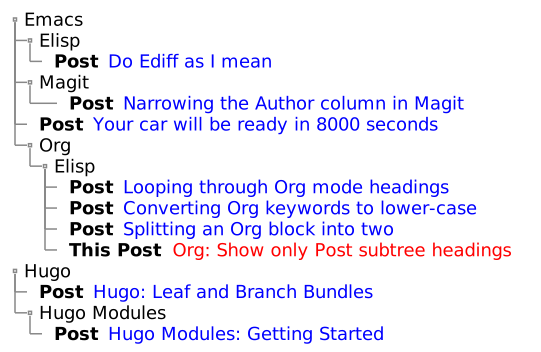
organize under &ldquo;category&rdquo; headings .. It kind of looks like the below
mock-up:
<span class="sidenote-number"><small class="sidenote">
It&rsquo;s amazing how many features PlantUML has. If you are interested in
creating diagrams like these, check out the <a href="https://plantuml.com/salt">PlantUML Salt</a> syntax.
</small></span></p>
<p><a id="figure--post-subtrees-collapsed-mockup"></a></p>


<figure>
    
        <img src="https://scripter.co/org-show-only-post-subtree-headings/post-subtrees.svg" alt="Figure 1: Post Subtrees at arbitrary heading levels"/> <figcaption>
                <p>
                    <span class="figure-number">Figure 1: </span>Post Subtrees at arbitrary heading levels
                    
                        
                        </p>
                
            </figcaption></figure>

<p>As we can see,</p>
<ul>
<li>All the post subtrees are not at Level 1 headings.</li>
<li>They are also not at a fixed Level <em>N</em>.</li>
<li>The heading level of the post depends on how many parent categories
that post has (and that will also change over time).</li>
</ul>
<p>I needed to basically show everything leading up to a post subtree
heading, and then collapse all the content under that post; even the
sub-headings.</p>

<h2 id="the-collapse-all-posts-function">The &ldquo;Collapse All Posts&rdquo; function&nbsp;<a class="headline-hash no-text-decoration" href="#the-collapse-all-posts-function">#</a></h2>


<p>The <code>modi/org-hugo-collapse-all-posts</code> function defined below meets
the above requirement:</p>
<ol>
<li>It first widens the whole buffer and expands all the headings.</li>
<li>Then it loops through all the headings and collapses all the <em>post
subtrees</em> i.e. all the subtrees that have the <code>EXPORT_FILE_NAME</code>
property set. This is where I use the <a href="/looping-through-org-mode-headings/"><code>org-map-entries</code></a> magic.</li>
<li>Finally it looks for Org headings that begin with &ldquo;Footnotes&rdquo; or
&ldquo;COMMENT&rdquo; and collapses them as well.</li>
</ol>
<p>I am using the development version of Org mode (version 9.6, yet to be
released as of <span class="timestamp-wrapper"><span class="timestamp">&lt;2022-06-15 Wed&gt;</span></span>) which has the new <code>org-fold</code>
library. This library obsoletes the use of <code>outline.el</code> library and
other <em>code-folding</em> related functions in Org mode. So <code>cl-flet</code> is
used to create function symbol aliases that use the <code>org-fold-*</code>
functions if available, otherwise they fall back to the legacy
functions.</p>
<p><a id="code-snippet--collapse-all-posts-fn"></a></p>
<div class="highlight"><div class="chroma">
<table class="lntable"><tr><td class="lntd">
<pre tabindex="0" class="chroma"><code><span class="lnt"> 1
</span><span class="lnt"> 2
</span><span class="lnt"> 3
</span><span class="lnt"> 4
</span><span class="lnt"> 5
</span><span class="lnt"> 6
</span><span class="lnt"> 7
</span><span class="lnt"> 8
</span><span class="lnt"> 9
</span><span class="lnt">10
</span><span class="lnt">11
</span><span class="lnt">12
</span><span class="lnt">13
</span><span class="lnt">14
</span><span class="lnt">15
</span><span class="lnt">16
</span><span class="lnt">17
</span><span class="lnt">18
</span><span class="hl"><span class="lnt">19
</span></span><span class="lnt">20
</span><span class="lnt">21
</span><span class="lnt">22
</span><span class="hl"><span class="lnt">23
</span></span><span class="lnt">24
</span><span class="lnt">25
</span></code></pre></td>
<td class="lntd">
<pre tabindex="0" class="chroma"><code class="language-emacs-lisp" data-lang="emacs-lisp"><span class="line"><span class="cl"><span class="p">(</span><span class="nb">defun</span> <span class="nv">modi/org-hugo-collapse-all-posts</span> <span class="p">()</span>
</span></span><span class="line"><span class="cl">  <span class="s">&#34;Collapse all post subtrees in the current buffer.
</span></span></span><span class="line"><span class="cl"><span class="s">Also collapse the Footnotes subtree and COMMENT subtrees if
</span></span></span><span class="line"><span class="cl"><span class="s">present.
</span></span></span><span class="line"><span class="cl"><span class="s">
</span></span></span><span class="line"><span class="cl"><span class="s">A post subtree is one that has the EXPORT_FILE_NAME property
</span></span></span><span class="line"><span class="cl"><span class="s">set.&#34;</span>
</span></span><span class="line"><span class="cl">  <span class="p">(</span><span class="nb">interactive</span><span class="p">)</span>
</span></span><span class="line"><span class="cl">  <span class="p">(</span><span class="nb">cl-flet</span> <span class="p">((</span><span class="nv">show-all</span> <span class="p">(</span><span class="nb">if</span> <span class="p">(</span><span class="nf">fboundp</span> <span class="ss">&#39;org-fold-show-all</span><span class="p">)</span>
</span></span><span class="line"><span class="cl">                          <span class="nf">#&#39;</span><span class="nv">org-fold-show-all</span>
</span></span><span class="line"><span class="cl">                        <span class="nf">#&#39;</span><span class="nv">org-show-all</span><span class="p">))</span>
</span></span><span class="line"><span class="cl">            <span class="p">(</span><span class="nv">hide-subtree</span> <span class="p">(</span><span class="nb">if</span> <span class="p">(</span><span class="nf">fboundp</span> <span class="ss">&#39;org-fold-hide-subtree</span><span class="p">)</span>
</span></span><span class="line"><span class="cl">                              <span class="nf">#&#39;</span><span class="nv">org-fold-hide-subtree</span>
</span></span><span class="line"><span class="cl">                            <span class="nf">#&#39;</span><span class="nv">outline-hide-subtree</span><span class="p">)))</span>
</span></span><span class="line"><span class="cl">    <span class="p">(</span><span class="nf">widen</span><span class="p">)</span>
</span></span><span class="line"><span class="cl">    <span class="p">(</span><span class="nv">show-all</span> <span class="o">&#39;</span><span class="p">(</span><span class="nv">headings</span><span class="p">))</span>
</span></span><span class="line"><span class="cl">    <span class="c1">;; Collapse all the post subtrees (ones with EXPORT_FILE_NAME</span>
</span></span><span class="line"><span class="cl">    <span class="c1">;; property set).</span>
</span></span><span class="line hl"><span class="cl">    <span class="p">(</span><span class="nv">org-map-entries</span> <span class="nf">#&#39;</span><span class="nv">hide-subtree</span> <span class="s">&#34;EXPORT_FILE_NAME&lt;&gt;\&#34;\&#34;&#34;</span> <span class="ss">&#39;file</span><span class="p">)</span>
</span></span><span class="line"><span class="cl">    <span class="c1">;; Also hide Footnotes and comments.</span>
</span></span><span class="line"><span class="cl">    <span class="p">(</span><span class="nb">save-excursion</span>
</span></span><span class="line"><span class="cl">      <span class="p">(</span><span class="nf">goto-char</span> <span class="p">(</span><span class="nf">point-min</span><span class="p">))</span>
</span></span><span class="line hl"><span class="cl">      <span class="p">(</span><span class="nb">while</span> <span class="p">(</span><span class="nf">re-search-forward</span> <span class="s">&#34;^\\(\\* Footnotes\\|\\*+ COMMENT\\)&#34;</span>
</span></span><span class="line"><span class="cl">                                <span class="no">nil</span> <span class="nb">:noerror</span><span class="p">)</span>
</span></span><span class="line"><span class="cl">        <span class="p">(</span><span class="nv">hide-subtree</span><span class="p">)))))</span>
</span></span></code></pre></td></tr></table>
</div>
</div><div class="src-block-caption">
  <span class="src-block-number"><a href="#code-snippet--collapse-all-posts-fn">Code Snippet 1</a>:</span>
  Function that collapses all the post subtrees in the current buffer
</div>

<h2 id="binding-with-c-u-c-c-tab">Binding with <code>C-u C-c TAB</code>&nbsp;<a class="headline-hash no-text-decoration" href="#binding-with-c-u-c-c-tab">#</a></h2>


<p>The function is ready, but let&rsquo;s now add a bit of convenience to it.</p>
<p>If a point is under a subtree, <code>C-c TAB</code> will collapse that subtree
while showing only Level 1 headings, and if a numeric prefix is used,
it will show only those many levels of headings. I decided to bind the
above function to <code>C-u C-c TAB</code> because,</p>
<ol>
<li>The behavior of <code>modi/org-hugo-collapse-all-posts</code> falls in the
same category as that of <code>C-c TAB</code>.</li>
<li>The <code>C-u C-c ..</code> binding rolls off the fingers pretty
nicely 😃.</li>
</ol>
<p>This <em>binding</em> is achieved using one of my favorite Emacs features
.. the <strong>advice</strong> system. The <code>:before-until</code> <a href="https://www.gnu.org/software/emacs/manual/html_node/elisp/Advice-Combinators.html" title="Emacs Lisp: (info &quot;(elisp) Advice Combinators&quot;)">Advice Combinator</a> is used
here, which means that if the <em>advising</em> function (below) returns a
<em>nil</em>, the <em>advised</em> or the original function <code>org-ctrl-c-tab</code> is not
called.</p>
<p>The <em>advising</em> function below detects if the <code>C-u</code> prefix argument is
used. If it is, the <code>modi/org-hugo-collapse-all-posts</code> function is
called, otherwise the original <code>org-ctrl-c-tab</code> function is called.</p>
<p><a id="code-snippet--collapse-all-posts-binding"></a></p>
<div class="highlight"><div class="chroma">
<table class="lntable"><tr><td class="lntd">
<pre tabindex="0" class="chroma"><code><span class="lnt">1
</span><span class="lnt">2
</span><span class="lnt">3
</span><span class="hl"><span class="lnt">4
</span></span><span class="lnt">5
</span><span class="lnt">6
</span><span class="lnt">7
</span><span class="lnt">8
</span><span class="lnt">9
</span></code></pre></td>
<td class="lntd">
<pre tabindex="0" class="chroma"><code class="language-emacs-lisp" data-lang="emacs-lisp"><span class="line"><span class="cl"><span class="p">(</span><span class="nb">defun</span> <span class="nv">modi/org-ctrl-c-tab-advice</span> <span class="p">(</span><span class="kp">&amp;rest</span> <span class="nv">args</span><span class="p">)</span>
</span></span><span class="line"><span class="cl">  <span class="s">&#34;Run </span><span class="ss">`modi/org-hugo-collapse-all-posts&#39;</span><span class="s"> when
</span></span></span><span class="line"><span class="cl"><span class="s">doing \\[universal-argument] \\[org-ctrl-c-tab].&#34;</span>
</span></span><span class="line hl"><span class="cl">  <span class="p">(</span><span class="nb">let</span> <span class="p">((</span><span class="nv">do-not-run-orig-fn</span> <span class="p">(</span><span class="nf">equal</span> <span class="o">&#39;</span><span class="p">(</span><span class="mi">4</span><span class="p">)</span> <span class="nv">current-prefix-arg</span><span class="p">)))</span>
</span></span><span class="line"><span class="cl">    <span class="p">(</span><span class="nb">when</span> <span class="nv">do-not-run-orig-fn</span>
</span></span><span class="line"><span class="cl">      <span class="p">(</span><span class="nv">modi/org-hugo-collapse-all-posts</span><span class="p">))</span>
</span></span><span class="line"><span class="cl">    <span class="nv">do-not-run-orig-fn</span><span class="p">))</span>
</span></span><span class="line"><span class="cl">
</span></span><span class="line"><span class="cl"><span class="p">(</span><span class="nv">advice-add</span> <span class="ss">&#39;org-ctrl-c-tab</span> <span class="nb">:before-until</span> <span class="nf">#&#39;</span><span class="nv">modi/org-ctrl-c-tab-advice</span><span class="p">)</span>
</span></span></code></pre></td></tr></table>
</div>
</div><div class="src-block-caption">
  <span class="src-block-number"><a href="#code-snippet--collapse-all-posts-binding">Code Snippet 2</a>:</span>
  Bind <code>C-u C-c TAB</code> to call <code>modi/org-hugo-collapse-all-posts</code>
</div>

<h2 id="result">Result&nbsp;<a class="headline-hash no-text-decoration" href="#result">#</a></h2>


<p>After evaluating the above two snippets, when I do <code>C-u C-c TAB</code> in
my &ldquo;blog posts&rdquo; Org buffer, I see this:</p>
<p><a id="figure--post-subtrees-collapsed"></a></p>


<figure>
    <a href="post-subtrees-collapsed.png">
        <img src="https://scripter.co/org-show-only-post-subtree-headings/post-subtrees-collapsed.png" alt="Figure 2: My &ldquo;blog posts&rdquo; Org buffer showing only the Post subtree headings"/> </a><figcaption>
                <p>
                    <span class="figure-number">Figure 2: </span>My &ldquo;blog posts&rdquo; Org buffer showing only the Post subtree headings
                    
                        
                        </p>
                
            </figcaption></figure>

<p>It matches <a href="#figure--post-subtrees-collapsed-mockup">that earlier mockup</a> &mdash; Mission accomplished! 💯</p>
]]></content><category scheme="https://scripter.co/categories/emacs" term="emacs" label="emacs"/><category scheme="https://scripter.co/categories/org" term="org" label="org"/><category scheme="https://scripter.co/categories/elisp" term="elisp" label="elisp"/><category scheme="https://scripter.co/tags/100daystooffload" term="100daystooffload" label="100DaysToOffload"/><category scheme="https://scripter.co/tags/subtree" term="subtree" label="subtree"/><category scheme="https://scripter.co/tags/looping" term="looping" label="looping"/><category scheme="https://scripter.co/tags/advice" term="advice" label="advice"/></entry><entry><title type="html">Zero HTML Validation Errors!</title><link href="https://scripter.co/zero-html-validation-errors/?utm_source=atom_feed" rel="alternate" type="text/html"/><link href="https://scripter.co/offline-html5-validator/?utm_source=atom_feed" rel="related" type="text/html" title="Offline HTML5 Validator"/><link href="https://scripter.co/hugo-modules-importing-a-theme/?utm_source=atom_feed" rel="related" type="text/html" title="Hugo Modules: Importing a Theme"/><link href="https://scripter.co/looping-through-org-mode-headings/?utm_source=atom_feed" rel="related" type="text/html" title="Looping through Org mode headings"/><link href="https://scripter.co/using-org-logbook-notes-to-record-blog-post-updates/?utm_source=atom_feed" rel="related" type="text/html" title="Using Org Logbook Notes to record blog post updates"/><link href="https://scripter.co/building-org-development-version/?utm_source=atom_feed" rel="related" type="text/html" title="Building Org Development version (2022)"/><id>https://scripter.co/zero-html-validation-errors/</id><author><name>Kaushal Modi</name></author><published>2022-06-05T17:58:00-04:00</published><updated>2022-06-05T17:58:00-04:00</updated><content type="html"><![CDATA[<blockquote>How I fixed my site content and went down from 46 HTML validations
errors down to 0!</blockquote><div class="ox-hugo-toc toc">
<div class="heading">Table of Contents</div>
<ul>
<li><a href="#avoid-duplicate-heading-id-attributes"><span class="section-num">1</span> Avoid duplicate heading <code>id</code> attributes</a></li>
<li><a href="#remove-inline-style-elements"><span class="section-num">2</span> Remove inline <code>&lt;style&gt;</code> elements</a></li>
<li><a href="#ensure-that-all-images-have-captions-or-alt-attributes"><span class="section-num">3</span> Ensure that all images have captions or <code>alt</code> attributes</a></li>
<li><a href="#do-not-have-hyperlinks-in-headings"><span class="section-num">4</span> Do not have hyperlinks in headings</a></li>
<li><a href="#validation-ignores">Validation Ignores</a>
<ul>
<li><a href="#ignore-errors-due-to-hyperlinks-in-inline-svg"><span class="section-num">5</span> Ignore errors due to hyperlinks in inline SVG</a></li>
<li><a href="#ignore-files-not-expected-to-serve-html-content"><span class="section-num">6</span> Ignore files not expected to serve HTML content</a></li>
</ul>
</li>
<li><a href="#summary">Summary</a></li>
</ul>
</div>
<!--endtoc-->
<p>In my <a href="/offline-html5-validator/">previous HTML5 Validator post</a>, I mentioned:</p>
<blockquote>
<p>I was a bit disappointed to see validation errors on my site, but then
it wasn&rsquo;t too bad .. 46 errors.</p>
</blockquote>
<p>But they truly say ..</p>
<div class="org-center">
<p>Ignorance is bliss.</p>
</div>
<p>So .. once I realized that my site had 46 validation errors, I lost
that <em>bliss</em> .. and I couldn&rsquo;t rest easy &mdash; I had to fix them all
😁.</p>
<p>This post summarizes the categories of those errors and how I fixed
<span class="sidenote-number"><small class="sidenote">
The fixes mentioned in this post refer to changes in Org mode
content. But you should be able to derive equivalent fixes for
Markdown too.
</small></span>
them all.</p>

<h2 id="avoid-duplicate-heading-id-attributes"><span class="section-num">1</span> Avoid duplicate heading <code>id</code> attributes&nbsp;<a class="headline-hash no-text-decoration" href="#avoid-duplicate-heading-id-attributes">#</a></h2>


<div class="highlight"><pre tabindex="0" class="chroma"><code class="language-text" data-lang="text"><span class="line"><span class="cl">&#34;file:/public/notes/​string-fns-nim-vs-python/index.html&#34;:636.34-636.46: error: Duplicate ID &#34;notes&#34;.
</span></span><span class="line"><span class="cl">&#34;file:/public/notes/​nim-fmt/index.html&#34;:300.34-300.52: error: Duplicate ID &#34;older-issue&#34;.
</span></span><span class="line"><span class="cl">&#34;file:/public/notes/​nim-fmt/index.html&#34;:306.20-306.33: error: Duplicate ID &#34;floats&#34;.
</span></span><span class="line"><span class="cl">&#34;file:/public/page/6/index.html&#34;:29.39-29.54: error: Duplicate ID &#34;fnref:1&#34;.
</span></span></code></pre></div><p>Errors with above kind of signatures were fixed by,</p>
<ol>
<li>
<p>Converting headings to description lists</p>
<p>I had a bunch of generic headings like &ldquo;Notes&rdquo; and &ldquo;Older Issue&rdquo; in
some of my posts. After taking a second look at those, it made more
sense to convert those to description lists. So in Org mode, I
converted headings like <code class="code-inline language-org"><span class="gh">*</span><span class="gs"> Notes</span></code> to
description lists <code class="code-inline language-org"><span class="k">- </span>Notes ::</code>.</p>
</li>
<li>
<p>Setting <code>CUSTOM_ID</code> heading property</p>
<p>For the cases, where the headings needed to be left as so, their
IDs were uniquified by setting their <code>CUSTOM_ID</code> property. For
example, below fixed the <em>Duplicate ID &ldquo;floats&rdquo;</em> errors.
<a id="code-snippet--using-custom-id-to-uniquify-heading-id"></a></p>
<div class="highlight"><pre tabindex="0" class="chroma"><code class="language-diff" data-lang="diff"><span class="line"><span class="cl"> ** Precision
</span></span><span class="line"><span class="cl"> ..
</span></span><span class="line"><span class="cl"> *** Floats
</span></span><span class="line"><span class="cl"><span class="gi">+:PROPERTIES:
</span></span></span><span class="line"><span class="cl"><span class="gi">+:CUSTOM_ID: precision-floats
</span></span></span><span class="line"><span class="cl"><span class="gi">+:END:
</span></span></span><span class="line"><span class="cl"><span class="gi"></span> ..
</span></span><span class="line"><span class="cl"> ** Type (only for numbers)
</span></span><span class="line"><span class="cl"> ..
</span></span><span class="line"><span class="cl"> *** Floats
</span></span><span class="line"><span class="cl"><span class="gi">+:PROPERTIES:
</span></span></span><span class="line"><span class="cl"><span class="gi">+:CUSTOM_ID: type-floats
</span></span></span><span class="line"><span class="cl"><span class="gi">+:END:
</span></span></span></code></pre></div><div class="src-block-caption">
  <span class="src-block-number"><a href="#code-snippet--using-custom-id-to-uniquify-heading-id">Code Snippet 1</a>:</span>
  Using <code>CUSTOM_ID</code> property to uniquify heading ID's
</div>
</li>
<li>
<p>Prevent footnote links in post summaries</p>
<p>This issue was due to me not being conscious about how the footnote
references work in a post <em>versus</em> on a page outside that post&rsquo;s
context.  The issue was caused by footnote references getting into
the post summaries parsed by Hugo, which will then show up on the
list pages.</p>
<p>The fix was simple &mdash; Edit the post summaries so that they don&rsquo;t
contain any footnote references.</p>
</li>
</ol>

<h2 id="remove-inline-style-elements"><span class="section-num">2</span> Remove inline <code>&lt;style&gt;</code> elements&nbsp;<a class="headline-hash no-text-decoration" href="#remove-inline-style-elements">#</a></h2>


<div class="highlight"><pre tabindex="0" class="chroma"><code class="language-text" data-lang="text"><span class="line"><span class="cl">&#34;file:/public/​grep-po/index.html&#34;:51.139-51.145: error: Element &#34;style&#34; not allowed as child of element &#34;div&#34; in this context. (Suppressing further errors from this subtree.)
</span></span><span class="line"><span class="cl">&#34;file:/public/​how-do-i-write-org-mode/index.html&#34;:23.194-23.200: error: Element &#34;style&#34; not allowed as child of element &#34;div&#34; in this context. (Suppressing further errors from this subtree.)
</span></span></code></pre></div><p>Errors with above kind of signatures were fixed by,</p>
<ol>
<li>
<p>Avoiding export of raw <code>&lt;style&gt;</code> elements in the Markdown content</p>
<p>I figured out which functions were responsible for injecting
<code>&lt;style&gt;</code> elements in Markdown content and then advised them to
stop that. After applying these advises, I lost the in-content
rules for CSS classes <code>.org-center</code> and <code>.csl-entry</code>. So I put
those rules directly in this website&rsquo;s CSS.
<a id="code-snippet--advices-to-prevent-style-elem-in-exports"></a></p>
<div class="highlight"><pre tabindex="0" class="chroma"><code class="language-emacs-lisp" data-lang="emacs-lisp"><span class="line"><span class="cl"><span class="p">(</span><span class="nb">defun</span> <span class="nv">modi/org-blackfriday-center-block</span> <span class="p">(</span><span class="nv">_center-block</span> <span class="nv">contents</span> <span class="nv">info</span><span class="p">)</span>
</span></span><span class="line"><span class="cl">  <span class="p">(</span><span class="nb">let*</span> <span class="p">((</span><span class="nv">class</span> <span class="s">&#34;org-center&#34;</span><span class="p">))</span>
</span></span><span class="line"><span class="cl">    <span class="p">(</span><span class="nf">format</span> <span class="s">&#34;&lt;div class=\&#34;%s\&#34;&gt;%s\n\n%s\n&lt;/div&gt;&#34;</span>
</span></span><span class="line"><span class="cl">            <span class="nv">class</span> <span class="p">(</span><span class="nv">org-blackfriday--extra-div-hack</span> <span class="nv">info</span><span class="p">)</span> <span class="nv">contents</span><span class="p">)))</span>
</span></span><span class="line"><span class="cl"><span class="p">(</span><span class="nv">advice-add</span> <span class="ss">&#39;org-blackfriday-center-block</span> <span class="nb">:override</span> <span class="nf">#&#39;</span><span class="nv">modi/org-blackfriday-center-block</span><span class="p">)</span>
</span></span><span class="line"><span class="cl">
</span></span><span class="line"><span class="cl"><span class="p">(</span><span class="nb">defun</span> <span class="nv">modi/org-cite-csl-render-bibliography</span> <span class="p">(</span><span class="nv">bib-str</span><span class="p">)</span>
</span></span><span class="line"><span class="cl">  <span class="p">(</span><span class="nv">replace-regexp-in-string</span> <span class="s">&#34;&lt;style&gt;\\.csl-entry[^&lt;]+&lt;/style&gt;&#34;</span> <span class="s">&#34;&#34;</span> <span class="nv">bib-str</span><span class="p">))</span>
</span></span><span class="line"><span class="cl"><span class="p">(</span><span class="nv">advice-add</span> <span class="ss">&#39;org-cite-csl-render-bibliography</span> <span class="nb">:filter-return</span> <span class="nf">#&#39;</span><span class="nv">modi/org-cite-csl-render-bibliography</span><span class="p">)</span>
</span></span></code></pre></div><div class="src-block-caption">
  <span class="src-block-number"><a href="#code-snippet--advices-to-prevent-style-elem-in-exports">Code Snippet 2</a>:</span>
  Emacs-Lisp advices to prevent <code>&lt;style&gt;</code> elements in exports
</div>
</li>
<li>
<p>Removing unnecessary micro-styling</p>
<p>I found a single case, where an inline CSS rule was defined in
content for CSS class <code>.repr-type</code> for a table. I just removed that
without affecting the looks of that rendered table too much.</p>
</li>
</ol>

<h2 id="ensure-that-all-images-have-captions-or-alt-attributes"><span class="section-num">3</span> Ensure that all images have captions or <code>alt</code> attributes&nbsp;<a class="headline-hash no-text-decoration" href="#ensure-that-all-images-have-captions-or-alt-attributes">#</a></h2>


<div class="highlight"><pre tabindex="0" class="chroma"><code class="language-text" data-lang="text"><span class="line"><span class="cl">&#34;file:/public/​hugo-use-goat-code-blocks-for-ascii-diagrams/index.html&#34;:24.130-24.255: error: An &#34;img&#34; element must have an &#34;alt&#34; attribute, except under certain conditions. For details, consult guidance on providing text alternatives for images.
</span></span></code></pre></div><p>Errors with above kind of signatures were easily fixed by ensuring
that all images had captions
<span class="sidenote-number"><small class="sidenote">
Thankfully, there were only two images that were missing captions.
</small></span>
. The Hugo <code>figure</code> shortcode adds the caption to the <code>alt</code> attribute if
the <code>alt</code> is not specified separately.</p>
<p>As an example, here&rsquo;s how I fixed the above error:</p>
<p><a id="code-snippet--adding-a-caption-to-an-image"></a></p>
<div class="highlight"><pre tabindex="0" class="chroma"><code class="language-diff" data-lang="diff"><span class="line"><span class="cl"><span class="gi">+ #+name: fig__disproportionate_box_drawing
</span></span></span><span class="line"><span class="cl"><span class="gi">+ #+caption: Disproportionate box drawing characters
</span></span></span><span class="line"><span class="cl"><span class="gi"></span>[[file:images/​hugo-use-goat-code-blocks-for-ascii-diagrams/ascii-diagram-rendered-in-plain-text-code-block.png]]
</span></span></code></pre></div><div class="src-block-caption">
  <span class="src-block-number"><a href="#code-snippet--adding-a-caption-to-an-image">Code Snippet 3</a>:</span>
  A <code>git diff</code> showing addition of caption to an image
</div>

<h2 id="do-not-have-hyperlinks-in-headings"><span class="section-num">4</span> Do not have hyperlinks in headings&nbsp;<a class="headline-hash no-text-decoration" href="#do-not-have-hyperlinks-in-headings">#</a></h2>


<div class="highlight"><pre tabindex="0" class="chroma"><code class="language-text" data-lang="text"><span class="line"><span class="cl">&#34;file:/public/​using-emacs-advice-to-silence-messages-from-functions/index.html&#34;:151.687-151.732: error: Start tag &#34;a&#34; seen but an element of the same type was already open.
</span></span><span class="line"><span class="cl">&#34;file:/public/​using-emacs-advice-to-silence-messages-from-functions/index.html&#34;:151.748-151.751: error: Stray end tag &#34;a&#34;.
</span></span><span class="line"><span class="cl">&#34;file:/public/​auto-count-100daystooffload-posts/index.html&#34;:114.446-114.475: error: Start tag &#34;a&#34; seen but an element of the same type was already open.
</span></span><span class="line"><span class="cl">&#34;file:/public/​auto-count-100daystooffload-posts/index.html&#34;:114.446-114.475: error: End tag &#34;a&#34; violates nesting rules.
</span></span><span class="line"><span class="cl">&#34;file:/public/​auto-count-100daystooffload-posts/index.html&#34;:114.526-114.529: error: Stray end tag &#34;a&#34;.
</span></span></code></pre></div><p>While the hyperlinks in headings work well, they created invalid HTML
in the Hugo-generated TOC. So while these errors were created
technically because of a bug in Hugo
<span class="sidenote-number"><small class="sidenote">
It&rsquo;s really cool when you end up finding a bug in an upstream project
while trying to fix the errors in your own thing 😎.
</small></span>
, I wanted to fix these errors on my end as soon as I can.</p>
<p>I reviewed the errors, and this is all it took to get rid of them all:</p>
<ol>
<li>
<p>Remove manually inserting hyperlinks in headings
<a id="code-snippet--removing-hyperlink-from-a-heading"></a></p>
<div class="highlight"><pre tabindex="0" class="chroma"><code class="language-diff" data-lang="diff"><span class="line"><span class="cl"> show two methods of finding sources of any printed messages.
</span></span><span class="line"><span class="cl"><span class="gd">-***** Using plain-old /grep/ or [[https://github.com/BurntSushi/ripgrep][/rg/]]
</span></span></span><span class="line"><span class="cl"><span class="gd"></span><span class="gi">+***** Using plain-old /grep/ or /ripgrep (rg)/
</span></span></span><span class="line"><span class="cl"><span class="gi"></span> This method is pretty easy (but not robust) to use if the search
</span></span><span class="line"><span class="cl"> ..
</span></span><span class="line"><span class="cl"> Org source directory and search for the /&#34;org-babel-exp process ..&#34;/
</span></span><span class="line"><span class="cl"><span class="gd">-string ..
</span></span></span><span class="line"><span class="cl"><span class="gd"></span><span class="gi">+string using [[https://github.com/BurntSushi/ripgrep][~rg~]] ..
</span></span></span></code></pre></div><div class="src-block-caption">
  <span class="src-block-number"><a href="#code-snippet--removing-hyperlink-from-a-heading">Code Snippet 4</a>:</span>
  Removing hyperlink from a heading
</div>
</li>
<li>
<p>Remove Org Radio links that created links in headings</p>
<p>Here, a Org heading happened to contain the string &ldquo;Day count&rdquo;,
which was also an <a href="https://orgmode.org/manual/Radio-Targets.html" title="Emacs Lisp: (info &quot;(org) Radio Targets&quot;)">an Org Radio link</a> in that post. While ideally
that shouldn&rsquo;t have mattered, I removed that radio link to get
around this Hugo bug.
<a id="code-snippet--removing-an-org-radio-link"></a></p>
<div class="highlight"><pre tabindex="0" class="chroma"><code class="language-diff" data-lang="diff"><span class="line"><span class="cl"> .. /Just may be/. But regardless, I am already enjoying writing once
</span></span><span class="line"><span class="cl"><span class="gd">-again, and it&#39;s great to see the &lt;&lt;&lt;Day count&gt;&gt;&gt; (counting up to 100)
</span></span></span><span class="line"><span class="cl"><span class="gd"></span><span class="gi">+again, and it&#39;s great to see the Day count (counting up to 100)
</span></span></span><span class="line"><span class="cl"><span class="gi"></span> increase with each new post!
</span></span></code></pre></div><div class="src-block-caption">
  <span class="src-block-number"><a href="#code-snippet--removing-an-org-radio-link">Code Snippet 5</a>:</span>
  Removing an Org Radio link
</div>
</li>
</ol>

<h2 id="validation-ignores">Validation Ignores&nbsp;<a class="headline-hash no-text-decoration" href="#validation-ignores">#</a></h2>


<p>Above fixes fixed 43 out of 46 errors, but the remaining 3 were unfixable.</p>

<h3 id="ignore-errors-due-to-hyperlinks-in-inline-svg"><span class="section-num">5</span> Ignore errors due to hyperlinks in inline SVG&nbsp;<a class="headline-hash no-text-decoration" href="#ignore-errors-due-to-hyperlinks-in-inline-svg">#</a></h3>


<div class="highlight"><pre tabindex="0" class="chroma"><code class="language-text" data-lang="text"><span class="line"><span class="cl">&#34;file:/public/notes/​plantuml/index.html&#34;:114.474-114.678: error: Attribute &#34;title&#34; not allowed on element &#34;a&#34; at this point.
</span></span></code></pre></div><p>This error was caused by hyperlinks in inline SVG elements. These SVG
elements are created by <a href="https://plantuml.com/">PlantUML</a>. The <em>hyperlinks in SVG</em> feature
works great, and as these are generated by PlantUML, I chose to just
ignore these errors.</p>
<p>I ignored this error by adding the <code>--ignore-re 'notes/plantuml.*Attribute.*title.*not allowed'</code> switch to the
<code>html5validator</code> command.</p>

<h3 id="ignore-files-not-expected-to-serve-html-content"><span class="section-num">6</span> Ignore files not expected to serve HTML content&nbsp;<a class="headline-hash no-text-decoration" href="#ignore-files-not-expected-to-serve-html-content">#</a></h3>


<div class="highlight"><pre tabindex="0" class="chroma"><code class="language-text" data-lang="text"><span class="line"><span class="cl">&#34;file:/public/googleFOO.html&#34;:1.1-1.52: error: Non-space characters found without seeing a doctype first. Expected &#34;&lt;!DOCTYPE html&gt;&#34;.
</span></span></code></pre></div><p>The <code>googleFOO.html</code> file here is not a valid HTML file. It&rsquo;s a just a
<em>cookie</em> file that was used by Google to verify that I own this
domain.</p>
<p>This error was masked by adding the <code>--ignore 'googleFOO'</code> switch to
the <code>html5validator</code> command.</p>

<h2 id="summary">Summary&nbsp;<a class="headline-hash no-text-decoration" href="#summary">#</a></h2>


<p>Once I fixed the 43 errors by tweaking the Org mode content, and added
those two ignores, I had <strong>zero validation errors</strong>! 🎉</p>
<p>If you are interested in the fix details, <a href="https://gitlab.com/kaushalmodi/kaushalmodi.gitlab.io/-/compare/a7cac5dd1293442a51fd5020a3bcef8da7f75fdc...42d6c72d533c337b5c67fa09207f68e45efe6e6c">here are the commits</a>.</p>
]]></content><category scheme="https://scripter.co/categories/emacs" term="emacs" label="emacs"/><category scheme="https://scripter.co/categories/web" term="web" label="web"/><category scheme="https://scripter.co/categories/org" term="org" label="org"/><category scheme="https://scripter.co/series/html5-validator" term="html5-validator" label="HTML5 Validator"/><category scheme="https://scripter.co/tags/html" term="html" label="html"/><category scheme="https://scripter.co/tags/validator" term="validator" label="validator"/><category scheme="https://scripter.co/tags/100daystooffload" term="100daystooffload" label="100DaysToOffload"/></entry><entry><title type="html">Looping through Org mode headings</title><link href="https://scripter.co/looping-through-org-mode-headings/?utm_source=atom_feed" rel="alternate" type="text/html"/><link href="https://scripter.co/using-org-logbook-notes-to-record-blog-post-updates/?utm_source=atom_feed" rel="related" type="text/html" title="Using Org Logbook Notes to record blog post updates"/><link href="https://scripter.co/building-org-development-version/?utm_source=atom_feed" rel="related" type="text/html" title="Building Org Development version (2022)"/><link href="https://scripter.co/downloading-nim/?utm_source=atom_feed" rel="related" type="text/html" title="Downloading Nim"/><link href="https://scripter.co/creating-a-patch-file-using-magit/?utm_source=atom_feed" rel="related" type="text/html" title="Creating a patch file using Magit"/><link href="https://scripter.co/presenting-tomelr/?utm_source=atom_feed" rel="related" type="text/html" title="Presenting tomelr!"/><id>https://scripter.co/looping-through-org-mode-headings/</id><author><name>Kaushal Modi</name></author><published>2022-05-18T23:29:00-04:00</published><updated>2022-05-18T23:29:00-04:00</updated><content type="html"><![CDATA[<blockquote>Using the <code>org-map-entries</code> API to loop through selected or all
headings in an Org file.</blockquote><div class="ox-hugo-toc toc">
<div class="heading">Table of Contents</div>
<ul>
<li><a href="#org-map-entries-api"><code>org-map-entries</code> API</a>
<ul>
<li><a href="#match-strings"><em>MATCH</em> strings</a></li>
<li><a href="#comparison-types">Comparison Types</a></li>
<li><a href="#other-notes">Other notes</a></li>
</ul>
</li>
<li><a href="#example-modifying-a-property-in-all-headings">Example: Modifying a property in all headings</a></li>
<li><a href="#org-map-entries-references"><code>org-map-entries</code> References</a></li>
</ul>
</div>
<!--endtoc-->
<p><a href="https://framapiaf.org/@postroutine/108313152514542145">Below question</a> on Mastodon by the user <a href="https://framapiaf.org/@postroutine">@postroutine</a> inspired me to
write this post:</p>
<blockquote>
<p>I got a lot of Org-Mode headings and I want to modify their properties
(add, remove, edit). Is there a function to do the same modifications
on each heading?</p>
</blockquote>
<p>I think that the best solution to that question is using the
<strong>org-map-entries</strong> function.</p>
<p>But somehow when replying to that question then, that wasn&rsquo;t what
first came to my mind! .. when ironically that function is the <a href="https://github.com/kaushalmodi/ox-hugo/blob/2b169e5e83d608e80f4faee9d681b98d87041f58/ox-hugo.el#L4781-L4788">main
function</a> that enables my preferred <em>subtree-based flow</em> in <code>ox-hugo</code>
😆. So I am writing this post to better ingrain the following
concept in myself ..</p>
<div class="note">
<p>If you need to loop through headings in an Org buffer, and especially
if you <strong>need to modify that buffer</strong> in the process, use
<strong>org-map-entries</strong><sup id="fnref:1"><a href="#fn:1" class="footnote-ref" role="doc-noteref">1</a></sup>.</p>
</div>
<p>Next,</p>
<ol>
<li>I will give a give introduction to the <code>org-map-entries</code> API.</li>
<li>Then provide a super-short solution to the above question.</li>
</ol>

<h2 id="org-map-entries-api"><code>org-map-entries</code> API&nbsp;<a class="headline-hash no-text-decoration" href="#org-map-entries-api">#</a></h2>


<p>I will give only a broad level overview on how to use this function. I
would encourage the reader to refer to the resources at the end of
this post to learn more about it.</p>
<p>So let&rsquo;s start by looking at this function&rsquo;s signature:</p>
<p><a id="code-snippet--org-map-entries-signature"></a></p>
<div class="highlight"><pre tabindex="0" class="chroma"><code class="language-emacs-lisp" data-lang="emacs-lisp"><span class="line"><span class="cl"><span class="p">(</span><span class="nv">org-map-entries</span> <span class="nv">FUNC</span> <span class="kp">&amp;optional</span> <span class="nv">MATCH</span> <span class="nv">SCOPE</span> <span class="kp">&amp;rest</span> <span class="nv">SKIP</span><span class="p">)</span>
</span></span></code></pre></div><div class="src-block-caption">
  <span class="src-block-number"><a href="#code-snippet--org-map-entries-signature">Code Snippet 1</a>:</span>
  Signature of the <code>org-map-entries</code> function
</div>
<p>The <code>org-map-entries</code> function iterates through all the headings
meeting the <em>MATCH</em> criteria in the determined <em>SCOPE</em>, and then calls
the specified function <em>FUNC</em> at each of those headings.</p>
<ul>
<li>The <code>FUNC</code> function accepts <strong>no</strong> arguments and is called at the
beginning of each Org heading.</li>
<li>The optional second argument <em>MATCH</em> is either <em>nil</em>, <code>t</code> or a
<em>search string</em>.
<ul>
<li>If <em>MATCH</em> is <em>nil</em> or <code>t</code>, <strong>all</strong> headings will be visited by the
iteration and <em>FUNC</em> will be called on all of them.</li>
<li>But if <em>MATCH</em> is a string, the headings will first be filtered
based on that string and then the <em>FUNC</em> will be called on only
those.</li>
</ul>
</li>
<li>For explanations on the optional <em>SCOPE</em> and <em>SKIP</em> arguments, see
<a href="https://orgmode.org/manual/Using-the-Mapping-API.html" title="Emacs Lisp: (info &quot;(org) Using the Mapping API&quot;)">Org Info: Using the Mapping API</a> or <kbd>C-h</kbd> <kbd>f</kbd> <code>org-map-entries</code> from
within Emacs.</li>
</ul>
<p>Here&rsquo;s a typical <code>org-map-entries</code> call that loops through <strong>all</strong> the
headings in the <strong>visible</strong> buffer: <code class="code-inline language-emacs-lisp"><span class="p">(</span><span class="nv">org-map-entries</span> <span class="nf">#&#39;</span><span class="nv">some-function</span><span class="p">)</span></code> where all the optional
argument values are <em>nil</em>. Next, we&rsquo;ll see some examples of
string-type <em>MATCH</em> arguments used for filtering the headings.</p>

<h3 id="match-strings"><em>MATCH</em> strings&nbsp;<a class="headline-hash no-text-decoration" href="#match-strings">#</a></h3>


<p>Below table shows few examples of match string patterns.</p>
<p><a id="table--org-map-entries-search-strings"></a></p>
<div class="table-caption">
  <span class="table-number"><a href="#table--org-map-entries-search-strings">Table 1</a>:</span>
  String-type <i>MATCH</i> argument examples for <code>org-map-entries</code>
</div>
<table>
<thead>
<tr>
<th>Search string</th>
<th>Description</th>
<th>Example</th>
</tr>
</thead>
<tbody>
<tr>
<td><strong><code>&quot;TAG&quot;</code></strong></td>
<td>Tag name</td>
<td><code>&quot;foo&quot;</code> matches all headings with that tag</td>
</tr>
<tr>
<td><strong><code>&quot;{TAG REGEXP}&quot;</code></strong></td>
<td>Regexp matching tags</td>
<td><code>&quot;{f.*}&quot;</code> matches all headings whose tags match that regexp</td>
</tr>
<tr>
<td><strong><code>&quot;TAG1+TAG2+..&quot;</code></strong></td>
<td>Tag set intersection</td>
<td><code>&quot;foo+bar&quot;</code> matches all headings with both of those tags</td>
</tr>
<tr>
<td><strong><code>&quot;TAG1-TAG2+..&quot;</code></strong></td>
<td>Tag set difference</td>
<td><code>&quot;foo-bar&quot;</code> matches all headings with <code>foo</code> tag but without <code>bar</code> tag</td>
</tr>
<tr>
<td><strong><code>&quot;TAG1</code>|​<code>TAG2</code>|​<code>..&quot;</code></strong></td>
<td>Tag set union or boolean <em>OR</em></td>
<td><code>&quot;foo</code>​|​<code>bar&quot;</code> matches all headings with either of those tags</td>
</tr>
<tr>
<td><strong><code>&quot;TAG1&amp;TAG2&amp;..&quot;</code></strong></td>
<td>Tag set intersection or boolean <em>AND</em></td>
<td><code>&quot;foo&amp;bar&quot;</code> is same as <code>&quot;foo+bar&quot;</code></td>
</tr>
<tr>
<td><strong><code>&quot;PROP</code>​=​<code>\&quot;STRVAL\&quot;&quot;</code></strong></td>
<td>Specified property value matching a string</td>
<td><code>&quot;color</code>​=​<code>\&quot;blue\&quot;&quot;</code> matches all headings where <code>color</code> property is <code>blue</code></td>
</tr>
<tr>
<td><strong><code>&quot;PROP&lt;&gt;\&quot;STRVAL\&quot;&quot;</code></strong></td>
<td>Specified property value not matching a string</td>
<td><code>&quot;color&lt;&gt;\&quot;blue\&quot;&quot;</code> matches all headings where <code>color</code> property is not <code>blue</code></td>
</tr>
<tr>
<td><strong><code>&quot;PROP</code>​=​<code>{VAL REGEXP}&quot;</code></strong></td>
<td>Specified property value matching a regexp</td>
<td><code>&quot;color={b.*}&quot;</code> matches all headings where <code>color</code> property value matches &lsquo;<code>b.*</code>&rsquo; regexp</td>
</tr>
<tr>
<td><strong><code>&quot;PROP[OP]NUMVAL&quot;</code></strong></td>
<td>Specified property value compared with a numeric value</td>
<td><code>&quot;some_num</code>​&gt;=​<code>10&quot;</code> matches all headings where <code>some_num</code> property is &gt;=10</td>
</tr>
<tr>
<td><strong><code>&quot;LEVEL[OP]VAL&quot;</code></strong></td>
<td>Check value of headline&rsquo;s special property <em>LEVEL</em></td>
<td><code>&quot;level&gt;2&quot;</code> matches all headlines at levels greater than 2</td>
</tr>
<tr>
<td><strong><code>&quot;TODO[OP]\&quot;STRVAL\&quot;&quot;</code></strong></td>
<td>Check value of headline&rsquo;s <em>TODO</em> state</td>
<td><code>&quot;TODO</code>​=​<code>\&quot;DONE\&quot;&quot;</code> matches all headlines with <em>TODO</em> state set to &lsquo;DONE&rsquo;</td>
</tr>
</tbody>
</table>

<h3 id="comparison-types">Comparison Types&nbsp;<a class="headline-hash no-text-decoration" href="#comparison-types">#</a></h3>


<ul>
<li>If the comparison value is a plain number, a numerical comparison is
done, and the allowed operators are &lsquo;&lt;&rsquo;, &lsquo;=​&rsquo;, &lsquo;&gt;&rsquo;, &lsquo;&lt;=​&rsquo;, &lsquo;&gt;=​&rsquo;,
and &lsquo;&lt;&gt;&rsquo;.</li>
<li>If the comparison value is enclosed in double quotes, a string
comparison is done, and the same operators are allowed.</li>
<li>If the comparison value is enclosed in curly braces, a regexp match
is performed. For this comparison, only &lsquo;=​&rsquo; (regexp matches) and
&lsquo;&lt;&gt;&rsquo; (regexp does not match) operators are allowed.</li>
<li>Comparison with dates and <a href="https://orgmode.org/manual/Tag-Hierarchy.html" title="Emacs Lisp: (info &quot;(org) Tag Hierarchy&quot;)">Group Tags</a> is also possible. See
<a href="https://orgmode.org/manual/Matching-tags-and-properties.html" title="Emacs Lisp: (info &quot;(org) Matching tags and properties&quot;)">Org Info: Matching tags and properties</a> for more details.</li>
</ul>

<h3 id="other-notes">Other notes&nbsp;<a class="headline-hash no-text-decoration" href="#other-notes">#</a></h3>


<ul>
<li>The property names are case-insensitive. So these all work the
same: <code>&quot;COLOR&lt;&gt;\&quot;blue\&quot;&quot;</code>, <code>&quot;color&lt;&gt;\&quot;blue\&quot;&quot;</code>,
<code>&quot;Color&lt;&gt;\&quot;blue\&quot;&quot;</code>.</li>
<li>The &ldquo;tag&rdquo; and &ldquo;property&rdquo; matches can be mixed up using the boolean
&lsquo;<code>&amp;</code>&rsquo;, &lsquo;<code>|</code>&rsquo;, &lsquo;<code>+</code>&rsquo; and &lsquo;<code>-</code>​&rsquo; operators. So searching
&lsquo;<code>+LEVEL=3+boss-TODO​=&quot;DONE&quot;</code>&rsquo; lists all level three headlines
that have the tag &lsquo;boss&rsquo; and are <span class="underline">not</span> marked with the TODO
keyword &lsquo;DONE&rsquo;.</li>
<li>&lsquo;<code>&amp;</code>&rsquo; binds more strongly than &lsquo;<code>|</code>&rsquo;.</li>
<li>Grouping of match expressions using parentheses is not
supported.</li>
</ul>

<h2 id="example-modifying-a-property-in-all-headings">Example: Modifying a property in all headings&nbsp;<a class="headline-hash no-text-decoration" href="#example-modifying-a-property-in-all-headings">#</a></h2>


<p>Below is an example solution to the <a href="https://framapiaf.org/@postroutine/108313152514542145">Mastoson question</a> that I
referenced in the beginning of this post.</p>
<p><a id="code-snippet--set-props-all-headings"></a></p>
<div class="highlight"><pre tabindex="0" class="chroma"><code class="language-emacs-lisp" data-lang="emacs-lisp"><span class="line"><span class="cl"><span class="p">(</span><span class="nb">defun</span> <span class="nv">test/set-property-at-heading</span> <span class="p">()</span>
</span></span><span class="line"><span class="cl">  <span class="s">&#34;Function to be called at the beginning of an Org heading.&#34;</span>
</span></span><span class="line"><span class="cl">  <span class="p">(</span><span class="nb">let</span> <span class="p">((</span><span class="nv">el</span> <span class="p">(</span><span class="nv">org-element-at-point</span><span class="p">)))</span>
</span></span><span class="line"><span class="cl">    <span class="p">(</span><span class="nv">org-set-property</span> <span class="s">&#34;foo&#34;</span> <span class="p">(</span><span class="nv">org-element-property</span> <span class="nb">:title</span> <span class="nv">el</span><span class="p">))))</span>
</span></span><span class="line"><span class="cl"><span class="p">(</span><span class="nv">org-map-entries</span> <span class="nf">#&#39;</span><span class="nv">test/set-property-at-heading</span><span class="p">)</span>
</span></span></code></pre></div><div class="src-block-caption">
  <span class="src-block-number"><a href="#code-snippet--set-props-all-headings">Code Snippet 2</a>:</span>
  Dummy example showing how to set a property for all Org headings using <code>org-map-entries</code>
</div>
<ul>
<li>It defines a function that parses the Org element at point using
<code>org-element-at-point</code>, gets the <code>title</code> property of the element
<span class="sidenote-number"><small class="sidenote">
This function is designed to be called by <code>org-map-entries</code> and so
the point at the time of calling this function will always be on a
heading.
</small></span>
, and sets that to the <em>headline</em> element&rsquo;s <code>foo</code> property.</li>
<li>The <code>org-map-entries</code> call now simply calls this function on each
heading in the visible scope of the Org buffer.</li>
</ul>

<h2 id="org-map-entries-references"><code>org-map-entries</code> References&nbsp;<a class="headline-hash no-text-decoration" href="#org-map-entries-references">#</a></h2>


<ul>
<li><kbd>C-h</kbd> <kbd>f</kbd> <code>org-map-entries</code></li>
<li><a href="https://orgmode.org/manual/Using-the-Mapping-API.html" title="Emacs Lisp: (info &quot;(org) Using the Mapping API&quot;)">Org Info: Using the Mapping API</a></li>
<li><a href="https://orgmode.org/manual/Matching-tags-and-properties.html" title="Emacs Lisp: (info &quot;(org) Matching tags and properties&quot;)">Org Info: Matching tags and properties</a></li>
</ul>
<div class="footnotes" role="doc-endnotes">
<hr>
<ol>
<li id="fn:1">
<p>Org mode has another popular mapping/looping API function
<strong>org-element-map</strong>. I won&rsquo;t go into much detail about that in this post
&mdash; I&rsquo;ll just mention that <code>org-element-map</code> is not the best choice if
you need to modify the original Org buffer. It&rsquo;s main use is to loop
through a parsed <abbr aria-label="Abstract Syntax Tree" tabindex=0>AST</abbr> of an Org buffer
and optional modify those elements <em>in memory</em>.&#160;<a href="#fnref:1" class="footnote-backref" role="doc-backlink">&#x21a9;&#xfe0e;</a></p>
</li>
</ol>
</div>
]]></content><category scheme="https://scripter.co/categories/emacs" term="emacs" label="emacs"/><category scheme="https://scripter.co/categories/org" term="org" label="org"/><category scheme="https://scripter.co/categories/elisp" term="elisp" label="elisp"/><category scheme="https://scripter.co/tags/looping" term="looping" label="looping"/><category scheme="https://scripter.co/tags/100daystooffload" term="100daystooffload" label="100DaysToOffload"/></entry><entry><title type="html">Using Org Logbook Notes to record blog post updates</title><link href="https://scripter.co/using-org-logbook-notes-to-record-blog-post-updates/?utm_source=atom_feed" rel="alternate" type="text/html"/><link href="https://scripter.co/building-org-development-version/?utm_source=atom_feed" rel="related" type="text/html" title="Building Org Development version (2022)"/><link href="https://scripter.co/downloading-nim/?utm_source=atom_feed" rel="related" type="text/html" title="Downloading Nim"/><link href="https://scripter.co/creating-a-patch-file-using-magit/?utm_source=atom_feed" rel="related" type="text/html" title="Creating a patch file using Magit"/><link href="https://scripter.co/presenting-tomelr/?utm_source=atom_feed" rel="related" type="text/html" title="Presenting tomelr!"/><link href="https://scripter.co/defining-tomelr/?utm_source=atom_feed" rel="related" type="text/html" title="Defining tomelr – A library for converting Lisp expressions to TOML"/><id>https://scripter.co/using-org-logbook-notes-to-record-blog-post-updates/</id><author><name>Kaushal Modi</name></author><published>2022-05-16T00:59:00-04:00</published><updated>2022-05-16T00:59:00-04:00</updated><content type="html"><![CDATA[<blockquote>Quick introduction to Org mode&rsquo;s <code>:LOGBOOK:</code> feature and how I use it
to record time-stamped notes for blog post updates.</blockquote><div class="ox-hugo-toc toc">
<div class="heading">Table of Contents</div>
<ul>
<li><a href="#prior-forms-of-adding-post-updates">Prior forms of adding post updates</a></li>
<li><a href="#introducing-logbook">Introducing <code>:LOGBOOK:</code></a></li>
<li><a href="#adding-notes-to-logbook">Adding notes to <code>:LOGBOOK:</code></a></li>
<li><a href="#logbook-notes-example"><code>:LOGBOOK:</code> Notes Example</a></li>
<li><a href="#references">References</a></li>
</ul>
</div>
<!--endtoc-->
<p>Most of my blog posts are mainly to serve as documentation for my
future self
<span class="sidenote-number"><small class="sidenote">
This post will serve to remind me how to get the <code>:LOGBOOK:</code> notes
working once again in case I end up with some issue there.
</small></span>
. So when I get a chance, I try to fix outdated stuff in
my old blog posts. And along with the act of updating things, adding
brief notes describing those updates comes naturally to me.</p>

<h2 id="prior-forms-of-adding-post-updates">Prior forms of adding post updates&nbsp;<a class="headline-hash no-text-decoration" href="#prior-forms-of-adding-post-updates">#</a></h2>


<p>As I author my posts in Org mode, I can easy enter a date stamp using
the <code>org-time-stamp</code> command (bound by default to <kbd>C-c</kbd> <kbd>.</kbd> <kbd>RET</kbd>) and
follow that by the update note.</p>
<p>While that worked, that approach bothered me because those notes
didn&rsquo;t have consistent format across multiple posts. For example, I
might type the update as &ldquo;<code class="code-inline language-org"><span class="gs">*Update (&lt;time stamp&gt;)*</span>: &lt;<span class="s">note</span>&gt;</code>&rdquo; in one post, while I might type the same in a
<em>description list</em> form in another: &ldquo;<code class="code-inline language-org"><span class="k">- </span>&lt;<span class="s">time stamp</span>&gt;) :: &lt;<span class="s">note</span>&gt;</code>&rdquo;.</p>
<p>To solve the consistency problem, I came up with this Org macro:</p>
<p><a id="code-snippet--update-org-macro"></a></p>
<div class="highlight"><pre tabindex="0" class="chroma"><code class="language-org" data-lang="org"><span class="line"><span class="cl"><span class="cs">#+macro</span><span class="c">: update - $1 :: $2</span>
</span></span></code></pre></div><div class="src-block-caption">
  <span class="src-block-number"><a href="#code-snippet--update-org-macro">Code Snippet 1</a>:</span>
  <code>{{{update(..)}}}</code> Org Macro
</div>
<p>This worked mostly &hellip; except when the update text needed to be a bit
longer, like a paragraph. It didn&rsquo;t look elegant in that case. Also,
if the text had a <em>comma</em> character in there, it needed to be escaped
with a backslash (<code>\</code>).</p>

<h2 id="introducing-logbook">Introducing <code>:LOGBOOK:</code>&nbsp;<a class="headline-hash no-text-decoration" href="#introducing-logbook">#</a></h2>


<p>So when I learned
<span class="sidenote-number"><small class="sidenote">
A little bit of history .. I learned about the <code>:LOGBOOK:</code> drawer when
Adam Porter mentioned it in <a href="https://github.com/kaushalmodi/ox-hugo/issues/203"><code>ox-hugo</code> Issue # 203</a> back in
September 2018. I wanted to use that feature, but I didn&rsquo;t have time
and/or know-how on how exactly I would parse those Org Drawers in
<code>ox-hugo</code> until very recently (May 2022)!
</small></span>
about the Org <code>:LOGBOOK:</code> drawer, it solved all those problems: (i)
consistency in adding notes (ii) easy to add update notes &ndash; in fact
much easier (iii) easy to type long form notes (iv) no comma escaping
needed.</p>
<p>Org Drawers look like this:</p>
<p><a id="code-snippet--code-org-drawers"></a></p>
<div class="highlight"><pre tabindex="0" class="chroma"><code class="language-org" data-lang="org"><span class="line"><span class="cl">Content before the drawer
</span></span><span class="line"><span class="cl"><span class="c">:DRAWERNAME:
</span></span></span><span class="line"><span class="cl"><span class="c"></span><span class="cs">Content inside the drawer
</span></span></span><span class="line"><span class="cl"><span class="cs"></span><span class="c">:END:</span>
</span></span><span class="line"><span class="cl">Content after the drawer
</span></span></code></pre></div><div class="src-block-caption">
  <span class="src-block-number"><a href="#code-snippet--code-org-drawers">Code Snippet 2</a>:</span>
  Org Drawers
</div>
<p>and they can be inserted anywhere in your Org content using the
<code>org-insert-drawer</code> command (bound by default to <kbd>C-c</kbd> <kbd>C-x</kbd> <kbd>d</kbd>).</p>
<p><code>:LOGBOOK:</code> is a special kind of drawer that&rsquo;s auto-inserted by Org
mode when certain actions are detected, like changing the TODO state
of a subtree, or
<mark>adding a note</mark> . That latter action is what this blog post is about.</p>

<h2 id="adding-notes-to-logbook">Adding notes to <code>:LOGBOOK:</code>&nbsp;<a class="headline-hash no-text-decoration" href="#adding-notes-to-logbook">#</a></h2>


<p>You need to enable this feature using one of these methods:</p>
<ol>
<li>Set the <code>org-log-into-drawer</code> variable to a non-nil value
(typically <code>t</code>) in your Emacs config, or as a file-local variable,
or in your project&rsquo;s <strong><code>.dir-locals.el</code></strong> (⭐ my preference).</li>
<li>Set <code>#+startup: logdrawer</code> to enable this for the whole Org file.</li>
<li>To enable this feature for only selected subtrees, set the
<code>:LOG_INTO_DRAWER: t</code> property in the subtree (or one of its parent
subtrees).</li>
</ol>
<p>Once this is set, call the <code>org-add-note</code> command (bound by default to
<kbd>C-c</kbd> <kbd>C-z</kbd>). That will open a window with ∗Org Note∗ buffer where-in
you will type your post update and then <kbd>C-c</kbd> <kbd>C-c</kbd> to save it to the
subtree&rsquo;s <code>:LOGBOOK:</code> drawer. If that drawer didn&rsquo;t exist already, it
will be created directly under the subtree&rsquo;s heading.</p>
<p>The note will get recorded in this format by default under the current
subtree:</p>
<p><a id="code-snippet--logbook-default-format"></a></p>
<div class="highlight"><pre tabindex="0" class="chroma"><code class="language-org" data-lang="org"><span class="line"><span class="cl"><span class="gh">*</span><span class="gs"> Subtree title</span>
</span></span><span class="line"><span class="cl"><span class="c">:LOGBOOK:
</span></span></span><span class="line"><span class="cl"><span class="c"></span><span class="cs">- Note taken on &lt;current date and time&gt; \\
</span></span></span><span class="line"><span class="cl"><span class="cs">  &lt;note text&gt;
</span></span></span><span class="line"><span class="cl"><span class="cs"></span><span class="c">:END:</span>
</span></span></code></pre></div><div class="src-block-caption">
  <span class="src-block-number"><a href="#code-snippet--logbook-default-format">Code Snippet 3</a>:</span>
  Default format of a <code>:LOGBOOK:</code> note
</div>
<p>As you see, you only type the note text, and the time-stamp is
inserted automatically.</p>

<h2 id="logbook-notes-example"><code>:LOGBOOK:</code> Notes Example&nbsp;<a class="headline-hash no-text-decoration" href="#logbook-notes-example">#</a></h2>


<p>Here are the update notes from one of my posts:</p>
<p><a id="code-snippet--logbook-example"></a></p>
<div class="highlight"><pre tabindex="0" class="chroma"><code class="language-org" data-lang="org"><span class="line"><span class="cl"><span class="c">:LOGBOOK:
</span></span></span><span class="line"><span class="cl"><span class="c"></span><span class="cs">- Note taken on &lt;2018-08-26 Sun&gt; \\
</span></span></span><span class="line"><span class="cl"><span class="cs">  Mention =org-babel-demarcate-block=, tweak the =org-meta-return= advice.
</span></span></span><span class="line"><span class="cl"><span class="cs">- Note taken on &lt;2018-08-23 Thu&gt; \\
</span></span></span><span class="line"><span class="cl"><span class="cs">  Use ~M-return~ instead of ~C-return~ for splitting blocks and
</span></span></span><span class="line"><span class="cl"><span class="cs">  support upper-case blocks (though I [[* Converting Org keywords to lower-case][don&#39;t prefer those]]!).
</span></span></span><span class="line"><span class="cl"><span class="cs"></span><span class="c">:END:</span>
</span></span></code></pre></div><div class="src-block-caption">
  <span class="src-block-number"><a href="#code-snippet--logbook-example">Code Snippet 4</a>:</span>
  Examples of post update notes added to the <code>:LOGBOOK:</code> drawer
</div>
<p>You can see how they rendered at the top of the <a href="/splitting-an-org-block-into-two/">Splitting an Org block into two</a> post.</p>
<p>If you are an <code>ox-hugo</code> user following the <em>subtree-based export
flow</em>, and would like to export <code>:LOGBOOK:</code> notes in a similar
fashion, check out the <a href="https://ox-hugo.scripter.co/doc/drawers/"><code>ox-hugo</code> Manual: Drawers</a> page for details.</p>

<h2 id="references">References&nbsp;<a class="headline-hash no-text-decoration" href="#references">#</a></h2>


<ul>
<li><a href="https://orgmode.org/manual/Drawers.html" title="Emacs Lisp: (info &quot;(org) Drawers&quot;)">Org Info: Drawers</a></li>
<li><a href="https://orgmode.org/manual/Tracking-TODO-state-changes.html" title="Emacs Lisp: (info &quot;(org) Tracking TODO state changes&quot;)">Org Info: Tracking TODO state changes</a></li>
</ul>
]]></content><category scheme="https://scripter.co/categories/emacs" term="emacs" label="emacs"/><category scheme="https://scripter.co/categories/org" term="org" label="org"/><category scheme="https://scripter.co/tags/100daystooffload" term="100daystooffload" label="100DaysToOffload"/><category scheme="https://scripter.co/tags/logbook" term="logbook" label="logbook"/></entry><entry><title type="html">Building Org Development version (2022)</title><link href="https://scripter.co/building-org-development-version/?utm_source=atom_feed" rel="alternate" type="text/html"/><link href="https://scripter.co/downloading-nim/?utm_source=atom_feed" rel="related" type="text/html" title="Downloading Nim"/><link href="https://scripter.co/creating-a-patch-file-using-magit/?utm_source=atom_feed" rel="related" type="text/html" title="Creating a patch file using Magit"/><link href="https://scripter.co/presenting-tomelr/?utm_source=atom_feed" rel="related" type="text/html" title="Presenting tomelr!"/><link href="https://scripter.co/defining-tomelr/?utm_source=atom_feed" rel="related" type="text/html" title="Defining tomelr – A library for converting Lisp expressions to TOML"/><link href="https://scripter.co/parsing-backlinks-in-hugo/?utm_source=atom_feed" rel="related" type="text/html" title="Parsing Backlinks in Hugo"/><id>https://scripter.co/building-org-development-version/</id><author><name>Kaushal Modi</name></author><published>2022-05-13T17:01:00-04:00</published><updated>2022-05-13T17:01:00-04:00</updated><content type="html"><![CDATA[<blockquote>A guide on how to build Org mode from its <strong>main</strong> branch and load in
Emacs without any path <em>shadowing</em>.</blockquote><div class="ox-hugo-toc toc">
<div class="heading">Table of Contents</div>
<ul>
<li><a href="#clone-the-org-repo"><span class="section-num">1</span> Clone the Org repo</a></li>
<li><a href="#build-setup"><span class="section-num">2</span> Build Setup</a>
<ul>
<li><a href="#customizing-local-dot-mk--optional">Customizing <code>local.mk</code> (Optional)</a></li>
</ul>
</li>
<li><a href="#build"><span class="section-num">3</span> Build</a></li>
<li><a href="#set-the-correct-paths-in-your-emacs-config"><span class="section-num">4</span> Set the correct paths in your Emacs config</a></li>
<li><a href="#testing-that-the-right-org-version-got-loaded"><span class="section-num">5</span> Testing that the right Org version got loaded</a></li>
<li><a href="#future-org-development-version-updates">Future Org development version updates</a></li>
<li><a href="#references">References</a></li>
</ul>
</div>
<!--endtoc-->
<div class="note">
<p>This post is a re-write of <a href="/building-org-development-version-2017/">an earlier &ldquo;Building Org Development
version&rdquo; post</a> but minus all the outdated stuff.</p>
</div>
<p>I am assuming that you already know what <a href="https://orgmode.org/">Org mode</a> is and that&rsquo;s why
you are here 😃.</p>
<p>You would want to build Org from its development branch (<a href="https://git.savannah.gnu.org/cgit/emacs/org-mode.git/log/?h=main"><strong>main</strong>
branch</a>) to get the latest and greatest goodies <em>plus</em> bug fixes! Go
through the <a href="https://git.savannah.gnu.org/cgit/emacs/org-mode.git/tree/etc/ORG-NEWS?h=main"><code>ORG-NEWS</code></a> file to read about what&rsquo;s new in the <strong>main</strong>
branch.</p>
<p>If you like what you see there, here are the steps for installing the
development version of Org.</p>

<h2 id="clone-the-org-repo"><span class="section-num">1</span> Clone the Org repo&nbsp;<a class="headline-hash no-text-decoration" href="#clone-the-org-repo">#</a></h2>


<div class="highlight"><pre tabindex="0" class="chroma"><code class="language-shell" data-lang="shell"><span class="line"><span class="cl">git clone https://git.savannah.gnu.org/git/emacs/org-mode.git
</span></span></code></pre></div>
<h2 id="build-setup"><span class="section-num">2</span> Build Setup&nbsp;<a class="headline-hash no-text-decoration" href="#build-setup">#</a></h2>


<ol>
<li>Copy <code>&lt;REPO_ROOT&gt;/mk/default.mk</code> to <code>&lt;REPO_ROOT&gt;/local.mk</code></li>
<li>Tweak <code>local.mk</code> (optional)</li>
</ol>

<h3 id="customizing-local-dot-mk--optional">Customizing <code>local.mk</code> (Optional)&nbsp;<a class="headline-hash no-text-decoration" href="#customizing-local-dot-mk--optional">#</a></h3>


<p>Here are few variables that you might like to change in the <code>local.mk</code>:</p>
<dl>
<dt><code>prefix</code></dt>
<dd>Org installation directory
<div class="highlight"><pre tabindex="0" class="chroma"><code class="language-makefile" data-lang="makefile"><span class="line"><span class="cl"><span class="nv">prefix</span> <span class="o">=</span> /dir/where/you/want/to/install/org <span class="c1"># Default: /usr/share</span>
</span></span></code></pre></div><p>The <code>.el</code> files will go to <code>$(prefix)/emacs/site-lisp/org</code> by
default. If you&rsquo;d like to change that, change the <code>lispdir</code>
variable too.</p>
</dd>
<dt><code>infodir</code></dt>
<dd>Org Info installation directory. I like to keep the
Info file for development version of Org in a separate directory.
<div class="highlight"><pre tabindex="0" class="chroma"><code class="language-makefile" data-lang="makefile"><span class="line"><span class="cl"><span class="nv">infodir</span> <span class="o">=</span> <span class="k">$(</span>prefix<span class="k">)</span>/org/info <span class="c1"># Default: $(prefix)/info</span>
</span></span></code></pre></div></dd>
<dt><code>ORG_MAKE_DOC</code></dt>
<dd>Types of Org documentation you&rsquo;d like to build by
default.  Setting below generates only the Org Info manual.
<div class="highlight"><pre tabindex="0" class="chroma"><code class="language-makefile" data-lang="makefile"><span class="line"><span class="cl"><span class="nv">ORG_MAKE_DOC</span> <span class="o">=</span> info <span class="c1"># Default: html pdf</span>
</span></span></code></pre></div></dd>
</dl>

<h2 id="build"><span class="section-num">3</span> Build&nbsp;<a class="headline-hash no-text-decoration" href="#build">#</a></h2>


<div class="highlight"><pre tabindex="0" class="chroma"><code class="language-shell" data-lang="shell"><span class="line"><span class="cl">make autoloads
</span></span><span class="line"><span class="cl">make
</span></span><span class="line"><span class="cl">make doc
</span></span><span class="line"><span class="cl">make install
</span></span></code></pre></div><p>Type <code>make help</code> for help on the Org <code>Makefile</code>. Type <code>make helpall</code>
to get a detailed help, or see the <a href="https://orgmode.org/worg/dev/org-build-system.html">Org build system help</a>.</p>

<h2 id="set-the-correct-paths-in-your-emacs-config"><span class="section-num">4</span> Set the correct paths in your Emacs config&nbsp;<a class="headline-hash no-text-decoration" href="#set-the-correct-paths-in-your-emacs-config">#</a></h2>


<ol>
<li>Update <code>load-path</code> to remove the Org version that ships with
Emacs. Do the same if you have Org installed via GNU ELPA
<span class="sidenote-number"><small class="sidenote">
If you need the latest stable version of Org mode, install it from
GNU ELPA.
</small></span>
too.</li>
<li>Also remove the associated old Org mode Info manuals from
<code>Info-directory-list</code>.</li>
<li>Update the <code>load-path</code> and <code>Info-directory-list</code> variables to point
to the Org mode source code and Info manual built using the <strong>main</strong>
branch.</li>
</ol>
<p><a href="#code-snippet--org-load-path-info-update">Below code</a> does all that but
<mark>make sure this code is executed <strong>after</strong> you do <code>(package-initialize)</code>,
but <strong>before</strong> you <code>require</code> the <code>org</code> package</mark> . You can use <a href="https://github.com/jwiegley/use-package"><code>use-package</code></a> and make sure that this order of code
evaluation is always correct &mdash; Just put the code from
<a href="#code-snippet--org-load-path-info-update">Code Snippet 2</a> where <code>&lt;HERE&gt;</code> is shown in the below
snippet:</p>
<p><a id="code-snippet--use-package-org"></a></p>
<div class="highlight"><pre tabindex="0" class="chroma"><code class="language-emacs-lisp" data-lang="emacs-lisp"><span class="line"><span class="cl"><span class="p">(</span><span class="nb">use-package</span> <span class="nv">org</span>
</span></span><span class="line"><span class="cl">  <span class="nb">:preface</span>
</span></span><span class="line"><span class="cl">  <span class="nv">&lt;HERE&gt;</span><span class="p">)</span>
</span></span></code></pre></div><div class="src-block-caption">
  <span class="src-block-number"><a href="#code-snippet--use-package-org">Code Snippet 1</a>:</span>
  Update <code>load-path</code> and <code>Info-directory-list</code> in <code>use-package</code> <code>:preface</code>
</div>
<p><a id="code-snippet--org-load-path-info-update"></a></p>
<div class="highlight"><pre tabindex="0" class="chroma"><code class="language-emacs-lisp" data-lang="emacs-lisp"><span class="line"><span class="cl"><span class="p">(</span><span class="nb">defvar</span> <span class="nv">modi/org-version-select</span> <span class="ss">&#39;dev</span>
</span></span><span class="line"><span class="cl">  <span class="s">&#34;Variable to choose the version of Org to be loaded.
</span></span></span><span class="line"><span class="cl"><span class="s">Valid values are </span><span class="ss">`dev&#39;</span><span class="s">, </span><span class="ss">`elpa&#39;</span><span class="s"> and </span><span class="ss">`emacs&#39;</span><span class="s">.
</span></span></span><span class="line"><span class="cl"><span class="s">
</span></span></span><span class="line"><span class="cl"><span class="s">When set to </span><span class="ss">`dev&#39;</span><span class="s">, the development version of Org built locally
</span></span></span><span class="line"><span class="cl"><span class="s">is loaded.
</span></span></span><span class="line"><span class="cl"><span class="s">When set to </span><span class="ss">`elpa&#39;</span><span class="s">, Org is installed and loaded from GNU ELPA.
</span></span></span><span class="line"><span class="cl"><span class="s">When set to </span><span class="ss">`emacs&#39;</span><span class="s">, the Org version shipped with Emacs is used.&#34;</span><span class="p">)</span>
</span></span><span class="line"><span class="cl">
</span></span><span class="line"><span class="cl"><span class="p">(</span><span class="nb">defvar</span> <span class="nv">modi/default-lisp-directory</span> <span class="s">&#34;/your/emacs/share/dir/version/lisp/&#34;</span>
</span></span><span class="line"><span class="cl">  <span class="s">&#34;Directory containing lisp files for the Emacs installation.
</span></span></span><span class="line"><span class="cl"><span class="s">
</span></span></span><span class="line"><span class="cl"><span class="s">This value must match the path to the lisp/ directory of your
</span></span></span><span class="line"><span class="cl"><span class="s">Emacs installation.
</span></span></span><span class="line"><span class="cl"><span class="s">
</span></span></span><span class="line"><span class="cl"><span class="s">If Emacs is installed using --prefix=\&#34;${PREFIX_DIR}\&#34; this value
</span></span></span><span class="line"><span class="cl"><span class="s">would typically be
</span></span></span><span class="line"><span class="cl"><span class="s">\&#34;${PREFIX_DIR}/share/emacs/&lt;VERSION&gt;/lisp/\&#34;.&#34;</span><span class="p">)</span>
</span></span><span class="line"><span class="cl">
</span></span><span class="line"><span class="cl"><span class="p">(</span><span class="nb">defvar</span> <span class="nv">org-dev-lisp-directory</span> <span class="s">&#34;/value/of/lispdir/in/local.mk&#34;</span>
</span></span><span class="line"><span class="cl">  <span class="s">&#34;Directory containing lisp files for dev version of Org.
</span></span></span><span class="line"><span class="cl"><span class="s">
</span></span></span><span class="line"><span class="cl"><span class="s">This value must match the </span><span class="ss">`lispdir&#39;</span><span class="s"> variable in the Org local.mk.
</span></span></span><span class="line"><span class="cl"><span class="s">By default the value is \&#34;$prefix/emacs/site-lisp/org\&#34;, where
</span></span></span><span class="line"><span class="cl"><span class="s"></span><span class="ss">`prefix&#39;</span><span class="s"> must match that in local.mk too.&#34;</span><span class="p">)</span>
</span></span><span class="line"><span class="cl">
</span></span><span class="line"><span class="cl"><span class="p">(</span><span class="nb">defvar</span> <span class="nv">org-dev-info-directory</span> <span class="s">&#34;/value/of/infodir/in/local.mk&#34;</span>
</span></span><span class="line"><span class="cl">  <span class="s">&#34;Directory containing Info manual file for dev version of Org.
</span></span></span><span class="line"><span class="cl"><span class="s">
</span></span></span><span class="line"><span class="cl"><span class="s">This value must match the </span><span class="ss">`infodir&#39;</span><span class="s"> variable in the Org local.mk.&#34;</span><span class="p">)</span>
</span></span><span class="line"><span class="cl">
</span></span><span class="line"><span class="cl"><span class="p">(</span><span class="nb">when</span> <span class="p">(</span><span class="nb">and</span> <span class="nv">org-dev-lisp-directory</span>
</span></span><span class="line"><span class="cl">           <span class="nv">org-dev-info-directory</span><span class="p">)</span>
</span></span><span class="line"><span class="cl">  <span class="p">(</span><span class="nb">with-eval-after-load</span> <span class="ss">&#39;package</span>
</span></span><span class="line"><span class="cl">    <span class="c1">;; If `modi/org-version-select&#39; is *not* `emacs&#39;, remove the Emacs</span>
</span></span><span class="line"><span class="cl">    <span class="c1">;; version of Org from the `load-path&#39;.</span>
</span></span><span class="line"><span class="cl">    <span class="p">(</span><span class="nb">unless</span> <span class="p">(</span><span class="nf">eq</span> <span class="nv">modi/org-version-select</span> <span class="ss">&#39;emacs</span><span class="p">)</span>
</span></span><span class="line"><span class="cl">      <span class="c1">;; Remove Org that ships with Emacs from the `load-path&#39;.</span>
</span></span><span class="line"><span class="cl">      <span class="p">(</span><span class="nb">let</span> <span class="p">((</span><span class="nv">default-org-path</span> <span class="p">(</span><span class="nf">expand-file-name</span> <span class="s">&#34;org&#34;</span> <span class="nv">modi/default-lisp-directory</span><span class="p">)))</span>
</span></span><span class="line"><span class="cl">        <span class="p">(</span><span class="nb">setq</span> <span class="nv">load-path</span> <span class="p">(</span><span class="nf">delete</span> <span class="nv">default-org-path</span> <span class="nv">load-path</span><span class="p">))))</span>
</span></span><span class="line"><span class="cl">
</span></span><span class="line"><span class="cl">    <span class="c1">;; If `modi/org-version-select&#39; is *not* `elpa&#39;, remove the Elpa</span>
</span></span><span class="line"><span class="cl">    <span class="c1">;; version of Org from the `load-path&#39;.</span>
</span></span><span class="line"><span class="cl">    <span class="p">(</span><span class="nb">unless</span> <span class="p">(</span><span class="nf">eq</span> <span class="nv">modi/org-version-select</span> <span class="ss">&#39;elpa</span><span class="p">)</span>
</span></span><span class="line"><span class="cl">      <span class="p">(</span><span class="nb">dolist</span> <span class="p">(</span><span class="nv">org-elpa-install-path</span> <span class="p">(</span><span class="nv">directory-files-recursively</span>
</span></span><span class="line"><span class="cl">                                      <span class="nv">package-user-dir</span>
</span></span><span class="line"><span class="cl">                                      <span class="s">&#34;\\`org-[0-9.]+\\&#39;&#34;</span>
</span></span><span class="line"><span class="cl">                                      <span class="nb">:include-directories</span><span class="p">))</span>
</span></span><span class="line"><span class="cl">        <span class="p">(</span><span class="nb">setq</span> <span class="nv">load-path</span> <span class="p">(</span><span class="nf">delete</span> <span class="nv">org-elpa-install-path</span> <span class="nv">load-path</span><span class="p">))</span>
</span></span><span class="line"><span class="cl">        <span class="c1">;; Also ensure that the associated path is removed from Info</span>
</span></span><span class="line"><span class="cl">        <span class="c1">;; search list.</span>
</span></span><span class="line"><span class="cl">        <span class="p">(</span><span class="nb">setq</span> <span class="nv">Info-directory-list</span> <span class="p">(</span><span class="nf">delete</span> <span class="nv">org-elpa-install-path</span> <span class="nv">Info-directory-list</span><span class="p">))))</span>
</span></span><span class="line"><span class="cl">
</span></span><span class="line"><span class="cl">    <span class="p">(</span><span class="nb">let</span> <span class="p">((</span><span class="nv">dev-org-path</span> <span class="p">(</span><span class="nf">directory-file-name</span> <span class="nv">org-dev-lisp-directory</span><span class="p">))</span>
</span></span><span class="line"><span class="cl">          <span class="p">(</span><span class="nv">dev-org-info</span> <span class="p">(</span><span class="nf">directory-file-name</span> <span class="nv">org-dev-info-directory</span><span class="p">)))</span>
</span></span><span class="line"><span class="cl">      <span class="p">(</span><span class="nb">if</span> <span class="p">(</span><span class="nf">eq</span> <span class="nv">modi/org-version-select</span> <span class="ss">&#39;dev</span><span class="p">)</span>
</span></span><span class="line"><span class="cl">          <span class="p">(</span><span class="nb">progn</span>
</span></span><span class="line"><span class="cl">            <span class="p">(</span><span class="nv">add-to-list</span> <span class="ss">&#39;load-path</span> <span class="nv">dev-org-path</span><span class="p">)</span>
</span></span><span class="line"><span class="cl">            <span class="c1">;; It&#39;s possible that `org-dev-info-directory&#39; is set to</span>
</span></span><span class="line"><span class="cl">            <span class="c1">;; an unconventional value, in which case, it will not be</span>
</span></span><span class="line"><span class="cl">            <span class="c1">;; automatically added to `Info-directory-alist&#39;. So add</span>
</span></span><span class="line"><span class="cl">            <span class="c1">;; it to `Info-directory-alist&#39; manually.</span>
</span></span><span class="line"><span class="cl">            <span class="p">(</span><span class="nv">add-to-list</span> <span class="ss">&#39;Info-directory-list</span> <span class="nv">dev-org-info</span><span class="p">))</span>
</span></span><span class="line"><span class="cl">
</span></span><span class="line"><span class="cl">        <span class="c1">;; If `modi/org-version-select&#39; is *not* `dev&#39;, remove the</span>
</span></span><span class="line"><span class="cl">        <span class="c1">;; development version of Org from the `load-path&#39;, and its</span>
</span></span><span class="line"><span class="cl">        <span class="c1">;; Info from the Info search list.</span>
</span></span><span class="line"><span class="cl">        <span class="p">(</span><span class="nb">setq</span> <span class="nv">load-path</span> <span class="p">(</span><span class="nf">delete</span> <span class="nv">dev-org-path</span> <span class="nv">load-path</span><span class="p">))</span>
</span></span><span class="line"><span class="cl">        <span class="p">(</span><span class="nb">with-eval-after-load</span> <span class="ss">&#39;info</span>
</span></span><span class="line"><span class="cl">          <span class="p">(</span><span class="nb">setq</span> <span class="nv">Info-directory-list</span> <span class="p">(</span><span class="nf">delete</span> <span class="nv">dev-org-info</span> <span class="nv">Info-directory-list</span><span class="p">)))))))</span>
</span></span></code></pre></div><div class="src-block-caption">
  <span class="src-block-number"><a href="#code-snippet--org-load-path-info-update">Code Snippet 2</a>:</span>
  Emacs config snippet to ensure that <code>load-path</code> and <code>Info-directory-list</code> use the right Org version
</div>
<dl>
<dt>Note</dt>
<dd>Remember that you need to correctly set the values of these
3 variables in the above snippet:
<ul>
<li><code>modi/default-lisp-directory</code></li>
<li><code>org-dev-lisp-directory</code></li>
<li><code>org-dev-info-directory</code></li>
</ul>
</dd>
</dl>

<h2 id="testing-that-the-right-org-version-got-loaded"><span class="section-num">5</span> Testing that the right Org version got loaded&nbsp;<a class="headline-hash no-text-decoration" href="#testing-that-the-right-org-version-got-loaded">#</a></h2>


<ol>
<li><strong>Restart Emacs</strong> (<em>Don&rsquo;t be lazy &mdash; do it!</em>)</li>
<li><code>M-x org-version</code> &ndash; That should show something like this in the
echo area:
<div class="highlight"><pre tabindex="0" class="chroma"><code class="language-text" data-lang="text"><span class="line"><span class="cl">Org mode version 9.5.3 (release_9.5.3-482-gd5a52b @ /home/kmodi/usr_local/apps/7/emacs/emacs-28/share/emacs/site-lisp/org/)
</span></span></code></pre></div>This message format is broken down as:
<div class="highlight"><pre tabindex="0" class="chroma"><code class="language-text" data-lang="text"><span class="line"><span class="cl">Org mode version &lt;ORG-VERSION&gt; (release_&lt;ORG-VERSION&gt;-NNN-g&lt;GIT-HASH&gt; @ &lt;PREFIX&gt;/emacs/site-lisp/org/)
</span></span></code></pre></div></li>
</ol>
<p>If the <code>GIT-HASH</code> and <code>PREFIX</code> above are what you expect,
congratulations! You did it! 🎉</p>
<p>Else, let me know in comments if I can help you.</p>

<h2 id="future-org-development-version-updates">Future Org development version updates&nbsp;<a class="headline-hash no-text-decoration" href="#future-org-development-version-updates">#</a></h2>


<ol>
<li>Below will do <code>git pull</code> and build Org.
<div class="highlight"><pre tabindex="0" class="chroma"><code class="language-shell" data-lang="shell"><span class="line"><span class="cl">make update
</span></span></code></pre></div></li>
<li>Restart Emacs.</li>
</ol>

<h2 id="references">References&nbsp;<a class="headline-hash no-text-decoration" href="#references">#</a></h2>


<ul>
<li><a href="https://github.com/kaushalmodi/.emacs.d/blob/master/setup-files/setup-org.el"><code>setup-org.el</code> in my Emacs config</a></li>
<li><a href="https://github.com/kaushalmodi/.emacs.d/blob/master/setup-packages.el"><code>setup-packages.el</code> in my Emacs config</a></li>
</ul>
]]></content><category scheme="https://scripter.co/categories/emacs" term="emacs" label="emacs"/><category scheme="https://scripter.co/categories/org" term="org" label="org"/><category scheme="https://scripter.co/tags/development" term="development" label="development"/><category scheme="https://scripter.co/tags/100daystooffload" term="100daystooffload" label="100DaysToOffload"/></entry><entry><title type="html">Presenting tomelr!</title><link href="https://scripter.co/presenting-tomelr/?utm_source=atom_feed" rel="alternate" type="text/html"/><link href="https://scripter.co/defining-tomelr/?utm_source=atom_feed" rel="related" type="text/html" title="Defining tomelr – A library for converting Lisp expressions to TOML"/><link href="https://scripter.co/improving-ox-hugo-exported-org-info-links/?utm_source=atom_feed" rel="related" type="text/html" title='  Improving ox-hugo exported Org "info:" links   '/><link href="https://scripter.co/linking-and-exporting-org-info-links/?utm_source=atom_feed" rel="related" type="text/html" title='  Linking and Exporting Org "info:" links   '/><link href="https://scripter.co/sidenotes-using-ox-hugo/?utm_source=atom_feed" rel="related" type="text/html" title="Sidenotes using ox-hugo"/><link href="https://scripter.co/parsing-backlinks-in-hugo/?utm_source=atom_feed" rel="related" type="text/html" title="Parsing Backlinks in Hugo"/><id>https://scripter.co/presenting-tomelr/</id><author><name>Kaushal Modi</name></author><published>2022-05-04T01:03:00-04:00</published><updated>2022-05-04T01:03:00-04:00</updated><content type="html"><![CDATA[<blockquote>In this post, I introduce a little library I created for <code>ox-hugo</code> to
have a robust mechanism for generating TOML from any Lisp expression.</blockquote><div class="ox-hugo-toc toc">
<div class="heading">Table of Contents</div>
<ul>
<li><a href="#my-flow-for-creating-this-library">My flow for creating this library</a></li>
<li><a href="#adapting-the-library-to-fit-ox-hugo">Adapting the library to fit <code>ox-hugo</code></a></li>
<li><a href="#changes-in-ox-hugo-tests">Changes in <code>ox-hugo</code> tests</a></li>
<li><a href="#what-s-next">What&rsquo;s next?</a>
<ul>
<li><a href="#unblocking-some-future-ox-hugo-improvements">Unblocking some future <code>ox-hugo</code> improvements</a></li>
</ul>
</li>
</ul>
</div>
<!--endtoc-->
<p>In my previous post <a href="/defining-tomelr/">Defining <em>tomelr</em></a>, I started toying with the idea
of creating a library that would help convert any Lisp expression to a
TOML config, and I share my vision (specification) of what this
library would look like.</p>
<p>I wasn&rsquo;t even sure if I would be able to make the <a href="https://github.com/kaushalmodi/tomelr"><strong>tomelr</strong></a> library
feature-complete at least to the extent of what <code>ox-hugo</code> was already
doing! But to my surprise, the library development snowballed to a
completion much earlier than I thought, and additionally it helped fix
some inconsistencies that the older TOML generation code had in
<code>ox-hugo</code>.</p>
<p>In this post, I start by (i) giving a broad overview of how the
development of <code>tomelr</code> happened, then (ii) briefly describe how it
got integrated into <code>ox-hugo</code>, and finally (iii) how the use of this
library will unblock the path to addition of some cool features to
<code>ox-hugo</code>.</p>

<h2 id="my-flow-for-creating-this-library">My flow for creating this library&nbsp;<a class="headline-hash no-text-decoration" href="#my-flow-for-creating-this-library">#</a></h2>


<ol>
<li>Write the spec for the library.
<ul>
<li>List all the formats of Lisp data I would expect it to process.</li>
<li>List the corresponding TOML data I would expect it to generate.</li>
<li>Ensure that I am not inventing my <em>own lisp syntax</em> by confirming
that the expected TOML output matches the JSON generated from
that same lisp form (using the Emacs built-in <code>json.el</code> library).</li>
</ul>
</li>
<li>That helped me write the tests first! &ndash; <a href="https://en.wikipedia.org/wiki/Test-driven_development">Test Driven Development
(TDD)</a>.</li>
<li>I started with writing tests for TOML booleans and then
implementing that (because that was the simplest and easiest). Of
course, I used <a href="/quick-intro-to-emacs-lisp-regression-testing/">ert</a> for this! <code>ert</code> helped me quickly create small
modular tests
<span class="sidenote-number"><small class="sidenote">
<a href="https://github.com/kaushalmodi/tomelr/blob/867c82c9e230309c748de59bf8c0937b10d6fc64/test/tscalar.el#L31-L43">Here&rsquo;s</a> the <em>ert</em> test for booleans as an example.
</small></span>
and efficiently iterate through modifications in the library code
until I got the tests to pass.</li>
<li>Once that got working, I set up a continuous integration system
using <a href="https://docs.github.com/en/actions">GitHub Actions (GHA)</a>. I used GHA because I host my library on
GitHub. Also I already have a tried and tested setup that I could
get up and going in a matter of few seconds. In general, this
concept would apply to any <em>Continuous Integration system</em>. The CI
setup step should come early in the development of any project so
that incremental feature additions don&rsquo;t start breaking previously
added features 😃.</li>
<li>The library development just snowballed after this point .. added
support for integers, floats, regular strings, multi-line strings,
arrays, TOML tables, arrays of TOML tables. By this time, the
library was about 80% finished.</li>
<li>Then came the difficult part .. stabilizing the library to support
all the varieties of Lisp data I can think of. I must have put in
double the time spent so far to finish the remaining 20% of the
planned features for this library 👉 <a href="https://github.com/kaushalmodi/tomelr/tree/main/test"><strong>tomelr test suite</strong></a></li>
<li>Once I had the test suite complete and passing, it was time to do
some code cleanup:
<ul>
<li>Remove duplicate code and break them off into smaller helper
functions.</li>
<li>See if the function defined in this library is already defined
somewhere else (in this case, I was able to use <code>json-plist-p</code>
directly from <code>json.el</code>).</li>
<li>Proof read the code.</li>
<li>Proof read the docstrings and run <code>M-x checkdoc</code> to fix their
formatting.</li>
<li>Ensure that the code compiles without any warnings.</li>
<li>Remove unnecessary customization options and case statements from
the library (while continuously ensuring that the <em>ert</em> tests
still pass).</li>
</ul>
</li>
</ol>

<h2 id="adapting-the-library-to-fit-ox-hugo">Adapting the library to fit <code>ox-hugo</code>&nbsp;<a class="headline-hash no-text-decoration" href="#adapting-the-library-to-fit-ox-hugo">#</a></h2>


<p>After polishing the library by its stand-alone testing, I decided to
use it with <code>ox-hugo</code> and see how the test suite in that repo fared.</p>
<p>Of course I saw that a lot of tests failed now 😁.</p>
<p>The main issue was that <code>tomelr</code> was constructing multi-line strings
such that the spaces translated exactly from Lisp data to TOML. So
<code class="code-inline language-emacs-lisp"><span class="p">(</span><span class="nv">tomelr-encode</span> <span class="o">&#39;</span><span class="p">((</span><span class="nv">foo</span> <span class="o">.</span> <span class="s">&#34;line1\nline2&#34;</span><span class="p">)))</span></code> would generate:</p>
<p><a id="code-snippet--tomelr-mls-no-extra-ws"></a></p>
<div class="highlight"><pre tabindex="0" class="chroma"><code class="language-toml" data-lang="toml"><span class="line"><span class="cl"><span class="nx">foo</span> <span class="p">=</span> <span class="s2">&#34;&#34;&#34;
</span></span></span><span class="line"><span class="cl"><span class="s2">line1
</span></span></span><span class="line"><span class="cl"><span class="s2">line2&#34;&#34;&#34;</span>
</span></span></code></pre></div><div class="src-block-caption">
  <span class="src-block-number"><a href="#code-snippet--tomelr-mls-no-extra-ws">Code Snippet 1</a>:</span>
  Multi-line string with same white-space as in original data.. but not that "pretty"
</div>
<p>whereas <code>ox-hugo</code> expected the same TOML to look like:</p>
<p><a id="code-snippet--tomelr-pretty-mls"></a></p>
<div class="highlight"><pre tabindex="0" class="chroma"><code class="language-toml" data-lang="toml"><span class="line"><span class="cl"><span class="nx">foo</span> <span class="p">=</span> <span class="s2">&#34;&#34;&#34;
</span></span></span><span class="line"><span class="cl"><span class="s2">  line1
</span></span></span><span class="line"><span class="cl"><span class="s2">  line2
</span></span></span><span class="line"><span class="cl"><span class="s2">  &#34;&#34;&#34;</span>
</span></span></code></pre></div><div class="src-block-caption">
  <span class="src-block-number"><a href="#code-snippet--tomelr-pretty-mls">Code Snippet 2</a>:</span>
  Pretty multi-line string, but with extra white-space
</div>
<p>I had intentionally decided for <code>ox-hugo</code> to have this latter format
for multi-line strings because (i) it made it more readable with the
<em>triple-quotes</em> out of the way on their own lines, (ii) the indented
lines prevented the multi-line string from getting mixed with
surrounding TOML parameters, and <strong>most importantly</strong> (iii) these
strings were processed by the Hugo Markdown parser, and so it wasn&rsquo;t
sensitive to horizontal spaces.</p>
<p>And so the <code>tomelr-indent-multi-line-strings</code> feature was born
(<a href="https://github.com/kaushalmodi/tomelr/commit/3362213172237f40ff0d9aa3ddf12b4bb00a3564">commit</a>) which optionally made <code>tomelr</code> export multi-line strings as
expected by <code>ox-hugo</code> 😎.</p>

<h2 id="changes-in-ox-hugo-tests">Changes in <code>ox-hugo</code> tests&nbsp;<a class="headline-hash no-text-decoration" href="#changes-in-ox-hugo-tests">#</a></h2>


<p>Once I had finalized the integration of <code>tomelr</code> into <code>ox-hugo</code>, I had
only about 30 tests change out of roughly 400 tests. These changes
were welcome as they fixed all the inconsistencies in the older TOML
generation code in <code>ox-hugo</code>. If interested, you can see <a href="https://github.com/kaushalmodi/ox-hugo/commit/c24ea792484598ffd2f8e786fadb823d48c8ec12">this commit</a>
for the diff and details, but here&rsquo;s the gist:</p>
<ol>
<li>Now <em>nil</em> value of a key in Lisp consistently implies that the key
should not be exported to TOML. So <code class="code-inline language-emacs-lisp"><span class="o">&#39;</span><span class="p">((</span><span class="nv">foo</span> <span class="o">.</span> <span class="no">nil</span><span class="p">))</span></code> will result in <code>foo</code> <strong>not</strong> getting exported
to TOML, whether that&rsquo;s a top-level key or a key in a nested TOML
map or array. If you need to set a key to a boolean <em>false</em>, use
<code>&quot;false&quot;</code> or any value from <code>tomelr-false</code>.</li>
<li>Earlier <em>empty string</em> value as in <code class="code-inline language-emacs-lisp"><span class="o">&#39;</span><span class="p">((</span><span class="nv">foo</span> <span class="o">.</span> <span class="s">&#34;&#34;</span><span class="p">))</span></code> behaved like the current <em>nil</em>
implementation. That&rsquo;s not the case any more. Now that empty string
will export as <code class="code-inline language-toml"><span class="nx">foo</span> <span class="p">=</span> <span class="s2">&#34;&#34;</span></code> in TOML.</li>
<li>Now if a string has a quote character (<code>&quot;</code>) in it, that value will
auto-export as TOML multi-line string. I like the readability of
this more than that of backslash-escaped double-quotes.</li>
<li>Now the nested tables like <code class="code-inline language-toml"><span class="p">[</span><span class="nx">menu</span><span class="p">.</span><span class="s2">&#34;nested menu&#34;</span><span class="p">]</span></code> export with their parent table keys like <code class="code-inline language-toml"><span class="p">[</span><span class="nx">menu</span><span class="p">]</span></code>. As per the TOML spec, this is not required. But now
that <code>tomelr</code> has added a generic support for any TOML table, this
change happens as a result of consistency 💯.</li>
</ol>
<p>In summary, the changes in <code>ox-hugo</code> TOML front-matter exports were
mostly cosmetic, and if they were not cosmetic, they were consistency
fixes.</p>

<h2 id="what-s-next">What&rsquo;s next?&nbsp;<a class="headline-hash no-text-decoration" href="#what-s-next">#</a></h2>


<dl>
<dt>tomelr</dt>
<dd>The library is pretty much feature complete ✨ as
many of the examples from <a href="https://toml.io/en/v1.0.0">TOML v1.0.0 spec</a> have been added to its
test suite, and .. it is supporting all the <code>ox-hugo</code> use cases.
<p>The library though has <a href="https://github.com/kaushalmodi/tomelr#limitations">one limitation</a> that I&rsquo;d like to resolve at
some point &mdash; Right now, we require the Lisp data to first list all
the scalar keys and then list the TOML tables and arrays of
tables. But at the moment, I don&rsquo;t know how to fix that, and also
<code>ox-hugo</code> is not affected by that (because it already populates the
front-matter alist in the correct order). So fixing this is not
urgent, but of course, if someone can help me out with that, I&rsquo;d
welcome that! 🙏.</p>
</dd>
<dt>ox-hugo</dt>
<dd>Given that <code>tomelr</code> allows robustly exporting any Lisp
data expression to TOML, I do not see any value in continuing with
YAML generation support using the old custom code.
<p>📢 In near future, I plan to get rid of the
<code>org-hugo-front-matter-format</code> customization variable from <code>ox-hugo</code>
&mdash; thus deprecating YAML export support
<span class="sidenote-number"><small class="sidenote">
This change should not functionally affect the YAML front-matter
fans out there because the front-matter that <code>ox-hugo</code> is exporting
is mainly for Hugo&rsquo;s consumption. The only scenario where I see that
this change can be breaking is if the user is using YAML format
<em>extra front-matter</em> blocks. If so, unfortunately, they will need to
convert those to TOML manually.
</small></span>
and sticking with using just TOML for the front-matter.</p>
</dd>
</dl>

<h3 id="unblocking-some-future-ox-hugo-improvements">Unblocking some future <code>ox-hugo</code> improvements&nbsp;<a class="headline-hash no-text-decoration" href="#unblocking-some-future-ox-hugo-improvements">#</a></h3>


<p>This decision will open up the doors to add more features to <code>ox-hugo</code>
like:</p>
<ol>
<li>
<p>Exporting Org <code>:LOGBOOK:</code> drawers to TOML front-matter (<a href="https://github.com/kaushalmodi/ox-hugo/pull/504">ox-hugo #
<strong>504</strong></a>)</p>
</li>
<li>
<p>Exporting Org Special Blocks to user-configurable front-matter
(<a href="https://github.com/kaushalmodi/ox-hugo/pull/627">ox-hugo # <strong>627</strong></a>)</p>
</li>
<li>
<p>Supporting more complex data in Lisp form using
<code>:EXPORT_HUGO_CUSTOM_FRONT_MATTER:</code> which could translate to nested
TOML tables or arrays of TOML tables.</p>
<p>Finally, there won&rsquo;t be a need to use the <a href="https://ox-hugo.scripter.co/doc/custom-front-matter/#front-matter-extra">&ldquo;Extra front-matter&rdquo;</a>
workaround. For example, it would be possible to represent the data
in that first example on that page as <code class="code-inline language-emacs-lisp"><span class="nb">:foo</span> <span class="p">((</span><span class="nb">:bar</span> <span class="mi">1</span> <span class="nb">:zoo</span> <span class="s">&#34;abc&#34;</span><span class="p">)</span> <span class="p">(</span><span class="nb">:bar</span> <span class="mi">2</span> <span class="nb">:zoo</span> <span class="s">&#34;def&#34;</span><span class="p">))</span></code> in the
<code>:EXPORT_HUGO_CUSTOM_FRONT_MATTER:</code> property.</p>
</li>
</ol>
]]></content><category scheme="https://scripter.co/categories/web" term="web" label="web"/><category scheme="https://scripter.co/categories/org" term="org" label="org"/><category scheme="https://scripter.co/categories/hugo" term="hugo" label="hugo"/><category scheme="https://scripter.co/categories/emacs" term="emacs" label="emacs"/><category scheme="https://scripter.co/categories/elisp" term="elisp" label="elisp"/><category scheme="https://scripter.co/tags/ox-hugo" term="ox-hugo" label="ox-hugo"/><category scheme="https://scripter.co/tags/toml" term="toml" label="toml"/><category scheme="https://scripter.co/tags/100daystooffload" term="100daystooffload" label="100DaysToOffload"/></entry><entry><title type="html">Improving ox-hugo exported Org "info:" links</title><link href="https://scripter.co/improving-ox-hugo-exported-org-info-links/?utm_source=atom_feed" rel="alternate" type="text/html"/><link href="https://scripter.co/linking-and-exporting-org-info-links/?utm_source=atom_feed" rel="related" type="text/html" title='  Linking and Exporting Org "info:" links   '/><link href="https://scripter.co/sidenotes-using-ox-hugo/?utm_source=atom_feed" rel="related" type="text/html" title="Sidenotes using ox-hugo"/><link href="https://scripter.co/straight-and-curved-quotes-in-emacs-lisp/?utm_source=atom_feed" rel="related" type="text/html" title="Straight and Curved Quotes in Emacs Lisp"/><link href="https://scripter.co/hugo-use-goat-code-blocks-for-ascii-diagrams/?utm_source=atom_feed" rel="related" type="text/html" title="Hugo: Use goat code blocks for ASCII diagrams"/><link href="https://scripter.co/using-emacs-advice-to-silence-messages-from-functions/?utm_source=atom_feed" rel="related" type="text/html" title="Using Emacs advice to silence messages from functions"/><id>https://scripter.co/improving-ox-hugo-exported-org-info-links/</id><author><name>Kaushal Modi</name></author><published>2022-04-15T22:50:00-04:00</published><updated>2022-04-15T22:50:00-04:00</updated><content type="html"><![CDATA[<blockquote>In my previous post, I talked about how <code>info:</code> Org link export
support got added to <code>ox-hugo</code>. This post is about making those
exported links a tiny :pinching_hand: bit better.</blockquote><div class="ox-hugo-toc toc">
<div class="heading">Table of Contents</div>
<ul>
<li><a href="#flexed-biceps-1-exported-links-now-point-to-separate-pages-in-the-manual">💪1: Exported links now point to separate pages in the manual</a></li>
<li><a href="#flexed-biceps-2-export-org-manual-links-to-orgmode-dot-org-urls">💪 2: Export Org manual links to <code>orgmode.org</code> URLs</a></li>
<li><a href="#flexed-biceps-3-link-hover-text-shows-the-elisp-code-for-accessing-the-info-node">💪 3: Link hover text shows the <em>elisp</em> code for accessing the Info node</a></li>
<li><a href="#final-code-in-ox-hugo-that-exports-the-info-links">Final code in <code>ox-hugo</code> that exports the <code>info:</code> links</a></li>
</ul>
</div>
<!--endtoc-->
<p>After writing my <a href="/linking-and-exporting-org-info-links/">previous post</a>, I had shared its link on the Org mode
mailing list
<span class="sidenote-number"><small class="sidenote">
For folks who don&rsquo;t know, you can email the Org mode mailing list
(<code>emacs-orgmode@gnu.org</code>) about pretty much anything Org mode related:
any help you want, a bug you want to report, a patch you want to
submit, or just share your positive or negative experiences with Org
mode or thank someone for their awesome work.
</small></span>
<a href="https://lists.gnu.org/r/emacs-orgmode/2022-04/msg00162.html">here</a>, and received some helpful feedback from Max Nikulin.</p>
<div class="verse">
<p>        <em>Thank you Max!</em><br /></p>
</div>
<p>This post is a response to his feedback, and it also describes a few
improvements made for <code>info:</code> link exports in <code>ox-hugo</code> based on that.</p>
<div class="note">
<p>The commits for this <code>info:</code> link export improvements can be found in
<code>ox-hugo</code> <a href="https://github.com/kaushalmodi/ox-hugo/pull/620">PR # 620</a>.</p>
</div>

<h2 id="flexed-biceps-1-exported-links-now-point-to-separate-pages-in-the-manual">💪<sup id="fnref:1"><a href="#fn:1" class="footnote-ref" role="doc-noteref">1</a></sup> 1: Exported links now point to separate pages in the manual&nbsp;<a class="headline-hash no-text-decoration" href="#flexed-biceps-1-exported-links-now-point-to-separate-pages-in-the-manual">#</a></h2>


<dl>
<dt>Feedback</dt>
<dd><div class="highlight"><pre tabindex="0" class="chroma"><code class="language-text" data-lang="text"><span class="line"><span class="cl">  For &lt;info:emacs#Browse-URL&gt; export to html produces the following link:
</span></span><span class="line"><span class="cl">      https://www.gnu.org/software/emacs/manual/html_mono/emacs.html#Browse_002dURL
</span></span><span class="line"><span class="cl">  I think, a better variant is
</span></span><span class="line"><span class="cl">      https://www.gnu.org/software/emacs/manual/html_node/emacs/Browse_002dURL.html
</span></span><span class="line"><span class="cl">  even though for the Org manual I often prefer single-page HTML version.
</span></span></code></pre></div></dd>
</dl>
<p>I really liked this suggestion!</p>
<ul>
<li>Earlier, the Info node references were exporting to an <span class="underline">anchor</span> on a
huge single-page HTML manual e.g. <code>emacs.html#Browse_002dURL</code></li>
<li>After implementing this fix, the exported link points to a <span class="underline">separate
HTML page</span> for that node e.g. <code>emacs/Browse_002dURL.html</code>.</li>
</ul>
<p>Now, <code class="code-inline language-org">[[<span class="na">info:emacs#Screen</span>]]</code> exports and renders to
<a href="https://www.gnu.org/software/emacs/manual/html_node/emacs/Screen.html" title="Emacs Lisp: (info &quot;(emacs) Screen&quot;)">Emacs Info: Screen</a>, and a Top level node like <code class="code-inline language-org">[[<span class="na">info:emacs#Top</span>]]</code> exports and renders to <a href="https://www.gnu.org/software/emacs/manual/html_node/emacs/index.html" title="Emacs Lisp: (info &quot;(emacs) Top&quot;)">Emacs Info</a>.</p>
<p>For consistency, all <code>info:</code> links will now be exported to URLs
pointing to the separate node HTML pages, even for Org manual links.</p>

<h2 id="flexed-biceps-2-export-org-manual-links-to-orgmode-dot-org-urls">💪 2: Export Org manual links to <code>orgmode.org</code> URLs&nbsp;<a class="headline-hash no-text-decoration" href="#flexed-biceps-2-export-org-manual-links-to-orgmode-dot-org-urls">#</a></h2>


<dl>
<dt>Feedback</dt>
<dd>(About an example <code>info:</code> link pointing to Org manual:
<code class="code-inline language-org">[[<span class="na">info:org#Top</span>]]</code>)
<div class="highlight"><pre tabindex="0" class="chroma"><code class="language-text" data-lang="text"><span class="line"><span class="cl">And the link target ideally should be https://orgmode.org/manual/index.html
</span></span></code></pre></div></dd>
</dl>
<p>This was another great suggestion!</p>
<p>By default, the Org manual <code>info:</code> links will export to URLs pointing
to the <a href="https://www.gnu.org/software/emacs/manual/html_node/org/index.html">Org manual shipped with Emacs</a>. That manual will be associated
with the Org mode version that shipped with the last stable version of
Emacs. <em>So depending on how long it has been since the last Emacs
release, you could be referring to quite an older version of the Org
manual.</em></p>
<p>If you install Org from GNU Elpa, you can get an
<mark>update of the latest stable Org version every week</mark> !
<span class="sidenote-number"><small class="sidenote">
There&rsquo;s a related post on <a href="/org-contribution-flowchart/">Org mode&rsquo;s Release Flow</a> that might interest
you.
</small></span>
And the manual hosted on <a href="https://orgmode.org">https://orgmode.org</a> gets updated every week
as well. I would like to always refer to the latest Org manual with
the latest fixes and documentation improvements, and so I agree with
Max&rsquo;s suggestion above.</p>
<p>Now <code class="code-inline language-org">[[<span class="na">info:org#Top</span>]]</code> exports and renders as
<a href="https://orgmode.org/manual/index.html" title="Emacs Lisp: (info &quot;(org) Top&quot;)">Org Info</a> and the Org manual nodes like <code class="code-inline language-org">[[<span class="na">info:org#Working with Source Code</span>]]</code> also export as a link to a
page in that manual: <span class="org-target" id="org-target--improving-info-link-exports--last-link"></span>
<a href="https://orgmode.org/manual/Working-with-Source-Code.html" title="Emacs Lisp: (info &quot;(org) Working with Source Code&quot;)">Org Info: Working with Source Code</a>.</p>

<h2 id="flexed-biceps-3-link-hover-text-shows-the-elisp-code-for-accessing-the-info-node">💪 3: Link hover text shows the <em>elisp</em> code for accessing the Info node&nbsp;<a class="headline-hash no-text-decoration" href="#flexed-biceps-3-link-hover-text-shows-the-elisp-code-for-accessing-the-info-node">#</a></h2>


<dl>
<dt>Feedback</dt>
<dd><div class="highlight"><pre tabindex="0" class="chroma"><code class="language-text" data-lang="text"><span class="line"><span class="cl">  I would prefer
</span></span><span class="line"><span class="cl">      info &#34;(org) Top&#34;
</span></span><span class="line"><span class="cl">  to
</span></span><span class="line"><span class="cl">      Org Info: Top
</span></span><span class="line"><span class="cl">  since the former may be pasted to M-x : or to shell command prompt.
</span></span></code></pre></div></dd>
</dl>
<p>I wanted the link descriptions in the exported markdown to be more
&ldquo;English&rdquo; and understandable to people not familiar with the Emacs
Info interface. So I decided to keep this <em>mostly</em> unchanged ..</p>
<p>I did not change the link <em>description</em>, but I did add a new HTML
<strong>title</strong> attribute to the link. This attribute contains the Emacs Lisp
code needed to access the Info manual from Emacs. The user will see
the text from this attribute when they hover the mouse over the
links. If you haven&rsquo;t already discovered this feature, try hovering
the mouse over <a href="#org-target--improving-info-link-exports--last-link">that last link above</a> and you should see this 😃 :</p>
<p><a id="figure--info-link-title-attribute"></a></p>


<figure>
    
        <img src="https://scripter.co/improving-ox-hugo-exported-org-info-links/info-link-title-attribute.png" alt="Figure 1: Hovering the mouse over the exported info: links will show the Emacs Lisp code for accessing the same node from Emacs"/> <figcaption>
                <p>
                    <span class="figure-number">Figure 1: </span>Hovering the mouse over the exported <code>info:</code> links will show the Emacs Lisp code for accessing the same node from Emacs
                    
                        
                        </p>
                
            </figcaption></figure>

<p>Of course, the user will still not be able to copy that text and paste
in Emacs. But it will still provide them enough hint on how to access
Info nodes in Emacs.</p>

<h2 id="final-code-in-ox-hugo-that-exports-the-info-links">Final code in <code>ox-hugo</code> that exports the <code>info:</code> links&nbsp;<a class="headline-hash no-text-decoration" href="#final-code-in-ox-hugo-that-exports-the-info-links">#</a></h2>


<p>Here&rsquo;s the version of the <code>org-hugo--org-info-export</code> function that
handles the exports of <code>info:</code> links as of today (<span class="timestamp-wrapper"><span class="timestamp">&lt;2022-04-15 Fri&gt;</span></span>):</p>
<details title="Click to expand">
<summary><code>org-hugo--org-info-export</code> function from <code>ox-hugo</code></summary>
<div class="details">
<p><a id="code-snippet--org-hugo--org-info-export"></a></p>
<div class="highlight"><div class="chroma">
<table class="lntable"><tr><td class="lntd">
<pre tabindex="0" class="chroma"><code><span class="lnt">888
</span><span class="lnt">889
</span><span class="lnt">890
</span><span class="lnt">891
</span><span class="lnt">892
</span><span class="lnt">893
</span><span class="lnt">894
</span><span class="lnt">895
</span><span class="lnt">896
</span><span class="lnt">897
</span><span class="lnt">898
</span><span class="lnt">899
</span><span class="lnt">900
</span><span class="lnt">901
</span><span class="lnt">902
</span><span class="lnt">903
</span><span class="lnt">904
</span><span class="lnt">905
</span><span class="lnt">906
</span><span class="lnt">907
</span><span class="lnt">908
</span><span class="lnt">909
</span><span class="lnt">910
</span><span class="lnt">911
</span><span class="lnt">912
</span></code></pre></td>
<td class="lntd">
<pre tabindex="0" class="chroma"><code class="language-emacs-lisp" data-lang="emacs-lisp"><span class="line"><span class="cl"><span class="p">(</span><span class="nb">defun</span> <span class="nv">org-hugo--org-info-export</span> <span class="p">(</span><span class="nv">path</span> <span class="nv">desc</span> <span class="nf">format</span><span class="p">)</span>
</span></span><span class="line"><span class="cl">  <span class="s">&#34;Add support for exporting [[info:..]] links for </span><span class="ss">`hugo&#39;</span><span class="s"> format.&#34;</span>
</span></span><span class="line"><span class="cl">  <span class="p">(</span><span class="nb">let*</span> <span class="p">((</span><span class="nv">parts</span> <span class="p">(</span><span class="nv">split-string</span> <span class="nv">path</span> <span class="s">&#34;#\\|::&#34;</span><span class="p">))</span>
</span></span><span class="line"><span class="cl">         <span class="p">(</span><span class="nv">manual</span> <span class="p">(</span><span class="nf">car</span> <span class="nv">parts</span><span class="p">))</span>
</span></span><span class="line"><span class="cl">         <span class="p">(</span><span class="nv">node</span> <span class="p">(</span><span class="nb">or</span> <span class="p">(</span><span class="nf">nth</span> <span class="mi">1</span> <span class="nv">parts</span><span class="p">)</span> <span class="s">&#34;Top&#34;</span><span class="p">))</span>
</span></span><span class="line"><span class="cl">         <span class="p">(</span><span class="nv">title</span> <span class="p">(</span><span class="nf">format</span> <span class="s">&#34;Emacs Lisp: (info \\\&#34;(%s) %s\\\&#34;)&#34;</span> <span class="nv">manual</span> <span class="nv">node</span><span class="p">))</span>
</span></span><span class="line"><span class="cl">         <span class="p">(</span><span class="nv">desc</span> <span class="p">(</span><span class="nb">or</span> <span class="nv">desc</span>
</span></span><span class="line"><span class="cl">                   <span class="p">(</span><span class="nb">if</span> <span class="p">(</span><span class="nv">string=</span> <span class="nv">node</span> <span class="s">&#34;Top&#34;</span><span class="p">)</span>
</span></span><span class="line"><span class="cl">                       <span class="p">(</span><span class="nf">format</span> <span class="s">&#34;%s Info&#34;</span> <span class="p">(</span><span class="nf">capitalize</span> <span class="nv">manual</span><span class="p">))</span>
</span></span><span class="line"><span class="cl">                     <span class="p">(</span><span class="nf">format</span> <span class="s">&#34;%s Info: %s&#34;</span> <span class="p">(</span><span class="nf">capitalize</span> <span class="nv">manual</span><span class="p">)</span> <span class="nv">node</span><span class="p">))))</span>
</span></span><span class="line"><span class="cl">         <span class="c1">;; `link&#39; below is mostly derived from the code in</span>
</span></span><span class="line"><span class="cl">         <span class="c1">;; `org-info-map-html-url&#39;.</span>
</span></span><span class="line"><span class="cl">         <span class="p">(</span><span class="nv">link</span> <span class="p">(</span><span class="nb">cond</span> <span class="p">((</span><span class="nf">member</span> <span class="nv">manual</span> <span class="nv">org-info-emacs-documents</span><span class="p">)</span>
</span></span><span class="line"><span class="cl">                      <span class="p">(</span><span class="nb">let</span> <span class="p">((</span><span class="nv">manual-url</span> <span class="p">(</span><span class="nb">if</span> <span class="p">(</span><span class="nv">string=</span> <span class="p">(</span><span class="nf">downcase</span> <span class="nv">manual</span><span class="p">)</span> <span class="s">&#34;org&#34;</span><span class="p">)</span>
</span></span><span class="line"><span class="cl">                                            <span class="s">&#34;https://orgmode.org/manual&#34;</span>
</span></span><span class="line"><span class="cl">                                          <span class="p">(</span><span class="nf">format</span> <span class="s">&#34;https://www.gnu.org/software/emacs/manual/html_node/%s&#34;</span> <span class="nv">manual</span><span class="p">)))</span>
</span></span><span class="line"><span class="cl">                            <span class="p">(</span><span class="nv">node-url</span> <span class="p">(</span><span class="nb">if</span> <span class="p">(</span><span class="nv">string=</span> <span class="nv">node</span> <span class="s">&#34;Top&#34;</span><span class="p">)</span>
</span></span><span class="line"><span class="cl">                                          <span class="s">&#34;index.html&#34;</span>
</span></span><span class="line"><span class="cl">                                        <span class="p">(</span><span class="nf">concat</span> <span class="p">(</span><span class="nv">org-info--expand-node-name</span> <span class="nv">node</span><span class="p">)</span> <span class="s">&#34;.html&#34;</span><span class="p">))))</span>
</span></span><span class="line"><span class="cl">                        <span class="p">(</span><span class="nf">format</span> <span class="s">&#34;%s/%s&#34;</span> <span class="nv">manual-url</span> <span class="nv">node-url</span><span class="p">)))</span>
</span></span><span class="line"><span class="cl">                     <span class="p">((</span><span class="nf">cdr</span> <span class="p">(</span><span class="nf">assoc</span> <span class="nv">manual</span> <span class="nv">org-info-other-documents</span><span class="p">)))</span>
</span></span><span class="line"><span class="cl">                     <span class="p">(</span><span class="no">t</span>
</span></span><span class="line"><span class="cl">                      <span class="p">(</span><span class="nf">concat</span> <span class="nv">manual</span> <span class="s">&#34;.html&#34;</span><span class="p">)))))</span>
</span></span><span class="line"><span class="cl">    <span class="p">(</span><span class="nb">when</span> <span class="p">(</span><span class="nf">member</span> <span class="nf">format</span> <span class="o">&#39;</span><span class="p">(</span><span class="nv">md</span> <span class="nv">hugo</span><span class="p">))</span>
</span></span><span class="line"><span class="cl">      <span class="p">(</span><span class="nf">format</span> <span class="s">&#34;[%s](%s \&#34;%s\&#34;)&#34;</span> <span class="nv">desc</span> <span class="nv">link</span> <span class="nv">title</span><span class="p">))))</span>
</span></span></code></pre></td></tr></table>
</div>
</div><div class="src-block-caption">
  <span class="src-block-number"><a href="#code-snippet--org-hugo--org-info-export">Code Snippet 1</a>:</span>
  <code>ox-hugo</code>'s version of <code>org-info-export</code> (<code>ol-info.el</code>) function
</div>
</div>
</details>
<p><a href="https://github.com/kaushalmodi/ox-hugo/blob/5b3a0d8a7da49f602785aa20486bbbbeb35ebb36/ox-hugo.el#L888-L912">Link to code in the repo</a></p>
<p>I will leave it as an exercise for the reader to map the lines in
above code snippet to the features described in this post
🍀.</p>
<div class="footnotes" role="doc-endnotes">
<hr>
<ol>
<li id="fn:1">
<p>Just for giggles, I am using 💪 as a replacement
for &ldquo;Improvement&rdquo;&#160;<a href="#fnref:1" class="footnote-backref" role="doc-backlink">&#x21a9;&#xfe0e;</a></p>
</li>
</ol>
</div>
]]></content><category scheme="https://scripter.co/categories/web" term="web" label="web"/><category scheme="https://scripter.co/categories/hugo" term="hugo" label="hugo"/><category scheme="https://scripter.co/categories/emacs" term="emacs" label="emacs"/><category scheme="https://scripter.co/categories/org" term="org" label="org"/><category scheme="https://scripter.co/tags/100daystooffload" term="100daystooffload" label="100DaysToOffload"/><category scheme="https://scripter.co/tags/info" term="info" label="info"/><category scheme="https://scripter.co/tags/ox-hugo" term="ox-hugo" label="ox-hugo"/></entry><entry><title type="html">Linking and Exporting Org "info:" links</title><link href="https://scripter.co/linking-and-exporting-org-info-links/?utm_source=atom_feed" rel="alternate" type="text/html"/><link href="https://scripter.co/sidenotes-using-ox-hugo/?utm_source=atom_feed" rel="related" type="text/html" title="Sidenotes using ox-hugo"/><link href="https://scripter.co/straight-and-curved-quotes-in-emacs-lisp/?utm_source=atom_feed" rel="related" type="text/html" title="Straight and Curved Quotes in Emacs Lisp"/><link href="https://scripter.co/hugo-use-goat-code-blocks-for-ascii-diagrams/?utm_source=atom_feed" rel="related" type="text/html" title="Hugo: Use goat code blocks for ASCII diagrams"/><link href="https://scripter.co/using-emacs-advice-to-silence-messages-from-functions/?utm_source=atom_feed" rel="related" type="text/html" title="Using Emacs advice to silence messages from functions"/><link href="https://scripter.co/binding-nim-to-c-plus-plus-std-list/?utm_source=atom_feed" rel="related" type="text/html" title="Binding Nim to C++ std::list"/><id>https://scripter.co/linking-and-exporting-org-info-links/</id><author><name>Kaushal Modi</name></author><published>2022-04-12T13:51:00-04:00</published><updated>2022-04-15T00:00:00-04:00</updated><content type="html"><![CDATA[<blockquote>Journey of Org links from copying (storing) them, inserting them in
Org documents and exporting them. The focus of this post is on the
<code>info:</code> type Org links, but the same concept would apply to any Org
link type.</blockquote><div class="ox-hugo-toc toc">
<div class="heading">Table of Contents</div>
<ul>
<li><a href="#storing-links-to-info-nodes"><span class="section-num">1</span> Storing links to Info nodes</a></li>
<li><a href="#inserting-stored-links"><span class="section-num">2</span> Inserting stored links</a>
<ul>
<li><a href="#org-link-library-for-info-links--ol-info">Org Link library for <code>info:</code> links (<code>ol-info</code>)</a></li>
</ul>
</li>
<li><a href="#exporting-info-dot-dot-links-using-ox-hugo"><span class="section-num">3</span> Exporting <code>[[info:..]]</code> links using <code>ox-hugo</code></a></li>
<li><a href="#summary">Summary</a></li>
</ul>
</div>
<!--endtoc-->
<p>This post was inspired out of the exercise of support <code>info:</code> Org link
exports in <code>ox-hugo</code>.</p>
<p>There are 3 steps:</p>
<ol>
<li>Storing a link from any buffer that you want to later document in
an Org file.</li>
<li>Inserting that link that you stored earlier.</li>
<li>Exporting the Org document.</li>
</ol>
<p>I am focusing on the <code>info:</code> Org links in this post, they these steps
apply to <a href="https://orgmode.org/manual/External-Links.html" title="Emacs Lisp: (info &quot;(org) External Links&quot;)">any</a> Org link type.</p>

<h2 id="storing-links-to-info-nodes"><span class="section-num">1</span> Storing links to Info nodes&nbsp;<a class="headline-hash no-text-decoration" href="#storing-links-to-info-nodes">#</a></h2>


<p>If you follow the instructions on <a href="https://orgmode.org/manual/Activation.html" title="Emacs Lisp: (info &quot;(org) Activation&quot;)">Org Info: Activation</a>, you&rsquo;ll see that
it is recommended
<span class="sidenote-number"><small class="sidenote">
This post assumes that you have actually set this binding. If you
haven&rsquo;t yet, go do it already! <code>(global-set-key (kbd &quot;C-c l&quot;) #'org-store-link)</code>
</small></span>
to bind the <code>org-store-link</code> command to <kbd>C-c</kbd> <kbd>l</kbd> in your Emacs
<em>global map</em>.</p>
<p><code>org-store-link</code> stores an Org Mode compatible link based on the
context i.e. type of buffer where the point is.  Org supports a
variety of links as documented in <a href="https://orgmode.org/manual/External-Links.html" title="Emacs Lisp: (info &quot;(org) External Links&quot;)">Org Info: External Links</a>.</p>
<p>If the point is in an ∗Info∗ buffer and <code>org-store-link</code> is called, it
stores an <code>info:</code> type link that will lead back to the same node where
the point was.</p>
<p>Let&rsquo;s say you have opened the Org Info manual and you hit <kbd>C-c</kbd>
<kbd>l</kbd>. You should then see this in the <em>Echo Area</em>:</p>
<blockquote>
<p>Stored: org#Top</p>
</blockquote>
<p>The link to Org manual&rsquo;s <em>Top</em> node is <em>stored</em> by that command, but
only temporarily &ndash; it isn&rsquo;t yet saved anywhere.</p>

<h2 id="inserting-stored-links"><span class="section-num">2</span> Inserting stored links&nbsp;<a class="headline-hash no-text-decoration" href="#inserting-stored-links">#</a></h2>


<p>These stored links can now be saved in an Org file. To do that,</p>
<ul>
<li>Visit an Org file or a buffer and call <kbd>M-x</kbd> <kbd>org-insert-link</kbd>
(bound to <kbd>C-c</kbd> <kbd>C-l</kbd> by default) and follow the prompts.</li>
<li>An immediate <kbd>RET</kbd> after the prompt will select the last stored link
to be inserted.</li>
<li>The second prompt allows you to change the link description, and
then the link will be inserted.</li>
</ul>
<p>If I insert the <code>org#Top</code> Info link that I stored earlier over here,
and accept the default link description, it will paste as
<code class="code-inline language-org">[[<span class="na">info:org#Top</span>][<span class="nt">org#Top</span>]]</code>.</p>
<p>But .. how did the link description become &ldquo;<code>org#Top</code>&rdquo; by default?</p>
<div class="verse">
<p>        The <a href="https://git.savannah.gnu.org/cgit/emacs/org-mode.git/tree/lisp/ol-info.el"><code>ol-info.el</code></a> library did that.<br /></p>
</div>

<h3 id="org-link-library-for-info-links--ol-info">Org Link library for <code>info:</code> links (<code>ol-info</code>)&nbsp;<a class="headline-hash no-text-decoration" href="#org-link-library-for-info-links--ol-info">#</a></h3>


<p>The default description for <code>info:</code> type links was set at the time of
storing those links, with the help of the <a href="https://git.savannah.gnu.org/cgit/emacs/org-mode.git/tree/lisp/ol-info.el?id=f6813dbea9ef0c6be19bf68b4d9227ceb64c9449#n49"><code>org-info-store-link</code></a>
function in <code>ol-info.el</code>.  That same description is then suggested at
the time of inserting that link.</p>
<p>This library defines these &ldquo;actions&rdquo; for <code>[[info:..]]</code> type of links:</p>
<dl>
<dt>:store</dt>
<dd>Defines when (in which buffer, major mode, etc.) the
&ldquo;store&rdquo; operation should store to an <code>info:</code> type link, and what
metadata should be stored. Some of the stored metadata are: the Info
file name, node name, link string and description string.</dd>
<dt>:follow</dt>
<dd>Defines what action to perform when <code>org-open-at-point</code>
(<kbd>C-c</kbd> <kbd>C-o</kbd>) is called with point on the link.  Hitting this
binding with point on an <code>info:</code> link will open or switch to that
∗Info∗ node.</dd>
<dt>:export</dt>
<dd>Defines how the link should be exported for various
backends. <em><code>ol-info</code> defines how the <code>info:</code> links should be
exported, but only for <code>html</code> and <code>texinfo</code> backends.</em></dd>
</dl>

<h2 id="exporting-info-dot-dot-links-using-ox-hugo"><span class="section-num">3</span> Exporting <code>[[info:..]]</code> links using <code>ox-hugo</code>&nbsp;<a class="headline-hash no-text-decoration" href="#exporting-info-dot-dot-links-using-ox-hugo">#</a></h2>


<p><code>ol-info.el</code> defines the <code>:export</code> &ldquo;action&rdquo; such that <code>info:</code> links
get converted to hyperlinks pointing to online Org manual pages, when
exporting using <code>ox-html</code>.</p>
<p>But it didn&rsquo;t do the same when exporting using <code>ox-hugo</code>. That feature
got added recently in <a href="https://github.com/kaushalmodi/ox-hugo/blob/d3d4c57444f03898e78d2ae11e97fdb94a4655c5/ox-hugo.el#L888-L899">this <code>ox-hugo</code> commit</a>. Now <code>ox-hugo</code> exports
<code class="code-inline language-org">[[<span class="na">info:org#Top</span>][<span class="nt">org#Top</span>]]</code> to <a href="https://orgmode.org/manual/index.html" title="Emacs Lisp: (info &quot;(org) Top&quot;)">org#Top</a>.</p>
<p>I didn&rsquo;t like the <code>#</code> that <code>org-info-store-link</code> added to the default
description (notice that previous link). So I added a tiny little
feature to the <code>info:</code> export behavior 😁 &mdash; If you leave the
<code>info:</code> link descriptions empty when inserting the links, <code>ox-hugo</code>
injects its own &ldquo;auto description&rdquo; which are better (in my
opinion).</p>
<p>Now when that same Info link is inserted description-less as
<code class="code-inline language-org">[[<span class="na">info:org#Top</span>]]</code>, it renders to: <a href="https://orgmode.org/manual/index.html" title="Emacs Lisp: (info &quot;(org) Top&quot;)">Org Info</a>.</p>

<h2 id="summary">Summary&nbsp;<a class="headline-hash no-text-decoration" href="#summary">#</a></h2>


<ol>
<li>Store link (from anywhere in Emacs) : <kbd>C-c</kbd> <kbd>l</kbd></li>
<li>Insert link (in an Org file) : <kbd>C-c</kbd> <kbd>C-l</kbd></li>
<li>Export the Org file as usual.</li>
</ol>
]]></content><category scheme="https://scripter.co/categories/web" term="web" label="web"/><category scheme="https://scripter.co/categories/hugo" term="hugo" label="hugo"/><category scheme="https://scripter.co/categories/emacs" term="emacs" label="emacs"/><category scheme="https://scripter.co/categories/org" term="org" label="org"/><category scheme="https://scripter.co/tags/100daystooffload" term="100daystooffload" label="100DaysToOffload"/><category scheme="https://scripter.co/tags/info" term="info" label="info"/><category scheme="https://scripter.co/tags/ox-hugo" term="ox-hugo" label="ox-hugo"/></entry><entry><title type="html">Sidenotes using ox-hugo</title><link href="https://scripter.co/sidenotes-using-ox-hugo/?utm_source=atom_feed" rel="alternate" type="text/html"/><link href="https://scripter.co/sidenotes-using-only-css/?utm_source=atom_feed" rel="related" type="text/html" title="Sidenotes using only CSS"/><id>https://scripter.co/sidenotes-using-ox-hugo/</id><author><name>Kaushal Modi</name></author><published>2022-02-05T18:14:00-05:00</published><updated>2022-02-05T18:14:00-05:00</updated><content type="html"><![CDATA[<blockquote>Adding sidenotes using a Hugo shortcode and ox-hugo.</blockquote><div class="ox-hugo-toc toc">
<div class="heading">Table of Contents</div>
<ul>
<li><a href="#hugo-shortcode">Hugo shortcode</a></li>
<li><a href="#org-mode-special-block">Org mode special block</a></li>
<li><a href="#summary">Summary</a>
<ul>
<li><a href="#one-time-configuration">One-time configuration</a></li>
<li><a href="#org-special-block-sidenote">Org special block: <code>sidenote</code></a></li>
</ul>
</li>
</ul>
</div>
<!--endtoc-->
<p>The main focus of my <a href="/sidenotes-using-only-css/"> previous post </a> was the CSS for sidenotes. I also
showed the companion HTML wrapper needed for that CSS to work. Here it
is again for convenience:</p>
<p><a id="code-snippet--sidenote-html-example"></a></p>
<div class="highlight"><pre tabindex="0" class="chroma"><code class="language-html" data-lang="html"><span class="line"><span class="cl"><span class="p">&lt;</span><span class="nt">span</span> <span class="na">class</span><span class="o">=</span><span class="s">&#34;sidenote-number&#34;</span><span class="p">&gt;</span>
</span></span><span class="line"><span class="cl">  <span class="p">&lt;</span><span class="nt">small</span> <span class="na">class</span><span class="o">=</span><span class="s">&#34;sidenote&#34;</span><span class="p">&gt;</span>
</span></span><span class="line"><span class="cl">    sidenote content
</span></span><span class="line"><span class="cl">  <span class="p">&lt;/</span><span class="nt">small</span><span class="p">&gt;</span>
</span></span><span class="line"><span class="cl"><span class="p">&lt;/</span><span class="nt">span</span><span class="p">&gt;</span>
</span></span></code></pre></div><div class="src-block-caption">
  <span class="src-block-number"><a href="#code-snippet--sidenote-html-example">Code Snippet 1</a>:</span>
  Sidenote HTML example
</div>

<h2 id="hugo-shortcode">Hugo shortcode&nbsp;<a class="headline-hash no-text-decoration" href="#hugo-shortcode">#</a></h2>


<p>Now .. You might be thinking that it&rsquo;s not too practical to type that
thing for each new sidenote. And you are right! That&rsquo;s where we use
the <a href="https://gohugo.io/content-management/shortcodes/">Hugo Shortcode</a> feature.
<span class="sidenote-number"><small class="sidenote">
<em>Hugo Shortcodes</em> are like Org Macros that are typically used to
insert some HTML template around the user entered content.
</small></span>
If you look at the <a href="#code-snippet--sidenote-html-example">above snippet</a>, the outer <code>span</code> and <code>small</code> tags
are just HTML boilerplate that the user will need to type mechanically
around each sidenote. So the shortcodes are perfect for solving this
annoyance.</p>
<p>If we design a <em>paired</em> shortcode for this, the above HTML example
will change to below:</p>
<p><a id="code-snippet--sidenote-shortcode-use"></a></p>
<div class="highlight"><pre tabindex="0" class="chroma"><code class="language-md" data-lang="md"><span class="line"><span class="cl">{{% sidenote %}}
</span></span><span class="line"><span class="cl">sidenote content
</span></span><span class="line"><span class="cl">{{% /sidenote %}}
</span></span></code></pre></div><div class="src-block-caption">
  <span class="src-block-number"><a href="#code-snippet--sidenote-shortcode-use">Code Snippet 2</a>:</span>
  Example use of the <code>sidenote</code> shortcode
</div>
<p>As you can see, this shortcode
<span class="sidenote-number"><small class="sidenote">
This is a markdown-rendering shortcode i.e. a shortcode with <code>{{​% .. %}}</code> instead of <code>{{​&lt; .. &gt;}}</code>. So the insides of this shortcode
will passed on to the Hugo Markdown renderer.
</small></span>
<em>now</em> enables the user to
<mark>focus on content writing</mark> than on writing boilerplate HTML. And the definition of that shortcode
is pretty simple as well:</p>
<p><a id="code-snippet--sidenote-shortcode"></a></p>
<div class="highlight"><pre tabindex="0" class="chroma"><code class="language-html" data-lang="html"><span class="line"><span class="cl"><span class="p">&lt;</span><span class="nt">span</span> <span class="na">class</span><span class="o">=</span><span class="s">&#34;sidenote-number&#34;</span><span class="p">&gt;&lt;</span><span class="nt">small</span> <span class="na">class</span><span class="o">=</span><span class="s">&#34;sidenote&#34;</span><span class="p">&gt;</span>{{ .Inner }}<span class="p">&lt;/</span><span class="nt">small</span><span class="p">&gt;&lt;/</span><span class="nt">span</span><span class="p">&gt;</span>
</span></span></code></pre></div><div class="src-block-caption">
  <span class="src-block-number"><a href="#code-snippet--sidenote-shortcode">Code Snippet 3</a>:</span>
  "sidenote.html" Hugo shortcode
</div>
<p>The only Hugo-templating syntax used here is <code>{{ .Inner }}</code>. You can
read more about it <a href="https://gohugo.io/templates/shortcode-templates/#inner">here</a>, but the <em>tl;dr</em> is that the <code>.Inner</code> holds
whatever content the user entered <em>inside</em> the <code>{{​% sidenote %}}</code> and
<code>{{​% /sidenote %}}</code> tags.</p>
<p>Once you save <a href="#code-snippet--sidenote-shortcode">that shortcode snippet</a> to a <code>layouts/sidenote.html</code> file
in your Hugo site&rsquo;s directory, you are ready to use it.</p>
<div class="verse">
<p>        🛑 But wait! 🛑<br /></p>
</div>

<h2 id="org-mode-special-block">Org mode special block&nbsp;<a class="headline-hash no-text-decoration" href="#org-mode-special-block">#</a></h2>


<p>It would be a shame to populate the Org source of this blog with
Hugo-specific shortcodes when I am using <a href="https://ox-hugo.scripter.co/">ox-hugo</a> 😄.</p>
<p>So instead, we just use the plain-old Org special blocks and tell
<em>ox-hugo</em> that this &ldquo;sidenote&rdquo; special block be exported as a
markdown-rendering Hugo shortcode. I do that by just placing this at
the top of my Org file
<span class="sidenote-number"><small class="sidenote">
See the <a href="https://ox-hugo.scripter.co/doc/shortcodes/#hugo-paired-shortcodes">Hugo Paired Shortcodes</a> section in the <em>ox-hugo</em> manual to learn
more about this.
</small></span>
:</p>
<p><a id="code-snippet--sidenote-hugo-paired-shortcode"></a></p>
<div class="highlight"><pre tabindex="0" class="chroma"><code class="language-org" data-lang="org"><span class="line"><span class="cl"><span class="cs">#+hugo_paired_shortcodes</span><span class="c">: %sidenote</span>
</span></span></code></pre></div><div class="src-block-caption">
  <span class="src-block-number"><a href="#code-snippet--sidenote-hugo-paired-shortcode">Code Snippet 4</a>:</span>
  <code>#+hugo_paired_shortcodes</code> keyword for specifying "shortcode" special blocks
</div>
<p>.. and then writing a &ldquo;sidenote&rdquo; type Org special block:</p>
<p><a id="code-snippet--sidenote-special-block-use"></a></p>
<div class="highlight"><pre tabindex="0" class="chroma"><code class="language-org" data-lang="org"><span class="line"><span class="cl">abc
</span></span><span class="line"><span class="cl"><span class="c">#+begin_sidenote</span>
</span></span><span class="line"><span class="cl">example sidenote content
</span></span><span class="line"><span class="cl"><span class="c">#+end_sidenote</span>
</span></span><span class="line"><span class="cl">def
</span></span></code></pre></div><div class="src-block-caption">
  <span class="src-block-number"><a href="#code-snippet--sidenote-special-block-use">Code Snippet 5</a>:</span>
  Example use of the <code>sidenote</code> special block
</div>
<p>Normally, Org mode would insert a paragraph break where any Org block
(like that <em>sidenote</em> special block) is used. So above would render
as:</p>
<div style="color:green;" class="green">
<p>abc</p>
<p><span class="sidenote-number"><small class="sidenote">
example sidenote content
</small></span></p>
<p>def</p>
</div>
<p>But I am pretty sure that nobody would render sidenote references in
their main text as above&mdash;instead, below is more <em>normal</em> 😄.</p>
<div style="color:green;" class="green">
<p>abc
<span class="sidenote-number"><small class="sidenote">
example sidenote content
</small></span>
def</p>
</div>
<p>In that <em>normal</em> example of the sidenote, <em>ox-hugo</em> trims the whitespace
around the <em>sidenote</em> block. That is configured by customizing the
<code>org-hugo-special-block-type-properties</code> variable:</p>
<p><a id="code-snippet--sidenote-whitespace-trimming"></a></p>
<div class="highlight"><pre tabindex="0" class="chroma"><code class="language-emacs-lisp" data-lang="emacs-lisp"><span class="line"><span class="cl"><span class="p">(</span><span class="nb">with-eval-after-load</span> <span class="ss">&#39;ox-hugo</span>
</span></span><span class="line"><span class="cl">  <span class="p">(</span><span class="nv">add-to-list</span> <span class="ss">&#39;org-hugo-special-block-type-properties</span> <span class="o">&#39;</span><span class="p">(</span><span class="s">&#34;sidenote&#34;</span> <span class="o">.</span> <span class="p">(</span><span class="nb">:trim-pre</span> <span class="no">t</span> <span class="nb">:trim-post</span> <span class="no">t</span><span class="p">))))</span>
</span></span></code></pre></div><div class="src-block-caption">
  <span class="src-block-number"><a href="#code-snippet--sidenote-whitespace-trimming">Code Snippet 6</a>:</span>
  Whitespace trimming enabled by default for <code>sidenote</code> special blocks
</div>
<p>You can read more about this <em>whitespace trimming</em> feature in the
<a href="https://ox-hugo.scripter.co/doc/org-special-blocks/#whitespace-trimming">ox-hugo manual</a>.</p>

<h2 id="summary">Summary&nbsp;<a class="headline-hash no-text-decoration" href="#summary">#</a></h2>


<h3 id="one-time-configuration">One-time configuration&nbsp;<a class="headline-hash no-text-decoration" href="#one-time-configuration">#</a></h3>


<ol>
<li>Create and save a &ldquo;sidenote&rdquo; Hugo shortcode as shown <a href="#code-snippet--sidenote-shortcode">here</a>.</li>
<li>Configure <em>ox-hugo</em> to export &ldquo;sidenote&rdquo; special block as a
markdown-rendering shortcode.</li>
<li>Configure whitespace to be trimmed around those blocks using
<code>org-hugo-special-block-type-properties</code> customization variable.</li>
</ol>

<h3 id="org-special-block-sidenote">Org special block: <code>sidenote</code>&nbsp;<a class="headline-hash no-text-decoration" href="#org-special-block-sidenote">#</a></h3>


<p>Now just use the <code>#+begin_sidenote</code> .. <code>#+end_sidenote</code> Org special
blocks wherever you need sidenotes.</p>
]]></content><category scheme="https://scripter.co/categories/emacs" term="emacs" label="emacs"/><category scheme="https://scripter.co/categories/org" term="org" label="org"/><category scheme="https://scripter.co/categories/hugo" term="hugo" label="hugo"/><category scheme="https://scripter.co/categories/web" term="web" label="web"/><category scheme="https://scripter.co/series/sidenotes" term="sidenotes" label="Sidenotes"/><category scheme="https://scripter.co/tags/sidenotes" term="sidenotes" label="sidenotes"/><category scheme="https://scripter.co/tags/100daystooffload" term="100daystooffload" label="100DaysToOffload"/><category scheme="https://scripter.co/tags/ox-hugo" term="ox-hugo" label="ox-hugo"/><category scheme="https://scripter.co/tags/shortcode" term="shortcode" label="shortcode"/><category scheme="https://scripter.co/tags/special-block" term="special-block" label="special-block"/></entry><entry><title type="html">Splitting an Org block into two</title><link href="https://scripter.co/splitting-an-org-block-into-two/?utm_source=atom_feed" rel="alternate" type="text/html"/><id>https://scripter.co/splitting-an-org-block-into-two/</id><author><name>Kaushal Modi</name></author><published>2018-08-22T17:47:00-04:00</published><updated>2018-08-26T00:00:00-04:00</updated><content type="html"><![CDATA[<blockquote><p>I ventured out to start writing about a 100+ line <a href="https://github.com/kaushalmodi/.emacs.d/blob/e3b17a7fb9cd3d429002b1d339956d394584570d/setup-files/setup-editing.el#L537-L654">Emacs Lisp snippet
in my config</a>, and then I thought &mdash; Wouldn&rsquo;t it be nice if I can
quickly split out that huge snippet into smaller Org Src blocks?</p>
<p>And so this blog post happened.</p>
</blockquote><div class="ox-hugo-toc toc">
<div class="heading">Table of Contents</div>
<ul>
<li><a href="#problem">Problem</a></li>
<li><a href="#action-plan">Action Plan</a></li>
<li><a href="#org-in-any-block-p">Am I in an Org block?</a></li>
<li><a href="#org-block-split">If so, split the block</a></li>
<li><a href="#M-return-split-block-dwim">Now make <kbd>M-return</kbd> do that</a></li>
<li><a href="#full-code">Full code</a></li>
</ul>
</div>
<!--endtoc-->

<h2 id="problem">Problem&nbsp;<a class="headline-hash no-text-decoration" href="#problem">#</a></h2>


<p>If I have a huge Org Src block, I&rsquo;d like to split it into multiple Org
Src blocks so that I can write my explanations in-between.</p>
<p>So I&rsquo;d like to quickly split up:</p>
<div class="highlight"><pre tabindex="0" class="chroma"><code class="language-org" data-lang="org"><span class="line"><span class="cl"><span class="c">#+begin_src </span><span class="cs">emacs-lisp</span><span class="c">
</span></span></span><span class="line"><span class="cl"><span class="c"></span><span class="p">(</span><span class="nf">message</span> <span class="s">&#34;one&#34;</span><span class="p">)</span>
</span></span><span class="line"><span class="cl"><span class="p">(</span><span class="nf">message</span> <span class="s">&#34;two&#34;</span><span class="p">)</span>
</span></span><span class="line"><span class="cl"><span class="c">#+end_src</span>
</span></span></code></pre></div><p>into:</p>
<div class="highlight"><pre tabindex="0" class="chroma"><code class="language-org" data-lang="org"><span class="line"><span class="cl"><span class="c">#+begin_src </span><span class="cs">emacs-lisp</span><span class="c">
</span></span></span><span class="line"><span class="cl"><span class="c"></span><span class="p">(</span><span class="nf">message</span> <span class="s">&#34;one&#34;</span><span class="p">)</span>
</span></span><span class="line"><span class="cl"><span class="c">#+end_src</span>
</span></span><span class="line"><span class="cl">
</span></span><span class="line"><span class="cl"><span class="c">#+begin_src </span><span class="cs">emacs-lisp</span><span class="c">
</span></span></span><span class="line"><span class="cl"><span class="c"></span><span class="p">(</span><span class="nf">message</span> <span class="s">&#34;two&#34;</span><span class="p">)</span>
</span></span><span class="line"><span class="cl"><span class="c">#+end_src</span>
</span></span></code></pre></div><p>.. <a href="org-block-splitting-in-action.gif">like this</a>.</p>
<p>☝ <em>Click for animation.</em></p>

<h2 id="action-plan">Action Plan&nbsp;<a class="headline-hash no-text-decoration" href="#action-plan">#</a></h2>


<ol>
<li>Write a function to return <em>non-nil</em> if point is in <strong>any</strong> Org block
&ndash; Not just &ldquo;src&rdquo;, &ldquo;example&rdquo;, &ldquo;export&rdquo; or any of the inbuilt Org
blocks.. but also any Org Special block like <code>#+begin_foo .. #+end_foo</code>.</li>
<li>Write a function that does this imagined block splitting.</li>
<li>Overload the <kbd>M-return</kbd> binding so that this block splitting
function gets called only when the point is inside an Org block
(detected using that first function).</li>
</ol>
<div class="note">
<p><span class="timestamp-wrapper"><span class="timestamp">&lt;2018-08-26 Sun&gt; </span></span> Thanks to the comment by reader <strong>Mankoff</strong>, I learnt
about the <code>org-babel-demarcate-block</code> function (bound by default to
<kbd>C-c C-v d</kbd> and <kbd>C-c C-v C-d</kbd>).</p>
<p>This function varies from the solution in this post in at least two
ways:</p>
<ol>
<li>It works only for Org Src blocks.</li>
<li>It splits the block exactly at where the point is, whereas I would
like to always split only at EOL or BOL.</li>
</ol>
<p>But I can see that <code>org-babel-demarcate-block</code> can cover most of the
block splitting use cases.</p>
</div>

<h2 id="org-in-any-block-p">Am I in an Org block?&nbsp;<a class="headline-hash no-text-decoration" href="#org-in-any-block-p">#</a></h2>


<p>Before venturing into writing this function, I looked at these
existing ones, but none did what I exactly wanted:</p>
<dl>
<dt><code>org-in-src-block-p</code></dt>
<dd>Returns <em>non-nil</em> only if the point is in a
<code>#+begin_src .. #+end_src</code> block; not when point is in any other
Org block.</dd>
<dt><code>org-in-block-p</code></dt>
<dd>Returns <em>non-nil</em> only if the point is in one of
the pre-defined block names passed as a list (<code>'(&quot;src&quot; &quot;example&quot; &quot;quote&quot; ..)</code>). So this again won&rsquo;t work as I cannot pre-define all
Org Special blocks.</dd>
</dl>
<p>So I define the below <code>modi/org-in-any-block-p</code> function that returns
<em>non-nil</em> if the point is in-between any <code>#+begin_FOOBAR .. #+end_FOOBAR</code>. Thankfully, I was able to reuse a lot of logic from
the <code>org-between-regexps-p</code> function (<code>org-in-block-p</code> uses that
function internally).</p>
<p><a id="code-snippet--modi-org-in-any-block-p"></a></p>
<div class="highlight"><pre tabindex="0" class="chroma"><code class="language-emacs-lisp" data-lang="emacs-lisp"><span class="line"><span class="cl"><span class="p">(</span><span class="nb">defun</span> <span class="nv">modi/org-in-any-block-p</span> <span class="p">()</span>
</span></span><span class="line"><span class="cl">  <span class="s">&#34;Return non-nil if the point is in any Org block.
</span></span></span><span class="line"><span class="cl"><span class="s">
</span></span></span><span class="line"><span class="cl"><span class="s">The Org block can be *any*: src, example, verse, etc., even any
</span></span></span><span class="line"><span class="cl"><span class="s">Org Special block.
</span></span></span><span class="line"><span class="cl"><span class="s">
</span></span></span><span class="line"><span class="cl"><span class="s">This function is heavily adapted from </span><span class="ss">`org-between-regexps-p&#39;</span><span class="s">.&#34;</span>
</span></span><span class="line"><span class="cl">  <span class="p">(</span><span class="nb">save-match-data</span>
</span></span><span class="line"><span class="cl">    <span class="p">(</span><span class="nb">let</span> <span class="p">((</span><span class="nv">pos</span> <span class="p">(</span><span class="nf">point</span><span class="p">))</span>
</span></span><span class="line"><span class="cl">          <span class="p">(</span><span class="nv">case-fold-search</span> <span class="no">t</span><span class="p">)</span>
</span></span><span class="line"><span class="cl">          <span class="p">(</span><span class="nv">block-begin-re</span> <span class="s">&#34;^[[:blank:]]*#\\+begin_\\(?1:.+?\\)\\(?: .*\\)*$&#34;</span><span class="p">)</span>
</span></span><span class="line"><span class="cl">          <span class="p">(</span><span class="nv">limit-up</span> <span class="p">(</span><span class="nb">save-excursion</span> <span class="p">(</span><span class="nv">outline-previous-heading</span><span class="p">)))</span>
</span></span><span class="line"><span class="cl">          <span class="p">(</span><span class="nv">limit-down</span> <span class="p">(</span><span class="nb">save-excursion</span> <span class="p">(</span><span class="nv">outline-next-heading</span><span class="p">)))</span>
</span></span><span class="line"><span class="cl">          <span class="nv">beg</span> <span class="nv">end</span><span class="p">)</span>
</span></span><span class="line"><span class="cl">      <span class="p">(</span><span class="nb">save-excursion</span>
</span></span><span class="line"><span class="cl">        <span class="c1">;; Point is on a block when on BLOCK-BEGIN-RE or if</span>
</span></span><span class="line"><span class="cl">        <span class="c1">;; BLOCK-BEGIN-RE can be found before it...</span>
</span></span><span class="line"><span class="cl">        <span class="p">(</span><span class="nb">and</span> <span class="p">(</span><span class="nb">or</span> <span class="p">(</span><span class="nv">org-in-regexp</span> <span class="nv">block-begin-re</span><span class="p">)</span>
</span></span><span class="line"><span class="cl">                 <span class="p">(</span><span class="nf">re-search-backward</span> <span class="nv">block-begin-re</span> <span class="nv">limit-up</span> <span class="nb">:noerror</span><span class="p">))</span>
</span></span><span class="line"><span class="cl">             <span class="p">(</span><span class="nb">setq</span> <span class="nv">beg</span> <span class="p">(</span><span class="nf">match-beginning</span> <span class="mi">0</span><span class="p">))</span>
</span></span><span class="line"><span class="cl">             <span class="c1">;; ... and BLOCK-END-RE after it...</span>
</span></span><span class="line"><span class="cl">             <span class="p">(</span><span class="nb">let</span> <span class="p">((</span><span class="nv">block-end-re</span> <span class="p">(</span><span class="nf">concat</span> <span class="s">&#34;^[[:blank:]]*#\\+end_&#34;</span>
</span></span><span class="line"><span class="cl">                                         <span class="p">(</span><span class="nv">match-string-no-properties</span> <span class="mi">1</span><span class="p">)</span>
</span></span><span class="line"><span class="cl">                                         <span class="s">&#34;\\( .*\\)*$&#34;</span><span class="p">)))</span>
</span></span><span class="line"><span class="cl">               <span class="p">(</span><span class="nf">goto-char</span> <span class="p">(</span><span class="nf">match-end</span> <span class="mi">0</span><span class="p">))</span>
</span></span><span class="line"><span class="cl">               <span class="p">(</span><span class="nf">re-search-forward</span> <span class="nv">block-end-re</span> <span class="nv">limit-down</span> <span class="nb">:noerror</span><span class="p">))</span>
</span></span><span class="line"><span class="cl">             <span class="p">(</span><span class="nf">&gt;</span> <span class="p">(</span><span class="nb">setq</span> <span class="nv">end</span> <span class="p">(</span><span class="nf">match-end</span> <span class="mi">0</span><span class="p">))</span> <span class="nv">pos</span><span class="p">)</span>
</span></span><span class="line"><span class="cl">             <span class="c1">;; ... without another BLOCK-BEGIN-RE in-between.</span>
</span></span><span class="line"><span class="cl">             <span class="p">(</span><span class="nf">goto-char</span> <span class="p">(</span><span class="nf">match-beginning</span> <span class="mi">0</span><span class="p">))</span>
</span></span><span class="line"><span class="cl">             <span class="p">(</span><span class="nv">not</span> <span class="p">(</span><span class="nf">re-search-backward</span> <span class="nv">block-begin-re</span> <span class="p">(</span><span class="nf">1+</span> <span class="nv">beg</span><span class="p">)</span> <span class="nb">:noerror</span><span class="p">))</span>
</span></span><span class="line"><span class="cl">             <span class="c1">;; Return value.</span>
</span></span><span class="line"><span class="cl">             <span class="p">(</span><span class="nf">cons</span> <span class="nv">beg</span> <span class="nv">end</span><span class="p">))))))</span>
</span></span></code></pre></div><div class="src-block-caption">
  <span class="src-block-number"><a href="#code-snippet--modi-org-in-any-block-p">Code Snippet 1</a>:</span>
  Function to check if point is in any Org block
</div>
<ul>
<li><code>(case-fold-search t)</code> ensures that either <code>#+BEGIN_ ..</code> or <code>#+begin_ ..</code> match.</li>
<li>The regular expression in <code>block-begin-re</code> matches with
<code>&quot;#+begin_src foo&quot;</code> or <code>&quot;   #+begin_src foo&quot;</code> or <code>&quot;#+BEGIN_EXAMPLE&quot;</code>
or <code>&quot;#+begin_FOOBAR&quot;</code> or ..</li>
<li>The <code>limit-up</code> and <code>limit-down</code> are set to the buffer locations of
the previous and next Org headings. The following regexp searches
are limited to happen in those bounds for better performance.</li>
<li>The <code>block-end-re</code> is dynamically constructed based on the string
matched using <code>block-begin-re</code>. This is so that if <code>&quot;#+begin_quote&quot;</code>
is found initially, it matches the block ending with specifically
<code>&quot;#+end_quote&quot;</code> and not something like <code>&quot;#+end_src&quot;</code>.</li>
<li><em>nil</em> is returned if the point is not between <code>#+begin_FOOBAR .. #+end_FOOBAR</code>.</li>
</ul>
<!--listend-->
<dl>
<dt>Caveat</dt>
<dd>I haven&rsquo;t gone extra lengths to support nested block cases,
specifically where the point is outside the inner-most
block, but still inside the outer block:
<div class="highlight"><pre tabindex="0" class="chroma"><code class="language-text" data-lang="text"><span class="line"><span class="cl">#+begin_src org
</span></span><span class="line"><span class="cl">▮
</span></span><span class="line"><span class="cl">#+begin_src emacs-lisp
</span></span><span class="line"><span class="cl">(message &#34;hello!&#34;)
</span></span><span class="line"><span class="cl">#+end_src
</span></span></code></pre></div></dd>
</dl>

<h2 id="org-block-split">If so, split the block&nbsp;<a class="headline-hash no-text-decoration" href="#org-block-split">#</a></h2>


<p>With the &ldquo;point in an Org block&rdquo; detection working, I now needed the
split to happen with these rules:</p>
<ol>
<li>
<p>If the point is anywhere on the line, but not at the beginning of
the line (BOL),</p>
<ul>
<li>
<p>Go to the end of the line, and then split the block.</p>
<p>So if the point<sup id="fnref:1"><a href="#fn:1" class="footnote-ref" role="doc-noteref">1</a></sup> is after the first <code>message</code> identifier,
or at the end of that first <code>message</code> line:</p>
<div class="highlight"><pre tabindex="0" class="chroma"><code class="language-org" data-lang="org"><span class="line"><span class="cl"><span class="c">#+begin_src </span><span class="cs">emacs-lisp</span><span class="c">
</span></span></span><span class="line"><span class="cl"><span class="c"></span><span class="p">(</span><span class="nf">message</span> <span class="s">&#34;one&#34;</span><span class="p">)</span><span class="err">▮</span>
</span></span><span class="line"><span class="cl"><span class="p">(</span><span class="nf">message</span> <span class="s">&#34;two&#34;</span><span class="p">)</span>
</span></span><span class="line"><span class="cl"><span class="c">#+end_src</span>
</span></span></code></pre></div><p>Split the block at the point <strong>after</strong> <code>(message &quot;one&quot;)</code> and move
the point to between the split blocks:</p>
<div class="highlight"><pre tabindex="0" class="chroma"><code class="language-org" data-lang="org"><span class="line"><span class="cl"><span class="c">#+begin_src </span><span class="cs">emacs-lisp</span><span class="c">
</span></span></span><span class="line"><span class="cl"><span class="c"></span><span class="p">(</span><span class="nf">message</span> <span class="s">&#34;one&#34;</span><span class="p">)</span>
</span></span><span class="line"><span class="cl"><span class="c">#+end_src</span>
</span></span><span class="line"><span class="cl">▮
</span></span><span class="line"><span class="cl"><span class="c">#+begin_src </span><span class="cs">emacs-lisp</span><span class="c">
</span></span></span><span class="line"><span class="cl"><span class="c"></span><span class="p">(</span><span class="nf">message</span> <span class="s">&#34;two&#34;</span><span class="p">)</span>
</span></span><span class="line"><span class="cl"><span class="c">#+end_src</span>
</span></span></code></pre></div></li>
</ul>
</li>
<li>
<p>Otherwise (if point is at BOL),</p>
<ul>
<li>
<p>Split the block exactly at that point.</p>
<p>So if the point is at the beginning of the second <code>message</code> line:</p>
<div class="highlight"><pre tabindex="0" class="chroma"><code class="language-org" data-lang="org"><span class="line"><span class="cl"><span class="c">#+begin_src </span><span class="cs">emacs-lisp</span><span class="c">
</span></span></span><span class="line"><span class="cl"><span class="c"></span><span class="p">(</span><span class="nf">message</span> <span class="s">&#34;one&#34;</span><span class="p">)</span>
</span></span><span class="line"><span class="cl"><span class="err">▮</span><span class="p">(</span><span class="nf">message</span> <span class="s">&#34;two&#34;</span><span class="p">)</span>
</span></span><span class="line"><span class="cl"><span class="c">#+end_src</span>
</span></span></code></pre></div><p>Split the block at the point <strong>before</strong> <code>(message &quot;two&quot;)</code> and move
the point to between the split blocks:</p>
<div class="highlight"><pre tabindex="0" class="chroma"><code class="language-org" data-lang="org"><span class="line"><span class="cl"><span class="c">#+begin_src </span><span class="cs">emacs-lisp</span><span class="c">
</span></span></span><span class="line"><span class="cl"><span class="c"></span><span class="p">(</span><span class="nf">message</span> <span class="s">&#34;one&#34;</span><span class="p">)</span>
</span></span><span class="line"><span class="cl"><span class="c">#+end_src</span>
</span></span><span class="line"><span class="cl">▮
</span></span><span class="line"><span class="cl"><span class="c">#+begin_src </span><span class="cs">emacs-lisp</span><span class="c">
</span></span></span><span class="line"><span class="cl"><span class="c"></span><span class="p">(</span><span class="nf">message</span> <span class="s">&#34;two&#34;</span><span class="p">)</span>
</span></span><span class="line"><span class="cl"><span class="c">#+end_src</span>
</span></span></code></pre></div></li>
</ul>
</li>
</ol>
<p>So here&rsquo;s the code that follows that spec:</p>
<p><a id="code-snippet--modi-org-split-block"></a></p>
<div class="highlight"><pre tabindex="0" class="chroma"><code class="language-emacs-lisp" data-lang="emacs-lisp"><span class="line"><span class="cl"><span class="p">(</span><span class="nb">defun</span> <span class="nv">modi/org-split-block</span> <span class="p">()</span>
</span></span><span class="line"><span class="cl">  <span class="s">&#34;Sensibly split the current Org block at point.&#34;</span>
</span></span><span class="line"><span class="cl">  <span class="p">(</span><span class="nb">interactive</span><span class="p">)</span>
</span></span><span class="line"><span class="cl">  <span class="p">(</span><span class="nb">if</span> <span class="p">(</span><span class="nv">modi/org-in-any-block-p</span><span class="p">)</span>
</span></span><span class="line"><span class="cl">      <span class="p">(</span><span class="nb">save-match-data</span>
</span></span><span class="line"><span class="cl">        <span class="p">(</span><span class="nb">save-restriction</span>
</span></span><span class="line"><span class="cl">          <span class="p">(</span><span class="nf">widen</span><span class="p">)</span>
</span></span><span class="line"><span class="cl">          <span class="p">(</span><span class="nb">let</span> <span class="p">((</span><span class="nv">case-fold-search</span> <span class="no">t</span><span class="p">)</span>
</span></span><span class="line"><span class="cl">                <span class="p">(</span><span class="nv">at-bol</span> <span class="p">(</span><span class="nf">bolp</span><span class="p">))</span>
</span></span><span class="line"><span class="cl">                <span class="nv">block-start</span>
</span></span><span class="line"><span class="cl">                <span class="nv">block-end</span><span class="p">)</span>
</span></span><span class="line"><span class="cl">            <span class="p">(</span><span class="nb">save-excursion</span>
</span></span><span class="line"><span class="cl">              <span class="p">(</span><span class="nf">re-search-backward</span> <span class="s">&#34;^\\(?1:[[:blank:]]*#\\+begin_.+?\\)\\(?: .*\\)*$&#34;</span> <span class="no">nil</span> <span class="no">nil</span> <span class="mi">1</span><span class="p">)</span>
</span></span><span class="line"><span class="cl">              <span class="p">(</span><span class="nb">setq</span> <span class="nv">block-start</span> <span class="p">(</span><span class="nv">match-string-no-properties</span> <span class="mi">0</span><span class="p">))</span>
</span></span><span class="line"><span class="cl">              <span class="p">(</span><span class="nb">setq</span> <span class="nv">block-end</span> <span class="p">(</span><span class="nv">replace-regexp-in-string</span>
</span></span><span class="line"><span class="cl">                               <span class="s">&#34;begin_&#34;</span> <span class="s">&#34;end_&#34;</span> <span class="c1">;Replaces &#34;begin_&#34; with &#34;end_&#34;, &#34;BEGIN_&#34; with &#34;END_&#34;</span>
</span></span><span class="line"><span class="cl">                               <span class="p">(</span><span class="nv">match-string-no-properties</span> <span class="mi">1</span><span class="p">))))</span>
</span></span><span class="line"><span class="cl">            <span class="c1">;; Go to the end of current line, if not at the BOL</span>
</span></span><span class="line"><span class="cl">            <span class="p">(</span><span class="nb">unless</span> <span class="nv">at-bol</span>
</span></span><span class="line"><span class="cl">              <span class="p">(</span><span class="nf">end-of-line</span> <span class="mi">1</span><span class="p">))</span>
</span></span><span class="line"><span class="cl">            <span class="p">(</span><span class="nf">insert</span> <span class="p">(</span><span class="nf">concat</span> <span class="p">(</span><span class="nb">if</span> <span class="nv">at-bol</span> <span class="s">&#34;&#34;</span> <span class="s">&#34;\n&#34;</span><span class="p">)</span>
</span></span><span class="line"><span class="cl">                            <span class="nv">block-end</span>
</span></span><span class="line"><span class="cl">                            <span class="s">&#34;\n\n&#34;</span>
</span></span><span class="line"><span class="cl">                            <span class="nv">block-start</span>
</span></span><span class="line"><span class="cl">                            <span class="p">(</span><span class="nb">if</span> <span class="nv">at-bol</span> <span class="s">&#34;\n&#34;</span> <span class="s">&#34;&#34;</span><span class="p">)))</span>
</span></span><span class="line"><span class="cl">            <span class="c1">;; Go to the line before the inserted &#34;#+begin_ ..&#34; line</span>
</span></span><span class="line"><span class="cl">            <span class="p">(</span><span class="nf">beginning-of-line</span> <span class="p">(</span><span class="nb">if</span> <span class="nv">at-bol</span> <span class="mi">-1</span> <span class="mi">0</span><span class="p">)))))</span>
</span></span><span class="line"><span class="cl">    <span class="p">(</span><span class="nf">message</span> <span class="s">&#34;Point is not in an Org block&#34;</span><span class="p">)))</span>
</span></span></code></pre></div><div class="src-block-caption">
  <span class="src-block-number"><a href="#code-snippet--modi-org-split-block">Code Snippet 2</a>:</span>
  Function to split the current Org block in sensible fashion
</div>
<ul>
<li>The regexp for extracting <code>block-start</code> is the same as
<code>block-begin-re</code> in <a href="#code-snippet--modi-org-in-any-block-p">Code Snippet 1</a>, but with
different sub-grouping.</li>
<li>The <code>block-end</code> string is derived from sub-group 1 of <code>block-start</code>
string &ndash; just replacing &ldquo;begin_&rdquo; with &ldquo;end_&rdquo;.</li>
<li>And then based on if the point was initially at BOL (<code>at-bol</code>), the
insertion of newlines and movement of point is done accordingly.</li>
</ul>

<h2 id="M-return-split-block-dwim">Now make <kbd>M-return</kbd> do that&nbsp;<a class="headline-hash no-text-decoration" href="#M-return-split-block-dwim">#</a></h2>


<p>With these two functions evaluated, <code>M-x modi/org-split-block</code> will
work right away.</p>
<div class="verse">
<p>    But where&rsquo;s the fun in that‽<br /></p>
</div>
<p>I needed to have the Org block splitting happen with an intuitive
binding &mdash; like <kbd>M-return</kbd>.</p>
<ul>
<li>By default, <kbd>M-return</kbd> is used to either create new headings, or do
other things like insert an item, wrap a region in table, etc. based
on the context. See the doc-string of <code>org-meta-return</code> (function
bound to this key by default) for more info.</li>
<li>But it doesn&rsquo;t have a context for &ldquo;point in an Org block&rdquo;. So it
tries to create a heading when inside a block too, which doesn&rsquo;t
make much sense.</li>
<li>So fix that by adding that context.</li>
</ul>
<p>So I <strong>advise</strong> <code>org-meta-return</code> to call <code>modi/org-split-block</code> when
the point is inside an Org block.</p>
<p>The advising function <code>modi/org-meta-return</code> is the same as the
advised function <code>org-meta-return</code> (as of <span class="timestamp-wrapper"><span class="timestamp">&lt;2018-08-26 Sun&gt;</span></span>), except
that a new context <code>(modi/org-in-any-block-p)</code> is added.</p>
<p><em>You can tweak the precedence of this new context by moving the
<code>((modi/org-in-any-block-p) #'modi/org-split-block)</code> form in that
<code>cond</code> form.</em></p>
<p><a id="code-snippet--modi-org-meta-return"></a></p>
<div class="highlight"><pre tabindex="0" class="chroma"><code class="language-emacs-lisp" data-lang="emacs-lisp"><span class="line"><span class="cl"><span class="p">(</span><span class="nb">defun</span> <span class="nv">modi/org-meta-return</span> <span class="p">(</span><span class="kp">&amp;optional</span> <span class="nv">arg</span><span class="p">)</span>
</span></span><span class="line"><span class="cl">  <span class="s">&#34;Insert a new heading or wrap a region in a table.
</span></span></span><span class="line"><span class="cl"><span class="s">
</span></span></span><span class="line"><span class="cl"><span class="s">Calls </span><span class="ss">`org-insert-heading&#39;</span><span class="s">, </span><span class="ss">`org-insert-item&#39;</span><span class="s">,
</span></span></span><span class="line"><span class="cl"><span class="s"></span><span class="ss">`org-table-wrap-region&#39;</span><span class="s">, or </span><span class="ss">`modi/org-split-block&#39;</span><span class="s"> depending on
</span></span></span><span class="line"><span class="cl"><span class="s">context.  When called with an argument, unconditionally call
</span></span></span><span class="line"><span class="cl"><span class="s"></span><span class="ss">`org-insert-heading&#39;</span><span class="s">.&#34;</span>
</span></span><span class="line"><span class="cl">  <span class="p">(</span><span class="nb">interactive</span> <span class="s">&#34;P&#34;</span><span class="p">)</span>
</span></span><span class="line"><span class="cl">  <span class="p">(</span><span class="nv">org-check-before-invisible-edit</span> <span class="ss">&#39;insert</span><span class="p">)</span>
</span></span><span class="line"><span class="cl">  <span class="p">(</span><span class="nb">or</span> <span class="p">(</span><span class="nf">run-hook-with-args-until-success</span> <span class="ss">&#39;org-metareturn-hook</span><span class="p">)</span>
</span></span><span class="line"><span class="cl">      <span class="p">(</span><span class="nf">call-interactively</span> <span class="p">(</span><span class="nb">cond</span> <span class="p">(</span><span class="nv">arg</span> <span class="nf">#&#39;</span><span class="nv">org-insert-heading</span><span class="p">)</span>
</span></span><span class="line"><span class="cl">                                <span class="p">((</span><span class="nv">org-at-table-p</span><span class="p">)</span> <span class="nf">#&#39;</span><span class="nv">org-table-wrap-region</span><span class="p">)</span>
</span></span><span class="line"><span class="cl">                                <span class="p">((</span><span class="nv">org-in-item-p</span><span class="p">)</span> <span class="nf">#&#39;</span><span class="nv">org-insert-item</span><span class="p">)</span>
</span></span><span class="line"><span class="cl">                                <span class="p">((</span><span class="nv">modi/org-in-any-block-p</span><span class="p">)</span> <span class="nf">#&#39;</span><span class="nv">modi/org-split-block</span><span class="p">)</span>
</span></span><span class="line"><span class="cl">                                <span class="p">(</span><span class="no">t</span> <span class="nf">#&#39;</span><span class="nv">org-insert-heading</span><span class="p">)))))</span>
</span></span><span class="line"><span class="cl"><span class="p">(</span><span class="nv">advice-add</span> <span class="ss">&#39;org-meta-return</span> <span class="nb">:override</span> <span class="nf">#&#39;</span><span class="nv">modi/org-meta-return</span><span class="p">)</span>
</span></span></code></pre></div><div class="src-block-caption">
  <span class="src-block-number"><a href="#code-snippet--modi-org-meta-return">Code Snippet 3</a>:</span>
  Advising <code>org-meta-return</code> to add context of point being inside any Org block
</div>
<p>Now with the point in <strong>any</strong> Org block, <kbd>M-return</kbd> away!</p>

<h2 id="full-code">Full code&nbsp;<a class="headline-hash no-text-decoration" href="#full-code">#</a></h2>


<p>Look for the source of <code>modi/org-split-block</code> (and dependent
functions) added to <a href="https://github.com/kaushalmodi/.emacs.d/blob/master/setup-files/setup-org.el"><code>setup-org.el</code></a> in my Emacs config.</p>
<div class="footnotes" role="doc-endnotes">
<hr>
<ol>
<li id="fn:1">
<p>The point is denoted by the <em>BLACK VERTICAL RECTANGLE</em> unicode
char (▮).&#160;<a href="#fnref:1" class="footnote-backref" role="doc-backlink">&#x21a9;&#xfe0e;</a></p>
</li>
</ol>
</div>
]]></content><category scheme="https://scripter.co/categories/emacs" term="emacs" label="emacs"/><category scheme="https://scripter.co/categories/org" term="org" label="org"/><category scheme="https://scripter.co/categories/elisp" term="elisp" label="elisp"/><category scheme="https://scripter.co/tags/src-block" term="src-block" label="src-block"/><category scheme="https://scripter.co/tags/org-block" term="org-block" label="org-block"/><category scheme="https://scripter.co/tags/split" term="split" label="split"/><category scheme="https://scripter.co/tags/advice" term="advice" label="advice"/></entry><entry><title type="html">How do I write "Org mode"?</title><link href="https://scripter.co/how-do-i-write-org-mode/?utm_source=atom_feed" rel="alternate" type="text/html"/><id>https://scripter.co/how-do-i-write-org-mode/</id><author><name>Kaushal Modi</name></author><published>2018-05-21T16:35:00-04:00</published><updated>2018-05-21T16:35:00-04:00</updated><content type="html"><![CDATA[<blockquote>You write it just like that in the title &mdash; &ldquo;Org&rdquo; with capital &ldquo;O&rdquo;,
and then lower-case &ldquo;mode&rdquo; separated by a space.</blockquote><div class="ox-hugo-toc toc">
<div class="heading">Table of Contents</div>
<ul>
<li><a href="#a-super-quick-intro-to-org-mode">A super-quick intro to Org mode</a></li>
<li><a href="#inconsistency">Inconsistency</a></li>
<li><a href="#the-right-way">The right way</a></li>
<li><a href="#reference">Reference</a></li>
</ul>
</div>
<!--endtoc-->

<h2 id="a-super-quick-intro-to-org-mode">A super-quick intro to Org mode&nbsp;<a class="headline-hash no-text-decoration" href="#a-super-quick-intro-to-org-mode">#</a></h2>


<p><a href="https://orgmode.org">Org mode</a> is a fantastic major mode for Emacs, and people use it for
all sorts of things like keeping notes, maintaining TODO lists,
writing documentation, or even blogging&mdash;like I am doing here.</p>

<h2 id="inconsistency">Inconsistency&nbsp;<a class="headline-hash no-text-decoration" href="#inconsistency">#</a></h2>


<p>Every now and then, I would see &ldquo;Org mode&rdquo; and related phrases written
in the &ldquo;wild&rdquo; (like blogs, Reddit posts, tweets) as <em>Org-mode</em>,
<em>org-manual</em>, <em>org file</em>, etc., with a mix-and-match of cases and
hyphens.</p>
<p>So here is an attempt to familiarize more people with the
documentation standard for referring to &ldquo;Org&rdquo; stuff. Below I am
quoting the text from the official Org Documentation Standards:</p>
<blockquote>
<ul>
<li>Prefer &ldquo;Org mode&rdquo; to &ldquo;Org-mode&rdquo; or &ldquo;org-mode&rdquo;. This is simply
because it reflects an existing convention in <a href="https://www.gnu.org/software/emacs/manual/html_node/emacs/index.html">The Emacs Manual</a> which
consistently documents mode names in this form - &ldquo;Text mode&rdquo;,
&ldquo;Outline mode&rdquo;, &ldquo;Mail mode&rdquo;, etc.</li>
<li>Likewise refer, if at all possible, to &ldquo;Org file or &ldquo;Org buffer&rdquo;
meaning with, great generality, any file or buffer which requires
use of some part of Org to edit it properly.</li>
<li>Org uses &ldquo;org-&hellip;&rdquo; to ring fence a name space for itself in the
Emacs code base. This is obviously retained in code snippets.</li>
</ul>
</blockquote>

<h2 id="the-right-way">The right way&nbsp;<a class="headline-hash no-text-decoration" href="#the-right-way">#</a></h2>


<div class="org-center">
<p><strong>Org mode</strong>, <strong>Org manual</strong>, <strong>Org file</strong></p>
</div>
<p>Only in the Elisp code, is it called <code>org-mode</code>, because it is a
<em>major mode</em>, and has to be named so in code by convention, and for
its separate <code>org-*</code> name space.</p>
<p>But for blogging, documentation, etc. &ndash;</p>
<div class="verse">
<p>    <strong>Org foo</strong> it is.<br /></p>
</div>

<h2 id="reference">Reference&nbsp;<a class="headline-hash no-text-decoration" href="#reference">#</a></h2>


<ul>
<li><a href="https://code.orgmode.org/bzg/org-mode/src/master/doc/Documentation_Standards.org#referencing-systems-packages-modes-and-much-else">Org mode Documentation Standard</a></li>
</ul>
]]></content><category scheme="https://scripter.co/categories/emacs" term="emacs" label="emacs"/><category scheme="https://scripter.co/categories/org" term="org" label="org"/><category scheme="https://scripter.co/tags/convention" term="convention" label="convention"/><category scheme="https://scripter.co/tags/consistency" term="consistency" label="consistency"/><category scheme="https://scripter.co/tags/standard" term="standard" label="standard"/></entry><entry><title type="html">Org Contribution Flow-chart</title><link href="https://scripter.co/org-contribution-flowchart/?utm_source=atom_feed" rel="alternate" type="text/html"/><id>https://scripter.co/org-contribution-flowchart/</id><author><name>Kaushal Modi</name></author><published>2018-03-06T00:23:00-05:00</published><updated>2022-02-22T00:00:00-05:00</updated><content type="html"><![CDATA[<blockquote>A handy flow-chart if you are confused about when commits happen to
Org <code>bugfix</code> branch vs <code>main</code> branch, what ends up in the GNU Elpa
version, and so on.</blockquote><p>I have often seen questions and confusion about why certain fixes or
features added to Org mode did not show up in its update on GNU Elpa.</p>
<p>Below flow chart is an attempt to answer all such questions, and also
my first attempt at creating one using <strong>PlantUML</strong> (<em>legacy syntax</em>)
<span class="sidenote-number"><small class="sidenote">
See the <a href="http://plantuml.com/activity-diagram-legacy">legacy</a> vs <a href="http://plantuml.com/activity-diagram-beta">new (beta)</a> PlantUML syntax for activity
diagrams. When I tried the new (beta) syntax, it did not allow using
the &ldquo;labels&rdquo;.. see the <code>as bugfix</code>, <code>as main</code> syntax in the <a href="#org-target--org-contrib-plantuml-source-code">flowchart
source code</a>.
</small></span>
.</p>
<p><a id="figure--org-contribution-flow-chart"></a></p>


<figure>
    
        <img src="https://scripter.co/org-contribution-flowchart/flowchart.svg" alt="Figure 1: Flow of a commit in Org mode repo from bugfix branch to main branch to Emacs repo"/> <figcaption>
                <p>
                    <span class="figure-number">Figure 1: </span>Flow of a commit in Org mode repo from <code>bugfix</code> branch to <code>main</code> branch to Emacs repo
                    
                        
                        </p>
                
            </figcaption></figure>

<p><span class="org-target" id="org-target--org-contrib-plantuml-source-code"></span></p>
<details>
<summary>PlantUML source code</summary>
<div class="details">
<pre tabindex="0"><code class="language-plantuml" data-lang="plantuml">(*) --&gt; &#34;My Org commit&#34;

--&gt; &#34;Discuss on Org mailing list&#34;

if &#34;Bug fix commit?&#34; then
  --&gt;[yes] &#34;Commit to Org **bugfix**&#34; as bugfix
else
  -&gt;[no] if &#34;**bugfix** compatible doc fix commit?&#34; then
    --&gt;[yes] bugfix
  else
    -&gt;[no] &#34;Commit to Org **main**&#34; as main
  endif
endif

bugfix --&gt; &#34;Merge to Org **main**&#34;
  --&gt; main
bugfix --&gt; &#34;Wait till next Monday&#34;
  --&gt; &#34;Push to GNU Elpa&#34; as push
bugfix --&gt; &#34;Short maturity time&#34;
  --&gt; &#34;Cut a minor release&#34; as minor_release

minor_release --&gt; ===RELEASE===
minor_release --&gt; main

main --&gt; &#34;**Long maturity time**&#34;
  --&gt; &#34;Cut a major release&#34; as major_release

major_release --&gt; ===RELEASE===
major_release --&gt; &#34;Merge to Org **bugfix**&#34;
  --&gt; bugfix

===RELEASE=== --&gt; push
===RELEASE=== --&gt; &#34;Squash and commit to Emacs release or main branch&#34;
  --&gt; (*)

push --&gt; (*)
</code></pre><dl>
<dt>Few notes on PlantUML syntax</dt>
<dd><table>
<thead>
<tr>
<th>Syntax</th>
<th>Output</th>
</tr>
</thead>
<tbody>
<tr>
<td><code>-​-​&gt;</code></td>
<td>Vertical arrow</td>
</tr>
<tr>
<td><code>-​&gt;</code></td>
<td>Horizontal arrow</td>
</tr>
<tr>
<td><code>(*) -​-​&gt;</code></td>
<td>Start point</td>
</tr>
<tr>
<td><code>-​-​&gt; (*)</code></td>
<td>End point</td>
</tr>
</tbody>
</table>
</dd>
</dl>
</div>
</details>
]]></content><category scheme="https://scripter.co/categories/emacs" term="emacs" label="emacs"/><category scheme="https://scripter.co/categories/org" term="org" label="org"/><category scheme="https://scripter.co/tags/plantuml" term="plantuml" label="plantuml"/><category scheme="https://scripter.co/tags/flow-chart" term="flow-chart" label="flow-chart"/><category scheme="https://scripter.co/tags/contribution" term="contribution" label="contribution"/><category scheme="https://scripter.co/tags/development" term="development" label="development"/></entry><entry><title type="html">Field Formatters in Org table</title><link href="https://scripter.co/field-formatters-in-org-table/?utm_source=atom_feed" rel="alternate" type="text/html"/><link href="https://scripter.co/how-to-quickly-create-a-table-in-org-mode/?utm_source=atom_feed" rel="related" type="text/html" title="How to quickly create a table in Org mode"/><id>https://scripter.co/field-formatters-in-org-table/</id><author><name>Kaushal Modi</name></author><published>2018-03-05T17:40:00-05:00</published><updated>2018-03-05T17:40:00-05:00</updated><content type="html"><![CDATA[<blockquote>Using field-formatters to format results of Org table formulae.</blockquote><div class="ox-hugo-toc toc">
<div class="heading">Table of Contents</div>
<ul>
<li><a href="#using-printf-style-0-dot-1f-formatter">Using <code>printf</code> style <code>%0.1f</code> formatter</a></li>
<li><a href="#using-calc-f1-formatter">Using <em>Calc</em> <code>f1</code> formatter</a></li>
</ul>
</div>
<!--endtoc-->
<p>If you have a simple Org table like:</p>
<div class="highlight"><pre tabindex="0" class="chroma"><code class="language-org" data-lang="org"><span class="line"><span class="cl"><span class="s">| 0.5 |</span>
</span></span><span class="line"><span class="cl"><span class="s">| 1.5 |</span>
</span></span><span class="line"><span class="cl"><span class="s">|-----|</span>
</span></span><span class="line"><span class="cl"><span class="s">|     |</span>
</span></span></code></pre></div><p>And you want the <em>A3</em> cell to contain the sum of <em>A1</em> and <em>A2</em> cells,
you would add this at the bottom on that table and evaluate it (<kbd>C-c
C-c</kbd>).</p>
<div class="highlight"><pre tabindex="0" class="chroma"><code class="language-org" data-lang="org"><span class="line"><span class="cl"><span class="cs">#+tblfm</span><span class="c">: @&gt;$1=vsum(@1..@&gt;&gt;)</span>
</span></span></code></pre></div><p>That formula reads as: &ldquo;Set the value of the cell is last row
(<code>@&gt;</code>)<sup id="fnref:1"><a href="#fn:1" class="footnote-ref" role="doc-noteref">1</a></sup>, first column (<code>$1</code>) be equal to the sum of all cells in
the same column from row 1 (<code>@1</code>) to second-to-the-last row (<code>@&gt;&gt;</code>).&rdquo;</p>
<p>But then you end up with an odd-looking <code>2.</code> instead of <code>2.0</code> in the
result cell:</p>
<div class="highlight"><pre tabindex="0" class="chroma"><code class="language-org" data-lang="org"><span class="line"><span class="cl"><span class="s">| 0.5 |</span>
</span></span><span class="line"><span class="cl"><span class="s">| 1.5 |</span>
</span></span><span class="line"><span class="cl"><span class="s">|-----|</span>
</span></span><span class="line hl"><span class="cl"><span class="s">|  2. |</span>
</span></span><span class="line"><span class="cl"><span class="cs">#+tblfm</span><span class="c">: @&gt;$1=vsum(@1..@&gt;&gt;)</span>
</span></span></code></pre></div><p>So I had <a href="https://lists.gnu.org/r/emacs-orgmode/2016-04/msg00581.html">posted</a> a question on the Org mailing list to understand if
this was a bug &mdash; <em>it was not</em>.</p>

<h2 id="using-printf-style-0-dot-1f-formatter">Using <code>printf</code> style <code>%0.1f</code> formatter&nbsp;<a class="headline-hash no-text-decoration" href="#using-printf-style-0-dot-1f-formatter">#</a></h2>


<p>Thanks to the reply from Thierry Banel to that question, one of the
solutions is to use <em>field formatters</em>, like in <code>printf</code> in C (and
many other languages):</p>
<div class="highlight"><pre tabindex="0" class="chroma"><code class="language-org" data-lang="org"><span class="line"><span class="cl"><span class="s">| 0.5 |</span>
</span></span><span class="line"><span class="cl"><span class="s">| 1.5 |</span>
</span></span><span class="line"><span class="cl"><span class="s">|-----|</span>
</span></span><span class="line hl"><span class="cl"><span class="s">| 2.0 |</span>
</span></span><span class="line hl"><span class="cl"><span class="cs">#+tblfm</span><span class="c">: @&gt;$1=vsum(@1..@&gt;&gt;);%0.1f</span>
</span></span></code></pre></div>
<h2 id="using-calc-f1-formatter">Using <em>Calc</em> <code>f1</code> formatter&nbsp;<a class="headline-hash no-text-decoration" href="#using-calc-f1-formatter">#</a></h2>


<p>Another solution, also from Thierry, was to use the <em>Calc</em> <code>f1</code>
formatter instead of <code>%0.1f</code> (and similarly <code>f5</code> instead of <code>%0.5f</code>).</p>
<div class="highlight"><pre tabindex="0" class="chroma"><code class="language-org" data-lang="org"><span class="line"><span class="cl"><span class="s">| 0.5 |</span>
</span></span><span class="line"><span class="cl"><span class="s">| 1.5 |</span>
</span></span><span class="line"><span class="cl"><span class="s">|-----|</span>
</span></span><span class="line hl"><span class="cl"><span class="s">| 2.0 |</span>
</span></span><span class="line hl"><span class="cl"><span class="cs">#+tblfm</span><span class="c">: @&gt;$1=vsum(@1..@&gt;&gt;);f1</span>
</span></span></code></pre></div><dl>
<dt>Note</dt>
<dd>While the <code>%.1f</code> format is handy for those who are used to
<code>printf()</code> syntax, note that Calc unlimited precision
numbers are converted to double floats before applying
<code>%.1f</code>. Whereas <code>f1</code> operates on Calc numbers without
conversion.</dd>
</dl>
<div class="footnotes" role="doc-endnotes">
<hr>
<ol>
<li id="fn:1">
<p>See <a href="https://orgmode.org/manual/References.html"><abbr title="Read the same section within Emacs by doing 'C-h i g (org) References'">(org) References</abbr></a> for more information on those field references.&#160;<a href="#fnref:1" class="footnote-backref" role="doc-backlink">&#x21a9;&#xfe0e;</a></p>
</li>
</ol>
</div>
]]></content><category scheme="https://scripter.co/categories/emacs" term="emacs" label="emacs"/><category scheme="https://scripter.co/categories/org" term="org" label="org"/><category scheme="https://scripter.co/tags/table" term="table" label="table"/><category scheme="https://scripter.co/tags/field-formatter" term="field-formatter" label="field-formatter"/></entry><entry><title type="html">LaTeX in HTML</title><link href="https://scripter.co/latex-in-html/?utm_source=atom_feed" rel="alternate" type="text/html"/><id>https://scripter.co/latex-in-html/</id><author><name>Kaushal Modi</name></author><published>2018-02-02T18:58:00-05:00</published><updated>2018-02-12T00:00:00-05:00</updated><content type="html"><![CDATA[<div class="ox-hugo-toc toc has-section-numbers">
<div class="heading">Table of Contents</div>
<ul>
<li><span class="section-num">1</span> <a href="#using-mathjax">Using MathJax</a></li>
<li><span class="section-num">2</span> <a href="#using-html-plus-css">Using HTML + CSS</a>
<ul>
<li><a href="#define-these-macros-in-org">Define these macros in Org</a></li>
<li><a href="#css">CSS</a></li>
<li><a href="#use-the-org-macros">Use the Org macros</a></li>
</ul>
</li>
<li><a href="#references">References</a></li>
</ul>
</div>
<!--endtoc-->
<p>Ever wondered how to show <span class="latex">L<sup>a</sup>T<sub>e</sub>X</span> in HTML or a <a href="https://ox-hugo.scripter.co">Hugo blog post</a>
exported from Org?</p>
<p>There are 2 ways to do this:</p>
<ol>
<li>Using MathJax &ndash; \(\LaTeX\).</li>
<li>Using HTML + CSS &ndash; <span class="latex">L<sup>a</sup>T<sub>e</sub>X</span>.</li>
</ol>

<h2 id="using-mathjax"><span class="section-num">1</span> Using MathJax&nbsp;<a class="headline-hash no-text-decoration" href="#using-mathjax">#</a></h2>


<p>If you don&rsquo;t mind including the <a href="https://gitlab.com/kaushalmodi/hugo-theme-refined/blob/master/layouts/partials/mathjax.html">MathJax script</a>, it&rsquo;s as simple as
typing <code>$\LaTeX$</code> in Org, which results in \(\LaTeX\).</p>
<p>Similarly \(\TeX\) (<code>$\TeX$</code>) also works, though not <code>$\XeTeX$</code>.</p>

<h2 id="using-html-plus-css"><span class="section-num">2</span> Using HTML + CSS&nbsp;<a class="headline-hash no-text-decoration" href="#using-html-plus-css">#</a></h2>


<p>And here&rsquo;s another way if you don&rsquo;t want to include MathJax.</p>

<h3 id="define-these-macros-in-org">Define these macros in Org&nbsp;<a class="headline-hash no-text-decoration" href="#define-these-macros-in-org">#</a></h3>


<div class="highlight"><pre tabindex="0" class="chroma"><code class="language-org" data-lang="org"><span class="line"><span class="cl"><span class="cs">#+macro</span><span class="c">: tex @@html:&lt;span class=&#34;tex&#34;&gt;T&lt;sub&gt;e&lt;/sub&gt;X&lt;/span&gt;@@</span>
</span></span><span class="line"><span class="cl"><span class="cs">#+macro</span><span class="c">: latex @@html:&lt;span class=&#34;latex&#34;&gt;L&lt;sup&gt;a&lt;/sup&gt;T&lt;sub&gt;e&lt;/sub&gt;X&lt;/span&gt;@@</span>
</span></span><span class="line"><span class="cl"><span class="cs">#+macro</span><span class="c">: xetex @@html:&lt;span class=&#34;xetex&#34;&gt;X&lt;sub&gt;&amp;#398;&lt;/sub&gt;T&lt;sub&gt;E&lt;/sub&gt;X&lt;/span&gt;@@</span>
</span></span></code></pre></div>
<h3 id="css">CSS&nbsp;<a class="headline-hash no-text-decoration" href="#css">#</a></h3>


<p>Add this CSS directly in the page within a <code>#+begin_export html</code> /
<code>#+end_export</code> block, or add that CSS your site&rsquo;s stylesheet.</p>
<div class="highlight"><pre tabindex="0" class="chroma"><code class="language-html" data-lang="html"><span class="line"><span class="cl"><span class="p">&lt;</span><span class="nt">style</span><span class="p">&gt;</span>
</span></span><span class="line"><span class="cl"><span class="p">.</span><span class="nc">tex</span><span class="o">,</span> <span class="p">.</span><span class="nc">latex</span><span class="o">,</span> <span class="p">.</span><span class="nc">tex</span> <span class="nt">sub</span><span class="o">,</span> <span class="p">.</span><span class="nc">latex</span> <span class="nt">sub</span><span class="o">,</span> <span class="p">.</span><span class="nc">xetex</span> <span class="nt">sub</span> <span class="p">{</span>
</span></span><span class="line"><span class="cl">  <span class="k">font-size</span><span class="p">:</span> <span class="mi">1</span><span class="kt">em</span><span class="p">;</span>
</span></span><span class="line"><span class="cl"><span class="p">}</span>
</span></span><span class="line"><span class="cl">
</span></span><span class="line"><span class="cl"><span class="p">.</span><span class="nc">tex</span> <span class="nt">sub</span><span class="o">,</span> <span class="p">.</span><span class="nc">latex</span> <span class="nt">sub</span><span class="o">,</span> <span class="p">.</span><span class="nc">latex</span> <span class="nt">sup</span><span class="o">,</span> <span class="p">.</span><span class="nc">xetex</span> <span class="nt">sub</span> <span class="p">{</span>
</span></span><span class="line"><span class="cl">  <span class="k">text-transform</span><span class="p">:</span> <span class="kc">uppercase</span><span class="p">;</span>
</span></span><span class="line"><span class="cl"><span class="p">}</span>
</span></span><span class="line"><span class="cl">
</span></span><span class="line"><span class="cl"><span class="p">.</span><span class="nc">tex</span> <span class="nt">sub</span><span class="o">,</span> <span class="p">.</span><span class="nc">latex</span> <span class="nt">sub</span><span class="o">,</span> <span class="p">.</span><span class="nc">xetex</span> <span class="nt">sub</span> <span class="p">{</span>
</span></span><span class="line"><span class="cl">  <span class="k">vertical-align</span><span class="p">:</span> <span class="mf">-0.5</span><span class="kt">ex</span><span class="p">;</span>
</span></span><span class="line"><span class="cl">  <span class="k">margin-left</span><span class="p">:</span> <span class="mf">-0.1667</span><span class="kt">em</span><span class="p">;</span>
</span></span><span class="line"><span class="cl">  <span class="k">margin-right</span><span class="p">:</span> <span class="mf">-0.125</span><span class="kt">em</span><span class="p">;</span>
</span></span><span class="line"><span class="cl"><span class="p">}</span>
</span></span><span class="line"><span class="cl">
</span></span><span class="line"><span class="cl"><span class="p">.</span><span class="nc">latex</span> <span class="nt">sup</span> <span class="p">{</span>
</span></span><span class="line"><span class="cl">  <span class="k">font-size</span><span class="p">:</span> <span class="mf">0.85</span><span class="kt">em</span><span class="p">;</span>
</span></span><span class="line"><span class="cl">  <span class="k">vertical-align</span><span class="p">:</span> <span class="mf">0.15</span><span class="kt">em</span><span class="p">;</span>
</span></span><span class="line"><span class="cl">  <span class="k">margin-left</span><span class="p">:</span> <span class="mf">-0.36</span><span class="kt">em</span><span class="p">;</span>
</span></span><span class="line"><span class="cl">  <span class="k">margin-right</span><span class="p">:</span> <span class="mf">-0.15</span><span class="kt">em</span><span class="p">;</span>
</span></span><span class="line"><span class="cl"><span class="p">}</span>
</span></span><span class="line"><span class="cl"><span class="p">&lt;/</span><span class="nt">style</span><span class="p">&gt;</span>
</span></span></code></pre></div>
<h3 id="use-the-org-macros">Use the Org macros&nbsp;<a class="headline-hash no-text-decoration" href="#use-the-org-macros">#</a></h3>


<div class="highlight"><pre tabindex="0" class="chroma"><code class="language-org" data-lang="org"><span class="line"><span class="cl"><span class="k">- </span><span class="nb">{{{tex}}}</span>
</span></span><span class="line"><span class="cl"><span class="k">- </span><span class="nb">{{{latex}}}</span>
</span></span><span class="line"><span class="cl"><span class="k">- </span><span class="nb">{{{xetex}}}</span>
</span></span></code></pre></div><p>Export that from Org to HTML or Hugo, and you get:</p>
<ul>
<li><span class="tex">T<sub>e</sub>X</span></li>
<li><span class="latex">L<sup>a</sup>T<sub>e</sub>X</span></li>
<li><span class="xetex">X<sub>Ǝ</sub>T<sub>E</sub>X</span></li>
</ul>

<h2 id="references">References&nbsp;<a class="headline-hash no-text-decoration" href="#references">#</a></h2>


<ul>
<li><a href="https://stackoverflow.com/a/8160532/1219634">stackoverflow.com</a></li>
<li><a href="http://tess.oconnor.cx/2007/08/tex-poshlet">tess.oconnor.cx</a></li>
<li><a href="https://hroy.eu/tips/TeX/htmlAndCss/">hroy.eu</a></li>
</ul>]]></content><category scheme="https://scripter.co/categories/emacs" term="emacs" label="emacs"/><category scheme="https://scripter.co/categories/org" term="org" label="org"/><category scheme="https://scripter.co/tags/latex" term="latex" label="latex"/><category scheme="https://scripter.co/tags/html" term="html" label="html"/><category scheme="https://scripter.co/tags/hugo" term="hugo" label="hugo"/></entry><entry><title type="html">Converting Org keywords to lower-case</title><link href="https://scripter.co/org-keywords-lower-case/?utm_source=atom_feed" rel="alternate" type="text/html"/><id>https://scripter.co/org-keywords-lower-case/</id><author><name>Kaushal Modi</name></author><published>2018-02-02T13:42:00-05:00</published><updated>2018-02-02T13:42:00-05:00</updated><content type="html"><![CDATA[<p>I never quite liked the trend to have upper-cased keywords in Org
documents, like <code>#+TITLE</code>.</p>
<p>So it was a pleasure to see that trend start changing in this <a href="https://code.orgmode.org/bzg/org-mode/commit/13424336a6f30c50952d291e7a82906c1210daf0">Org
commit</a>.. so that that same keyword would now be written as <code>#+title</code>.</p>
<p>But now I have quite a few Org documents with the ALL-CAPS keywords
and block identifiers. So I came up with this little &ldquo;lower-case all
the Org keywords and block identifiers in the current document&rdquo; Elisp
command:</p>
<div class="highlight"><pre tabindex="0" class="chroma"><code class="language-emacs-lisp" data-lang="emacs-lisp"><span class="line"><span class="cl"><span class="p">(</span><span class="nb">defun</span> <span class="nv">modi/lower-case-org-keywords</span> <span class="p">()</span>
</span></span><span class="line"><span class="cl">  <span class="s">&#34;Lower case Org keywords and block identifiers.
</span></span></span><span class="line"><span class="cl"><span class="s">
</span></span></span><span class="line"><span class="cl"><span class="s">Example: \&#34;#+TITLE\&#34; -&gt; \&#34;#+title\&#34;
</span></span></span><span class="line"><span class="cl"><span class="s">         \&#34;#+BEGIN_EXAMPLE\&#34; -&gt; \&#34;#+begin_example\&#34;
</span></span></span><span class="line"><span class="cl"><span class="s">
</span></span></span><span class="line"><span class="cl"><span class="s">Inspiration:
</span></span></span><span class="line"><span class="cl"><span class="s">https://code.orgmode.org/bzg/org-mode/commit/13424336a6f30c50952d291e7a82906c1210daf0.&#34;</span>
</span></span><span class="line"><span class="cl">  <span class="p">(</span><span class="nb">interactive</span><span class="p">)</span>
</span></span><span class="line"><span class="cl">  <span class="p">(</span><span class="nb">save-excursion</span>
</span></span><span class="line"><span class="cl">    <span class="p">(</span><span class="nf">goto-char</span> <span class="p">(</span><span class="nf">point-min</span><span class="p">))</span>
</span></span><span class="line"><span class="cl">    <span class="p">(</span><span class="nb">let</span> <span class="p">((</span><span class="nv">case-fold-search</span> <span class="no">nil</span><span class="p">)</span>
</span></span><span class="line"><span class="cl">          <span class="p">(</span><span class="nv">count</span> <span class="mi">0</span><span class="p">))</span>
</span></span><span class="line"><span class="cl">      <span class="c1">;; Match examples: &#34;#+FOO bar&#34;, &#34;#+FOO:&#34;, &#34;=#+FOO=&#34;, &#34;~#+FOO~&#34;,</span>
</span></span><span class="line"><span class="cl">      <span class="c1">;;                 &#34;‘#+FOO’&#34;, &#34;“#+FOO”&#34;, &#34;,#+FOO bar&#34;,</span>
</span></span><span class="line"><span class="cl">      <span class="c1">;;                 &#34;#+FOO_bar&lt;eol&gt;&#34;, &#34;#+FOO&lt;eol&gt;&#34;.</span>
</span></span><span class="line"><span class="cl">      <span class="p">(</span><span class="nb">while</span> <span class="p">(</span><span class="nf">re-search-forward</span> <span class="s">&#34;\\(?1:#\\+[A-Z_]+\\(?:_[[:alpha:]]+\\)*\\)\\(?:[ :=~’”]\\|$\\)&#34;</span> <span class="no">nil</span> <span class="nb">:noerror</span><span class="p">)</span>
</span></span><span class="line"><span class="cl">        <span class="p">(</span><span class="nb">setq</span> <span class="nv">count</span> <span class="p">(</span><span class="nf">1+</span> <span class="nv">count</span><span class="p">))</span>
</span></span><span class="line"><span class="cl">        <span class="p">(</span><span class="nf">replace-match</span> <span class="p">(</span><span class="nf">downcase</span> <span class="p">(</span><span class="nv">match-string-no-properties</span> <span class="mi">1</span><span class="p">))</span> <span class="nb">:fixedcase</span> <span class="no">nil</span> <span class="no">nil</span> <span class="mi">1</span><span class="p">))</span>
</span></span><span class="line"><span class="cl">      <span class="p">(</span><span class="nf">message</span> <span class="s">&#34;Lower-cased %d matches&#34;</span> <span class="nv">count</span><span class="p">))))</span>
</span></span></code></pre></div><p>Here are <a href="https://github.com/kaushalmodi/ox-hugo/commit/ad1b513c0847383d19bf37becce6413697d14bd0">few</a> <a href="https://github.com/kaushalmodi/eless/commit/f2eee31be46f6f296541d840f74fdd7dc1f5acd2">examples</a> where <kbd>M-x</kbd> <code>modi/lower-case-org-keywords</code> did
hundreds of replacements for me, saving me a <strong>lot</strong> of time
😎.</p>
<p><a href="https://github.com/kaushalmodi/.emacs.d/blob/56a2d3ad42e6640ddae46b5afd3f93044b6d5172/setup-files/setup-org.el#L267-L286">Source</a></p>]]></content><category scheme="https://scripter.co/categories/emacs" term="emacs" label="emacs"/><category scheme="https://scripter.co/categories/org" term="org" label="org"/><category scheme="https://scripter.co/categories/elisp" term="elisp" label="elisp"/></entry><entry><title type="html">Installing bleeding edge Hugo + Goorgeous</title><link href="https://scripter.co/installing-bleeding-edge-hugo-goorgeous/?utm_source=atom_feed" rel="alternate" type="text/html"/><link href="https://scripter.co/count-down-timer-in-shell/?utm_source=atom_feed" rel="related" type="text/html" title="Count Down Timer in Shell"/><link href="https://scripter.co/check-if-a-command-exists-from-shell-script/?utm_source=atom_feed" rel="related" type="text/html" title="Check If a Command/Executable Exists from Shell Script"/><id>https://scripter.co/installing-bleeding-edge-hugo-goorgeous/</id><published>2017-03-07T21:36:13-05:00</published><updated>2017-03-07T21:36:13-05:00</updated><content type="html"><![CDATA[<p><strong>Outdated</strong> post on how to build <code>hugo</code> from source with the latest
commit from the <em>goorgeous</em> package.</p>
<p><strong>Update (2017/06/16)</strong></p>
<p>Updated the github source references as per
the changes in <code>hugo</code> v0.23<sup id="fnref:1"><a href="#fn:1" class="footnote-ref" role="doc-noteref">1</a></sup>. Also made the shell
script <a href="https://github.com/koalaman/shellcheck">ShellCheck</a>-passing! 🙌 §</p>
<hr>
<p>You already got <code>go</code> installed, and that&rsquo;s why are you reading it.</p>
<p>         If not &ndash; Go! <a href="/installing-go-toolchain/">Install it!</a></p>
<p>So.. now that you have <code>go</code> installed, why settle for the
release version of <a href="https://gohugo.io/"><code>hugo</code></a>! You are reading this blog post
generated using the bleeding edge of <code>hugo</code><sup id="fnref:2"><a href="#fn:2" class="footnote-ref" role="doc-noteref">2</a></sup>.</p>
<p>In addition, Hugo v0.19 onwards supports the <a href="https://orgmode.org/"><em>org-mode</em></a>
syntax<sup id="fnref:3"><a href="#fn:3" class="footnote-ref" role="doc-noteref">3</a></sup>, which is so much more awesome than <em>markdown</em>,
especially if you are using emacs.</p>
<p>This post is about how you can install the latest versions of <code>hugo</code> and the go
package that adds the <em>org-mode</em> support &ndash; <a href="https://github.com/chaseadamsio/goorgeous"><code>goorgeous</code></a>.</p>

<h2 id="first-time-install-of-hugo">First time install of hugo&nbsp;<a class="headline-hash no-text-decoration" href="#first-time-install-of-hugo">#</a></h2>


<p>When any package gets installed using <code>go get</code>, it gets installed
inside the <code>$GOPATH/src/</code> directory. We install <code>hugo</code> using <code>go get</code>
for this <em>one-and-only</em> time to get that correct directory structure
in there:</p>
<div class="highlight"><pre tabindex="0" class="chroma"><code class="language-bash" data-lang="bash"><span class="line"><span class="cl">go get -u -v github.com/gohugoio/hugo
</span></span></code></pre></div>
<h2 id="installing-hugo-from-master">Installing hugo from master&nbsp;<a class="headline-hash no-text-decoration" href="#installing-hugo-from-master">#</a></h2>


<p>Now you should find the <code>hugo</code> source code in
<code>$GOPATH/src/github.com/gohugoio/hugo/</code>.</p>
<p><strong>From here on, run all commands in that directory! </strong><sup id="fnref:4"><a href="#fn:4" class="footnote-ref" role="doc-noteref">4</a></sup></p>
<p>To get the latest files from the <em>master</em> branch do:</p>
<div class="highlight"><pre tabindex="0" class="chroma"><code class="language-bash" data-lang="bash"><span class="line"><span class="cl">git fetch --all <span class="c1"># fetch new branch names if any</span>
</span></span><span class="line"><span class="cl">git checkout master
</span></span><span class="line"><span class="cl"><span class="c1"># I also do hard reset as I don&#39;t develop any code in go</span>
</span></span><span class="line"><span class="cl">git reset --hard origin/master
</span></span></code></pre></div>
<h3 id="govendor">Govendor&nbsp;<a class="headline-hash no-text-decoration" href="#govendor">#</a></h3>


<p>Hugo does its package dependency management using <a href="https://github.com/kardianos/govendor"><code>govendor</code></a>,
which, not surprisingly, is also a <code>go</code> package. (<code>goorgeous</code> is one
of these dependent packages.)</p>
<p>So you would install <code>govendor</code> like any other <code>go</code> package:</p>
<div class="highlight"><pre tabindex="0" class="chroma"><code class="language-bash" data-lang="bash"><span class="line"><span class="cl">go get -u -v github.com/kardianos/govendor
</span></span></code></pre></div><p>The package dependency database is stored in
<code>$GOPATH/src/github.com/gohugoio/hugo/vendor/vendor.json</code>. This JSON
file specifies what other <code>go</code> packages need to be installed from
which git repo, using which commit.</p>
<p>Govendor makes installing the right versions of the dependent packages
easy &ndash; Just run the below.</p>
<div class="highlight"><pre tabindex="0" class="chroma"><code class="language-bash" data-lang="bash"><span class="line"><span class="cl">govendor sync
</span></span></code></pre></div>
<h3 id="latest-goorgeous">Latest <code>goorgeous</code>&nbsp;<a class="headline-hash no-text-decoration" href="#latest-goorgeous">#</a></h3>


<p><strong>Note:</strong> If you do not wish to update to the latest version of
<code>goorgeous</code>, you can skip this step.</p>
<p>The commit hash for <code>goorgeous</code> in that JSON file might not
point to its latest version. But we are interested in getting the
latest-and-greatest <em>org-mode</em> support for <code>hugo</code> ..</p>
<p>The good news is that <code>govendor</code> allows that:</p>
<div class="highlight"><pre tabindex="0" class="chroma"><code class="language-bash" data-lang="bash"><span class="line"><span class="cl"><span class="c1"># Fetch the goorgeous package from its master branch</span>
</span></span><span class="line"><span class="cl">govendor fetch github.com/chaseadamsio/goorgeous
</span></span></code></pre></div><p><em>See the Govendor <a href="https://github.com/kardianos/govendor#quick-start-also-see-the-faq">Quick Start Guide</a> for frequently used
commands.</em></p>

<h3 id="static-executable">Static Executable&nbsp;<a class="headline-hash no-text-decoration" href="#static-executable">#</a></h3>


<p>We want to make the <code>hugo</code> executable a <strong>static</strong> executable.</p>
<p>That way it is <em>100% portable</em> &mdash; independent of dynamically linked
libraries. This is also how the <em>Continuous Integration</em> engines (like
the Gitlab CI Runner that generates this blog) can use this custom
built <code>hugo</code> binary without any dynamic library dependency issue.</p>
<p>To enable static building of <code>go</code> binaries, these env variables need
to be set:</p>
<div class="highlight"><pre tabindex="0" class="chroma"><code class="language-bash" data-lang="bash"><span class="line"><span class="cl"><span class="nb">export</span> <span class="nv">CGO_ENABLED</span><span class="o">=</span><span class="m">0</span>
</span></span><span class="line"><span class="cl"><span class="nb">export</span> <span class="nv">GO_EXTLINK_ENABLED</span><span class="o">=</span><span class="m">0</span>
</span></span></code></pre></div><p><em>Note that above (and the snippet that follows) work in a <code>bash</code>
shell. Even if your default shell is not <code>bash</code>, you can run the <a href="#full-build-script">full
<code>bash</code> script</a> at the end of this post.</em></p>

<h3 id="building-hugo">Building Hugo&nbsp;<a class="headline-hash no-text-decoration" href="#building-hugo">#</a></h3>


<p>We now finally build <code>hugo</code>, with some customization so that
running <code>hugo version</code> prints the <em>Build Date</em> and <em>Commit Hash</em>
too.</p>
<div class="highlight"><pre tabindex="0" class="chroma"><code class="language-bash" data-lang="bash"><span class="line"><span class="cl"><span class="nv">package</span><span class="o">=</span><span class="s2">&#34;github.com/gohugoio/hugo&#34;</span>
</span></span><span class="line"><span class="cl"><span class="nv">commithash</span><span class="o">=</span><span class="k">$(</span>git rev-parse --short HEAD 2&gt;/dev/null<span class="k">)</span>
</span></span><span class="line"><span class="cl"><span class="nv">builddate</span><span class="o">=</span><span class="k">$(</span>date +%FT%T%z<span class="k">)</span>
</span></span><span class="line"><span class="cl">go install -v <span class="se">\
</span></span></span><span class="line"><span class="cl"><span class="se"></span>   -ldflags <span class="s2">&#34;-X </span><span class="si">${</span><span class="nv">package</span><span class="si">}</span><span class="s2">/hugolib.CommitHash=</span><span class="si">${</span><span class="nv">commithash</span><span class="si">}</span><span class="s2"> \
</span></span></span><span class="line"><span class="cl"><span class="s2">             -X </span><span class="si">${</span><span class="nv">package</span><span class="si">}</span><span class="s2">/hugolib.BuildDate=</span><span class="si">${</span><span class="nv">builddate</span><span class="si">}</span><span class="s2">&#34;</span> <span class="se">\
</span></span></span><span class="line"><span class="cl"><span class="se"></span>   <span class="si">${</span><span class="nv">package</span><span class="si">}</span>
</span></span></code></pre></div><p>This will install the binary as <code>$GOPATH/bin/hugo</code>.</p>
<p><em>Now don&rsquo;t forget to add <code>$GOPATH/bin</code> to your <code>$PATH</code>!</em></p>
<p>Verify that the binary got built as expected by running <code>hugo version</code>.</p>
<blockquote>
<p>Hugo Static Site Generator v0.24-DEV-411AC930 linux/amd64 BuildDate: 2017-06-16T11:16:50-04:00</p>
</blockquote>

<h2 id="full-build-script">Full Build Script&nbsp;<a class="headline-hash no-text-decoration" href="#full-build-script">#</a></h2>


<p>Here is the full <code>bash</code> script. You can save it as <code>hugo-build.sh</code> and
it will run just fine on any shell (as long as you haven&rsquo;t removed
<code>bash</code> from your system 😄).</p>
<div class="highlight"><pre tabindex="0" class="chroma"><code class="language-bash" data-lang="bash"><span class="line"><span class="cl"><span class="cp">#!/usr/bin/env bash
</span></span></span><span class="line"><span class="cl"><span class="cp"></span>
</span></span><span class="line"><span class="cl"><span class="nv">here</span><span class="o">=</span><span class="k">$(</span><span class="nb">pwd</span><span class="k">)</span>
</span></span><span class="line"><span class="cl">
</span></span><span class="line"><span class="cl"><span class="nv">package</span><span class="o">=</span><span class="s2">&#34;github.com/gohugoio/hugo&#34;</span>
</span></span><span class="line"><span class="cl">
</span></span><span class="line"><span class="cl"><span class="nb">export</span> <span class="nv">CGO_ENABLED</span><span class="o">=</span><span class="m">0</span>
</span></span><span class="line"><span class="cl"><span class="nb">export</span> <span class="nv">GO_EXTLINK_ENABLED</span><span class="o">=</span><span class="m">0</span>
</span></span><span class="line"><span class="cl">
</span></span><span class="line"><span class="cl"><span class="k">if</span> ! <span class="nb">hash</span> govendor 2&gt;/dev/null
</span></span><span class="line"><span class="cl"><span class="k">then</span>
</span></span><span class="line"><span class="cl">    go get -u -v github.com/kardianos/govendor
</span></span><span class="line"><span class="cl"><span class="k">fi</span>
</span></span><span class="line"><span class="cl">
</span></span><span class="line"><span class="cl"><span class="c1"># Install hugo for the first time so that the ${GOPATH}/src/${package}</span>
</span></span><span class="line"><span class="cl"><span class="c1"># directory gets populated.</span>
</span></span><span class="line"><span class="cl"><span class="k">if</span> <span class="o">[[</span> ! -d <span class="s2">&#34;</span><span class="si">${</span><span class="nv">GOPATH</span><span class="si">}</span><span class="s2">/src/</span><span class="si">${</span><span class="nv">package</span><span class="si">}</span><span class="s2">&#34;</span> <span class="o">]]</span> <span class="o">||</span> <span class="o">(</span> ! <span class="nb">hash</span> hugo 2&gt;/dev/null <span class="o">)</span>
</span></span><span class="line"><span class="cl"><span class="k">then</span>
</span></span><span class="line"><span class="cl">    go get -u -v <span class="si">${</span><span class="nv">package</span><span class="si">}</span>
</span></span><span class="line"><span class="cl"><span class="k">fi</span>
</span></span><span class="line"><span class="cl">
</span></span><span class="line"><span class="cl"><span class="c1"># Update to hugo master branch</span>
</span></span><span class="line"><span class="cl"><span class="nb">cd</span> <span class="s2">&#34;</span><span class="si">${</span><span class="nv">GOPATH</span><span class="si">}</span><span class="s2">/src/</span><span class="si">${</span><span class="nv">package</span><span class="si">}</span><span class="s2">&#34;</span> <span class="o">||</span> <span class="nb">exit</span>
</span></span><span class="line"><span class="cl">git fetch --all <span class="c1"># fetch new branch names if any</span>
</span></span><span class="line"><span class="cl">git checkout master
</span></span><span class="line"><span class="cl"><span class="c1"># git fetch --all</span>
</span></span><span class="line"><span class="cl"><span class="c1"># Force update the vendor file in case it got changed</span>
</span></span><span class="line"><span class="cl">git reset --hard origin/master
</span></span><span class="line"><span class="cl">
</span></span><span class="line"><span class="cl"><span class="c1"># Synchronize all the dependent packages as per the just updated vendor file</span>
</span></span><span class="line"><span class="cl">govendor sync
</span></span><span class="line"><span class="cl">
</span></span><span class="line"><span class="cl"><span class="c1"># Update the goorgeous package to its master branch</span>
</span></span><span class="line"><span class="cl"><span class="c1"># You can comment out the below line if you do not need to fetch the</span>
</span></span><span class="line"><span class="cl"><span class="c1"># latest version of goorgeous.</span>
</span></span><span class="line"><span class="cl">govendor fetch github.com/chaseadamsio/goorgeous
</span></span><span class="line"><span class="cl"><span class="c1"># govendor fetch github.com/chaseadamsio/goorgeous@=fixNewlineParagraphs</span>
</span></span><span class="line"><span class="cl">
</span></span><span class="line"><span class="cl"><span class="nv">commithash</span><span class="o">=</span><span class="k">$(</span>git rev-parse --short HEAD 2&gt;/dev/null<span class="k">)</span>
</span></span><span class="line"><span class="cl"><span class="nv">builddate</span><span class="o">=</span><span class="k">$(</span>date +%FT%T%z<span class="k">)</span>
</span></span><span class="line"><span class="cl">go install -v <span class="se">\
</span></span></span><span class="line"><span class="cl"><span class="se"></span>   -ldflags <span class="s2">&#34;-X </span><span class="si">${</span><span class="nv">package</span><span class="si">}</span><span class="s2">/hugolib.CommitHash=</span><span class="si">${</span><span class="nv">commithash</span><span class="si">}</span><span class="s2"> \
</span></span></span><span class="line"><span class="cl"><span class="s2">             -X </span><span class="si">${</span><span class="nv">package</span><span class="si">}</span><span class="s2">/hugolib.BuildDate=</span><span class="si">${</span><span class="nv">builddate</span><span class="si">}</span><span class="s2">&#34;</span> <span class="se">\
</span></span></span><span class="line"><span class="cl"><span class="se"></span>   <span class="si">${</span><span class="nv">package</span><span class="si">}</span>
</span></span><span class="line"><span class="cl">
</span></span><span class="line"><span class="cl"><span class="nb">echo</span> <span class="s2">&#34;Hugo Version Check:&#34;</span>
</span></span><span class="line"><span class="cl">
</span></span><span class="line"><span class="cl"><span class="nb">cd</span> <span class="s2">&#34;</span><span class="si">${</span><span class="nv">here</span><span class="si">}</span><span class="s2">&#34;</span> <span class="o">||</span> <span class="nb">exit</span>
</span></span></code></pre></div><div class="footnotes" role="doc-endnotes">
<hr>
<ol>
<li id="fn:1">
<p>Hugo v0.23 <a href="https://github.com/gohugoio/hugo/releases/tag/v0.23">Release Notes</a>&#160;<a href="#fnref:1" class="footnote-backref" role="doc-backlink">&#x21a9;&#xfe0e;</a></p>
</li>
<li id="fn:2">
<p>To see the master branch commit of <code>hugo</code> used to build this site, do <kbd>Ctrl</kbd> + <kbd>U</kbd> in your browser and search for <em>Hugo Commit Hash</em>.&#160;<a href="#fnref:2" class="footnote-backref" role="doc-backlink">&#x21a9;&#xfe0e;</a></p>
</li>
<li id="fn:3">
<p>Hugo v0.19 <a href="https://github.com/gohugoio/hugo/releases/tag/v0.19">Release Notes</a>&#160;<a href="#fnref:3" class="footnote-backref" role="doc-backlink">&#x21a9;&#xfe0e;</a></p>
</li>
<li id="fn:4">
<p>You need to be in the <code>${GOPATH}/src/${package}</code> directory in order to build any <code>go</code> <code>${package}</code> (unless you are doing a plain <code>go get</code>).&#160;<a href="#fnref:4" class="footnote-backref" role="doc-backlink">&#x21a9;&#xfe0e;</a></p>
</li>
</ol>
</div>]]></content><category scheme="https://scripter.co/categories/hugo" term="hugo" label="hugo"/><category scheme="https://scripter.co/categories/org" term="org" label="org"/><category scheme="https://scripter.co/tags/bash" term="bash" label="bash"/><category scheme="https://scripter.co/tags/installation" term="installation" label="installation"/><category scheme="https://scripter.co/tags/go" term="go" label="go"/></entry><entry><title type="html">Org-to-HTML and fill-column-indicator</title><link href="https://scripter.co/org-to-html-and-fill-column-indicator/?utm_source=atom_feed" rel="alternate" type="text/html"/><id>https://scripter.co/org-to-html-and-fill-column-indicator/</id><published>2014-07-21T13:06:09-04:00</published><updated>2014-07-21T13:06:09-04:00</updated><content type="html"><![CDATA[<p>Lately I was having an issue in the org to html conversion where the newline
characters got appended with funky unicode characters.</p>
<p>Full detail is in <a href="https://www.reddit.com/r/emacs/comments/2b5x5g/funny_characters_appended_at_new_line_to_source/">this</a> reddit post I started.</p>
<p>The fix was to add the following code after the line <code>(funcall lang-mode)</code> in
the <code>org-html-fontify-code</code> defun in <code>ox-html.el</code>.</p>
<div class="highlight"><pre tabindex="0" class="chroma"><code class="language-elisp" data-lang="elisp"><span class="line"><span class="cl"><span class="p">(</span><span class="nb">when</span> <span class="p">(</span><span class="nb">require</span> <span class="ss">&#39;fill-column-indicator</span> <span class="no">nil</span> <span class="ss">&#39;noerror</span><span class="p">)</span>
</span></span><span class="line"><span class="cl">    <span class="p">(</span><span class="nv">fci-mode</span> <span class="mi">-1</span><span class="p">))</span>
</span></span></code></pre></div><p><em>Make sure you delete ox-html.elc else your patched ox-html.el won&rsquo;t be effective.</em></p>]]></content><category scheme="https://scripter.co/categories/emacs" term="emacs" label="emacs"/><category scheme="https://scripter.co/categories/org" term="org" label="org"/><category scheme="https://scripter.co/categories/html" term="html" label="html"/></entry><entry><title type="html">Inline LaTeX code fragments in Org</title><link href="https://scripter.co/inline-latex-code-fragments-in-org/?utm_source=atom_feed" rel="alternate" type="text/html"/><id>https://scripter.co/inline-latex-code-fragments-in-org/</id><published>2014-05-28T17:31:24-04:00</published><updated>2014-05-28T17:31:24-04:00</updated><content type="html"><![CDATA[<p>At times you might need your org exported pdf to have the exact font rendering
as generated by a snippet of LaTeX code. To do that, wrap that code inbetween
the <code>\(</code> and <code>\)</code> delimiters.</p>
<pre tabindex="0"><code>* Section in org mode
Text in org mode. And here is the LaTeX snippet \(\sim 2000k \approx 2^{21}\).
</code></pre><p><a href="https://orgmode.org/manual/LaTeX-fragments.html">Source</a></p>]]></content><category scheme="https://scripter.co/categories/latex" term="latex" label="latex"/><category scheme="https://scripter.co/categories/org" term="org" label="org"/><category scheme="https://scripter.co/categories/inline" term="inline" label="inline"/><category scheme="https://scripter.co/categories/fragment" term="fragment" label="fragment"/><category scheme="https://scripter.co/categories/emacs" term="emacs" label="emacs"/></entry><entry><title type="html">How to quickly create a table in Org mode</title><link href="https://scripter.co/how-to-quickly-create-a-table-in-org-mode/?utm_source=atom_feed" rel="alternate" type="text/html"/><id>https://scripter.co/how-to-quickly-create-a-table-in-org-mode/</id><author><name>Kaushal Modi</name></author><published>2014-05-28T12:44:06-04:00</published><updated>2014-05-28T12:44:06-04:00</updated><content type="html"><![CDATA[<p>Set the buffer major mode to <code>org-mode</code>. If the file extension is
<code>.org</code>, that major mode would be set automatically by emacs.</p>
<p>Follow the below steps to create a table ..</p>
<ol>
<li>
<p>Start writing the headers of the table starting with a vertical pipe
<code>|</code>.</p>
<div class="highlight"><pre tabindex="0" class="chroma"><code class="language-text" data-lang="text"><span class="line"><span class="cl">| Header1 | Header2 | Header3 |▮
</span></span></code></pre></div></li>
<li>
<p>Once you have finished writing the headers, do <code>C-u C-c -</code> to insert
a horizontal line above the header row.</p>
<div class="highlight"><pre tabindex="0" class="chroma"><code class="language-text" data-lang="text"><span class="line"><span class="cl">|---------+---------+---------|
</span></span><span class="line"><span class="cl">| Header1 | Header2 | Header3 |▮
</span></span></code></pre></div></li>
<li>
<p>Then do <code>C-c -</code> to insert a horizontal line below the header row.</p>
<div class="highlight"><pre tabindex="0" class="chroma"><code class="language-text" data-lang="text"><span class="line"><span class="cl">|---------+---------+---------|
</span></span><span class="line"><span class="cl">| Header1 | Header2 | Header3 |▮
</span></span><span class="line"><span class="cl">|---------+---------+---------|
</span></span></code></pre></div></li>
<li>
<p>Go down one row ( <code>C-n</code> ) and hit TAB and org-mode will figure out
that you need to create a new row and will put the cursor in the
first cell of the new row.</p>
<div class="highlight"><pre tabindex="0" class="chroma"><code class="language-text" data-lang="text"><span class="line"><span class="cl">|---------+---------+---------|
</span></span><span class="line"><span class="cl">| Header1 | Header2 | Header3 |
</span></span><span class="line"><span class="cl">|---------+---------+---------|
</span></span><span class="line"><span class="cl">|▮        |         |         |
</span></span></code></pre></div></li>
<li>
<p>You can now use TAB and Shift + TAB to navigate the cells and new
rows will be created when you hit TAB when you are in the last cell
of the last created row.</p>
<p>When you want to close the table with a bottom border, hit <code>C-c -</code>
when the cursor is in the last row.</p>
<div class="highlight"><pre tabindex="0" class="chroma"><code class="language-text" data-lang="text"><span class="line"><span class="cl">|---------+---------+---------|
</span></span><span class="line"><span class="cl">| Header1 | Header2 | Header3 |
</span></span><span class="line"><span class="cl">|---------+---------+---------|
</span></span><span class="line"><span class="cl">| A       | B       | C▮      |
</span></span><span class="line"><span class="cl">|---------+---------+---------|
</span></span></code></pre></div></li>
</ol>]]></content><category scheme="https://scripter.co/categories/emacs" term="emacs" label="emacs"/><category scheme="https://scripter.co/categories/org" term="org" label="org"/><category scheme="https://scripter.co/tags/table" term="table" label="table"/></entry></feed>